#blueprint
1 messages · Page 114 of 1
 plain cobalt
plain cobalt
plain cobalt
This one right?

 lofty rapids
yes
plain cobalt
Nice, that will work
lofty rapids
how big are these array ?
plain cobalt
So it executes for every index from 0-x
lofty rapids
from first index, to last index
plain cobalt
Its scalable depending on fidelity of the system, but I dont think theyll be bigger than 16
lofty rapids
then a loop shouldn't be bad for 16, if you have hundreds then it might be a problem
plain cobalt
Does it get expensive?
lofty rapids
definately

ブループリントとC++のパフォーマンスの比較をしてみました。ブループリントのネイティブ化をした結果も動画の後半に載せています。
I tried to compare the performance of blueprint and C++. Blueprint Nativization is posted in the latter half of the movie.
plain cobalt
O lord that intense
lofty rapids
i had to offload some loops to c++ for that reason
but anything under 500 or so for me seems to be fine
it's really just because it tries to do it in a tick, and bp will crap out if it takes longer
plain cobalt
Maybe you could help with another question then, my system basically uses linetraces to calculate things for a generative reverb (echo) module. I seperate the info into quartiles for a front, back, left and right speaker system.
Im debating wether I should initialize the arrays and have it static, which might cause problems as Im rotating the linetraces constantly. Can be that instead of the expected amount of traces it receives 1 less or more because I choose which quartile it influences based on degrees.
Or I could add to the arrays each tick with (simplified) if degrees between 0 - 90, add element with x value to x array. And at the each of each tick clear the array to do it again next tick.
I am not sure if Im conveying it well, but Im scared of option 2 being expensive if you scale it a little
and im about to redo my entire system based on quartiles so its quite the different approach
lofty rapids
what is a quartile ?
plain cobalt
1/4th of a circle
lofty rapids
so you do a trace and split it into 4 sections ?
plain cobalt
basically yes
the question is more if the inserting and clearing of like in total 16 arrays each tick is going to screw me over
lets say 3 ticks a second
lofty rapids
ya i probably wouldn't be adding to a bunch of arrays on tick, clearing and adding
your first option is to do it at the end after you trace ?
idk the performance of adding/clearing
plain cobalt
Nah I initialize before the tick system starts

So itd only do it once
Which is relatively less expensive anyway
lofty rapids
what are you doing with the arrays ?
what are these values ? i'm not quite understanding
plain cobalt
the arrays just have floats in them mostly which im using to determine distances
but the main point was just if inserting/clearing on tick was expensive, which it seems to be
because I would be doing that a lot of times
lofty rapids
i mean the more calculations you do, the more expensive it is
so since it's hard coded at the beginning, no adding/clearing thats a lot less calculations
plain cobalt
I guess it just boils down to that in the end. I want this to be something I can add to projects, so I dont want to overload it
Excuses if I tend to give more info than is useful, still learning a lot
lofty rapids
i'm still learning as well, i only know about the loop problem because i actually dealt with it
plain cobalt
Im glad you did and shared it :D
lofty rapids
but from what i gather basically the less you do the better
kind of the same with any programming
more stuff takes up performance
plain cobalt
Yeah thats fair. Its just the basic struggle of quality vs performance here
I tend to want to make everything scalable and modular but that sometimes comes at a hefty price, and im not too aware of how expensive everything is
and at the very least being conscious is good
lofty rapids
i've just recently come across different things that could hurt performance
like a pure cast into a foreach
i haven't had performance issues yet, but i keep learning these things and making it better
plain cobalt
oh yeah i heard of multiple casts being performance killers
Its fun isnt it, optimizing this stuff :D
lofty rapids
i meant pure function, woops
plain cobalt
Ohh
lofty rapids
but it is yes, i'm always when programming trying to optimize
i find every ms really adds up
 true folio
plain cobalt
oh yeah i heard of multiple casts being performance killers
true folio
plain cobalt
oh yeah i heard of multiple casts being performance killers
Depends on the cast no?
 rugged wigeon
Casts shouldn't ever be particularly expensive...
nathan what exactly are you trying to accomplish. I see you talking about speakers. are you trying to create a generative music system?
plain cobalt
I'm working on a generative reverb system
Right now it works based on distance and material values, but the next step is to have audio orientation
Cause we cant have it coming from the pure middle, that's not realistic :D
 dark drum
plain cobalt
I'm working on a generative reverb system
dark drum
plain cobalt
I'm working on a generative reverb system
I'm pretty sure UE already has stuff for this.
plain cobalt
I can see something about convolution reverb in the documentation, but that does not accomplish what I want
Likewise Wwise's built in tools for reverb also do not accomplish what I want
lofty rapids
what do you need 16 arrays for ?
plain cobalt
I need to calculate the average of 4 different values per quartile
lofty rapids
an array per quartile isn't enough ?
4 arrays that hold the values
why 4 seperate arrays ?
plain cobalt
I mean, maybe if I could determine which position holds which value
lofty rapids
you would just use the index i would think
plain cobalt
yes but I would need to know which index is for height and which for distance
lofty rapids
you would just use a uniform setup for each array
plain cobalt
with different values I mean different purposes
lofty rapids
0 is height, 1 is distance, etc...
but i'm still not fully grasping what your doing anyway
plain cobalt
but depending on how many traces you want (for fidelity) it can increase
lofty rapids
what can increase ?
the amount of arrays ?
i just feel like 16 arrays is overkill
plain cobalt
For every quartile I need an average of: Distance, Height, DampeningValue (this is based on materials) and Outdoors% (a float I calculate). This is done by averaging an array I assign those values to. The length of an array is determined by the amount of linetraces. Say I have 16 linetraces in total, so 4 per quartile, then each array is 4 long. Increasing/decreasing the amount of linetraces would shift the index
So then I would need a system to check the index based on array length, which is not impossible, I suppose
plain cobalt
Thats why I thought of inserting an array element based on the degrees the linetrace fires off at, but that gets expensive
So either I make it more expensive or just determine it needs to be a multiple of 4
so I can hardcode it
lofty rapids
also multiplication is faster than division
so for instance instead of 1 / 4, you can *0.25
plain cobalt
but I cant *0.25 an int
lofty rapids
well you can
it will output a float
which you need to trunc or something
but i see your point
just another way to optimize that i know of
plain cobalt
if thats cheaper than dividing, but that sounds counterintuitive
lofty rapids
i don't know if the conversion is more/less performant either
just something i know of that i learned awhile back
multiplication = faster than division
plain cobalt
Ah well for floats thats nice to know either way
Ty for the insights though. The whole array thing is maybe more optimizable, Ill have a look at that later as well
 gentle urchin
Array seems weird when a function solves this without effort
plain cobalt
Do enlighten me
gentle urchin
ForLoop
Start = 0
End = sections
Traceangle = index*(360/sections)
RotateVector((1.0,0.0,0.0), Traceangle)
Unless it was more than the angle, if so, pardon me for joining late 😅
If you wanna group them somehow, division is your friend
plain cobalt
Im not so sure what its accomplishing. Granted my brain is starting to overflow a little
gentle urchin
GroupId = Traceangle / groupDegrees
 versed sun
I have an Actor with a Box Collision and 2 of these actors in the world
When one actor moves (Set Actor Location) and overlaps other actor, each Actor fires its On Component Overlap Event
Any built in way to determine which actor was moving and which was stationary at the time of overlap ❓
I want the stationary actor to rise up and sit on the moving one
plain cobalt
gentle urchin
GroupId = Traceangle / groupDegrees
I still dont get what problem its solving 😢
lofty rapids
versed sun
I have an Actor with a Box Collision and 2 of these actors in the world
When one...
you may be able to check the velocity length on overlap to determine if it's moving
gentle urchin
Dynamic averaging of a bunch of measurements
plain cobalt
Ah, yeah
dark drum
plain cobalt
I can see something about convolution reverb in the documentation, but that does...
Yea the Convolutuion Reverb was what I was thinking of. What doesn't it do that you're trying to do?
plain cobalt
gentle urchin
Dynamic averaging of a bunch of measurements
The problem is that this system assumes if the linetrace does not hit anything, it is used as a invalid trace to determine the outdoors% so I cant just average everything
plain cobalt
dark drum
Yea the Convolutuion Reverb was what I was thinking of. What doesn't it do that ...
You have to set the convolution reverb manually on sounds, iirc. If an actor or the player moves in a space it does not automatically create a new fitting reverb sound
gentle urchin
plain cobalt
The problem is that this system assumes if the linetrace does not hit anything, ...
Thats easy to solve, check for the hit before adding it
Branching logic
versed sun
lofty rapids
you may be able to check the velocity length on overlap to determine if it's mov...
I dont think Set Actor Location produces a velocity, its always 0,0,0
I do think i have a solution , thanks
plain cobalt
Wwise fixes this by mapping spaces to AkVolumes, but requires you to map spaces. If a level designer decides to move stuff around youre left with redoing the mapping entirely. Hence, a system that checks surroundings and creates algorithmic reverb
(akvolumes are a tool that do a bunch of reverb stuff for a space)
gentle urchin
Guess im not understanding the issue then^^
plain cobalt
The problem is that the system has so many modules at this point to influence the sound that its hard for me to wrap my head around it as well :D
But the only question I set out to solve was this to be fair haha
lofty rapids
it would be nice if you just MakeArray(length)
but i think you need to loop for that
unfortunately bp is not built for a bunch of loops
one tick or fail
so the less you can do the better imo
i really believe that anything in loops like that should be done in c, you'll see a drastic change
plain cobalt
I get that. Its just that I do a lot of different calculations for each array
And yeah I believe it, but I dont have experience with c besides adding a couple hooks for audio middleware
lofty rapids
i don't know how easy it would be to carry over c to another project either, but i just made a blueprint function library in c++
then i can use the functions anywhere
it's not difficult to make really, just changes the way you use unreal tho
 frail onyx
https://youtu.be/204F0wVtR2M?si=UFMYXzycXcyOCiLs hi does anyone know how to exactly go about making a visual like check or X system for any actor I want to be activated, like the one shown at 1:10 where you can either set it to need 1 input or 2 inputs or 4 inputs ect to be able to activate

Discord group: https://discord.gg/SU78Cy5Ufx
Unreal Marketplace: https://www.unrealengine.com/marketplace/en-US/product/d289cd109137434ca7f6ed1e4b005f10
Playable Demo: https://drive.google.com/file/d/1Jwq-y1qWdHTlmiJGi0nKcvPgYvHfrUey/view
Old: https://www.youtube.com/watch?v=eRoD7Ws7yqY&t=266s
The physics module has been completely rewritt...
plain cobalt
One step at a time, I want to end this portfolio project in the near future and we'll see about learning scripting :D
Thanks again for the help
frail onyx
I already have a system I use with two blueprint interfaces where the button for a door has an interact interface and the door has the interact interface and I use the mouse drop tool to select which actor it’s interacting with in the viewport
lofty rapids
frail onyx
https://youtu.be/204F0wVtR2M?si=UFMYXzycXcyOCiLs hi does anyone know how to exac...
do you mean how the laser thing opened the door ?
frail onyx
Basically just like the panel that is next to the door that either shows a checkmark or an x depending on if it received enough inputs at once
And then let’s say if it needs 4 inputs (like 4 pressure plates all activated or something) once it gets the 4 inputs then it’ll send an output to whatever I want to activate like a door or a platform moving or shield opening ect.
Or have it just need one input so only one pressure plate that is linked to it would be enough to activate it
lofty rapids
maybe an array of ints that is 0 off, 1 on, so lets say [ 0, 0, 0, 0 ] is all off and you can check if it's all 1's then it's done
the first thing you need to do is probably define "input"
you have an interface, and some sort of variable that is describing the input to the actor ?
frail onyx
Atm the input I’m using for my doors is just a blueprint interface called interact so when I press e when looking at a button it calls an event in my door bp which opens it
 undone bluff
frail onyx
https://youtu.be/204F0wVtR2M?si=UFMYXzycXcyOCiLs hi does anyone know how to exac...
undone bluff
frail onyx
https://youtu.be/204F0wVtR2M?si=UFMYXzycXcyOCiLs hi does anyone know how to exac...
you just check if the amount of active inputs is the amount of needed inputs
just an integer
lofty rapids
you may want to check a variable on tick, in the case of multiple inputs i would use an array of integers
frail onyx
Would that still be done utilizing a blueprint interface?
lofty rapids
the interface is just so you can actually interact
gentle urchin
lofty rapids
it would be nice if you just MakeArray(length)
Resize
lofty rapids
gentle urchin
Resize
i'm looking that up right now, sounds interesting
frail onyx
So like the array checking part would be in the panel bp after the interact bpi is called from each input I have?
And then if the check succeeds I’d have that go through another bpi which would activate the door?
undone bluff
just an integer that is increased when an on signal is received and decreased for an off signal
lofty rapids
or ya just an integer, that is the count ig would work
instead of an array, i'm quick to use arrays i just like them
frail onyx
undone bluff
just an integer that is increased when an on signal is received and decreased fo...
Oh alr
 graceful holly
is it possible that only the possesed pawn is able to listen to input events? or there is a workaround of some sort? simple key events
undone bluff
you can even make it an OR gate by setting the desired int to 1
or a NOR gate by setting it to 0
 obtuse mulch
graceful holly
is it possible that only the possesed pawn is able to listen to input events? or...
obtuse mulch
graceful holly
is it possible that only the possesed pawn is able to listen to input events? or...
thats how its originally works tho
lofty rapids
graceful holly
is it possible that only the possesed pawn is able to listen to input events? or...
usually you can just put the inputs you want in the pawn you want, and when you possess it it uses those inputs
obtuse mulch
ah ye when you put them in pawn
lofty rapids
if it's in the controller idk, i think it carries over and then you can use them on anything if you don't switch controllers
undone bluff
graceful holly
is it possible that only the possesed pawn is able to listen to input events? or...
are you trying to control a pawn other than the possessed one?
it shouldn't be an issue unless you are using the character movement component
it has some checks to only work if its pawn is being possessed by the local controller
graceful holly
undone bluff
it shouldn't be an issue unless you are using the character movement component
nah i was just trying to create an external actor that does X thing when i press X button
undone bluff
don't let external actors receive inputs, handle inputs in your controller and pass them where they are needed
(or character if you are setting up your inputs there)
there is no need for the actor to be a pawn unless you actually intend to have it possessed by a controller
 lusty sphinx
Just wondering, what is the point of the function "Invalidate Timer Handle" over using the "Clear and Invalidate Timer by Handle". I've tried finding documentation on it with no luck. Just invalidating does not stop the timer from running the event/function or the looping of it. It just invalidates the timer handle and I think it prevents it from ever being stopped unless the actor is destroyed.
Trying to see when I would ever want to just use "Invalidate Timer Handle" over "Clear and Invalidate" or "Pause"
 thin panther
in short, clear removes the timer from the timer manager, invalidate just invalidates your handle to the timer
gentle urchin
I think the question is "but why would you just invalidate* the handle?"
thin panther
there's probably some niche use there
in nearly all cases you want to clear and invalidate
lusty sphinx
I thought clear and invalidate was the go to way to stop timer functions/events
thin panther
it is
gentle urchin
Exactly
And would invalidating it with the function differ from just setting it to null?
Its like we had a special function for clearing actor references
lusty sphinx
I see. I was mainly trying to think about when I would ever use only invalidate, and there just wasn't any off the top of my head.
thin panther
gentle urchin
And would invalidating it with the function differ from just setting it to null?
No, this is all the function does

I guess technically you can't do that, because the handle integer is a private member of the struct
gentle urchin
Erh, ofcourse it is 😅
But you dont set the member
You replace the entire struct / handle
Anyhow, not important
 sick sky
how can I play a level sequence without using lvl bp ?
gentle urchin
Create level sequence player
sick sky
ok ty
 limber parcel
versed sun
I have an Actor with a Box Collision and 2 of these actors in the world
When one...
limber parcel
versed sun
I have an Actor with a Box Collision and 2 of these actors in the world
When one...
you can use movement edelta
 torn mason
A dumb question probs - is there a way to check whether the top timeline has finished and if so kill the loop of the second timeline?
 sick sky

 torn mason
but wouldn't the stop initiate finished of the second timeline?
sick sky
or get yoru timeline var
idk if there is a bool "fisnished", but you can get at what point the timeline is
thin panther
torn mason
but wouldn't the stop initiate finished of the second timeline?
Is there any reason you're using this odd hack instead of just ticking the loop box in the timeline
thin panther
No problem 😆
dark drum
Whats the best way to save data for multiple instances of the same type? I assume just create a struct with the data and then use a map in the SGO where the key is some identifier?
gentle urchin
Sounds reasonable
Not sure you need an identifier
If you got the class and transform and data then... id is irelevant
limber parcel
dark drum
Whats the best way to save data for multiple instances of the same type? I assum...
sounds like u want data assets
gentle urchin
For runtime save data?
frail onyx
Anyone know how to clamp the distance i can move the held object forwards and backwards?

 floral stump
Hi, how to fix the streaming pool error?

this only happenes if i place a vehicle in the level
 agile moss
Been watching this tutorial about interfaces and I dont know how to get that "Create reference to new blueprint". Can anyone help me? Btw he is using UE5 I am using UE4
 lofty rapids
frail onyx
Anyone know how to clamp the distance i can move the held object forwards and ba...
lofty rapids
frail onyx
Anyone know how to clamp the distance i can move the held object forwards and ba...
get it's relative location after and clamp it, or check before you even move it if it's already too far
it's usually better to check before so you don't get snap back but it's probably in a tick anyway
obtuse mulch
agile moss
Been watching this tutorial about interfaces and I dont know how to get that "Cr...
you have to select the object in the world
agile moss
obtuse mulch
you have to select the object in the world
still nothing
oh wait
1 sec I think I got it
undone bluff
frail onyx
Anyone know how to clamp the distance i can move the held object forwards and ba...
break/split vector, clamp the x float, then feed it into the split new location vector, done
agile moss
nope still nothing
undone bluff
agile moss
Been watching this tutorial about interfaces and I dont know how to get that "Cr...
that's only a thing in the level blueprint afaik
why is the tutorial about interfaces even touching that
agile moss
bruh, interfaces are so complicated, so the guy was using an interface between a level and a BP, but I want for 2 BPs.
so how do I get a refference of a bp?
undone bluff
whatever circumstance requires you to communicate usually involves a reference being available to being with
what are you trying to do?
usually you have a reference and then you worry how to communicate
agile moss
Basicaly a sender and receiver BPs
undone bluff
not the other way around
undone bluff
agile moss
Basicaly a sender and receiver BPs
can you elaborate on that?
agile moss
Well the sender sends the message interface thing, the receiver gets that with event then prints string
undone bluff
I get that you're trying to communicate, but there's tons of ways to do that
I want to know why
agile moss
Well I want to learn interfaces because I want all the status variables like health stamina armor to be stored in the player, which later can be accesed by other blueprints or widgets
But I just cant find out how to make interfaces work
undone bluff
got it, so the way you'd design those systems is that the character or an actor component in it manages those stats
you'd have a function for receiving damage that adjusts the health and armor for example
then, you'd access that function in another actor by either communicating with the actor component or by sending an interface call to the player which implements it
most of the times such interactions happen with traces and overlaps, these return a reference to the actor
once you have that reference you can call an interface function with it as the target or get the component and talk to that
frail onyx
undone bluff
break/split vector, clamp the x float, then feed it into the split new location ...
which part do i split it and where do i add the clamp/how?
agile moss
Sooooooo, what did I do wrong with the refference? 🥲
 undone bluff
frail onyx
which part do i split it and where do i add the clamp/how?
undone bluff
frail onyx
which part do i split it and where do i add the clamp/how?
split the relative location
add 50 to the float for x
then clamp the float
then feed it into the new location
undone bluff
agile moss
Sooooooo, what did I do wrong with the refference? 🥲
I don't get why you're copying the reference over to another variable
agile moss
just folowed what the guy did, idk that either
undone bluff
either way, it is a public variable, so you can assign it on the instance. that means if you have newblueprint in the level you can find the variable in the details panel
and assign it a reference to a receiver in the level using the eyedropper tool
this is neat for situations when you place a button in a level and want to pick which door it should open

 🤣
agile moss
🤣
agile moss
okey dokie
frail onyx
undone bluff
then clamp the float
wait what do i put in the clamp values to make each direction only be able to go to a certain point?
undone bluff
I mean it's just a min and max
frail onyx
like i only want to be able to move to object forward to the relative x of 1000 and back to the relative x of 100
undone bluff
yea so those are the values
frail onyx
But how do i make that work with the mouse wheel up and mouse wheel down being separate?
i tried doing this but i don't think i did it correctly, it goes diagonally when i scroll and not straight

 wraith loom
WTF is a delegate, and how do I use it? I tried searching it up, but I get a bunch of C++ stuff
 gentle urchin
delegate is like a method for broadcasting an event
So other classes can "tune in" (bind) to them, and be notified whenever that event is broadcast
so drag from it, and "Create custom event" to see its signature
undone bluff
frail onyx
i tried doing this but i don't think i did it correctly, it goes diagonally when...
split the new location
you are converting float to vector
which makes a float of 50 a 50 50 50 vector
you want to only change the x axis
frail onyx
oh whoops that makes sense LOL, dont know how i didnt notice that
wraith loom
gentle urchin
so drag from it, and "Create custom event" to see its signature
OK so can I delete the create event node after I make the custom event? Also how is the delegate different from an exec node?
 frail onyx
thx
undone bluff
np
gentle urchin
wraith loom
OK so can I delete the create event node after I make the custom event? Also how...
Delegates are 1 sender to many recievers (potentially)
where the sender don't have to care who's listening or not
you simply broadcast it. Others are responsible for listening
undone bluff
wraith loom
OK so can I delete the create event node after I make the custom event? Also how...
this creates an event that is called when the save game is done loading
so anything that requires that can act on it
gentle urchin
wraith loom
OK so can I delete the create event node after I make the custom event? Also how...
Also, you didnt do the custom event.. so you cant see the signature
oh mvn
it says there

never noticed that
wraith loom
undone bluff
this creates an event that is called when the save game is done loading
so, after the save game is done, the custom event's delegate is called? I'm very confused
undone bluff
it's loaded or created asynchronously
wraith loom
what is?
undone bluff
yea
undone bluff
wraith loom
what is?
 agile moss
What was that node called that allows you to drag multiple nodes from it?
undone bluff
if it wasn't the game would freeze up until that process is done
limber parcel
agile moss
What was that node called that allows you to drag multiple nodes from it?
sequence
undone bluff
agile moss
What was that node called that allows you to drag multiple nodes from it?
now that's vague
probably sequence, yea
agile moss
limber parcel
sequence
thanks
undone bluff
I only use it when I think I'm going to add additional logic and have some that needs to always be executed after everything else
otherwise there's so many ways to organize bp without having to get vertical
wraith loom
gentle urchin
Delegates are 1 sender to *many* recievers (potentially)
So the advantage of using delegates is that you don't need object references?
gentle urchin
one way
the things binding to the delegate needs a reference to the holder of the delegate
but the owner of the delegate dont need a reference to all other things 🙂
an example could be daytime system with sun and whatnot
where you have a bunch of things happening at specific times
well, then you let your daytime system have a delegate, which includes the current time.
Anyone who cares gets notified whenever the hour shifts
 worn eagle
Hi,
I'm trying to cast to the character blueprint from an animation blueprint, however it doesn't seem to work for me. Does anyone know how to fix this? (I'm new to this:))
Thanks!
 wraith loom
gentle urchin
well, then you let your daytime system have a delegate, which includes the curre...
wraith loom
gentle urchin
well, then you let your daytime system have a delegate, which includes the curre...
I see, thanks.
worn eagle
gentle urchin
try get pawn owner ?
I've tried this, but it didn't seem to work either
 jaunty solstice
What would be the equivalent of PerInstanceRandom Material Graph node in Blueprints?
gentle urchin
worn eagle
I've tried this, but it didn't seem to work either
print the display name of the pawn owner
gentle urchin
jaunty solstice
What would be the equivalent of PerInstanceRandom Material Graph node in Bluepri...
not sure there's really an equivalent to that

 wicked cairn
Anyone have tutorial sources on how I could make an island that has a 3d tiling system like this one? Like placing a landscape and then being able to mold it and it generates the tiles together? https://m.youtube.com/watch?v=mdaZjQlmN_w
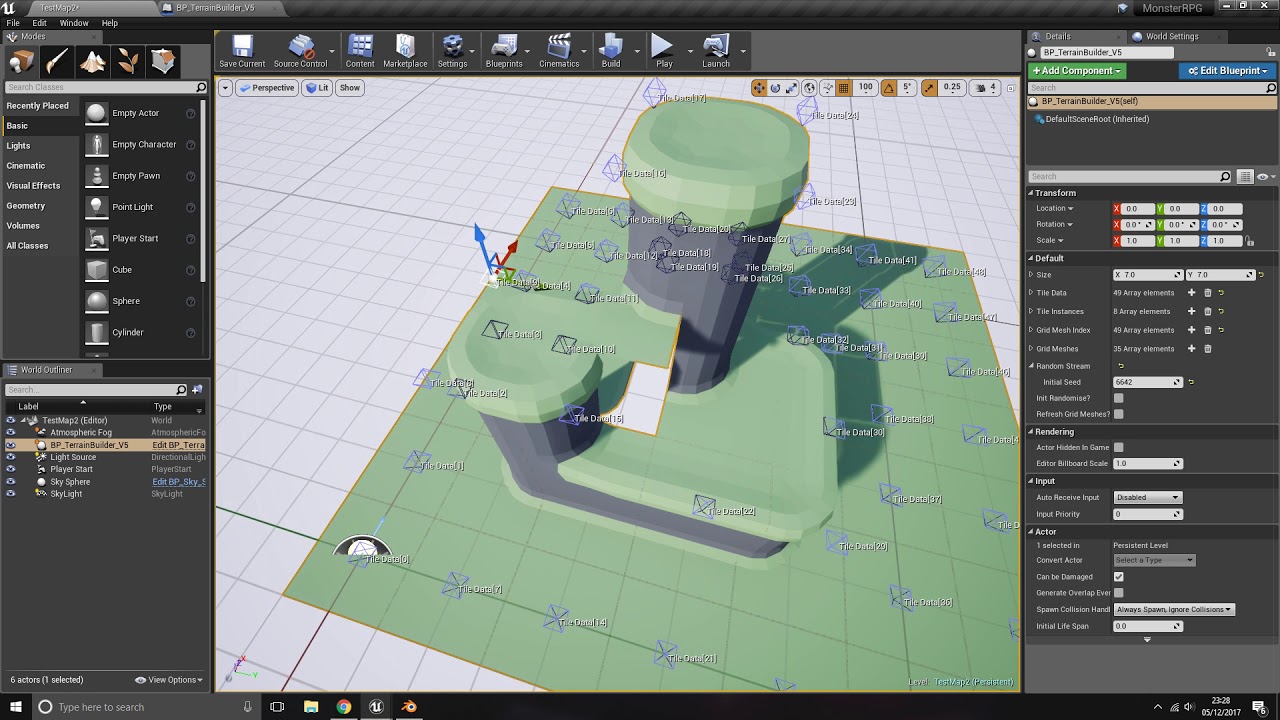
This is my initial prototype for a 3D tile based terrain builder. Once the BP is placed in the scene all you have to do is drag the data points up and down and it will automatically place tiles where they should be to best fit the heights selected.
I plan to add more functionality at some point when i get time. Ramps are the next thing i wish t...
 undone sequoia
guys any tips how i can make path for my AI Plane where to fly? draw some line it will fly on i mean
lusty sphinx
Is there any simple way to use AIController on my main player character that is already using Player Controller? I want to use the Move to Location or Actor node, but that only works with with the AIController. I want to be able to use the pin for when On Move Finished.
I've already tried to unpossess and then possess controller, but I think I am using it wrong cause it breaks my controller even more.
Or is there some way I can use the Simple Move to Location, and then somehow execute a function after it reaches the location?
obtuse mulch
lusty sphinx
Or is there some way I can use the Simple Move to Location, and then somehow exe...
well you can compare vectors
i think
compare actor location and destination location
on timer
when its <= 10 or something do the function
lusty sphinx
How would I use a timer for that? Just have a looping timer with a low time set, and then cancel the timer when the condition is met?
I was thinking I could use an empty while loop that is checking the distance as the condition, and perform my desired function after the while loop ends
Not sure how expensive that would be. It would be best if I can just swap player controller to aicontroller so I can use the Move to Location or Actor node. Would this introduce additional problems with me trying to input controls while my character is possesed by the AIController?
 nocturne basalt
did the same thing, but it doesn't work 😦
I need this door to move -300 on y, after what the elevator gonna go up. The elevator is working, the door goes by it's own way, despite the code being the same for both. Help needed
upd: solved through the relative location


 obtuse mulch
i dont think while loop is a good idea
obtuse mulch
lusty sphinx
Not sure how expensive that would be. It would be best if I can just swap player...
well if you switch controller you will not be able to input controls at all
you can do it on tick if you want too
obtuse mulch
lusty sphinx
How would I use a timer for that? Just have a looping timer with a low time set,...
or this
clear and invalidate and use function
obtuse mulch
nocturne basalt
did the same thing, but it doesn't work 😦
I need this door to move -300 on y, a...
why dont just use timeline for a door?
nocturne basalt
obtuse mulch
why dont just use timeline for a door?
Haven't knew that is a thing, gonna try this
 fading hawk
Is it possible to override a CustomEvent in a ChildBP ?
Attached scenario: I can press "F" on my keyboard, to trigger an event, or I can call the custom event "ShowDevPanel" from my main menu. This is in the Parent BP. Now I want to override the DevPanel with a new one in the ChildBP so I drop "F" and pull off from the Pressed pin - that works, but I can't drop a new Custom Event of ShowDevPanel because the name is already in use on the parent. How can I override this CustomEvent in the ChildBP?
 obtuse mulch
fading hawk
Is it possible to override a CustomEvent in a ChildBP ?
Attached scenario: I ca...
obtuse mulch
fading hawk
Is it possible to override a CustomEvent in a ChildBP ?
Attached scenario: I ca...
just call showdevpanel in childbp
should be there
as event
fading hawk
So I was trying to create a new Custom Event and call it ShowDevPanel and it keeps giving me the red ! finger... but if I search in the existing nodes, I found the "Event Show Dev Panel" node, and that works.
Thanks @obtuse mulch
 celest trench
If I want to add "st, nd, rd, th" at the end of a number for 1st, 2nd, 3rd, etc., Is the only way to do that by getting the last digit and dynamically choosing which one to pick? Or is there anything more simple or built in for that?
fading hawk
You would probably need to create a function to handle this - but check the last 2 digits so that you catch cases like 11, 12 and 13 🙂
celest trench
Yeah that's what I'm currently doing. Just wish there was a more clean way lol. And there probably is, I'm not the best. Here's what I have

 frosty heron
What r u trying to do?
Could clean this with a TMap
Depending on the need
Make an int and string pair
And just get the value with the key
celest trench
That's smarter lol
celest trench
frosty heron
What r u trying to do?
I'm just trying to get what the ending would be for positioning based on your rank. Like 1"ST", 2"ND", etc
frosty heron
Ohh
celest trench
I'll switch to a map thank you 😄
frosty heron
Perhaps a macro? I'm not sure what would be optimal here. But anything is better than switch on int imo
If 1 then st
If 2 then Nd
If 3 then Rd
Else
Th
celest trench
I can do a map and then get the last 2 digits and find that value in the map
I need to make sure it's not in the teens, because 11th-13th are all different from like 21st-23rd etc
fading hawk
Just drop 1,2,3,11,12,13 into the map - if it's not in the map it gets a "th"
celest trench
So I'll need last 2
Yeah that's what I was gonna switch to. A lot cleaner. Thanks guys!
fading hawk
lastDigit = number % 10
lastTwoDigits = number % 100
There is a modulo node
celest trench
fading hawk
lastDigit = number % 10
lastTwoDigits = number % 100
There is a modulo node
What would lastTwoDigits output if the int is a single digit value?
fading hawk
1 % 100 = 1
11 % 100 = 11
111 % 100 = 11
1111 % 100 = 11
celest trench
Sweet thank you
celest trench
Yeah, but then all the others are not the same
frosty heron
Isn't it just 1, 2 and 3 or am I tripping
fading hawk
1st, 11th, 21st
frosty heron
Oof never know that
celest trench
For example:
11th, 12th, 13th
21st, 22nd, 23rd
31st, 32nd, 33rd
frosty heron
👍
fading hawk
Yeah it's a pita
celest trench
So lame 😔
celest trench
Yeah that's true. Hard to say elevenst and twelvend too lol
Much cleaner. Any more suggestions?
 jaunty solstice
Need feedback from anyone familiar with using EditorTick and Blueprint Interfaces to create animations that run in the Construction Script.
I have the attached simple node network in my Actor Blueprint Construction script.
What is missing is a final 'PlayAnimation' node which takes 2 arguments
- an array of animation sequences
- an index value
This works fine in the editor if I instance several Actor Blueprints.
However I need it also to work in PIE (OnBeginPlay) and in Sequencer.
What logic must be added to my EventGraph so that the exact same functionality happens when in PIE?


 pine tangle
Got it all working?
 timber basalt
hey guys im trying to access a specific collider on my enemy to trigger dmg and rn is not working as intended how do i fix this or did i do something wrong


 woeful pilot
does anyone know how to open a level through an editor utlity widget?
timber basalt
timber basalt
hey guys im trying to access a specific collider on my enemy to trigger dmg and ...
This BP is from my Player
 floral totem
pine tangle
Got it all working?
floral totem
pine tangle
Got it all working?
Nope lol
 pine tangle
floral totem
Nope lol
pine tangle
floral totem
Nope lol
you will probably want to have an independent coordiante multiplier for the Z value too since the radius is going to change the input to output x/z ratio
wicked cairn
wicked cairn
Anyone have tutorial sources on how I could make an island that has a 3d tiling ...
any suggestions? I'm thinking I might have to use wave function collapse
 sage lagoon
So what would be the best way to get the program to pick up that GameInstance's variable and check at the start of the main level once it is reloaded from a dialogue "map?"
Oh, and I've posted on the forums for the sake of posterity.
https://forums.unrealengine.com/t/reloading-and-teleporting/1748892

Epic Developer Community Forums
What would be the best way to, say, teleport the player when a level is reloaded? More specifically, I move the player back and forth between two maps. But, after setting a Boolean variable to “true” on the second map after a cutscene is over, I want to reload the first level and place the player character in an alternate location, using a trigg...
I'm not sure I understand what you meant before, by which node I should not link to.
What if I gave that "Escape" Boolean to PlayerState instead of MyGameInstance? I mean, in what kind of entity or instance would variables remain the same when the game closes one level and opens another? That is, no variables return to their default parameters each time a level is loaded and opened?
frosty heron
sage lagoon
What if I gave that "Escape" Boolean to PlayerState instead of MyGameInstance? I...
Game instance and save game object exist outside the world/level
Read more on presistence object
sage lagoon
frosty heron
Read more on presistence object
Persistent objects?
 main lake
anyone has an answer to this please ? #umg message
sage lagoon
sage lagoon
Persistent objects?
Bad example. But you meant persistent objects?
frosty heron
sage lagoon
Bad example. But you meant persistent objects?
Bad example?
sage lagoon
frosty heron
Bad example?
I hastily shared this - https://forums.unrealengine.com/t/make-object-persistent-with-gameinstance/406452 - only to realize it's been unanswered.

Epic Developer Community Forums
Hello. I know that GameInstance object persist between levels loaded with Open Level. I know I can store simple variables of bool, integer etc. types. What I would like to do is to store there the object of more complex type and keep it alive when going to next level. I don’t want to save and load it before and after each Open Level. The pr...
frosty heron
U don't need to read that
The aim is to not keep an object alive inside game instance
You just want to store a variable in presistence object (game instance or savegame object)
It's very simple to do
Game instance is created when you run your game and destroyed when you close your game
Read the docs if that's not clear
sage lagoon
I did make a BP version of the GameInstance and named it BP_MyGameInstance.
sage lagoon
I did. Yet the program still acts like the Boolean I declared is False on the first level after it's reloaded, even though the program is supposed to set that Boolean to true before closing the second level and returning to the first.
frosty heron
Try to do a very simple test
In your player character
On key press -> flip the boolean in mygameinstance
Also have another on key press event to print string the boolean in my game instance
That's it
Set the value, print the string , open another level with open level then print the string again in the new map
sage lagoon
Okay then. Anything else I'll need to do?
frosty heron
Btw when you said u opened a new map, how did u do it?
Did u open from editor or did you run open level node?
sage lagoon
I had it use the Open Level node.
sage lagoon
You see, the second level is really a map for a long dialogue cutscene. Then, as soon as the cutscene is over, it reloads the first level. Before the first level is reloaded, the Boolean is set to True - or is supposed to be, although the program did stop at "Cast at ThirdPersonCharacter" and didn't set the Boolean; the program just stopped. So I linked the Cast Failed to the Set Boolean...which was probably not a good idea.
frosty heron
I can't help you with your game, I can only show you an example. You can figure out your self once you understand how game instance work
sage lagoon
I sure hope so. Anyway, thanks for the suggestion. I'll give that a shot.
 ionic holly
I have a Camera Component and I'd like to get its relative rotation. However, it doesn't get updated unless I pull up the inspector. Why does this happen?
 carmine saddle
I want to start using assets for BIONICLE Masks of Power, and I specifically want to start with Lewa. Is there a chance that Team Kanohi would give me blueprints for Lewa specifically?
ionic holly
I am suspicious of the Player Camera Manager (it's recommended alot online, but documentation is non-existent)
here's a vid showing it becuase it's driving me insane: https://www.youtube.com/watch?v=hqO4SaeQh7w
 limber parcel
carmine saddle
I want to start using assets for BIONICLE Masks of Power, and I specifically wan...
limber parcel
carmine saddle
I want to start using assets for BIONICLE Masks of Power, and I specifically wan...
i doubt anyone will give you their assets for free...
carmine saddle
You might not have remembered, but I HAVE UNREAL.
sage lagoon
frosty heron
Always start from smallest sample
Okay, so if I assign a new Boolean to the player character's BP, its value will reset to its default value when another level is opened. So now I'll try the GameInstance.
...Which doesn't work, since it doesn't acknowledge when the key is pressed.
frosty heron
We r talking about boolean in presistence object
Not the player variable
Read the docs, before you proceed again
sage lagoon
Which docs in particular do you suggest? I also tried having the player's BP cast to the GameInstance, but it stops at "Set Escape" to True.

Wait!
frosty heron
If u follow the example I tried to give u
There needs to be 2 key pressed
One to flip the value
The other just printing
U are not doing that here
The set is also useless, u are setting the value to it self
sage lagoon
Which is what I just realized. I fixed it, though.
Okay, so now it sets the Boolean to true when instructed.
main lake
How to print a map variable please ? Like I'm trying to use a for each loop but it doesn't let me so I'm kinda confused 🤔
 frosty heron
sage lagoon
Okay, so now it sets the Boolean to true when instructed.
frosty heron
sage lagoon
Okay, so now it sets the Boolean to true when instructed.
Where?
Show code
frosty heron
main lake
How to print a map variable please ? Like I'm trying to use a for each loop but ...
Use array if u carw about indexes
sage lagoon
 frosty heron
sage lagoon
frosty heron
sage lagoon
Can u just follow the instruction
1 key to print, the other to flip the value
main lake
frosty heron
Use array if u carw about indexes
No I need it to be a map
frosty heron
To flip value, get the bool, drag and type not, then drag to set
frosty heron
main lake
No I need it to be a map
U can get all the keys in the map
TMap doesn't support replication btw
main lake
frosty heron
TMap doesn't support replication btw
why ? 😢
main lake
frosty heron
You can use a struct with key and values as subtitue
But I need to fill it dynamically according to a datatable
main lake
frosty heron
W.e u want
W.e ?
sage lagoon
frosty heron
1 key to print, the other to flip the value
More like this?
 frosty heron
I forgot about it when I do my proj and end up restructuring a bit
frosty heron
sage lagoon
More like this?
No
sage lagoon
Then what did you mean?
frosty heron
Don't need branch at the top
Connect the not to the set
And then contemplate why
Work out why it flip values
sage lagoon
Okay. I think I got it figured out. The Boolean stays changed between levels now.
frosty heron
Now work out how you can use that to "communicate" between maps
sage lagoon
Will do.
frosty heron
But honestly what u are doing is just writing and reading data
Eg teleporting from gate with id 45 in level 1. Set the transport id to 45 in game instance.
In level 2, if transport id is 45, teleport player to X location
 stray halo
Anyone know why its doesnt follow the ball, thank you!


 dawn gazelle
main lake
But I need to fill it dynamically according to a datatable
dawn gazelle
main lake
But I need to fill it dynamically according to a datatable
Why would you need to fill a map with a data table? Data tables are effectively a Map themselves, of RowName -> TableDataStruct
main lake
dawn gazelle
Why would you need to fill a map with a data table? Data tables are effectively...
Because Datatables are read only, and I'm retrieving data from it which are all the roles available in the game and put them into a map as the host can disable the roles he doesn't want in the game. The map will be inside the GameInstance and serve as the main point to retrieve that data from the gamemode to give people their roles (abilities, power up, set up the right amount of health, give them items, etc...) and preventing the game from giving disabled roles to people, etc...
frosty heron
I'm with datura here tho, since DT would be something you fill not in run time
Why not just dump the values in a map
main lake
frosty heron
Why not just dump the values in a map
what do you mean ?
frosty heron
What I mean is , you getting value from DT to your map is likely to be redundant
main lake
Interesting, so the other idea of having a struct isn't better ? Like having a struct of "Name" and "IsEnabled" as Struct are replicatable
gentle urchin
Id probably just add the dt row handle, and not the entire struct
pine tangle
How do I have a global game manager BP, akin to the globality from a gamestate/instance
dawn gazelle
main lake
Interesting, so the other idea of having a struct isn't better ? Like having a s...
If everything is enabled by default, then you only need to keep track of what is disabled. That means you only need some kind of identifier as to what it is that is disabled, you don't need to know it is disabled as well.
That can be done by an array. If you want to use an FName that's fine, use an array of FName and add it to an array. If you need to know if something is enabled check if the FName is in the array, if it is not, then you know it is enabled. If you want to know its disabled, check if it is in the array, if it is then it is disabled.
dawn gazelle
pine tangle
How do I have a global game manager BP, akin to the globality from a gamestate/i...
You'd need to create a subsystem, but that's not something you can do in blueprint, though you can expose it to blueprints.
gentle urchin
"Ive heard BP support subsystems"
 fervent breach
not sure which channel to ask this in, but I am working on a pause menu and wanted to know if there was an easy way to map what buttons arrow keys will take you to? Unity has a pretty decent system for it, where it automatically knows what button to select when you press a directional key, does Unreal have anything like that?
sorry if this sounds confusing, lol
sage lagoon
Now I want to make sure that the screen stays faded out between levels, whenever the game opens one level and then another. I do have a fade-out level sequence that plays at 15 frames a second and is two seconds long. (And no, GameInstance will not keep that state if you try to play a sequence from that.) So, what would be a better way to ensure the screen stays faded out when the program opens a new level, if any?
gentle urchin
fervent breach
not sure which channel to ask this in, but I am working on a pause menu and want...
It does have something along those lines yes
#umg flow direction? Or smth
Never used it myself so not sure how good it actually is
Last time i did something akin to that i just laid up my own mapping/routing.
sage lagoon
fervent breach
not sure which channel to ask this in, but I am working on a pause menu and want...
You can assign nodes to any key on the keyboard on a widget BP, so that might be a good start.
Or on the player's BP if a widget is active, maybe.
 summer nexus
How do I access SQLite database?
frosty heron
sage lagoon
Now I want to make sure that the screen stays faded out between levels, whenever...
Presistence loading screen?
If u just want black screen you can fake it by fading to black instantly in the map you opened
sage lagoon
Ah, true. I could with a widget.
frosty heron
Not really
The widget dies when you open a new level
Unless you use some cpp to keep it alive
I never say widget btw. You can just instantly fade your camera at begin play
sage lagoon
Will it stay dark, unlike with a level sequence, though?
 valid solstice
Anyone know what could I use instead of a Event Beginplay?
gentle urchin
for what?
valid solstice
gentle urchin
for what?
 stray halo
anoyone know how to make like a ball cam mode like there is on rocket league, i got it to lock on and recognize where the ball is but it only locks on to where it spawned
dawn gazelle
valid solstice
If you want something to start when the actor starts, then begin play is the way to do it. Rather than having delays like this that loop backwards, you could consider using a timer instead that can trigger the attached delegate at the designated interval.
dawn gazelle
stray halo
anoyone know how to make like a ball cam mode like there is on rocket league, i ...
As you're likely simulating physics on the mesh of the ball rather than moving the actor, you'd want your code to lock on to the location of the mesh rather than the actor itself.
valid solstice
dawn gazelle
If you want something to start when the actor starts, then begin play is the way...
So how would the bp look? sorry im new
dawn gazelle
valid solstice
So how would the bp look? sorry im new
 stray halo
dawn gazelle
As you're likely simulating physics on the mesh of the ball rather than moving t...
stray halo
dawn gazelle
As you're likely simulating physics on the mesh of the ball rather than moving t...
how could i get my mesh as a target in a blueprint?
dawn gazelle
stray halo
how could i get my mesh as a target in a blueprint?
You'd get it from the actor reference. If the reference you're using is only of the "Actor" type and not your type for your particular actor, you'd need to cast, or use some other method of retrieving a component from the actor, like Get Component by Class or Get Components by Tag.
stray halo
How could i get a refrence from my soccer ball BP for the object?
 stray halo
dawn gazelle
You'd get it from the actor reference. If the reference you're using is only of...
stray halo
dawn gazelle
You'd get it from the actor reference. If the reference you're using is only of...
^
dawn gazelle
stray halo
How could i get a refrence from my soccer ball BP for the object?
Use the reference you were using originally to get your ball that wasn't working.
valid solstice
dawn gazelle
tysm also if I wanted to add like a cooldown after my dash what and where should i put in here?
 dawn gazelle
valid solstice
tysm also if I wanted to add like a cooldown after my dash what and where should...
dawn gazelle
valid solstice
tysm also if I wanted to add like a cooldown after my dash what and where should...
Think about how you want the cooldown to work. You can use a bool named something like 'DashAvailable' that you check before executing your dash code only if the boolean is set true. When you execute your dash, you set that bool false. You can also set a non-looping timer for the duration you want your cooldown to be and when the timer ends you can set the bool to true again.
 untold fossil
Hello is there a way to implement the event of an interface in a custom FoliageInstancedStaticMeshComponent?
I can add the interface but I can't seem to implement the event
dawn gazelle
valid solstice
tysm also if I wanted to add like a cooldown after my dash what and where should...
Here's an alternative as well. Replace the "Do Your Dash Code Here" node with whatever code you want to execute while dashing.
 valid solstice
dawn gazelle
Here's an alternative as well. Replace the "Do Your Dash Code Here" node with w...
valid solstice
dawn gazelle
Here's an alternative as well. Replace the "Do Your Dash Code Here" node with w...
Mine didn't work is there an issue with mine?

 brisk gate
"The navigation mesh bounds volume is not being applied to the tilemap. How should I proceed with mouse click movement?"
dawn gazelle
valid solstice
Mine didn't work is there an issue with mine?
Nothing wrong with the code here, it's likely where you're calling DashCooldownStart.
stray halo
dawn gazelle
Use the reference you were using originally to get your ball that wasn't working...
should this not refrence my BP actor?
 dawn gazelle
stray halo
should this not refrence my BP actor?
dawn gazelle
stray halo
should this not refrence my BP actor?
Should be, yes, but what are you pulling the start and end values from?
stray halo
i just keep getting the same outcome of it locking on to where it started at
valid solstice
dawn gazelle
Nothing wrong with the code here, it's likely where you're calling DashCooldownS...
So what should i do different?
dawn gazelle
valid solstice
So what should i do different?
Check how you're calling "DashCooldownStart". Is there anything that could be say, delaying it?
Are you even calling it at all?

 valid solstice
dawn gazelle
Are you even calling it at all?
valid solstice
dawn gazelle
Are you even calling it at all?
Wdym?
dawn gazelle
valid solstice
Wdym?
You haven't shown me anything other than some events connected to a gate. You're not showing anything of how those events are being called.
valid solstice
How should I call them?
dawn gazelle
valid solstice
How should I call them?
dawn gazelle
stray halo
What is it you're tracing for if you have a reference to the actor?
You also don't want to lock on to the actor, you want to lock on to the mesh component itself.
So this here is your reference to your mesh.
 valid solstice
dawn gazelle
Are you even calling it at all?
valid solstice
dawn gazelle
Are you even calling it at all?
Im calling the dash cooldown start in the end
dawn gazelle
dawn gazelle
So this here is your reference to your mesh.
@stray halo And from that reference of the mesh, you should be able to get its location which you would want to use on your lock-on instead of the "Locked on Target" reference here.

 dawn gazelle
valid solstice
Im calling the dash cooldown start in the end
dawn gazelle
valid solstice
Im calling the dash cooldown start in the end
At the end after these delays?
 valid solstice
dawn gazelle
At the end after these delays?
valid solstice
dawn gazelle
At the end after these delays?
Yeah I have Dash Cooldown start all the way at the end
should i have it before?
dawn gazelle
valid solstice
Yeah I have Dash Cooldown start all the way at the end
And therein lies your problem. It won't start the cooldown until after those delays.
You want to put it whereever you want the cooldown to start.
valid solstice
Okay thanks I fixed it
valid solstice
dawn gazelle
And therein lies your problem. It won't start the cooldown until after those de...
Sorry for being such a hassle
brisk gate
"The navigation mesh bounds volume is not being applied to the tilemap. How should I proceed with mouse click movement?"
stray halo
dawn gazelle
And therein lies your problem. It won't start the cooldown until after those de...
bro thank you, just had to use my little ole brain but you definitely got me to the end, ily
 slender torrent
Hello guys, I am seeking for some help. I am doing some practicing on VR shooting. I want to switch from default event for projectile collision("On component begin overlap") to "On Component Hit" because I want to generate decals on hit object. But now collision works different and I think "Add Impulse" Is not working properly or not at all because some object that used to block collision now are overlapping. Hope I was clear..

 runic ore
doesn't overlap also give you some impact point you could use for this?
slender torrent
I am using impact point for location where decal should spawn

this is the case
 native canopy
How do i get actors amount wiht get all actors of class, in this picture have 2 actors and how to get actors amount?
 gentle urchin
Length
 young meteor
Hey
I can't remember how to set an image to use a Material Instance for some reason?
What node am I looking for instead? (assuming the approach is correct)
"Round Progress Bar 1" is an image element in the widget.
 young meteor
Lol, thank you. Feel stupid 😄
 soft fjord
How do you assign a key/IA to activate a box?
frosty heron
Define "activate"
 unkempt ibex
Hey,
I am banging my head for some days now on a problem with a render target export to png and hope someone here can help.
I have implemented implemented a very simple UI Paint System where players can draw on a whiteboard. In game everything looks fine, but when I export to png and open it in e.g. MS Paint, I only see whatever was drawn in transparent. Looking at it with a more professional Image viewer, I can see that all information is in the image, but it's kinda mixed up, e.g. if I draw a red line, the red channel is empty, drawing in blue makes the blue channel empty.
I hope this is good info as a starter, of course I am happy to provide more info.
soft fjord
I've got a script and a BP that I want activated with a created IA - I've tried to use a gate and several different ways. Struggling massively here
frosty heron
define activate
soft fjord
frosty heron
Define "activate"
as in - when player is in box - player presses E and script should run
1 sec i'll upload a pic
frosty heron
Define how you want to call it
eg
Player press Key, Look for box in range, Run an event inside the box
normally you want to use interface / component for interaction
 unkempt ibex
soft fjord
So I want this event to run when the player is in the box and presses my chosen ...
unkempt ibex
soft fjord
So I want this event to run when the player is in the box and presses my chosen ...
I found a YT vid to create a paint canvas in game that might actually help you on your question.
Am I allowed to post YT videos here?
 trim matrix
sure
soft fjord
frosty heron
Define how you want to call it
Oh, any chance you got a link? been searching the net far and wide for anything
DM me if not
frosty heron
I mean you can just scour through internet
interaction like opening a door etc is probably the most generic tutorial in sh*t tube (youtube)
unkempt ibex

👉Get Access To All My Unreal Engine Courses At : https://www.unreal-university.com/courses
👉Get My Free Unreal Engine Beginner Course : https://bit.ly/46mUWMr
👉Generate Icons for your games,apps and more https://iconbuilderai.com/
#Rendertargets #UnrealEngine5 #Uisco
📚 Chapters
Intro 0:00
Creating The UI 0:10
Creating The Materials 1:44
Creat...
soft fjord
yeah i know, but they mainly just use overlap
soft fjord
frosty heron
https://discord.com/channels/187217643009212416/221798862938046464/1217807425982...
Gonna try this
soft fjord
yes, but i'm struggling to understand how I define the rules
frosty heron
it's all about getting the reference to the actor u want to interact with
Well , speak in plain english first
what rule u want to grab the ref
trim matrix
soft fjord
yes, but i'm struggling to understand how I define the rules
gameMode?
frosty heron
if u can't do that, then I don't know what to tell you. Go pick a game and see how they done theirs
soft fjord
frosty heron
if u can't do that, then I don't know what to tell you. Go pick a game and see h...
Lol someone woke up on the wrong side
soft fjord
trim matrix
gameMode?
First person,
frosty heron
trim matrix
gameMode?
I don't mean the game rule
soft fjord
I thought it would be simple.
I want the player to interact with 10 box collisions. Each collision counts it down from 10 and then fades to black.
I have a IA setup and the BP that counts it down and fades to B at 0 is within BP_FirstPersonPlayer
The collision box itself is in BP_Score
Atm I can get it working with overlap but I simply want to change so when the player overlaps the box it can press the IA to "run/activate" it.
I've tried setting a gate and assigning keyboard to open it but it doesn't seem to work - however it does not activate the box when the gate is attached.


Any help is appreciated, I'm thinking I have made it more complex then necessary
unkempt ibex
soft fjord
Any help is appreciated, I'm thinking I have made it more complex then necessary
The video I suggested above uses line tracing to determine how close your player is to another actor. When close enough allows to interact with that actor. It does that using custom IA. Not sure if this is the best approach, but sounded like what you wanted to do. I am a super noob in unreal though.
soft fjord
Thanks! Watching the video now, I'm obviosuly a super noob as well haha. Appreciate it!
 harsh coral
Question: I have a bunch of skeletal meshes in a blueprint and I set an animation instance globally.
But I need to be able to override the animation mode from "instance" to "blueprint" for select meshes through sequencer.
How can I create either a global override, that allows me to use animation bueprint on select meshes only, so I don´t have to create an override option for each of them separately?
I tried just adding the selected skeletal meshes in sequencer and animating the animation mode, but I guess they get overridden through the construction script?
frosty heron
I think the word global here is a misconception
harsh coral
Elaborate
frosty heron
not able to, my English is terrible
but I don;'t know how to say it politely. I think you are a bit confused
harsh coral
 harsh coral
frosty heron
but I don;'t know how to say it politely. I think you are a bit confused
harsh coral
frosty heron
but I don;'t know how to say it politely. I think you are a bit confused
Its fine, I´m a total beginner.
I´m just scrambling together stuff without knowing all the vocabulary yet.
frosty heron
harsh coral
What are the values in All Skeletal Mesh?
the Skeletal mesh component inside the class?
harsh coral
Its an array with all skeletal meshes in the blueprint
frosty heron
Right, so what sort of issue are you having?
harsh coral
 frosty heron
Play in Editor, check your skeletal mesh components after u run the script
see if it didn't give you the anim instance you intend
harsh coral
Haha, yeah, its not working in PIE yet.
I´ve got something dumb going on, when I hit play, everything just disappears...
I´m not building a game, just a blueprint for cinematic renders to easily change stuff.
frosty heron
harsh coral
This part looks fine, except setting Organs All to it self
it will basically do nothing
harsh coral
The issue is that I can select single skeletal meshes in the sequencer and animate the animation mode or use different anim blueprint, but it doesn´t work.
harsh coral
frosty heron
it will basically do nothing
Yeah, thats redundant I guess.
I´m gonna do some cleanup in the end.
frosty heron
What doesn't work? If you want to use anim instance in sequencer, I think you should assign it in sequencer
harsh coral
frosty heron
What doesn't work? If you want to use anim instance in sequencer, I think you sh...
Yeah, thing is, I have like 300 skeletal meshes, so I want ONE global sequence to play on all of them, but then depending on the shot, I´ll need to switch SOME to an animation blueprint instead.
I have some morph targets for specific meshes for example, that I need to animate in sequencer, if I just add the mesh separately to the sequence, it works fine, but not if its inside my blueprint.
frosty heron
can't say I get it, are you able to post some pictures
harsh coral
To me it looks like the global anim mode and instance I set above overrides whatevere I try to animate in sequencer for single meshes.
frosty heron
personally I don't have good experience relying on Anim blueprint in sequencer
afaik sequencer value should be the one that have the last say
harsh coral

Something like this. Everything gets the same anim instance ( in this case just a pose), but then for example the lungs need to get a different anim blueprint.

I´ve done this for the heart and it works this way, but having to add an option like this for every one of the over 300 meshes isn´t reasonable.
So I was thinking I could just override it in sequencer, but it doesn´t seem to work.
 frosty heron
@harsh coral that don't work?
harsh coral
Oh, I figured it out.
I have a default slot in the animation blueprint, so I have to add an animation in the sequencer, if I wanna use the blueprint animation...
I think I had the exact same issue before and I couldn´t figure out how to set that default slot animation directly in my blueprint.
harsh coral
 frosty heron
yeah that's for montages
Play animation will just bypass anim blueprint all together
 frosty heron
ye
I think we did the same thing
its annoying how morph can't be viewed in sequencer without doing that work around
 frosty heron
imagine if we have dozens of morphs
harsh coral
So, I can set the blueprint this way, but its not working in sequencer, unless I manually add the animation for the default slot
harsh coral
frosty heron
imagine if we have dozens of morphs
Exactly...
Are you also creating linear content with Unreal or is that for a game cinematic?
frosty heron

That's how I play the anim
just a short in-game cinematic
So It's working now? After you add the default slot?
frosty heron
harsh coral
Thanks
I didn't even help :D, but I'm glad you found the solution
harsh coral
frosty heron
I didn't even help :D, but I'm glad you found the solution
Haha, yeah you did. Listening and making me describe the problem made me realize what I missed before...:)
frosty heron
harsh coral
Haha, yeah you did. Listening and making me describe the problem made me realize...
happened to all of us 🤣
sometime, I dreamt of a solution. Woke up, try it then Eureka
harsh coral
Not looking forward to troubleshooting why everything disappears when I hit play though...
Gotta disconnect one function after the other to see where its going wrong...
Haha, loughing my ass off right now.
Guess which blueprint actor was set to "hidden in game"...
Could have spent hours inside the blueprint finding NOTHING....:)
Hm, actually that wasn´t it...
Looks like its in the blueprint after all.
Can´t set the hidden in game when I recompile with the construction script hooked up again...Must be overwritten somewhere inside the construction script.
frosty heron
Check the visibility in Pie, if it's indeed hidden
probably want to Ctrl + F , search actor hidden in game / set vissibility
Then hit the binocular icon and hope that you find the culprit
harsh coral
Found the culprit:

Couldn´t connect a single skeletal mesh to change hidden in game, so I just dragged something out that seemed to work, but of course this sets the whole blueprint to hidden...
frosty heron
Component is not actor
@harsh coral

hiding the actor (the bp where the skeletal mesh components lives) will hide all of them
harsh coral

This works now.
Thats the thing I struggle with most in Blueprints.
Certain pins not letting me connect what I wanna connect and then having to figure out what the type of node is to "convert" an input so it "fits".
frosty heron
wait, what are u trying to hide here?
from the make array, drag and type for each loop. Drag from the blue pin and type set hidden in game
obtuse mulch
hows that possible 😄
agile moss
Okay
I know how to use BPInterface on 2 blueprints
But what about a widget and a blueprint?
lofty rapids
so the interface is just functions that you can run on a bp
can you make the widget use the interface ?
 sinful bone
Is there any Physics master here? 😄 My main problem is that when I turn on Simulate Physics, instead of staying inside the box, it's just pops out. The way I do this is: I spawn the apple, attach it to one of the box's socket, then detach it and apply physics. So basicaly what I want to accomplish is to spawn apples inside the box, apply physics and they stay inside the box. What could be the solution for it? It has a simple collision and there is no other child mesh or collision inside the box. Tried to play with scaling to decrease the size of the apple but didn't help.
agile moss
lofty rapids
so the interface is just functions that you can run on a bp
Nvm I think I found a pretty decent tutorial
dark drum
sinful bone
Is there any Physics master here? 😄 My main problem is that when I turn on Sim...
I would check the collision on your box. It's probably just a box without a hollow bit meaning it'll force other objects out of it if physics is enabled.
agile moss
agile moss
Nvm I think I found a pretty decent tutorial
Well that was easy
lofty rapids
i actually just learned a bit about interface the other day
fairly simple in theory
floral totem
pine tangle
I’ll give it a try tonight! Thanks! I’ve been really busy at work so I haven’t had much Dev time this week
sick sky
is there a way to make a const var ?
sick sky
i guess ill have to create the var outside of that bp class
seems weird that after all this years there is no ways of having this
versed sun
I use Blueprint Function Libraries for Const Values
 sinful bone
dark drum
I would check the collision on your box. It's probably just a box without a holl...
sinful bone
dark drum
I would check the collision on your box. It's probably just a box without a holl...
It has a box simplified collision.
sinful bone
 dark drum
sinful bone
It has a box simplified collision.
dark drum
sinful bone
It has a box simplified collision.
That is most likely the issue. The hollow bit in the middle shouldn't have any collision, just the side bits and the bottom.
gentle urchin
Couldnt you restrict the physics (constrain?) And still have a neat effect?
They'd be jumpingnslightly :p
sinful bone
dark drum
That is most likely the issue. The hollow bit in the middle shouldn't have any c...
That helped, thanks 🙂
woeful pilot
Hey guys does anyone know how to open a level through and editor utility widget
 stray axle
not sure if this is the best place to put this but I need some help. I been working on a bit where I get my car to spawn in a location in some kind of like customization section. I got it all set up and everything but the car wont spawn. Here's the function that I have that's meant to spawn the car (which is a pawn)
 lofty rapids
stray axle
not sure if this is the best place to put this but I need some help. I been work...
lofty rapids
stray axle
not sure if this is the best place to put this but I need some help. I been work...
is the index valid ?
stray axle
active index is at 0
lofty rapids
and cars is full of classes ?
stray axle
just the one that I got atm
lofty rapids
does it destroy the active car ?
or what i'm getting at is it getting past the cast and actually going to spawn ?
then you want to make sure your other cast is succeeding as well
stray axle
come to think of it, its an instance where the car just outright spawns. I think the destory actor is for when you're driving into a garage, where the active car gets destroyed and then spawns again. I just want to spawn
lofty rapids
well a print string right after the spawn will tell you if you got there
is it not spawning at all ? or just not possess ?
some print strings to see whats actually executing is a good start
or you could use breakpoints ig, but i just uses print strings because i'm used to "logging" and it gives me info i need usually
stray axle
I got a print string up and I been putting the append to different parts but nothing's showing up
the car isnt spawning at all. I dont want to possess it
lofty rapids
so no print string ?
it's not showing up ?
put one right at the point of entry
see if the function is even running
then one after the game instance cast
maybe that is failing
stray axle
I want it to be like this

but its not happening. That ball is meant to be where the car spawns
 lofty rapids
ya i mean i'm just going through debuggin
lofty rapids
lofty rapids
put one right at the point of entry
^
stray axle
like this?
 dark drum
Would anyone have any idea what would cause the PIE window to change size when adding a widget to the viewport? If it helps, i get this in the logs.
LogViewport: Scene viewport resized to 1914x1040, mode Fullscreen.
The issue is, I'm not setting the resolution to that size or setting it to fullscreen so I'm a little confused.
Edit: I figured it out. It was down to applying settings used in the settings widget. I needed to use Apply Non Resolution Settings.
stray axle
still not getting anything
I been following some tutorial to a tee, the only thing I pretty much changed was setting my class arrey to a pawn instead of wheeled vehicle since my vehicle isnt a chaos vehicle
but its just as if nothing works at all, I dont get it
 manic vessel
I have this really strange bug I can't seem to to find the cause of. I have VR version of parent character that Im reparenting the camera to the vr Origin SC, Which is needed, Everything works as it should, But when my character spawns its like my anim bp does not activate until I Slightly look down. then everything clicks suddely springs to life . Anyone have any ideas, I do this on begin play ,

OH, and its only look down, not up or left \ right
lofty rapids
stray axle
like this?
no a print string out of cast failed on the first cast, and one out of the second see if either shows up
and one at the begging just a "hello" to see if the thing is actually running
also, where do you actually call the function ?
stray axle
lofty rapids
also, where do you actually call the function ?
I put in this static mesh here that is used to get the world rotation and location for the spawn class node

also I got it like this, nothing pops up again. Am I setting the print strings up correctly?
 lofty rapids
stray axle
I put in this static mesh here that is used to get the world rotation and locati...
lofty rapids
stray axle
I put in this static mesh here that is used to get the world rotation and locati...
so where do you actually run the function tho ?
it looks like it's not running
if neither one of those print string show up then it's most likely not running
stray axle
oh shit I got it to work XD yeah I wasnt calling the function
thanks for the help Engage ^^
 golden kite
This is interesting, but kinda cumbersome for large arbitrary arrays. I'd need to think on it a bit, but creating a Struct that holds the Class AND a weight amount (any arbitrary integer, as opposed to 0-1.0) would be the most "artist-friendly" way to go about it. I'd need to think how that can get used in a randomizer function though. I liked your idea of adding the class in multiple times. So perhaps there's an intermediate step where you take the base array (of Structs) iterate through it, and then add that class to a new array as many times as the weight parameter. As an example, suppose element 0 has a weight of 5, then the middleware function would add 5 instances of that class to the new array. Then you can use a RANDOM node to pick from the array as you suggest.
And the middleware would only need to be run the one time, unless you're modifying the array as you go.
gentle urchin
manic vessel
I have this really strange bug I can't seem to to find the cause of. I have VR ...
Are you doing any logic on look down?
 steady night

hey this is how im linetracing infront of the camera when my char is "attacking"
i wanna include the up/down rotation of the mesh
how would i add that ?

like include the angel
stray axle
stray axle
oh shit I got it to work XD yeah I wasnt calling the function
just need to figure out how to get it to possess the new camera instead of possessing the car pawn
lofty rapids
so you probably don't want to possess something, just switch the camera
i've only done so far with another pawn has it's own camera
possessing the pawn changes to that camera
stray axle
been trying to put the camera I got for the test garage pawn but it wont connect to the possess node. How do I go about doing this?
Sorry if I be dumb. Im still a novice with UE5
lofty rapids
set view target with blend ? idk i have not switched cameras like that yet
i'm still learning also a lot of this stuff is new to me
stray axle
I got a set view target with blend but it wont let me connect the camera
steady night
anyone :/ ?
stray axle
there's probably a way to do this but for now imma take a break
thanks for the help tho engage 😉
obtuse mulch
steady night
anyone :/ ?
gotta take camera forward vector
steady night
nah that wont work
obtuse mulch
i dont think you can do it with bones
steady night
i just wanna include the yaw rotation from the mesh to what i got now
obtuse mulch
well good luck with that 😄
steady night
ha
obtuse mulch
ur mesh has no yaw rotation engine wise
steady night
i can use the actor rotation tbh
obtuse mulch
you can attach something to characters head bone and use its world rotation
but it wont be as accurate as with camera
obtuse mulch
you want trace up and down?
steady night
yeah
obtuse mulch
you gotta use cameras forward vector🤷♂️
steady night
im using actor rotation + get forward vector * distance
im wanna use actor rotation + get forward vector * angle rotation * distance
something
should be possible:/?
obtuse mulch
actor is like a tower
it has no angles
see ur main collision component?
thats ur actor
steady night
ah now i get it what you meant with the bone
yeah my idea was to get the mesh from withing and get the angle of something
for e.a bone as u mentiond
obtuse mulch
ye but with bone it will be limited to the animation angle
obtuse mulch
attach method should work
steady night
can i use the bone or it has to have a socket
obtuse mulch
nah just bone
steady night
hm yeah using a socket worked
obtuse mulch
i would give the player more freedom with camera forward vector tho 🤓
steady night
i get waht your comming from but that wouldent work in my game tbh
or this would work better
ok now i got stuff set u
up

the attack forward is an arrow component that rotates with the mesh
how would i add only the Z angle towards my forward vector ?:/
 obtuse mulch
attack forward is ur arrow?
steady night
y
steady night
true
obtuse mulch
actually you can just use your mesh as target
and type in the bone name
this way you dont need the arrow
if the bone rotation is correct
steady night
the arrow is whats rotating so i need that
 gusty dragon
so I have an actor that moves forwards and backwards and I control the forward tilt and backwards tilt with my mouse tilting it up and down but my issues is if I tilt the actor forwards it still moves straight but doesn't follow the tilt anyone know what I can do
obtuse mulch
steady night
the arrow is whats rotating so i need that
bone is rotating too you just dont see it
frail onyx
https://youtu.be/204F0wVtR2M?si=oJPvaDnf-5YfNWIy anyone know how to make this screen object seen at 2:25 that has a widget slider on it which can control an objects position or the value of whatever it is linked to, currently I’m using a empty actor variable that I have set to instance editable and assign it in the viewport per object instance
Discord group: https://discord.gg/SU78Cy5Ufx
Unreal Marketplace: https://www.unrealengine.com/marketplace/en-US/product/d289cd109137434ca7f6ed1e4b005f10
Playable Demo: https://drive.google.com/file/d/1Jwq-y1qWdHTlmiJGi0nKcvPgYvHfrUey/view
Old: https://www.youtube.com/watch?v=eRoD7Ws7yqY&t=266s
The physics module has been completely rewritt...
 light glen
hello, i was wondering, you can create multiple event graphs, is there any significance to this?
 lunar sleet
light glen
hello, i was wondering, you can create multiple event graphs, is there any signi...
lunar sleet
light glen
hello, i was wondering, you can create multiple event graphs, is there any signi...
Not really, you’re better off using functions
light glen
lunar sleet
Not really, you’re better off using functions
is it just a grouping? i saw a video and the guy said, err just makiing another graph, i was like oh yeah i know you can do this, but what are the implications
lunar sleet
light glen
is it just a grouping? i saw a video and the guy said, err just makiing another ...
It’s aesthetic. Just making it harder for yourself to read your code in the future prly
light glen
lunar sleet
It’s aesthetic. Just making it harder for yourself to read your code in the futu...
i do most of my work in c++ and hadn't considered using this feature before, i won't use it, but knowledge is useful
harsh coral
Another quickie, seems rather obvious but doesn´t work: How can I copy paste placed actors into a blueprint in the same level?
lunar sleet
harsh coral
Another quickie, seems rather obvious but doesn´t work: How can I copy paste pla...
Ctrl+D
Assuming you’re trying to create duplicates of placed actors that is.
harsh coral
lunar sleet
Ctrl+D
? that just duplicates what is selected in the blueprint...
harsh coral
I have a few actors placed in a level. I am also working on a blueprint. Now I wanna copy the actors from the level to the blueprint.
lunar sleet
You mean get references to them or what
harsh coral
Spawn them in the blueprint with all settings they have in the level.
I don´t know how else to phrase it.
lunar sleet
You can’t place things in a blueprint, it’s not a level
harsh coral
Wel, I can drag and drop from the content browser...:)
lunar sleet
And an actor would be its own bp
lunar sleet
harsh coral
Wel, I can drag and drop from the content browser...:)
Is it a static mesh?
harsh coral
Its a few lights.
lunar sleet
Static meshes are components
harsh coral
I can just recreate them in the blueprint, but its probably something I´ll come across more often in the future.
lunar sleet
They get placed into a placeholder actor when you place them in level
lunar sleet
harsh coral
I can just recreate them in the blueprint, but its probably something I´ll come ...
Design it properly from the start by creating the bp first and then placing
harsh coral
Yeah, thats what I did.
So, there is no way to copy stuff from a level into a blueprint, other than creating a packed level blueprint from it?
Guess I can at least copy paste the settings.
lunar sleet
No, and using level bp is usually a bad idea
harsh coral
Yeah, I´m not doing that
harsh coral
I´ve created it from scratch, still learning a lot, so I keep trying to make things the way I am used to...:)
NVM then.
lunar sleet
It’ll take some getting used to but then it’ll come easy
harsh coral
And of course I´m always starting from the top instead of from the bottom...Creating a fully customizable blueprint with 300+ skeletal meshes...
Well, overall its going pretty well. Hopefully I won´t realize that it sucks once its done...:)
lunar sleet
Pretty sure you can add 300x skeletal mesh components on construct if you want
harsh coral
Yeah, I can, I already did...:)
I´m in the polishing stages now, figuring out what else to add to make my life easier in the future.
Like, custom lighting rig, material overrides etc.
Only thing I´m not happy with rn is how I have to animate it.
Rather tedious trying to animate specific skeletal meshes, when all you get in the sequencer is a mile long drop box list and no way to directly select them in the viewport.
lunar sleet
Control rig is prly an option, but it has its own learning curve
harsh coral
But on the other hand: I don´t have to manually add the same animation for all 300 SMs...
Oh yeah, control rig will be the final step. Bonus Level.
harsh coral
Well, I´ll stick to what I know for now...I have a few arrays that lets me add animation to all SMs with one button, as all SMs use the same rig (well, almost all).
Before that I had to add all SMs in the sequencer and then add the animation sequence there, plus having them all on different sublevels made the whole thing rather tedious to reuse.
Anyways. I´m digressing. Back to the workbench...:)
Thanks!
harsh coral
Ok, I got another question...
Since I´m only building this blueprint to use in cinematic sequences and they will only get rendered out using MRQ...I´m wondering how to set certain things up, that I wanna customize.
Right now, everything happens in the construction script. I exposed a bunch of variables to editor and sequencer and its working fine.
I just added a few lights parented to an empty child actor and then I hooked it up to a "Set world transform". I created a variable for the rotation, but when I tried to rotate the lights this way, unreal almost crashed with the video memory exhausted.
I´m guessing its not the best way to do this...
in the construction script that is.
I could set it up as an event, but then I´d only be able to control it if I hit "play in editor", I woulnd´t be able to see the updates live in the viewport editor otherwise, correct?
So whats the best practice here?
sage lagoon
I know I asked this once before, but I'm sharing this on the forum and asking here:
What would be the best way to make the player’s camera fade out in one map then stay dark when another level is loaded? GameInstance doesn’t work since I can’t invoke anything from its BP without having to use the Player BP or any level BP.
https://forums.unrealengine.com/t/fade-out-between-levels/1751878
Epic Developer Community Forums
What would be the best way to make the player’s camera fade out in one map then stay dark when another level is loaded? GameInstance doesn’t work since I can’t invoke anything from its BP without having to use the Player BP or any level BP.
 dull shell
sage lagoon
I know I asked this once before, but I'm sharing this on the forum and asking he...
dull shell
sage lagoon
I know I asked this once before, but I'm sharing this on the forum and asking he...
Level Streaming?
sage lagoon
No, I just use Open Level.
 dull shell
sage lagoon
No, I just use Open Level.
dull shell
sage lagoon
No, I just use Open Level.
Is opening level necessary? If not i suggest using Level Streaming
sage lagoon
dull shell
Is opening level necessary? If not i suggest using Level Streaming
What's the difference? I'm honestly asking.
 queen dagger
i want it to work by allowing a condition of is attacking and attack to the character and false when not attacking so that i can use that bool to activate the animation sequence of the attack in the animation instance
however it seems like i cant get thje animbp to pick up on the fact the character is attacking
dull shell
sage lagoon
What's the difference? I'm honestly asking.
Open Level resets everything and Opens a new level like the name suggests.
Level Streaming has a Persistent Level and in that persistent level you have multiple sub levels that you can load and unload without resetting everything.
sage lagoon
Oh, I see! I'll try that, then. Thanks!
dull shell
No worries!
dull shell
queen dagger
however it seems like i cant get thje animbp to pick up on the fact the characte...
Can you show your animBP?
sage lagoon
dull shell
No worries!
Which is the best command? Load Stream Level (by Name) doesn't seem to do anything.
I put in a breakpoint to test, too.
dull shell
sage lagoon
Which is the best command? Load Stream Level (by Name) doesn't seem to do anythi...
Do you have your level set up for Level streaming?
sage lagoon
dull shell
Do you have your level set up for Level streaming?
I guess not. How do I set levels up for that?
dull shell
sage lagoon
I guess not. How do I set levels up for that?

Loading levels is one of the most basic requirements for almost any game. And while Uneal engine provides you with some options, I see most people just using the simple " Open level" node, which is not that great. so today, let's talk about the proper way to do this!
Get the project on Patreon : https://www.patreon.com/posts/94995004
or as a ...
 shell marsh
if someone could help me find an answer for my problem I posted It would be much appreciated https://www.reddit.com/r/unrealengine/comments/1ber1k2/need_advice_my_hitboxtracers_are_not_applying/

Reddit
Explore this post and more from the unrealengine community
dull shell
sage lagoon
I guess not. How do I set levels up for that?
Make a new empty level
Then head over to window -> Levels
In the levels window -> Add Your existing levels that you are trying to travel in between
@sage lagoon https://www.youtube.com/watch?v=z5Yjnr7ryuA

Here's how to dynamically load and unload sublevels at runtime in your Unreal Engine 5 projects!
Get access to the project files and more on my Patreon: https://www.patreon.com/MattAspland
Check Out My Game Studio: https://www.copagaming.co.uk/
#UE5 #UnrealEngine5 #UE5Tutorial
__________________________________________________________________...
This one is better
 flat coral
obviously I could rename my parameter, but honestly, I feel like mine isn't the problem! Anyone else kinda hate "Target" as the way BP functions reference an object instance?
 harsh coral
Why does this crash unreal...?


When I drag that number to rotate it in the editor, Unreal crashes.
Its just a child actor with some lights attached.
 undone bluff
harsh coral
When I drag that number to rotate it in the editor, Unreal crashes.
Its just a c...
undone bluff
harsh coral
When I drag that number to rotate it in the editor, Unreal crashes.
Its just a c...
tick is not executed in the editor
so unrelated
 faint pasture
shell marsh
if someone could help me find an answer for my problem I posted It would be much...
faint pasture
shell marsh
if someone could help me find an answer for my problem I posted It would be much...
Use breakpoints or prints strings, figure out where in the chain between the trace and the damage that it breaks
faint pasture
harsh coral
When I drag that number to rotate it in the editor, Unreal crashes.
Its just a c...
What's in its construction script?
 spark steppe
dull shell
<@346830603401822210> https://www.youtube.com/watch?v=z5Yjnr7ryuA
spark steppe
dull shell
<@346830603401822210> https://www.youtube.com/watch?v=z5Yjnr7ryuA
can we trust someone who can't spell optimization?
thin panther
harsh coral
When I drag that number to rotate it in the editor, Unreal crashes.
Its just a c...
A child actor or a child actor component?
undone bluff
spark steppe
can we trust someone who can't spell optimization?
optimisation is just as correct
thin panther
spark steppe
can we trust someone who can't spell optimization?
ouch 🥲
spark steppe

This is how to find what is using the most memory (RAM) in your games and how to fix it to reduce lag.
Get access to the project files and more on my Patreon: https://www.patreon.com/MattAspland
Check Out My Game Studio: https://www.copagaming.co.uk/
#UE5 #UnrealEngine5 #UE5Tutorial
____________________________________________________________...
thin panther
no need for the assault on the british
spark steppe
is this a running gag? no it's british 😛
undone bluff
just a matter of dialect
 lethal pollen
Hi! How can I know where is Motion Controller Aim Ref declared? Is it a local variable? A global variable? Thanks
 thin panther
can't exactly say I blame you though.
Even as a brit I'm so used to american made libraries that I mostly use american english over text now out of force of habit 😆
undone bluff
as a non native english speaker I pick one depending on the weather and my mood at any given time
faint pasture
lethal pollen
Hi! How can I know where is `Motion Controller Aim Ref` declared? Is it a local ...
 sage lagoon
dull shell
In the levels window -> Add Your existing levels that you are trying to travel i...
sage lagoon
dull shell
In the levels window -> Add Your existing levels that you are trying to travel i...
Okay, I got it figured out. I made a huge black image to cover the entire screen and had it added to the start of each of two maps I currently have, and the widget has a fade-in animation that plays when called.
The second video might be more useful when more maps are made in later builds of an RPG for which I've been making an alpha prototype.
Thank you again for your help @dull shell !
lethal pollen
faint pasture
Thanks. But Local Motion Controllers is an Array, and Motion Controller Aim Ref is a Motion Controller Component Object Ref.
undone bluff
lethal pollen
Hi! How can I know where is `Motion Controller Aim Ref` declared? Is it a local ...
it's a component
faint pasture
lethal pollen
Thanks. But Local Motion Controllers is an Array, and `Motion Controller Aim Re...
Then it's a global variable, check inherited variables. It'll be somewhere, it's not local.
undone bluff
so you need to expand the category in your variables
undone bluff
if not, it is inherited as Adriel says
faint pasture
steady night
will always get the "Root" location right ?=
Yes
The location of the root scene component of the actor
That IS the location of the actor, by definition.
A common mistake is haveing a root scene but then simulating physics on a child of that scene. The physics thing moves around, but get actor location never changes, because the root component hasn't moved.
If you make the ThingSimulatingPhysics the root, then get actor location, it'll update
lethal pollen
faint pasture
Then it's a global variable, check inherited variables. It'll be somewhere, it'...
Thanks, but I think you don't know the answer.
undone bluff
no, your component references
discord servers are not playing nice and images barely load
lethal pollen
Ah, thanks. @undone bluff I have found it. Thanks a lot.
undone bluff
nice, just for the record, you can also press the cogwheel and select "show inherited variables"
in the case that it didn't show in the menu due to being part of the parent class
lethal pollen
@undone bluff Thanks
 sick sky
how can I make the actor component attached to my player character execute his "beginplay" after its owner "begin play"
steady night
start - (middle) -end
versed sun
Lerp by .5
faint pasture
steady night
can i get the middle point from 2x vectors ?
(Vec1 + Vec2)/2