#blueprint
1 messages · Page 74 of 1
 edgy elbow
 mighty crown
is there a way to scale the skeletal mesh on a character via BP? Im trying to find the right node but I can't seem to


 lunar sleet
 carmine peak
i cannot get the reference to gamemode class
carmine peak
i cannot get the reference to gamemode class
You don’t reference things by creating variables with that class
Use the get game mode function
 trim matrix
lunar sleet
Use the get game mode function
trim matrix
lunar sleet
Use the get game mode function
ty for helping people here
carmine peak
lunar sleet
You don’t reference things by creating variables with that class
thanks
ill try that
carmine peak
lunar sleet
Use the get game mode function
okay but what next then?
i never used get game mode node
okay im gona ask one more quesiton, why cant i create a wdiget after one is destroyed?> mainly i want to create a widget B after EVENT DESTRUCT is called when widget A is destroyed
lunar sleet
carmine peak
okay but what next then?
You would then cast to your game mode class and get what you need from it. There’s a good video on blueprint communications pinned here, (2nd to last link) that’s worth a watch. It’s a bit long but worth it
 crimson saddle
I'm curious, does anyone know if its cheaper to have a big array of complex structs or a bunch of actors with that same information?
lunar sleet
crimson saddle
I'm curious, does anyone know if its cheaper to have a big array of complex stru...
Depends entirely on what’s in them. But also don’t worry about performance until you have a performance issue
crimson saddle
lunar sleet
Depends entirely on what’s in them. But also don’t worry about performance until...
I do have performance issues. I just dont want to cause more while trying to solve others
lunar sleet
crimson saddle
I do have performance issues. I just dont want to cause more while trying to sol...
I mean specifically related to your question
Did you profile and find out either of those caused your perf issues?
crimson saddle
I have been tracking resources that the players have via struct arrays and this has been fine so far, but when they have a lot of different resources it begins to slow down the UI. Listview is the answer to lists, but it wants objects not structs.
 kind estuary
How do i set a BP_PlayerState (child of playerstate), to a pawn that is controlled by AIController?
I remember this was messy. Like you need to go in the player state and change some weird things
lunar sleet
It’ll prly be just as heavy if you’re loading a lot of assets
crimson saddle
my other worry is that struct arrays will not scale very nicely if I want to add more information to my resources, but at the moment they are quite lightweight because they are fairly simple
lunar sleet
crimson saddle
my other worry is that struct arrays will not scale very nicely if I want to add...
Maybe DAs/DTs?
Not rly runtime editable tho afaik
crimson saddle
lunar sleet
It’ll prly be just as heavy if you’re loading a lot of assets
I know this isnt the case because I have other systems that I could switch to objects and the UI performance was solved
crimson saddle
lunar sleet
Not rly runtime editable tho afaik
needs to be runtime editable : (
I just dont want to trade gameplay performance for UI performance if I can help it
lunar sleet
Your UI should just list items without loading the entire asset
Save for icons or whatnot
If that’s not already the case
crimson saddle
thats mostly the case
kind estuary
kind estuary
How do i set a BP_PlayerState (child of playerstate), to a pawn that is controll...
So there's this little thing thats like finding a needle in a haystack 🪡 🍿

but where the hell do i set it to BP_PlayerState
crimson saddle
lunar sleet
Your UI should just list items without loading the entire asset
Really the issue is loading the list initially, simply because the array becomes so large. I know listview does fancy stuff with this, but populating the list is the problem right now
lunar sleet
crimson saddle
Really the issue is loading the list initially, simply because the array becomes...
How are you loading it
 uncut shale
is there a way to print what entry something is in an array? Get a copy shows me what is in the entry number, but I wanna do the reverse
lunar sleet
crimson saddle
not sure how else you populate a list, lol
If it’s loading assets may want to async load those first
uncut shale
like instead of showing me what actor is in my actor array in slot 1, I wanna see what slot my specific actor is in
lunar sleet
uncut shale
like instead of showing me what actor is in my actor array in slot 1, I wanna se...
Find and Get index
uncut shale
lunar sleet
Find and Get index
thanks man, I was blanking out on what specifically i needed, and google wasnt much help
 random pulsar
i studied today some principles of programming and i understood the singleton and abstract methods but when i saw mediator(manager) my brain quit my head
the idea is that i need to press buttons in order to be able to open the door

 crimson saddle
lunar sleet
If it’s loading assets may want to async load those first
crimson saddle
lunar sleet
If it’s loading assets may want to async load those first
not really assets. I believe it may be the way some of the stats are calculated, because they change so frequently I dont really store some of the values and just calculate them whenever the player needs to check. Is there a way to DIY an async function?
random pulsar
my brain explodes,so much information that i need to consider simultaniously in 3 places
lunar sleet
crimson saddle
not really assets. I believe it may be the way some of the stats are calculated,...
Probably by coding it in cpp
uncut shale
I kinda feel like there is an easier way to do this. If not im not going to be mad, but it just seems inefficient

 modest monolith
How do I know what is possibly rendering my character? The blueprint doesn't work because "Is rendered?" it's active due to something
 outer zodiac
Blueprint structs can't have arrays?? 
Dumb enough that blueprint can't have a list of lists now I gotta write the most basic struct on the planet in C++ 
uncut shale
outer zodiac
Blueprint structs can't have arrays?? <:wtff:828463195365834762>

what do you mean? it looks like they can
outer zodiac
Hmm, didn't let me do it for an actor
 elder lodge
should the ai pawn be able to do anything the player does?
uncut shale
how can I set a timer WITHOUT needing an event
I want to wait in between blueprints and most other languages have a wait function
kind estuary
elder lodge
should the ai pawn be able to do anything the player does?
No. But like for example. You command a group of soldiers. And sometimes you want one soldier to be self controlled. So you make him use ai functions
so just some functions
 willow kraken
Hello I'm using a phys constraint for a lever. So only the movement to pull the lever up and down are allowed. In 4.27.2 the same code works perfectly fine. If I pull the lever in 5.3.2 i can also move the lever in all locked directions. If I let the lever go, it will snap back in the right position, but this breaks everything.
How can I fix this weird behavior?
If i lock everything in this example, it can also move the lever in all direction. If I let the lever go it will snaps back to its locked position like a spring.
kind estuary
elder lodge
should the ai pawn be able to do anything the player does?
yeah i think in this case its a new class and just get the functions you need and copy paste them
elder lodge
uncut shale
how can I set a timer WITHOUT needing an event
wdym? You want a timer but no event to proc off the timer?
Wait between blueprints? Like a delay between Nodes?
uncut shale
elder lodge
wdym? You want a timer but no event to proc off the timer?
Wait between bluepri...
wait is it called delay instead of wait?
if so thats why i couldnt find anything
elder lodge
if that's all you wanted haha, yeah
uncut shale
yep, thank you
trim matrix
outer zodiac
Blueprint structs can't have arrays?? <:wtff:828463195365834762>
they can wtf
elder lodge
kind estuary
yeah i think in this case its a new class and just get the functions you need a...
I actually think if you have a pawn that can accept a player or AI controller it should remain one class
have the AI logic be in the controllers
It's the body/mind divide
trim matrix
random pulsar
i studied today some principles of programming and i understood the singleton an...
use interface
elder lodge
pawn is the body; it should have functions for attack, and translating inputs. But the controllers give the input; the pawn shouldnt' care whether it's being controlled by AI or human, just that something is at the controls.
elder lodge
uncut shale
wait is it called delay instead of wait?
tbf, in behavior trees for AI, it is indeed called Wait, lol
uncut shale
elder lodge
tbf, in behavior trees for AI, it is indeed called Wait, lol
in godot and RPGMaker is is called wait
I wish there was a way to search for blueprints by function like that
elder lodge
Honestly, it's one of the things where ChatGPT has come in very clutch
A vague description and it'll give you common answers
"Hmm, I want to find the rotation that translates to facing towards a vector as if it were the forward axis" is one i used recently
at least in situations where you don't need to wait for a forum response
 paper smelt
How do i make this save when the level reloads?
 kind estuary
elder lodge
I actually think if you have a pawn that can accept a player or AI controller it...
kind estuary
elder lodge
I actually think if you have a pawn that can accept a player or AI controller it...
but its different because the ai controller is a different class from the player controller
elder lodge
kind estuary
but its different because the ai controller is a different class from the player...
Pawns can acept different controllers
You tell the pawn to switch over to AI controller when needed
 lunar sleet
A valid reference to quest menu whatever that is. Watch that video so you understand how casting works
carmine peak
a valid reference um , what should that be ? i only need to understand what
carmine peak
yes
i have a widget where music starts on contructs, but i want to stop that music when another widget is created

this is widget 1
this is widget 2

 lunar sleet
I mean the actual create widget node
carmine peak
oh
lunar sleet
Not the widget itself
carmine peak
here
 lunar sleet
And that code is where ?
carmine peak
in the level bp
lunar sleet
Ugh you dont want to use the lvl bp, it’s outdated methodology
carmine peak
yea , i pretty much feel its problems
lunar sleet
Put it somewhere easily accessible like in the player controller or the HUD. Promote the return value to a variable. Then use the built in functions to get that bp and cast to that bp to grab that var
By built-in functions I mean for example get player controller (provided this is single player)
carmine peak
damn, so i wont be able to do it today ,well gona do it tomorrow as its 1 am rn
carmine peak
lunar sleet
By built-in functions I mean for example get player controller (provided this is...
single all the way
 unkempt warren
Do you have to cast to another widget?
Could you avoid it by using the user widgets on the side?
 carmine peak
i use 4.27 ue and i would to rewrite some code to make it all work
my code is a weird working mess
unkempt warren
haha, glad I comment everything..
carmine peak
i mean i do understand what is where
its just that i dont use widely used methods
insted of using player controller to store variables and other things i would use level bp and widget bp
which is bad as it make it harder to grab variables
okay so i need to move everything to player controller
unkempt warren
If you're using Level BP you're going to hate yourself if they swap to another level for any reason..
carmine peak
yea, okay well time to make a local road map for myself to rewrite a lot of code (for me it alot ) to make it more convenient
im gona get in contact if i rewrite it
lunar sleet
Not to mention you can’t rly access the lvl bp from the outside
carmine peak
Long story short : I'm reinventing the wheel
lunar sleet
carmine peak
Long story short : I'm reinventing the wheel
Refactoring is life, you’ll get used to it
carmine peak
lunar sleet
Not to mention you can’t rly access the lvl bp from the outside
Long time ago realised that , which is hella inconvenient
Okay well
I'll come to this chat in a bit to make a favor if you would be able to Check where I made some mistakes with what to use and what to do , not much code , small project
In a bit means like a week or so
Thanks for the help
 twin perch
man ... really feeling that need for 2D arrays in blueprints.
i gotta learn how to use c++
lol
 meager spade
twin perch
man ... really feeling that need for 2D arrays in blueprints.
meager spade
twin perch
man ... really feeling that need for 2D arrays in blueprints.
Can't you make a struct that only contains an array of the type you want? And then have an array of that?
Iterating it will probably be pretty ugly in BP but I think it should work
twin perch
meager spade
Can't you make a struct that only contains an array of the type you want? And th...
i think your on the money i just haft to visualize how ill do that cheers.
twin perch
that did work, looks like structures are the 2D arrays XD
 devout ruin
Looking for help with my line trace spaghettis. Trying to damage a different actor with surface type node. Node has "target" as a tag for the separate actor.
https://imgur.com/utKzBmY
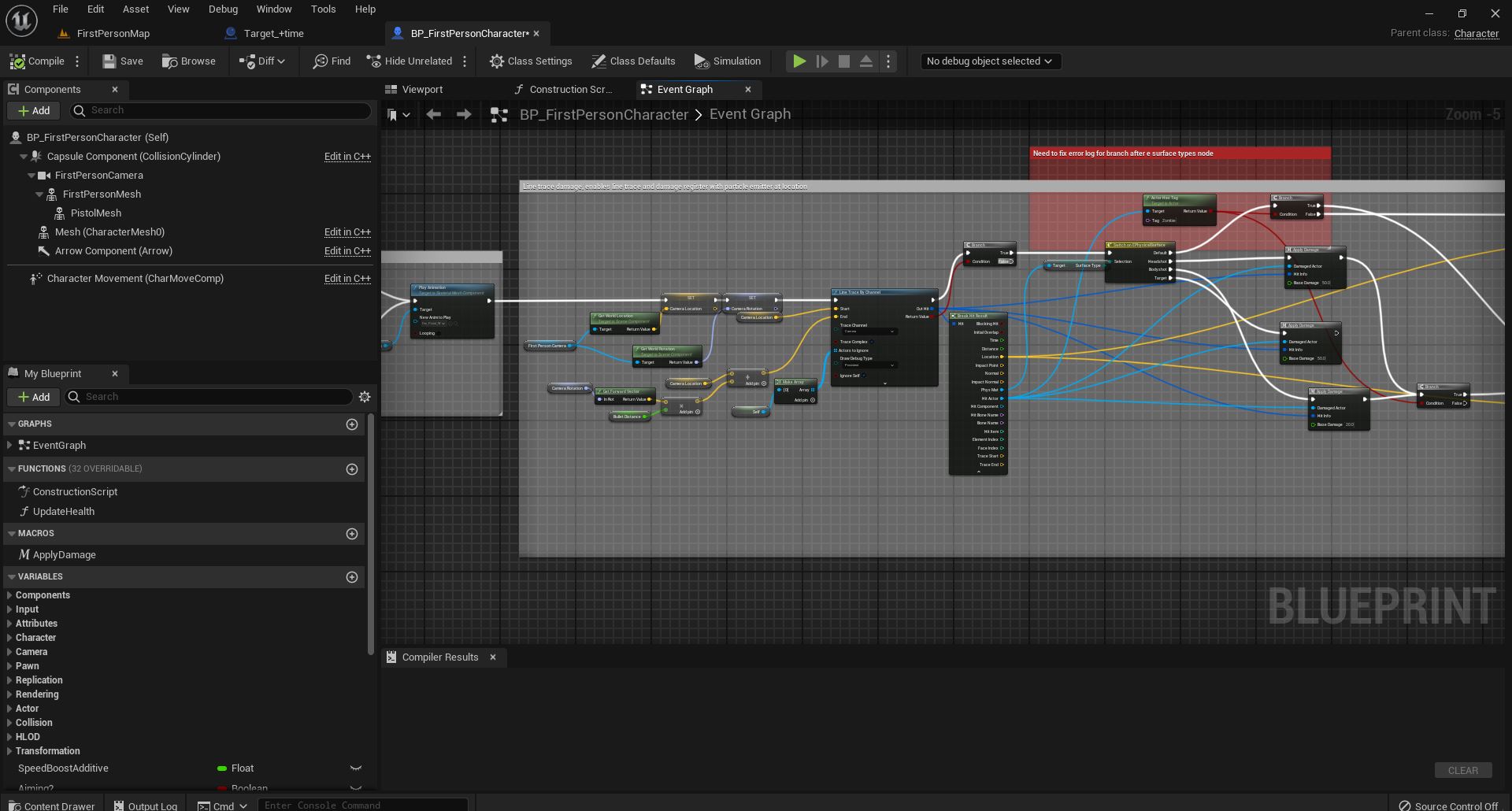 devout ruin
Looking for help with my line trace spaghettis. Trying to damage a different act...
devout ruin
devout ruin
Looking for help with my line trace spaghettis. Trying to damage a different act...
This is my call for damage in the target. I originally made the target to be destroyed with overlap events with the projectile from the default gun but have since switched to line trace.
Thanks for the time and apologies in advance for the lack of knowledge.
https://imgur.com/ZcJdrZX
actor is also set to be damaged
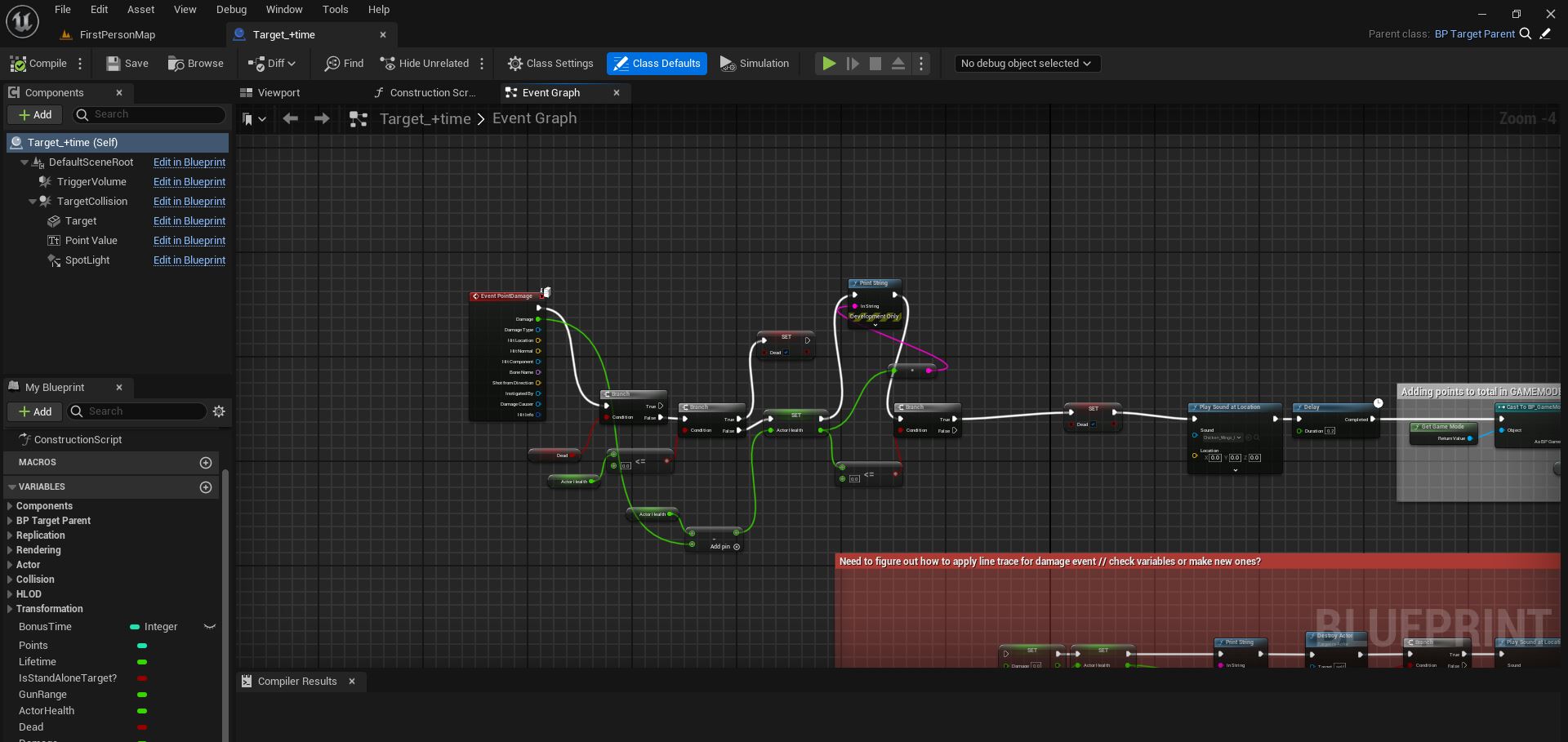
 hardy merlin
Can anyone recommend an asset pack for testing action gameplay? I need an object in the world that can measure angle and distance.
 wanton prism
Im trying to trigger a door with a differnt blueprint that the player needs to click and then it will open the door i have everything set up except for trigger the door event how do i do that?
lunar sleet
wanton prism
Im trying to trigger a door with a differnt blueprint that the player needs to ...
Event Actor OnClicked -> get a ref to the door -> cast to the door, call the door open event, assuming it's on the door
wanton prism
So when the player interacts with the switch interactible i just ref the door and cast to the doors open event?
lunar sleet
correct. you'll need to get the ref to the door tho. if it's within range, you can do an overlap or a line trace to the door to get it
if the switch is right next to the door, a simple overlap bubble should do the trick
lunar sleet
it can, but then you need a precise way to get the door
if there is only ever going to be one door in your level you can cheat and use get actor of class
but if you're going to have multiple doors, that functionality will break
wanton prism
ok so any suggestions? on how i could cast to door with out it breaking?
lunar sleet
are you going to have multiple doors with corresponding switches?
trim matrix
wanton prism
ok so any suggestions? on how i could cast to door with out it breaking?
use interface if you interact with the door
wanton prism
trim matrix
use interface if you interact with the door
From the switch?
trim matrix
well I'm not sure
lunar sleet
If it’s multiple specific doors that get opened by specific switches, you could prly use actor tags, then on switch interaction, get all actors of class door, for each loop has tag -> if true, open door event.
Interfaces can work too
Few ways to do this
wanton prism
Would this work?

 lunar sleet
Idk what I’m looking at, you have a branch that will always be true and an open door function that’s on the switch instead of the door
You could always subscribe your doors to a dispatcher event on the switch but you’d still need a ref
wanton prism
 wanton prism
lunar sleet
You could always subscribe your doors to a dispatcher event on the switch but yo...
wanton prism
lunar sleet
You could always subscribe your doors to a dispatcher event on the switch but yo...
How would i do that?
lunar sleet
wanton prism
You’re going at this backwards
wanton prism
Heres also the code for the interact interface
 lunar sleet
Maybe filter more than just class Actor
If you’re looking for switches filter by the switch bp
If it’s multiple misc interactable items make a base class for them
wanton prism
Is this better
 lunar sleet
wanton prism
Heres also the code for the interact interface
lunar sleet
wanton prism
Heres also the code for the interact interface
As for the Interact logic you’re going in circles. Your code says: find all overlapping actors (could be anything at all), iterate over all of them, if they have this interface, call open an open door function on the switch, with the target being the switch
lunar sleet
wanton prism
Is this better
No, you’re running a check on tick and if true you’re going to call that timeline 60-120x per second
random pulsar
trim matrix
use interface
This lesson was that buttons know about the manager and manager knows about the door he opens,and author showed a varient but he said its hard code.And next lesson is with interact interface , when only manager knows information about objects
wanton prism
lunar sleet
No, you’re running a check on tick and if true you’re going to call that timelin...
ok im right now correcting everything
Heres what i came up with but im trying to fix what your said but im just not underderstanding. sorry

 lunar sleet
wanton prism
Heres what i came up with but im trying to fix what your said but im just not un...
lunar sleet
wanton prism
Heres what i came up with but im trying to fix what your said but im just not un...
You need to understand the basics of bp comms first, watch the video in the 2nd to last pin here
wanton prism
OK
 waxen trench
Is there an efficient version of this? https://docs.unrealengine.com/4.26/en-US/BlueprintAPI/Rendering/ReadRenderTargetPixel/ - I’m considering making a line of sight based game and I’d like to use a render target as the underlying data structure to tell if an actor is visible or not. Is this the complete wrong way to go about it? I know most RTS games use an underlying grid data structure but I’m hoping to avoid doing that so I don’t have to reinvent pathfinding and collision systems.
Read Render Target Pixel
 lunar musk
I wanna use twinblast paragon turn in place animation on my character. Any idea how can i do that?
twin perch
is their any way to spawn actors not during run time ?
 lost glen
Does anyone know anything about Physics Constraint coordinate issues?
I've been trying to create a pushing door actor and I'm running into a very annoying problem regarding the placement of the door (just the door, not the frame) in the actual world. Inside the actor blueprint I have the door, the frame and a physics constraint.
The problem is, the door is being locked to the physics constraint coordinates relative to the world. So if I bring in a physics constraint and push it x-50 to the side of the frame, the door will be locked to x-50 of the worlds coordinates, not the actor coordinates.
The result is my door being locked at x-50 no matter where I place the actor blueprint in the world. Anyone have any ideas what's up with that? I'm on 5.3
 steady night

yesterday everything was fine
this morning trying to test my project
instant
ideas ?
steady night
how do i get those
 spark steppe
in the launcher
rightclick the engine i think
but it's ~80GB
and only increases your chance of getting help by 2%
steady night
gah... i mean i worked fine last night or rather 8 hours ago O.o
lunar sleet
steady night
gah... i mean i worked fine last night or rather 8 hours ago O.o
Restore from source control
lunar sleet
Does it let you open any other project ?
steady night
yeah
all other works,
but yeah i think this works just have to remake some stuff no worries
lunar sleet
Ah ok, then yeah just redo what you did step by step, in case it happens again
steady night
yeah
 keen widget
how to load in and out .scv(exel) files in runtime ?
 lime zephyr
hey
I manually pulled out five points in the blueprint, the spline mesh was added, and set its starting point to be the first point and ending point to be the last point, but I think I can adjust these points in the middle of it, so that the rattan man is twisted, and only this one rattan man, how to achieve this
 lunar sleet
keen widget
how to load in and out .scv(exel) files in runtime ?
lunar sleet
keen widget
how to load in and out .scv(exel) files in runtime ?
I think you mean .csv. You would use data tables: https://docs.unrealengine.com/5.3/en-US/data-driven-gameplay-elements-in-unreal-engine/

Driving gameplay elements using externally stored data.
lunar sleet
lime zephyr
hey
I manually pulled out five points in the blueprint, the spline mesh was add...
Your translation software failed to make sense
 keen widget
lunar sleet
I think you mean .csv. You would use data tables: https://docs.unrealengine.com/...
keen widget
lunar sleet
I think you mean .csv. You would use data tables: https://docs.unrealengine.com/...
can i use this as data table that loading from hard drive when you launch program ?
so if i open this csv file and change it with excel then next launch would use updated data?
lunar sleet
keen widget
can i use this as data table that loading from hard drive when you launch progra...
DTs are not editable at runtime. You’ll prly need to use a plugin
keen widget
lunar sleet
DTs are not editable at runtime. You’ll prly need to use a plugin
yeah, im trying to find some free plugin for that
 gusty crater
Why am i getting that note and nothing coming through that event?

Its setup exactly the same as the one above so not sure why its not working
kind estuary
elder lodge
You tell the pawn to switch over to AI controller when needed
in strategy games you dont control one pawn. but many actors. So in that case we use one pawn for the player + playerstate + controller, and actors for the units
So then i store the player state reference from the single pawn each player has in each unit actor
Then when units (actors) collide, you check the player state reference in the unit
Im kind a bit lost here
But yeah, the AIController was not made to have a player state
It can have with bWantsPlayerState, but from what i read its not meant to, because it doesnt need to replicate it (something like that)
i think i digressed
i just woke up, im a bit sleepy yet.
Okay so the issue with having the Pawn and the AIPawn as one, is that it complicates stuff a bit
Imagine you want AIPawn to manage everything automatically, including moving its units, etc...
Then you would have to deactivate all of that in the pawn
Having 2 different classes might be better?
im not sure of what im saying. im just trying to reason with this
yes if you have the pawn and the aipawn as the same class, you would have to check if its AI all the time.
you would have to like EventBeginPlay -> branch is AI ? Yes -> Check where enemies are -> Attack
So the logic would be all in the same place for AI and Player
But i dont know... maybe there is a reason you are saying this?
 split salmon
Guys iam making all traces to run async and thinking if i should put on the market. Is there any plugin on the market place that does the same thing?
 obtuse oriole
a beginner question, is there a node for getting world position and rotation result of relative movement to a global transform? Say I have a cube that is offset from the world origin and rotated a bit on random axis, now I want to get the world position and rotation when I move say (5, 7, 2) relative to the cube.
 silent drift
I don't know if this is the best place, but I'll start here. Currently I "spawn" my AI in my levels by literally placing them into the level and they "just" start there. Would it be better to have a "SpawnAI" actor that I place that spawns them instead of spawning them on level load?
I'm working on a 2d game similar to Mega Man, so I want to control the placement rather than having a spawn-closet of sort, but I'm used to always using a "spawnAItool" rather than placing them, so wanted to ask if I should make this even for this type of game?
THe reason I'm wondering mostly if it would be better to when the player "dies" and the AI should respawn to destroy all AI spawned by the spawner, and re-spawn them, rather than "resetting them".
 dark drum
split salmon
Guys iam making all traces to run async and thinking if i should put on the mark...
dark drum
split salmon
Guys iam making all traces to run async and thinking if i should put on the mark...
How would traces on async be useful? Do you have an example?
split salmon
dark drum
How would traces on async be useful? Do you have an example?
I'm using the Task system so the line trace occurs outside the game thread
dark drum
split salmon
I'm using the Task system so the line trace occurs outside the game thread
How would that be useful? What problem does it solve?
split salmon
dark drum
How would that be useful? What problem does it solve?
Performance
dark drum
split salmon
Performance
Traces are pretty quick anyway so I cant see it making that much of a difference. Do you have any examples/scenarios where it would make a difference? I can also see issues where the trace that has been performed no longer being relevant once it's completed.
 sand yacht
is there a way to spawn instanced actors the same way you can add instanced static meshes?
spark steppe
split salmon
Performance
have you measured it?
and how do you handle concurrent access to collision data from the game thread and your background worker?
 glossy egret
Does anyone know how to stop this message from playing.
LogScript: Warning: Script Msg: Attempted to access index 0 from array
Some of my arrays are ment to be populated at runtime. and some get used and some dont.
but it seems as if any method of checking to see if an array is valid so that i can filter it out of usage. that im aware of. triggers this message.
and its infuriating that i cant get it to stop
 versed sun
 glossy egret
thankyou
versed sun
 glossy egret
i had been using is valid index before and i was still having the trouble
but ill give is not empty a try
 fickle quartz
Hi there! I'm making a game where you play as mosquito and I've got a bug (heh) that seems like it should have an easy fix, but I can't figure it out.
When the player presses the right trigger/space bar, the mosquito blueprint adds movement input in the Up direction, basically simulating flapping its wings. This works flawlessly when the player is moving in an XY direction with the left stick/WASD keys, but, when there is no XY movement being applied, the mosquito always rotates so that it ends up facing Z: 0 in world space
 glossy egret
versed sun
glossy egret
versed sun
Thankyou, "Is Not Empty" worked for me
 tribal gazelle
After I use the teleport node I can walk around fine and control the character but they are invisible, what can I do to fix this?
silent drift
Can I somehow create an actor in the "Construct"? I want to make an AI spawner and when I add an array element, it creates something I can move around in the world to see where it will spawn.
versed sun
Instead of Construction Script, make a Function with Call in Editor checked
 young meteor
Hey folks
I have an actor (monster spawner) I use to spawn monsters in a sequence for my tower defense.
Sometimes it doesn't work and spawns nothing causing the whole game to halt. This only happens in a shipped build, not in editor when testing.
I have set up a bunch of loading/validation stuff. Any idea what I'm doing wrong?

Should mention it typically halt when it is supposed to start spawning a new type of monsters. So fairly sure the shown part is the issue.
 supple dome
young meteor
Hey folks
I have an actor (monster spawner) I use to spawn monsters in a sequen...
supple dome
young meteor
Hey folks
I have an actor (monster spawner) I use to spawn monsters in a sequen...
what goes into time
 silent drift
I would like it to add these, and then be able to move each instance from the AI spawner, so I can see where it will spawn in editor. @versed sun . Would I somehow be able to do that for the editor stuff?
 supple dome
young meteor
supple dome
young meteor
I assume this is all inside a loop/timer?
young meteor
Loop is running to the right of what you see.

This loop is what you see the beginning of in previous screenshots
supple dome
young meteor
can you try using gc.CollectGarbageEveryFrame 1 and see if the same problem happens in editor
I am wondering if the class gets unloaded between spawn calls, as theres no reference holding it alive, however not sure if the garbage collection actually takes care of unloading unreferenced assets
young meteor
Hmm. Might be worth a shot. How would I set it back? Just gc.CollectGarbageEveryFrame 0?
supple dome
yeah
young meteor
It will take some time to test, because it does not happen often. Last time I got to wave 18 before getting the issue for example.
Not the same wave every time either :S
I highly appreciate your help though. Will give it a shot if you think there is a chance it works. 🙏
supple dome
this kind of cross linking (between different events) is also a likely source of problems, the values can get changed or lost between frames
To fix this you can encapsulate stuff like acessing the row into a getter function ie. GetCurrentMonster, and then call this function whenever you need to access the table
 young meteor
Good point. Don't think I call database and change it in between things, but better safe than sorry.
 coarse grove
Hello people, Im with a little bug on my enemy behavior, maybe someone can explain it to me. My enemy has 2 behaviors:
1- follow the player
2- moves on straight line
I switch between states when the enemy reaches a certain speed
Sometimes it works perfectly, sometimes when my player is not moving the enemy also does not move aswell, if I move the player, then the enemy finds the point and direction to move and goes. Anyone knows why this might be happenning? And how could I solve this bug?
supple dome
coarse grove
Hello people, Im with a little bug on my enemy behavior, maybe someone can expla...
is the player blocking the navmesh? if the navmesh has a hole on top of the player, the npc may not find a path to the player
coarse grove
supple dome
is the player blocking the navmesh? if the navmesh has a hole on top of the play...
is there a way to check if the player is blocking the navmesh?
supple dome
turn on the navmesh viewer in the show panel
 cursive cosmos
They guys. What does this error actually mean?

 coarse grove
@supple dome on this video, is possible to see the weird behavior and that sometimes the enemy goes it way
https://streamable.com/3osclm

 tepid willow
cursive cosmos
They guys. What does this error actually mean?
tepid willow
cursive cosmos
They guys. What does this error actually mean?
HitActor you're calling the DoesImplementInterface is None, hence you're trying to call a function upon nothing
You should use ReturnValue of the trace you're running before using such fields, as it might not hit anything
If the ReturnValue is true, it means that it will have some actor to use, otherwise it'll be None
coarse grove
@supple dome yeah, seems like sometimes the navmesh where the enemy should go does not appear, and when i move the player then it appears. How could I solve it?
supple dome
go through all the components of the player and the enemy, and deselect Affects Navigation
 orchid quest
 coarse grove
supple dome
go through all the components of the player and the enemy, and deselect Affects ...
coarse grove
supple dome
go through all the components of the player and the enemy, and deselect Affects ...
its better, but sometimes its still happenning, mostly if im near a wall and i think its trying to find a place he cant go
 cursive cosmos
still little confused but will try
cursive cosmos
cursive cosmos
still little confused but will try
nvm! i got it working by adding a "isvalid" node
supple dome
I think you can play with the agent's width etc, in the navigation options, and the navmesh min distance to walls
you will have to google a bit cuz i dont remember where you can find that
 old frigate
Guys, I want to make a first-person immersive simulation game. In many ways, I refer to Dishonored 2. Now I want to use blueprints to make the mechanics of interacting with the world. I first want to make the one that picks up bottles and then throws them out. mechanism, and the bottle should be located in the lower right corner of the screen at the palm position. I have checked a lot of information, but none of it seems relevant. I would like to ask you what you think and what I should do.
coarse grove
supple dome
I think you can play with the agent's width etc, in the navigation options, and ...
yeah, im going to search how to get the bounds of the navmesh or something like that
 scarlet root
Uhm
Small Question about ShowCursor and using a Widget as Cursor (via SetCursorWidget).
Using CommonUI.. It seems like i can't hide the cursor when Gamepad input triggers.. The cursor gets set to the current Gamepad focus.. But is visible... And i can't hide it.. Not with collapsing the widget, nor setting the ShowCursor to false..
Any idea why this happens? Its a bit annoying to have a Gamepad control, but the cursor is always visible and placed centered on the current focused widget or the middle of the viewport...
The only Calls for SetShowMouseCursor and GameCursor > SetVisibility
Are in the Player Controller.. nowhere else..
 forest crater
old frigate
Guys, I want to make a first-person immersive simulation game. In many ways, I r...
forest crater
old frigate
Guys, I want to make a first-person immersive simulation game. In many ways, I r...
Look into:
- Interfaces to implement interaction with items
- Physics constraint to attach a bottle to your character
 timber crystal
need to now why the character makes the fall animation if i jump in a row
CAN SOMEONE HEALP ME?


 hardy swallow
timber crystal
need to now why the character makes the fall animation if i jump in a row
CAN...
hardy swallow
timber crystal
need to now why the character makes the fall animation if i jump in a row
CAN...
First off, idk about everyone else, but typing in caps lock makes me want to not help. Second, use isFalling instead of isJump

 fast compass
What could cause blueprint actor to change its size (scales down, smaller) when attached to a socket on a skeleton?
For example, attaching a flashlight to the characters hand makes it tiny. Sockets relative scale is set to 1,1,1, and the flashlight actor itself is also set to 1,1,1.
 cyan bone
I have this little effect done with ISM.
Basically it spawns a plane ISM with a slice white effect on top of the unit.
Then to remove it, i just scale it down (for now).
But it seems the index of the instance gets overwritten...
How do you pass stuff in such a way that it persists in blueprints?
This is so weird
forest crater
fast compass
What could cause blueprint actor to change its size (scales down, smaller) when ...
Have you tried with nodes and keeping the world scale?

 rugged sun
You cannot have multiple "Event Beginplay" events within the same blueprint. If i want to add a healthbar to the tutorial third person blueprint, what event would be a substitute for "Event Beginplay"?
rugged sun
....The answer is so much more simple then I could have thought
dark drum
rugged sun
....The answer is so much more simple then I could have thought
It normally is. Are feeble minds often over complicate things lol.
hardy swallow
rugged sun
You cannot have multiple "Event Beginplay" events within the same blueprint. If ...
If you want to keep things organized, you can add a sequence node after the begin play
 dark drum
fast compass
What could cause blueprint actor to change its size (scales down, smaller) when ...
dark drum
fast compass
What could cause blueprint actor to change its size (scales down, smaller) when ...
The scale of the bone.
rugged sun
I might try that sequence node thing. Why won't the controller attach to my healthUI widget?
 spark steppe
rugged sun
I might try that sequence node thing. Why won't the controller attach to my heal...
spark steppe
rugged sun
I might try that sequence node thing. Why won't the controller attach to my heal...
it's not ensured to be a playercontroller
as it could also be an ai controller
dark drum
cyan bone
I have this little effect done with ISM.
Basically it spawns a plane ISM with a ...
Adding and removing instances changes the Indexes. The issue will be the delay as after a second the item you added probably isn't at the same index, especially if one has been removed.
spark steppe
idk if there's a equivalent for the player controller, otherwise you have to cast the result to player controller
(since you got a cast below, just use the result of that)
and place the cast first, obviously
cyan bone
dark drum
Adding and removing instances changes the Indexes. The issue will be the delay a...
I know that problem. that is why im not removing the instance, im just scalling it down. If you look closely.
The issue here is different. It has to do with the index being passed into the next function, its overwritten when the next instance is spawn
I came accross an issue like this in the past where the function just overrides its value
fast compass
forest crater
Have you tried with nodes and keeping the world scale?
Thanks for the reply, it was close! Somehow at some point I had accidentally put a scale node with .3 values underneath the attach actor to component node.. No idea how this happened 😂
 rugged sun
oh my gosh that actually worked. thanks Ben
 spark steppe
rugged sun
oh my gosh that actually worked. thanks Ben
spark steppe
rugged sun
oh my gosh that actually worked. thanks Ben
that's not nice tho
put it in the execution line of the first branch
or add another cast
but as a good practice, don't cross execution lines ever (even if it works sometimes)
it just makes the nodes messy and is prone for failures
rugged sun
which one is the execution line of the first branch?
forest crater
Also 'Get Player Controller' node should do the same job with less nodes (bonk me if I'm wrong), at least I always use it
 honest wraith
I'm trying to lock a scene component on the Z Axis, whilst moving the parent actor. So essentially keep a decal on the floor whilst moving the actor to show where it is relative to the ground.
Already have a physics constraint component to try to accomplish this

But it isn't working as intended, what am I missing?
spark steppe
rugged sun
which one is the execution line of the first branch?
see, you are already confused! 😄 (it's the one branching of the first then of the sequence
or move the cast in front of the sequence (imho maybe the best choice here)
silent drift
This is what I have been trying for the AI spawner, so I can see it easily in the map and move them to the location I want them, but still be "owned" by the AI Spawner. However, even though I have set it to be false with the drag, it still gives me a new value in the array every time I move it. Is there a better way to do this?
 rugged sun
spark steppe
or move the cast in front of the sequence (imho maybe the best choice here)
rugged sun
spark steppe
or move the cast in front of the sequence (imho maybe the best choice here)
ooohh so like this?
 spark steppe
i think... the isvalid check on the enhanced input thing may be redundant
but don't take that for granted 😄
but i think interface calls wont error even if the target isn't valid
 lost glen
Does anyone know anything about Physics Constraint coordinate issues?
I've been...
lost glen
lost glen
Does anyone know anything about Physics Constraint coordinate issues?
I've been...
A little help? Tried posting on the UE5 Reddit but got no response there either
scarlet root
The "cursor hidden" gets printed.. but the Cursor Widget is still shown centered on the Gamepad focused button.. and moves with the focus..
 grizzled roost
How do I do a "get child actor"?

 thin panther
try to avoid child actor components, they are wrought with issues
grizzled roost
Noted, how do I do it though?
I did it before to go around a failed cast.
 ocean kernel
Hello, can someone help me why my respawn button doesnt work?


 dark drum
grizzled roost
Noted, how do I do it though?
I did it before to go around a failed cast.
dark drum
grizzled roost
Noted, how do I do it though?
I did it before to go around a failed cast.
How would using a child actor component solve an issue with a failed cast?
As for your question, you get the child actor component from the actor and get child. (Afaik)
scarlet root
ocean kernel
Hello, can someone help me why my respawn button doesnt work?
You need to plugin a Player to the Respawn node..
grizzled roost
dark drum
How would using a child actor component solve an issue with a failed cast?
As f...
Pulling a pin connection and searching "get child actor" doesn't yield anything, that's why I'm stumped.
dark drum
grizzled roost
Pulling a pin connection and searching "get child actor" doesn't yield anything,...
Are you pulling from the child actor component?
ocean kernel
scarlet root
You need to plugin a Player to the Respawn node..
but when i try connect to self i cant
 fast compass
I found the issue before, somehow I had managed to hide and connect scale node underneath the attach node, almost as if I was pulling a prank on myself.. 
dark drum
ocean kernel
but when i try connect to self i cant
Because self isn't a character. You need to connect a reference to the character you want to respawn.
grizzled roost
dark drum
Are you pulling from the child actor component?
No I'm pulling from a "try to get pawn owner" node in a ABP.
This approach works, even though I'm not happy about it.
 scarlet root
ocean kernel
but when i try connect to self i cant
scarlet root
ocean kernel
but when i try connect to self i cant
GetPlayerController
ocean kernel
i cant too
 grizzled roost
No I'm pulling from a "try to get pawn owner" node in a ABP.
This approach works...
grizzled roost
grizzled roost
No I'm pulling from a "try to get pawn owner" node in a ABP.
This approach works...
never mind it's giving me errors.
dark drum
grizzled roost
never mind it's giving me errors.
What are you trying to achieve?
grizzled roost
dark drum
What are you trying to achieve?
I'm following this tutorial to sync the animations of two skeletons, obviously I'm adapting it to my own needs.
https://docs.unrealengine.com/4.26/en-US/AnimatingObjects/SkeletalMeshAnimation/AnimHowTo/CopyPose/
I'm currently in the very last step but I'm getting this warning, I remembered I got around it by doing the thing I mentioned above, but it wasn't in an animation blueprint, just a normal one, so there's that.
 scarlet root
Isn't the Respawn just an Event that resets the Player coordinate to the PlayerStart and reset his attributes (health..etc) ?
So.. a simple SetActorTransform and SetCharacterHealth (For Player and Enemies, depending on how you designed it) should be enough...
dark drum
grizzled roost
I'm following this tutorial to sync the animations of two skeletons, obviously I...
Is BP scryer a type of pawn? If not that would be your issue.
 lofty rapids
grizzled roost
I'm following this tutorial to sync the animations of two skeletons, obviously I...
lofty rapids
grizzled roost
I'm following this tutorial to sync the animations of two skeletons, obviously I...
does not inherit from "pawn" <-- what is the parent class of bp_scryer ?
ocean kernel
scarlet root
Isn't the Respawn just an Event that resets the Player coordinate to the PlayerS...
i following this tutorial https://www.youtube.com/watch?v=PwDHGhdDG_k

Hey guys, in today's video I'm going to be showing you how to set up a death and respawn system for your player in your game. This will allow your player to die and respawn at any point/location you set.
How To Create A Damage And Healing System: https://youtu.be/5Xdnx3wPNLo
#UE5 #UnrealEngine5 #UE5Tutorial
____________________________________...
grizzled roost
@dark drum @lofty rapids Parent class is Actor.
 glossy fern
Hi guys , i wanted to know if it's possible to create a function with parameters that are of type array but no specified datatype
dark drum
grizzled roost
<@430016173694779402> <@910231430074859570> Parent class is Actor.
That's your issue. The owner of the anim BP would be the pawn/character that is running it. What is the actor you're trying to get?
dark drum
glossy fern
Hi guys , i wanted to know if it's possible to create a function with parameters...
Wildcard.
glossy fern
so i cant have a function with templated parameters MM
ocean kernel
scarlet root
Isn't the Respawn just an Event that resets the Player coordinate to the PlayerS...
i cant
 glossy fern
dark drum
Wildcard.
glossy fern
dark drum
Wildcard.
yess
grizzled roost
dark drum
That's your issue. The owner of the anim BP would be the pawn/character that is ...
The actor I'm trying to get IS inheriting from character class.
dark drum
grizzled roost
The actor I'm trying to get IS inheriting from character class.
It doesn't, you just said it inherits from actor.
grizzled roost
dark drum
It doesn't, you just said it inherits from actor.
Oh I mean the actor I'm trying to sync with is, my bad.
Essentially.
grizzled roost
dark drum
It doesn't, you just said it inherits from actor.
I'm trying to sync the skeletal mesh in BP_Scryer, to another skeleton in another class, that class is a character.
dark drum
grizzled roost
I'm trying to sync the skeletal mesh in BP_Scryer, to another skeleton in anothe...
And where is BP_Scryer?
grizzled roost
dark drum
And where is BP_Scryer?
An instance of it is in the scene, what do you mean?
dark drum
grizzled roost
An instance of it is in the scene, what do you mean?
And how is it created?
grizzled roost
dark drum
And how is it created?
I manually dragged it there.
 opaque mauve
Does anyone know how to interrupt a timeline?
i made a sprinting and crouching timeline, but the run to sprint takes 1 second, and the crouching takes 0.35 second, so whenever i press crouch,
in the middle of sprinting to running
the movement speed doesnt change to the crouch speed, instead it change to run speed while crouching
lofty rapids
grizzled roost
I manually dragged it there.
your trying to cast to something from something that isn't a parent of that class ?
if you need an actor probably get a reference to it, or get actor by class
grizzled roost
lofty rapids
your trying to cast to something from something that isn't a parent of that clas...
Good point, I just ignored the tutorial and got a reference to the instance directly, it works as intended but I'm getting errors.
Guess I'll go debug those.
Thanks.
dark drum
grizzled roost
I manually dragged it there.
Hmmm, getting a reference in the animBP to a random actor you've placed in the level isn't the easiest. Is a ref to the actor stored in the character?
dark drum
opaque mauve
Does anyone know how to interrupt a timeline?
i made a sprinting and crouching t...
Trigger the stop exec pin.
grizzled roost
dark drum
Hmmm, getting a reference in the animBP to a random actor you've placed in the l...
No I just got all actors of that class and grabbed the first one in the array since there will always be only one in the scene, a but crude but it gets the job done.
 dark drum
grizzled roost
No I just got all actors of that class and grabbed the first one in the array si...
dark drum
grizzled roost
No I just got all actors of that class and grabbed the first one in the array si...
That's definitely not recommended lol. If you are going to use it, atleast store a ref to it so you're not calling get all actors of class on tick.
For context, on a high populated levels, that node can tank FPS.
grizzled roost
dark drum
That's definitely not recommended lol. If you are going to use it, atleast store...
Noted, I'll look for a better way to do it.
This is a small scale project with not a whole lot going on, but I should try to learn better practices anyway.
Thanks for your help as well.
 dry forum
Can i only set default input parameter value on interface functions and not default output?
hardy swallow
dry forum
Can i only set default input parameter value on interface functions and not defa...
From what I understand, an interface is a collection of virtual functions, and you use them to make sure the class is implementing certain functions, while giving you the ability to override the function per implementation, which means there is no default variables. If you're looking for something with default vars, you would want to inherit from a class which has a function with defaults (which you made or came premade by UE), then you can override that function in your inherited class.
opaque mauve
dark drum
Trigger the stop exec pin.
but that only stop the timeline in the middle >,<
would you like me to show the blueprint?
hardy swallow
opaque mauve
but that only stop the timeline in the middle >,<
You have crouching and sprinting in the same timeline? I think it would be better to make separate timelines so you have better control
opaque mauve
hardy swallow
You have crouching and sprinting in the same timeline? I think it would be bette...
no, they are different timeline
the sprinting to running and vice versa takes 1 second
the stand to crouch and vice versa takes 0.35 second
dark drum
opaque mauve
but that only stop the timeline in the middle >,<
It would do as you've asked. Why would it matter if it stops in the middle?
opaque mauve
so if i press crouch in the middle of sprinting to running, the movement speed doesnt go to crouch speed, instead it goes to run speed
dark drum
opaque mauve
so if i press crouch in the middle of sprinting to running, the movement speed d...
But if you stop the timeline it would no longer update the speed.
hardy swallow
opaque mauve
so if i press crouch in the middle of sprinting to running, the movement speed d...
At this point, screenshots of your timelines would be helpful. From what I'm getting, you're wanting to interrupt the sprint timeline and start playing the crouch timeline, and when you did that, it's not working how you're wanting, correct?
opaque mauve
hardy swallow
At this point, screenshots of your timelines would be helpful. From what I'm get...
yes
because the crouch timeline will end faster than the sprint timeline
wait
 bold flax
So I have some child actors attached to an actor and I am trying to get a specific child actor within the actor. Any ideas on a way to do this? Get all child actors is not doing it. Its only giving me the single actor.


Should be showing me the two correct?
bold flax
Oh okay.
opaque mauve
hardy swallow
At this point, screenshots of your timelines would be helpful. From what I'm get...
so i print string the movement speed (ohh sorry, havent got the chance to implement the crouch animation yet)
so whenever it reach 250 meaning im crouching
500 is run speed
and 900 is sprint
but while im in the middle of transitioning from sprint to run (so that means 900 going to 500) my movement speed dont set at 250
instead it is set on 500
dry forum
hardy swallow
From what I understand, an interface is a collection of virtual functions, and y...
You can set the input parameters default value but doesnt look like there is any for output, atleast i cant see it
dark drum
opaque mauve
so i print string the movement speed (ohh sorry, havent got the chance to implem...
Show how you handle the speed change.
opaque mauve
yep, waiting for the video to convert
1 minute my friend
discord cant playback an mkv
lunar sleet
Show screenshots of your code, videos are not usually necessary
opaque mauve
dark drum
thin panther
they're super broken
I wouldn't say super broken but there's definitely the right time to use them.
One example I had that worked well was having a light BP that could be placed in the level. Adding them as a child in a bp worked well where only the actor they're placed in ever needs to talk to those specific instance.
opaque mauve
okay for more close up

 thin panther
nah they are definitely super broken. They've caused me multitudes of issues.
The most fun one was their actor in the component still being valid, but their outliner representation being null leading to an engine crash 🥳
opaque mauve
heres the sprint logic
thin panther
They are fundamentally broken on an engine level
lunar sleet
Let’s just settle on broken af 🙂
 thin panther
the off cases where they can work are just lucky occurrences. They can and will break at any given moment
 opaque mauve
for the crouch logic, i use the line trace to determine whether or not i can stand


and the timeline is 0.35 second
silent drift
Is there a way to shadow create an actor in the construct? So when I place it, it looks correct but it spawns first in a custom event?
I want to place AI and see them in the level so the size and all. But I want to spawn it first when the player reaches a checkpoint.
lunar sleet
silent drift
Is there a way to shadow create an actor in the construct? So when I place it, i...
Sure, you can place an empty actor or a volume there and spawn the actor at that location when needed
Or if you need to see it as it would show just place it manually, copy the transform, delete the actor, and feed that directly into the spawn
silent drift
lunar sleet
Or if you need to see it as it would show just place it manually, copy the trans...
That is what I ideally wanted to avoid. 😄 but still get that info as when placing it manually
lunar sleet
silent drift
That is what I ideally wanted to avoid. 😄 but still get that info as when placi...
You can’t spawn actors on Construct, only place them in level manually
lofty rapids
opaque mauve
so i print string the movement speed (ohh sorry, havent got the chance to implem...
so your problem is it's printing 500 not 250 when you stop sprinting ?
opaque mauve
yes, because when its going from 900->500, i press crouch in the middle, so in a common sense it should be at 250 at the end
 winter canopy
Can somebody help me to understand why my spawnActor isnt spawing anything?
My BP item Class is of type BP Item which is an Actor and my Item Object is of type Object


 opaque mauve
lofty rapids
so your problem is it's printing 500 not 250 when you stop sprinting ?
opaque mauve
lofty rapids
so your problem is it's printing 500 not 250 when you stop sprinting ?
okay, how about this, im gonna rephrase the question, how do I interrupt and end (not stop) the execution of the animation timeline by boolean
how do i get the timeline to end instantly
with a certain condition
hardy swallow
lunar sleet
You can’t spawn actors on Construct, only place them in level manually
I'm not sure what you mean by this. You can use a few different methods to do this.
winter canopy
winter canopy
 hardy swallow
opaque mauve
how do i get the timeline to end instantly
hardy swallow
opaque mauve
how do i get the timeline to end instantly
By calling the stop pin. That stops it instantly, though that's already been said here and you were saying that's not what you wanted.
lunar sleet
Spawn actor from class node is not allowed in the Construction Graph and for good reason
I’m sure you can f your way around it if you really tried tho
opaque mauve
hardy swallow
By calling the stop pin. That stops it instantly, though that's already been sai...
yeah, because if i connect with the stop pin, the movement speed doesnt set to 500, its set somewhere between 500-900
781 in my case
i want it to instantly goes to 500 instead of following the timeline
hardy swallow
lunar sleet
You can’t spawn actors on Construct, only place them in level manually
I mean, in the way he's wanting to do it, it sounds like he needs a manager BP and an array of actors which represent what he wants to spawn. Then each of those actors simply have a way to spawn when the player is near. In the construction script, yeah, it's not good to try to spawn actors, and even though that's what he's saying, I don't think that's what he's actually trying to do, instead just getting representations in the world.
lunar sleet
hardy swallow
I'm not sure what you mean by this. You can use a few different methods to do th...
Not at all what it seemed you implied here
hardy swallow
lunar sleet
Not at all what it seemed you implied here
By "on construct" I wasn't sure if you were talking about inside the construction script, or on begin play
bold flax
thin panther
the off cases where they can work are just lucky occurrences. They can and will ...
Since attaching actors to actors is not a good thing to do. What would you recomend to get the location of multiple static messhes on a single bp?
thin panther
with static meshes you can just use static mesh components
attaching actors to actors is fine by the way, it's just child actor components aren;t
the two are very different
bold flax
thin panther
the two are very different
How do you attach a normal actor to a actor without it being a child?
thin panther
Use SpawnActor, then AttachActorTo....
That will allow them to be attached
silent drift
lunar sleet
You can’t spawn actors on Construct, only place them in level manually
Yeah. Right now I'm adding as child class in the construct and that works, but I don't like doing it. Since then I can't control the spawning like I wrote.
hardy swallow
opaque mauve
yeah, because if i connect with the stop pin, the movement speed doesnt set to 5...
It's doing exactly what you're telling it to, and when you stop it in the middle, it will stop updating the speed. What you have to do if you want to set the speed after you stop it, is just set the speed after you stop it. How you do this and what you set it to can be done a few ways.
bold flax
thin panther
Use SpawnActor, then AttachActorTo....
That will allow them to be attached
Oh okay. Is there a way to get the location for static meshes?
hardy swallow
silent drift
Yeah. Right now I'm adding as child class in the construct and that works, but I...
What you're trying to do isn't straight forward or using a built in system, you'd have to build it yourself unfortunately.
thin panther
bold flax
Oh okay. Is there a way to get the location for static meshes?
yes.
If they are static mesh actors placed in the world you would have to GetAllActorsOfClass, preferably with tag, or use an instance editable Actor reference, and select them in editor
However the better way would be having these special actors as blueprints, with a static mesh component. Then you can store a reference to these actors as described, and get the static mesh component, and get it's location
silent drift
hardy swallow
What you're trying to do isn't straight forward or using a built in system, you'...
Was worth a shot. Thanks for the answer. 🙂
hardy swallow
silent drift
Yeah. Right now I'm adding as child class in the construct and that works, but I...
What you could do is place the actors, but have them disabled at the start, then hook them up to your checkpoint so they enable once the player reaches that
 pulsar vigil
how would u reverse the result of a step node in a shader ? 1 or 0 into 0 or 1 ? with a if ?
silent drift
Hmm. Also an idea
bold flax
thin panther
yes.
If they are static mesh actors placed in the world you would have to GetAll...
Whats the node to get the static meshes location if I do what you mention?
 dire frost
pulsar vigil
how would u reverse the result of a step node in a shader ? 1 or 0 into 0 or 1 ?...
dire frost
pulsar vigil
how would u reverse the result of a step node in a shader ? 1 or 0 into 0 or 1 ?...
you can reverse almost every node result with oneminus node
thin panther
you just get the reference to it, and type "Get World Location"
bold flax
thin panther
you just get the reference to it, and type "Get World Location"
Oh okay.
pulsar vigil
dire frost
you can reverse almost every node result with oneminus node
yeah but thats why im asking here u can't realy do that cause 1- minus would negate 1 and do nothing to the 0
dire frost
pulsar vigil
yeah but thats why im asking here u can't realy do that cause 1- minus would neg...
ah yeah idk then 😅 #materials will know tho ™️
pulsar vigil
dire frost
ah yeah idk then 😅 <#1014244767854510262> will know tho ™️
lmao i just realise xD, sorry
young meteor
Hey folks 🙂
I want to load actors and keep them in memory because I will be spawning them again later.
Can I just add them to an array in an actor like this? That way they will already be loaded when needed?
 opaque mauve
hardy swallow
It's doing exactly what you're telling it to, and when you stop it in the middle...
opaque mauve
hardy swallow
It's doing exactly what you're telling it to, and when you stop it in the middle...
im a f**king idiot, i connect the stop to reverse, not the play
my apologies to everyone that tries to help
hardy swallow
opaque mauve
im a f**king idiot, i connect the stop to reverse, not the play
You're not dumb, I've been doing this for 15 years and I make mistakes constantly. it happens
opaque mauve

ive been connecting the stop to reverse instead of the play
no wonder its not working no matter what i tried
apologies again to everyone that goit frustrated with my question
opaque mauve
hardy swallow
You're not dumb, I've been doing this for 15 years and I make mistakes constantl...
thank you for your time my friend
 hardy swallow
silent drift
Hmm. Also an idea
hardy swallow
silent drift
Hmm. Also an idea
I think I have a pretty good idea about a quick system to make what you want. When I get off work, I'll make a short video and link it here for you.
silent drift
Thank you
hardy swallow
No problem
 plush ether
Quick question, in the editor you can disable the construction script while dragging by unticking this.
But is it possible to keep it enabled and also have an event when the drag is released?

 pallid flicker
what are enhanced input actions, im following a tutorial and it says use axis mappings, so how much different would it be?
lunar sleet
pallid flicker
what are enhanced input actions, im following a tutorial and it says use axis ma...
Completely different systems. Read the documentation on EIS
There’s useful pins in #enhanced-input-system as well
pallid flicker
cheers
 warped juniper
Hey there, I'd like to hear from you some tips for improving my BP quality!
Currently I have some basic functions for camera switching and movement controls, but I'd like to hear how to better make these things reusable and manageable.
For instance I feel I wanna reuse the movement input system for enemies, but I'm not familiar enough with behaviour trees to be sure
In the image I have a simple function that makes the active camera look at the player when a setting that allows it is active. I don't feel this should be attached to the player BP itself, but I'd like to hear some opinions.
 lunar sleet
warped juniper
Hey there, I'd like to hear from you some tips for improving my BP quality!
Curr...
lunar sleet
warped juniper
Hey there, I'd like to hear from you some tips for improving my BP quality!
Curr...
To answer part of your question, you wouldn’t use the input system for #gameplay-ai
As for getting familiar with BTs, watch the 4th pin video in that channel
warped juniper
lunar sleet
To answer part of your question, you wouldn’t use the input system for <#2217987...
Oh I don't mean the input part but the logic behind the movement itself
I have a turn rate mechanic added to movement and would like to keep that true for npcs
lunar sleet
Assuming characters, the CMC has turn rate settings
warped juniper
Ah yes? I added it manually out of using tank controls in my game, but it's nice to see it has an option for the base movement
 edgy ingot
young meteor
Hey folks 🙂
I want to load actors and keep them in memory because I will be sp...
edgy ingot
young meteor
Hey folks 🙂
I want to load actors and keep them in memory because I will be sp...
Use the completed pin instead.
coarse grove
Hello, anyone have an idea how could I get this valid point? I have an AI that moves to a player direction and if my player is near a wall, the AI will find an invalid point, like on screen, then I want to change that invalid point to a valid point inside the navmesh but on the same direction


 edgy ingot
steady night
derp what am i missing :/ =?
edgy ingot
steady night
derp what am i missing :/ =?
Test in sp first. Also you dont want to multicast for a door. Use repnotify instead
 dawn gazelle
steady night
dawn gazelle
steady night
Adding relative means you keep adding the result from the lerp. You want to set rotation
Also, you could just use the curve from the timeline rather than lerping, for the other side just * -1
steady night
@edgy ingottrue
@dawn gazelleyeah lol makes sense
wdym use the curve from timeline i always lerp :/ how would that look ?
 hoary junco
question about linetraces
if you have a linetrace going to a component on a character model, and multiple of that component type exists, will it select all of them or will it pick just one?
dawn gazelle
Rather than going from 0-1 in your timeline, make it go from 0-90
steady night
true
edgy ingot
hoary junco
question about linetraces
if you have a linetrace going to a component on a char...
Depend which line trace you used
dawn gazelle
hoary junco
question about linetraces
if you have a linetrace going to a component on a char...
The trace would hit a specific component more than likely, unless you're doing a multi trace.
Depends on the collision of the components involved in the trace which one would be returned by the trace.
hoary junco
ok, because what I have is a line trace which traces to the character, then when the character enters a cone that's projected from the owner of the line trace then it activates something, however what I'm noticing is the trigger doesn't activate until the centre of that component enters the selected cone, I want to make it so if any part of the component enters the zone then it triggers but I'm not sure how to do that
opaque mauve
lunar musk
Idk why this returns 0
get AGR Pro and watch how the guy set it up, the plugin is free, theres a youtube channel and he post everything you need to know about it.
it simplifies the turn in place, head turn, and many more, its also set up for multiplayer. you can also simplify inventory and equipment management with it,(not trying to promote the guy since its entirely free, just a recommendation)
edgy ingot
Add your comps to an array
On trace, If hit comp is found in the array then do your business
hoary junco
edgy ingot
Add your comps to an array
On trace, If hit comp is found in the array then do ...
thanks, for a while I was trying to use the function which selects the closest point of the component to the trace source but the source comes down at an angle so it still wasn't working I'll test this method see how it turns out
 lyric basin
Quick question about casting if anyone can help. I wanna change a value of a variable in a blueprint in the level, specifically ultra dynamic weather if it matters but this isn't just about this BP. I wanna know for general knowledge. My question is from where should I call the cast and what would I put in the object input pin. It's an actor that just sits in the level.

 edgy ingot
lyric basin
Quick question about casting if anyone can help. I wanna change a value of a var...
edgy ingot
lyric basin
Quick question about casting if anyone can help. I wanna change a value of a var...
Casting is just a type check. The object pin will be the object you are casting.
So if you are casting a bp_animal, you want to plug a bp_animal instance to the object pin
For example, if you are grabbing an actor, make sure thst actor share the same base class as what you are casting otherwise the cast will fail
edgy ingot
modest monolith
Do you know how to change my crosshair when I'm looking at an interactable?
Set brush is the node to change the brush
warped juniper
Hm I have a small bug in my project that has a workaround that still doesn't satisfy me
If you ever played Resident Evil, I'm making that camera system here, but the camera switch has problems when between 2 camera areas.
If the player walks into an area, switches the camera, but is still overlapping with the previous area, they are stuck on the next camera and unable to switch back until they stop overlapping and overlap again...
Is there a way I can replace this system so it behaves more like bounds, so the player's camera is based on the general area they stand instead of a this? Or if you have some better suggestions, I'd love to hear you out.
Currently the workaround I have is leaving gaps between transition that have size equal or larger than player colision betweeen transitions. This isn't ideal because it can easily crlash with level design and some camera angles
lyric basin
edgy ingot
Casting is just a type check. The object pin will be the object you are casting....
So from where should I make such a cast? As in, the level blueprint, the player, etc.
edgy ingot
lyric basin
So from where should I make such a cast? As in, the level blueprint, the player,...
You can use the node it self anywhere in any bp. Btw avoid level bp
warped juniper
This is the main code for the logic behind the camera switch
 lyric basin
edgy ingot
You can use the node it self anywhere in any bp. Btw avoid level bp
lyric basin
edgy ingot
You can use the node it self anywhere in any bp. Btw avoid level bp
so thats the issue. I do not know what to put in there. I cant put a reference to itself. The ultra dynamic weather is a BP actor which you just drop in the level. I wanna cast to the actor in the level but using things like get actor and such fail.

do I somehow reference the actor which is in the level?
edgy ingot
lyric basin
so thats the issue. I do not know what to put in there. I cant put a reference t...
Again casting is just a type check. The object would be the actor in the level you are trying to cast
There are many ways to obtain actor in the level. You can use get actor of class if you only have one bp dynamic sky in the world and use the return value for the object pin
But thats a shit way imo and beginner trap.
A better way would be to make an actor bp (the manager). Create a variable of the type you want to grab from the world. Make the var instance editable and expose on spawn.
Then drop the manager actor bp to the world and pick the actor from the detail panel
You can then use that variable for the object pin because thats what u want to cast
lyric basin
Alright, I'll give this a go. 'preciate it
 valid frigate
If i create a cube grid for a door, can i use that in the bp editor?
lofty rapids
how do you "create" the "grid" ?
 leaden oasis
Hi! Quick question, is there a way to make pawns pushable by the player or each other? I can think of ways of the player being able to push adjacent pawns but not a multitude of pawns
 nova ledge
Guys what is the name of plugin that makes connections more organized
?

Or an option whatever will make this more organized
 frosty heron
@nova ledge subjective, I like vanilla more and it's free
There is electric node in marketplace but I am not fond of it
leaden oasis
@nova ledge There's Blueprint Assist and Node Graph Assistant which are both paid (haven't tried them). I personally use Electric Nodes and type Q to align horizontally often
nova ledge
👍
 latent ridge
im having an issue im trying to create a lift but for some reason the lift won't move my character up here's what i have so f with the blueprint. im also trying to make the lift push the player left an right


 tame prism
Hmm There's a few things I'd check.
You're using AddForceAtLocation, which adds force at a location in world space, and it's set at 0,0,0. Also, It mentions that it should be called for the duration of the thrust. Now you're only trying to add force during 1 frame (OnBeginOverlap).
dark drum
latent ridge
im having an issue im trying to create a lift but for some reason the lift won't...
Is there a reason moving the lift using the set location isn't working?
 restive valve
Hello! I am a Unity dev thats slowly starting to work in UE, and I am having some issues shifting my Unity component to Unreal, I am trying to solve an issue I currently have about ActorComponents and object references

I have an actor component that requires a reference to a BoxCollision component
but when I try to assign it this list show as empty

is there some fundamental misunderstanding I am having about ActorComponents and object references?
this is my hierarchy for the object
 latent ridge
correct, i was trying to have more that lift would detect the player actor which is tagged as character and then apply force to make the character move upward but when i try it out it detects the actor and which but it's not applying any force it gives warnings like these:
Invalid Simulate Options: Body (BP_FirstPersonCharacter_C_2.CharacterMesh0 Y_Bot) is set to simulate physics but Collision Enabled is incompatible
BP_FirstPersonCharacter0.CollisionCylinder has to have 'Simulate Physics' enabled if you'd like to AddForceAtLocation.
BP_FirstPersonCharacter0.Widget has to have 'Simulate Physics' enabled if you'd like to AddForceAtLocation.,
and i think i understand what you mean i should change it to apply force instead of at location
restive valve
it seems I am missing something very basic because if for example, I instead just get the owner, find the component I want within the owner with Get Component by Class my code just works, but I would really like to be able to asign specific component references
tame prism
If you have warnings (and they are quite clear 😉 ) it's good to fix those if you want to go the physics way.
tame prism
restive valve
it seems I am missing something very basic because if for example, I instead jus...
Are you using home made components?
restive valve
yep
the parent class for that component is a SceneComponent
its just a dummy wrapper for triggering positional FMOD events
it works pretty well, but I wanted to add the functionality of having volume bounding boxes where the sound is audible in those areas
so thats why I am trying to asign specific box collisions
for the most part I can just attach a box to the same object and use GetComponenByClass but I really wanna understand why cant I asign specific component references from the blueprint
 topaz gazelle
Is there anyway to Sort an array? For example arrange an integer array by value.
 fleet cedar
How can I reference a particular blueprint I want to spawn in my data table?
 kind estuary
Set Timers in BP are very bad
when i use them i always need to use an object
In C++ it seems that a Set Timer is created individually
but in BP, they seem to be static
and cant pass variables to the event
And if this same Set Timer is called again it overwrites the previous values
is this me doing something noob?
Or its the way it is
tame prism
restive valve
for the most part I can just attach a box to the same object and use GetComponen...
I understand your setup a bit more.
I don't know the reason, I'm setting them by hand.
At least you're assure it gets referenced and your engine doesn't crash 🙂
Maybe someone with more experience can give a better answer.
restive valve
Yeah I am just wondering, there is something I am missing here thats intrinsic to UE
that I am not understanding
frosty heron
topaz gazelle
Is there anyway to Sort an array? For example arrange an integer array by value.
Yes, do the sorting your self. There are multiple methods you can do.
Bubble sort is one of them
frosty heron
fleet cedar
How can I reference a particular blueprint I want to spawn in my data table?
What's the variable type? It should be the item base class reference
frosty heron
kind estuary
And if this same Set Timer is called again it overwrites the previous values
You can create a comp or an object that spawn the timer. either works
@restive valve object ref, refers to the instance spawned to the world, while a component refers to the comp.
You can't assign anything to it because in that bp world, (the bp viewport?) no instance is spawned. Hence it find nothing
restive valve
hmmm so there is no way to have ActorComponent have variables that reference spawned components in the level?
restive valve
I am not quite understanding that
asign the variable from where?
The componment in the level doesnt see any of the components in the level
kind estuary
frosty heron
You can create a comp or an object that spawn the timer. either works
Yeah but this really makes me want to make it a C++ project.
Because you know, creating an object everytime you need a timer with parameters, and need it to not be overwritten its a bit messy
In C++ the Set Timer is awesome
frosty heron
kind estuary
In C++ the Set Timer is awesome
I don't notice the different but I don't use it much yet
kind estuary
So just now i created a function that when my unit is attacked, i will start a melee in random time : 1-3 seconds. Random time so that it looks natural, so they dont attack each other right at the same frame.
But then if there is a third unit also clashing, then this set timer gets overwritten and it forgets about the previous attack

It wont work if more units are involved it just gets overwritten
or maybe im missing something
frosty heron
Yea just construct object or comp. Its not even messy
Only a few extra node and dispatcher
restive valve
Sorry to bother you again but what did you mean by asign the variable Cold?
frosty heron
restive valve
Sorry to bother you again but what did you mean by asign the variable Cold?
An object variable (pointer) is null by default. Use the set node to point the variable to some object in the world
 zealous moth
how would you go about doing a health system with hearts? progress bar isn't a good one...
restive valve
I dont think you understood my issue, I am already fixing my problem by doing it that way

my code works perfectly by doing something like this
I just wanted to know if there was a way to able to asign instanced components directly from the level with a dropdown
*components
I feel this is very poor coding (The equivalent of just constantly doing GetComponent in unity instead of actually asigning the component is my analogy), and I was wondering if this is how unreal operates
frosty heron
restive valve
I just wanted to know if there was a way to able to asign instanced components d...
No because the bp is a template. In its world , it doesn't know about your level
restive valve
okay so thats just how Unreal works then
frosty heron
If you want to pick an object from the level, you have to drop an instance of the bp to the world
Make the variable instance editable and expose on spawn
Then drop that bp class to the level
Select the bp instance , go look at the detail panel. There you can pick from your level
restive valve
Let me know if I am doing something wrong, so I set my variable like this
 frosty heron
zealous moth
how would you go about doing a health system with hearts? progress bar isn't a g...
frosty heron
zealous moth
how would you go about doing a health system with hearts? progress bar isn't a g...
Can the player have 2 and a half heart?
zealous moth
yeah, similar to TBOI or LOZ
restive valve
I add the scene component to one of my actors
 frosty heron
restive valve
Let me know if I am doing something wrong, so I set my variable like this
frosty heron
restive valve
Let me know if I am doing something wrong, so I set my variable like this
That's fine
restive valve
and this is what I get
 frosty heron
restive valve
and this is what I get
frosty heron
restive valve
and this is what I get
On holiday atm, I don't have editor to test. Try to create the variable outside the component (in the actor). Make sure there are some box collisions in the world
restive valve
yeah there are
frosty heron
restive valve
yeah there are
The box collision can't be part of some actor bp tho, it has to be stand alone.
To make it easier to test, try changing the variable to actor
And just drop some things to the world
restive valve
yeah as an actor I can asign it objects
frosty heron
Then maybe you don't have a stand alone box collision actor in the world
You probably have some box collision component belonging to some other bps
The variable that you have, points at a box collision actor
restive valve
okay, then that would be my next question
I deff dont have standalone boxes as actors and that wouldnt be the part of the solution I want, because I wanna be able to just have a single wrapper actor and put the components I need be part of it
is there a way where I can make it reference an actor in the level that has that specific component with a dropdown that filters them?
 silk mesa
what would you guys do to make lone echo/echo vr's movement in ue5?
i really like it and i wanna use something similar for my project
frosty heron
Afaik you can't reach components belonging to some other bps with the drop down from the level. But I may be wrong
restive valve
ah, sad
kind estuary
A dispatcher? How would a dispatcher be useful here?
This is what im doing:

 frosty heron
You can always populate reference using blueprint nodes
But again I could be wrong with the drop down
restive valve
yeah thats what I am doing but it felt disgustingly badly coded
I am a Unity dev so having to use GetComponent instead of assigns feels very dirty
kind estuary
frosty heron
Only a few extra node and dispatcher
Is this correct? @frosty heron
restive valve
seems like UE just works this way and I will have to get used to it, thanks for the pointers
frosty heron
kind estuary
Is this correct? <@1050954229902213150>
Don't look right
kind estuary
though it works
could you please correct me?
so i dont do something wrong eternally
frosty heron
Made something with some guys before, will see if I can find it
silk mesa
is there a way to make the VR template's character phsyics based (if not already)
i need my character to be able to grab bars and pull themselves up
tribal gazelle
When I SpawnActorOfClass to switch pawn after respawn, when I use "posses" node on my controller, all of my controller components give off errors after the switch. Should I be giving the player a new controller or something?
frosty heron
@kind estuary #blueprint message
For random timer, you want to add an input in the timer object
 lusty hedge
is there a way to get information on a single pixel within an image widget. maybe store its information so i can then edit it.
i want to generate a black and white image for terrain generation
frosty heron
lusty hedge
is there a way to get information on a single pixel within an image widget. mayb...
Totally, but I don't know if that can be done in bp
Image r collection of colours. They r represented as bytes. Can be constructed and deconstructed. There is even some helper function in cpp
kind estuary
frosty heron
<@711946020858101790> https://discord.com/channels/187217643009212416/2217988629...
nice thats quite similar to what i have done except it has a more fancy way with the bind
frosty heron
I try to read pixel from render target once but it was very expensive
lusty hedge
frosty heron
Image r collection of colours. They r represented as bytes. Can be constructed a...
like if i could get an array of every pixel i feel like thats the only thing i need to get this done
lusty hedge
frosty heron
I try to read pixel from render target once but it was very expensive
id only need to run it once when the level is generated for the first time. so expensive should be okay
frosty heron
lusty hedge
like if i could get an array of every pixel i feel like thats the only thing i n...
You can but you have to do it in cpp or buy a plugin
lusty hedge
ah
frosty heron
Afaik there are plugin that read image or brush assets
 fathom gull
Hello, if an object is shorter than 30 cm this doesnt work and the character can step on it anyways, is there a way to make the character unable to step on objects shorter than 30 cm?
 versed sun
fathom gull
Hello, if an object is shorter than 30 cm this doesnt work and the character can...
versed sun
fathom gull
Hello, if an object is shorter than 30 cm this doesnt work and the character can...
fake it with an extra collision box on top ?
frosty heron

Epic Developer Community Forums
First you need to understand that a texture is normally, a sum of multiple images called MipMaps. MipMaps are down-scaled versions of your images, always in steps of power of 2, so the original image, is, say, 512x512 - this would be the MipMap “0”, then the engine generates the MipMap “1” which is 256x256 and then MipMap “2” which is 128x128, t...

Reading the pixels from a UTexture2D is not particularly difficult, indeed this post on Unreal AnswerHub resume almost perfectly how to do it. However, there are some points missing and one could go in the case where a call to RawImageData->Lock(LOCK_READ_ONLY) will return nullptr. When it happens, it prevents us from reading the pixels,
versed sun
lusty hedge
i want to generate a black and white image for terrain generation
there is a BP way
tribal gazelle
tribal gazelle
When I SpawnActorOfClass to switch pawn after respawn, when I use "posses" node ...
Can any help please?
 worn tartan
I'm a total newbie with blueprints and unreal. I've got a basic blueprint setup for 3rd person movement. But my model isn't animating. Can someone help me or point me to a tutorial where I can make my model animate when I press a direction? I have the animation already imported into the project.
fathom gull
versed sun
fake it with an extra collision box on top ?
Thanks :)
frosty heron
tribal gazelle
Can any help please?
Start by posting the error 📸
kind estuary
@frosty heron
Now that i read it well thats actually much better
because by using a bind you can bind and unbind as you want
so its reusabLe
frosty heron
kind estuary
Now that i read it well thats actually much better
Well what u had earlier won't work because u start the timer not inside the comp
I don't know about reusing it but you certainly can
Would need a ref to every timer created tho and differentiate the one you want
kind estuary
frosty heron
Well what u had earlier won't work because u start the timer not inside the comp
well it works for calling a specific function
so you create the object, call the function inside the object that then calls the set timer, that then calls the event in your actor
so it works, its just not as reusable like the one you made
my weakness is still event dispatchers, inheritance and interfaces
i need to practice this more
tribal gazelle
frosty heron
Start by posting the error 📸
This is my inventory controller component giving off errors AFTER the switch. I am triiggering it by trying to open inventory. It opens fine before the switch.

This is the respawn in gamemode
 frosty heron
Try to skip the unposses
See wat happend
Your issue is inventorycontrollercomponent is null(not set)
tribal gazelle
frosty heron
Try to skip the unposses
Same thing
frosty heron
Make sure it's set after posses
tribal gazelle
frosty heron
Make sure it's set after posses
Make sure what is set?
tribal gazelle
frosty heron
Read the error log
That is an actor component which is attached to the controller
It works fine (opening inventory) before switch.
frosty heron
W.e it is, the value is null , debug with break point
Or print string on event tick
Find out how it's lost
tribal gazelle
Where should I print the string. in the component?
frosty heron
You will have to figure that out as it's your code. But I will look at every area where changes to that comp might take place
zealous moth
frosty heron
You will have to figure that out as it's your code. But I will look at every are...
I ended up doing it weirdly
I use a string system and parse it
F for full heart, f for half heart
frosty heron
👀
zealous moth
and using the current string, add hearts
because you end up with out of order FFFEESSB
full F, E empty, S shield and B black
frosty heron
🧙♂️
zealous moth
I don't see how else you would do it in a simple manner
the other way is to make an array and each index is a heart enum
but at the end of the day, same as a string you pasrse into chars
frosty heron
I would just add a horizontal box and add heart as needed
zealous moth
but how to deal with different hearts?
frosty heron
.5 will be half a heart
Well I'm not sure about the system
Can it go 0.1?
Cuz I would prob use progress bar 🥹
If it needs to be accurate
 zealous moth
yeah so it becomes a hassle
I'll keep it as a string unless something else better comes along
so far this entire game is 90% REGEX and string parsing
"I could make 20 enums... or just regex 20 characters and switch"
frosty heron
Personally I would deal with string than too many enums
frosty heron
String are error prone but when u have too many enums. You can't really work with those enums
Had my npc name as enums, I ended up ditching the entire system
zealous moth
yeah but I am building and rebuild the string with specific characters each time, no typing or anything
versed sun
lusty hedge
like if i could get an array of every pixel i feel like thats the only thing i n...
You can use this node

I used it to generate Foliage ISM in a giant map
The R , G, and B of each pixel determine the % chance of which trees, grass, rocks etc.. will spawn
 worn tartan
I'm a total newbie with blueprints and unreal. I've got a basic blueprint setup ...
worn tartan
worn tartan
I'm a total newbie with blueprints and unreal. I've got a basic blueprint setup ...
I'm a total newbie with blueprints and unreal. I've got a basic blueprint setup for 3rd person movement. But my model isn't animating. Can someone help me or point me to a tutorial where I can make my model animate when I press a direction? I have the animation already imported into the project.
hardy swallow
@silent drift https://youtu.be/FfAuZxmLfNg
https://github.com/PretendCoding/UE5_TutorialCity
Hello, and welcome to the description! This video goes over a simple collision trigger which uses event delegates to activate actors, allowing you to place your actors in a level, but not having those actors be rendered, collided with, or have their tick active through a trigger volume in Unreal...
Hope this helps with the checkpoint system
hardy swallow
worn tartan
I'm a total newbie with blueprints and unreal. I've got a basic blueprint setup ...
I would suggest looking the the content packs that come with the engine. Add the third person pack to your project, and look at how they setup their animation blueprint and character. There are tons of tutorial on youtube.
worn tartan
Ok I hadn't thought of the content packs. I will give that a shot. Thanks
 astral estuary
How can I spawn a Geometry Collection from blueprint? I can't find the correct actor or how to reference it 🤔 (geometry collection as in chaos destructible mesh)
hardy swallow
astral estuary
How can I spawn a Geometry Collection from blueprint? I can't find the correct a...
https://www.youtube.com/@MichaelRoyalty/videos
This guy has a lot of good tutorials on it

YouTube
Join me as I dig into procedural content generation with Unreal Engine 5, one video at a time.
hoary junco
so I'm getting a weird response whenever it comes to line trace outputs
I have 2 line traces coming from the same source, and I have it to where if the angle between the 2 lines is ever below 14 degrees then it outputs an event, except it seems to be doing this thing where I have to go past 14 degrees to make it trigger, then I have to go back out quite a distance to get it to stop triggering, like you have to overshoot it in either direction to get it to recognise the change
lunar sleet
hoary junco
so I'm getting a weird response whenever it comes to line trace outputs
I have 2...
Show code
hoary junco
lunar sleet
Show code
well I was about to say I found the issue kinda but not sure how to fix it
see, I have the line trace set up to get closest point on collision of the target of trace one, except whenever a point comes where the line trace is going to a corner of the collision mesh it just acts like there's nothing there.. like it stops generating hits and idk what to do about that
lunar sleet
Collision is a tricky beast
hoary junco
how would I get around something like this? like how can I get it to continue generating hits even when the linetrace is going to a corner of the collision mesh?
lunar sleet
Depends on what the issue actually is. Maybe you need to trace for complex collision
hoary junco
when I tried that it stopped generating hits entirely
 pale imp
Anyone know why this actor reference doesn't work ? (probably something super simple, I've only got like a few hours in unreal)
 lofty rapids
is it throwing an error when you run it ?
hoary junco
pale imp
Anyone know why this actor reference doesn't work ? (probably something super si...
if you're trying to get the lever function to activate on the boat spline actor you have 1 of 2 options
1: you either do get all actors of class, then get a copy, then target that
2: your BoatSpline variable, just make it a general actor object reference, go back into your level editor window, then look at the variable on your lever, and use the dropper tool to link it to the boatspline
if you're doing it this way all you're doing is sending an instruction to the blueprint itself and not an instance of the blueprint that's present in the level
twin perch
how do you completely clear the contents of an array ?
edit
NM XD i found the clear node ❤️ XD ignore this
hoary junco
lunar sleet
Depends on what the issue actually is. Maybe you need to trace for complex colli...
so I actually solved the issue in the end, instead of using a linetrace I used a sphere trace with a really small radius, for some reason line traces just cannot work with corners at all where as sphere traces get around it fine.. I guess it's because the sphere can pick up in an area around the single point? idk
it's like line traces just pass through corners where as a sphere trace will still be picking up faces in the general vicinity
pale imp
hoary junco
if you're trying to get the lever function to activate on the boat spline actor ...
How do I make it a general actor object reference ? do you mean soft object reference ?

Also what I'm trying to do is send a signal from the lever to the boatspline, that's it
Not the instance of the boat spline in the level
I'm trying my best to explain it lol, but I think I just need a general object reference
lunar sleet
hoary junco
so I actually solved the issue in the end, instead of using a linetrace I used a...
Yeah, was gonna suggest maybe a shape trace. And also if you trace complex your mesh needs to have complex collision added directly to it
But even then, it might still be hit or miss
hoary junco
pale imp
How do I make it a general actor object reference ? do you mean soft object refe...
ok so... what you need to do is whenever you select the variable type, you see this

go to object types, actor, object reference
lunar sleet
pale imp
Not the instance of the boat spline in the level
That’s not how bp comms work
You still need a valid instance to reference
Can’t run code on null pointers
pale imp
There is a boat spline in the level if that's what you're asking
lunar sleet
I’m saying that is not how you get a reference
Making a variable with the desired class will not get you what you want
hoary junco
pale imp
How do I make it a general actor object reference ? do you mean soft object refe...
then go back to your level editor, click on the lever, then look in its details page and you should see something like this, and you see the dropper tool on the far right hand side, click that, then click on the boat spline that you want it to be connected to and it should work

I have something similar in the game I'm working on, buttons that I can hook up to any object that has the interaction interface on it and make it work
pale imp
hoary junco
then go back to your level editor, click on the lever, then look in its details ...
Seems like you're super close, but I can't select the lever
 hoary junco
pale imp
Seems like you're super close, but I can't select the lever
hoary junco
pale imp
Seems like you're super close, but I can't select the lever
what do you mean you can't select the lever, just click on it
pale imp
turns blue for a second, then gets that orange outline
is is because the boatspline is its parent ?
hoary junco
pale imp
turns blue for a second, then gets that orange outline
if you click on the boatspline and look in its details page do you see the lever in the hierarchy
pale imp
hoary junco
then go back to your level editor, click on the lever, then look in its details ...
Not sure where I'm supposed to find this.
 hoary junco
pale imp
Not sure where I'm supposed to find this.
hoary junco
pale imp
Not sure where I'm supposed to find this.
what type of object is the lever?
pale imp
Actor
thin panther
Click the eye icon next to the variable in the BP editor
That will make it instance editable so you can do the above
hoary junco
thin panther
That will make it instance editable so you can do the above
from one of his previous screenshots the eye was already open in the blueprints editor
thin panther
Ah so it is
Then you just want to click the BP not a component in it
(also don't use child actor components)
hoary junco
pale imp
Not sure where I'm supposed to find this.
I think you just need to make the lever its own blueprint instead of it being a child component of the boatspline
pale imp
Alright I tested it on a lever separate from the boat and it works fine
problem is that I need the lever to move relative to the boat
thin panther
Welcome to the world of issues surrounding child actor components
pale imp
 hoary junco
pale imp
problem is that I need the lever to move relative to the boat
hoary junco
pale imp
problem is that I need the lever to move relative to the boat
right click the lever, click "attach to" then select the boat
you can have blueprints attached to one another

 verbal wren
Which type of projectile tracing is best for performace? all of the tutorials I can find using things like the Predict Projectile Path Advanced function is hard on performance and can't seem to find anything that works right for projectile tracing by TraceChannel
hoary junco
pale imp
testing on a seperate one, doesn't move with the boat
can you click on the boatspline blueprint and show me the entire hierarchy of that blueprint in the details pane please?
pale imp
hoary junco
can you click on the boatspline blueprint and show me the entire hierarchy of th...
Yeah sure. you mean in the editor or the outliner ?
hoary junco
pale imp
Yeah sure. you mean in the editor or the outliner ?
outliner
because I just tested using attach to from one blueprint to another and it worked just fine
pale imp
I just got rid of the old lever and replaced it with one not connected to the spline tho.

everything still works the same, the lever just doesn't move

just tried attatching it again and got this
 hoary junco
pale imp
I just got rid of the old lever and replaced it with one not connected to the sp...
hoary junco
pale imp
I just got rid of the old lever and replaced it with one not connected to the sp...
ok yeah here's the issue... the spline and the boat need to be their own separate blueprints and then using the method I showed you before with the lever and the spline, you can connect the boat back to the spline that way and then connect the lever to the boat
pale imp
hoary junco
ok yeah here's the issue... the spline and the boat need to be their own separat...
I see
That can't be too hard, you think I could get that done in like an hour ? : )
hoary junco
I mean you could get it done in 5 minutes if you know what you're doing 😛
pale imp
hoary junco
I mean you could get it done in 5 minutes if you know what you're doing 😛
Any idea on how to seperate the 2 ?
Also thanks for your help, this took longer than expected lol
ig everything does with programming
hoary junco
pale imp
Any idea on how to seperate the 2 ?
basically just remove the boat, the engine, the cord, and the spotlight from the boatspline blueprint and just leave the spline as is, then make a separate blueprint with the boat, the engine, the cord, and the spotlight
in the blueprint for the boatspline replace any references to the boat's static mesh with an actor variable called "boat" and make it instance editable (aka open the eye)
then go back to the level editor, add an instance of the boat to the level, click on the spline and in the details pane you should see your boat variable with the dropper next to it, select your boat blueprint, attach the lever to the boat, then it should all work fine
pale imp
hoary junco
basically just remove the boat, the engine, the cord, and the spotlight from the...
Thanks, I'll try not to get confused, I'll mention you if it works (or doesn't)
hoary junco
pale imp
Thanks, I'll try not to get confused, I'll mention you if it works (or doesn't)
if you get confused just show me your boatspline blueprint and I'll let you know how to edit it, I've had to do something similar myself for a searchlight that moves back and forward across a spline so I know how it works
 urban moon
Why is it complaining about the blueprint I am in? I am trying to pull from this variable in my other blueprint I am casting to
 warped juniper
Hey there. How can I break a float array variable?
I'm using it to tweak all relevant hitbox info for a simple attack in order to make multiple variations on it with simple number tweaks
hoary junco
urban moon
Why is it complaining about the blueprint I am in? I am trying to pull from thi...
have you compiled the blueprint you're casting to so that variable is properly registered?
warped juniper
But I cannot figure how to separate the array
urban moon
hoary junco
have you compiled the blueprint you're casting to so that variable is properly r...
yeah, I will save and reload just to make sure real quick.
warped juniper
This is the example, I wanna plug each index of the array into each input of the function
 trim matrix
Is there a way to detect when the player is about to hit the ground (just before) when jumping
(the answer isnt: isFalling? because this is too late for my system)
hoary junco
trim matrix
Is there a way to detect when the player is about to hit the ground (just before...
do a linetrace down from the bottom of the character and whenever the length of the line is small enough do thing.
trim matrix
I thought there was a way to get the velocity and then do: if, is equal with a tolerance of like 10, do smt.. would that work?
hoary junco
if a character is jumping up something they won't be at the same velocity just before they land than if they had fallen a long ass distance
you said you wanted it to be whenever they hit a certain distance from the ground not when they hit a certain falling speed
trim matrix
ok ty
hoary junco
pale imp
Thanks, I'll try not to get confused, I'll mention you if it works (or doesn't)
are things going ok? It's 2 AM so I'm going to bed soon so just wanted to see if you needed anything else before I head out
warped juniper
Well this is functional though a bit ugly
 pale imp
hoary junco
are things going ok? It's 2 AM so I'm going to bed soon so just wanted to see if...
pale imp
hoary junco
are things going ok? It's 2 AM so I'm going to bed soon so just wanted to see if...
Oh right yeah I took a 15 minute break and I'm trying to find a way to separate the spline from the boat now. I haven't done anything with the engine or cord, and the light is just a spotlight so it's not a big deal, but ideally I wouldn't want to re-path the spline/ just create a new one
wanton prism
kind estuary
A dispatcher? How would a dispatcher be useful here?
This is what im doing:
init lol
hoary junco
pale imp
Oh right yeah I took a 15 minute break and I'm trying to find a way to separate ...
you just go into the spline's blueprint, delete the meshes and then compile it
you don't have to repath the spline, any edits to the core blueprint will edit its instance in the level
pale imp
Alright I'll try that, just a bit annoying since I have to reference everything
also are you in the Uk too ? it's 2am for me as well
hoary junco
warped juniper
Well this is functional though a bit ugly
I'm guessing that perform attack (box) thing is a function? in which case couldn't you bake the "get" instances into the function and have the input pins accept an array then just plug the attack data array directly into the function?
hoary junco
pale imp
Alright I'll try that, just a bit annoying since I have to reference everything
I'm in Ireland but same time zone
warped juniper
hoary junco
I'm guessing that perform attack (box) thing is a function? in which case couldn...
Yeah I'm not as much of a coding savvy as you, so getting an explanation to do this would be great!
pale imp
Alright close then, I'll let you know in about 5 minutes and you'll be free lol
warped juniper
The idea is that each array has concrete settings to establish attack range, height, distance, etc, in a way I can reuse it across characters
hoary junco
warped juniper
Yeah I'm not as much of a coding savvy as you, so getting an explanation to do t...
is the "perform attack" thing something you made?
warped juniper
Yeah?
hoary junco
open it up and show me a screenshot
warped juniper
It's just a component that rewrites data on a collider in the character

This is the function for controlling the collider, afterwards the attacker side performs the overlap event and damage once I set that up
hoary junco
warped juniper
so you see the "perform attack" thing on the left
click on it and in the details on the right it should show you all the input pins right?
well you can change their types to float arrays instead of just floats, then from each of the input pins draw off a "get (a copy)" node and rehook it all back up
warped juniper
Ohhhh I see...
So I can use array 1 for collider 1, then array 2 for collider 2 etc
pale imp
Boat model reference not showing up in details 👍

 warped juniper
Hmm
Then this has a slight downside
How could I do it in the hypothethical case I wanna mix a sphere collider and a box collider?
Or do any number of mixes like that
hoary junco
pale imp
Boat model reference not showing up in details 👍
ok so create a new blueprint for the boat, and rebuild it like how you used to have it in the boatspline
then in the actual boatspline blueprint, where you used to have a reference to the boat mesh, replace that with an actor variable and set it up like how the lever was set up
pale imp
hoary junco
ok so create a new blueprint for the boat, and rebuild it like how you used to h...
Alright I'll try that
Goodnight probably, seems like it'll take a while
hoary junco
warped juniper
So I can use array 1 for collider 1, then array 2 for collider 2 etc
what I meant was just have array inputs for attack start, attack end, attack height, thickness h, thickness v
hoary junco
pale imp
Goodnight probably, seems like it'll take a while
if you're around tomorrow and need more help ping me, I'm going to be working on my own game tomorrow so I'll have time to answer some questions
warped juniper
Yeah I get that
What I asked is aout making more intricate hitbox combinations using this function
Currently I can add a "number of colliders" variable and gate them...
pale imp
hoary junco
if you're around tomorrow and need more help ping me, I'm going to be working on...
Alright thanks, I'll still try to get this all done tho
warped juniper
Also, mike, how can I separate the array once back in the function?
hoary junco
warped juniper
Also, mike, how can I separate the array once back in the function?
one second...
I'll show you once I get UE5 loaded up
pale imp
Quick question, would a spline count as an actor reference ?
hoary junco
pale imp
Quick question, would a spline count as an actor reference ?
for what purpose?
pale imp
hoary junco
for what purpose?
For the separate boat blueprint
 hoary junco
pale imp
For the separate boat blueprint
hoary junco
pale imp
For the separate boat blueprint
didn't you have the timeline and stuff built on the spline's blueprint?
pale imp
hoary junco
ok so create a new blueprint for the boat, and rebuild it like how you used to h...
I thought you said to rebuild it
Or are you talking about the boat itself lol
hoary junco
pale imp
I thought you said to rebuild it
yeah you just need to put the meshes and stuff on the new blueprint you don't need to move over the timeline, all that can stay on the spline
pale imp
hoary junco
yeah you just need to put the meshes and stuff on the new blueprint you don't ne...
ooooooooooooooooo
I see
pale imp
hoary junco
ok so create a new blueprint for the boat, and rebuild it like how you used to h...
Yeah I did that, but it's the same issue, the reference won't show up in the details of the spline
hoary junco
pale imp
Yeah I did that, but it's the same issue, the reference won't show up in the det...
did you set it to instance editable?
pale imp
What, the variable ?
hoary junco
warped juniper
Also, mike, how can I separate the array once back in the function?
so what I meant was the inside of your function should look like this (mostly, I didn't organize the wirework as much but you get the idea)
 hoary junco
pale imp
What, the variable ?
hoary junco
pale imp
What, the variable ?
show me what the blueprint for your spline looks like

 hoary junco
pale imp
hoary junco
pale imp
click on the closed eye next to "BoatModel" in the variables list, also you see how with "set world location" and "set relative rotation" how their targets are scene components? you can delete both of those and replace them with "set actor location and rotation", hook it up to use "Boat Model" as the target, right click on the purple looking input pin and select "split struct pin" then input your location from "get location at distance along spline" and hook up the roll and yaw from "get rotation at distance along spline"
warped juniper
hoary junco
so what I meant was the inside of your function should look like this (mostly, I...
Ah so just use get? Got it
pale imp
hoary junco
click on the closed eye next to "BoatModel" in the variables list, also you see ...
What does opening the eye do ?
hoary junco
warped juniper
Ah so just use get? Got it
yeah, then you can hook up the array to all of the inputs on the function
hoary junco
pale imp
What does opening the eye do ?
makes the variable instance editable, aka it appears in the details pane in the level editor and can have the boat asigned to it, like what we did with the lever
hoary junco
that's fine 😛 we can do this all tomorrow if you want it is nearly 3 AM
pale imp
hoary junco
that's fine 😛 we can do this all tomorrow if you want it is nearly 3 AM
I'll finish what I can and I'll stop when I encounter another roadblock
 lyric rapids
when i rotate my actor 90 degrees why does the children components on the actor not rotate as well
pale imp
thanks for the help ofc
 lusty oak
So awhile back I was trying to work out an issue with some stuff I did in a level blueprint, and several people mentioned to not use level blueprints at all. However, in multiple tutorials that I've watched they teach you to use the level blueprint for things that it makes sense to use it for. For example, keeping track of a day/night cycle value and thus setting off an event to turn lights on or off depending on if it's day or night. That said, could anyone explain to me why I shouldn't use level blueprints? I've not found any legitimate reasoning behind it, but I'm also not one to deny the wisdom of more experienced developers.
 devout latch
lusty oak
So awhile back I was trying to work out an issue with some stuff I did in a leve...
devout latch
lusty oak
So awhile back I was trying to work out an issue with some stuff I did in a leve...
Think about if you had more than one level.
lusty oak
devout latch
Think about if you had more than one level.
So I guess the better option would be to just make a blueprint that does the same thing so it can just be quickly dropped into whatever level you need it in?
Are there any pros to using level blueprints? Any additional functionality they offer beyond just using a normal blueprint?
 willow breach
is it possible to make an event that triggers the same event in another actor
like a custom event
devout latch
lusty oak
Are there any pros to using level blueprints? Any additional functionality they ...
Not really. Not for your main stuff. I do have code in my persistent level blueprint but that controls the other levels for level steaming. That’s about it, though.
You could use it for a quick prototype if you want. Nothing for a complete project.
lusty oak
Ah ok, good to know. Thanks for the explanation!
 fiery swallow
willow breach
is it possible to make an event that triggers the same event in another actor
fiery swallow
willow breach
is it possible to make an event that triggers the same event in another actor
Yes, you just need a reference to the actor you want to trigger the event on
willow breach
fiery swallow
Yes, you just need a reference to the actor you want to trigger the event on
could you explain
fiery swallow
willow breach
could you explain
You need to know which specific actor in the world you would like to call the event on
In other words, you need a reference to the actor you are trying to call the event on
There are many ways to get a reference. Some better then others
willow breach
fiery swallow
In other words, you need a reference to the actor you are trying to call the eve...
do you mean to like cast to the actor with the event from the one without it
fiery swallow
willow breach
do you mean to like cast to the actor with the event from the one without it
Yes, but even if you were to use a cast, you still need a reference
willow breach
fiery swallow
Yes, but even if you were to use a cast, you still need a reference
oh, but then how do you get the event
fiery swallow
It sounds like you should do some research or watch some YouTube examples on referencing objects in unreal
fiery swallow
willow breach
oh, but then how do you get the event
I gave you the answer fam
lusty oak
Is there a way to turn thes RectLights into an array variable and loop through them? I tried creating an array of RectLights, but I couldn't figure out how to assign these from the Components list to the variable in the details panel.
 fiery swallow
lusty oak
Is there a way to turn thes RectLights into an array variable and loop through t...
fiery swallow
lusty oak
Is there a way to turn thes RectLights into an array variable and loop through t...
get components by class returns an array of all components, you can loop through that
or you can make a helper function which utilizes "make array" node and drag all those components directly into that node yourself, and then return the array
lusty oak
Interesting. So, if I make an array variable, there's no way to give it default values with objects from the current blueprint?
fiery swallow
On beginplay you'd have to pass those components into the array variable
But honestly I don't see why you wouldn't just create a pure function for this
But either option would work the same
You could also do it in the construction script if you wanted
silent drift
@hardy swallow thank you! That helped me get it working. 🙂
wanton prism
lunar sleet
To answer part of your question, you wouldn’t use the input system for <#2217987...
I took the pussy way out for making the switch for the door by just using the interface system
lunar sleet
wanton prism
I took the pussy way out for making the switch for the door by just using the in...
Nothing wrong with using interfaces
 honest maple
wanton prism
I took the pussy way out for making the switch for the door by just using the in...
honest maple
wanton prism
I took the pussy way out for making the switch for the door by just using the in...
took the what out?
warped juniper
Hm I'm having some issues cleaning up my camera system...
When making a Resident Evil style fixed camara system what can I use to map out general areas and properly make the angles switch across them all?
This is what I have currently.
Each BB has assigned a different camera actor in the level, and on begin overlap, it assigns it as active camera.

Problem is, currently if 2 BBs overlap with the player at the same time, then only the latest one's camera is applied. So if the player walks back just as they transition the camera, then the player walks around the room with the wrong camera set as active until they overlap with a new camera
This is "avoided" by adding a gap between BBs that is exactly as big as the player collision... Which is of course a non viable workaround
If someone has a better idea for sorting this out, then by all means help me with this!
keen widget
what this do ?
 warped juniper
keen widget
what this do ?
warped juniper
keen widget
what this do ?
Returns true if you get both a true and a false on both booleans, otherwise returns false
So B1 True and B2 False return a True, while B1 True and B2 True return a False
spark steppe
google logic gate truth table
 autumn torrent
I don't know why this happens but, ive been having a problem where colliders dont follow actors that can move, Ive had to make them teleport to the main model after a second in every tick
I dont know if im doing something wrong with the blueprints or anythin
spark steppe
autumn torrent
I don't know why this happens but, ive been having a problem where colliders don...
that sounds like you are doing something wrong
show your blueprint hierarchy and how you move your actor
autumn torrent
actually, I just checked colisions, when the actor changes its model, it just, leaves the collision behind
figured it out, i was setting every object in the actor to have physics when only the parent should have em
keen widget
how to take a Graph screenshot?
i think i saw some button for that somewhere but i dont remember where
wanton prism
lunar sleet
Nothing wrong with using interfaces
it isnt working now?

 silent drift
warped juniper
Problem is, currently if 2 BBs overlap with the player at the same time, then on...
silent drift
warped juniper
Problem is, currently if 2 BBs overlap with the player at the same time, then on...
I sadly don't have a perfect solution but I remember someone doing something similar during a company game jam we had years and years ago where they wanted the RE Fixed Camera style. I believe their solution was to
A. Have one trigger for the cameras and inside of it check with a bool which camera was active and change to the other on exit rather than on enter
B. Make the trigger thicker as well.
I don't know if it will work they way you want it, but maybe?
warped juniper
silent drift
I sadly don't have a perfect solution but I remember someone doing something sim...
I see... I found a functional so to speak alternative, if you wanna have a look
So, in the character BP there are 2 main colliders, the Player collision for enviroment, and the new camera collision which holds the tag that is searched by the component overlap

The Camera Capsule has a radius of 0, so it's impossible for it to overlap with more than 1 collision, unless it already overlaps with another one
Because of this, so long the transitions have at the very least a non 0 distance between eachother, the error I encountered is impossible
@silent drift This is a solution that overall applies what I considered at first, applied backwards... But there are two things in my mind now.
- Is it a valid guideline for a longer term project to keep all area transition collisions with at least a pixel of distance between eachother?
- Does having a collider with one of the extents / radius set to 0 affect performance or calculations in undesired ways?
Sadly I don't get how to do the method you mentioned using a bool...
silent drift
Okay, I just dropped my kid of a daycare (I believe that is the English name?) once I'm home I can probably do a quick set up example and send. 🙂
Again not sure if it is the best solution but it might work.
warped juniper
haha, no problem...
Currently the system I have works, which is absolutely the main goal
Though would there be a better method to set the sectors? Currently I have several BBs assigned to the same camera to roughly fill up the area of the rooms
 lunar sleet
wanton prism
it isnt working now?
lunar sleet
wanton prism
it isnt working now?
Bear in mind that Do Once means once per runtime, unless you reset it
gusty crater
Not sure if im doing this wrong, first time trying to do a behaviour tree. once i finish constructing my building i set the key "ConstructionSite" to None so it should by not set, should the selector then not go back up the tree? as i have a condition it can only be in that part if it is set
 lunar sleet
gusty crater
Not sure if im doing this wrong, first time trying to do a behaviour tree. once ...
lunar sleet
gusty crater
Not sure if im doing this wrong, first time trying to do a behaviour tree. once ...
Use #gameplay-ai for these questions, but back up the tree from where ? If you’re past that selector it’ll have to wait until it gets aborted up from the next selector which in your case doesn’t have a decorator so it never will
gusty crater
No worries will do, ahhh right so just add a condition onto everything on the way down not just the very top selector
lunar sleet
gusty crater
No worries will do, ahhh right so just add a condition onto everything on the wa...
Yeah, your second selector will always just swap between the left and the right branch
gusty crater
Gotchya thankyou
Is there a way to update a navmesh at runtime? so when i place buildings they know to walk around them and not only the preplaced ones. Any nodes that refreshes it or is that too demanding?
lunar sleet
gusty crater
Is there a way to update a navmesh at runtime? so when i place buildings they kn...
Go to project settings, navigation, change it to dynamic.
spark steppe
dont
lunar sleet
Make sure you turn off can ever affect navigation on your moving actors
spark steppe
this will also regen it when anything moves!?
lunar sleet
spark steppe
this will also regen it when anything moves!?
Not if you do it right
spark steppe
ok, that sounds more reasonable
didn't knew you where done with what you where about to say 😄
lunar sleet
You could also just add nav modifiers to your buildings and set it to dynamic modifier only
warped juniper
Okay say
gusty crater
Legend cheers. Im assuming doing nav modifiers is a lot more efficient but more work too?
warped juniper
Is it acceptable if my important camera control system demands I lay down BBs over the levels with as small possible of a gap between the, but without any overlap whatsoever?
spark steppe
warped juniper
Is it acceptable if my important camera control system demands I lay down BBs ov...
imho not
you should/could generate them
there's probably a way to get the world/level bounds
warped juniper
Ah let me show you
lunar sleet
gusty crater
Legend cheers. Im assuming doing nav modifiers is a lot more efficient but more ...
Idk about more work, you add a nav modifier component to a base building class, change its setting to obstacle, that’s about it, in theory
warped juniper
So let's see here

The idea is that each BB has a camera assigned for a fixed angle
Curretnly there is a 0 radius capsule in the center of the player that checks overlap with these BBs
gusty crater
Hmmm making it dynamic helped heaps, but once my building has finished construction and they try to nav back to their office, it keeps showing path is blocked
