#blueprint
1 messages · Page 39 of 1
 willow gate
Hey friends. Anyone know of some comprehensive Android/iOS tutorials? I have found several scattered tutorials, documentation and other resources for making mobile games but I wondered if anyone here knows of any good tuts that cover things like interfacing with logging into Google play and the apple store and microtransactions.
 thin panther

Free API to get sunrise and sunset times for any location using coordinates. Returned JSON results include all types of sun events.
 sand yacht
thin panther
https://sunrisesunset.io/api/
sand yacht
thin panther
https://sunrisesunset.io/api/
looks like this is exactly what I need, however is there a way to use this in blueprint?
 lunar mulch
Hey guys, im brainstorming some code idea where i want to Blend in a Visual effect as the player reaches a stamina Threshold. Made a prototype using Timelines where the timeline starts to blend in the post-process when stamina is below 50%. Blends out when hes above 50%.
This still requires me to set an arbitrary time for the timeline, so its basically just spitballing it.
Because of this i have a feeling like timelines are not the right approach for this type of stuff. But they are great for Blending in and out values slowly over time. Are there other Nodes can blend in values relatively simple similar to timelines?
 rugged sonnet
Any idea why I can't get "Set Material Instance Vector Parameter"?

 versed sun
lunar mulch
Hey guys, im brainstorming some code idea where i want to Blend in a Visual effe...
versed sun
lunar mulch
Hey guys, im brainstorming some code idea where i want to Blend in a Visual effe...
you can set the timeline length to 1 and then before the timeline plays you can set the Play Rate
this setup would take 3 secs to finish the timeline , even tho its length is 1
not sure if this helps

 thin panther
sand yacht
looks like this is exactly what I need, however is there a way to use this in bl...
thin panther
sand yacht
looks like this is exactly what I need, however is there a way to use this in bl...
yeah there's built in functionality, or easy to access plugins for http post and get calls
you might need a secondary thing to get local coordinates.
also note you're probably going to have to draft a privacy policy for collecting geolocation data like that
lunar mulch
versed sun
you can set the timeline length to 1 and then before the timeline plays you can...
Hey thank you for the idea, this gives me some food for though! 😉
 undone sequoia
guys if I am multiplying value for example speed by delta world seconds , its result is always very different as delta world seconds tick is always different how keep this number as smooth as I can?
because I display speed and see 58 60 56 60 62 50
its jumping like crazy
sometimes is delta worlds 0.02 0.03 0.025
thin panther
show what you're trying to do
you absolutely want to multiply something like speed by delta seconds
undone sequoia
I am printing speed of plane and i dont want its speed to be connected to FPS so I need multiply it before implementing


if I dont use speed * delta ms then someone with 20 fps will be more slower than me
but if I use delta ms * speed then everyone has same speed every frame
thin panther
yes exactly
undone sequoia
but outputs from this multiply is crazy you see 64 64 59 59 64 63
it cant be like this 😄
when you have constant speed
because my delta ms looks like this

its everytime different value
idk how to make it smooth
 sweet silo
hi there how would you create a routine system with characters moving at specific times throughout the day ? thanks !
thin panther
undone sequoia
its everytime different value
a frame will take differing amounts of time to execute
that's just how it is
though in your above example im not sure why you're multiplying the result of the delta by 100
you definitely don't want that
undone sequoia
thin panther
though in your above example im not sure why you're multiplying the result of th...
because its slow without it
thin panther
so increase the speed
undone sequoia
okay lets say I am not multiplying it by 100 , then result is this with constant speed, also very bad numbers it solve nothing 😄

problem is definitely not *100
 lunar sleet
sweet silo
hi there how would you create a routine system with characters moving at specifi...
lunar sleet
sweet silo
hi there how would you create a routine system with characters moving at specifi...
Probably an event dispatcher that is called at specific times of the day. You’ll need to implement some form of time system
thin panther
undone sequoia
okay lets say I am not multiplying it by 100 , then result is this with constant...
can i ask what your fps is?
lunar sleet
Isn’t it speed = speed * delta + speed? Can’t rmbr
sweet silo
lunar sleet
Probably an event dispatcher that is called at specific times of the day. You’ll...
ok cool yeah i see i already have a time system but i don't know how compatible
but thanks !
thin panther
lunar sleet
Isn’t it speed = speed * delta + speed? Can’t rmbr
nah.
speed is like you're per second amount of units you want to travel.
you want to multiply that by deltatime, so you get the number of units for that frame
lunar sleet
sweet silo
ok cool yeah i see i already have a time system but i don't know how compatible
I mean you could use an event by timer to check what the current time of day is at certain intervals, and call the dispatcher if it’s above a specific time
thin panther
i.e. my frame took 1/50 of a second, so give me 1/50 * speed
sweet silo
lunar sleet
I mean you could use an event by timer to check what the current time of day is ...
great idea i'l do that
lunar sleet
thin panther
i.e. my frame took 1/50 of a second, so give me 1/50 * speed
Ah so just multiply it to make it not be tiny then?
thin panther
or just increase the speed :P
lunar sleet
Is it possible to do this with timelines? I’m having issues with them when fps drops rn
thin panther
the issue here though seems to be some very unstable frame times which hunts at poor optimization
thin panther
lunar sleet
Is it possible to do this with timelines? I’m having issues with them when fps d...
i mean you can access the frame delta anywhere with get world delta seconds
lunar sleet
Well on my end I’m using a Niagara 3D Flip template and let me tell you, that thing is fricken expensive lol
thin panther
whether this would work with your timeline implementation is improbable at best
lunar sleet
So what are my options? The timeline controls x and y values over a certain amount of time, not sure how else to do that reliably
 pulsar vigil
Guys another weird question what get should i have here to cast successfully to this widget ? im trying to cast an animation blueprint to a widget lol maybe its insane
 lunar sleet
pulsar vigil
Guys another weird question what get should i have here to cast successfully to ...
lunar sleet
pulsar vigil
Guys another weird question what get should i have here to cast successfully to ...
You need to watch the blueprint comms video pinned here. Also that looks like an anim bp you’re trying to cast to, not a widget, and generally, you want to cast from the ABP to other stuff not the other way around.
 trim matrix
To cast to a widget you need to either store its reference once it is constructed or use the (expensive) node https://docs.unrealengine.com/4.26/en-US/BlueprintAPI/Widget/GetAllWidgetsOfClass/
Get All Widgets Of Class
pulsar vigil
lunar sleet
You need to watch the blueprint comms video pinned here. Also that looks like an...
i want to use a play rate variable in the ABP to control opacity of an element in the widget, my cast is at the right place normaly, its to use an event dispatcher created in the anim bp
lunar sleet
trim matrix
To cast to a widget you need to either store its reference once it is constructe...
He’s not casting to a widget tho
trim matrix
they could have named their widget like that 🙆♂️
lunar sleet
And idk what “my cast is at the right place normally” means
lunar sleet
trim matrix
they could have named their widget like that 🙆♂️
If they named a widget ABP, I’m going to go to another channel lol
pulsar vigil
lunar sleet
And idk what “my cast is at the right place normally” means
lmao
pulsar vigil
lunar sleet
If they named a widget ABP, I’m going to go to another channel lol
my cast is here to set the variable and use it to target the event ? does that make sense ? thats a real question im lost lol
cause that how i operated until now and everything work
trim matrix
is ABP_ShowNPC a widget?
pulsar vigil
trim matrix
is ABP_ShowNPC a widget?
no its not lol
Guys
I said i want to use a variable in an ABP to control opacity of an element in a widget via an envent dispatcher
i just need to know what should i get to cast succesfully
lunar sleet
ABPs are not meant to be accessed this way
pulsar vigil
lunar sleet
ABPs are not meant to be accessed this way
i sure trust u cause i have some weird idea since i m a nooby but is it possible ?
trim matrix
they can be tho but why do you need to do it throught the anim bp?
that is the big question
pulsar vigil
trim matrix
they *can be tho* but why do you need to do it throught the anim bp?
are u kidding me i said it 2 times already
undone sequoia
when I fix fps of editor its fine because delta world seconds are always same but when fps are not fixed then its problem 😄
ah
how are people solving it?
trim matrix
lunar sleet
ABPs are not meant to be accessed this way
they aren't meant to be used in this way
lunar sleet
pulsar vigil
i sure trust u cause i have some weird idea since i m a nooby but is it possible...
Sure, it’s possible. I can’t rmbr how, but there’s some weird detour you gotta take
Or you can just do it right 😀
pulsar vigil
lunar sleet
Sure, it’s possible. I can’t rmbr how, but there’s some weird detour you gotta t...
ok, do u know the way ?
pulsar vigil
 gentle urchin
From the char , returns the animbp
gentle urchin
From the char , returns the animbp
thats look like its a way but it stipulate a context i have to say i dont know how to "from the char"
im sorry it look basic but i dont understand the exact way
gentle urchin
You can see the implementing class below the function name
Thats the context you need
Character is a native unreal class that many utilize
For their player characters
 trim matrix
wrong node
pulsar vigil
trim matrix
wrong node
whats then node name bro 😄
trim matrix
Get Anim Instance
pulsar vigil
Oh so i need to put the skeletal mesh targeted ?
trim matrix
you need to obtain a ref to the skeletal mesh, yes
trim matrix
gentle urchin
From the char , returns the animbp
isn't there a way to get directly the anim instance straight from the character actor?
gentle urchin
I thought so but maybe memory fails me
Im not doing detour like this anymore so idk 😂
trim matrix
there should be smh
trim matrix
trim matrix
you need to obtain a ref to the skeletal mesh, yes
you can do get component by class
 trim matrix
don't use that node with the context input
pulsar vigil
im probably doing atrocity
trim matrix
idk what that context even is suppoused to be
trim matrix
trim matrix
https://docs.unrealengine.com/4.26/en-US/BlueprintAPI/Components/SkeletalMesh/Ge...
👆
pulsar vigil
im forced to get a skeletal mesh here ?
trim matrix
trim matrix
you can do get component by class
.
lunar sleet
pulsar vigil
im forced to get a skeletal mesh here ?
You asked for this
pulsar vigil
trim matrix
.
ok, just for common knowledge u generaly dont use variable set in the abp in other bp ?
pulsar vigil
lunar sleet
Correct
thx i will find an other way
gentle urchin
AnimBP is a slave
To the Character
Generally not used to provide any statefullnes to anything else i guess
pulsar vigil
perfect thx for the valuable information
lunar sleet
 faint pasture
it SHOWS the state, doesn't decide it
faint pasture
it SHOWS the state, doesn't decide it
Good way to look at it
How’s the intercooler realistic physics system coming along ?
 feral ice
How do i get the angle between my characters forward vector and my camera direction?
faint pasture
lunar sleet
How’s the intercooler realistic physics system coming along ?
It's coming. Did you know that the math behind thermodynamics is pretty complicated? lol.
faint pasture
feral ice
How do i get the angle between my characters forward vector and my camera direct...
I think there's an angle between vectors node but you can also do a dot product then an atan
lunar sleet
faint pasture
It's coming. Did you know that the math behind thermodynamics is pretty complic...
Haha, yes I had an inkling
feral ice
faint pasture
I think there's an angle between vectors node but you can also do a dot product ...
yeah that gets me so far but i need an angle with - or + "How do i get the angle between my characters forward vector and my camera direction and if the players camera is looking at the left of the player it should be a negative angle? " Sorry didnt fully explain my problem
feral ice
faint pasture
I think there's an angle between vectors node but you can also do a dot product ...
i think you mean acos :P
faint pasture
feral ice
yeah that gets me so far but i need an angle with - or + "How do i get the angle...
negative implies there's an axis to rotate around
what axis are you using?
faint pasture
feral ice
yeah that gets me so far but i need an angle with - or + "How do i get the angle...
I'd check sign of dot product between camera.forward and character.right for that
feral ice
well im not there yet. I have been using find look at rotation and then substracting the z value with players rotations z but that didnt work
faint pasture
or you can just transform rotation to get the camera rotation relative to the char and do whatever you want with the pitch and yaw
feral ice
faint pasture
I'd check sign of dot product between camera.forward and character.right for tha...
ah yeah true
 thin cradle
hey, I have an actor base cpp class with a scenecomponent root created in it
I also have a blueprint inheriting from that actor class, as well as several blueprints inheriting from that first blueprint
I can change the type of the root component in the first blueprint, but I can't in the other inheriting ones, is there any way to make that editable in childrens?


some of my child blueprints rely on the root being a primitive with collisions but some of them are gonna have meshes and others just collision shapes, rn the only solution to that is for all BPs to inherit from the original cpp class but then I don't have a base bp class to set common variables and components in
 remote meteor
thin cradle
hey, I have an actor base cpp class with a scenecomponent root created in it
I a...
remote meteor
thin cradle
hey, I have an actor base cpp class with a scenecomponent root created in it
I a...
is EditAnywhere used on the UPROPERTY specifier?
thin cradle
yup
like I said, the first BP class I can modify the root on but not the other BP classes that then inherit from it
oh also modifying the root is weird, I have to click on it and change the component class, I can't just drag an existing component onto it
it either detaches the component or doesn't do anything instead
lunar sleet
Children are usually allowed to change the default value not the type of variable
thin cradle
weird that it'd work when inheriting from the cpp class but not from the bp class
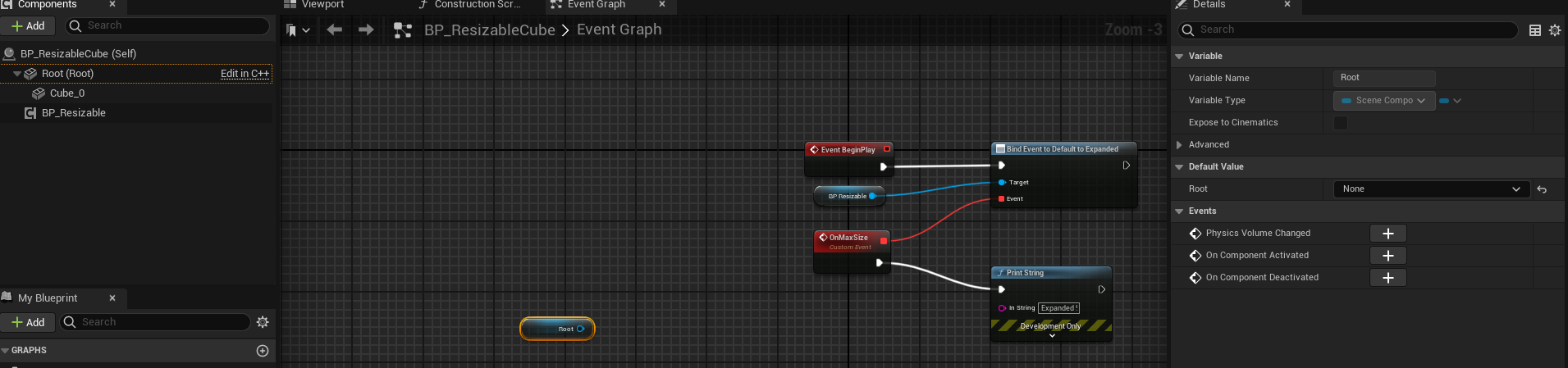
weirdly enough too placing a get root in the bp lets me change the type which doesn't sound intended https://i.imgur.com/nDKbHYR.png
 lunar sleet
Why would you do this to begin with, what’s the use case?
thin cradle
I need a base class for my "puzzle objects" where I'll handle common mechanics ie saving data for that actor etc
I also have multiple type of puzzle objects that inherit from it, but they're all pretty radically different
some of them have a mesh, and that mesh needs to be the root because they're physically simulated and change scale dynamically, which for some reason only works if the physics enabled component is the root
some other don't change scale and aren't physics enabled, being either just static objects with collision or triggers, etc
back when all my blueprints inherited directly from the cpp class it worked fine but meant anything common to all of them needed to be implemented in cpp or be duplicated a bunch
 split rose
hey anyone with a bit of free time to help me out on a small thing
i got a reset level function and im storing the player transform and camera rotation into the game instance, so when reloading the level the player stays in the same place, but somehow the camera rotation just doesnt get applied properly
any idea why?
thin panther
it might be due to the controller rotation
how are you setting the rotation back
sometimes, in certian cases controller rotation is always overriding it
split rose
im doing a set world rotation inside the player blueprint
lunar sleet
thin cradle
back when all my blueprints inherited directly from the cpp class it worked fine...
Can you make your base class include the static mesh with nothing in it as default and just change the static mesh?
thin cradle
wouldn't that mean any inheriting actor that doesn't need a mesh end up with just an empty static mesh component?
can that become a problem in any way
lunar sleet
Not really
thin cradle
I'll do that then
lunar sleet
It’s not tied to any assets so not rly expensive
thin cradle
there's no overhead from a staticmesh with no mesh? is it just treated as nonexistent or smth
lunar sleet
If there is, I’d imagine it’s negligible if it’s got no asset hard ref
thin cradle
oh also while that solves the type changing thing I still can't change anything on the component through the details panel
lunar sleet
How so
thin cradle
even with "editable when inherited" is on
split rose
thin panther
sometimes, in certian cases controller rotation is always overriding it

the bottom part is from another blueprint that triggers the level reset, the top part is connected to the begin play of the player bp
thin cradle

 lunar sleet
thin cradle
even with "editable when inherited" is on
lunar sleet
thin cradle
even with "editable when inherited" is on
Did you recompile both?
thin cradle
yup
nevermind fixed it
my earlier workaround of setting the type through the get node broke it
resetting the type in that fixed it even tho it's the same type
oh and I can change the type in child classes now too. go figure
thin panther
split rose
https://blueprintue.com/blueprint/j4v-p0n7/
yeah, you'll want to be using control rotation, not set world rotation
or unposess, set those, then repossess
thin cradle
thin cradle
oh and I can change the type in child classes now too. go figure
although I need to cast to their respective type whenever doing anything not covered by scenecomponent for some reason
yeah I'm just gonna make the default root a mesh
lunar sleet
thin cradle
although I need to cast to their respective type whenever doing anything not cov...
Prly needs it to access the specific functionality of said component
thin cradle
yeah it's just weird that the same blueprint where I already specified the current type of the root still needs to cast and isn't just aware of that
if it were all cpp I'd get it but BP tends to abstract away stuff like that
trim matrix
can i damage an actor?
 zealous moth
what do i need to do to report all my hits through several layers?

during the trace, i see a green

but i want to report all hits throughout
huh i guess trace by channel doesn't do it
but trace by object does
interesting
thin panther
all traces stop at the first blocking hit
 elfin hazel
One thought would be to have a cooldown time. Timestamp when the player enters. If timestamp + cooldown < current time, then the logic can execute.
thin panther
multi traces will hit any amount of overlaps, but will also stop a the first block
 tidal marlin
Hello. How do I fix the cancellation of Input at the moment when I click on the interface? As for example i hav this input and when i click on widjet buttons in my viewpot it cancle.

 zealous moth
thin panther
all traces stop at the first blocking hit
zealous moth
thin panther
all traces stop at the first blocking hit
not true for objects if you do complex
 thin panther
LineTraceForObjects will perform a collision trace along a given line and return the first Object the trace hits that matches one of the specified Object Types.
trim matrix
gentle urchin
Apply damage
im trying to create an exploding veichle that i can shoot but it doesnt seem to take any damage
there is something i have to use like a collision box?
this is my current bp
 split rose
trim matrix
this is my current bp
split rose
trim matrix
this is my current bp
you'd probably run that event whenever the bullet hits the car
thin panther
trim matrix
this is my current bp
where are you applying damage though
that's receiving damage, which is great
but you need to apply it
split rose
also this ☝️
trim matrix
i think i know, my weapon hits only actors with a tag
thin panther
(just show the code for your damage)
trim matrix
i followed smart poly's zombie game tutorial
 split rose
yeah if the object doesnt have the zombie tag it wont recieve damage
trim matrix
split rose
yeah if the object doesnt have the zombie tag it wont recieve damage
im working on that
faint pasture
zealous moth
what do i need to do to report all my hits through several layers?
multi line trace
zealous moth
faint pasture
multi line trace
I did do that, but it only works if you muti line trace (complex) by objects, not channel
split rose
trim matrix
im working on that
maybe do another line trace with the same input that checks for the tag "destructableObject" or something and then apply the damage
thin panther
zealous moth
I did do that, but it only works if you muti line trace (complex) by objects, no...
no?
read again what the multi line trace does
it returns still after the first block, but returns every overlap between
split rose
(my unreal knowledge is still small so I might not be as helpful) @trim matrix
thin panther
so set the trace channel on those things to be overlap
thin panther
trim matrix
i followed smart poly's zombie game tutorial
yeah that's not great
for a tutorial
trim matrix
thin panther
yeah that's not great
i needed something to start and i wanted a game about zombies so, its at least something
zealous moth
@thin panther

it's all in there
but after first hit, it will not report the next hit
trim matrix
split rose
(my unreal knowledge is still small so I might not be as helpful) <@456226577798...
i've been using ue5 for 5 days so anything i can learn is useful
dont worry
thin panther
zealous moth
but after first hit, it will not report the next hit
you still aren't reading what I'm saying 😭
a multi trace stops after the first blocking hit.
it reports all overlaps between.
so the objects in the world must overlap that trace channel.
you haven't shown me anywhere you doing this
zealous moth
I don't get it, why would the channel differ in results to the objects?
I literally plugged in the same params
and got different results
split rose
@zealous moth make the objects overlap the trace hit not block it
thin panther
 lunar sleet
tidal marlin
Hello. How do I fix the cancellation of Input at the moment when I click on the ...
lunar sleet
tidal marlin
Hello. How do I fix the cancellation of Input at the moment when I click on the ...
Interface means something else here, just fyi. What key are you using for that input action?
lunar sleet
thin panther
Tbh I didn’t realize a line trace can detect overlaps, that’s nice
thin panther
zealous moth
well excuse me for not reading it right the first 5 times
no problem, if you result in issues like camera clipping from overlapping visibility, you may consider a custom trace channel for that
zealous moth
yeah i knew that part, but I completely forgot that most SMs block the channels all the time
so tracing by objects makes more sense now
lunar sleet
Custom collision channels/objects are also an option
thin panther
absolutely
though i'd only have one
and apply a series of modifiers based on hit object, probably via gameplay tag
versed sun
hmmmm...
should the amount of BP nodes you have on the graph make a difference on FPS, but only if that window is open ?
 dawn gazelle
I've noticed that it can.
versed sun
I have a large BP, and if that Graph window is open , i get 10-20 fps
if the windown is closed/ on a different graph, FPS is 70

can a BP be "too big" ?
dawn gazelle
Probably not. Like, if you were to organize that into separate event graphs, then you may not see the same problem.
versed sun
or Convert to Function
lunar sleet
Usually better to break it down into functions if it gets too big
versed sun
i already have a few functions
 dawn gazelle
Collapse nodes 😄
versed sun
ewwww
lunar sleet
I’ve seen people get lost in their own code cause they collapsed
lunar sleet
versed sun
I have a large BP, and if that Graph window is open , i get 10-20 fps
if the wi...
Other than sluggish response which can be annoying to code in, editor fps doesn’t really matter
versed sun
i get local variable errors when i collapsed things
 elder lodge
versed sun
i get local variable errors when i collapsed things
elder lodge
versed sun
i get local variable errors when i collapsed things
collapse them differently
make sure the right varaibles are either scoped right or input/output correctly
don't collapse willy nilly
lunar sleet
Or just use functions/macros and call ‘er a day
versed sun
yup, didnt know if there could be an issue with too many functions
was driving me crazy that sometime when i play its 15fps, and sometimes its 70
elder lodge
Before I get too into the weeds on a zero-g platforming feature; for "magnetic boots" that will let me walk on any surface, what are the nodes that will help me with this? Probably some raycast out of the feet, right? Or should I also look into "welding" them if it was, say, a movable plane?
I just know if I have boots imparting force, I'll need extra logic if it's on a moving surface.
versed sun
Did you try the Directional and Planet Gravity plugin?
no clue if its any good...
 runic pagoda
Any idea on this one? Pressing T triggers the animation no problem, but calling it from the Event -doesn't- play the animation.
The node still gets triggered (I put a breakpoint there, and the montage node gets triggered) it just doesn't play the animation, but pressing T does play it. I see no functional difference between the two though.
 lunar sleet
Idk if you can extend that in bp but try #multiplayer
lunar sleet
runic pagoda
Any idea on this one? Pressing T triggers the animation no problem, but calling ...
Same goes for you
dawn gazelle
It's not a blueprintable class.
elder lodge
versed sun
Did you try the Directional and Planet Gravity plugin?
no clue if its any good....
i've already got gravity implemented to my satisfaction so far, it's the flying/walking transition which I may have to rewrite
dawn gazelle
Put BlueprintType, Blueprintable in the UCLASS specifier, but i'm not sure how useful it will be as it doesn't look like anything within the C++ class is exposed at all to blueprints.
I suppose if you have your own functions and variables exposed in your own C++ subclass you can do some things with it in blueprint.
lunar sleet
Is that a function you were showing with delays in it?
You could use a bool check at the start of it
Well, so you want the sounds to queue after each other?
Have you tried #audio for this? There might be pre-built or obvious solutions
What is this protection you are talking about, define precisely what you want to happen if a player quickly makes 2 overlaps back to back
And why are you allowing this instead of doing what #audio suggested by using a distance check
Depends, I’m having a hard time picturing your use case
Alright
So you want to account for those players that go back and forth in the bunker’s door?
 narrow pendant
how do I get all actors of class including child classes? I've got a BP_TreeBaseClass and multiple child BPs. I would now like to find any of those child BPs around an actor
lunar sleet
K well delays are usually the wrong choice. If you want something you can stop, other than using a coroutine plugin, your best bet is a timer by event
lunar sleet
narrow pendant
how do I get all actors of class including child classes? I've got a BP_TreeBase...
Just sphere overlap or whatever you’re using, cast to the parent class
 proven garnet
Hey I need some guidance from a nice person. I'm trying to update the score in the bottom right corner of the screen when I walk over the coins. I have set the coins to destroy on overlap with the player character but I can't seem to connect the coin BP to the UMG BP in any way. Just getting errors. I tried googling casting but tbh I don't really know what to ask for to get a good google result.
Appreciate if anyone could check this out and see what I can do to get this to work. I'm probably just missing something easy. Thanks a bunch!


 narrow pendant
lunar sleet
Just sphere overlap or whatever you’re using, cast to the parent class
narrow pendant
lunar sleet
Just sphere overlap or whatever you’re using, cast to the parent class
I see, thanks
thin panther

What are the Set Timer by Function and Event Name Nodes in Unreal Engine 4
Source Files: https://github.com/MWadstein/wtf-hdi-files
 cyan spire
took me hours to understand why "cast to" does not work, figured out it does not actually cast into another blueprint but casts FROM another blueprint ffs damn naming scheme, im not a programmer 😁
lunar sleet
cyan spire
took me hours to understand why "cast to" does not work, figured out it does not...
Neither of those is accurate
narrow pendant
oh there's a sphere overlap actors node, never saw that 😄
thin panther
cyan spire
took me hours to understand why "cast to" does not work, figured out it does not...
i think you're confused.
because both of those aren't true
a cast is type conversion
taking a reference and seeing if it is of a more specific type
lunar sleet
A cast checks if a ref is of a certain class and if successful allows you to access its innards
thin panther
:P
lunar sleet
narrow pendant
oh there's a sphere overlap actors node, never saw that 😄
Yeah, add a for each loop on it
narrow pendant
lunar sleet
Yeah, add a for each loop on it
yup yup I got it 🙂
 thin panther
because it's called a cast
why rename the fundamental thing, that is used across languages, because people interpret a meaning it never had
lunar sleet
thin panther
a cast is type conversion
This is why I don’t like using this definition
narrow pendant
🧙♂️ because wizards
lunar sleet
Yeah, the hogwarts people will get confused and think it’s a magic wand
narrow pendant
"cast is a type conversion" did not help me back when my understanding of programming was in the negative digits
lunar sleet
Type conversion can make a rookie think you can turn any ref into some other bp
thin panther
so many people do it, because they jumped into a programming language without programming knowledge, which leads to false assumptions.
it's a common mistake, but pretty exclusive to unreal
cyan spire
Oh my god what have i done to this channel at night 😆
thin panther
yeah a type check is a better way to put it
narrow pendant
"Is This A and Does It Really Exist" is how I think about it (as in is it instantiated, because you might have the correct type of object but it might still return none)
lunar sleet
proven garnet
Hey I need some guidance from a nice person. I'm trying to update the score in t...
For one , use a cast instead of == actor, and second, I don’t see a call to change the number anywhere in your overlap
thin panther
that would be a good middle ground.
i still don't like renaming it tho 😭
cyan spire
Laura again, i thank you for your help, this is the one that actually makes sense for me
thin panther
it just returns a more specific pointer. its still pointing to the same thing
dawn gazelle

Google Docs
What is Casting? Casting is a means of making a less specific object reference more specific so that you can access the functions and variables that are accessible to that specific class. Casting will only succeed if the input object is of, or inherits from, the defined casted class. In the be...
lunar sleet
A Google doc? Did you make this?
dawn gazelle
Some time ago, yea <_<
thin panther
Becomes also suffers from the issue that calling it type conversion does, where it also leads to the assumption that anything can become anything
proven garnet
lunar sleet
For one , use a cast instead of == actor, and second, I don’t see a call to chan...
I've tried to do it like this but I just don't understand how to get the coin BP to talk to the HUD
 lunar sleet
dawn gazelle
Some time ago, yea <_<
lunar sleet
dawn gazelle
Some time ago, yea <_<
Only issue I have is on mobile it seems like the picture resolution is garbage 😀
cyan spire
Holy, half discord is discussing about a single name, this wasn't my intention
thin panther
tbf the explanation is only 2 lines. the rest of it is practical examples, debunking specific examples of what it isn't, and an faq :P
 stuck sentinel
how can i fix this? ive only been using locomotion until now
narrow pendant
it's a controversial topic just like math channels ducks
lunar sleet
proven garnet
I've tried to do it like this but I just don't understand how to get the coin BP...
Where is your widget created, in the hud bp?
thin panther
cyan spire
Holy, half discord is discussing about a single name, this wasn't my intention
it's a pretty useful discussion though
stuck sentinel
stuck sentinel
how can i fix this? ive only been using locomotion until now
its only when i run
cyan spire
As a beginner i gotta say naming scheme is what makes it extremely hard for me to get most of the things, and people say if you had a programming background it seems logical. But for me it does not
proven garnet
lunar sleet
Where is your widget created, in the hud bp?
Yes, I have updates for health and ammo also but right now want to figure out score.
 lunar sleet
stuck sentinel
its only when i run
lunar sleet
stuck sentinel
its only when i run
Looks like a collision thing, did you move your capsule down or something ?
thin panther
unreal is a hard adjustment especially coming from nothing, indeed
cyan spire
Can't often guess what it would do, even with the most remote explanation i could come up with, it often has nothing to do with it
narrow pendant
most things are only half as scary as the big fancy word it's named after make them seem
cyan spire
narrow pendant
most things are only half as scary as the big fancy word it's named after make t...
exactly what i mean
lunar sleet
proven garnet
Yes, I have updates for health and ammo also but right now want to figure out sc...
On overlap, get player controller, get hud, cast to your hud bp, call the function - provided this is not a multiplayer game
narrow pendant
cyan spire
exactly what i mean
I've struggled with understanding what a cast really is for a long time too I think it's a rite of passage for us non programmers 😄
cyan spire
Biggest problem was for me to grasp that there are multiple (like hundreds) of nodes which sound the same, have technically 80% of the same function, can be only used for certain things
lunar sleet
narrow pendant
I've struggled with understanding what a cast really is for a long time too I th...
Blueprint comms video is the only thing that cleared up for me, mind you I hadn’t read Datura’s blog back then
proven garnet
lunar sleet
On overlap, get player controller, get hud, cast to your hud bp, call the functi...
Not multiplayer, just learning! Thanks! I'll try that, hopefully doing it the right way.
thin panther
an important thing to always keep in mind with unreal is that it's a AAA engine. a lot of the stuff, if you're just jumping straight in assumes experience.
lunar sleet
You’re not in Roblox anymore 😀
thin panther
the official guides for beginners and such help simplify that, but a lot of folks don't even know they're there
 tardy prawn
i implemented an interface in a parent, then in a child i see that one interface function is grey color (function), and other is yellow (why, what is this) ?
proven garnet
lunar sleet
On overlap, get player controller, get hud, cast to your hud bp, call the functi...
Haha I'm too stupid for this. I don't know how to do anyof that. But thanks. I think I'll just watch some other tutorials on other stuff..
lunar sleet
proven garnet
Haha I'm too stupid for this. I don't know how to do anyof that. But thanks. I t...
What do you mean, I gave you the exact nodes
Just type
thin panther
proven garnet
Haha I'm too stupid for this. I don't know how to do anyof that. But thanks. I t...
they gave you all the nodes
stuck sentinel
lunar sleet
Looks like a collision thing, did you move your capsule down or something ?
there is no collision its just samples i downloaded
thin panther
damn beaten to it again
lunar sleet
thin panther
they gave you all the nodes
They ? 😀
stuck sentinel
cant i make it not play the running animation during a y velocity between 0-100
lunar sleet
stuck sentinel
there is no collision its just samples i downloaded
Did you move the capsule?
lunar sleet
Follow it again from the beginning
stuck sentinel
he has the same issue but he doesnt show it
cyan spire
lunar sleet
You’re not in Roblox anymore 😀
Honestly, i learned stuff like 3DSmax,Photoshop,Vegas,Premiere,Illustrator,Painter (at release), and did custom models, animations and mods in general for CounterStrike:Source when i was 14 in 2009. But actually using UE with zero coding experience is the biggest struggle i ever had in my life learning anything.
proven garnet
lunar sleet
What do you mean, I gave you the exact nodes
I mean I don't know how to do that. I assume you mean here. But I mean going from this to what you said is like a couple of hours of digging through documentation. I've got like 20 hours into UE.
 lunar sleet
proven garnet
I mean I don't know how to do that. I assume you mean here. But I mean going fro...
lunar sleet
proven garnet
I mean I don't know how to do that. I assume you mean here. But I mean going fro...
Go back and read my message thoroughly
stuck sentinel
is two years enough to stop following tutorials and courses and instead start problem solving and googling your issues
lunar sleet
stuck sentinel
is two years enough to stop following tutorials and courses and instead start pr...
2 years?! You’re 1.7 years overdue
thin panther
cyan spire
Honestly, i learned stuff like 3DSmax,Photoshop,Vegas,Premiere,Illustrator,Paint...
You really want to tackle some of that coding experience. Learn some fundamentals
You can't use bp without em. It's a programming language
lunar sleet
I mean you should mostly stop following random tutorials that are not peer reviewed within the first 3-4 months
 blissful grail
stuck sentinel
is two years too much or too litte
blissful grail
stuck sentinel
is two years too much or too litte
Too much. You're in tutorial hell. IE - your progress/growth is massively stunted.
Just build stuff
cyan spire
thin panther
You really want to tackle some of that coding experience. Learn some fundamental...
Im 700+ videos of Wadstein in, i guess im gonna do that when im through with him
lunar sleet
cyan spire
Im 700+ videos of Wadstein in, i guess im gonna do that when im through with him
Random tutorials and MatWadstein tutorials are not the same
stuck sentinel
yeah i am problem solving
lunar sleet
His channel is one of the exceptions ^
stuck sentinel
why is the guy still walking in the air thats not perfection
 minor dew
Does anyone encountered here a bug when reparenting a user widget revert back to the previous parent after relaunch?🤔
lunar sleet
minor dew
Does anyone encountered here a bug when reparenting a user widget revert back to...
#umg for widgets
stuck sentinel
no no you guys got it all wrong i havent been two years on unreal im just asking in two years time is it enough to stop following tutorials and courses
proven garnet
lunar sleet
Go back and read my message thoroughly
I'm drawing a blank. I've read your message carefully now but yeah. Maybe I should do some other tutorials. I don't know.
 lunar sleet
proven garnet
I'm drawing a blank. I've read your message carefully now but yeah. Maybe I shou...
lunar sleet
proven garnet
I'm drawing a blank. I've read your message carefully now but yeah. Maybe I shou...
Stop with the tutorials lol
proven garnet
I think I need tutorials, I'm very new
lunar sleet
proven garnet
I think I need tutorials, I'm very new
What you need is reading comprehension and more than 30s of patience
I’m going to tell you how to do this again
Pay attention
If this overlap code is on your coin, delete the player char node, the == and the branch
thin panther
stuck sentinel
no no you guys got it all wrong i havent been two years on unreal im just asking...
You don't really want to be following tutorials still after like 6 months maybe
You should ideally be able to start learning in other forms
lunar sleet
proven garnet
I think I need tutorials, I'm very new
From other actor cast to your char bp, then on success (not failed pin the other one) get player controller, get HUD, cast to the HUD bp, then from its return value call the function that increases your coins
Follow these instructions to the letter
“More tutorials” is rarely ever the answer
cyan spire
Not wanna act like its a good idea but would be awesome to have a newbie bp channel in this discord where we can discuss the most basic bottom stuff everyone should really know and one channel for actual questions
lunar sleet
cyan spire
Not wanna act like its a good idea but would be awesome to have a newbie bp chan...
Or here, it doesn’t really matter
feral ice
is there a costum switch on where i can switch on costum values. Like if i have 10, 25, 30 and i have value 10 it should be the first output. What am i looking for?
lunar sleet
feral ice
is there a costum switch on where i can switch on costum values. Like if i have ...
You mean custom switch? Maybe like a select?
 lunar sleet
I’d prly put it at the beginning of the function. Promote the handle to a var and check if it’s valid. If not, run the timer, if so, clear and invalidate it
proven garnet
lunar sleet
From other actor cast to your char bp, then on success (not failed pin the other...
Something like this?
 blissful grail
I don't believe that it removes 2/3rds. It removes more.
lunar sleet
proven garnet
Something like this?
What does the warning say
proven garnet
lunar sleet
What does the warning say
 blissful grail
Just hover over the node and there will be a little button you can click at the top right of it.
lunar sleet
proven garnet
What class is your UMG HUD made from then? 😁
proven garnet
lunar sleet
What class is your UMG HUD made from then? 😁
Widget Blueprint
lunar sleet
Test and find out what works best
dawn gazelle
proven garnet
What class stores your UMG Player HUD reference you want to use? In what blueprint did you create it in?
blissful grail
Ah - maybe that is messing with it then.
lunar sleet
Click on the node, hover right above it
You should see an ellipsis
That’s not what dyslexia is but ok
I believe it means you read blueprint as blpreutni or such, you can google to find out for sure 😛
trim matrix
you both don't know what dyslexia is
lunar sleet
trim matrix
you both don't know what dyslexia is
Hence the disclaimer
 noble ledge
Is it possible to set defaults to a BP struct somewhere?
trim matrix
noble ledge
Is it possible to set defaults to a BP struct somewhere?
defaults tab
in the struct
asset
lunar sleet
proven garnet
You can try going to your hud class that’s not a hud, hit file, reparent and select HUD. That might fix your problem, unless of course you put stuff in it that’s only meant to work in widgets, in which case you’re going to need to redo some of this
noble ledge
trim matrix
defaults tab
Ah ok thank you!
blissful grail
I forget the exact specifics - I'm not in BP that much these days 😅
proven garnet
lunar sleet
You can try going to your hud class that’s not a hud, hit file, reparent and sel...
Yeah I'm only using widgets in the UMG thingy and it was super easy to build and implement the HUD through that. Following this UE tutorial but wanted to try some stuff in my own project instead of just downloading their project and redoing everything they do.

Epic Developer Community
In this course, you’ll learn how to create basic user interfaces for the user using the Unreal Motion Graphics (UMG) UI Designer.
 prisma cedar
Like in Elden Ring for example
trim matrix
trim matrix
https://media.discordapp.net/attachments/728552296908193843/1173677065703268432/...
What the fuck?!
This does work
lunar sleet
That is what I said yeah
 lunar sleet
trim matrix
What the fuck?!
lunar sleet
trim matrix
What the fuck?!
With what array size
trim matrix
The array size is determined by the actors array gathered by get all actors of class
It is 2/3, just tested it
Its unimportant
lunar sleet
Did you test with any other array size?
 trim matrix
trim matrix
trim matrix
the last index changes when removing the elements (??)
isn't that set array suppoused to be cached?
It keeps returning the current last index instead of what it was at the time that node was executed

the first one is the index of for loop
the result is the same as if the last index was gotten like this

the same occurs for other var types:


arrays aren't cached
that makes sense actually
i think the person who made this had no idea that usually vars get cached besides arrays, or was trying their hardest to make this look unreadable

 lime basin
I have made 3rd in c++ I have added new Enchanted input action here are a few questions and issues I am facing for the life of me I can't figure it out.
Why is the event graph in BP_ThirdPerson empty? I understand it's partly due to the code, but can you clarify?
I get that there are transition variables in AnimBP that control transition between animations but how does the Code know when these are activated? I don't see them in the code, or I don't see inputs in the Blueprint Evenet graph so how?
I added a custom action detected in CharacterBP Event Graph and set up a state machine and bool in AnimBP to control transitions. It should activate when I press RMB and return to idle. However, I'm unsure how to get it to work. In the Event Graph, I see no way to reference the bool that controls the transition in AnimBP. Can you provide guidance?
I am way to used to Unity animations so this is a little bit of challenge for me wrap my head around
 wary acorn
Hi! I'm fairly new at this, I hope I'm in the right place.
I'm building a respawn system for a school project, where you destroy the actor to trigger the respawn. Theres a 2 second delay there, and during that period my camera view weirdly flips to the side. It goes back to normal once the new actor spawns.
Any advice or tips on how to fix this would be greatly appreciated.
(I've seen other similar posts suggest to use set target view with blend, but I didnt understand)
 fiery swallow
lime basin
I have made 3rd in c++ I have added new Enchanted input action here are a few qu...
fiery swallow
lime basin
I have made 3rd in c++ I have added new Enchanted input action here are a few qu...
Are you properly sending or setting that information to the animbp? Beginners usually do this by retrieving the variables from the character and then setting it in the animbp every frame. There's lots of tutorials on this
 dark drum
Does anyone know if it's possible to make a component only visible in the editor when the actor is selected?
fiery swallow
wary acorn
Hi! I'm fairly new at this, I hope I'm in the right place.
I'm building a resp...
Youre destroying the character you were using? If so then you could use a view target blend, or you could setup a spectator pawn
fiery swallow
wary acorn
Hi! I'm fairly new at this, I hope I'm in the right place.
I'm building a resp...
How do I use the Set View Target with Blend node to change cameras during gameplay using Unreal Engine 4 Blueprints.
Source Files: https://github.com/MWadstein/wtf-hdi-files
lime basin
fiery swallow
Are you properly sending or setting that information to the animbp? Beginners us...
I am sure I do I just dont know how to use that bool that controls transition of animation in AnimBP for my RMB input action how do i link them together
 fiery swallow
lime basin
I am sure I do I just dont know how to use that bool that controls transition of...
fiery swallow
lime basin
I am sure I do I just dont know how to use that bool that controls transition of...
Oh you already have the variables setup properly in the animbp? If that's the case you just need to plug it into those little transition circles. You can open them by double clicking it lol
I forget what they're called... but you can see them in the picture you posted, it's the little circles next to the transition arrows
I'm on my phone so I can't really show it
lime basin
fiery swallow
Oh you already have the variables setup properly in the animbp? If that's the ca...
yes everything is set up and enchanted input action is set up, I have added animations just dont know how to link this bool to Input
fiery swallow
dark drum
Does anyone know if it's possible to make a component only visible in the editor...
Not when it's selected. You'll need to use variables for this.. usually something called like "debug show components". And it's logic lives in the construction function
lime basin
 fiery swallow
You can probably have some logic for when it's selected through c++ but nothing like that is exposed to blueprints
lime basin
UPROPERTY(EditAnywhere, BlueprintReadOnly, Category = Input, meta = (AllowPrivateAccess = "true")) UInputAction* AimAction;
fiery swallow
lime basin
This should work, if it doesn't there is a logical error.
It's not being set right. You can use a print string to see if it's properly updating
lime basin
It does work but I dont know how to set up AnimBP to use this action
that isAminingBP to connect it to this Property in blueprint
lime basin
fiery swallow
It's not being set right. You can use a print string to see if it's properly upd...
I will try this
dark drum
fiery swallow
Not when it's selected. You'll need to use variables for this.. usually somethin...
I thought that would be the case. I'll just have an editor function to set their visibility in the editor.
lunar sleet
wary acorn
Hi! I'm fairly new at this, I hope I'm in the right place.
I'm building a resp...
If you’re destroying the actor when respawning it and the camera’s attached or it, it might be going to 0,0,0
wary acorn
fiery swallow
https://youtu.be/uW86ZGxesmc?si=4XgsdpWgG9fU-LRp
Thank you! Ill check this out
fiery swallow
wary acorn
Thank you! Ill check this out
Yeah just to clarify, after watching the video. You want to change the camera just before the actor is destroyed
 proper wyvern
does anyone know if there's a way to print the name and triangle count of all visible meshes?
 frosty heron
lime basin
that isAminingBP to connect it to this Property in blueprint
frosty heron
lime basin
that isAminingBP to connect it to this Property in blueprint
In your anim graph, on event anim update. Set the isaimingbp of your animbp to isaimingbp of the owner of the anim instance
 ocean gate
Any tips on how I should approach making a flexible toggle switch system in UE? I want to make it as flexible and modular as possible, so I'd rather not hard code in any specific actor classes it should work with. For instance, I imagine having two actors, a switch and an actor of some kind (a moving platform, a light, a door etc.) and I can assign the switch to the actor I want inside of the editor itself without having to enter the blueprint. Then when I toggle the switch it'll pass on to the target actor that it should be activated. Is this possible?
elfin hazel
The switch is an actor with an actor variable that is instance editable. You can now select any actor in the scene for that variable.
The switch has some method to be interacted with. When that happens, it calls an Enable or Disable interface message to the actor.
The platform actor implements the interface and responds accordingly. Something like that?
Or, the switch can be a component. It's location and rotation is set to world. When interacted with, it gets its owner and interface calls. Now that component can be attached to any actor in the scene, or in a blueprint.
ocean gate
Ah!! Interfaces seems to be the way I'm thinking of. Thanks so much for your help!
yep that did the trick perfectly, thanks again!!
 storm shale
Does anyone knows how to create widget and add it to viewport without creating a hard reference to that widget?
I have a multiplayer project, where there is a login widget, and that will only be created when entering the lobby.
Once that's done, it won't be created again in the actual game, which is a different level alltogether
The issue is am creating the widget from Player Controller, so that causes it to always be loaded with Player Controller regardless.
versed sun
once you change the level, dosnt the ref reset ?
storm shale
I thought about creating the widget in the Level Blueprint, but since it's an online project, Begin Play and Event Tick only fire in the dedicated server
 lofty rapids
what would be a soft reference ?
storm shale
versed sun
once you change the level, dosnt the ref reset ?
yes but the reference to the blueprint still exists, like the Class and blueprint. The widget no longer exists but all their code or whatevs is still loaded, in case u were to create them etc.
storm shale
lofty rapids
what would be a soft reference ?
I tried that but they still are treated as hard references, so now idk what to do.
lofty rapids
i'm asking because i don't really know the difference
hard/soft idk
are you trying to not create at all ? or not even be able to create ?
storm shale
I saw this post about them https://medium.com/advanced-blueprint-scripting-in-unreal-engine/object-references-in-blueprints-4c0df7f4dc1d But it seems to be partially misinformation (or most likely outdated) cuz it doesn't work in practice
Medium
Object references are one of the building bricks of every project. However, when you try to manage them in blueprints, there are many…
creating soft reference variables still loads them as if they were hard references
storm shale
storm shale
creating soft reference variables still loads them as if they were hard referenc...
You can test it in a new project. Create 2 objects, Only create a variable to the second object in one of them, as a soft reference.
Go to reference viewer
it's treated as a hard reference
dawn gazelle
It's all in how you are attempting to access the references. If you need a hard reference then there's no point in using a soft reference.
Creating a widget doesn't specifically require a hard reference to the widget class. You can have a soft class reference to User Widget. You can then set the value in that reference to the actual widget class you want to use when you go to load it, you'd async load it, but it would be a hard reference to the UserWidget class, but it wouldn't be a hard ref to the soft class of the actual widget class you want to use.
So then, this prevents this bluerpint from loading the actual widget class before it is actually required, but it still would require a hard ref to the User Widget class, which is more than likely going to be loaded anyway.
lunar sleet
Which part is not working? Also I said use branch not flip flop, it’s not reliable. Additionally, there’s an isValid node you can use, you don’t need branches for that part
thin panther
storm shale
it's treated as a hard reference
not in memory though
i mean you can look at that yourself
the implementation is not hidden
lunar sleet
If soft refs didn’t work it’d be a pretty big deal and we would know 😁
thin panther
a soft ref is basically an asset path
they're not going to add functions to asyncronously load them if they're just loaded anyway
sure, the path is loaded
but the asset isn't
lofty rapids
whats not working about it, is the sound playing ?
storm shale
thin panther
i mean you can look at that yourself
When I open Size Map and set it to show memory it still shows that. I know that's how it's supposed to work in theory, but, imma share ss
lunar sleet
Ah what fun 😀
storm shale


I jsut created 2 objects, Atest and Btest, created a soft ref variable to B test, and it shows that.
thin panther
storm shale
When I open Size Map and set it to show memory it still shows that. I know that'...
that's not in theory though.
that is how it works.
you can literally look how TSoftObjectPtr works in c++
the size map means nothing when thats how the pointer works
sure when the soft pointer is loaded it will take that
but not until
storm shale
thin panther
the size map means nothing when thats how the pointer works
then the size map is broken? I legit want to know, cuz ti's confusing when different sources say different stuff
thin panther
showing just the size of basically a string path wouldn't be much use in a size map
storm shale
storm shale
thin panther
that's not in theory though.
that is how it works.
you can literally look how TS...
perhaps it could be something that works in c++ but not in blueprints?
thin panther
storm shale
perhaps it could be something that works in c++ but not in blueprints?
no, they work in blueprints
storm shale
thin panther
no, they work in blueprints
Is there any way that can be verified?, cuz ReferenceViewer and SizeMap both claim it's not working properly, as per the screenshots I shared.
thin panther
their long history of use and the fact that they exist because of the hard reference problem?
i mean i suppose if you really wanted to you could do some memory profiling with insights
but it's not worth it
 old orbit
Hi! Im new to unreal engine, I need to make my cinematic camera into my players view when i start the game so i can have the animation of other things playing while the camera is doing its own animations. I assume this is a blueprint thing. Anyone know how something like this could be easily done? Thank in advanced. 🙂
storm shale
thin panther
but it's not worth it
But both the tools provided by the engine to see references say they don't work. How come you be so confident and blindly believe they do XD. I just want to understand, if there's smth am missing... Like. I shared 2 screen shots one of sizemap and another one of reference viewer, They both show the soft reference as if it was a hard reference.
thin panther
storm shale
But both the tools provided by the engine to see references say they don't work....
How come you be so confident and blindly believe they do
Because there is literally 0 reason for them not to. From the source code. A soft pointer is not valid until loaded, thus it is not a valid pointer. The hard pointer gets made when you load it


it would defeat the whole purpose if it was an always loaded hard ref
the size map you are probably seeing is from the internal weak pointer it keeps
which is not valid
lunar sleet
It also helps having been around for longer than 2 weeks 😀
dawn gazelle
If you have a reference to an asset, it needs to know about that asset otherwise how would you be referencing it?
If you have a soft reference to an asset, it still needs to know about the asset BUT it doesn't need to load the actual asset. That includes the soft reference definition itself - if you're referencing it as the asset, then it must know about that asset, so of course it will be loaded.


 lunar sleet
dawn gazelle
If you have a reference to an asset, it _needs to know about that asset_ otherwi...
lunar sleet
dawn gazelle
If you have a reference to an asset, it _needs to know about that asset_ otherwi...
Telepathy 🙃
thin panther
thank you, for having the editor open to demonstrate it :P
versed sun
Here is what I came up with, but I'm not sure what you are doing with Volume Multiplier = 0
Also not sure what float AC Ambient Sound Vol A/B do
but , this plays 1 sound for 2 sec, then stops it
if you try to play a 2nd sound ,it waits untill first sound is finished before playing 2nd
 lunar sleet
What’s the current behaviour?
versed sun
here ya go
bail on Flip Flops unless its quick and dirty testing

np, When there is a branch choosing between two similar paths, you can Usually find a better way
makes it easier to read imho
 oblique ibex
Okay so I am new, and I have this emissive material
And I want to infinitely shift the color of it all the time
The goal is: Switch the Material To the emissive material, then have it last 10 seconds then go back to the previous material
Its like an invincible state so is there any way I can infinitely shift the color over and over?
To replicate the code its just start a new 3rd person template, and put the code at the end of the third person blueprint event beginplay


 spark steppe
you can do all of this within the material
 foggy topaz
I am trying to set up a blueprint for a UI Button where when you click it, you create a session
I am following this tutorial where the image is from.
For me, "Cast to TestGameInstance" isn't appearing for me. How do I fix this?

It's like my Game Instance doesn't even exist
 carmine palm
Are there built in things for interaction? or do I need to add blueprints to every object in world that is interactable and check closest actor and give them the ability to press E or whatever to use
dawn gazelle
carmine palm
Are there built in things for interaction? or do I need to add blueprints to eve...
Actor Components & Class Heirarchy
Biuld the logic once, reuse it 🙂
oblique ibex
spark steppe
you can do all of this within the material
Can you tell me how?
 rancid crag
I am having an issue with my bitmask enumerator. Every time I close my project the enumerator I assigned to the bitmask gets reset to "None" even though I make sure to compile and save beforehand. Does anyone know how to solve this issue?
 carmine palm
dawn gazelle
Actor Components & Class Heirarchy
carmine palm
dawn gazelle
Actor Components & Class Heirarchy
Yea I know about re-using. I was just curious if theres built in functions for doing it without me doing it the long way. or if I need to do from beginning: IE object>getClosestActor->send the E ui>highlight the object somehow>etc
dawn gazelle
carmine palm
Yea I know about re-using. I was just curious if theres built in functions for d...
Well, there's nothing built in to do that specifically. If you create it as an actor component then you'd only need to build that kind of logic once, and then just attach that component to whatever actors you want, preferably at the lowest level class that can support it so that any children of that class will also have that component implemented and you don't have to keep adding it to more and more actor classes.
Then if you ever need to make changes to the logic, you do it in the component and it'll update for all instance of it.
carmine palm
Yea thats what I did on an earlier projectfor a "pickup" function for attaining points from different objects
and just had it check object type that was stored on a struct on the objet
object
Okay I'll make a base class
 hexed wharf
I've been racking my brain over this for past few hours I need some help
I have my BP_Player Blueprint, and I want to be able to make a reference to it so that I can access the variables inside of it, but I do not want to use a hard reference (so no cast to BP_Player).
I want to use a blueprint interface, but I don't know how to attach my BP_Player as an object reference and then use that Object reference in other blueprints to access the BP_Player reference itself (kind of like cast to BP_Player) and get variables stored inside BP_Player (kind of like as BP_Player).
I've tried adding the ouput of my interface to be the Object reference of BP_Player, but that does not seem to work, and I'm kind of confused.
A picture would be nice, or a video (I've already looked at many YouTube videos on blueprint interfaces, so please don't send me those).
dawn gazelle
hexed wharf
I've been racking my brain over this for past few hours I need some help
I have...
If you want to access variables of a spawned actor, you need a hard reference to that spawned actor.
If you want to access the class defaults of an actor class, you need a class reference (which is still a hard reference technically) and you can get defaults from that.
Interfaces only allow you to feed in references and attempt to execute the interface on the object that implements that interface and how that object implements it. It doesn't allow you to just get something from no where.
The closest I can think of what you're trying to do is maybe make a Blueprint Function Library and create a pure function in it that:
- Gets Player Character 0
- Casts to Player Character 0
- From the cast, reads some values that you want.
- Returns the values.
This would then allow you to do something like...
GetPlayerHealth
and it'll give you a node that takes no inputs, and is pure, and only returns the player's health value.
hexed wharf
So a hard ref is inevitable
dawn gazelle
Example here I've done in a blueprint function library. When I call to GetPlayerHealth in another blueprint, there is no hard reference to Character or AbilitySystemComponent in the actor it's accessed in, however, there is a hard reference in the function library, so in the end, when it loads the library during game time, it will have to load these assets - luckily they're common ones anyway so they're most likely already loaded.


But otherwise, yes, if you want to access variables of something, that something has to exist in order for you to pull values from it.
And you need to somehow get a reference to that something.
elder lodge
any tips on getting a camera and the parent of the camera to counter-rotate so that the view doesn't change but the body does?
My camera LERPs from relative rotation to 0
But retrieving that in the world rotation for the parent to rotate works-ish but for a longer move squiggles a bit; I think it may be due to the variables updating as it goes
I could set it to snap and call it a day for now, but just throwing it out there...
hexed wharf
dawn gazelle
Example here I've done in a blueprint function library. When I call to GetPlaye...
woah... looks complicated I think I'll just cast then
 jagged cipher
Hey all, is there any way to set just few values of a structure without affecting the rest of it? I have a structure that can be later on expanded so just doing simple hooking up all the pins might cause issues later on if the struct will expand.
dawn gazelle
jagged cipher
Hey all, is there any way to set just few values of a structure without affectin...
Set members, then you can pick and choose which to set.
jagged cipher
dawn gazelle
Set members, then you can pick and choose which to set.
Thx
dawn gazelle
Has to be done by ref though, so if you're accessing it from a copy it won't work.
oblique ibex
oblique ibex
Can you tell me how?
Could someone help me with this? I'm new to UE5 and UE in general
The person who replied said it's all possible in materials but i don't know how?
lunar sleet
oblique ibex
Could someone help me with this? I'm new to UE5 and UE in general
The person wh...
For that side of the engine you want to ask in #materials
prisma cedar
How do I make the player run in a circle when holding left/right?
Like in Elden Ring for example
 modest tinsel
How can I limit the camera rotation speed so I cant just spin my camera a million miles an hour?
 charred berry
@prisma cedar
ignore above not intended, need this https://forums.unrealengine.com/t/tutorial-blueprint-spline-locked-sidescroller-e-g-klonoa-pandemonium-style-game/8396

Epic Developer Community Forums
I’m very new to blueprints so please feel free to share if you know a better way to achieve the same result and please do post videos of anything you make with this method. Would be great to see what people come up with. This example uses Blueprint sidescroller project as a start point and will modify it to the point your character is locked to...
prisma cedar
charred berry
ignore above not intended, need this https://forums.unrealengine.com/t/tutorial-...
This will help me with making the player run in a circle?
Why is a spline needed?
charred berry
yes, the ex isnt specific to that, but you can shape spline to be a circle
Its one way of doing it.
Look at the link, it shows the player following the spline. The shape isn't a circle, so move spline points.
afa the key issue, not sure, prob;. fairly easy in blueprint
if keypress is chosen move player along spline
rancid crag
I think Joe is wanting a 3D camera system like Super Mario 64 or Ocarina of Time where if you hold left or right it will slowly rotate the camera in the direction the player is moving and hence you will move in a circle due to the camera simply rotating. I could be wrong though
prisma cedar
rancid crag
I think Joe is wanting a 3D camera system like Super Mario 64 or Ocarina of Time...
Yep but the player actually runs in a circle.
charred berry
same thing essentially, key press, turn character around, for that If I recall, you load character blueprint and add rotation
then yes what I said above
faint pasture
prisma cedar
Yep but the player actually runs in a circle.
without forward movement input? That's really hard to do
prisma cedar
faint pasture
without forward movement input? That's really hard to do
I just want to add an arc to turning
Which would also result to running in a circle when only holding left/right
 bold plover
prisma cedar
I just want to add an arc to turning
bold plover
prisma cedar
I just want to add an arc to turning
do you wanna have the same kind of camera as elden ring/SM64? If you have that kind of camera set up, then your movement direction can be scaled relative to camera rotation instead of relative to character position and thatll do it I think
 hushed heath
hello guys i have a quick question: I have mulitple pawns consisting of 2 BP's BP_Player and BP_Monster and they both have different HUDs. But if i play my game now and i run this in the BP_Player it also comes up on the BP_Monster wich i dont want
 bold plover
if you're switching which pawn you're possessing, I think you need to remove from parent first. But either way, make sure the widget stuff only executes when you actually possess the pawn, not on begin play if they are both in the scene
hushed heath
worked thanks 😉
prisma cedar
bold plover
do you wanna have the same kind of camera as elden ring/SM64? If you have that k...
You are right. Are there any tutorials on it?
 pine hatch
Hi i wonder if anyone know why i am getting infinite loop error when i try to add local offset to a colliding component using a box colliders event s

ok i figured out i have to add tags to the component i want to add offset to .. and has to call a has tag to check if the component has that tag in that way it only try to add offset to those components..
 potent wedge
How do i stop character movement if a box overlaps with me? I'm trying to make it so the character just stops moving entirely. This is the code i've done so far.

 edgy ingot
potent wedge
How do i stop character movement if a box overlaps with me? I'm trying to make i...
edgy ingot
potent wedge
How do i stop character movement if a box overlaps with me? I'm trying to make i...
Try movementcomp-> stop movement immideately
It will zero the velocity
potent wedge
edgy ingot
Try movementcomp-> stop movement immideately
wdym movementcomp?
sorry i'm a bit new so i'm still getting the jist of it
edgy ingot
The character movement component
It has a function called stop movement immidieatly
See how u run stop active movement?
Try run stop movement immideately after that node
 pulsar pulsar
how would I rotate the player with the camera? Like in CS, Valorant or Cod etc
yea I have that but it does nothing but spin the camera lol. "Use Pawn Control Rotation" yea?
oh shit, yea found it now, cheers ^^
potent wedge
edgy ingot
Try run stop movement immideately after that node
i tried but all it does is start moving the player instantly after
i tried adding a delay but it keeps running the code

i want the enemy to stop moving for 5 seconds then charge towards me
edgy ingot
potent wedge
i want the enemy to stop moving for 5 seconds then charge towards me
You probably should use behavior tree to run A.I logic
If it doesnt stop when you call to stop movement, it could be that you are running A.I move to somewhere after the call to stop movement was made
Use print string to debug
potent wedge
edgy ingot
Use print string to debug
cheers
 forest agate
Hey guys is anyone really good with UE5 that can help me out? I'm a beginner and I'm trying to get this super nice grapple hook blueprint working
No description provided
I loaded up the basic firstperson character map that comes with UE5 and just slapped that blueprint on the first person character blueprint
I'm not getting any compiler errors but no white sphere is shooting out
Reddit
Explore this post and more from the unrealengine community
how its supposed to look
can anyone help me out?
Just trying to chase a long time dream of mine and this mechanic is integral
it SHOULD be when I right click it shoots a white sphere


I created variables for grapple reach and set it to 1000
so it SHOULD have the range to be visible
Any help would be greatly appreciated
versed sun
I would do this then
The first time you play a sound , the AC Ambient will be empty, so it sets the Timelines position and plays from that point (Turning up the volume)
After that , it will play from start (Lower the volume, change the sound, raise the volume)


oh, add a anti-spam check in beginning

 fallow needle
The reason why I had a flipflop and 2 variables for everything because i need 2 sounds at once during the crossfade so the transition between ambient sounds is seamless
versed sun
haha , i knew crossfade was next 🙂
remote meteor
dont really need a timeline
you can use FadeOut() and FadeIn from the UAudioComponent
if you want the audio to keep playing in the background, in the sound asset, set the Virtualization Mode to Play when Silent
fallow needle
versed sun
haha , i knew crossfade was next 🙂
how would we go about that?
versed sun
 fallow needle
ur putting in tremendous effort btw by creating the blueprint graphs for me i am greatly appreicative of that by the way
versed sun
make sure Volume Multi is 1 on the Spawn Sound
as long as you understand it
the sidetrack thinking of code resets my brain for what im doing (Sometimes)
fallow needle
versed sun
no sound at all with this method, and vol multi is at 1
versed sun
hmm, now im not getting sound either after reloading...
NM, mine works
Did you set the Fade In/Out duration to 1 ?
or however long you want the crossfade
fallow needle
Yeah i set both to 3 duration
fallow needle
ok so it plays the new sound, it fades in, but then it fades out instantly and then nothing
versed sun
mine works smooth, hmmm
fallow needle
it seems to be playing both the fade in and fade out at the same time on the same sound
versed sun
what UE version are you ?
im 5.2, doubt that they changed it...
maybe add a little delay in the middle ? ?

 polar wing
In Lyra B_WeaponSpawner. Is there a way to specify in the blueprint which weapon to define instead of the details window? Right now the current spawner does not work when rewarding things through opening a chest by spawning the weapon spawner actor into the level since I can't predefine the weapon definition beforehand.
My workaround is just placing them outside the level and teleporting them with predefined definitions when the chest is opened.

 thin cradle
is there an equivalent of onbegin/endoverlap for actual collisions? ie events for when something starts and stops touching something else
OnHit seems to only cover initial hit, not things no longer touching
versed sun
?

this way wont set the AC Amb until after the fade out
eww, spamming it keeps making more sounds...
lunar sleet
Good😈
versed sun
are you cycling thru songs or something ?
frosty heron
Seems like you are creating new ref everytime you call the function.
versed sun
odd, this way for me seems to work perfect
 polar wing
In Lyra B_WeaponSpawner. Is there a way to specify in the blueprint which weapon...
polar wing
polar wing
In Lyra B_WeaponSpawner. Is there a way to specify in the blueprint which weapon...
nvm figured it out. In c++ changing BlueprintReadOnly to BlueprintReadWrite.
versed sun
np, glad you got it
 turbid ether
Apparently, combo boxes changed during run-time are not easily localizable by default as they use strings for options rather than text. The solution I found was to just have a function to refresh them. But my Question is: Is there an event that fires in the blueprint when the language gets changed? I couldn't find any.
carmine palm
Quick question
How can you outline an object via bp
For doing interaction
Want looked at item to basically do wireframe around outside of mesh to show its object about to be interacted with
turbid ether
carmine palm
How can you outline an object via bp
Set up your material as a Dynamic material instance, you will get a reference to it where you can set your Scalar Parameters, the rest is done in the material it self. I think #materials might be a better place for information on how you create a material with an outline.
 carmine palm
Ty
frosty heron
Outline isn't equivalent to wireframe tho
And I think normally outline is done with post process volume with custom stencil buffer
Covered by tutorials widely
trim matrix
Hey all, I have a graph that is supposed to iterate over an array of MaterialParameterCollection's, and I basically want to iterate over each index and start a unique loop at a different speed, according to the Speed param. This doesn't work, and neither does a Set Timer By Event. The Issue with Set Timer by Event is I need to run that loop once, and start a unique loop for each, once.
Thanks!
 zealous moth
trim matrix
Hey all, I have a graph that is supposed to iterate over an array of MaterialPar...
zealous moth
trim matrix
Hey all, I have a graph that is supposed to iterate over an array of MaterialPar...
- do not ever delay inside a loop, it does not do what you think it does
- You should pass the math from your macro inside of your material and just have an alpha value change instead. That would throw it onto the GPU and be more efficient.
- Why not use a timeline? Is this supposed to be on tick?
zealous moth
frosty heron
Outline isn't equivalent to wireframe tho
they updated this a while back to avoid stencils altogether, i forget what it is called
@carmine palm ^
carmine palm
o lordt
carmine palm
ty
zealous moth
5.1+
trim matrix
zealous moth
1. do not ever delay inside a loop, it does not do what you think it does
2. You...
- Gotcha, noted
- This is a collapsed graph, so I could do that, but would it do anything?
- Never seen a timeline, I just want to execute the same code (get scalar speed, multiply by other scalar and return) for each array element. I have a new revision here that works a little better, I can see it executing in debug, but it crashes, and won't work on anything but the first array element

 earnest swan
Oh it could be that the loop is creating a bunch of timers, but the event you're firing wont use the objects at different indexes, since that isn't part of the loop
trim matrix
The part that makes this hard is that these scalars need to be added to slowly, it controls the opacity of the object. If it didn't matter, I could just keep the old one most likely, it needs to wait a half second after its called though, and continue at the same time. Get array element 1, branch off and start a wait, and while waiting move to the next array elem and do the same. The problem is moving to the next element while waiting
trim matrix
earnest swan
Oh it could be that the loop is creating a bunch of timers, but the event you're...
Yeah thats what I said in the message to lol, it only runs on the first array elem.
zealous moth
use a timeline
elfin hazel
It kind of looks like you don't want the loop before the "set timer by event", but have the loop after the event is called.
trim matrix
zealous moth
use a timeline
I'll look it up
trim matrix
elfin hazel
It kind of looks like you don't want the loop before the "set timer by event", b...
It's a weird issue, the problem im trying to solve is starting N amount of loops at X speed based on N amount of MaterialParameterCollection and X from each MPC.
So I want to make all N loops at begin play and keep looping forever
and update X when it changes
earnest swan
It may be very very cursed but could you have flow pins loop back around and have a delay at the end? Essentially making your own while loop 😅. Remove the for loop node
versed sun
carmine palm
Want looked at item to basically do wireframe around outside of mesh to show its...
Here is a nice one i used a while back
 zealous moth
@versed sun you can use blueprint ue share 😛 >>https://blueprintue.com/
blueprintUE is a tool for sharing blueprints for Unreal Engine. UE is a game engine which use visual scripting called blueprint.
versed sun
thx , always forget that site
 marble tusk
There's also the snippets page on the dev site which is powered by blueprint ue https://dev.epicgames.com/community/unreal-engine/snippets

Epic Developer Community
Snippets are chunks of previously authored code or script (C++, blueprint, material graph etc.)you can use to improve and expand your Unreal Engine project.
earnest swan
Oh damn, that's cool
versed sun
No description provided
zealous moth
marble tusk
There's also the snippets page on the dev site which is powered by blueprint ue ...
wow that is so restrictive
trim matrix
earnest swan
It may be very very cursed but could you have flow pins loop back around and hav...
Infinite loop no? I would need a branch, that might work though lol, ill try it later
 graceful trench
Logic Flow Question - I have a widget that is created when a level is loading and will disappear when "Is Loaded" becomes true. Right now it's on a tick. How can I use an "Is Loaded" that's not on a tick and will return true or false when the level is loaded?
 earnest swan
trim matrix
Infinite loop no? I would need a branch, that might work though lol, ill try it ...
earnest swan
trim matrix
Infinite loop no? I would need a branch, that might work though lol, ill try it ...
yeah you'd need a branch
elder lodge
Is this right? It works 99% of the time but occasionally wigs out, often when I'm upside down

 wind spire
do i need to run load settings every startup(in menu level or game instance) or it runs automaticly?
 elder lodge
versed sun
check that Shortest Path
elder lodge
versed sun
check that Shortest Path
This? Output?
 versed sun

 civic shadow
oops, my bad. I will ask there
zealous moth
anyone got a good runtime blueprint plugin or something to make BP nodes at runtime? I can make my own nodes but at least the base
lunar sleet
What’s the use case, jw
zealous moth
an point and click/drag drop to solve puzzles using nodes
thin panther
zealous moth
anyone got a good runtime blueprint plugin or something to make BP nodes at runt...
if there was, it wouldn't be shippable
per the eula you can't ship editor code
you'll have to come up with your own node graph
feral ice
there has to be a better way of doing this right? I am checking if the rotation is between two values and if its 87 degrees it rounds it to the closest out of [0,45,90,135,180,225,270,315,360] and that should be 90. There has to be a better way of doing this. Can i put [0,45,90,135,180,225,270,315,360] in a list and then use a funciton that checks what value that its closest to?
this is the way im doing it now
 thin panther
you want to round not trunc tho
feral ice
its not a memory i want to keep
 mental trellis
It's right there in the name.
Truncate: (of a leaf, feather, or other part) ending abruptly as if cut off across the base or tip.
In the function too.
mental trellis
thin panther
aka it's always a floor iirc
Depends what floor does with negative numbers. Floor(-1.5) might be -2.
lunar sleet
mental trellis
Truncate: (of a leaf, feather, or other part) ending abruptly as if cut off acro...
Sounds more like pruning but I guess that was already in use 😅
zealous moth
thin panther
if there was, it wouldn't be shippable
no no, not editor code, I don't want to reproduce UE5 BP at runtime, just the interface where I can link nodes that do stuff
thin panther
mental trellis
Depends what floor does with negative numbers. Floor(-1.5) might be -2.
that's a very fair point
zealous moth
for instance, Input color -> add red
thin panther
zealous moth
no no, not editor code, I don't want to reproduce UE5 BP at runtime, just the in...
thats editor code
zealous moth
?
thin panther
you will need to make your own
zealous moth
yeah I get that
lunar sleet
There’s blutility stuff too
thin panther
even just the graph that you can add bp nodes into is editor code
zealous moth
blutility?
mental trellis
If it's in an editor or developer folder, it's offlimits.
zealous moth
i would use widgets
thin panther
you can absolutely make your own visual graph based language, like blender nodes or whatever.
but this is not bp. you are not making bp nodes
zealous moth
I meant, is there a solution out there already made that mimics BP logic with meatballs and spagghetti
thin panther

Unreal Engine
Create custom editor graphs with custom nodes that fit your needs.
it says you can use this in game, but by the same token it looks to be using editor slate code in some of it's examples
if that is stripped then it's all good
 unkempt fjord
I have a collision box that I to trigger spawning a piece of geometry. I want only the AI to trigger the collision box and not the player. My AI is BP_AI_Npc, how do I set this up for the input object in the is valid node?
Another version I have is for only the player and not the npc and it works when i connect 'get player character' into the 'is valid' input object. Just not sure how to get the BP_AI_NPC in there. Any idea?
 lofty rapids
usually you can get other actor and cast it
unkempt fjord
what do i put into object for the cast to node? I'm expecting I want something like capsule component or mesh from the bp_ai_npc but its not coming up as an option that i can find
 lofty rapids
other actor most likely
are you trying to see if that thing overlaps ?
i also don't think you need is valid
just if the cast succeeded or failed
unkempt fjord
Other actor worked! thanks a lot engage
thin panther
you should watch the blueprint communication video in the pins on what a cast is
its a type check. "is this actor of this more specific type"
i.e. "is this animal a bunny, if so let it do cute bunny things"
 wicked cairn
Anyone know a good article or tutorial on how to keep track of where the player is during their progression through a story/rpg (text dialogue and completion of a quest with the quest's id)?
I was thinking of using a bunch of booleans with data assets, but unsure if this effective or if theres a better way to put the system together
 molten tinsel
can someone explain me why this simple line trace doesn't work? Is it because the cube is inside the same blueprint as linetrace? But it doesn't make sense
lunar sleet
molten tinsel
can someone explain me why this simple line trace doesn't work? Is it because th...
It works fine, you just don’t have collision set properly on that wall
dawn gazelle
wicked cairn
Anyone know a good article or tutorial on how to keep track of where the player ...
You could technically store just reference to the data assets themselves in an array indicating their completion.
molten tinsel
lunar sleet
It works fine, you just don’t have collision set properly on that wall
Isin't block all supposed to block linetrace?
lunar sleet
It is
But upon reviewing your question and video you might have had it right the first time
Why are you tracing from a wall instead of from the char?
Is the light your “ai” ?
molten tinsel
lunar sleet
Why are you tracing from a wall instead of from the char?
Well I want to trace from the center of this sphere to the player. But it ignores everything inside the blueprint what is in front of it.
lunar sleet
molten tinsel
Well I want to trace from the center of this sphere to the player. But it ignore...
Well yeah if that wall is in the same bp, you’d need to turn off ignore self for it to pass through it
wicked cairn
dawn gazelle
You could technically store just reference to the data assets themselves in an a...
Oooohh wait you're right thank you
molten tinsel
lunar sleet
Well yeah if that wall is in the same bp, you’d need to turn off ignore self for...
oh ur right, I didin't know it's global across entire BP
I thought it ignores start/end point only
lunar sleet
Nah, self means the whole actor
molten tinsel
lunar sleet
Nah, self means the whole actor
it still refuses to work with or without for some reason
lunar sleet
molten tinsel
it still refuses to work with or without for some reason
Are all those lights instances of the same bp?
molten tinsel
lunar sleet
Are all those lights instances of the same bp?
yep
lunar sleet
molten tinsel
yep
Take me through your line trace code. You have this in the light bp but it’s set to start from the char’s root component and end at the cube (idk what that is on your map)
molten tinsel
lunar sleet
Take me through your line trace code. You have this in the light bp but it’s set...
There is really no code. The blueprint is just no collision cube which represent crystal, a test wall to test line trace and collision to start the line trace when entering

 lunar sleet
molten tinsel
There is really no code. The blueprint is just no collision cube which represent...
lunar sleet
molten tinsel
There is really no code. The blueprint is just no collision cube which represent...
What I’m asking is, why are you starting a trace that’s meant to start from the character from inside the crystal bp
You should ideally be tracing from actor to actor (not component to component)and not have the wall be part of the same bp as that crystal thing, and your trace code (nodes are also code) should be on the character itself.
molten tinsel
lunar sleet
What I’m asking is, why are you starting a trace that’s meant to start from the ...
So, my goal is when player enters the blue zone, we make line from crystal to player and there is smaller collision sphere which represent the radius (red one). I need the hit location so I can pull the crystal into this location and I wanted to try doing this with raycast, no vector lengths, math etc.
 lunar sleet
molten tinsel
So, my goal is when player enters the blue zone, we make line from crystal to pl...
lunar sleet
molten tinsel
So, my goal is when player enters the blue zone, we make line from crystal to pl...
Ah I think we had that discussion yesterday in this channel with another user. You prly want your trace to overlap the box on its way to the crystal
lunar sleet
molten tinsel
So, my goal is when player enters the blue zone, we make line from crystal to pl...
A multi-line trace to be precise #blueprint message
molten tinsel
ill try checking it
 harsh tiger
Hey, is it possible to have a DetailView widget in a EditorUtilityWidget display multiple assets details at once and edit them?
faint pasture
molten tinsel
So, my goal is when player enters the blue zone, we make line from crystal to pl...
You need to trace the other direction to get that hit
 random pulsar
hi guys,i just made a child of my character ,that will be the rabbit ai and the problem is in flipbooks,how can i access them and change in the child
this are things i want to change in the child

and this is the child
 modest tinsel
Is there a way a can cap the max camera movement speed kinda like how you can adjust the mouse speed?
dawn gazelle
random pulsar
this are things i want to change in the child
If the logic is needed to mostly stay the same, but some values need to change in the child, promote the values you want to change to variables.
If you want the logic to be different, override UpdateAnimation.
trim matrix
zealous moth
use a timeline
Finally back home, and it doesn't seem like this would help, could you explain why you think I should use one? I want to get from 0 to 1 over time, and then go to 0, and back to 1. Which is what my previous code worked, does a timeline just replace that?
dawn gazelle
trim matrix
Finally back home, and it doesn't seem like this would help, could you explain w...
You can define a curve on a timeline and have it output values as you need them over the course of the duration of the timeline.
They're easy to start and stop when you need, and can even loop if desired.
trim matrix
guys i created a simple grenade but it doesnt seem to do any damage
 dawn gazelle
trim matrix
guys i created a simple grenade but it doesnt seem to do any damage
dawn gazelle
trim matrix
guys i created a simple grenade but it doesnt seem to do any damage
You have the AnyDamage event implemented in your target actor that needs to receive that damage?
trim matrix
dawn gazelle
You have the AnyDamage event implemented in your target actor that needs to rece...
yes
 glass vale
I am a newbie to blueprint programming in UE5
I am trying to test something extremely simple so I can implement this in my game:
I tried to follow this video tutorial:
https://www.youtube.com/watch?v=jvte8lNyNJ0&ab_channel=MBC
I ve an event writebob inside Bob BP.
As I understood the video you have 1 blueprint in which you have an event, and 1 reference to it
In my case Bob is the blueprint the custom event is writebob
So in the 3rd person character bp I ve a variable wherebob which is set as type
Bob.
So In my third person character bp. I access the wherebob and call on the function writebob that should write bob.
I thought I was calling writebob in this process but I must be missing something
blueprint runtime error: accessed none trying to read property where bob, node: write bob: graph, function execute ubergraph bp third person character blueprint: BP_thirdpersoncharacter
Any and all help, tips, guidances, suggestions would be greatly appreciated! thank you!


How to set up two blueprints that will interact with each other in Unreal 4
dawn gazelle
trim matrix
guys i created a simple grenade but it doesnt seem to do any damage
Single player game?
dawn gazelle
glass vale
I am a newbie to blueprint programming in UE5
I am trying to test something ext...
Accessed None errors indicate you have a variable that doesn't have a reference set in it. While you may have created a variable of the type "Bob" you haven't populated it with the reference to the specific instance of "Bob" you want to communicate with.
trim matrix
Hi all, im currently trying to setup a respawn system, so when a player hits a specific checkpoint, if it hits a collision box it will be respawned back at its current checkpoint that it last hit, but its not working for me.. im really unsure on how to fix this as i had just previously watched a tutorial but had to make changes as my game has different functionality 🙂


the respawning system does work, it just doesnt respawn at the checkpoint it last previously hit
 frozen spruce
Hey guys, is it possible to detecte a front raise /
rising edge ? because when my condition is true, "Etapes" is incrementing by 3... I don't know if im clear enough (im french lol)
 carmine palm
trim matrix
Hi all, im currently trying to setup a respawn system, so when a player hits a s...
carmine palm
trim matrix
Hi all, im currently trying to setup a respawn system, so when a player hits a s...
Does it just respawn at 0, 0, 0?
0 0 10
i mean
You're not setting the checkpoint_location as far as I can see
So its always 0,0,10
you'd need to set it in the trigger
trim matrix
dawn gazelle
You can define a curve on a timeline and have it output values as you need them ...
Okay yeah! I figured it out, but I want it to reverse once it reaches the end. I could do 2 things here, just copy and paste my curve and make it fade out at the end so it appears to reverse when it loops, or I could try to fuck with the reverse input, what do you think?
trim matrix
trim matrix
Okay yeah! I figured it out, but I want it to reverse once it reaches the end. I...
Like so, or I could do it the BP way, this feels a bit hacky, but if it works it works i guess
 trim matrix
carmine palm
you'd need to set it in the trigger
trim matrix
carmine palm
you'd need to set it in the trigger
do you have an example you could show me?
by any chance
im a visual learner lol
trim matrix
carmine palm
Does it just respawn at 0, 0, 0?
let me look too
trim matrix
carmine palm
you'd need to set it in the trigger
so would i just "get" trigger
or something
trim matrix
carmine palm
lastCheckpoint is the object ref right?
https://www.youtube.com/watch?v=2X0nYIV9L70&t=267s its from this

Hello guys, in this quick and simple tutorial we are going to learn how to make a checkpoint in Unreal Engine 5.
↪️Project Files: https://bit.ly/GorkaGames_Patreon
Join my Discord Server: https://bit.ly/GorkaGamesYouTubeDiscordServer
Amazing FPS Shooter Course: https://bit.ly/FPSShooter_VirtusCourse_GorkaGames
Patreon: https://bit.ly/GorkaGames...
but i believe its just a variable
trim matrix
carmine palm
in the bp third person
do what
trim matrix
carmine palm
you dont even have your checkpoint in there
what do you mean
trim matrix
dawn gazelle
Single player game?
yes
lunar sleet
trim matrix
Hi all, im currently trying to setup a respawn system, so when a player hits a s...
Does the overlap fire? Do you know how to use breakpoints, I can’t rmbr if we talked about that
carmine palm
Does last_checkpoint return anything
like does it return the object
in your 3rd person blueprint
trim matrix
lunar sleet
Does the overlap fire? Do you know how to use breakpoints, I can’t rmbr if we ta...
like the if collided?
lunar sleet
trim matrix
like the if collided?
Yeah the red event
carmine palm
need to do last_checkpoint->getWorldPosition or whatever.
and set player location to that
trim matrix
it gives a print string (Working) when i hit the checkpoint
trim matrix
carmine palm
need to do last_checkpoint->getWorldPosition or whatever.
is this correct @lunar sleet ?
carmine palm
Right now you aren't feeding it a position from last checkpoint
so its always 0,0,10
lunar sleet
Work calls brb
trim matrix
carmine palm
need to do last_checkpoint->getWorldPosition or whatever.
ohh so where do i put this?
carmine palm
in ur 3rd person try doing last_checkpoint->getWorldPosition or whatever
not sure if last_checkpoint is a valid ref tho
and then set position to that
trim matrix
oh in the bpthirdperson game mode one?
frozen spruce
can someone help me ^^
trim matrix
carmine palm
in ur 3rd person try doing last_checkpoint->getWorldPosition or whatever
like this?
 trim matrix
and then do i connect it to thisd one or this one? or both?
 carmine palm
bottom one
trim matrix
hope your well neo! im in my final stretch for my game assignment and then i finish my degree next week! \
i will continue to implement this game in ym freetime as well
guys what is a good tutorial for a simple grenade?
i cant find any that i like
lunar sleet
trim matrix
hope your well neo! im in my final stretch for my game assignment and then i fin...
Nice! Congrats!
modest tinsel
Is there a way a can cap the max camera movement speed kinda like how you can adjust the mouse speed?
lunar sleet
modest tinsel
Is there a way a can cap the max camera movement speed kinda like how you can ad...
A clamp prly
trim matrix
So I have a timeline, and I want to be able to determine how fast or slow to move along the graph, how can I do so?
carmine palm
trim matrix
hope your well neo! im in my final stretch for my game assignment and then i fin...
Nice. I just started college for dual major in comp science with focus in game development and also major in game design with focus in programming aspect
trim matrix
carmine palm
Nice. I just started college for dual major in comp science with focus in game d...
oh wow!! impressive, hope it goes well for you, im going into a graduate position in sales enablement in the cloud sector of the company im with, and it has absolutely nothing to do with game development lol
lunar sleet
trim matrix
So I have a timeline, and I want to be able to determine how fast or slow to mov...
Place your key frames further or closer along the time axis
carmine palm
Fancy
trim matrix
anyone got tips on a good save system?
trim matrix
lunar sleet
Place your key frames further or closer along the time axis
Yeah, but I want to make it dynamic, I would have to edit it at runtime, seems needlessly complicated
lunar sleet
trim matrix
Yeah, but I want to make it dynamic, I would have to edit it at runtime, seems n...
What is your actual goal with this?
lunar sleet
trim matrix
anyone got tips on a good save system?
This might help https://youtu.be/_4usRrTiqak?si=l7XauZiTUryn10qL

How do I use the Save Game Object in Unreal Engine 4?
Source Files: https://github.com/MWadstein/wtf-hdi-files
trim matrix
thanks neo i will give this a look!
trim matrix
lunar sleet
What is your actual goal with this?
This curve will control the opacity of VDB clouds, using a MaterialParameterCollection. I want to be able to make them fade in and out at different rates to simulate clouds forming. So, I want to control the speed using a variable in BP
dawn gazelle
trim matrix
yes
Ok, only one other thing I can think of is that your actor that's supposed to be hit by the grenade doesn't respond to the visibility trace channel or something is blocking the trace before reaching the actor.
Otherwise what you have there should be functional.
lunar sleet
trim matrix
This curve will control the opacity of VDB clouds, using a MaterialParameterColl...
🤔 this might be done better directly in the material
Maybe apply the randomness by changing params on the mat instance
trim matrix
Yeah I used to use this, I just thought that it would be better to use the BP to control it
 carmine palm
Watched video on how to apply a glowing outline on objects lol
just need to figure out adding post process effect via bp on approach
lunar sleet
trim matrix
Yeah I used to use this, I just thought that it would be better to use the BP to...
I doubt it. Like I said, you can use bp to change a mat param tho, so you can achieve that randomness with each cloud
trim matrix
lunar sleet
I doubt it. Like I said, you can use bp to change a mat param tho, so you can ac...
It would apply to every cloud though no? I can't say to apply to one or the other cloud, cause its all under the same material
lunar sleet
trim matrix
It would apply to every cloud though no? I can't say to apply to one or the othe...
Every instance
trim matrix
Yeah so that wouldn't work
lunar sleet
Do you only have 1 cloud instance ?
dawn gazelle
trim matrix
So I have a timeline, and I want to be able to determine how fast or slow to mov...
You can set the playback rate of the timeline. So if you have your timeline as a 1 second timeline, all you have to do is divide 1 by the actual duration you want to get your timeline to play for the correct amount of time.
trim matrix
Dynamic Material Instances don't work on Heterogenous Volumes, so I would need to make like 10 materials, with 10 Material Parameter Collections, and make an array of them.... exactly what I was doing before with my for each loop 😂
lunar sleet
Ah damn I didn’t realize
trim matrix
Yeah it pisses me off that they don't work, but you can use MPC's for some reason, Heterogenous Volumes and SVT's are brand new though, might change in the future
lunar sleet
I guess Datura’s solution is the best one then, once again 😁
trim matrix
What would be great is if I could do it in the material, but idk how to make it random enough on a large timeframe, so im using the bp
lunar sleet
Speaking of, how would I make the timeline be frame independent, can I use this set playback rate you mentioned with like * world delta ? @dawn gazelle
dawn gazelle
lunar sleet
Speaking of, how would I make the timeline be frame independent, can I use this ...
I don't think so. Timelines update exec fires with the frame rate, so their position in the timeline when its called should be based on the current position + delta which is then set as the new current position.
lunar sleet
dawn gazelle
I don't think so. Timelines update exec fires with the frame rate, so their pos...
So you’re saying they should be frame independent to begin with?
dawn gazelle
I'd think so.
lunar sleet
It doesn’t seem like it, I am using a timeline to make some lasers move on a wall. And if the frame rate is lower, it seems to affect the end result
dawn gazelle
o_o
lunar sleet
Yeah, I’ve noticed this issue before with timelines, and I saw someone saying they’re frame independent before too but I seem to be getting the opposite result 🥲


 lunar sleet
Oh
carmine palm
Neo any idea on this:
lunar sleet
That’s in the timeline settings? I can test
dawn gazelle
Yea it's at the top above the curves
carmine palm
so I have my post-process effect that I can set on object. and now I can set custom render depth to true once player is looking at it, which would make it use the post process effect. I'm trying to figure out how to add the effect to the object via BP
actually I might have found it just now
lunar sleet
dawn gazelle
Yea it's at the top above the curves
Neither option nor the ignore time dilation worked sadly
trim matrix
dawn gazelle
You can set the playback rate of the timeline. So if you have your timeline as ...
Wait, how?
basically, 1/10 would be 10 seconds on a 1 second graph, but what do you divide by?
dawn gazelle
trim matrix
Wait, how?
basically, 1/10 would be 10 seconds on a 1 second graph, but what do...
by the number of seconds you want it to be.
trim matrix
Yeah I get that, I worded that badly, I just mean like, what do I hook that up to in the timeline node?
dawn gazelle
 trim matrix
haha
dawn gazelle
lunar sleet
Neither option nor the ignore time dilation worked sadly
Is there something you're doing to change the frame rate itself?
Like some console thing for testing?
lunar sleet
dawn gazelle
Is there something you're doing to change the frame rate itself?
I tried both capping it with t_maxFPS and just having it happen naturally due to a very expensive, yet to be optimized 😅 Niagara system
Same end result
I’m using it to add x and y values over certain time intervals to the end of 2 line traces, essentially making it trace a square on the wall. But the more the fps drops, the more inaccurate the result is.
Like if my editor goes out of focus and it drops to 5fps because, idk windows optimizations, the traces don’t even end up moving much
dawn gazelle
That's probably why... If you're adding a value from the timeline, then the timeline won't always have the same amount added up.
lunar sleet
It won’t ?
I thought adding fixed values over a fixed time interval, that’s supposedly frame independent would mean I’d always get the same result. I guess I’m thinking of this wrong then?
trim matrix
dawn gazelle
Yo the only Set Play Rate node I have takes in a sequence as an input, what're you using?
dawn gazelle
Timeline works based on a input time interval and it outputs a value.
At 30 FPS, it'll try to read the next value stored at 0.032 seconds and output that.
At 60FPS, it'll try to read the next value stored at 0.016 seconds and output that.
At 120FPS it'll try to read the next value stored at 0.008 seconds and output that.
So if you have varying frame rates, it can't output consistent times from it, and if you're adding up those values to come to a summed value, it can't add up as it doesn't have all the same values.
Maybe a better way of looking at it:
At 120 FPS, you'll get double the amount of values output from the timeline that you would from 60FPS.
At 30 FPS, you'll get half the amount of values output from the timeline that you would from 60 FPS.
trim matrix
Blend space, or sequence
 dawn gazelle
trim matrix
Yo the only Set Play Rate node I have takes in a sequence as an input, what're y...
dawn gazelle
trim matrix
Yo the only Set Play Rate node I have takes in a sequence as an input, what're y...
Grab the reference to the timeline component from the left hand side and drag it on to the graph, and from that do "Set Play Rate"
 trim matrix
Gotcha that makes sense
 lusty hedge
how would i go about setting up a 2d simulation
i just want to move some circles around with code.
i dont want to deal with any lighting tools
but i cant find a way around that
theres so many annoying features in my way i just want to code some objects
lunar sleet
dawn gazelle
Timeline works based on a input time interval and it outputs a value.
At 30 FPS,...
Ok, so it’s 1/FPS… which makes perfect sense now given the name 🤦♂️ . But based on that, could I not just adjust the play rate based on world delta to get consistent output values? 😅
 hollow pond
lusty hedge
theres so many annoying features in my way i just want to code some objects
hollow pond
lusty hedge
theres so many annoying features in my way i just want to code some objects
you're using an engine purpose-built for 3d games with lighting, there's going to be some annoying stuff in your way if you aren't using it for that purpose
dawn gazelle
lunar sleet
Ok, so it’s 1/FPS… which makes perfect sense now given the name 🤦♂️ . But base...
Maybe? That seems like not a great way of using a timeline. A better way would be to just have it output a value from 0 to 1 and use that to lerp between the starting value and the ending value.
lusty hedge
hollow pond
you're using an engine purpose-built for 3d games with lighting, there's going t...
damn.
lunar sleet
dawn gazelle
Maybe? That seems like not a great way of using a timeline. A better way would...
Right, but the problem is I’m drawing a square using 2 line traces so I have x moving over the first interval and then y over second interval and then back to x. You thinking I should be using 3 timelines back to back instead ?
lusty hedge
unreal is the only thing i kind of understand and im having trouble making a simulation

im trying to make a clean 2d workspace
hollow pond
you can use a postprocess volume to display the scene as Unlit if you're still working in 3D
hollow pond
that won't change lighting
lusty hedge
but then its still making geometry for spheres
hollow pond
well... it might break the lighting lmao
lusty hedge
if its unlit how would it break