#blueprint
1 messages · Page 6 of 1
 surreal peak
In case you want to pass the Json stuff to whoever bound to it
Just delete the folders and package again?
 steady night
 modern radish
surreal peak
You can also give that a parameter
modern radish
surreal peak
You can also give that a parameter
I have this so far, but I'm failing to understand how the event dispatcher I created in the gameinstance connects with all this

Ahhh, BindEvent?
or Assign?
surreal peak
It's the same. Assign just spawns an event on top. Just do Bind
 surreal peak
Yeah the Create event node alles for a wireless bind
If you connect that to the red pin it will change a bit
There is then a dropdown you can select matching events and functions from
 surreal peak
Yap
Then you don't need the red wire to the custom event and you can put that somewhere else
Or put stuff into a function
I would also just call that function on True
Instead of connecting the wires twice
modern radish
Okay yeah that makes sense.. then I would rename my boolean
is that what you mean?
do I need the Branch at all?
surreal peak
Yeah
 solid mesa
Hello
Have anyone created a health regenation system in BP without using Delay?
Forme its health reg per second, one health point every second.
 marble tusk
Timer
solid mesa
marble tusk
Timer
Thanks!
 worldly tartan
hello everyone, i am trying to play the video in media player at specific time using blueprint in which i can speicify the start time and stop time of the video to play and stop but i donno how to do so ?
Can anyone help me out in this?
(i am using a single walkthroug video and i have multiple screen on which i want to play that video but according to that specific screen it starts from that specific time that i would set up in blueprint and my screens are in widget bp)
 spark steppe
worldly tartan
hello everyone, i am trying to play the video in media player at specific time u...
spark steppe
worldly tartan
hello everyone, i am trying to play the video in media player at specific time u...
Seek
worldly tartan
spark steppe
https://docs.unrealengine.com/4.27/en-US/BlueprintAPI/Media/MediaPlayer/Seek/
i tried this but it is not working like if i have seek function in my bp then my video even doesn't play so how can i set the time there?


 spark steppe
have you tried to call play before or after seeking!?
worldly tartan
after seeking i tried but still didnt work
spark steppe
there's also play and seek
 quasi nacelle
Hi guys.
Is there any way to mark functions from BlueprintFunctionLibrary as UObject safe?
I found a way to use them in UObject (just drag and drop them) but they show warning about unsafe usage (i know i have to pass world context to use tem in safe way).
But i would like to use them just like cpp version of static functions from cpp BlueprintFunctionLibs (i can add them to uObjects from context menu).
Is there any way to do that? Or i have to rewrite them to cpp?
 remote meteor
quasi nacelle
Hi guys.
Is there any way to mark functions from BlueprintFunctionLibrary as UO...
remote meteor
quasi nacelle
Hi guys.
Is there any way to mark functions from BlueprintFunctionLibrary as UO...
there is a way but it requires cpp to override the GetWorld() function where you can get it from the outer
then you can use BPFL normally in them
quasi nacelle
THX
 rare bloom
new guy here, using the tutorials.
what now?

 upper badger
there has to be a more elegant way of showing collisions in the editor, right? because this was all i found...

 ionic palm
upper badger
there has to be a more elegant way of showing collisions in the editor, right? b...
ionic palm
upper badger
there has to be a more elegant way of showing collisions in the editor, right? b...
You can press the apostrophe in game and then use the numpad keys to reveal collision I believe it is num pad 4 in the apostrophe menu
 zealous scaffold
Hey guys, has anyone worked with custom movement modes for the character movement component? I'm trying to implement one but i can't make the character move while in custom mode. add movement input is ignored both on standalone and client server
ionic palm
upper badger
there has to be a more elegant way of showing collisions in the editor, right? b...
You can also see collisions if you double click on the original mesh or model and then show collisions there on the top left "show" menu
ionic palm
zealous scaffold
Hey guys, has anyone worked with custom movement modes for the character movemen...
I think you need to use C++ to mess around with custom movement nodes I could be wrong though but it would seem like the sort of thing that requires scripting
upper badger
ionic palm
You can also see collisions if you double click on the original mesh or model an...
im testing overlapping BP actors. i know i can type show collision in the apostrophe menu, but i need to see it every time i test something, which is pretty often
ionic palm
upper badger
im testing overlapping BP actors. i know i can type show collision in the apostr...
I mean it's pretty straight forward what you have I dunno how you can make it more "elegant" other than adding the one node to visualize it on play haha
upper badger
ionic palm
I mean it's pretty straight forward what you have I dunno how you can make it mo...
i guess lol, i just thought there was a debug setting or something that i was missing
thanks :))
zealous scaffold
ionic palm
I think you need to use C++ to mess around with custom movement nodes I could be...
The functions are the same though
ionic palm
upper badger
thanks :))
Nah I think you are doing it the best way you can. Np buddy best of luck 👍
 versed sun
Compile
 finite flax
Can someone please tell me how can I call a reference bp in easy step? The 2 pics below indicates what I want to achieve


 mental trellis
 feral parrot
Does anyone know is there a setting of the spring arm when the player’s camera slides along the collision of a building when you get close to it?
 zealous moth
that's actually perfect since I need blocks of time
remote meteor
feral parrot
Does anyone know is there a setting of the spring arm when the player’s camera s...
 ionic palm
Hi guys I am trying to figure out a way to stop weird physics when jumping or leaving the ground at all on my sailing ship.
You can see what I mean in the clip;
https://streamable.com/2ey1a0
My issue is basically the ship and characters velocities are combining and the ship is moving beneath them when airborne.
I had an idea to subtract the ships velocity from my characters overall as you see in my screen but I am unsure how to hook this up or where to look for similar examples.


 south lintel
Hi, I’m a complete beginner to game development and Unreal Engine in general. I’m making a game where the camera can either face the left, right and front of the office the player is inside, I made the left and right click buttons move the camera to sides with “rinterp to constant” and event tick but this method is extremely basic and awful since it adds controller yaw input and instead of looking at three specific sides, it just continuously rotates either left or right. The idea is similar as how the attic night works in TJOC Story Mode but instead of rotating the camera to look behind, it does the same thing by looking at the sides (linking a gameplay of TJOC later in the message), how can I implement such mechanic, while also making it interpolate between the positions like in that game? Thanks!

The Joy Of Creation: Story Mode Walkthrough Gameplay Part 5 - Night 5: Attic (No Commentary Playthrough Let's Play) (FNAF Fan Made Indie Horror Game 2017)
This full game complete walkthrough will include all nights, all cutscenes game movie cinematics, all jumpscares and scary moments, all secrets and easter eggs, full main story and all ending...
 trim matrix
Guys what is preferred Validated Get of variable / run Is Valid node?
mental trellis
You can turn off using controller input for a start
south lintel
So instead of controller input I’ll just rotate the camera?
south lintel
So each button will set the rotation to the specific one and by using lerp the rotation will get interpolated from the original rotation to the final one?
versed sun
trim matrix
Guys what is preferred Validated Get of variable / run Is Valid node?
Use different methods depending on how you need it
The Function version (f) will return a Bool
The Macro version (?) will return a Branch style
The Convert Validate Get is a different way

 tawdry surge
Validated get is 17% faster, so if you can use that one, you should
south lintel
mental trellis
Just lerp to it.
I've been able to rotate the camera through set world rotation and the keys changing the rotation to the correct ones for each side, but now the lerp instead of interpolating the movement, it just rotates the camera 50% of the distance from the original angle to the final one each click instead of just rotating smoothly, I've probably messed it up or misunderstood the suggestion lol

 lunar sleet
tawdry surge
Validated get is 17% faster, so if you can use that one, you should
lunar sleet
tawdry surge
Validated get is 17% faster, so if you can use that one, you should
Que?! 😱 I had no idea 😅
 quartz stag
Does anyone know why the inherited won't let me add any interfaces (never used this before)
 lunar sleet
quartz stag
Does anyone know why the inherited won't let me add any interfaces (never used t...
lunar sleet
quartz stag
Does anyone know why the inherited won't let me add any interfaces (never used t...
Because that’s where interfaces get inherited from parent classes
If you’re following some crappy tutorial be aware that in 5.0/5.1 iirc there was a bug where the 2 were accidentally reversed
quartz stag
So instead of putting the interface into the inherited, it would be the other one I put it into?
lunar sleet
Yes, now that it’s fixed, it makes logical sense
quartz stag
Thanks
 warped saddle
idk if this is right text channel but i am creating inventory system and i have 2 indexes, source index and destination index, and like when i drag the item it print strings source index and when it drops it should print destination index but it prints the same index even tho i dropped it somwhere else. The draging and dropping works but i dont understand how is destination index becoming like the new index and how the drop actually works
it works but i dont know how is the new index becoming new, because when i print it it shows the same value instead of new one
 lofty rapids
hard to tell without code
warped saddle


first is drag function second is drop and the third is in my inventory system
in the last picture it should print new index that i dropped in the slot but it print the old one
lofty rapids
warped saddle
maybe because you have or and the component is != so your indexes could be the same
versed sun
warped saddle
idk if this is right text channel but i am creating inventory system and i have ...
I didnt see a problem, but here's something handy to help de-clutter
When you have a Function , you can Get the inputs (can't set)
I think this would help you see exactly what you are printing
 warped saddle
thanks guys i will try to do those
remote meteor
i would also give that get node a note that it is a param so not to confuse people 😆
unreal probably can improve by make a small visual difference to the get node to differentiate whether its a class variable, local variable or param variable
 fallow yarrow
I'm working with a grid setup with instanced components on the actor, and trying to find a way to identify the components on linetrace, is there any way to attach data/info to a component that you can retrieve and use? For example an ID/Name to use later ?
ionic palm
fallow yarrow
I'm working with a grid setup with instanced components on the actor, and trying...
I have something kinda what you are talking about to posses my sailing ship, provided what you are casting too is a pawn. I'm not sure about retaining it though in the long term
 ionic palm
fallow yarrow
I'm working with a grid setup with instanced components on the actor, and trying...
ionic palm
fallow yarrow
I'm working with a grid setup with instanced components on the actor, and trying...
You could probably add the result to an index or something that is stored in your world blueprint
fallow yarrow
I don't see how it would work to identify the component that was hit. The problem currently is that the return displayname and objectname is the same for each instance component, not unique. I was going to make an data array with information, however don't have anything unique to identify each components
 versed sun
remote meteor
unreal probably can improve by make a small visual difference to the get node to...
versed sun
remote meteor
unreal probably can improve by make a small visual difference to the get node to...
yah , I wish there was a visual difference between Variables and local Variables
Local Variables could have a dashed morder or something
 kind willow
I have capsule trace which activates when player tries to stand up from crouching, but when it looks for collision, it also detects triggers which have their collision set to "overlp" and not "block". How do I change this to make it only detect collision that blocks movement?
 versed sun
fallow yarrow
I don't see how it would work to identify the component that was hit. The proble...
versed sun
fallow yarrow
I don't see how it would work to identify the component that was hit. The proble...
Im having a slight brain fart , but one of these IS the index of the ISM that you hit

Just cant remember which one
fallow yarrow
Hmm, really? Because I kept getting 0 for them. Gonna do some quick test again
fallow yarrow
As you can see, the results is always -1 and 0, I think it's more about the what is hit first, starting from 0 as you said.
 remote meteor
StaticMeshcomponent?
I supposed they should show up as instancedstaticmeshcomponent if they were instanced
fallow yarrow
InstancedStaticMesh, yeah
 gentle urchin
They're all instances of the same component, right ?
And not 800 components.......
remote meteor
Can you show how you spawn the instances?

 alpine monolith
fallow yarrow
As you can see, the results is always -1 and 0, I think it's more about the what...
alpine monolith
fallow yarrow
As you can see, the results is always -1 and 0, I think it's more about the what...
The debug is saying you are hitting StaticMeshComponent, not Instanced one. Do you have proper collisions on the ISM? Aren't you perhaps hitting the ground underneath?
 remote meteor
Oh yeah
fallow yarrow
Oh? I bloody well hope not... but at the same time I do, because it might help haha
lofty rapids
i was going to ask that because it didn't have hit blocks it looked like
remote meteor
The hit debug point isnt shpwing up either
remote meteor
It happens dw 😆
fallow yarrow
Ah thanks a lot. So much testing and trying different things, just for a damn setting not being set right earlier haha. At least learned some new nodes haha
 tight pollen
is it possible to set variables by creating a widget (Child) for Parent?
do I necessarily need to create new variables in Child Widget and then set them in Parent Widget
?
fallow yarrow
And @versed sun , did get the correct index now 🙂
versed sun
which pin ?
tight pollen
someone?
gentle urchin
remote meteor
tight pollen
do I necessarily need to create new variables in Child Widget and then set them ...
Dont quite understand the question. Parent child as in class inheritance?
fallow yarrow
versed sun
which pin ?
It was the Hit Item, seem it gives different numbers now
tight pollen
remote meteor
Dont quite understand the question. Parent child as in class inheritance?
yes
in the Details panel I can set values for these variables in Child
but I want to set these variables when creating the widget
remote meteor
Oh those variable
You can tick exposed on spawn
Then should be visible when you do CreateWidget
remote meteor
They should be visible as long the variable itself is marked "exposed on spawn" on the details panel of the variable
versed sun
^Once you compile/refresh
remote meteor
ah yes..
tight pollen
remote meteor
They should be visible as long the variable itself is marked "exposed on spawn" ...
are set
versed sun
They will show up
tight pollen
on Exposed on spawn
works 
I have no idea why this didn't show up before
maybe I chose the wrong widget 😅
remote meteor
The class selected on the createwidget is important
It bases of that
If its a variable, it depends on the variable type
 sick fable
LOL
My character movement component
Just wiped itself
Again
Bruv
wt
f
Anyone know how to fix?

 sick fable
actually everything in my character wiped
what

now my character is just a floating camera
with all blank details
lofty rapids

sick fable
lofty rapids
<:old_man_yells_at_unreal:989354160925327400>
I am right now 3 hours into the video you sent me lol
lofty rapids
sick fable
I am right now 3 hours into the video you sent me lol
not bad right ?
lofty rapids
i saw somewhere around here thats a bug
ionic palm
Does anybody have any idea how I can get my character to exit my ship reliably with a transform lock on a delay or exit animation or something?
I'm having a lot of issues due to it being a moving surface.


 sick fable
lofty rapids
not bad right ?
sick fable
lofty rapids
not bad right ?
Ye its good but I will skip all the manual coding for C++ parts of the video because I don't know about that lol
ionic palm
ionic palm
Does anybody have any idea how I can get my character to exit my ship reliably w...
Are there better options than event tick for the exit sailing logic?
sick fable
ionic palm
Does anybody have any idea how I can get my character to exit my ship reliably w...
bros making sea of theifs
lofty rapids
ionic palm
Does anybody have any idea how I can get my character to exit my ship reliably w...
are you also controlling the boat ?
ionic palm
sick fable
bros making sea of theifs
I'm trying to get the boats to work the same at least
ionic palm
lofty rapids
are you also controlling the boat ?
Only when I posses it
 ionic palm
lofty rapids
are you also controlling the boat ?
ionic palm
lofty rapids
are you also controlling the boat ?
It seems fine when I spam it but anything longer than a second at the helm it seems completely random as to where you end up
warped saddle
versed sun
I didnt see a problem, but here's something handy to help de-clutter
When you h...
fixed it thx
alpine monolith
Greetings! I have a custom C++ AActor with a few components. When I look at the BP version of that class, in the Class Default details panel, there seems to me quite a mess, every property from every component visible and shown (image1). It that normal behaviour? When I create BP-only Actor and add some components through BPs, the Class Defaults seems clean as it should be (for example no transforms for every component) (image2).
I dont think that this is the proper behaviour, as the BP-only version just behaves differently with the Class Default properties shown. Anyone have any experience with this?

 tawdry surge
No, that's normal
works the same when making a static mesh actor bp or character bp.
Anything declared in c++ shows in the defaults, anything added in bp doesn't
alpine monolith
tawdry surge
works the same when making a static mesh actor bp or character bp.
Anything decl...
Damn, it's just a mess in the class defaults, hard to orient in that with c++ classes. But at least now I know that it is supposed to be that way, was worriying I messed up some settings or smthing.
 stone dirge
can ayone help me with fps weapon switching like I don't know how to do it. The only thing i can think of to keep the position of the weapon meshes is just having a lot of arms but thats inefficient so any better ideas? I'm pretty new so Id need a decent amount of health. Also this system had dual revolvers so right now i just have two identical skeletal meshes which are child two the respective hands of their arms.
 fleet lichen
Hi, am new to Unreal Engine, and am trying to make a light that will turn off or on when the player is near them. But it doesn't work. Anyone knows why?
 lofty rapids
fleet lichen
Hi, am new to Unreal Engine, and am trying to make a light that will turn off or...
lofty rapids
fleet lichen
Hi, am new to Unreal Engine, and am trying to make a light that will turn off or...
you probably want to set it false on end overlap
lofty rapids
fleet lichen
Hi, am new to Unreal Engine, and am trying to make a light that will turn off or...
is it turning on ?
fleet lichen
it is, i think
 thin panther
Yeah that would turn on. Your issue is you're never evaluating a condition to turn off
That branch will always execute true because you've told it to
fleet lichen
oohhh
this one right?

so i need something that will say player is not near and turn it of
lofty rapids
you want it to turn off if not overlapping ?
fleet lichen
yep
lofty rapids
there is an end overlap where you can set player is near to false, and run that event again
fleet lichen
can i just connect "on componet end overlap" there?
lofty rapids
i mean technically you could plug it into the set player is near to false
fleet lichen
ohh i think i get it now
give my a min
this could work?

YES IT DOSE
Thx for help guys
thin panther
fleet lichen
YES IT DOSE
The branch in both cases is completely unnecessary and should be removed
fleet lichen
oh, true. thanks again
thin panther
No problem :)
tight pollen
I need to get the absolute position of a widget located inside another widget. How can I do this?

someone can help?
lofty rapids
I mean can you get the outer top left, then add the inner relative ?
or maybe there is a node for that idk
 cyan bone
tight pollen
cyan bone
tight pollen
maybe this node can help you

get local top left is the position of the widget
do this to the parent and then do this to the child
then get the relative position
but im not sure. maybe someone knows this better
 drowsy steppe
Hey guys, noob in need of help here!
I'm trying do make a mesh rotate when i press the letter A, and I got it working with this logic, but I wish to do it in a way where when i keep pressing the letter A the mesh keep rotating and in a smooth way, since right now it's not smooth at all. Any suggestions? Should be quite easy but can't figure out how to do it
 cyan bone
drowsy steppe
Hey guys, noob in need of help here!
I'm trying do make a mesh rotate when i pr...
cyan bone
drowsy steppe
Hey guys, noob in need of help here!
I'm trying do make a mesh rotate when i pr...
you need to use rinterp for that
and the tick event
drowsy steppe
cyan bone
and the tick event
thank you for your help. i wanted to use it, but it's being used by some other logic, how can i bypass that?
sick fable
lofty rapids
you can still use it, just put it at the end
Ok finally
just finished fixing my character by making a new one and changing everything to match it
Where you the one that told me about something about source code
so I can have project backups
for if this shit happens
lofty rapids
probably not, i never used source control, i could have suggested it idk
versed sun
drowsy steppe
Hey guys, noob in need of help here!
I'm trying do make a mesh rotate when i pr...

 flint wind
Hey guys. I have a very extensive question, I basically need some guidance. Is it okay for me to post the entire thing here? Thanks!
 frigid swallow
I have this issue where whenever I move my mouse, it just turns the camera without moving the player character at all. Any help?
lofty rapids
sick fable
Where you the one that told me about something about source code
"source control" is definitely a good idea if you want to revert back from some error, i just use backups i'm not that sophisticated yet.
sick fable
lofty rapids
"source control" is definitely a good idea if you want to revert back from some ...
ok how can I make backups lol
Just duplicate the project file?
lofty rapids
sick fable
ok how can I make backups lol
i just duplicate rename the folder, when you hover over the project just check the folder because it will say same name
can be a bit confusing but you can also rename them it's just a hassle
lofty rapids
sick fable
because you seem to know a lot
i have not made a lot yet, still messing around, i only been using unreal for a few months
versed sun
flint wind
Hey guys. I have a very *extensive* question, I basically need some guidance. Is...
Whats the general highlights about your question ?
Anyone that is around and is familiar with it might help
lofty rapids
sick fable
because you seem to know a lot
i have a pretty long programming history so bps kind of click for me
drowsy steppe
versed sun
thanks! I can't find the right "add local rotation" it gives me one with a purple dot and not three green ones like yours
 drowsy steppe
versed sun
Right ckick the purple dot
drowsy steppe
versed sun
Right ckick the purple dot
thanks! I didn't know this
sick fable
how can I recalculate my nav mesh
 minor dew
Hey guys,
I've create an inventory system that based on a Map of Int: Uobject.
The system works and everything works great.
I forgot the maps aren't replicated.
Should I rebuilt the system base on arrays or can I continue as is and using server events ?
drowsy steppe
versed sun
I did it like this, "rotazione" is being called by eventbeginplay, but it is not working, what did i do wrong?
 drowsy steppe
right, dumb me, thank you
versed sun
and make sure the Delta Z is set to small, like 1
setting to 1 would rotate 100° a sec
flint wind
versed sun
Whats the general highlights about your question ?
Anyone that is around and is ...
Well, I'm creating a "dynamic and flexible house building system", and with the first two words I mean that I'm not using a grid or modular assets so what I'm trying to create is indeed very complex. The main obstacle are walls. I want them to have variable height, inclination and curvature. In many scenarios, I need to accurately move individual vertices of these walls, which as of right now I only know how to do by using Procedural Meshes or Skeletal Meshes with a bone in each vertex (which is very resource wasting), and for windows and such, I thought of using the Geometry Script Plugin or slicing the wall to create some sort of frame. As I said, I don't really know how to explain this without writing too much. Thanks a lot in any case!
drowsy steppe
versed sun
and make sure the Delta Z is set to small, like 1
it is not rotating at all
versed sun
drowsy steppe
it is not rotating at all
Plop a Print string on the RotateItem event so see if it ticks while A is pressed
drowsy steppe
versed sun
Plop a Print string on the RotateItem event so see if it ticks while A is presse...
print string doesn't execute
versed sun
and pressing A fires if you add a print on the A?
drowsy steppe
yes
lofty rapids
You changed your time from 0.0 ?
drowsy steppe
lofty rapids
You changed your time from 0.0 ?
yes
i have to go now unfortunately, i greatly appreciate your help kind man
i will try to fix it later
versed sun
flint wind
Well, I'm creating a "dynamic and flexible house building system", and with the ...
Well, I love Dynamic and Procedural gen and might be able to help
What do you have so far?
What value?
Setting Visibility has a built in check for all children
flint wind
versed sun
Well, I love Dynamic and Procedural gen and might be able to help
What do you h...
Would you mind if I contact you later? I have to get off for some hours
versed sun
flint wind
Would you mind if I contact you later? I have to get off for some hours
sure
cyan bone
Im trying to do map boundaries on my game.
From the videos i have seen thats done using box collisions on the 4 edges of the map.
But my map is not exactly a square.
Its more like a sphere shaped map, with mountains around.
Should i just brute force some box collisions inside the circular map?
Or there's some other way?


Maybe do something like this though it feels like such a waste of space

 desert quarry
What's the best way to stop my character from moving during an interaction?
 ebon olive
I cant delete a certain link that is connecting the two nodes. Anyone know why? 😦

its so weird. this is from state machine. I cant delete it off. Like i press Alt then click like how you normally do but it wont remove. I press delete even but it wont go away
lofty rapids
ebon olive
its so weird. this is from state machine. I cant delete it off. Like i press Alt...
which one are you trying to delete ?
you can click the circles and hit delete if it's one of those
if it's one comming out of stunned or out, right click and hit break this link
hopefully that works, i tried in an anim bp and that seemed to work

 short phoenix
I thought in the Blueprint Communications demo that there was a demo of a button that has an instance of a specific class as a variable, and it's able to call functions on it that become events inside the other class' blueprint code. Is this actually a thing?
fleet lichen
How can i connect custom event to two nodes?
lofty rapids
fleet lichen
How can i connect custom event to two nodes?
like two binds ?
fleet lichen
i need to connect the event to the two down timelines but idk how.
 lofty rapids
you can run a custom event
just type it's name in and you can just plug that into exec to run it
lofty rapids
wdym sequence ?
fleet lichen
lofty rapids
wdym sequence ?
the name of the node i needet to do it
frigid swallow
I have this issue where whenever I move my mouse, it just turns the camera without moving the player character at all. Any help?
fleet lichen
 lofty rapids
fleet lichen
i need to connect the event to the two down timelines but idk how.
lofty rapids
fleet lichen
i need to connect the event to the two down timelines but idk how.
oh ok i was not getting it, you just want to run the bottom two as well ?
fleet lichen
i need to run the bottom one as well but at same time
if i plug them after the first timeline then it get delayd
Ok, there needs to be a better way to do it.
Am trying to do auto-opening garage doors but it look...not good
zealous moth
@faint pasture @lunar sleet in the end for a timer, even following your discussion, I put this on an interface binding:

as long as a starting time in seconds exists, you can subtract the current to get the delta seconds and extrapolate time
zealous moth
frigid swallow
I have this issue where whenever I move my mouse, it just turns the camera witho...
if you have a character, you can set the rotation to follow the camera
zealous moth
fleet lichen
Ok, there needs to be a better way to do it.
you cannot sequence timelines in the same event. Your best bet is to use 1 timeline and use math with the alpha to update multiple things at once
cyan bone
cyan bone
Maybe do something like this though it feels like such a waste of space
anyone know what i can do for a map boundarie if the map is circular?
fleet lichen
zealous moth
you cannot sequence timelines in the same event. Your best bet is to use 1 timel...
...to advance shet for me
zealous moth
cyan bone
anyone know what i can do for a map boundarie if the map is circular?
capsule collider or sphere collider?
zealous moth
fleet lichen
...to advance shet for me
it really isnt. Your timeline is x in f(x). Use a graphing program to see how you can influence it.
fleet lichen
zealous moth
it really isnt. Your timeline is x in f(x). Use a graphing program to see how yo...
yeee, idk wahts that
frigid swallow
zealous moth
if you have a character, you can set the rotation to follow the camera
How/where would I do this?
lunar sleet
fleet lichen
yeee, idk wahts that
What do the 3 timelines do
fleet lichen
2 are for cloasing (rotation) and the other two are for positioning the doors
but its ok now, i realized i have bad pivot point
It's finaly wrok.
cyan bone
zealous moth
capsule collider or sphere collider?
but how, unless i could inverse it.
like a inversed sphere collision

like this
or like
 cyan bone
spark steppe
you just need a large cylinder without ends
cyan bone
spark steppe
you just need a large cylinder without ends
yep thats a cylinder. yep no need for sphere. good point
ahh
i know what i can do
it doest need to be a circle
it can be a octagon
so like 8 box collisions

so something like this is not bad
 north lynx
Hello!
I have a some sort of stupid question, I remeber that I can make movement of the player camera using timeline, but I completly forgot how to get X Y Z camera referances (those green outputs in timeline)
 fleet lichen
north lynx
Hello!
I have a some sort of stupid question, I remeber that I can make movement...
fleet lichen
north lynx
Hello!
I have a some sort of stupid question, I remeber that I can make movement...
they are just 3 separate timelines named "Camera X, ... Y, ... Z"
north lynx
Oh yeah!
I remember now, thanks 🧡
Sometimes I have goldfish memory...
fleet lichen
Me too, don't worry
spark steppe
cyan bone
oO what the actual heck
just use a cylinder with collision set to complex as simple
fleet lichen
Does anyone know why it's happening?

 limber parcel
is there any way to display custom data in details window when using uobjects?

kinda hard to debug without seeing what the items actually are lol
lunar sleet
fleet lichen
Does anyone know why it's happening?
Use print strings or right click and watch the values at runtime. Debugging is 50% of development, it's important you learn how to do that
fleet lichen
lunar sleet
Use print strings or right click and watch the values at runtime. Debugging is 5...
i know now why its happening, but still dont know how to fix it
lunar sleet
fleet lichen
i know now why its happening, but still dont know how to fix it
why is it happening
fleet lichen
Sorry, English is not my main language.
fleet lichen
lunar sleet
why is it happening
When I go inside the collision box, I trigger a "on component begin overlap", and that starts the opening of the doors, but when I leave the collision box, that triggers "on component end overlap" and that will start the closing of the doors. If I do both too fast, then it don't know what to do first.
feral parrot
Why is the camera not following the spring arm direction?
 lunar sleet
fleet lichen
When I go inside the collision box, I trigger a "on component begin overlap", an...
lunar sleet
fleet lichen
When I go inside the collision box, I trigger a "on component begin overlap", an...
ah, makes sense. Tricky. You could gate them with a boolean check but then you'll prly end up with the door not closing cause you left too fast
lunar sleet
feral parrot
Why is the camera not following the spring arm direction?
you mean the rotation?
feral parrot
lunar sleet
you mean the rotation?
yeah
fleet lichen
lunar sleet
ah, makes sense. Tricky. You could gate them with a boolean check but then you'l...
yee, already did that
lunar sleet
feral parrot
yeah
rotate the camera itself.
if your camera is attached to your spring arm it'll rotate with it tho
feral parrot
lunar sleet
rotate the camera itself.
it is a part of it but it doesn't rotate with the spring arm
 feral parrot
lunar sleet
rotate the camera itself.
feral parrot
lunar sleet
rotate the camera itself.
it was a bug, working now
feral parrot
lunar sleet
rotate the camera itself.
ah I got it, it behaves different when this setting is enabled, but I need it ti bo enabled, at the same time I need it berotated with a spring arm
 lunar sleet
feral parrot
ah I got it, it behaves different when this setting is enabled, but I need it ti...
lunar sleet
feral parrot
ah I got it, it behaves different when this setting is enabled, but I need it ti...
Which one, camera lag?
feral parrot
lunar sleet
Which one, camera lag?
use pawn control rotation
I can't set it 45 angle
lunar sleet
It shouldn’t be affecting rotation, sec
Oh right it does, I forgot
It says it’s because it maintains its position relative to parent
Why do you need it enabled?
feral parrot
lunar sleet
Oh right it does, I forgot
what would you recommend doing if I need to rotate the camera by Y axis when I stand close to a building? it should like sliding or something like that
lunar sleet
feral parrot
what would you recommend doing if I need to rotate the camera by Y axis when I s...
just grab the spring arm and rotate it
feral parrot
and i should see the character mostly from the top view rather than 45 angle
automaticly in the play
lunar sleet
there's a top down template if you want
fleet lichen
I just want to close my door. 🥹
lunar sleet
fleet lichen
I just want to close my door. 🥹
why don't you time gate it, so it can only close after a certain amount of time has passed
maybe even remove the close from the end overlap
just close it automatically if x seconds passed and the character is no longer overlapping (use getOverlappedActors + for each loop + cast to check)
fleet lichen
lunar sleet
just close it automatically if x seconds passed and the character is no longer o...
That's what am trying to do this whole time
lunar sleet
fleet lichen
That's what am trying to do this whole time
you were using onEndOverlap
do what I said above
fleet lichen
lunar sleet
you were using onEndOverlap
Am new to unreal, so i didn't even know something like getOverlappedActors exist
...
lunar sleet
Now you know 🙂
 pseudo anchor
guys is there a way to get forward vector of an rotation in world space? or a way to convert it to world space
fleet lichen
...ups
 cyan bone
spark steppe
oO what the actual heck
cyan bone
spark steppe
oO what the actual heck
how does that work? if i make a cylinder that doesnt make boundaries
? or am i missing something
just like you cant just make a cube
you must make 4 boxes to define the cube
 red berry
How do you call the constructor or begin play from a simple blueprint that extends Object?
tawdry surge
Pretty sure objects don't have a begin play function
red berry
Then what about a constructor? I know UObject has one, but the blueprint version doesn't? In every other language, every object/class has a constructor, but somehow in unreal it doesn't
thin panther
it does, its just not exposed to you iirc
lunar sleet
fleet lichen
...ups
Drag from the array element and cast to your character. Also watch the pinned blueprint communications video in this channel
red berry
I'm trying to setup a grid based inventory system like tarkov. A BackpackComponent might have multiple groups, e.g. 1x1, 2x1, etc. I'm trying to use the Object class for each of these groups, so the backpack will have an instance of "BP_StorageTiles" setup with a 1x1 array, and another one with a 2x1 array.
If I don't have access to the constructor for the BP_storageTiles, then how do I setup the size of the array? It makes no sense that I would do it in the BackpackComponent because all it does is manage and look over the groups.
And I've read that maybe Actor is better for serialization or multiplayer stuff than Object? But I don't need a 3d transform for inventory objects
frigid swallow
How would I cast an object (lets say gun) to a character's arm?
fleet lichen
lunar sleet
Drag from the array element and cast to your character. Also watch the pinned b...
Like this?
 thin panther
frigid swallow
How would I cast an object (lets say gun) to a character's arm?
thin panther
frigid swallow
How would I cast an object (lets say gun) to a character's arm?
you wouldn't
you have a fundamental misunderstanding of what a cast is
it's type conversion. checking if a general type is a more specific thing, i.e. "Is this Actor a Gun, if so let me shoot it"
lunar sleet
fleet lichen
Like this?
Yep
fleet lichen
So now i just connect it to the end of opening the doors?
 devout oak
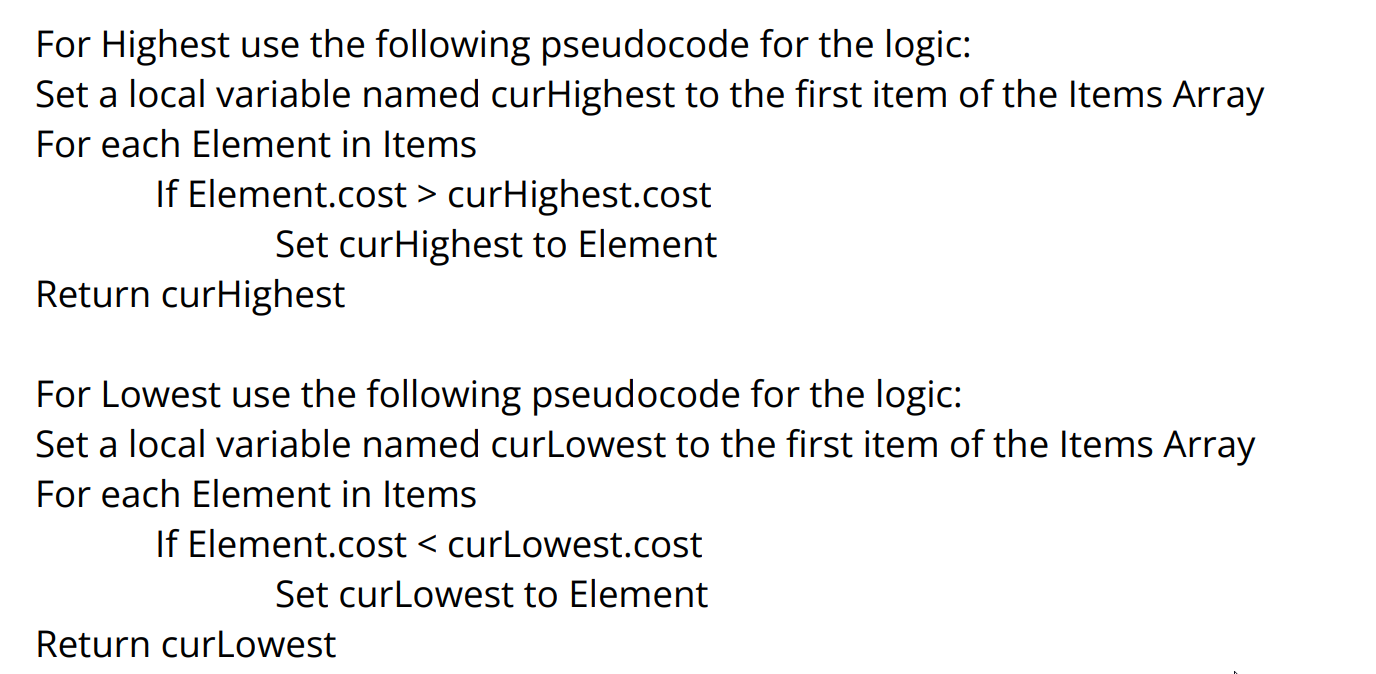
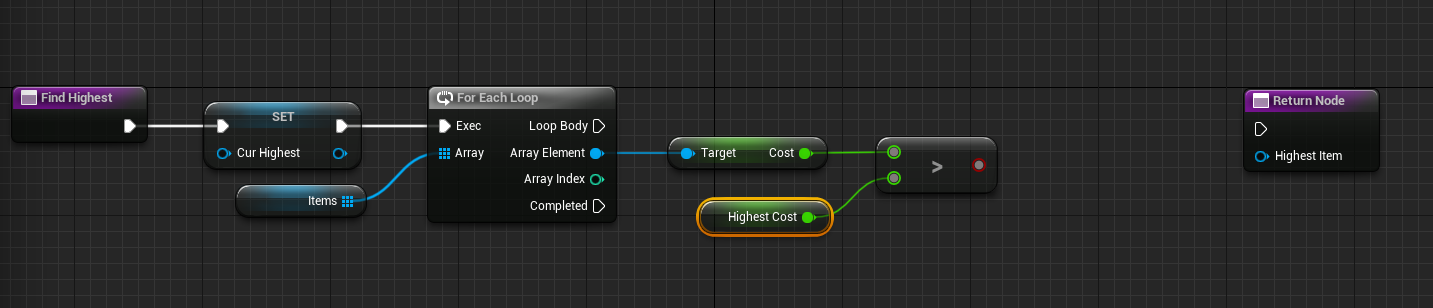
Can someone show me how to put this pseudocode into bp? I have tried many ways but just cant seem to understand it. https://i.imgur.com/4S06WNj.png
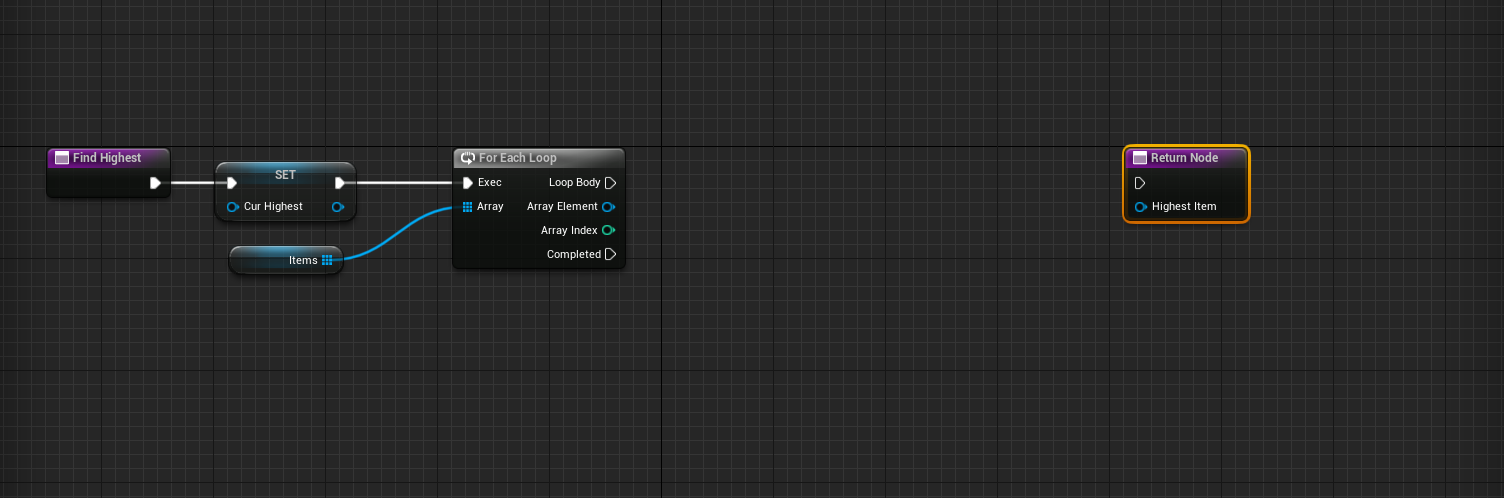
this is what I have so far https://i.imgur.com/G4Fxj8q.png
 lofty rapids
devout oak
Can someone show me how to put this pseudocode into bp? I have tried many ways b...
lofty rapids
devout oak
Can someone show me how to put this pseudocode into bp? I have tried many ways b...
are you just using an array of values, or do you need something like an object ".cost" ?
 slender quest
general question about best practices for Timers, is this really the best and right way to do this? Just type in the name of the function I am trying to call?
 devout oak
I have multiple orbs with a range of value from 0>1000 and im trying to have it where it shows the highest value above the orb when holding down the "1" key to find the highest
lofty rapids
so they all have a variable cost ? or where is this value ?
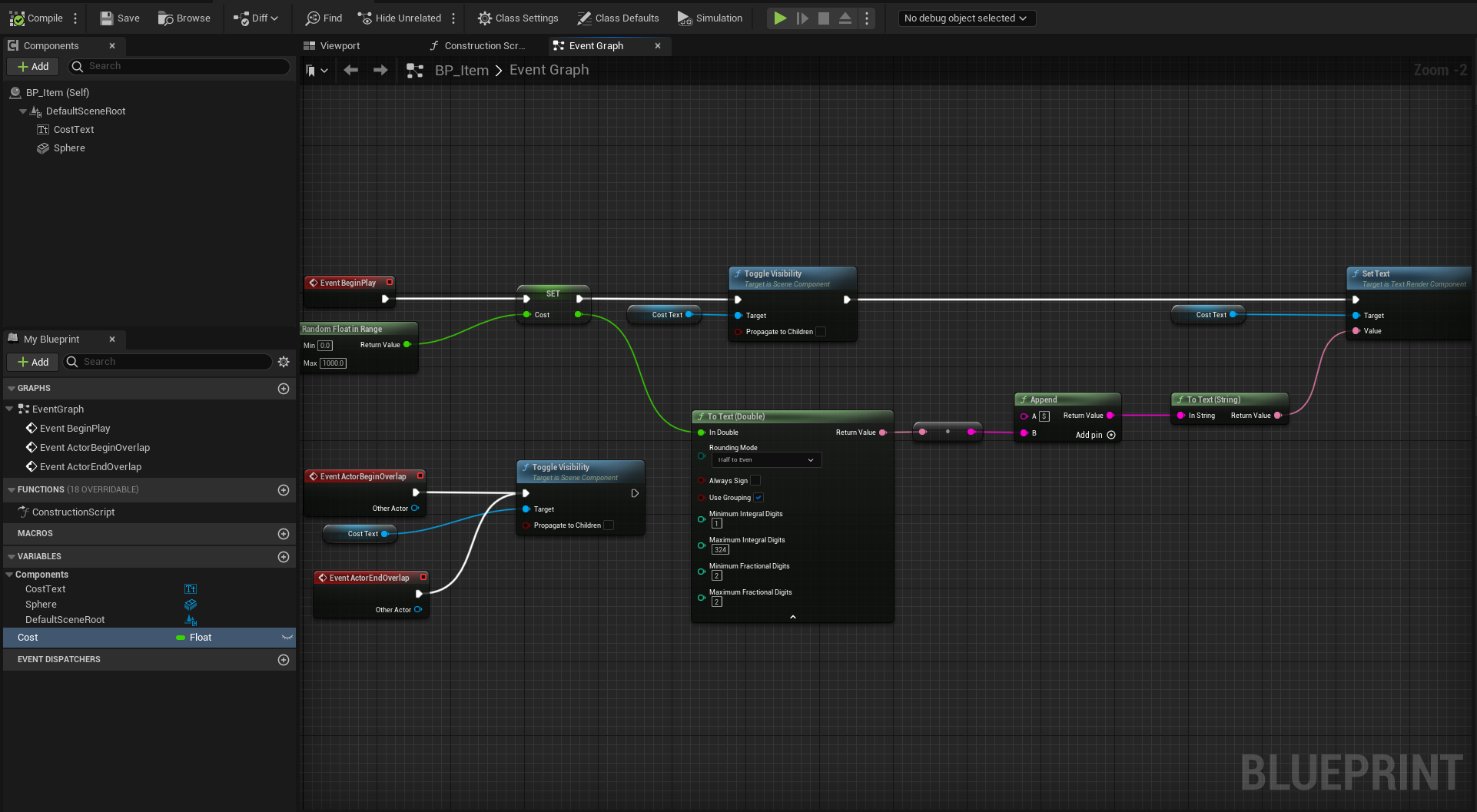
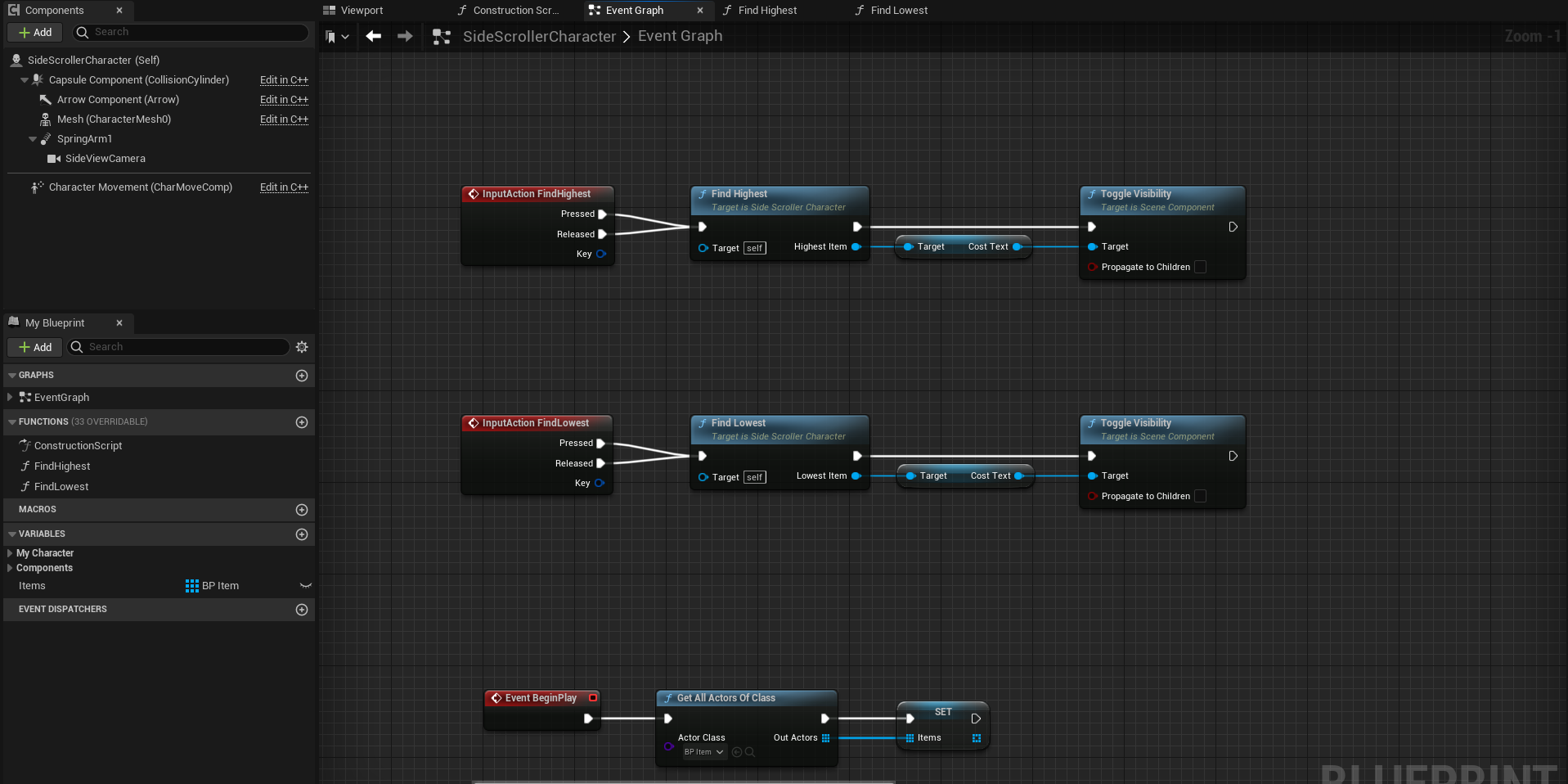 devout oak
correct
lofty rapids
so foreach and out of array items try to get cost
see if that works
just drag out of the array element, and type get cost
hopefully you don't have to cast
lofty rapids
devout oak
correct
Your going to need a variable of type actor to set as the highest
then you loop through checking cost, if it's the higher/lower set that variable to the array element in the loop
 lofty rapids
ok
so that foreach loop is looping through and you are getting the cost
so you want to check that against the highest
drag out from cost and type >
to get the greater than node
devout oak
okay
lofty rapids
you need another variable
that is the currentHighest
a float
so you can check against the cost
devout oak
Would it be another local variable or a regular variable
warped saddle
Guys, In widget blueprint, i have description for an item and when i hover over the item i want to display item describtion but i want to dispaly it in some kind of a background, like border or vertical box or whatever, do you now how to do it
?
 lofty rapids
devout oak
so like that
lofty rapids
devout oak
so like that
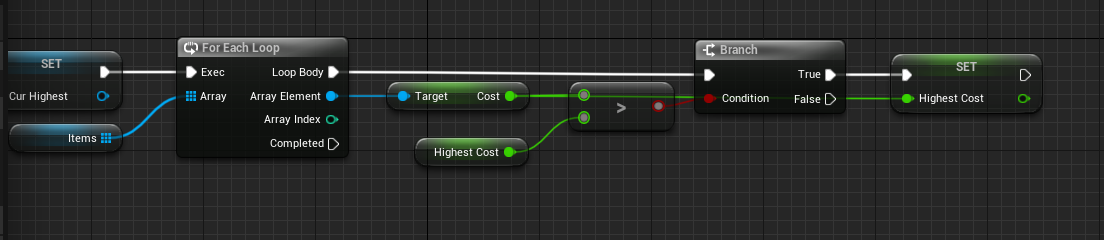
ya and for now do a branch that if that is true set the highest cost to that cost variable
 sonic crest
Isn't there a node that already does that?
devout oak
 lofty rapids
devout oak
https://i.imgur.com/ZIl08rU.png
lofty rapids
devout oak
https://i.imgur.com/ZIl08rU.png
well you don't want to return yet you have some stuff to do
out of the true set the HighestCost to the cost value
sonic crest
devout oak
https://i.imgur.com/ZIl08rU.png
You need to break on true and return that array element
But why not do it in cpp tho?
lofty rapids
why would you want to break
frigid swallow
thin panther
you wouldn't
Thanks for the clear-up. I guess what I meant to say was, how would I get the gun sprite to be attacked the a character’s hand?
 meager spade
sonic crest
You need to break on true and return that array element
meager spade
sonic crest
You need to break on true and return that array element
No, you have to loop through the entire array every time
sonic crest
My bad
devout oak
Well the value varries so I dont have a set value on each item
lofty rapids
you want to set that local variable HighestCost
to the variable you got out of that array element, cost's value
sonic crest
devout oak
Well the value varries so I dont have a set value on each item
Just on true
 devout oak
so i need a 2nd Set CurHighest?
lofty rapids
now move that set at the beginning to the end and plug in the array element
lofty rapids
devout oak
so i need a 2nd Set CurHighest?
well you have a float, and an actor reference
sonic crest
devout oak
so i need a 2nd Set CurHighest?
Yeah, you don't need to clear it first tho as it'll be replaced anyway
devout oak
So get rid of the current set CurHighest and move it to the end?
lofty rapids
devout oak
so i need a 2nd Set CurHighest?
the first one you can get rid of it's not doing anything or needed
then on completed return it
meager spade
devout oak
So get rid of the current set CurHighest and move it to the end?
Depends on where it's used tbh, is this inside a function then yes
lofty rapids
devout oak
So get rid of the current set CurHighest and move it to the end?
yep
and plug in the array element
lofty rapids
devout oak
what do i connect my output on the Set HighestCost to
so what is your code now ?
devout oak
 lofty rapids
devout oak
https://i.imgur.com/jQSUTVu.png
lofty rapids
devout oak
https://i.imgur.com/jQSUTVu.png
you don't want to return there
drag out of completed
and return there
or just plug in the exec from complete in the return node
lofty rapids
devout oak
https://i.imgur.com/jQSUTVu.png
your returning on the first go because your in the "loop body"
or atleast the first true
devout oak
 lofty rapids
now you just need to do one more thing
devout oak
well its not dragging from the Set CurHighest to the return node
thin panther
frigid swallow
Thanks for the clear-up. I guess what I meant to say was, how would I get the gu...
you can just attach it to the socket :)
devout oak
@lofty rapids im not sure what the one thing i need to do is
lofty rapids
devout oak
https://i.imgur.com/FwbUdiG.png
here you can see the loop body runs for each element and you set the reference to the one that is higher than highest, so it will be the highest on completed
get the ref, and plug it into your output variable
devout oak
so use a get node?
lofty rapids
devout oak
so use a get node?
ya, you can also just grab the variable from the left and drag it onto the graph, click get
 lofty rapids
looks legit, give it a go
devout oak
doesnt work
lofty rapids
so when you push the 1 key it runs this function ?
devout oak
oh just kidding
it working
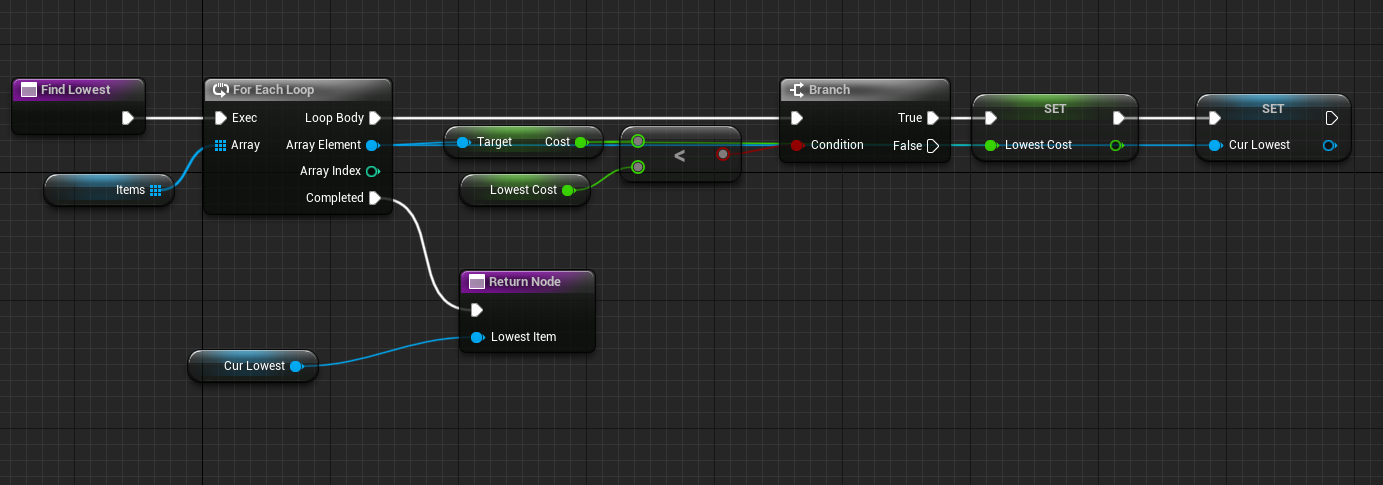
so I would basically do the same thing but instead of the > i would use < for the lowest correct?
lofty rapids
yep
make sure you default the lowest to something rediculous high
so that when it runs the first time it's not something like < 0
devout oak
So I have the same code for the lowest
changed the variables that I needed but its not showing the lowest
lofty rapids
what does it look like ?
devout oak
 lofty rapids
what is your LowestCost default value ?
devout oak
0.0
lofty rapids
theres the problem
devout oak
so would i need to change that to 0.01
lofty rapids
No change it to something that would be higher than the highest cost value
devout oak
so I would want it higher than the max value?
lofty rapids
right, think about it if your looping through and checking if the cost is < 0.0
it will never be true
you want the default to be higher than max so that any value works
devout oak
okay
i set it to 1000
and that worked
so I just set it to the max value
Ty so much for the help
frigid swallow
thin panther
you can just attach it to the socket :)
The thing I’m trying to attack is going to be a pickup-able item. How would I do that with blueprints?
 floral stump
 limber parcel
yeah because ure using outdated engine version 🤦♂️
 edgy ginkgo
I am trying to have a game over camera that rotates around the level on a spline so I followed a tutorial but the camera does not move position

anyone have advice?
zealous moth
edgy ginkgo
I am trying to have a game over camera that rotates around the level on a spline...
there is a node that returns the world location at a distance on spline
and vice versa
you can get that location
and increment it
edgy ginkgo
what would that node be called?
@zealous moth I am having trouble finding that node, is it in 4.3?
 weary imp
likely this
 weary imp
edgy ginkgo
<@383068958221139970> I am having trouble finding that node, is it in 4.3?
weary imp
edgy ginkgo
<@383068958221139970> I am having trouble finding that node, is it in 4.3?
so he's saying you could use the node i screenshotted above to determine world locations by incrementing the distance param
edgy ginkgo
I guess I am still slightly unsure how to go about that from this number
weary imp
basically you could use it to "keyframe" your camera animation if you know the total length of your spline, if im understanding it correctly. however that doesnt necessaryily explain why your camera isnt moving at all with your current setup. let me take another look
weary imp
edgy ginkgo
I guess I am still slightly unsure how to go about that from this number
is your "Spawn?" and "End Location" the same point? like a connected circular spline?
edgy ginkgo
no they are two different points

I am using these since it seems simpler but they are not moving still
weary imp
i think it needs to be on the tick event if you do it this way, im new myself so take it with a grain of salt
edgy ginkgo
it is on a tick
weary imp
and the end game boolean is staying true?
edgy ginkgo
I made sure that is happening and the game tells me it is
currently nothing else is happening on game end
weary imp
edgy ginkgo
currently nothing else is happening on game end
at this point id do a print string on tick for the "end game?" var and both location return values to at least make sure we're getting something valid
edgy ginkgo
I did one after the branch which works
and I did one after the set world location which works
so it is seting the location on tick it's just not a new location
weary imp
just for curiosity's sake, what happens when you set interp speed to 0
edgy ginkgo
it does not change how things work it spawns the camera at the correct initial point on the spline but does not move
I cranked it up as well with no results
weary imp
0 should teleport it straight away, so that helps narrow it down a little
edgy ginkgo
is it a camera or spring arm setting I am missing?
weary imp
this may not be the overall problem, but i think you need to loop the distance var on the "get location at distance along spline" node and increment it
edgy ginkgo
how do I do that? confused by the meaning of that sorry
weary imp
otherwise its just always using the beginning of the spline as the current point
lets try this:
so you spawn your camera, get its world location run that to the "current" pin of the vinterp to node
then we just use a single get location along spline node at your desired distance, in this case that would be the length of the spline i think
edgy ginkgo
I tried using the spline length as the distance to get the zero to full length but this doesn't fix it
 weary imp
i think your "current" pin on the vinterp to node is the issue
because youre telling it your cameras current position is always the start point of the spline
which you wouldnt want to be the case as soon as your camera moves, so that pin should be the actual world position of your camera
weary imp
good luck!
edgy ginkgo
now it does move!
weary imp
lets goooo
edgy ginkgo
but it only goes one way and stops
weary imp
well we're getting somewhere
edgy ginkgo
thats huge though
weary imp
the next thing is incrementing your distance
because right now youre just sending it to the send
to the end*
so some "x" amount of time you need to give the "get location at distance along spline" node a new distance
so youre basically plotting points along the line, rather than just telling it where the end is
because right now your setworldlocation node doesnt care about your spline at all. youre just telling it where the end of the spline is so its sending the camera over there
the distance variables plots points along the curve and youll interp to those
 white veldt
is there a fsr3 plugin for ue5? (not mobile)
 dawn gazelle
Whatever your Get Inventory Manager function is returning is not a valid reference.
trim matrix
dawn gazelle
Whatever your Get Inventory Manager function is returning is not a valid referen...
oh, thanks
 radiant cape
if i need my ai/player controller to know when OnDamage/PawnSee happened to its controlled pawn... would i use an interface to message to the current controller?
if so, is it practical to send a message from the pawn, to the player controller, and then to the HUD class in that order?
because i need my UI to also know the stats of the currently controlled pawn

 dark drum
radiant cape
if so, is it practical to send a message from the pawn, to the player controller...
dark drum
radiant cape
if so, is it practical to send a message from the pawn, to the player controller...
In the controller, you can get the controlled pawn and bind to the on damage events.
Regarding the pawn sense stuff, you can get the pawn sensing component using the get component by class node and bind to the relevant events as needed.
This will prevent the pawn from needing to communicate directly with the controller.
radiant cape
dark drum
In the controller, you can get the controlled pawn and bind to the on damage eve...
THANKS!
best to keep with this listener approach for the controoler/pawns?
dark drum
radiant cape
best to keep with this listener approach for the controoler/pawns?
I would say so. It makes swapping stuff out easier. If you make different characters it means you wouldn't need to set the stuff up to communicate with the other stuff.
radiant cape
my player camera pawn is just an rts camera, all pawns can be the player or ai so this sounds perfect tbh
 pulsar pulsar
So i made a fade in effect for my respawn widget but for some reason it keeps applying to the alpha even when it reaches 1,0. I'm confuuuuused.


Sorry, First pic was bad.

Floaty Alpga was just for seeing the value on screen. It does stop on 1,0 but still continues to add to it
 velvet turret
How to do that?
 agile prism
velvet turret
How to do that?
agile prism
velvet turret
How to do that?
Ah I can't quite remember now, but the way most people do it is create another widget bp and then have that display as a dropdown
dark drum
pulsar pulsar
Floaty Alpga was just for seeing the value on screen. It does stop on 1,0 but st...
In your timeline, adjust the length to match the last key frame or tick the use last key frame option.
agile prism
That way you can edit the particular selection boxes within the drop down if you link it to a individual widget bp
modern radish
surreal peak
Instead of connecting the wires twice
Hey man, sorry to bring this up again, I was hoping you could explain me what you meant, how can I avoid connecting it twice?
 surreal peak
- Instead of connecting the Event directly, use CreateEvent
- Instead of connecting the TRUE Pin of the BRANCH to the FOR EACH loop, simply call "JsonIngested"
And fwiw, you can also make that Array an Param of the EventDispacher
And pass that along when Calling it
Then your JsonIngested Event already gets the Array
cyan bone
spark steppe
just use a cylinder with collision set to complex as simple
https://www.youtube.com/watch?v=gGqeX8gvqeg
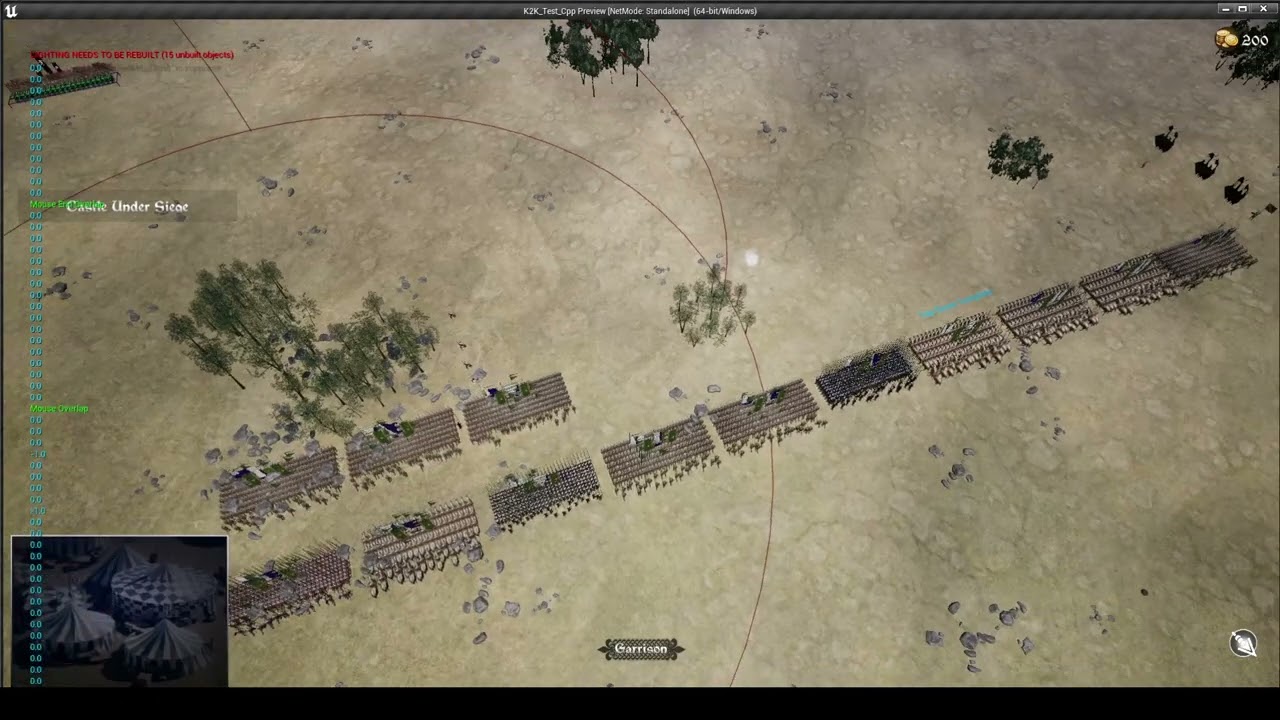
Well thats how i handled it.
Dont know if im reinventing the wheel. But its working.
 pulsar pulsar
dark drum
In your timeline, adjust the length to match the last key frame or tick the use ...
pulsar pulsar
dark drum
In your timeline, adjust the length to match the last key frame or tick the use ...
I did tick Use Last Keyframe but still the same issue.
 surreal peak
May I ask why you use a Timeline if you are already in a Widget?
pulsar pulsar
Here's a clip of what's happening
pulsar pulsar
surreal peak
May I ask why you use a Timeline if you are already in a Widget?
I couldn't figure out a way to fade in the widget inside the widget itself
surreal peak
Given a Timeline is a Component, that also means you are driving it from outside the Widget
surreal peak
pulsar pulsar
I couldn't figure out a way to fade in the widget inside the widget itself
Widgets have Animations
pulsar pulsar
oh
surreal peak
You can literally make an Anim where you set the Opacity or whatever over time
surreal peak
pulsar pulsar
i will have to look into that
Animations are created via the Designer Tab of the Widget, at the bottom/bottom-left somewhere
Once you made your Anim, you can find the Anim as a Variable in the BP Tab of the Widget under Animation Category of the Varibles List.
You can then drag that out like a normal variable and call Play Animation on it
modern radish
surreal peak
- Instead of connecting the Event directly, use CreateEvent
- Instead of connect...
Okay, is this what you mean in the first part? Awesome to know, I will try to fetch the Array alongside it
 surreal peak
modern radish
Okay, is this what you mean in the first part? Awesome to know, I will try to fe...
surreal peak
modern radish
Okay, is this what you mean in the first part? Awesome to know, I will try to fe...
No
Gimme a minute, I'm gonna wire it
Takes less time
modern radish
Sorry man, really appreciate it, It's confusing to me

 modern radish
cool, in my case it's a struct, but I can just swap it
should I pass as reference?
 surreal peak
Yeah that part was offscreen on your screenshot

When you click on the Event Dispatcher in the GameInstance, you can add Inputs with the + at the top right
I used a random Struct type, so just ignore that.
modern radish
sure, yeah. I got that working.. but what is confusing to me is thy does it look like it's an Input when I call it on the second BP? I would have expected it to be on the right side, coming out as output?
here is my logic in the Game Instance BP, where I parse the JSON

(will rename things later)
surreal peak
Not sure what you mean with the question. Where do you expect it to be an Output?
modern radish
ahh okay, I think I understand now, it appears as output in the Custom Event
modern radish

I just thought when you told me I could pass my data with the Event Dispatcher, I thought it would look different, but I think I understand now
 versed fulcrum
Does anyone knows why i can't delete the StaticMesh inside a Blueprint?
 surreal peak
modern radish
I just thought when you told me I could pass my data with the Event Dispatcher, ...
surreal peak
modern radish
I just thought when you told me I could pass my data with the Event Dispatcher, ...
EventDispatchers/Delegates are Lists/Arrays of who to notify when Calling/Broadcasting it.
In C++ the EventDispatcher is just a Variable. The BPs its a bit more fluffed out with custom nodes.
The Variable, internally, has an Array of who to notify and how. E.g.
[0] Object1, MyCoolFunction(Param)
[1] Object2, SomeOtherFunctionName(Param)
With "BindEvent", you add an entry to that List. You can also unbind it if you wish to no longer be notified. Binding multiple times is also possible, so it's wise to unbind after you are done with whatever you had to do.
For you that would be
[0] YourObject, OnJsonIngested(STData JSONDATA)
When Calling/Broadcasting the EventDispatcher/Delegate, it will go over the list and simply call those functions on those objects, passing in the Parameter.
The list of Parameters on the Function you bind has to match the signature (Inputs) of the Delegate. In C++ there are some more options available, but that's the gist of it in BPs.
So your OnJsonIngested function just has an Input. There is no Outputs involved here.
surreal peak
versed fulcrum
Does anyone knows why i can't delete the StaticMesh inside a Blueprint?
Pressing Delete on your Keyboard also doesn't help?
versed fulcrum
no work.. what i did is just copied a static mesh from anther actor in the level
and pasted into the bp
surreal peak
Have you compiled and saved the BP already?
versed fulcrum
yeah
surreal peak
Hm, can you try restarting the Editor?
versed fulcrum
yes, thanks
hmm. seems still won't be able to delete. I found this, but these static mesh are just inheriting the StaicMeshActor class, not a BP
 edgy ginkgo
I have a spawner that is supposed to alternate between two types of trees, only one of them is spawning, even if I just have it spawn the second one it spawns the first one

they aren't even in the same class
surreal peak
versed fulcrum
hmm. seems still won't be able to delete. I found this, but these static mesh ar...
Hm sorry not sure then. Either a bug or something obvious that is missed :<
versed fulcrum
OK,thx man
surreal peak
edgy ginkgo
I have a spawner that is supposed to alternate between two types of trees, only ...
If it spawns the first one even if you only connect the second one, then your issue lies somewhere totally else :P
dark drum
what advantages do data assets have over just using a uobject?
dark drum
i'm doing a bit of work on my dialogue system to add audio and montage support and currently debating on making the selections their own object of sorts for the data. (Dialogue, Audio, Montage and ResponseOptions) Not sure if I should even bother and if I do, if I should just use a uobject (I can just get the default values from the class) or use a data asset for it.
 cursive cloud
When I kill the NPC he ragdolls and dies (good) but an invisble version of him appears and will follow me when im in radius and attacks me:
Im not sure what im doing wrong

when I shoot at him I see the blood particles as well but it doesn't die its an invisble god
dark drum
cursive cloud
When I kill the NPC he ragdolls and dies (good) but an invisble version of him a...
That would be the capsule component that the mesh would be attached too (before you ragdoll). When the NPC dies, you need to stop any behavior they might have if using a Behavior tree.
remote meteor
a data asset is also an uobject
what you could do with an uobject you also can do the same on data asset
dark drum
Yea, im not sure if there's much point the more i think about it. If a conversation has 7 pieces of dialogue, then that would be 7 uobjects/dataassets that would need to be created. If there's 100 different conversations, that could be around 700 uobjects/dataassets that would need to be created. Just thinking about naming them gives me a headache haha.
Hmmm...
remote meteor
oh definitely not an object for each sentence
😅
i would do an object for each conversation..
dark drum
remote meteor
oh definitely not an object for each sentence
It would be the back and forth so not always a single sentence but it is still a lot haha.
remote meteor
until the day epic decides to finish up CommonConversation into a more robust backbone 🫠
 tawny summit
Just a question, is there a cloak spell effect equivalent in eu5's blueprints like how the creation kit has one. What I mean by this is can you put a cloak effect on an actor (the effect can be anything) that would cause an effect on other npcs or the player if they get too close to its radius?
dark drum
If there was a way to have the function update the number of output pins based on the inputted uobject/dataasset, that would be pretty cool.
thin panther
tawny summit
Just a question, is there a cloak spell effect equivalent in eu5's blueprints li...
No. The creation kit was designed with modding a specific few games. Unreal Engine is a general purpose engine. You would have to make this, most effectively with GAS
tawdry surge
@remote meteor more robust? Last I looked it doesn't even function
minor dew
I've set a default player pawn in the project settings, and the player controller that I created.
When I start the game, the controller doesn't set the view target to the camera of the player pawn, instead it put a camera in the mesh location.
What's the problem here? 🤔
 undone sequoia
guys when I have output from pitch lets say -180 min and max 180 degrees and I want make from it min -45 max + 45 so output will be between these range what to use ? i tried clamp and put there -45 and 45 but its not working its giving me always 45 lol
remote meteor
tawdry surge
<@150947275290443776> more robust? Last I looked it doesn't even function
supposingly they use it for fortnite, but they strip like 99% of it and ship it as a experimental plugin 😅
i somehow manage to get it "working", its very particular of needing the game feature plugin for its content...
i just liked the behavior tree alike editing
the other things,, not so much..
tawdry surge
I looked at the c++ for it a few months ago, and you couldn't do anything beyond assign a speaker and feed it a line. Most of the nodes didn't actually do anything and it didn't implement any of data arguments for dynamic conversations.
Didn't look like they touched in in months either.
Was just gonna steal the graph and roll my own
 random solar
Got an issue I need help understanding, I'm trying to cast to a widget from the character blueprint. The issue is that the cast is failing when I create a user widget object reference when I put it in the object pin.

The only blueprints for the actual widget is me making a reference to the character from the widget.

 dark drum
random solar
Got an issue I need help understanding, I'm trying to cast to a widget from the ...
dark drum
random solar
Got an issue I need help understanding, I'm trying to cast to a widget from the ...
It looks like you've not provided the object ref it should be casting.
random solar
dark drum
It looks like you've not provided the object ref it should be casting.
In place of that would be a variable that is the user widget object reference that causes the cast to fail
 dark drum
random solar
In place of that would be a variable that is the user widget object reference th...
dark drum
random solar
In place of that would be a variable that is the user widget object reference th...
With there being the yellow warning message, I would assume the object your plugging in can never be what your trying to cast it to.
 dark drum
random solar
My bad, didn't press compile but issue still applies
dark drum
random solar
My bad, didn't press compile but issue still applies
how do you set the ref?
random solar
That's what I'm trying to find out. All the widgets are host on another blueprint called MainHUD. MainHUD is created in playercontroller and calls the HUD with all it's widgets in the second picture


So I don't think I have created a reference to the widget individually
If you think what ive explained is false then I will continue to look for it
 trim matrix
hello guys, I have a problem with my blueprint.
everything works visually fine with 5s delay, but if I clicked twice sounds keep playing after 5s and giving this error
 north lynx
Hi!
I have a question
I'm currently working on picking and dropping system, but I hit the wall
Using Interact Interface and the trail from players view idk how to know, which item to show the player
Every tutorial uses the collisions to pick the items, but I don't want another system for only picking and dropping items.
Idk what to do...


 modern radish
surreal peak
EventDispatchers/Delegates are Lists/Arrays of who to notify when Calling/Broadc...
modern radish
surreal peak
EventDispatchers/Delegates are Lists/Arrays of who to notify when Calling/Broadc...
That’s super helpful, man. Thanks so much again for your help, really appreciated!
north lynx
trim matrix
hello guys, I have a problem with my blueprint.
everything works visually fine...
Idk if it will help, but you can add "Is Valid" node after the "Cast to..." node, like this
 trim matrix
north lynx
Idk if it will help, but you can add "Is Valid" node after the "Cast to..." node...
trim matrix
north lynx
Idk if it will help, but you can add "Is Valid" node after the "Cast to..." node...
like this ?
 dark drum
north lynx
Idk if it will help, but you can add "Is Valid" node after the "Cast to..." node...
dark drum
north lynx
Idk if it will help, but you can add "Is Valid" node after the "Cast to..." node...
The 'isvalid' node after the cast is redundant, if it's not valid, the cast would fail anyway.
 golden pewter
how can i prevent a widget from blocking an actor in my level?
trim matrix
dark drum
The 'isvalid' node after the cast is redundant, if it's not valid, the cast woul...
yes it didn't work /:
dark drum
trim matrix
yes it didn't work /:
This issue is your stop audio node. It's pulling an input from a different execution line (which you should avoid). When you add an audio component, store it in a ref and when you go to stop, use the ref.
trim matrix
you're right, thank you. how can I add ref here to stop it
 dark drum
trim matrix
you're right, thank you. how can I add ref here to stop it
dark drum
trim matrix
you're right, thank you. how can I add ref here to stop it
pull from the retun value on the Add Audio Component and promote to variable. Then use this variable at the target for the stop audio node.
trim matrix
didn't work 😦
 dark drum
surreal peak
EventDispatchers/Delegates are Lists/Arrays of who to notify when Calling/Broadc...
dark drum
surreal peak
EventDispatchers/Delegates are Lists/Arrays of who to notify when Calling/Broadc...
On the topic of event dispatchers. Do you know (of the top of your head) if a UObject that has bound to an event somewhere will be garbarge collected if the UObject is no longer referenced?
I would assume, the binding would keep it loaded right?
dark drum
trim matrix
didn't work 😦
You need the set node to be on the same exec path as the add audio component. (Between the add and play nodes)
trim matrix

 dark drum
trim matrix
dark drum
trim matrix
whats the issue? If there's an error, you need to show it.
trim matrix
 dark drum
trim matrix
dark drum
trim matrix
hit the recompile button
edgy ginkgo
nvm for my issue
dark drum
edgy ginkgo
I am so confused by this variable
Does the cast fail?
trim matrix
dark drum
hit the recompile button
same error
dark drum
trim matrix
same error
What var type is 'NewVar'?
trim matrix
just promote variable, didn't name it
dark drum
trim matrix
just promote variable, didn't name it
You need something like this.
 trim matrix
system sound didn't recorded but after second click sounds keep playing
dark drum
your not setting the var thats connected to the stop node. You should set this to the audio component you create when you create it.
thin panther
dark drum
You need something like this.
why are you adding an audio component each time you interact? 🤔
 split sleet
Hi, I've been trying to create a seesaw that trying to stay horizontal like in Fall Guys and for some reason Angular Motor stops at some point as shown in video (34-35 second). All I did was:
- Create Actor Blueprint and add Cube
- Set scale of the Cube to 4,25 on X and 0,5 on Z
- Set the Cube to simulate physics
- Add a Physics Constraint to the Cube
- Set the Component Name 1 in the Physics Constraint to "Cube"
- Lock Swing 1 Motion and Twist Motion, limit Swing 2 Motion to 70
- Change Angular Drive Mode to Twist and Swing and check Swing in Drives and set Strength to 1
I tried:
- changing limit angle, component names and blueprint hierarchy attaching physics constraint to root component instead of cube;
- delete and add constraints again;
- reopen project; create new blueprint;
- use swing 1 motion and twist motion;
- change stiffness and damping;
- change angular motor strength;
I've noticed that it mostly happens when one side is slowly going upwards


 dark drum
thin panther
why are you adding an audio component each time you interact? 🤔
dark drum
thin panther
why are you adding an audio component each time you interact? 🤔
Just helping Boraniks, one step at a time lol. But yes, ideally, he should either add in via the editor (setting the sound) or add it on begin play and reuse the same component.
trim matrix
lol now this happening because of delay
dark drum
trim matrix
lol now this happening because of delay
Make is so the play node doesn't go into the timeline. That would just make it restart after 5 seconds.
trim matrix
dark drum
You need something like this.
but you did here
now I disconnect play
but still coming sound after 5 second when I click twice
 civic citrus
I wanted to create a very simple actor for representing cover (basically a mesh, collider, a variable indicating whether it's weak/low or strong/high cover, and a variable representing its durability). It's easy to toss these together in a blueprint, but apparently then I can't access the cover level and durability from C++ code? Is there a way to get around that? If not, what's the proper way to handle this situation?
dark drum
trim matrix
but still coming sound after 5 second when I click twice
Move the add component to begin play and then add an event track to your timeline at the 5 second mark. That way, it'll only play the sound when it gets to that point. If it's stopped before that, it won't play.
 surreal peak
dark drum
On the topic of event dispatchers. Do you know (of the top of your head) if a UO...
surreal peak
dark drum
On the topic of event dispatchers. Do you know (of the top of your head) if a UO...
Kinda sure that's a weakobjptr
dark drum
surreal peak
Kinda sure that's a weakobjptr
so it would get garbage collected?
surreal peak
Pretty sure yeah
dark drum
surreal peak
Pretty sure yeah
one less thing for me to worry about then haha.
trim matrix
how did you add play audio there ?
 dark drum
trim matrix
how did you add play audio there ?
dark drum
trim matrix
how did you add play audio there ?
add an event track inside the timeline, similar to how you add a float track.
trim matrix
now sound is always playing from start :/

I unchecked the auto activate, so now not starting on itself but it playing when I clicked
not after 5 sec
frigid swallow
How would I attach an actor to my player character’s arms using blueprints?
north lynx
north lynx
Hi!
I have a question
I'm currently working on picking and dropping system, but ...
Any ideas about that?
lofty rapids
is it falling at all? or are you just destroy actor it looks like it disappears
thin panther
frigid swallow
How would I attach an actor to my player character’s arms using blueprints?
you just use the attach actor to component node.
random solar
random solar
That's what I'm trying to find out. All the widgets are host on another blueprin...
Anyone able to help with my issue? I'm available to show off my blueprints with screenshare too
thin panther
how could we possibly know? you havent shown us anything other than a video?
split sleet
split sleet
Hi, I've been trying to create a seesaw that trying to stay horizontal like in F...
So I find out that it happens when angular velocity gets to 0. But I still have no idea why it's stops angular motor when velocity is 0
split sleet
split sleet
So I find out that it happens when angular velocity gets to 0. But I still have ...
I find kind of solution - just add impulse every time angular velocity reaches 0
pulsar pulsar
surreal peak
Animations are created via the Designer Tab of the Widget, at the bottom/bottom-...
I have now implemented this but I'm still having the same issue lol. I'm trying to figure out what's causing it though
Ah, it's happening without the animation aswell. So the issue lies somewhere where the sun doesn't shine it seems.
ah
i know now i think
The widget creation is being called each tick
yup that was it
frigid swallow
So I changed the mesh for the player character that's referenced here, and now I can't figure out what to put for "Parent" and "Rocket Name".

 near tundra
How do I make it where a projectile will not collide with itself but still collides with other objects?

 lofty rapids
near tundra
How do I make it where a projectile will not collide with itself but still colli...
lofty rapids
near tundra
How do I make it where a projectile will not collide with itself but still colli...
are you handling the collision yourself or is it some sort of physics stuff ?
if your handling it yourself then just cast and do nothing, run the code on fail
 manic hamlet
How do you guys tell your UI elements(i take Crafting menu as example) what the player is ? do you always "Get player character->Cast to PlayerCharacter"? or do you have a variable called like "PlayerCharacter" in your CraftingMenu ? is there a "best practice" for this?
near tundra
lofty rapids
are you handling the collision yourself or is it some sort of physics stuff ?
I'm using generate overlap events on each object
i figured it out
I had generate overlap events on the arrow itself
-facepalm-
lunar sleet
near tundra
How do I make it where a projectile will not collide with itself but still colli...
Make a custom collision channel
If you want to block only a specific type of object
lunar sleet
manic hamlet
How do you guys tell your UI elements(i take Crafting menu as example) what the ...
You can cache and reuse a ref just don’t start doing actual logic in your widgets
zealous moth
manic hamlet
How do you guys tell your UI elements(i take Crafting menu as example) what the ...
I get player character and cast to it. There is nothing of value lost. The character is already in memory, you're just getting it.
 cold junco
hello ,noob here , i have build a pressure plate , and put a cube on it , when i move it with my character on the plate , it does not stay in the state open (end overlap for the cube ) , i have try "is overlapping" to tell the pressure plate that i m still here , don't know what to do for the door to stay open if my character stay on the plate .
 manic hamlet
lunar sleet
You can cache and reuse a ref just don’t start doing actual logic in your widget...
manic hamlet
lunar sleet
You can cache and reuse a ref just don’t start doing actual logic in your widget...
I know about the references 🙂
Lemme explain my scenario:
Every UI usually needs variables or functions from the "root player":
- Clicking Craft in a crafting Menu needs a reference to the InventoryArray to add whatever is crafted to that variable.
- Clicking "Increase Stamina by 5points" in a Talent-Tree would also need a reference to the player as the Stamina Variable is there.
My thought was:
Do I give the Crafting menu and the Talent Menu widget both a PlayerCharacterRef variable that these buttons(Craft/IncreaseStamina) then refer to and get the functions from the player that way or do i do this(screenshot) each time I click the Button:
 lunar sleet
cold junco
hello ,noob here , i have build a pressure plate , and put a cube on it , when ...
lunar sleet
cold junco
hello ,noob here , i have build a pressure plate , and put a cube on it , when ...
For starters don’t use == or != for this
Drag from other actor and cast to the BP you want to check for
It’ll give you an execution and a cast failed
manic hamlet
zealous moth
I get player character and cast to it. There is nothing of value lost. The chara...
See my comment above, just in case 😄
lunar sleet
manic hamlet
I know about the references 🙂
Lemme explain my scenario:
Every UI usually need...
Do you have to make these calls from more than one spot in each widget?
manic hamlet
lunar sleet
Do you have to make these calls from more than one spot in each widget?
I hope I get you right:
Yes, there is more than ONE crafting button and more than one Talent in a talent tree 😄
lunar sleet
Well yeah but they’re all the same blueprint or children of it right?
manic hamlet
I think the answer to that question is also yes.
e.g.:
I got a WB_TalentTree
and theres like 50 WB_Talent
in there
lunar sleet
That’s fine
So you should only need to get the char once and cast into it
At which point there’s no need to further save that ref
Basically, just get it and cast. I’d only recommend saving the ref if you have to reuse it several times in the WB
sick fable

Can I get help I am trying to get this audio to loop while the event is triggered
until it end
s
lunar sleet
sick fable
s
Use the edit button
sick fable
I am not sure how so I didn't do it
manic hamlet
the thing is im trying to figure out if a reference makes sense even if i need it multiple times, as the child (the Craft Button) would need a reference to the parent each time anyway
sick fable
lunar sleet
Use the edit button
if you mean set it to loop in the file If I do that the event keeps getting called quicker than the sound can end
manic hamlet
lunar sleet
Use the edit button
imma prepare something, gimma 5min
lunar sleet
sick fable
if you mean set it to loop in the file If I do that the event keeps getting call...
I meant edit on discord
lunar sleet
So you don’t have to add 1 letter 😀
sick fable
do you know how to help me
lunar sleet
sick fable
do you know how to help me
You want to ask this stuff in #audio
sick fable
ok
manic hamlet
@lunar sleet @zealous moth
1screen: WB_CraftingUI
2screen: WB_CraftingItem
The WB_CraftingUI has a "foreach RecipeYouHaveLearned"(not real names,just making sure you understand what i mean xD) in it.
Now the Craft button doesnt know what the player is, and I have figure out 2 solutions to this problem:
Nr 1. Inside of WB_CraftingItem I do a GetPlayerCharacter->Cast to BP_PlayerCharacter and from there i do stuff like AddItemToInventory
The second solution would be: WB_CraftingUI has a variable of type BP_PlayerCharacter and inside the foreach I give the Child(Wich also has a variable called "Parent", Wich is the WB_CraftingUI, and then once i click the craft button it goes to: Parent->BP_PlayerCharacter->AddItemToInventory
My question basically is(as I am used to avoid "Cast to" wherver I can): Is it better to have that "layering" of variables in Example 2 or is it better to "Cast to BP_PlayerCharacter" EACH TIME a player clicks craft?

 lunar sleet
manic hamlet
<@179343890409717771> <@383068958221139970>
1screen: WB_CraftingUI
2screen: WB_C...
lunar sleet
manic hamlet
<@179343890409717771> <@383068958221139970>
1screen: WB_CraftingUI
2screen: WB_C...
Is it single player?
manic hamlet
No
lunar sleet
manic hamlet
<@179343890409717771> <@383068958221139970>
1screen: WB_CraftingUI
2screen: WB_C...
For #2, if you mean create a variable and select that BP, absolutely not lol
Show where it’s fired
manic hamlet
lunar sleet
For #2, if you mean create a variable and select that BP, absolutely not lol
So casting each time would be the way to go?
lunar sleet
manic hamlet
<@179343890409717771> <@383068958221139970>
1screen: WB_CraftingUI
2screen: WB_C...
Also whoever told you to avoid casting is terrible at this, don’t listen to them
lunar sleet
manic hamlet
So casting each time would be the way to go?
Yes, don’t fear the cast
manic hamlet
lunar sleet
Also whoever told you to avoid casting is terrible at this, don’t listen to them
self taught 😄 so some random youtube video many moons ago haha
lunar sleet
Interp will change the value but it won’t call your entire function again, print the output value if you need to understand better
lunar sleet
manic hamlet
Once per click on something UI related that needs player data
Yeah that’s fine
Don’t worry about that. Lot of plebs making YouTube tutorials that have no clue what they’re doing and just saying random shit to get views. The tiny cost of casting is unlikely to ever be an issue in your game
manic hamlet
e.g. lets say i got 20 Talent points and all my talents would be:
4Buttons of 5+ Strength
4Buttons of 5+ Stamina
4Buttons of 5+ Dexterity
etc
so each of those buttons would do a "GetPlayerCharacter->Cast to BP_PlayerCharacter->IncreaseStats()
lunar sleet
Basically your interp starts but you’re only showing the value in that next tick
You’d need a timeline or like @edgy ingot said, on tick or a timer by event
lunar sleet
manic hamlet
e.g. lets say i got 20 Talent points and all my talents would be:
4Buttons of 5+...
All of these buttons are in the same widget bp?
manic hamlet
lunar sleet
All of these buttons are in the same widget bp?
UI_TalentTree
yes
lunar sleet
Yeah, so make one function
That gets the char and casts
And then call that function on each onClicked
So you don’t have to write it 50 times 😀
manic hamlet
well all these buttons derive from the same parent anyway,so i kinda got that already
manic hamlet
I just,until i realized that this is getting messy and then i came here to ask about it 20mins ago^^, did it the "parent way" as in:
I have a foreach->CreateTalentPointWidget
then each TalentPointWidget has a variable type UI_TalentTree and the TalenTree has the ref to the player so each time a player clicks it goes to the TalentPointWidget->GetParent(now were in UI_TalentTree)->Get Player Ref->IncreaseStats()
I was just realizing if i have like 200 talent points in the tree that would mean I have 200 of the same variable attached to them for no reason, wich i can easily solve by just casting to the playerCharacter
lunar sleet
Did you plug that into a tick or what
Yeah no don’t do that
I’ll explain how it works in layman terms
Interp changes a value over time
If you want to reflect that, you need to check that value several times during that time
So
try this
On clicked, set timer by event, set it to looping
Make a new custom event
Put your code in it
Delegate that event into your timer by event’s event in pin
Also add a branch to check if that value has reached the end of your interp
When it does, clear and invalidate the timer by handle
lunar sleet
...
why are you calling the event instead of calling the timer?

after this, you need to google set timer by event @odd berry
here's a mockup above, might need testing
 jolly cipher
Hello!
This maybe a noob question, but im trying to add a mount system in this template. ( First time, trying to wrap my head around this ).
I created a separate blueprint for my mount actor. Created a overlap event so when the BP_PlayerCharacter overlaps, the player would attach to the mount and posses it.
After testing a very basic setup, as soon as I posses the mount I start getting spammed that it can no longer find the player's dependencies components.
Is there a way to attach the mount to my character without having to loose all my depencies of my main player?
The only way I would see maybe working would be to create a bool (IsMounted) for my animBP and create a blendspace for my mounted animation but I have no clue how to make my mount move and have it controlled by player or mirror its direction ... Does anyone have any tips or tricks to go around this?
lunar sleet
think of a timer by event as your own personal tick with customizable interval and that can be stopped
sec, gotta do some actual testing on it
this'd be much easier with a timeline but can't use those in widgets apparently
pulsar pulsar
so I made my project a C++ project because I thought I would learn C++ but I've kinda changed my mind as C++ is so darn messy to look at lol. I kinda want to change my project into Blueprint again but I'm afraid of what/or if I could lose stuff in the process.
thin panther
pulsar pulsar
so I made my project a C++ project because I thought I would learn C++ but I've ...
No need. You can still use bp
And still not write any c++ in a c++ project
But I have no clue what you mean. Unreal c++ is much cleaner than BP 😆
pulsar pulsar
I figured as much. But I think the basic stuff of the movement code for the ThirdPerson blueprint is all located in C++ form.
thin panther
You can still very much use the BP content pack
pulsar pulsar
As I'm only familiar with C# since before the Unity disaster, I find C++ to be horrendous for the eyes.
thin panther
You'll want to get used to c++. BP can't do everything, and you'll want some c++ in a game you plan to ship
pulsar pulsar
thin panther
You can still very much use the BP content pack
I'm not able to access some blueprint nodes it seems with a C++ project. Before I made the C++ project I had a blueprint project and I had Input stuff in the TPC BP but with the C++ project the TPC BP does not have these standard nodes
pulsar pulsar
thin panther
You'll want to get used to c++. BP can't do everything, and you'll want some c++...
I'm not really looking to do so atm. I want to world/level build and just create small things within them to build a portfolio. Hence why i feel BP would be easier to have for this
because I was following a tutorial on implementing swimming as I had no clue where to start so that's when I noticed my BP being different. So I drew my conclusion it was because of my C++ made project
lunar sleet
k, sry that took so long, had to work around not being able to use Timelines in widgets
you can adjust the update rate by changing the Time
sry I missed a step, sec
there, fixed

do you see kind of what this does, or do you want me to take you through it
so onClicked you set a new timer that "ticks" every <Time> seconds. Every time it "ticks" it calls that CustomEvent. That event lerps between value A and B which would be your start float and target float. If you hover over the Alpha it'll tell you 0% is A and 100% is B. Then from there you can plug that value into your Set Render Scale. Once the value's hit the max amount you give it, you stop the timer by clearing and invalidating its handle
cold junco
lunar sleet
For starters don’t use == or != for this
Thank you ! , did not help for my problem but still useful to know ^^ , here is what fix my problem
 lunar sleet
Are you having actual perf issues?
you'd need to do some #profiling probably and maybe simulate it for mobile devices since those usually have less resources
jolly cipher
jolly cipher
Hello!
This maybe a noob question, but im trying to add a mount system in this...
Im rethinking my approach. Im trying to see if theres a way to attach my main character to my mount but instead of possessing it have the mount mirror input from main character via Tick.
For example in my mount I would capture the MOveForward, MoveRight and Jump inputs from my MainCharacter. This way I would still be able to maintain my main character inputs and components
Would this make sense to anyone? Not sure if I have the right approach to this.
lunar sleet
jolly cipher
Im rethinking my approach. Im trying to see if theres a way to attach my main ch...
that's not a good idea
lunar sleet
jolly cipher
Im rethinking my approach. Im trying to see if theres a way to attach my main ch...
open the actual Message Log and click on where it's saying you're accessing None then show that code in a screenshot
yep
you can make them all floats, change the A and B around, and just change the Alpha to a negative value
I just put static values in there but yours can be cached in floats and changed as needed
versed sun
Does anyone else get a bug once and a while where you can't delete/cut/copy/paste/duplicate nodes?

everything is compiled , saved
 stable crystal
Hi,
I recently tried to set up movement for a character but it isn't working. I copied exactly what's on the 3D character demo but it isn't doing anything. The block still won't move.
Custom Character Blueprint Class: https://imgur.com/a/ZnLRrMQ
Custom Game Mode: https://imgur.com/a/mVoBEFV
Custom Mapping: https://imgur.com/a/usAiI9W
InputAction Jump: Set as Digital (bool) InputAction Move: Set as Axis2D (Vector2D) InputAction Look: Set as Axis2D (Vector2D)
I know it's not very helpful to be viewing it all from screenshots but any help is appriciated. It's exactly the same system on the 3rd person baseplate level on the unreal launcher. I just copied stuff over manually
lofty rapids
stable crystal
Hi,
I recently tried to set up movement for a character but it isn't working. I...
well for one thing your ia_move isn't connected in the exec, it doesn't have any execution comming out of it
from triggered into the first add movement
also the add movement input at the end of your ia_look isn't necessary i don't think it's even doing anything
versed sun
stable crystal
Hi,
I recently tried to set up movement for a character but it isn't working. I...
Here is what I forget 90% of the time:
 lofty rapids
stable crystal
Hi,
I recently tried to set up movement for a character but it isn't working. I...
lofty rapids
stable crystal
Hi,
I recently tried to set up movement for a character but it isn't working. I...
is the mouse look working ?
stable crystal
No, nothing currently. It just sits there
stable crystal
lofty rapids
well for one thing your ia_move isn't connected in the exec, it doesn't have any...
Nice catch, thank you. Fixed that
lofty rapids
stable crystal
No, nothing currently. It just sits there
make sure you select the context in the add context
stable crystal
lofty rapids
from triggered into the first add movement
also the add movement input at the en...
Yeah I didn't know if that was needed but I shall remove. I don't think it does anything either
stable crystal
lofty rapids
make sure you select the context in the add context
Aha! Thank you. That got it working
Now I just need to see if I can smooth rotation because it's a bit choppy
jolly cipher
Hello!
So trying to wrap my head about creating a mounting system. I am currently building a shooter game and wanted to add a simple horse mount where you can still shoot while riding.
After looking at a few tutorials on youtube, i'm understnading the the fundamental system revolves around Attaching my main character to the mount character. I would then posses the Mount character to control it.
If im understanding this correctly, once I posses my mount character, I loose all my Main character's inputs and refs.
I assume I need to re-create all my inputs and rework some of my main character refs as most of my HUD ( Behind Tick events ) were based on Get Owning player. Once I posses the Mount character, my get owning player becomes the Mount and breaks alot of this logic ...
I could copy and paste my widgets over to the mount and rework my logics to swtich owning player base if player is mounted or not but just seems like there should be a better way.
Is there no alternatives to attach my main character to the mount but not posses it and still control the mount somehow? Im super confused lol
stable crystal
Actually it's not even rotation. It's moving left/right that's choppy. When I press the key there's about a 0.5 delay which causes it to jump in position. Same with going backwards
frigid swallow
How would I change the character’s animation/movement using blueprints? For example, when the player character is holding a gun, instead of running like normal, the arm that’s holding the gun stays still?
 oak fable
hey there
i just bought this asset pack its the procedural turn in place
im having issue with the turn in place component it has many errors but what i need help with is this Steps structure array
it says Steps no longer exists on node calculate tun in place steps but its there
any clue why ?

also inside the function calculate turnInPlaceSteps i see this errors

 lofty rapids
why does the second add to array have a different setup than the first ?
oak fable
i dont really know im trying to fix this asset
stable crystal
stable crystal
Now I just need to see if I can smooth rotation because it's a bit choppy
If anyone has any ideas on how to do this with all the info I've given, please let me know!! Struggling to work it out
lofty rapids
stable crystal
Actually it's not even rotation. It's moving left/right that's choppy. When I pr...
maybe #enhanced-input-system would know, sounds odd
stable crystal
Yeah. I'll try there. Thank you!
lofty rapids
oak fable
i dont really know im trying to fix this asset
what does it say when you hover over the error on one of the adds ?
oak fable
 lofty rapids
try to "refresh node"
oak fable
removed them
oak fable
its not mine im trying to fegure out how its working and fix it
oak fable
lofty rapids
you changed it somehow ?
no it the same as i imported it
lofty rapids
well theres a problem with that array obviously, something with the structure most likely
oak fable
lofty rapids
well theres a problem with that array obviously, something with the structure mo...
okay wait a sec
oak fable
lofty rapids
well theres a problem with that array obviously, something with the structure mo...
that the struc i believe
 lofty rapids
what happens if you try to drag off the array now and re add the adds ?
or just try to drag out make an add see what happens
oak fable
for the duration it says float is not compatible with structure
lofty rapids
oak fable
for the duration it says float is not compatible with structure
it says that when you try to drag into duration a float ?
lofty rapids
oak fable
for the duration it says float is not compatible with structure
that probably means your dragging the wrong thing into it ?
oak fable
when i drag from duration to add
lofty rapids
i mean when you drag out and do an add, it shows up with no error ?
oak fable
i can join a voice channel and screen share for you if you want
lofty rapids
i just help in here sometimes in dm
oak fable
lofty rapids
i mean when you drag out and do an add, it shows up with no error ?
yeah from the local steps no error
lofty rapids
oak fable
yeah from the local steps no error
what are you dragging into duration ?
oak fable
lofty rapids
i just help in here sometimes in dm
its okay i mean so you can have better view
 versed sun
Oh, you have to Split the Structs
lofty rapids
oak fable
also inside the function calculate turnInPlaceSteps i see this errors
based of this picture you should e draggin the step duration output into there
lofty rapids
versed sun
Oh, you have to Split the Structs
oh i c you were trying to plug it into the whole thing
versed sun
Copy/Pasting Split structs does that
lofty rapids
oak fable
well that makes no sense it's still two different adds
i mean they have a different setup on each on, is this when you drag a new add node ?
oak fable
versed sun
Copy/Pasting Split structs does that
i didnt copy past any thing XD
lofty rapids
drag out from local steps and add a new "add" node, it should be the current setup
oak fable
lofty rapids
i mean they have a different setup on each on, is this when you drag a new add n...
when i drag new add node there nothing on it and i cant add anything to it
oak fable
also local_steps looks like that in the local variables
 oak fable
lofty rapids
haven't work much with structs, still new to unreal as well
oak fable
lofty rapids
haven't work much with structs, still new to unreal as well
yeb me too
lofty rapids
oak fable
also local_steps looks like that in the local variables
where it says local_steps, are you sure your structure is selected and it's an array
weird it just shows the colored dot thing by itself
oak fable
i see now it was the local steps issue its bugged i added new one and now got the values
modern radish
if I spawn blueprints containing actors at runtime, I see them in the Outliner but I don't see them in editor.. Is there a way to make them visible?
frigid swallow
How would I change the character’s animation/movement using blueprints? For example, when the player character is holding a gun, instead of running like normal, the arm that’s holding the gun stays still?
lofty rapids
modern radish
if I spawn blueprints containing actors at runtime, I see them in the Outliner b...
well your spawning them at runtime so they'll never be in the editor
lunar sleet
Well the 0 to 10 was an example
You need to plug in your actual values
Also
Don’t do 0.001 on the Time
That’s just how often to update
The lowest you should maybe do is 0.1
The values in your lerp should literally be your current scale value and the desired scale value (A and B respectively)
So 1.5?
Did you change A to 1 and B to 1.5?
Yeah cause your counter is too small
You set your float scale to something ridiculously small like 0.0001
It’s going to take forever to reach 1.5
Make sure to adjust your >= too as well
oak fable
i dont really know what is the issue with this structure
can't we no longer use the break node or let say how can i break this structure
im really stuck here
 lunar sleet
oak fable
i dont really know what is the issue with this structure
can't we no longer use...
lunar sleet
oak fable
i dont really know what is the issue with this structure
can't we no longer use...
Is it a bp struct?
lofty rapids
it looks like it
oak fable
i can't see any break struct when i drage from the Get node
lunar sleet
Prly cause you’re getting a copy, but either way bp structs are bad
oak fable
i dont know but here i can't find any break nodes is that normal ?
lofty rapids
oak fable
i dont know but here i can't find any break nodes is that normal ?
no it's not normal if it's an array of structures, i just tried it and i can break it off a get
oak fable
can you sent a screenshot please
modern radish
lofty rapids
well your spawning them at runtime so they'll never be in the editor
I understand, but I do see them in the world outliner, hence the confusion

 lofty rapids
modern radish
I understand, but I do see them in the world outliner, hence the confusion
lofty rapids
modern radish
I understand, but I do see them in the world outliner, hence the confusion
right so i believe the outliner is live so you can see them during runtime
oak fable
lofty rapids
still cant find it
lofty rapids
what does your array variable details look like ?
lofty rapids
lofty rapids
this window on your variable


