#blueprint
1 messages · Page 5 of 1
 fluid wraith
 slender quest
So I made a print string on Triggered and then one on Completed, and you can see that it did a bunch of them in pairs > Triggered, then completed, etc, until the last one where it triggered but then did not print the Completed string

 lunar sleet
slender quest
So I made a print string on Triggered and then one on Completed, and you can see...
lunar sleet
slender quest
So I made a print string on Triggered and then one on Completed, and you can see...
That’s very weird.
 lunar sleet
Well
slender quest
could it be that it's not firing due to this situation of "trigger reporting Ongoing" on the same frame?
lunar sleet
Is it firing the cancelled though
slender quest
the cancelled is routed through the same nodes, so it should have fired the Completed print string too if it had happened
lunar sleet
slender quest
could it be that it's not firing due to this situation of "trigger reporting Ong...
Maybe, you can check if it fires ongoing then
slender quest
Alright, I'll set up a print string for that and see what happens
 meager spade
I'm not the sharpest rn but depending on what they mean wouldn't a node that does nothing hooked up to the ongoing solve the completed firing all the time?
lunar sleet
slender quest
Alright, I'll set up a print string for that and see what happens
Is this on RMB or what key aims
slender quest
lunar sleet
Is this on RMB or what key aims
I'm using left trigger on my controller right now for testing
lunar sleet
meager spade
I'm not the sharpest rn but depending on what they mean wouldn't a node that doe...
Maybe, TBD what actually happens tho
 narrow surge
I Added a reload animation to my character animations recently and the aim offset seems to effect where the left hand lines up to slam the magazine, so if i look straight, no issue, if i look down, the hand is off. How fix/ what words can i lookup to research?

 lunar sleet
slender quest
I'm using left trigger on my controller right now for testing
lunar sleet
slender quest
I'm using left trigger on my controller right now for testing
I wonder if it’s actuating twice very fast
slender quest
lunar sleet
I wonder if it’s actuating twice very fast
ah hmm hardware trouble?
or maybe im double tapping it fast
lunar sleet
slender quest
ah hmm hardware trouble?
🤷♂️ perhaps, tho I’d expect it to complete and retrigger but idk
Can always test on a different button
lunar sleet
slender quest
ah hmm hardware trouble?
Your actuation threshold is half a second
Ongoing usually fires when the threshold has not yet been hit but still actuating
I’d lower that threshold as well
 thick flame
ok so. If I wanted my enemy and player to die when health hit zero, what would be the best way to do so? I have a death animation that works great, but I want to prevent movement, attacking, etc. Should I do branches and a "IsLiving" variable? or is there a prebuilt state for this?
slender quest
lunar sleet
Ongoing usually fires when the threshold has not yet been hit but still actuatin...
seems like Ongoing is never firing from my current test
I think there might be some kind of interaction happening as well between other actions i'm doing, because If i just wander around and aim and release i can't replicate this, but if i start dashing and attacking while also aiming and shooting sometimes, i can more reliably replicate it
lunar sleet
thick flame
ok so. If I wanted my enemy and player to die when health hit zero, what would b...
Generally if you enable physics that stops it from doing stuff I think, you can also destroy it and replace it with a dead actor, etc
slender quest
i kind of want to take a video of the gameplay to see if i can find a pattern in what im doing that makes this happen, it happens way too quick for me to see
thick flame
ohhhh
lunar sleet
slender quest
I think there might be some kind of interaction happening as well between other ...
Could be, maybe it’s hanging somewhere
slender quest
ill try testing on another button first and playing with the actuation threshold
thick flame
lunar sleet
Generally if you enable physics that stops it from doing stuff I think, you can ...
the enemy just attacks and comes back to life, its health going into the negatives so it cant be killed again
lunar sleet
Ok, maybe just replace it with a dead version
slender quest
lunar sleet
Your actuation threshold is half a second
So with the "down" trigger, the actuation threshold appears to represent the amount that the button is pressed down, if i put it to 1.0, i have to pull the trigger all the way down, and with 0, it activates as soon as i pull it a little bit
thick flame
lunar sleet
Ok, maybe just replace it with a dead version
ok
lunar sleet
slender quest
So with the "down" trigger, the actuation threshold appears to represent the amo...
Oh interesting
thick flame
time to figure out how that works JKLFSD
lunar sleet
😀
slender quest
thinking about it this way, do i really need Down, maybe i can just switch it to Pressed and get the same result i'm looking for, gonna try that
scratch that, I do need Down
slender quest
lunar sleet
Can always test on a different button
tried out left bumper button and it does happen again. I'm gonna have to take a video and slow it down to see what actions im taking that makes this occur and then go from there
lunar sleet
slender quest
scratch that, I do need Down
Usually yeah
 sleek elbow
Can anyone tell me how to fix this
 warped lodge
Hello, I have some questions about tile movement in ue5 involving a frictionless ice mechanic. I wasn't sure which channel I should ask for help in, and didn't want to be rude with an "all" call, but if anyone could help me with the functionality I would be forever grateful!
 devout oak
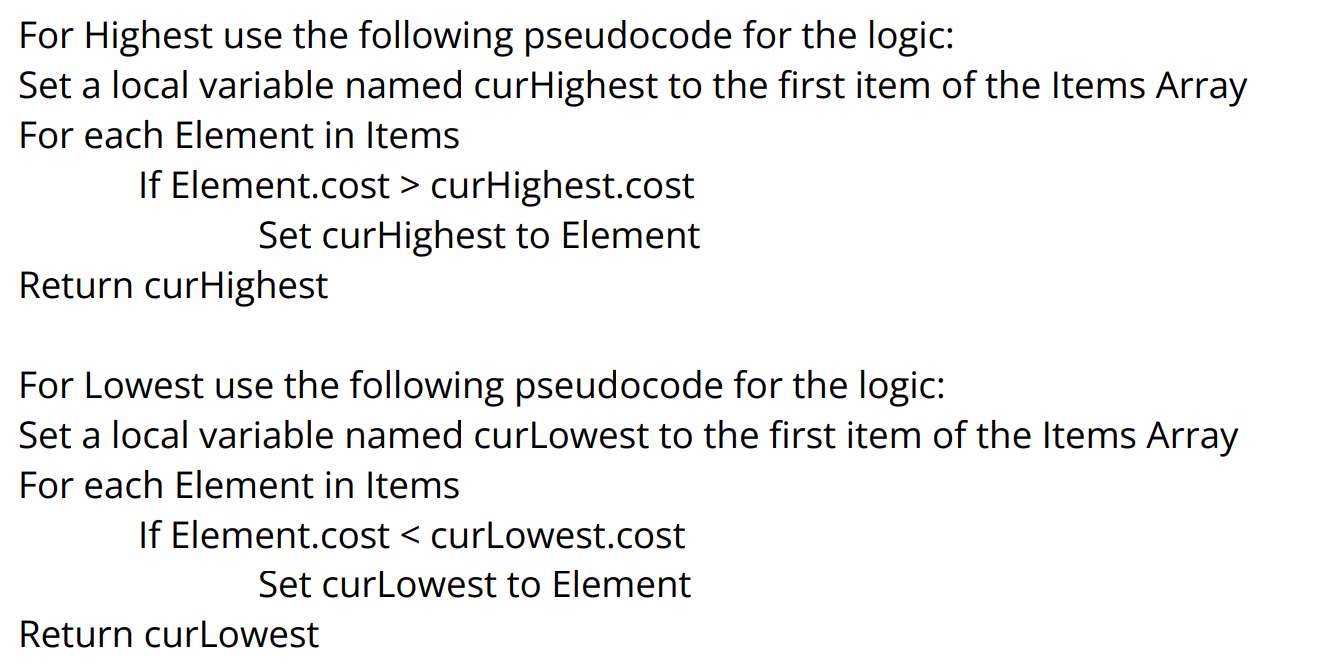
How would i code this as a bp https://i.imgur.com/nFCk308.png
 kind estuary
Im spanning factions on a map. How do i make sure they are far away from each other uniformly? So like how age of empires 2 does it. When the game starts all players are more or less apart from each other.
i tried generating a grid. and assign players to its own space, but sometimes players get too close
 versed sun
Make a random Location A
In a random Direction, extend out X Distance to find Location B
How many players?
 cunning vapor
Got it working with this; thanks for the push in the right direction; a small follow on question; how do i set the actorbeginoverlap to work with different/multiple boxes
 lunar sleet
cunning vapor
Got it working with this; thanks for the push in the right direction; a small fo...
lunar sleet
cunning vapor
Got it working with this; thanks for the push in the right direction; a small fo...
Wdym
Boxes on the same actor?
It’ll stack
cunning vapor
lunar sleet
It’ll stack
Is there a way around this ?
lunar sleet
Just gotta make sure you have the right collision settings
lunar sleet
cunning vapor
Is there a way around this ?
Around what, do you want collision or no collision
cunning vapor
was thinking of "if this close - play this anim" , "if closer -- play this anim"
lunar sleet
You want to check how close you are to another actor?
cunning vapor
lunar sleet
You want to check how close you are to another actor?
yes
lunar sleet
Use GetDistanceTo
cunning vapor
tyvm!
devout oak
devout oak
How would i code this as a bp https://i.imgur.com/nFCk308.png
anyone know how i would throw this into a bp
https://i.imgur.com/HOA4HvQ.png this is what I currently have
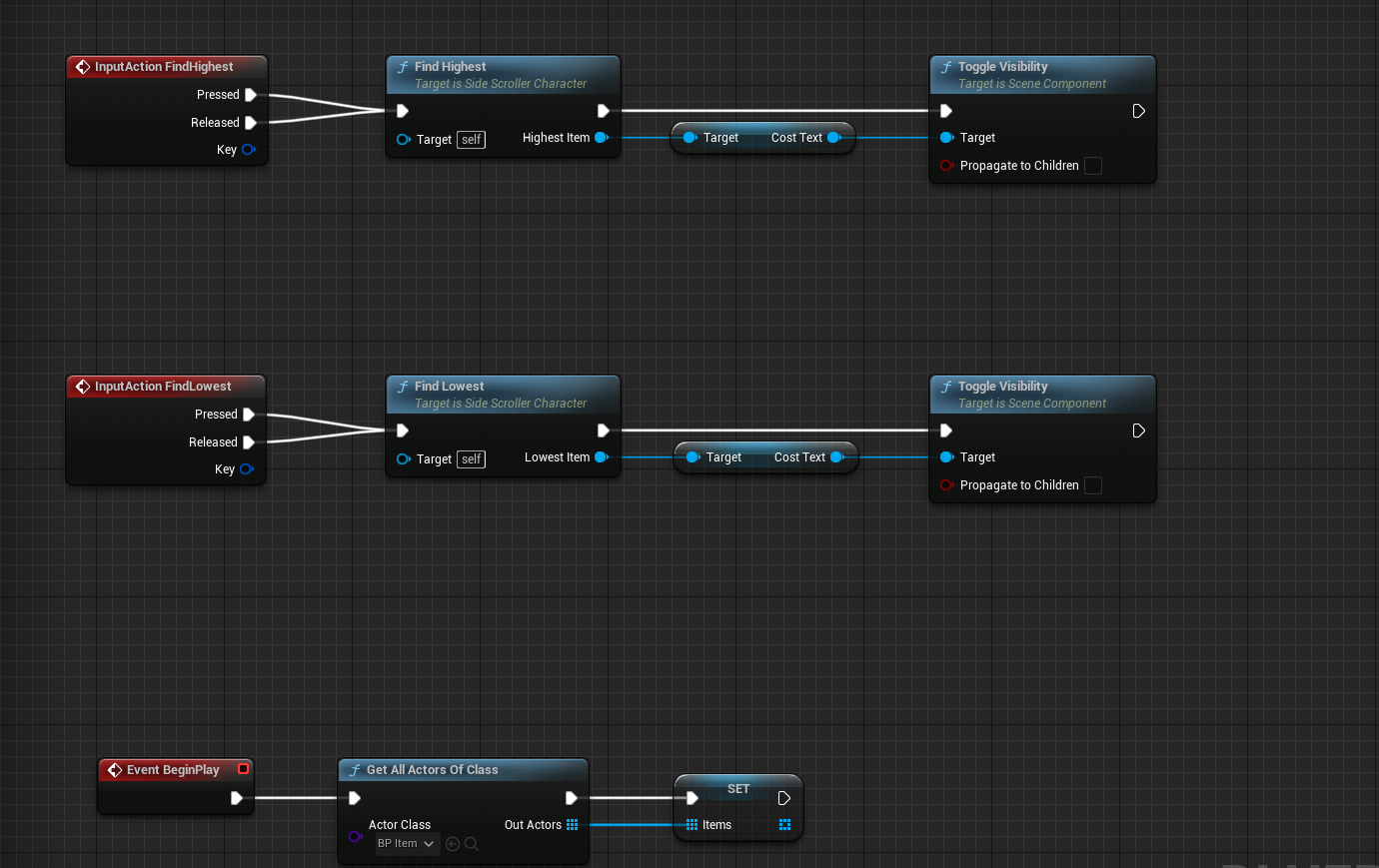
just not sure how to implement the pseudocode into it
 foggy otter
where can i change the parameters of the default physics volume of the world?
slender quest
lunar sleet
Usually yeah
I finally figured out the main issue, which is when i dash and aim at the same time, it seems to cut the aim action out instead of completing or cancelling it
lunar sleet
slender quest
I finally figured out the main issue, which is when i dash and aim at the same t...
Nice
slender quest
to be even more specitic, if i aim, and then dash, and then let go of aim while in the middle of the dash, it does not cancel
BECAUSE, during my dash, i disable input...
😅
lunar sleet
slender quest
BECAUSE, during my dash, i disable input...
You disable input during input?
You can Add and remove mapping contexts if you want to stop it from reacting to movement while dashing
 celest tangle
How can I return something from calling a custom event set to replicate on owning client?
I start in a function that is run on the server --> need to access the UI (client event) --> UI data sent back to the same (calling) server function.
foggy otter
celest tangle
How can I return something from calling a custom event set to replicate on ownin...
afaik you generally cant. split the functionality into separate events.
celest tangle
kk ty
 gritty tartan
I'm using a random stream and setting it in the game instance. When I pull the variable from game instance in a widget, the random stream always returns 0 instead of the actual random stream variable (I'm setting text to update what the random stream numbers are, so I can verify what it's supposed to be). Not sure why it's doing that.
 light summit
is it possible to make a console command that puts the player in a free cam and despawns the possessed pawn?
slender quest
lunar sleet
You can Add and remove mapping contexts if you want to stop it from reacting to ...
oooh, i didn't know about this, i should learn some more about that
I was just using the disable input node because it seemed to get me the effect I wanted at the time, but i see how it's limited
The mapping context sounds like an important concept for me to learn
lunar sleet
Yes it’ll go a long way
slender quest
lunar sleet
You can Add and remove mapping contexts if you want to stop it from reacting to ...
So I can just swap the mapping context using something like this whenever the Dash is active, so that there's no movement input included, ill try to exclude the aim too

or i guess i could just remove mapping context and then add it back after the dash completes
lunar sleet
slender quest
So I can just swap the mapping context using something like this whenever the Da...
Yeah have everything you want not to be able to use in one context and the dash with other stuff you want to still be able to use in the other. Then remove the corresponding mapping context while dashing and add it back at the end of it
You can also break the options pin to force it immediately and so on
But if that’s not smooth enough, you can always use a bool check isDashing? on the movement and look IAs, not elegant but it’ll work
 wicked marten
hey guys.. just wanna ask how to screenshot in game including UI...
lunar sleet
wicked marten
hey guys.. just wanna ask how to screenshot in game including UI...

Epic Developer Community Forums
Use the “Shot” console command. The screen shot will show up in the Saved/Screenshots directory in PIE, or user appdata folder if installed. You can also pass in a custom name in the HighResShot command: Or, if you want to specify resolution and filename/path, use HighResShot with filename=:
lunar sleet
Did you use the last response in that thread ?

 lunar sleet
wicked marten
wait
lunar sleet
wicked marten
wait
Yes
 wicked marten
lunar sleet
Yes
wicked marten
lunar sleet
Yes
Gee thanks
 lunar sleet
I’m not sure if that’s sarcasm but 🤷♂️
wicked marten
nah realy i was going crazy for 3 days
finding this
my only problem is the filename
i transfered from unity

impracticing here
slender quest
lunar sleet
Yeah have everything you want not to be able to use in one context and the dash ...
It fixes the aim issue, but now i'm getting something weird happening with the dash-attack and the shooting, which seems to be firing twice for some reason, but I will investigate this further. Thanks for the input mapping context concept, a good thing to learn
wicked marten
lunar sleet
I’m not sure if that’s sarcasm but 🤷♂️
naah, i appreciate the help
lunar sleet
slender quest
It fixes the aim issue, but now i'm getting something weird happening with the d...
Break that options struct
There’s a couple of options in there
Play with those on both the add and remove
devout oak
devout oak
https://i.imgur.com/HOA4HvQ.png this is what I currently have
Hey neo would you be able to help me with this?
lunar sleet
devout oak
Hey neo would you be able to help me with this?
I see functions being called but not inside them
lunar sleet
wicked marten
pm me ill paypal you some
Nah, advice here is free
Just pay it forward when the time comes
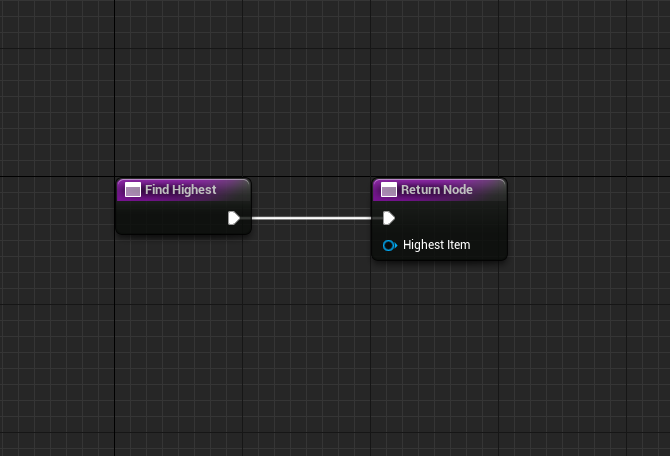 lunar sleet
devout oak
https://i.imgur.com/TwmSFqZ.png
lunar sleet
devout oak
https://i.imgur.com/TwmSFqZ.png
Oh ok so empty
devout oak
just named diff
wicked marten
gee big thanks
lunar sleet
devout oak
im just not sure how to implement the pseudocode into the bp
Do you know what pseudocode means?
 ionic cypress
It is not a language. Just for you to write down your logic
lunar sleet
Not really a language,
More like a description of the logic 🥈
Is this a class assignment or something?
devout oak
yeah but ive never translated something like that into a bp
lunar sleet
Logic in layman’s terms as they say
devout oak
so im just unsure of where to even start
lunar sleet
Have you done any normal coding?
devout oak
nope
wicked marten
YOUR DRAFT
lunar sleet
Ok, it usually helps to understand programming basics, were you told to just do all of this stuff in Unreal blueprints with nothing to go on?
devout oak
the only thing i have to go off of is the photo that i had sent
we were told to attempt to figure it out
but thats it
ionic cypress
devout oak
nope
Probably you'd better to check some blueprint tutorial first. There're a bunch of videos online.
It is not that a magic but need to spend time in it.
 frosty heron
Yes
lunar sleet
Whether you should is another story
frosty heron
I used it to find paths to movie and image file
wicked marten
only image
open OS file browser > select image> Display Image on screen > screenshot it again. simple as that
i have a project game, a 2d game like tradewinds
im practicing the basics
frosty heron
I don't know a way to serialise it tho, so basically you are just getting the path to the image file. You will need to load the image everytime you start the game again.
So what I mean is , if your user delete the image then it goes bye2
thick flame
oh man.... so, i got everything working between my player and one enemy, but when i place more of my BC it doesnt work. They will swing at the player if they are close enough, but they wont path to them and cant be killed by the player
frosty heron
Opening file browser requires cpp, I wouldn't have a clue my self and use a plugin
lunar sleet
thick flame
oh man.... so, i got everything working between my player and one enemy, but whe...
You’re placing more actors of that class into the world or spawning
lunar sleet
No, just wondering
You said those instances wont path to your player, did you check they’re on the navmesh and not in or above it?
thick flame
they dont seem to be clipping the mesh
 lunar sleet
If your attack happens onSuccess and your move fails, they will be invincible
wicked marten
frosty heron
I don't know a way to serialise it tho, so basically you are just getting the pa...
the purpose of the screenshot is, it will be the save file. the image
lunar sleet
thick flame
they dont seem to be clipping the mesh
Put a print string on the move failed
frosty heron
wicked marten
the purpose of the screenshot is, it will be the save file. the image
Ye you can do w.e you want with it. The image will be saved in your .sav folder tho which is editable and accessible by user (delete or edit in photoshop)
wicked marten
frosty heron
Ye you can do w.e you want with it. The image will be saved in your .sav folder ...
thats the point ahhahahah
but that will be later on
i dont know if thats absurd
frosty heron
Well it's not a good thing for user to be able to delete stuff from inside the game
thick flame
lunar sleet
Put a print string on the move failed
would that be reutrn value here? or do i need to code something to check for a miss
 frosty heron
Anyway the plugin is called file browser if you want the OS file browser
lunar sleet
thick flame
would that be reutrn value here? or do i need to code something to check for a m...
No, that’s a trace, talking about the AIMoveTo
wicked marten
frosty heron
Anyway the plugin is called file browser if you want the OS file browser
ue5 .3?
thick flame
lunar sleet
No, that’s a trace, talking about the AIMoveTo
ohhh
frosty heron
wicked marten
ue5 .3?
No idea. I used it in my old project 4.25
wicked marten
cuz thereis none
 frosty heron
wicked marten
cuz thereis none
frosty heron
wicked marten
cuz thereis none
Marketplace
frosty heron
Not expensive tho
thick flame
lunar sleet
No, that’s a trace, talking about the AIMoveTo
its failing every tick lol
frosty heron
Just hope it support your ue version
thick flame
so its a nav mesh issue?
wicked marten
frosty heron
Just hope it support your ue version
i hope so
lunar sleet
thick flame
so its a nav mesh issue?
Maybe. Try rebuilding the nav, adjusting the positions of the actors on the landscape, see if that works
If not, you’ll need to use Visual Logger to debug
wicked marten
frosty heron
Just hope it support your ue version
this one?
 frosty heron
No
wicked marten
i think i saw a bp tutorial at YT
frosty heron
The one I used expose the actual OS browser
wicked marten
 wicked marten
frosty heron
The one I used expose the actual OS browser
wicked marten
frosty heron
The one I used expose the actual OS browser
i need is not the actual OS browser
a simple browser like this

Full Plugin: https://www.unrealengine.com/marketplace/en-US/product/074bb96d3dac4b70a16943022d335401
Basic Version: https://gum.co/OwCcK
Source: https://github.com/anhuntz/fileman
Join the fun: https://discord.gg/32qgNwm
frosty heron

Unreal Engine
Open windows file browser at game runtime
thick flame
lunar sleet
If not, you’ll need to use Visual Logger to debug
i cant find any doc on vislog
frosty heron
5.2 Max I think
frosty heron
I haven't finished watching your tutorial but it seems he hard code the paths
Kinda lame to ask users to type in the path instead letting them pick the file from the browser
wicked marten
frosty heron
I haven't finished watching your tutorial but it seems he hard code the paths
yapp...
pick is better than typing the whole shiet
frosty heron
What feature are u using in 5.3 anyway? I'm just glad I didn't upgrade atm given the bugs
wicked marten
frosty heron
What feature are u using in 5.3 anyway? I'm just glad I didn't upgrade atm given...
i dont know yet.... im still practicing yknow
i thought the preview version is the buggy one
frosty heron
Yeah preview and 5.3
wicked marten
ahh i know
frosty heron
I'm using 5.1 dunnoe about 5.2
wicked marten
the auto ai generated environtment
frosty heron
But I didn't hear a lot of complain for 5.1 or 5.2
frosty heron
Hmm I think you can still use the plugin if you have the source build. I'm not sure, might want to ask around
wicked marten
i work at a school back then creating architecture mock ups of thier buildings
i did not need to do heavy blueprint pro gaming
programming
wicked marten
frosty heron
Hmm I think you can still use the plugin if you have the source build. I'm not s...
ill try doing tutorials first
then ask if my powers cant do this shit
about scroll list, i want show the contents of the first coluomn
lunar sleet
thick flame
i cant find any doc on vislog
This is an #gameplay-ai issue now, but go to Tools -> Debug -> Visual Logger. Record and then run the game. From there you can click on each frame and see what the log says
thick flame
ok
wicked marten
wicked marten
about scroll list, i want show the contents of the first coluomn

do i need to put it manually or can i import in inside
frosty heron
You can use node in bp to extract the name into the box

 frosty heron
Yeah get data table row names
wicked marten
while loop?
frosty heron
Not while loop
wicked marten
just the 2nd coloumn

 lunar sleet
wicked marten
i dont know how for each works
lunar sleet
wicked marten
i dont know how for each works
It just iterates over each element in the array
But that will only have one row
So one element
wicked marten
wicked marten
is there any way to automatically put this in scroll list?
ill go to uncle google and understand how it works first
lunar sleet
Yeah I haven’t tried that before, but I’m sure it’s doable
wicked marten
and ill ask help if i cannot understand it. so i will not waste anyones time
ill be back
 dawn gazelle
In order for something to happen smoothly over time, it has to be triggered every frame, not just on the click.
Instead, try using a variable for "Target". On click, set the target to what you desire. Move the Set Relative Transform Angle to run on Tick. Also make sure your interp speed is not too high otherwise it may happen too fast.
dawn gazelle
I think there's an "Ease" type interp to node.
frosty heron

it's easing at the start too tho, not sure if that's what you want
Slow in Slow out is the term in animation
ionic cypress
regular one is linear I think?
 deep void
How can i get a HUD user widget to communicate a bool with an actor component BP?
I've tried;
-
exposing the HUD variable and doing a object reference to the HUD (never changes the bool in the component bp)
-
exposing the component variable and doing a object reference to the component (never changes the bool in the component bp)
-
Casting to the component (read none error)
-
Casting to the HUD (HUD does not inherit from user widget error (it is a user widget))
I simply want the actor object (with actor component attached) to behave differently depending on which UI button is pressed.


 frosty heron
deep void
How can i get a HUD user widget to communicate a bool with an actor component BP...
frosty heron
deep void
How can i get a HUD user widget to communicate a bool with an actor component BP...
Name is just a name, what you want to do when casting is to check for the object type
User Widget is not equal/inherit/share the same base class with HUD, your casting will always fail
deep void
frosty heron
User Widget is not equal/inherit/share the same base class with HUD, your castin...
I don't really understand this part of casting, so what would be the object type for this to work?
frosty heron
So you need to check what your Hud Ref is
hover over the blue pin and you will see the Variable type of HudRef
from what I see, there is probably no casting required here. You simply have not set HudRef
casting is just a type check
deep void
frosty heron
from what I see, there is probably no casting required here. You simply have not...
i have set it to an object reference of my hud
 frosty heron
then you don't need to cast
you are trying to get TFHUDWidget anyway
if you get access none then you simply have not SET HudRef
you are trying to access an instance that doesn't exist in memory
deep void
fair enough, then why won't this work?
I am changing testbool in the HUD, yet it doesnt change in this bp
 frosty heron
because you have not SET HUDRef
for the 4th time 😄
It needs to point at something that exist
You can create a variable of MyPlayer in a bp. It will point at nothing until you tell the engine to, Hey Point the variable to this MyPlayer that just step into my trigger (for example)
Refer to your error here
 deep void
frosty heron
because you have not SET HUDRef
deep void
frosty heron
because you have not SET HUDRef
i thought we just established that i had set it, to an object reference. You then said that i don't need to cast.
If im not setting HUDref to an object reference of the HUD BP, then what would i set it too?
I get the logic of your sentence, but how do i "point" a reference in blueprints?
frosty heron
We never established that you had set it
hence the error
This is example
Using the variable as is without setting(pointing) will result in runtime erro , Green is SET. Now MyActor points at the Actor that I spawned

if I get MyActor->DestroyActor
It will destroy the character that I spawned
deep void
frosty heron
Using the variable as is without setting(pointing) will result in runtime erro ,...
i understand getting and setting an actor, int, bool etc for the purpose you mentioned.
But that's not really what i want to do, or at least i don't see the connection.
I am setting a bool in my HUD, i want an actor component to be able to read that bool.
The bool in the actor component BP never changes
Even when it is changed in the HUD
 edgy ginkgo
is there any way to allow a player to use the foliage brush in game in unreal?
if not would there be any way to simulate it?
frosty heron
deep void
i understand getting and setting an actor, int, bool etc for the purpose you men...
You are making it really hard to help you. You can forget about setting or getting member variable when the variable it self is not set yet. Hence the error
You have not set your HudRef hence accessed none. I can't tell you more than what I've told you already
deep void
frosty heron
You are making it really hard to help you. You can forget about setting or getti...
But how do i set a variable to a blueprint, in your example you're linkning spawn actor into the set. All im asking is what do i link into my set
frosty heron
edgy ginkgo
is there any way to allow a player to use the foliage brush in game in unreal?
With c++ anything is possible
frosty heron
deep void
But how do i set a variable to a blueprint, in your example you're linkning spaw...
I've given example, in your case you need to set the hudref to the hudref that exist within the world and that you want to use/access
If you have trouble with that, try to watch blueprint live communication video in this channel. That will help you understand
deep void
frosty heron
I've given example, in your case you need to set the hudref to the hudref that e...
that's what I'm trying to do, i get you're saying i need to set hudref to my HUD or ill get the error.
But what im asking is how do i set it to my HUD? What goes into the set pin?
I thought setting hudref to an object reference of my hud was doing this, but i guess it isnt, so how do i set it, how do get my HUD onto the BP so i can plug it into set
edgy ginkgo
if only I knew enough c++ to help
frosty heron
You need to set the hudref to an instance of hudref that you want to access. I give up at this point if you still don't get it. Refer to blueprint live communication video to brush up on the basic
 gentle urchin
deep void
i have set it to an object reference of my hud
gentle urchin
deep void
i have set it to an object reference of my hud
This is just defining its type
So its a pointer to your hud type
But its a nullreference by default
It knows what type of object instance it can point to
But doesnt actually point to anything yet
Hud is accessible from playercontroller
If the owning actor is pawn you can set the hud rer like this:
Get owner -> cast to pawn -> get controller -> cast to playercontroller -> get hud -> cast to myhud
Then you set your hud reference to the output object of that cast
When that is done, you can access the hud directly from that varoable, assuming all casts succeed
deep void
frosty heron
You need to set the hudref to an instance of hudref that you want to access. I g...
I dont know how else to say this, again i get it has to be linked, I understand the logic, all I was asking is how, as in what node goes on the blueprint for this to work. I'm checking out the video, cheers for the link
deep void
gentle urchin
When that is done, you can access the hud directly from that varoable, assuming ...
Thank you so much for explaining it clearly and providing instructions, its greatly appreciated 🙂
casts mostly worked, only problem being is that all my logic is handled on a user widget on my HUD. There doesnt seem to be a get user widget node available from HUD
 gentle urchin
Where are you creating this widget, and storing a reference to it ?
deep void
gentle urchin
Where are you creating this widget, and storing a reference to it ?
on my main hud bp, and it has a reference there.
(I'm pretty new to this and followed a tutorial for this hud set up)
 frosty heron
UserWidget is not your HUD,
Go to your world setting , check the HUD that you use
cast it to that, then get MainHudWidgetRef
gentle urchin
And not the widget direvtly, as thats not a valid type conversion
edgy ginkgo
is there a blueprint to adjust cursor speed?
frosty heron
Don't think you can do anything with hardware stuff with BP. the most you can do is adding sensitivity for Aiming your weapon and the likes
but mouse speed in widget is OS dependent afaik
deep void
gentle urchin
So you wanna cast to main hud bp
cast to pawn is failing
 gentle urchin
Well
Who is the owner ?
A random actor?
Owner being whoever "holds" this component
deep void
gentle urchin
Who is the owner ?
its a component bp on an actor bp, so i assumed target self is fine
gentle urchin
Actor bp...
frosty heron
when in doubt, print it
frosty heron
Get Player Controller -> Get Hud probably works
 fading plank
 deep void
frosty heron
Get Player Controller -> Get Hud probably works
deep void
frosty heron
Get Player Controller -> Get Hud probably works
this worked, thank you
fading plank
fading plank
https://imgur.com/a/f9jGIsP
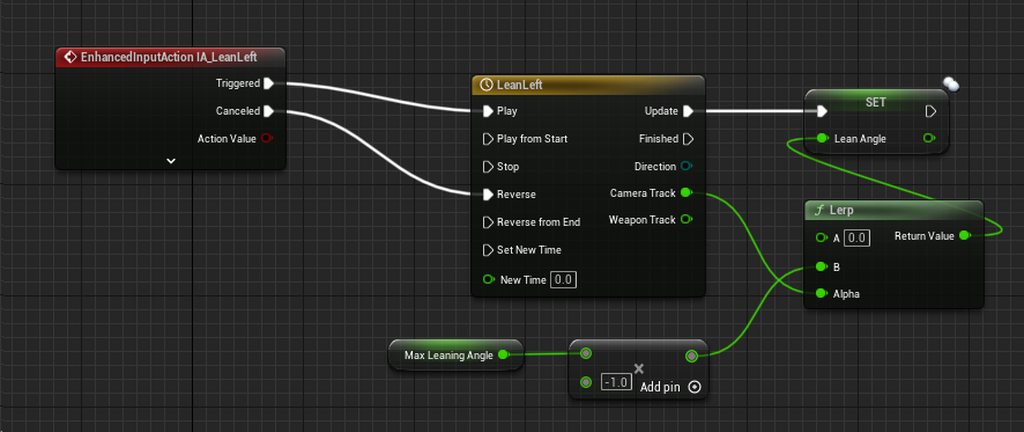
For some reason the timeline just wont reverse when the button is released, it stays at the max value. What am I doing wrong?
gentle urchin
You cant set a replicated value from a client
Not the reason it doesnt work, but another issue
 tame pecan
gentle urchin
You cant set a replicated value from a client
tame pecan
gentle urchin
You cant set a replicated value from a client
you can, just wont work as you expect
😄
deep void
gentle urchin
Whats it supposed to do ?
its working without the cast to pawn, thanks heaps for your help.
Its for a building simulator style game, with placeable objects, objects that can be selected (logic in the actor component bp)
However i noticed when you're placing objects on the grid, you can sometimes accidently click and highlight / select objects.
So ive made a 'select' button on my hud user widget, I just havent been able to get it to change a bool in the component bp that says "yes you can click"
fading plank
gentle urchin
Not the reason it doesnt work, but another issue
Tsk. I'll need to figure that out some other time. Right now I'm more worried about the timeline not reversing
 dim flume
Hello! I took some a project that was using the Angelscript version of UE (the one from Hazelight) and I wanted to convert all my Angelscript classes to C++. I did that with no issues but then the blueprints that had those classes as parents have lost the parent and are showing None as the parent. I thought I would just reparent them to their new C++ type but all of those classes are not shown in the filter when reparenting... and that's weird as they are all derived from either APawn of AActor. I though I would give a try with CoreRedirects and point the old classes to the new one there but nothing to do there either. Do you have any suggestions?
frosty heron
fading plank
Tsk. I'll need to figure that out some other time. Right now I'm more worried ab...
I Don't use enhanced input but im pretty sure cancelled is not what you want
try to click on the drop down arrow and see your options
gentle urchin
deep void
its working without the cast to pawn, thanks heaps for your help.
Its for a bui...
This sounds very backwards
Selection, currently selected etc should live in the pawn or playercontroller
Id go with pc
fading plank
frosty heron
I Don't use enhanced input but im pretty sure cancelled is not what you want
 frosty heron
fading plank
frosty heron
fading plank
maybe completed?
deep void
gentle urchin
Id go with pc
ill see about moving it there, i was just adding to the existing logic from a yt tutorial, which is all in the component bp on each placeable actor
gentle urchin
Ugh... tuts
fading plank
frosty heron
maybe completed?
That did it!
deep void
gentle urchin
Didnt they also have building selection
will do, thank you so much 😁
edgy ginkgo
okay now I am facing a bit of a complex issue. In my game players click and drag on the map to spawn trees this fully works in the level however when the level is loaded from the main level the cursor is still visible but is no longer able to click and make line traces
though the cursor is visible the cursor appears as a cross
versed sun
across from what ?
 spark steppe
edgy ginkgo
okay now I am facing a bit of a complex issue. In my game players click and drag...
spark steppe
edgy ginkgo
okay now I am facing a bit of a complex issue. In my game players click and drag...
have you changed the input mode in the main menu?
you'll probably have to set the game input mode to game or game and UI
edgy ginkgo
I have not
spark steppe
try those on beginplay in your level blueprint
or in your player blueprint if it is a character
edgy ginkgo
thanks for the help
it almost works!
so the click works now
but now regardless of the setting for that node the mouse cursor locks when clicking
ah I fixed it
thanks for you help
 rancid moat
Anybody able to explain clearly what the different value in the Linear Motor option of a physical Constraint are? Because I can't find anything clear, and try and error isn't really giving me anything solid either
 trim matrix
OnPaint function isn't being executed any tip?
 keen hedge
Is there a way to add an actor component via construction script and have it visible in the actor component hierarchy?
gentle urchin
doubt it
 restive rose
PackagingResults: Error: [AssetLog] D:\UnrealProjects\IWALS (Version 3.0) UE5\Content\AdvancedLocomotionV4\Blueprints\CharacterLogic\ALS_Player_Controller.uasset: [Compiler] Spawn node Create Widget must have a class specified. from Source: /Game/AdvancedLocomotionV4/Blueprints/CharacterLogic/ALS_Player_Controller.ALS_Player_Controller
I have errors like this, when i packaging project, blueprints compile success but package throws error like this, how to solve it?
versed sun
Looks like you have one of these in your ALS_Player Controller that doesn't have a Class pugged in right

 maiden wadi
keen hedge
Is there a way to add an actor component via construction script and have it vis...
maiden wadi
keen hedge
Is there a way to add an actor component via construction script and have it vis...
Not really. It doesn't really make sense to edit a component added from the construction script. The moment you edit it, the script will run again and rebuild the component. The point is to edit them from the script itself. If you want extra components that you can edit on an instance in a level but not make it part of the defaults, just add it to the instance.
 random solar
Need some help, currently trying to increase a sizebar called Stamina Bar Reducer that will shorten the green bar before the end of the total bar but as you can see in the video there is an issue where it's not working. Is there anyone around that can help?

 versed sun
 random solar
It's still doing the same issue
I am doing a cast to where it's made but I'm having it be hosted in another BP if that helps

 maiden wadi
random solar
Need some help, currently trying to increase a sizebar called Stamina Bar Reduce...
maiden wadi
random solar
Need some help, currently trying to increase a sizebar called Stamina Bar Reduce...
If you increase the sizebox's size in the designer, this works fine, right?
random solar
Yes, adding 15 to the width overide works fine
maiden wadi
Is your cast successful? Is that a valid reference?
random solar
Hmm, it comes out as failed actually
maiden wadi
Did you set the property that you're trying to cast from?
random solar
I'm pretty sure I did user widget object reference for the variable
If that's what you were asking about anyway
maiden wadi
What blueprint is this logic in?
random solar
It's in my top down character
maiden wadi
One consideration would be, why does your character care about this widget? The widget can get your character much easier.
random solar
This widget is the stamina bar. The stamina bar is affected by a few mechanics such as movement states (How fast it's moving) and how much stamina is consumed by the character
maiden wadi
The widget can get all of that state as well. But that's maybe a topic for another time. Usually you don't make a gameplay class care about your UI like this.
My original question was just if you set the pointer. I assume since it's failing, that it's a blank pointer of a type. You need to get the widget somehow and set it in that pointer.
 vernal pelican
why is my cast not working
 random solar
maiden wadi
My original question was just if you set the pointer. I assume since it's failin...
random solar
maiden wadi
My original question was just if you set the pointer. I assume since it's failin...
In the widget, I have this
 maiden wadi
vernal pelican
why is my cast not working
maiden wadi
vernal pelican
why is my cast not working
Because Actor is either not set to a specific actor, or that specific actor is not a DOOR.
vernal pelican
how do i set it to a specific actor
lunar sleet
vernal pelican
how do i set it to a specific actor
Get a reference to that actor
Through an overlap event for example
 silent ledge
Hey people, I am currently having an issue with Unreal, when working in my current project, sometimes when I close the game to continue editting blueprints, the engine freezes and crashes quickly after, the Crash Reporter keeps giving me the following:
Assertion failed: Index>=0 && Index<NumBits [File:D:\build++UE5\Sync\Engine\Source\Runtime\Core\Public\Containers\BitArray.h] [Line: 1265]
UnrealEditor_Core
UnrealEditor_Core
UnrealEditor_Core
UnrealEditor_RenderCore
VCRUNTIME140
ntdll
ntdll
ntdll
I am unsure what is causing it. Does anyone know anything that could help me?
Thanks in advance!
slender quest
lunar sleet
Play with those on both the add and remove
I played around with a bunch of the options but it didn't really fix the double input, though one configuration brought back the original issue. I'm not sure i totally understand what the options are doing. However, I did fix the problem by adding in the attack and shoot buttons to the new mapping context, so that they get "carried over" so it doesn't trigger them twice anymore. Thanks for all your help!
 snow rapids
Hello you lovely people! I can not figure out how to move an actor to a point from pcg. Can you help?
 faint pasture
vernal pelican
how do i set it to a specific actor
faint pasture
vernal pelican
how do i set it to a specific actor
However you want. How do you WANT this code to choose which actor it cares about?
 mental trellis
silent ledge
Hey people, I am currently having an issue with Unreal, when working in my curre...
mental trellis
silent ledge
Hey people, I am currently having an issue with Unreal, when working in my curre...
You'd have to install the editor debug symbols to glean anything from taht - they're 80gb and probably won't help, though.
 fallow dune
Hi! Does anyone know how I can set on which display my game is on? Thanks!
silent ledge
mental trellis
You'd have to install the editor debug symbols to glean anything from taht - the...
hmmm okay, thanks!
mental trellis
Does it happen every time you stop your game?
silent ledge
not everytime, about once every half hour so I would say 1/20 times, but there doesnt seem to be a pattern for whats causing it
fallow dune
silent ledge
Hey people, I am currently having an issue with Unreal, when working in my curre...
im having the same issue
lunar sleet
What engine version
fallow dune
altough for me it seems to freeze permanently
fallow dune
lunar sleet
What engine version
ue 5.3
silent ledge
same here
fallow dune
yeah
lunar sleet
Try updating
fallow dune
it didn't happen before
fallow dune
lunar sleet
Try updating
I can't see the new engine version in the launcher
do i need to get it off github?
silent ledge
lunar sleet
Try updating
thing is I dont think its my version, Ive been using 5.3 for about 1.5 months now and it only started happening earlier this week
silent ledge
but I will have a look anyways
fallow dune
lunar sleet
No, you should see Update
I did a while back, but nothing changed
lunar sleet
Weird, no clue tbh
fallow dune
yeah, i've seen they fixed a couple of bugs that i've been running into with the new version
so i'd be worth updating
gentle urchin
Update launcher
keen hedge
Is there a way to get a viewport in a SceneComponent subclass?
fallow dune
gentle urchin
Update launcher
where?
gentle urchin
fallow dune
where?
Settings/options
lunar sleet
keen hedge
Is there a way to get a viewport in a SceneComponent subclass?
A viewport? What are you trying to do ?
keen hedge
lunar sleet
A viewport? What are you trying to do ?
Create a actor component (scene component) w/ its own actor component hierarchy, so w/ a mesh etc etc
lunar sleet
keen hedge
Create a actor component (scene component) w/ its own actor component hierarchy,...
Components can’t have components, they can however be roots for other components. Not sure what this has to do with viewports
keen hedge
lunar sleet
Components can’t have components, they can however be roots for other components...
Yeah, that is unfortunate. The viewport I was asking for would be an attach-relationship, like how you attach scene components to other scene components in an Actor
Not sure why this isn't possible for scene components themselves
I mean I guess it is possible by manually creating and attaching other scene components - but why doesn't the Editor just give you a viewport to do that ugh
lunar sleet
keen hedge
I mean I guess it is possible by manually creating and attaching other scene com...
If you meant the viewport tab that’s specifically there to see and fiddle with the mesh
keen hedge
Well yes which is exactly what I want to do in my SceneComponent subclass 🙂
lunar sleet
A component cannot contain a component. The attachment relationship is merely platonic, it’s only there to affect transforms and give you access options
keen hedge
Dunno why epic didnt just implement "components containing components" by components NOT containing components and instead having whatever actor the main component is added to be the owner of other components, while allowing you to actually use the editor to create these relationships/attachments. Of course I'm talking about scene components specifically here
Oh well
keen hedge
Yes but my point is I cannot create a reusable scene component that will have other components attached to it other than doing so manually at runtime
keen hedge
Yes that is exactly what I want to avoid
Instead of having composability as a choice, you're FORCED into inheritence like its 1999
lunar sleet
Lol
keen hedge
And OOP is the shiny new thing 😄
keen hedge
lunar sleet
Inheritance is OOP
Yes, and it was shiny in 1999 (well more like in 1979 but still)
Ok rant over, sry for that

 maiden wadi
Nothing wrong with inheritance. Also nothing wrong with composition. But if you want a decent project you really need both and to not choose one over the other. Like any other tool they have their uses.
 golden pewter
if i were to make something to detect when im placing an item in my level to match the direction of a wall, would i use a widget or an actor in my level
some sort of panel that detects mouse hover and changes the rotation of the item accordingly
wall is just a background image
faint pasture
@keen hedge you're doing modular building right?
You want to have a thing which contains things which contain components
keen hedge
Yes, ideally that's what I'd want
I guess I'll settle with child actor components that (al least so far) seem to be working better than in 4.27
faint pasture
Yeah CAC will do the job but I don't use them, it's all just actors in my project. Can't visualize a thing made up of the actors at editor time but there's ways around that for me
For context I'm doing modular vehicles
keen hedge
Well I know that Tom Looman, in one of his talks, as a workaround decided to create his elaborate actor as an entire Map/Level
So he can visually see what he is doing when creating elaborate setups
He just parents everything under the main actor BP in the level hierarchy and then streams the "level" in when he needs to load and use the actor
faint pasture
Yeah that's an approach
My game centers around a vehicle editor so I just use that to make the pre-built vehicles
keen hedge
Just seems kinda overkill
keen hedge
faint pasture
Yeah CAC will do the job but I don't use them, it's all just actors in my projec...
Curious, what are your "ways around that" 🙂 ?
faint pasture
My game revolves around player built designs so I just use the vehicle editor I already have. The entire vehicle is baked down to a "recipe" struct which is used to spawn it.
Basically my editor is in the game.
 desert briar
is it a bad idea to have a blueprint variable that is an array with 300 960x540px textures?
faint pasture
desert briar
is it a bad idea to have a blueprint variable that is an array with 300 960x540p...
Nah go for it
it's not really an array of textures
it's an array of references to textures
desert briar
awesome, that saves my ass
faint pasture
I gotta ask, wtf are you actually doing tho
desert briar
😂 i think you're nice for not asking this the very first thing
faint pasture
flipbook animation?
desert briar
i'm adding tutorial videos, to be displayed in UMG. the built in mediaplayer stutters on looping. the electra plugin crashed on me after playing for 10 minutes (and i got no idea how to debug it, so f that). flipbook animations can't be used on images in UMG
=> i've written an own flipbook player in umg. dynamic material with a texture parameter - update texture index with delta time and swap out the texture
turns out my own flipbook thing uses 100mb less ram than the electra player

maiden wadi
Default Meda Player in Unreal is really bad. If you want a media player, enable the Bink plugin and use that. It's infinitely better. Less runtime resources, better compression for file sizes, and also runs on most all platforms.
desert briar
maiden wadi
Default Meda Player in Unreal is really bad. If you want a media player, enable ...
Thanks so much! I’ll try that next time
maiden wadi
Also not sure I'd use it for flipbook stuff though. Maybe. Depends on the context I guess.
desert briar
This flip book thing is only a workaround because the video players sucked. Would have been so much better to just throw my video in there
maiden wadi
Ah. If it's for a real video than 100% the bink player. The only real downside is that you have to open media via a relative path to the project root. And you have to run your media through their converter to "bink" it. But neither of which is really painful to work with for the benefits.
 worldly oar
im trying to highlight a button in the widget blueprint (in ue5) and added an animation to it. The animation is the opacity goes to zero and an outlined box appears on clicked and then i want it to return to its original state. I used event on clicked for the highlight and on released to reverse the animation. The blueprints i used were the event to play animation with the ref to the animation in play animation. any ideas how i can return the button to its original state when clicked again?
maiden wadi
Sounds kinda like you'd just play the animation in reverse?
worldly oar
yes i changed that in the play animation node
but you mean create another animation in reverse
maiden wadi
No. You can play the same animation in reverse. You've already played it forward, so that's where the state is, so if you play it in reverse, it will go backwards to where it started.
worldly oar
yes thats how the nodes are
but when its clicked again
it doesnt reverse the animation
 lofty rapids
you probably want a boolean or flip flop
lofty rapids
worldly oar
im trying to highlight a button in the widget blueprint (in ue5) and added an an...
"on released to reverse the animation" <-- this didn't work ?
worldly oar
hmm ok
doesnt work
was thinking might be the released node that needs to be switched
lofty rapids
I'm not understanding, on released doesn't "reverse the animation" ?
worldly oar
 lofty rapids
"On Pressed happens the moment you click on the widget. On Clicked, on the other hand, triggers when you release the mouse button."
maiden wadi
Yeah.
Swap Clicked for Pressed. You only used Clicked when you want a specific Down and Up press event.
worldly oar
thank you!
 night trench
I saw in tutorials that this should work to add upward movement to a ThirdPersonCharacter, but it's doing nothing but control how intense the forward movement along the ground is, can anyone help?
 maiden wadi
Is your Pawn a character?
night trench
Yes.
maiden wadi
It needs to be in Flying MovementMode for this to affect it like that.
golden pewter
what actor can i use to detect mouse hover in my level
and in relation to this topic i cant get nav modifier volume to detect my mouse
hover or click
night trench
maiden wadi
It needs to be in Flying MovementMode for this to affect it like that.
Perfect! Thank you.
 onyx token
is there a way to detect if an actor is no longer 100% overlapping a collision? 
there's ActorEndOverlap - but that only triggers if it's completely outside
i need something that triggers when it's only just poking out
night trench
maiden wadi
It needs to be in Flying MovementMode for this to affect it like that.
And, if I wanted to create a custom pawn controller to do this? (aka, one without a character movement controller)
maiden wadi
What do you mean by "Controller" in this sense? The Controller technically doesn't have much to do with movement. I assume you mean the CharacterMovementComponent?
night trench
maiden wadi
What do you mean by "Controller" in this sense? The Controller technically doesn...
Apologies, I meant 'character movement component'
maiden wadi
In that case it depends on your movement component. Normally the usual go to is the FloatingMovementComponent, which will basically act the same as the CharacterMovementComponent in flying mode. The ProjectileMovementComponent isn't really meant for being controlled so much outside of maybe affecting it's direction for like a guided rocket.
If you created your own custom MovementComponent, then that would be entirely up to you, based on how you choose to interpret the input direction and scale.
night trench
maiden wadi
If you created your own custom MovementComponent, then that would be entirely up...
I think that has given me enough to google to move some steps forward. Thank you very much for answering the basic questions, it means a lot.
maiden wadi
Generally speaking, if anything is network related, it's usually best to hack up the CMC in some way.
Singleplayer? Doesn't really matter as long as it moves how you want it to.
faint pasture
desert briar
i'm adding tutorial videos, to be displayed in UMG. the built in mediaplayer stu...
Why videos?
Why not just sequencer
trim matrix
Any best practices that I need to know for doing global project constants? (Actually, I'm using .ini files)
desert briar
because it's 1000 times easier
 thin panther
trim matrix
Any best practices that I need to know for doing global project constants? (Actu...
thin panther
trim matrix
Any best practices that I need to know for doing global project constants? (Actu...
Using UDeveloperSettings is generally decent
 zealous moth
@onyx token no you would need to use multiple detectors inside and out.
What's the use case?
onyx token
i figured it out, i decided to use multiple detectors 
zealous moth
Hah nice
onyx token
I wanted to make a detector that won't let me build a building outside of my countries border in a lil strategy game
faint pasture
onyx token
is there a way to detect if an actor is no longer 100% overlapping a collision? ...
That's pretty hard to do
onyx token
well-
faint pasture
What are the shapes, arbitrary?
onyx token
i decided to always make them rectangles, add lil collision bodies to each corner and work with OnActorEndOverlap

fug it
onyx token
faint pasture
always the same or arbitrary
that ones basically arbitrary, made of a bunch of capsule colliders
(if you build an outpost, it increases your borders by a smaller radius than the town center, etc.)
onyx token
ye
 sick fable
can someone link me a video the basics of blueprints It was like an hour long someone linked it before but I forgot
faint pasture
yeah you can do distance checks
onyx token
but then i would have to distance check every corner of my building, with the nearest object, dependent on their radius.
And if an enemy builds an outpost next to your border, your border gets shifted by the difference between your outpost & their outpost
frosty heron
sick fable
can someone link me a video the basics of blueprints It was like an hour long so...
Blueprint live communication by epic
 sick fable
frosty heron
Blueprint live communication by epic
sick fable
frosty heron
Blueprint live communication by epic
thank
onyx token
i wanna use the colliders 
unless it actually does kill fps
which it might

but i hope it wont
 steady night
how would i use a BP struct efficiently
since if u make the slightest change in it it resets all vars related to it -.-'
onyx token
steady night
since if u make the slightest change in it it resets all vars related to it -.-'
be happy it doesn't brick your project anymore.
Which it did.
In the past.

onyx token
if you changed something in a blueprint struct, and it was in use, sometimes (i had it happen once), your project got completely bricked.
as in

ded.
shit stopped working, you better be usin git levels of ded
so it turned into a nice, useful brick
lofty rapids
sick fable
for unreal 5 in depth blueprint
you know anything about programming ?
lofty rapids
ok so this is a real long one i have not been through it all myself
sick fable
but I have no idea about construction scipts and stuff
sick fable
I will watch this whole video for 11 hours straight if its good
cuz I got nothing better to do
sick fable
ok
lofty rapids
but it helped a bunch
frosty heron
steady night
how would i use a BP struct efficiently
You just dont
Use cpp struct. It's easy to declare
spark steppe
steady night
how would i use a BP struct efficiently
you save everything before you modify the struct, then you modify the struct and save it, then you quit unreal and when it asks you to save anything else you DONT save that
then restart the editor
frosty heron
spark steppe
you save everything before you modify the struct, then you modify the struct and...
Let's say he saved it by accident tho
If he used the struct in 40 bps. He has to recompile all those 40 bps
spark steppe
and they are most likely broken
frosty heron
I would use cpp struct any day over going thru that
spark steppe
if he can even open them
but that's what sourcecontrol is for...
commit before such changes which are likely to screw over your whole project
cunning vapor
If an actor is launched (Launch Character node) and hits another actor; is there a way of transfering some of that velocity/launch ?
cunning vapor
frosty heron
You can just apply the velocity to the other actor upon collision
How would i specify that exact collision and not any others ?
frosty heron
Get the collision component that overlap with the other actor?
steady night
@spark steppe oh that will not reset ?
cunning vapor
frosty heron
Get the collision component that overlap with the other actor?
thanks! just trial & erroing what nodes to use now 😛 will let you know once i get it
frosty heron
Select the specific collision volume you want to use. Then click on event begin overlap
cunning vapor
frosty heron
Select the specific collision volume you want to use. Then click on event begin ...
sorry; just tried but am a tad confused;
There is a horde of zombies; when one is kicked (player hitbox) they are launched but stop dead in their tracks when they hit another zombie; if i set it to overlap capsule (for the zombie) and do cast to zombie - launch; won't that launch everytime they walk into each other?
lofty rapids
most likely yes
maybe you can check for amount the zombie is moving if it's above a certain amount then do the hit
 barren kestrel
Hi guys, I wanted to make a calender for my game that is accurate to the one in real life any idea how i would do that
i.e I know about the get now or today nodes i just want a way to convert those digits into the date like Tuesday 12 february 2029
so that no matter when the project is viewed the date will be correct
spark steppe
barren kestrel
i.e I know about the get now or today nodes i just want a way to convert those d...
if you break the datetime struct it will give you all those data
and there's a format text node which does more iirc
barren kestrel
spark steppe
if you break the datetime struct it will give you all those data
yeah i know that but the problem is it returns integers i wanna convert that into a string i.e 06/10/2023 to friday 6 october 2023
barren kestrel
spark steppe
and there's a format text node which does more iirc
even using that i cannot determine the sting equvalent of date and month
spark steppe
there's some stuff in cpp https://docs.unrealengine.com/4.27/en-US/API/Runtime/Core/Misc/FDateTime/GetDayOfWeek/
eventually you are lucky and theres a plugin on the marketplace which exposes those to BP
barren kestrel
@be thanks i will just have to try figure in bp i am not good wit hc++
maiden wadi
@barren kestrel Do you have the ability to even make a very basic C++ BlueprintFunctionLibrary?
The functions you're looking for already exist in engine. They're just not BP exposed.
.h
UFUNCTION(BlueprintPure)
static FText DateTimeToTextFull(const FDateTime& InDateTime);```
.cpp
```cpp
FText UAuthaerTextLibrary::DateTimeToTextFull(const FDateTime& InDateTime)
{
    return FText::AsDate(InDateTime, EDateTimeStyle::Full, FText::GetInvariantTimeZone());
}

 barren kestrel
maiden wadi
<@811959376075685939> Do you have the ability to even make a very basic C++ Blue...
barren kestrel
maiden wadi
<@811959376075685939> Do you have the ability to even make a very basic C++ Blue...
@maiden wadi thanks never attempted to do it but I should be able with your example thanks
maiden wadi
Good step to take. 😄 Even a library will open a lot of doors in the engine for you.
trim matrix
can someoen hlep me out with the eidtor utility widget? i feel sooo stupid cant make even a simple button to work the way i want to :( if anyone could help me on voice chat or knows a good tutorial i would really appreciate it
(basically i have a blueprint with bunch of objects, cameras and lights in it, and i want to make presets sorta say to work in editor, with a custom menu i make with editor utility widget, so when i click on option 1, everything except cube 1, point light 1 and cmera 1 gets invisible, same goes with option 2 and 3 and etc) on paper it seems easy but i cant seem to figure it out on my own and cant find any proper tutorial on it) an y helps would be highly apreaciated
barren kestrel
trim matrix
can someoen hlep me out with the eidtor utility widget? i feel sooo stupid cant ...
What exactly have you tried right now
lofty rapids
barren kestrel
@be thanks i will just have to try figure in bp i am not good wit hc++
 spark steppe
now have fun figuring out the name of the day
barren kestrel
thanks guys It really helped I made the c++ function library as @maiden wadi showed and I also learned there is a AsDateTime node in BP that converts the result from the now/today nodes to text and calculating the day of week from there is easier
maiden wadi
Other downside to the BP approach is that you have to relocalize everything. Including the date format.
trim matrix
barren kestrel
What exactly have you tried right now
ok its really reallu stupid but i made just 2 set ups to be changed with boolean, it works on blueprint on its own, i wanted to see if i can make it work with buttons and unfourtinately it didnt

thats for utility
thats for the actual BP
 lofty rapids
when does the construction script run ?
trim matrix
it...always?
whenevr i click on the boolean itself it works fine
when i bring the utility menue i made, it doesnt work
trim matrix
trim matrix
something here needs to change
barren kestrel
is your casting correct
trim matrix
what you eman by that?
barren kestrel
Did you create a variable and the assign it as your BP object refrence without casting or do you use a cast to node
trim matrix
without casting
maiden wadi
trim matrix
He means your BPReference in this picture. He's asking if it's valid. If it's setting the boolean correctly on the intended instance.
barren kestrel
trim matrix
without casting
then ithink most likely it is ot valid
trim matrix
maiden wadi
He means your BPReference in this picture. He's asking if it's valid. If it's se...
i dont think its valid cuz its not working
maiden wadi
Chances are you need to set it to something. This is an editor utility, right?
maiden wadi
The instance you intend to alter.
barren kestrel
Yeah you need to get the parent of the BP when the menu starts then use that to cast to your actual BP and set that as the BP Object Ref
maiden wadi
You can usually use these to gather actors in an editor utility for example.

The left gets all of them, the right gathers what you have selected. If you loop over them and cast to your BP type, you can affect it that way.
barren kestrel
what @maiden wadi is saying works as well
trim matrix
barren kestrel
Yeah you need to get the parent of the BP when the menu starts then use that to ...
my knowledge of blueprints is really really low, i genuinely cant fully understand what you mean, do you know any good tutorial to explain these on a beginner level?
barren kestrel

Casting in Unreal Engine is often misunderstood. In this video, I do my best to explain and demystify everything regarding casting. We talk about why the object input is needed, what exactly it is, and why casting is needed in general. I also go over some best practices, and mistakes to watch out for when you encounter casting. This is the first...
 deep yarrow
If i want to ask a complicated question regarding some blueprint code i made, do i just ask it in here?
maiden wadi
trim matrix
my knowledge of blueprints is really really low, i genuinely cant fully understa...
For example. Replacing your button click code with this.
 maiden wadi
deep yarrow
If i want to ask a complicated question regarding some blueprint code i made, do...
maiden wadi
deep yarrow
If i want to ask a complicated question regarding some blueprint code i made, do...
Probably.
lofty rapids
a break would work well to cut down on the iterations if your only using one in that foreach
trim matrix
maiden wadi
For example. Replacing your button click code with this.
ok something really weird is happening
in the detail panel of the blueprint i see its working, its getting on and off
but nothing is changing to the actual object
wish i couls send a video to show it
maiden wadi
Construction scripts may not run editing properties this way.
trim matrix
like
maiden wadi
You could move the code in the script to another function and call it both after setting the bool in the editor utility and from the construction script.
trim matrix
this is getting ticke on and off

but the actual BP is not changing but when i manually tick it on and off then it changes
maiden wadi
Right
maiden wadi
maiden wadi
You could move the code in the script to another function and call it both after...
Do this
deep yarrow
Ok. I have a video here where i am showing off the problem i have with my code:
https://youtu.be/GV2GrP3JZF8
I am working on a teleport system for a platformer game, but for some reason, the end location isn't in the correct place. The teleport system works where you can chain teleports while holding down left mouse button and pressing the WASD keys. When you press the keys after each other while holding down the mouse button, it adds the teleport locations to an array and when you let go of the mouse button, it loops through the array and teleports to the locations. The orbs that spawn are the teleport locations. The problem is that, the intended locations would be orthogonal to the player, and would simply be the previous teleport location plus 200 in the new teleport direction, but it doesn't end up in the correct placement.
 trim matrix
maiden wadi
For example. Replacing your button click code with this.
trim matrix
maiden wadi
For example. Replacing your button click code with this.
you mean to movve this code into custom function?
maiden wadi
Right. And call that after changing the boolean and from the construction script.
Er
Sorry, no, not that.
maiden wadi
trim matrix
thats for the actual BP
This code in this image.
barren kestrel
deep yarrow
Ok. I have a video here where i am showing off the problem i have with my code:
...
where does it end up
deep yarrow
barren kestrel
where does it end up
Can you see the orbs in the video? those are the end locations for each teleport when i press a key
It seems to me like the previous location isn't added properly to the new location, but i don't know what to do about it since the math in the blueprint seems correct.
barren kestrel
okay do you have a snipet of the math
lofty rapids
the videos kind of long, normally if you can shorten things down to the problem area it helps
deep yarrow
The first part of the video should just show the problem with the teleports
I'll find a snippet of the code, 2 sec
The rest of the video just looked through the code and showed some solutions i tried
This should be the math part of the code

The input vector is just a vector that has either 1 or -1 in one of the coordinates and 0 in the other. The output list is looped through afterwards and then used as coordinates to teleport to
lofty rapids
i'm guessing you want them to go straigh in a line when w, then a/d move to the left/right of the one your on and wasd supposed to work like that ?
deep yarrow
If i understand you correctly then yes.
If you chained W and then D you should end 200 units in front and 200 units to the right of your starting location
You end closer to 100 units in front and 200 units to the right
The teleport distance variable is 200
barren kestrel
then you should add to the last teleport location rather than player location
w will give 200 units upfront then d will add 200 units right of w
deep yarrow
barren kestrel
w will give 200 units upfront then d will add 200 units right of w
That is what i want
But it doesn't actually happen for some reason
At around 20 seconds in the video you can see the result of pressing w and then a
barren kestrel
deep yarrow
But it doesn't actually happen for some reason
if you press w and d the vector is not normalized its wont give perfect 1 on both x and y axis hence when multiplied by 200 it wont give perfect 200 distance
deep yarrow
I multiply the d vector and the w vector seperetly and add them together afterwards.
i first calculate the W vector, which is normalized, then multiply it by 200. That is stoed in a variable. Then next run through, i calculate the D vector in the same way, then multiply it by 200, then add the W vector afterwards
lofty rapids
that math is supposed to figure out if you want to go forward/right ?
oh i see if it's zero
then * 0 should just have it set to zero ?
deep yarrow
I don't think i understand what you're asking
At first i define a vector depending on the direction i want to go. Then i multiply the different coordinates with the corresponding direction vectors for the players rotation
That should just make a unit vector that is foward in terms of the player if i press w, and the other 2 vectors become zero, since i don't move along those axis
If that's what you're asking about
barren kestrel
none of these increase by 200 even in a straight line thats why i thought the vector might not be perfect 1 to multiply by 200 and give you 200 out
 trim matrix
maiden wadi
This code in this image.
trim matrix
maiden wadi
This code in this image.
thank you so much it works, but for some reason i have to click the buttons twice to make it work properly first time clicking it changes it in details pannel and second time actually changes it, any idea why?
deep yarrow
They should increase by a vector of length 200
trim matrix
trim matrix
thank you so much it works, but for some reason i have to click the buttons twic...
if needed can send a picture as well
nevermind fixed it
had to move it a bit further
lofty rapids
deep yarrow
They should increase by a vector of length 200
did you try using the last location instead of actor location like suggested ?
deep yarrow
lofty rapids
did you try using the last location instead of actor location like suggested ?
What do you mean?
trim matrix
@barren kestrel @maiden wadi thank you guys soooooo much, if you guys ever needed help with textures/materials or anything related to environment design ill be more than happy to repay your kindness and help you out❤️
deep yarrow
deep yarrow
What do you mean?
Like instead of adding the last vector and then adding the actor location, simply adding the last location?
lofty rapids
also are you sure your inputs are comming in correctly ?
deep yarrow
Yes, i'm pretty sure, i have tried writing out the inputs and it seemd correct. Also the first teleport is always correct, so that should be right
I have also tried something where i instead of adding the last vector and the adding the location, i simply added the player location, and all the teleports went the correct amount in the correct directions. That method just doesn't actually think about where the last teleport ended, so it doesn't work to end up in the correct location
 broken gazelle
Don't you just need to add forward, right or left vectors to the last orb location?
deep yarrow
broken gazelle
Don't you just need to add forward, right or left vectors to the last orb locati...
Well, what i'm doing is adding forward right or left vectors to the relative position of the last orb, and then adding the location of the player afterwards, which should do the same
deep yarrow
I don't think i understand what you mean.
The forward vector is caluclated by doing x * forward vector, where x would be 1 for forward, -1 for backwards or 0 for sideways movement
I've now tried to set direction sum to the player postion when left click is first pressed down, and then not adding it to the vector afterwards, but it doesn't work correctly so i might have done it wrong. Now it simply ignores the previous teleport and instead just teleports relative to the player position both for the first and any consecutive teleports
The code looks like this now for the math:

And instead i added this to where the teleport is initiated:

Teleporting with A and then D now gives these 2 positions:

Where the ideal would be the left one is in the correct position but the right one would have ended at the player position
W then A looks like this:
 broken gazelle
What does A W A W look like
deep yarrow
With the new code, it looks exactly the same
The new code doesn't care about the previous teleports
broken gazelle
You're setting the actor location as the diration sum
deep yarrow
I tried doing it do it only happende when i initially pressed right click
I thought that was what the "triggered" part of the block did
I don't know where else i could place it
broken gazelle
Maybe triggered isn't the right one
deep yarrow
Is there an if statement in blueprint code?
broken gazelle
Branch
deep yarrow
Then i can just make an if statement, and while inefficient, i could test out if this concept would work
lofty rapids
deep yarrow
W then A looks like this:
i also added a set last after the spawn
 deep yarrow
I got it to do it in a way where it only sets the position initially, but now it just works in the same way is it initially did, when i added it to the sum of the vectors from before. W then D now looks like this:

So adding the location to the first teleport, and then adding the location of the previous teleport during the next teleports gives the same result as adding the relative location vector of the previous teleport to the new teleport and then adding the player position afterwards.
lofty rapids
i would just set the forward and right, add them together, multiply it by the distance you want to go, add that to the last location
deep yarrow
I'll try that
lofty rapids
in the example i used 0,0,0 as the default to mean it's starting and get the player position
so to reset it you just reset back to 0,0,0
maybe a better way that was just what worked
deep yarrow
So like this instead?

And then after a teleport, you just reset Diration sum to (0, 0, 0)?
This code just does the excact same result as my code from before
lofty rapids
lofty rapids
i also added a set last after the spawn
^ this worked
lofty rapids
deep yarrow
So like this instead?
you probably want to set it after the multiply
deep yarrow
But then i would also multiply the new values
They would just get enormously big really quickly
lofty rapids
idk about the other value your using
lofty rapids
the sum
after you add the three together, multiply by the distance and that's your next location
set that as your last location
and just add the new to the last
deep yarrow
That was what i did in the beginning
deep yarrow
I was adding the relative last location, and then adding the actor location afterwards
This one here

Or i was just using the last location in this one:


They gave the same result, and the same result as the one i do now
lofty rapids
any reason you want to use the actor location+relative when you can just set the current, will he be moving during this or something ?
deep yarrow
He might be, as this could be happening while he is falling
But i did it the other way around before, and it had the same result
The way like the last 2 images, where i only get the location once at the beginning
lofty rapids
lofty rapids
i also added a set last after the spawn
again this way works just fine
lofty rapids
well i tried with using the offset like your doing and i'm running into problems
deep yarrow
What offset?
lofty rapids
your dilation sum variable
what is that supposed to be ?
the last location is not the added values, but the location of the last spawned or the total after you add to last location
deep yarrow
Well that variable is for the first run through the position of the player, and for the next run through it is the position of the last teleport location
The weird thing about my problem is that if i simply print out the vectors, they all look correct, so if you're just printing them out they might look correct, but when i actually spawn the spheres and teleport, it isn't the correct locations
lofty rapids
it's not though because you didn't add from actor location
set the last location after spawn, or use the character to start off
deep yarrow
lofty rapids
it's not though because you didn't add from actor location
If you look at image no. 2 in my last message, you can see that i added the location of the character to the variable
There is missing a bit in the image but i made a branch so it only triggered when the diration sum is (0, 0, 0)
So when i first press down left mouse button, it sets diration sum to the location of the character. Then when i make a teleport, it sets the new diration sum to the old diration sum plus the new teleport vector
broken gazelle
Set diration sum after you add the new pos to the array
deep yarrow
That shouldn't make a difference, should it?
broken gazelle
Not sure but looks like it does
Since you first execute the set
And then the value changes
And the array execution computes it again with the new value
(I think?)
deep yarrow
It didn't seem to make a difference. The result looks like this:

And the code like this

 lofty rapids
deep yarrow
Or i was just using the last location in this one:
lofty rapids
deep yarrow
Or i was just using the last location in this one:
set the last position after the spawn
get the actor location and set it there
deep yarrow
lofty rapids
set the last position after the spawn
get the actor location and set it there
What is the spawn?
Spawning the orbs?
lofty rapids
deep yarrow
What is the spawn?

i had a problem setting it after the math was complete, so i just set after the spawn
 deep yarrow
So i should get the location of the orb, and set that as the last location?
lofty rapids
yep
i would tone down the space a bit so you can test it out make sure it's accurate
deep yarrow
What do you mean tone down the space?
lofty rapids
i mean the distance between spheres
just make it a small amount so you can see it working kind of hard when it's spaced far out
deep yarrow
It's just easier to see if the difference is a bit bigger, but i can set it down to 100
It seems to be working now, after i started using the orb locations
I think this looks right. This was W, W, A, A and then i rotated the camera to look at the distance

Those seem about the same distance apart, right?
lofty rapids
i mean just test it out a few times, adjust the distance make sure it's all the same
you can really see it when you change it, make sure it scales properly
deep yarrow
I think the distance you move forward and the distance you move left isnt the same, but it seems like for moving one direction the distance is consistent
lofty rapids
well i mean look at your inputs
are they correct or changing for left/right up/down ?
also what does it look like now ?
deep yarrow
The inputs should be correct
The code looks like this now:


And the output ingame like this:


 lofty rapids
i mean it looks ok, are you saying it's different left/right ?
deep yarrow
No, left/right is correct
I'm saying it looks like The amount for W/S is different from the amount for A/D
But it doesn't really matter
lofty rapids
looks fine to me, i don't notice it
deep yarrow
Since now it is actually consistent, this is a really good result
lofty rapids
you don't need the check for 0,0,0 if you always set it back to the actor location when you mouse down
that was just a way to keep it in function and working off the bat, didn't know you had code running that sort of "sets it up"
deep yarrow
I can see that it was probably just perspective, it seems like A/D is the same as W/S

 broken gazelle
 deep yarrow
lofty rapids
that was just a way to keep it in function and working off the bat, didn't know ...
deep yarrow
lofty rapids
that was just a way to keep it in function and working off the bat, didn't know ...
I need to set it to (0, 0, 0) since i use that to make sure it only sets it to the actor location when i initially press down left mouse button. Otherwise it just keeps resetting it to actor location as long as i hold down left mouse button
lofty rapids
whatever works
deep yarrow
Yeah
It works now, so i'm all happy
I was struggling with this for like an hour and a half earlier today with the friend i'm working with on this, where out teacher sat with us for about 15-30 mins of it
And we couldn't get it to work
So thanks a lot for the help
barren kestrel
deep yarrow
It works now, so i'm all happy
I made my own version though basically the same in princple end i just finish to find yours working🤣
deep yarrow
barren kestrel
I made my own version though basically the same in princple end i just finish to...
Damn
But thanks for trying anyways 🙂
 pulsar geode
Does anyone know how to get when a player is moving diagonally? Specifically diagonally relative to the first person player view.
 burnt heath
Hi everyone, I'm new to unreal and can't find how to make it work:
This is the fonction of my UI button and I'm trying to start the fonction "ChangeTexture" that is on a different actor (Sofa). it look like the reference is not working and I'm a little bit lost on how can I make the link between this button and the sofa "change Texture" fonction that is on the sofa actor (each sofa have the InteractMenu Component so I want them to all individually have their own menu)
 lofty rapids
burnt heath
Hi everyone, I'm new to unreal and can't find how to make it work:
This is the ...
lofty rapids
burnt heath
Hi everyone, I'm new to unreal and can't find how to make it work:
This is the ...
your trying to run that function and it's not working ?
burnt heath
yea pretty much
lofty rapids
the print string is happening ?
burnt heath
yea both work
lofty rapids
did you get the function from draggin out of the reference ?
burnt heath
 lofty rapids
does that print happen ?
burnt heath
lofty rapids
did you get the function from draggin out of the reference ?
I don't think so, thats whats my problem, I don't think I know how to get the correct reference
lofty rapids
burnt heath
nop
how did you set the reference ?
burnt heath
tbh, I'm not sure a 100%, I was trying 20 different way since I wasn't sure how to do it but right now I think its just a variables created that have the variable type of the blueprint that have the fonction(I know it doesn't make sense)
sorry I think i'm not clear: how do we usually create a reference to a other blueprint to have acces to their fonctions (the fonctions would activate on the reference) for exemple here : I have a sofa that have a widget attach to it. I want to when I press that button, the button go on the sofa blueprint and activate the fonction change texture to switch his color
lofty rapids
burnt heath
sorry I think i'm not clear: how do we usually create a reference to a other blu...
i'm still new to unreal but i believe there is a couple ways
one way may be to get actor of class
lunar sleet
Line trace usually
lunar sleet
burnt heath
I was getting it correctly but I wasn't getting the value
That’s not always a good idea
burnt heath
 lunar sleet
If you had another sofa to your game, that functionality will break
burnt heath
ahh I see
lofty rapids
maybe find the closest sofa
lunar sleet
Yeah
So use a line trace from your character and cast to the Sofa
This’ll also make sure your sofa is not in Africa
burnt heath
sorry I see Cast a lot but I don't understand exactly what it does
lunar sleet
And it’ll let you get a ref to that specific instance
lunar sleet
burnt heath
sorry I see Cast a lot but I don't understand exactly what it does
Take the time to watch the bp comms video pinned here
It’s a tad long but you’ll understand what cast does and all the other methods
burnt heath
oh wow thanks you, I will check that out for sure
I feel like finding unreal engine information to do anything is so hard (maybe beceause I'm not used to the vocabulary yet and I'm from unity)
lunar sleet
This place is prly the best place to find them. Along with the unreal learning portal
And MathewWadstein videos
 little pulsar
how do make an arc trace be at the same place every time
burnt heath
lunar sleet
This place is prly the best place to find them. Along with the unreal learning p...
good to know! will check that youtuber too
lunar sleet
little pulsar
how do make an arc trace be at the same place every time
Same place?
little pulsar
trying to make the arc ok the attack hit the same place evry time so the sword connect to the head everytime
lunar sleet
little pulsar
trying to make the arc ok the attack hit the same place evry time so the sword c...
Could maybe put a collision box on the head and get its location and plug that in your trace, but it’ll need some testing
little pulsar
it did not work
little pulsar
found the problem and i fix it i think
 rancid oriole
Is there any way to play a curve asset in timeline?
 ionic palm
Would anyone have any recommendations on a better way to do this as my character gets punted half the time when exiting the sailing mode?
I think this is an issue with how the character interacts with my boat in general but is there a way to make sure the character is planted on the ground before I swap back from the pawn ship?


You can see what I mean here

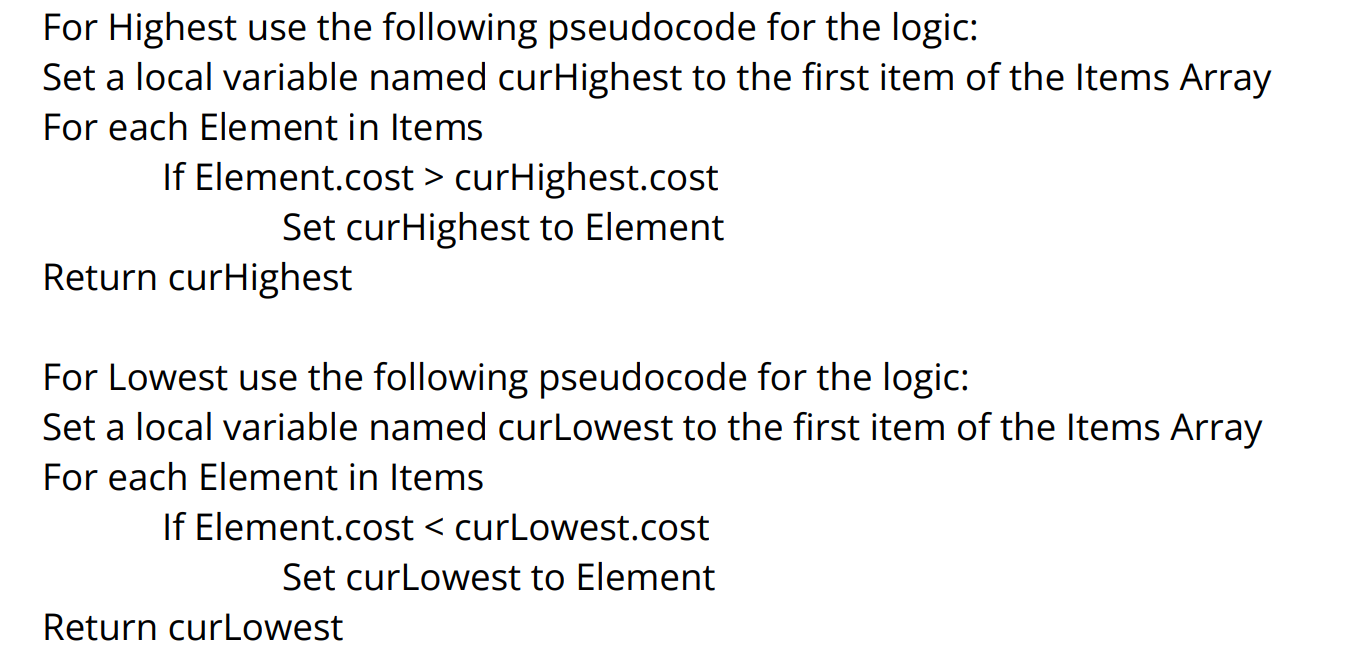 dawn gazelle
devout oak
https://i.imgur.com/10mnILd.png
dawn gazelle
devout oak
https://i.imgur.com/10mnILd.png

Actually, probably not what you want, seeing as you likely have a structure of items that have a cost property.
mental trellis
That isn't what it's asking, though.
That sounds very much like a "I want you to do exactly this so you can show you know how to use loops and variables" type question.
 fiery glen
looks like a task for a course
zealous moth
@dawn gazelle Create a function where using it on itself will return the negative of the original input.
Such that f(f(x)) = -x
E.g.: f(f(3)) = -3
or
f(f(-2)) = 2
You can use any programming functions at your disposal 😉
 eternal dirge
how can i let the set velocity results in movement component to last for a period. Now I set the velocity it only appears for an instant.
zealous moth
@eternal dirge what are you setting velocity to? character? object? physics object? a car?
eternal dirge
player controlled character
zealous moth
if you use the movement component you can set the max walk speed
eternal dirge
zealous moth
if you use the movement component you can set the max walk speed
Ummm. I just want to add some velocity to my character. Like in a velocity field, once you walk in to it, your character automatically get some static velocity beyond the movement input.
zealous moth
hm sec i got a way
ok, you know your movement input logic?
you can add that over a period of time
either on tick or a timer with high frequency
that mimics that
devout oak
Im unsure how to to put this into bp. I think ive gotten the rest of the code correct though
If Element.cost > curHighest.cost
Set curHighest to Element
eternal dirge
So, I cannot just set the base velocity for the character movement? But that's surely a way. Thank you, my friend.
 tawdry surge
You can set velocity directly, but it'll be pushed back down in a few frames by the character movement component
zealous moth
yeah hence your best bet is to "add input" over X amount of time using tick or a timer or a timeline
faint pasture
eternal dirge
Ummm. I just want to add some velocity to my character. Like in a velocity field...
CMC responds to force
Just add force based on velocity vs field velocity (if you're trying to do a conveyer belt thing
 dusky rain
what could cause a timer to never ever fire, not even once? actor is set to tick, although I'm not even sure that's supposed to matter

never mind
lunar sleet
dusky rain
what could cause a timer to never ever fire, not even once? actor is set to tick...
It doesn’t matter, that’s for event tick
dusky rain
yeah i thought so
my problem was my input action was repeating the input while holding, re-setting the timer every frame 😄
lunar sleet
Triggered pin has its own tick, so you would have to go off Started if you want to use a timer
dusky rain
i cant seem to figure out how to bind an action with enhanced input and detect pressed vs released
Started is meant to be called when the trigger has been started to evaluate, but not actually triggered yet
I read a suggestion about adding both triggers to the action, and then checking the value in the bound method
lunar sleet
No no
You leave your trigger on Down and run things off Started or Triggered and Completed
zealous moth
what's a good way to track time spent that isn't affected by frame rate?
Doing a race and I wanna record the time
lunar sleet
zealous moth
what's a good way to track time spent that isn't affected by frame rate?
There’s 4 ways, one of them being get real time seconds
See this convo: #programmer-hangout message
 dense ingot
How can i make it so for everytime the for loop spawn's the actor there is a delay right before so it doesn't all spawn as one big group

 jade lintel
dense ingot
How can i make it so for everytime the for loop spawn's the actor there is a del...
jade lintel
dense ingot
How can i make it so for everytime the for loop spawn's the actor there is a del...
i use a custom for loop macro
its pretty simple to make

 lunar sleet
That is disgusting lol
lunar sleet
dense ingot
How can i make it so for everytime the for loop spawn's the actor there is a del...
Use Set Timer by event, make a custom event, put the spawn in it, then connect it to the timer using its delegate pin. You can set it to looping and increase an int on each loop. When your int reaches the right amount, clear and invalidate the timer by handle
 remote meteor
The macro is okay, but i will suggest making it with a break exec so you can control it atleast.
If we are making latent events, being able to control it is a big plus.
remote meteor
zealous moth
Doing a race and I wanna record the time
UtcNow()
To record start and end time
But pausing the game will have problem as this records real time.
Will need some additional calculation to support pausing.
But using delta time to calculate time is also fine
 modern radish
what's the general workflow when I need my Level Blueprint or anyblueprint to wait for some data to be computed on another blueprint, like the GameInstance, for example?
 surreal peak
Delegate in GameInstance, bind in AnotherBP. Broadcast when done.
modern radish
Ohh I think I read about that workflow, but I never implemented it
surreal peak
Also called EventDispatcher in BP
modern radish
so this will like only trigger once the action is done in the first BP?
surreal peak
You still need the reference to the instance that has the dispatcher to be able to bind
surreal peak
modern radish
so this will like only trigger once the action is done in the first BP?
It triggers when you broadcast it
See it as a newsletter
modern radish
Even if the logic is attached to Event BeginPlay in the second BP?
I understand the concept, it's exactly what I need 😄 just haven't done it
surreal peak
modern radish
Even if the logic is attached to Event BeginPlay in the second BP?
If you can't be sure that the action isn't already done when the other BP binds, add a boolean to the GameInstance
Set the boolean to true when broadcasting
Other stuff can then ask if the Boolean is true
And if not bind to the delegate
 surreal peak
The create event needs to go into the other BP
Here you need to create an EventDispatcher
Bottom left below your functions and stuff
 surreal peak
Call = Broadcast
modern radish
and then in the first BP, what is required>


 surreal peak
Correct
steady night
Hey guys ive got a weird issue when im building my project im getting 2 versions inside the folder a older version and the new version as a sub folder inside the old one ?
the build is succsessull>)
so weird
any advice on how to clean the slate or what to do ?
surreal peak
Now on the other side you get the GameInstance, check if the JSONParsed boolean is true or false, and then either call the function that you wanted to bind directly (if true) or bind the function to the dispatcher (if false)