
#blueprint
1 messages · Page 4 of 1
 lunar sleet
Sudden onset paralysis ?
 junior prairie
I want to apply an impulse to a ragdoll when it gets hit by a gun and have the impulse push the ragdoll in the direction the bullet was travelling, which one of these do I use for?

i.e. if I shot the ragdoll in the face, it the head should move back, if I shoot it in the back of the head, the head should move forward
lunar sleet
Oh ok
lunar sleet
Yeah no that’s good I got confused for a sec lol
Do you rmbr what you did last before it broke?
Did you mess with the mapping contexts at all
 sick fable
I was messing with looking left and right and also I messed with the inputs
on the screen I showed you
lunar sleet
Ah that’s prly why
sick fable
Yes but I don't know what I did
lunar sleet
Well for starters
sick fable
I might have changed some stuff from -1.0 to positive 1
lunar sleet
The stuff in project settings is the old system
sick fable
 lunar sleet
Yeah that’s the wrong spot
 lofty rapids
those shouldn't effect the enhanced input stuff it's seperate
lunar sleet
lofty rapids
those shouldn't effect the enhanced input stuff it's seperate
Unless you’re using both for the same thing
lofty rapids
well as far as the event that is in the image is enhanced input
lunar sleet
sick fable
I never touched enhanced though
You’re using EIS because that’s what gives you IA nodes
You prly went from a template
So get rid of the stuff in project settings
sick fable

how do I get rid of it?
I delete
ok I deleted the action mappings and axis
in regular input
I still can't walk

it messed up after I fixed something here

@lunar sleet
lunar sleet
Guessing you don’t have source control?
 broken gazelle
Why would my sphere sometimes block on a wall on some angles and sometimes it just goes through? Why does the same sphere sometimes block on a pawn even though it is set to overlap only? I'm setting linear physics velocity on the sphere
sick fable
lunar sleet
Guessing you don’t have source control?
no clue what that means but when I pressed a w s d it activated the IA_Move event
lunar sleet
sick fable
no clue what that means but when I pressed a w s d it activated the IA_Move even...
It’s an easy way to undo fuckups, should set it up sooner than later, see pinned guide in #ue5-general
lunar sleet
sick fable
no clue what that means but when I pressed a w s d it activated the IA_Move even...
Did you play with settings on the char?
sick fable
maybe
lunar sleet
Like use controller rotation
sick fable
lunar sleet
Like use controller rotation
idk I think I did that somewhere
maybe in the project settings
lunar sleet
sick fable
idk I think I did that somewhere
It would be on the char settings
 sick fable
lunar sleet
It would be on the char settings
sick fable
lunar sleet
It would be on the char settings
.
lunar sleet
You have 2 skeletal meshes ?
sick fable
no?
lunar sleet
Your panel says otherwise
lunar sleet
You should figure out which one you’re using
sick fable
it doesn't let me delete the one im not using only the one i am
ive had it since the start tho
@lunar sleet
lunar sleet
Have you changed anything in the mapping context?
 dawn gazelle
Did you recently change game mode or game state?
sick fable
lunar sleet
Have you changed anything in the mapping context?
not in ia_move or in enhanced as I never knew about it before you said
lunar sleet
dawn gazelle
Did you recently change game mode or game state?
He’s able to move the camera on the char but not the actual char it’s weird
lofty rapids
sick fable
ive had it since the start tho
when you float around can you see your character like it's just there not moving ?
lunar sleet
I’d still get rid of that 2nd skeletal mesh if it’s it in use tbh
sick fable
ok i just moved the character spawn higher
and my character just floats
and doesn't fall
that isn't normal right

@lunar sleet
lunar sleet
None of it is normal 😀
sick fable
Blueprint Runtime Error: "Accessed None trying to read property CharacterMovement". Node: Set isfalling? Graph: EventGraph Function: Execute Ubergraph Anim BP Character Blueprint: AnimBP_Character
I got this error after i restart the engine
sick fable
lunar sleet
Your CMC details panel is blank
Also what is cmc
sick fable
oh it does look pretty empty
lunar sleet
Yeah
sick fable
 lunar sleet
Make a new char bp, copy all your stuff in it
sick fable
Can I just make a new char bp and drag character movement?
 hasty shard
Hi everyone.
I'm a bit confuse... habitually I never get trouble with Interfaces... but now...
On the BP_Lantern itself, start game event if I refer the function control lanthern that work, but on Third_character when I trigger the right thing, nothing come up...
Any idea?


 sick fable
or no
so I have to make the variables over again?
wait how do I make me the new BP Character @lunar sleet
lunar sleet
Right click content browser, blueprint class, character
sick fable
yes but how do I make me it and not the old blueprint character
lunar sleet
It’ll come with a CMC and skeletal mesh
sick fable
that might sound dumb to you
sick fable
oke so It should just be me when I press play after?
do I have to delete the old one too
lunar sleet
You’ll need to delete the old one
sick fable
ok is there any easy way to copy the variables
lunar sleet
Might need to set it up as default again too
sick fable
lunar sleet
Might need to set it up as default again too
where
lunar sleet
sick fable
ok is there any easy way to copy the variables
When you copy the code, it tends to ask
lunar sleet
sick fable
where
Just start with the rest first
 vocal prism
anyone got an explanation why the one with higher priority doesnt work when in the documentation is noted that higher priorty goes first
 lunar sleet
hasty shard
Hi everyone.
I'm a bit confuse... habitually I never get trouble with Interface...
lunar sleet
hasty shard
Hi everyone.
I'm a bit confuse... habitually I never get trouble with Interface...
I can’t rmbr off the top of my head but I think you need to reference it somehow or use the player controller to send the msg
lunar sleet
vocal prism
anyone got an explanation why the one with higher priority doesnt work when in t...
hasty shard
The mapping work, I tested it with print string
It just don't call the interface
That weird
sick fable
lunar sleet
<#1004083824344436767>
so the way to do It is just select all the blue prints and crtl+c+v it
?
lunar sleet
hasty shard
That weird
Bp interfaces are weird that way, but where are you setting the bp lantern ref
vocal prism
lunar sleet
<#1004083824344436767>
i cannot see the user settings tap, im gonna restart real quick
hasty shard
@lunar sleet I never get any trouble before... but maybe I forget something?
The ref is inside the asset on left
Third character blueprint
lunar sleet
No no you can’t do that
lunar sleet
You want the instance not the asset
So if your char interacts with the lantern somehow, overlap or hit, then you drag off that overlapped/hit actor
 timber sable
Is there any best practice about what type of component should be the Sceneroot component of a blueprint? Of can you just use whatever?
hasty shard
Then, how can I access to the BP_Lanthern function?
sick fable
lunar sleet
Bp interfaces are weird that way, but where are you setting the bp lantern ref
bro I don't know how to properly copy it over
lunar sleet
hasty shard
Then, how can I access to the BP_Lanthern function?
Are you interacting with the lantern in any way?
hasty shard
yes, with the input, the lantern is on the caracter... but in the begin, we don't have it
lunar sleet
sick fable
bro I don't know how to properly copy it over
If you’re not that deep just start fresh from a template. And use source control
lunar sleet
hasty shard
yes, with the input, the lantern is on the caracter... but in the begin, we don'...
Wait, it’s a component on the actor?
vocal prism
lunar sleet
<#1004083824344436767>
i have checked my settings for the user settings tab but i cannot find it even after restarting the project
lunar sleet
vocal prism
i have checked my settings for the user settings tab but i cannot find it even a...
What user settings?
hasty shard
@lunar sleet yes, it's a companant referencing a blueprint
lunar sleet
hasty shard
<@179343890409717771> yes, it's a companant referencing a blueprint
Umm yeah don’t do that 😀
vocal prism
lunar sleet
What user settings?
this one that is referenced in #enhanced-input-system
 lunar sleet
hasty shard
<@179343890409717771> yes, it's a companant referencing a blueprint
lunar sleet
hasty shard
<@179343890409717771> yes, it's a companant referencing a blueprint
Watch the blueprint communications video pinned here, it helps understand things a bit better
lunar sleet
vocal prism
this one that is referenced in <#1004083824344436767>
Why are you looking for that?
I told you to go to that channel and watch the pinned tutorials, read the docs, then ask questions if you get stuck, in that channel. After you’ve done all that, preferably
sick fable
@lunar sleet ok I copied it over how do I change it to default
 golden pewter
how can i detect if a nav modifier volume is hovered or clicked
hasty shard
THanks @lunar sleet
 short phoenix
Say I have a Blueprint that calls an interface and I declared a variable for that interface in the Blueprint. Can I assign that variable somewhere in the editor? I want to connect it to blueprint in another actor.
 drowsy heron
where can i learn Blueprints from?
 wraith eagle
The actual unreal website has some good beginning blueprint tutorials.
 paper smelt
Ik this dont belong in this channel but idk where yo ask. Where can i learn how to make Skinned Decal gore so its realistic and sutch bc i dont wana buy something i could learn and make myself
short phoenix
I can see in the details of the actor that calls the interface that I have the public variable for the interface, but I can't assign it in the details view. Nothing comes up as a target for it despite me having an actor in the scene with a blueprint that implements the interface.
drowsy heron
wraith eagle
The actual unreal website has some good beginning blueprint tutorials.
thanks
wraith eagle
Sure, if you have specific questions the folks are are pretty good at helping around!
 deft pivot
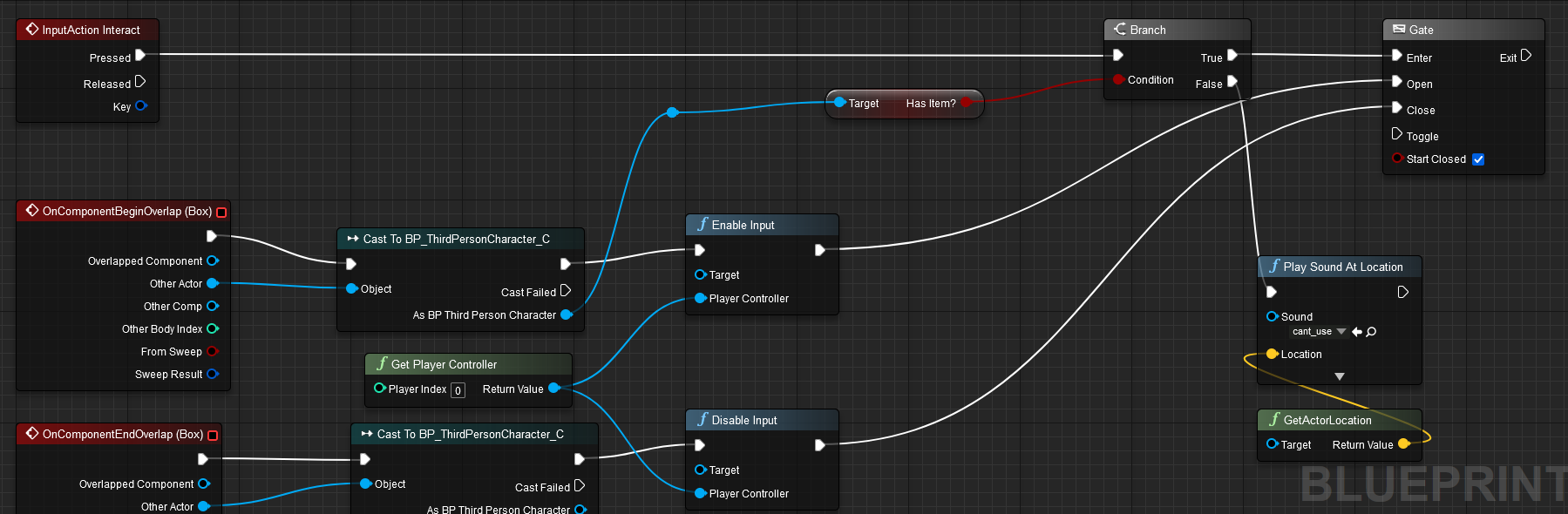
I have 2 actors. 1 the characters interacts with and the other one that should be destroyed once the player interacted with the 1st actor. How do i set up the BP for it to get destroyed?
 golden pewter
how can i detect if a nav modifier volume is hovered or clicked
 edgy ginkgo
I have a simple question. When in a project in unreal and I click into my game anywhere besides my UI elements my mouse cursor disappears
 fiery swallow
edgy ginkgo
I have a simple question. When in a project in unreal and I click into my game a...
fiery swallow
edgy ginkgo
I have a simple question. When in a project in unreal and I click into my game a...
getplayercontroller -> set show mouse cursor
 kind estuary
what other alternatives are there for fog of war? what if i dont want fog of war? Should i just cull units that are outside of my units range?
fog of war looks ugly
i dont want a black shadow everywhere in my game
or some weird clouds :/
lunar sleet
kind estuary
what other alternatives are there for fog of war? what if i dont want fog of war...
World partition
kind estuary
lunar sleet
World partition
thats the one that makes a grid and its like lods?
the purpose of that is performance, right?
my problem is not necessarily performance but more like aesthetics
and also gameplay mechanic
maybe it isn't that bad to have the whole map visible?
thats how total war does actually
and stronghold it seems
lunar sleet
So make it all visible and use LODs/nanite
kind estuary
lunar sleet
So make it all visible and use LODs/nanite
i noticed when games do that they make they replace the units by symbols at distance
 jagged cipher
How can i set "can fly" bool in the character movement component in run time?

 woven nest
Can anyone help me, that why I am getting error of
"pure virtual function being called while application was running (gisrunning == 1)."
when I open any level in my game?

 nimble flower
what would be the ideal way to set up a system where, once every enemy in a room dies, a bunch of new enemies spawn in set locations?
short phoenix
Is there a way to connect a blueprint that implements an interface to a blueprint that needs an instance of an interface in the editor before the game starts? I guess exposing a variable for it only works at run time.
 gentle urchin
nimble flower
what would be the ideal way to set up a system where, once every enemy in a room...
gentle urchin
nimble flower
what would be the ideal way to set up a system where, once every enemy in a room...
Through a wave manager id say
short phoenix
Well it looks like I can pass an actor to the blueprint, not an instance of an interface.
So I cast it to the interface, cast that to an object, and set it as the target of a call to the interface. I did test prints on the initial case to an interface: Cast Failed doesn't print but the other event (I assume for success) does print. However, I don't get any affect on the other actor.
 opaque blade
nimble flower
what would be the ideal way to set up a system where, once every enemy in a room...
opaque blade
nimble flower
what would be the ideal way to set up a system where, once every enemy in a room...
Yeah like squire wrote
Give each enemy a Ondeath delegate bind to it and register them in an array before
If called remove from array and if array is empty done
For set locations depends how precise you want them, but for control either designated points or volumes ( and select a random point inside )
opaque blade
short phoenix
Is there a way to connect a blueprint that implements an interface to a blueprin...
Not with just BP iirc, but make it instance editable works for Actor
Assigning an actor and cast to that interface is typical for BP only
But maybe check if the instance editable variable can be the interface and allows you to select said actor directly
short phoenix
I tried to declare an interface instance editable and I can't assign it from the editor. It was the first thought I had. I've been told it just doesn't work that way.
In the Blueprint, the actor version is instance editable.
And both sides (the thing taking the actor and calling the interface, and the actor that has a blueprint that implements the interface) are doing everything in blueprints.
 steady night
https://gyazo.com/85ac7ab6484a1834e7655fdfcd3485a5
hey Guys Question,

how can i make the "text Field to keep all the text inside the frame ?
 gentle urchin
Set wrap rules
 crude marlin
How should logic be in event tick, this is from my friends enemy logic , its just lots of nodes with branches everywhere, so when i am about to add something after , i need to figgure out their branch logic aswell. So that my foley sounds wont get interupted.

 thin panther
You would use an input axis with enhanced input. If your y axis is positive and greater than 0, you are moving the mouse up
 native ferry
crude marlin
How should logic be in event tick, this is from my friends enemy logic , its jus...
native ferry
crude marlin
How should logic be in event tick, this is from my friends enemy logic , its jus...
Just remake it from scratch because damn
And all of this is running on tick?
 dark drum
crude marlin
How should logic be in event tick, this is from my friends enemy logic , its jus...
dark drum
crude marlin
How should logic be in event tick, this is from my friends enemy logic , its jus...
Personally, I would look at either behavior trees or state trees (experimental) and redo it. Whilst there's no issues doing AI based stuff like in the screenshot, unless its fairly basic AI it just ends up becoming a mess and difficult to expand.
crude marlin
native ferry
And all of this is running on tick?
ye
crude marlin
native ferry
And all of this is running on tick?
But how would you make it if not run on tick,
Its kind hard to understand were to put things , dont like nodes. I mean if just coding in C# you just use the methods when needed.
And behaviour trees for ai harder to get the logic there or whats the difference ?
@dark drum @native ferry
 frosty heron
crude marlin
How should logic be in event tick, this is from my friends enemy logic , its jus...
dark drum
crude marlin
But how would you make it if not run on tick,
Its kind hard to understand were ...
frosty heron
crude marlin
How should logic be in event tick, this is from my friends enemy logic , its jus...
dark drum
crude marlin
But how would you make it if not run on tick,
Its kind hard to understand were ...
Behavior trees aren't to bad once you understand the basics. Spending a day or two learning them should be enough to create some nice AI behavior. They have a lot of features that work with other elements in the engine. Any AI controller can run a behavior tree.
I personally prefer state trees but as it's still an experiment feature so doesn't have as much support but they do offer a lot more flexibility regarding moving to and from different states an AI might have.
If you're not wanting to use the built in AI tools, you might need to look at making your own system. This would normally require the use of UObjects that would serve as tasks/actions (similar to behavior trees) and then you would create a manager of sorts (Actor component) that would then check what actions it should be performing. (Not recommended for beginners)
As it doesn't seem like you have much experience with AI, I would however recommend just using behavior trees. This would allow you to separate your AI behavior into separate tasks and the tree will be used to control what tasks are performed.
Does anyone know why this would return none even if the action index is 0 or 1? These are gameplay tags.
 dark drum
Does anyone know why this would return none even if the action index is 0 or 1? ...
dark drum
dark drum
Does anyone know why this would return none even if the action index is 0 or 1? ...
Never mind, it looks like its just not showing the value inside the function for some reason. Seems to showing the relevant value on the outside of the node.
 crude marlin
frosty heron
https://discord.com/channels/187217643009212416/221798862938046464/1032844524919...
crude marlin
frosty heron
https://discord.com/channels/187217643009212416/221798862938046464/1032844524919...
Oh really nice, why thaaankuuu!
crude marlin
dark drum
Behavior trees aren't to bad once you understand the basics. Spending a day or t...
Well i know both BH and ST but find the node system BP in unreal clogy when in projects. So its more a matter of convinving them of using BT and dont missuse tick
steady night
is it possible to change Text color in a format text ?
nimble flower
if my spawn system uses "get all actors of class" to spawn enemies when an event occurs, how would I adjust that so I don't have to make a new class for each subsequent grouping of enemies?
 manic hamlet
steady night
is it possible to change Text color in a format text ?
manic hamlet
steady night
is it possible to change Text color in a format text ?
not 100% sure but aint there like "HTML"-Like tags you can use like <red>TEXTINRED</red>?
steady night
hmm dose it have to be a rich text style then ?
manic hamlet
Havent done it myself just when I saw your question thats what came to mind first 😄 was just a suggestion,no clue if its doable this way at all 🙂
sick fable
Can someone help me
my character movement component wiped itself for no reason
And I don't know how to fix it

I tried making a new one and copying everything over but it seemed like it would break everything
dark drum
steady night
hmm dose it have to be a rich text style then ?
When i looked at setting text colour, you would need to use rich text and as you mentioned a rich text style. I never got round to setting it up but from what I found it's the only way to have different colour text in a single text box.
steady night
yy thats what im doing now
frosty heron
nimble flower
if my spawn system uses "get all actors of class" to spawn enemies when an event...
ask your self how you are spawning and under what condition
you want to avoid get all actor of class unless you are trying to get all actor of the class.
People that just start, over used it because they don't know how to establish communication between blueprints
frosty heron
sick fable
5.3 Bug Rip
dark drum
sick fable
my character movement component wiped itself for no reason
Have you restarted the editor? If you have, if you create a new character BP, do the details show up in that one?
sick fable
yes I restarted I am currently trying to copy everything over and fix it all but if this doesn't work my project is basically ruined because I don't know much of what im doing
I am changing all the refrences to the old character to the new one
nimble flower
my condition is when the player enters a trigger volume (though I also want to add something that spawns after enemies are killed), and when this happens, the trigger takes the location of every "spawnpoint" blueprint and spawns an enemy at each one before destroying itself and the spawnpoints
frosty heron
nimble flower
my condition is when the player enters a trigger volume (though I also want to a...
You need a blueprint that manages the spawning and track the enemies. Call it BP_Spawner for example.
store the relevant information to bp_spawner such as the relevant enemies and spawn point, the rest would just be applying the logic
nimble flower
hmm, I def need an overarching manager, but Im wondering what it needs to do
nimble flower
but how will it know where to spawn enemies if it cant use all actors of class?
frosty heron
Depend on how you create the spawn points
is it pre-placed on the map, or created at run time
If it's created at run time then you want to add it to the array of Spawn points in the Bp_spawner everytime you spawn the spawn points
nimble flower
rn Im planning on pre-placing them
frosty heron
if it's pre-placed in the editor, which isn't ideal imo. Then you can get all actor of class at the start
dark drum
nimble flower
but how will it know where to spawn enemies if it cant use all actors of class?
Create a transform array and set to show 3d widget. You can then add locations to the array and move them around in the world via the editor. 🙂
frosty heron
really depends on the scope of the game, if it's a replayable game with generated spawn points for example, You don't really want to pre-placed it
Instead
Begin Game -> Spawn 5 Points at Random Location -> Add each to the SpawnPoint Array
nimble flower
I want specific pawn points for a linear game atm
manic hamlet
is there a "default" variable with all the objects that are in "ActorBeginOverlap"?
frosty heron
Then you can get all actor of class at event begin play. It's an ok node when not used incorrectly
nimble flower
wouldnt that just bring me back to square one though?
like I dont want to spawn enemies at literally all the actors of the spawn point class
frosty heron
then don't?
Example of spawning 5 enemies at random point between many spawn points
For Loop (5 times)
{
Get Random element of Spawn Point -> Spawn Enemy at the Spawn point
}
nimble flower
that makes sense, tho rn I want to use every single spawn point, just not all at once
frosty heron
If you are not fammiliar with array, how to shuffle elements, or to randomise it. Maybe you can start with that
nimble flower
like each room will have a set layout(s) of enemies that'll spawn in once I enter it (and occasionally a second/third wave after killing every enemy)
frosty heron
it's all about feeding the data. Add relevant spawn points to an array, use that array to spawn the enemy.
nimble flower
I rlly need to figure out how arrays work in unreal then
 dreamy mountain
Hey, anyone know why AI MoveTo is being annoying? It keeps failing
 frosty heron
for sure, you can't really survive game making w/o knowing how array works imo
dreamy mountain
Earlier, it gave an error of 'movement not allowed'
I'm trying to make this barrel asset follow the player
frosty heron
dreamy mountain
Hey, anyone know why AI MoveTo is being annoying? It keeps failing
Your pic is annoying but you can look at the result
print the movement result just below the exec
nimble flower
rn I have a rlly convoluted idea tho
frosty heron
you can't make any complex stuff without knowing how array works. especially for something that takes in X number of objects
just start with that and take it slow
start simple, improvise later
nimble flower
oh not complex, just convoluted as in dumb
frosty heron
Chances are you are going to scrap your entire system anyway once u have better way to do things
dreamy mountain
frosty heron
Your pic is annoying but you can look at the result
Movement result doesn't do anything; I have it linked to to string and to print string, it prints nothing
frosty heron
dreamy mountain
Movement result doesn't do anything; I have it linked to `to string` and to prin...
how are you printing it?
print screen please
dreamy mountain
 frosty heron
why the tilted camera
frosty heron
dreamy mountain
Sorry for the pics, I don't have discord on the PCs
You didn't connect the print string
hook it from the OnFail exec
nimble flower
I was gonna give the spawn triggers and the spawn points variables, so like if I go in trigger 3, then enemies will spawn at all points with the variable 3
frosty heron
dreamy mountain
It just spams 3
You have to convert the byte to string
dreamy mountain
I have
 frosty heron

anyway my grandmother is dead, Im gonna pray with my family. Gl on the debug.
Last I checked it's Aborted. there could be number of reason why
dreamy mountain
Yeah, I get aborted
thin panther
frosty heron
anyway my grandmother is dead, Im gonna pray with my family. Gl on the debug.
La...
My condolences.
 maiden wadi
steady night
is it possible to change Text color in a format text ?
maiden wadi
steady night
is it possible to change Text color in a format text ?
Possible, yes. But it requires C++ and a new decorator class. You can sort of do it with predefined rich text spans. But if you want to dynamically set it in code, you have to create your own text decorator that can take that in and manage it.
 pulsar pulsar
any reason why it would go through both True and False in the branch? 🤔 i'm stumped and confused lmao

dont mind the mess, I was just trying to narrow it down lol
wait, I might just know why now.
I'm trying to save some corrupt blueprints and I think the old is still being somehow used in memory.
how tf do I delete old corrupt blueprints 😂 the editor crashes when I try to delete them
 stable mantle
So, I have a question, in my character class I calculated 3 vaulting positions used for my motion warp. Then After getting those I am setting my "bCharIsVaulting" public value to true. ( it does work, debugged as much )
But now I want to do something out of this true state in my blue print, so in my character Event Graph I added this graph but it never triggers looking at the absence of log, any idea what I should change?
 nimble flower
whats the universal way to call a blueprint within a different blueprint?
sick fable

Can someone help me
my wasd isn't working properly
W is making me go right S is making me go left
A is making me go backwards
D is Making me go Forwards
 versed sun
swap the X and Y
 peak wigeon
@Kiro #enhanced-input-system
 stone field
nimble flower
whats the universal way to call a blueprint within a different blueprint?
stone field
nimble flower
whats the universal way to call a blueprint within a different blueprint?
"There are many ways to skin a cat"
References. Events. Interfaces.
sick fable
versed sun
swap the X and Y
well I can walk backwards and forwards normally
but left and right is still inverted
after I did that
nimble flower
just like, if I have the 1st blueprint with one variable, and I want to set the 2nd blueprint's variable to match the 1st, what would I do?
stone field
nimble flower
just like, if I have the 1st blueprint with one variable, and I want to set the ...

Examples of how to set up and use different methods of Blueprint Communication.
versed sun
sick fable
but left and right is still inverted
then take the y pin and multiply by -1
nimble flower
ohno it long ty
stone field
nimble flower
ohno it long ty
It goes through a lot of different scenarios
I am personally a big fan of Interfaces
But it depends a lot on the use case
nimble flower
that makes sense
thin panther
You tend to cast when inheritance makes sense. And use interfaces when interaction needs to be class agnostic. I.e. interaction can happen across many base classes, so should be an interface. Shooting is only going to happen with weapons, so doesn't need an interface
The blueprint communication video is pinned here too if you prefer video format
nimble flower
damn there's so much
 echo storm
Hello, I have this blueprint class and want to create child blueprint classes of it where I can edit the RGB values in the timeline to have a custom colour for each child when the interface function triggers, how can I do that?
 lunar sleet
echo storm
Hello, I have this blueprint class and want to create child blueprint classes of...
lunar sleet
echo storm
Hello, I have this blueprint class and want to create child blueprint classes of...
Right click create child
echo storm
lunar sleet
Right click create child
Yes but in the child class the blueprint event graph is empty. Can I edit the timeline from there somehow?
lunar sleet
echo storm
Yes but in the child class the blueprint event graph is empty. Can I edit the ti...
No but you can override the event iirc
nimble flower
how would I change the variable for every object in a class, or cast to an entire class at once?
lunar sleet
nimble flower
how would I change the variable for every object in a class, or cast to an entir...
Use the resources we just gave you
nimble flower
im lookin bruh
echo storm
lunar sleet
No but you can override the event iirc
How do I do that? Just add a new timeline that's connected to the event?
lunar sleet
echo storm
How do I do that? Just add a new timeline that's connected to the event?
Either that or have a standard track and multiply it by variables so you can change them on each child
Not sure that’ll work for RGB values tho 😅
echo storm
Hmm okay thank you
It feels inefficient to create a new timeline when the parent already has the timeline
versed sun
You can have the track control the alpha, and outside the timeline you can lerp colors
lunar sleet
versed sun
You can have the track control the alpha, and outside the timeline you can lerp ...
Ooh nice
echo storm
versed sun
You can have the track control the alpha, and outside the timeline you can lerp ...
Ohh so basically having 3 lerp nodes in that case then (one for R, one for G, one for B)?
So I can switch from one colour to another
Oh wait no I can just have a vector lerp to do it all in one node
versed sun
 echo storm
versed sun
echo storm
versed sun
Thank you, that's really helpful!
nimble flower
how could I get the blueprint to not interact with a blueprint, but a specific object in the scene without the two overlapping
lunar sleet
nimble flower
how could I get the blueprint to not interact with a blueprint, but a specific o...
An object is an instance of a bp. A cast checks if an object ref is of a certain bp class and then lets you access its insides. It takes a bit to understand this stuff and that video really does help. Ik it’s pretty long but if you don’t understand these bp comms basics you won’t get very far in Unreal
nimble flower
and someone said the video is pinned?
did they mean the live training?
damn 2 hours okay
well it does seem important
rn I found a workaround for my specific issue (switched to using gamemode bc that has rlly easy referencing), but I'll def watch this later this week, ty
echo storm
nimble flower
well it does seem important
Blueprint Communication is essential to understand, I only recently learnt how it works too

Overview of the different methods of Actor Communication.
nimble flower
its so weird rn bc i've been super comfortable with anything that involves the player or collisions, but now that I'm reaching something that has neither i *was at a wall
echo storm
This page has a quick-to-read overview of how you could communicate with other Blueprint Classes
nimble flower
is there a way to have a blueprint check when a variable reaches a certain amount, but not when its steady at that amount?
like if I reduce something to 0, it'd only trigger once and not for every frame that it's at 0
 jade lintel
do once?
echo storm
You could dispatch it as an event when it reaches 0
(I don't know if that would be the most efficient way though, so someone correct me)
nimble flower
oh ig I could use events yeah
 cunning vapor
I've done the tut - run into some problems I can't seem to fix -- but thanks for the link on it ! 😛
nimble flower
do once seems neat as well but I want to do it more than once
cause Im tracking how many enemies are left, and when that number reaches 0 I wanna check if another wave of enemies is scheduled
versed sun
nimble flower
do once seems neat as well but I want to do it more than once
Do N
might havesearch Flow Control

Hold N and click on graph
nimble flower
wth this looks cool
 random solar
Okay I'm going to do it this way but instead of adding a black box i'm just going to add a sizebox and increase padding for every 1000. Question is should I use a for loop or should I just do
if stam consumed == 1000
{
set padding for sizebox += 7
max stamina -= 5
stam consumed = 0
}
 versed sun
I wouldn't do padding, just Set Width Override on the Sizebox
then keep track of stamina consumed, and update as needed
I dont see a use for a For Loop
 tight pollen
tight pollen
tight pollen
I don't know if I clearly stated what I need
versed sun
nope...
random solar
versed sun
I wouldn't do padding, just Set Width Override on the Sizebox
then keep track of...
How would I do every 1000 units of stam consumed for the branch condition?
would it just be what I wrote which is if stam consumed == 1000 then reset to 0 after?
versed sun
not reset to 0, Remove 1000
What if you are at 999, and spend 200?
random solar
That's what I meant, my bad for how I phrased it but yeah its more like
if stam consumed => 1000
stam consumed - 1000
 tight pollen
if a connection to other actors already exists, I don't want to execute the function for that connection. e.g. the key (actor1) is connected to: actor2, actor3, actor4 and if the next key (actor2) has actor1 in its values, it will ignore it and go to the next values for this key

someone can help
?
or maybe there is a better way, instead of using a Map variable
dark drum
tight pollen
if a connection to other actors already exists, I don't want to execute the func...
What do you mean by a connection? How are they formed? How are the connections stored?
tight pollen
I simply store the references of actors that have been linked to a given actor and check their position on an ongoing basis and at any time these actors can be removed from the value
I just want to not execute a function if it has already been executed in previous actors
lunar sleet
tight pollen
I simply store the references of actors that have been linked to a given actor a...
How do you store these references, just curious?
lunar sleet
I mean how are you getting them
sick fable

How can I make the delay only after it has been triggered
So it gets triggered and it can be next triggered in 60 seconds
lunar sleet
sick fable
So it gets triggered and it can be next triggered in 60 seconds
If this is for an #gameplay-ai it might be best suited for the cooldown feature in behaviour trees
sick fable
yes for an ai
After It gets hit it is mean't to run away but I don't want it to repeat the running away event every hit because It will make it look jitery
lunar sleet
Set a bool to false until the run is complete and check for that bool before running every time the function is called
tight pollen
tight pollen
if a connection to other actors already exists, I don't want to execute the func...
I just wanted you to help me with this ;p
sick fable
lunar sleet
Set a bool to false until the run is complete and check for that bool before run...
Thank you

wait why is this not changing it after I shoot
It should change it to true until it is done running ?
random solar
versed sun
I'm not quite sure how to use set width overide so thought it might be better to just increase padding instead. I'm not sure how to link it to the size box though

 sick fable
@lunar sleet
lunar sleet
sick fable
It should change it to true until it is done running ?
Set a breakpoint on it and see when it fires
tight pollen
tight pollen
if a connection to other actors already exists, I don't want to execute the func...
someone can help?
sick fable
lunar sleet
Set a breakpoint on it and see when it fires
only on the Ai move to
not on the boolean
it doesn't break on the is fleeing
tight pollen
lunar sleet
I mean how are you getting them
i set reference when actor spawn
sick fable
but I put it on both to check
lunar sleet
sick fable
but I put it on both to check
Ok, set the bool to True right before the move to node and back to false when it’s done
tight pollen
and the player connects them together by clicking on them
lunar sleet
tight pollen
and the player connects them together by clicking on them
you should prly answer patty’s question: #blueprint message
sick fable
lunar sleet
you should prly answer patty’s question: https://discord.com/channels/187217643...
ok think that worked
thanks
nimble flower
right now I have a system so when you die you return to your last checkpoint, but I was wondering if there would be a way to just reset the scene entirely, with the only change being the player's new position?
 tawdry surge
Game mode has a reset level function and all actors have a reset event (which fires when reset level is called) that you can override
tight pollen
I want something like this

I just don't want the connections to be repeated
(this is Map with Array)
random solar
Got an issue where I'm trying to reduce the stamina bar width but doesn't seem to work, In the video you can see the stamina value does a jump but doesnt have the bar itself move. The issue might be because I am using another blueprint to host all of my widgets so the width overide might not be following through but the stamina bar value is

 nimble flower
what event would be death plane? like if I wanna reset the level when I hit the kill Z, how would I do that?
tawdry surge
I just override the end play event of the character and use that to tell the gamemode to spawn default pawn at transform and reset level
tight pollen
tight pollen
I want something like this

i made this
there cannot be an identical connection
nimble flower
where do I find the end play event of the character?
tight pollen
tight pollen
but I guess it's not good in terms of performance :/
Can anyone recommend a better solution?
tawdry surge
It's a dispatcher you can bind to which is called when an actor is destroyed
nimble flower
would it count as being destroyed if I'm using the "open level" function?
tawdry surge
No.. the gamemode dies then too. You'd have to use a save game object or the game instance and grab the info on construction or begin play
nimble flower
oh weird
frosty heron
<@&213101288538374145>
nimble flower
so now the checkpoints work, but the player starts at the default checkpoint value instead of the player start value which is kinda weird
tawdry surge
I have a check to see if the checkpoint value is 0,0,0 and if it is, then use player start otherwise use the checkpoint.
Could also use player starts and give them name/tag, then you can use that to pick which one they go to as well
pulsar pulsar
pulsar pulsar
any reason why it would go through both True and False in the branch? 🤔 i'm st...
Still having this issue. Not sure what's causing both True and False to go through
lofty rapids
pulsar pulsar
any reason why it would go through both True and False in the branch? 🤔 i'm st...
wdym both ? the execution shouldn't go through both at the same time
pulsar pulsar
I have prints after True and False. Both prints gets printed upon passing the branch
lofty rapids
pulsar pulsar
I have prints after True and False. Both prints gets printed upon passing the br...
well your branching in a forEach so maybe one is true, one is false
pulsar pulsar
I just removed my Does Implement Interface check and manually set it too true and false. Prints for both when the condition is true and on False only the false print gets printed.
pulsar pulsar
lofty rapids
well your branching in a forEach so maybe one is true, one is false
Hmm. Well, its for a door so it's only a single action when pressing F
lofty rapids
Well theres pretty much no way it would go through both
a boolean is either true of false
it most likely because it's in a loop and your seeing two different looped values
pulsar pulsar
Actually, I get double prints if I manually set the condition to false. So maybe there is something with the forloop as you said. although.. In my old (now corrupted) blueprint where I first had this function, I didn't have this problem.
lofty rapids
pulsar pulsar
Actually, I get double prints if I manually set the condition to false. So maybe...
well your getting overlapping actors and looking for one that implements a certain interface
so if there is more than one actor overlapping it will run for all of them
idk much about interfaces, but your looping over all overlapping actors so if there is more than one you will run it that many times
pulsar pulsar
it's just the door and the character currently
lunar sleet
Print your array elements
 patent wasp
I have a widget on the screen and it goes to this when my character dies. Telling it to add again to viewport doesn't put it back, how can I fix this?
 pulsar pulsar
lunar sleet
Print your array elements
pulsar pulsar
lunar sleet
Print your array elements
I'am. Only getting the door.
lunar sleet
pulsar pulsar
I'am. Only getting the door.
Show code
pulsar pulsar
 kind estuary
So we use this to get a data table. How do we do the same to get a specific data asset?
 maiden wadi
Make a variable of the asset's type, and populate it.
Can also make static library functions as getters too.
lofty rapids
pulsar pulsar
are you seeing "should now interact with" ?
pulsar pulsar
lofty rapids
are you seeing "should now interact with" ?
correct
followed by the door name
lofty rapids
is it not interacting ?
pulsar pulsar
It's fully functional, it's just bugging me lol. I guess it's not the end of the world but as I had it not double printing before it was just annoying me.
lofty rapids
so it also prints failed to interact ?
pulsar pulsar
yesss
lofty rapids
probably because there is another thing overlapping it
nimble flower
is there a solution to ai breaking?

 lofty rapids
pulsar pulsar
lofty rapids
pulsar pulsar
i wouldn't worry about failed to interact, that's just because you have something overlapping that does not implement interface
not sure what it could be, but that's why you do the loop and check to only interact with the things that use that interface
pulsar pulsar
yeaaa I guess. Cheers tho! It's working atleast 👍
kind estuary
maiden wadi
Make a variable of the asset's type, and populate it.
ah so maybe is better to use data tables because it doesnt need any variable
i have a hard time understanding the difference between data tables and data assets
they seem to be the same in terms of use
except data tables are more useful
maiden wadi
Why is having a variable a concern?
And they're really not. Data Assets are a lot more useful. Datatable is just a list of the same data repeated for different keys. A data asset is like one row of a datatable, except that it's a lot more dynamic. It doesn't require a predefined struct to hold data, it can hold anything you want. It can also contain functions to manage that data. You can also use a data asset similar to a datatable by just putting a Map of Key/Struct in it.
Datatables have their uses, but they are not more useful.
kind estuary
maiden wadi
And they're really not. Data Assets are a lot more useful. Datatable is just a l...
It can also contain functions to manage that data
ah thats great
well but, it does need a struct
kind estuary
maiden wadi
And they're really not. Data Assets are a lot more useful. Datatable is just a l...
those are great tips
or i can use an array in it
and put all my character names in it
dark drum
pulsar pulsar
yeaaa I guess. Cheers tho! It's working atleast 👍
Using overlaps for determining interactings can be troublesome at times. If you every decide to switch to a trace based system, this tutorial will set you up. There's even follow up tutorials for different types of doors. 🙂

Welcome to this tutorial on how to create an interaction system in Unreal Engine 5! In this video, we'll go over a different approach to making an interaction system using Unreal Engine's powerful Blueprint visual scripting language.
Whether you're a beginner to Unreal Engine or an experienced developer looking to add a modular interaction syst...
pulsar pulsar
dark drum
Using overlaps for determining interactings can be troublesome at times. If you ...
I have this for my light sources ^^ I may switch that to my doors aswell tho
dark drum
pulsar pulsar
I have this for my light sources ^^ I may switch that to my doors aswell tho
You should make sure you use the same system for everything the player can interact with to help prevent weird issues. 🙂
pulsar pulsar
dark drum
You should make sure you use the same system for everything the player can inter...
that's true. I'm currently not making a game or anything though. Merely just learning
dark drum
pulsar pulsar
that's true. I'm currently not making a game or anything though. Merely just lea...
As an FYI, one of the main issues I've had with using overlaps for interacts is when you have a few close together. I find using traces easier to handle as it's what the player is looking at.
pulsar pulsar
dark drum
As an FYI, one of the main issues I've had with using overlaps for interacts is ...
Ahh yea, you're right. I might aswell change tbh, do it properly from the start 😎
 remote meteor
i would make an InteractComponent to handle sorting of those "few close together" to select which one exactly to interact, but then, i was making a top-down game
dark drum
remote meteor
i would make an InteractComponent to handle sorting of those "few close together...
I'd still use traces though. If you don't need pin point accuracy, you can do a 2nd, smaller sphere trace and then just get the closest to the end point of the first line trace.
kind estuary
https://i.ytimg.com/vi/jDvIwq8c9BY/maxresdefault.jpg
How are these farm tiles done?
Are they planes with textures? Or is there something more tricky about it?
 remote meteor
dark drum
I'd still use traces though. If you don't need pin point accuracy, you can do a ...
remote meteor
dark drum
I'd still use traces though. If you don't need pin point accuracy, you can do a ...
not exactly when i needed their name and info to show up instead of just "interact"
 wild moth
the way you get the object to interact with doesn't interfer with that
if you use a trace, you can trace at specific intervals
to find the current object the player is looking at
and display information from it with UI
remote meteor
well, in the end i use overlaps and traces to check they are behind an obstacle
nimble flower
if the nav mesh is just f*cked up and you have no idea why what do you do
pulsar pulsar
dark drum
I'd still use traces though. If you don't need pin point accuracy, you can do a ...
I made one line trace that the character uses all the time that I can refer to when needed. I dont suppose one constantly would be bad?
remote meteor
for increased responsiveness, you would have to trace at small intervals anyway
maiden wadi
@kind estuary To give you a kind of idea of how you might implement both. Just depends on your needs.
I have a bunch of items. Weapons, crafting items etc like coal or iron ore. Right? These are all individual DataAssets. Cause weapons need a lot more data in them than a Coal item. Coal is largely just a mesh, an icon, some association tags, descriptions. Weapons need all of that, plus defaults for their stats, associated abilities, etc etc. The amount of data differs wildly and putting all of that in a struct would be a great waste of space for a lot of smaller crafting items.
But crafting can take any item. Maybe I need a recipe for an Iron ingot. Or maybe I need three recipes for an iron ingot. Maybe I have three different forges and each processes iron a little more efficiently, so I make a table for each forge to house their own craftable recipes. Those tables can reference the items like coal and iron ore with amounts required and output their results. This data is ALL the same. Regardless of how you structure it. You have an array of input items, and an array of output items and some description data thus it's easier to put it in a datatable. Though you could also put these in a dataasset with an array of structs.
wild moth
Datatables are easier to add/edit/manipulate and pull data from
if for example you need to list all recipes/all entries in that table/etc
maiden wadi
Right, but as structured above, it depends on the data set you're working with. If the data is all the same, structured into a struct, datatables are great. If you need a more dynamic set of data while identifying something, it's not so great.
 sonic crest
rookie question, how can I grey out the Code Required String??
 remote meteor
grey out as in make it non editable?
maiden wadi
Easy in C++. Can't remember if you can do that in BP only.
remote meteor
i dont think you can do that in bp 🤔 except hiding it in advance menu or something
lofty rapids
weird they are both the same name
dark drum
pulsar pulsar
I made one line trace that the character uses all the time that I can refer to w...
That video I sent shows how you can set one up on tick or at an interval. 🙂 For something like an interaction system tick is normally fine.
 true igloo
This Timeline works fine, it animates the UI elements as needed. But, I want to stagger the animations. If there a way to delay each element of the array. I don't see a way to adjust the float curve evaluation of a timeline. I could do something super convoluted like switch statement the index with a buncha different curves, and if that is what I need so be it, but maybe there is a better way?
 wild moth
There's an entire system for animating UI, you don't need to use a timeline
maiden wadi
I'm sort of concerned about seeing a Timeline controlling UI. Why aren't you using a UMG Animation track?
lunar sleet
nimble flower
if the nav mesh is just f*cked up and you have no idea why what do you do
#gameplay-ai is better suited for this question but depends on what you define as the navmesh being f8cked
true igloo
maiden wadi
I'm sort of concerned about seeing a Timeline controlling UI. Why aren't you usi...
Honestly, cause unreal is a vastly complex engine and often times I unknowingly overlook best practices with in the engine even though I make an effort to do things the "right" way. I guess I will look into using the UMG Animation Track.
sonic crest
remote meteor
i dont think you can do that in bp 🤔 except hiding it in advance menu or someth...
alright, thanks
sonic crest
remote meteor
grey out as in make it non editable?
and yes
sonic crest
maiden wadi
Easy in C++. Can't remember if you can do that in BP only.
thanks
maiden wadi
true igloo
Honestly, cause unreal is a vastly complex engine and often times I unknowingly ...
UMG Animations are basically the same as a sequencer. You can get and affect everything internal to that widget. You can also make tracks that evaluate every frame to run an event that you can do stuff on to use for more dynamic animations.
If your Inner widget there is all the same class it can be fairly easy to put an animation track on it with like a 1s start gap. I did that with some vertical boxes housing buttons. The buttons held the animation track, animating themselves. When the widget was brought up, it just ForEach loops over all of the children in the VBox, and based on the ForEach loop index, multiplies that to start the animation track closer to the 1s gap mark. So you get a ForEach loop that instantly runs to start a lot of animations. But each animation plays starting from a different start point on the anim track. Makes it look like they're delayed but without the hassle of actually doing that.
kind estuary
maiden wadi
<@711946020858101790> To give you a kind of idea of how you might implement both...
thanks. though its quite confusing. So let me see if i understood it.
So having a data table for units for example can be innefficient. Because the simple basic melee units require less data. Whereas if you have archers, and knights they will differ with their properties. So to have them all in one data table, all the basic melee units must also have information about the archer and knight type, even if they have no arrows, they must have a reference for the arrow mesh.
Thats correcT? And that means its a waste of space.
But then i lost it on the recipes. So you would create a data table for each different unit class ? Or you would create a data table that can have a reference to each different unit class?
You have an array of input items, and an array of output items and some description data thus it's easier to put it in a datatable. Though you could also put these in a dataasset with an array of structs.
And here im GG too. Where do you put the input items? An array of input items? In the data asset? Or the data table?
maiden wadi
kind estuary
thanks. though its quite confusing. So let me see if i understood it.
So having ...
Here. This might help a little better to actually see it. I made a few assets. The DataAssets are made out of PrimaryAssetLabel types, but I personally would make these out of a PrimaryDataAsset from a C++ base and set them correctly in the asset manager. But for a BP only this will work okay.
There's two structs. One has two arrays of the other. Thes represent entries and the counts. For requirements this is how much of the item you require. For output this is how much of the item you would get for the recipe.
Then there are two datatables. I would give these two my forges so they can look up what data they need for their own crafting. The first datatable only has an iron ingot recipe. It's a bad forge, takes a lot of resources to make one ingot.
The second table has a better iron ingot recipe, and a sword recipe where you can craft a sword from the ingots you've made.


In this particular case, these crafters would need to interact with some form of inventory to get their requirements and output the results.
In the case of units. It would be much the same to create unit types out of a data asset. Specify their meshes, skins, abilities, actor class, etc in an asset.
Then make a table where you can create these units from a barracks or other buildings. Maybe you upgrade your buildings for cheaper unit costs. Can just make a table for each building tier that costs less and less per unit.
wild moth
This is a great modular way of handling it, just an addition depending on usecases you could set these as classes/inheritence (BPs) instead of data classes
wild moth
maiden wadi
Here. This might help a little better to actually see it. I made a few assets. T...
A suggestion/idea (depending on recipes of course) but instead of having a data table per building, you could have a single data table with ALL recipes and then list the recipes each building can craft in their respective Struct/DataAsset/Datatable Entry where you define each building's info
 vernal snow
Howdy there, i'm attempting to create a little slide mechanic and using some blueprint to try and make it a automatic stand up if there is nothing above:
Now the issue currently i find is that i cant get it to "slide" (Add velocity) to the direction the camera is facing, i've messed around with the Forward Vector to the Velocity node a bit but it doesn't yield the intended result (IE Add velocity to where the player is looking) and was wondering if anyone could throw a bone or maybe help.
Thanks for the time.
 lofty rapids
vernal snow
Howdy there, i'm attempting to create a little slide mechanic and using some blu...
lofty rapids
vernal snow
Howdy there, i'm attempting to create a little slide mechanic and using some blu...
you tried the camera, forward vector * SomeValue ?
vernal snow
lofty rapids
you tried the camera, forward vector * SomeValue ?
No actually, thank you that worked i mainly used +(Value) because i thought the *(Value) may mess up stuff.
 drowsy steppe
hey guys, where can i ask for someone to help me?
kind estuary
maiden wadi
Here. This might help a little better to actually see it. I made a few assets. T...
thats awesome. will try to make something based on that. thanks a lot.
lofty rapids
drowsy steppe
hey guys, where can i ask for someone to help me?
usually you find the proper section and ask there
drowsy steppe
well I'm trying to use an interface but I'm unable to, can i ask here?
lofty rapids
drowsy steppe
well I'm trying to use an interface but I'm unable to, can i ask here?
you are using blueprint ?
drowsy steppe
yes
lofty rapids
then probably it would make sense, i usually just pick the closest and ask you would probably be redirected to the right place if it's not correct ig
true igloo
What is the best practice for animating Camera Modifiers. Basically I want a reusable animated camera modifier. in the modifier I can animate it with a Timer that ticks up from the provided delta time. But that Timer value does not reset and the value isn't accessible from what I can tell. Is there way to do this with the nodes inside the modifier so it animates the values then resets?
drowsy steppe
So guys here's my problem (I'm quite new at this).
I did a system with line traces and an interface to interact with objects and i added a widget (the letter E) that shows up whenever I can interact with an object that is interactable. Everything works properly and it is set like in the screenshot.
Now I want to add a feature where if you enable the option on an item whenever you pick it up it shows up in front of the camera and you can inspect it and rotate it.
I created a new function in the interface (with an output as a static mesh) I'm already using (second screenshot) and I tried adding the message in the thirdpersoncharacter blueprint where when the object in the scene gets hit from the line trace and after interacting it should set the mesh i put in front of the camera as the mesh of the object i picked up, but it is doing nothing, someone knows why? I hope I was clear enough and I appreciate anyone trying to help me


 lofty rapids
Is it printing hello ? @drowsy steppe
 manic vessel
Im Not sure why My Items are not being removed from this actor component inventory's Array, What did I do Wrong?


 drowsy steppe
lofty rapids
Is it printing hello ? <@146329517978419200>
drowsy steppe
lofty rapids
Is it printing hello ? <@146329517978419200>
no, even if i put it earlier. Is the reasoning behind this right?
lofty rapids
drowsy steppe
no, even if i put it earlier. Is the reasoning behind this right?
well the reasoning is if it's not printing, then it's not firing
drowsy steppe
yeah i mean the reasoning behing the logic I'm trying to apply
versed sun
manic vessel
Im Not sure why My Items are not being removed from this actor component invento...
On your Remove Item Event, see it the Removed Item is valid
lofty rapids
drowsy steppe
So guys here's my problem (I'm quite new at this).
I did a system with line trac...
maybe does implement interface is failing, print string out of the false
manic vessel
versed sun
On your Remove Item Event, see it the Removed Item is valid
Seems to be valid as the print text is working
 drowsy steppe
lofty rapids
maybe does implement interface is failing, print string out of the false
drowsy steppe
lofty rapids
maybe does implement interface is failing, print string out of the false
it prints nothing 😦
lofty rapids
manic vessel
Im Not sure why My Items are not being removed from this actor component invento...
one thing is you don't change number of items, not sure if you need that but it looks like if you want to keep the number of items you should get length and set it again
lofty rapids
drowsy steppe
it prints nothing 😦
how about out of the true, does it print ?
versed sun
manic vessel
Seems to be valid as the print text is working
Well, Check to see it the array Contains the Item
drowsy steppe
lofty rapids
how about out of the true, does it print ?
no
lofty rapids
drowsy steppe
no
then it's not executing
versed sun
manic vessel
Seems to be valid as the print text is working
Also, the array length Print is printing on the add item ?
drowsy steppe
i don't understand, it doesn't print even if i put print string before the interact event which is working because i can interact with my items
versed sun
and , you aren't deleting the item before removing it from array ?
manic vessel
versed sun
Also, the array length Print is printing on the add item ?
Yes Im printing the array here when an item is added.
 lofty rapids
drowsy steppe
i don't understand, it doesn't print even if i put print string before the inter...
lofty rapids
drowsy steppe
i don't understand, it doesn't print even if i put print string before the inter...
well if you put a print string on the white lines (execution) and it doesn't print then it's not running, but also you want to make sure it's when it should be ran
its obviously not going to show right off the bat if it's on a click action or something
drowsy steppe
lofty rapids
well if you put a print string on the white lines (execution) and it doesn't pri...
but i don't understand because what happens after gets executed as i can interact with my items, and that needs the interact message to be possible
what am i missing?
manic vessel
a separate spawner is adding the item to the actor component array when the player overlaps it. then I cycle the array and spawn a actor in the players hand . when I drop it thats when I need to remove it from the array
drowsy steppe
drowsy steppe
but i don't understand because what happens after gets executed as i can interac...
i disconnected interact and everything is working the same, i am confused
lofty rapids
drowsy steppe
i disconnected interact and everything is working the same, i am confused
are you compiling ?
lofty rapids
drowsy steppe
i disconnected interact and everything is working the same, i am confused
maybe your in a different bp ? some sort of copy or something ?
drowsy steppe
lofty rapids
are you compiling ?
yes, i must be missing something really dumb
versed sun
manic vessel
a separate spawner is adding the item to the actor component array when the play...
Try on the Remove event, seeing if the array Contains the item, If not then For each Print the contents of the array
drowsy steppe
drowsy steppe
So guys here's my problem (I'm quite new at this).
I did a system with line trac...
I disabled everything on the first input action and everything is still working, i'm really confused
drowsy steppe
drowsy steppe
I disabled everything on the first input action and everything is still working,...
Yeah there something going on in the background because i disabled everything and it's still working
lofty rapids
drowsy steppe
Yeah there something going on in the background because i disabled everything an...
there must be other code somewhere running
drowsy steppe
lofty rapids
there must be other code somewhere running
yeah looking into it
manic vessel
versed sun
Try on the Remove event, seeing if the array Contains the item, If not then For ...
not printing here so I assume its not even in the array?
 versed sun
alright, getting somewhere
See if it is valid before adding it to array
ohh...
there is a Contain node for arrays
 versed sun
manic vessel
Yes Im printing the array here when an item is added.
versed sun
manic vessel
Yes Im printing the array here when an item is added.
And do this before and after adding to array
drowsy steppe
lofty rapids
there must be other code somewhere running
found it
manic vessel
On cycle array in player BP im destroying any valid helf actor and spawning a new one from this array. and setting it as the held item. but that is the same thing I am telling the array to remove when I drop it. the cycling of items in the hand is actuall working ok but they are just not being removed 😦
 versed sun
ahhhhh, so its not the same exact item, its a copy ?
manic vessel
Contains was not true 😦 Must be adding items as a different actor
versed sun
You might want to switch the array to a Class Ref
manic vessel
yeah. I will try that
versed sun
yes, that should do it
manic vessel
just incase child actor issue?
versed sun
not child actor
manic vessel
instance
versed sun
the array hold a list of EXACT actor, once you destroy the actor in your cycle , its ref in the array is not valid/ gets destroyed or somehting
manic vessel
versed sun
the array hold a list of EXACT actor, once you destroy the actor in your cycle ,...
I get it . I Made sure to destroy the actor after removing it from the array.
versed sun
You should change your array to keep track to what Class the actor is, not what actor it was
Change that variable type to Class ref like this

dosnt have to be "Actor", use whatever your blueprint is
manic vessel
versed sun
You should change your array to keep track to what Class the actor is, not what...
Yeah I already have one setup, But working with arrays is still a bit new. The add and add unique is always a point of contention
lunar sleet
manic vessel
Yeah I already have one setup, But working with arrays is still a bit new. The a...
Like you don’t understand the difference?
 abstract oar
Is it normal that OnBeginOverlap events don´t fire all the time, even if it should?
manic vessel
lunar sleet
Like you don’t understand the difference?
I do But One Time I didn't ; )
versed sun
abstract oar
Is it normal that OnBeginOverlap events don´t fire all the time, even if it shou...
It wont fire if its already overlaped before
lunar sleet
Use getOverlappedActors and iterate
 faint pasture
abstract oar
Is it normal that OnBeginOverlap events don´t fire all the time, even if it shou...
faint pasture
abstract oar
Is it normal that OnBeginOverlap events don´t fire all the time, even if it shou...
When does it not fire?
Begin Play?
abstract oar
lunar sleet
Use getOverlappedActors and iterate
Can I use it when I want to make a bullet?
abstract oar
faint pasture
When does it not fire?
When the bullet hits it target, but sometimes it fires
lunar sleet
You should use begin overlap if it’s a projectile travelling through something
faint pasture
Yeah I'm not sure what happens with the stock ProjectileMovementComponent, it's pretty ass IMO
lunar sleet
If it doesn’t fire check your collision, if you’re doing like a sphere or similar shape it can have weird effects
abstract oar
lunar sleet
If it doesn’t fire check your collision, if you’re doing like a sphere or simila...
Collision is okay, it fires, but not on every hit, even if it clearly hits the target
lunar sleet
Are you blocking (hit) or overlapping
abstract oar
 abstract oar
lunar sleet
Are you blocking (hit) or overlapping
abstract oar
lunar sleet
Are you blocking (hit) or overlapping
overlapping
lunar sleet
On the collision settings I mean
Not the event
Like check settings on both objects, the bullet and the target
abstract oar
 lunar sleet
Need to see the drop-down (all the checkboxes)
abstract oar
Bullet
 lunar sleet
What object type is your bullet
abstract oar
Target
 abstract oar
lunar sleet
What object type is your bullet
abstract oar
lunar sleet
What object type is your bullet
Actor
abstract oar
lunar sleet
Looks like you set it to vehicle tho
Yes
lunar sleet
Check ✅ the generate overlap events on the target
manic vessel
versed sun
You should change your array to keep track to what Class the actor is, not what...
Works Great ! good call on the Actor class.
 lunar sleet
faint pasture
Yeah I'm not sure what happens with the stock ProjectileMovementComponent, it's ...
lunar sleet
faint pasture
Yeah I'm not sure what happens with the stock ProjectileMovementComponent, it's ...
I still don’t know why my projectile phases through Event Hits at certain velocities and fps. Temporarily switched it to overlap to fix it but it’s not accurate enough for what I want
abstract oar
lunar sleet
Check ✅ the generate overlap events on the target
Oh
abstract oar
lunar sleet
Check ✅ the generate overlap events on the target
Thank you, that fixed it 👍🏻
manic vessel
lunar sleet
I still don’t know why my projectile phases through Event Hits at certain veloci...
Wonder if CCD would help
versed sun
manic vessel
Works Great ! good call on the Actor class.
Nice!
The downside to Class is it wont retain info about weapon (Ammo, durability, mods)
lunar sleet
manic vessel
Wonder if CCD would help
Hmm I haven’t thought of that outside the context of AI movement. I know the CMC has it, is it on the PMC tho?
manic vessel
CCD=Constant collision detection on the collision settings I have no idea if that will help its a shot in the dark
faint pasture
lunar sleet
I still don’t know why my projectile phases through Event Hits at certain veloci...
Is it important that your projectiles can be hit by another projectile?
lunar sleet
faint pasture
Is it important that your projectiles can be hit by another projectile?
No, not really
faint pasture
I'd just lose the projectile movement component and do your own
lunar sleet
manic vessel
CCD=Constant collision detection on the collision settings I have no idea if tha...
Maybe I’m thinking of the wrong spot I can’t check rn
lunar sleet
Like cpp code my own PMC ?
faint pasture
you can do it in BP.
Tick -> update Velocity (mostly gravity but homing too) -> calculate NextPosition -> trace from CurrentPosition to NextPosition -> process hits
lunar sleet
Oh neat
versed sun
lunar sleet
I still don’t know why my projectile phases through Event Hits at certain veloci...
do you have Sweep on? Doesn't that trigger Hits ?
faint pasture
no collision on anything in the projectile. It's just a thing that moves through space tracing every frame. Cool thing is it will devolve into a line trace if you turn up the initial velocity high enough
You don't even need projectile actors for this, projectiles can just be structs in a subsystem or gamestate or whatever
depends on your needs
lunar sleet
versed sun
do you have Sweep on? Doesn't that trigger Hits ?
Oh the overlap? I haven’t checked if it has that
faint pasture
faint pasture
you can do it in BP.
Tick -> update Velocity (mostly gravity but homing too) ->...
This is exactly what ProjectileMovementComponent does but it relies on collisions with the collision body, not on doing traces
lunar sleet
lunar sleet
Oh the overlap? I haven’t checked if it has that
The event hit doesn’t have sweep, that’s on traces iirc
versed sun
I was thinking on this
 lunar sleet
faint pasture
you can do it in BP.
Tick -> update Velocity (mostly gravity but homing too) ->...
lunar sleet
faint pasture
you can do it in BP.
Tick -> update Velocity (mostly gravity but homing too) ->...
I’ll try this when I get a chance
lunar sleet
versed sun
I was thinking on this
Oh I’m using velocity not set location rn
I set it to X:500 by default, which becomes Y in local space at runtime but either way
Dropping it to 400 made the event hit work at 60fps, but 30fps and it’s gone
At 500 only 120fps registers it
Maybe my disc is moving through frames like Neo 😅
manic vessel
Normally When Using actor I can use reference to self, Here with the Actor class how would I do the same, as this actor is removing itself from the player
 versed sun
Quick Inventory>Get WeaponRH>Get Class
lunar sleet
Get class
manic vessel
this ? method
 lunar sleet
That should work no?
manic vessel
I think is should. I will test
lunar sleet
I’d tell you to remove that medal but it’s a Super:: so I’ll allow it 🙃
versed sun
haha
manic vessel
works Great
versed sun
was doing it as you said it
 mental trellis
What?
 eternal fable
Guys I had some strange issue while attaching NPCs to vehicle mesh. They seem to attach to the actor but not the mesh.
I wrote about it here. Please help !

Epic Developer Community Forums
I made a simple code that attaches NPCs to the desired socket on a vehicle skeletal mesh inside it’s Blueprint.The problem is, they don’t seem to really attach. I was executing code and found that Sedan Vehicles (low in height) appeared fine but SUVs were causing problems as the NPCs were sinking. So I picked a sedan Blueprint and lifted it up t...
lunar sleet
mental trellis
What?
Super reactions
mental trellis
Oh.
kind estuary
maiden wadi
Here. This might help a little better to actually see it. I made a few assets. T...
took me a while to understand it. basically the data tables have an array of recipes to make weapons. and each recipe is a data asset so that means each weapon fabrication is unique and can be customized because the data asset recipes can be made specifically for that one. thats very smart and versatile. i dont know how you came up with this. thanks for sharing
maiden wadi
kind estuary
took me a while to understand it. basically the data tables have an array of rec...
Not quite. The recipes are not data assets.
The recipes are a struct with two arrays of a second struct. The second struct holds IDs to the assets.
You might be familiar with how people identify items via keys? Like Enums, GameplayTags, FNames, or Integers? Instead of those, I identify an item by the asset it holds.
No point abstracting it out to a key when you can just directly use the asset that specifies the item's defaults and descriptions.
short phoenix
If I declare an interface as an instance editable variable, is there any way to assign to that in the editor before play starts? It looks like I can't do anything with it that way, and I instead have to assign the actor containing the interface and extract the implementation out from it. It's just a bit more brittle that I would have expected.
versed sun
not sure what "declare an interface as an instance editable variable" is , but you can Bind things in construction script
manic vessel
Im pretty much done here with My Quick Inventory, But when I cycle through the 3 weapons with each press. Im hitting an area where 2 of them are nothing, Can Anyone see an issue here
 maiden wadi
short phoenix
If I declare an interface as an instance editable variable, is there any way to ...
maiden wadi
short phoenix
If I declare an interface as an instance editable variable, is there any way to ...
What exactly are you trying to do? An interface variable is basically the same thing as a hard pointer. It's just referencing an object in a way that it can only access it's interface functions.
short phoenix
I was trying to use it to notify something had been activated. I've been trying with events too and have been trying to weigh them all. So all I needed was the function to call when something was activated through the rules of the interface.
manic vessel
cycle through the item array one index at a time and when it reached the last is goes back to the first item
 barren kestrel
Hi guys any idea of how to convert an (automation editor task object refrence/output of a screen shot) into an image
lofty rapids
manic vessel
Im pretty much done here with My Quick Inventory, But when I cycle through the 3...
well your not checking if the currentIndex+1 is within a valid range of the size
so ig technically you could check if the currentIndex is valid, it may be at the last one, then when you ++ and try to get it's out of bounds or something just a guess
versed sun
manic vessel
Im pretty much done here with My Quick Inventory, But when I cycle through the 3...
Theres always a better way, and probably a better way than this
Save the 1st item and remove it and place at end of array
 manic vessel
lofty rapids
well your not checking if the currentIndex+1 is within a valid range of the size
manic vessel
lofty rapids
well your not checking if the currentIndex+1 is within a valid range of the size
This seems to work thanks .

change to this lol, think it makes more sense ?
 lofty rapids
manic vessel
change to this lol, think it makes more sense ?
lofty rapids
manic vessel
change to this lol, think it makes more sense ?
i would check +1, i think ++ actually changes it which you probably don't want to do if it's not in range
then do the ++ on true
i mean you are setting it back to zero on false
so ig that's fine
manic vessel
Yeah I Like how I have a index with no actor so I can select nothing
Think Im done with this, Got the end result I wanted, Thanks EVERYONE now I will add some polish
broken gazelle
lofty rapids
i would check +1, i think ++ actually changes it which you probably don't want t...
++ sets the get value? So confusing blueprint wise. I would think they would at least annotate the ingoing pin that it is modified
maiden wadi
They kinda do. It's by reference.
broken gazelle
What do you mean
 plush swallow
if i accidently created an infinite loop in the construction script how can i open the blueprint to undo it?
broken gazelle
Woah shooting yourself in the leg, just like C++
lofty rapids
broken gazelle
++ sets the get value? So confusing blueprint wise. I would think they would at...
i was saying it alters the value

but they reset it so it didn't go out of bounds
maiden wadi
broken gazelle
What do you mean
I mean the left pin on the ++ is a diamond, meaning it's by reference. Usually if something is passed this way there's an intention to edit it.
broken gazelle
Ah
lunar sleet
plush swallow
if i accidently created an infinite loop in the construction script how can i op...
If you weren’t too deep into it, delete the bp and remake it. Otherwise source control might be the only option
lunar sleet
What’s the property matrix
gentle urchin
Erh, the bulk edit option for assets
lunar sleet
Oh maybe idk
gentle urchin
Right click -> asset actions -> bulk edit via prop matrix
plush swallow
lunar sleet
If you weren’t too deep into it, delete the bp and remake it. Otherwise source c...
nah i found another way
lunar sleet
gentle urchin
Cant you disable constructionscript from property matrix?
Ok, what was it?
plush swallow
tho i still cant believe epic hasnt fixed this
apparently its been since forever and its still present in unreal 5
gentle urchin
Not a prio would be my guess
maiden wadi
It's not really up to Epic to fix though. Adding in something that would not run the construction script sounds like a nightmare if someone leaves that off on accident on some parent class. If a studio wants to implement that themselves, they're kinda free too, but most people just source control it and eyeroll and revert to the last working class.
That said though, usually if you wait long enough, unless the editor actually crashes, the BP will open.
plush swallow
gentle urchin
Right click -> asset actions -> bulk edit via prop matrix
i tried that but it doesnt show any construction script enable/disable option
plush swallow
gentle urchin
Not a prio would be my guess
uhh why not? its kinda ridiculous that accidently having a node connect itself crashes the whole thing and makes the project unable to open unless you delete it
and having no way of editing it
maiden wadi
What node was it? O.o
plush swallow
it was a function to disable shadows on the meshes on my actor... lol
i mean it doesnt matter what node it was
maiden wadi
Is it actually crashing, or just hanging for a long time?
plush swallow
it was just while building the script i was moving the node around in positions and i accidently forgot to remove one of the exec wires that was connected to a node before it
maiden wadi
Could also probably lower the loop limit detector to make it faster if it's just hanging. Wait for the BP to open and disconnect it.
plush swallow
maiden wadi
Is it actually crashing, or just hanging for a long time?
hanging for a long time then it crashes
i tried setting loop to 100 and even 0 and no fix
gentle urchin
You could create your own Actor class where you'd let yourself disable construction script 8-)
lunar sleet
lunar sleet
Ok, what was it?
Did you ever say how you fixed it?
plush swallow
by causing a compilation error
gentle urchin
deleting related asset would be one method then i guess 😛
lunar sleet
plush swallow
by causing a compilation error
Oh nice
plush swallow
yeah u delete somthing the asset references or uses, you open it, fix it save it then u add those assets back and reload
 slender quest
anybody ever face this problem? Enhanced input action for my character to aim the gun, sometimes the "Completed" exec doesn't go through, neither does the cancelled, to reset the two bools i have there. Why would it not "complete" even though i have released the button?

I am also not sure of how to replicate the issue, i am currently trying but it seems kind of random when it occurs
 naive falcon
I'm having some trouble getting a pinch to zoom gesture to work in UE 5.2. I need to make this work for a windows build that will run on an ELO touchscreen monitor. I have multi touch set up on the ELO. In UE I have enabled 'Enable Gesture Recognizer' and created an axis map that is set to the pinch gesture. However in my blueprint, the pinch event only prints 0.
Since I am not building this as a mobile app, I think unreal is recognizing the touch events from the ELO as regular mouse clicks. Anyone know how I can get this working?
kind estuary
damn i just lost myself in my mess of a project. i have an ai pawn being spawned, i dont know where is it being spawned from. how can debug this?
how can i see where a pawn is being spawned from?
trying to use the reference viewer
but cant locate it like that
lofty rapids
you can search for spawn in the blueprint
idk how you would search through multiple but in a single one you may be able to find spawn
lunar sleet
slender quest
anybody ever face this problem? Enhanced input action for my character to aim th...
Is it a chorded action/combo?
lunar sleet
lofty rapids
idk how you would search through multiple but in a single one you may be able to...
Either use ctrl+shift+f to begin with or ctrl+f , type word, hit binoculars @kind estuary
kind estuary
lofty rapids
idk how you would search through multiple but in a single one you may be able to...
i tried that. made me realize its not in blueprint, so i found it in the cpp
thanks
kind estuary
lunar sleet
Either use ctrl+shift+f to begin with or ctrl+f , type word, hit binoculars <@71...
thanks
 restive breach
would some one please give me ahand on a blue print? its for stamina drain and gain i did this and it works but you have to spam the w insted of it just looping tell you let go of your move button

 calm gull
I'm trying to add a static mesh component to an actor runtime in UE5.1.0, but cannot find any functions that could help. Basically looking for something like this image (snapped from this unreal engine forum post [the question they have is irrelevant for me]: https://forums.unrealengine.com/t/how-to-set-static-mesh-in-add-static-mesh-component-with-variable/508155 ) Anyone had similar issues?
 lunar sleet
restive breach
would some one please give me ahand on a blue print? its for stamina drain and g...
lunar sleet
restive breach
would some one please give me ahand on a blue print? its for stamina drain and g...
You have a do once in there that’s not being reset until stop stamina drain is called
versed sun
calm gull
I'm trying to add a static mesh component to an actor runtime in UE5.1.0, but ca...
That is the correct function, are you saying its not showing up for you?
versed sun
are you in a Blueprint? or a widget? player controller ?
calm gull
an actor blueprint
 calm gull
YES, THANK YOU will circumvent this way (your question was perfect, i was trying to call it from an actor component of the player controller, THANK YOU!!! )
calm gull
thats okay, will add a function and will just call that, THANK YOU AGAIN
 lunar sleet
don't ask to ask, just ask
sick fable
I want the dog to attack every 1 second while chasing
but for some reason it can spam continously
I removed the delay
from the screenshot while trying to fix it let me put it back

@lunar sleet Do you get a lot of satisfaction from helping people lol because you helped me a lot
lunar sleet
sick fable
<@179343890409717771> Do you get a lot of satisfaction from helping people lol b...
no, I'm just a masochist 🙂
do you know how to use set timer by event?
sick fable
nope
it attacks me then takes a pause but when I stop moving it can spam attack me really hard
like pauses to do the bite animation
Idk about timer by event
slender quest
lunar sleet
Is it a chorded action/combo?
It's not, it's set up like this:
 lunar sleet
slender quest
It's not, it's set up like this:
lunar sleet
slender quest
It's not, it's set up like this:
you're saying your completed pin never fires?
lunar sleet
sick fable
Idk about timer by event
if you remove the delay, does it wait for the montage to complete before applying the damage ?
sick fable
I think so
slender quest
lunar sleet
you're saying your completed pin never fires?
It fires most of the time, but on some occasions it does not fire, but i haven't been able to pinpoint what causes it to not fire. I could be walking around and pressing and releasing aim over and over, and it will work 99% of the time when i release it, but 1% of the time it does not go through
sick fable
Im not sure but the animation to attack is only like almost a second
lunar sleet
slender quest
It fires most of the time, but on some occasions it does not fire, but i haven't...
and how do you know it doesn't go through, are you watching it live, printing, breakpoints?
sick fable
I want a delay while it chases me till it can do another bite animation
lunar sleet
sick fable
I want a delay while it chases me till it can do another bite animation
right, but your delay is using the montage duration, not the duration it takes to get to you
and either way if he's right next to you that'll be instant
sick fable
lunar sleet
right, but your delay is using the montage duration, not the duration it takes t...
well I want when Im on the spot for it not to be able to spam attack me
maybe like 2 second delay
or 1.5
what im doing isn't working
lunar sleet
sick fable
well I want when Im on the spot for it not to be able to spam attack me
yeah cause delays are often misused
Do this instead: on Success of the Move, Set timer by Event
Create a custom event called Bite (or w/e)
drag from the red square (delegate pin) of the bite event and plug it into the timer's Event pin
Set the Timer's Time to whatever you want it to be, set it to looping.
When you want the dog to stop biting, drag from the timer handle (you can also promote to variable), and use clear and invalidate timer by handle to stop it from biting
slender quest
lunar sleet
and how do you know it doesn't go through, are you watching it live, printing, b...
When it does not fire, the char will be stuck in a weird position because the rotation is not turned back on, so then I know it happened, I pause it, and go examine the blueprints and I see that the "IsAiming?" is still set to true, and the "Action Value" coming out of the enhanced input action event is still set to true as well. The only place where "IsAiming?" can be set to false is when it either completes or cancels from here, so my conclusion was that it does not fire
 thick flame
sick fable
thick flame
sick fable
I had the same issue, following a tutorial. The issue is that the follow player event is called every tick that vision happens, so the animation can still play despite the delay set up. Move it to set canAttack to true on Play

 lunar sleet
thick flame
I had the same issue, following a tutorial. The issue is that the follow player ...
lunar sleet
thick flame
I had the same issue, following a tutorial. The issue is that the follow player ...
...why not just change the default value to True then?
thick flame
lunar sleet
...why not just change the default value to True then?
that makes more sense lol
im very new to ue, but i had the same issue so i thought id give my solution
lunar sleet
well tbh I haven't played with montages enough, so if that lets you control the timing, good enough
 lunar sleet
slender quest
When it does not fire, the char will be stuck in a weird position because the ro...
lunar sleet
slender quest
When it does not fire, the char will be stuck in a weird position because the ro...
Put a Print String on the Completed Pin to make 100% sure
sick fable
i did nothing with the event so I was wrong lol
lunar sleet
sick fable
Almost. The way you have it, you're clearing the timer after the first loop, so that's not gonna bite anymore
For starters, remove the clear and invalidate node and move the stuff after it down to the Bite.
sick fable
lunar sleet
Almost. The way you have it, you're clearing the timer after the first loop, so ...
how can i fix it
thick flame
ive got a similar issue atm, my animation works for both my player and enemy, but the damage is no longer working
 lunar sleet
yeah, I'm trying to account for preventing it from trying to bite while it's chasing the player around, before it reaches it
if this an #gameplay-ai , BTs with cooldowns might be much better here
thick flame
thick flame
does my method apply to yours?
lunar sleet
with the current code?
lunar sleet
At all?
sick fable
not even once
lunar sleet
is the Play Montage node firing (breakpoint)?
sick fable
no
thick flame
playAnimMontage returns a Value- that value is your animation length. You dont need to set a variable called BiteDelay
sick fable
oh
lunar sleet
thick flame
playAnimMontage returns a Value- that value is your animation length. You dont n...
yeah, that's also redundant now
thick flame
you can then use a multiplier to change the time
 thick flame
this is what I got from the tutorial. I can send the tutorial if youd like
 lunar sleet
sick fable
lunar sleet
sick fable
what's the default value of CanAttack?
restive breach
@lunar sleet how would i fix that if you no how
sick fable
lunar sleet
what's the default value of CanAttack?
false
lunar sleet
restive breach
<@179343890409717771> how would i fix that if you no how
are you following some crappy tutorial too? 🙂
thick flame
set it to true
restive breach
ya
lunar sleet
sick fable
false
Your current code is If True run this, if False, fuck it
restive breach
im loring blue prints
 thick flame
sick fable
thick flame
sick fable
im still confused on why you have the custom event here. Is it all for the timer? cuz you can cut a lot of this out
sick fable
still wont bite
sick fable
thick flame
im still confused on why you have the custom event here. Is it all for the timer...
I was just listening to Neo
thick flame
oh
well, if you look at the code I posted, you can go right out of the second set can attack into the animMontage
lunar sleet
restive breach
<@179343890409717771> how would i fix that if you no how
Reset the Do Once when your initial Drain event is completed, not just when you stop draining, because if you don't let go of W Stop draining is never called as far as I can tell.
Or get rid of Do Once altogether.
Also, if you're following a tutorial and it works for them and not for you, watch it again, prly missed a step
thick flame
 sick fable
 thick flame
did you do this
thick flame
thick flame
this is where the delay comes in
sick fable
Sorry I am tired and new
thick flame
i would just use the code i posted. I got it from a tutorial
lunar sleet
yeah do what works for K2000 rn, realistically this should prly be done in a behaviour tree, but for now duct tape and glue is fine
sick fable
lunar sleet
yeah do what works for K2000 rn, realistically this should prly be done in a beh...
lol
 jagged parrot
How can I communicate between blueprints easier? I've been trying to get an collision part to relay that it has been hit to a widget "interface" and im struggling a lot xD
sick fable
finally fixed
lunar sleet
jagged parrot
How can I communicate between blueprints easier? I've been trying to get an coll...
there's a blueprint comms video pinned here that's worth watching. as for a collision "hitting" a widget, idk that you can do that, but maybe ask #umg
lunar sleet
thick flame
i would just use the code i posted. I got it from a tutorial
is your damage working now?
thick flame
no, i havent gotten anywhere lol
jagged parrot
lunar sleet
there's a blueprint comms video pinned here that's worth watching. as for a coll...
I'll give it a Shot! - I've literally just been trying to make a countdown system, with time bonus pickups (Hence the collision - widget situation)
lunar sleet
thick flame
no, i havent gotten anywhere lol
is this the same code you're giving to Kiro?
thick flame
i tried to swap code between the player and the dummy instead of finding a tutorial
lunar sleet
jagged parrot
I'll give it a Shot! - I've literally just been trying to make a countdown syste...
you usually collide with actors not widgets
thick flame
lunar sleet
is this the same code you're giving to Kiro?
different section of code
lunar sleet
thick flame
different section of code
show
sick fable

 wicked fable
Would anyone know how to fade out a widget after its full (fade out stamina bar when at 100%)
lunar sleet
wicked fable
Would anyone know how to fade out a widget after its full (fade out stamina bar ...
#umg is best for widget related stuff

 wicked fable
Oh thanks, i was looking for a ui chat
lunar sleet
thick flame
did you print out the hit actor to make sure it hits the right thing?
lunar sleet
thick flame
i tried printing on damage and got nothing
that part looks fine
lunar sleet
thick flame
ill try somewhere in sword hit manager
go off the hit actor on break hit result
print the value
Camera trace channel is a weird pick but who am I to judge? 🤷
thick flame
trying this
 lunar sleet
thick flame
trying this
lunar sleet
thick flame
trying this
lel
no no
right now your code says: Do A Line Trace, don't care where, then print something, don't care if it hit anything
lunar sleet
thick flame
its doing that every time no matter what
drag from the hit actor plug into the in String
break hit result happens before the print anyways, it's just not ordered right on your screen
 foggy otter
is there any way to disable the air control for the flying movement mode in bp? im trying to make a simple dash, and i want the character movement during the dash to not have gravity and not respond to player input (except rotation), until i decide that the dash has ended. is there any semi-legit way to make this work without writing my own movement mode in c++?
thick flame
lunar sleet
drag from the hit actor plug into the in String
it wont let me go from there
lunar sleet
thick flame
it wont let me go from there
do this:

obv connect the execution path on your end
 thick flame
nothing
lunar sleet
so your line trace is hitting nada
thick flame
yeah
lunar sleet
try using Visibility channel instead
thick flame
ok
lofty rapids
a little more complicated than that
 thick flame
still nothing
lunar sleet
thick flame
still nothing
you're certain TriggerSword is firing?
thick flame
good question
the Trace lines are goiung and the animation is playing, so it should be
thick flame
lunar sleet
what prints
it prints when I hit walls and stuff
lunar sleet
thick flame
it prints when I hit walls and stuff
so just not your dummy or w/e
 lunar sleet
thick flame
yeah
lunar sleet
thick flame
yeah
Test with Trace Complex ticked on. If not, check your collision settings on your target
thick flame
of course
thick flame
I turned off camera bc it was acting wierd when the enemy swings
but i should turn on vis
lunar sleet
visibility is usually good to stay on yeah
thick flame
overlap would be good yeah? to catch the hit but not affect position?
lunar sleet
thick flame
overlap would be good yeah? to catch the hit but not affect position?
no, because Block = hit, overlap is different
thick flame
just gotta figure out how to get the enemy to damage the player
lunar sleet
similar fashion, apply damage from one end, receive it on the other
cunning vapor
Does anyone know the best method to making a variable for "is too close"
Ie, is too close to a wall / actor
Trying to make a system where my actor plays an anim montage when too close to an actor/wall/static mesh
Am thinking maybe a collision sphere?
lunar sleet
cunning vapor
Does anyone know the best method to making a variable for "is too close"
Ie, is...
Box might be better
 finite flax
Help please: On widget drag, how to make an actor material start during drag of widget??! images attached below...
Like in the image below, I'm trying to drag the tower from the widget and place it on the map below, what I want is the second I take the tower from the widget on the left, I want the ACTOR (Circle material shapes) to start/begin, I think I'm close to solve it but need a bit of help, the pictures of the blueprint might help alot!
please tell me the solution with a picture, thank you soo much guys!


 lunar sleet
finite flax
Help please: On widget drag, how to make an actor material start during drag of ...
lunar sleet
finite flax
Help please: On widget drag, how to make an actor material start during drag of ...
Try #umg
thick flame
@lunar sleet are you able to answer some more questions?
thick flame
could we call so i can stream? I cant stream in these vcs
cunning vapor
lunar sleet
Box might be better
Am i using the wrong node? :/
 lunar sleet
thick flame
could we call so i can stream? I cant stream in these vcs
lunar sleet
thick flame
could we call so i can stream? I cant stream in these vcs
Can’t rly do that rn and I’m not into it tbh. Ask questions here in chat and people will answer, usually people smarter than me
thick flame
ok
lofty rapids
usually cast have execution, whats up with that not having that ?
cunning vapor
was a purecast
lofty rapids
Oh i c that, why would you want to do that ?
lunar sleet
cunning vapor
Am i using the wrong node? :/
To detect overlap? Yes. Also don’t use pure casts unless you really know what you’re doing, as engage said
Actor begin overlap is the node to test for overlaps
Well one of them
lofty rapids
cunning vapor
Am i using the wrong node? :/
well you can check if the event is firing, and then check if the cast succeeds
thick flame
 edgy ginkgo
is there a way to allow the player to use the foliage tool in game?
lofty rapids
thick flame
i think you need to add the end to the start, and plug that into end
thick flame
@onyx galleon
lofty rapids
i would also check the return value is true before trying to apply damage
thick flame

 fluid wraith
lofty rapids
i would also check the return value is true before trying to apply damage
fluid wraith
lofty rapids
i would also check the return value is true before trying to apply damage
Shouldnt matter if its an interface ¯_(ツ)_/¯
fluid wraith
lofty rapids
well the line trace
Do you mean the hit bool?
I thought it doesnt matter for interfaces
thick flame
line trace is working, bc i iddnt have things connected :)
fluid wraith
;'y
lofty rapids
fluid wraith
I thought it doesnt matter for interfaces
 fluid wraith
lofty rapids
fluid wraith
lofty rapids
All this gives ya is a bool for whether it got a blocking hit or not
lofty rapids
right, good thing to check if it's hitting before you try to apply damage is what i was saying
fluid wraith
lofty rapids
right, good thing to check if it's hitting before you try to apply damage is wha...
Yeah, but if its hitting nothing, you're not applying damage to anything