Hello, I'm learning my way around animations and I have a trouble with crouching interpolation (following the FPS tutorial).
The issue is that when the character stops he still plays the crouch walking for ward animation for a moment. What is basically happening looks like the blending does the L shape instead of going diagonally to the idle animation. I'm not sure how to fix that one though
#animation
1 messages · Page 115 of 1
 sudden sedge
there's not much you can really do to fix that without a "halt" animation
 void coyote
I think what I might need to ease the speed value in the animation graph. Basically the reported speed goes from 300 to 0 instantly, so the animation does not follow the way you expect it when messing our ind the blendspace
yeah, it seems to be it. The animation interpoles to the points, but it does not use the inbetween speed and direction values, that is why the walking forward keeps playing.
How can I ease between A and B in the animation graph? It does not have the timeline function
void coyote
ok, so to get the smooth animation that you can achieve in the blend space I would have to manually (via blueprint) transition between the speed values as well direction values. This way the animation BP will be told the inbetween speed and direction values that will be used for playing the animation. Instead of being told to play animation of 300 speed left and then instantly to play 0 speed idle.
I just need to figure out a way to get a lerp/ease working in the animation blueprint
void coyote
derp
I used wrong node for getting the character velocity. I used the vector length squared by mistake
 misty dagger
Hey, does anyone know how I can make it to where certain moves that my character can do only play while in the air? I have this dive attack and some air fighting moves for my character that should only be able to be played while suspended in mid-air, and also a forward air boost, but I don't exactly know how to make this happen.
I'm using blueprints by the way. I'm working on a prototype
 restive yew
Look into animation montage
misty dagger
What do you mean @restive yew ?
What is that? And how do I make it work for the player in-game, kind of like how super smash bros has certain attacks in the air.
restive yew

In this stream, Wes Bunn takes a look at the quickest way to get a humanoid character up and playable from a Skeletal Mesh and a series of animations. We’ll ...
misty dagger
Thank you!
 gentle pagoda
I'm trying to synchronize animations between two characters
It's a human riding a camel - the camel's animation is driven through a blend space by his locomotion, the human is simply looping an idle
If they're dragged in as skeletal meshes, the animations sync up perfectly
But as anim BP's, they're always out of sync
I've tried manually adding a loop offset to either the human or the mount, but to no avail
Is there a proper way of synchronizing animations between two characters?
 clever abyss
The easiest way would be with sequencer?
But It all comes down to, how exactly should It be done?
 thorn tendon
Can anyone give me advice on making a 2D scripted sequence? I am using the sequencer but I can't use flipbooks to show movement animation
 fleet willow
How can i move the CapsuleComponent to the following position when i play an Animation Sequence ?
misty dagger
I'm kinda confused. How does animation montages make it to where I can only use certain attacks/animations while mid-air? I can't find any recent videos on it so I can't find anything that's really helpful. Like I said before there are certain attacks that I only want to be able to be used while mid-air and not touching the ground.
thorn tendon
@misty dagger Sounds like you need a boolean with a branch
I think there is a "IsFlying"
misty dagger
What's that?
thorn tendon
Get character movement and then search "IsFlying"
OR
SetMovementMode
set it to flying when are in air
Then set it to walking when your on the ground
Its just to tell the engine that your character is in the air, so play the proper animation if in the air
misty dagger
Oh okay, thank you! How do I set that up in the inputs menu in the project settings? So let's say I want the attack to only be able to happen when I'm in the air and press S + Right Click. Do I just put Right Click under actions and the set it up in the blueprint that you can only do it in air and when also pressing right click, or what?
thorn tendon
Its not in project settings. I would set that action up in your PlayerCharacter (whatever your main player will be playing)
Or rather the Animation bp. Im not really skilled enough to help you farther.
If it's crucial to your project, pay someone some bucks to get it done
I have to shell some money out from time to time
misty dagger
Eh, I don't really have the money to do that personally, so I'd rather just learn how to do it, at least that way I understand how to do it in the future XD
thorn tendon
For sure. My programmer dude rips through stuff and my head is spinning when I watch him haha. IF I do it myself though it sticks. I know what you mean
Even if you pay for an hour at a reasonable rate, it can really help you move forward on your project and ease some stress
 lofty sphinx
How do I make an animation play longer than usual/extend its duration?
 pastel bone
Slow down playrate
lofty sphinx
@pastel bone This animation is used in a Blendspace; it is not a Blendspace proper. I need to extend it because I want it to loop much more smoothly.


 bleak mirage
New to animation here 😬 can anyone tell me if armature and rigging are the same thing
And if all animated models should use bones? I just have a basic light switch that consists of two meshes and the switch itself has an animation that rotates it up and down to turn the switch on or off
 viscid sand
I only know how to implement them now
xD
and make them work
currently working on the dying animation
to work
restive yew
@bleak mirage armature and rig are more or less the same thing and often used interchangeably. No, you don’t need bones to make animations. You can use morph target, material, and the bp itself (look into timeline node).
bleak mirage
i've used the timeline node before for animating door open/closing
restive yew
@viscid sand in your world setting, check your z kill
bleak mirage
so just to confirm, if i combine mesh on import to ue4, i cannot animate individual static meshes since it's been combined right?
restive yew
Correct
bleak mirage
Okay so maybe I should just split my fbx into two static meshes and make a blueprint class containing both static meshes and use a timeline to animate the static mesh that needs to be animated
Either way I’ll need to blueprint class to handle state to determine if the switch is in the up or down position
Basically to simplify things in just trying to figure out the “best” way to go about animating a light switch
restive yew
You can export multiple elements in one file. How it’s done is varied from program to program
bleak mirage
So the player can turn the switch on and off
Oh yea but basically I don’t want to combine them on ue4 import
I can have 1 fbx but when I import into ue4 I’ll leave combine off so I’ll end up with two static meshes and throw them both in an actor blueprint and timeline to animate the switch
restive yew
Yep, you’re set 😜
bleak mirage
awesome thanks
and do you think this is a smarter route than rigging a light switch? 😆 @restive yew

 hoary kindle
is it possible to make an animation with the levelsequencer where a bird flies to my third person character and lands on a slot (eg. shoulder)?
viscid sand
probably yeah
if you make a "bird object" hit a volume that's attached on your shoulder
but it's too complicated for me
xD
hoary kindle
😄
i guess it would look like a bollywood action movie when i try to do something like this but it would be cool :§
viscid sand
xD
Never stop trying
I didn't think I could get the stamina bar to drain and refill while crouching
still managed to do it somehow xD
even when it's easy for others
the only thing that annoys me is the fact that while you are crouched and you release the crouch button while still holding down the shift button nothing happens only after you press and hold shift again
which isn't too annoying but still stupid
also jumping doesn't drain anything yet

 sudden sedge
his feet sliding looks odd, and doesn't feel like it's got weight behind the punch (unless it's a quick jab then that's fine)
 sweet tartan
It's supposed to be the weakest punch there is, like the first hit of a combo
How would you fix the feet sliding though?
 night crow
hey, what do people use for face rigging and creating blendshapes in the least time consuming way? can one create blendshapes with auto-rig pro for blender?
don't have the budget to use polywink but otherwise i guess that would be a perfect option
 undone tartan
Usually you set up a joint / armature system for a face
Most flexibility with the least amount of work
restive yew
I too get bamboozled when running into a box. Very nice.
Does he ragdoll or are you sticking to sequence?
night crow
@undone tartan and then you animate the face frame by frame?
night crow
Hm okay, sorry I've only done motion capture so far so I don't know how this works
Control system as in pulling a slider from closed mouth to open mouth? And closed eye to open eye, etc?
 quasi mulch
Hey everyone, I have a question, I am trying to export an animation with empty dummy objects in 3ds max, in unreal I want to create mesh sockets to attach a dynamic set of meshes to this animation. When I try to import however the import buttons in 3ds max are greyed out. I assume this is because there isnt any geo in the FBX?
 viscid sand
Got an animation problem now I think in the sprinting the weapon is basically far more to the left tried to adjust it but I'd like to do a second animation for the sprinting can't see how it works properly
I know how to apply a mesh to the player character
But not how to add a new one for the sprinting for this I would have to delete the old mesh idk
 red marsh
Hey guys so i imported a few animations into UE4 from blender and the hands are slightly out of sync with the gun and im not sure whats causing it. i baked animations then removed the constraints but they are still slightly out of sync
but it works perfectly fine in blender so i dont know whats going on
restive yew
check frame rate in blender and play rate in ue4
red marsh
yeah the issue still persists i had setup the gun and the arms as one skeleton. ive seen an issue thats almost similar where someone used dummies and hae 2 seperate pieces of animation that ran alongside each other.

 plucky bough
Anyone here who's been able to convert a Mixamo animation to the UE Mannequin?
plucky bough
Thank you
 main seal
@sweet tartan that kick looks bit awkward, seems like he would fall over. CoG seems off.
sweet tartan
How would you fix it @main seal ?
main seal
I'm not an animator, so my technical knowhow is nil, but when kicking you're doing to want to try to have your torso and supporting leg as lined up as possible

The 4 basic kicks you absolutely need to know to begin your martial arts training! Instruction by Patrick Fulop. Enjoy! Live instruction on the Effective Mar...
I'm not sure if your animating for more of a stylized fighting style, but I assumed it was fairly realistic since the punch looks much more controlled and purposeful by comparison.
Makes my knee hurt looking at it.

 mint wind
that's quite the crouch
 stoic plaza
Hey guys, I come from a 0 3D modeling or animation background so I've just started dabbling with this and I killed a few hours tonight trying to fix this, but any help would be appreciated. https://www.reddit.com/r/unrealengine/comments/apq009/help_needed_on_animation_issue_when_editing_in/
reddit
1 vote and 2 comments so far on Reddit
For those not wanting to click the link, here is my issue:
https://giant.gfycat.com/AgonizingAnxiousAmericankestrel.webm
I change the animation in UE4, but for whatever reason it changes every other animation in that blueprint. I have no idea why, or how to fix it. Any insight as to what's going on here and any advice on how to fix it would be appreciated.

 trim stream
Is there any way to offset an animation? I've got a wagon with two horses infront and they play their animations at the same speed/time and it looks kinda weird.
 river meteor
@stoic plaza That's happening because you're not supposed to do that. Use inverse kinematics to adjust the hand positions
stoic plaza
@river meteor Ok. I will look into how to do that. Thank you.
Do I do that in blender or in engine?
river meteor
In engine
It's a runtime adjustment to match the hands to a grip point on the weapon
Take a look at the content examples animation map, there's a few examples there
sweet tartan
@main seal yes it's definitely meant to be stylized and pretty anime.
stoic plaza
@river meteor thanks much, appreciate the advice.
 wraith lion
guys
does control rig work
or is it horrendously broken?
ive been trying to get it to work for ages with no luck
we just wanna make some fairly simple anims for our workers
wraith lion
to be fair its an experimental feature
its a way of making new animations inside UE4
wraith lion
instead of having to take them out to blender etc
sweet tartan
This sounds good!
wraith lion
I know right! lol
sweet tartan
UE would be the ultimate if you could animate inside of it.
wraith lion
that why im trying to get it to work
 sweet tartan
I'm an animator, just made this a second ago
thanks
OK the control rig thing looks nothing like Maya.
I think if they made it like maya a bit it would be a lot nicer..

 molten vector
I am making animations in blender and then implementing them into ue4
does anybody know if you are able to implement several animations per mesh
so there is a walking running and idle animation
i am not sure how to do it
so in the same blender project on the same person i have two animations will that import correctly into ue4
restive yew
@molten vector use the nla editor in blender to define animation sequences.
restive yew
With that editor, you'll be able to have multiple animations within a file that'll separate into animation sequences when importing it to unreal. If I'm understanding your goal correctly
void coyote
How can I sync animations of multiple characters for stuff like grabs and melee, so the animation can be modified by input, attributes and such. I'm mostly interested in characters lining up together without spazzing out or clipping.
I'm not exactly sure what is the phrase I'm looking for.
 untold gale
@sweet tartan it;s still a bit too stiff in alot of places
sweet tartan
@untold gale

Like these Gymnastics Lessons !!! Check out the official app http://apple.co/1Hbhtyv Perfect Products to Get You Tumbling: Overcoming Gravity: A Systematic A...
This guy's torso doesn't bend at all.
This was the reference
untold gale
watch your elbows 😄
 misty dagger
Does anyone have any info on the new Animation Sharing plugin in 4.22?
 glad plaza
as a broke person, where or what sort of book should i buy to learn animation? Instead of $10,000 college fees?
just a human movement animation
molten vector
I have an animation from blender and when i import it it says there are too many root bones how do i fix.
sweet tartan
@glad plaza I think videos and not books. I'm self taught and have a lot to learn but it's cheaper than college.
I'm going to school for something else while I learn animation at home.
molten vector
Can anyone help me?
sweet tartan
You have more than one bone named root I take it? Delete one if you can or rename it, I think. Not sure.
molten vector
I don't have a bone named root bone
I have IK bones
But i have no boned named root
 robust swallow
name doesn't matter, it just means there is more than one hierarchy in the root.
like
bone01
    bone02
bone03
    bone04
mesh```@sweet tartan keep him in IK for that pose, hands need to be planted
arcs are everything in animation
sweet tartan
Arcs?
His stupid hands forcibly change. I'm thinking it could be a rigging issue too.
molten vector
What do i habe to do to fix it? @robust swallow
robust swallow
i beleive you can make a dummy bone, at the root, and put the mesh and the other bones under it
so toplevel is just one object
 somber urchin
any one know how you set up IK bones for a rig?
 solar gyro
First, anyone successfully export animations from blender(2.80) into UE4, second, would you keep the meshes joined as one object, but seperate meshes or keep objects as seperate meshes and export/inport it as seperate skeletal meshes and joind them as individual objects with their own skeletal meshes....or what?
This is for a rifle.
sweet tartan
When everyone has questions but no answers.
viscid sand
@solar gyro make sure the thing you made in blender is exported as a .fbx
unreal engine likes fbx 😃
and I would export the skeletal mesh seperated from your rifle
because later on you need to add the rifle mesh
and attach it to your character with a socket
you can create this socket once you imported your character from blender to unreal engine choose "right hand " or "left hand" in the skeletal mesh, rightclick choose add socket
name it "weapon"
@sweet tartan no clue about your problem didn't do much rigging myself used mixamo animations most likely for my characters sorry
I would help if I could
I know blendspace stuffs though
xD
misty dagger
@sweet tartan make the animation more lifelike... the animations weight is all on the left side you gotta fix that
solar gyro
@viscid sand What I was wondering is should I join meshes that are seperate and make it one mesh (that is the rifle, with all the weight paints and excetra) and then import it into UE4 or should I leave it as seperate meshes and import them wiht their own seperate skeletal systems?
right now the asset I have has them all as seperate, and a blueprint with them assembled, but they are static meshes, not skeletal meshes.
 opal jackal
Is there a way to copy/retarget Animation Blueprints for a nother skeleton. In my case I have a Paragon AnimBlueprint that I want to change to the Standard UE4 Mannequin character with his animations? Or do I need to just make a new one from scratch?
misty dagger
Hi guys anyone know any blender? My model is acting a little weird, some parts of his body are attached to random bones.
river meteor
@opal jackal Yes you can retarget an animation blueprint, it will retarget all of the sequences that are referenced in it as well.
opal jackal
@river meteor Ok thanks. Now if I'm wanting to use the SameAnimBP but replace the skeleton and anims with new ones would I have to redo that from scratch? I'm wanting to keep the same system in place but use a different skeleton and animations.
 tiny granite
okay im not sure what im looking for, but i know that i have had to work with it in the past
where you can split the skeletal mesh with groups or Slots and assign animations to the slot
and so you can hold a torch with your hands but still walk around with bottom animations.
what is that called and any videos you might recommend
river meteor
@opal jackal Retarget then throw away the anim sequences it retargeted and replace them with your own
Or create an anim bp base class that has the common functionality in it. Depends on your use case
tiny granite
nevermind. Figured it out
misty dagger
Hi peeps I have created a blender animation ( a mesh with a moving armature) and I am getting this error when I try to import. The imported mesh is invisible.
restive yew
@misty dagger rename the rig in blender to anything BUT armature
Also check your bones. Looks like one of them got zeroed out
misty dagger
This anim needs a root track, it wont even import to ue4
if u can do it that would be awesome
void coyote
If anybody is interested: I made a new pose for Makehuman that mimics the default pose for the UE4 blender rig.
 late dawn
How do I get this simple hierarchial animation into Unreal from Max?
I've watched tutorials. They all use "skeletal" import option, and that doesn't work here.
what am I missing?
misty dagger
@misty daggerdirector thank you. I have changed it so there is only one root (I think). I have other problems but they are blender specific
misty dagger
The problem was actually that the characters' hands each had 100K+ faces each.... when they are only going to be a few pixels big in game... lol
restive yew
That statement makes me weep
misty dagger
yeah because i did a bevel modifier which made it look nice... and i thought repeat 12 times... but then i generate something like 2^12 faces
restive yew
Mate. Just use smoothing group 😜
misty dagger
ok will look into it ty
😮 I only have to click one button and it looks 10 times better?
restive yew
Yes
 compact abyss
is there a way to cut or trim an animation in a master sequencer?
 fickle copper
I got a question about importing animations if anyone could help I'd appreciate it.
restive yew
@compact abyss if you right click on the animation timeline, you’ll get the option to delete frames
fickle copper
I made a mesh, rig and Animations in Blender. Importing the Mesh works fine but I can't get the Rig or Animations to import. Gives me an error that it can't Create Asset or "Mesh contains bone as root but animation doesn't contain the root track". I've searched google and forums and can't find anything that works.
misty dagger
How do I give an anim a root track that I can’t even import to UE4
restive yew
That’s usually due to an bad bone hierarchy and attempting to import an empty animation
fickle copper
How can you tell if you have bad bone hierarchy? And the animations move the model/Armature so how is it empty? I'm so confused @.@ lol
restive yew
Make sure the bones are all parented to each other except the root bone. Whichever bone that may be
fickle copper
Ohhh...that might be my issue. I don't have a separated bone as "the Root".
I just followed a youtube tutorial for modeling and rigging, it was meant for unity so I guess that's what messed me up. How do I make a "root bone" then? Just add a random bone and have the mesh parented to it?
restive yew
Yeah. Usually place it at 000 is the way to go
fickle copper
Okay, I'll try that. Do I import the whole armature and mesh as one thing into UE4 or import the Mesh then the Armature separately? Sorry, I'm still a big noob at all this.
restive yew
Keep them together
fickle copper
I click the mesh then the bone and parent them right? Not the other way around?
restive yew
Just add the bone in the rig in edit mode
restive yew
Check the all the bones parent
fickle copper
the poll targets arent
nor are the IK Bones
But, they're not suppose to be parented right? Wont that screw up what they're suppose to do?
misty dagger
So I've gotten my character to be able to use the run animation when moving, but there's a problem. When he runs forward he looks normal, because I made the animations facing forward, but when I try to run backwards he doesn't turn around, he just does he same running animation and it looks like he's moonwalking. I heard there was a way to turn him around whenever he runs backwards so that all of his movement and attack animations face that way, but I don't know how to do that. How do I get him to turn around whenever he runs to the left? The player camera is to the right of the character in this one, like the mario games.
 nova oxide
Hello!
I would like to ask a question regarding animation blueprints and custom animation notifies. The context is that I have a weapon with a fire animation. I want to play the gunsounds through a custom animation notify event, but somehow the sound is not playing when the notify is triggered. I have attached a picture below to show what I have did so far. I have set up the custom notify called FIRE and inside the animation blueprint's event grap I attached a PlaySoundatLocation node and set up the sound I would like to play. According to the documentation and some tutorials I have watched this is enough to make it work, but somehow it still doesn't play any sound. Just for some background information I try to use this with sequencer, so I have my gun there with the animation playing. I tried to play the animation while simulating is enabled but it has the same effect. If I attach the sound as a PlaySound notify directly in the animation its working fine, but using blueprint would make change settings and other stuff much more easier and time saving later on.
Any help, suggestions or tips are welcome and appreciated. Thanks in advance!
misty dagger
Maybe I am missing something, but your 'location' is just set to the origin?
nova oxide
Should it affect the sound at all ?
restive yew
Make an audio component in the bp itself. You can trigger it without worrying about setting location
Or simple get actor location
misty dagger
Just curious, does anyone have an answer to the question I posted earlier?
misty dagger
This is the question in case you didn't know: So I've gotten my character to be able to use the run animation when moving, but there's a problem. When he runs forward he looks normal, because I made the animations facing forward, but when I try to run backwards he doesn't turn around, he just does he same running animation and it looks like he's moonwalking. I heard there was a way to turn him around whenever he runs backwards so that all of his movement and attack animations face that way, but I don't know how to do that. How do I get him to turn around whenever he runs to the left? The player camera is to the right of the character in this one, like the mario games.
fickle copper
I'm not knowledgeable in UE4 that much but I do know there is a way to set it up through Blueprints to flip the direction the character is facing and flip all animations accordingly through a directional button being pressed.
Look up a way of doing it on youtube or through forums. All I can suggest @misty dagger
sweet tartan
@eternal ivy how did making the animations go for your sidescroller?
@gritty sapphire Can yout ag me and let me know how the allright rig has worked for you? I see you've got the dweller from daz in there.
restive yew
You need to make a blendspace as you did with idle/walk/run. It’s quite literally the same set up but with a different batch of animations.
misty dagger
@restive yew Wait what do you mean? Was that for me?
How do I make a blendspace and what does it do?
Oh okay, well now I know what a blendspace is, how do I use it to turn all of my animations around? Because it's not just for the direction of my run and idle, it also my jump, slide, the direction of multiple attacks, and stuff like that.
Because I don't want to have to go in Blender ad manually flip all the animations and stuff like that, I just want to be able to jus make it to where you press A it turns around and runs and attacks that way. I don't need it to mirror the attacks or anything, just do the exact same thing, just the opposite way, and I want to figure out how to do that
restive yew
In that case, you simply need to rotate the pawn in its bp. If you’re using a character bp, then you’ll just need to enable yaw or pitch rotation in the component detail
 eternal ivy
@sweet tartan ?
I think the last sidescroller I made I was still using stock animations?
misty dagger
@restive yew I'm using a character BP for my character information stuff, and I'm also using an animation blueprint for the state machine stuff. Where do I find YAW/pitch rotation and how do I enable it? Sorry I couldn't find it
sweet tartan
@eternal ivy I heard you were making some animations and needed help or something that's all
eternal ivy
ahh. Yeah I run into issues every time 😄 I think I've got it figured now, but I havent done any in a long while
thanks 😄
restive yew
misty dagger
Ive been at this for a while, I cant seem to have my character to be standing up. I have set Z to be up and as seen in the screenshot is not standing that way. Any advice on how to fix this?
@restive yew Hm, it doesn't change which way he's facing, it just does the same thing. I tried checking both YAW and Pitch, but he just still moonwalked when I pressed back
misty dagger
Look like she sleepy
sweet tartan
I want to rotate this animation in-engine

How could I do this?
I want him to flip.
I know you can cause the animation to rotate somehow within Unreal. @ me if you answer, thanks a lot!
glad plaza
@sweet tartan Videos like? Any examples please? I recently purchased akeytsu for animation and regret it lol. What videos should I watch or purchase? College is really $10,000-$20,000+ =.=
sweet tartan
@glad plaza I'm not sure what you are asking?
You're asking how to animate, or how I animate?
I taught myself nearly everything that I know.
restive yew
@misty dagger Check your input functions. It's likely not set up to rotate the pawn. Move onto #blueprint this is not an animation issue.
Love, did you just get rando pinged? 😛
restive yew
Always fun
sweet tartan
Still looking for an answer as to how to make my character rotate when flipping, in-enginw
I can do it when animating but I also l know there's gotta be a widely used way in unreal?
glad plaza
my first question on this channel was: "as a broke person, where or what sort of book should i buy to learn animation? Instead of $10,000 college fees?"
restive yew
hmm, it's going to pause at the zenith? You're not going to rotate the bones itself?
sweet tartan
Oh. That was forever ago.
I literally just watch real people and stop them at certain frames and copy the poses in the animation program
I've developed my own style when it comes to my game though
It has its own rhythm and way of working
restive yew
Almost everyone here is self taught. There's no magic to it
sweet tartan
People always direct others to skullgirls gdc
glad plaza
isn't skullgirls is a 2D game?
sweet tartan
I saw one guy animate by crouching then stretching and then being midair and that taught me everything I needed
Yes
The same principles apply. Trust me.
I hated that people kept showing me 2D.
But if you look at the 3D animations from the side, it helps a lot.
glad plaza
Which one is that guy animate by crouching then stretching? Would love to learn your way maybe
I spent months still clueless
glad plaza
I thought animation isn't for some people
sweet tartan
Are you currently a student?
sweet tartan
In college/university
restive yew
Watch some videos on animation principle
glad plaza
part time college, i don't pay fees for every year anyways
sweet tartan
Download the student version of may 2018 with your student email
restive yew
technical side of it is where it gets tricky
glad plaza
no student email for part time college
glad plaza
too poor alright.
restive yew
what
restive yew
resort to Blender
restive yew
Guarantee he's not going to pay you anyway 😛
restive yew
blood sacrifices doesn't count
sweet tartan
Says you
Every person that I teach must teach others when the time comes.
Share the wealth, pass on the skill, become the ultimate.
 mossy coral
hi guys, do you know or how is the best way to prepare a rig and animation for unreal?
do you guys prefer to rig and animate a base body for example without clothes? because I wanted to have some changing clothes will that be a problem?
sweet tartan
I wish I knew more, sorry. The base bodies we have do not have clothing, but I think they have to be skinned to characters and whatnot
 dark pawn
Hey everyone, can anybody help with an issue i have with maya and A.R.T. v1.0, everytime i add the character for animation, afterwards i am unable to save the scene anymore u.u what can i doo? 😦
or rather as soon as I import an animation it stops working
// Error: line 1: Cannot parent a referenced object to another referenced object. Use the 'group' command. //
// Error: line 0: Could not save file "C:/Users/phand/Documents/maya/projects/default/scenes/1.mb". //
solar gyro
Is it normal/desired for importing of static meshes and skeletal meshes to have a different visual outcome? Same FBX, the top one is imported as a static mesh, the bottom as a skeletal mesh.
restive yew
Looks like you lost your smoothing group
 burnt jasper
whats the diffrence between using a sprite jus a regualr image?
well i guess i coulda jus googled that nvm ><
solar gyro
@restive yew You are correct, as it complains about not finding the smothing groups, but why would it complain with skeletal mesh, but with the static mesh there were no issues.
Could it be importing wihtout a skeleton?
restive yew
Well, the static clearly has smoothing group. Somewhere down the line, you lost the group. Whether during rigging, import, export, etc.
solar gyro
@restive yew It was my fault when importing, I had to select import normals and not caculate normals on the fbx importer window.
hoary kindle
uhm i think im doing this wrong. https://youtu.be/q82hOUIroPU
 misty dagger
so sad 😦
dark pawn
anybody ever had this in maya working with A.R.T. v1.0? u.u i can't ever save my work
dark pawn
well if anyone wants to know xDD
just run
cmds.file(save = True, type = "mayaBinary", force = True, prompt = True)
in the script editor and it saves fine
sweet tartan
It's not a bug it's a feature
misty dagger
have anyone tested if it is possible to use the Blenrig and to export it to Unreal?
 spice hill
I don't see any reason why Blenrig wouldn't "work" in UE4. but whether the skeleton and everything else matches/imports exactly how you want is another story
Anyone ever mixed Fabrik/IK and simulated physics/physical animations?
somber urchin
anyone know how to set up IKs from blender to UE4?
sweet tartan
@hybrid tulip
misty dagger
Hi guys I have a skeletal mesh imported from blender that moves, I have attached a socket to the end of one of the bones, how do I get the socketed item to move locally with the bone animation?
 meager crystal
Anyone know how to blend single frame animation? I;m currently using a Blend Poses On Enum but the blending doesnt seem to be working.
somber urchin
@misty dagger I think you are looking for this node
https://i.gyazo.com/f4d781d2c3a174091604a4ff40997b15.png
 misty dagger
Thank you that seems to work - however looks like I will have to rescale and reposition it!
sweet tartan
@meager crystal let me know if you get the answer.
I think key pose animation like that is really smart.
Overgrowth uses it.
procedural animationnn
misty dagger
Is there anyone here that creates their own rigs in blender and then imports them into UE4? And if you do do you use the IK systems? And if you use the IK systems does it break your characters limbs? I've seen this issue pop up in other threads and I think I've identified the problem but I'm not sure how to fix it.
Everything has been great so far until yesterday when I tried using IK systems in the engine. (You can see examples of the issues in this thread: https://www.reddit.com/r/unrealengine/comments/arj2kx/artists_who_create_their_own_skeletal_rigs_and/)
I believe the issue is that when I enable IK on my limbs unreal is zeroing out the local rotations of the affected bones. This is because if I manually zero out a bone in-engine it winds up in the same position as it does when I turn on leg IK
So I think I need to set the rotations of the bones in their rest poses to equal zero? And I don't know if I need to do that in unreal or in blender. But I think if I can do that then when IK is enabled it won't cripple my characters. Does anyone know how to do that?

reddit
4 votes and 11 comments so far on Reddit
somber urchin
@misty dagger I'm trying to find out the same thing.....
misty dagger
@somber urchin Yeah, like I refuse to believe that this is just an unsolvable issue, right? Surely someone has figured this out before, there's no way that every artist who gets this far discovers that their rig doesn't work with IK and gives up.
opal jackal
I have a rigged character that is all one mesh. I want to hide his weapon by simply assigning his weapon material an invisible material. My problem is I don't know how to select just his weapon in Maya and assign a new material. Any ideas? https://i.gyazo.com/542fbee81901489615a4b64bb0379036.png
 restive yew
You need to select the vertices you want and assign new mat id
Going off of memory here. You can select by element or you can expand group select using ‘shift + >’
opal jackal
@restive yew That seemed to work! Thank you so much. 😃
 timid glade
Does anyone know if there's a way to scrub through skeletal animations inside the editor when I move the play head in the Sequencer?
opal jackal
Is there something special I have to do for Muzzleflash joints and sockets? I ask because my newly rigged weapon's muzzleflash's are rotated 90 degrees.
UE4 Vs Maya: https://i.gyazo.com/aac7b63017b27238209a58ee1319ddce.png https://i.gyazo.com/e0c2353ea29948d26ddda4c1b602e416.png

 opal jackal
Its rotated 90 in UE4 but not in Maya
 rustic swallow
hi, I have a bone rig but when I export it as a FBX
ue4 imports it as an animation, but no skeleton asset
is it possible to generate a skeleton asset from the rig?
restive yew
Yes, you simply need to leave skeleton as none when importing
 delicate robin
Does anyone know any free tools that will do basic static mesh editing?
restive yew
Blender
delicate robin
Thanks @restive yew, I'll give that a shot.
 merry summit
Is this possible: Play an animation(montage?) from the Player blueprint, but have the animBP do additive blends over it? As an example, play a Punch montage from the playerBP, but the animBP blends over a lean animation, a body rotation, an overall body pose adjustment etc.. all full body (eg. not layered per bone)
ive tried using slots, switching up which is the additive blend, mesh space vs local blends, a variety of things but it seems like the montage overrides everything and doesnt get additive blends on top
 vast yoke
Hi everyone, I'm new here.
Long time modder, and I am now making my first game, and after some research, I chose to go with the Unreal Engine.
So, hi o/
Anyways, I have a question...
Does anyone know of any free or cheap VR motion Capture software?
Anyone know of a VR motion capture software they recommend, an affordable one?
Thanks for any help, and I'm excited to join the Unreal community.
restive yew
Software? I recall Blender has mocap support though I’ve never tested that myself. Motionbuilder is the go to for handling mocap data. There’s a free student license or you can use 30 days trial.
 gilded harbor
Hey guys, so I noticed quite some time ago that when I import my Skeletal Mesh, the root bone comes scaled by 100
(I'm using blender, and I've been looking into the scaling problem but, I saw on one of the Epic's streams that it was supposed to work from the start now).
I just wanna ask if that's normal, and I shouldn't worry too much about it, I can get the animations to work (Even tho I get the "Bone transform is different from original error").
I'm mostly having trouble trying to get some things on the Physics asset to work properly, like cloth. I thought the bone scale being 100 might be the cause, the problem is I cant find a way to make Unreal import it with a scale of 1,1,1.
I exported the manikin and opened on my blend file side by side with my mesh, they're about the same side, and I don't think I have any deltas applied, at least that I know of...
 terse wind
Can i play additive animation once? In the animation blueprint it's going in a loop. I want to play it once when getting hit, and that's it.
restive yew
Click on the animation in the state machine, there’s an option for looping in the details panel
@gilded harbor your animations will work fine. Adding cloth stim for example will cause an issue though (still hunting a fix for that). But to start, make sure your scene is set to metric. Set scene unit to .1. This will convert it to cm, matching unreal’s.
gilded harbor
... doing that I got the scale to be 1, but how would I make the character the normal size again? Do I scale it on the animation or do I need to remake the rig?
because the rigs get pretty messed up if I try to apply the scale e.e
restive yew
Scale the rig in edit mode. Zero out the cursor coord and use that as pivot point for a more controlled scaling
gilded harbor
then scale the mesh and reapply the weights?
restive yew
Scale mesh in edit mode too. You don’t need to reweigh it
gilded harbor
OMG O.O Thank you soo much @restive yew
I've been dealing with this for MONTHS
Seriouslly thanks a lot, I never got the physics asset to generate correctly aswell, so it really was the scale, Now it's working great xD
restive yew
oh dear
Glad the issue was resolve. Blender export pipeline is a pain at best of times
 untold zinc
some one used "Copy pose from mesh" for modular character ??
terse wind
@restive yew that's just playing an animation, I need to do that on an additive animation, so it applies on top of current animation
meager crystal
Anyone know how to play an additive animation on top of a montage?
sudden sedge
apply the additive node after the montage node in the animation blueprint
 serene perch
howdy, just a quick question about skeleton and locomotion setup
Is it a good idea to like, unify ALL animation into a single skeleton?
like having third person, first person and camera animation all handled in a single animation blueprint?
to reduce the amount of separate state machines all basically doing the same transitions
not really an animation guy myself, still working with placeholder assets and whatnot
 dapper panther
Hi Im stuck on the an animation graph. Basically my char has a idle state, and then an attack state. When the left click, I just need to play the attack animation, and then I need my state to go back to idle. So I created a variable for this called "isAttacking" , and when he left click I set that, and it switches to the attack state and plays the attack animation, but then it never goes back to idle state! how to set the "isAttacking" flag to false when the attack animation ended?
restive yew
Don’t handle attacks in state machine. Use animation montage and run it through the char bp.
dapper panther
thanks @restive yew ! is you suggestion based on something you implemented yourself and tested?
are actions better in montage (like attack, jump, punch), while permanent states in state machines (like combat idle, sleep, sit)?
or better everything in montage?
restive yew
Yes, I’ve made such system. The idea is, you cache you state machine[s] and then cache montage using the previous cache. You can blend bones and do bools from there
Idle, walk, run, jump can all be set up in a state machine. These merely need passive bp communication. But if you need more control, you use ani montages. Attacks, eat, sleep, death. Basically anything that needs to trigger a function.
 hazy pollen
Are vector Anims the same as morphs (as far as UE4's concerned)?
untold zinc
Hi I am using "Copy Pose from mesh" to set up a modular character, I have a child of Mesh on ThirPersonCharacterBP, it uses "Copy pose from mesh" with "Use attached parent" in the AnimBP ( this child SKM is a head, neck_01 and respective mesh ), it looks working on the BP preview, but when i play the head is static, some tip ?? If i use SK with all hierarchy it works in all cases, but just using the required bones cause this issue ( is suposed to work and works in preview ), what i miss ?? Thanks in advance if some one can help
 civic hinge
I have a question. I made a simple animation on Blender and exported it to Unreal. It doesn't work. I can export well until Mesh, but I can't see the animation. I'll attach some gif files to help you understand.
What should I do? I'm so new to Unreal that I don't know what to do.
-Written as a translator.
restive yew
Rename your rig to anything but Armature
civic hinge
Thank you very much for your answer, but can you give me some more supplementary explanation?
I'm not sure what you're talking about.
restive yew
civic hinge
thx for help <<<<<<3333333333333333333
 wraith nova
Hello i was wondering if i can retarget an animation pack to my paragon character thanks
wraith nova
Sorry i got it 😊 thanks
 dapper mountain
Anyone got Carrier properly retargeted for normal UE4 skeleton and animations? (I really hope so, I need it so bad right now lol)
 inland ridge
anyone tried to import an FBX animation exported from UE4 to 3dsmax? It won't play, in blender it plays fine
 tall hull
@huffeh no problem here on 3ds Max 2019. Exported a couple of anims from the mannequin (third person run and jump) using FBX 2018 compatibility. Just the skeleton imported, and it plays fine.
wraith nova
Can anyone tell me how to get my montage to work? Or plug it up properly?
inland ridge
@tall hull hmm let me try again, I think it was using a different FBX version
what settings did you use on import? Just "Add"? Still doesn't work
wait lol, it was a checkbox "Animation" set to off, but it somehow allowed me to change animation settings. Clicking it on and off fixed it
now the problem - I'm using a skeleton with different proportions, how can I import existing UE animations, without it making a mess of my skeleton? I want to preserve positions and have the imported animations retargeted, but in 3dsmax. Is this even possible?
molten vector
Hi, i have been working on an animation for a fan game i am a dev on. The running animation is of course made in blender and i need to get it into Unreal Engine 4 but there is an error that i have had a lot of trouble with. Does anybody think i can DM them the fbx file so that they can fix it?. I really need help and get finnished with this. People have tried explaining it to me but i can't really understand what they mean. I am pretty new to this and i hop someone will be so good and to let me send them the file.
Also the error that is stated is the multiple roots error
actually nvm
molten vector
Hi
i have a problem with my animation from blender
when i import it and i preview it my character is lying down in the animations
why is that
can someone please tell me a fix?
restive yew
Change the rotation upon import
 dusky axle
My mesh just pulls apart instead of importing the animation correctly. I have deform off on all my bones in blender🤔
misty dagger
Is there a way for my anim BP to tell my player BP to change a boolean? I want the IsRolling boolean to be set to false once my roll animation finishes but I've only ever made changes to the anim BP from the player BP, not the other way around. Is that possible?
 next pine
I had a similar question to @misty dagger , but more generally. When designing how you're going to control a character, should the state machine be considered a reflection of gameplay state, solely concerned with animation, or should it be considered authoritative about the state of the character?
misty dagger
I might be able to help @next pine. For the past few months up until like 5 minutes ago my state machine was purely a reflection of my gameplay state. But now it looks like I can have a sort of hybrid where occasionally the state machine tells my character what to do.
next pine
Interesting!
The people I'm working with are concerned about timing. How do you handle knowing how long a particular event should last.
For example, an interactive chair, which, when activated, has the player sit in the chair.
To my mind, the correct way to do this would be to have the gameplay code send an event to the animation bp, which would trigger a state change to a 'start sitting' state, which would run an animation of the character sitting down (one of several, probably, based on the targets relative location), then enter a 'sitting' state.
And the character would be considered to be 'seated' when they're in the 'sitting' state.
But that means that the gameplay code is reacting to the state machine transitions.
How do you handle that?
misty dagger
My solution might not be the best but that seems almost identical to the situation I was just in. In the main #ue4-general MathewW responded to me and I can relay the info here.
next pine
Fantastic!
misty dagger
I basically have my different booleans that represent my different states in my main character blueprint. Things like IsCrouching, IsProne, IsSprinting, etc. I then also have corresponding booleans in my anim BP that dictate when to change my animations. I ran into an issue with my rolling animation. I needed to set "IsRolling" to false once my roll animation finished but that would mean that my Anim BP would be telling my character BP what to do. Mathew reminded me about anim notifies and linked his quick setup here: https://i.imgur.com/dvQixz7.png
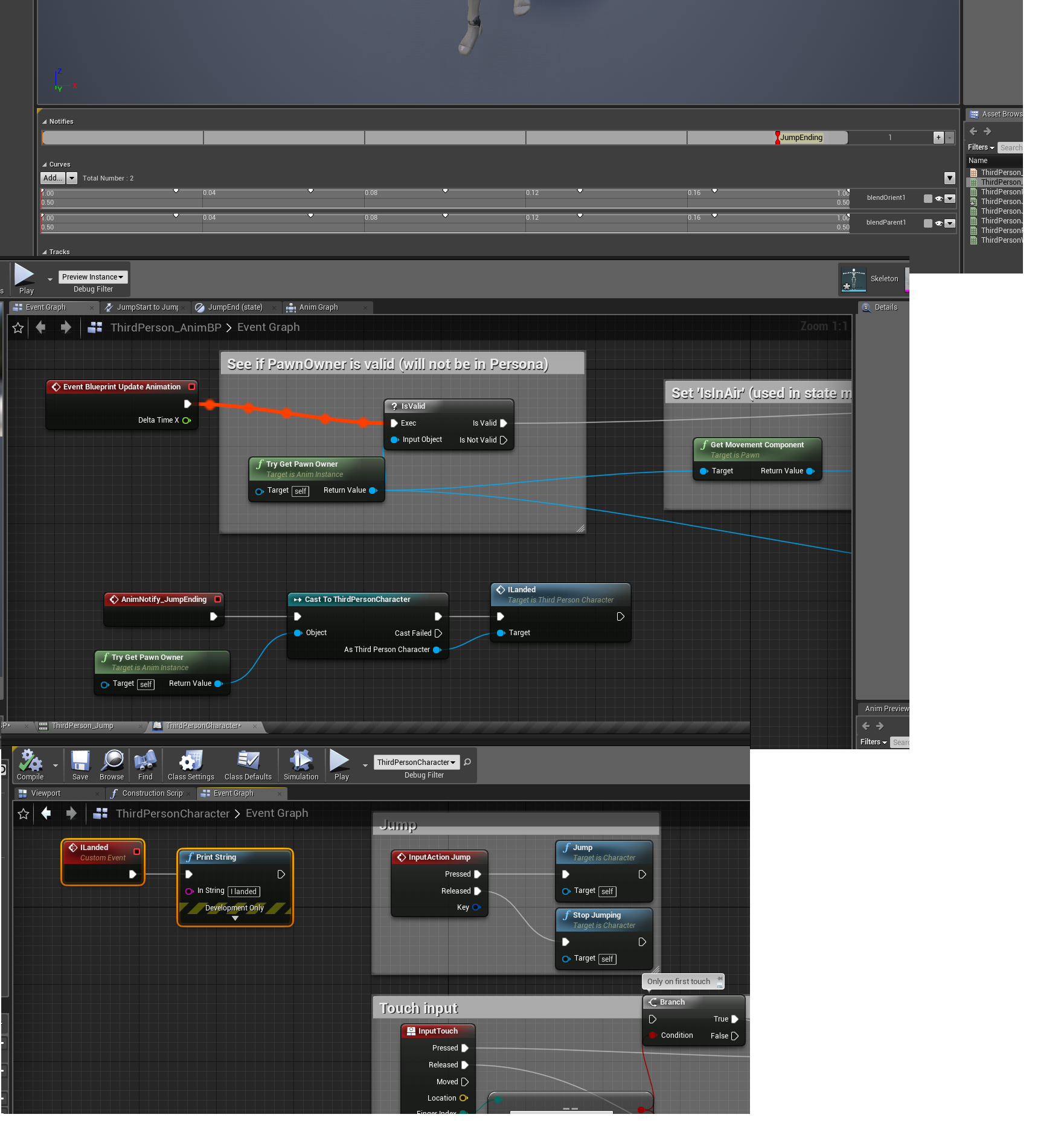
Basically, you set a point on the animation timeline when you want an event to trigger
And then you cast to the player to trigger the event. So for your sitting animation you would create an event at the end of the transition animation
next pine
Ah, ok. I was wondering if notifies were the 'reverse channel'.
That makes sense to me, and lets you be more expressive then relying on hard state transitions.
misty dagger
You could also do something using the "TimeRemaining" node. That's what I've been doing
up until tonight
next pine
(for example, you could trigger the 'seated' animation notify before the end of the animation, so you could have a settle without interrupting interactivity)
misty dagger
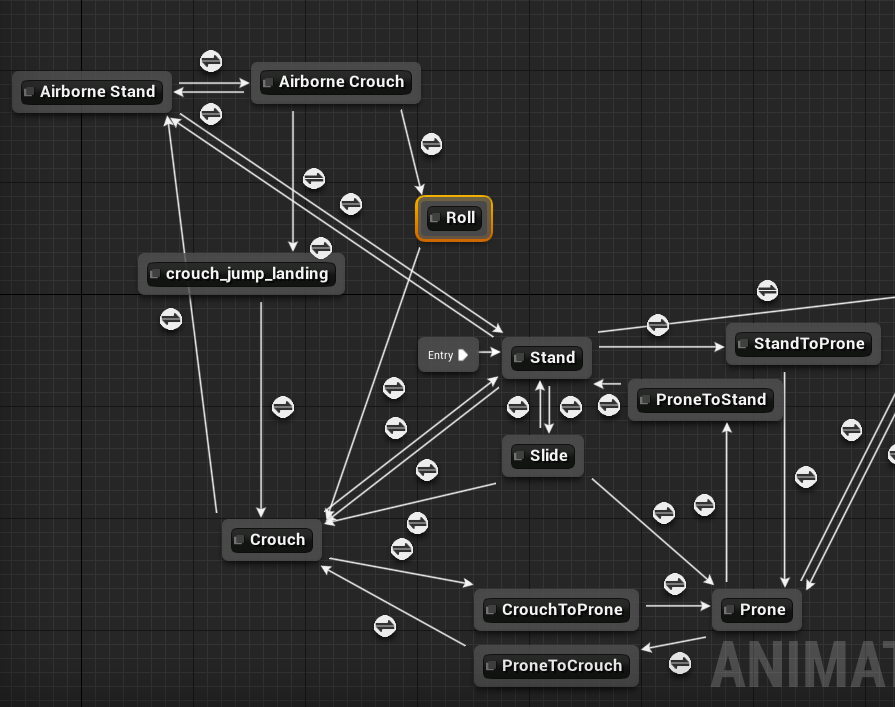
https://i.imgur.com/KyZVC6Q.png
That's my locomotion graph and you can see that I have transitions for prone to stand and stand to prone
Yeah I think that would work
next pine
Do you use events or does your gameplay code just flip switches?
Like, for a punch, or a swordswing?
misty dagger
I used input events for those
But I had context-relevant animations
I unplugged all of my combat code but let me see if its still in here somewhere. My animations got messed up a while back and rather than redoing them all right away I decided to keep working on my locomotion but I think I still left it in here somewhere
https://i.imgur.com/qLcTS4R.png
Yeah this was my setup for melee but I think I might have to do it differently

It was meant to copy the ForHonor combat system
next pine
I worked on that project. : )
misty dagger
so if I was aiming left my character would be in the Fists_Left state. And then it would play an animation corresponding to my mouse input. So fists_left_0 would trigger a light attack to the left
WOW that's one of my favorite games of all time from a raw gameplay perspective. and visual
next pine
Nice! I was, sadly, not involved in the gameplay stuff for that one. I did their cinematic animation pipeline stuff.
Which did get used, but was not nearly as cool as the gameplay stuff.
misty dagger
Well visually everything in that game is spectacular as well!
next pine
It was very pretty. : )
misty dagger
It's so cool that you were a part of that it's one of my biggest inspirations. Yeah so for throwing punches I'm pretty sure I just flipped a boolean on for like .05 seconds and the anim graph would play the animation as a result. Since it would enter the transition if the bool was set to true and it wouldn't go back to normal until the time remaining in the animation was around 0. I didn't think that was the best way to do it and I went around asking on forums but everyone seemed to think it was acceptable and no one suggested an improvement
next pine
I guess you could do the boolean switching yourself, inside the animation bp, using a notify.
And then it wouldn't matter how long the animation was.
misty dagger
And my fist hitbox was socketed onto a hand bone so as long as the fists were out it would register hits. Although with the new info Mathew gave me I could turn off the hitbox as soon as the anim was over
yeah exactly
next pine
You could even turn the hurtbox on and off in the middle of the animation, so it's only 'live' during the impact, not during anticipation / recovery.
misty dagger
Oh thats even better, I'll put that in my notes for when I go back to combat
I don't know how much you've worked on the combat, but someone showed me that it's significantly cheaper to do a line trace than an entire box trace. So like my fist had two line traces with one going across the knuckles and the other going across the first digits. So it looked like an equals sign =. When I do bladed weapons I'll have the line trace from the bottom of the blade to the tip
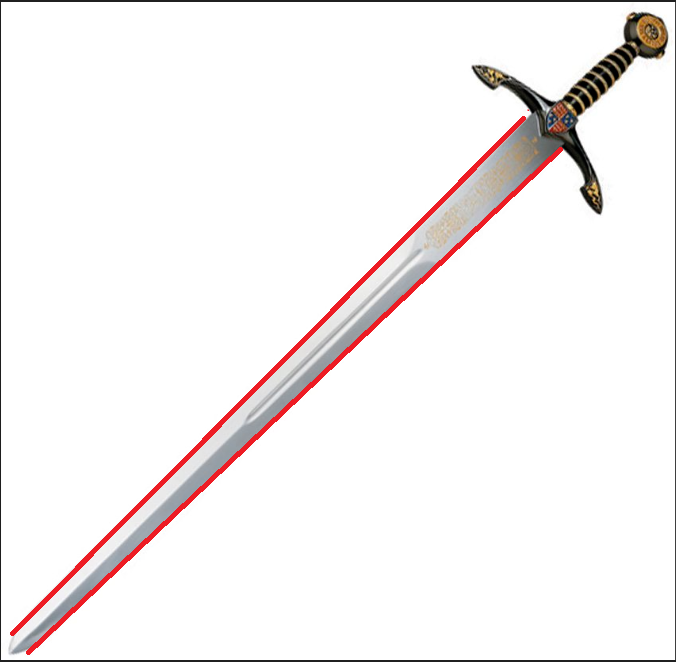
I mean along the edge of the blade
next pine
Interesting, but I suspect that weapon collision testing isn't going to be a bottleneck in most games.
Unless you have a ton of combatants.
misty dagger
That'd make sense. It's definitely more tedious to set up too.
I've had a problem that you might know about, it's fine if you don't. Do you use your own skeletons for animations? Or are you using the UE4 mannequin's skeleton?
next pine
Our own skeletons.
next pine
No, Maya.
misty dagger
Ahhhhhhhhhhhhhhh, damn. Nevermind then. Blender rigs seem to work fine in UE4 until LegIK gets turned on. That totally destroys whatever limb the IK is applied to. One day I'll find another person using a blender rig, hopefully they'll have answers.
I hope I helped though, I know anim notifies are going to be revolutionary for my workflow hopefully they help you too!
next pine
Thank you! Yes. You've been a great help.
My guess, for the leg thing, is that the axis are wrong.
Check which axis is pointing forwards.
The unreal 2-bone ik may only work on one axis.
I haven't checked, but that would be the first place I'd look.
misty dagger
I'll check it out then. I know that if I import the mannequin into blender with "connect bones" or whatever to make it look good and then put it back into UE4 then the mannequin will also have the issue. And if I go to its foot bone in the skeleton and set its local rotation to 0,0,0 then it seemingly goes to the same place as it does once IK is turned on.
misty dagger
Awesome, I wrote that down too. Once I finish this rolling stuff I'm going straight back to investigating the IK issue. Because that's currently the biggest obstacle in my way. I'll let you know if it ends up working, thanks again!
next pine
No problem. Thank you. : )
molten vector
I imported my character animation from blender to UE4 but my skeleton mesh and animations became really small does anyone have a good solution?
restive yew
Set the scene unit in blender to metric and rename your rig to anything but Armature
molten vector
ok
@restive yew should i set it to centimeters?
the length is set to none
and unit preset is not set to anything
restive yew
Centimeters is fine
molten vector
ok
what about the length thing?
should i set that to somethin?
it is set to none
restive yew
Screenshot the please. I haven’t had morning tea yet ☕️
molten vector
there
o
there you have it
a screenshot @restive yew
and what should i set the unit scale to?
restive yew
Just check the height of the mesh itself
200 cm is the default character height in unreal
restive yew
Go to edit mode in blender and click on one of the highest vertex or go the left, right, front, or back view and move the 3D cruiser to the top of the head. Check it’s z coords
molten vector
?
i don't totally get what you mean
but i think it is ok
i will try importing now
didn't help
my anims are still small
but there is something weird
it makes a difference witch way i import
i can import by going to file and import to level
or i can import it with the import button in the animation window at the bottom
but when i import from the bottom thing my character becomes small
but
when i import from the file thing my character is just rotated 90 deegres
it is really weird
also when i do the file thing my character is right size but is just rotated
@restive yew
i think it will be easier to fix my character being rotated
so how do i fix
my character is lying on his back
restive yew
What
molten vector
and in the animations he is also lying on his back
restive yew
Set rotation upon import
restive yew
Import menu
molten vector
in ue4?
restive yew
Just drag the fbx onto the content browser
restive yew
And yes
molten vector
ok
thanks
well
when i drag it it is only small so i guess i should just see what i can do with scale
 random lichen
Okay not sure if this is a stupid question or not - I keyframed my own animation in UE4 and saved it as an animsequence. It plays fine in the Animation preview, but when I hook it up in the AnimGraph, it doesn't play. I did compile the AnimGraph and other animations are working, just not this new custom one.
The main difference is the new one was created by rotating a bone and keyframing the rotation. I suspect it might have something to do with the message "Bone manipulation is disabled in this mode", but i'm not sure. Any thoughts on why this might not work?
It also doesn't play in game either
 tawny coral

Instagram
71 Likes, 3 Comments - Delzaar (@delzaarco) on Instagram: “Another shot from "Beauty Cold" animation. More is to come! @unrealengine @allegorithmic…”
tiny granite
Any reason that the ART character is importing rotated at 90
i also get a script error
nvm i guess a Z/Y difference for the default
terse wind
Is it possible to play Additive Animation over the whole pose once?
 stray bay
I've got a bit of an issue - I have a custom deformed character rigged using ARTv1 that works properly with the Unreal skeleton. I then tried to apply animations from a purchased pack (Adventure Game Animset) and it's totally messed up - the hands don't reach the places that they're supposed to go, etc. Given that they both us the UE skeleton does anyone have ANY idea what's going on here? I've already sunk a ton of time into this and I'm at a loss.
 stone umbra
k im here
stone umbra
Oooh lol
untold zinc
Hi all, i am importing a blender animation, but it breaks when UE4 removes the Armature object, some one knows how to fix that ??
stone umbra
Unsigno make sure it's all selected when you export
restive yew
stone umbra
And if it is then make sure you have the skeleton import option ticked too
when importing into UE4
If I'm doing multiple bones would I just keep adding? @restive yew
restive yew
yes
untold zinc
yes, it works fine if i rename the Armature object ( so UE4 don't remove it ) but when it is removed the animation breaks
restive yew
bone depth sets the number of child bones it'll influence mind you
untold zinc
ok thanks, i wait np
stone umbra
Wouldn't a bone selection like that normally be a drop down of bones on the skeleton? @restive yew
restive yew
I'm afraid I do not understand your question
restive yew
Bone Name: sets the bone that'll be blended
stone umbra
But bone depth means it'll blend the children of that bone too, right?
Or did I misunderstand what you said?
"bone depth sets the number of child bones it'll influence"
restive yew
It just sets how many bones are influenced along the chain starting from the bone you declared in Bone Name
untold zinc
sure
restive yew
Well, that's one way of brute forcing it
stone umbra
yeah but it still doesn't work though 😦
restive yew
you can use Neck and bone depth 1 to have the head bone influenced instead of manually setting individual bones
but regardless
debug time
print out the pitch var from the anibp
make sure it's actually receiving it
river meteor
Hmm redirector are you sure that's what blend depth does? I thought it was rations for the hierarchy
Ratios*
stone umbra
how do I print it?
river meteor
For example, having a value of 1 would be full blend for all child bones, while having something like 0.5 would be 50% of the parent for every step down in the hierarchy
That's what I got from the forums + it seems to behave that way in practice
stone umbra
even Epic's official documentation doesn't explain it
restive yew
you can't put floats in blend depth
go to your ani event graph and use the print node
river meteor
Er sorry I meant something like 2 would have the 50% effect
stone umbra
print string?
river meteor
1/<parent blend> per child
stone umbra
it says 0
restive yew
you are moving your mouse when playing yes? (sorry, gotta ask) 😛
stone umbra
yeah lmao
restive yew
Wonderful. screenshot the graph please
river meteor
Here I found some stuff
// how much weight increase Per depth
const float IncreaseWeightPerDepth = (BranchFilter.BlendDepth != 0) ? (1.f/((float)BranchFilter.BlendDepth)) : 1.f;
looks good
river meteor
From AnimationRuntime.cpp:1302
river meteor
const float BlendIncrease = IncreaseWeightPerDepth * (float)(Depth + 1);
BoneBlendWeight.BlendWeight = FMath::Clamp<float>(BoneBlendWeight.BlendWeight + BlendIncrease, 0.f, 1.f);
It's multiplying the ratio by the depth
restive yew
and annoying
river meteor
Yea I really wish they documented this stuff haha
stone umbra
oh sorry redirector one sec didn't see
restive yew
I think I based my original description off the live training on it
Gotta double check on that video. That's concerning if it was the case
stone umbra
🤦 🤦 🤦 🤦 🤦 🤦 🤦 🤦 🤦 🤦 🤦 🤦 🤦 🤦 🤦 🤦 🤦 🤦 🤦 🤦 🤦
restive yew
it's ok 😄
stone umbra
I thought you said it would run without me having to execute it from anything lmao
restive yew
hey hey, I only mislead you on the blend depth 😛
stone umbra
lool ok
well it's kind of working but it's doing some funky shit now
think I can fix it tho one sec
river meteor
// if Depth == -1, it's not a child Hmm, setting the blend depth to -1 makes it so it just affects that bone, right?
stone umbra
ok so when I look all the way down it sets my pitch to 270
and all the way up is 89.9
Ok so it works, but it doesn't blend smoothly at all
restive yew
setting any negative value doesn't yield blending from what I can tell xen
restive yew
Use the input scalar value instead, it's cleaner and less headache Vmpere. Unless you absolutely need rotation value
river meteor
Maybe it nulls out curves on those bones that were previously computed
That would be my best guess
For example, compute a full body animation then null out just the thigh bones so that you don't have to do some nasty branch stuff
stone umbra
what does scalar do?
restive yew
That's the thing though, it seems to null out everything
river meteor
There's also the CurveBlendOption that adds a layer of complexity on this
I'm using BlendByWeight (not default)
stone umbra
I think I'm going to bed lol
It's 3:30 am here and I have to do like 3 more of these blending things tomorrow :/
restive yew
It's your axis value. keeps the numbers reasonable and consistent
stone umbra
or today technically
ok
Is it ok if I ping you with any questions later, redirector?
restive yew
On this topic? Sure. Just remember there are a ton of lovely folks here who can help you too.
and not misunderstand the function of blend depth
restive yew
Ah, you're right xen. It does null specific bones when changing to blend by weight
river meteor
Cool, that makes sense.
restive yew
Thank you for correcting me. It certainly sheds some light on these poorly documented nodes.
river meteor
For sure, I wasn't sure myself just running with what I had seen on the forums
stray bay
Did anyone have any ideas about my issue? I’m seriously in the dark and any help (or even just ideas!) would be so massive. Basically, again, I rigged a custom character using ARTv1 in Maya, then I’m trying to use some store-bought animations rigged to the UE skeleton and it’s super messed up, no matter how I tweak the bone in the skeletal window
restive yew
It’s been years since I’ve used maya. Can’t help you much there. I’m assuming you’re trying to retarget it. Investigate UEs bone rotation. I recall it’s funky
stray bay
Hmmm okay. Yeah, trying to retarget but I cannot fathom why it would be messed up like that
restive yew
Test retargeting on the mannequin and mixamo rig too.
 tiny flicker
Hi! Who's familiar with Maya? I have mixamo retarget script I wrote a while ago and it worked well. But now when I use it, animation just do not work.
The steps I make
Clear rotation connections
Rename joints
Remove Unity useless joints
Orient joints
Add root
But now clear connections break the animation. Is it possible to restore connections.
IF i do not clear connections, I get weird animation at the end.
https://pastebin.com/3zP5sJHF Script without breaking connections looks li this:
 tiny flicker
Finally I found out how did i retarget it. But now I have another problem 😄
Does any body know, why animation can apply such effect?
misty dagger
Anybody knows where I can get a free dodge/roll placeholder that can use the UE4 skeleton? I can't seem to find one even in Paragon
 rose zealot
ok guys, I've modelled and animated a chest in blender with 3 keyframes. How do I get that bad boy into ue4 now? Will i be able to determine when the animation should stop (I want the chest to stay open while browsing its contents, then close when the player is done using it)
misty dagger
Anybody knows how to hide certain bones (im trying to hide Paragon char weapons) without using the Anim BP graph? Setting the scale to 0 in the skeleton doesn't seem to work and it just resets everytime I reopen the skeleton
 calm pelican
Does anyone have a resource/tutorial/advice on animating first person animations for Unreal? I am pretty good with anim-BPs and okay with actually crafting animations, but I am curious to see of there's anything in particular to keep in mind while building them for first person.
 simple star
Anyone knows how to quickly restart an animation ?
I'm teleporting my characters between areas of the game but when the new area loads completely you can still see the players moving from the previous movements ... how would you go about fixing this ?
rose zealot
hey guys. So I've modelled and animated a chest in blender, but I have trouble importing it. I've tried several options. It either doesn't import the whole modell into blender, or imports it somehow completely deformed and idk how to fix that. Googling didn't help me either. Is my model/it's animation fucked, or are it the export settings, or the import settings in ue4? How can I find out?
pls @ or dm me if u can help, I'd appreciate it a lot
misty dagger
@Silveregg just play animation? Pretty sure it will start at time 0
 lunar agate
Does anyone know the science behind blendspace? Is it just a weighted Lerp between corresponding skeletal points?
misty dagger
Does anyone have any good tutorials on Animation Montages for 1.21? That's the version I'm using, and all of the tutorials I find on it are outdated. I heard I could use it to make my jump animation play when my character jumps.
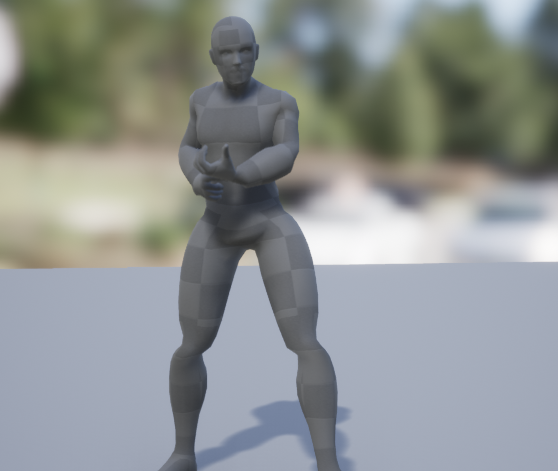 restive yew
Misaligned mesh, bone, bad vert weighing
 lavish silo
I used mixamo to generate the rig/bones
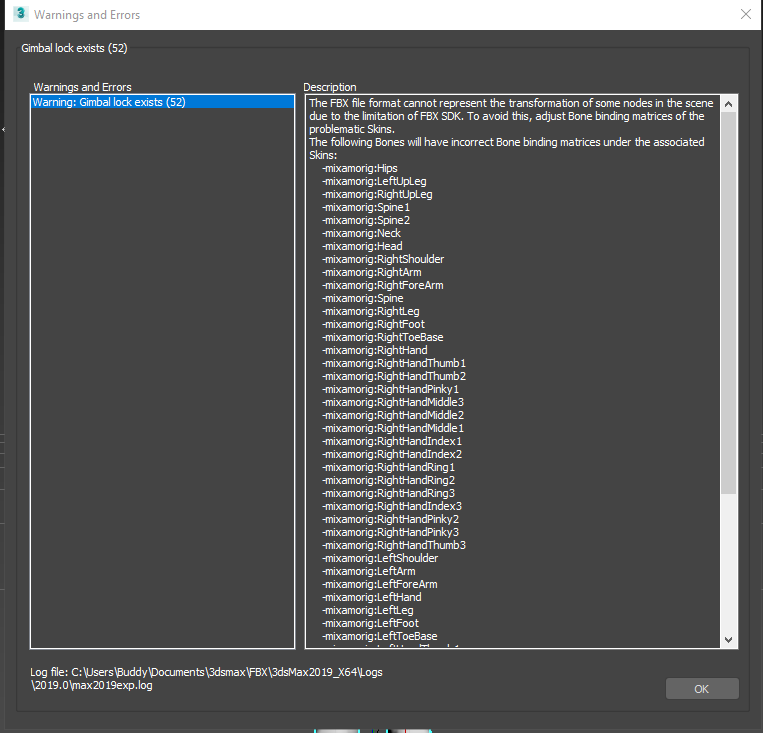
I do think there is a issue with the weights, though when I try to export from 3ds max.
I get this issue here;
 lavish silo
what do you mean
restive yew
you can export mixamo animation packs. Which is incredibly buggy
lavish silo
I just uploaded the Model to Mixamo, then assigned the wrists, pelvis, elbows. knees, chin, then downloaded it in T-pose
restive yew
and reuploaded yes?
restive yew
You may be getting bone discrepancy then
lavish silo
So after I download it, I reupload it?
restive yew
You'll want to download it, fix the bones/weight as needed, then reupload it (don't rename the bones mind you), grab the animations you need
untold zinc
i have a skeletalmeh component with an animation BP, can it access the parent states ?? ( eg. maniquin with tail, can tail check if maniquin is idle ? or i need to check the speed again ? )
 lime bramble
Where can i learn to import a custom character rig from Blender into UE4? i really tried looking for some info but couldnt find anything useful
 sudden mortar
Having problems with Animation from maya to Unreal, i have an imported skeleton and it looks fine. However all animations that i bring in get problems with the arms/shoulder area. Anyone who knows how to solve it? It does not look like this in maya or motion builder.
sudden mortar
@restive yew I am
@restive yew Or atleast im selecting it when importing the animations
restive yew
Import an animation without selecting a skeletal mesh. Let’s see what happens
sudden mortar
@restive yew Same problem, however when i imported it created a skeleton even if i didnt choose one when importing.
restive yew
That’s normal. We were just trying to see if it was the original skeletal or the animation that was the problem
sudden mortar
This is how it looks like in motionbuilder using same FBX file
restive yew
Import without animations, I want to see if it’s the rig itself that’s causing the issue
sudden mortar
It works fine
restive yew
You’re rotating the forearm
lime bramble
@restive yew no idea what a skeletal mesh Felix is, i just want to build my own Character Rig in Blender and port it together with the Mesh into UE4
restive yew
I was talking to Felix after pinging you Thane
lime bramble
oh okay lol
restive yew
I’m at a lost Felix, I do apologize. Repost your issue here and hopefully someone can help
 foggy vessel
hey guys.. When I added an aim offset to my character.. I used a blend per bone on the spine 001 and there is a lot of extra movement being transferred to my upper body that isn't in the original aim offset movement
it doesn't make much sense to me
sometimes the movement is there other times its not..
like the gun and arms will bob up and down more than they do in the original animation.. . But sometimes they don't bob at all and are like the original animation
misty dagger
Hey, does anyone know any good up-to-date tutorial videos on how to use animation montages for Unreal 4 ver 1.21? I heard I can use it to make my character play the jump animation when my character jumps.
restive yew
You don’t use ani montage for jumping but regardless https://m.youtube.com/watch?v=ffuq5k-j0AY

Epic Games has released 20 character assets from Paragon and now we want to show you how to get started with those assets! Shinbi's animation Blueprints are ...
In this stream, Wes Bunn takes a look at the quickest way to get a humanoid character up and playable from a Skeletal Mesh and a series of animations. We’ll ...
misty dagger
Oh okay, well thanks anyways! It's just hat I haven't been able to find any way to get my character to play the jumping animation whenever he's jumping, and only whenever he's jumping. He either plays the animation whenever he jumps and walks off the edge, plays it constantly and doesn't stop, plays it constantly over and over again whenever the character is in the air but goes into the running animation or idle animation whenever he lands, or plays the animation whenever I press space, but even when I'm out of jumps it still plays the animation whenever I press space, it's weird.
But I only want it to play when my character jumps and each time he jumps (my character has a double jump)
restive yew
Watch starter animation tutorials. They’ll go over how to use the ani bp, it’s event graph, ani graph, state machine, and transition rules. You’ll be hard press not to find one that doesn’t cover jumping
misty dagger
Yeah, but usually most of them are outdated from either 4,3, or 2 years ago, sometimes you can find one from 1 so year ago but I don't really know if those are outdated too. And usually the way they set up the jump by detecting if the character is falling (or no longer on the ground) and then play the jump animation, but that makes it to where whenever you walk off the ledge it plays the jump animation. when I don't really want it to. I just want it to play the jump animation whenever the jump action is happening.
restive yew
Video from 2012 are still applicable for the basic. You don’t need to worry about that. Sounds like your transition rule is bad
misty dagger
Maybe. How would i set the transition rule to only play the jump animation when I'm wanting?
restive yew
let me make a quick sample
misty dagger
Alright! Thank you 😄
misty dagger
Oh okay, thank you! And this way I can double jump without any trouble or it won't play the jump animation whenever I walk off of a ledge right?
restive yew
double jumping is an input thing. Go to #blueprint for that. Otherwise, the animations will be fine. You may need to add to the transition rule depending on how you implement said input however.
misty dagger
Well I already have the double jump set up by the maxjump rule in the characterblueprint, but I was just wondering if the animation would still play correctly if I were to use my second jump in the air.
But I'll try it out and see how it works, thank you By the way in the animBP event graph are those connections going down to anything I need to attach it to, or is that something else that's irrelevant?
restive yew
ignore those
there are scary stuff down there
I doubt it'll respond to the second jump since it's just checking if player is falling. Doesn't hurt to try
misty dagger
Oh and also, what do I do for some of those transitions in the state machine? I understand the InAir and NOT InAir, but I was wondering what I do for the GetInstance things
restive yew
ah, right
the transition from JumpIn to JumpLoop
it just cuts down on animation poppiness. Makes it blend to the next animation better while preventing JumpIn from looping
misty dagger
Oh okay, cool! And is it done the same way for the landing animation?
restive yew
Yep
misty dagger
Alright, cool! Thank you so much! 😄
misty dagger
Hey @restive yew ?
I can't find the speed node that I'm suppose to use in this photo you sent me https://cdn.discordapp.com/attachments/221798806713401345/549710600700428288/Capture.PNG
 restive yew
you need too make the variable
misty dagger
Oh, what do I attach the speed variable to? Is there anything else other than what's in the picture?
Hey @restive yew ? I followed your instructions as far as I know, but my character just kind of replays the jump animation over and over again once I jump. It works normally at first, the run animations and idle animation play and stuff, but once i jump it just continuously plays the jump animation, even after I land and try to run and stuff.
 unreal jungle
Hello I have a question about creating a certain animation
restive yew
An answer cannot be given to an unasked question
unreal jungle
heh, sorry, so I was wondering how would I go about doing a looking back feature while the character is running something similar to Outlast?
restive yew
Never play. Aim offset would be one solution
You can also brute force it and use a blendspace with Blend per bone
unreal jungle
I might try that.
restive yew
Delete cast to ani bp. It’s fine otherwise
misty dagger
@misty dagger make sure your animation length is one jump long when you export and only play once don't loop in ue
misty dagger
@restive yew But the cast to animation blueprint is for the run animation not the jump animation. And I think I need that for the run and idle animation to work.
restive yew
It’s telling me you have a messy setup. Wipe the blueprint and start over. Follow these starter tutorials in this order

UE4 tutorial on animation blueprints which brings the character blueprint and blendspace I created in the tutorials before together. you can assign the anima...

In this video I go over the jump mechanic in unreal engine, and how to approach getting the character to jump. The animation that comes with the pack are bad...
In this stream, Wes Bunn takes a look at the quickest way to get a humanoid character up and playable from a Skeletal Mesh and a series of animations. We’ll ...
untold zinc
if i want to blend 2 animation where one just move the root and another move the rest of the bones. "Layered blend per bone" will be the most appropiate/performant solution ( i can't use additive pose ) ??
 molten lodge
where can I do some learning in regards to in-engine IK ?
 wheat badge
anyone made custom anim graph node here b4?
@molten lodge ue4 has very few IK supports. Two Bone IK, FABRIK, Spline IK, u find them in the Anim Graph Nodes list
nova oxide
Hi! Not sure if I should have ask this question here or #cinematics but what's the most convinient way to turn a sequencer animation into ragdoll on UE 4.18? Lets say I have a character in my sequencer, I assigned an animation and at the end of it it should blend/switch to ragdoll (e.g when a character dies at the end of the animation or something like that). Possibly it would be cool to be control it with keyframes.
What I have tried so far is setting up a physics based animation blueprint setup based on the docs and attached it to EventTick and exposed the BlendWeight (float) parameter to the sequencer and keyframed it from 0 to 1. But it doesnt seem to do anything at all when I hit Simulate and play the animation. On another hand I tried to make a custom event which just had a SetAllBodiesSimulatePhysics attached to it with the characters reference, but in 4.18 I cant directly call that unfortunately from sequencer and I had to make another event in the levelBP which was calling this even from the character blueprint, but if I want to have multiple instances of my character I would need to recreate this as many times as much instances I have which is clearly redundant.
Can you guys give me any tips on how could I solve this? Feel free to tag me because I am not really able to check discord often so this way I can find answers better. Thanks in advance.
ps.: I attached a picture of my current setup.
nova oxide
Sorry I messed up something regarding describing my problem. When I hit Simulate and paly the animation while collision is set to ragdoll, it immediatelly starts to simulate physics and doesnt let to play the animation and when the sequencer gets to the blend keyframes it will just put my character back to the origin and have a ragdoll there
restive yew
 analog tulip
Im really new to animation and ive just exported a walking animation, https://gyazo.com/c1c7e38cd5640241ba2a034db3b6d71f Anyone have any tutorials to make this look better, im using blender and I dont know if its the rig or my animation skills? (its really bad I know)

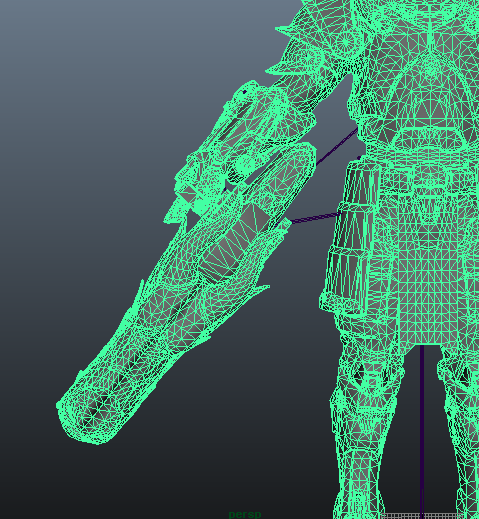
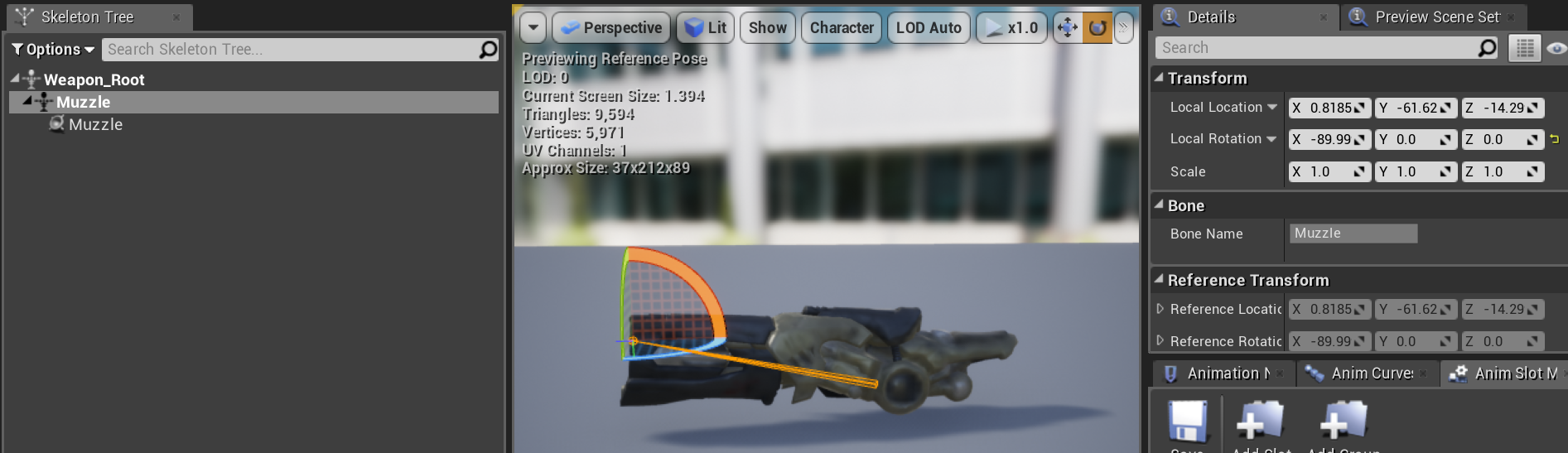
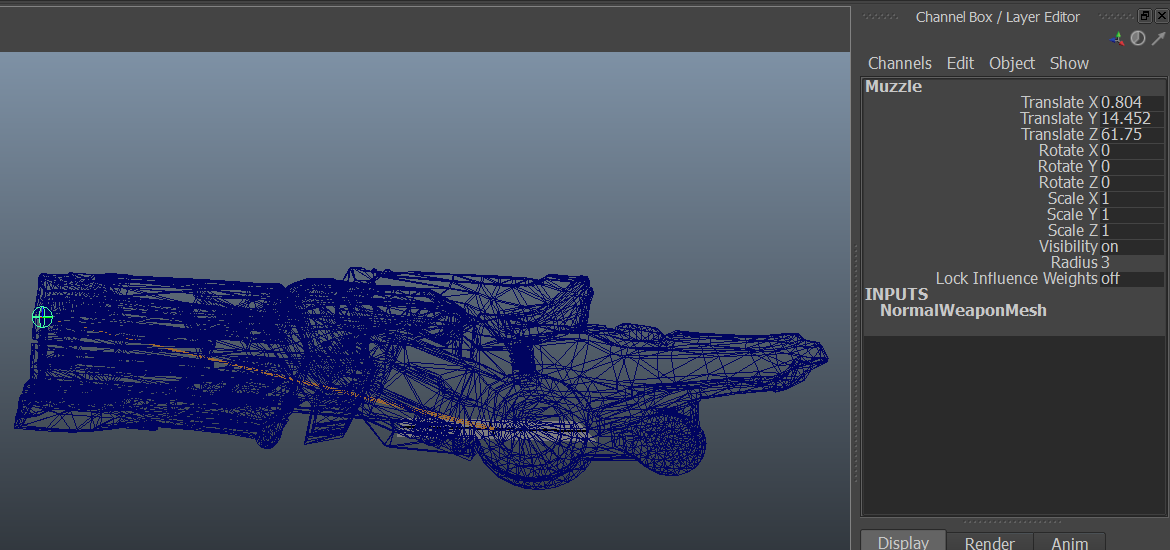


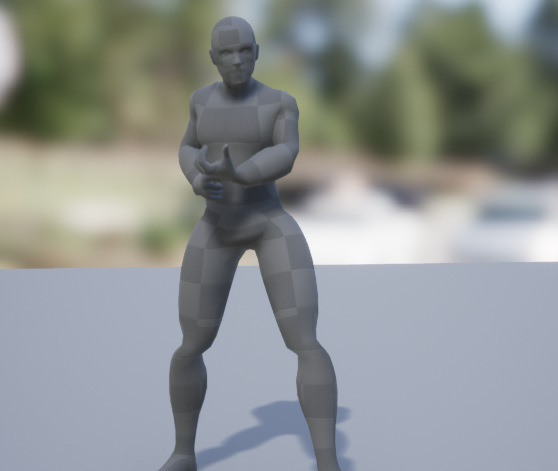
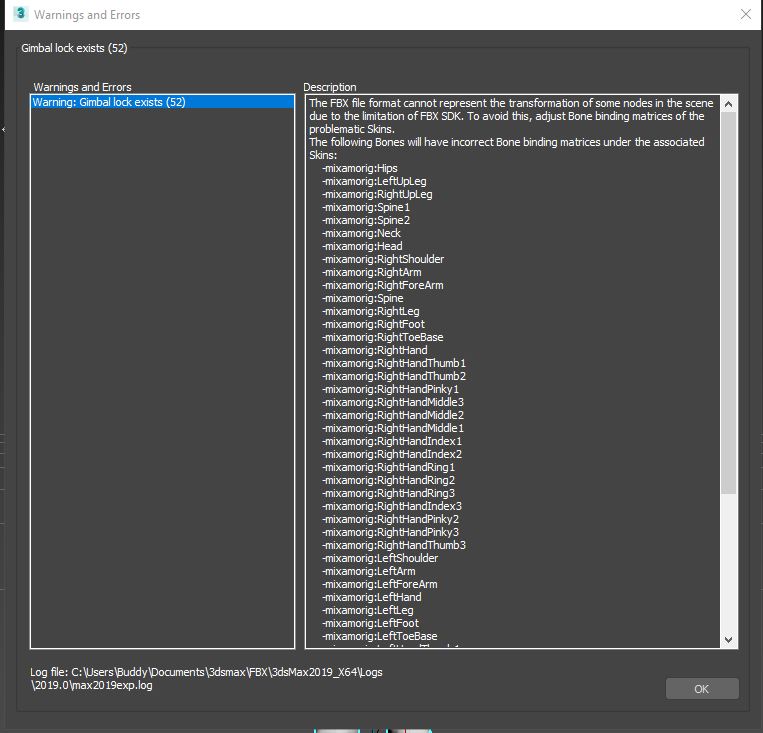
 restive yew
In blender (or any 3D software) have the character move forward in the scene using its root bone. This’ll help you get a more pleasing stride as opposed to eyeballing it. It Unreal, you can enable/disable root motion to keep the character in place. Otherwise, look at walk cycle refs. Lots of walk cycle refs.
analog tulip
oh i didnt know you could use root motion
serene perch
so uh, blender/animation noob here. Im trying to animate a character sitting. because I need the rotation of my player to be facing the opposite direction I have attempted the following. I used the childof constraint of all root bones in blender to tie them all to a chair in the scene. The sitting animation gets done. Then after that I go into object mode and make two keyframes to rotate the entire object by 180 degrees.
Now theres a couple confusing things
I get two animation sequence files
one with the full rotation, but it rotates as if the childof constraints didnt exist
and one with only two frames that appear to not do anything
is there anything obvious so far that I could have been doing wrong?
or is there more stuff I need to post?
is my approach generally the right one or is there a better solution to my problem?
restive yew
oh boy, this is a bit to digest
serene perch
yea im sorry if I am terrible at describing my problem
its been something thats been an issue for a few weeks now
and I havent sufficiently figured it out yet
restive yew
Quickie solution: in your import window (in unreal) you can adjust rotation
serene perch
thats an offset that applies to the entire sequence right?
which doesnt really help me, I need a transition from 0 to 180 degrees with root motion
let me snap a clip from blender really quick
restive yew
I really don't understand your issue, it's the animation itself that needs modification?
serene perch
this is what I got in blender
it's not been animated with any root motion whatsoever
every bone is parented to the chair via childof constraint
now at the end of this I do rotate the entire object
restive yew
good lord, why?
serene perch
so that rotating the object leaves the pose alone
I dont want the character to slide out of the chair
restive yew
but the chair isn't a part of the animation, just the character
restive yew
Well yes, you're parenting to an object that doesn't exist to calculate bone data
serene perch
so how do I fix it?
is there a way I can like
bake the pose so its not dependent on the chair?
restive yew
Try (in pose mode) >>> pose >>> animation >>> Bake Action
serene perch
theres a bunch of tickboxes
do I just hit ok or do I futz with the settings first?
restive yew
experiment
serene perch
aight
restive yew
or go to a blender forum/server and ask there
serene perch
okay turns out
it wasnt anything wrong I did in blender at all
it was the control rotation forcing itself over the root motion
so an entirely different problem
 devout dagger
I still don't get why people struggle with UE4 + Blender
What's the goal here @serene perch ?
misty dagger
Cos blender is confusing af
restive yew
It's primarily the export pipeline. Quite literally any random reason can cause a fail or undesired result
like the Armature bug 😛
or physic scaling
restive yew
@tawdry sky This isn’t an advertising channel
Actually
Delete that please @tawdry sky
molten lodge
@devout dagger blender FBX export is honestly wank
but the culprit here is autodesk
serene perch
@devout dagger having a sit animation with root motion rotation by 180 degree
so that the character looks the other way once they are finished
the blender stuff is all working fine now, gotta fix up some other stuff that's messing with rotation
devout dagger
You are doing it wrong really
Just make a rig in Blender that has the same size, naming and structure as Mannequin. Animate, export anims, retarget anims to UE4 Mannequin.
I haven't had any issues doing it like that
analog tulip
Does anyone know how to fix blender exports animations being imported as tiny
it imports the skeletal mesh the correct size but animations are very small
devout dagger
Make your character in Blender with proper scene unit setup and scale @analog tulip
analog tulip
Ah okay, i thought i could just export it and it would be fine
devout dagger
Metric, centimeters, 0.01
analog tulip
where would these settings be?
devout dagger
Eeh you should probably learn Blender first, before diving into Animations
analog tulip
Na i can do blender its just ive never exported into unreal
devout dagger
It's in the Scene tab
analog tulip
yea i just found it thanks
devout dagger
👍
 wicked crypt
Importing an animation from UE4 to Blender, but it become this...
I used .fbx import in blender, should I import or open the mesh first like in UE4?
What is the problem causing this?
The original animation and mesh look like this.
Never mind.Solved😋
devout dagger
Why would you import anims into Blender?!
devout dagger
For me personally, as soon as I stopped doing things I really wasn't suppose to doing and started doing things UE4 way, 99% of my issues with Blender and UE4 got resolved automatically.
Adjust anims? Just make your own.
serene perch
@devout dagger do elaborate, im not exactly sure how that is supposed to help me, keep in mind im fairly inexperienced with blender/animation in general
wicked crypt

devout dagger
@serene perch before I got deeper into game dev, I learned Blender and how to animate. Then I worked with id Tech engines, then I got into UE4. And I tried doing the same thing - importing Mannequin into Blender (with bones sticking out), setting up IK/FK rig to drive those deforming bones, etc. That didn't work. So the proper ways of doing this is either rigging Mannequin mesh in Blender from scratch (the rig should be basically identical to UE4 Mannequin rig that you see in the Skeletal editor in UE4), animating it, exporting into FBX, importing into UE4 and retargeting to UE4's Mannequin, OR just making your character from scratch in Blender, exporting it into UE4 and using it as-is, without retargeting (but it's going to have to be your character made and animated in Blender 100%)
serene perch
this helps me not whatsoever with my problem
devout dagger
that's because you don't listen
learn Blender and animation first, then get back to your export/import exercises
serene perch
I think it's rather because it's got nothing to do with what Im currently dealing with
but in any case, I got it figured out roughly so far
molten lodge
@devout dagger I remember a forum user, believe their username was victorblanco, who made essentially a really fancy control rig for the mannequin
using what blender sees as the "jumbled" rig
I got mileage out of it, using the same principle I even got to animate assets for an unreal marketplace release
molten lodge
hey, if it works and it's easy to animate with... who am I to judge? 😂
devout dagger
I recall you still going to have to retarget anims, when you bring it into UE4
there are several solutions to the problems. Mine is to do it right way - learn your tools, follow the standard workflow
(for animation at least)
restive yew
@wicked crypt A bit late to the party, you can fix bone rotation upon import into blender. It’s in the setting bottom left section of the import menu.
molten vector
I am using A.R.Tv1 right now and i am creating a rig. I have gotten so far that i need to go to stage deformation setup EXCEPT: i can't press the button
molten vector
:/Program Files/Autodesk/Maya2019/scripts/others/newSkinCluster.mel line 59: Skin on root was bound at a different pose. Go to the bindPose to attach new skins.
?
solar gyro
Does anyone know how I keep exported fbxs from blender (if its an issue with other software I don't know) extedning the import name to also including the name of the file, and what would cause imported meshes/skels to exagerate the size of sockets added to the mesh after inport?
 wicked wind
hey folks, got a weird issue with my aimoffset where my character's hand starts to come off the gun in the space between key poses - it's attached perfectly fine at every key pose, so im not sure whats going on
misty dagger
@restive yew So I followed the first tutorial you sent and created a blendspace and set it up exactly like how they did, now how do I connect both the blendspace and the state machine to the final animation pose, and also how do I set up the state machine now? The blendspace is taking care of the run and idle, but how do I set up the state machine now so that the jump will work without the run and idle in the state machine interfering with the blendspace?