#animation
1 messages · Page 90 of 1
 winged valley
winged valley
winged valley
Where?
 clever abyss
I moved shoulders a bit forward....
winged valley
In what program? 😛
clever abyss
Blender
winged valley
Did you reimport the mesh/skeleton?
clever abyss
I even changed position of the shoulders in UE4
but that didnt work
I used old mesh, new mesh , new skeleton , old skeleton
s a m e t h i n g , s a m e e r r o r
I'm spending literally 2nd day on this.
 lime bramble
You could try and force it maybe? When you're keying, key as whole character and push down as an NLA action, rename it and import it
It'll most likrely duplicate anims with a bigger name but you could give it a shot
winged valley
What's wrong though? Can't really see it.
You're aware of the FOV difference between Blender and UE4?
clever abyss
The shoulder do not match the version of Blender.
lime bramble
Coverop animated the shoulders a bit forward but in UE4 the changes dont seem to reflect what has been animated
clever abyss
New skeleton , new mesh , old skeleton , old mesh... NOTHING works
winged valley
Did you reimport the animation?
winged valley
It never works right? Always works for me...
Can you try importing it into a new project for now?
lime bramble
Ahh so my issue maybe isnt with the blendspace but somehow the character is not getting the reference to its speed?
huh
winged valley
How are you doing that then?
winged valley
lol
clever abyss
Every, single, 3D program doesnt like me.
Maya , 3DSmax , Blender , SFM , UE4 , Unity
all hates me
winged valley
Then you're not successfully reimporting the mesh/skeleton/animation.
clever abyss
It's the same skeleton/rig I'm using.
I'm gonna check the settings I used for the new project.... in old project
lime bramble
Ah i see what my problem is @winged valley haha it has nothing to do with speeds or blendspaces. I was casting in animupdate to the wrong BP... derp
clever abyss
OK. I figured it out.
The rig that I've been using for long time.... I have messed up the bones retargetting properties (I did that so animations from Mannequin could somehow match the mesh)
 wicked belfry
Any1 here?
winged valley
Pretty sure everyone ignores messages like those. 😛 ... oops.
wicked belfry
I'm trying to interpolate between two blendspace modes
It doesn't really work
What did I do wrong?
winged valley
You need to put the Get of Transition Float into Current.
Also that node is supposed to run on tick or something so you should probably use a timer for that.
winged valley
Update Animation is basically tick.
wicked belfry
Ohh
Didn't see that green pin
One sec.
Hmm
Weird glitchy stuff happens
Not a smooth transition
wicked belfry
I watched a tutorial on FInterps but my situation is... unique haha
I'm trying to cheat
winged valley
 round shale
Hmm same old question from me - should I derive animation notify events from UAnimationInstance or UAnimationNotify whem extending out in C++ ?
 ruby swallow
i just started rigging, painting weights etc.
and i feel like there should be a reddit or gallery for first time rigging, animating
fucking hilarious results
some of these are begging me to delete them
 broken geyser
i am using ue4 and im trying to use the given skeletal mesh of the third person character to create animations but when i export them out of blender and back into ue4, for some reason only rotations are animating and not any relocations. if i create a new skeleton when i import it does let me create a new skeleton which does work but i want to use the original one
 thorn vigil
show me @ruby swallow
round shale
Do AnimNotify run on some kind of tick or animation or something to that effect?
it seems to fire when I move my character around a little bit. If just move one step it doesn't fire but when I move alot it does.
 vast trellis
@cinder ocean texture stuff isn't really a question for #animation, try #graphics
 cinder ocean
How do I export only the animation of a character from 3ds max? this is the tree of the model:
 plush adder
Hello if i import the ue4 manequin into blender will it be all ready to go to make custom anims using ue4 skeleton ?
winged valley
No, you will get a Maya mess. Use a custom rig like UE4Tools instead and retarget to whatever your skeleton is in UE4.
@broken geyser It's better to use a rig made for Blender instead so you get IK bones and rig controls. Also pretty sure the bones are supposed to be connected so any location transforms are ignored. If you retarget a custom rig animation to the UE4 mannequin it's the same thing as using the original one.
 simple aspen
The main benefit of the ART Maya plugin is for fast rigging and a nice interface when animating, correct? Are there any essential reasons to use it for UE4 characters vs a custom rig (no facial controls just body movement)? Maya LT still doesn't support python and the full version of Maya costs way too much.
winged valley
Yes, it's for rigging. It's just a normal rig really.
 dim charm
I want to create slide animation, but I don´t know how to change character position in animation (If I dont change it my character will fly.). Please help me. Thanks.
 devout dagger
How do I setup IK for vehicle suspension in UE4? (I simply want to move my vehicle actor from A to B over the terrain and have vehicle react to the terrain in a more or less believable manner) Vehicle actor is just a BP actor with skeletal mesh (vehicle).
 misty dagger
Hey guys - anyone around?
I've run into this issue that I ran into once before - I'll change random things in my game and all of my sudden my player animations will stop working correctly - as in the walk animation will be twitchy? I think it has to do with animation blending. But like I said I have no clue why it's happened when I litterally didn't modify the animation class. It feels as if it's a bug.
Dope. Reloaded my project and now it's not happening.... I'm so confused.. Is this a known bug?
broken geyser
@winged valley can I ask you a few questions in I regarding the rig?
winged valley
Sure.
broken geyser
can i create an animation based on the base mannequin provided by ue4, change the bones or w/e, and then retarget it to the ue4 mannequin?
@winged valley (just in case you need to be alerted to see my message)
winged valley
Why would you change the bones?
broken geyser
good question, my idle animation was me just lowering the arms and chest up and down lol
winged valley
If you want to retarget to the UE4 mannequin your rig should look like that too.
broken geyser
couldnt figure out how to do idle with just rotations
winged valley
Did you try UE4Tools?
broken geyser
no im not sure what that is, ill google that
winged valley

It's the best rig for Blender at the moment.
You can use it to make animations for the mannequin skeleton (or just use the rig directly), it has IK controls so it's easy to use too.
broken geyser
so if i animate using this rig how do i stick that onto my existing mannequin (sorry if its an obvious answer i just started doing this two weeks ago)
winged valley
Have you used retargeting before?
broken geyser
i have only tried it on animations and it has never populated anything in the skeletons field so i assume iv been doing it wrong
winged valley
Probably. 😛
But it's pretty easy, especially with that rig.
First you need to name the rig in Blender "armature", that way UE4 will discard the extra root bone.
Also you should set up your scene units to use metric 0.01 unit scale before doing anything else.
Here.
Did you install the addon?
broken geyser
oh cool the scene units is already set in the ue4 template given
yup just got it working and found it in the menu
winged valley
Okay, then rename it "armature" and make some simple animation.
broken geyser
ok, do i rename the HeroTPP_Character armature or ? because he has a thing in him called armature
winged valley
You rename the rig object.
Also the UE4 Tools rig by default has a bone called "Bone" you need to remove, you can enter pose mode and it should be in the elbow, a tiny bone.
Then enter edit mode and delete it.
You can delete it from the template later and save the file so it never happens again. 😛
broken geyser
ok i found bone at the botton of the bones list under elbow, deleted!
still not sure how to rename the rig object (because i dont know exactly what you mean by rig object yet lol sorry)
winged valley
Then after you made some animation you can export with Face smoothing, in Armatures disable Add Leaf Bones and enable Only Deform Bones.
broken geyser
thank you so much for the help so far by the way, you rule
winged valley
In the n-panel under Item there's the object name.
broken geyser
in the n panel i see "item" with the name in it, is that it?
oh thats what oyu just said lol great
winged valley
😛
winged valley
Then you can make a simple animation, doesn't really matter what it is. Just insert some keyframes in pose mode.
broken geyser
how do i show the bone manipulation thingies with those weird pyramids?
winged valley
o_O
By default the rig is set to IK mode, just grab one of the red ones and move/rotate them.
broken geyser
or do i just have to select stuff in the scene menu
winged valley
Or the pelvis.
broken geyser
ok
winged valley
Yes, you'll have to select in the viewport.
They have custom bone shapes so they should be easy to select anyway.
broken geyser
also is it better to do whole character keyframes so i dont have to select the whole guy every time i insert one or just do the frame for the thing i want specifically and reselect the whole guy
winged valley
Just selecting a single thing should work, but it can be good to set a pose on all bones at the same time if you're new to animating, that way you can easily change timing later.
broken geyser
ok, i used locrotscale and im going to export this thing, you said the only changes i have to make to the default export is disable add leaf and enable deform bones
winged valley
Yeah.
broken geyser
ok import menu on ue4, anything i need to do here or just leave as defualt?
winged valley
Make sure import animations is enabled. And the skeleton should say None.
Then in UE4 open the mesh and go to the skeleton tab and go to Preview Scene Settings, there you need to Apply Preview Mesh.
broken geyser
ok preview mesh applied
winged valley
Next click Retarget Manager to the top left.
In Set up Rig you press the None next to Select Rig and do Select Humanoid Rig.
It should auto detect all of the bones and set them up for you.
broken geyser
oh baby
winged valley
Then you can do the same thing for the mannequin skeleton, no idea if you need to do that though, maybe it's set up by default.
broken geyser
after the auto detect do i need to do anything with the new rig? save it or something?
winged valley
After you've done that you can right click your animation and choose Retarget Anim Assets.
Maybe save.
😛
In the retarget dialog choose the mannequin skeleton and press Retarget, that should do it.
broken geyser
nothing in the select skeleton so i probably need to do it for the default skeleton
winged valley
Yeah, but it's the same thing so it should be easy.
winged valley
👍
broken geyser
AND it has ik
you are a fucking god my friend
i shall burn an effigy in your honor
broken geyser
genius
cinder ocean
How do I export only the animation of a character on 3ds max?
misty dagger
hey all. when you create rigs for first person games, do you add an extra "weapon Attach" bone?
cinder ocean
@misty dagger No, the weapon attachment is done through Sockets on the skeleton in UE4
misty dagger
ive run into an issue with socket attachment points where the weapon doesnt orient properly.is there a way to either set the rotation in BP, or freeze rotation on a certain axis?
cinder ocean
You have to zero-out the values on the Z,X,Y axis on the weapon, in the viewport
misty dagger
it is already
the socket is following the rotation of the hand bone
i had to rotate the hand a bit when i animated it, to get a proper grip
cinder ocean
check if the gun rotation is correct on the Preview asset on the gun socket
misty dagger
yepp. all good
like i said, its following the hand bone
you can see what i mean with it at an angle
i guess what im asking for is a way to control the rotation of the weapon or the attach point
like its working properly, technically speaking its just... wrong i guess lol
winged valley
You can rotate the socket itself.
misty dagger
ooh how do i do that?
i figured id set the rotation value in my weapon class, so it changes based on the weapon
winged valley
Just rotate the socket itself in Persona.
misty dagger
yeah but is there a way to set it in code?
just rotating it and leaving it may cause issues with rotation for other weapons
winged valley
You can just make a socket for each weapon.
😛
Why be smart when you can be lazy?
You can do it in BP/code too probably, just type socket and see what you can do.
misty dagger
theres only a GetSocketRotation. doesnt seem like i can set it
i guess ill have to cheat and do it with the weapon itself
winged valley
You can also use a virtual bone if you really need to modify it at runtime.
(using modify bone)
misty dagger
so do i make the Virtual Bone in my character rig inside UE, then in my weapon class, make a character reference, then use modify bone to change the rotation?
i attached a Virtual bone to my character's hand.r bone. does this mean it replaced the bone, or is it just following it?
misty dagger
PlayMontage() is broken
broken geyser
i want to turn the blendspace jog that comes with the anim pack from a rifle jog to holding a melee weapon jog, is there an easy way to do this or do i need to change the 4 direction animations independently and work them into a new blendspace
cinder ocean
when i enable root motion on an animation, the character rotates a bit on the Pitch, how to fix that?
 dusk dove
Fix your animation? @cinder ocean
winged valley
@misty dagger It follows it. But the socket method is way easier. Virtual bones are usually used for IK.
@misty dagger I don't see why the C++ version wouldn't work when the BP version does.
misty dagger
@cyaoeu#1358 neither work for me
winged valley
@misty dagger Can you show your setup?
misty dagger
uhm
all i do is call "PlayMontage" and give it the montage into the bp node
then in my animbp
i have a slot
with the one i use on the montage
thats it
winged valley
Where are you calling Play Montage?
misty dagger
ive tried calling it from a custom event on my anim bp
and also tried doing
Mesh->GetAAnimInstance->PlayMontage
winged valley
I tested it now and it works.
misty dagger
if it works
thenm its not obvious
which means its badly designed
if u have to read/watch more than 1 article/tutorial on how to get a single function to work
then i would say its poorly designed
winged valley
That's all you need to do.
Most times I heard people saying montages aren't working they were triggering the montage node on tick, which means playing the first frame of the montage every frame.
Did you get it working? 😛
 river isle
hi there
winged valley
Just try it some other time then. 😛
misty dagger
xd
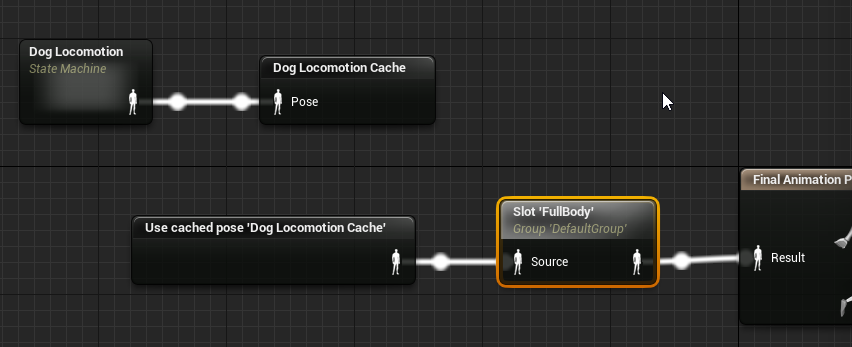
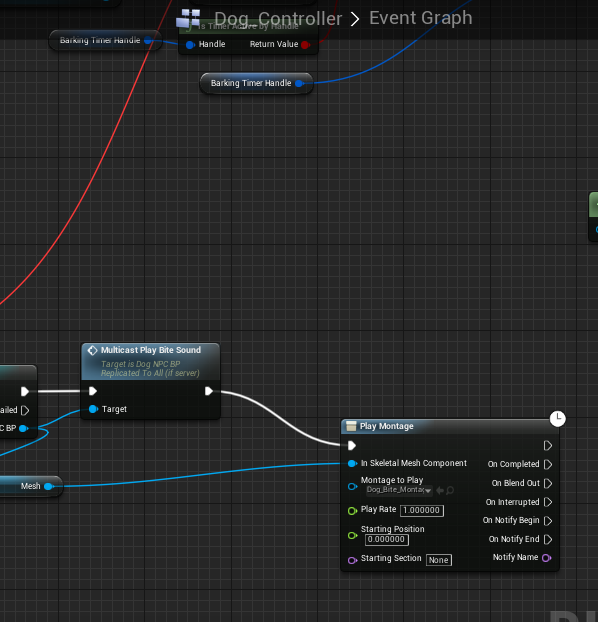
@winged valley basically i want the montage to play at the same time as the sound
on the network
the second image is from my ai controller
misty dagger
yea
winged valley
What happens if you remove the cached pose from the input to the slot node?
winged valley
In the anim graph you have Use Cached Pose hooked into the Slot node, try removing that temporarily.
winged valley
It should play the montage still, if you trigger it.
You should at least test that and see if it works or not.
misty dagger
hm
ok
so just
put the slot
and nothing else
no default pose? @winged valley
winged valley
Nothing else.
misty dagger
ok
winged valley
Just see if the montage works at all.
winged valley
Then it's not getting triggered correctly. What BP are you calling Play Montage from?
misty dagger
@winged valley AI Controller
winged valley
Does it have a skeletal mesh?
winged valley
How are you getting the skeletal mesh reference?
misty dagger
GetControlledPawn()->CastTo<ACharacter>()->GetMesh()
like that basically
but in blueprints
winged valley
Okay, should work I guess.
Did you try putting Play Montage at begin play or something?
misty dagger
uh
no
interesting thing is
if i put my attack animation (not a montage, just the anim clip) at my state machine
and set it as the entry default
it plays
winged valley
The animation or the montage?
winged valley
Try moving Play Montage into the actual character BP on Begin Play.
winged valley
Because maybe it's not getting called correctly from the controller.
winged valley
"Why?" is not a good question to ask when troubleshooting, just do stuff until it works. 😛
Not necessarily. I mean playing an animation from the player controller sounds pretty weird.
misty dagger
but i mean
im just calling the function
from the AI Controller
im not Playing it
lol
winged valley
All I know is that it's working for me but not working for you.
So you can at least try stuff you think are weird anyway. 😛
misty dagger
@winged valley .-.
winged valley
No luck?
winged valley
o_O
misty dagger
@winged valley yeah im just at work and got meetings
sadly :l
i wish my game made enough money
so i didnt need to work
devout dagger
join the club 😐
 analog palm
How would i go about animating a door to violently shake, when triggered by a blueprint? Any help is appreciated 😃
The blueprint being a part of the door itself
 lofty aurora
Is it possible to blend animations? Currently i can reload and jump, but my legs doesnt move when i reload and i want the leg portion to be use with the jump animation when playing reload and jump
winged valley
Yeah, you can play a montage only on the upper body for example.
broken geyser
@winged valley i want to turn the blendspace jog that comes with the anim pack from a rifle jog to holding a melee weapon jog, is there an easy way to do this or do i need to change the 4 direction animations independently and work them into a new blendspace
winged valley
Demonstrates how to blend animations together, in this case, a character that can move and fire a weapon at the same time.
Uh, don't know really.
broken geyser
ok, ill try changing the animations and see where that takes me
though i cant for the life of me manage to copy Jog animations onto the mannequin in blender
winged valley
You could probably do the same thing, replace the upper body animation and keep the lower body animation.
It's possible to get UE4 animations into Blender, you can retarget the mannequin animation to your rig first, then open the retargeted animation and export using preview asset.
broken geyser
i tried that but im ight have messed something up a long the way
winged valley
Then you can import the animation and bake it to your control rig.
broken geyser
ill give it another try and write the steps im following down
winged valley
I've got a script for the retargeting part, you could try it out. It's not very tested though.
broken geyser
im down but i want to try it out first and let you know what steps i did, you might know exactly what my issue is
winged valley
Sure.
broken geyser
ok heres how i do it, using all default values
- find animations initial skeleton (ISK)
- make sure it has rig setup as humanoid
- have new awesome skeleton (NSK) ready with its preview applied and rig setup
- retarget animation from ISK to NSK
- export animation as fbx
- import animation fbx into blender
winged valley
Instead of 5. you could open the animation and export using the preview mesh.
broken geyser
ok
winged valley
How do the bones look with your method?
broken geyser
at which stage?
winged valley
6
broken geyser
at the end they look like the old school ones i had before i used the new mannequin you showed me, a series of pyramids, ill take a ss
winged valley
You won't get the control bones back from UE4 so that's normal.
That's why I made a script so you could get the UE4 animation onto your control rig again.
Not sure how useful it is though, personally I don't have a use for modifying the UE4 animations, I just make my own anyway. 😛
broken geyser
id love to make my own but i am a crap and running animations are hard
i moved it a bit away from the other one so you can see it
oh fuck it worked like magic when i did the preview mesh
there he is runnin along
broken geyser
wait i might be getting ahead of myself, i think its the same thing just now it has the mesh
winged valley
Ah, okay.
winged valley
The benefit of exporting the preview mesh animation is that you get the results after retargeting, for example if you decided to set some bones to Skeleton when retargeting.
broken geyser
not exactly sure what that means yet lol but anyway, now how do i take this guys animation and put it on my guy?
he seems to have a similar rig to the original mannequin, he doesnt have the circles and red grabbers
winged valley
Yeah, all that stuff gets removed when importing into UE4.
broken geyser
is there a way to reattach all those thingies? is that what your script does?
winged valley
Yeah, it bakes the animation from the bones to the IK controls and other bones like the spine bones.
Here is animation data vs preview mesh btw, the right side is the preview mesh version. The animation was screwed up from the beginning (in UE4), jog_fwd_rifle. Setting the upperarm twist bone to skeleton fixes it. And is exported with preview mesh.
broken geyser
any chance i can get you on voice? some of this stuff is going a bit over my head lol
winged valley
Honestly it doesn't matter. The preview mesh is a better alternative most of the time when exporting animations from UE4.
And my script assumes you exported with the preview mesh. 😛
But you can test my script if you want.
broken geyser
sure
winged valley
It's not guaranteed to work. 😛
broken geyser
im sure i messed something up and it wont work because of it lol
winged valley

You need to make sure the control rig has the name armature and the imported animation should have the name root.
After pasting that into the text editor, select the imported animation and click Run Script.
Then you probably need to fix the pole targets (red balls) because you're using the IK control rig after running the script.
winged valley
Here's an example of the script and the pole targets. As you can see he looks a bit comical because of the angle of the knees being wider than the original animation.
broken geyser
mine looks like a murder victim, hes in pieces, gonna start this from a fresh mannequin lol
winged valley
Also there's some glitches on the feet, I don't really know the cause, maybe because the FPS is different when exporting from UE4 (kinda weird, maybe a bug).
If you tell me what animation you're trying to retarget in Blender I could try it myself. 😛
misty dagger
eh anyone watched my vid ?
winged valley
Yeah, but no idea what the cause is.
broken geyser
right now im doing the 4 jog rifle animations so i can turn them into melee jog animations for a melee jog blendspace
so i have the nce mannequin renamed as armature and the imported preview mesh, now im gonna open up text editor, paste your script and run
having root selectted, hitting run script
winged valley
After running the script you can remove the imported animation/rig. Assuming it worked. 😛
broken geyser
ok so it looks a lot better than last try lol
misty dagger
hey @winged valley i managed to create a "hack" to fix my weapon's alignment. basically setting its rotation when the weapon's equipped
winged valley
Setting the weapon rotation?
misty dagger
like compensating for the improper alignment by rotating it in code.
winged valley
Okay, interesting. Personally I would just make 20 sockets which have the right rotation from the beginning. 😛
misty dagger
the marketplace inventory system im using only uses one attachment for weapons.
broken geyser
it worked cyaoeu, you are a god my friend
winged valley
@broken geyser You can check if the feet are messed up on any frame, if they are you can rotate them back into place and insert new keyframes.
broken geyser
yeah i was wondering if theres an easy way to adjust them without doing it frame by frame
if i do it on just like locrot with the feet selected would that fix my issue?
winged valley
And for the CS_ball bone you can set the X Y rotation to 0 and they should be pretty good.
Yeah.
Actually doing that on the feet fixed them too. 😛
But if they were facing some other direction you can just nudge them and they should snap back into place, except the CS_ball bone I mentioned.
broken geyser
i made the adjustments and with both CS_balls and CS_foot selected i created a keyframe at 1 of locrot but then it just snapped back to the way it was
its not a big deal though
it only looks bad on the first frame
alright now i just gotta change where the arms are, thanks homie!
winged valley
Shouldn't snap back though. o_O
You might want to delete the keyframes on the IK hand bones before starting so they don't snap back all the time when animating.
And you could use the Pose Library to save your poses.
broken geyser
i think i figured it out
i wasnt selected the correct element when i was locrot keyframing
now im going frame by frame to find all the other weird bone things
can i delete a row of keyframes from the dopesheet? like can i just delete the ik hand keyframes so i can make my own ones?
cinder ocean
@dusk dove yeah, how? it works normally when root motion is not enabled
winged valley
@broken geyser Yeah, just filter for IK and delete them.
broken geyser
i just did it manually with border selector
actually while i have you here i wanted to ask you something
can i take just the legs from this guy and make them a separate thing or even add them to another one?
i want to have a kicking animation that is independent of this body, i want the kicks to come from the camera
winged valley
You can remove the legs from your character and have another skeletal mesh (legs) that does some other animation.
Or just add more legs. 😛
broken geyser
the way my horribly designed character works is that he has both a mannequin and just arms, the arms are attached to the camera so you can aim up and down with them
can i attach a pair of legs to the arms so when you kick they come out of the camera?
winged valley
I guess. But just try it and see if it works or not.
broken geyser
can i copy the pose data for just a few objects not the whole thing?
winged valley
Yep.
broken geyser
sweet how do i do it
winged valley
Or you can select the bones to paste to I think.
broken geyser
these google searches never go anywhere for me lol
winged valley
You need 2.79 to actually only create keyframes for the selected bones in the pose.
broken geyser
oh dang that just came out, aight
winged valley
If you want to use 2.79 you can press a button "Import previous settings" or something in the splash screen, then you'll have the same settings you had before.
broken geyser
the screen with the robot dude on it?
winged valley
Robot dude? 😛
broken geyser
oh he was a robot in 2.78, now its some cartoon guy, i saw the thing, thanks
alright got my stuff up to 2.79, gonna try to figure out how to do the poses
cinder ocean
How do I make a root motion animation InPlace? so it stays in place
 worldly ibex
Hey, I'm looking to interpolate a hand through multiple gestures (potentially up to a dozen). The way I understand blendspaces, it would force me to go through multiple of those gestures before getting to the right one (unless I can do something like 5 dimensional blendspaces). Any idea what's the best course of action in this case?
winged valley
Probably a pose asset.
That being said driving poses this way using pose assets is not super easy.
You could also use a montage and put each pose in its own section.
 knotty sandal
Hi Unreal peeps, I have a quick and easy question. How do I open the Blend Space UI, instead of continously opening my Blend Space file from a folder?
worldly ibex
@winged valley Unfamiliar with either concepts, but I'll look in that direction, thanks 😃
broken geyser
@knotty sandal not sure what you are asking, i open blendspace ui either from folder or from my graph
knotty sandal
@broken geyser How do I open it from the graph?
broken geyser
in this case i would click on bs aiming walk to open that one up
to have it in there to begin with you can either find it in the asset browser and stick it in or just search it in right click menu
knotty sandal
Ahhh, I found a way haha. What I usually did was like a 5 step process where I would go through my folders just to click the BlendSpace file. But I noticed that I could click the blendspace file directly from the list of animations.
Thanks!
cinder ocean
how do I make a root motion animation NOT move the character out of place?
 clear zodiac
I'm not an animator, but I need to whitebox a basic move set. If I have, for example, walk / jog / run animations is it best practice to create a blend space for each of those (idle->walk, walk->jog, jog->run) and blend between spaces. Or do you put all of them in a single blend space and go from idle->walk->jog->run?
 tame whale
Hello there.
please can someone here share with us the archive for "Maya Auto-Control Rig Script" from mixamo?
the plugin are not still avalaible on their website
we want to quickly create control rig for our charcters with mixamo rig structure, in order to speedup the production for our game prototype
winged valley
@cinder ocean Disable "Enable Root Motion" in the animation.
@clear zodiac Don't know the best practice but Epic put them all in one.
river isle
hi there
How can I make smooth animation with find look rotation node
?
the character turning to target but he doing suddenly
winged valley
Use an interpolation node and put the tick or a timer into the delta.
worldly ibex
I'm going insane trying to just make a simple hand gesture in the editor. I used a duplicate of an animation sequence from the VRTemplate, but everytime I place the fingers how I want them, it somehow crated keys everywhere on the timeline. I can't just delete those keys as that snaps the bone back into place. Any idea what I'm doing wrong/how to fix it?
it's a completely static gesture mind you
worldly ibex
Well I really need a few hand gestures, it is pretty painful but if I knew how it worked I'd take me an hour at most
worldly ibex
Can I just get rid of the tracks altogether?
It's a pain to navigate and I don't need actual animation, I'll just blend between gestures in a blueprint
worldly ibex
Alright, I fixed that misunderstanding. I'm still wondering how to transition between multiple (static) animation sequences. Say I have 10 gestures and want to change from one to the other, are blendspaces still appropriate? If they are, how do I make it work since I'm limited to 2 dimensions?
devout dagger
so, let's say I rigged, animated and exported my character into UE4... Then I made a dozen more characters with the same rig. How do I use anims from the first character with any other character I bring into the project ?
winged valley
You set any other characters to use the same skeleton when importing, or change the skeleton later.
@worldly ibex You could use Blend Poses by Int and set an int variable that drives that.
Or put all of the animations in a montage, each with a different section, and play a montage followed by jump to section.
devout dagger
I see, thanks
winged valley
@devout dagger If you need to change any existing character to use a different skeleton you can right click the skeletal mesh and do Assign Skeleton.
devout dagger
what would the circumstances for switching skeleton?
worldly ibex
@winged valley Right! Blend poses by int, I think that's what I'm looking for, thanks
winged valley
@devout dagger If you imported the first character with skeleton1 with a bunch of animations, then imported the second character with skeleton None creating a new skeleton2 without animations. Now even if the skeletons hierarchy/orientations etc are the same you still can't play skeleton1 animations on skeleton2. To fix it you can change the skeleton for character2 to skeleton1, that way you can play the animations again.
devout dagger
gotcha, thanks
cinder ocean
@winged valley it doesnt work, because the animation is root motion by default
winged valley
@cinder ocean It does work if you enable root lock below enable root motion.
Force root lock I mean.
cinder ocean
true, thanks
why is it that when I check root motion, the character stays in place and rotates 90 degrees?
and when not checked, he reproduces the animation, getting out of place, but the capsule stays in place
 merry rampart
Is this the proper channel to discuss Sequencer?
misty dagger
ummm
need help lol
on my skeleton the weapon looks fine its in the right spot and what not but
in game
its off on the side
nvm fixed it
lol
cinder ocean
moize opel tutorial
misty dagger
quick little question how do i stop my player movement while attacking like i want it so when i attak even if im clicking forward for my character to stand still and attack
 light atlas
Try setting MovementMode to MOVE_None maybe
Or turn on root motion extraction, thatd a bit of a hack though
I think it's just DisableMovement in blueprint if I recall correctly
@cinder ocean is your root nulled out?
cinder ocean
@light atlas how do I do it?
light atlas
Well usually when you do root motion you wanna make sure the objects transform is nulled out, meaning transforms and rotations are 0 and scales are 1. You can check in blender when you press n.
Not sure if thats a cause but its worth checking I suppose
cinder ocean
nulling out inside the engine or on the 3D software before exporting?
 hushed agate
@cinder ocean are you doing any RETARGETTING to the Epic skeleton with this asset?
cinder ocean
no
hushed agate
then you're safe to ZERO OUT the root & all bones on its T Pose.... but you must ensure that your animations are all working correctly afterwards. if you zero it out - and the animations had initial rotation values in them from the OLD SKELETON (if it had rotations in the firs tplace...) then you'll have to redo animations
the reason I asked about the RETARGETING - is the EpicSkeleton (GOD BLESS WHOEVER FUCKIN DID THIS) has a 90 degree X & Z rotation
making the damn characters DIP between animations blending..... only with retargetted animations that arent 90 in these axes in teh first place
this is all just informaiton overload for you - in case you find your character DIPPING between animations... you'll now know why
its not pertinent to what your doing now
and for clarification - sorry.... do the zerioing out in Blender - then export & reimport to engine.
light atlas
sorry yes, zeroing out was the term I was looking for, my bad c:
cinder ocean
I zeroed out the character and ALL bones in 3ds max and the mesh imported succesfully
but the animations ^
hushed agate
as i just said....
the animations previously had rotation values
you'll need to redo animations on the NEWLY ZEROED out skeleton
if you know how to retarget (in maya this is) properly - then you'll have no problems
i'm unsure of Blenders capabilities when it comes to animation retargetting
Maya & MotionBuilder are 2 great resources for this
cinder ocean
I didnt do the animations nor the model, they were ripped from a game
cinder ocean
yeah
cinder ocean
yeah the characters have that final fantasy style
hushed agate
so if you're needing the SAME animations it had... you'll have to retarget them in a DCC
otherwise - apply/make new animations tot he NEW skeleton
 lofty marlin
Or just don't rip Mesh and Anims :D
You are not allowed to use them in a released game anyway
hushed agate
honestly - there is nothing that the epic skeleton CANT do when it comes to prototyping
i dont even use custom mesh anymore for prototypes
misty dagger
how do i get a montage played for a character to work on a different character?
different skeletons i tried retarget but all that does is just make a new anim sequence for that skeleton
i need to play one montage and somehow it will play for both skeleton and retarget somehow ????
broken geyser
any way to see my sockets in ue4 for some previewing?>
 autumn prawn
Anyone use the UE4 live stream mannequin and have this happen on open? I can't figure out how to fix mesh placement in object mode.
winged valley
Maybe you're not allowing python scripts?
But I recommend you don't use that rig and use the UE4Tools instead.
cinder ocean
how do I remove animation movement on 3ds max?
autumn prawn
thanks @winged valley
misty dagger
@cinder ocean filter by keytype and just delete them

do i really have to make a new animBP and a complete set of new anims just to change the mesh of a character.... ??
AHHHH fuk it im just going to reskin the dam mesh raw so i can reuse these anims....
 red prawn
@cinder ocean late reply, I use the curve editor and just delete the keys I want to delete
 merry cliff
Hey guys, imma copypaste something here
Did anyone encounter the following anim bp issue?
I needed a state machine for both character's hands with shared logic, but different input
so I made a separate animbp and included a sub anim instance in my character bp for each hand
surprisingly it didn't work out, compiler detectes an infinit loop for no apparent reason


So what I did is created yet another anim bp that just wraps around the original hand bp
and that actually does compile and work fine

So the question is, am doing it the non-intended way, i.e., there's another way to share logic with different inputs
or is it just a random editor bug?
devout dagger
so, how does one set up IK for legs for example ? (in UE4, not in 3D rigging/anim app)
merry cliff
by using a Two-Bone IK node and applying any logic you like to move its effector transforms
winged valley
How do you make that fancy background for the text? 😛
winged valley
Also it could be a good idea to enable Deform for the pole targets/other IK stuff and export them along in your skeleton.
test
Nice. 😛
winged valley
o_O
merry cliff
yeah, triple backticks at the start and at the end
winged valley
Does it keep formatting from pasted text?
merry cliff
it should probably keep tabs
winged valley
Shouldn't morph targets on Additional Meshes get triggered from curves? Like I export facial animation, the body is the main mesh, my head is an additional preview mesh, curves don't affect the head's morph targets. 🤔
(sharing the same skeleton)
Is this a bug? 🤔
misty dagger
below on the track
you have to select the move gizmo then follow the rightclick menu in the GIF
where you scrub the timeline
misty dagger
ye
misty dagger
Guys had anyone made a character in blender?
winged valley
Yes.
misty dagger
I am struggling to make a simple low poly human man
Plus the rigging is too confusing so can u do any help in that ?
misty dagger
Oh in the user preferences right?
misty dagger
Okay
After that do, while importing it to the engine will I need to retarget the model?
winged valley
You will need to retarget mannequin/marketplace animations to the UE4Tools skeleton, but because they match perfectly it's easy.
misty dagger
Yeah
winged valley
You'll need to make an own rig for that.
misty dagger
Well in my First attempt I made one but it turns out to not be "joined" with the main structure and is separate...
cinder ocean
I asked this question already, but still having problems. My character's attack animation moves him out of place, but the capsule component doesn't follow the movement, so I was supposed to enable root motion. But when I do, the character permanently changes his rotation, adding more degrees to that rotation every time it's executed. I've tried zeroing out the root bone on 3ds max and importing again, but doesn't work. How could I make the capsule component follow the animation movement?
winged valley
Which direction does the character move?
winged valley
!?
 cinder ocean
like the first one, the character moves out of place
winged valley
Can you upload an .fbx somewhere of just the rig so I can take a look at the animation?
winged valley
😮
It would be nice if you could extract the single animation, 229MB would probably take some time to upload too.
cinder ocean
with the single animation its 82MB, because the character has 220 bones
winged valley
Ok, seems kind of overkill but whatever. 😛
misty dagger
well thats why theres over 7 billion different animations here
which one is the animation your having trouble with? theres over 6000 frames here!
winged valley
🤔
cinder ocean
try with 3ds max if you have
winged valley
I don't. 😛
The last time I used 3ds Max was in high school when my teacher told us to go pirate it. 😛
cinder ocean
lol
winged valley
Anyway Blender hasn't crashed or anything, just seems like FBX import is really slow. Can't really blame it when it's reverse engineered.
cinder ocean
the export is slow as well, took 2 minutes to export
winged valley
Is there a reason you have all the animations in one timeline?
cinder ocean
I ripped the model with the animations from a game, and it came like that
winged valley
Fair enough. 😛
misty dagger
right so the problem here is that the char does not reset back to default position
because he takes 2 steps forward on the attack
winged valley
The problem is that the root motion is spinning crazy instead of just moving the root forward.
misty dagger
ye
im guessing maybe too many bones having movement keys might be messing with root motion
winged valley
Only the root bone should affect root motion.
misty dagger
have you scrubbed all movement keys from all bones except root?
cinder ocean
he does go back to his initial position
the first animation is without root motion and the second is with
misty dagger
he only goes back because of the interpolation from his idle animation or rather the blending between the two
misty dagger
well try removing the movement keys from all bones except root bone
cinder ocean
filter by current transform?
misty dagger
ye
just select all bones except the root bone
select the move gizmo then filter by current transform
then delete all the keys they should be red
cinder ocean
did it, now i will import into ue4
do i have to zero out the root bone translation?
cinder ocean
@misty dagger look what happens now https://gyazo.com/8de42af3ab3b9712b694c4502f6eaf11
 winged valley
Constraint node (4.18) set to only constrain rotation. Video by Lina Halper.
winged valley
Actually maybe it's in 4.17 too? o_O
dusk dove
I have a looping Run Animation and I have some Anim Montages that should blend to different frames in the Running Animation.
How Can I do that?
winged valley
You can put notifies in the running animation and trigger montages from that and blend in the anim graph.
cinder ocean
@winged valley is that related to my issue?
cinder ocean
oh ok
winged valley
I couldn't even open your animation.
You can try to trim it for real so I can open it, then I can take a look.
Just make a copy of the file and remove everything but the frames you need, then move them to the start.
cinder ocean
alright
@winged valley there, 2.8MB: https://drive.google.com/file/d/0BwRE48sXXie8UWIxbGEzaC1pWTA/view
Google Docs
winged valley
That didn't even load the animation for me. 😛 But I can see why the root motion is messed up, the root bone is in the middle of the character, rotated 90 degrees, and the character is rotated 90 degrees too.
And the rig is scaled 2.54 times, probably max inches stuff.
winged valley
Honestly no idea how to fix that, it would probably break all animations.
You could try fixing the rig by rotating the root bone back to normal (pointing up from 0,0,0), freeze character transforms, then retarget the animations to the fixed character.
cinder ocean
what do you mean by retarget?
winged valley
Retargeting animations for use between different skeletons.
winged valley
Making sure location/rotation is 0 on export.
cinder ocean
i had done that already, and the character moves downwards instead of going forward
its weird
plush adder
aanyone know how to get anim notifies to work mine wont fire ?
nevermind for some reason the animation is never getting to the end so it never hits the notify
dusk dove
When I am using a Blendspace(1D) my Anim Notifies get played twice with some delay. Anyone knows a solution for this?
Nevermind, deleting the BS and recreating it solved it
broken geyser
@winged valley got a question for you
i have an animation wherein the character takes a step forward but i didnt want to actually step him forward in blender because im assuming thats just gonna move his mesh not his whole character
so i just have him appear to move and not actually move
now im trying to make him move in unreal but im not really sure what the best way to go about this is
i need him to move for about 10 frames in the middle of the animation
right now the only thing i can think of is putting notifies at each of the movement frames and push him forward just a hint but that might be a stupid way to do it
i cant figure out how to use a timeline here
winged valley
Is it a player character or AI?
If you have a Character type BP it also has a character movement component which handles the movement of the capsule.
broken geyser
it is an ai but he also have a movement component
has*
how do i engage this with the proper timing
oh i got it, ill have the notify happen and the beginning and end of the animation and set a bool, then in the update animation event which i believe runs every tick i can move the character forward
winged valley
Yeah, or use a state machine.
dim charm
I want to create crouch animation. I have created Crouch BlendSpace and Walk BlendSpace. I have found with Debugger that all veriables are set up correctly, but the animation doesn´t work Please help me. Thank you.
winged valley
Your setup with the bools is kind of strange, you should probably Set it to true when pressed and false when released.
If you want it to be a toggle you could use a flip flop node.
You should probably show the inside of some state too.
(kind of hard to see what's not working now)
And the anim graph. 😛
@dim charm
broken geyser
@winged valley what would be the best function to use to move my character forward? i tried addinglocaloffset and MoveUpdatedComponent but both move him in the wrong direction sometimes
winged valley
You need to set the forward vector as the direction.
broken geyser
this is called every frame for about 17 frames during the animation
the timing works fine, its just that sometimes the guy doing move forward even though im using forward vector, i tried forward vector from mesh and capsule, and getactorforwardvector
ill see if i can make a gif of him movent
moving
winged valley
You could also try MoveToLocation (if you've got a location). 😛
broken geyser
i can find the location a step a head of him, would i use a lerp to smooth it out?
but i wouldnt have a curve in there, hmm
cant get these darn gifs to work lol
winged valley
If you use MoveToLocation it should orient itself if you set it up to do that.
 broken geyser
i see simple move to location
winged valley
You need to disable "Use Controller Rotation Yaw".
broken geyser
for the moveto or for what i was doing at first?
winged valley
For Move To Location.
For the real Move To Location it seems like the target is AIController.
So you would Get AIController.
There's also AI Move To.
broken geyser
ah i see it
ok this works wayyyyy better
saved my ass again
now i just gotta figure out what to do when hes right on top me of swinging like a mad man with no where to step to lol
winged valley
😛
broken geyser
ok if i set the radius to something reasonable then it looks ok when hes not moving in place
winged valley
You could also have a collision radius around the enemy character, if it overlaps the player you could set it to stop moving.
Er, collision box.
Trigger volume. Something. 😛
broken geyser
the acceptance radius on the move to works perfect actually
i just call the move to when it hits the right frame and let the radius sort it it out
i can even move him back with the same principle
is there an easy way to ragdoll an enemy?
@winged valley know of a good way to ragdoll an enemy?
winged valley
When it dies or when it takes damage?
broken geyser
from a special ragdoll attack
it can also ragdoll when it dies but in that case i dont need it to come back
i wanna kick these dudes and have it ragdoll
i got the hitbox and animation of the kick i just dont know how to force em to ragdoll and push em back
winged valley
Physical animation maybe?
broken geyser
whats that?
winged valley
Maybe overkill for what you want to do though. You can check the content examples for animation/physics examples.
broken geyser
i wanna make the character move like it does when simulate the physics asset
winged valley
Or if you want to try physical animation which is a bit crazy there's a stream: https://www.youtube.com/watch?v=N1tDjbFXeOo

Announce Post: https://forums.unrealengine.com/showthread.php?121376 The "Physical Animation Component" is a new feature in UE4 with a lot of applications. I...
broken geyser
then ill just create an impulse force push
winged valley
Set All Bodies Simulate Physics and Set All Bodies Below Physics Blend Weight for simulation stuff.
broken geyser
ok ill give that a try
winged valley
Actually Set All Bodies Below Simulate Physics.
broken geyser
the bone im assuming should be root?
winged valley
You can try a bunch of different bones.
broken geyser
k
root doesnt seem to do it, ill try pelvis
ok i got the simulating part working
you rock homie!
woah weird his capsule component doesnt come with him
ok ill just bring the capsule with them manually
now how do i turn off the ragdoll and bring them back to life lol
winged valley
Animation Pose Snapshots can capture a runtime Skeletal Mesh Pose inside a Blueprint and can be used for blending in or out of additional poses within an Animation Blueprint.
misty dagger
why cant i use the same animBP for a different skeleton character? it has proper retarget and i can use one skeletons anims on the other... but not animBP ????
winged valley
They are skeleton specific. They need to share the same skeleton if you want to use the same anim BP.
You could try retargeting the anim BP itself though.
misty dagger
that just makes a whole new anim bp and a thousand new animations linked to new skeleton
winged valley
Yes. 😛
misty dagger
so i need what 10 of the same exact animbp and 10x10000 of the same exact animation just because my characters have different skeletons ???
winged valley
But if they need to share the same anim BP they should have the same skeleton. You can reassign it by right clicking it.
misty dagger
the anim retargets work just fine i dont understand why i need so many different files..
winged valley
You could just create a new anim BP and copy paste all of the node/logic.
misty dagger
seems very tedius to maintain
winged valley
You could try Create Child Blueprint Cass.
No idea if that is still skeleton specific though.
misty dagger
thats what i tried its still skeleton specific
winged valley
Then you're screwed. 😛
The copy paste method is probably the least painful if you need the same logic without retargeting all of the animations.
misty dagger
The FBX file format cannot represent the transformation of some nodes in the scene due to the limitation of FBX SDK. To avoid this, adjust Bone binding matrices of the problematic Skins.
what does that even mean?
 barren pecan
https://youtu.be/zWL68GvXMLo does anyone know how I can make child components inherit parent transform updates in animation?


 smoky shell
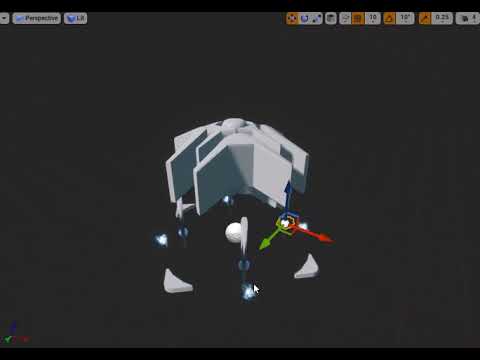
Might be a bug or oversight from epic, but when I set my mesh to simulate physics Copy Pose From Mesh stops working and his armour no longer follows
 errant ermine
Anybody ever seperated head and arms from the body? I tried to do that in 3DS Max. I just cut the head, then imported the mesh back. Everything works if the animation is not playing. As soon as the animation starts the character starts to deform strangely. Any idea what can cause this?
top picture is 3DS max. Character head is cut clean. Middle picture is when animation is not playing. Everything looks fine. Bottom picture shows deformation. All the scales seems to be right
Here is the running animation from side view
errant ermine
If i look closely, i can see some polygons from this side. Those are the ones that deforms the mesh. They are normal however if the animation is not playing
winged valley
@smoky shell Your armor needs to be a child of the main skeletal mesh.
 sacred spire
HI there. I am working on a 2d game here on Unreal Engine with paper 2d. I've done most of the animation of my character but there is one thing that i litteraly can't do. The Run animation. My character is 64*64..anyone have some tips? videos? something? Thank you ❤
plush adder
Hi guys I have a character that needs to prone on uneven surfaces e.g. a slanted hill I have the collision sorted but now I just need to use ik to adjust leg positions for animations etc depending on the variance of the slope. So his legs follow the hill rather than sticking out straight .Anyone know how to go about this or where I can find tutorials or reference material . I'm using the ue4 manequin thanks
broken geyser
whats the best way to have a bunch of running animations with the same leg motions but different upper bodies?
like i want the guy to run with one handed weapons and two handed weapons but i dont want to reanimate the run for each type
winged valley
Layered Blend Per Bone.
Animation nodes that blend multiple animations together based on a set of criteria.
broken geyser
do i need to then have a "base" running animation where the bones i want to animate are in the rest pose or does that not matter?
 obtuse gazelle
Hey Guys, I have been working on a multiplayer game and have set up a skeletal mesh with Animation blueprint that changes animations based on player speed. It is a walk run animation blend. However when I play the game in multiplayer, the mesh doesn't show any animation. What could be the problem. Can anyone help?
winged valley
@broken geyser It shouldn't really matter, you can just have an upper body pose. You're blending the upper part anyway.
broken geyser
ok cool
smoky shell
@winged valley That doesn't solve it, the mesh is lying on the ground and his armour is floating in the air, looks like some joint rotation is trying to follow along but nothing else
devout dagger
what are the pros and cons between using anims with root motion and on-the-spot anims (and moving character via code) ?
 dim cloak
root motion is generally smoother looking animations, but less responsive to controls and I think harder to set up in UE4
not sure if it's still the case, but there at least used to be networking issues with root motion too
 urban spear
@sacred spire have you had a look at some tutorials? A quick search came up with this: https://www.youtube.com/watch?v=_irS13Bn30I

I outline the process of creating a side scroller character in Unreal Engine 4 using the Paper 2D toolkit. This video was created as part of my teaching degr...
devout dagger
thanks @dim cloak
dusk dove
@motorsep#8292 As @dim cloak mentioned, Rootmotion only works partly in a networked game.
Afaik Rootmotion is only networked, if you set the Root Motion Type to "Montages only" (not sure here atm).
Root Motion has the advantage that you can move your characters precisely with your animation
 copper dawn
I have a 3dsmax animation imported that heavily relies on rotation and subtle changes in that rotation.
for some reason when I import it into ue4 it removes all these subtleties. the smoothing of curves is totally gone.
does anybody know how I can get these subtleties properly in ue4?
its like all the curves of the animation are set to linear the moment I export
winged valley
Try baking the keyframes.
copper dawn
thanks but I tried all that stuff
winged valley
What is the FPS set to?
copper dawn
60
winged valley
And Use Default Sample Rate is not ticked?
copper dawn
yea, though I also tried it ticked, and set the animation to 30 fps in max
but the rotation speed stays linear instead of the subtle curves I created
winged valley
You could try ticking Preserve Local Transforms. But I don't really know what's wrong, I don't use Max.
copper dawn
normally I bake my animations down into a vertex animation but since I need to use multiple meshes for this effect I dont want to waste space and only make the animation once.
I opened a whole can of worms with that because either ue4 or max 2017 are fubarring it
<_< saved it as another fbx version (2013) and it works
well that was 1.5 hour wasted
copper dawn
thats been a clusterf.. for vertex colors so I dont even touch it anymore
instead of being nice and applying alpha-vert color the way I painted it, it randomly assigns an alpha value to random verts
^ that joke cost me a day to find out
thanks for the help btw @winged valley
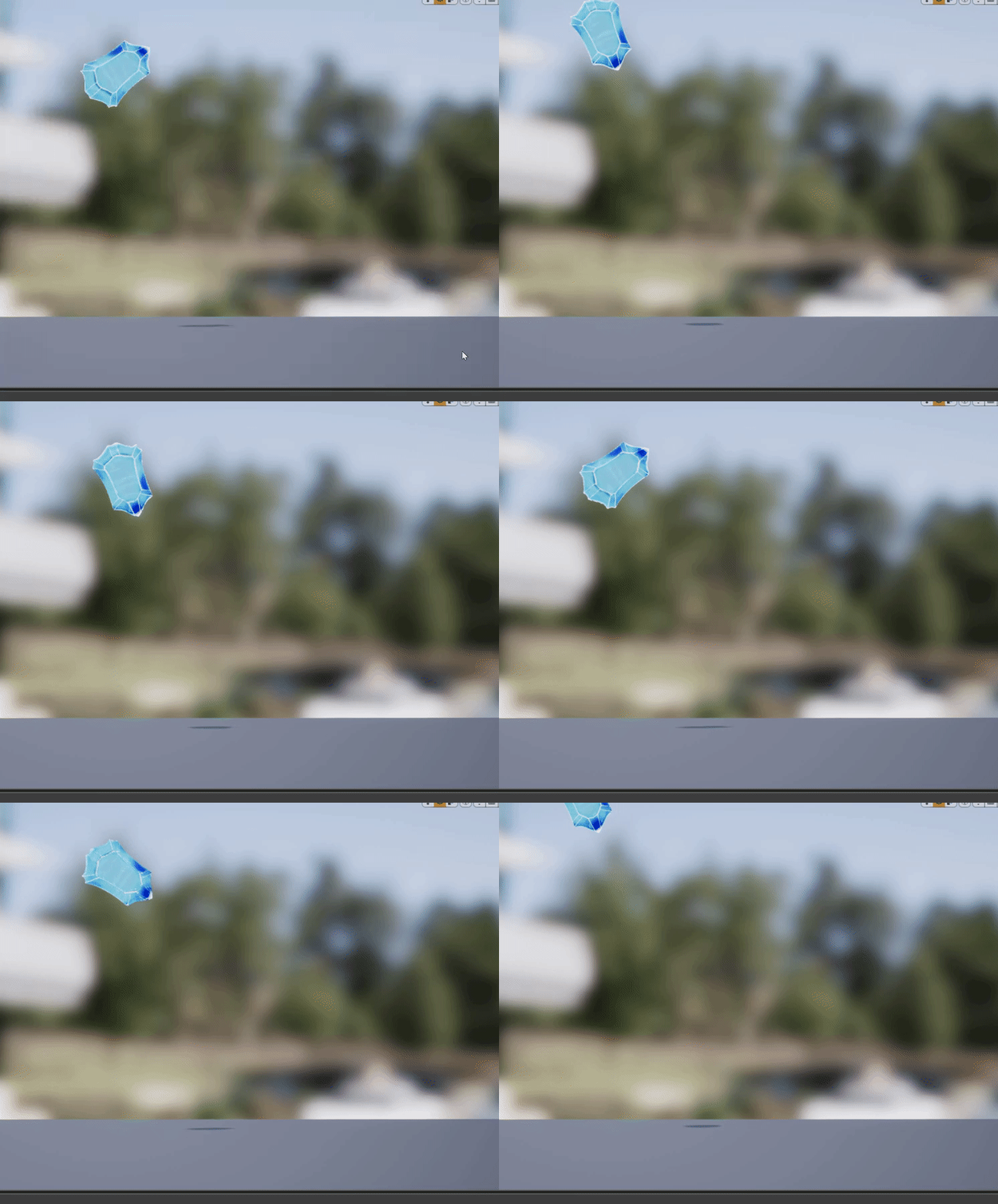
https://i.gyazo.com/87a8abff826620d990e9bb6a729b90e1.gif low fps gif not being the best way to show it.. but meh
 winged valley
FBX is a mess in general. 😛
copper dawn
fo sho
broken geyser
is there a way to make the ue4 mannequin partially invisible either in blender or in ue4?
i want to use the mannequin just for the arms and legs but its hard to work around the torso and head being in the camera
@winged valley
winged valley
You can just delete the parts you don't need.
Or move the mesh to another layer and just watch the rig.
broken geyser
i cant figure out how to do either of those from these dang videos lol, ill keep looking for some better tutorials
i dont think im selecting the correct parts of the mannequin or something
winged valley
You can select a bunch of vertices in edit mode, do Select Linked All, then delete the vertices.
broken geyser
working so far, ill report back with my results after i render it, thanks homie
broken geyser
hmm after i deleted the torso i think it deleted all the bones or something because now i cant manipulate anything in pose mode
winged valley
Deleting something in the mesh shouldn't affect the rig.
You don't even need a mesh for a rig, it's just helpful that you can see it. You will need both a rig and a mesh for a skeletal mesh though.
broken geyser
ok
i think i just accidentally deleted the bones the first time, this time i kept em
its still showing the torso area when i import it into unreal, do i need to change anything in the export/import settings or something?
winged valley
Probably need to reimport the skeletal mesh itself.
broken geyser
yeah i imported the whole thing, skeletal mesh, skeleton, physics asset, with and without textures
winged valley
Try opening the skeletal mesh and pressing Reimport at the top.
broken geyser
says failed to reimport
winged valley
o_O
If you imported the first time with a mesh and rig you'll need to export the same thing in order for the reimport to work.
broken geyser
not sure what you mean
winged valley
If it's a skeletal mesh you need to make sure both the mesh and rig are in the new .fbx.
Failed to reimport usually means you only exported the rig, or only exported the mesh.
broken geyser
gotcha
i exported it with the default settings in blender, all the parts checked, and it still says failed to reimport
man what a pain just to make something invisible lol
i can screen share this if you want, maybe im doing this wrong?
winged valley
I tested it and it worked for me so no idea why it doesn't work for you.
Try going to Editor Preferences and then Miscellaneous, under Import tick Show Import Dialog at Reimport and try importing everything again.
broken geyser
winged valley
While you're there you can enable Blueprint Break on Exceptions in Experimental, usually a good idea to see BP errors as they happen.
broken geyser
oops
ok gonna try importing, im using blenders default export settings and these import settings
now when i try to reimport it pops up that same box, and with nothing different, it failed to reimport
broken geyser
multiple roots are found in the bone hierarchy
winged valley
In the UE4 Tools rig the IK controls for the hands and the pole targets for the legs and arms are not parented to the root bone, not sure if that's a good design.
broken geyser
yeah i noticed that when i tried selecting everything under root
also when i tried reimporting it says failed to merge bones, probably something i messed up, one sec
i managed to merge it into the just arms and legs version, wonder if this works!
seems to work!
winged valley
I think those bones should really be parented to the root bone though, no real benefit to having them outside of the root. Especially when converting in place animations to root motion animations.
If they are outside of the root the rig will get messed up when you move the root bone when instead everything else should just move with the root bone.
winged valley
But it's an old addon, probably made before you could remove the extra root bone by naming the rig "armature". So you wouldn't get an error even with deform only ticked (because of the extra root bone).
broken geyser
i still have the blender files so if it doesnt change the way it looks i can reimport them after parenting
winged valley
No idea actually, you could try it out.
broken geyser
ill give it a go, lets figure out how to parent stuff
winged valley
In the bone panel (bone icon) there's Relations, you can set the parent under Parent:
(in edit mode)
broken geyser
when in edit mode, what part of the hierarchy do i need to actually select, because when i go to Armature -> Pose -> CS_ik_hand_l it goes to pose mode again
winged valley
Click Armature instead.
broken geyser
ok in Armature -> Armature -> CS hand, i am under Bone -> Relations and i see parent but its grayed out and says Disabled: this property is for internal use only and cant be edited
anything i need to tick or something?
broken geyser
woops...
broken geyser
gonna see what it does to the old animations
winged valley
The template is in AppData\Roaming\Blender Foundation\Blender\2.79\scripts\addons
UE4_Mannequinn_Template.blend
I don't think it will do anything to the old animations except if you animated the root bone.
 plucky nebula
So is movement lock for montauges only if its a root motion animation?
 frozen nova
Did any body by chance save the Mixamo Control Rig script before they shut it down ? If you have it backed up can you send it to me?
nevermind found it in a youtube video description - in case any body else wants to help back this up forever --- https://www.dropbox.com/sh/0050we75xa4wepk/AABHhcSxISH6e3RbJUcs3sgwa?dl=0

 young sail
Does anyone know how to make montage blend times scale with play rate?
I am wanting to speed up attack animations as attack speed goes up, but blend times remain static
Gets to a point where blend time is longer than animation itself lol
I see FAnimMontageInstance has "DefaultBlendTimeMultiplier", but it seems to get applied to blend in time before I can modify it on the instance created by UAnimInstance::Montage_Play()
I guess UAnimInstance::PlaySlotAnimationAsDynamicMontage would work, but means I would have to use a raw animation rather than a montage which isn't ideal
urban spear
does anyone know how to properly transition once a WHOLE animation in the state is completed? I understand how unreal does it in the templates, however sometimes the animation goes back to the start and jitters. The only way to fix this is transitioning when the time remaining fraction is like half, meaning i lose half the animation
broken geyser
best way to move my characters camera for a sec while he slides? iv seen the Camera Animation component in there but i have no idea how to use this thing
urban spear
what do you mean, what effect are you looking for?
@broken geyser if you're looking to change the camera while he slides or something, look into set view target with blend
broken geyser
ok ill look into that, thanks
im trying to lower the camera near the ground and then back up so he looks like hes sliding
urban spear
ooh
broken geyser
i tried using a timeline and setting the cameras location but it just snapped it around strangely
urban spear
like a cinematic angle from foot height
broken geyser
yeah exactly
actually no more like bring the camera down
because i have the mesh attached to the camera
urban spear
if you use blend
broken geyser
urban spear
and use a timeline that drives the alpha value (0-1)
maybe it will save some headaches if you can find the 2 vector locations
broken geyser
so my timeline goes from 64 to -32 as a float and i feed that into my z, but instead of moving it slowly it just snaps to 32
broken geyser
in relation to the cameras parent capsule component, the vectors are 0, 0, 64 for up and 0, 0, -32 for down
whats the function i should be calling for the blend?
broken geyser
looks about right
urban spear
and its 'ease', it blends between A and B depending on the 'alpha' (0-1)
broken geyser
right
urban spear
in timeline make a curve go from 0 to 1 to 0
then drive the alpha in ease
An alpha of 0 will yield (0,0,64), an alpha of 0.5 will yield (0,0,48) and an alpha of 1 will yield (0,0,32)
hope that works man
urban spear
sweet!
broken geyser
now i just gotta push my guy forward and lock his movement down and im all set
urban spear
😃 sounds great man
dusk dove
Are the default PlaySound Notifies in animations audible by pawn sensing?
 main ferry
Anyone know why my characters bones have rotation on them even though I zero them out when exporting from maya?
winged valley
Yes, you selected another bone in UE4 (the one with the selection outline).
main ferry
okay, here one sec I'll post an updated
Actually no I didn't it colors the previous bone orange, but if you look closely you can see the test says "Left Arm" Which is the same bone as the Maya selected one
UE4 just decides to color the previous bone orange
winged valley
Oh yeah, I thought they fixed that bug. 😛
main ferry
So any ideas why it's making up it's own bone transforms?
winged valley
What does the bone to the right say?
main ferry
I went through and freeze transform on all bones in maya. All the rotations should say zero
winged valley
That is closer to 0 at least.
main ferry
Not in the "Y" channel it's 24
winged valley
I mean, 0 in the pose only means that it's reset.
It would still have some other rotation.
Otherwise it wouldn't point in the right direcion.
main ferry
I see
winged valley
The only way to have a 0 0 0 rotation would be to have a bone that isn't connected to anything.
For example the root bone should probably have 0 0 0.
main ferry
okay that makes more sense
dusk dove
What's the point of a Slot Group?
Does it make a difference if I put every Slot into the DefaultGroup or in different Groups?
winged valley
It's for splitting the body into different parts, so you could play something on only one slot for example. You could do the same thing with layered blend by bone though.
If it's a full body animation it doesn't really matter.
dusk dove
I'm talking about Groups, not Slots
winged valley
What does the thing say where you select the "group"?
The main thing is that you can only play one montage at a time per group.
But "group" is a pretty bad name, that if anything should have been called "slots" (because it's a slot for a montage), and the "slot" should have been called "section" or something.
broken geyser
what would be the best way to limit all of the players button inputs during an animation?
while keeping camera control
should i just do bool checks if im in the animation for all the moves i want to restrict?
 spice sun
What is a benefit to using an aimoffset vs blendspace?