#animation
1 messages · Page 85 of 1
 undone flax
Don't see why not.
undone flax
Or at least play the animations and use IK for the feet/hooves so that it can stand on uneven ground. You'd have to look into it more as I am not an animator.
 misty dagger
yeah
 devout dagger
How can I use anims from Marketplace and starter content with mobile mannequin?
 ebon portal
@misty dagger there's no problem with having more than two feet, if you've any question feel free to tag me
devout dagger
Anyone, how can I use anims from Marketplace and starter content with mobile mannequin?
 sudden sedge
@misty dagger Skeletons can be anything you want
the only reason you'd use the UE4 skeleton is if you want to use marketplace stuff
However, Using consistent joint names across your stuff can help make doing batches and handling large amounts of characters easier
@devout dagger You could try animation retargetting
devout dagger
I see.. Ok, thanks
 urban skiff
I had a question about IK, I want my characters feet to match the terrain of the game world, angled feet, stretched leg on a downhill angle etc, is that possible to do with IK rigs from blender? or must I use Maya for that sort of thing?
urban skiff
Oh, that's cool
is that something you do in engines in general or is ue4 just ahead with that?
devout dagger
Doom 3 had legs and arms IK
 pearl swift
Hey is mixamo auto rigger bugged for UE4?
Cause it didn't work for me -_-
But it worked before
 half flare
It's been working fine for me
 iron stone
how to make a character jump in a trajectory of a projectile ?
 long stone
@pearl swift I think because of this? https://forums.unrealengine.com/showthread.php?131571-Mixamo-has-dropped-support-for-Unreal-Engine-exporting
undone flax
Can someone explain why my pose asset is doing this? http://imgur.com/a/fAln7 (Also, doing additive blending in the animation blueprint causes the mesh to look like something out of a horror movie)
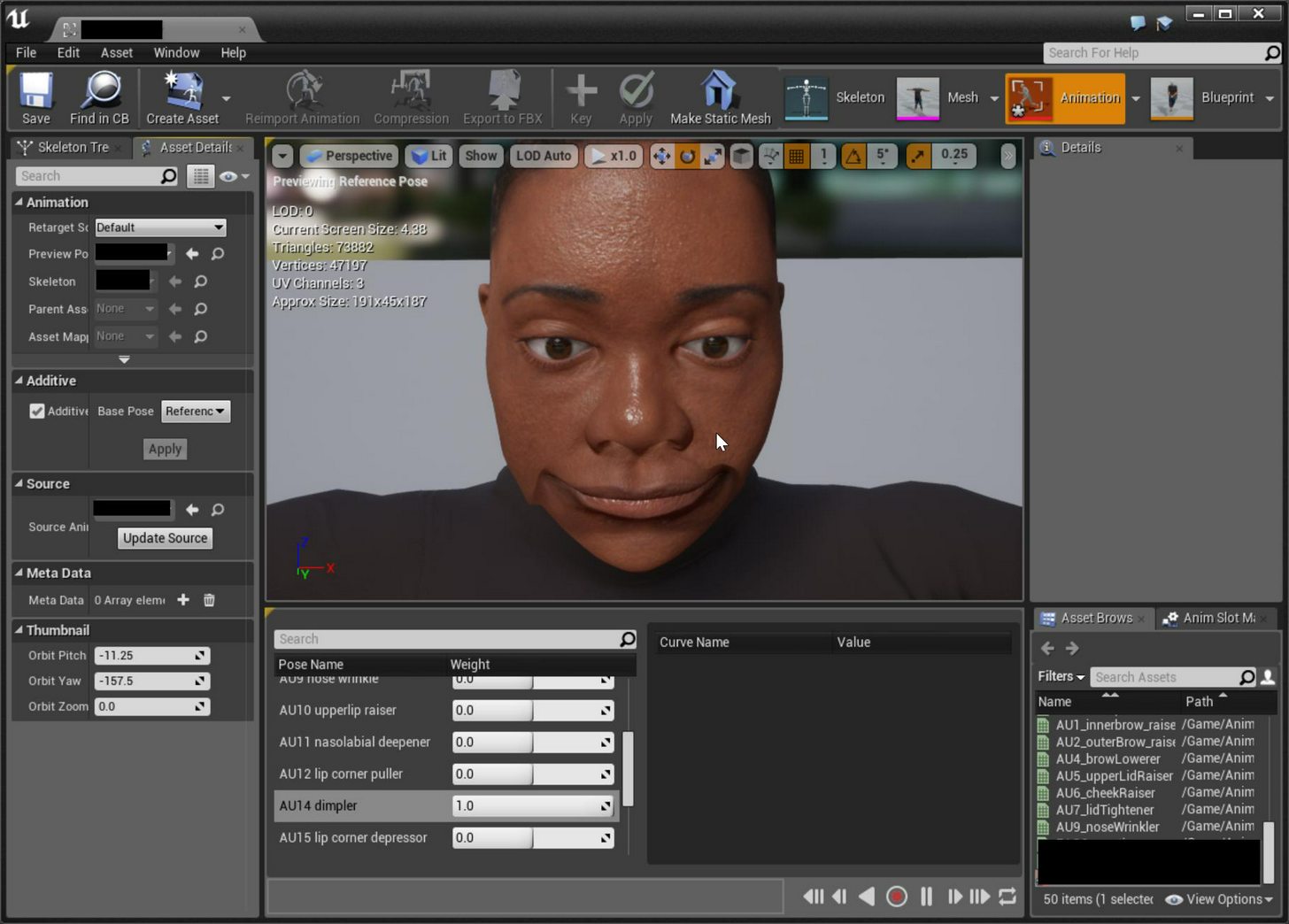
 tidal river
You guys have any idea why this animation icon doesn't show the actor?
undone flax
@tidal river It is off of the last camera angle? Try opening it, clicking in the viewport in the animation preview and pressing F.
tidal river
@undone flax well that angle is way off, how do i fix it?
This is after i press f
Oh, i clicked on the skybox -_- pressing f brings me to the character
long stone
This looks useful https://trello.com/c/e12clLg1/75-animation-modifiers
undone flax
Can someone explain why my pose asset is doing this when switching between additive and not additive in a pose asset? http://imgur.com/a/fAln7 (Also, doing additive blending in the animation blueprint causes the mesh to look like something out of a horror movie)
 timber aspen
anyone here who has used the vehicleAnimInstance ?
Can anyone confirm https://answers.unrealengine.com/questions/586822/not-playing-animation-in-child-of-vehicle-anim-ins.html
 icy valley
What would cause this "tail" ?
The animations or the model?
It only happens on crouch
 next comet
Check the models weighting, its unlikely that a single vertex is intended to have an influence that different from its surrounding verts. So a model issue
 fringe mountain
^
 weary pine
Yeah montage stuff kinda needs work
weary pine
Ah
It'll jump a bit, but you can try it
Although I think you can maybe get the position
And then you can start it at pos
Might work
icy valley
yeah could do that
hmm it just spamms the play for some reason o.o
oh i didnt stop
weary pine
Nice
 icy valley
Would I use IKs to prevent head going through objects?https://gyazo.com/050f06cdecfe4d011c5b71b8aa9e2791

 dusk dove
Having a bigger Collision for the Character would help already
 ivory crane
Maybe a bigger collision for the door itself?
 analog tulip
How can i make it when i look up my character looks up 2
icy valley
@analog tulip it's called an aim offset
An Aim Offset is an asset that stores a blendable series of poses to help a character aim a weapon.
I'm trying to figure out how to fix the waist twisting whilst reloading: https://gyazo.com/1b47483a2ce3672df0bc9566c37d18fd

the reload is a montage on "upperbody"
maybe I make upperbody off spine01
spine03*

kinda fixed it by turning rotation off
but it introduces a new result
when strafing while aiming lol
 wooden parrot
I imported a skeletal mesh from blender, but the rotation of its bones seems to be odd. On this screenshot, all rotation values are set to 0. Why does the mesh get turned 90 degrees on two axises?
wooden parrot
I fixed my own problem. When you export to fbx in blender, go to the armature settings in the lower left hand corner and try various settings for primary and secondary bone axis. You can just reimport the skeletal mesh to test faster
sudden sedge
Anyone have any experience with root motion extracted animations?
dusk dove
@sudden sedge Si.
 floral horizon
Can anyone tell me how I can pose my character in UE4 and use that asset elswehere?
I want to create a static pose for being inside a vehicle
Nevermind. Figured it out
 gilded magnet
Hey hey
I need help with inverse kinematics!
right now I have a fully fucntional character that can interact with boxes, pulling and pushing them
but I want the character to put his hands in the handles, or just agaisnt the box, while the button of interaction is pressed
Is there a good approach to this matter?
 lavish veldt
I have a question about my camera: I wanted to make a "true" first person game (able to look down and see my body), so I used a third person base and readjusted the follow camera to occupy the space on my characters head. This appears to have worked out okay, but I cannot seem to figure out how to bind the camera angles to actual player movement. That is to say, I want a basic ~180 degree view, but once someone attempts to go further than that, the characters position is manipulated, rather than the camera being spun around and looking at the inside of their head.
^Never mind, figured it out.
ivory crane
@lavish veldt Care to share? I've actually tried to understand how that works
sudden sedge
I solved my root motion issues, but does anyone know how to import only a single frame into UE4?
If I define and animation length of 0-0 on import it breaks
but 0-1 imports 2 frames
misty dagger
@ivory crane ive implemented true first person like that by adding turn-in-place animation to the character when the angle between camera and actor is beyond 90 degrees
and also an aim offset when in first person that sticks the head rotation to the camera
ivory crane
Well that sounds like a big nice load of i-don't-understand-anything. Thank you for trying to explain that to me, my knowledge of all this shit is too limited for me to properly comprehend however. But yis, thank you for the information. I'll note it down and with some luck in due time i'll know what it means
sudden sedge
does UE4 support dae?
floral horizon
@ivory crane Its really simple. You still need a hand?
@sudden sedge No. FBX is the best thing to use
ivory crane
Thank you very much for the help you wish to give, but concerning animation, that's just not at my level just yet. I do need some help understanding some stuff though, it's not related to animation
@floral horizon
floral horizon
Its not to do with animation really. Just rotating the player based on the camera movement
ivory crane
Ah
sudden sedge
smd is the best animation format I tell you what
can I reopen the fbx import dialouge?
so I can trim the animation a different way
sudden sedge
lavish veldt
@ivory crane my solution is by no means professional, but it is a simple fix. Go to your third person character, drag your follow cam to your mesh, socket the camera to the head and adjust. In camera settings go to "Use Pawn Control Rotation" and select, then go to your component for ThirdPersonCharacter (mine has generic name still), search up "use controller rotation yaw" and select that as well.
Solved all of my problems, but I am not entirely sure if it is the cleanest work-around for the problem.
ivory crane
Oh, thanks
long stone



 tiny monolith

We present a real-time character control mechanism using a novel neural network architecture called a Phase-Functioned Neural Network. In this network struct...
want that feature in ue4 😄
 unreal cosmos
its rumored they used that in For Honor
all the dates align
and for honor has quite good animation
pearl swift
Anyone have a good solution for riggin a character in blender for the standard ue4 rig? (to use with marketplace animations)
lavish veldt
@tiny monolith Agreed fully!
 craggy pier
@pearl swift maybe check out this guys addon i use it for most blender to ue4 stuff https://www.youtube.com/channel/UCeImMYGUDD3PkQezyjHmsIA

YouTube
On this channel you can watch all the videos I do, related to Unreal Engine or related to the 3D world Thanks for watching!
pearl swift
Cool thanks!
 analog cargo
Hi Everyone!
I have two animations say A1 and A2. I want to play A2 after A1. Last frame of A1 doesn't match with first frame of A2. So, I want to do a smooth transition between these animations.
How can I achive it ? Need help.
 crude shuttle
Are A1 and A1 always the same?
A1 and A2 I mean.
Couldn't you make A3 to play if A1 precedes A2?
@analog cargo ^
 vital sun
@unreal cosmos for honor use motion matching as far as i heard. It is a way more simple approach that neural networks and motion field stuff.. however they may have changed it since i heard about it
analog cargo
@crude shuttle Problem is that I am having a jerk when playing A2 after A1 since ending frame of A1 doesn't match with starting frame of A2. If I combine them, Jerk remains there and I want to get rid of jerk by smooth transition.
 unkempt vapor
https://lh3.googleusercontent.com/-VI09XImuY4w/WQnYQrmO0BI/AAAAAAAAD5Y/-OvV2WYuUp8hktowSv7tM4qosKtbii-oQCHM/s0/UE4Editor_2017-05-03_14-16-44.png -- Any reason why my animation isnt playing ? i also have code in C++ that sets the enum, but it doesnt work anyway...
 unkempt vapor
anyone ?
 subtle matrix
I'd guess, check the state machine booleans
or, does it work without the select node
devout dagger
is anyone having issues with their anim BPs and montages in 4.15.2 ?
misty dagger
Has anyone used the RigidBody node in 4.16 yet? Should I just keep my physics assets and their bodies that should simulate set to simulated and then just add the rigidbody node?
I'm not sure how to properly see if the rigidbody node is working or if it's just the standard physics simulation
I realised I can see it within the animation bp so I'm figuring it's working as it should 😃
 cold shore
hi. I'm trying to import fbx camera animation from Maya onto a cineCamera in Unreal. I right click on the cameraComponent and import fbx animation. The animation comes in, but though the pivot looks like its in the right place, the camera is completely offset from it. Any ideas what I did wrong?
 upper wind
Would this be the right spot to ask a Sequencer question?
I guess I'll ask it and see if anyone knows
I have an animation I recorded via the Sequence Recorded. It's a simple animation: character's idle then runs to a spot. The animation itself that was baked out looks fine, the character is idle for a second or so then starts running.
When I use it in a Sequence itself, everything works except the animation. It's just in the original idle.
This is a possesed character, not a spawned one.
Any idea what could be going on? Is the base blueprint animation just stomping over it? This just using the included ThirdPersonAnim BP anim class
oh I got
it
This was just luck, I decided to click on that little tiny button next to the Animation Mode field. I had no idea what it did, but it added an Animation Mode node to the sequence and I guess that made it work?
 tame trellis
@analog cargo - did you try adjusting animation transition speed? Try increasing it up to 0.5, or higher to smooth the jerk
dusk dove
An Animation doesn't import as it should. In MotionBuilder, The Hands stay in place but in UE, the whole body seems to be translated
Someone know how to fix this?
misty dagger
that could have to do with the sample rate of the import
dusk dove
I found the Problem. The Spline somehow gets translated
but it has no keyframes for translation, only rotation
dusk dove
Oh, I solved the Problem. I guess MotionBuilder's Control Rig doesn't like Skeletons with an Additional Pelvis Bone (Root->Hips->Pelvis->Legs and Root->Hips->Spine)
 hasty prism
Hi! someone know how to set up a realist walking up stairs? IK is very difficult to implement
dusk dove
Do you guys recommend using AnimMontages for Weapon Animations?
I want to distinguish between Pistol and Heavy Weapons (Shotgun, Rifle etc) but want to keep it as easy extensible as possible.
 twin ore
Hey guys! Probably stupid question, but i just can't find the right way to solve this. I have a child skeletal mesh that is fixed to a socket of my character. I need, in animation blueprint, to either change bone rotation or pull that bone to another character socket(will achieve the same effect). But i can't find a way to do this. Transform bone node doesn't change child meshes and i see no other way to do it.
 robust condor
@dusk dove Yes. Montages with different Slots for each weapon type
dusk dove
@robust condor Can I play multiple Anim Montages at a time even when the montages have different slots?
robust condor
@dusk dove Never had to do it, but I'd say it's possible, but it depends on how you setup your anim BP and your pawn skeleton though
dusk dove
@robust condor There are some Montages like Climbing on low obstacles.They are full-body with Root Motion and having a weapon equipped (mostly upper Body) would be nice
undone flax
Is there an easier way to do additive animation for a lot of poses? (Trying to implement FACS. PoseAsset didn't work as doing additive screwed everything up)
dusk dove
Morph Targets come into my mind. The disadvantage is that they are mesh-unique
dusk dove
Hey there, I have a weird problem.
For Swimming I rotate my Character upside down . And when changing direction in Swiming, the Upper Body should rotate towards this direction.
For this, I use Delta(Rotator) with the last Rotation and the current Rotation as Input.It doesn't work completely.

As you can see, the upper body goes wild at an certain angle
My BP looks like this
(called it leaning because I use it for running, too. where it works tho)
The Input for Delta(Rotator is) CurrentRotation and Last Rotation
Is that Gimbal Lock or the -180 to 180 interpolation issue? When running around the problem doesn't occur (at the beginning of the video)
 clever abyss
Question to people who uses Blender... can you import a model with shapekeys to UE4?
 wise sundial
yes
clever abyss
Okay. I figured out the export settings required for UE4.
Next question. Can you disable LOD in UE4?
 smoky sail
Hey. So i have a character reaching for a door handle, or crates handles to then push / pull them. how would i approach this? i've been trying two bone ik but with no sucess.
dusk dove
What have you tried?
The best approach would be to have your object implement an interface "Grababble" or something like that, that returns the local IK Position and you should send it to the AnimationBP
misty dagger
hey guys, anyone here able to help me out on this?
https://forums.unrealengine.com/showthread.php?144267-Specific-Skeletal-Mesh-Import-Question
 rocky brook
Does anyone know what this gray color means in maya? When I select both arms and export the grayed out arm isn't in the fbx.
 sterile venture
Question: Why sequencer didnt play Audio Track on Reverse?
 rugged imp
Is there any tutorials for cutscene in ue4?
 old granite
omg why i think Lara doing stunts in AR
 reef bone
Anyone know if it's possible to tell where a certain bone will be in a montage at some point without actually playing the montage?
Like, for example a GetBoneTransformAtMontageTime or something
 rare maple
@rugged imp You have to use sequencer
 uncut harness
@dusk dove Maybe that's because the InterpTo is not getting the shortest path to rotate the mesh when it changes from positive to negative valus. Try using the Lerp(Rotator) instead and toggle Shortest Path just to test it out
devout dagger
has anyone tried this tool http://store.steampowered.com/app/446060/akeytsu_Indie/?snr=1_5_9__300 ?

3D animation software did not evolve much during the last 25 years... until Akeytsu, a brand new 3D software dedicated solely to animation and rigging developed by nukeygara came out on the market. Disruptive, fast and easy Akeytsu is an intuitive...
Price
$79.99
hasty prism
Hi! There is a way to use the skeletal mesh component of my spawned character BP in sequencer without have this character in the world like an actor?
 sharp cedar
@devout dagger i'm also interested in that. i need to learn rigging and came across that. i heard good and bad so far, the good being that its user friendly and overall pretty powerful, the only bad i heard so far is that somebody had issues with root's, not sure to what extent. there is a trial but i wanna see what others think about it as well.
question for anybody here. have an old animation for the old blue mannequin, when i retarget it to the new one its pretty broken. any way to fix this?
 pastel hawk
Newb here, can someone please explain what is root animation for me please?
rugged imp
https://www.youtube.com/watch?v=pXV--221TBc
Hi! in 15sec there is a animation synchronizationed with first person camera? How do I create animation like this?

Call of Duty Infinite Warfare Peek-a-Boo! Trophy - Kick/Peek Open Door & Throw Grenade while Peeking
Call of Duty Inifinite Warfare Peek-a-Boo! trophy and achievement guide. Kick open a door, peek open a door, and throw a grenade while peeking a door. ► Supp...
 outer iris
I need help, when animating, I did something in 3ds max and now I can only see cubes where my bones are, nothing else
Any ideas?
sudden sedge
Hey quick question, for animation retargetting, how do I define ik chains?
dusk dove
Can I have RootMotion which consists of Rotation only while Translation is applied by MovementComponent?
uncut harness
@dusk dove Couldn't you export the rotation as a curve, or even creating it inside UE4 and use the curve when the animation is playing?
 bronze panther
Creating an animation from current animation in persona doesn't seem to save my moved bones http://i.imgur.com/5i6xRcG.png
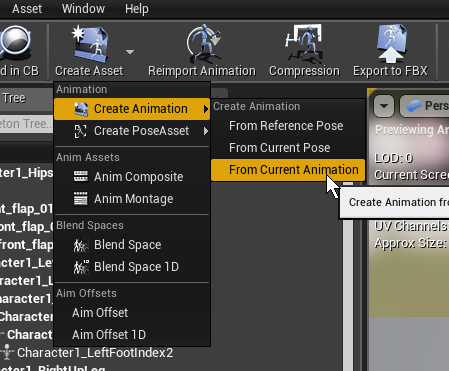
I take an animation, move some bones and it looks nice n' all but when I create an animation asset from it, it just looks like the same default animation
have you guys modified animations in UE4 before?
rugged imp
When I perform the inverse kinematic event through 3ds max
IK does not move on Unreal Engine 4 in animating how do we solve it?
hasty prism
Hi, there is a way to use the skeletal mesh component of my spawned character BP in sequencer without have this character in the world like an actor?
 nova kestrel
I have some bones
Is it possible to offset those bones in Blueprint
Basically change the relative location of the bones/sockets on runtime
misty dagger
sure, use the modify bone transform operand in animBlueprint
rugged imp
hey, sometimes animation montage duration is changing by itself. anyone has idea?
long stone
@bronze panther Did you try using from current pose?
bronze panther
That just creates an animation with 0 frames @long stone - it does save the pose correctly though
long stone
Ah I see what you want, I've also tried adjusting the animation with that in 4.13 (I think?) but had no luck
misty dagger
anyone know how i can reposition my joint orientation without having to redo the skinning process? (in maya)
 sick brook
@misty dagger use deformer -> export weights, unbind skin, delete bindPose, adjust joint, rebind skin, deformer -> import weights
misty dagger
oh okay @sick brook sounds easy enough
sick brook
You could try skin -> remove influence and skin -> add influence
Instead of unbinding the whole skin
sick brook
It shouldn't make a big difference what you're fixing in particular
 misty dagger
i think i might just animate it per joint

 lost prawn
Is there someway to choose from multiple different blendspaces in same animBP? tried blend poses by int but couldn't get it work
lost prawn
solved⬆
 reef viper
We are looking for lead animator to create Rigging, Animation and apex who can do this and is interested in contact me privately
dusk dove
I have an Animation with a curve which gets Blended with a Layered Blend Per Bone. However, The Value of the Curve gets reduced due to the blend. How can I avoid that?
 visual blade
Interestingly I thought this would be an easy solution but seems not. Is there any way to keep the characters forward momentum whilst playing an Animation Montage with Root Motion? it seems the root motion cancels the Movement which sucks
sudden sedge
Anyone know how I can reuse animation blueprints with new skeletons?
misty dagger
you can copy past grand portions of your blueprints to other blueprints, if that works for complex animBPS.. no idea
misty dagger
does anyone here know how i can do foot IKs for 4 legged animals, bears, tigers, deeer...etc
i have a base pose but the feet on my animal
just float in the air
on a slope
misty dagger
@misty dagger Quadripeds are a difficult one. You find plenty of project templates having 2 bone IK. But not 4. In your position, I would 'simplify' and use a 2 bone IK where 1st bone is for the 2 front legs and 2nd bone is for the 2 back legs. This way most of the climbing up and down a hill/stairs situations will be okayish. What do you think ?
@misty dagger but how do you set it up to always move to the ground
@misty dagger This you need a full tutorial on foot IK. You have plenty on 2 bones IK.
@misty dagger yeah i know what IKs are but how do they work in unreal
misty dagger
@misty dagger That's the official UE4 docs on 2 bone IK, that will get you started ----> https://docs.unrealengine.com/latest/INT/Engine/Animation/IKSetups/index.html <------
Inverse Kinematic systems allow for reactive animation, such as foot placement on non-planar terrain.
@misty dagger thanks I will give this to my artist.
 merry rampart
hey gang. Anyone use blender for animation? Am having a hard time exporting my skeletal mesh into UE
UE says there's no valid animation takes
I've had problems with this workflow for a long time. blender's fbx seems to be rather wonky
merry rampart
Hello?
misty dagger
Good that you found it out @merry rampart 😋
 safe epoch
Im having a problem where I have a character in maya with iks for their arms and legs but when I export it as an .fbx the iks are just empty transforms
iv done some google searches for it and their dosnt seem to be a better solution than to just bake the animations on to the bones and accpet that the Iks are just going to diddipear
is their anyway to get the Iks to stay on the character?
 river helm
using sequencer I making an animation and want keep my player stay in the same position for 4 to 5 seconds so I move the frames (i.e from 200 to 600) and give it the same tranform but it twitches and changes position
any one having this problem ?
ok found the solution select both frames where you want to make the player stay for a while and select linear
misty dagger
@jade hound#6664 no, fbx doesnt support ik handles, you have to bake that motion to the bones directly.
Then you can also setup ik again once your thing is in the engine
 lapis shadow
I am trying to change a variable inside an actor through Sequencer. I have the Expost to cinematics checked, and in Simulate, if I just change the variable, it works. But When I add a keyframe for that specific actor and change the value, the value DOES change(because if I eject from the player, I can see it's "True" instead of "False"), but it's thing does not get triggered. Why is that?
 haughty solstice
nvm wrong channel
 fair crater

FaceRig Studio is a professional software which enables anyone to digitally embody CGI characters using different motion tracking sensors. The output can be streamed in real time, saved as a movie or exported as .fbx animation. It is meant to be a...
Price
$299.99
It looks like a useful tool for me
merry rampart
guys alembic support is sweet
im getting some sexy cloth animations going on here ❤
misty dagger
show us @merry rampart !
merry rampart
I will soon! xD
misty dagger
is there a way to have animDynamics driven bones collide with eachother?
ebon portal
hey everybody I've a problem ... I skinned a character (not too properly) and now when I import him into UE, he shows up fine if I look at him in skeletal view, but gets totally messed up when I apply animations to him
ebon portal
okay I figured now that it's because of the rotation of the skeleton joints
I used another skeleton on this character (who was other proportions) and did some imports and exports (in blender, I know I know) and now if I apply the animations of the original skeleton to this one, all the joint rotations are messed up
can somebody help me to adjust my new skeleton (without losing the skin) to be able to use the original one?
merry rampart
lol, blender (I know I know)
I don't know if this would be the source of your issue, but Ive had a lot of trouble exporting blender skeletal mesh fbx into UE
did you rig your character in blender?
took a while for me to understand that blender's fbx solution isn't proprietary - it's reverse engineered w/e that means
so it takes some tinkering around to get it to work in my experience
rocky brook
@misty dagger I know when they were first introduced collision wasn't in scope
Simple physics solver inside a skel control node, for doing 'flappy bits' without using the full physics engine. Will support joint limits etc, but probably not collision.
Votes
28
 proven osprey
Hey everyone! I have a quick question about arrays in anim blueprints
How do I get this to be thread safe? I tried checking the length but it seems to not work
misty dagger
ah ok, thanks @rocky brook
I guess Ill check out what 4.16 has to offer in that regard
pastel hawk
Can some one help me with the animation blend, i got every thing working fine except when my character stops moving he sprint to the right always
i got Direction on X axis (-90,90), and Speed on Y (-600,600)
i get speed and direction from these
 tall lake
im currently following a tutorial and am stuck on a particular part, i have a first person camera set up and working and also have a 3rd person mesh and animations set up to be viewed with another camera in the level. The problem is while i can look around fine in 1st person, the 3rd person mesh does not animate to match the 1st person view.
 distant axle
incase anyone wants to animate INSIDE ue4, someone's already made a plugin for that.
 marble thunder
Hi everyone, I'm trying to switch between anim instances depending on equipped weapon and have it all working except for one issue: when a new weapon is equipped and the anim instance is set with SetAnimInstanceClass, the mesh snaps to instantly to the pose from the new animation blueprint. This is expected of course, but not really what I want. Does anybody have any ideas how to blend into the new animation instance from the previous pose? I'm wondering if there is a way to take a snapshot of the pose before changing the anim instance, then give the pose to the new anim instance and have it blend from that into its default behavior.
I haven't used the animation systems much but I can use code for this.
Appreciate any help!
Hmm, looks like I might be able to use the 4.15 Pose Snapshot functionality
misty dagger
do i have to use root motion?
 stiff thunder
@misty dagger nope. I'm currently not using any root motion at all for my test char
misty dagger
see when im attacking my attack animation freaks out if i dont use root motion
stiff thunder
ahh well i dont really have attacks. for attacking animations root motion can be handy esp. melee
 untold halo
Guys do u know how to make destructible mesh work inside a sequencer shot
sudden sedge
@misty dagger , if your character moves in a non linear fashion, root motion is the best choice
tall lake
I made a blendspace for my characters walking animations for all directions, but i cant find a way to plug it into the final animation pose, any ideas anyone?
this is what i have so far
 jovial imp
Does anyone here know how to do rigging in Blender? Because I've been banging my head against a wall for a few tutorials here but I keep somehow screwing up my armatures. It's really frustrating because I feel like they get different results than me even though I feel like I'm doing the same actions.
I get through the modeling phase fine, but when it comes to creating the armatures and connecting the bones and setting up the IK stuff , that's where everything falls apart.
misty dagger
@jovial imp sometimes rigging can take hours even days id suggest just keep trying and trying
sharp cedar
evening all, having some issues with root bones and retargeting. this is my first time rigging from scratch and i'm hoping to retarget to the ue4 mannequin so i can use all the market place animations. anyways the current issue is the root isnt working properly, when i crouch the character floats mid air. it seems like the engine thinks the pelvis is the root rather than the actual root bone. does anybody know how i could fix this?
sharp cedar
i figured it out

Before we can use the punching animations on our character, we need to handle some simple retargeting so that they are compatible with our character's Skelet...
thanks to this video
had to set the root to skeleton, pelvis to animation
works now
@jovial imp i spent most of the week learning how to rig. i purchased auto rig, tryed rigging software, in the end i just setup my own rig in blender and did it all myself. it takes quite some time but i'm already getting decent at it after just 1 week. just keep at it and make sure you know the tools, thats a big thing to keep in mind.
untold halo
@sharp cedar why no mixamo?
sharp cedar
i actually did use it initially
but i was having issues where i would import the mixamo fbx into unreal and then had to export it to fix some weighting. i have gear hanging off the characters belt, that needed custom weighting.
when i imported the mixmo fbx into blender
it kept breaking the weighting alltogether
so
i figured i'd just learn how to do the entire process myself and not rely on 3rd party stuff
so part learning process to gain skill, and part necessity due to issues
in the end i'm happy i went that route, despite spending a good amount of time on it
untold halo
Good luck
sharp cedar
thanks
sharp cedar
hm new issue, i attached skeletal meshes in the character bp. as soon as i kill the enemy he ragdolls, except for the attached meshes, they remain in the last animation until despawn. anybody any idea?
pearl swift
Workflow question here. Should you finish your high poly sculpt and do a low poly and bake all before rigging and bringing your char in engine?
Or would you rig an early version?
misty dagger
ideally you should start the rig only when the proportions of your model are locked down. If thats the case in an earlier stage, you can do that then already
pearl swift
Yea proportions are pretty set
misty dagger
then you can already commence rigging
pearl swift
Cool thanks
 tepid brook
Hey guys i was working for about 6 hours to have an correct root motion and now when i imported to ue4 to make an anim montage it works great BUT the blend time and root motion are not compatible
 safe yacht
Is there an updated Sequecer Tutorial out there? I'm trying to follow the UE one, but they are attaching the character weapon (SM) to character in the editor by drag and drop. I know how to attach it via blueprints, but the weapon isn't a skeletal mesh.

Before we start creating our cinematic we’ll need some content to play with. In this video we show where you can get the assets we will be using for this ser...
ebon portal
hey guys, I don't know whether this is the right place to ask this, but I always wanted to get into body motion capturing. But I'm still a student who can't afford anything big. I found an inertial system from perception neuron for about 1500 $, but is there anything which is even cheaper? (I know 1500$ is nothing regarding mocap but I don't want to spend the whole summer working, since I kinda need it now)
long stone
@ebon portal I have no idea how it actually works or how well it works but you can get some motion capture going using an Xbox Kinect
just check on google and you'll hopefully find a tutorial out there somewhere
 eager arrow
How would I cut a montage short (Say, an attack montage) if the character dies?
rugged imp
Best
eager arrow
Just used STOP montage. Thank you. 😃
 slim yacht
is there a way to get an anim notify to call a material parameter?
iron stone
how to disable root motion "Rotation" only in newer versions of unreal ? I want the translation alone and not rotation in my animations
 solid fossil
@ebon portal dude i have worked with perception neuron .I have to say that it is a shitty product and customer care service is the worst. They dont pick up the phone plus u need 20 minutes to rearrange the suit and then working with unreal is a nightmare. always gets an error in port number, TCP, UDP
ebon portal
what do you recommend then @solid fossil
solid fossil
My recommendation would be Ikinema .
But they are quite costly
but they give 15 days trial
so you can try it with your vr
ebon portal
oh so is that like a kinect software?
ebon portal
well unfortunately I don't have a htc vive
that's why I was searching for a system where my input is body movement and the output is bvh or any other animation files
solid fossil
Ohhkay ! Well Mocap below 1k is impossible to find
ebon portal
an below 2-3k?
solid fossil
have you tried Mixamo pack? they offer good animations but not as good as mocap
ebon portal
yes, but I need to do my own mocap equipment because I need to do very specific animations
solid fossil
then i would recommend iPiSoft
 obtuse hatch
The person who animates for my game is great, but when I export the animations in UE4 they appear like sliding somethimes. e.x one step isn't the distance of one step. Any advice?
rugged imp
Hey everyone, for some reasons we combined mixamo skeleton bones and ue4 skeleton bones and having issue skinning problem anyone knows how to solve?
 copper dawn
shit that looks painful
 dense ibex
Anyone know why i crash when i use "Copy pose from skeletal component"
target is poseable mesh component
dense ibex
nvm figuired it out 😄
misty dagger
post solution pls
dense ibex
i didnt have the "In component to copy" connected to the character mesh
 sick nebula
is this the right place to ask sequencer questions here
 quartz cove
@sick nebula hmm, not really, this is for Persona. Maybe #ue4-general or #level-design
@rugged imp Buy the new plugin for Mixamo to UE4, win
icy valley
Anyone having issues with 4.16 and weighted notifys?
I am getting duplicate footsteps
Even with highest weighted anim
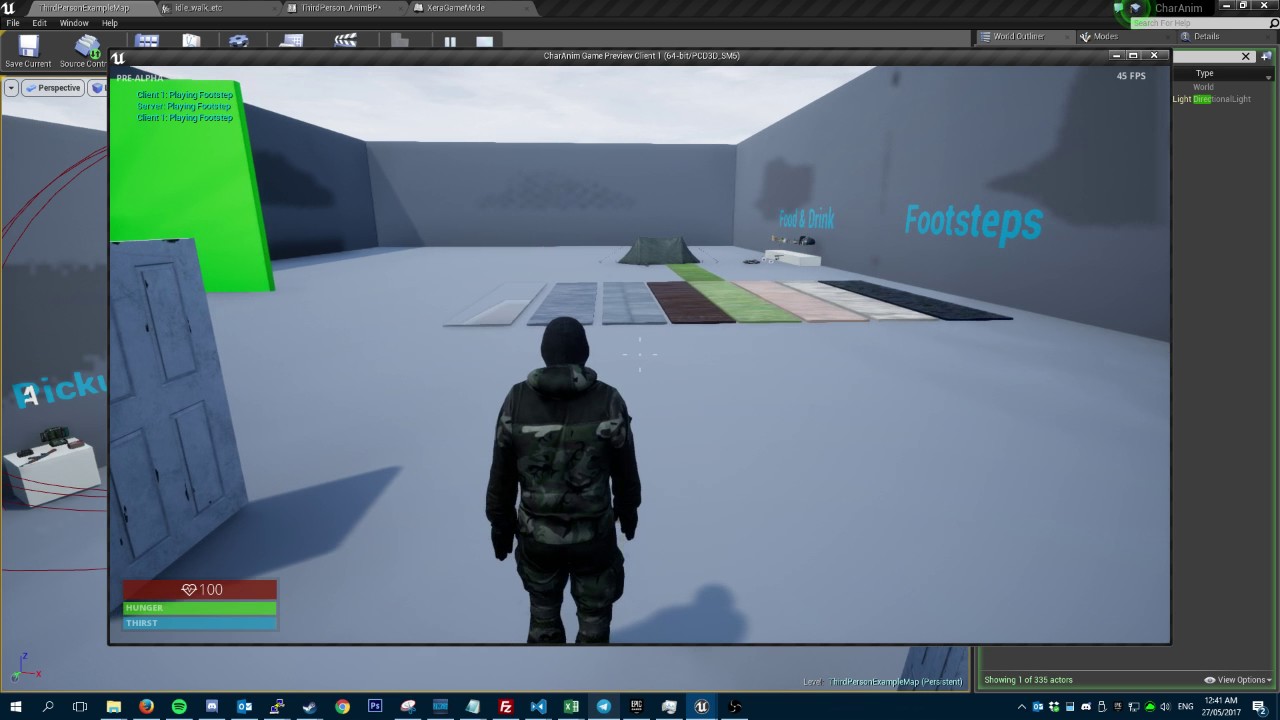
Already have this on
knew i should have waited for 4.16.1
😦
scuffed af
misty dagger
any idea on how to do learn in for turning?
dusk dove
@misty dagger I use Delta(Rotator) and use the Current Actor Rotation and the Last Actor Rotation. The Yaw is your Leaning.
It's not correct leaning, but is a starting point
 wooden juniper
Hey guys, this might be a noob question, but is it possible to export an animation from maya to UE4 that is based on blend targets? Does my mesh need a skeleton in order to expose the animation panel in UE4's FBX import popup?
quartz cove
@wooden juniper Quick answer: you don't need a skeleton for a blendshape anim
aka morphtargets
wooden juniper
@quartz cove that's what I figured, but I can't seem to export the animation without requiring a skeleton...I don't even get the option on FBX import menu
wooden juniper
@quartz cove I tried baking it from the export menu, doesnt work. I also tried baking before exporting, also didnt work.
quartz cove
@wooden juniper Read this: https://docs.unrealengine.com/latest/INT/Engine/Content/FBX/MorphTargets/
Creating and importing Morph Targets for Skeletal Meshes using the FBX content pipeline.
That has a skelly, but you don't need one
@wooden juniper What version of Maya are you using?
wooden juniper
@quartz cove maya 2017
quartz cove
K, I have that, let me double check
wooden juniper
@quartz cove thanks. I'm trying to make a sword that expands like a lightsaber, and I feel like it would be foolish to give it a skeleton for that simple animation
 wooden juniper
@quartz cove Yep, did exactly that. When u export it, does it show the animation panel in ue4 FBX import menu?
quartz cove
Hmm
I am importing it just fine in 4.14.3
But am having issues in 4.15.3
One sec
wooden juniper
@quartz cove I'm using 4.16
quartz cove
Cool
No idea then
But, it seems there's a bug
Try to reimport
lmfao
yeah that worked
So, there's a bug when you first import 4.15+
But if you "reimport" it (rightclick context)
it'll appear
I just realized I've been in 4.14 for too long due to my VR project
4.15 was buggy
but seems 4.16 isn't much better
weary pine
What's wrong with being behind release?
quartz cove
Being behind?
weary pine
yeah
quartz cove
Nothing wrong
weary pine
4.14 < 4.16
quartz cove
Shit works better than 4.15/4.16
weary pine
w/e, just wondering why it was "too long"
quartz cove
Oh, because I haven't done much in 4.15/4.16 and there's a lot of new stuff
and new bugs
weary pine
Ah, I see.
wooden juniper
@quartz cove I see...thanks!
quartz cove
@wooden juniper np
misty dagger
Training Livestream - Blender to UE4 - May 30 - Live from Epic HQ
https://forums.unrealengine.com/showthread.php?145938?utm_source=launcher&utm_medium=chromium&utm_term=showcase&utm_content=blender&utm_campaign=communitytab
 molten hamlet
Hey guys is there an easy way to "Flip" an animation
Say like an animation is doing stuff with the left arm, and I want to done to the right
icy valley
Play rate -1 ?
oh
Why the heck do following notify sounds detatch any attached actors

🤔
Anyone else have a reload animation or something they can test this with?
Just turn on 'follow' on a sound notify and see if your gun detaches
icy valley
turns out if something is attached client side, it will remove it when notify sound is called
icy valley
Ok cool
Hmm virtual bones arent supported with retargets?
Are the twists important? Because I tried to make virutal twists
@spiral panther can i rotote the limbs in editor or?
 spiral panther
I'm talking about the retarget manager
spiral panther
press view pose, rotate the legs then press save pose
spiral panther
then you might need to change retargeting options, it's well covered in the docs
to see the result you'll have to retarget again
 spiral panther
view options
spiral panther
you might also need to use an animation mode over skeleton
icy valley
theyre all set to animation atm
spiral panther
in combination with pose matching for acceptable results
icy valley
should i try skele?
spiral panther
should be mostly skeleton
icy valley
There we go!
spiral panther
cool
spiral panther
it's powerful
icy valley
Yeah i didnt actually know you could do this
I was just messing around to see if I could get it to work
spiral panther
I also can do retargeting outside the engine but using internal myself atm
icy valley
I was going to pay someone $200 to re-rig it to the ue4 skele
i'm an idiot
😄
I know for next time now
spiral panther
lot of options these days
while I'm here, anyone seen docs on the ik pinning they showed for 4.16 where you use physical blending. The video showed hit reaction with hands unaffected?
yeah it shows size in mesh window
I think I saw something like that, only played with ragdolls so far
need to fix the phys asset
icy valley
Is there a way to change a sockets transform depending on anim?
in the animbp?
nvm learning IK instead
misty dagger
@clever abyss what is that, ive never seen it before
clever abyss
This happens when the model uses incorrect skeleton rig..... for some reason mine is still incorrect
merry rampart
anyone messing with Alembic here
I'm experimenting with alembic rn
and so far so good, in 4.15
but I've noticed the file sizes for alembic can be monstrous
wondering if there are any good ways of reducing size on export - so that UE can process it
wooden juniper
@quartz cove Hey so I just tried reimporting my fbx file from maya as you said, but still I could not see the animation section. Still am unable to bring an blendshape animation from maya to unreal without a skeleton 😦
quartz cove
@wooden juniper You're doing something wrong 😉
4.14 didn't have this issue, but it was introduced in 4.15
4.16 still has it
when you import it the first time, it won't show.
But if you reimport, it will show up
Make sure you are importing it without skeleton and with import morph targets seleted
Or, if you just want to avoid it
you can just add one bone
and call it a day
wooden juniper
@quartz cove Haha alright I'll try that. Thanks again for the help.
quartz cove
But, no idea if that issue will persist with a skelly or not
merry rampart
my morph targets aren't animating either 😦
I mean, it does in engine
I mean, in animation window
but not in-game
merry rampart
fuck it. morph targets have never played smoothly for me
merry rampart
it just seems to jerk to final position
well actually I animated it in blender
so glad youre answering hehe
 umbral herald
its between 0 and 1
merry rampart
it cant transition smoothly between 0 and 1?
umbral herald
you can
merry rampart
ive had it working befroe
umbral herald
you have to do .01 or such
you know a little bit at a time
its a percentage representation
umbral herald
so .5 = 50%
merry rampart
based on blender animation
hmm
Im not sure what you mean
youre talking about controlling it via bp?
umbral herald
or any other way
but you are applying a 0-1 value to it every time
I see that on the right side
merry rampart
ya whereas it could just be a smooth curve
umbral herald
maybe delete all the nodes and make just 2 or 3?
I doubt that would be the actual issue
but with UE4 you never know 😄
merry rampart
lol
i guess I could always try
if it fucks up ill reimport ;\
or maybe this is something I can do in import settings
no?
soooo dd
*odd
I just tried changing the playrate
and it works smoothly
lol
ya a playrate of 5 transitions smoothly
merry rampart
lol, well I dont want a playrate of 5 is the problem 😛
cause then it's super fast!
im gonna try importing into maya first, then exporting through maya
blender's fbx is fuxed
..or not
fuck
 stoic remnant
is anyone here familer with maya?
ebon portal
yes what do you need @stoic remnant
misty dagger
yes @stoic remnant
fair crater
 misty dagger
Guys
A bit noob question
Because i still have problems getting used to ue's tools
Is there any option to import animations straight from .blend files?
 limber shard
As far as I know, no. Best way I've found is to export to .fbx. Just remember to change your export options to add smoothing groups.
 tacit pilot
I want to create a fight scene between two robots. Is it possible to build up a scene by capturing a series of poses with two skeletons at once. I don't want to trigger the anims in level sequence as the moves arn't preanimated
 simple skiff
hey guys I exported a robot model from blender as an fbx and imported into ue4 but it seems that the wheels are over lapping with each other and this is causing them to spin none stop in really erratic way, is there anyway I can disable the wheels of the mesh from colliding with each other?
 gaunt hemlock
Ok I'm puzzled to figure out a "best" way. Typically I go for whatever works but I just cannot figure out a good way.
So I have a Groundplate/Door which can open and close. I wanted to solve that as a SkeletalMesh / Animation. Now if I use a PhysicsAsset I would have to add lots of collision manually, to sparse out the soon to be open area and then attach extra collision to the actual moving parts.
Is there a better/easier way than doing/setup what I plan?
ebon portal
@tacit pilot you can just play as the two robots and record all the movement that they do, save it as one big animation and then use it as that
@simple skiff yes you can create new collision types and make them not collide with each other. Take a look here: https://www.unrealengine.com/en-US/blog/collision-filtering
@gaunt hemlock no, but you could export the door and the frame seperately and the engine will create collision objects that fit the frame and the door seperately, meaning you won't have to set up all the collision by hand
simple skiff
@ebon portal thank you so much just started reading that, think it's exactly what I needed
gaunt hemlock
@ebon portal thanks so the frame just as static mesh?
ebon portal
no worries, glad I could help @simple skiff
@gaunt hemlock yes, you might have to place the door then by hand, but I think this is still much faster than creating all the small collision
gaunt hemlock
well can create it as blueprint to recombine them for easier placing - k will try that
ebon portal
👍
gaunt hemlock
@ebon portal yeah seems like the best way 😃
ebon portal
awesome! glad I could help
 tawny cliff
Guys! What should I look at in animated characters in terms of performance? Amount of bones, skin vertices, etc. Any budgets (mobile) and stat commands suggestions?
copper dawn
the less bones the better, skelmeshes can be quite heavy, specially on mobile.
ebon portal
@tawny cliff don't use blending of animation at all, rather have a lot of animations who need a lot of space, instead of loosing performance, don't use IK or anything like that, don't use line tracing for anything (like IK), ...
dusk dove
Can I use the Same Animation asset twice in a Blendspace 1D?
Having the same Asset with different Rate Scale doesnt seem to have an effect
tawny cliff
@ebon portal what blending are you talking about? Blend spaces?
ebon portal
@tawny cliff yes, but mostly about blending that's going on in the animgraph, nodes like blend per bone, to create for example upper body animations
tawny cliff
Ah I see
ebon portal
@dusk dove do you mean animation sequences, with animation asset?
dusk dove
yes
tawny cliff
In one of a Maya tutorials I've heard something about vertex influence count, as far as I understood it should be as low as possible, correct? But what is 'vertex influence' exactly?
dusk dove
@ebon portal like having one Walking Animation and a RunAnimation. In the center, the Walk animation plays normally, but with an X Value of 0 very very slow
does that make sense what I'm trying to say? xD
ebon portal
@tawny cliff When you skin a character to a skeleton, you normally don't have every vertex painted to one bone fully, meaning a point on the forearm would be painted onto the forearm bone and a bit on the upperarm bone and the hand. Those are three influences, meaning the influence count for this point (vertex) is 3. It's just to prevent exteeme calculating of the skin movement due to multiple bones influencing one vertex
@dusk dove oh yeah you can do that, by having three animations, the run, the walk and an idle
tawny cliff
I see. Thanks a lot, @ebon portal
ebon portal
the 1D blendspace will then blend between the walk and the idle (meaning a stopping pose or loop) creating a slower walk movement when you're blending between them
no worries @tawny cliff
 fiery copper
Not sure if this is the right place, but Im having issues with my apex cloth
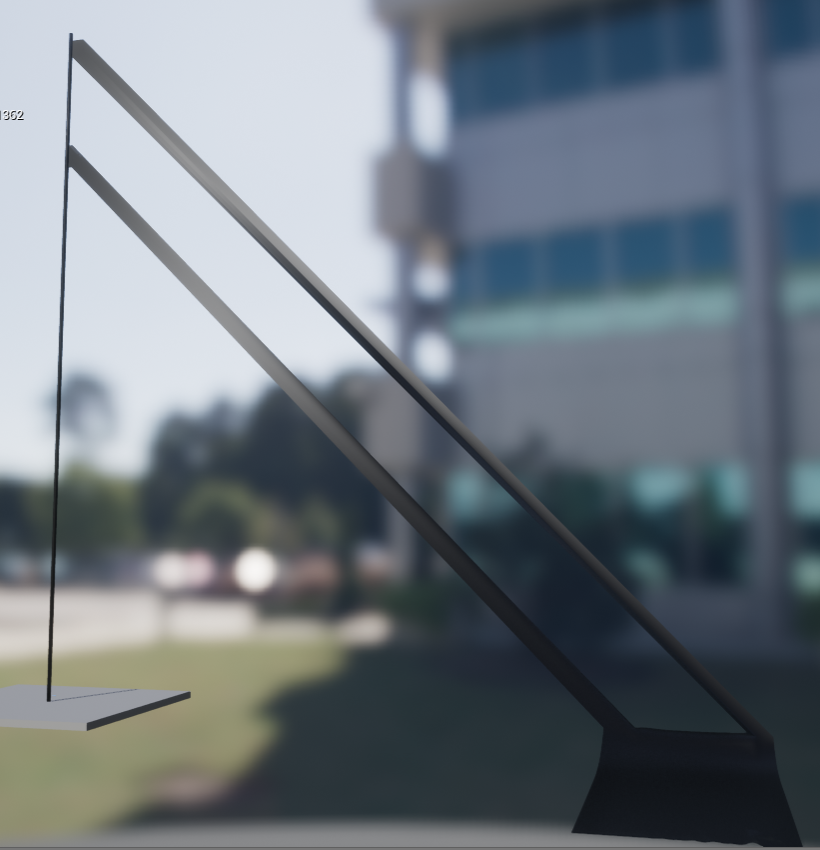
no clue why this is happeneing
 subtle relic
hi
do you need to retarget skeleton bones to be able to use root motion animations on that character?
cause when I play an InPlace anim montage it works properly, but not with root motion ones
ebon portal
@fiery copper can you put pictures of your settings and your model in here? and also a description of the steps you're doing would be nice
@subtle relic can you show a picture/video or describe what isn't working properly?
 sinful vine
hey everyone- I'm wanting to cycle through a sequence of animations- so everytim the player presses a button, the next animation in the sequence plays (blended from the current post at the time of the button press)... I tried using the Blend Poses By int node in the anim graph and just incrementing an integer... it works really well the first time through but after that some of the animations don't play the next time through (and some still do)
Looking through the animations, I don't see why some still play and some don't- none are set to loop (when I set them to loop they play no matter how many cycles I've been through- but I don't want them to loop).. Has anyone run into this or know what the issue may be?
Ah I think I fixed it! In the Blend by int node there's a checkbox called "Reset Child On Activation" and checking that seems to fix it
subtle relic
@ebon portal Anim montages must be created based on an animation. If I create an anim montage for an InPlace animation, the character can execute the anim montage perfectly, but he doesn't do anything when I play an anim montage for a RootMotion animation.
ebon portal
with rootmotion animation, you mean an animation where the root is traveling, but shouldn't and you checked the root motion box on the left correct?
because this shouldn't occur, you should be able to play whatever kind of animation you want within an animmontage @subtle relic
subtle relic
@ebon portal I have the DynamicSwordAnimset, and it has 78 InPlace animations + 78 RootMotion version of the same animations
the inplace ones work and the rootmotion ones dont. I didn't check any boxess
ebon portal
in the animation sequence details panel is a little checkbox which says "enable rootmotion" see if it's checked on the rootmotion ones. And just out of curiosity: why do you need the animations to work if you already have the other ones working?
subtle relic
Funny, I can't see this checkbox. There are some animations I want to use rootmotion and other ones to use InPlace. Because using InPlace allows me to control how I want the character to move as it requires an external force (Launch Actor, for example) to be applied on him, because the characer stays in place, he doesn't move as he doesn't follow the bone movement of the animation, and rootmotion animations are useful for when I want the character to execute exactly that animation.
ebon portal
hm, which version of the UE do you use? because this checkbox moved around a lot between the versions
subtle relic
4.15.3
misty dagger
hey, how do i rename a slot in an anim montage
 chrome mango
hi guys, i know nothing about animations and i need to set up a system where my guns aim-down sights
im not asking you to do the work
but i dont know where to start
if someone can send me a friend request or chat with me here, and help me understand what to do step-by-step, i would really appreciate it
subtle relic
@misty dagger you can't do it in the anim montage, you have to rename it in the Animation Blueprint, where you set up the slot
subtle relic
@chrome mango You have to move the camera forward by 40 units with the ActorForwardVector
@misty dagger you have to add a new slot in the Animation blueprint and not use the default one
misty dagger
If I do that will it play? @subtle relic
subtle relic
It is supposed to @misty dagger
misty dagger
OK
gaunt hemlock
fingers crossed
proven osprey
Blendspaces or state machines?
Mostly i guess I dont know how to use blendspaces properly
ebon portal
could you elaborate some more @proven osprey
 green musk
Hello. I got a problem. My Character isnt moving alltough i got all set up right i think, like in the tutorial of someone. My instinkt sais that my gamemode isnt set up right or the speed input isnt workin/updating or the animation somehow isnt attached to the character or the blendspace is not working correctly. please help
ebon portal
is the character itself not moving or is it not playing animation?
chrome mango
@subtle relic thanks for the advice, is that supposed to give the illusion of a lower field of view?
subtle relic
@chrome mango yes, that zooming effect
green musk
@ebon portal the character is moving fine but its not playing the animation
misty dagger
you sure your animBP and characterBP are communicating properly?
ebon portal
can you show us a screenshot of how you set your animBP up? @green musk
green musk
@ebon portal already solved the problem but thanks
ebon portal
okay no probs @green musk
misty dagger
@ebon portal you any good with animations cause i cant seem to find out why my animation does this

the head has no animation so it shouldnt be moving at all
ebon portal
send me a picture of your bone hierachy pls @misty dagger
misty dagger
@ebon portal in maya or ue4
ebon portal
ue
misty dagger
@ebon portal there ya go
 umbral compass
?
umbral compass
It's all good
 steel knot
I found this incredibly helpful for getting a overview of setting up animations. It's not my vid, just sharing in case anyone needs a good overview explanation.

What starting to look like an ongoing problem as to the progress and progression of what needs to be a complex player control system the idea of what a blend...
 solemn scroll
Hey, guys. Idk if this is the place to ask, but Mixamo no longer offers support for UE4...that seems like it's going to cause a problem for a lot of folks...are there any good alternatives?
chrome mango
which tutorial series is the best for learning Blender?
dusk dove
best is relative
 still gorge
@solemn scroll it hasn't for several months, it simply removed the UE4 specific version of their FBX's, it still fully supports normal FBX which UE4 uses as expected. It just doesn't have the additional root and twist bones.
 small tangle
@chrome mango as Raildex stated, best is relative, but you could look around here:

Home of the Blender project - Free and Open 3D Creation Software
There are good introduction vids, and mostly well explained
chrome mango
@small tangle thank you very much!!!
 dreamy fox
Hi. The collision of the cloth can only occur on the collision body created on the bones?😃
 frigid drum
i made my character and lots of animations without a root bone, will i have problems in the future? or just having the pelvis bone is ok
dont want to redo everything
misty dagger
@frigid drum if you arent using root motion you will be fine
if you are then yeah it will collapse massively
Hey so
For some reason when I retarget animations
it just fucks my character up
do the skeletons match?
try to uncheck the box in the retargeting window for convert spaces to new skeleton (second one from the bottom)
Yeah
ok
lemme try that
@misty dagger OK wtf
That worked??
Man I need to write a list of all the wanky things in UE4
and how to fix them
there's sooo many of them too
indeed there is
My entire weekend was solving the UE4 4.16 widget bugs
It ended up just being a simple checkbox i had to check to make it use the old system
coz the new system is buggy
its always just some stupid little option
kind of annoying in the end, but also reliefing when you find out
mhm
@misty dagger thanks btw
 smoky ingot
I would love weapon animations like this

Resident Evil 7[All Weapons Reload Animations & Sound]1080P, 60fps
ebon portal
@misty dagger are there any constrains on the neck/head? are there any keyframes on the endjoint?
misty dagger
Is there a blend per bone by bool
ebon portal
@misty dagger in which software are you binding the skin? and yes there is, just search for it in the node search bar
misty dagger
@ebon portal maya
ebon portal
and you want to bind a weapon to a joint right?
or to a full skeleton?
@misty dagger
ebon portal
can you show me a picture?
misty dagger
ye
solemn scroll
@still gorge Does that mean it's still a relatively similar process? I'm really new to this so it's still early enough for me to start using something something else if it's worth it. Otherwise if it's a simple fix, I can work with that...
still gorge
@solemn scroll it's the same, yes, just if you want custom functionality for the animations you need to create those (as you would if you created the structure yourself) which isn't hard. If you're just doing normal animation stuff, it's perfectly fine
solemn scroll
@still gorge Oh, great! Thank you for that. It helps a lot cause I didn't exactly understand what had happened.
gaunt hemlock
Not directly to ue4 :/ someone working with blender and ue4 and knows a proper fix for the following?
Exported an mannequin from ue4 -> imported in blender -> added back the root bone yet the offset of the rootbone is scaled by 0.01 inside ue4 (so character is almost at 0,0,0 rather than 0,0,98...
misty dagger
@gaunt hemlock check the scale size in blender as the units are probably different
gaunt hemlock
@misty dagger forgot to mention that: I actually managed to fix it however - the amature is now at scale 100.0 (Applied Scale to 1.0) and the mesh is at regular 1.0 scale (reapplied from earlier 0.01 after import)
It works that way - but the Armature being that big is not useful for animating 😄
misty dagger
@unreal cosmos so my question is when i put the character with the animation into a game it feels very light compared to most games where movement feels slightly heavy
how can i achieve that heavy feeling if that makes sense
unreal cosmos
not on animation,m but on the movement component
you would need to increase the inertia of the character movement component. To do that you lower the acceleration
misty dagger
oh ok
ebon portal
also decrease the acceleration and decceleration value to achieve more realistic movement, since you can't simply go from 0 to full speed running in a splitsecond
ebon portal
uhm I have a problem with my character, I rigged it to the UE mannequin skeleton, but I created the skeleton from scratch and it looks fine when I don't play any starter pack animations on it, but when I do it goes nuts. Plus I also tried retargetting but that doesn't work either
can somebody help me figure out how to solve that problem?
it isn't bad if I lose my skinning or skeleton, I just want my character to work with the UE mannequin
outer iris
Quick question: Anyone have an idea on how to do this?
I'm using Random Sequence Player in my animBP to play random animations during idle, one of which is actually two animations that must be played back to back
so how can i put a pair of anims inside this random sequence player?
 vocal wren
Hey guys, I've got a problem with the lighting on my character as soon as the animation in the sequencer starts playing. I thought maybe the character would take the lighting from outside the scene (zero position of the root) but this is not the case.. Any idea what is causing this problem?
Here's a little GIF to show the problem: https://gyazo.com/f868c257e3004906ca462e77616ffcaf
 vocal wren
But why would the animation in the sequencer trigger the AO to become darker? The rest of the scene doesn't get affected. Also, the character does respond to other lights, he just gets really dark
It's the darkening in the face yes
 supple axle
do you use distance field AO?
it might have some temporal filtering going on that accumulates it across multiple frames
vocal wren
I'm not using any distance field AO
vocal wren
Anything else that you might know could cause this problem?
ebon portal
Hey, I've a small question and I'm kinda feeling dumb for it, but in Maya 2015 you had an option while you imported, whether to add or update the scene with the thing (in my case a skeleton) you're trying to import. But when I import another character which uses the same skeleton, the other one gets replaced, but I don't want that
how do I do that?
I've Maya 2017 btw
 coarse igloo
Does anyone know if you can create basic animations inside of 4.16? I rmember seeing a video about it from Epic but upon release I cant seem to find a reference for that feature.
subtle relic
do you have to retarget bones in the skeleton to use root motion animations?
ebon portal
aaah thx @misty dagger I don't like it when the do the switcherino on the settings
misty dagger
how can i make my animation play for only the arms
but have the rest of the body use another animation
(aiming in arms, walking/idle in everything else)
i dont tihnk i should have to make 50 blendspaces just for walking
with diff guns
ebon portal
use the layered blend node @misty dagger
misty dagger
@ebon portal yeah thats what i ended up doing
ebon portal
while keep in mind that it's better to have an animation for each weapon than use blending because blending is very inefficient
misty dagger
@ebon portal what does "local to component" and "component to local" do in this example:
http://i.imgur.com/1hMDgFR.png
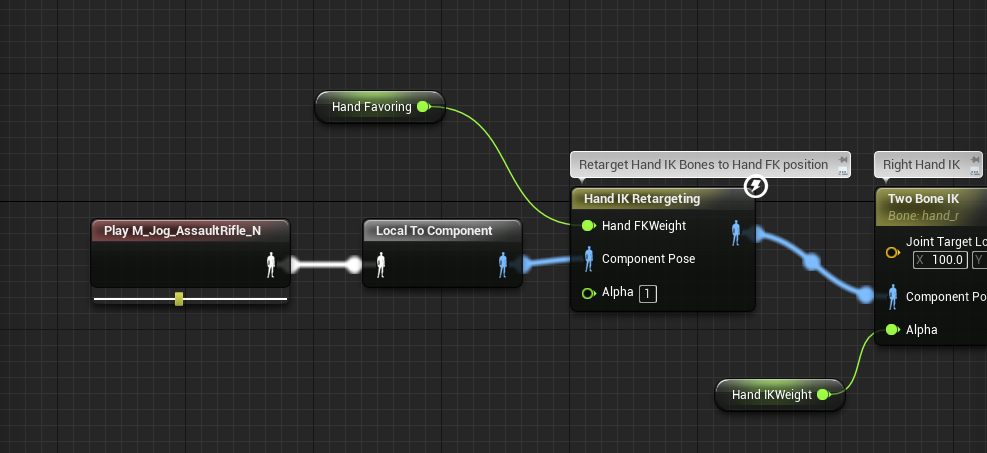
@ebon portal We have poses for each weapon, so im blending it for the arms to use my pose and then the rest of the body uses idle/run..etc
ebon portal
okay, but try to use only one layered blend node for that
local-space means that each transform of a bone is relative to the parent bone and component-space means that the transform is relative to the SkeletalMeshComponent
in short: you need to use component because IK uses the "world transform" to move the bones around and doesn't work relatively to each bone
that's why you need local to component
@misty dagger
misty dagger
@ebon portal sorry had to drive home
ebon portal
no worries, rather not drive while texting
ebon portal
is that the only weapon you have?
ebon portal
and you want to set them all up like that?
I'd recommend something else, let me draw something
misty dagger
i mean
i just want it to be where
the hand covers the weapon
so i have a socket
i socket the weapon to the socket
then i change the animation
to fit that weapon
we tried skin binding the weapon to the hand
but it just stretches the gun
and looks crap
ebon portal
yeah and sockets on bones are very easy to use for weapons
I just recommend you to add all your weapons within that weapon type blend node
then you should be fine
ebon portal
yeah I thought you wanted to first blend upper body and lower body and then blend the weapons
oh wait you do
oh it's fine
I'm confused sry XD
it's already late here
misty dagger
yeah
@ebon portal so like, my problem is
the socket is static
but each weapon has a diff size
u know what i mean?
a sniper riffle is like 4 times larger than a pistol
ebon portal
but your weapons should all be scaled correctly, no? @misty dagger
or do you mean that the socket needs to be moved around constantly?
ebon portal
I'd recommend to move the origin of the models instead of the socket
ebon portal
the weapon
misty dagger
they are all origined at 0,0,0
ebon portal
@misty dagger yeah but you've to set for every weapon the origin at the bottom of the handle or the trigger or something which is the same with every weapon
and then move the socket there to fit
@subtle relic no, you have to poses which you want to blend and you have to set up array elements to tell the node from which bone and at the depth of the blending
subtle relic
where do u set those arrays
subtle relic
durex
ebon portal
@misty dagger https://gyazo.com/721083e52ad1811c0dd173ec20463c54

@subtle relic https://gyazo.com/b205efbe3627ec21ff1ada9cb9daf7a4

in the details window you click on the + next to Array elements
ebon portal
haha nice
misty dagger
@ebon portal not supposed to be that way tho
ebon portal
would be strange
 tender condor
Now we are speaking about weapons... That is neither a good grip for a pistol 😛
 glacial night
Is there any way to add in an animation tab? Or is there a certain option you check when you import it?
Nvm figured it out, has to do with importing.
 buoyant raptor
is there a way to do a boolean check in anim graph?
 junior basin
I am a programmer, but I want to understand the basics of animation. What are the different animation options for? What do you use a animation blueprint for, for example, and what would you use an animation asset for?
ebon portal
@@buoyant raptor what do you want to do? normally you use blend by bool if you want to choose between two animations
@junior basin animation blueprint is responsible for the logic behind the animation for example: if your character goes x speed play this animation or if your character is in air play this animation. Animation Assets include but are not limited to animation sequences (aka the animations themselves), blendspace (an awesome tool to blend between animations driven by one or two values like speed or direction) and animation montages which are used to quickly jump around within one animation or handle multiple animations as one
junior basin
So, if I want to play animations from my AI's BT I should make a animation blueprint that handles the fine details and just call functions from the BT tasks? @ebon portal
I was just handed 17 animations and told to make it work with the AI somehow.
ebon portal
yes you can directly cast to the character blueprint and get variables from there @junior basin
junior basin
Ok, Thanks.
ebon portal
no worries
buoyant raptor
@ebon portal I have an animation manager that I built and I'm using that to handle which blend space to use. However, I get a bunch of null reference errors right when the game starts because the manager hasn't be initialized yet. I want to check to see if the manager is valid before trying to use it.
ebon portal
you mean something like this? @buoyant raptor https://gyazo.com/989d6db0f4882106e1ea8ebdac7a2de1
 buoyant raptor
yea so if the success returns false, don't do anything
ebon portal
okay so what is your animation manager exactly? is it a part of your animgraph or is it another animgraph or another bp?
buoyant raptor
it's another bp
basically it receives an input of which animation you want to play such as idle or walk or jump, and it returns the correct animation based on the character's current equipped weapons
 ebon portal
oh, actually that's what the animBP is for @buoyant raptor
you can copy the right side of the code and just put it into your AnimBP
you might have to add the correct blendspace nodes though
but you can use all the blendspaces that are associated with the skeleton directly within the AnimBP
buoyant raptor
that screen shot is inside the animbp
but when it starts executing, the "player animation manager" doesn't exist yet so it errors until it gets created
ebon portal
I'm wondering why you're using the blendspace player node
can't you just search for the name of your blendspace?
buoyant raptor
because it's dynamic
it receives an input of which animation you want to play such as idle or walk or jump, and it returns the correct animation based on the character's current equipped weapons
ebon portal
ohhh I get you now
buoyant raptor
yea so i need a way to check if the animation manager exists before it tries to get the blend space so that it doesn't throw that error
 muted fossil
guys, how can you test the animation for walking if it's perfect in motion for a CONSTAT speed ?
by that i mean that i don't want the legs to skid along the floor (taken into account the right speed is given in character movement blueprint)
sample video on animation i'm working to fine tune
should i add background sliding objects and go frame by frame and see if there are any slow or faster spots or how does the gurus do it ?
made the video public, didn't notice it was private
 native moss
lol noobs you have some fun ahead
ebon portal
@buoyant raptor I'd recommend that everything you do within your animation manager, do it within the animBP. If you go to the UE Docs and look for State Machine you should find what you're searching for
native moss
how to trigger the animation states with the behavior states is non trivial
i would start by working out how to trigger locomotion states based on speed and rotation
without having to actively change those states in the behavior tree
on that note, i have a problem of this nature, all the character assets in this game are rotated 90 degrees
the skeletons etc
it is fucking with the blendspaces
ebon portal
@muted fossil I'd recommend to put a texture on the floor to see if any foot slides and go to the Level Blueprint and create a Key Event (like when you press 8 on keyboard) which executes a Change Time Dilation Node and I'd set the dilation on about 0.2 so your game will play in slow motion and you'll see exactly where your foot is
@native moss me personally I think it's easier to have a state machine within a state machine for that and you can also export all of your animations and reimport them and change the rotation of all of the animations in the import settings
native moss
yea
sorry not sure what you meant
reimporting would be quite a task
would have to reimport the skeletons, skins, all animations etc
and can see that creating other issues

was hoping something like this could do it
but i don't think it will work?
maybe could make the blendspace go from -90 to 270 in direction or somethign? would that affect my calculate direction node ?
yea i think that is the first step, since character is now idle at 90 (default rotation)
muted fossil
@ebon portal ok thanks, i'll play with what you described
buoyant raptor
@ebon portal state machines don't support the type of logic we need
glacial night
Has anyone tried a camera shake simlar to that of FF15's battle camera?
buoyant raptor
I did a simple camera shake but just doing add offset in random directions to the camera and it didn't look too bad. you could start there and manipulate it so that you get the kind of feeling you want
ebon portal
@native moss you can simply rotate your root bone with a transform (modify) bone node in the anim graph
@buoyant raptor really? what kind of logic do you need?
@misty dagger a blendspace outputs just an animation which was blended within that blendspace. An AimOffset (while it inherits from blendspaces) has an output of additive animations
ebon portal
yes, but you'd have to blend the blendspace with your normal animations, but since the AO already is an additive animation you can just put it on every animation and it'll work
@misty dagger
I mean there's not much of a difference really ... but it's cleaner and more efficient to use the ao node
misty dagger
@ebon portal I know that ShooterGame example uses blendspace
to blend offsets
lol
so i copied it but i wasnt sure whiat was the diff
buoyant raptor
@ebon portal several different equality checks and enum operations. If it were to be done in state machine, it would be extremely unreadable.
 wicked belfry
Imagine an enemy running toward you using a standard animation imported into UE4.
You shoot the enemy with a gun, the bullet hits his arm.
Instead of appearing stiff and rigid, continuing running just as he was before, I want him to continue running but also react to the bullet based on where he was hit. Almost like a ragdoll that is still bound to the animation blueprint (the running).
Any help would be appreciated, even if it's a link to a tutorial or post regarding this.
Thank you!
subtle relic
must the skeleton be retargeted to be able to play root motion animations? because they dont play
misty dagger
@wicked belfry you want to check out physical animation component
ebon portal
@buoyant raptor can you show me the code within your manager? because I think you can pretty much transfer anything to the AnimBP in terms of bool checks and similar operations
@subtle relic what do you mean with "they don't play"? plus, it's always good if the animations use the same skeleton, if not, you need to retarget
frigid drum
need some tips
i have a bunch of attack animations, but i want they all to move the same amount forward
should i modify the animations to match the movement and use root motion
or maybe it would be best to make the capsule slide and keep the animations still
ebon portal
@frigid drum depends whether you're creating a multiplayer game and how much time you want to invest
root motion doesn't work with multiplayer, but if you want to do a singleplayer game and have enough time to modify all your animations, I'd do it that way
but if not, just move the capsule
you can work with curves to move the capsule to create a better feeling
 neat plover
anyone know why sequencer doesn't work until Match has started?
misty dagger
hey guys, im struggling with blendspaces (i created an aim offset in a blendspace) now the blendspace works, but the arms holding my gun are off a bit (when i remove the BS it looks fine)
i tihnk it has to do with the additive settings
but im not sure
 delicate locust
does anyone know the equivalent of 'spring' for the bones in the Physics Asset editor? want them to keep themselves better up, not just flail
buoyant raptor

 ebon portal
@buoyant raptor maybe you want to look into this https://docs.unrealengine.com/latest/INT/Engine/Animation/NodeReference/Blend/
Animation nodes that blend multiple animations together based on a set of criteria.
buoyant raptor
I don't need to blend animations though, there's a specific animation for each case
ebon portal
I'll send you a picture of an example about how that's used, because as far as I understand you, you want to choose between blendspaces with a boolean or an integer or similar correct?
buoyant raptor
no, I just need to make sure the animation manager exists
This is what happens when i run
ebon portal


 ebon portal
but I wanted to show you that everything you set up is way easier and more efficient to do directly in the animBP where you don't even need to check for a manager
buoyant raptor
then it's fine because the manager exists and the animbp can get what it's looking for
ebon portal
then use the Is Valid node
ebon portal
on a branch
buoyant raptor
branches don't exist inside state machine cells
ebon portal
oh I thought you wanted to do it within the event graph