#animation
1 messages · Page 83 of 1
 misty dagger
actually
i replied to that topic were discussing to thank the ppl in it for the great infos, and some1 replied with a tut they made, might be usefull for you to look at, looks like he just walks you trough every step, and has some cleaner bp's too: http://unrealdevelop.org/2016/11/15/ik-feet-placement-setup/
gonna go over that myself now to see what i can improve ^^
 dusk dove
Do your Animation Update Events also look like this? (not just IK stuff)
pretty much every gameplay variable gets copied from the CharacterBP...
dusk dove
Yeah, I don't gave a fuck after 10 variables anymore xD
misty dagger
what helped me alot is to start doin it as a list, each set below the other
then just have 1 reroute node connected to your bp class reference, and connect all sets to that
(that way if you change the class type down the line for whatever reason you dont lose all connections, just from node to reroute node)
anyway yea, i get your 'i wanna do it all in anim bp' 😛
that set stuff annoys me too
dusk dove
This is what I explained earlier. The Feet slip under the hips.
I tried IK multiple times. Always with the same result
misty dagger
thats a problem of spaces
go to your two bone ik nodes
for left and right foot
select one, look in details panel
see where it says effector location space
change that
for my setup bone space works, but for your setup it may be different
and then my transform modify bone node (for the hip) has its translation space set to world space
currently actually pulled all my ik stuff aside for a moment and following that tut i linked
then after that ill prolly do some mix and match to fit my likings
dusk dove
Mine are all set to world space, just like in the thread
misty dagger
whatever works i guess ^^
dusk dove
Do you trace permanenlty or on demand?
How Do you solve running/walking?
misty dagger
i trace on demand
the example in that thread has 'animation notify' nodes
those tie into notifies u can set up in animations ^^
like, foot lift/land in this case
theyre just like tags on the animation, if it comes across the tag during play, it it will fire the notify
dusk dove
And what about a standing animation?
misty dagger
ideally you have the ik kick in as players stop moving
then as they no longer move disable it
atm mine still has it enabled cuz i only added notifys to a few of the about 40 anims i have 😛
but yea, notifys should help for that
and depending on your current anim/char bp you will prolly have to do some further implementation of that to properly toggle it on off as needed
but notifiers should be your first step with that
that linked more recent tutorial doesnt use anim notifiers btw, it uses some other logic to toggle the IK on/off, wich is also fine i guess
i wanna go with the notifiers in my system tho
more control
just takes some more setting up
misty dagger
40 anims is rather low. in my current plan I have around 350 anims
dusk dove
for what? xD
misty dagger
ye 40 anims isnt alot, thats just for moving around
also cut down the amount by usin blendspaces
movements, normal, 8 directions, starts and stops, runs, walks, sprint, jumps, from idle, walk, sprint, apxes for different in air situations, lands, to idle, walk, spints, crouches, starts, moves ,stops in 8 directions, jumproll, get ups (from ragdoll), proned movement, idles variations, weapon carry blend overrides,
next im working on armed/combat based attacks, etc. etc.
dusk dove
I have like 1 Blendspace for Idle/Walk/Run, oen for Swimming ... xD
misty dagger
i got a nice asset from marketplace :3
does multiple locomotion types and get up from ragdoll etc
but yea, no ik, so thats how i got into that ^^
dusk dove
Ah, probably the Advanced Locomotion System. I saw that 😄
misty dagger
yup :3
was honestly a little surprized to find it didnt have IK
Im currently making my own locomotion system, but strongly considering getting that other one from the marketplace to see their implementation, mine is most probably very amateur
i only have that one so a bit hard to compare to anything other then the content examples, but i really like how well structured it is
(as in, compare to the basic anim & char bp's u see in tuts etc, this is really nicelly put together, very modular)
appearantlly it took him a few months to make, and that kinda shows
what I found is that many things I create more or less complicated node networks for, already have something that does it .. and I find out later by coincidence
that said definatlly not here to advertise his thing either ^^ (again, kinda bummed it doesnt come with IK for that price)
dusk dove
I wish I could animate properly 😄
misty dagger
yeah, im hesitant because of price :/
yea i know what u mean adept 😛
and tru, that said, its custom built anims etc so its not a unfair price either
oh so it comes with anims?
and cuz its so well structured, like for example IK is pretty easy to bolt on in the right places
yea
thats mainly what u pay for lol
i thought it was just a template to use with kubolds
nice
that justifies the price Id say
ye
i also like the start with ragdoll to anim and back
gonna expand that myself later
(atm its fairly basic, often falling in similar ways cuz theres only 2 get up poses)
jonas molgaard made an awesome video series about that, I implemented a cool ragdoll system with his help
nice, ill remember that name for later 😃
kinda wanna dive into those physics based anims first tho
seems like there could be alot of overlap

perfect thx 😃
well not really... physical animation component is based on phat setups.. so its more like an extension
dusk dove
dreams from a working ragdoll
looks disappointed to the Physics Asset he created that has stretched bones everywhere
misty dagger
ye thats what i was gonna say, combining physical based anims and the anim to ragdoll and back, that would be sweet
bscly got something along the lines of gta then
lol raildex
raildex, physics asset bones stretching and flying away is mainly the cause of not setting collision relations correctly
you should set neighbouring bones to not collide
dusk dove
Already did that. Projection is also set to 0
misty dagger
did you also set linear constraints to locked?
misty dagger
wanna share a screenshot of the broken phat?
dusk dove
Wait a sec

It's pretty funny to look at though
Everything is locked and yet it breaks
this is anything but reliable
dusk dove
Custom
misty dagger
ah, well I do remember setting up the phat for my custom skeleton took quite some time too.. looking at the mannequin phat and comparing every single detail
until it looked useable enough
main things were capsule sizes, they should be rather big, they would then overlap neighbours, then you disable collision to their neighbouring capsules using the red button on the top
 tidal sigil
 misty dagger
nice 😄
tidal sigil
😃
misty dagger
super heavy burning pumpkin? 😛
kinda hard to tell tbh
do you have a landing animation for that jump?
 hollow mesa
used the same anim bp transition rules as i have in other projects and that worked just fine
its not like the player is clipping either
its scaling down to zero and then back up
i didnt set this player controller up though, someone else on the project did
but we're unable to figure out why its happening
dusk dove
@misty dagger The Joint Target, is it the Knee or the Thigh? I always though it is the Knee, but the Tutorial you linked it is the Thigh...
hollow mesa
are there any settings in the inheritied player movement components that would cause it
misty dagger
seems like one of your anims is being used wrongly (additive used in wrong space or something like that)
@dusk dove it really just depends on how u set it up
did u get something working? or stuck now and trying to find a fix in the tut? 😛
hollow mesa
omg yeah i totally forgot to check my additive settings
thanks! one of the animations i imported from couchknights was additive
much appreciated
dusk dove
@misty dagger Thanks to you 😄
misty dagger
woo 😄 well done and glad to be able to help ^^
now just tweak that a bit to get to what u want exactly, theres some things discussed in the thread that might be worth adding
like 'knee ik' (for lack of a better term) and foot rotation
also dont forget to move your trace positions to a bit better places
dusk dove
Somehow the Foot slides forward when it is higher than the other.
misty dagger
how do u mean
might be a spaces problem again
it could also be anim notifies constantly toggling it on/off and causing small variations
dusk dove
I'm tracing permanently and toggle the Alpha with Notifies
misty dagger
should be good, did u add notifies to your 'stand' pose?
dusk dove
I guess it is the Bone Space itself. The bones are diagonally build, which makes the Z axis forward,too instead of up Only
misty dagger
ah, yea, thats not guud
you can prolly throw a rotator in your blueprint to solve that tho, no need to change your character/skeleton
Set the 'Draw Debug type' to 'For Duration' or something (and set a duration) in the LineTraceByChannel node in your IK Foot Trace func
if they go at an angle, yep, thats the problem
thats cool looking skin, is it from the content examples?
dusk dove
@misty dagger it looks like that you can use Virtual Bones' Space in the Two BoneIK
misty dagger
yep thats what i did
misty dagger
@dusk dove got that tutorial thing workin, finally, and its definatlly a nice implementation, but theres some issues with it aswell, so your prolly best of just sticking with what u took from that magical IK thread
ima try and get the system from the tut to behave as nicelly as the system from the thread 😛
 split needle
anyone used the alembic cache thingy ?
 fossil tusk
hi all, I'm having issues with UE4 ignoring some parts of an animation. In this case, Z axis comes in fine, but Y is ignored.
misty dagger
using rootmotion?
 supple tendon
Hi guys! I filmed a few shots in unreal using sequencer but it doesnt export the right camera and just renders still frames?
Anyone know what Im missing
fossil tusk
@misty dagger No, it wound up being sampling was way too infrequent. Had to force it onto 30fps. I should go back and check what's missing in Houdini's exported fbx that caused it not to sample at the file's framerate.
 craggy gorge
Hey, if I download the same character from Mixamo but use different animation packs, this is what happens when I retarget an animation to the existing skeleton: http://imgur.com/Ug8O6SW Does anyone know how I might fix this?

Imgur: The most awesome images on the Internet.
 glacial night
Unfortunately I do not but I want to scratch my eyes out after seeing that lmao
craggy gorge
Haha yea it did give me a bit of a laugh too
Solved it! If you use object scale transforms in Blender, then upload to Mixamo, it seems to apply the scaling to any animations retargeted to it in Unreal.
 soft crown
So i'm trying to swap out the animations from the shooter game to custom animation and sounds.
I got the animation but for some reason the sounds are not working during runtime
I can test them out and hear them in the Animation BP inside editor
Confused why in game I hear the old sounds
Actually might be a local thing
Clients may hear the correct sound but not local
 iron stone
Is there a way to randomly select an animation clip to play in a state machine ?
misty dagger
every n seconds? or how?
dusk dove
@iron stone There is a Random Sequence Player
misty dagger
Haaaa, one learns new things every day, thanks Raildex
dude that random sequence player is a dream come true oO Ive been doning it so complicated.. insane
dusk dove
what exactly are you trying to do? :d
misty dagger
Hassan or me?
well, I have several different variations of idles for my character (from kubold movement sets) and just wanted to use them all 😃
dusk dove
I see 😄 I have a main idle and some "After some while play this" animation. You can check if you are in a state for a certain amount of time. which helps alot
iron stone
@dusk dove thanks alot. One other question, how can i check "Time remaining ratio" if i am using random sequence player ? I want to transit to other state any of the animations get played through the random sequence player. I am new to unreal
misty dagger
probably get relevant time remaining ratio?
iron stone
relevant time remaining ratio is not working
misty dagger
hmm, I think then its off the limits of my current knowledge. :/
Im using it for idle so time remaining isnt part of my state transition rule
iron stone
i've different attack animations. i wanted to randomly select one of the attack animations and when it gets played i want my character to transit back to the idle state and play idle animation
misty dagger
you could use animNotifies on the attack anims (I hope those trigger from the random sequence player)
misty dagger
np, let me know how it goes.. Ill be looking into this sort of combat stuff very soon too
iron stone
sure
 plain jolt
how can i add this 2 blend poses by bool to the final anim pose ? the upper one is the layer that throws grenade while crouched and the lower one is not a layer but a condition based blend pose by bool,, now how to add both of them to the final anim pose ? so that when the condition is true for the individual anims , then they will fire off based on the condition
 half orbit
So you want to blend them with a bool?
plain jolt
the thing is i have a grenade throw layer on the crouch system,, so when im in crouched and press G then the layer will work otherwise wont,, and now i added another state machine which is swimming , and firing it only when the bool is working ,, but i need to connect both of them in the final animation pose ,, but dunno how
half orbit
But you cannot crouch or throw grenades while swimming, right?
plain jolt
yeah
if i plug one,, then there is no way of plugging the other
in the final anim pose
half orbit
Well. I haven't work much with animations yet. But couldn't you connect the top one into Swimming False? And then Swiming into final
plain jolt
OMG!!! It worked ,, thanks and love you too XDD Thanks a lot
half orbit
NP 😃
I know the simplest of solutions tends to be missed unless you ask someone else to look at it...
plain jolt
lemme share a bug with ya ,, if you add a reroute node , then the animation wont work,, if dont add then it will work
half orbit
Even when you play?
plain jolt
hai XD
half orbit
Then make a bug report
plain jolt
are they gonna give me chocolates ?? :/ i guess no
half orbit
To many people. They would need to get their own factory if they would give chocolates to all bug reporters. 😜
plain jolt
should i share this in the UE4 developers community fb group ?
btw,, your using 4.15 , may you see weather its fixed in your version ??
half orbit
seems to work here.
https://puu.sh/ud7Sd/8bc68cc81d.png
 plain jolt
well i guess they have fixed it
half orbit

 zenith quarry
Anyone here available for animating weapons in first person view?
 ebon portal
hey everybody, I've an extremely weird import/export problem, I modified an animation I exported from UE and know I want to import it again
this is how it looks in maya
https://gyazo.com/e31918c51f66d232fafe86ac597c4085

and this is how it looks in UE
https://gyazo.com/4df445e88e381004aabaedb8fe74af62

as you can see the ik bones are not in place as in maya
I baked all the constraints, reimported the animation in UE and maya (meaning I opened up the baked .fbx in maya and it looks perfect) but it still messes up the ik when I import the animation into UE, it's so weird and I have no clue why it's doing that
and I noticed now that when I reimport the animation in Maya the first thing I see is this https://gyazo.com/520dd4d1128a7006bdca6c8eec06ee6c

but as soon as I switch between frames everything is normal again
misty dagger
functionality is fine except for that display bug?
 subtle matrix
hnngh, every update the same raindance to figure out what's the proper export scale for skeleton
ebon portal
@misty dagger nope
ebon portal
okay I did some debugging now and I think it's because this animation (I just got it to modify) was exported from a completely different skeleton, retargeted to our skeleton and then sent to me ... and something within the retargeting went wrong, but I can't seem to fix it either
soft crown
How hard is it to get a First Person model of arms wielding a knife coupled with a single slash animation?
 reef bone
I am not sure whether this is related to animation or coding, but has anyone here experience with custom AnimInstance classes / custom FAnimationInstanceProxy structs?
 devout dagger
brainstorming NPCs and wondering how it would work in conjunction with anims/bones if I want for NPC to look at player and track him
visually it would look like this: player approaches NPC (who is in idle anim), NPC "looks" at player and as player moves around, NPCs tracks player with eyes, then with head, then with full body.
how would I do that ?
subtle matrix
@devout dagger You could check does NPC controller have a valid tracking target, then rotate the head(+eyes if you have those rigged) towards the target using FABRIK
you'll probably need to do some extra logic to prevent the head from doing full 360
devout dagger
aye, thanks
are there any built-in constraints for bones? (like converting location of the target in world space to linear movement of the eyes in local space)
subtle matrix
afaik all bone modifying nodes accept world space
devout dagger
I did this simple rig in Blender https://blenderartists.org/forum/showthread.php?416715-HELP-Simple-eyes-head-rig where you move target bone around and eyes move on the face of the character
so I wonder how'd I replicate this in UE4
subtle matrix
IK target?
use empty scene component, drive bones from it
probably
or just with pure math
devout dagger
maaatthhhhhh 🙀 😒 😵 💩
subtle matrix
there's 101 ways to do it really, just need to get creative
one would be doing like 8 different corners + center blendspace for the eyes
then blend it over all the other animations
devout dagger
ah, I see
subtle matrix
you can do the blendspace poses inside the engine with additive tracks too
devout dagger
I am still just getting into animation in UE4, so I don't know much about it yet 😦
 timid summit
Hey, I just started anim stuff in UE4 today, followed a written tutorial from the UE site on how to set up the Animation starter pack. I needed legs to my first person camera, basically, soo apart from few issues here and there, the player model now animates fine, i have put a camera where his eyes are supposed to be, im using pawn, s control rotation. But the camera itself isnt attached to the skeleton, even tough its in its group
misty dagger
you need to attach it to socket
timid summit
also, for the life of me I dont get why the idle to walk animation is clipping
and ty for the tip @misty dagger
 lucid meteor
So I have a player with a jump animation, I have it to play when it's moving on ground is false. Bad part is lets say its a long jump down the jump animation loops when after it does it once while falling. Any way to fix this?
misty dagger
have an in-air state with the jump apex
like in the 3rd person conttroller tutorial from the epic website
 potent current
anyone know in the fortnite animation video (https://www.youtube.com/watch?v=3NK97psTA8g&list=PLZlv_N0_O1gbggHiwNP2JBXGeD2h12tbB&index=54) how do they "feather" blend the locomotion to the weapon pose? I tried to replicate it, but cannot keep the upper body rotation facing forward, it takes on too much of pelvis rotation during running state
 iron stone
how to create sub state machines ? Like i want the movement part as one sub state machine and my battle moves as another. Need help.
 tiny monolith
Hi, i'm using 4.15. i'm add Cin Camera, make some focal length adjasments in sequencer, add camera in camera cuts track. Camera transform animation is playing fine, but focal/dof not working
i'm need to activate some cinema mode?
ebon portal
@potent current try to tick Mesh Space Rotation in your blend details
@iron stone if you're in a State Machine, press RMB and search for "state" there should appear something like "create new state machine node"
@tiny monolith see whether you keyframed the focal/dof within the sequencer timeline
@soft crown do you want a model of arms, a given model of arms moving, or both?
tiny monolith
@ebon portal i'm think it is bug, on new project all working fine, but on old project not 😉
ebon portal
@timid summit what do you mean with clipping? clipping through the ground?
@tiny monolith found this in the UE 4.15 changelog https://gyazo.com/9d4ee0877083048c47c8813658b6eff8
 timid summit
uh, its just, it switched back and forth between idle and walk animations
in a really irritating way
ebon portal
@timid summit so it's changing rapidly? can you show me your state machine with the variable you're using for the transitioning and the transition itself, plus the details window of the transition?
ebon portal
oh sry, let's take that to PM I turned of my notifications for this channel
@timid summit
 vagrant vigil
extremely basic problem: simple idle animation hooked up to final post. animation blueprint assigned in playercharacter to the mesh. animation plays in the preview. but ingame, it doesnt play. it's in the right pose, just not playing.
I just dont know what I'm missing, and it's weird as all my other projects I've gotten animations to work fine, but this one for some reason doesn't want to lol
misty dagger
I get the warming: skeletal mesh influence count of 11 exceeds max count of 8. Influence truncation will occur. Maximum Ignored Weight 0 -- What does that mean ?
that you have more than 8 bones influencing some verts. UE4 only supports up to 8..
it will truncate low weights until 8 is reached
Ah OK. Thanks! That sounds not too bad. But for the next model I'll take care of it.
misty dagger
@vagrant vigil you need to give us a bit more, maybe a screenshot of animGraph and animBP enventgraph, statemachine and such
 undone flax
What is the best way to play a single animation once and then have it stop until it is called/done again?
 supple axle
montage?
though I don't really know how you'd blend a montage with rest of the anim BP
maybe someone knows better
undone flax
I've currently got something where I have a montage of a single animation and when I want to call it I start the animation, delay for the duration of one cycle and then stop it. I'm also using the "layered blend per bone" to merge animations together. I was just wondering if there was a better way to go about it.
 outer iris
Hey so if you guys have your first person character to aim down the sights of several different weapons, how do you line up the sights of each different weapon?
Do you just tweak the animation until he brings the gun to the perfect spot?
Or is there a cleaner way to have the sights "snap" to the center of the view?
 hushed agate
@outer iris - have 1 frame poses for each different weapon - use blending nodes to switch between the frames (SwitchonInt or Bool) in AnimBP when you switch the weapons in CharacterBP
to help you get more proceduralized - look at teh way Paragon is doing thier blending... its AMAZING workflow practice!
outer iris
Ooh, awesome, thanks! 😄
 undone fulcrum
@potent current just untick loop animation on the jump animation in the animbp
 mystic warren
Why don't animations downloaded from Mixamo work in UE4?
 shut musk
What is the best way to make indivual realistic charcters, MEN + Women ! i can not use mixamo or Maya So i dont know what else to use
misty dagger
@mystic warren because the skeleton is a completely different one.
 frail basin
@shut musk why can't you use those?
not that mixamo characters would look realistic in the first place..
misty dagger
Hey guys could I get some constructive criticism https://gyazo.com/9e6045df3b5f167a01160e0794a531d6
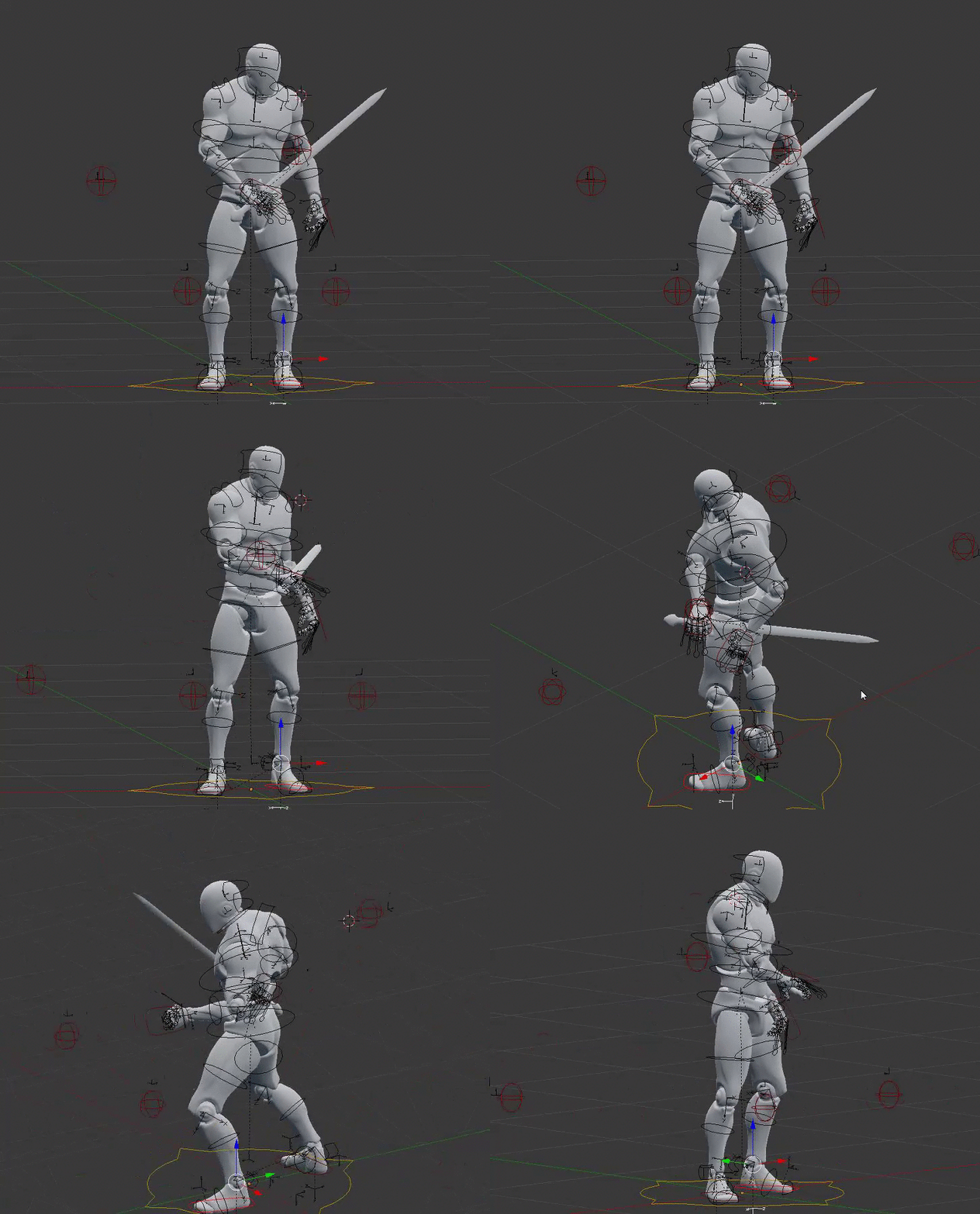
want my animations as good as I can get this is my first time doing it so simple words please lol
 copper dawn
the only thing that comes to mind, and mind you animation is not my forte, is that it feels like there is no weight to the blade. his arm would/could react to the momentum/inertia, move the arm back a little further before it goes back to resting position.
Also, if you are holding something even a pen and you squeeze into it you can see the movement of the tip of whatever you are holding due to the muscles relaxing or tensing. that would really make it look more alive.
misty dagger
Ill go for a drop in the blade and focus on the tip with the body movement
 copper dawn
movement of the sword feels better imho.
that front foot slide is a tad odd though.
also, dont take just my word for it, <_< let others react as well.
misty dagger
all good normal peeps notice this stuff since normal peeps play games
 copper dawn
when looking at the character from the side, the sword's final movement is a tad odd.
copper dawn
where it moves horizontally into final position
misty dagger
 copper dawn
👍 !
misty dagger
sweet thanks
misty dagger
New guy here...I imported some animations into my project but when I use the animation the character falls through the floor. Am I missing a setting somewhere? btw these are root animations if that matters.
misty dagger
Does the Automatic LOD Generation for meshes work with animation ?
misty dagger
Is the animation root motion or still?
sometimes the animation can play through the floor
depending on how its made
 lean orbit
Its getting pretty good but I think you need to add some anticipation and weight transfer to the hips they are very floaty, so perhaps drop the center of gravity and move hips back a tiny bit at the start then move the weight forwards a little during the move, settling back in the the middle.
misty dagger
@misty dagger just my 2 cents; try everything a bit slower
ive never seen somebody draw a sword so fast
also hes bscly jumping to new pose, wich may be a bit much too
Redbull bro lol
lol k
yeah ill space it out I had been messing with new mocap I got and its making me rage
okie ^^
what you could possibly try is keep 1 foot on the ground
so its more of a step into a new stance, rather then some hyped up jump 😛
that said still a cool anim ^^
but u asked for opinions, so now u have mine 😄
Haha all good Ill keep tweaking it till I have something unique
 minor pecan
Do any of you have experience using alembic imports for animation?
misty dagger
Describes the Alembic File import process along with import options.
might be worth watch the video if you haven Ive never tryed myself
tired*
soft crown
Trying to add a new animation to the shooter project but it isn't playing
misty dagger
checked that the state is accessible and the variables are all taken care of from characterBP to animBP?
soft crown
Figured it out
Apparently there is something called grouping in AniM Blueprint? And depending on what group you set it to it will play a certain anim?
Didn't set the group
But now for some reason even after adding a Weapon Socket point I'm not seeing the weapon in the socket, it is just on the ground by my feet
 covert ivy
Hi, beginner question: I have a box in Maya that has an opening animation. I understand that I need to have a skeletal mesh in order to animate it in UE. Any way to go around having a bone in my box? I understand Matinee is obselete and Sequencer needs to be camera oriented. Thanks in advance 😃
split needle
if you must... you can use alembic to save out a vertex change....
misty dagger
@soft crown you need to attach it to your socket in the construction script.
@covert ivy however, doing it with a bone will be much much simpler and more performant than using alembic. Id just stick with a bone.
timid summit
hey, any idea how to inport mixamo anims into 4.15. it keeps wanting to rebuild skeletal meshes and basically fuck up my existing work with the epic anim starter pack
covert ivy
@split needle @misty dagger Thanks, I ended up chaining together some timelines to recreate the animation in my BP 😃 I was thinking if it would be possible to use the facial animation feature in 4.15 to do baked vertex animations or some other strange solution. Checked out alembic, you are right, it seems complicated for what I am trying to achieve.
timid summit
actually, can i even use a different sceleton for one character, with different anims
I have used the anim starter pack from the marketplace to setup my character's anims, with some blendspaces etc
but now i want to introduce a roll animation but the mixamo one cant work with the skeleton of Epic's anims
devout dagger
are there any good animation tutorials floating around ? (working with anims in UE4 that is, using IK, blending, etc.)
 cursive hollow
Hi does anyone here work with blender for 3d models
devout dagger
I do
cursive hollow
I am trying to build a basic car and import it into unreal but when i do it is in seperate pieces
did i not build it as one object or what everytime i import it the thing blows up
devout dagger
Why don't you join meshes into one. in Blender ?
cursive hollow
what does that mean ?? Sorry
devout dagger
eeeh, you probably need to learn Blender first, sorry
cursive hollow
So i need to join all of the meshes into one object in Blender then import ??? But if i creat the object and create everything doesnt it make it one object ?
devout dagger
If you have wheels, body, etc. all in separate pieces, you can join them into one object. Select them and do Ctrl J to merge.
If you already rigged it, everything should remain as-is.
I haven't worked with vehicles and UE4 yet, but I don't see why there can be an issue when exporting multiple objects. As long as you have 1 Armature to which all objects are parented and weighed to, you shouldn't have any issues.
 dusky arrow
vehicles have to be exported as one object. Wheels linked to body etc. It does accept the linking as structure though so they dont need to be physically attached by vertex.
devout dagger
@dusky arrow by one object you mean one single mesh or one FBX with multiple meshes ?
frail basin
vehicles need skeletalmesh
dusky arrow
one fbx with multiple meshes that are treated as one object. ie. you have a Body mesh and 4 wheels. The wheels are linked from wheelbone to bodybone. Then it can be imported as one object
cursive hollow
Do you guys know of a good tutorial for blender to unreal I saw a video but was looking for a written doc
dusky arrow
not personally. Im all about the autodesk :p
cursive hollow
yeah I like 3d studio max but have gone to blender since it is free
I am currently learning blender using a course from udemy it is a pretty good course
one fbx with multiple meshes
here is what i am working on
dusky arrow
@cursive hollow : if you like 3dsmax, I would highly recommend MayaLT. It's cheap and powerful. Takes maybe a day to get used to if you come from 3ds. I was super impressed with it and I was a staunch 3ds user since 2006'ish
cursive hollow
yeah I have tried the light for the little bit of modeling and stuff i do wouldn't be worth it to buy anything thanks though for the suggestion
dusky arrow
oh I dunno. £25 for a month isn't bad. 😉
cursive hollow
yeah blender is pretty kewl it is just learning the hot keys which once you take time to learn them it isn't bad
Hey could i send you an OBJ file and you convert it to an FBX for ME ?
dusky arrow
can't atm. No maya sub right now as I've been coding for a few months so haven't needed it. Im pretty sure the Autodesk FBX converter should work though.
dusky arrow
currently finishing up a dll that implements TrackIR with UE4 for our game.
http://store.steampowered.com/app/433190/ <--- VR Version.
&
http://store.steampowered.com/app/564950/ <--- nonVR for xbox/PC with trackIR support

CDF Starfighter is an exciting, fun, and beautifully detailed single player VR space combat simulator immersing players into the experience of a star fighter pilot in the Colonial Defence Force Universe. Inspired by games such as Freespace, Wing Commander and Star Wars, CDF Starfighter focuses purely on space combat with pick up and play...

Starfighter Origins is a 90`s style space combat simulator inspired by games such as wing commander, Freespace and star wars. Combining a focus on single player action and favouring full space combat simulation over dog-fighting, Starfighter Origins looks and plays great using a Gamepad and also supports HOTAS.
timid summit
solved my mixamo problem by uploading the epic skeleton to mixamo lol
cursive hollow
Marc_Rogerson WOW nice work looks really good kind of like team Fortress meets team fortress kind of VERY KEWL
Mr Tapa thats a good idea uploading the epic skeleton i was having problems uing that also
timid summit
glad my newbness could help
cursive hollow
So Marc How long have you guys been developing the games ???
timid summit
now i have a wired thing, after my roll animation, my character cant transition back to crouch_BS
dusky arrow
@cursive hollow these two are roughly 2 years to get to this point. Release date is in April.
timid summit
its all messed up like he has seasures
cursive hollow
wow very kewl man you guys seem to be doing an awsome job on it looks really good
dusky arrow
it's getting there for sure.
cursive hollow
MrTapa Thats what mine does too
I am just doing some mode stuff for ark
TRYING TOO THATS IS LOL
timid summit
im doing project to get into uni lol
i think somethig is wrong with the animation, cant transition back into crouch_bs properly
cursive hollow
Uniy
timid summit
university*
cursive hollow
Mr Tappa have you considered learning how to mod for like ark or conan might be easier to focus thats what i have been doing to try to learn this stuff
cursive hollow
what is Bo3 ?
timid summit
black ops 3
frail basin
black ops 3?
timid summit
yup
cursive hollow
sorry not up on all of the acrponyms
timid summit
but for UE4, i wanted to make a game prototype
im already done with the game mechanics
refined them a couple of days ago
now i have to touch animations, make roll and slide anims, touch the fp cam a bit
coz i am using third person animations
and making the game first person
so i can see my legs, animated. And what Is cool is that i have socket-ed the cam to the head, so micro movements affect the viewport, when doing anims
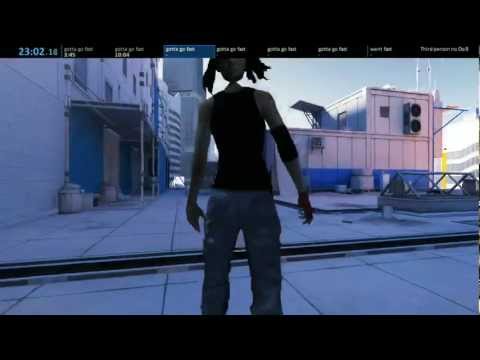
for the roll, im trying to achive the mirrors edge effect
cursive hollow
Oh thats kewl man I am still new to alot of unreal and stuff
mess with it till i get frustrated then stop for a bit then try to go back to it later
 dusky arrow
@frail basin : it originally started out as a VR only game but decided to do a non-VR version for Xbox so made a second build with some changes to accomodate that and non-steam builds for other markets (we have a chinese version too).
frail basin
they didn't use regular anims
@dusky arrow still, seems odd that you have two versions for pc
if it's essentially the same game that is
timid summit
lol
@frail basin how can i lock the camera, to a forward vectgor, just during the roll animation
cursive hollow
Olento thats looks pretty kewl man you guys seemed to have fun filming it hahahahaha you guys should make that the ending credits for your game
timid summit
just like DICE did
frail basin
@cursive hollow it's not my video
@timid summit I wouldn't know much about ue4 characters 😃
cursive hollow
oh thought that was the game your working on sorry
dusky arrow
@frail basin : not my decision but yeah it could have been done as one. The boss doesn't really code (although he's done most of the blueprints) so some concepts he is not aware of when deciding things. Im the Technical Support Manager but sometimes I think that's just a title and my advice often goes unheard :p
frail basin
nah, that's mirrors edge from DICE, wish it were my game 😄
someone just moded the first person camera so you'd really see the char, it's not designed to played like that
cursive hollow
Thats to bad Marc _Rogerson sounds like you should work on you own project on the side
wish i could learn C++ I am horrible at programing
dusky arrow
naah im commited to helping him. He's done an insane amount of work and he is a friend so I don't mind. Plus I get tasks that give me experience. Like writing in the support for TrackIR. Taught me how to make a DLL and use function pointers to call Unreal functions from it. Which is pretty valuable
cursive hollow
Well thats kewl the point is as long as your happy
dusky arrow
I've only got a few days work left and I'm free to do whatever. Might work on a prototype for a while but I'm in the mood to make some cash so whatever happens really.
cursive hollow
maybe to could start creating game engines for the marketplace amd sell them on there
dusky arrow
I have a 3d Radar submission for the Marketplace just waiting for me to finish the documentation but I haven't had time for it.
Not sure how many people would use it but it's nice for VR space games and could be used for other sci-fi purposes. Such as handheld scanners etc.
cursive hollow
yeah still there is stuff being sold on there that sounds like you would be able to make sma eor better maybe still fast cash
dusky arrow
trickle income is always nice
Something I missed out on with web development. I shoudl have had hundreds of microsites making me pennies over time. I always wanted to make new things that hadn't been done before though
a friend of mine though makes $25k a year from doing nothing but letting his sites advertise
devout dagger
so, are there any good animation tutorials floating around ? (working with anims in UE4 that is, using IK, blending, etc.)
dusky arrow
can't say I have done any for a couple of years. You want to create the anims or just set them up?
cursive hollow
Well hopefully can find something that you can enjoy Marc
Marc How are you at with blue printing
timid summit
hey, kinda being retarded here,
how do I tell an animation to end
when the actual animation finishes
just a timeline node with the same time?
devout dagger
I am still n00b when it comes to anims, but if I want to blend anim of my actor (non-player, non-AI) into another anim, keep it in that second anim for some time, and then blend it back into original anim (or into another), what do I need to use? (I am moving my actor along a spline in BP)
 full egret
Animation state machine seems to be the simplest way to do them
 elfin tulip
Hey guys, Stupid question
But can I combine root motion anims and non root motion anims without messing everything up?
I'm porting a project and all the animations are root motion processed. But the movement controller in the original game was very sticky it's really smooth if I don't use root motion in UE and blend it
But I don't want to do calculations for the rest of the animations (I have about 100 animations )
So it it feasible if I combine both?
devout dagger
@full egret but how do I connect my BP code with anim state machine ? Any tutorials on the subject you could recommend ?
full egret
What I have is BP_Character and BP_CharacterAnimation. While updating the BP_CharAnimation, I can for example call GetOwningActor and check boolean variables directly. I'm sure there are many ways this could be handled, via Events for example
googling "ue4 animation communication" gets lots of hits
devout dagger
I haven't worked with anims in UE4 at all.
aye, will use Google-sensei
well, I know all that stuff already (casting, BPI, etc.)
what I am wondering about is how the whole enchilada works together
BP code calls BPI when needed. And then what? Anim graph should have that BPI and nodes that switch/blend anims ?
 wicked belfry
When I preview as a simulation, I can see animations playing out in my scene but when I do a VR preview, they never move. Why is this?
devout dagger
ughhh, while Animation stuff in UE4 very powerful, it's sooooo confusing and illogical for n00bs 😦
at this moment I really hate it
shut musk
Hello Sirs I really need help with creating indivual Charcters, i do not have money to use Maya, to rig my charcters from Mixamo, so i need help with creating Realistic people for my video game ! any ideas
devout dagger
if you do not have money to use Maya, use Blender - it's free 😉
and MakeHuman can create pretty realistic people
also for free
timid summit
hey, how can i make an animation to use root motion, i need it for a sliding animation, because at the end of it it bounces the camera in an annoying way
 zealous solar
 livid karma
yes
timid summit
hey, I am having issues getting root motion to work on mixamo animations
timid summit
whenever I activate root motion, the character's body stops moving and only his arms and legs are
and i need to use root motion for the roll and slide animation i implemented
anyone got any ideas
devout dagger
any animation gurus around? (blend spaces, anim BP, etc.)
timid summit
unfortunately not, i am waiting for some magic wizard to help me as well
devout dagger
😦
timid summit
😦
devout dagger
🙀
timid summit
😟
ebon portal
@devout dagger just pose your question in here, maybe I can help
@timid summit write me tomorrow and I'll look at it
ebon portal
I just read through your first post, because I don't have much time @devout dagger but it seems like you're trying to trigger certain animations through code, which should blend between each other, correct?
devout dagger
yeah
I figured I need to make blend space and anim blueprint to make it happen, but not really sure how to wire actor's BP with anim BP and blend space (and anim states)
ebon portal
ok so first: I'd use a state machine, because they are exactly designed for your case. Blendspace work with 2 variables maximum and are more for AimOffsets, movement, directions and so on
devout dagger
I guess I would need 1D blendspace , right ?
ebon portal
for working with a state machine you don't need any blendspaces, since the blending between two animations is done within the state machine
A state machine is actually pretty easy to use, since they only consist of two things: states and transitions
your character starts in one state, meaning he's looping one animation
you give the transition a condition, something like "if variable x is true, then transition"
you can set exact properties for how fast it'll transition and how it'll blend
then your state machine ends up in a second state and loops this animation
until a transition says "hey I'm true", cause then it'll transition to another or the first state
is this somehow explanatory for you @devout dagger?
misty dagger
any 1 know how this works?
devout dagger
well, @ebon portal , it sounds like stransition is true or false only.
ebon portal
yes, what do you need @misty dagger ?
devout dagger
I need to transition from one anim to another over time or/and only certain % and keep it in the second anim for some time before transitioning back
misty dagger
and i saw on the shoter game that they use animations
and they have this and i want to know why
devout dagger
I need to make video in Blender of what I have and what I need to accomplish (but I am at work right now 😦 )
ebon portal
@devout dagger give me the direct example, I don't really get what you need, do you have a variable like a float between 0 and 1 to determine how much is blended?
dw I'm here tomorrow too just tag me @devout dagger
devout dagger
aye, thanks
ebon portal
@misty dagger so you basically want an explanation of what happens there right?
misty dagger
yes
ebon portal
okay so the red thingy at the top left is a boolean variable called "isRifle", this means it can be either "true" or "false
this variable indicates, whether the player wants to aim or not
for example if you want to aim with your right mouse button, as long as you press your mouse button, the variable "isRifle" is set to true
if RMB isn't pressed, it's false
oooooh wait, that isn't the part for aiming
xD
just realized
what they're doing there is checking whether you're holding a rifle or a launcher
but the aiming is done similar
misty dagger
what blend pose does?
ebon portal
blend poses by bool is a function for blending animations or poses, conditioned by a bool
meaning that you have a bool (true or false variable)
and determine based on that variable, which of the two animations/poses will be played
it basically chooses which animation, based on the variable
misty dagger
ar u familiar with the unreal engine shooter game?
ebon portal
not too much, why?
misty dagger
they have 2 animations idle and aim, altouth when playing its like theres another animation because the idle animation dosent teleport to the animation aim
ebon portal
that's the cool thing about Unreal, you're able to blend almost anything
ebon portal
don't worry, blending between animations means mixing them in the way you need them to be
the animations don't teleport between each other, because the game engine is mixing the idle and aim animation
ebon portal
just one last thing @misty dagger the function "Blend Poses by bool" can be adjusted if you select it with one click
you can adjust how fast it takes to "mix" from one animation to the other and how it is done
it's a really cool feature
ebon portal
welcome 😄
devout dagger
@ebon portal did you manage to watch the video on my forum post ?
(the one you skimmed over initially)
ebon portal
no I didn't sry, but I'll do so now
devout dagger
lemme try to explain (as I might not have time to mess with my project tomorrow and until Monday)
basically the drone is in "idle" anim as it's moving along spline (movement along spline is not animation, it's done via BP)
it also has "bank left" and "bank right" and "spin barrel" anims
banking anims are basically same as "idle", but the drone is tilted 45 deg left or right
"barrel" anim is just spinning, looped
ebon portal
and you want to blend the banking anims into the idle one determined by the rotation of the drone
right?
devout dagger
back, Internet outage .. geez
sorry
so, I want to use timeline in BP to use it to blend "idle" into "bank right" for example.
I can then adjust how fast blending happens for sharp turns
(by adjusting timeline)
ebon portal
ok for that you do need a blendspace
plus a variable that indicates how far it's tilted to one side
do you have both?
devout dagger
no, I don't because I don't understand how all that works together and there are no good tutorials about it :/
like, if I need to use blendspace, do I still use state machine? (assuming state machine is something that is there by default)
ebon portal
no you don't need a state machine for that, state machines aren't there by default either, you need to create them
so what exactly makes the drone fly? you said you use BP for that, can I have a screenshot of that?
devout dagger
at work, not a game dev work, so can't post screenie
but basically I have a BP actor that moves on a spline by sampling spline and setting actor's world location and rotation (so it always looks down the spline). Drone is a child actor of that moving actor.
does it make sense ?
ebon portal
yes
okay so what you need to do is create a variable within that BP actor that gets the world rotation needed for the turning of the drone
then you go into your animation Blueprint, into your event graph
and create something that looks like that:
devout dagger
am I missing something or you haven't posted image yet? 😃
ebon portal
I haven't sry I needed to open up a project xD
okay so if you're in your event graph you have this little window which says "My Blueprint" within there you have your Graphs, Functions, Macros, Variables and Event Dispatchers
next to variables there is a little + sign
click on that and create a new float variable (you might need to set it to "float" within the variable details)
Within your Event Graph you need something like this https://gyazo.com/e4b038839736b83ceff6639332db559b

what this does is, everytime the Update happens (it's like a tick) it casts to the Actor BP
to determine what your actor bp is, it's easier to use the function "Try Get Pawn Owner" as you can see below
after the cast, it is verified whether the pawn exists (? IsValid)
if it does it sets the variable "Player Character BP" (you need to create that variable in advance too) to the actor bp
you can call the variable actor bp if you want
you just do that, so you save that in a variable and don't have to get the pawn owner everytime to increase the performance
once this is done you can always refer to your actor bp, which is what you need to get any variables from the actor bp
so what you need is to save the rotation, which is done within the actor bp in a variable
once this is done you can just get the actor BP within the animation blueprint and drag out a node and get the variable which is needed
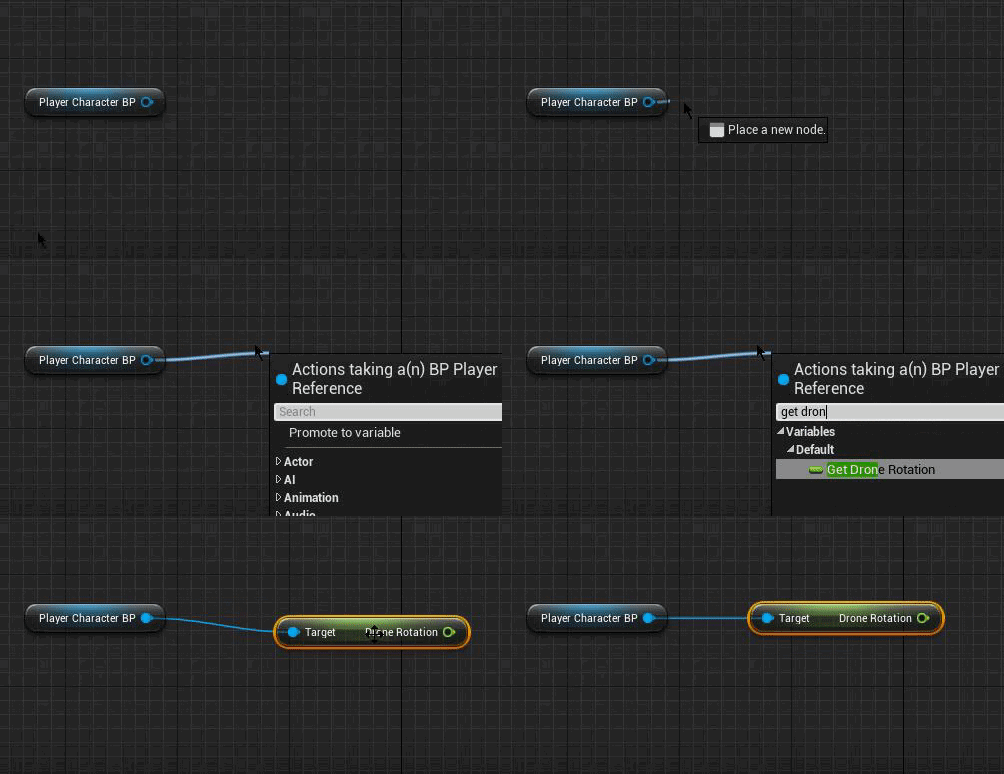
then you need to save this in the rotation float variable you created in the beginning
devout dagger
so all that in anim BP graph, not in the actor's regular BP graph, correct ?
ebon portal
all that happens in anim BP graph, in the event graph
except that you need to have a variable in your actor's BP that is the rotation of the actor
devout dagger
basically getting access to that float variable from the BP actor, right ?
ebon portal
exactly
devout dagger
aye, got it.. What's next? (how to use it to blend between 2 anims)
ebon portal
next you create your Blendspace
idk if your float of the BP actor is in degrees but I'll just pretend it is
devout dagger
so if it goes from 0 to 1 quickly, drone banks sharply. If it goes slowly - drone banks slowly.
ebon portal
yes that will happen

this is how the properties of the Blendspace should look like
except
that you have to drag the bank left to the left side of the slider, the idle to the middle, and the bank right to the right side
devout dagger
I see.. Why 4 divisions on the axis and not, let's say, 10 ?
ebon portal
the divisions on the axis don't have anything to do with the blending. The thing is, that you can't drag Animations in between divisions, to make it easier for unreal to blend
because imagine someone places his anims at the value 0.57498712984567194613
that's really stupid engine wise
so the engine allows you only placing animations at the divisions
in this case, the middle, left, between middle and left, right and between middle and right
Divisions mean basically the parts where stuff is blended and no animations can be placed
if that is somehow explanatory
@devout dagger
devout dagger
hmm
so in other words it can only be idle, 1/4 between idle and bank, 1/2 between idel and bank, 3/4 between idle and bank and fully banked ?
I guess when I get it working I can mess with division settings and see what it does
what's next?
devout dagger
@ebon portal ?
ebon portal
sry was having dinner
@devout dagger I think what you think is that divisions determine the steps of the blending right?
ebon portal
ye that's not the case, Unreal blends without steps (they're so small that they're unnoticable) those divisions are only for the UI of Persona, it's just for placing animations in a blendspace
devout dagger
ah, ok
ebon portal
okay so now comes the hardest steps of all
you need to go into the animGraph in your animation BP and do this

tadaaaah
I was just kidding with the "hardest step"
you just have to get your float variable, connect it to the blendspace you created
connect that to the final anim pose
and you're set
@devout dagger
devout dagger
I see.. So anim sequences are defined in the blend space and final pose if the product of blended anim, correct ?
ebon portal
pretty much yes
devout dagger
aye, thanks a bunch. Now it makes whole a lot more sense !
ebon portal
glad I could help 😄
devout dagger
btw, is the anim BP going to be ticking every frame, even if I haven't started blending anims ?
the idea is that there will be 2 triggers on the spline, so when the BP actor trips the first one, blending into banking will begin. When it trips the second one, blending back to idle starts.
so I wonder if there is a way to not do anim update until triggered
ebon portal
you don't even need that, unless you want some kind of deadzone
anim update will happen every tick
devout dagger
well, you said anim update is like a tick. So it will be ticking as event tick, every frame. I am doing it on mobile, so every tick counts
ebon portal
the thing is, it wouldn't change anything, because the anim BP would need to check for the trigger every tick
devout dagger
ah, I see
ebon portal
it's designed like that, don't think there's much you can do about it, except destroying and creating child actors non-stop which is obviously even worse
but the impact of the upadate animation isn't much, there's plenty of other functions causing much more perfomance loss
like blend per bone or stuff like that
devout dagger
aye, will test and see what's happening
@ebon portal in what situations would you normally use anim montage, state machines, blending, anim offset, anim composites ?
(or maybe you know of some tutorials that use real-life, so to speak, scenarios and what would normally apply to achieve those scenarios)
ebon portal
I don't know that many tutorials, since I take most of my knowledge out of the Unreal Docs, but I can give you some examples for each, as long as you're speaking about AimOffset instead of AnimOffset
Anim Montages I mostly use for stuff like reloading animations on weapons, since you can chain multiple animations into one anim montage and use them as one
anim montages are also often utilized when you're working with code, because a montage allows you easier handling of start. loop and end animations and can even be played within the eventgraph
A state machine is a tool that allows using states to control your animations
imagine you've a simple character and you want it to idle, walk and sprint
devout dagger
but don't you need to use blending between states ? (like transitioning from idle to walk to run maybe)
ebon portal
you don't need to, but you can
devout dagger
but if you don't use blending, wouldn't it snap from one anim to another ?
ebon portal
yes
devout dagger
hmm
ebon portal
if you select a transition this'll pop up https://gyazo.com/6574e1efcf43db28d0ee48eb13fd32b9
 devout dagger
why didn't you use states in my situation ? Like have different states and blend between them ? (just trying to understand the difference)
ebon portal
as you can see you've the blendsettings there, where you can adjust how and how fast it's being blended
the difference is that a state machine can't be in between two states
cursive hollow
is this a good place for modeling and texture questions
devout dagger
So basically blend space is needed when you need controllable blending
ebon portal
it can be in state1 and it can be in state2, but it can never stay while it's transitioning
devout dagger
and blending between states more like automatic one, you can't influence it from code
ebon portal
@cursive hollow we've #graphics channel for that, I'd ask in #ue4-general though, since modeling isn't really a part of this server
cursive hollow
yeah i know thanks Electri93
ebon portal
no probs
@devout dagger I don't know to what extent you can involve coding into the state machines, I've never fiddled around with that
you've to understand that even if it's called blending, it isn't really blending
it's transitioning
you can only determine how fast it goes from one state to another
devout dagger
yeah, I get it
ebon portal
that's why I'd recommend blendspaces for the drone rotation
devout dagger
I am surprised Epic never writes docs (at least some parts) in layman terms.. I grasp animation system a bit better now after talking to you than after few evenings of reading through docs 😃
thanks again
ebon portal
@devout dagger the thing about the docs is, that they're working with a certain base of knowledge and understanding of how Unreal Engine works and does things
so many people who are starting to learn unreal have huge trouble with it
I got lucky and learned it through my job
devout dagger
ah, cool
 neat compass
So is the aim offset preview broken in 4.15? I can't drag in my poses
devout dagger
@ebon portal Got it working (rough draft, still need to make whole thing generic and working with triggers): https://www.youtube.com/watch?v=PKFxzg0ciIY

😊 🖖
devout dagger
@ebon portal Even though those 2 drones are different actors, they use the same model/anims and thus they bank synchronously. How can I make them bank at different times and different amount?
ebon portal
I'll go through that with you later this evening if you've time for a video chat @devout dagger
devout dagger
I am going afk until Monday in a few hours 😦
and then it's all over again (day job). Also we are in different time zones, so it's highly unlikely I will ever have time for video chat with my current situation (not a situation per se, but just the way things are in life currently) :/
that's why I chat about UE4 when I am at work 🙀
sorry
devout dagger
@ebon portal PM'ed you
ebon portal
dw I think text might work too, it's just easier to confuse stuff through text
neat compass
Can anyone help with this?
the server appears to be stuck facing X+ in worldspace
for the client
ebon portal
@neat compass try #blueprint
 ivory blaze
Hello guys i want to know is there any trick in 3ds max to push up, those vertices come in the other mesh ?
frail basin
is that animation related question?
I dunno if max has setting for background constraints like Modo (you'd think it has something similar)
which constraint in place, one could move the other mesh against the one in front
ivory blaze
its related to anims, that part of mesh is a little big from other part and it's a little fat and makes some problem
 random totem
What's the bet software for creating new characters etc??
Best* sorry haha
I've tried blender my laptop hates it
misty dagger
yes, so where would people post questions about blender, 3dsmax, maya and software like that?
@random totem the best software is defined by you. Many people can create awesome characters with many differnt softwares, so that questions doesnt really have a simple answer.
random totem
yeah, blender doesn't run on my pc it literally hates it haha. Anything you'd recommend?
or do I just go for 2d animation?
misty dagger
I use maya and mudbox for my stuff, but if you really wanna dive into it, Id suggest zbrush and substance.
random totem
ah thanks 😃 yeah it's just I think the idea i have is too complex for 3d and would need an awful lot of work so I was thinking maybe go for a 2d/3d effect
like the animals and people are 3d but the actual scenes aren't
ummm do you have a link for substance hha it'only come up with stuff about drugs lol
ah found it don#t worry I got back into my student maya account that i forgot i had haha hanks for the help 😃
misty dagger
cool, good luck man
random totem
lady haha
I've found 3d max i just neeed to remember to install the tools first 😛 usually helps
random totem
do auto desk programs usually take a while??
Never mind it's done now I've decided to give 3D max a try i found maya a little cumbersome to use
 nova hemlock
if i scale a 'bone' in blender to make something squash, is that supported in UE?
short answer.. yes
 compact lake
Have you guys seen this already?
http://esotericsoftware.com/spine-ue4
I've dropped some money on their kickstarter like 3 years ago or more
Finally it's available in UE4
Basically it's a 2D skeletal animation system
With standalone editor for authoring content
copper dawn
@ivory blaze i think http://www.scriptspot.com/3ds-max/plugins/impressobjects does just that, but images currently not loading due to creators website being down
timid summit
anyone here understands root motion?
 vestal mulch
Is there a way to manually move joint oriantation in maya 2017?
vestal mulch
nevermind, found it
ivory blaze
@copper dawn Thank you so much
misty dagger
what?
 lone wadi
@misty dagger how to get such nodes? (Asset)
 open sequoia
Is the rigging toolkit a modular step in the animation workflow? I use modo indie but just heard that blender has had a port of the rigging toolkit. Does that mean I can just learn to do my rigging set up in blender and then animate/finalize in modo?
Or does the toolkit have features that require it to be used from start to finish?
I guess it comes down to whether or not fbx supports IK info? And perhaps to a lesser degree all the graphical control widgets that might be put on the skeleton inside blender
 quasi geode
hi guys, could you help with a newbie question :D? I'm combining 2 animation sequences and I need the next sequence to start at the exact location from the last one (they're not in-place animations), how can I achieve this in blueprint/animsequence or sequencer?
Edit: I ended up using in-place animations and position tweening, it's better for the world 😃
misty dagger
Does anyone have any idea of what could be causing this issue? https://streamable.com/video/7tqsk
Worked fine yesterday, today I started up the project and the toes started doing this
tiny monolith
Hi, don't understend what is key difference beetween Queued and Branching Point Montage Tick Types?
potent current
anyone here successfully used MasterPoseComponent? I'm having issues with parts lagging behind master when in networked game
 dreamy cloak
Hey guys. Quick question. Are there any good tutorials on retargrting animations from one skeleton to there. One characters is rigged to the epic skeleton the other is not.
 dark vortex
I have an animation; I simply want it to LOOP less frequently. How might I do that?
devout dagger
it should loop on its own, automatically
(well, depends how you set it up with your actor)
 weary pine
If you're blending you could try making a montage with a base pose added for padding
probably a horrible idea
dark vortex
No, this is extremely crude I just need for a demo
weary pine
Other than that if its within your ABP you could set up a transition state to need to wait
but it'd make it static until it loops
dark vortex
I literally dragged the animation and the npc continues to JUMP...I just want them to jump less frequently
Like, how do I simply add 'empty time' that would make it work
dark vortex
Anyone?
 whole rain
@dark vortex Create an animation blueprint, make the jump animation a montage without anything else, go in the event graph of the AnimBP and do something like this:
I did it with blinking, but it can be used for other stuff.
Use duration if you want to change the play rate.
Anyone have any good tools or tutorials for doing lip syncing in Ue4?
Preferably off of pre-recorded audio/wav files.
 glossy flicker
How efficient are animation blueprints?
I can't do that in c++, right?
I feel bad about doing math calculations per frame on 10 characters in the game
whole rain
Just ten, you're probably fine but know that blueprints can be pretty expensive.
@glossy flicker With blueprint nativization it isn't that costly: https://docs.unrealengine.com/latest/INT/Engine/Blueprints/TechnicalGuide/NativizingBlueprints/#inclusivenativization
Technical guide for programmers exposing gameplay elements to Blueprints.
Yes, that counterdicts what I said but that was in the context of not doing nativization.
glossy flicker
but I suppose thats not the way it's meant to be done
I mean nativizing is a pretty new feature
what did people do before that
whole rain
No idea, I'm new to dealing with animation myself. I'm not the artist but the programmer. I was asked to look into ways of doing things so I'm here.
Sorry.
 ruby sapphire
@whole rain If you're worried about the overhead of the math, specifically from doing it in blueprints, you can do the math in native code and just call it from the blueprint.
whole rain
Yep. I was just stating that with nativization for blueprints, including animation ones, it isn't as much of a worry as in the past.
 drifting oyster
I need to reder a Sequencer sequence into a video. How do I choose the CineCamera to be the default camera? Right now it renders the video from player's PoV.
Okay, figured it out. I didn;t have Camera Cuts in my sequence.
subtle matrix
anyone know how to change the default mesh on skeleton?
my character skeleton is showing shoulder armor as it's default mesh
Reference viewer is wrong too
eh
Had to re-import the mesh, open the skeletal mesh, jump to skeleton tab and save
 royal saddle
hi guys, anybody use ARTtool on MacOS ? Can you use Switch character function ?
 fair crater
It is a model which made physical setting for animation.
Share assets. https://bowlroll.net/file/130391
 whole rain
What are some recomended plugins/things for UE4 for doing lip syncing? I know about FaceFX but that hasn't been updated since 2015-ish. There is also the port of Oculus' Lip Sync thing but apparently it is pretty low quality. 😐
timid summit
hey how do i make my character's pelvis and arms n stuff rotate up and down as well as horizontaly, but the legs stay on the ground
like not to rotate the whole character
 forest idol
Anyone around with Sequencer & VR experience? I am having some issues recording stuff in VR
timid summit
@royal saddle repeat that but this time as if you are speaking to a brainless monkey
misty dagger
is it possible for me to place my custom character model and use the ue4 manaquinn skeleton?
forest idol
yea I think so
havent done it, but cant u just replace the mesh part of it? the skeleton is a seperate file I think, right?
 round shale
Here's a question
Is AI blackboard stuff done in C++ or is that done via the editor?
Like is it a version of BPs?
supple axle
I'd say mostly in editor
blackboard is just a key value store, you can put values in it in C++ too I'd imagine
 sleek gyro
Is there a good way of blending walking and running animations so they line up and don't make the character look like he's sliding around?
frail basin
root motion
but it brings new problems to solve
and unreals root motion support is subpar

 molten stump
Any tutorials on how to do blending?
 polar shore
UE4 auto generates bones if your fbx has anim data ?
even if your fbx file has no bones in it ?
 past tree
What term am I looking for where you bake all the vertices of an animating mesh in Maya to one joint?
dusk dove
Hey, I have 2 separate Animations:
A Battle Stance Animation
A Targetting Animation.
However, the Battle Stance animation has a slightly rotated upper body.
This causes the targetting animation (Shoulders) to be slightly rotated , too.
I already tried to use "Find Look At Rotation" from Shoulder SOcket to Target Location, but that doesn't work properly.
 finite trail
Anyone know why this would be happening with a typical aim offset?
stuff I've tried...
- Mesh Space Rotation vs not.
- No base pose on aimoffset
- Not using UpperBody slot
pretty much everything I can think of, either gets same or worse results. Worked before 4.14 or so I think...
ivory blaze
Hello guys, I made a simple character in 3ds max, how i can automatically apply the rig from mannequin to my character ?
is there any tutorial for that ?
 weary ferry
So there's no tools for animating inside EU4, right?
All has to be done with a 3rd party editor
iron stone
Hey Everybody, i want to create multiple state machines and i want to switch according to the mode my character is in. Like if he is in a battle mode i want to run different animations for idle,walk,run etc
 stark grail
@weary ferry there are some basic animation tools - check out the most recent video Epic released with animation in the title
weary ferry
@stark grail thx bud
stark grail
np - like i said, they're really basic tools, but if you just want a basic pose they'll get the job done
misty dagger
Tesselation works with skeletal animated objects ?
misty dagger
yes, but only if you have less than 255 bones per element
else it internally splits up the material elements and that will produce ugly broken seams where they border
 hushed spruce
So has anyone figured out how to use 4.16's built in Control Rig? (From the master branch on GitHub).
I found the Control Rig Plugin, Created a Control Rig from the Mannequin Skeleton, Added a Control Rig component to the Mannequin in the level, Switched to the new "Animation Mode", created a New Control Rig Sequence, Added a Human Rig to the Sequence Track, targeted the Mannequin in the level and now lost.
Really hoping it can be used in VR, so it will be like posing an action figure with your hands.
devout dagger
I have BP Actor with skeletal mesh and anim montage
how do I make it play in-game?
basically I need to kick off playback on trigger or on delay
dusky arrow
should probably just run through one of the basic animation tutorials from Epic for this. It's kind of fundamentals that you need for the anim blueprint
devout dagger
actually all anim tutorials suck
they deal with mostly anim tools UI and how to get third person player running
nothing about anims with BP actors that aren't pawns
misty dagger
little question if i was to make this guy hop i wouldnt need to do bones would i?
https://gyazo.com/4a036084088282e88d474bc270f9a09b
 devout dagger
I figured it out. Apparently montage can be used as anim asset, so I don't need to use anim BP at all
 verbal ocean
@misty dagger If you need it animated in unreal, you will need bones if you want to transfer animation easily, or maybe you could find a way to use the facial shape blending to animate a compressed / stretched form and the transform directly in matinee ?
misty dagger
ok im here
 radiant matrix
too
show message again
then show me your folder with your animations and yee character mesh export
i need file sizes
misty dagger
ok the error i got?
radiant matrix
yee
misty dagger
 radiant matrix
the other stuff
misty dagger
@radiant matrix its saying it doesnt have the root track
radiant matrix
what are your steps on export
radiant matrix
that all?
 radiant matrix
the file size after export?
misty dagger
yup
radiant matrix
go into ue4 and show me your skeleton
misty dagger
ahh 1 sec i may of found the issue
misty dagger
@radiant matrix https://gyazo.com/71bcafe637ea0ab2483c338d96c723e6
 devout dagger
has anyone managed to remove Armature from the skeletal hierarchy when exporting from Blender ?
(there is a tutorial about editing FBX exporter code in Blender, but that screws up scale of the mesh when animation is applied)
half orbit
is the retarget and Skeleton sharing bone name case sensetive?
And what about the order the bones is in the Tree? Do they have to be the same even if they have the same parent structure?
 haughty linden
might be a longshot, but any of you wonderful people that can help me skin a cute little character? 😃
a rough pass is more than enough
dreamy cloak
Hey guys I've been trying to retarget some anims to a skeleton that isn't rigged to the epic skeleton, it works pretty good for the most part but the fingers turn all twisted and weird lookin.
devout dagger
does anyone know how to work with anim montage notifiers ?
dreamy cloak
Yeah
half orbit
@dreamy cloak have you watched this? part 2 and 3 might help, It did for me.
https://www.youtube.com/watch?v=FDbpHamn2eY&feature=youtu.be
 devout dagger
does anyone know how to work with anim montage notifiers ?
frail basin
 misty dagger
jesus christ finally a decent approach to clothing in ue4.. never use the maya apex plugin again!
im celebrating
Ooooh, I need to know more about that rigidBody node. He didnt say anything about how it functions... He just plugged it in and it magically worked, but whats going on.
 rancid charm
the official anim montage tutorial series is pretty in depth if you ask me
devout dagger
where ?
misty dagger
Hi!
In unity there is a function of the alignment root motion animations on different bones, is there any equivalent in UE4?
devout dagger
Still having trouble with montages https://forums.unrealengine.com/showthread.php?139426-Anim-montage-notifiers-how-to-work-with-them&p=680454&viewfull=1#post680454
😦
can someone please help ?
undone flax
What is the best way to have an NPC turn their heads towards a point in space?
copper dawn
show them something offensive
copper dawn
hey @devout dagger three guys walked into a bar, but Messem refused to give them a drink resulting in this joke not being as good as it could have been.
 slim anchor
i need help
i will make a video explaining the issue, idk how to explain it by words
well brief explanation is
i have lets hands that have the same skeleton as the weapon
except the weapon actually has few extra bones (for the weapon itself)
now, i import the hands and use hands skeleton as a "master" skeleton
i then import 1 weapon and as a skeleton i use the hands one
that works good
now...
i import another weapon that has the same skeleton as the hands one but again few extra bones for the weapon itself (now different bones because its a different weapon)
and then i get an error saying failed to merge bones etc...
so when it asks me to like replace anims or w/e i click no
then right click my skeletal mesh, setup skeleton and choose an already existing one
it shows me the WHOLE list of bones and it clearly says that some are missing (the weapon specific ones)
i click add those bones to the existing skeleton and it gives me an error again
saying animations will be compressed or w/e
ah... a single video will explain this better
 gilded magnet
Okay! anyone around here?
Question nrº1: I'm using Maya 2016 with A.R.T, to animate the sample third person character that UE has ( I never animated before) and when the character finally gets loaded on A.R.T, it's like, facing down
like this
What's happening?
Question nrº2: I need to learn how to do animations, because I have to finish a game for a project ( deadline 5 months from now), any recommendation?
 stiff thunder
No.1: It could be your UP-Axis.
No. 2: Learning animations in 5 months is hard but you can find good tuts on e.g 3dmotive or Books by M. McKinley (on an old maya version but still very good)
 young urchin
books only good for animation theory, like example basics of cartoon animation
gilded magnet
how do I change the UP-axis? ( I really suck at this)
young urchin
@gilded magnet good channel on animation https://www.youtube.com/channel/UC10PV9Ih-3RIJnK7IGh4mPQ

YouTube
Hi, my name is Yun. I'm a 16 year veteran Broadcast Designer and 3d Generalist. I created Tales of Nalstone as an experimental animation project. My channel ...
stiff thunder
Settings/Preferences -> Settings -> World Coordinate System. Then you can choose between Y or Z Up axis. @gilded magnet
at least it should be something like that. I'm on an old Maya version.
devout dagger
can someone please point me to a tutorial about moving actors along splines using Sequencer ?
 river helm
I am trying to make QTE events using sequencer and want to ask can I change animations inside a sequence on runtime
?
undone flax
@Izaya#9268 If you just want some animations, look into using Mixamo. They are owned by Adobe but it is entirely free and you can even import your own model/mesh.
slim anchor
hey guys
can anyone explain me why the hell is this happening??? https://gyazo.com/f9c34593460ca2f6a54e1be8d5a7b2c1


as you can see the whole hierarchy is the same
only thing i am adding are extra bones
devout dagger
can someone please point me to a tutorial about moving actors along splines using Sequencer ?
slim anchor
is there any limit of how much times i can add extra bones to a skeletal mesh or what
slim anchor
fixed my problem
i had EXTRA bones that nothing was bound to
suprised that ue4 couldnt solve that by itself...
 buoyant raptor
When using anim montages, is there a way to store the different sections as enums instead of by string name?
devout dagger
store it as enums and array of names
haughty linden
helloes, using the sequencer recording with my playercharacter looks weird when i play back the sequence after recording
its flipped 90 degrees to one side
is there something i can do to fix that?
seems like setting root motion to zero and forzing root fixes the problem
so it looks weird when i record now, and correct when i view the recording
 raven lantern
@Izaya#9268 You need to switch Maya to Z as the up axis. (Maya is Y up by default)
 split vale
So question to this channel: I am a programmer and I tried to do keyframe animation once. At that point in time I realised that animation is not for me. But I'd still like to somewhat have something that resembles prototype animations when I do my prototype abilities.
What do you suggest I do?
I once dabbled into using Kinect for motion capture, but I never really had the proper conditions for making use of it
To add to that, I'd like it to be hand-to-hand combat animations. I know there are like shooting guns and fighitng with swords, but I don't really see hand to hand animations
Do you know of methods or something like that I can make use of to produce placeholder animations on my own perhaps?
 vocal wren
Not sure if this is the right channel but I’m experiencing some problems with the sequencer. So the problem is that once I try to render my master sequence, it does not render through the correct camera. I’m currently working on a cinematic including animations and camera movement.
I have a Master sequencer in which all the shots are placed and all the shots have their own camera cuts. I’ve tried to turn on auto play on in the master sequence, create a new master sequence and import my shots but with no result. Also the thumbnails do not show the correct camera. When I lock the camera and show it through cinematic view, it does show the correct camera’s and shots.
I’m kinda stuck here now so is there someone that knows a solution? I’m kinda new with the sequencer and Unreal in general.
devout dagger
can someone please point me to a tutorial about moving actors along splines using Sequencer ?
buoyant raptor
When using anim montages when I call Play Anim Montage, it always returns the timing of the end of the montage. Has anyone experienced this before?
devout dagger
what do you expect to be returned ?
buoyant raptor
I would expect it to be 0.0 or the end of the first section since that's what i'm attempting to play
devout dagger
 wet fog
@split vale i feel your pain. i tried to do keyframe animation and its actually the most frustratign thing in unreal. having to select each and every bone you want to change, set keyframe, manually moving everything along with it to make it look natural, set another keyframe for every edited bone etc
it felt like i had to be doing it wrong, because it was such an awful way to do animations 😦
either that or animation artists that dont use motion capture are actually some sort of zen master that dont experience anger or frustration
buoyant raptor
@devout dagger can you not specify a start section?
devout dagger
you can specify timing