#animation
1 messages · Page 29 of 1
 remote summit
 viscid willow
Oh interesting, like crash bandicoot vertex animation. I'm not sure how Unreal would handle that. I seem to recall some kind of solution for that, I'll have a dig
 smoky shell
Your bones are oriented wrong
And they use non-unreal orientations also
remote summit
smoky shell
Your bones are oriented wrong
And they use non-unreal orientations also
how are the bones "wrong"?
smoky shell
Not pointed at the child bone
viscid willow
It is weird, and yeah I think you're right I think it will be an issue Blender side
smoky shell

Should be like this

It will be pivoting around the red line, which is whats causing this
My comment about the unreal standard is worth taking to heart in the future
Creating things the same way Epic does is how you avoid issues and a lot of time wasting
Despite coming from film as a creature rigger I still don't bother rigging and animating in Maya, I use Cascadeur and Akeytsu that rig for you, it means if I iterate I don't lose work and they are far more powerful than Maya, even if you redid your skeleton then you can retarget the old onto the new but the raw animation files (regardless of Maya, Akeytsu, Cascadeur) will be lost. Studios only stick with Maya for this because they've developed entire pipelines and toolsets around it. If I had to make a sweeping change to a skeleton I would keep the old one purely to retarget from if I need to modify the animations created from it.
And given the bone orientations, your animations aren't going to survive any fixes
remote summit

so, in this screenshot the Y is pointed down toward the child
Normally, this would be X, if I was to have Y forward like Manny
smoky shell
It would be X regardless, that is the bone's aim vector, the character's orientation isn't a factor in the aim axis, it would only be a factor in the right axis actually because these are relative, it probably isn't
If you create and rig a character from scratch, the first thing to do is setup an IK Rig and IK Retargeter and retarget some UE5 Manny animations onto it, even if the character is wildly different it will show you if there are issues with your rig before you start animating, in the future
Though it might not catch this
remote summit
smoky shell
If you create and rig a character from scratch, the first thing to do is setup a...
That is an interesting concept
smoky shell
Well, you've seen for yourself what happens when you need to change a skeleton after the fact
So mitigating any possibility of needing to do that is essential
remote summit
smoky shell
Well, you've seen for yourself what happens when you need to change a skeleton a...
certainly, I didnt think of that as an option. For future dev it can be part of the pipeline for certain
smoky shell
When I finish rigging a character I reference in UE5 Manny and go through every single bone orientation and ensure they match
remote summit
My point of question here, now that we are discussing this, is that I set the joint to orient and then define the "look down" bone direction
local rotation is set to Y for that, since X is set to forward on the joints
the reason this matters is... the entire down the joints bones are set this way

with Y being the look down bone direction
I can change that.... but I dont see how that will solve the issue. That is where I am confused
smoky shell
remote summit
local rotation is set to Y for that, since X is set to forward on the joints
Unreal can definitely support a Y aim axis
But if you want to use settings that are used throughout Unreal for bone vectors then you should use X aim
The comment I'm replying to doesn't make sense to me, X = aim/forward, then Y can only be up or right vector
Based on what you showed, Y is your aim/forward
remote summit
ah... well I see the confusion here
smoky shell
The orientation of your mesh shouldn't have any impact on bone orientations because they're local
remote summit
smoky shell
The orientation of your mesh shouldn't have any impact on bone orientations beca...
maybe... but I am not so certain of this. In maya I have to manually set Z up and X forward (dont ask me why I did this so many years ago) lol
To make this work in maya, I have to set the orientations properly with X being forward (or so I think?)
I could be wrong on that assessment... maybe I can modify the forward direction of everything
and X foward meaning, world position, not local orientation
I see where you are saying that, and that makes sense now that you mention it
smoky shell
Those are the co-ordinates you're setting for Maya to work in
I also set it to Z-Up because thats what Unreal uses (and frankly, Y up was completely random, it never made sense based on any field, Z up does)
There is no relationship between the co-ordinates that Maya is set to and the bone orientations
Those bone orientations are going to be relative, not in world space
So Maya's world space co-ordinates are irrelevant for this
remote summit
k, so... if Y is my forward, that is my primary?
smoky shell
You can use Y as aim, but the orientations need to correctly point down the bones
But not for all bones
You'll need to reference in UE5 Manny and see how the bones are oriented, some are effectively placed based on world space; have a look at the foot_l bone
remote summit
in maya, my rotate order changes, to avoid gymbol lock
smoky shell
There is no universal answer for bone orientations
remote summit
so, for example... the thigh uses yzx as the rotation order... so maybe I can try that....
in theory, Y should be primary, Z should be secondary
smoky shell
You can see Manny has the bone oriented towards the child

I doubt Unreal is going to care about the rotation order
But then look how the foot_l is oriented


The ball_l as well

If you want a rig you know is 100% compatible with unreal and takes very little additional work to setup, then matching these orientations is the only way to go
smoky shell
Since your calf isn't pointing at the child you're going to need to change the orientations anyway, which will break animations (but as said previously, you can retarget from the old to the new)
So its an opportunity to do it the 'right' way
Unfortunately this is something everyone learns the hard way
remote summit
So, this doesnt look like it is pointing down to the child?
 smoky shell
Open the skeleton asset and show me the left calf
remote summit
one sec
 uncut flint
any idea? i cant get it working :(


 smoky shell
smoky shell
smoky shell
Yeah the issue I showed here is present
smoky shell
remote summit
It's clear in this one
remote summit
smoky shell
It's clear in this one
that is the knee joint controlled by the IK
let me check something
smoky shell
Open it in Maya, set to object space, select the left calf and then press the + key to change the widget size until it's long enough to extend past the foot
 smoky shell
The y axis should land directly on the foot
 heady sundial
any advice how to get this to look a bit better when its in idle it all works fine

bow is positioned wierd when im playing aim animation
remote summit
smoky shell
The y axis should land directly on the foot
Wait, you mean the foot bone?

This has it going down to the child the calf
the calf is not pointing at the foot though
so... that might be the point of issue here

which seems odd on how I would have missed that, all the other bones align 😦
smoky shell
 remote summit
yeah
smoky shell
remote summit
which seems odd on how I would have missed that, all the other bones align 😦
Yeah, these mistakes happen easily and often, you gotta be very very thorough because it costs a lot when something isn't right
remote summit
smoky shell
Yeah, these mistakes happen easily and often, you gotta be very very thorough be...
I thought I was, but I did make this during the gamejam... so.. maybe sleep deprivation
Well, I certainly appreciate the walking me through it
smoky shell
You gotta go over every bone with a fine tooth comb
remote summit
looks like I have my week planned ahead of me 😛
 devout dagger
viscid willow
Oh interesting, like crash bandicoot vertex animation. I'm not sure how Unreal w...
devout dagger
viscid willow
Oh interesting, like crash bandicoot vertex animation. I'm not sure how Unreal w...
I figured UE5 has some kind of new state machine that UE4 didn't have. Maybe that can be used in lieu of animation blueprint ?
smoky shell
Before alembic, UE actually had vertex animation already, but I don't recall the name
I know Epic released a maxscript for baking it out of 3ds max but nothing for Maya
I got 99% of the way to translating it to Maya but fell short, I released the python script many years back but dunno if I can find it now since the forums lost a lot
It used .exr format to store 32-bit data in an image IIRC
viscid willow
smoky shell
Before alembic, UE actually had vertex animation already, but I don't recall the...

User guide for the 3D Max Vertex Animation tool set.
viscid willow
devout dagger
I figured UE5 has some kind of new state machine that UE4 didn't have. Maybe tha...
I dont think there's a new kind of state machine, at least not for animation
 gray dock
Hi everyone. My name is Wayne. I have been using Unreal for about a year, specifically just chipping away at new skills as I go, but I want to specifically begin using it for animation and rendering.
Curious if you can recommend any tutorials that explain the best and most efficient way to work for setting up a scene and using Sequencer. Any support is appreciated. Thank you!
smoky shell
viscid willow
This? https://docs.unrealengine.com/4.27/en-US/AnimatingObjects/SkeletalMeshAnim...
Yep
smoky shell
viscid willow
I dont think there's a new kind of state machine, at least not for animation
I don't think there is either
But the existing animation graph improved immensely with UE5
 steel musk
how do i import mixamo animations so they work with root motion and dont glitch out
 next oriole
Hi all! I think I'm running into a limitation of UE in the sense that I can't have a static mesh that has its pivot at the center of it's mass, but also zeroed out on its position coordinates, yet does not sit at the origin of world space?
For further clarification, here is what I'm trying to do: I have a very simple prop/character that I am trying to make animation friendly (all animated properties at 0,0,0). I don't need anything super fancy, so I'm trying to devise a way to let the animators animate these static meshes directly via the sequencer. I can't show the actual prop/character, but for the sake of this conversation, imagine I'm animating a street sign (like an American stop sign). The pole part (that goes into the ground) would have its pivot at the center of world space at the bottom of the pole, but i'd like the static mesh that makes up the actual sign on top to have its pivot centered to its bounding box and translation values zeroed out.
I can center the pivot to bounding box in unreal via the modelling menu, but then the translation values are no longer (0,0,0). If I zero those out manually, the sign snaps to the center of the world, instead of on the pole where it is supposed to be. So, hence, what i mentioned before: There doesn't seem to be any way to have both an object with translation set to 0,0,0 that also has its pivot centered locally to the object. (Similar to what you'd do in Maya with a freeze transforms). It wouldn't be the most ideal solution, but i'd be okay with sticking these meshes in a blueprint and inserting a null or some sort of control if it comes to it (as long as it allows the animator to have clean position coordinates to start with), but i'm trying to keep it as simple as possible.
Hope this all makes sense and thanks for any pointers in the right direction!
viscid willow
next oriole
Hi all! I *think* I'm running into a limitation of UE in the sense that I can't ...
It sounds a bit like what you want are remote pivots or proxy controls, something like this? https://youtu.be/FgJ1stTScxI?si=jCFxxD6nr3cu-KBn&t=670
This is a bit of a different example from your use case, but the idea of a separate pivot to animate with is something you might be able to handle with control rig.

With Unreal Engine 5.0, rigging and animating in-engine became a real possibility. UE 5.1 has taken another step forward, so artists don't have to hop back and forth between various DCCs. Learn about the recent changes to the Control Rigs and animation tools via real-life examples.
Learn more about recommended Hotkeys & Preferences: https://dev...
next oriole
viscid willow
It sounds a bit like what you want are remote pivots or proxy controls, somethin...
Thakns! I will check this out. I havn'et had a chance to dive into the control rigs much, mainly because as far as I can tell, you have to have a skeleton and point weighted geo/mesh in order to use them? Is that still the case or can you just attach controls to regular static meshes via parenting/hierchy?
viscid willow
next oriole
Thakns! I will check this out. I havn'et had a chance to dive into the control r...
Oh sorry I misread your original message when you said static mesh 😅
Control Rig is only compatible with skeletal meshes
next oriole
which is a shame
but i guess they assume people will use blueprints in the other scenarios
but i think even if i use a blueprint, i'm going to run into the same issue
viscid willow
Like you mentioned at the end of the original post. Could you have a component above the static mesh in the blueprint heirarchy, like a scene component, and animate that at the correct pivot, while the pivot of the sign is unchanged?
Just wondering, for a prop like this, wouldnt it be preferable to have the pivot at the base? Since that would be the most useful origin in most cases for an asset like that. That way it snaps into an ideal position when you pull it into a scene.
 woeful iris
I have some rigged models- is there quick/easy/simple way to enable physics for the skeleton? e.g. I was have the model floating midair and want the skeleton to react the force of the position changing
devout dagger
viscid willow
I dont think there's a new kind of state machine, at least not for animation
this is what I was talking about https://docs.unrealengine.com/5.0/en-US/overview-of-state-tree-in-unreal-engine/

Overview of the StateTree system.
viscid willow
devout dagger
this is what I was talking about https://docs.unrealengine.com/5.0/en-US/overvie...
Ah right, that's for AI, not necessarily driving animation systems. Although you could play animation when in a particular state I suppose
devout dagger
how would I connect the dots, so to speak?
like, there is a character actor, state tree and geometry cache - how to tie it all up together?
next oriole
viscid willow
Like you mentioned at the end of the original post. Could you have a component a...
re: the pivot location, yes, that's what I was trying to explain above. For the pole part of the sign, the pivot would be at the base, for the reasons you mentiond. But for the actual sign that is attached near the top of the pole, that should have it's pivot in the center, not at the bottom of the pole. (otherwise when you tried to rotate it, it would fly off the pole due to the offset).
re: additonal compoent, they suffer from same issue: I can't zero them out if i move them away from origin of world.
viscid willow
next oriole
re: the pivot location, yes, that's what I was trying to explain above. For the ...
Would the sign be a child of the pole in that case?
next oriole
viscid willow
Would the sign be a child of the pole in that case?
yep, but would still have the ability to be animated independently as a sep piece
viscid willow
next oriole
yep, but would still have the ability to be animated independently as a sep piec...
okay, so you'd wanna space switch it? So it would be able to follow the pole and also be independent in world space?
next oriole
viscid willow
okay, so you'd wanna space switch it? So it would be able to follow the pole and...
more or less, yep
viscid willow
next oriole
more or less, yep
haha it's starting to sound more and more like it needs a rigging solution
next oriole
viscid willow
haha it's starting to sound more and more like it needs a rigging solution
yeah, it's just seems such overkill to have to throw bones in and point weight just to solve this issue. I'm gonna go down the blueprint rabit hole first and see what I can do.
viscid willow
next oriole
yeah, it's just seems such overkill to have to throw bones in and point weight j...
It's nice when you can get away without bones for what would otherwise be a simple animation. Goodluck 😄 I'd be keen to hear what you come up with if you're up for sharing
next oriole
viscid willow
It's nice when you can get away without bones for what would otherwise be a simp...
yep! will def report back if i find a solution that doens't involve me sacrificing a chicken 🙂
viscid willow
next oriole
yep! will def report back if i find a solution that doens't involve me sacrifici...
I thought that was step one
devout dagger
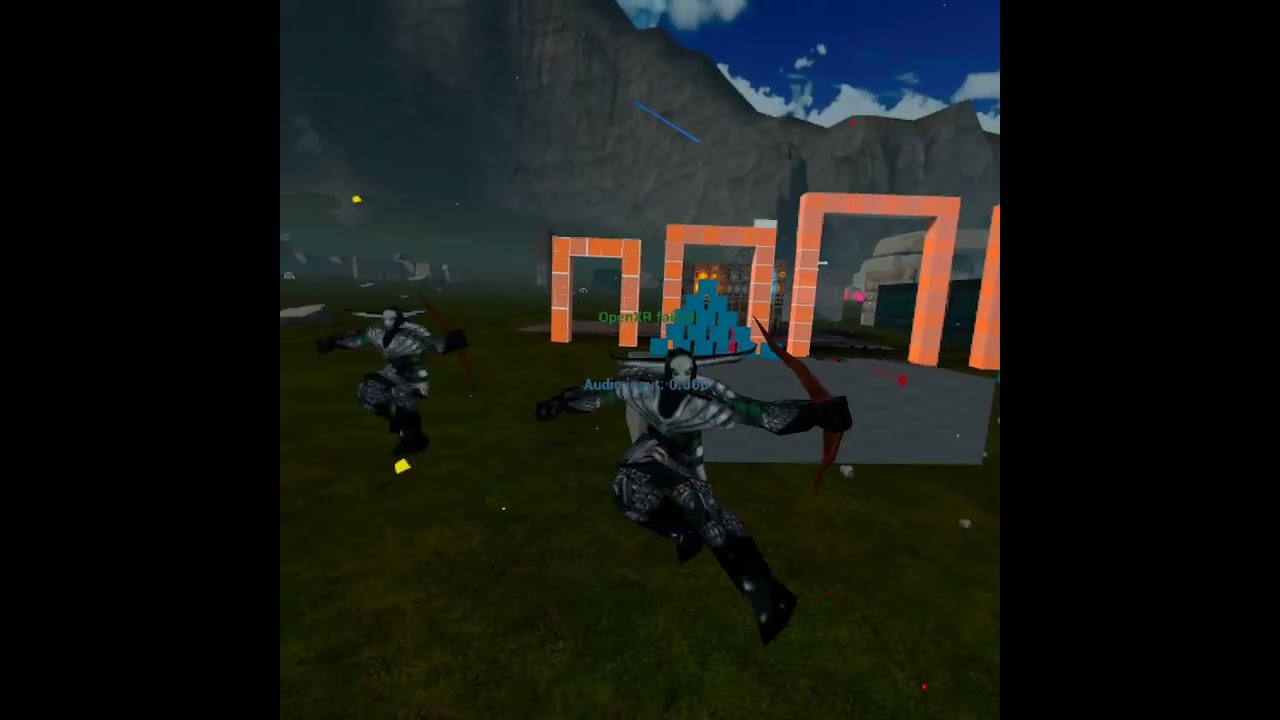
there ya go, Alembic Geometry Cache (still no controls, just raw looping through all anims)
viscid willow
Nice 😎
devout dagger
@viscid willow what I can't figure out is how to play certain frames only (whether play and stop or play in the loop)
viscid willow
devout dagger
<@142605242620444672> what I can't figure out is how to play certain frames only...
Sorry I don't know much about alembics
 pallid needle
Hope everybody has an amazing night/day! 🙂 God bless you all! 🙂 Jesus loves you! 🙂
 fresh storm
Hi there. I've checked many resources online and still lack a bit of clarity on the subject: is it possible to retarget skeletons (DIFFERENT skeletons) in UE 5 without the need to use IK Retargetter and baking retargetted animations? Basically I just want the old-style mapping of bones while having the ability to use same animations across mapped skeletons. Nothing really fancy. Marking skeletons as compatible does not really do the job.
 subtle lava
Hmmm did we not get IkRig profiles in 5.3 or am I a little blind?
 languid mango
Hey can someone explain what these warnings mean?
 viscid willow
languid mango
Hey can someone explain what these warnings mean?
viscid willow
languid mango
Hey can someone explain what these warnings mean?
Sounds like those events are deprecated in favour of those Anim Node Functions it mentions.
Didn't realize that had changed 😅
languid mango
viscid willow
Sounds like those events are deprecated in favour of those Anim Node Functions i...
What does this actually mean? I just started with animations, following a Ryan Laley video from 3 months ago (so not that outdated) and it still gives me these warning. 😦
viscid willow
Oh they're just a warning to say they're not recommended to use, because there is a new way to access those events. If you need to use those events you should still be able to. Otherwise you could look up anim node functions which seems to be the newer system.
 wind vapor
Hi
languid mango
I looked at this https://docs.unrealengine.com/5.2/en-US/animation-blueprint-node-functions-in-unreal-engine/ and this https://docs.unrealengine.com/5.0/en-US/animation-node-technical-guide-in-unreal-engine/ and I still don't understand what these anim node functions actually are, and what the difference is to these states.
Using Animation Node Functions.

Guide to creating new nodes for use within graphs in Anim Blueprints.
I guess I will just continue doing it the old way..
These anim node functions look like an overly complicated way of doing exactly the same stuff you did before with the states.
subtle lava
subtle lava
Hmmm did we not get IkRig profiles in 5.3 or am I a little blind?
update in regards to this
making my own plugin to generate ikrig presents on to unknown skeletons, I will eat my own shoe before I set another one up my self again
 limber shell
Does it relly have to be this much effort. Want something to move when my care is driving.
For that i need, anim blueprint, sequencer to create animation, and an animation rig to do the handels so i can move stuf in the sequencer. Then i need to convert my animation to a montage and then implement it.
I dont get why it is so many steps. I have it all now but if theres a better way just saying play THIS animation when pressing this key, direct in the animation BP pls tell me
 fresh storm
Hi there. I've checked many resources online and still lack a bit of clarity on ...
fresh storm
fresh storm
Hi there. I've checked many resources online and still lack a bit of clarity on ...
Bumping up 🙂
viscid willow
languid mango
These anim node functions look like an overly complicated way of doing exactly t...
fair enough. Looks like it's built to be more state agnostic and to include more functionality. Presumably for more reuse and for being more specific about when certain logic is used. The old setup is certainly easier to understand
viscid willow
limber shell
Does it relly have to be this much effort. Want something to move when my care i...
Animation is complicated.
If you're making a car that the player can control, you might want to use a state machine rather than a montage. Typically Montages are for performing certain gameplay actions. For things like controls where the player input determines whether the avatar is moving or not, a state machine is often preferable.
limber shell
viscid willow
Animation is complicated.
If you're making a car that the player can control, y...
Thnx , what about the process, I mean imorting it from maya would have saved me so much time but now when I have done the animations I will use them, but u do not need the montage if I'm using state machine ? Do you have any tutorial tips on youtube ?
 small shale
For a attack combo sequence. Should i put each attack in it's own animation sequence, or is it better to all them in one file?
 distant dagger
small shale
For a attack combo sequence. Should i put each attack in it's own animation sequ...
distant dagger
small shale
For a attack combo sequence. Should i put each attack in it's own animation sequ...
usually you want every attack to have a return to idle so they should be their own sequences.
You can put it interrupts in-engine to use another followup attack and interrupt the 1st animation at the appropriate spot, before returning to idle
 spark blaze
I started playing around with Control Rig and accidentally hid the rig controls by pressing T. When I look at the Animation Settings the Hide Control Shapes setting isn't toggled on. If I select something else in the viewport with the shapes hidden, I can't get them back unless I hit Ctrl-Z. Anyone know why this happens and what T is actually doing? In the clip, I first toggle the shapes with the menu. Then I toggle with T, then I hide, select another object, try to go back to bungee man and toggle with T, but it doesn't work. I have to Ctrl-Z to get it the shapes back.
small shale
distant dagger
usually you want every attack to have a return to idle so they should be their o...
Thankyou for the tip i'll try i t out!
languid mango
viscid willow
fair enough. Looks like it's built to be more state agnostic and to include more...
I see this is a trend in Unreal Engine 5, old perfectly working systems get replaced with new systems that have more options, but are vastly more complicated to use, instead of just expanding the old ones.
It's very clear these new systems are designed by programmers and not UX designers, who would have designed them in a way to be intuitive and user-friendly.
 sharp coyote
anyone know why my crocodile's hands are going through the ground or rather why they are not sticking in one place? in the original animation the hands remain almost static while the elbows and arms move but my croc's hands move with the rest of the arm
the feet don't seem to have that issue so im not sure what im missing rn
limber shell
When i have a state machine on our car, there is a problem that its the only thing that can go into output POSE. But we have wheels from chaos wheels that goes into the output pose, how can i combine multiple things into output Pose?
 crisp granite
Hi hello

Is it normal that I can only rotate bones in edit mode of Retarget editiing mode ?
 tribal saffron
My control rig is skewing my hand orientation, been trying forever to fix

Anyone able to help? i just need to move the resting position of the hand slightly so the hand is aligned with the wrist 
 mint pasture
I'll try posting my issue here
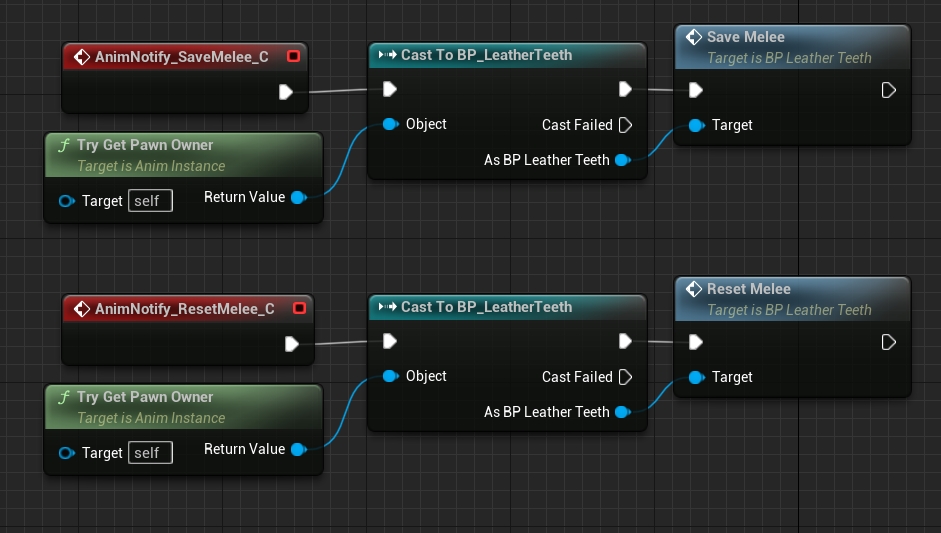
Hi, I am struggling with an issue with anim notifiers on my project. I have a very basic hack n slash project that I use to test and refine my skills in UE5.
Here is the basic blueprint for combos to play out
https://imgur.com/a/Xhn0OVR
And the setup for montages
https://i.imgur.com/0IR4AKU.jpg
I have made sure to add notifiers on my animations
https://i.imgur.com/Pjo0acF.jpg
And they are referenced within my animation blueprint
https://i.imgur.com/Q25drW4.jpg
Yet when playing, it seems that the anim montages I have set up don't play at all and I cannot figure out why.
I have been using this tutorial alongside this project to help with the basic setup.
https://youtu.be/_TZ37WpOWgY?si=mO75H8Fwa4a9Vld_
I have used this before within UE4 and it has worked so I don't know if I'm missing something in UE5 for it to not work.
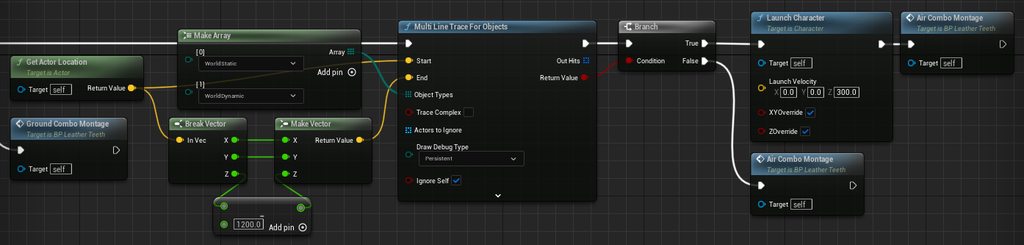
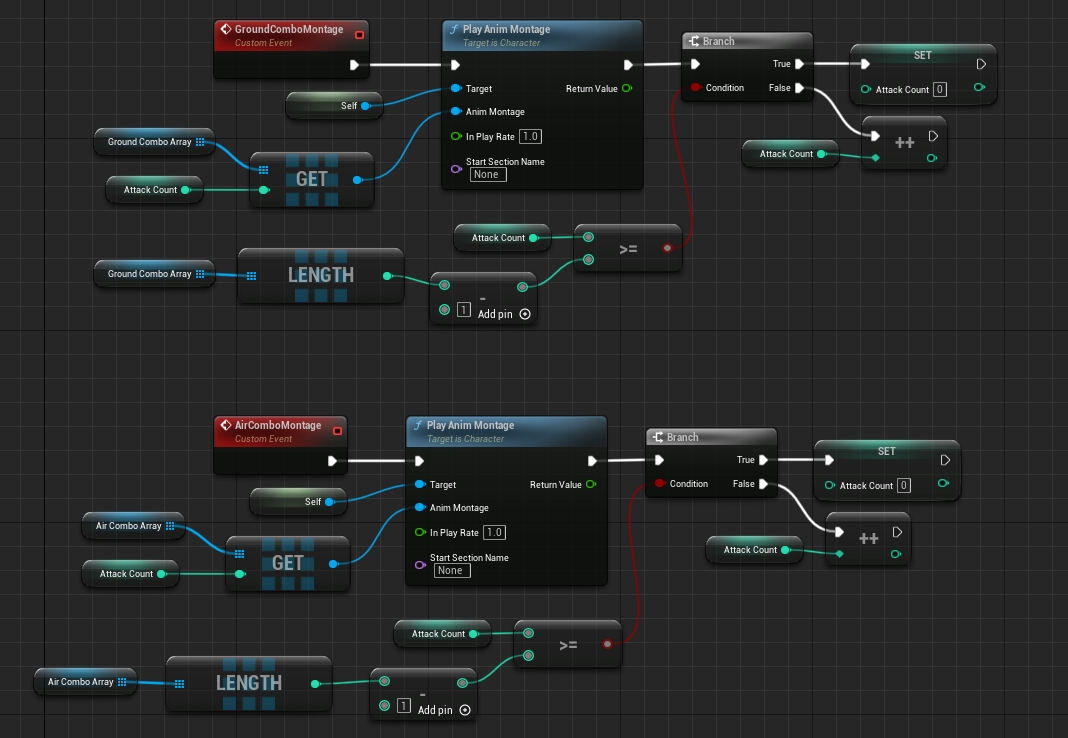
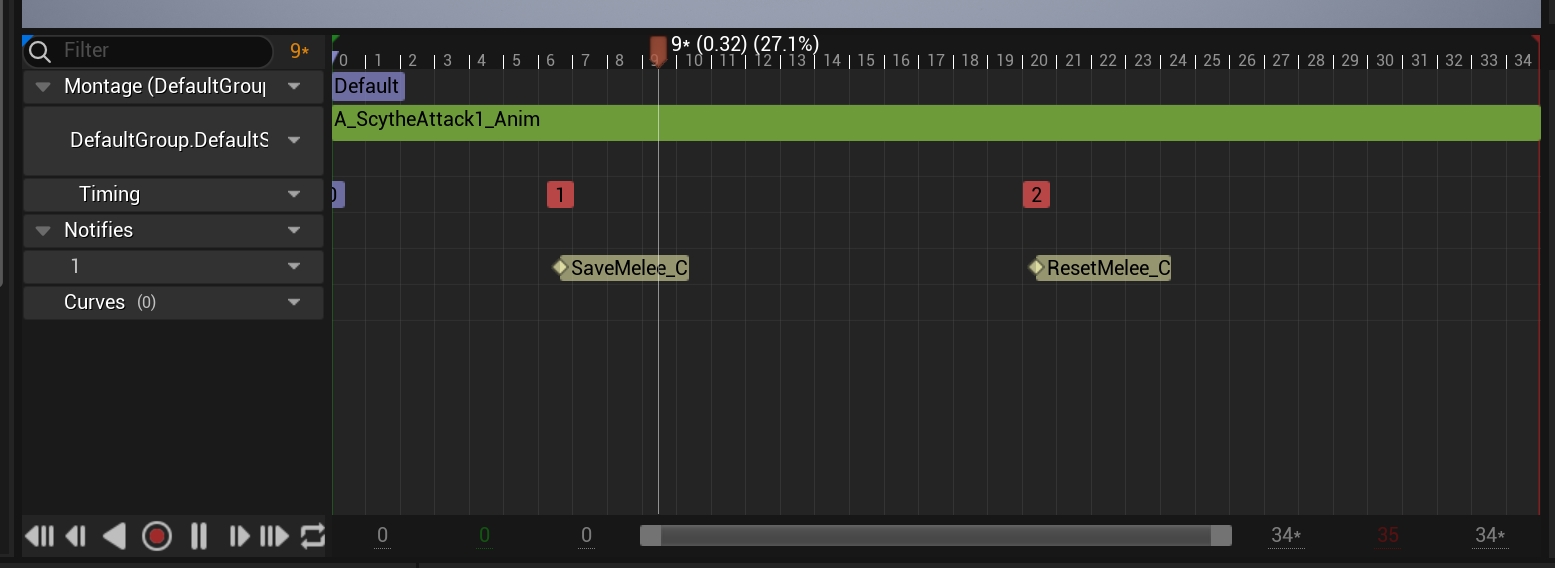

Hey ! This is a tutorial on how to build a combat system with air combo in the style of devil may cry. I will continue this serie starting from that point. if you have any question please feel free to join my discord server, link is in the description.
TIMESTAMP :
0:00 - Intro
0:34 - Prerequisites
1:16 - Prerequisites_01 - Combo Animations
3:0...
 sudden thicket
anyone here have any experience working with exporting a VAT from an alembic? the animtotexture plugin doesnt seem to properly export any data when importing alembic as a skeletal mesh or geo cache and exporting a vat from a blender python script just does not look good at all
 wheat badge
Hi, anyone experienced with Take Recorder or any other ways to capture a skeletal mesh at runtime that uses Post Process AnimBP?
I want to be able to record everything that is driving the skeletal mesh (basically baking it all)
 zenith mirage
Hi everyone !
Is it possible to blend with a float in between animation sync points ? I'm trying to have a character synced to music.
Let's say I have 128 BPM, I want her feet to touch down everytime 1 bar passes. Right now my bar progression is communicated to Unreal from 0 to 1, so it works, but I need to drive the animation with it and I'm not sure which node I need to use.


So 0 to 1 goes to the first sync point, then again 0 to 1 goes from the second sync point to the third, then from the third to the fourth etc
zenith mirage
zenith mirage
Hi everyone !
Is it possible to blend with a float in between animation sync po...
Found a potential solution for what I want to do, controlling the animation progression based on my beats. Found the solution here: https://www.reddit.com/r/unrealengine/comments/wbtoqj/anyone_know_how_to_manipulate_the_animation/
Reddit
Explore this post and more from the unrealengine community
 mortal granite
so im curious if anyone would know, my blend space on the left has a static animation as the base pose, and can blend into a walking pose. but in between blends the character walks in almost slow motion
whereas this ALS blend space moves at the same speed in between blends just with a smaller gait but also has a static pose as the base, it looks very natural but i cant really find any differences between my blendspace and the ALS blendspace. any ideas?
 mint pasture
wheat badge
I want to be able to record everything that is driving the skeletal mesh (basica...
mint pasture
wheat badge
I want to be able to record everything that is driving the skeletal mesh (basica...
As far as I remember, I think you can bake this using sequencer while playing the game
 bronze fable
Hey, I'm trying to set the blend time of a sequence node and the Blend Time seems to not be functioning correctly.
If I set the Blend Time of this function it calls something called Internalization. I saw somewhere online that you had to add an Internalization node to your graph but I do not have that option anywhere I can locate. Any ideas?

 smoky shell
bronze fable
Hey, I'm trying to set the blend time of a sequence node and the Blend Time seem...
smoky shell
bronze fable
Hey, I'm trying to set the blend time of a sequence node and the Blend Time seem...
The inertialization node goes in your anim graph, not in the layer functions
Its an anim graph node
bronze fable
smoky shell
The inertialization node goes in your anim graph, not in the layer functions
Its...
I have no idea why, but I read Internalization 100 times but it's Inertialization 🫢
That was why I couldn't find it, thank you
viscid willow
zenith mirage
Hi everyone !
Is it possible to blend with a float in between animation sync po...
There's a section in this article about Hi Fi Rush. There's no real concrete tutorial on the rhythmic setup other than they authored actions at 120 BPM and seemingly changed the playrate globally so it synchronises with an adjustable BPM. I can't say for certain and there may be some other tech going on, but maybe there's some insight there: https://cgworld.jp/article/202306-hifirush01.html

CG・映像の専門情報サイト | CGWORLD.jp
Tango Gameworksの新作『Hi-Fi RUSH』のメイキングを紹介。
 high pike
So this is an alembic animation from maya that has mocap data on it. In maya, there's no clipping but as soon as it's brought into unreal, the face wigs out. Does anyone have any clues?
viscid willow
zenith mirage
Found a potential solution for what I want to do, controlling the animation prog...
That or you could convert your Sequence to a Sequence Evaluator, which allows you to set a discreet time in the Sequence you want to play.
zenith mirage
viscid willow
There's a section in this article about Hi Fi Rush. There's no real concrete tut...
I’ll check it out ! Thank you 👌
 ripe ledge
Hello! Tell me how to import a model from UE5 into blender

 scenic breach
mortal granite
so im curious if anyone would know, my blend space on the left has a static anim...
scenic breach
mortal granite
so im curious if anyone would know, my blend space on the left has a static anim...
Why is he naked
 signal tiger
Hello hello!
If I have a rigged character, is there any way for me to animate that character in Unreal and use these animations in-game?
I already know how to use animation sequences, I just want to know if I can create anims in Unreal for gameplay usage
bronze fable
I took the UE5 control rig and swapped skeletons with the Character Creator skeleton. I've adjusted all the references and hierarchy. All the controls work, and all the bones went back into position and work perfectly fine with exception of neck_02. For some reason it gets pulled way up and extends the neck. I've looked through the control rig nodes but I can't really identify where it's getting this distance from. Has anyone run into something similar?
 mint pasture
signal tiger
Hello hello!
If I have a rigged character, is there any way for me to animate t...
mint pasture
signal tiger
Hello hello!
If I have a rigged character, is there any way for me to animate t...
I believe the sequencer could help with this. I've only ever used it the edit animations but I don't think it's too far a stretch for gameplay
 fathom glade
What's the simplest way to get a component space transform of a bone in a given animation sequence time? I found this https://docs.unrealengine.com/5.3/en-US/API/Runtime/Engine/Animation/UAnimSequence/GetBoneTransform/2/ but it returns a parent space transform, when i need a world space or a component space transform
i dont want the transform of the current pose, i want a transform of a bone in any animation at any given time
fathom glade
I think i figured it out, in case someone ever stumbles upon this:
Insequence is a UAnimSequence*
if (IsValid(InSequence))
{
FTransform Transform;
FReferenceSkeleton RefSkeleton = InSequence->GetSkeleton()->GetReferenceSkeleton();
int32 BoneIndex = RefSkeleton.FindBoneIndex(BoneName);
Success = RefSkeleton.IsValidIndex(BoneIndex);
// Parent space transform
InSequence->GetBoneTransform(Transform, FSkeletonPoseBoneIndex(BoneIndex), InTime, false);
int32 CheckIndex = BoneIndex;
TArray<int32> Parents;
// Get parents
while (RefSkeleton.IsValidIndex(CheckIndex))
{
CheckIndex = RefSkeleton.GetParentIndex(CheckIndex);
if (RefSkeleton.IsValidIndex(CheckIndex))
{
Parents.Add(CheckIndex);
}
else
{
break;
}
}
// Transform to component space
for (int32 Parent : Parents)
{
FTransform ParentTransform;
InSequence->GetBoneTransform(ParentTransform, Parent, InTime, false);
Transform = Transform * ParentTransform;
}
return Transform;
}``` scarlet void
hi guys, I have a problem baking the animation, I select my car to bake transform and then export as fbx. After I import the fbx into maya, the root animation is right but the mesh is not bind perfectly with the root, the mesh animation is delay somehow. What did I do wrong?

 high pike
So this is an alembic animation from maya that has mocap data on it. In maya, th...
high pike
high pike
So this is an alembic animation from maya that has mocap data on it. In maya, th...
in case anyone ever wondered the fix - it was fixed by combining the mesh in maya before exporting as an alembic
 arctic tapir
I'm trying to make tentacles using spline IK in animation blueprint, but the solver often applies strange extreme twists as I move the control points around. Any ideas for how to smooth it out?
viscid willow
arctic tapir
I'm trying to make tentacles using spline IK in animation blueprint, but the sol...
I wonder if you might have more luck with the Splines in Control Rig rather than in the ABP directly: https://docs.unrealengine.com/5.3/en-US/control-rig-spline-rigging-in-unreal-engine/
Particularly because you can set your primary and secondary axis to help maintain alignment.


Utilize Splines in your Control Rig to achieve easier procedural animation on long joint chains.
 astral shale
What are the advantages of using animation montages vs animation state machines?
viscid willow
astral shale
What are the advantages of using animation montages vs animation state machines?
Montages are typically used for some kind of gameplay action, they can loop, but most commonly they're a fire off this animation once, then return to the anim graph.
States Machines are good for what they say, handling particular states which relies on some kind of logic to transition between. So states are great for handling things like locomotion, or something like overlay poses for holding objects. These are times where the states are driven by variables and certain player inputs.
Something else to consider with State machines is you can add more than just an animation sequence to a state. You can make use of blend nodes and additives, whatever you need to achieve the desired output pose.
A good example is Jumping. You can have a simple jump loop state, but perhaps you want to have a different pose for ascending vs descending.You could drive the ascending and descending pose based on the Z velocity of the character, then overlay a noisy additive for some keep alive motion, all in one state.
 static falcon
Why is the mouth bone translating

It's just a single bone chain
Translation is set to none
astral shale
viscid willow
Montages are typically used for some kind of gameplay action, they can loop, but...
thank you that's very helpful
 misty dagger
What would people say is best way to make weapon animations ?
as in would I be best exporting the player character with it's camera position etc to ensure stuff lines up or use another method
I'm thinking I want to use cascaduer as well for my animations so
 jovial panther
anyone got a utility handy for calculating a bounds for a frame of an animation? I need to cache it offline
arctic tapir
viscid willow
I wonder if you might have more luck with the Splines in Control Rig rather than...
Ah thanks I’ll give that a shot
 high bone
Can someone explain to me why I can't put Maximo's slide animation in place?
I've already tried Mixamoconverter and two other plugins on Blender.
Or can I send someone that file and get it in place back...?
 wooden shoal
does anyone can recommend me an asset for strafe locomotion? I'm looking for a motion matching that can work with a strafe movement
 humble lance
i have a jump attack animation - i want the jump to curve to the target from start. so, in between start and target will be the highest point.
Whats the easiest way to achieve this.. motion warping or distance curves in the animation?
or something else?
 onyx sigil
i dont have maya on my current computer. is there a way to create the animation on unreal directly ?
 wide cedar
alr i need a fix for this cuz it's driving me insane
if i change the platform target fps on an animation, it crashes

i just tried something
i changed it, click save, then closed the window
it still crashed, but now when i go to open it, it'll tell me "GPU removed or crashed" or something
and crash the engine with the same error
now i can't even delete it or reimport it, it just crashes
 timber summit
I'm using 5.3 and i've added a new bone to a skeletal mesh but when I export it as an FBX, it doesn't have the updated skeleton. Does anyone know why this might be?
wide cedar
the hell am i meant to do : (
 jolly hatch
Can anyone explaine whats happening here? I am creating a IK positions for the hands in the anim BP directly from the world position of a component thats arrathced to a constraint. works great :). But because I wanted to replicate these positions I decided to do this in the character BP and update it from there by running this on tick. but the hands are lagging

 wide cedar
alr you know what i'm verifying the engine files
jolly hatch
timber summit
I'm using 5.3 and i've added a new bone to a skeletal mesh but when I export it ...
Im pretty sure any bones created in UE are will only exist inside UE, im not 100% this is just a Suspision I have as someone thats rigged a lot of characters outside UE
timber summit
jolly hatch
Im pretty sure any bones created in UE are will only exist inside UE, im not 100...
I think you might be right. I think it stores it directly in the skeleton asset which doesn't get applied to the SKM when exported.
wide cedar
wide cedar
alr you know what i'm verifying the engine files
didn't fix it
 patent thorn
is it possible to create a new animation sequence for my skeletal mesh? Let's say I have a mesh imported from a fbx that has no other animations, but I want to animate it on unreal
 deft timber
hello , I haven't seen any "modelling" realated topic so i am writing here, do you know how to change the Skeletal mesh pivot point with modelling/skeletal mesh tool? Or is that possible ?
viscid willow
patent thorn
is it possible to create a new animation sequence for my skeletal mesh? Let's sa...
Yes. Control Rig is the tool for rigging and animating characters in the engine: https://docs.unrealengine.com/5.3/en-US/control-rig-in-unreal-engine/

Rig and Animate characters in real-time using Control Rig.
misty dagger
Someone able to tell me where I would get that from ?

FIKProperties I can't find ref to it anywhere at all in terms of Cpp being happy with it
viscid willow
humble lance
i have a jump attack animation - i want the jump to curve to the target from sta...
A simple way you could do this is make your jump attack animation jump up and down with no forward motion at all. Then when the attack is used in the game you linearly interpolate the character to the target position. That way the in place jump animation is moved through space and looks like they're jumping toward the target.
patent thorn
viscid willow
Yes. Control Rig is the tool for rigging and animating characters in the engine:...
I do have the rig and what I wanted was to create an animation sequence asset and use it on my animation blueprint, is control rig used for that too?
viscid willow
patent thorn
I do have the rig and what I wanted was to create an animation sequence asset an...
Yep. One way to think of a rig is like it's a user interface for animation. The rig provides controls and tools to move your character, instead of moving individual bones.
humble lance
viscid willow
A simple way you could do this is make your jump attack animation jump up and do...
so effectively move its root to the target, then back again
viscid willow
humble lance
so effectively move its root to the target, then back again
Yeah, i suppose you'd wanna be moving the capsule. Not sure if you wanna move back again.
humble lance
viscid willow
Yeah, i suppose you'd wanna be moving the capsule. Not sure if you wanna move ba...
in my game they run/dash/jump to target, then back to starting position
viscid willow
humble lance
in my game they run/dash/jump to target, then back to starting position
oh i see. In that case you could store the initial position and then use that as a second target position to jump to after you have performed the first attack.
patent thorn
viscid willow
Yep. One way to think of a rig is like it's a user interface for animation. The ...
Nice I'll go through the documentation
misty dagger
What would people say best method to use here ?

I trying to do it so when the player has weapon equipped the upper part of the body obvs have on it the equipped anim and if it's ADS then it does the EquippedADS animation
it doesn't like though two pins within the Layered blend thing being same bones
I've sorted it
I didn't realise the layered should be first and then the blend poses by bool
 opaque fern
Does anyone know how to make the NPCs hand go to where i shoot the line trace? I want him to hold his wound while he in ragdoll for a set ammount of sec before stoping but idk how to make his hands to to the location of the line trace

 strange island
so... i got a modular character. equipping pieces of armor hides certain body parts.
in the construction script of the character, i "set leader pose component" for all of those and i redo this once equipping a new piece of armor.
hiding bodyparts works in both PIE as well as shipping build - in the cases shown below, i am hiding the lower torso from the belly button downwards, as the rest of the body can still be seen partially (chest, shoulders, neck...)
in the editor, everything is fine when playing montages, no clipping visible (editor.mp4), but in a packaged shipping build, it seems as if the armor parts following the leader component would not be fast enough and they cause clipping (package.mp4)
am i missing something?
 limber flax
Is there an apply physics animation BP node at all?
My fingertips have colliders, and my mouse has a collider. I have a part of my animation graph that moves my hands into position, and I want to apply the physics collision afterwards. Is there a way to do this?
 wide cedar
how the hell do i fix this when trying to change the platform target fps on an anim sequence?

 formal gulch
hi so I am very new to Unreal and I am trying to make a first-person game, i want to be able to switch between different arm animations (holding gun, not holding gun, ads) while keeping all the default leg animations for running or jumping. if there are any resources you could point me to or anything you could tell me about this that would be awesome! (sorry if this is a stupid question)
misty dagger
Anyone able to help here

when I look up and down it's rotating the horizontally, I can't think what once I've crossed or not crossed
viscid willow
formal gulch
hi so I am very new to Unreal and I am trying to make a first-person game, i wan...
To play different animation on the arms while maintaining the leg motion of your character you'll want to use the Layered Blend per Bone node: https://docs.unrealengine.com/5.3/en-US/animation-blueprint-blend-nodes-in-unreal-engine/#layeredblendperbone

Animation nodes that blend multiple animations together based on a set of criteria.
formal gulch
viscid willow
To play different animation on the arms while maintaining the leg motion of your...
Ok I will check it out, thanks!
viscid willow
i updated my original message after re reading your comment 😅 but yeah this should be what you're after
formal gulch
Ok awesome :)
 vocal owl
is there a specific technique to make server initiated root motion not cause jitter on the owning client? I have a knock back montage that is getting triggered by server initiated gas ability and the owning client always gets a bit of camera jitter when the montage is played if root motion is enabled
 tawdry hemlock
i have a question, blending a lot of animations have an impact on performance or not?
 opal thistle
aim ofset break my animations how can I fix it
if I make aimofset my characters hands looking weird
timber summit
Could anyone put me in the right direction for making the character have the relevant turn animations for a third person character similar to Hogwarts legacy and horizon zero dawn (to name a few)?
I've tried a few methods and I can't seem to get anything to really work.
 boreal widget
Hi, I'm trying to retarget to Ikrigs, it seems fine at first, but when I try to preview my running to the side animation, the whole target Ikrig gets a wierd offset from the source rig:

 ashen matrix
Hi, when retargeting an animation to MH, the target MH only contains the body since the head is a separate part... And it goes wrong obviously when playing the animation. Does anyone knows how to deal with this ? Edit : it seems LOD fixes it. It surely is a perfomrance issue then.

 dire mauve
This has my head scratching, I've downloaded Mixamo animations, fixed them in blender for the root etc. Now i'm having trouble with the "Jump" animation, the character mesh will leave the capsule component behind, any idea how to make them align? I've tried the "Root Animation" but the root is on the ground and dragging along so that doesn't fix the issue.
I would like the capsule to follow the base of the jump animation.
 low thorn
I'm really struggling to learn how to "tween" animations better. Basically I have two dance animations that start/end in almost the exact same pose, but the feet positioning is slightly different between the start/end positions, so they don't simply "snap" together in a montage and it's jarring. I can fix this in blender, but it would be exhausting to manually do this for every single animation combination. Can anyone point me to a learning resource for dynamically "tweening" bones in an ABP or something? I don't want them to teleport... I should say I want to do this in the context of an ABP/Anim Montage and not a level sequence/cutscene.
 misty karma
using the vehicle template
how do i change out the default vehicle
to my own mesh of a rover
 formal shore
Is it possible enable/disable this EnableRootMotion of AnimationSequence in blueprint?
 formal shore
Is it possible enable/disable this EnableRootMotion of AnimationSequence in blue...
formal shore
formal shore
Is it possible enable/disable this EnableRootMotion of AnimationSequence in blue...
I am not sure if is related by this, but I am trying to fix this animation. I want that he Stand Up vertically 0.
The way that I am playing these animations is this:
 misty karma
is there a way to group meshes in the content browser together?
 somber briar
did something from 5.2 to 5.3 change that broke Modify Curve in my AnimBP? It just flat out doesn't modify the curve anymore, same exact AnimBP updated from 5.2 to 5.3 (The curve modifies a Morph)
the morph still works on the skeletal mesh, it just isn't being changed by the AnimBP anymore
even if I just plug only the modify curve in it doesn't work
 muted wadi
I have a procedural animation for walking in control rig, and I'm starting to add in some other poses, such as holding a rifle while walking. I'm having some issues getting the IK effector transform to be set same transform as a socket on the rifle (setting that through the character BP).

Effector Item is the hand, B is lower arm, and A is upper arm. Pole vector is a default calculated by the x-axis of the hand.
 formal shore
I am not sure if is related by this, but I am trying to fix this animation. I wa...
formal shore
formal shore
I am not sure if is related by this, but I am trying to fix this animation. I wa...
Well, I think that I discovered why but I don't know how to fix it. This is happening because of the reference of root to pelvis on the animation of sitting is dislocated to behind, and when he will stand up, the pelvis go to target and stand up but do wrong on the animation. Someone have some idea? ._.


 serene plover
For my slime when its attacking

It does the attack animation and jumps past player
is there anyway to stop it when it hits player
or is it because I dont have physical collision on
(aka is that only way)
 halcyon garden
How do i smooth transition from animation montage to walk?
 broken echo
Hello, everyone. I have a small question. I want to pull two routes from my Locomotion state machine and use one as input for my aim offset and the other one as inout for my blend node. Unreal does not allow me to pull twice, so I had to copy my state machine. It does not seem neat. Any opinions, please?

Nvm, I worked around using cached pose
Thx)
viscid willow
broken echo
Hello, everyone. I have a small question. I want to pull two routes from my Loco...
Instead of duplicating, you can wire your Locomotion state machine into a Cache Pose
Yep beat me to it haha 😅
broken echo
Yeah, I am still learning, just found that function out=)
viscid willow
halcyon garden
How do i smooth transition from animation montage to walk?
From your video the montage looks as though it's blending correctly. Is there something more specific about the transition you want to solve?
dire mauve
Are Mixamo animations bad or is it just me? The root motion ones seem to be the worst.
 shadow crypt
Hey I retargeted an animation from mixamo to the manny skeleton with root motion (I added a root bone to the mixamo skeleton and animations with a blender addon) but for some reason the root in the retargeted animation isn't being animated. Is there something I should be looking out for while retargeting?
 charred orbit
Hey, maybe someone could share some tutorial about custom animation creation? I need to create some animation for character but all I can find is tutorials how import mixamo animations or how add custom animation state
charred orbit
oh very nice Pyramid scheme offer. I guess it will be something about coffee or books?
<@&213101288538374145>
charred orbit
charred orbit
<@&213101288538374145>
he made a message in all of chats. You might want to check that too
halcyon garden
viscid willow
From your video the montage looks as though it's blending correctly. Is there so...
It is corectly but not smooth
halcyon garden
viscid willow
From your video the montage looks as though it's blending correctly. Is there so...
It has a small window where it "jumps" on animations frames
You can see the sword moving fast at 0:05 or 0:06 @viscid willow
maybe i can make it better?
misty dagger
Which approach is recommended?
(Lyra): Using and custom animation for start / cycle / stop
(Advanced Locomotion System) using the cycle running animation with an additive leaning forward?
timber summit
halcyon garden
It is corectly but not smooth
You could try increasing the blend out time on the montage and play with the blend curve.
timber summit
formal shore
Well, I think that I discovered why but I don't know how to fix it. This is happ...
You could try opening the anim and moving the pelvis where you want it and adding a key. That should add a modifier curve to the anim. Not sure if it'll correct the issue though.
formal shore
timber summit
You could try opening the anim and moving the pelvis where you want it and addin...
Huummm okay, I will try when I enter on the pc
thanks!
bronze fable
Does anyone know if there's a way to set this control rig at runtime? I'm trying to make a template ABP but I need to change this control rig based on the Skeleton

 nocturne spruce
Guys do u know how it would be possible to get a parachute deploy physic based
 cosmic saffron
Hello somebody know how can I get some realistic animations for free? Maybe some marketplace pearls or something. Even easy to learn program when I can do some of them will be cool
nocturne spruce
cosmic saffron
Hello somebody know how can I get some realistic animations for free? Maybe some...
Mixamo is very good also I am a big fan of DeepMotion that’s an Ai that makes animation in text to animation or video to 3d animation
If that’s what u need
nocturne spruce
cosmic saffron
Hello somebody know how can I get some realistic animations for free? Maybe some...
By the way Cascadeur is my opininion of the best animation program and it’s free
cosmic saffron
Yeah bro thank you very much :))
nocturne spruce
cosmic saffron
Yeah bro thank you very much :))
Np;)
charred orbit
Maybe someone know why I am missing tool section? 1st image is from tutorial

 viscid willow
halcyon garden
It has a small window where it "jumps" on animations frames
viscid willow
halcyon garden
It has a small window where it "jumps" on animations frames
This is pretty typical behaviour since you're blending straight to locomotion.
You could look into Blend Profiles to make certain parts of the body blend faster such as the legs, so they begin locomotion more quickly. While the body can be slower so the blend is smoother. https://docs.unrealengine.com/5.2/en-US/blend-masks-and-blend-profiles-in-unreal-engine/#blendprofiles
Otherwise solving blending from different actions into locomotion can quickly become quite complex. You could have different animation clips going from attacking to locomotion to bridge the blend, or apply some kind of additive to make it look a bit different.

Exclude Bones or change their individual blend speed by using Blend Masks and Blend Profiles.
viscid willow
misty dagger
Which approach is recommended?
It's one of those "It depends" situations.
ALS gets a lot done with very few animation clips.
Lyra on the other hand uses a lot of animation clips.
I'm not sure if anyone has ever profiled ALS, but I believe it's a fairly heavy animation system to run, particularly on a lot of character (I could be completely wrong there).
Lyra has a fair bit of complexity around how animation assets are loaded which can be great to learn from, but can be a bit confusing.
For your question are you looking for the best solution for start/stop animations in locomotion?
misty dagger
viscid willow
It's one of those "It depends" situations.
ALS gets a lot done with very few an...
I just want to learn about complex animation scripting/programming. Start/stop animations in locomotion is one of the things
viscid willow
misty dagger
I just want to learn about complex animation scripting/programming. Start/stop a...
Righto.
I suppose the Lyra way would allow for more fidelity and control over the start/stop animation so you could change a lot about what it looks like.
The ALS solution is a bit more "general" and would provide a bit less control given the additive setup that is used.
misty dagger
viscid willow
Righto.
I suppose the Lyra way would allow for more fidelity and control over t...
Thanks for spend your time answering my question 👍
 opal jay
How to make anim walk stop work? im trying to use anim instance with root motion but doesnt work properly
onyx sigil
Hello, i have a logic question.
i'm adding a fishing mini game, with 4-5 animations, ( idle upper body, sit lower body, fishing upper body, Fishing action, standing up)
should i create another ABP for that, and switch it on my character ? or just integrate it on the player normal ABP ?
also, if an animaiton blencd is at 0%, does it process the aniamtion ? (for performance issue)
 blissful kite

 onyx sapphire
Has anyone seen this before in terms of the Physics Control Plugin? I've got everything set-up correctly as far as I know but the character wont actually move anymore
not sure what's causing it entirely
 stray anvil
can anyone explain me what is "Play Slot Animation as Dynamic Motnage" node is and how and where to use it??
 hollow relic
I asked this general before, but it might be too specific. 🙂
Let's say I have weapon hilt as a skeletal mesh and I would allow the player to curve that mesh by rotating the bones (it would use a proxy using control rig), would It be possible to save the current pose and use that as the "resting" pose?
I'm pretty sure this is super specific, it would not be a huge issue if not, but it would be super fun if it were possible.
misty dagger
Any tips for animation debugging? simulate states and transitions. Pose watch don't work properly?
 grave perch
Hello everyone, I want to change the animation using control rig, but when I try to bake a mesh to control rig, my control rig is not in the baking list. How can i fix it?
 drifting mantle
is there a way to set a variable on a pawn form state exit callback in an ABP?
this is inherently not thread safe, so I cannot do this directly
hollow relic
hollow relic
I asked this general before, but it might be too specific. 🙂
Let's say I have ...
Hey again, I was researching a bit and found "Animation Pose Snapshot".
Is that what I want?
 split orchid
grave perch
Hello everyone, I want to change the animation using control rig, but when I try...
split orchid
grave perch
Hello everyone, I want to change the animation using control rig, but when I try...
I'm still facing the same issue. Have you figured out what it is yet?
 sick field
howdy! woyuld anyone know how to set blender or unreal in such a way that my root bone is chosen as the root bone in unreal engine instead of the armature itself being made into the root when imported into ue5?
nevermind got it working
 marble tundra
Hey, what is the best way to create multiplayer character models that use the same exact animations. Is there a way to do this, basically like how all the big games do it. Thanks
 clear dune
Is anyone an expert on Animation Montages? I have a tough problem that I don’t know how to solve
 lunar kraken
in 5.3 I cant seem to import alembic files that has number of points change for example (growing line sweep) when i attempt to import the geometry cache it craches with D3D error
hollow relic
marble tundra
Hey, what is the best way to create multiplayer character models that use the sa...
They probably would need to use the same skeleton.
 upbeat axle
Hi I just noticed in UE5 that we can bind animation blueprint node pins directly to various things (such as properties from the pawn etc). I have two questions:
- Is there a way to get current velocity as a float value directly this way to drive an animation blendspace 1d? Since
Velocityfrom the movement component is a vector it won't directly work - Does using this direct binding disable animation fast path? Meaning, does it count as blueprint VM usage?
Thanks
upbeat axle
Also, does anyone know if an animation montage can play a random sequence from an array of animation sequences? Or do I have to create a separate montage for each sequence?
EDIT: https://docs.unrealengine.com/4.26/en-US/BlueprintAPI/Animation/PlaySlotAnimationasDynamicMontag-/ I found this, hope it will work
Play Slot Animation as Dynamic Montage
 tawny pewter
I am trying to make a turn in place system using animations from mixamo. these anims are not playing on the spot, nor do they have any root motion. the pelvis is the turning point. I am counter rotating the root of the SkelMesh and I'd like to rotate it back to 0 when the turn in place action happens but that seems rather difficult with the way these animations work... should I just get other animations or is there a way to work with this?
 slim elbow
Asking experienced devs, how do you manage your control rig controls for humanoid characters so it gives sufficient control like IK to FK seamless mode switch while also organized so you don't have to search in the sequence editor window for a control?
I also have another question, how do I sync FK to IK? Like for IK to FK, I just have to apply FK controls with the bone rotation but for FK to IK, I need to somehow know where to place the pole (aka the second control that the elbow bend towards)
I am very low on budget so I would like for "do it yourself" method rather than a paid plugin
 outer maple
Trying to work out an issue, I have a bunch of seperate models that are based on the UE4 & UE5 skeleton but not exactly so I need to do some retargeting. All good. Is it possible for me to use a single animation blueprint to drive each seperate skeleton, considering that all the animations are just retargeted duplicates? Cheers.
 hearty linden
Hello!
 inland mango
Trying to get these two nodes to work together, and work at the same time (as they work fine by themselves), and connect them to the output pose
 hearty linden
So what do you guys think about using UE5 for making animations / short films?
 slow egret
hey yo, very new to ue. But im curious what a good approach to animating aiming down sights in a first person game?
If i could i would like to just set the position in the blueprint viewport so i can see the positions are correct. But i don't know how i save those positions. Input appreciated!!
also for context, i want to move this gun camera up and down when you press a button
 strange marsh
hearty linden
So what do you guys think about using UE5 for making animations / short films?
strange marsh
hearty linden
So what do you guys think about using UE5 for making animations / short films?
Yes but only with a proper control rig setup. https://docs.unrealengine.com/5.3/en-US/control-rig-in-unreal-engine/
Rig and Animate characters in real-time using Control Rig.
high bone
hello, greetings, I have the following problem: I can't put a simple "slide" animation from mixamo "in place" over unreal, so with "root motion" the whole thing doesn't work because the animation then looks very strange
I've already used 2 different tools via blender and also mixamo converter but it doesn't help. Can someone please help me?
inland mango
anyway to connect the blend poses by bool to the output pose without disconnect the other I'm so lost out of ideas would love some advice .
 slow egret
i have 3 positions for this gun. How do i animate between them?
The positions i got by placing 3 seperate invisble arrows on my character blueprint so i could get the positions right relative to the view, but there's probably a smarter way. What should i do?

the 3 positions are these arrows. I didn't know how else to make sure the positions were correct in the view

 tranquil lark
slow egret
i have 3 positions for this gun. How do i animate between them?
The positions i...
tranquil lark
slow egret
i have 3 positions for this gun. How do i animate between them?
The positions i...
What you're looking for is "procedural aim down sight"
Plethora of material out there about this.
bronze fable
Does anyone have a quick example of editing bone transforms in an Animation Sequence through a Animation Modifier class? My IK bones on all my animations are all jacked up from retargeting and I need to sync all the IK bones with the foot/hand bones in each an every animation. I'd like to do it through a modifier but I cannot seem to figure out the proper way to apply bone transforms on each frame. A link to an example or something would go a long way
 ancient isle
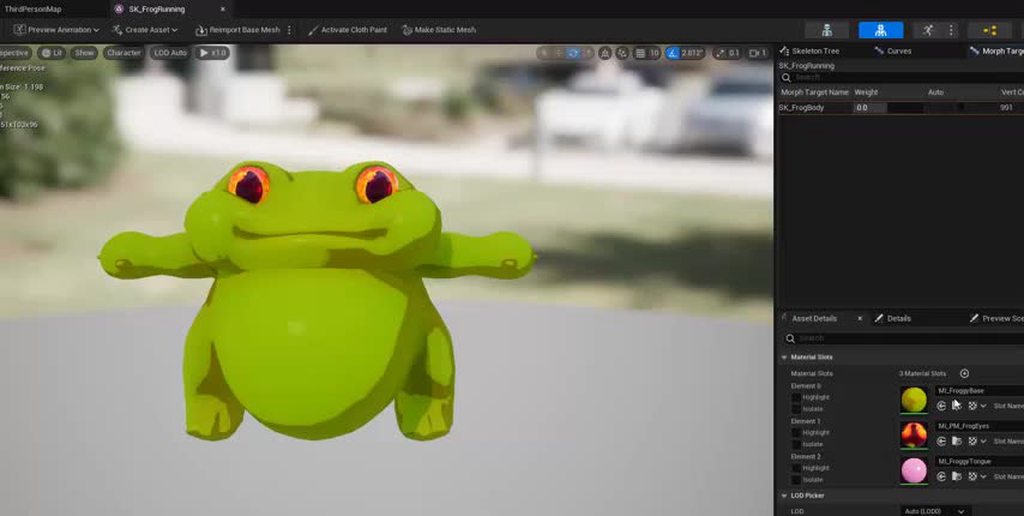
Anyone know why my imported morph targets are backwards? The default is the expanded state when I import, but thats opposite to how its supposed to be.
The default of zero is actually what is supposed to be 1. And the 1 is supposed to be my default pose.
 lyric dew
Hi! I'm not 100% sure this is the right channel for this, sorry, and I've asked in other places aside from this discord but haven't got an answer so I'm trying again. I'm having an issue where:
- I duplicate/retarget Manny's animation blueprint to my game's character
- I set it up, and it works fine
- I close the editor
- upon booting the editor again, interacting with the new animation blueprint or anything that uses it will instantly crash the editor.
This is 100% reproduceable. Honestly I'm totally stumped and would just like direction on where to look to debug this. Thanks a ton if anyone knows anything!
 heavy kayak

 hybrid creek
Dunno if it'd be more fitting here or some programming channel, but anyone know why UAnimInstance::GetCurveValue() always seems to output 0 when you're using PIE in client mode?
ancient isle
ancient isle
Anyone know why my imported morph targets are backwards? The default is the expa...
follow up, looks like it was due to the advanced skeleton export process which uses a hierarchy of groups during export. I also deleted the morph target geometry before exporting.
Been on this for hours, this is why i stay in my environment artist hermit hole and never come out. Gross import settings and hierarchy particularities make me wish to perish.
bronze fable
bronze fable
Does anyone have a quick example of editing bone transforms in an Animation Sequ...
For anyone searching later trying to fix IK bones that weren't retargeted properly with the IK Retargeter, you can manually create a blutility/animation modifier and use the following function to sync the IK bones with the skeletal bones. Just set up a map with the IK Bones and their corresponding target bone and loop the function. I ran this on some 7000 animations and it seems to work great.

No description provided
 uncut relic
Got a question for anyone who may have some information:
I have a character that plays, say, a pistol animation on their upper body. I want to apply an offset to both hands via a transform variable fed into them.
I've read up a little bit on virtual bones, and while I feel they may be the solution, I'm unsure of the implementation. Does anyone have a solution they've used, or some resources on the topic?
The idea is to be able to modify the positioning of the hands during weapon idle animations dynamically, instead of needing to tweak the animation until I find a desired result.
slow egret
i'm stuck on something simple. I have a mouse wheel, and i want to animate the wheel going up and down. But i don't know how to do it so it only goes up or down one notch.
I just need to smoothly rotate the bone up and down 30 degrees over a short amount of time. But i can't find a way to do that in blueprints or animation blueprints
i can't add a timeline in an animblueprint, to set the rotation in there over time.
And i'm not allowed to set the rotation of an individual bone in my main blueprint, because i'm using a skeletal mesh. So it's like i'm stuck
 mint musk
I made the drop ship in Blender. Then laid out the canyon and city with assets from epic. Then tried to animate the camera and ships. There it is. Like my third attempt at animation in unreal... I'd ask questions but... I dont even know what to ask.. LoL. Besides just saying.. Please help. Haha. I'lll be fine.Its just object animation. Easy peasy lemon squeezy.
 lunar wave
I made this animation in blender, I import it to UE5 and the Hammer that is attached to a bone with an armiture modifyer no longer animates and just stays at it's origin
heres in blender


heres in unreal
anybody know how to fix?
fyi in blender the hammer and model are different objects in blender but when I export I just select both and export selected
 gleaming pier
Morning/afternoon/evening everyone. Hope you are all well. I recently got my hands on an animation pack, provided to me by the University I go to as part of a team project. I'm trying to test the animations but they only seem to work when dragged directly into the world - trying to set an animation asset on a model outright fails (i.e: It just doesn't select and remains as "None"). Would anyone know why this is the case?
gleaming pier
solved
 ember tundra
I am trying to get one of those loading-disguise "squeezing" animations done. Where a character slowly squeezes through a narrow passage to get to a new area and hide the streaming of assets a bit for example. How is something like that called?
 meager plank
i added a rootbone to my mesh and it is connected to the pelvis but once i enable root motion in animaiton the pelvis still acts as the root bone, why is this? Its like the rootbone doesnt even exists, it gives the same result as using mixamo animation without rootbone and enabling root motion

 serene steppe
If I'm trying to set up in-game IK on the Default BP_ThirdPersonCharacter, should I start by looking into an IK solver or control rig? I'm in 5.3 if that makes a difference.
 light frost
serene steppe
If I'm trying to set up in-game IK on the Default BP_ThirdPersonCharacter, shoul...
light frost
serene steppe
If I'm trying to set up in-game IK on the Default BP_ThirdPersonCharacter, shoul...
the default ue5 character already has IK built in
serene steppe
light frost
the default ue5 character already has IK built in
Right, but it's a massive incomprehensible wall to someone just starting into animations, so I'm curious what tutorials/route I should be learning from.
Alright, I think this tutorial will show me what I need to learn: https://www.youtube.com/watch?v=Ep-jQbxNI8A

Project Files: https://www.patreon.com/posts/78395797 .
In this video, we'll take a closer look at how to realistically animate a character's hands while driving a vehicle, including the rotation of the steering wheel. To achieve this, we'll be utilizing a full body inverse kinematics (IK) system, which allows us to control the positioning and ...
spark blaze
I'm trying to understand the BungeeMan control rig, by setting a breakpoint in Debug Mode on the Editor Preview. When I enter Debug Mode, the indicator stops at node I've set the breakpoint at, but I can't continue execution from there. I can't step into a function either. Is there some setting I have to enable or something? I'm running Unreal v5.3.1.
Nevermind. I'm not sure why, but it's working now. I did try toggling the event before, but nothing happened. Now it's working when I switch to Construction Event.
Enabling Debug Mode is really janky. I can't enter Debug Mode and have a breakpoint set on a Construction Event. When entering Debug Mode it defaults to Forwards Solve, and if I try switching to the Construction Event I can't step the debugger. I have to clear the Construction Event breakpoints, enter into Debug Mode, then switch to the Construction Event then set the breakpoint.
wtf?
Need to enter via Forwards Solve without Construction Event breakpoints, then switch.
spark blaze
This is strange. I can't seem to watch the values of properties inside of functions. At the Rig Graph level, I can watch values, but I have to enable the watch when I'm in release mode. I can't set a property to be watched while in Debug Mode. 😕

In the pic, the function has already been executed past A in the sequence, but the Get Parents node can't find the value.
 past violet
The Characters > Mannequins > Animations > Quinn > MF_Run_Fwd animation sequence runs in place when it is tested. But when I clone that on to my retargeted model, the cloned one does not run in place and my mesh moves. How do I change that so that it runs in place? EnableRootMotion is already unchecked in both animation sequences.
light frost
Trying to setup an ABP from scratch bc our animator made something that doesn't target well with the mannequin. Im just trying to get a state machine in but right clicking into the animgraph there is no "add new state machine" like the documentation says?
 agile gyro
When purchasing animations.
The description says it works with unreal engine 5.3 but all animations are set up for mannequins on UE 4.
If an animation is set up for UE 4 mannequins is retargeting guaranteed to work? Or are there risks?
past violet
The difference between UE4 and UE5 mannequins is just being T-pose or A-pose as far as I've seen for retargeting
agile gyro
past violet
The difference between UE4 and UE5 mannequins is just being T-pose or A-pose as ...
OK. So it should retarget successfully then if its for specific combat animations then.
 copper obsidian
slow egret
also for context, i want to move this gun camera up and down when you press a bu...
copper obsidian
slow egret
also for context, i want to move this gun camera up and down when you press a bu...
yooooo this is a interesting concept

 sinful raptor
How can i open doors and stuff with animations instead of timelines. So the doors would move with the character
 alpine nexus
https://cdn.discordapp.com/attachments/1178333955393601606/1185232827596427415/Moments-clip-from-Dec-15-2023.mp4?ex=658edd16&is=657c6816&hm=aafc7aafbe141b78cce5014447e0e31fcf533a7178f7a5d391aed67792ae6ee6&
How do I stop the player from rolling in the air? This happens when turning on root motion
sinful raptor
its rolling on an angle too lol
gray dock
Finally got around to testing out the Rush Hour automotive plugin. This makes animation of vehicles insanely easy and fun to use. Thanks for checking it out.
Unreal 5.3
Lit with Lumen
marble tundra
I used the animation starter pack in ue4 with the mannequin. Am I now able to import a character from mixamo, and transfer over the mesh
serene steppe
So I've got procedural animation for aiming working with the default player control rig, now I'm looking into making sure I can't aim at an unnatural angle. From Googling it sounds like Aim Constraints might be set up to handle this situation? Would I be better off looking into aim constraints or just handling it in blueprint and making sure I don't send in a value that's too twisted?
tranquil lark
What are you talkin' about? Looks perfectly natural to me
Jokes aside - yeah, just clamp your values really
I don't know what aim constraints are though
I should probably explore control rig more. Just never had the time.
serene steppe
There's some "Aim Constraint" node that lets you clamp movement to certain axises. I've only seen info on it in some of the Epic GDC talks though -- it seems promising but since there's not much info it's hard to want to dig into it 😄
Alright, yeah. I figure I'll clamp the input and make the character turn when the rotation gets close to the max 🙂
Thanks!
serene steppe
tranquil lark
I don't know what aim constraints are though
Epic has an in-depth description in their documentation /s
 tranquil lark
serene steppe
Epic has an in-depth description in their documentation /s
tranquil lark
serene steppe
Epic has an in-depth description in their documentation /s
I've been meaning to get into procedural animation with control rig since like 4.26 - that hasn't happened yet 😅
serene steppe
tranquil lark
I've been meaning to get into procedural animation with control rig since like 4...
Lol! Yeah, too many other things to do?
I've been working in PCG, which brought me to Niagara, now animation/control rig. It's not the worst, slowly delving into other systems with bite sized projects
tranquil lark
serene steppe
Lol! Yeah, too many other things to do?
I've been working in PCG, which brought...
Way too many other things.
If I were trying to aim for a smaller scoped project, maybe. But I'm a dreamer 😅
serene steppe
I feel you!
uncut flint
hey guys got a question about retargetting some animations, is this the right channel?
tranquil lark
So I just stick to contracting out keyframed animations like some neanderthal 😅
uncut flint
uncut flint
hey guys got a question about retargetting some animations, is this the right ch...
 for some reason nothing ive tried is working so i could really use some help haha
uncut flint
ookay :)
bronze fable
Anyone have any idea why turning an animation into a composite would completely alter the animation and the frames in the animation?
These are the same animations, one was just put into a composite. It goes from 26 frames to 520,000 frames and is a completely different movement. I assume this is just some UE5 bug but I need to get around it somehow

 serene steppe
tranquil lark
Jokes aside - yeah, just clamp your values really
serene steppe
tranquil lark
Jokes aside - yeah, just clamp your values really
Seems to work well, I'm happy with that!
I should just be able to make the beam track the hand rotation and it'll be set
tranquil lark
serene steppe
I should just be able to make the beam track the hand rotation and it'll be set
Just have a socket on the hand and have the beam always come out of that socket's forward direction
 grim sigil
I have a question. How is it when I want to blend more than 2 animations with Layered blend per bone? Because if I blend 2 animations, it works fine, but I don't know how to add the third one, second animation just keeps bugging
serene steppe
tranquil lark
Just have a socket on the hand and have the beam always come out of that socket'...
Yeah, that's probably the smart way to go >_> I've got a socket on the hand but I think it's oriented wrong, and I should just fix it because it'll simplify things. For now though I've got it working well enough to test and I like it.
Though for responsiveness I might want the beam to do a separate trace. I'm building towards gameplay, not video
opal thistle
When I add aimofset, my animations are distorted, for example their hands are intertwined etc. How can I solve this?
slow egret
hey, how can i set the starting animation in my blueprints construction script
 eternal spoke
Hello sourcers... I'm working on a particular AnmBP with differnt speeds and I want to set up different styles of movement in which there is a min speed and a max speed for each stage... how to I put down in the blueprint? Down below there are the 4 stages I have to set up in the Event Graph the the screenshot of the blendspace.. My problem is I'm not sure how translate all that in the nodes in the Animation Graph using 4 different blendspaces, one per style, instead of a single one while idles are on the very first node after Entry.


 solemn vapor
Hi, im just starting learning about locomotion and ive setup my character with root motion, i can make him walk forward in the direction im looking at, but if move in any other direction he strafes or moves backward.
How could i set it up for him to move forward in any direction? like if i press ''A'' make him move to the left facing that direction?
 compact kernel
solemn vapor
Hi, im just starting learning about locomotion and ive setup my character with r...
compact kernel
solemn vapor
Hi, im just starting learning about locomotion and ive setup my character with r...
In your BP_ThirdPersonCharacter or whatever you have it called under character movement Look for "Character Rotation" and try changing the rotation to "Orient Rotation to Movement" instead of controller desired rotation..
solemn vapor
ah thanks , but i already have that on. that lets me move forward with ''W'' in the direction i am looking at. but what im trying to do is for my character to move facing the direction im pressing.
Sorry if im not describing it correctly but im so new to this that i dont know the correct term. im trying to replicate the Dark Souls 3 movement
 dim torrent
Can anyone explain this?
 dim torrent
I mean the root normaly is fine, during the ik it gets like this
 astral prism
koby
what's the difference between a sequence player and sequence evaluator
I'm seeing two identical names nodes but they point to either a sequence player or a sequence evaluator
uncut relic
How can I dampen a full-body animation's effect on the upper body?
I want to only pass about half of the motion to any bone above spine_01
 cedar zodiac
Hi all! I am trying to do a combination of Animation and Audio. I have a blendspace for Idle -> Walk - > Run. I would like to add a sound effect that plays in idle / walking where it plays a noise. Now - it would get annoying if the noises play constantly so I was thinking of doing an random int where I can make it play like 10% of the time a noise.
Now initially I was thinking of doing this by making a custom animation notification for sound playing. You throw it into the Animation Sequence and it plays based on the random value. However, this doesn't seem to work... at least as I Thought it would. Does anyone have any suggestions or alternative ideas?
opal thistle
When I add aimofset, my animations are distorted, for example their hands are intertwined etc. How can I solve this?
 trim verge
Any1 knows why retarget animation is rotated by 90 degree
 warm ore
Hello folks, I'm still extremely new to UE5 and have a question about animations I've been seeing on the marketplace. I wasn't sure whether to ask here, multiplayer or even in general but I figured this'd be the best place.
I've been seeing animation packs on the marketplace that say things like "Single player only" or "Not multiplayer ready" and my question is how can an animation not be multiplayer ready? What does it require to be able to be used in a a multiplayer game?
I've only been doing this for about a week or so so I haven't delved into much multiplayer stuff yet, but I saw it and thought I'd ask.
trim verge
warm ore
Hello folks, I'm still extremely new to UE5 and have a question about animations...
they must be talking about animation blueprint and not animation itself
trim verge
uncut relic
I want to only pass about half of the motion to any bone above spine_01
use layered blend per bone in animbp
warm ore
trim verge
they must be talking about animation blueprint and not animation itself
That makes sense. Thanks!
 arctic fern
I'm trying to figure out a proper workflow for setting up full body and upper body only gestures that properly blend with the main idle and locomotion animations. The problem is, from what I can tell, montages don't do a very good job at this, even if they do handle upper body animations well enough.
 fossil sable
Question about workflow from Blender to Unreal. Lets say I have a kitchen scene in Blender with cabinets and doors. What is the best way to import the kitchen cabinets and doors so that I can have the cabinets be interactive i.e. open and close without manually placing all the doors after import?
trim verge
arctic fern
I'm trying to figure out a proper workflow for setting up full body and upper bo...
just blend it in animbp using latered blend per bone node
 ripe grotto
guys i apply a root montion on a animation that rotate meu character but it stops the character movement i dont wanna it, dont have a way to fix that?
 hollow moat
Hi guys im using Gorka Games gta 6 series ep 3
and my rifle animations seem to be broken? But in the Blend Space preview they work fine.
tranquil lark
Gross - I'd be very careful with Gorka Games. A vast majority of their content is super bad.
warm ore
For some reason when I use this UE5 skeleton, the hands and shoulders are misaligned. How can I fix this?

 hollow moat
tranquil lark
Gross - I'd be *very* careful with Gorka Games. A vast majority of their content...
hollow moat
tranquil lark
Gross - I'd be *very* careful with Gorka Games. A vast majority of their content...
Yea i just needed a way to make a equipment system and now im there.
tranquil lark
When editing an animation with control rig, why does this reset the pose back to default when I try to keyframe a new position? This is in the additive track
arctic fern
trim verge
just blend it in animbp using latered blend per bone node
Yeah, I figured out what I was doing wrong with layered blend per bone node
Though now I'm trying to figure out the best way to trigger an animation once and have it immediately transition out without transitioning back in again
I know Unity has a "trigger" type for state transitions
tranquil lark
Montages are typically what are used for "one-shot" style animations
As for why you think montages don't do well with this - you'd have to expand more on that, because they work great for this kind of stuff
arctic fern
Well I've got a bunch of dialogue animations, some are purely standalone and some involve a specific pose type with enter and exit animations, I just want to make sure it all transitions properly
arctic fern
Okay, I think I've figured out what I should be doing, but I'm also trying to figure out why my full body montages are becoming a-poses when set to the default group
arctic fern
Okay, I finally figured out how to make full body and upper body slots play nice with each other, it's just a matter of using caching properly
I'm getting the distinct impression that caching every pose blending step is the way you're supposed to do things lol
 uncut latch
Hey guys, got a question, how do you replicate controller pitch when its used in an animation blueprint for all clients?
How I've currently tried it and failed. Pitch updates on server, and clients can see servers updated pitch, but clients don't have other clients pitch


 teal canyon
quick question: say I have different firearms in my game an I want to represent the lowered/aiming states for each in its own state machine and route to that state machine based on the weapon type enum of the weapon, which node would I use to accomplish this in the animgraph? I recall seeing it before in other frameworks but can't recall its name
uncut latch
uncut latch
How I've currently tried it and failed. Pitch updates on server, and clients ca...
Was a stupid simple fix, Pull the owner, get actor rotation. Don't use the get player controller for this.
 zenith pebble
I'm having an issue with physical animation, I think it might be related to the fact that my character has twist bones, but not 100% sure
The physics asset works normally, with simulate phyics and such. But once I use physical animation, the arms bend in super weird ways
I've tried playing with the constraints and it has a minor effect but it feels like there's some other issue
Anyone know how to solve this?

 uncut kelp
anyone had any issues with animations not playing but in the pose of the animation in the level sequencer, then only when restarting the project does the animations play? its a new issue for me and cant seem to find anything online thought i would reach out here, im using ue4.27
trim verge
uncut kelp
anyone had any issues with animations not playing but in the pose of the animati...
were is animation not playing??
uncut kelp
so im using the level sequencer to trigger the animations
if im editing the animations that are there i have to close down ue4 and start back up to see a difference
so before hitting play you can see the animation work using the scrubber in the LS but not when you watch it with play in editor
 reef raft
Hey guys I am trying to import animation from maya to Unreal using a rig that is not game engine optimized. Is there a way to export the animation using open USD or the one with nvidia omniverse or is the only option allembic?
uncut kelp
reef raft
Hey guys I am trying to import animation from maya to Unreal using a rig that is...
hey not a clue hopefully someone knows buddy
uncut relic
I have full-body locomotion animations playing on a first person character. When the character holds a firearm, the locomotion animation affects the hand positioning. I want to keep the right hand at a defined location offset from the head (which the camera is mounted to). My current idea is to use a control rig to handle this, but I'm stuck on how to set the hand's rotation to aim at my look target, which is essentially a line trace from the camera.
Has anyone done something similar?
tranquil lark
Pretty sure there is an "Aim" node you can use in CR
uncut relic
tranquil lark
Pretty sure there is an "Aim" node you can use in CR
I appreciate it. Gonna tinker with this and see what I can figure out.
slow egret
i have a weapon with a simple animation state machine, for being in different positions and states
But i wanna move it slightly when you press a button or shoot. I know you can play an animation on top of others, but how do i trigger it?
Do i need to make a montage, or can i just run play animation, or do i NEED to make another state machine on top?
like the animation is just a shot, that plays once and returns to it's default position, how do i do that with an animation blueprint
i think i've gotten it, using montages and layered animation
 hollow trail
Hello! I'm having issues with root motion animations. The character's mesh leans sideways after the animation, and leans more and more with each consecutive play of the montage. I've downloaded the animations from mixamo. I can't find a fix anywhere -- even on this server, it seems like this question wasn't answered in the past.
I'd really appreciate some help because this has been bugging me for literally weeks
serene steppe
I'm using the default ThirdPersonCharacter's Full Body IK to control where the hands are placed, but when I aim to the side the elbow clips through the body. Is there a good way of constraining the elbow so it stays in front of the chest? I'd also constrain the elbow in the other direction so it faces downwards, instead of rotating up like in this first image, though that's not as necessary as solving the elbow clipping into the chest.
I've attempted to set limits on the bones in the Full Body IK node, but I don't really know what I'm doing there, or even which bone I'd limit to get things working right. Or should I just look into directly setting the elbow location instead of setting rotation limits?


 noble jolt
Trying to do keyframe animation (not control rig). In unreal it seems you can only toggle the gizmo between "world" and "object" space. In maya there is also "parent" space. This is useful eg when you need to animate along a diagonal - you rotate the parent to line up with the diagonal and then use the gizmo in parent space you get nice clean animation channels. Basically I want a gizmo arrows that actually point in the direction the box moves when you use the channel sliders directly as in this gif

 hollow stone
Does anyone know what's happening here? Something seems to be up with the basic foot IK control rig; whenever I crouch, and turn the camera to a specific location, the IK bugs out (I think it's from the arms trying to clip through the legs/feet?)
noble jolt
noble jolt
Trying to do keyframe animation (not control rig). In unreal it seems you can on...
Just to answer my own question - it looks like this isn't possible yet since the roadmap has an item to address this in future: https://portal.productboard.com/epicgames/1-unreal-engine-public-roadmap/c/1280-animation-authoring -> "Parent Space option in Viewport while posing. We currently only have World & Local."
 lusty ore
What would be the best way to animate blinking on these guys? I have about 50+ of them on some levels, even though in different rooms along the level. and I am quite worried about performance. I got them to look at me and look away with BPs. But I am not sure about blinking and performance. Should I make it the same way through static mesh transforms or Timelines or add skeletal meshes to each one of them? I will be moving only eyelids on these and they won't have many polygons. But I still heard that skeletal meshes add quite a bit of overhead.
Timelines gie much better control over sm transformations and skeletal mesh even more. But I want to know if there will be that much big of an impact
 ashen junco
lusty ore
What would be the best way to animate blinking on these guys? I have about 50+ o...
ashen junco
lusty ore
What would be the best way to animate blinking on these guys? I have about 50+ o...
Vertex Animation Texture would be the cheapest way to do it, since it runs entirely in GPU, but it's harder to control (and introduces CPU if you do based on gameplay)
lusty ore
ashen junco
Vertex Animation Texture would be the cheapest way to do it, since it runs entir...
Does it take into consideration that the object will be moving? These boxes are physical actors that players can pick up and throw, etc. How does material going to take in the world position of the parent object ? 🤔
I have seen one video aboy that But I havent seen many tutorials on YT
 icy gate
Hello, quick question, I need the AnimDynamic bone to start simulating based on the state of the previous node (a FABRIK). Is it possible to do so ?
basically I have a chain using FABRIK that when I release it needs to simulate
though if I input mirrored alpha (1 and 1-active) it snaps back to rest pose from the FABRIK to the anim dyanmic behaviour
 true echo
Me and my friend are working on a short movie, and we found out neither of us knows character animation so we need someone to help us with that part, we need custom soldier animations such as them firing s vehicle turret, firing a weapon, talking and such. Rig and model itself we have, we just need an animation colleague
Note: This is sadly not a paid job, we both work for free and are making this as our first big project
opal thistle
When I add aimofset, my animations are distorted, for example their hands are intertwined etc. How can I solve this?
 daring marten
I am using a blendspace 2d for walking, running and directional movement animations.
But I am left with jump animation.
How can I combine the jump animation along with the blendspace
 slender mural
hey
can someone help me with an issue i can't figure out how to do something
im trying to retract the wheels but i don't find a way to

 spice magnet
Hello. I know it's stupid question and I've seen answer somewhere but I can't find it now. How to combine a few output poses in animation blueprint? Like, if I want to keep my character's locomotion and combine it with retargeter?

 marsh schooner
spice magnet
Hello. I know it's stupid question and I've seen answer somewhere but I can't fi...
marsh schooner
spice magnet
Hello. I know it's stupid question and I've seen answer somewhere but I can't fi...
You have a few options: Blend, Layered Blend per Bone, Apply Additive, etc. These take in a base pose and an additional pose and combine them depending on some parameters you can define.
 cosmic phoenix
Hey guys, I'm working on movement animation trough a tutorial. but for running to the left the animation I used in my project is kind off a backwards run to the left, while the animation to run to the right is a normal run to the right. Now I wanted to simply take the normal run animation to the right and mirror it so I get a normal run to the left. I tried this by exporting it to blender, changing the Axis and reimporting it, but it didn't go that when I tried reimporting it
Is there an easier way to mirror an already made animation in UE5?
This is the animation

for running
This is the animation graph

TL:DR I got a locomotion animation setup but I wanna mirror the right run so I can also use it as a left run because my left run animation sucks
hollow stone
cosmic phoenix
TL:DR I got a locomotion animation setup but I wanna mirror the right run so I c...

Hello guys, in this quick and simple tutorial we are going to learn how to a mirror animations INSIDE Unreal Engine 5
↪️Check out awesome Unreal Engine courses: https://bit.ly/GorkaGamesWingfoxCombat
Check out my Steam Game! https://bit.ly/3rVlXU1
Follow me on Twitter: https://twitter.com/GorkaGames
Subscribe to the channel: https://www.youtube...
cosmic phoenix
hollow stone
https://www.youtube.com/watch?v=crzl7NyqFFk
Yeah but the thing is, I can't mirror the whole Blendspace animation cause then I just mirror everything, no?
 lyric nacelle
so I have encountered this issue. I set up an attack animation. if I have root motion disabled. then go into play mode. no animation plays. if I enable root motion. then the animation becomes janky and weird. this continues even with first frame or zero set
hollow stone
cosmic phoenix
Yeah but the thing is, I can't mirror the whole Blendspace animation cause then ...
1st. Create a Mirror Data table for your skeleton. You only need to do this once.
Create a level sequence in a test map
Drag your animation sequence into the sequence editor in the left window (under + Track)
For instance, "Run strafe right 135loop". This just gets the proper track type in the window. I am not a sequencer person, so I don't know what type this really is and none of the type names seems to match up.
The tricky part, after doing this, in the sequence editor click on the PLUS sign next to the animation name in the that window and add the same animation.
Set your sequence start/end to be the start/end of this animation in the sequence track
Right click on the animation name in the sequence and select properties
On the Mirror Datatable property set your mirror data
On the main track right click and select bake animation sequence
To do another animation, in the left-hand track window, delete the animation entry that was created when you manually added the animation, then click on the + to the right of your original animation name (it turns into + track when you hover over it) and select Animation and select a new animation sequence. Be sure to reposition your start and end points for the track to match the length of the new animation you added. It'll make more sense when you see it in the editor.
^Stolen from Reddit but should help you
There are also tools online available to flip animations :) I even think Mixamo offers this?
Alternatively, there is a plugin available on the marketplace to simplify the process in-engine:

Unreal Engine
[RMA Mirror Animation] offers an easy way to mirror animations without coding.
 dawn jacinth
could someone help me set up my idle to walk animation? i think i did the blend space right but idk what to do next to make it actually happen in game
hollow stone
dawn jacinth
could someone help me set up my idle to walk animation? i think i did the blend ...
Can you provide screenshots?
 hollow stone
First, are you planning on adding strafing animation? Or just a normal 3rd person animation?
dawn jacinth
its a 2.5d game, so just normal animations
hollow stone
Okay cool
hollow stone
You do want an animBP, that's correct - but you need to change a couple things inside your blendspace first
hollow stone
I can't right now - but send me a DM
lyric nacelle
hollow stone
1st. Create a Mirror Data table for your skeleton. You only need to do this once...
ok. using a mirrored version didn't work
hollow stone
lyric nacelle
ok. using a mirrored version didn't work
What in particular didn't work?
lyric nacelle
wait. never mind I realized it wasn;t in reply to me
So yeah that is what happens when I am still waking up and post my issue XD
 dry totem
I have 2 Skeletal Mesh in the same Character Blueprint using the same type of Animation BP. Each seem to generate its own Animation BP instance during runtime. Is there a way to have them all share one single Animation BP instead?
hollow stone
lyric nacelle
wait. never mind I realized it wasn;t in reply to me
Ahhh okay - with your issue it looks like the problem is because the root of your animation is between the characters legs
If you want to use root motion for that animation, the root needs to be on the foot that stays planted
I don't know why you would want to use root motion for that animation though, as your character doesn't have any trajectory during that anim
lyric nacelle
true, the issue was still that the animation wouldn;t play without it enabled anyway. and it is good to get that issue pointed out so when I do use a trajectory based animation I know what the issue is now
 copper sigil
Working on an amputation/dismemberment system. Just wondering what the best approach would be for the disconnected parts?
It would be really easy to simply take the forearm and hand, keeping the existing weighting and adding some cap geometry. This is the quickest way forward, but I wonder whether maintaining most of the bone hierarchy would be necessary?
Could I just delete the bones from the other arms/legs/head in this arm example? Ideally I want all of these pieces to use the same base skeleton.
Just wondering really, whether I need to author a custom skeleton for these removed body parts, or if having the invisible rest of the skeleton there during ragdoll would be okay/preferable?

These cap meshes get spawned as part of the character, but I'm trying to figure out what the best approach for the gibs are. Static meshes, custom rigs with just the necessary bones, or reuse the existing skeleton but just include the gib mesh weighted to it
 lean folio
Hey guys I have been working on a few animations for my Top-Down characters and so far the few i've made ( i want to do more for different things). they animations works but I am having a hard using all of them as once. I want to combine a Sprint (left shift - Event graph keybinding in character BP), Crouch (left ctrl - Event graph keybinging in character BP). But I'm only able to select 1 set of animation to use indefinetly. I currently have a Blend space selected for Anim Class, I have a Sprint, walk, crouch Blend space but dunno how to get them working together.
So should I be creating a "animation": BP, Composite, Layer interface, Montage, Blend Space? and having it selected on my characters Anim Class?
Whats the best way to about this, links to videos work too if you don't want to type it out.
Anything helps.
 mint grail
Animation Blueprint Confusion
I just hopped on the bandwagon of using Cascadeur and it's really helping as I'm not an animator. However, Unreal's animation blueprints, montages, sequences, etc. seem extremely obtuse. I'm not skilled at game dev by any means but the coding, modeling, texturing, and audio at least make a lot of sense to me. In my day job I deal with messy network topologies, engineering stacks, and lots of "spaghetti" systems but I cannot seem to piece together how to implement my animations here.
I was eventually able to adapt a default anim blueprint so that I can trigger an animation (after apparently needing to turn it into a montage...) and I was even able to blend some of the default walking animations with it through trial-and-error but that's as far as I can get. Can someone possibly provide a diagram that shows what relates to what, and the general layout of a standard animation setup? Even a quick bulleted rundown would be really helpful...
Example issues:
-
It seems like I'm only able to trigger my animation without blending to the locomotion anims, or it automatically triggers on loop for some reason.
-
I'm not fully understanding the transitions/states, how they're referencing each other (matching strings???), or some of the logic that dictates which direction(s) a transition needs to go.
 bright python
Has anyone managed to use constraints in the sequencer for animating with control rigs, without the editor crashing every 5 minutes? No crashes until i start applying them to controls/bones. I feel like the Constraint Manager obj thats autocreated in the scene has something to do with it but cant confirm.
spice magnet
marsh schooner
You have a few options: Blend, Layered Blend per Bone, Apply Additive, etc. Thes...
Yes, but every option requires an alpha. And I don't know how to calculate that alpha, because I can't just set it's value to 1 or 0,5
hollow stone
Does anyone know what's happening here? Something seems to be up with the basic foot IK control rig; whenever I crouch, and turn the camera to a specific location, the IK bugs out (I think it's from the arms trying to clip through the legs/feet?)
cosmic phoenix
hollow stone
1st. Create a Mirror Data table for your skeleton. You only need to do this once...
thanks man
distant dagger
hollow stone
Does anyone know what's happening here? Something seems to be up with the basic ...
not a clue ... thats really strange, why would it be connected to the camera angle? 🤔
hollow stone
distant dagger
not a clue ... thats really strange, why would it be connected to the camera ang...
Honestly I have no idea why the camera would be causing this. I do have some logic that will implement a turn in place if the camera turns too far - as well as logic to make the characters head turn based on the camera's focal point... but neither of these features are called if the character is crouching.
hollow stone
cosmic phoenix
thanks man
No prob :)
hollow stone
distant dagger
not a clue ... thats really strange, why would it be connected to the camera ang...
I'm wondering if it has something to do with this:
When entering the crouched state, the root bone moves down underneath the feet for some reason
Which causes the ik_hand_gun bone to become very offset.
But in the crouching animation itself, the root bone is in the correct place - everything lines up
 pliant roost
Hi everyone, can you help me understand why the shadow is not animated? This is Vertex Animation Texture (VAT). I tried to switch all settings related to shadows both in the static mesh and in the material, but nothing helped.
pliant roost
pliant roost
Hi everyone, can you help me understand why the shadow is not animated? This is ...
Problem solved

 barren sand
Yo guys, just a quick question. I'm setting up a simple dash system in GAS(to learn it) and I have a set of dashes, depending on the direction of the dash. If it was just a forward dash, I would just put that animation into a montage and then play that. But now that I have 8 in total(forward, backward, left, 45 left etc.), would you use a 2D blendspace or just have 8 montages and use some selection logic?
cosmic phoenix
hollow stone
1st. Create a Mirror Data table for your skeleton. You only need to do this once...
Hey man, thanks a lot it worked! Did real good finally something that works in my first week of unreal engine
timber summit
I have two animations (an idle and an action) that play fine and look how they should in the animation viewer but when I play the action anim as a montage, there's some weird blending where the hips collapse in on itself before returning to what it should look like. Do anyone have any idea what might be causing it.
 pulsar hollow
how to have player bp ref in animbp without errors????? IN ANIMGRAPH is my reference
?
 hybrid acorn
Does anybody know why the UE4 skeleton has its feet off the floor? This is a stock Third Person Template project. UE4 anim pack projects seem to have their UE4 skeleton on the floor properly, which is causing issues when I try to import and use my UE4 skeleton.

This isn't retargeted or anything. It's just the basic UE4 skeleton at /Characters/Mannequin_UE4/Meshes/SK_Mannequin_Skeleton after creating a Third Person Template project using UE5.
 unkempt solstice
does anyone know a good way to have a weapon call an animation to multiple skeletons
hollow stone
hybrid acorn
Does anybody know why the UE4 skeleton has its feet off the floor? This is a sto...
Try adjusting the offset of the mesh in the player BP, or change your capsule component settings
marsh schooner
Does anyone know the best way to implement aiming-down-sights in a FPS game? There's so many different ways to do it, I'm wondering if there's one that's considered better than others. Some people make an entire set of animations for aiming, some use IK to move the weapon to the camera, some use two different cameras, some fix the crosshair and offset the weapon (e.g. Valorant), some fix the crosshair to the weapon (e.g. Ready or Not). Is there any one method that's ideal? For context, I want to implement aim sway, movement sway, and procedural recoil kick, which I can't imagine doing without proceduralizing aiming.
 stable pawn
Hey if I make a model in blender if I then import it into ue5 can I add bones in engine or do I need to add armatures inside blender (with the idea to rig it and use it in games)
marsh schooner
stable pawn
Hey if I make a model in blender if I then import it into ue5 can I add bones in...
You need to add the armature in Blender. I believe Unreal is working on a tool that lets you modify skeletons in-engine, but it's very experimental.
 steep cipher
can i not rotate bones in ikretargeter?
 distant dagger
Question for anybody who might happen to know
I am in UE5, digging around in Control Rig.
Been trying to modify it / research it for a while.
Does ANYBODY happen to know a resources that will explain what exactly this "Make Absolute" node does?
Like, I know what Make Absolute is supposed to do, in any other program
But this Make Absolute has a Parent input that changes its output math. And I have no idea why that is there or what it is doing.
UE documenation, Bing AI explanations, and frantic googling / youtube searching have not helped me figure this node out, but it is used in some complicated functions I need to unpack.
 distant dagger
steep cipher
can i not rotate bones in ikretargeter?
distant dagger
steep cipher
can i not rotate bones in ikretargeter?
No you cannot, IK Retargeter is only about matching the positions / offsets of the end points of bone chains. It doesnt let you manually add rotations.
 wicked harness
Hopefully this is the right place for this and my apologies if not! Does anyone know how to stop animations jumping even with root motion enabled? Not sure if this is an easy fix or not...
steep cipher
distant dagger
No you cannot, IK Retargeter is only about matching the positions / offsets of t...
how come there are no retarget chains
 distant dagger
steep cipher
how come there are no retarget chains
distant dagger
steep cipher
how come there are no retarget chains
you have to make them
distant dagger
steep cipher
how come there are no retarget chains

Check out my Multiplayer Survival Game Course:
https://smartpoly.teachable.com
Hello guys welcome back to another video. In this tutorial I will be showing you how to take any animations from any character model, and how to retarget those animations for any other character model you might have. Retargeting animations allows you to re-use the sa...
 night rover
🙈
 dusty steeple
I might be crazy but how did my montage get a playback range of -1073742 and how do i set it back to a reasonable value

i rebuilt the montage but man is it just me or is that montage editor rough to use and buggy?
wicked harness
wicked harness
Hopefully this is the right place for this and my apologies if not! Does anyone ...
Just bumping this in case anyone knows what's wrong
slim elbow
Is there anyway to toggle lock a control rig control in world space? I have arm control that moves relative to its parent which is the upper torso, upper arm and lower arm. It is IK but can be controlled like FK. In some cases I want the hand to stick to things so I want the hand control to stay in place in world space ignoring its parents
wicked harness
wicked harness
Just bumping this in case anyone knows what's wrong
Solved! I was supposed to tick "Force Root Lock" in the animations also
 hot oasis
Girl with determination infront of fire 
If you want your own pixel art 👀
 crystal blade
Does anyone have any good references on how to manage your animation data in Blender for UE? I recently used some of the animation assets from Paragon characters and added them to a Lyra project. When I tried using them, the feet just moved funny. It took me a long while but I noticed that the IK foot info in the animations didn't line up with the actual feet so I managed to find some videos and learned that I can add bone constraints, which fixed my feet problem but the flow was really manual. I've learned about the Action Editor in Dope Sheet as a way to have multiple animations but I'm at a loss here of how I should be getting this animation data back into UE. I'm a programmer by nature so trying to do all this as a one-man-show is really daunting but I'm also convinced that I'm missing some key flows/tools to make managing this much easier
high pike
is there a way to parent something to an alembic/geometry cache? I have a fire asset I want to attach to a dragon alembic. I can't find any helpful resources anywhere online.
 hexed sparrow
So is there a way to make the lake move instead of my boat move to create the illusion of movement of a ship? Is there a way to do this with the boat make a wake? thanks!
please @ if you reply
barren sand
is it possible to modify an animation with root motion run time? I have some dash/dodge animations in 45 degree increments. I want them to modify their end point so they perfectly align with the characters current velocity direction(character is always facing cursor)
copper sigil
Hey! Is there an automated way in Unreal to create an animation for a skeletal mesh which for every frame in the animation, it sets each morph target to 100% (the others to 0%) in sequence and saves it out as an animation file?
If that doesn't exist (which I expect it doesn't), is there any blueprint-level access to that sort of thing (kind of like Dynamic Meshes/Geometry Script but for animations)
hollow moat
Hi does anyone know a good tutorial for turn in place animations i've tried like 7 in the last 9 hours no of them seem to be working. Video preferbally.
spark blaze
distant dagger
Question for anybody who might happen to know
I am in UE5, digging around in Con...
I was also stumped by what another node (Transfrom from Spline) in Control Rig does. I was following a tutorial, and the node it uses has the same name, but is deprecated with new inputs. So I went to the source to understand what was going on. It looks like Control Rig is rapidly evolving, and there aren't any up to date docs that I could find. I suggest taking a look at the source. The node is defined here: D:\UE5-main\Engine\Plugins\Runtime\RigVM\Source\RigVM\Public\RigVMFunctions\Math\RigVMFunction_MathTransform.h D:\UE5-main\Engine\Plugins\Runtime\RigVM\Source\RigVM\Private\RigVMFunctions\Math\RigVMFunction_MathTransform.cpp Here's what the code looks like: ```
// Returns the absolute global transform within a parent's transform
FRigVMFunction_MathTransformMakeAbsolute_Execute()
{
Global = Local * Parent;
Global.NormalizeRotation();
}
Is that path local to your own machine?
spark blaze
distant dagger
Is that path local to your own machine?
Well yeah. I downloaded the source to D:\UE5-main 😄
distant dagger
spark blaze
Well yeah. I downloaded the source to D:\UE5-main 😄
Okay, what do you mean by "The Source"?
spark blaze
Build Unreal from source code
spark blaze

Compiling Unreal Engine from source code.
I'm not sure well to begin without sounding condescending. But, the source code is available to you.
distant dagger
thats well beyond what I am experience in using or reading
I have no concept what to do with or how to handle source code
spark blaze
If you code with C++, you'll bump into it at some point.
spark blaze
I see, well there's always a first time 😄
It probably wouldn't hurt to at least learn a little about it. At the minimum if you have a github account you can download the source code and search through it for node names, then again that might be asking for a lot if you have zero experience.
distant dagger
Yeah, I appreciate you offering a suggestion / giving me a bit of a lead, but this is WAY beyond what I have time or interest for
I only want to figure out what one function is doing and Im not going to learn a whole programming language to do that
spark blaze
Anyway, throwing this out there. I'm wondering is there a way to rotate more than 180 degrees in Control Rig? I'm trying to rotate BungeeMan around multiple times, but since Rotators are Quaternions that doesn't work out does it? 🤔
distant dagger
I cant even get an explanation for normalizerotation without more context though
distant dagger
spark blaze
Anyway, throwing this out there. I'm wondering is there a way to rotate more tha...
I think you just need to add keyframes at < 180 degree increments
spark blaze
distant dagger
I cant even get an explanation for normalizerotation without more context though
It's been a while since I learned quaternion math, but basically normalizing a rotation is done after combining rotations from quaternions to make them "work"
hollow stone
Does anyone know about IK? I'm having a problem getting my feet to align to sloped surfaces.

 distant dagger
spark blaze
It's been a while since I learned quaternion math, but basically normalizing a r...
distant dagger
spark blaze
It's been a while since I learned quaternion math, but basically normalizing a r...
tbh man I dont even know what multiplying transform matrices is supposed to do
spark blaze
distant dagger
I think you just need to add keyframes at < 180 degree increments
That's not going to work with BungeeMan because I'm trying to twist his spine around.
distant dagger
and I just saw videos about how multiplying vectors doesnt actually work and that confuses my concepts even more
distant dagger
spark blaze
That's not going to work with BungeeMan because I'm trying to twist his spine ar...
why cant you put keyframes at less than 180 degree increments if you:re twisting?
spark blaze
distant dagger
tbh man I dont even know what multiplying transform matrices is supposed to do
Multiplying transforms basically combines the transforms. Transforms are made of 3 parts, the Rotator (quaternion), translation (a vector), and the scale. Multiplying the transform combines the parts into one.
spark blaze
distant dagger
why cant you put keyframes at less than 180 degree increments if you:re twisting...
Because the mesh will pop. I'll try to do a screen capture of what I'm talking about, but I'm compiling the source at the moment. It'll probably take another 10 minutes.
distant dagger
spark blaze
Multiplying transforms basically combines the transforms. Transforms are made of...
Yeah I know thats what it does in concept but I dont follow in terms of actually mentally following what or how its doing it
distant dagger
spark blaze
Because the mesh will pop. I'll try to do a screen capture of what I'm talking a...
I dont ... follow
spark blaze
distant dagger
Yeah I know thats what it does in concept but I dont follow in terms of actually...
Well it's a bunch of math. But take for example scaling. If you have a transform A with scale 0.5 and transform B with scale 2 and multiply them, the scale will be 1
distant dagger
yea scale is easy
spark blaze
The translation parts combine by adding the vectors.
distant dagger
so thats adding not multiplying
spark blaze
yup
spark blaze
And quaternions combine by multiplying
distant dagger
insane math hell
spark blaze
Yeah it takes time to learn it, but for the most part you don't need to unless you're fighting the engine, which is what I'm dealing with atm.
distant dagger
spark blaze
I was also stumped by what another node (Transfrom from Spline) in Control Rig d...
okay so if this is accurate then ...
The node is just NAMED wrong
this isnt absolute at all
this is just multiplying 2 vectors
which cant be %Y&$E)UT accurate
it has to be doing something special otherwise it wouldnt have its own dedicated node
and flipping the order has a different result too
parent and local
if its just a multiply then it would be identical
spark blaze
yes. transform mult is order dependent it's not like scalar multiplication
each type of "unit" has it's own math rules for operations
distant dagger
okay so then
if you know what you:re looking at here, if we have source code and its actually a simple singular operation
can I ask you to please take a crack at just.
Unpacking what the UE5 tooltip explanation actually means?
spark blaze
hmm ok think of like with bones
you have bone2 as a child of bone1
now let's say you rotate bone1 30 degrees on the x
distant dagger

Like this tooltip just.
twists me.
I am listening I just needed to get the text up here
distant dagger
I want to know which direction X actually is
so no not really
bone math has 2 kinds of rotations, actual rotation and also orientation
spark blaze
ok I'm talking about euler rotation XYZ
doesn't really matter though cause rotations are going to combine
and they can be converted to one another
like quaternions can go to euler or to axis angle whatever.. in Unreal internally it's all quaternions
But imagine the 3D axes
XYZ
distant dagger
yeah but nobody can actually read those and to modify anything manually you gotta convert it
spark blaze
don't work about that. Imagine the XYZ axes
distant dagger
okay. Bone 1 is parent, Bone 2 is child, rotates 30 degrees in X
I cant mentally map this cause position and orientation are unknowns
spark blaze
say you have bone1 that's the parent of bone2 and you rotate bone1 somehow
Then say you want to get the effect of bone1 on bone2 and place it in the world separately? How would you do that? You need to get bone1's rotation and apply it to bone2. Bone2 has no rotation, so in this case it's easily when you get the rotations of bones it's just bone1's rotation and bone2's zero rotation.
That's what the node is doing
This is a little confusing because we've been talking about multiplying quaternions, but the result of multiplying rotators is that their rotations add.
distant dagger
this doesnt help me understand the purpose of the node
Because I would just. Use this node without a parent.
Get the actual Absolute Global Rotation of bone 2
spark blaze
So that node basically let you take a transform and put it into the context of the parent transform.
distant dagger
but thats what Make Relative is
isnt it?
spark blaze
If you don't have a parent, then the context is the global or root space
distant dagger
Like. Ive heard this explanation from a few different sources
but it still doesnt make sense
spark blaze
Make relative would take the difference of the transforms
ok my wording is a little off
distant dagger

From the tooltips my understanding is that make relative basically just gets the current transform AS IF it was a child of whatever you put in as a parent
which is exactly what everybody tells me Make Absolute does
spark blaze
basically think of it like Make Absolute is Parent + Child = Global and Make Relative is Parent - Child = Local
 spark blaze
actually probably should be Make Relative is Child - Parent = Local
distant dagger
I am more confused than ever
spark blaze
I'll need to use picture or something then
distant dagger
Like, I know these concepts, programming especially, tends to be taught in .. realy abstract ways. or using generic terms
but that is why I dropped out of comp sci, I cant learn or follow when things are generalized to such an extent
and its why I cant follow documentation or tooltips like these ones
spark blaze
This is a math concept
distant dagger
they dont actually explain or demonstrate anything its just word salad with the word "transform" in it to my eyes
spark blaze
Can you do voice chat?
distant dagger
I am at the office right now so unfortunately not really
I can listen
but I cant speak
spark blaze
you can dm me I'll try to screenshare and explain if you want
ok
well dm if you want me to try to explain it
 queen matrix
Hey, anyone experienced with anims, that could help me figure out how to play additive anims (preferably montage) over IK ADS or point me in the right direction? Example, bolt action weapon has a fire animation, would like to play that while retaining IK ADS position. Thanks! ❤️
hollow stone
What's the best way of disabling the control rig while jumping?
hollow stone
Found the answer: promote the alpha of the control rig to a variable and call it inside the player BP. Set it to 1 whenever on the ground and 0 whenever in the air
 simple star
I'm having this trembling issue when my IKs find a sharp edge like this box, how would you fix this?


 worldly anvil
Hello, does anyone know why animation might cause the character mesh to correct its position?
When I press Z, I toggle the Z coordinate between -89 and -110. The first value is the one to make the character to stay in the centre of the capsule, while the second one it meant to make it stay a bit underground. With an animation BP assigned to the sk mesh, it snaps the mesh backwards after I set it to -110, but absence of the ABP makes it work as I would like it to
 paper imp
Hey how do I unlock this options ?

I wanted to test what happens if I set the max frame rate of the animation to 12
 twin raptor
hello peeps. just made a video about a new ai mocap tool you can use if you cant afford a suit i think its super useful for ue5 users. TLDR: Single Camera, Multiplayer, Live Realtime AI mocap. mods you can take it down if not allowed https://youtu.be/Z6BuVLK4HSY?feature=shared
Unreal Engine 5 Realtime Ai Mocap Radical Motion
https://radicalmotion.com/
https://discord.com/invite/syXNpKVjBF
@UnrealEngine @radicalmotion2207 #unrealengine5 #mocap #ue5 #radicalmotion #aimocap
compact kernel
twin raptor
hello peeps. just made a video about a new ai mocap tool you can use if you cant...
That's crazy how far technology has came..
twin raptor
compact kernel
That's crazy how far technology has came..
yea man super stoked at what it will look like 5 years from now. Multiplayer live mocap is frickin insane
 late gate
So I have a... dilemma? regarding proper workflow.
I have various animations, some designed for UE5 and some for the UE4 skeleton.
I also have a few different character models, some based on the UE5 manny and some on the old UE4 skeleton.
Up until now I only had UE5 models, so I retargeted the UE4 animations to it, no problem.
However with the UE4 models.... I would end up with UE4 animations retargeted to UE5, which would then need to be retranslated back to the UE4 skeleton somehow....
This quickly gets really convoluted and confusing, to the point where I'm sure there's a simple solution I'm not seeing, hopefully someone points it out to me. Having multiple animsets for each character isn't an option unfortunately.
late gate
It seems like the solution is to only use either ue4 or ue5 models throughout an entire project. Mixing old and new animations is fine, but not old and new models.... which is a shame cos like 90% of models seem to be the old skeleton
 runic turret
Why Blendspace not working when using MoveTo node in behaviour tree??
Character is an ant btw
 quaint robin
Hi! Is there any way I can connect the left hand to the top part of the axe aswell, so that I don't have to move it manually when animating?


 misty dagger
Anyone got idea on if I have walk 30 FPS what my walk speed would be. Is there a calculation I can do or ?
grave perch
Hey every! I do aim offset on basic unreal character, but when i added it on Anim_BP it blend doesn't well (i mean, some bones turn back one some degrees). How can i fix it?


 foggy nexus
misty dagger
Anyone got idea on if I have walk 30 FPS what my walk speed would be. Is there a...
foggy nexus
misty dagger
Anyone got idea on if I have walk 30 FPS what my walk speed would be. Is there a...
FPS doesn't give you any useful information. If you have root motion for the animation, switch it on then you can use the data in the graph in the sequence to calculate distance/time. If not, you just have to use trial and error which is also a pretty short process.
misty dagger
no in place walk animation
misty dagger
foggy nexus
FPS doesn't give you any useful information. If you have root motion for the ani...
fairs I just thought there might be a calculation that can be done on what the walk speed should be based on the Walk animation like the 30 fps that mine is to get it more bang on
foggy nexus
It depends on the animation. Some may be one step / 30 frames, some more, some less. So frames won't help you unfortunately.
foggy nexus
late gate
So I have a... dilemma? regarding proper workflow.
I have various animations, s...
I'd suggest that you base all your models on one mannequin then set up your retargeters to go from ue4-ue5 and another ue5-custom (assuming you base it off ue5). That's your work flow.
foggy nexus
quaint robin
Hi! Is there any way I can connect the left hand to the top part of the axe aswe...
As far as I know, there isn't. An object can only have one parent that determines translation, so that has to be one hand or the other. The best workarounds I've found are either a) use a custom control rig to set the location of the other hand by childing a scene component to the weapon (where you'd like the hand to be) and passing that in to the control rig in your ABP, or b) calculating the desired rotation of the weapon with some vector math (i.e. (left hand loc - right hand loc).rotation()) and updating the rotation in tick in the character. Sometimes your weapon can have some dodgy rotation and it can be a little complicated working with local and world spaces. Two handed weapons are a finnicky part of game dev unfortunately.
misty dagger
foggy nexus
It depends on the animation. Some may be one step / 30 frames, some more, some l...
arr okay
out of interest whats best way to make a steal take down animation ?
I'm guessing in my blender I for both the character and the enemy I make their respective animations
ashen junco
misty dagger
out of interest whats best way to make a steal take down animation ?
takedown/execution animations are pretty much comes down to animating at least 2 skelmesh together, make sure both in position and play both anims together
misty dagger
ashen junco
takedown/execution animations are pretty much comes down to animating at least 2...
so I would prob be best leaving enemy where they are put the player warp to where needed
foggy nexus
runic turret
Why Blendspace not working when using MoveTo node in behaviour tree??
Character ...
You'll have more chance of help if you provide as much information + screenshots as possible.
misty dagger
just wondering best way to do it in Blender thats all
I make a new file where both meshes are their or bring both assets into each others blend file
I'm thinking something like this ?

so I animation my player side first and then in the enemy blend file switch it around so animate the Enemy
foggy nexus
I would probably do the attacker's animation first with a reference skeleton in the scene that is childed to the attacking hand/arm bone, then export, then animate the defender with the attacker animation overlaying...so as you said basically.
 scarlet belfry
Hi all, I need help with Blend Space, on the video I showed how to do it. If Interpolation Time is set above zero, the animations will switch all. How to fix it?
foggy nexus
Getting it looking nice is more AAA territory so don't be too hard on yourself 🙂
misty dagger
foggy nexus
I would probably do the attacker's animation first with a reference skeleton in ...
so attack for me would be player
so UE Mani
I've got the enemy skeleton their as my reference
stable pawn
Does anyone know a good tutorial series that explains how IK works (in engine)
foggy nexus
Scroll up a bit. This was recently discussed 🙂
foggy nexus
stable pawn
Does anyone know a good tutorial series that explains how IK works (in engine)
In this video tutorial series we will going over the control rig and how to set one up from scratch.
In Part 1 we talk about the control rig and how to setup the basic controls for a full body IK.
SUPPORT ME
Patreon I https://www.patreon.com/ryanlaley
Buy Me a Coffee I buymeacoffee.com/RyanLaley
Donations I paypal.me/ryanlaley
PRIVATE 1-2-1 S...
stable pawn
foggy nexus
https://youtu.be/F6dOXkD2-h8?si=pFZNIe8pkv_oAECm
Thanks you're awesome
misty dagger
So i have my FPS camera attached to the head socket of the player skeleton however I've realised that when I play my takedown montage. The FPS camera doesn't obvs follow the head rotation etc

anyone got a better Idea at all. Something else to note I have a offset thing going on which rotates characters spine forward and back for like an aim offset thing so would need to not mess that up in terms of what I can do
foggy nexus
Try making a socket from the head bone and attaching the camera to that
misty dagger
foggy nexus
Try making a socket from the head bone and attaching the camera to that
would this help me to have it where camera can be following same rotation of the Head ?
also reason it's like that in the picture is part of the tutorial I followed to setup the offset thing
foggy nexus
misty dagger
would this help me to have it where camera can be following same rotation of the...
Should do. Make sure the logic is in the constructor and the socket name is spelled correctly. If that doesn't work, something in the rest of your set up is interfering.
misty dagger
So this is what I'm doing in the constructor for the player character
It appears I'm already attaching it to a socket
however I'm purley attaching, I'm doing nothing to lock the camera to the socket like so where the socket is etc
what would you suggest I do different their ?
hollow stone
@foggy nexus Could you help me with an issue I'm having with IK? I've got my feet rotating correctly but when the left leg is higher than the right, the character floats above the ground.

Doesn't happen if the right (further back) leg is higher than the left
foggy nexus
misty dagger
however I'm purley attaching, I'm doing nothing to lock the camera to the socket...
USpringArmComponent::SocketName
Have you set this variable? I assume it's a static variable you can access in the spring arm component. Check the socket has a value set. Attaching is essentially making the component the child of the socket/bone so any change in the translation of the parent will offset the child accordingly.
foggy nexus
hollow stone
Doesn't happen if the right (further back) leg is higher than the left
Hard to tell from your midnight pic. My guess would be that you have some left foot data feeding into the right somewhere on accident.
misty dagger
sorry not using the third person
I'm using a FPSCamera kind of thing so FPSCamera is attached to mesh and socket on it
hollow stone
foggy nexus
Hard to tell from your midnight pic. My guess would be that you have some left f...
Sorry for the dark pic - doesn't look too bad on my monitor haha.
I'm actually just using Epic's default Control Rig (after researching what it's actually doing)
I added this code to it:
 foggy nexus
misty dagger
I'm using a FPSCamera kind of thing so FPSCamera is attached to mesh and socket ...
foggy nexus
misty dagger
I'm using a FPSCamera kind of thing so FPSCamera is attached to mesh and socket ...
Ah, then this may be the offending line:
FPCamera->bUsePawnControlRotation = true;
The camera is rotating with the character root, not the head.
misty dagger
foggy nexus
Ah, then this may be the offending line:
FPCamera->bUsePawnControlRotation = tru...
arr i got you so ideal I need to be setting that elsewhere
foggy nexus
If you need this on, you should set to false while the animation is playing. You can use an anim notify state to set this on and off by overriding notify begin and end
misty dagger
foggy nexus
If you need this on, you should set to false while the animation is playing. You...
thats my idea
foggy nexus
hollow stone
I'm throwing out guesses here but try just using the rotation instead of the whole translation
foggy nexus
misty dagger
thats my idea
Try it and report back
hollow stone
foggy nexus
I'm throwing out guesses here but try just using the rotation instead of the who...
I'll give that a go, good idea - one sec
foggy nexus
It also looks like foot_l is feeding into foot_r and vice versa
hollow stone
Where are you seeing that?
misty dagger
foggy nexus
Try it and report back
will do
foggy nexus
hollow stone
Where are you seeing that?
It's hard to tell which wires are plugging into which as they cross. If they're not, then no worries.
hollow stone
foggy nexus
It's hard to tell which wires are plugging into which as they cross. If they're ...
Ohh yeah - that's just the electronic nodes plugin
They're fed into the correct inputs
hollow stone
foggy nexus
I'm throwing out guesses here but try just using the rotation instead of the who...
How would I do that? My vector is being set from the hitnormal from the sphere trace. But there's no "make rot from" node available to me inside the control rig

 foggy nexus
In your first pic, you had the whole translation plugging into your full body ik. Try unplugging, expanding the translation in both the output and input nodes, then only using the rotation pins.
@hollow stone
hollow stone
foggy nexus
In your first pic, you had the whole translation plugging into your full body ik...
By rotation pins, do you mean X/Y? That's all it has available to me because of it being a vector.
And the only options available on the AimMath node for each target are X/Y/Z too, no specific rotation input
OH
Sorry hang on I'm just being dumb lol
So, doing this

Results in this:

Plugging the X value in helps, but the feet are ever so slightly absorbed into the ground:

And is causing weird issues on stairs:

@foggy nexus
(again I apologise for the dark screenshots)
 crude moat
Hey everyone. Need some assistance with the retargeter. So I have a root motion animation that I'm retargeting, both the source and target sharing similar bone hiearchies to the UE4 manny. My settings are as follows:
- Have all of the bone chains matching
- I have a chain for the root and set its translation mode to Globally Scaled and One-to-One
- Set the pelvis as the retarget root
When I play my root motion animation, the target mirrors the source and the root bone is moving, but, when I use stride warping with the retargeted animation, the feet move up and down like he's jogging in place. I know it has something to do with the retargeter because stride warping works perfectly fine for the original root motion animation. Anyone else have issues using stride warping with retargeted animations?
 past lake
crude moat
Hey everyone. Need some assistance with the retargeter. So I have a root motion ...
past lake
crude moat
Hey everyone. Need some assistance with the retargeter. So I have a root motion ...
This is how I retargeted root motion animations and my stride warping is working(and every other root motion related thing). Pelvis as retarget root for both iks.
 crude moat
past lake
This is how I retargeted root motion animations and my stride warping is working...
crude moat
past lake
This is how I retargeted root motion animations and my stride warping is working...
Thank you! Is this the ue4 rig that comes from the starter content? What’s your root chain look like?
past lake
crude moat
Thank you! Is this the ue4 rig that comes from the starter content? What’s your ...
This is for UE5 Manny to Synty character. Did it work for you?
foggy nexus
hollow stone
Yeah this is what I meant, but it seems it's traded one issue for another
Is this the only foot ik translation you're adjusting?
crude moat
past lake
This is for UE5 Manny to Synty character. Did it work for you?
No. Looking at your screenshot, I’ve already setup my rigs and retargeter the same way as you
hollow stone
foggy nexus
Is this the only foot ik translation you're adjusting?
The whole control rig is for the legs and pelvis - as it's based on the default Epic control rig, the code I've added is specifically targeting the foot rotation IK.
past lake
crude moat
No. Looking at your screenshot, I’ve already setup my rigs and retargeter the sa...
I would click on one of the feet ik bones in the walk/run animation sequence and check if they are at the position that they should be.
crude moat
past lake
I would click on one of the feet ik bones in the walk/run animation sequence and...
Ah good idea, let me check
foggy nexus
hollow stone
The whole control rig is for the legs and pelvis - as it's based on the default ...
I ask because the default ue5 CR uses offsets hip and foot depending on hit location, whereas you're specifically adjusting foot rotation so I wonder if one part of CR logic is interfering with the other. Would you mind screenshotting the whole graph in segments?
hollow stone
foggy nexus
I ask because the default ue5 CR uses offsets hip and foot depending on hit loca...
No problem, one second - I'll revert it to how it was before I swapped translation for rotation
crude moat
past lake
I would click on one of the feet ik bones in the walk/run animation sequence and...
Is your root chain just the root, or do you go from root to pelvis?


 past lake
crude moat
Is your root chain just the root, or do you go from root to pelvis?
past lake
crude moat
Is your root chain just the root, or do you go from root to pelvis?
I never saw a skeleton with just the root bone 😄 this is how mine is.

 crude moat
past lake
I never saw a skeleton with just the root bone 😄 this is how mine is.
crude moat
past lake
I never saw a skeleton with just the root bone 😄 this is how mine is.
I mean your chain in your ik retargeter lol
past lake
crude moat
I mean your chain in your ik retargeter lol
😂 oh my bad, y its just root.
crude moat
past lake
😂 oh my bad, y its just root.
And you have your own chain for pelvis?
past lake
crude moat
And you have your own chain for pelvis?
y pelvis has its own chain by itself.
foggy nexus
hollow stone
Step 5:
Ok so I think the issue may be (famous last words) that you're setting the same data twice for the feet, and the second piece of logic is overriding the first. What about if you isolate the data you want such that the rotation only affects rotation and the location offset only affects location?
hollow stone
Oh, no that's not the issue - I thought you might pick up on that haha.
I missed a little bit of code in the screenshot from step five (the reason there's two FullBodyIK nodes)
 crude moat
@past lake I believe you've found the issue. For some reason the IK foot bones aren't moving for the target. They are moving for the source (as expected).
foggy nexus
hollow stone
I missed a little bit of code in the screenshot from step five (the reason there...
Haha yes important detail. So you're doing one or the other depending on whether the char is accelerating or not. Hmmm
hollow stone
Yeah, this is to stop the feet from sticking to the ground when the character is moving - there may be a more elegant solution to this, but this is what I have for now
The issue happened before I added the branch condition though
past lake
crude moat
<@270626138580058122> I believe you've found the issue. For some reason the IK f...
Been there, done that. Make sure you set chains correctly and that root motion is actually carried to your new animation. I believe IK bones' motion won't get carried no matter what you do(unless you do some source code sorcery). So you need to add virtual bones to replace those. and use VBs for your stride warping, motion matching etc. Make sure you correctly pass VB's names to the node.
crude moat
past lake
Been there, done that. Make sure you set chains correctly and that root motion i...
Ugh...aggrevating lol but I appreciate you helping me with this. One last thing, I'm assuming you made those VB bones for your synty characters, can you pass me whatever material you followed to set all that up?
foggy nexus
hollow stone
Yeah, this is to stop the feet from sticking to the ground when the character is...
This is bizarre. Unfortunately I'm away from my pc on which I have several past projects, which I could share and solve with a few screenshots. I'm fully invested now though so let me ruminate and get back to you...
hollow stone
foggy nexus
This is bizarre. Unfortunately I'm away from my pc on which I have several past ...
No problem - thanks for the help :)
past lake
crude moat
Ugh...aggrevating lol but I appreciate you helping me with this. One last thing,...
My material was trial and error 😄
I ended up retargeting same anims for days to figure everything out.
crude moat
Lol I see. Well at least I now know the problem. Thank you again
past lake
crude moat
Lol I see. Well at least I now know the problem. Thank you again
My pleasure. Good luck with it.
foggy nexus
@hollow stone here's a rum inspired thought. Do what I said before, plug in only the rotation data, and for the translation, instead of getting the ik foot data, get the standard foot_l and foot_r position and plug that into the translation. So you should have the rotation from the aim nodes and translation from the foot nodes (scale can be plugged in from the normal feet or just left blank assuming you don't need to adjust foot size).
hollow stone
foggy nexus
<@133669099149590528> here's a rum inspired thought. Do what I said before, plug...
I already tried that :( didn't help sadly
Although, something I just noticed - the center of my capsule component is floating above the ground when on slopes.

The feet still look ok when going downslope, so I'm not sure why this would cause an issue particularly going uphill only
I'm also not quite sure how to resolve this if it is the issue
foggy nexus
Capsule has no bearing. Do it again for me and show me just to tick it off the list. If you're not adjusting the feet location anywhere else in the graph, the location should be entirely unaffected.
Try using the translation of both the ik and normal foot bone
Either/or
hollow stone
Last time I tried it was with the IK bones - this time I used standard:


One foot stays hovering as before, the other sinks into the ground

Using the IK foot bones as the translation just makes the result the same as if I'd connected only the translation from the aim math nodes, so essentially square 1
foggy nexus
hollow stone
Using the IK foot bones as the translation just makes the result the same as if ...
I don't quite get this sentence but let's break it down.
- you run a trace, extract surface normal and z offset. Set the offset on the ik feet.
- when moving, you apply this offset to the feet bones by plugging in the ik feet translation to the normal feet translations.
With this in mind, if you move along the surface and your feet look good, then the exact same translation data (from ik foot) should be applied to the stationary version.
Therefore, when moving, do the feet stick to the ground or is there some weirdness?
If the foot bone base translation is actually where the foot should be in the skeletal mesh and the trace is correctly returning the ground location, plugging the ik data into the full body ik should always stick the feet to the ground, so ik translation data + aim math rotation data should get the results you need. If not, I'd make sure the trace is hitting the surface.
hollow stone
foggy nexus
I don't quite get this sentence but let's break it down.
1) you run a trace, ext...
If I'm understanding you correctly - if I bypass the movement speed condition and run my foot rotation IK code regardless of velocity, the feet do not stick to the ground (something I've only just found out) - they do retain their rotation based on the slope though

It's hard to see in the screenshot, but the foot should be touching the ground here, it's hovering about as far as it was on the slope
If I'm stationary however - the feet are planted

But only on flat ground. On a sloped surface the uphill floating issue happens.
Although I think maybe the reason the feet are floating during the run cycle is because the Aim Math node is causing the animation to ignore the "tip-toes"
late gate
foggy nexus
I'd suggest that you base all your models on one mannequin then set up your reta...
If its best to stick to one mannequin (which would be better for me) is there any significant disadvantage with going back to using the UE4 skeleton? So far I have most of my animaitons from Lyra (so UE5) but a bunch of additional animations are older from the marrketplace (so they're UE4). I can go either way with the retargeting, so I don't -think- that matters which I choose, but I know a lot or more recent stuff like metahumans and tutorials and things will be using UE5 manny and not the old mannequin.... I don't want to handicap myself but I'm not sure what roadblocks I might hit
hollow stone
late gate
If its best to stick to one mannequin (which would be better for me) is there an...
It shouldn't matter too much - you can quite easily retarget the UE4 skeleton to the UE5 and vice versa. Just pick one and stick with it ^^
I'm using some animations built for the UE4 mannequin that have been retargeted to UE5 and they work fine
late gate
hollow stone
It shouldn't matter too much - you can quite easily retarget the UE4 skeleton to...
did you retarget/duplicate the animations, or use a live ik rig?
hollow stone
Retargeted using this method:
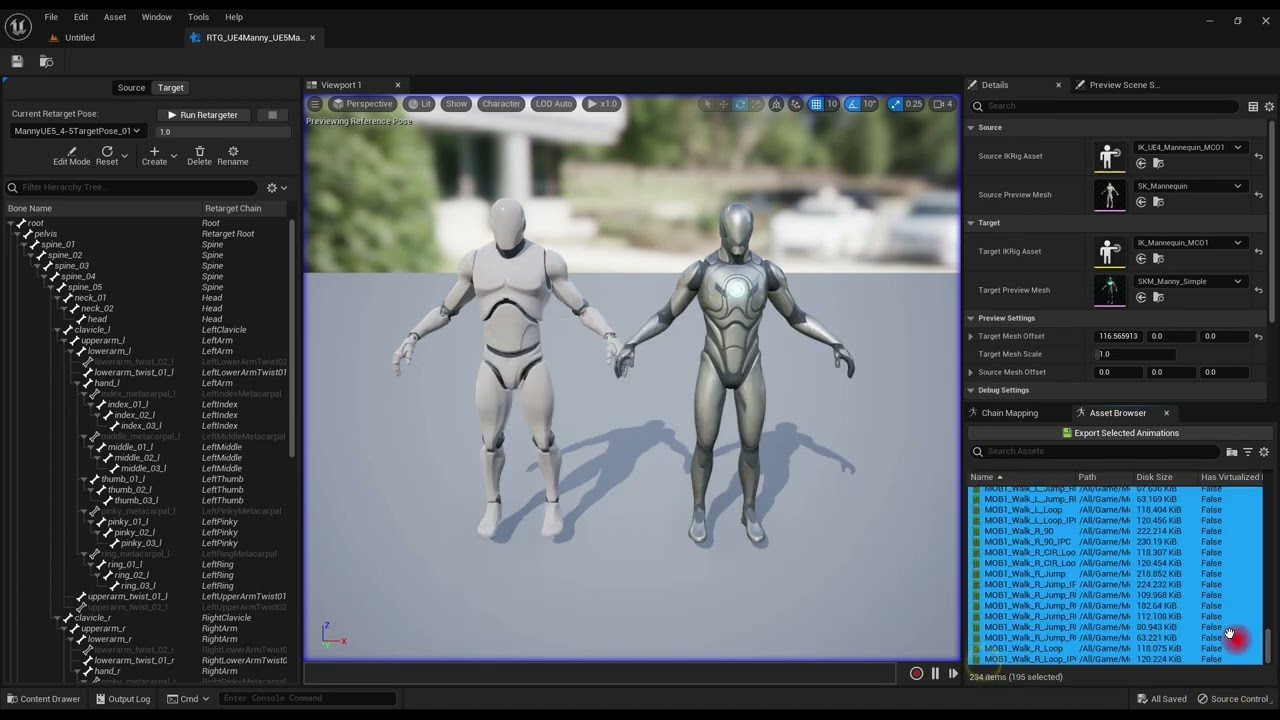
TUTORIAL - This is a quick tutorial on how to retarget animations on the stock UE4 Mannequin to the new Manny in UE5. We've tweaked and customized the retargeter files included with UE5, with much better and more accurate results. It fixes twisted fingers, elbows and shoulders, unstable chest, to name a few issues. It's fast and easy, takes on...
foggy nexus
@hollow stone first thing I'd do is check that your traces are hitting where you expect. You can enable draw debug in the CR then enable CR debug visuals in the engine console (let me know if you can't figure this out and I'll look it up). If this test passes and the trace hits are where you expect (i.e. in the middle of the bone) then it could indeed be that the location offset is being set at the wrong part of the foot, in which case a dirty workaround could be to add some small local y offsets to the feet at stage 4.
foggy nexus
late gate
If its best to stick to one mannequin (which would be better for me) is there an...
The only main drawback is that UE4 mannequin has fewer bones which means less smooth animations. More data = better visuals.
But if after retargetting to ue4, you're happy with how things look, there's no reason not to stick with it.
misty dagger
anyone ever got it so an enemy picks up player before ?
foggy nexus
If you use ue4, you need to set up a retargeter from ue5 to ue4 as @hollow stone said, then just keep your ue4 animations as is. Once you set that up, your workflow is done.
misty dagger
got an issue at moment where it seems to move the player lower into the ground before putting them at the height
foggy nexus
misty dagger
got an issue at moment where it seems to move the player lower into the ground b...
Show us your logic
misty dagger


so the timeline first to move player where enemy needs them
then the montage on the enemy where at the point needed the attachment is done and then at the relevant point the attachment broke with a launch character being done on the target actor so player
hollow stone
@foggy nexus Apologies if you wanted something more detailed than this, this is what I see when enabling debugging on the control rig

 foggy nexus
@hollow stone new theory: the rotation offset is offsetting the translation of the foot, which is not the heel but the centre of the foot, which would explain why its not snapping to the ground
If this is the case, easiest solution would be to offset the trace itself so that it's aligned with the heel.
hollow stone
You
are
a
genius
There was already an offset applied

Setting this to 0 fixes the problem entirely
But this was added by Epic (hence why I hadn't noticed it straight away)
foggy nexus
Ffs lol
hollow stone
I'm wondering why this was added in the first place
foggy nexus
Knowing epic, there was probably a good reason. If you get some weirdness while moving, at least you know why.
You can always add a conditional offset later if needs be
foggy nexus
misty dagger
got an issue at moment where it seems to move the player lower into the ground b...
Try to switch off the other character collision before attaching
foggy nexus
No, the character being picked up
Assuming you don't need their collision while they're being held, just disable, then re-enable after detaching
misty dagger
foggy nexus
No, the character being picked up
yeah so the player
it's the player being picked up and thrown by the bot
foggy nexus
I don't know your game dude
hollow stone
foggy nexus
Knowing epic, there was probably a good reason. If you get some weirdness while ...
I'm having a little play with it and I'm not noticing anything out of the ordinary with the offset set to 0. The only problem I still have is the rotation looking funky when on a steep slope (at the end of this clip):
misty dagger
foggy nexus
I don't know your game dude
it's fine I don't think I said to be fair
that ones on me
hollow stone
If you can think of any solutions to this, I'm all ears - but you've been super helpful in helping me diagnose this, so thank you so much bro
foggy nexus
hollow stone
If you can think of any solutions to this, I'm all ears - but you've been super ...
Try lerping to the new rotation/translation
Rather than just plugging straight in
foggy nexus
misty dagger
that ones on me
No worries. Let me know if this works.
Bear in mind that the player may jump after detaching + enabling collision if collision spheres are overlapping so you may have to add a translation offset or launch the character until they're clear.
foggy nexus
foggy nexus
Try lerping to the new rotation/translation
This should make everything look much better
misty dagger
foggy nexus
Bear in mind that the player may jump after detaching + enabling collision if co...
so in the screenshot you see. I'm attempting to launch the player with a additional amount in the z
at the moment I'm not having much luck
foggy nexus
misty dagger
so in the screenshot you see. I'm attempting to launch the player with a additio...
Firstly, is the first issue solved? Is the player still sinking into the ground?
foggy nexus
Hanging
misty dagger
thats why

the player is not set so their base is at 0
I will need to take the Vector and add onto it like 150 or something
foggy nexus
misty dagger
I will need to take the Vector and add onto it like 150 or something
Not exactly sure what you mean. If that doesn't work, record a quick clip of what you're seeing.
hollow stone
foggy nexus
Try lerping to the new rotation/translation
There's a high chance I'm just being dumb here, but I'm not sure quite how that would help? The problem is the lateral rotation of the feet looks strange on extreme slopes - the rotate to the slope perfectly fine, but they bend in an un-natural way.
Surely lerping the translation would just cause it to go to the strange position over time?
 misty dagger
foggy nexus
hollow stone
There's a high chance I'm just being dumb here, but I'm not sure quite how that ...
misty dagger
foggy nexus
hollow stone
There's a high chance I'm just being dumb here, but I'm not sure quite how that ...
Ah I thought it was the snapping to new rotations that you didn't like
misty dagger
so what you'll see is the following, Player moved to location but slower then into the ground. Then the enemy doing their montage. When they throw the player is all messed up and the launch looks bit odd at least to me
foggy nexus
It's the back foot you don't like?
If so, you have to clamp the angle
Even in this case, the foot won't stick flush
hollow stone
foggy nexus
It's the back foot you don't like?
Both, really. In the screenshot, the forward foot is rotated in a completely un-natural way.
Would clamping or using stiffness be better? I've not played around with either yet, but I know a lot less about the stiffness parameter than I do about clamping values haha
foggy nexus
hollow stone
Both, really. In the screenshot, the forward foot is rotated in a completely un-...
You're now entering AAA territory. Getting these things rights takes armies of experienced Devs breaking new ground.
In reality, on steep ground, you'd keep a clamped foot angle and offset the remaining angle onto the ball of your foot with the rest of your foot above the ground. You can see that transfering this logic into the CR gets complicated.
It's doable but probably not worth it unless you're working for Naughty Dog
hollow stone
foggy nexus
In reality, on steep ground, you'd keep a clamped foot angle and offset the rema...
Yeah for sure haha - the problem only really exists on super steep slopes, so part of me is wondering if I should just transition to a climbing animation for slopes like this
hollow stone
foggy nexus
It's doable but probably not worth it unless you're working for Naughty Dog
Referencing Naughty Dog gave you a big gold star in my book lmao
foggy nexus
I actually think the front foot looks quite natural tbh
Last of us animation blew me away
I've never seen anything like it
hollow stone
foggy nexus
Last of us animation blew me away
Dude both of those games got me obsessed haha. I've never quite had a gaming experience like that.
foggy nexus
misty dagger
so what you'll see is the following, Player moved to location but slower then in...
I see the issue I think
misty dagger
something tells me I don't think what I'm trying to do will work
This isn't helping

reason I say is it sinks into the ground after the rotation is done which tells me the timeline is messing up somehow
foggy nexus
It seems like it's doing what you're asking. The player is attaching to the enemies' hands (?) So the player has to sink into the ground. I think you need to rotate the player (lerp) before attaching, or have the enemy move hands uowards
misty dagger
so the attach is done on timeline being finished
hollow stone
foggy nexus
In reality, on steep ground, you'd keep a clamped foot angle and offset the rema...
Part of me is wondering if I'd get better results from IKing the 'ball_L/R' bones rather than the 'foot_L/R'. For some reason the 'ball' bone seems to actually reference the toes. I played around with it a little and when stepping up onto ledges, the toes would be IK'd and the back of the feet would naturally droop over the edge.
For now at least, I'm happy with how it's working - and I can't thank you enough for helping me come to the realisation that it was a pre-set offset.
foggy nexus
misty dagger
This isn't helping
I can't see where the target rotation is coming from. You either get picked up like it's your wedding night (sideways) or with the grabber's arms above his head, no?
misty dagger
that

I have a scene comp in the enemy BP for the location and rotation of where the player needs to be not to attach put being in right place for the attach
foggy nexus
It seems like the rotation is either not working or not set correctly according to my wedding analogy above
Although in first person it's very hard to tell
foggy nexus
I'm gonna have to leave now. Feel free to ping me tomorrow if you still need help 🙂
misty dagger
however is seems to launch player into abbyss where garbage collection deleted player
deletes
misty dagger
foggy nexus
I'm gonna have to leave now. Feel free to ping me tomorrow if you still need hel...
I'll prob be still working this out tommorow afternoon. I finish work at like 2 ish
hollow stone
hollow stone
Part of me is wondering if I'd get better results from IKing the 'ball_L/R' bone...
I've just realised that I've been thinking of "the ball of the foot" wrong my entire life lmfao.
 winged violet
Is there a way to prevent an anim montage from playing if a higher priority one is already playing?
smoky shell
I'm having trouble with the Rigid Body node. I'm using 5.3
In the first screenshot I'm simulating physics on the neck and its achieving the effect I want. I want to do the same thing in a post process anim BP using the same physics asset. But it isn't doing anything. There is no error/warning/information at all, it just isn't simulating.

 misty dagger
I've found the issue these are whats causing me pain


for some reason the attaching and then the detaching is just throwing player off completely
late gate
retargeting from UE5 manny to a UE5-compatible skeleton (that has slightly different dimensions cos its a slightly smaller character. I've done the bone-chains for the spine/arms/legs, and the legs seem to be working fine, but the arms....... I know the finger positions would be off cos I haven't done those chains, but I dont think that would help the arm positions.
Both were A-pose in default

 late gate
well, even though the UE guides seem to suggest it should deal with height differences automatically... it doesnt seem to. But adding in IK solvers and using offsets seems to make it work. Not sure its the correct method though!
lean folio
Hello,
So I am a Amateur/Newby to animations specially in UE5. In my TopDown project, I have attached my current setup. I have a run/walk, sprint, and crouch system, and I'm trying to get the crouch animation working/setup. In the image where the red X's are in the lower left I do NOT have anything set up in those transition rules as I'm not sure what/how to set it up properly.
Any suggestions? Anything is appreciated.
And yes I've tried looking at video's but all the ones I've found are specific to their situation and don't seem to work for me.
 foggy nexus
misty dagger
however is seems to launch player into abbyss where garbage collection deleted p...
foggy nexus
misty dagger
however is seems to launch player into abbyss where garbage collection deleted p...
GC destroys uobjects not actors, and if it were destroyed, you wouldn't see it.
If I were you, I'd handle this by making an "on lifted" animation, then another that loops the last frame while attached to the enemy. Attaching and detaching won't be the issue.
foggy nexus
late gate
well, even though the UE guides seem to suggest it should deal with height diffe...
Ik solvers on the arm chains should resolve this but the offset shouldn't be this large. Are the target chains definitely identical for both models?
This happens when you rotate in the wrong direction. If you move the latter key to "the other side" of the former key while maintaining the same value, this won't happen. It can be a bit of a pain sometimes.
late gate
foggy nexus
Ik solvers on the arm chains should resolve this but the offset shouldn't be thi...
I managed to improve it by doing the ik solvers properly (I needed to make the end part and then add a root to the solver, I was missing this second-step). It then ends up a bit off still, but fairly close. The hands end up too high (almost forehead height when holding the gun instead of chest height) so a -15 z-height and about -10 in the Y axis and they end up right. Assuming using static offsets is the way I'm meant to be doing it. I'll have to test it on various other animations, with the actual weapons in the hands
foggy nexus
lean folio
Hello,
So I am a Amateur/Newby to animations specially in UE5. In my TopDown pro...
What do you need help with? How to set up crouch transition rules?
foggy nexus
late gate
I managed to improve it by doing the ik solvers properly (I needed to make the e...
You'll find that unless you're working directly with UE mannequins that things will rarely be perfect. I'd suggest that you get a good control rig set up so you can edit your animations when you can't get it right in the retargeter.
lean folio
foggy nexus
What do you need help with? How to set up crouch transition rules?
yeah, how to go from standing/running and transition to crouch and crouchWalk
idk the logic behind it very well yet.
misty dagger
foggy nexus
GC destroys uobjects not actors, and if it were destroyed, you wouldn't see it.
...
Thats wierd then cause if I don't attach and do all the code it's fine
It's attach and then on detach it seems the player isn't where they appear to be
At least from what I can see
Am I right though what your saying is to fake the throw
Or I missing something
foggy nexus
lean folio
yeah, how to go from standing/running and transition to crouch and crouchWalk
Assuming you're working in blueprints and not c++, you'd choose an input (let's say ctrl), and in the character BP, make a Boolean value bIsCrouching, set to true when ctrl is pressed, false when released. In your ABP, cast to your custom character, get the Boolean, make an ABP Boolean of the same name and set the latter from the former in update, then use that value to transition.
I'd suggest looking for some more in depth tutorials and taking the time to go through them as this is a fairly rudimentary part of game dev.
foggy nexus
misty dagger
Thats wierd then cause if I don't attach and do all the code it's fine
If you don't attach then the enemy won't move you. If the enemy will remain stationary, then you don't need to attach at all.
Also fiddle about with attach rules. Snap to target or keep relative may get better results.
foggy nexus
misty dagger
Am I right though what your saying is to fake the throw
Not really. I'm suggesting that the player rotation be done by animations not timelines and lerps.
Launch character btw, you should multiply the X and Y by some value and keep the z constant e.g. 600-800.
foggy nexus
It's not dumb. It's just that in this case it's not the behaviour you want. Glad it's fixed now.
misty dagger
foggy nexus
If you don't attach then the enemy won't move you. If the enemy will remain stat...
So for this specific montage it doesn't need to really attach
I can do animation for player to happen same time. Its just if I do what attach I'd rather get that working
misty dagger
foggy nexus
Not really. I'm suggesting that the player rotation be done by animations not ti...
How would I do the player rotation by animation as I would need to rotate the player actor else even the animation would line up correct
foggy nexus
If you're using the mannequin, you'll have a control rig you can use to animate in the sequencer. Then you can make a sequence that rotated either just the mesh or the whole root by whatever angle you need. Long term it'll look a lot better than rotating with lerps
misty dagger
foggy nexus
If you're using the mannequin, you'll have a control rig you can use to animate ...
Won't that mess up stuff ? Like rotating mesh etc
Cause then the mesh will be rotated different to the actor forward and prob mess up something
misty dagger
foggy nexus
Not really. I'm suggesting that the player rotation be done by animations not ti...
I'll make this change, from what I saw I add onto the z but I'll change that
foggy nexus
misty dagger
Cause then the mesh will be rotated different to the actor forward and prob mess...
If the player's being grabbed, you won't need any root data anyway. Take your time, experiment and see what works best.
smoky shell
Rigid Body Anim Node:
- Ignores linear constraints
- Doesn't behave anything close to the way its been designed to
Does anyone know how to make it function in an even remotely usable manner?
First screenshot works 100% when hooked up
Second screenshot produces erroneous/broken and unusable behaviour no matter what settings are used


 near hamlet
ive got a strange issue and i cant figure it out nor find any known resolutions. ive tried applying all transforms and scale, disabled smoothing, and everything. my animation looks like this in blender : https://gyazo.com/03ee7af6d19ccabed1c5a3680a5b0d0c

and this in unreal : https://gyazo.com/353773dd33082a3b4b84d077623f6c17


 quaint robin
Hi! How do I snap the left hand correctly to the animation, so that it would only use rotation to allign correctly with the right arm and not move it on "x,y,z" ?


 misty dagger
foggy nexus
If the player's being grabbed, you won't need any root data anyway. Take your ti...
misty dagger
foggy nexus
If the player's being grabbed, you won't need any root data anyway. Take your ti...
I'm still confused I'll be honest as even if I animate the rotation I don't think it'll work right
can someone help me, when I replace the skeleton of the animations in 5.3, they turn into a t-pose
What I might do is just before I detach I get the player location and then after detach set it
See if that works as it's on detach player appears to be not where they would be
 brazen willow
Hey I'm doing a online game, and I have an issue: the feet always slide, in any max speed, how can I solve it?
As it's online, root motion is not a good idea according to the forums
Here's the movement video in game
foggy nexus
brazen willow
Hey I'm doing a online game, and I have an issue: the feet always slide, in any ...
Root motion definitely not suitable for multiplayer. Your issue is that the animation itself requires a non-constant speed. I usually handle these types of animations using anim notify states and lerping the walk speed so that the speed is lower when the foot is on the ground and higher when between strides.
foggy nexus
quaint robin
Hi! How do I snap the left hand correctly to the animation, so that it would onl...
You'll have better results editing the animations in the sequencer than trying to manage procedurally.