#animation
1 messages · Page 24 of 1
 worthy latch
but it would be good if you had the setup from zero, so you can be sure about you have a right setup
maybe you can create a new character for testing
then put the animation to it
 primal perch
I just made 2 short ideos for you to see
maybe that helps
in the sequencer one can see the wind up swing perfectly clear and smooth. but in game that part just skips (escpecially when seeing it from the front)
worthy latch
I think it's about the animation itself, where did you take the animation from? I think higher frame per second may solve the problem
worthy latch
and what happens if you set the speed to 0.5 from 1? can I see that
in the slow version, are you able to see the swing properly
maybe it's about rendering stuff
primal perch
worthy latch
in the slow version, are you able to see the swing properly
put it down to 0.1 and xeah the swing is there
but why is it faster on normal x1 playspeed than in the sequencer
or is it?
worthy latch
then I think you didn't give the animation enough time for the swing start to be rendered properly
can you try it with the same angle?
primal perch
worthy latch
can you try it with the same angle?
what you mean?
worthy latch
the camera angle, in the videos it's different than each other. in the sequencer you are checking from the back side which has a better angle to see the swing
primal perch
like this?
primal perch
worthy latch
the camera angle, in the videos it's different than each other. in the sequencer...
ah, yeah wait I make one
so, this is now back on 1x speed, so the original, like in the sequencer
worthy latch
there is definitely something about the animator itself, besides of the animation
I think the swing is still fast than it should be, which is the animation's problem
but the kickstart of the animation is problematic because of the character
I think there is supposed to be some settings for it
let me check the player settings, maybe there is something about speed
primal perch
so i need to slow down my wind up
 primal perch
yes
worthy latch
primal perch
so i need to slow down my wind up
yeah, I think there is a couple frames needed in your animation for the swing kickstart part
it's probably something about Unreal's rendering part
primal perch
allright then im trying to put some frames in between
worthy latch
yeah it would be a good choice, and how much frames are in there for the kickstart of swing?
worthy latch
and the rest? how much as total
primal perch
total was 27 frames
worthy latch
and how is it right now, any news?
primal perch
I swapped the animantions now. Its still not working.
it looks absolutely fine in the sequencer
worthy latch
can you get the camera closer for testing purposes?
we may determine the problem more clearly if we look from a closer distance
primal perch
worthy latch
I have a feeling that the animation is so fast that the game's rendering speed doesn't catch up
and sequence may have a different settings
I am kind of out of ideas since it is most likely about rendering
as you said and I saw, the animation works fine in sequence
but sequence is offering a detailed view on animation and probably special rendering
 limber garden
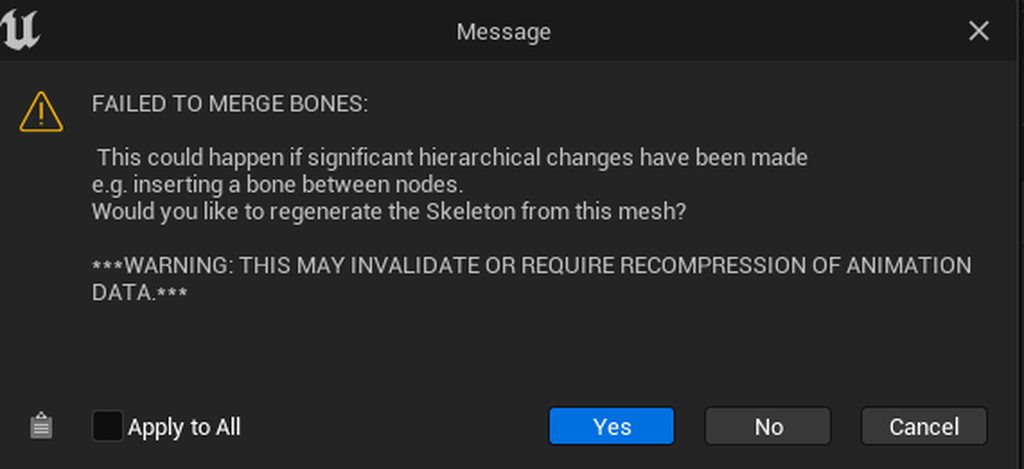
Ive had some animations made by someone and all the anims have been fine, except the last few, of which when I export them from Maya and import them into Unreal I get this error message saying this:
https://imgur.com/a/8fzlxL1
I would think this is an error on the animators side, but maybe not? Anyone have any ideas what it might be and how i can fix it?
 thick ridge
Not sure where it's appropriate to post this, but it affects animation, so here we go.
I'm currently experimenting with grooms, trying to get the best interpolation results possible. Currently, no combination of settings looks correct when combined with skinning and/or blendshapes. I believe I've tried just about everything, but the hair will clip into the underlying geometry no matter what, and I have no idea why.
Then there's this. What is this, and how do I use it? This description is useless. Nowhere does it say "EnableDeformation" in the interpolation settings, or anywhere else for that matter. Any ideas?

 worldly swan
Hey everyone,
I am working on an RPG game, and I've come across a question regadring the animation blueprint. In my game, players can equip weapons like swords and shield in both hands (interchangeably), each with it's own animations (for idle, walking, etc).
I'd love to hear some suggestions on how to efficiently structure the animation blueprint to handle this. I like the Lyra way with Linked Animation Layers to load in memory only the animations of the equipped weapon but I'm not sure how to make something like this for both hands.
Any insights or tips from experienced animators or Unreal Engine pros would be greatly appreciated! Thanks in advance for your help!
 zenith moon
Can anyone help with this? I'm trying to make a simple test "plane" where the rudder/elevator are controlled by the joystick. This part works on the physics side, but the angle of the elevator goes wrong when the vehicle is not facing the initial direction in the world. I'm using the above blueprint to move the elevator. (See pics)
(Rudder works with the same BP, but it is rotating on the yaw axis and the whole vehicle is only really rotating on the yaw axis at this point so that's not surprising. If I had it twisting I bet the rudder would also go wonky.)
The "sphere" is a parent to the "cubes" which make the elevator/rudder right now.
Edit to add: the "roll" shows 90 in there, because I had also tried making the elevator tall and rotating it by 90 degrees.


 primal perch
Can someone recommend me videos about timing and fps in animation? I cant figure out if I should animate in 30 or 60 fps
 sharp gazelle
does anyone else use mixamo? trying to import animations from it, and it isnt importing
 dull bridge
My enemies are being knocked back through animation montage root motion and it sometimes causes them to phase into walls/obstacles. Is there an easier way to handle this then tracing behind them before hand and playing a different animation if there is an obstacle there?
 stray anvil
How do you setup multidirectional dodge, while in combat
 maiden geyser
Hey folks. I'm having a very weird behavior/issue that I'm hoping someone can help be figure out. I'm using UE5.2
I have a modular character setup that's a bit odd (Inherited assets, can't change it). The skeleton is the same across each modular piece and I'm using Leader/Follower pose component to sync a single Animation Blueprint.
Root Mesh (Body)
- Coat, Hands, Legs, Feet
- Main Weapon, Offhand Weapon, Ranged Weapon
The Weapons utilize the same skeleton and are weighted separately instead of using mesh sockets so they can be animated rather than using a rigid body/physics object scenario.
The Weapons are able to utilize all animations for the root mesh - as planned, however, unless I explicitly set the weapon mesh as a preview in the animation blueprint, the weapons will not animate in-game. Immediately after setting the mesh as a preview, it works 100% correctly.
What I think is happening is since the animated bones in question are not part of the Root Mesh's bind pose, it may be being optimized out and left un-animated? Any thoughts or advice would be incredibly helpful. I really don't want to go through and set hundreds of weapon meshes as a preview >.>
 proven ridge
hey guys can you tell me how this work?

becuse if i just put this my animation wont work
proven ridge
proven ridge
hey guys can you tell me how this work?
im following a tutorial but why i dont see my character?
did i do something wrong ?
https://www.youtube.com/watch?v=WUXvq6At6pE&t=148s&ab_channel=GorkaGames im following this tutorial
Hello guys, in this quick and simple tutorial we are going to learn how to create an animation blueprint and a blendspace in Unreal Engine 5
↪️Check out awesome Unreal Engine courses: https://bit.ly/GorkaGamesWingfoxCombat
Check out my Steam Game! https://bit.ly/3rVlXU1
Follow me on Twitter: https://twitter.com/GorkaGames
Subscribe to the chann...
im at minute 4:55
 simple star
is it bad to have multiple smaller control rigs instead of a larger one?
 simple star
I was wandering what the best approach is
I'm still unfamiliar with animation
ok I guess it's like everything else then. Thank you for the time explainning it to me @stable basin !
 haughty saddle
hello

I made this animation and wanted to import into UE5
my character moves away abit from the root onctrol and I am not sure if she has a root bone
I cannot see it
 restive steppe
root bone is just parent of everything else in your skeleton
can be pelvis, bip_01 etc
depending on how you made it
open your character's skeleton
root should be on top
restive steppe
not necessarily
you can leave it as is and use root motion I guess
check this
https://docs.unrealengine.com/5.1/en-US/root-motion-in-unreal-engine/

An overview Root Motion Animations in Unreal Engine.
sorry, I know a bit about animation, but still a noob in UE so can't help with exact instructions
haughty saddle
so you mean as long as my root bone did not move then I can still surround the capsole for my animtion?
restive steppe
you can use both - character runs in place or character runs and moves away from original location inside animation, but you would need to use root motion for later
haughty saddle
thank you so much
 sleek hatch
Hi All, Sorry for the noob question, but is there an equivalent to the Unity Animator "Any State" entry point, so I can have a series of animations, but I don't need to transition between them all, I can just set the criteria to start what I want. In unity it looks like this:

 astral bay
If you’re using unity you’re in the wrong server
primal perch
hello, I have made myself an animation, a forward slash. Now I want that slash to have a forward impulse, but im not sure how to approach movement in skill animations. Would I make the movement of an animation in the animation and use root motion, or would I make animations stationary and move them in the engine, like in the screenshot?

 willow pilot
Hi guys i am looking to purchase animation packs on unreal engine for my character. but notice there are different types. there is a locomotion type and directional type i am a bit new in this area. Is there more different animations besides the one mention
sleek hatch
astral bay
If you’re using unity you’re in the wrong server
Sorry, I moved from unity and am trying to figure out if you can do the same thing in UE.
 shrewd finch
is there any technique, that forces walk animation to always finish the step? Atm I am exploring Lyra example, root motion + stride warping, but on short key press/releases character just slides, without actually making steps
hmmm... maybe I can just force input to have minimal pressed time
 storm delta
Is there a way to blend anim montages similar to a 2D blendspace? I'd like to blend 4 directional dodge animations so that the animation ends up suitable to whatever angle the player inputs
primal perch
is it better to animate spacial movement in the animation itself, or in the engine?
 azure trout
Hello guys, I am currently working on a scene that I would like to render using path tracing. When I started working on the project everything render fine, fully detailed. But as I continued building my scene, I lost all the mesh details on the rendered frame(s) regardless if the mesh was Nanite or not. It is the first time I am using path tracer and I have seen many suggest a console command but I have tried that with no success.
 bronze fable
Does anyone happen to know how performant Retarget Pose From Mesh is? I want to avoid generating an absurd number of animations, blends, and other various files but I can't help but feel like using Retarget Pose From Mesh is going to be expensive
worldly swan
sleek hatch
Hi All, Sorry for the noob question, but is there an equivalent to the Unity Ani...
You have a node called "State Alias" and you can choose Global Alias
or select any alias you want
sleek hatch
worldly swan
You have a node called "State Alias" and you can choose Global Alias
Thank you, I'll take a look at that.
primal perch
Would I use root motion for a dash or blueprints?
 frail kite
I have substituted my own 1D Blendspace into the stock ThirdPerson ABP_Manny "Walk/Run" locomotion state machine.
Increasing the "Rate Scale" of this Blendspace increases the speed of the animation playtime inside of the Blendspace preview, but not in the game preview - (Alt+P)
I have troubleshooted by removing the plugged in Blendspace, double checking the rate scale and animation speed under the preview, then saving the blendspace, plugging it back in, recompiling and running the state. Still no change.
Does the Animation board have any advice?
 haughty saddle
thank you so much
 tepid sundial
primal perch
Would I use root motion for a dash or blueprints?
tepid sundial
primal perch
Would I use root motion for a dash or blueprints?
It depends, You can use either, but if the motion is complex it can be quite a headache to move it via code in the way you want. Root motion makes it easy to have the movement feel natural, but is a little less flexible if you want to change the motion at a later point. Motion warping can help with that though.
My preference is to use root motion for most things, and in place animations for animations that don't have a defined length and involve relatively simple movement (Moving in a direction at a constant speed - like walking)
I'm an amateur though, so take my advice with a pinch of salt 😉
 tacit needle
How would I be able to stop the stutter from this animation or smooth out the looping of the animation? It's fairly short
 foggy nexus
Turn off root motion. I swear half of the questions are the same.
 lunar fern
hi, does anybody in here use rbf_nodes in controlRig ? the rbf_quaternion node (after setting it up) works fine if i set the values by typing them in but when i connect it to a getTransform of a rigElement (ctrl or joint) and transform that element interactively it immediately crashes unreal, i would think i tried everything by now to remedy this problem. Does it work for anybody in here ? I tried unreal 5.1, 5.2.
It seems to still work in 5.0 when the rbf_quaternion nodes were still split for the different outputTypes
tacit needle
foggy nexus
Turn off root motion. I swear half of the questions are the same.
Thanks it was actually clicking the in place option on mixamo and re downloading the animation.  got it now
 night crow
hello! is there a way to export shoes or clothes with a linked animation sequence in unreal?
i want to export an animation sequence with a character that has shoes and clothes from unreal
primal perch
tepid sundial
It depends, You can use either, but if the motion is complex it can be quite a h...
Can you recommend a video or smth to learn when to use what? Im tempted to go with making the spacial movement in the actual animation and just enable root motion, bcs it would be easier and I wouldnt need to set up a lot of code for it, could just play the animation. But on the other hand, if I want to change something about the spacial movement I would always have to alter the original animation instead of just increasing a parameter (say for the distance of a dash) I dont really know what aspects in a game or a certain animation are the key factors to decide what method to use.
 frosty moon
guys i made an locomotion and swichable states about my game but my crouching animations doesn't work at all

do someone know about anything APB?
the crouching transitions is working well ( i guess :D) i cant solve the problem
 severe surge
frosty moon
severe surge
frosty moon
What do you have in transitions? Seems like it goes to crouch transition, or even may go to crouch, but it goes right back to idle, because the backward condition is true.
 frosty moon
severe surge
What do you have in transitions? Seems like it goes to crouch transition, or eve...
frosty moon
severe surge
What do you have in transitions? Seems like it goes to crouch transition, or eve...
how can i fix it
severe surge
frosty moon
how can i fix it
Check the transition conditions in the white circles, with the arrows. Not in the states.
worldly swan
Hello everyone,
Is it possible to blend only if the blend poses are valid?
I use Linked Anim Layers and it's possible that they are not valid.
On the picture if right hand or left hand is not valid I just don't want to blend. (base is always valid)

 plush garden
Would anyone experienced with procedural animations dm me for help? I have a 3D asset with walking animation that I can't get working. The feet stay stuck. Thanks.
 ashen surge
is there a way to blend morph target not just in the target position but at position where the impulse is exerted?
frail kite
frail kite
I have substituted my own **1D Blendspace** into the stock ThirdPerson ABP_Manny...
Replying as solved: child AnimationBlueprint was not given authority to change the parent.
frail kite
frosty moon
guys i made an locomotion and swichable states about my game but my crouching an...
Replying to keep tabs on this conversation after editing
frosty moon
frail kite
Replying to keep tabs on this conversation after editing
do you also need help?
 abstract silo
does anyone know how i would make controls be able to be rotated and not just translated? im using full body IK and things like the head wont rotate at all but itll translate, and im thinking im gonna have to use set transforms for the specific bones i want to rotate like the head or hips for example
 warm island
how would you setup a movement anim BP blendspace with only an idle, walk, run animation and 2 turning animations? use 1d blendspace? if so, how would you use the turning anims?
sharp gazelle


any reason why my character is still T-posing when I run my game?
Im following a tutorial and i have set the character to have the animation blueprint and its still T-posing
 blazing saffron
hey team! im fairly new to animation, and our team is making an FPS game on Lyra, im wanting to add a prone feature to our game but struggling to figure out where to start. The only youtube tutorial I found that didn't require getting a plugin pack wasn't suitable for multi-player - im also not against getting a pack for it but they all have less than 10 reviews on ureal marketplace so it feels risky to drop lots of money on something with just a couple reviews, any thoughts or advise would be really appreciated 🙂 cheers
 steel pilot
Hey, do you guys know how to do acceleration tilt?
steel pilot
blazing saffron
hey team! im fairly new to animation, and our team is making an FPS game on Lyra...
There’s a few ways you can do this. Do you already have other stuff like crouching implemented?
 gaunt moat
Could you please advise me what the problem is, when linking a hand with IK to a socket, IK lags behind the camera and weapon movement by 1 frame. When the weapon is in one place, the arm is where the weapon was 1 frame ago. How to fix this?
 limber rock
gaunt moat
Could you please advise me what the problem is, when linking a hand with IK to a...
limber rock
gaunt moat
Could you please advise me what the problem is, when linking a hand with IK to a...
Did you try to use "GetSocketLocation" inside ABP, not in your character BP.?
Additionally when I was trying to attach left hand to the weapon I found virtual bones to be very usefull in this case https://docs.unrealengine.com/5.0/en-US/virtual-bones-in-unreal-engine/

Resolve layered animation problems by using Virtual Bones with IK.
gaunt moat
limber rock
Did you try to use "GetSocketLocation" inside ABP, not in your character BP.?
Yes indeed now the position is keeping up, thank you very much. Only now errors appear with exactly the same node construction
 limber rock
gaunt moat
Yes indeed now the position is keeping up, thank you very much. Only now errors ...
limber rock
gaunt moat
Yes indeed now the position is keeping up, thank you very much. Only now errors ...
Can you show me how your ABP looks like?
gaunt moat
gaunt moat
Yes indeed now the position is keeping up, thank you very much. Only now errors ...
The new nodes are the same as they were

But now they're written in ABP
limber rock
Probably SelectedWeapon is empty on the start, just change it to validated get or use "IsValid" node
gaunt moat
limber rock
Probably SelectedWeapon is empty on the start, just change it to validated get o...
Right, I'll try it now, thank you
limber rock
It sounds like you should use FullBodyIK then
 wicked ibex
Im trying to get this to blow in the wind but i have never done it before. Is it better to have a simulation of the wind or record the animation of it doing the movement? Also whats the best way to go about this as the goal is to have it blowing in game in a realistic way gently, but then get hit by a small gust and just move abit more.
frail kite
frosty moon
do you also need help?
I am looking to create elaborate animation states that are represented by seperate classes, so that the playable character can call to these states with a function.
Udemy has a sale right now, and there are a few classes I will be looking to take, so my focus will be in the rails of that system, however I saw your locomotion state and it was a reminder in how much I enjoyed creating a simple 1D blendspace, but had trouble implementing a 2D blendspace. I am new to unreal within the month and am not expecting to be perfect, but to learn how to create, redirect and refine. I am loving the process.
 jade plank
Does anyone here uses ue to rigify plugin? the plugin messes up the mesh and the animations
 dim tapir
Hi everyone, I have been extensively looking into implementing orientation warping in UE5, with my animation blueprint, however I use a Unreal Engine 4 mannequin, and have issues getting the expected results, i.e it's not warping at all. Anyone that has some experience with setting things up with Orientation Warping?
frosty moon
frail kite
I am looking to create elaborate animation states that are represented by sepera...
Tbh 2d blend space is better than 1d bcs if you have to move 8 way movement in any characters or thing you can easily animate it. I encourage you to learn if you get the chance any you are right its fun
tepid sundial
Do I still need to have my movement mode set to flying in order to apply root motion in the Z axis? 😦
frail kite
You are totally right. I tried a couple of times to make 8way movement work and found the animations froze when the movement events were being called. It is very likely a small over oversight on my part, I shifted to 1D Blendspaces so that I could interact with more various blueprints. I am feeling pulled into so many directions within the program now, and am so excited the depth I am starting to experience. I will for sure make my way back to 8way movement, but damn I am having fun.
 median heath
I've made Control Rig for my Skeletal Mesh and Skeleton. Then I've reimported that Skeletal Mesh with new Skeleton, because I wanted to add a few more bones. Those were added in correctly to Skeleton, but were not in Contol Rig's bone hierarchy.
Is there a way to update bone hierarchy in Control Rig to match updated Skeleton?
 devout elbow
Hey guys, I'm having problem with adding new IK goals, whenever I add it, it steals all Limb IK solvers that were set up on other goals, any idea how to avoid this? Notice on picture below that wrist loses all solvers from it when I add new IK goal


 spring silo
dose unreal accept animated mesh slicing using usd?
blazing saffron
steel pilot
There’s a few ways you can do this. Do you already have other stuff like crouchi...
yeah the lyra game already has crough built in so thats all good, we just dont have prone - what would be the simplest way?
 jovial falcon
Hi Everyone, i need your help 🙂 I am trying to adapt the (very complex) UE5 Control Rig to a Paragoncharacter with a more complex skeletalmesh and i am struggeling with the Implementation of the additional bonechains 🤯 could anyone give me a nudge in the right direction?
Thats the Bone and Control hierachie at the moment


 whole veldt
anyone know the easiest way to convert pelvis horizontal root motion to root? I tried various things with the rig retargetter, the body mover solver seems like it could work ( can move root based on feet position ) but that doesn't seem to get applied to the retargetter unfortunately.
 ripe lily
@here anyone knows how to make cables in UE render?
Just spent half a day animating cables to move certain objects, only for them to fail to show in the rendering? I mean wtf.
Does anyone has a solution?
 ornate marsh
Ngl best comment of the day
worthy latch
yo folk
I tried to add a dodge animation to my character, but it somehow doesn't work in root motion
all the other animations work well, but specifically this one doesn't. Does it have something to do about unreal, or the animation itself broken?
nevermind I accidently set some settings wrong in mixamo animation converter I am using, which broke the root rotation. fixed it by using the right settings
 lunar vigil
How would you make a character hold up one arm in the air while doing every other animation if theyre carrying a torch?
i figured but i wasnt sure how to make them hold it constantly through every other animation that might play
right that makes sense
yeah
gonna have a think about it, thanks 😅
btw wouldnt playing a montage from the actor BP override this?
i mean like, having the layered blend set up in the anim BP, but then calling an attack animation montage in the actor BP
well i have this set up already for everything else
and it kinda works alright
im just not entirely sure how to do the torch
i dont have one yet
i will try 😅
we shall see
 dull goblet
Any easy way to create a fire animation from idle animation?
 proper sleet
So I tried it, but it doesnt even show me my animations even tho I made them with this mesh myself

 night rover
proper sleet
So I tried it, but it doesnt even show me my animations even tho I made them wit...
night rover
proper sleet
So I tried it, but it doesnt even show me my animations even tho I made them wit...
Yeah that's the problem
you are trying to play montage for non compatible skeleton
lets look at your tool skeletal mesh
actually just go back to your montage
you can look at the actual skeletal mesh and skeleton the montage is using
 proper sleet
Looks like its using the correct ones, what should I check?
 night rover
proper sleet
I set it to a skeletal mesh without bones, its just the axe
night rover
proper sleet
I set it to a skeletal mesh without bones, its just the axe
pick the right skeleton and get the right animation you should be gucci
proper sleet
Thank you!
shrewd finch
In default Lyra Starter Project, after actor stops walking, it has very visible foot sliding (not happens with running animation). Anyone knows what is causing that precisely? All my heuristic attempts to fix this issue failed
lunar vigil
i dont know how but i did this and it works first try :D thanks for the tip. The anim BPs are still a bit confusing to me

idk if its the preferred solution though
lunar vigil
oh thats a good idea
 tropic solar
Hello unreal slackers, friends - having an issue today thats making me feel insane: trying to put standard collider/ constraint set up on a new character- when simulating specific colliders, they seem to be snapping to one another - the character is about 2.6 feet tall (.8m) importing using game rig tools exporter from blender. I tried another version of the character that was about 20 feet tall and the colliders worked fine. Is it just impossible to do collision with a character this small? Any thoughts, guidance, condolences, would be much appreciated. Thank you


 tall hinge
Hey, does anybody know how would one bind the groom asset to the skeletal mesh and keep it bound to it even when simulating the skeletal mesh or animating its bones? Appreciate you.

 blazing saffron
hey team! im fairly new to animation, and our team is making an FPS game on Lyra, im wanting to add a prone feature to our game but struggling to figure out where to start. The only youtube tutorial I found that didn't require getting a plugin pack wasn't suitable for multi-player - im also not against getting a pack for it but they all have less than 10 reviews on ureal marketplace so it feels risky to drop lots of money on something with just a couple reviews, any thoughts or advise would be really appreciated 🙂 cheers
 buoyant gust
I have a problem where I can't get an animation montage to play on the default 3rd person character. I made sure there is a Slot "Default Slot" node in the animation graph between the state machine and the output pose, and I also tried setting the blend in and out times on the montage to 0. I have verified using a print node that the code is indeed being executed, but the animation just isn't playing. If anyone has any idea what I should try next please let me know. Thanks!


 timid obsidian
Does anyone know how to change the default input pose of UE4 mannequin from A pose to T pose in unreal engine 5.2?
I'm using radicle
*radical
 charred orbit
I’m curious of trying to make an animated short in Unreal Engine 5, does anyone have any tips for speeding up animation, or to help make it look better? (Like humans movement looking real)
 covert furnace
Hey! I have a character that is having a pose but t-poses in the render.
His pose is his own sequence and I am renderin in another. Can I combined the sequences or do something else to get this to work?
 round briar
So I'm trying to do an additive animation on the characters root (so the character sinks into the floor, will use IK for legs), however for some reason any translation in my additives doesnt work, it's only rotation and scale.
Anyone know how about this?
 misty dagger
Hi. Online they tell me that i have to make 60fps animations so unrealengine works with them very fine. Is it OK if I do them 30fps and brutally scale the frames up? This is because blender sucks and cant reach 60fps viewport performances, I only reach 30. What do you think?
misty dagger
hi thanks for the reply. Online they tell me if I make 60fps animation, or 30, then unrealengine is doing a finer job, small details. I havent verified but online they say the standard nowadays is to get 60fps, which is also more complicated to animate
 steep nymph
Is it possible to make firstperson bodycam animations with motion capture with a phone or something like that
to achieve the most realistic animations possible
but for real time
not a prerecorded video where the animations r just recorded for that specific video
but for controlling the camera and having those animations in real time
like unrecord or something like that
misty dagger
maby you can add some sort of constraints wobbly camera or something similar
so the camera is all wobbly and bounces around but I woulndt like it. I heard that some game makers took footages installing gopros on actors and copying what they saw as a result, but thats the prerecorded stuff you want to avoid
steep nymph
misty dagger
so the camera is all wobbly and bounces around but I woulndt like it. I heard th...
yea thats what i meant by prerecorded
maybe i could record various different movement motion capture animations
and put them in the program and kinda program when should one animation play or another
depending on what movement is being activated at that moment
but its hard idk
misty dagger
try to make a quick test to see if you like the effect or not before doing something complicated
steep nymph
misty dagger
try to make a quick test to see if you like the effect or not before doing somet...
do u know any firstperson motion capture programs for phone?
haughty saddle
hello I am doing a similar type of animation, combat with a one hand weapon, I did not use constrain in Maya because I wanted to attach the weapon in UE5.. is it oK to do that?
 whole veldt
anyone use reallusion CC4? i imported a character from there and it seems like its mostly compatible with the ue4 mannequin, but the wrist seems kind of messed up.
Anyone know anything about this?
whole veldt
in a full body ik when you rotate a hand goal, isn't part of the arms also supposed to rotate ?
 gentle lake
How do i make my hit reaction additive so that it doesn't interrupt the rest of the ai. Right now if i play a montage on hit after a couple times it disables ai. I tried making it additive and using the idle animation, and punch animation but it's still breaking.
can't find too many tutorials on it that really show what i should do
 minor marsh
how can I change framerate?
 lunar fern
hi when i animate a character in the sequencer using a controlRig it doesn't seem to show the finalResult of the animBP that is attached to the controlRig in the animationBlueprint. Is that normal ? Do i miss some setting ?
i have a correctiveJoints setup with poseDrivers
it works fine when i rotate the joints in the animationBlueprintEditor
 vast ferry
what could possibly be wrong with this retargeter?

IK Rig of right character


Left Character


The left Character has a much more complex skeleton then the right one, was really hard to figure out what needs to be chained and what not
 abstract nest
Has anyone in here messed with the paragon animations as NOT a player? Im trying to make one of them follow me like a companion but for some reason his run animation isnt triggering unless I get kind of far away
abstract nest
abstract nest
Has anyone in here messed with the paragon animations as NOT a player? Im trying...
Nvm I got it to work I needed to set the acceleration tick box on nav mesh
 dark crow
Does anyone know if meta human comes rigged?
blazing saffron
anyone know a good tutorial for getting prone into a lyra game mode?
@dark crow yes it does!
whole veldt
do people typically do IK over animations? Or is it expected that animations should properly IK the arm rotations toward the hand and whatnot?
gaunt moat
My weapon is exported from Blender to UE with zero coordinates, so during Idle animation the root bone shifts to the right position and moves the whole weapon, but at the same time the coordinates of the object on the level remain the same, only the bone shifts. Is it possible to make the coordinates of the object coincide with the root bone?
 midnight granite
In 5.2 can you fully rig a character or is still recommended to rig through an external program
creating/adding bones that is
 hard summit
Hi guys! Anyone here has any idea why in UE5.2.1 Control Rig, i cant break rotator/split struct pins on the cast node?

in a previous file, i was able to do so and i can copy paste the nodes over with the broken value. but i cant seem to just...split this cast node.
 misty dagger
I had a curiosity. I notced that unreal engine default file has an IK on the foot that collides on assets. I notice online that it can be implemented on any character. What if I have one character I import and it has all baked actions I edited in blender? Will I be able to impose that IK that collides on assets even with the already built animations?
I get this curiosity because what I export from blender is a set bones all parented to the root so they have no parenting chain
 normal olive
Hey guys, here to the left I have a rig with an animation I downloaded from the marketplace and now trying to retarget it to the metahuman rig so I can get the animation on my metahuman to animate in sequencer. I was wondering how I do this the best? right now the animation on the animation is slightly off on the metahuman rig.

This is how it looks now in the exported "animation sequence"
frail kite
normal olive
Hey guys, here to the left I have a rig with an animation I downloaded from the ...
Can you edit the bones of the Metahuman skeleton tree within the viewport editor?
Rotating the hand of the metahuman for example?
normal olive
frail kite
Can you edit the bones of the Metahuman skeleton tree within the viewport editor...
In the skeletal mesh?
I can rotate this

but the fingers still a bit off
frail kite
If I could not retarget the bones for the hand, I would likely set a static mesh of the UE mannequin as a preview asset to the metahuman bone structure to better align the bones.
Silly question, but I feel I should ask, what version mannequin to your animation is the skeletal mesh set to? Has it been properly retargeted to SK_Mannequin?
If so, I'd do the former, but I am no expert.
wicked ibex
Whats a good way to record an animation using cloth simulation in blender so i can get a good looking flag blowing in the wind and then import that as an animation into ue5
gentle lake
gentle lake
How do i make my hit reaction additive so that it doesn't interrupt the rest of ...
^
 craggy thunder
Can you do everything in UE5 or do you need to use blender or another third party application? I.E. add bones and animate to a static mesh
gaunt moat
Why doesn't Root Motion work for me? The video shows a skeleton and animation where both bones are animated, but Root Motion doesn't affect anything. The coordinates should follow the root bone, but it doesn't happen
gaunt moat
A cube is a mesh attached to a "bone"
Well, in general, in the skeleton, the root is like a "Rig" bone, but when creating the skeleton with Blender and animating the bones there, there are only 2 bones, the Rig bone only appear in UE

Yes, if I name the rig "Armature", the root bone becomes "root", but if I rename the rig to something else, an additional root bone appears in UE with the rig name from blender. Maybe that's the problem, but when I don't rename the rig it's even more problematic, the mesh scale becomes 0.01 because of the different scales between blender and UE
gaunt moat
Maybe I'm doing the wrong thing? I'm making a weapon recoil system and I wanted the Pivot of the weapon to be at the coordinates of the root bone during animation, so that the recoil rotates the weapon relative to that point, not relative to the floor, i.e. zero coordinates. Is there any other way this should be done?
 desert raft
Hello, I'm doing a small rhythm game test.
Is there a way to make the same UMG widget animation overlap itself multiple times? If I send multiple events to the same aanimation it resets (as excpected) but is it possible somehow to just spawn a new animation completely unaware of the former animation playing so it wonðt just restart?


 obsidian pawn
So I have this skeletal mesh for a flamethrow, and I want the player to be able to aim the flame nozzle, but without the backpack moving. Is there a way to do that without splitting them into two different components? As far as I know, I can only attach to one socket at a time. I figured I'd then have to use IK for the hose, but not sure on that!

 hidden meadow
can I animate deformed objects? For example I want to animate these objects coming out of the flower in order to simulate a wind like animation.
 misty dagger
Hi i made an animation from a video using Rokoko and then retargeted to the Mixamo skeleton using their retargeting Blender plugin, it looks fine in blender but when I Import it to Unreal it looks all super squashed/distorted beyond recognition. How can I fix this?
 elfin axle
anyone here use als v4 refactored ??
elfin axle
whats the least painfull way of retargeting in unreal?
for the als addon that is
elfin axle
elfin axle
whats the least painfull way of retargeting in unreal?
for the als addon that is
ok im using this video currently
Learn how to copy animation sequences from one character to another character by making a simple IK Rig asset for a pre-animated mixamo character, then you'll use the IK Retargeter to transfer the animation to a mannequin and also a metahuman. #unrealengine #animation
If you are brand new to Unreal Engine, I recommend you watch this video fir...
 sharp brook
Has anyone tried to bake an animation pose using Snapshot and then additively use it on top of animations? How did you do this if you succeeded?
 worn osprey
hi all, is there any way to change the max bone influences on a skeletal mesh? - no matter what i try the mesh info still reads as them being capped at 8
 vivid geyser
Hello, I'm implementing an enemy that should play animation only when it's not observed. When the player starts looking at the enemy it should freeze the animation, i.e. pause it, and keep the pose, and then resume it when it's required.
How can I pause/resume animations, and keep the pose on pause?
normal olive
Can anyone help me make this look good? Im trying to retarget the rig animation from the left to the metahuman rig to the right. So I can animate my metahuman with this animation without it looking goofy
craggy thunder
Oh, okay thank you; how do I get access to 5.3 preview?
 alpine nexus
Why does pressing a button that triggers animation right after the animation end break it?
 alpine nexus
Why does pressing a button that triggers animation right after the animation end...
alpine nexus
alpine nexus
Why does pressing a button that triggers animation right after the animation end...
same happens with some other animations inside state machine
 outer karma
hi quick question, i want´when i picked the flashlight that a text appears with a fadein text and fadeout. i already picked it up but no success
dark crow
I am wanting to create multiple crouch height animations. What would be the easiest way to do this? Ideally I would take like the standing idle animation and then create animations off of it and lower it for each height that I want.
 midnight pike
@outer karma text on screen, 2d?, a widget blueprint, you can animate the fading or do it dynamically through the properties of the text, an animation would be a simple way to go, you just call the animations whenever needed.
you can also make the text dynamic, so its reusable
if this is your first time, take a look at how to create and attach widgets and the basics on animation.
outer karma
midnight pike
<@905524360436125746> text on screen, 2d?, a widget blueprint, you can animate t...
i wanna try when i pick up the flashlight, that a fadein text appear and it will slowy fadeout
midnight pike
as said.
midnight pike
are you following a silly youtube tutorial? heh
midnight pike
what do you mean text on bp item, a text component?
the docs are a good way to learn, anything official also
midnight pike
you'll need a widget blueprint and you could just bind the text, but this is way in the open what exactly do you have?
outer karma
midnight pike
youtube is a good way to learn improper techniques and how not to do things, you'll pick up bad habits if you are not already a seasoned programmer though.
(but there are some good instructors out there, don't get me wrong)
@outer karma well first of all your second node doesn't have an animation selected, everything is "in the air" there
outer karma
midnight pike
<@905524360436125746> well first of all your second node doesn't have an animati...
yea i alr fixed
still no success
midnight pike
you need to start thinking programatically because those tutorials are a diservice though.
the animations play right in the editor?
outer karma
widget bp
midnight pike
when you play them you see the fade in, and when you play the other it fades out?
outer karma
in editor yes
midnight pike

How to create animated UI elements in UMG.
there's a lot to learn from that alone 🙂
 desert crown
Ok, so I made an animated sliding door bp. When the door gets triggered, the doors "pop" the position in the pic. I am assuming this is a collision box issue with the building, but not sure. If so, what collision settings should I use? Every tut on sliding doors they just work. I need the door to stop players, vehicles and projectiles when closed.
 midnight pike
you don't want the object to collide onto other objects, so make the door overlap with the frame, while blocking the player
also fyi you can create custom collision channels, creating one called "player" is often a good idea.
if all of your blockable assets share that they are indeed dynamic, maybe that's what you should block.
@desert crown but know the door and the frame shouldn't collide with each other typically.
desert crown
Scene has very little in it right now and most object are set to BlockAll
midnight pike
if they do, the algorithm will try to pop it out because its trying to block and avoid an overlap
you need to define how you'll setup collisions now for your game heh
desert crown
They could also collide with the building model which is set to BlockAll
midnight pike
that's also an issue
so everything is trying to avoid everything
thus the door won't work right now
desert crown
yep, wish the tuts for us rookies covered the collsions on the doors. Watched 5 of them and bah!
midnight pike
make your frame static, make the door overlap to static
I often say most tuts are garbage, but I don't mean to insult whoever creates them... it's just that anyone can make a video today and most people are not proper teachers.
they're just showing some random procedure the way "they know it"
but if I don't explain to you the REASON and that there are also OTHER WAYS of doing something, you won't be on the right track.
desert crown
midnight pike
make your frame static, make the door overlap to static
frame and doors are all 3 static meshes in the blueprint. WHen you say make the frame "static" ?
midnight pike
if something won't move, try to always set the mobility as a static object.
misty dagger
how to reference an animation pose frame inside the animation blueprint?
 midnight pike
 desert crown
midnight pike
if something won't move, try to always set the mobility as a static object.
desert crown
midnight pike
if something won't move, try to always set the mobility as a static object.
and that means?
opps sorry
midnight pike
heh just different optimization paths internally, if you were to bake lighting you'd want your walls to be "static" for instance
the door would be movable.
defining what it is and how it behaves is the first step really.
And keep in mind, static objects will generally render faster overall.
desert crown
Going to have to do some reading and testing different settings...
midnight pike
well for now you could set the frame and the door to overlap each other, see if your animation works, then play with the settings and see how things behave
it's a bit much at first I know
"this huge wall of tick boxes, I just want it to work!" lol
desert crown
I see where you can overlap, how to you overlap a specific mesh?
midnight pike
overlap means it's allowed to "go inside" another mesh, this is also something you can detect via predefined events as well, so you can tell if someone or something overlapped with whatever, in code.
desert crown
 midnight pike
so the door should be set to overlap all, except for perhaps physics body or a custom channel for the player, pawn, etc. in other words you want it to overlap to worldstatic because that's what the frame will be set to.
the object being in static mobility falls into the worldstatic category
that should make sense if you think about it, now you could also use "ignore" if you don't need information
desert crown
I set this for door frame
 midnight pike
does it behave like a door frame in-game for you? based on your game design? heh
desert crown
The door frame seems to be right. I cant walk through it or shoot through it.
The moment the overlap condition fire to animate, the doors pop out to just outside the buildings collsion frame
midnight pike
set the actual door to ignore worldstatic if you don't need to handle overlaps
ignore all but what you mean to block.
those object responses are the generic ones, you can add your own as well if your game is more complex.
desert crown
very early in game dev. trying my first door on my first building.
midnight pike
edit>project settings>engine>collision
just so you know :p
but yes, reading on collision responses, tracing, etc. won't harm. you'll use it all.
desert crown
well they animate now, just over on the wall away from the door LOL
midnight pike
also keep in mind with your transformations you may have mixed up relative to local to world...
it could happen, depends on what you're doing.
desert crown
I made a door blueprint (above) and added it to my building blueprint.
Looks good on game start, but the minute I hit the overlap zone, the doors pop. I like the idea of adding bp's to bp's
midnight pike
(reading on transformation matrices helps but isn't required as long as you understand the differences and how they relate to each other, for instance the transformation -the matrix- contains primarily the position, rotation and scale information for that object)
desert crown
midnight pike
(reading on transformation matrices helps but isn't required as long as you unde...
yep, good with that.
midnight pike
don't go crazy with abstraction though heh
desert crown
I use to do OpenGL 3D dev years ago....its the UE specific stuff that ganks me
midnight pike
for instance say you wanted to implement a grenade and its explosion, then it does make sense to have the explosion as a separate BP which is the one that causes the "reaction" and spawns the emitters, sound, etc. whereas the grenade just creates this BP when it detonates after a preset time.
but typically you wouldn't abstract any more than that.
desert crown
ok, so add the door frame, doors etc to the tower building bp directly
I appreciate all your help and knowledge. Off to dinner and UE5 collsion reading!
will let you know how it fares...
elfin axle
elfin axle
whats the least painfull way of retargeting in unreal?
for the als addon that is
?
desert crown
For giggles, I set my doors to ignore all and my tower to ignore all and still get the same issue. lol
elfin axle
elfin axle
?
??
elfin axle
so im in the process of retargetting , and...

the hands look way off
idk what im doing wrong, kinda new to retargetting
and using different skeletal meshes
midnight pike
@elfin axle if both skeletons are not matched properly you'll have plenty issues, why are you retargetting?
elfin axle
because I want to learn retargetting as I will be using different skeletons
for instance
I will be animating with cascaduer, blender and they all use the manniquin skeletons
so I need a way of using the animations I make in the als locomotion system
if there is a less painfull way im all ears
@midnight pike
midnight pike
for that workflow not really
desert crown
midnight pike
but typically you wouldn't abstract any more than that.
I think I have the collsions right, and found it still happened, do dug further and it seems the animation was moving them to a position that altered the Y and Z as well...
Pulled the animation Timeline out and just did snap movement to test and now I have this for open doors!

now to animate them...
elfin axle
midnight pike
for that workflow not really
 midnight pike
@desert crown lol oh well... you could use a timeline, lerp the position yourself, use an interpto to movement component, write your own c++ component, the sky is the limit (?)
desert crown
midnight pike
<@223633700733059073> lol oh well... you could use a timeline, lerp the position...
Yeah, have to figure out how to use vars in a Timeline (if you even can). I code in a bunch of languages....C++ is not one of them. Just never had a need to (until now).
Thanks again for your help
midnight pike
true for all intent and purpose you could just have 1 float channel involved that goes from 0 to 1 and lerp it, then if you want to manipulate the length you can do so via the timeline properties, instead of going "full visual artist mode" this way you avoid hardcoding things in.
since you are new to the concept (I guess?) imagine you have a variable that in 1 seconds goes from 0.0 to 1.0, that's going to be your alpha value. lerp (linear interpolation) is fed this alpha and you can simply state the initial and final position for your axis, thus interpolating in between. then if you want to change the duration of the timeline, you can do so through SetPlayRate which would work OK for this.
desert crown
Thanks. Yeah, good with that. I just had to incorporate the starting position as it was not 0. Thanks all. It is WORKING!
midnight pike
"1 seconds" I'm not even editing that, live with it haha
elfin axle
ok so
what workflow do you guys propose for using multiple applications for making animations?
Ill be using cascaduer and blender
then I want to use the animations in als
should I retarget the animations instead of the skeletons?
got it fixed!
 tired garnet
How should I appreach making control rig and procedural animation fur creature with many more joints than in typical legs?

 marble sierra
Hey guys, I have a problem with physics asset collider not colliding... I have hands set to Simulated in the skeletal mesh physics asset, yet they clip through the body?


How can I make the capsule collide with others?
it collides with the world, but not with other capsules on the physical asset
rest of the body capsules are Default or Kinematic
oh I figured it out. I needed to select the capsules I need collision between, and click Enable Collision

 minor nexus
Hello, slackers! What's that "bug" icon in control rig of Third Person?

I can't create the same node only if I copy it. Strange things!
Alright, it is a "visual debug" icon
It looks like this, awesome feature guys!

Just right click pin you want to debug and you got this debug! Don't forget to write a.AnimNode.ControlRig.Debug 1 in console
 tight hazel
spent awhile to retarget unarmed and hiprifle animations. got them in the animgraph right, and started to make a blend space by bool, but am confused why HasRifle isn't triggering for the character reference.. In the weapon BP i had it print for all four steps of it to know its casting correctly and HasRifle = ✅,


I set a blendprofile from spine1 upwards, but am researching how to use this blend boolean currently. sorry if this is a freq. asked thing i kinda pop in asking things hoping its simple
been going to long i think. all my mistakes are always simple
tight hazel
by getting and setting the hasrifle variable in my anim_BP, based on event blueprint update animation node. i just was unsure where to put its get/set placement in all this
 gritty cliff
Hi,
I want to animate an object in UE5 that I want to use as a sort of "Power-Up pickup" but I can't find where to start.
It's in the form of an apple so it doesn't have any bones to rig. If anyone has any suggestions on how to accomplish this or has a link to a YouTube-video that shows it I'd appreciate it immensely.
 proper horizon
Hello, I'm trying to retarget a skeleton to UE5's Manny, and I found the root motion of the target behaviors differently from the source. The target moves higher and farther than the source. Why does it happen and how to fix it? I guess it may be because they have different root structure but I have no idea how to adjust it.
gritty cliff
Ah thank you. I will look into it. 🙂
proper horizon
proper horizon
Hello, I'm trying to retarget a skeleton to UE5's Manny, and I found the root mo...
Looking forward to getting some pointers. help😂
tired garnet
When should I use CCDIK and when FABRIK? What are advantages and disadvantages of both?
 rugged prairie
so i have an enemy set up in vr and it has an ai and everything
i want it to have a walking animation so im using a blend space for it
i have this set up


 heavy oasis
hello, dumb question here, but no info found :
how can I edit the length of a animation sequence (created from a pose of another animation) ?
heavy oasis
astral bay
<@652235918463336480> check the rules
someone told me to, so i did it
didnt plan to ask here
astral bay
Honestly be quite if you’re not doing anything you don’t need to be here mate honestly how old r u 5 or something
@acoustic willow
heavy oasis
astral bay
Honestly be quite if you’re not doing anything you don’t need to be here mate ho...
well, seeing you talk like this you look younger that him
astral bay
I’m 22
heavy oasis
astral bay
I’m 22
mentality still young
 young olive
heavy oasis
didnt plan to ask here
young olive
heavy oasis
didnt plan to ask here
the mods frown on double posts is all. i forgot to suggest you Move your post, not reproduce it. it is covered in the #rules as mentioned though
astral bay
Told you check the rules @heavy oasis
heavy oasis
astral bay
Told you check the rules <@652235918463336480>
stop doing the parrot :)
astral bay
So should you as well mate go on off you chip @acoustic willow
Check this @acoustic willow https://dev.epicgames.com/community/unreal-engine/learning

Epic Developer Community
Epic Developer Community Learning offers tutorials, courses, demos, and more created by Epic Games and the developer community.Learn UE and start creating today.
 bold cliff
Hi,
How can I recreate constraints and drivers from my blender rig inside unreal engine?
tired garnet
Is it a good idea to prepare a control rig for a skeleton that doesn't have straight bones? Its not in T pose, but e.g. in run pose
 olive zenith
What can be wrong if after import model with bones in model editor all bones works fine, but in sequencer some of them doesnt move right?


 wide widget
Hello. I am using UE 5.2.1 and I found that root motion does not work. Does anyone got same problem or knows any reason? I use mixamo animations, and they all work fine with root motion in 5.1, but using same actors and animations in 5.2 root motion just not working. That happens only when I import animations. When I merge animations from 5.1 then it is fine. Its like 5.2 got some bugs with animations import? Anyone knows anything about it?
olive zenith
olive zenith
What can be wrong if after import model with bones in model editor all bones wor...
So.. this was a problem with bone name - doesnt use \
 clever abyss
I have a problem with rotating object when Its attached to Rig Rail.
UE refuses to rotate the object.

 brazen wharf
wide widget
Hello. I am using UE 5.2.1 and I found that root motion does not work. Does anyo...
brazen wharf
wide widget
Hello. I am using UE 5.2.1 and I found that root motion does not work. Does anyo...
https://terribilisstudio.fr/?section=MC try this tool
terribilisstudio.fr
Animations generated by Adobe's Mixamo.com are not fully compatible with Unreal Engine 4 and 5, most notably when it comes to IK or root motion extraction. Mixamo Converter software is a mini-app that processes FBX files downloaded from Mixamo and adapts them to Unreal's conventions.
proper horizon
Hello, I'm trying to retarget a skeleton to UE5's Manny, and I found the root motion of the target behaviors differently from the source. The target moves higher and farther than the source. Why does it happen and how to fix it? I guess it may be because they have different root structure but I have no idea how to adjust it.
 ivory osprey
proper horizon
Hello, I'm trying to retarget a skeleton to UE5's Manny, and I found the root mo...
ivory osprey
proper horizon
Hello, I'm trying to retarget a skeleton to UE5's Manny, and I found the root mo...
This might not be a perfect solution but there's a panel in the IKRetargeter (seems to be missing from your setup) that deals with the various retarget chains you created. In that panel is a root settings button. Clicking that will show you various options in the details panel. Try messing with the offsets and Blend to Source slider.


You also might want to set the retarget root on the root bones 🤔
 open oxide
My imported animation from mixamo does not have to correct angle, first time it happends to me. Anyone know why or a fix for it?
 frosty moon
Hewlp
 astral remnant
I'd wager a guess that somehow your model's scale is being set to 0 at the start of whatever animation you're transitioning into when that happens
check root bone scale, perhaps
if you're doing things like grabbing a bunch of bones at the same time in whatever software you use and doing things to transform those parameters, or if you delete them from the timeline or graphs or something you'd get that
thick ridge
open oxide
My imported animation from mixamo does not have to correct angle, first time it ...
You probably have to rotate X axis 90 degrees in import settings.
frosty moon
astral remnant
if you're doing things like grabbing a bunch of bones at the same time in whatev...
tbh i cant coding the locomotion phrase
if you want i can dm to you
astral remnant
sorry, I can't really help with that
frosty moon
ty
 latent wolf
Sup folks 🙂 I'm completely inexperienced in animation and rigs related to UE4/5. I heard many-many times what blender have problems to export skeletal meshes to unreal.
Currently i testing a simple model of a VR hand. It looks like im get exectly the same bones orientations in UE as i setting them up in blender.
I compare my hand to the one from default VR template in UE5. The only difference is what for default hand the axis for fingers bone rotation are X. In my case its Z.
So im not really sure where the problem is and should im to be aware of any possible issues in the future?
 native umbra
frosty moon
Hewlp
native umbra
frosty moon
Hewlp
yeah I'm actually having a similar issue, this is the default landing animation right?
 oblique sky
Can we animate growing of vegetation over time in Sequencer i.e. the trees, flowers that have been used in the PCG mesh spawner?
native umbra
oblique sky
Can we animate growing of vegetation over time in Sequencer i.e. the trees, flow...
thats a crazy neat idea
 thorny pelican
So I'm using some assets that I got online. I imported a small dragon and the animations work fine. I tried uploading the dinosaur but the preview is blank. And if I try to use the animation in game it doesnt appear at all. Any Fix?

 thorny pelican
I'm thinking there may be a problem with the asset its self. But its made by the same people so Idk what could be causing it. I can go into blender and fix it if someone guides me.
 silent gulch
any clue whats going on here? it's from the anim starter pack, rifle run blend space on the default quinn. works retargeted to other models, but not here. some IK setting?
didn't intend to make a skiing sim
 oak belfry
Does multithreaded anim instances work for AI in a dedicated server multiplayer game or are they forced to be done on one core?
brazen wharf
silent gulch
any clue whats going on here? it's from the anim starter pack, rifle run blend s...
yea that totally looks like an IK issue
probably some curves missing in the animations
i would compare the original walk animation and yours and put special attention on any curves
 slender ore
Hey all! 🙂 I'm trying to learn ControlRig and I'm having troubles manipulating bones in local space. The bone collapses on itself. I would assume an identity matrix in local space would mean no transformation at all but that doesn't seem to be the case. Any ideas? Thx
brazen wharf
well, you seem to have a local transform to begin with
so try something like combine transforms (or multiply, not sure of the exact naming in CR)
slender ore
brazen wharf
well, you seem to have a local transform to begin with
what local transform?
brazen wharf
in your reference pose
 harsh yarrow
is there a way i can change my animation sequences rotate for 8 way setup
like giving a forward anim -45 degrees to make it arc movement
slender ore
brazen wharf
in your reference pose
I'm not following. The bone collapsing on itself seems to imply a local transform must at least be translated by the bone's length, which sounds... wrong
brazen wharf
slender ore
I'm not following. The bone collapsing on itself seems to imply a local transfor...
your reference pose has a local transform, so the bone isn't resting at 0,0,0 in local space
local space is parent bone space iirc
slender ore
brazen wharf
your reference pose has a local transform, so the bone isn't resting at 0,0,0 in...
why would the reference pose have a local transform? It's the point of a reference pose, have no transform 🧐
brazen wharf
it's not
at least not in UE
open your skeleton asset
click on any bone but the root bone...
and check the transforms in the details panel
actually, even control rig editor should show you the reference/initial transform
harsh yarrow
what's the apply rotation on tick, i need to change anims in blendspace
i tried import rotation but didn't work
i found a way i guess wait
slender ore
brazen wharf
actually, even control rig editor should show you the reference/initial transfor...
hmm right, indeed. Hmmmmm
harsh yarrow
will try thx
slender ore
brazen wharf
actually, even control rig editor should show you the reference/initial transfor...
Ty for the help. Getting the parent bone's local transform and multiplying with the control's local transform seems to do the trick. Not sure I like how this work but anyway, ty :p
brazen wharf
i dont like that either
you should pick the local transform of the bone that you modify
and check use initial transform (on the get node)
harsh yarrow
changing the root bone's rotation works for what i need
adding the key with ofc
that curve thing give me that idea tanks @stable basin
slender ore
brazen wharf
and check use initial transform (on the get node)
Oh right, that's a bit better. Uh. Still a bit strange. All animation softwares I know of make the distinction between local & parent space. Local space should really mean: identify transform = no movement imho
brazen wharf
prepare for a fun journy in UE...
well, at least it isn't DAZ 😄
where all bones are described in world space xD
almost forgot about that
slender ore
yeah I mean bones have always been a weird concept once translated to game engines so I'm not surprised it's a little bit different. Oh well, one gotta adapt and learn to think differently sometimes = )
frosty moon
Yes i think main problem here is about arrows. Ue5 itself cant calculate how to blend those animations. Idk how to fix it
proper horizon
ivory osprey
This might not be a perfect solution but there's a panel in the IKRetargeter (se...
oh thank you very much! I adjusted the horizontal and vertical scale and they now have the same root motion now.
But I'm still curious why these 2 skeleton with a same scale have different retarget root motion🧐
 shell bluff
Hey, I have a3D model for a deck of card in blender, and I animated the cards for a shuffle animation where I used the simple deform modifier to bend the cards and animate the shuffle of the deck. I tried importing the model (which is built from multiple card meshes that have an empty object as a parent) to unreal engine using fbx, and after importing the model as skeletal mesh and the animation, the location key frames of the animation were correct but the bending of cards is broken and not happening. Does anybody had this issue or something similar ? Thanks !
 oak bough
Hi, I'm using take recorder to create puppetteered animation of a blueprint character. Once I'm happy with the performance what is the best way to transfer the animation to a simple skeleton mesh without all the code? The take recorder records the bone movement of the skeleton mesh and the transform of the blueprint but I can't seems to transfer them as a whole and keep it synced. Any ideas?
alpine nexus
Just me who has animations break when you spam them?
nvm fixed it i had to tick this
 wide widget
brazen wharf
https://terribilisstudio.fr/?section=MC try this tool
wide widget
brazen wharf
https://terribilisstudio.fr/?section=MC try this tool
OK, that plugin is weird first of all, but i managed to make root components work anyway, I thought I did not need to tweak mixamo animations before, but it semms I had to using blender plugin, so, my bad...
 next python
could probably clean it up in sequencer and bake it back
 quaint orbit
Hey so this is kind of a weird question about animation and replication. From what I can tell if I attach a collision body/static mesh to a bone of a skeletal mesh, it does not animate the collision body with the skeletal mesh animations on the server side, only on the client side. Am I crazy or is this true? i'm basicallly trying to get begin overlap events to work on the server side with the overlap collision attached to a bone on a skeletal mesh, the problem is it seems that the collision body is not moving with the aniatmions of the skeletal mesh and it's generating inaccurate begin overlap events.
 cursive osprey
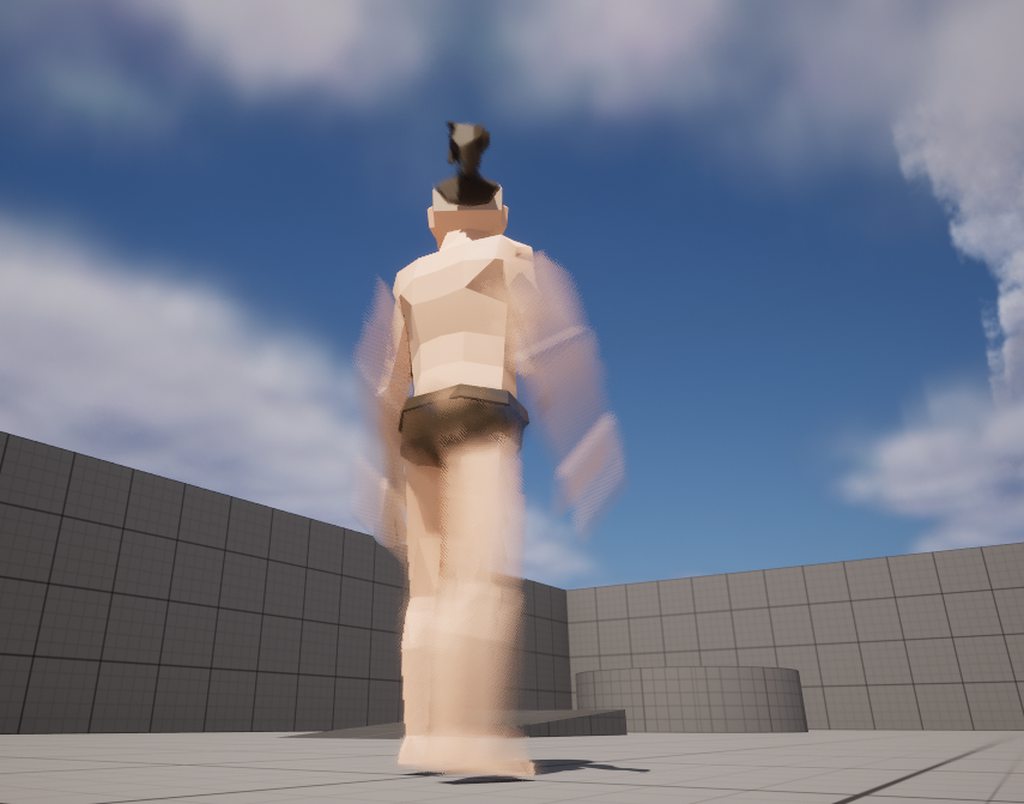
would anyone know why my animation looks like this while idle? it doesn't seem to transition through the blendspace just looks really blurry and weird

more pictures + small description
https://www.reddit.com/r/unrealengine/comments/16b9hyp/character_stuck_in_weird_blurred_animation/?
Reddit
Explore this post and more from the unrealengine community
next python
cursive osprey
would anyone know why my animation looks like this while idle? it doesn't seem t...
check the velocity buffer
I worry some weird material stuff might be trying to blur it but maybe not if it only occurs with this anim?
cursive osprey
next python
check the velocity buffer
sorry what do you mean by velocity buffer?
next python
it's a bit like the depth buffer but for how fast stuff is moving (and in what direction)
just a naive first gues though, I imagine it's vibrating in some form that causes the velocity to get high
cursive osprey
interesting thought actually, I'll look into this a bit further
thanks very much for the reply :)
cursive osprey
next python
just a naive first gues though, I imagine it's vibrating in some form that cause...
just made a simple function to print the characters velocity and doesn't seem like this is the issue, it's occurring when standing still and velocity=0
next python
this is about the pixel velocity, not the parent actor velocity
I assume that's why the blur is occuring
cursive osprey
next python
this is about the pixel velocity, not the parent actor velocity
then I'm not really sure what to do :(
next python
my guess was either the way it's rendering is causing the blur or the anim is transition in some weird superspeed way and flipping between two positions instantly every frame
you could try stepping through the anim frame-by-frame to catch wacky hops between anim states etc
cursive osprey
there are no whacky hops, when going through it in the blendspace it's smooth as butter
not sure if this is a clue but the animation doesn't play in the character's blueprint editor
next python
here, let me demostrate the velocity buffer real quick
cursive osprey
it has the correct pose for "frame 0" but it doesn't animate at all
next python
it won't really help much about actually fixing it but it will confirm it thinks something is moving in what direction
cursive osprey
ok sounds good
 late holly
Need help!
I change the Blend Space for normal walk from the usual "MF_Walk_Foward" to a custom animation and as seen in the video the legs don't move.
I found it has something to do with the CR_Mannequin_BasicFootIK that seem to adjust the foot to the ground and if I remove that last step (step 5) my custom animation plays ok but her foot not longer auto adjust to the ground.
How can I make my custom animation work correctly with CR_Mannequin_BasicFootIK ?
 next python
Herer you can see the velocity buffer in action on an animating mesh @cursive osprey ... although I am not sure how to keep it from overwriting it

this is what motion blur uses for the most part afaik
cursive osprey
next python
Herer you can see the velocity buffer in action on an animating mesh <@149554413...
thanks for the help but my animation doesn't play at all, in the editor or in-game, the only time I can see my animations working is in the animation blueprint/blend space so checking the velocity on them doesn't really do anything when the animations aren't playing to begin with sorry if I wasn't clear. There's more pictures here if this gives any clues because I'm so stumped aha https://imgur.com/a/YGFkmQJ
 blazing glade
I have a Blend space where my character goes from Idle to run, when the char velocity goes up. However when i run the game. The char starts to run way to fast and its like its not connect to the camera. it Aslo kinda reanimates itself. loops the animation.
blazing glade
IF anyone happened to have the same problem, the solution was "Root Component". What happens is the animation you imported, for example my run animation. It runs away from where the character actor actually stands. Just go into the Animation asset and click "True" on "Force Root lock"
 night crow
hi, is there a way to export facial animation from unreal? like from a control rig?
brazen wharf
night crow
hi, is there a way to export facial animation from unreal? like from a control r...
yes, you can create a animation sequence from it in the level sequencer and export that as FBX
How would i implement something like a "user" request for ending the current state in a state machine?
My idea was to use a bool which i use as part of the transition rule to go back to the last state, however i would have to reset the bool at some point, which i'm not quite sure how to do that!?
guess i could use Post Eval Animation...
also noticed there's Request Transition Event does anyone know how to read/use the queue that it utilizes?
night crow
brazen wharf
yes, you can create a animation sequence from it in the level sequencer and expo...
I tried that and I seems to only work with the body and not the face? Did you get it to work with the face as well?
When I tried it I tried with a metahuman
 earnest light
Is there a way to get the live output of a node in control rig?
with python
Thanks! I'll keep digging, testing
 pliant cairn
Question. I'm using a rretargeting tool off UE marketplace to retarget UE5 animations to that of my mixamo character. All works except for crouch. When I do, it goes through the floor. I think it has to do with the location of my mesh in the animation space vs. world space. Does anyone know of how to relocate or align the mesh properly for animations? Like not have it crouch through the floor
brazen wharf
night crow
When I tried it I tried with a metahuman
they might drive shape keys with curves, which wont export as bone animation
night crow
brazen wharf
they might drive shape keys with curves, which wont export as bone animation
Yeah they’re shape key driven. Is there a way to export that?
pliant cairn
I'm an idiot. I just, with trial and error, altered the root bone height, saved a key, adjusted, repeat etc. until it sits right
 hallow lion
Hey I'm using the bicycle with animations pack that was free a few months back, I've set up a bp for the bike and rider, etc, have some basic cycling animations set up, what I'm trying to do now that I'm having trouble with, is I want to assign a key to make it so the bike and player will pop a wheelie for as long as it's held down, then back to the regular cycling anim bp again once finished, the best I have right now is press the button and it plays the wheelie animation, then when you let go it plays the cycling animation again, but only briefly, then the legs stop pedaling, I would prefer to have it pop the wheelie, then when done, just go back to the anim bp animations, but not sure how to acheive this. https://youtu.be/qHkSMVtVnTc

 forest ivy
Purchased this character from the marketplace: https://marketplace-website-node-launcher-prod.ol.epicgames.com/ue/marketplace/en-US/product/bandit-ronin
Description: "Medieval Japan style Bandit/Ronin ready to be a part of your projects."
Completely missing both a Character Blueprint and an Animation Blueprint, so I'm attempting to use the Default 3rd Person Template, but finding difficulty knowing what to do with it.
Question: Anyone here know why both of this dude's feet are severely twisted? (IK)
I made the skeletons compatible, but apparently the ABP_Manny doesn't like it as the feet goes to normal after bypassing the Foot IK node in the AnimGraph, but what character doesn't need foot IK?
Event went to the extent of creating an IK rig and Retargeter just for this character with an ABP to Retarget Pose from Mesh, but then he just stands there in the A pose...Shouldn't I be able to use the default third person project and drop in the mesh to replace the mannequin? Anyone here got a shortcut guide for this issue?


Unreal Engine
Medieval Japan style Bandit/Ronin ready to be a part of your projects.
hallow lion
Nevermind, the set animation node is what I needed I think
 agile robin
so, my character animation is hitting inside the objects


there is a way to fix that?
i think it's the collision of the character but dunno where to find it
open oxide
thick ridge
You probably have to rotate X axis 90 degrees in import settings.
It worked great, thanks!
agile robin
agile robin
i was able to fix that creating a sphere colision in the hand of the player

but there is other issue...
when the player push the box the stand out for the hitbox and cancel the animation..
the box is more light with the new collision, do i need to change the weigh of the box or is something i can change in the collision?
 hasty geyser
I want to animate a person on horseback and the horse walking.
I am very very new to rigging and related stuff. I think I have to parent the pelvis of the character to one of the backbones of the Horse.
I have not found any tutorials on this, I have found some where it is a gameplay feature (Horse riding), I want this only as an animation, nothing more.
What should be the general workflow for something like this?
native umbra
hasty geyser
I want to animate a person on horseback and the horse walking.
I am very very ...
are you trying to animate them separately or together?
like is horse + person a single mesh?
elfin axle
anyone know how to pose a character with control rig then make it into a animation sequence?
 soft sapphire
elfin axle
anyone know how to pose a character with control rig then make it into a animati...
soft sapphire
elfin axle
anyone know how to pose a character with control rig then make it into a animati...
drag the control rig into a scene, it will auto make a level sequnce, make your pose for however long and bake that ti an anim sequence
native umbra
I'm making a top down twin stick shooter, and I'm trying to utilize Pose Warping to make some good looking animations.
However, I'm realizing that because my character can rotate really fast, I'm wondering if Pose Warping is actually not what I should be doing here and instead just trying another solution for dealing with foot sliding. Perhaps accepting foot sliding isn't even an issue here.
Anybody have any advice on this?
hasty geyser
native umbra
are you trying to animate them separately or together?
I want them to be different meshes.
oak belfry
Any idea what could be causing my Aimoffset 1D to incorrectly rotate? I checked the root and pelvis skeleton rotation and its matching the mannequin https://i.gyazo.com/e0b42ec87fbcdf7d8ac282551a5aac4f.mp4
slender ore
Hey all! I'm regularly experiencing weird compiler errors in ControlRigs although the rig works just fine and printing debug info doesn't indicate any issue at all.
Here I've a list of 4 controls. I set a local array's size to match the amount of controls, get each control's location and update that array.
Printing array's num does indeed print 4 for both the controls' array and the local array and each control's location is correctly printed as well, so I fail to see the issue here. Plus the spline is working 🤷 Any ideas? thx
 soft holly
native umbra
I'm making a top down twin stick shooter, and I'm trying to utilize Pose Warping...
soft holly
native umbra
I'm making a top down twin stick shooter, and I'm trying to utilize Pose Warping...
Hello, it's something I can help you out with
slender ore
slender ore
Hey all! I'm regularly experiencing weird compiler errors in ControlRigs althoug...
Imho it has do to with my 4 'IKControls' being spawned on ConstructionEvent. The log just showing 1 or 2 pairs of 4 errors seem to indicate the compiler has an issue with the forward solver during the very first or two first frames. 'Cause the rig works fine and if it'd be a real persisting issue, it would flood errors. Maybe the ForwardSolver runs one frame before the ConstructionEvent somehow? 🤷 could be wrong, it's just my own observations
 tight nebula
slender ore
Imho it has do to with my 4 'IKControls' being spawned on ConstructionEvent. The...
tight nebula
slender ore
Imho it has do to with my 4 'IKControls' being spawned on ConstructionEvent. The...
Did you need any help?
 heavy trout
tight nebula
Did you need any help?
heavy trout
tight nebula
Did you need any help?
do you know how to fix montages wont play?
tight nebula
Yes
heavy trout
tight nebula
Yes
how?
i tried to debug it with a button which runs the montage but wont play, nothing happening
understood
 stark needle
Friendly reminder, this server is for peers, not farming potential clientele through deception and misleading to bait people into solicitation.
 silver rain
There’s an issue with my rig, when I imported the new mixamo character, it broke one specific animation we had of the characters sword moving for a placeholder attack animation. We are thinking it has something to do with this warning in the state machine

Before, you could click the button and the sword would move up and down, to at least show it hitting the enemy, but now clicking the button applies the damage the sword would do, but there’s no longer animation for the sword
Here’s the blueprint calling the animation

My guess is the montage isn’t being referenced or isn’t able to be called, which is strange, because every other montage, we had still works fine with the new rig. Same with all of the other animations, like walking, jumping, and all the rest of those.
 spice steeple
Hey y'all!
Looking for feedback on my new Animation/ Motion Data Plugin
The project is called HEAT, we are a Motion Data library and Marketplace with an Unreal Plugin that allows you to drag n drop animations right into your scene and save it to your content drawer.
We are 100% compatible with Metahumans and our entire Marketplace is standardized for Root Motion and UE5 Manny!
We just got approved to be on the Unreal Engine Marketplace! Just search for HEAT Beta or follow the link below.
https://twitter.com/HEAT__TECH/status/1699866651016196194
https://www.unrealengine.com/marketplace/en-US/product/heat-beta-plug-in


OK, brace yourselves. I’ve got some mixed vibes news. The INCREDIBLE part? HEAT is now live on the Unreal Marketplace. 🎉 Big love to the grind our team put in and shoutout to @unrealengine and @epic for making the journey smoother.
 Twitter
·
Twitter
·

Unreal Engine
Drag n Drop Animation Plugin for Unreal Engine integrating HEATs Motion Library
 hybrid lichen
your site is a nightmare to try and sign in, page sits eating up my vid card as fan goes into overdrive, i signed in and went right back to sign in screen...
 hexed sinew
I've noticed something off with my blendspace (1D or 2D makes no difference) that for an Idle-Walk-Run blend, the idle animation at velocity 0 plays just fine, but any non-zero velocity and it plays the idle animation at super speed.
I think I understand what it's doing, I just don't know why: say the idle animation involves a lot of fidgeting and its 200 frames, and the next blend is the walk animation which is 50 frames... it's as if it's playing all 200 frames in the same span as the 50 frames. Which in this example would mean it's running 4X faster than its normal playback rate????
I hope that makes sense, and to be clear, this is just a hypothesis. I'm hoping someone knows what I'm talking about and can provide a solution.
 golden arrow
Not sure if I should put this here or blueprints but in my animation blueprint the get forward/right vector nodes don't seem to work as expected. They always point in one direction instead of where my character faces so I could move left but have the forward running animation
 hexed sinew
I've noticed something off with my blendspace (1D or 2D makes no difference) tha...
hexed sinew
hexed sinew
I've noticed something off with my blendspace (1D or 2D makes no difference) tha...
FWIW I've tried 1D and 2D, and a completely different skeleton and set of animations — it's always this same hyper-speed playback on the idle animation for non-zero velocity.
golden arrow
hexed sinew
changing the playback speed doesn't help?
hexed sinew
Changing the rate scale of that animation does what you would expect, but has no impact on this behavior of the engine forcing the durations to match up.
golden arrow
damn
Weird because I just made a blendspace going from idle to run and it works fine. The idle is way longer too.
hexed sinew
I'm wondering if this is related to sync markers, which haven't been set on the idle animation.
Wow holy crap, that was it...
I just added basically nonsense sync markers to the idle animation and it behaves correctly.
golden arrow
ue moment
hexed sinew
There's no notion of a "left_foot" or "right_foot" when idling, but whatever.
I wonder if that's a bug, or if I'm just petting the cat backwards…
Actually I see now that it's not completely fixed, but sync markers is definitely part of the problem here.
Alright, I think I need to separate out Idle from the rest of the animations since it can't really exist as a part of the same sync group it seems... I noticed the template project use a "walk in place" animation as the start of the blendspace. I might understand why now...
golden arrow
golden arrow
Not sure if I should put this here or blueprints but in my animation blueprint t...
Managed to fix my issue by setting actor rotation as a variable on the character and getting it from the anim bp then doing get forward and right vector from that var.

not ideal tbh but eh
 ripe gazelle
Is it possible to use keyframe animations to apply some sort of force to an IK?
Example: Impact animation. A keyframed animation ends IK takes over and emphasizes the direction/states of the animation?
golden arrow
ripe gazelle
Is it possible to use keyframe animations to apply some sort of force to an IK? ...
Haven't really messed with physics and impulses but you could probably set a notify on the frame you want the impact to happen on and set up logic somewhere and call it from anim bp
Idk but I think we'd need more info like what's the axis variable for your blendspace or how is your mouse input set up. Stuff like that
golden arrow
how are you getting that axis value? Is it just a set variable from the event itself?
Also have you tried using a print string on your axis value?
I printed off of the event and it seems that the speed you move the mouse at can make it go past the range of -1 to 1 so maybe you have a wrap input on blend space causing out of range values to swap anim
Sorry I don't know much tbh. just trying to help. At least me asking questions might give someone else the info they need to answer you.
golden arrow
yeah wrap input is a check box that makes it so if you go too far one way it comes back around
hexed sinew
hexed sinew
~~I just added basically nonsense sync markers to the idle animation and it beha...
For posterity, I was able to "patch" the idle animation by adding multiple sync markers every 27 frames (the same interval of markers as is used in the next animation)
And it fully works as one would expect, while still using sync markers for the foot steps on walk/run.
😅
golden arrow
hmmm thought wrap input would be the problem not solution lol. maybe you can mess with the smoothing to fix the snapping
is it backwards both ways?
if so maybe multiply by -1
I mean keep the mouse the same but invert the value the blendspace gets
like make a separate variable or sumthn
if that solves the mouse but breaks wasd then do like a branch or something for whether or not you're using wasd to switch the value
pliant cairn
This might fall under animation I'm not sure. I have a vault montage with warping. When I vault, the camera goes into first person mode. I know this is happening because if I turn on collision, which does prevent me from vaulting over the object, the camera stays put. How do I "lock" the camera into place when vaulting?
agile robin
Why when i play this animation my character doesn't back to the walking animation when its finished?
(it's my first time casting animation)

 arctic zealot
Hi there, I ran this through the #ue5-general but I was referred here. I'm having a weird issue in 5.3 I'm trying to use animations that I dropped into my project as .uassets and when I retarget the animation to the SK_Mannequin it breaks. This has happened with multiple sets of animations brought in.
UPDATE:
A friend of mine fixed it. Basically UE5 breaks animations if the__ExternalActors__ and ExternalObjects folders aren't transferred with the pack you import in. Or you can try to just import the .uassets directly into the "Content" folder, not any sub folders.
 primal perch
anyone here who can help me with root motion not working?
 astral perch
Quick question, let's say I have an idle pistol animation sequence, but do not have a run/walk pistol animation. Would it be possible to blend the upper part of the idle animation with the bottom part of the run/walk animation to create a run/walk animation for my anim bp? Seems like it's possible or I should just retarget a similar animation, but I haven't dove in animation much
 shell garden
Could you let us other idiots in as to what the issue is and how to fix it???
It looks like the Metahuman lighting projects enabled OCIO. I disabledit and the render from the cinema camera no longer is stamped "OCIO Invalid". I do my render grading Davinci Resolve.
 crystal imp
Has anyone ever figured out why Constraints no longer work in Unreal Engine 5 and why Spaces don't work? When they first introduced constraints to the Animation mode, they worked fine. After the first update to it I haven't been able to get them to work properly.
The Problem: When I constrain say the left hand to the rifle (This one being a skeletal mesh) with the rifle attached to the right hand it used to allow me to move and rotate the right hand and the left hand would stay on the barrel. However, after one of those updates covering the Animation Mode this stopped being the case and ever since whenever I do this the hand won't stay in place but will instead deviate from it's position as I scrub through the timeline.
In the picture included, I parented the hand to the rifle and selected none for the socket. After doing this the arms started moving in a circle just spinning uncontrollably. I couldn't undo this....it permanently screwed up the entire sequence.....luckily I didn't save it after doing that. If I simply constraint Translation/Rotation it will just start moving off in some manner even though before constraining it the hand was perfectly in place and didn't move during the animation.

This is a serious problem for me because in order for the Animation tools to be of any use what-so-ever to me at all period.....I need Constraints.....LOL
And yet since they were introduced in 5.1 they have been 100% broken
I'm in 5.3
 supple vigil
shell garden
Could you let us other idiots in as to what the issue is and how to fix it???
I...
supple vigil
shell garden
Could you let us other idiots in as to what the issue is and how to fix it???
I...
oh boy this was so long ago and I switched to using blender so I don't remember i'm sorry
i was promised real time rendering with ue5 but if you want any amount of quality it's pretty comparable in times for still images
and it's a lot more complicated to get DAZ3d > UE5 than DAZ3d > blender
crystal imp
And also I'm confused as to why......when I parented it......It did it 4 times......LOL
Maybe each of those represents something different but from my perspective it appears to have performed the parent 4 times
God that's so aggrevating.....Now I have to take this into Cascadeur and just make the animation there....it would be really nice if the Unreal Engine Animation Tools were actually USEFUL
I just really wish they would fix the Constraints and Spaces (I may not fully understand how spaces work, but if they require a specific setup I really feel They should make a guide on doing that or explaining it)
crystal imp
Alright, so I started looking in the Documentation and either I missed this or they must have altered the way Constraints work shortly after it's initial introduction into Unreal Engine 5.
I'm still reading through it but it seems that the Documentation is literally the only source of information that actually covers this stuff. https://docs.unrealengine.com/5.3/en-US/animation-constraint-tools-in-unreal-engine/

Attach the position, orientation, or scale of an object to other objects using a variety of constraints.
I was unable to find any videos more recent then a year ago that covered the Constraints
They've added a lot of features to Constraints that I was unaware of to fix various problems.
I think this is what I was looking for.....by default it allows you to keyframe and manipulate the constrained object

Yep.....that was it. So I think when it was first released this wasn't the default.....so at some point they added the Dynamic Offset Switch and set it to be on by Default.....Honestly I think the default value should have been like it was 'OFF'. Because I have been thinking this entire time it was a bug.....
 dapper dune
i have an idle animation that plays after 30 seconds and a different one that plays after 60 seconds but i cant get the 60 second one to play because the 30 second animation keeps playing every 30 seconds
 mossy swallow
Having an issue with my characters run animation, and i think i've run into this before, but i can't remember how to fix it. When he moves his legs are stuck to the ground. I think this has something to do with root motion or the IK rig, but im pretty inexperienced in those areas. Anyone got ideas for potential causes? Here's a lil video of the issue https://streamable.com/dsz20d
 dapper dune
mossy swallow
Having an issue with my characters run animation, and i think i've run into this...
dapper dune
mossy swallow
Having an issue with my characters run animation, and i think i've run into this...
would be great for a skiing game
 tawny steppe
mossy swallow
Having an issue with my characters run animation, and i think i've run into this...
tawny steppe
mossy swallow
Having an issue with my characters run animation, and i think i've run into this...

Hello guys, in this quick and simple tutorial we are going to make a simple enemy AI, which will follow the player, have its own vision area, and attack when it's near the player in Unreal Engine 5.
Follow me on Twitter: https://twitter.com/GorkaGames
Subscribe to the channel: https://www.youtube.com/channel/UCv_n9oioNF6OpzR2dt6E4xg?sub_confirm...
mossy swallow
ah, i must've modified the Manny ABP, using the default ABP_Quinn fixed the feet being stuck to the floor issue, but the character still doesn't rotate
👀
tawny steppe
This is metahuman but he fixes the skiing thing here.
mossy swallow
sick tyvm ill take a peek
niiice that did fix ABP_Manny :)
im kinda confused why ABP_Quinn was working though, because its a child of ABP_Manny, and unless the rig logic is different, i would assume it'd have the same skiing issue
 iron dust
idk if anyone is here I am having issues with blend space animation and the animations are not showing up in the asset list
 noble kettle
Are you using the correct skeleton for the animations?
iron dust
oh hey
yes I re imported the skeleton to my UE and the animations still do not show up in the blend space
noble kettle
I don't have this channel in my list. I just jumped over here from the other channel.
When they don't show up in the list that's usually an indication they belong to a different skeleton
night rover
iron dust
yes I re imported the skeleton to my UE and the animations still do not show up ...
Check if the animation skeleton and the blendspace skeleton are compatible
noble kettle
Look in the animation and see what skeleton it's using
night rover
Re exporting won't mean much if they don't share base skeleton
noble kettle
Then look at the blend space and see what skeleton that's using
If the skeletons are similar enough you should be able to retarget the animations to the skeleton the blend space is using
iron dust
yeah still not showing up
noble kettle
Or you can just create a new blend space that uses the same skeleton as the animations. But if you do that the skeletal mesh also needs to have the same skeleton as both.
 full crag
Anyone know of any good tutorials focusing on the new Skeletal Mesh editor tools in 5.3?
night rover
iron dust
yeah still not showing up
You haven't tell us if they are using the same base skeleton.
Its probably a fact that they don't. Hence why u will never see it show up in your life time
iron dust
it is using the same skeleton I might just re start over again re import everything start fresh
noble kettle
If you set your skeletal mesh to use an animation asset and select one of the animations does it play?
iron dust
yeah so the animations play
noble kettle
So the animations and the skeletal mesh have the same skeleton at least
iron dust
yeah they are the same skeletal mesh its just the animation would not show up in the list but the animation plays when I click the animation but let me try to make a new blend space again
noble kettle
Id just find the skeletal mesh, right click it and under skeleton select find in browser or whatever it is, then with that selected make a new blend space and select 'use selected asset' under the skeleton selection
My fat ass fingers have my phone confused
noble kettle
What version of ue are you using ?
iron dust
5.2
noble kettle
Can you provide some screenshots of what you have ?
iron dust
I am going to try exporting my enemy model again and export tha animations all in one folder and see what happens when I create a new blend space
noble kettle
Starting to get a headache from being in front of a bright screen to long. Gotta step out. Good luck.
night rover
iron dust
I am doing everything right as well
You make it really hard if not impossible to help you. Been like 20 minutes and you didn't provide a single picture
thorny pelican
thorny pelican
So I'm using some assets that I got online. I imported a small dragon and the an...
does anybody have an answer to this
thorny pelican
thorny pelican
So I'm using some assets that I got online. I imported a small dragon and the an...
can anybody help with this?
 modest moth
Can I get Ability System Component from my Character and change animation states based on tags? I am trying to do Get Ability System Component and it gives me an error Received Null trying to get...
 craggy sequoia
I have a couple of animation sequences that I want to set up to: Play A, then Loop B. Ideally with the choice to restart the animation from the start via blueprints, where it'll just play A once, then continue to loop B. I'm not that experienced with animations though and it seems like there's a lot of similar systems so I'm not sure if it should go in an Animation Montage or an Animation Blueprint, or even an Animation Composite. Does anyone have a suggestion for the best way to accomplish this?
 ripe coral
Im rigging a super simple character in blender, should I still use the ue5 manny for the bones or just make a smaller/less bone structure that suits this model?
 primal perch
Hello. For an attack combo animation (autoattack, 3-hit combo), would I make the whole combo in one animation and 3 "back to idle" animations to play when nothing is pressed and the combo doesnt continue?
Or would I make 3 different animations from start to idle and just blend them together?
misty dagger
im trying to fix the idle animation for the mannequins being rotated, so im rotating it back to something normal and no matter where I rotate the root its still the same, am I just saving it wrong?

I think its not saving because I did this and saved it, and it doesnt change it in game 😂

I had to click the key button, I thought keys were automatically edited 😂
also I have a question I dont know much about anatomy, but shouldnt the head be perfectly straight? I thought that at first but now im thinking I guess humans tend to look slightly down?

how can I move a bone in a skeleton on the world axis and not in relation to the rotation of the bone?

 pine star
Anyone know why moving or changing animations completely break all animations and even replacing the animation skeletons wont fix it?
i heard someone say putting your animation unreal engine 4 and re migrating it may work
but in unreal 5 i cant seem to use or make my animations work
misty dagger
how can I print an integer in an AnimGraph
I know for normal blueprints theres print text and print float, but I dont see anything for AnimGraphs
foggy nexus
pine star
Anyone know why moving or changing animations completely break all animations an...
How can anyone be expected to answer such a terribly worded question? I swear, a lot of us really try to help but you do yourself zero favours. Guys, take a minute, think, provide details and screenshots, then have a nap, then type.
pine star
foggy nexus
How can anyone be expected to answer such a terribly worded question? I swear, a...
im sorry?
 slim cosmos
I made a retargeter and retarget animations from the base manny/quinn to metahuman skeleton, but they become root motion animations for some reason and break everything. How do keep them as in place animations (Video included to show what)
https://youtu.be/6H3MHZXmVH8

 warm prawn
Why foot IK works on meshes where collision is set to overlap?
My charachter goes trough fien if Ik is disabled
if IK is on legs go crazy and it tries to stap on object
night rover
is there a way to keyframe morph keys in Sequencer?
night rover
this is soo hacky.... but seems like the only option atm

 topaz narwhal
Why when I save frame for my Right Hand, my Left Hand (which is not saved) go back to normal.
I am animator (Maya, Blender, etc), maybe is something I am not understanding about Sequencer animations.
-Can I set auto save of any movement? In Blender is pretty easy
ok is this
 misty dagger
I have forgotten how to toggle this skeletal mesh bone joint(?) rotation visualizer thingy which only seems to be visible in the editor view. Any ideas?
 iron dust
hey guys so I am using unreal engine 5.3 now and there is a built in animation section but there is no edit tool to animate the skeletal mesh
 tranquil lark
storm delta
tranquil lark
storm delta
Hey, I forgot to scale my rig in Blender so now my imported skeleton and mesh are very tiny in Unreal. Is there any downside to just scaling my character up in unreal?
 pastel roost
Anyone have an issue where a custom anim notify triggers on both server and client regardless if Trigger on Dedicated Server is turned on?
modest moth
This is my class hierarchy
CharacterBase -> this has Ability System Component
|
inherited by
|
\/
GameplayPlayerCharacter (can i get the Ability System Component in the anim bp on this by casting Get Owning Character to Character Base)
brazen wharf
storm delta
Hey, I forgot to scale my rig in Blender so now my imported skeleton and mesh ar...
i would greatly advice to fix this in blender (or eventually in your import settings), there's a bunch of issues you can run into when the scale isn't correct
storm delta
brazen wharf
i would greatly advice to fix this in blender (or eventually in your import sett...
do you have any advice for doing this? I spent a day trying and ultimately gave up because I couldn’t figure out how to apply scale to my armature without destroying my animation, and not applying scale brings in weird issues with parenting the mesh to bones
storm delta
also would these issues still happen even if I scale up the character to standard size (~mannequin size)?
pastel roost
storm delta
do you have any advice for doing this? I spent a day trying and ultimately gave ...
Blender armatures do not play nicely with unreal. I did some r&d into this a while back and the only way i found to get the scales the same was to set the blender scene Unit Scale to 0.01. This was in March of last year though (can't remember what version of blender or unreal) so things may have changed.
storm delta
pastel roost
Blender armatures do not play nicely with unreal. I did some r&d into this a whi...
0.01 unit scale is what I've also seen online, but tbh the only problem any other unit scale seems to give me is the model being a different size upon import. The animations seem to import just fine otherwise
so I guess my question ultimately is if I set the unit scale to something like 0.2, because that's what makes it import at a similar size to Manny, will that be a problem for other systems?
pastel roost
storm delta
0.01 unit scale is what I've also seen online, but tbh the only problem any othe...
Yes so when you change the unit scale while there's objects in your scene those objects with rescale proportionally to the unit scale. I had to scale my mesh by 100 to bring it back to the correct scale.
storm delta
right so did scaling your mesh by 100 have any adverse effect other than the initial annoyance of having to do it? like with physics or animation or anything?
because if it’s just annoying to do but otherwise not harmful, I’m happy to keep it like this and just learn my lesson for the next rig I make
storm delta
pastel roost
Yes so when you change the unit scale while there's objects in your scene those ...
just to clarify, did you scale the mesh in blender or in unreal?
pastel roost
storm delta
just to clarify, did you scale the mesh in blender or in unreal?
in blender
misty dagger
hello, not sure if this is a blender or unreal question but when exporting my animation, for some reason the animation is split into 2 and the 2 back legs are disconnected as 2 different animations

 pastel roost
storm delta
because if it’s just annoying to do but otherwise not harmful, I’m happy to keep...
pastel roost
storm delta
because if it’s just annoying to do but otherwise not harmful, I’m happy to keep...
yeah this is something that at best is a pain and at worst is a total workflow breaker. I was testing this with a rigged trebuchet. The rig itself was pretty simple (only 4 bones i think), but I was using physics to animate it and then baking the animation down. Things got annoying, and I was crashing quite a bit. A lot of physics sims break when the unit scale changes. And not just like you have to scale the sim components; it's more like the physics solver behaves differently at unit scale 0.01. Like i said it's been a while but I believe I did all of my animation/simulation work at unit scale 1 (default), then baked down the animation, changed scale to 0.01, and then scaled up my skeletal mesh. I can't remember if I zero'd out the scale. Probably saved out to a separate .blend file as well.
One thing I will say is that I went through all of this trouble in order to get the skeletal mesh root bone scale in unreal to be 1. If you're not a perfectionist, and can live with the root bone scale being 100, then you don't have to do this unit scale stuff. It seemed to work fine regardless if the scale was 1 or 100 but i didn't test that too deeply.
misty dagger
they are connected by offset
storm delta
pastel roost
yeah this is something that at best is a pain and at worst is a total workflow b...
For prototyping purposes I'm trying my best not to be a perfectionist where it doesn't matter, but I really appreciate you going through the steps for me here. Just to make sure I understand, you both baked down the animation in Blender and changed the scale to 0.01 in Blender before exporting to unreal? Also what do you mean by zeroing out the scale?
pastel roost
storm delta
For prototyping purposes I'm trying my best not to be a perfectionist where it d...
Yes and yes. I wanted to figure out how to properly set up blender to work with unreal. By zeroing I mean Applying Scale, reseting the scale in blender to use the currect scale as "1,1,1"
To clarify, the scene Unit Scale needed to be 0.01, and because my mesh/armature was already in the scene, I needed to scale the armature by 100.
storm delta
pastel roost
To clarify, the scene Unit Scale needed to be 0.01, and because my mesh/armature...
Sure, that makes sense. That's actually what I tried yesterday, but applying scale to the rig destroyed the animation so I gave up. I hadn't tried baking it down first, maybe that would have helped.
It really seemed like if you didn't have the rig properly scaled from the beginning, you were screwed
pastel roost
storm delta
It really seemed like if you didn't have the rig properly scaled from the beginn...
Exactly. The catch™️ is, if you start with Unit Scale = 0.01, and then want to use phyiscs, you're also screwed. More niche concern but still a problem.
storm delta
pastel roost
Exactly. The catch™️ is, if you start with Unit Scale = 0.01, and then want to u...
Is this if you want to physics in unreal, or physics in blender before baking down?
pastel roost
storm delta
Is this if you want to physics in unreal, or physics in blender before baking do...
Physics in blender
storm delta
pastel roost
Physics in blender
Sigh. Painful. Well, at least I know that I'm probably not missing something. Thank you so much for your help
pastel roost
storm delta
Sigh. Painful. Well, at least I know that I'm probably not missing something. Th...
By the way, there is a first party supported plugin for transferring assets between blender and unreal. I ran into that while doing the r&d stuff i mentioned, and you may find it worthwhile. Funny thing is, even using that plugin, the skeletal mesh root bone still has a scale of 100 in unreal.
So again, your life is simpler if you're not a perfectionist.
storm delta
pastel roost
So again, your life is simpler if you're not a perfectionist.
Definitely. I honestly expect that I might redo this asset later, so I'm fighting every urge to be too painstaking. And I'll look into that plugin, thanks!
 cobalt sun
I'm clueless as to what's happening. The walk/run anim plays fine aside from the hands and only the hands. as you can see I set the pose correctly in the SK file menu but it just doesn't want to fix. Has anyone been able to figure this out or am I forgetting/doing something wrong?


 true willow
I'd like to slightly modify this Animation Sequence MF_Pistol_Aim_Idle (pic 1) so that the arms are lowered more towards the ground, is there a simple way to do this without recreating it entirely? If i put this Animation Sequence into the map, and then add it to a Level Sequence, it resets the pose to the (sorry if my wording here is wrong) default sort of t-pose for the skeleton (pic 2)
is there some way to re-apply the pose from the animation sequence here so that i can just rotate the arms down a bit and then re-bake it?

 storm delta
I think you can do it by baking the animation back to control rig
true willow
I was able to do it by adding some keys here in the animation sequence screen, it looks like they appear as additive layer tracks? that might not be the "appropriate" way but it at least did achieve the result I wanted for now (and really i'm just learning how to blend animations per bone and i was able to achieve what i was looking for, so i guess for the moment this works)
 storm delta
I'm no expert but yeah an additive tracks seems like the right answer, especially because it's non-destructive to the underlying animation, so you can always tweak
modest moth
how do I play transitions between anim states in anim BP? like a transition between defend and not defend
storm delta
misty dagger
Character is going back every time the animation is repeated
seems like a problem with root motion
storm delta
modest moth
how do I play transitions between anim states in anim BP? like a transition betw...
Maybe another state between Defend and Not Defend that automatically goes to Not Defend once its animation is done?
slender ore
Heya! Just a bit of feedback in case that's useful. The Basic IK's Pole Vector setup being a tiny bit confusing is one thing, but the Basic IK Transforms not having the same setup options was really frustrating to figure out. The Pole Vector hasn't the option of being a position or a direction and it being just a 'vector' made me think it expected a unit vector, a direction. But apparently it expects a world space position... ( : Took me two hours to figure out why it was not working
 misty dagger
storm delta
seems like a problem with root motion
misty dagger
storm delta
seems like a problem with root motion
How can i fix it
 simple finch
Here is an animation exercise I have been working on for the past two weeks off an on. mainly working more on my compositing ability, effects, and shading. Next animation I do will be more action focused, but this one was fun nonetheless.
Prism is a half dragon sword fighter who uses magic to augment herself, the color of her hair signifies whi...
 karmic ether
Well I finally figured out why I was getting a weird snap to the left or right when aiming down ironsights and then moving left or right. It was caused by the movement component rotation rate. Took me forever to figure out that issue (unsure if setting it to zero will have any consequences for me)
 primal perch
Could someone pinpoint me whats missing in the firat two hits? I feel like there not right, but I cant figure what at throws me off
slender ore
https://docs.unrealengine.com/5.2/en-US/how-to-create-control-rigs-in-unreal-engine/ Why does the documentation suggests to parent the head_ctrl to the head? Am I missing something here or does this not create a cyclic dependency? If I do this, the widget rotates 90° when rotating it 45°, which makes sense to me.

Learn the basic fundamentals of Control Rig in Unreal Engine.
slender ore
for sure. I'm just a bit baffled as to why they chose to demonstrate the bad way. And why every youtube tutorial show the same thing 😅
I just wanted to double check in case I missed something
true
yeah I create a separate hierarchy for controls as well. I mean... that's pretty much the way you usually go when creating a rig in any 3D software, precisely to avoid cyclic dependencies. But oh well.
 limber shell
Hello everyone, i have a bit of an issue. and like to know if someone can give me a pointer in the right direction.
Found an asset on unreal store
But the animation i tought i could use with the character and IK bones is locked in a Level Sequenc.
Im guessing i need to bake the animation into a separet asset somehow. Can anyone good with unreal animation help out?
Asset:
https://www.unrealengine.com/marketplace/en-US/product/asc-teuthisan?sessionInvalidated=true

Unreal Engine
Teuthisan is the alien featured in THE EYE: CALANTHEK, a short film from Aaron Sims Creative and Epic Games premiering exclusively in Shortnitemares. Teuthisan is animated with Control Rig in Unreal Engine 5
Heeelp
 misty anvil
can somebody link me a tutorial for adding a bag to a character and adding physics to that bag..
 tight basin
misty anvil
can somebody link me a tutorial for adding a bag to a character and adding physi...
tight basin
misty anvil
can somebody link me a tutorial for adding a bag to a character and adding physi...
There was a fortnight explainer on how they add 'trinkets' and other physics enabled character addons, let me try and find it for you
If you're doing something simple like a bad with no gameplay interaction, then that would be even easier, just a Skeletal Mesh component to your actor and make sure your bag has a seperate physics asset with deformation / cloth painting / weighting enabled and configured
tight basin
misty anvil
can somebody link me a tutorial for adding a bag to a character and adding physi...
misty anvil
tight basin
https://www.youtube.com/results?search_query=fortnight+animation+epic+games+modu...
awesome thank you....i just wanted to add physics to the bag no interaction..
misty anvil
tight basin
https://www.youtube.com/results?search_query=fortnight+animation+epic+games+modu...
i hoped for the tutorial but it just shows me about modular character...but thanks for the explanation though... i didn't know where to start from....
storm delta
misty dagger
How can i fix it
Go and check if EnableRootMotion on your animation is ticked. My guess is no, because if it was then your character would move the exact animation amount. Either that, or the animation doesn't have root motion baked in, in which case you'd have to tweak the animation to put it in, or, better yet, change the animation to move in place so you can change the move speed later if you want
 quick saddle
is anyone here capable of fixing neck or head jitter from a metahuman or motion capture system? I've found nothing able to fix it so far haha
 round cypress
Hey guys.
So i'm just trying to learn some stuff in my free time and i have a problem i'm trying to solve. I have a character made from different parts (hair, face, torso, lower, boots and hands) that i have animated using mixamo and everything is fine but im trying to have this character modular so for example i want to replace the torso (lets say with a different armor) but i cant figure it out because when i import the character all the models are merged in 1 skeleton mesh.
So what im trying to do is have 1 skeleton but be able to replace parts of the model on the fly lets say.
Is there any guide or someone can explain me how could i solve this? thank you
thats the part i dont understand, the model is already split in the file but it gets imported as one so there is no way to edit it. and if i "hide" the parts in blender and export them it wil create a new skeleton every time. if i try to reuse the skeleton from the previews import it will also show the previews model. (sorry kinda new to this stuff)
 sinful swallow
whats the recommended approach when using animations for characters of different size and proportions, like metahuman tall and metahuman medium. Is there a fast runtime retarget solution, or do I have to setup retarget rig and transfer all animations?
round cypress
 yeah i can't figure it out, tried importing them one by one but cant seem to understand how to make 1 skeleton work for the other parts
nvm i think i got it (after a few hours lol)
ripe coral
full crag
Anyone know of any good tutorials focusing on the new Skeletal Mesh editor tools...
Did u find an answer to this? Ive been trying to rig for days and the only thing that kinda worked was accurig but wanna try ue 5.3 skeletal editor a go
sinful swallow
Ok, thanks. I'll check the animation levels.
slender ore
Heya! I'm trying to understand how the basic foot IK example works and it fries my brain. It's dead simple yet I fail to see how feet can remain in the air. It simply does a linetrace for each foot and moves the IK foot by however distant the floor is. And then uses a fullbody IK to reach those IK targets. So my assumption would be that feet would be projected on the ground at all times considering the linetraces reach quite far downward, and the character thus would slide like a skiier. Yet feet do not do that and it somehow works 🤨 Anyone has an explanation? Ty 🙂
 thorny pelican
So I'm using some assets that I got online. I imported a small dragon and the an...
thorny pelican
thorny pelican
So I'm using some assets that I got online. I imported a small dragon and the an...
If anybody has this issues. Import it into blender and rename it from Armature. It cuases issues in the engine for some reason.
 tall solar
CAN ANYBODY HELP ME ! iwant this person action to be same as default guy aSK-MANNY

 timber summit
Does anyone know what would cause the pelvis not to move when an anim is imported? I've downloaded some mixamo anims (using the manny skeleton) and it looks fine on the mixamo website as well as in blender. But for what ever reason, when it's imported into UE, the pelvis just doesn't move.
brazen wharf
i would greatly advice to use this tool: https://terribilisstudio.fr/?section=MC
terribilisstudio.fr
Animations generated by Adobe's Mixamo.com are not fully compatible with Unreal Engine 4 and 5, most notably when it comes to IK or root motion extraction. Mixamo Converter software is a mini-app that processes FBX files downloaded from Mixamo and adapts them to Unreal's conventions.
it saves you from all the mixamo => ue troubles in my experience
timber summit
brazen wharf
i would greatly advice to use this tool: https://terribilisstudio.fr/?section=MC
Thank you so much. I've just done a few test imports using it and everything just works. 😮 You're a star. 🙂
brazen wharf
the real star is the studio which made the tool (and made it available for free)
so... i got an control rig for IK of the index finger, which i want to use only when some animations are playing, is there any way to "inject" the solver only when necessary in my animation graph, or do i really have it in there all the time including some checks if it has to be blended in or not?
brazen wharf
wouldn't i rather save runtime resource if the AnimGraph doesn't have to parse all the skeleton/curve data to the controlrig if the ControlRig Alpha is disabled by a bool?
or isn't it that smart to skip the entire node if its disabled / alpha is 0?
brazen wharf
or i should just add it to my main control rig... sometimes it's hard to make a sane choice when you have 10 options
 frosty plinth
brazen wharf
or i should just add it to my main control rig... sometimes it's hard to make a ...
frosty plinth
brazen wharf
or i should just add it to my main control rig... sometimes it's hard to make a ...
I'd add it to the main control rig, and expose an anim channel bool in the animBP control rig node to toggle index finger IK.

 raven pulsar
Hi !
I have a general question for you all about locomotion and animation blueprint.
Disclaimer: I am a dev guy, not very much literate in animation yet. Trying to get the best practices etc ...
First my goal: UE5.1 + MP + 8 way root motion based locomotion system with control rotation as forward. No strafe but rather turning and moving forward in the desired direction. Possibility of changing movement speed / turning angles
I've read a few articles and tutorials about making such a thing:
- Lyra with Anim Layers, Animation Warping ...
- Blendspaces (2D) (mostly with UE 4?)
- "new" Motion Matching technique
- Probably others I didn't think of (or just plainly forgot).
I would like to ask you opinion on what to make of this. Pros / Cons ... ?
I noticed that Lyra is pretty "complicated" in this sense where the Anim blueprint have a lot of features, combined to make a whole system. Changing it is kinda a big job imo.
It seems that blendspaces are the "old way" but can't find good pros and cons
Motion Matching feels like magic, but missing pros and cons, especially in a MP setup.
Which road would you take IYO ?
Any advice would be greatly appreciated.
frosty moon
this is animmontage btw i thought i can use it and it worked well while using the default ue5 queen but i cant use anim monages with metahuman meshes do someone know how to fix it?
 digital reef
hey question, how do i import only the animation form and fbx file to unreal(i mean only the animtion no bones or mesh)
frosty moon
digital reef
hey question, how do i import only the animation form and fbx file to unreal(i m...
if ur importing anim from different platforms like mixamo you need that skeleton
because ue5's default characters' skeletons are different
so ue5 itself must do one
but with retargeter you can use these animations
brazen wharf
digital reef
hey question, how do i import only the animation form and fbx file to unreal(i m...
uncheck import skeletal mesh, then select your existing skeleton in the rig drop down (this only works if you have an existing skeleton in UE for which the animation was made)
otherwise you have to retarget like the guy with the weird nickname said
 rich hull
Question...
So I imported my mesh to use the default UE5 Mannequin Skeleton, would it be possible to edit it later on to have bones for the eyes and mouth as well? Or a similar solution perhaps?
 signal tiger
Hello!
My IK rig keeps twisting my character's shoulder, as seen in the picture.
How can I fix that?

 toxic nymph
Any chance someone can help me with an animation im trying to make
 weary frost
Anyone know if the paragon chracters are based off the manny skeleton please ? I tried retargeting the pistol idle animation from animstarterpack to the paragon wraith character but the hands do not align not sure why

As you can see mannys hands are interlinked but the paragon character kind of intersect with each other.
 frozen relic
my dudes, when you load up a pose asset in AnimBP, how do you control these sliders there?
 frozen relic
i've figured it out. for anyone wondering about a similar question - what was needed was a pose driver node in animBP.
tall solar
can anybosy help
 modest moth
How do I add more frames to this?
 round cypress
Hey guys i have a question if anyone can help. I have this character thats made from a few parts (hands,boots,lower,torso etc). i put it toghether (without merging) and then animate it using mixamo. for each part i have like 2 or 3 versions, they really similar but one might have 1 spyke or something on one side. is it possible to reuse animations without breaking the model (like having holes inside the mesh of the character). If anyone has any idea or point me in the right direction please let me know. Thanks
limber rock
Hey guys I have question about workflow of implementing FPP "event based" animations (I dont really know how to call it 😅 ). For example I have door and animation of opening them with hands etc. What will be the best approach to implement this? Currently I create new blueprint which contains doors, skeletal mesh of character and camera attached to this mesh. When player interacts with doors I invoke "Set View Target With Blend" to blend between player's camera to door's camera, then I play animation of opening the doors, and after that I invoke "Set View Target With Blend" again to blend to players pawn again. Is it good approach? 🤔
modest moth
how do I make a montage play only on a bone and it's children?
thick ridge
When exporting a skeletal mesh from Maya to Unreal Engine, how am I supposed to bring custom attributes (not blendshapes/morph targets) into Unreal Engine? Do I put the custom attributes on one of the meshes? It doesn't show up in Unreal Engine somehow.
 hidden aspen
thick ridge
When exporting a skeletal mesh from Maya to Unreal Engine, how am I supposed to ...
hidden aspen
thick ridge
When exporting a skeletal mesh from Maya to Unreal Engine, how am I supposed to ...
I hink you are reffering to metadata, find documentation about metadata in FBX export
i wanted to make some filtering of content so i want to add metadata inside unreal engine and filter content.

and i dont know what to write in filter to show only anims that has this metadata
 fringe sparrow
hand bone rotation: P=-40.512453 Y=-28.236813 R=11.467061
connected socket rotation: P=-2.364009 Y=36.237820 R=134.858929
the relative rotation of the socket before the hand moves:
pitch=-192.5, yaw=25.0, roll=67
... how?
primal perch
Hello, does someone know how I could cancel an animation montage when the hitphase is done and the player wants to move before the nimation ends, so he isnt forced to wait till the end?
fringe sparrow
primal perch
Hello, does someone know how I could cancel an animation montage when the hitpha...
theres a node called stop montage
or montage stop
primal perch
fringe sparrow
theres a node called stop montage
I know, i tried to figure out how to implement it, but I dont know how
thick ridge
hidden aspen
I hink you are reffering to metadata, find documentation about metadata in FBX e...
Found out during that animation stream Epic just hosted. There were several settings I had to change. First of all I had to put the attribute on the root bone instead of on one of them meshes. Then I had to make sure the value wasn't set to zero on those attributes, otherwise Unreal Engine would just discard them. And finally, I had to export an animation from Maya, despite this being a skeletal mesh, so that the animation attributes would carry over. Very sneaky stuff.
primal perch
Basically I guess a notify state that constantly checks at the end for input and then stops the montage would work but I would want to avoid using a tick for that.
Also is it better to handle my combat animations in the anim bp or just call them in my combat component?
I got mixed results from looking it up...
 jovial panther
if a control rig manipulates a bone transform, that manipulation doesn't persist into the next frames ABP tick does it?
 silent bay
Anyone know how I could get a 2D face rig from Blender to Unreal? It's shrinkwrapped in Blender and I'm not sure how I can get it out of there and into Unreal
It's a lego rig specifically for an idea on what I want to bring into UE

 idle elk
Not sure if this is the right channel, but...
Character starting stretching its mesh (torso) when going ragdoll by dying in the z-killzone.
Anyone would have an idea as to why?

 waxen wind
question: can I create a system, where I guess shooting, or punching, a character reduces the stability of the target, and then the physical animation is lessened, to simulate he's taking damage and injured? instead of just he's either good or dead, lying on the ground?
idle elk
waxen wind
question: can I create a system, where I guess shooting, or punching, a characte...
Yes
Semi-ragdolls. There are youtube videos about it!
waxen wind
ok thank you senpai
idle elk
Physical animations* sorry, brain fried trying to remember
waxen wind
active ragdoll?
idle elk
The first 1,000 people to use this link will get a 1 month free trial of Skillshare: https://skl.sh/prismaticadev10222
Hello dear viewer! Today we have a feature-length special that covers EVERYTHING you need to know about physical animation in Unreal Engine.
Physical animation can just be some extra sauce on your cake, or it can be integral ...
waxen wind
is this too much for a noob, should I just literally just make a room and forget about this for like a year or something, when I'm more advanced?
idle elk
The way I see it, it's a "nice-to-have" depending on the type of game you are making. I would focus on my main gameplay elements before going into hit reactions
But don't worry, I'm certain you can make it work!
waxen wind
woah, that's awesome of you to say that. thank you
all i was going to do is have him walk around a house and then a jumpscare and shoot the zombie/ghost/goblin???
 wild flare
WARNING TO ALL ROKOKO SUIT USERS
There are complete Wabbajacks working for rokoko that broke the sign in button on the newest build of the Studio App.
It seems to be impossible at the moment to use the software for users who aren't already signed in because the sign in button has no functionality.
If you own/use rokoko studio DO NOT SIGN OUT.
you will not get back in. So if you use the app or the suit for work in the industry or indie stuff, it will screw you over.
Just leave it how it is.
good luck 🫤
idle elk
Man my question is just getting drowned out xD
wild flare
idle elk
Man my question is just getting drowned out xD
whats the question?
idle elk
idle elk
Not sure if this is the right channel, but...
Character starting stretching its ...
This.
Sorry bout my comment, I'm not actually upset
wild flare
idle elk
Sorry bout my comment, I'm not actually upset
never worked with animations or ragdolls before. Im more of an audio / programming guy.
Sorry, but I wouldnt know the first thing in how to help
idle elk
It's all good!
waxen wind
idle elk
It's all good!
can I DM you? just general advice
idle elk
sure
plush garden
@waxen wind I did the same haha
You can make great progress when you have a working sample next to your sample and see the differences
waxen wind
and where do you think I can come up with a working sample? udontnomevewywell
plush garden
Sounds like a fun challenge 
rich hull
Hello! Hopefully I'm still asking in the right place but would this kind of face rigging be acceptable for UE5? This is me basically augmenting the UE5 manny skeleton
 toxic nymph
Anh chance someone who can animate that can gibe me some help
 analog schooner
Hi~ I don't know what I did but all Lyra animation work fine instead of the jump anims
https://youtu.be/VL4khQfyWTs?si=ipWBqkH7uR9Numd7&t=8
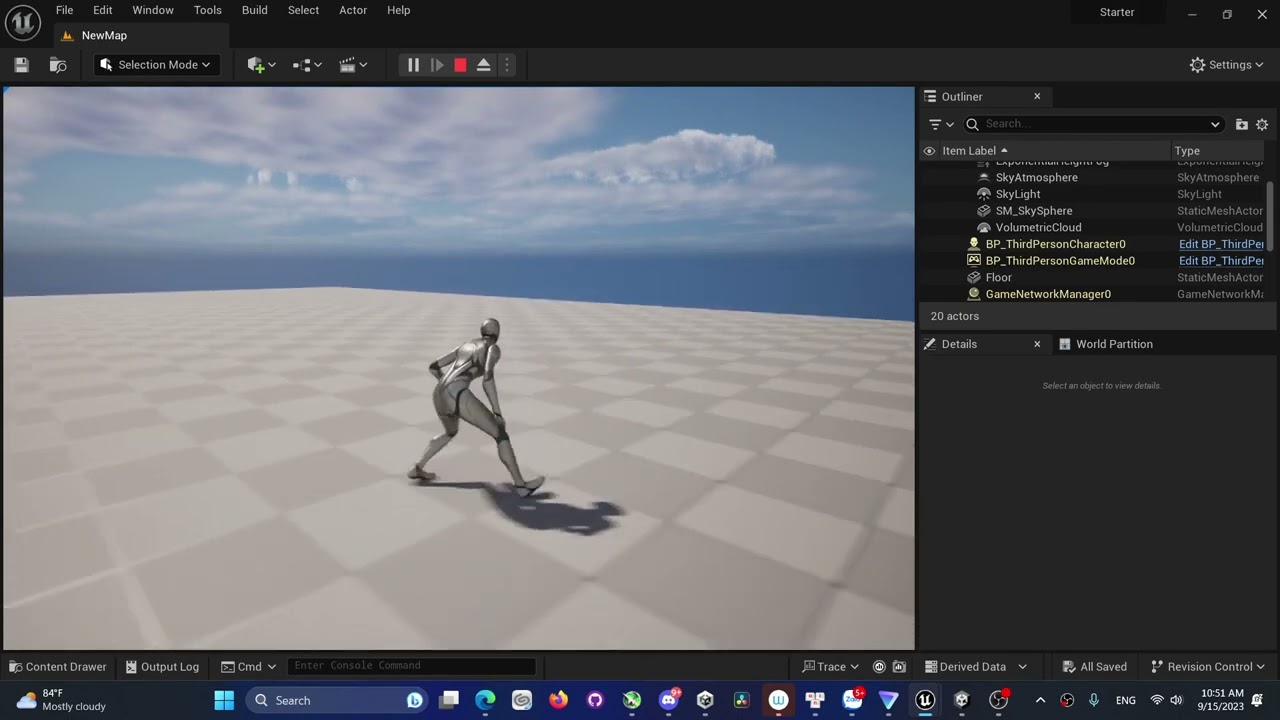
even when I reimport them the bug won't b fixed
hidden aspen
analog schooner
Hi~ I don't know what I did but all Lyra animation work fine instead of the jump...
You have IK enabled i gues... and they strech the legs 😉
analog schooner
hidden aspen
You have IK enabled i gues... and they strech the legs 😉
I'm complete new hehe, jump ship from Unity. Feel like a baby here.
misty dagger
best sites to get assets from ?
 modest plinth
misty dagger
best sites to get assets from ?
modest plinth
misty dagger
best sites to get assets from ?
I look through Sketchfab if I just need some quick testing models. Otherwise, I've been keeping a look out on Humble Bundle and Fanatical for their deals
misty dagger
modest plinth
I look through Sketchfab if I just need some quick testing models. Otherwise, I'...
cheers, do they have any free assets on there
modest plinth
misty dagger
cheers, do they have any free assets on there
On Sketchfab? Yeah. You can tell if a model is paid if it has a little dollar sign icon on the thumbnail
misty dagger
i see some pretty cool stuff on there
 lunar valve
What's the best way to modify mannequin/manny in blender?
 uneven salmon
lunar valve
What's the best way to modify mannequin/manny in blender?
uneven salmon
lunar valve
What's the best way to modify mannequin/manny in blender?
Export to blender, edit, then export From Blender then reimport...
If you're trying to add extra bones or skinning UE 5.3 has that support
lunar valve
uneven salmon
Export to blender, edit, then export From Blender then reimport...
If you're tr...
im in 5.2.1
bit hesitant to move towards 5.3
uneven salmon
lunar valve
bit hesitant to move towards 5.3
If you must use <5.3 then just export to blender and edit it there, then reimport it....
Any reason you want to modify it?
lunar valve
uneven salmon
If you must use <5.3 then just export to blender and edit it there, then reimpor...
bone structure is all messed up in blender
when you import it
but you need to rig things
also you need to make anims and such
uneven salmon
lunar valve
bone structure is all messed up in blender
Search for exporting to blender and importing from blender tutorials for unreal engine
its not straightforward, there's certain workflows and settings you need to follow
uneven salmon
lunar valve
also you need to make anims and such
You can use control rig and sequencer to animate directly in unreal engine
lunar valve
uneven salmon
You can use control rig and sequencer to animate directly in unreal engine
im moving unity to ue
i need to retarget old anims
also using ALS
toxic nymph
Any chance someone can help me make an animatic
lunar valve
trying my best to avoid breaking stuffs
uneven salmon
lunar valve
trying my best to avoid breaking stuffs
There's a lot of stuff you're going to have to break then fix and follow very specific rules and settings when working in unreal engine
and other DCC apps
the settings have to be accurate down to the T... its very finicky
That's why i recommend watching a few tutorials.
trying to do it all on your own you're going to run into a lot of frustrations...
There's a lot of missing docs for unreal engine, so your only option is community provided tutorials on youtube and other sites as supplementation
lunar valve
first of all will remove all fingers of ALS
because im doing total war like game
then redoing all anims
uneven salmon
In short Unreal Engine doesn't have good support for Rigging , Modelling, Skinning yet. they are trying, they have the basics down. they are relatively new tools.
So your idea to work in blender is a very good one. I was just saying if its a basic thing, it can be done in unreal engine..
lunar valve
the one within ALS
modest plinth
I'm trying to import an fbx (fps arms animation made in Blender) but for some reason, the finger bones aren't animated correctly
uneven salmon
modest plinth
I'm trying to import an fbx (fps arms animation made in Blender) but for some re...
Just like bigbossbro, you need specific settings that are accurate down to the T in order for this to work.
Search and watch some youtube tutorials about exporting from Blender to unreal engine
simple finch

Come sit down, enjoy yourselves for a while while I work on some assets, or an animation, whatever it may be. I like to stream my art and animations. I am a ...
 jolly hatch
Anyone Know How I could control the body controller location with the head control location . I want the character to crouch like it already does when moving the body control up and down, But I want to keep it in its current location from the head so when I move the head down it does not go in the the chest of compress the spine. Im currently solving this with a full body Ik and ignoring the spine joints, But its causing an issue elswhere.

 fair fractal
Retargeted animation question : how do I lower my butt?
So, I have created and mapped the chains from my source to the UE4 Mannequin. The standing animations are near pixel perfect. However, when it crouches, as you can see, it's no good. the target IK goal actually make it extra silly as the hands "want" to be at the right place, but the spine refuses to go down.
Additional information: all UE4 chains are mapped (except IK chain and twist). The pelvis is the retarget root for both (this is why it's strange to me, they should match perfectly, no?)
 simple grotto
hey everyone. rigging / animation noobie here.
I'm trying to get a snake NPC to move correctly with control rig. I have exported a basic rig and set up an anim BP and control rig for it. I have also set up a basic AI controller that assigns random locations for it to go to. I've also added a nice wiggle with a sine, so far so good.
the control rig setup is taken from the UE Animation Fundamentals livestream / control rig introduction (timestamp https://www.youtube.com/live/Wj1muths400?feature=shared&t=3369)
What I'm currently trying is to set the head control's position to be the same as my AI actor's position.
Which results in an offset - I suppose because I'm setting the control's transform which is in Rig Space with a World Space transform?
I'm setting it by enabling the Use Pin [ ] checkbox in the anim graph for my control, then setting that with the value I get in the event graph.
What's the correct approach here? any hints or resources would be appreciated 🙂

 serene arch
anyone ever have a weird issue where a really short montage plays twice? im using a 0.2 second montage for my recoil animation but when i fire once it plays the montage twice.. the animation isn't set to looped and Montage_Play is only getting called once
jolly hatch
anyone know why My Custom Control Rig Character mesh would not spawn This have been causing me issues for a while , with my spawned player character, And turned out to be the control rig causing it.


mY CONTROL RIG IS BASICALLY A FULL BODY IK NODE
jolly hatch
So I have come to the conclusion That The full body IK node causes character meshes not to spawn
 thin geyser
Folks, we have a small job that doesn't seem worth submitting to Manny, its basically doing some fixes to a Character control rig (some missing bones is making the auto retargeting to the Manny IK rig give our character a nice broken neck). Its probably a super quick fix. We are looking for someone to record their fixing it (its pretty common it seems). Where is the most appropriate place to submit tiny gigs?
(TL;DR we have a tiny gig fiver sized job but the jobs section seems like its only for larger scale projects, advice greatly accepted or if any riggers want a quick $50 LOL...).
thin geyser
Broken neck issue (although obviously the rig isn't super well fit to the mesh).
 thin geyser
Haha, yes, adjusted head_ctrl and it indeed looked correct, however, after compiling the rig it snaps back, boo
I'm just a humble code monkey, so... hence bowing down to the art gods 🙂
jolly hatch
Dont stress, Control rig is complex! I forgot 80% Of what I read
thin geyser
Feels like I should use IK rig retargeter, like most coders, I haven't gone nearly as deep on control rigs as I should have, I've been happily fed perfectly built rigs in the past from the art teams!!
thin geyser
jolly hatch
Dont stress, Control rig is complex! I forgot 80% Of what I read
Thanks though. I wonder if its just the bones aren't being mapped to the manny skeleton very well on import of the skeletal mesh.
 trim stump
I’m using a template from the marketplace, along with an anim pack from the marketplace, but the animations don’t play until I arbitrarily retarget them for no reason… is there a way around this? Am I missing something?
Even though the mannequin is the same with same name, I still have to make an IK for every anim pack
Is this normal?
 broken wagon
toxic nymph
Any chance someone can help me make an animatic
broken wagon
toxic nymph
Any chance someone can help me make an animatic
You have to be more specific. Detail the issue and you'll get more chances of some help.
 dire mauve
Just wondering if anyone can assist me with this. I did a few key frames for an animation in UE5 for my character, it was pretty much just sliding Root along the Y axis for a dash of some sort but (not sure if it's due to my awful mesh) my character flys up into the sky when I do the dash montage that I made.
frosty moon
Do somenone know how can i use multiple animation montages in one?
I cant find the problem in my project please get contact to me
toxic nymph
broken wagon
You have to be more specific. Detail the issue and you'll get more chances of so...
Ht i literally need help making the animatic. My photoshop and stuff aren’t working so I couldn’t make it
 west osprey
anyone know a way how i could make this so when i pick it up and click RMB my character goes into a aiming animation, currently all i can do is pick it up and fire the weapons ( I’m using UE 5.2)
 proper horizon
I have a jump animation and it looks well in montage, but when I use Play Montage to play it in runtime, it behaviors wrongly. Anyone has idea how it happens?
I tried playing animation node and it behaviors correctly too. So are there some critical settings in motage?
 stuck frigate
whenever i press W
tight basin
What do MM and MF prefixes on animation files usually mean? (MM_Walk_Fwd and MF_Walk_Fwd)
dire mauve
west osprey
anyone know a way how i could make this so when i pick it up and click RMB my ch...
Do you already have an aiming animation or do you need to make one?
tight basin
For anyone finding my post in the future, I think it means Male/Male and Male/Female, one set of anims look a bit more feminine, only difference I could find 
trim stump
I’m having an issue with some animations, when retargeted the IK hand sockets no longer work
The IK feet and roots also pay no attention
Is there a way to retarget these?
trim stump
tight basin
For anyone finding my post in the future, I think it means Male/Male and Male/Fe...
The M doesn’t stand for Male, it stands for Mannequin, so you have anims for Mannequin Male and Female
trim stump
proper horizon
I have a jump animation and it looks well in montage, but when I use Play Montag...
Need to enable root motion
Double check your root is moving with your spine
If not edit accordingly
trim stump
frosty moon
Do somenone know how can i use multiple animation montages in one?
You need to feed them into a blendspace - look up animation blendspaces on YouTube
trim stump
trim stump
I’m having an issue with some animations, when retargeted the IK hand sockets no...
If anyone has any idea on this one ☝️
proper horizon
trim stump
Need to enable root motion
thank you, but that's not about root motion. I finally found it was because the ABP automatically blend it.
 obsidian current
Hey guys, hello. Recently I1m looking into animation in Metahumans and Ive noticed that the morph target names from the metahuman itself has a different name, adding stuff like "head_lod0_mesh" before the actual morph target. Is there a way for me to remove that from the metahuman one or add it into mine without doing it mannually? I remember that epic had some sort of data sheet with the addition of those prefixes, but I cant find it anywhere

I want to make my custom character share the facial control rig of the metahuman (it does have all ARkit morph targets already, but no prefixes), but this detail doesnt let me get it working. Can someone help me please?

 tropic basin
Anyone have any experience applying physics to modular skeletal meshes? Physical animation component works fine in a singular mesh, but multiple skeletal mesh components they just explode
tight nebula
obsidian current
Hey guys, hello. Recently I1m looking into animation in Metahumans and Ive notic...
@obsidian current Inbox me I can help you
fringe sparrow
why would the hand_l rotation in relation to the attached gun socket be different here


if i connect the animation directly, it shows the correct hand in the anim blueprint, but its wrong in game


i just dont understand how the socket is not staying relative to the hand bone
west osprey
dire mauve
Do you already have an aiming animation or do you need to make one?
I have a aiming and fire animation I just don’t know what to do with them
dire mauve
west osprey
I have a aiming and fire animation I just don’t know what to do with them
The way that I've recently learned (like literally yesterday on how to merge animations) is by doing a "Layered Blend By Bone" within the animation. I'm not sure if that is the "proper" way but it does what I need to do (which is swing a sword while walking)
Here is a tutorial which I followed for my animation needs, should be able to do the same with yours (aiming + walking + shooting) https://www.youtube.com/watch?v=bU95pf5hTkI&ab_channel=MattAspland

Hey guys, in today's video, I'm going to be showing you how to use upper body montages in your game, as well as being able to blend between both upper and full body so that you can utilise both.
Punching And Fighting Tutorial: https://youtu.be/1jxElVA7g3c
#Ue4 #UnrealEngine4 #Ue4Tutorial
________________________________________________________...
west osprey
dire mauve
The way that I've recently learned (like literally yesterday on how to merge ani...
Alright thank you and yes I’ve heard of this way because I’ve Actually done this way
For my head look at
dire mauve
Ahhh ok, probably the same method then. Animations aren't my strong suit.
west osprey
dire mauve
Ahhh ok, probably the same method then. Animations aren't my strong suit.
Me neither
I hate animations