
#animation
1 messages · Page 8 of 1
 severe escarp
 craggy knoll
I remember you could set the "Instance Class" there 🤔
severe escarp
exactly
that node is giving me the problem
idk why
i refreshed that node multiple times
deleted added again still its the same
i think the node itself is supposed to look like this

 brazen wharf
you got to add an inPose input to the interface (and to the layer where you implement it)
severe escarp
okay i will quickly try that
 thorn tendon
@craggy knoll That link you posted. Worked like a charm! Thanks a bunch!
severe escarp
i hope i connected nodes properly but this doesnt work

in the second or main animBP using that layer node
not this way either X(
 severe escarp
it works perfectly fine in UE4 same steps but with same steps in UE5.1 (except that implemented and inherited interfaces) doesnt work for me.. pls let me know if you guys figure it out..
 final radish
Anyone ever had to solve trouble with camera snapping? I imported the City Sample animations and applied them to a MetaHuman character based on the Third Person template project, but when I turn I get this awful camera judder. I tried looking at the usual suspects in the Pawn (anything tied to orientation or rotation in the CMC, the Spring Arm or the Camera itself as well as lag settings on the Spring Arm) but to no avail. The Pawn's skeleton has all the curves declared for the imported animations. Playing around with root motion settings changed nothing. There are no blendspaces to configure in this setup.
 lunar wave
I have this animation that moves the character forward. I know root motion will fix this but I have no idea how to use root motion. Every thing I look up doesn't really help me get what I want to do.
I want to move the character forward the same way the animation moves the mesh
 vague ingot
Does anyone know what happened to the circular movement in ue5?
When blending between jog backwards right and jog backwards left and vice versa, it plays through all the animations like in the top example, instead of jumping over like in the bottom arrow like in ue4. Any fixes?

here's an example
 solemn charm
Blender viewport shading is lagging .
Pc:- 8gb /500gb window 10,Intel i5 . Any solution ?
vague ingot
 misty dagger
so im a beginner animator in blender and for the past few weeks im learning Unreal Engine 5. So i wanted to ask is it better to make the animation in Blender and then export it to Unreal or is it better to animate directly in Unreal?
vague ingot
blender: better looking/easier to animate
unreal: less compatibility issues
Aside from that, you can always animate in blender and edit in unreal if needed.
 ashen junco
misty dagger
so im a beginner animator in blender and for the past few weeks im learning Unre...
ashen junco
misty dagger
so im a beginner animator in blender and for the past few weeks im learning Unre...
Depends on what you're making, but generally Blender has lot more to offer when it comes to making animation, like constraints. UE5's Control Rig + Sequencer is rather limited in this regard, but passable for making cinematics.
That being said, UE4's Control Rig + Sequencer workflow was atrocious lol, thankfully UE5 significantly improved it
misty dagger
what about in a specific scenerio where i want my character walking in a hallway and then turns left, and then when i go to Unreal, do you have to try to sync the animation with the area?
ashen junco
misty dagger
what about in a specific scenerio where i want my character walking in a hallway...
So gameplay animation?
misty dagger
what i want to do is cinematic animations in UE5
ashen junco
If cinematics, then UE5's CR + Sequencer is passable. But if you want to go with Blender route, you'd have to blockout your scene there as well.
I found making gameplay animations with CR + Sequencer harder to make something that's passable, so that's one to consider down the line.
solemn charm
Blender viewport shading is lagging .
Pc:- 8gb /500gb, window 10,Intel i5 . Any solution ?
ashen junco
solemn charm
Blender viewport shading is lagging .
Pc:- 8gb /500gb, window 10,Intel i5 . Any...
Wrong server
You should ask that on Blender Discord server instead
 pale coral
Can anyone explain why the transition into a conduit doesn't provide me the option to set the duration? Does it guarantee playing the entire animation without being able to set duration?
 vapid basin
anyone has some knowledge how i should rig a hard surface model without bending with joints to unreal to use the control rig?
craggy knoll
severe escarp
it works perfectly fine in UE4 same steps but with same steps in UE5.1 (except t...
Do you fixed it?
 runic canyon
How to share the same control rig among different skeletons?
ashen junco
runic canyon
How to share the same control rig among different skeletons?
Depends on how you want to use them, but Control Rig isn't tied to one skeleton asset, it only looks for the bone name and hierarchy
runic canyon
ashen junco
Depends on how you want to use them, but Control Rig isn't tied to one skeleton ...
But don't you create one by clicking on a specific skeleton?
ashen junco
runic canyon
But don't you create one by clicking on a specific skeleton?
Creating via right clicking the skeleton asset will automatically import the hierarchy, but you can create a control rig without "assigning" to a skeleton asset
runic canyon
ashen junco
Creating via right clicking the skeleton asset will automatically import the hie...
I see, interesting. Thx!
 winter matrix
Hey, can someone help me with the suspension animation with a certain type of axle?
I set everything up and got something running, but it does not work perfectly.
Maybe I can show it in a discord stream. It is not quite the same as the double suspension example in the docs...
runic canyon
Is an already set up IK Rig(with all the standard chains equivalent to UE5 mannequins, metahumans etc.) for mixamo characters available somewhere online?
winter matrix
Is this related to my question @runic canyon ?
runic canyon
winter matrix
Is this related to my question <@655097109481127957> ?
No, sry man can't help with your issue 😦
 vague sphinx
Hi everyone i have a question i dont knw why but my animation doesnt work now in sequencer my character just sliding on the ground
 late dawn
Can you import FBX as level sequences?
ashen junco
late dawn
Can you import FBX as level sequences?
I had vague memory of that option existing in the Sequencer 
 mint grail
It's really daunting to think about having to learn animation blending and then blending each animation together. Is there any simpler method even if there is some quality reduction until I can actually afford to hire someone that can do it well?
mint grail
That seems very promising, I'll check it out. Thank you
 jade holly
Hey guys o/ I'm having trouble importing an animation into ue5, can someone help?
The problem is, all my animations are getting an additional move on the feet bones although there is none doing that in Blender.
The file has 3 actions, none of them are pushed in the NLA panel therefore not activated.
I followed the tutorial from PointyPants which I'll link below.
I'm using PopOS(Linux) and UE5.0.3.
My guess is that I smh messed up during exportion, somthing related with the primary and secondary bone axis
link video: https://www.youtube.com/watch?v=nY4Q8cYBLP8&t=933s
Here is a gif of the issue:
 late dawn
ashen junco
I had vague memory of that option existing in the Sequencer <:HaruThink:95960326...
late dawn
ashen junco
I had vague memory of that option existing in the Sequencer <:HaruThink:95960326...
Do you know why that is greyed out by default in UE5?
 ashen junco
late dawn
Do you know why that is greyed out by default in UE5?
ashen junco
late dawn
Do you know why that is greyed out by default in UE5?
You aren't editing any Level Sequence
late dawn
ashen junco
You aren't editing any Level Sequence
Got it. Ok, you were right, one can import FBX animation in there... but apparently nothing gets imported if it doesn't match to an actor in the level... which is bad for me... 🙈
I guess I'm in the camp now that Epic needs to develop their own Blender Datasmith exporter ASAP
ashen junco
late dawn
I guess I'm in the camp now that Epic **needs** to develop their own Blender Dat...
There is, though from third party
https://github.com/0xafbf/blender-datasmith-export

GitHub
Blender addon to export UE4 Datasmith format. Contribute to 0xafbf/blender-datasmith-export development by creating an account on GitHub.
late dawn
ashen junco
There is, though from third party
https://github.com/0xafbf/blender-datasmith-ex...
I know. I've used it for years, and donated. It's very bugged, unfortunately, and not updated.
 thin kayak
I'm having an issue, so the crouch animation begins to play but it stops and and my player character just slides around till I press the c key again, which he does his normal walk/running animation, if I press c again its the same will do 1-2 seconds of the crouch animation but it stops. I cant figure out why its doing this at all
 spare pulsar
Hi people. Does anyone know if I can find somewhere pole dancing animation and character ? I can't find any on the marketplace
thin kayak
mixamo ?
spare pulsar
I'll take a look, I'm not an animator tho. If I don't find, how much would it cost for someone to create a simple pole dance loop ?
thin kayak
@spare pulsar mixmo is pretty much free i believe haven't looked into it too much myself
spare pulsar
thin kayak
<@292058077878943754> mixmo is pretty much free i believe haven't looked into it...
I just took a look, but can't find what Im looking for
 remote summit
I hope somebody can help me, would love to use the power of the control rig in UE5... but having some interesting issues
Context, my model is made in Maya and I have setup the model to face X (forward) and use Z up


when applying the basic IK option, the primary axis and secondary axis values are not really working
The default BASIC IK node has the following:

X = 1 (primary) and Y = 1 (secondary)

this is what happens when I set that up
at this point... i have tried to play with the values of the primary and secondary, but none of them give me anything close to appealing results
I have tried x1 y1 z0 + sx0 sy0 sz1
and a few other combos... all of them just lead to massive warping
the IK for the bones looks great, but the mesh is horrid and warped
 pliant latch
is it possible to motion warp an ADS animation to make it end up at the correct location?
remote summit
If, I put the value to x0 y0 z-1 i get this

but I cant, for the life of me, figure out how to get the bone to not be twisted like that
ashen junco
pliant latch
is it possible to motion warp an ADS animation to make it end up at the correct ...
Yes, and it can be done with just IKs, no need for motion warping
remote summit
it just seems so odd
pliant latch
ashen junco
Yes, and it can be done with just IKs, no need for motion warping
alright
 still obsidian
hello, does anyone know how to enable dual quaternion skinning on a skeletal mesh in ue5.1
 tardy fiber
can i make socket change its relative location/rotation for specific animations?
remote summit
you can
@tardy fiber you would have to key that via animation or do it programmatically, but otherwise, yes it works.
vague ingot
vague ingot
Does anyone know what happened to the circular movement in ue5?
When blending be...
anybody know? this is really setting me back
tardy fiber
remote summit
<@175956558717386753> you would have to key that via animation or do it programm...
i wanted, but it seems like u cant key a socket, only bones, in code its possible, but annoying
ashen junco
tardy fiber
i wanted, but it seems like u cant key a socket, only bones, in code its possibl...
FWIW you might as well have dedicated weightless bone in your rig serving as socket, that way it'll be easier to constraint around
remote summit
ashen junco
FWIW you might as well have dedicated weightless bone in your rig serving as soc...
This is what I do, so yeah, that is also my suggestion
remote summit
vague ingot
anybody know? this is really setting me back
Should be an option that says use rotation, I will see if I can find the tutorial on it, but its because your allowing instant transition
ashen junco
That being said 5.1 does introduce constraints for Control Rig and Sequencer, though I have yet to take deeper look into it
Constraints were my biggest gripe with CR+Sequencer, and I prefer doing it in Blender due to how easy it is to set one up.
vague ingot
remote summit
Should be an option that says use rotation, I will see if I can find the tutoria...
thanks, i'll look into that
Ok I fixed it
the problem was that I was using Spring Damper interpolation instead of averaged interpolation
runic canyon
why has mixamo retarget become so hard?
ashen junco
Likely because mixamo rig was terrible to begin with
 cloud skiff
does anyone know how to pose a metahuman in the scene without using the sequencer?
ashen junco
cloud skiff
does anyone know how to pose a metahuman in the scene without using the sequence...
Practically impossible.
Unless if you're using Maya and deal with the source file, but that's just moving the goal post
cloud skiff
in that case, ive been having issues with the sequencer where it doesnt save the pose i make. im most likely doing it wrong here, but is there some way to save the pose in the sequencer?
ashen junco
cloud skiff
in that case, ive been having issues with the sequencer where it doesnt save the...
Keyframe the control rig on first frame, and bake it to anim sequence if you want to.
Doing just the former already works fine for me
 warm garnet
Noticed an issue with anim notifies. Sometimes they won't trigger at all if you place them at the very start of a montage (t = 0.0). Changing it to something small like 0.001 fixes it. Still a weird issue though.
 strong turret
Anyone know how to do this in blueprints?
 ashen junco
strong turret
Anyone know how to do this in blueprints?
ashen junco
strong turret
Anyone know how to do this in blueprints?
- Don't even bother using BP nativization, it's dead.
- That's just how you do it in C++, in BP this is just the same ordeal.
strong turret
ashen junco
- Don't even bother using BP nativization, it's dead.
- That's just how you do i...
I can't find those classes when creating a blueprint, could you point me in the right direction?
ashen junco
strong turret
I can't find those classes when creating a blueprint, could you point me in the ...
Just make animBP as usual.
strong turret
ashen junco
Just make animBP as usual.
Where does the proxy executing the logic fall into place
ashen junco
strong turret
Where does the proxy executing the logic fall into place
All of the events are already in the animBP, there's no point trying to move the goal post.
#work-in-progress
 red tulip
oh
strong turret
ashen junco
All of the events are already in the animBP, there's no point trying to move the...
The optimisation documentation for animation blueprints says differently
ashen junco
strong turret
The optimisation documentation for animation blueprints says differently
If you code stuff in C++, yes, that'd be a way to do it as opposed to do stuff in UAnimInstance. But for animBP, nothing changes, as FAnimInstanceProxy is for the anim graph, part of an animBP already.
Noah Zuo's Blog
This article introduces the animation framework in ue4, in a programmer's perspective.
 thick ridge
Will someone please explain how the FMeshToMeshVertData structure is supposed to be used? There's no documentation on it anywhere, and we need it for our animations.

 little linden
How can you add IK_foot_bones to Mixamo YBot? I've created retargeter but IK is not transfered

 minor wraith
im trying to edit the right arm of the mannequins run animation so my character isnt constantly putting their sword through their own head, but for some reason if i swap out the run animation in quinns walk run blend, even if its an identical duplicate of the original file, their feet stay stuck to the ground when running in game, even though the animation works in the editor.
anyone know whats going on here?
update: its started working with duplicate files now, but baking to control rig then baking to animation sequence still breaks it, so something in the baking process itself must be fucking with it
fixed it i think, switched the ik root from pelvis to animation_root
 dim slate
Hello. After retargeting the Sword animset pro animation to my Als character, all animation looks fine, except when i enable IK. After retargeting, the foot ik bone is not snapping to the foot. Any ideas?
 ashen junco
dim slate
Hello. After retargeting the Sword animset pro animation to my Als character, al...
ashen junco
dim slate
Hello. After retargeting the Sword animset pro animation to my Als character, al...
Do you use it to control IK effectors?
dim slate
Yes
ashen junco
Ah, I actually went the other way around, using IK bones to serve as the reference position
dim slate
TBH i dont understand a lot about this. I am using the default ue5 control rig ik system.
In there is does calculates with the foot iks. My IK bone not following my feet is a big problem 🙂
 ashen junco
dim slate
TBH i dont understand a lot about this. I am using the default ue5 control rig i...
ashen junco
dim slate
TBH i dont understand a lot about this. I am using the default ue5 control rig i...
I don't think you need that IK bone to actually control the IK anymore, you could do the same with controls and it could work just fine
thin kayak
https://www.youtube.com/watch?v=xHxl1RL_k90 Anyone know why my doors are animating like this ? they should match back up when closing but they dont, its like the whole location gets messed up
 runic canyon
How to play an anim montage on a metahuman?
I mean, which of the body parts should i plug in as mesh?
 slow timber
runic canyon
I mean, which of the body parts should i plug in as `mesh`?
slow timber
runic canyon
I mean, which of the body parts should i plug in as `mesh`?
Shouldn't you use the uppermost directory? Whatever all the other parts are attached to?
Hello! My character is spinning uncontrollably when I try to execute a TURN_IN_PLACE function. This is because the root bone is going infinitely positive and negative. Why is that?
 runic canyon
slow timber
Shouldn't you use the uppermost directory? Whatever all the other parts are atta...
runic canyon
slow timber
Shouldn't you use the uppermost directory? Whatever all the other parts are atta...
it doesn't seem to work when i have an animation blueprint, maybe that's the problem
slow timber
runic canyon
it doesn't seem to work when i have an animation blueprint, maybe that's the pro...
But it DOES work as a regular blueprinted animation?
slow timber
runic canyon
it doesn't seem to work when i have an animation blueprint, maybe that's the pro...
You can diagnose this by placing the animation directly inside of your gameworld, and then setting the mesh as the metahuman.
runic canyon
the animation works fine when used by itself. Just when i use it in anim montage it doesn't play. It still calls the on completed callback after the length though
slow timber
runic canyon
the animation works fine when used by itself. Just when i use it in anim montage...
Does your animation blueprint have a DEFAULTSLOT?
runic canyon
slow timber
Does your animation blueprint have a DEFAULTSLOT?
the fact i don't know what that is seems like a good start lol
 slow timber
runic canyon
the fact i don't know what that is seems like a good start lol
slow timber
runic canyon
the fact i don't know what that is seems like a good start lol
Between the MAIN_STATE_MACHINE and the OUTPUT_POSE, you'll need a DEAULT_SLOT.
slow timber
runic canyon
the fact i don't know what that is seems like a good start lol
Right click, type in "Default Slot", and insert it between the two nodes.
runic canyon
trying, thank you so much
runic canyon
slow timber
Right click, type in "Default Slot", and insert it between the two nodes.
it woooorks thank you wise man(or woman)
slow timber
runic canyon
it woooorks thank you wise man(or woman)
Glad to hear. Enjoy the onslaught of other issues you will inevitably have.
 wicked breach
dim slate
Hello. After retargeting the Sword animset pro animation to my Als character, al...
wicked breach
dim slate
Hello. After retargeting the Sword animset pro animation to my Als character, al...
Hey, I’ve been doing a lot of retargetting lately. Did you get this working?
wicked breach
cloud skiff
does anyone know how to pose a metahuman in the scene without using the sequence...
Did you get this working? There’s a way to do this if it’s a single anim alone, like idle or running, etc
cloud skiff
I got a pose to save in the sequencer, but said sequencer removes the water in my scene for unknown reasons
I just gave up when it stopped working
wicked breach
Ah I’m sorry
I wasn’t sure if something like this would work for you http://lucyestela.com/dev/unreal/unreal-assigning-keyboard-controls-to-trigger-animations/
ASSIGN CONTROLS TO TRIGGER ANIMATIONS Now I want to trigger the different animations based on the keyboard input, so to do that I need to set up some input...
There’s also this one that uses a sequencer and a trigger, but you’ve probably already tried it

Illustrates how to trigger a Sequence from an in-game event.
slow timber
Hello all!
So, when my archer shoots an inanimate object, the arrow has a "pure" flight path, but when I shoot at a pawn, it targets it. Is there a preset that forces this change in vector flightpath? (I'm using projectile movement component, by the way).
I love it, but I wonder how to set this attribute to regular meshes.
wicked breach
Hey everyone, I'm having an issue where my metahuman head is detached from the body while using the level sequencer. I've gotten it to work a couple times, but I'm struggling with this one- on the bp, the live retarget is use animation blueprint for the retarget orig body anim mode, and the retarget orig anime class is none. For the body, it's the same. For the face, I've set the animation mode to "use animation blueprint" and the anim class is "face_animBP_C". Has anyone had this issue before, and how did you resolve it?
 agile summit
Should I use ue5 or blender?
ashen junco
agile summit
Should I use ue5 or blender?
Depends
agile summit
ashen junco
Depends
On what?
ashen junco
agile summit
On what?
Many things, starting with your considerations
agile summit
ashen junco
Many things, starting with *your* considerations
I’m going to make games in unreal, but blender seems to be easier and has more tutorials (which is useful as a complete beginner)
That’s probably what I am going to use
warm garnet
What would the recommended workflow for creating a third person reload animation be in combination with aimoffsets? The main problem being, the left hand need to move to where the magazine is, then the magazine need to move with the hand, then the hand need to move to a specific place on the player's body (at least the way I want to do it). The current way I am planning to do it is: Blend left hand IK alpha with anim notifies towards the magazine location, switch the ik effector location to the magazine holster location on the player mesh and blend to it, while also "parenting" the magazine to the left hand, and then doing the same in reverse.
I don't mind experimenting and figuring it out myself, but I'm also happy to hear other people's suggestions 😄
warm garnet
Nevermind I found a good way to do it
 brisk slate
any advice on how to have different animations based on how long a character has been falling?
brisk slate
also is there a way to set looping point for animation separate from the start of it?
 slow salmon
severe escarp
it works perfectly fine in UE4 same steps but with same steps in UE5.1 (except t...
slow salmon
severe escarp
it works perfectly fine in UE4 same steps but with same steps in UE5.1 (except t...
hi, have you solved this? i stuck at the same problem
 severe escarp
Yes
slow salmon
how did you do
severe escarp
There is no problem with node u have to use that node properly in animgraph
In ue5 the default animgraph is different than ue4
The node is fine though it may look different
I wasn't using it properly in animgraph
slow salmon
but if LinkAnimClassLayer, the node have no effect
severe escarp
U have to link n unlink when needed or not needed respectively
Show animgraph if possible where u r using that node
slow salmon
maybe it is not the difference from UE4 and UE5, but ue5.0 and UE5.1 , this worked with UE5.0
severe escarp
I dint use in 5.0 but when I got problem in 5.1 i tried in ue4 then i understood i wasn't using node properly in ue5.1
slow salmon
did you use anim layer to link another animblueprint that implement layer interface, or just use the animblueprint itself's anim layer
severe escarp
I'm in class ATM in some time i can send exact screenshot of how i implemented
severe escarp
slow salmon
did you use anim layer to link another animblueprint that implement layer interf...
Other animbp
U link that other bp when needed n then unlink that same other bp when not needed
In ur main bp
Atleast that's how I did
slow salmon
@severe escarp want to see your screenshot, i use that layer node but no effect
and can't choose another class in this node

 high musk
Anyone know why lyra locomotion animations jump/skip/teleport randomly? This is using the lyra unarmed anim bp but also happens with the shooter mannequin in the included experiences.
happens several times in this clip
wicked breach
wicked breach
Hey everyone, I'm having an issue where my metahuman head is detached from the b...
I had to recreate the project and reimport the metahuman bp and anims
This solved it for me https://www.youtube.com/watch?v=bgDXZa5MVCw
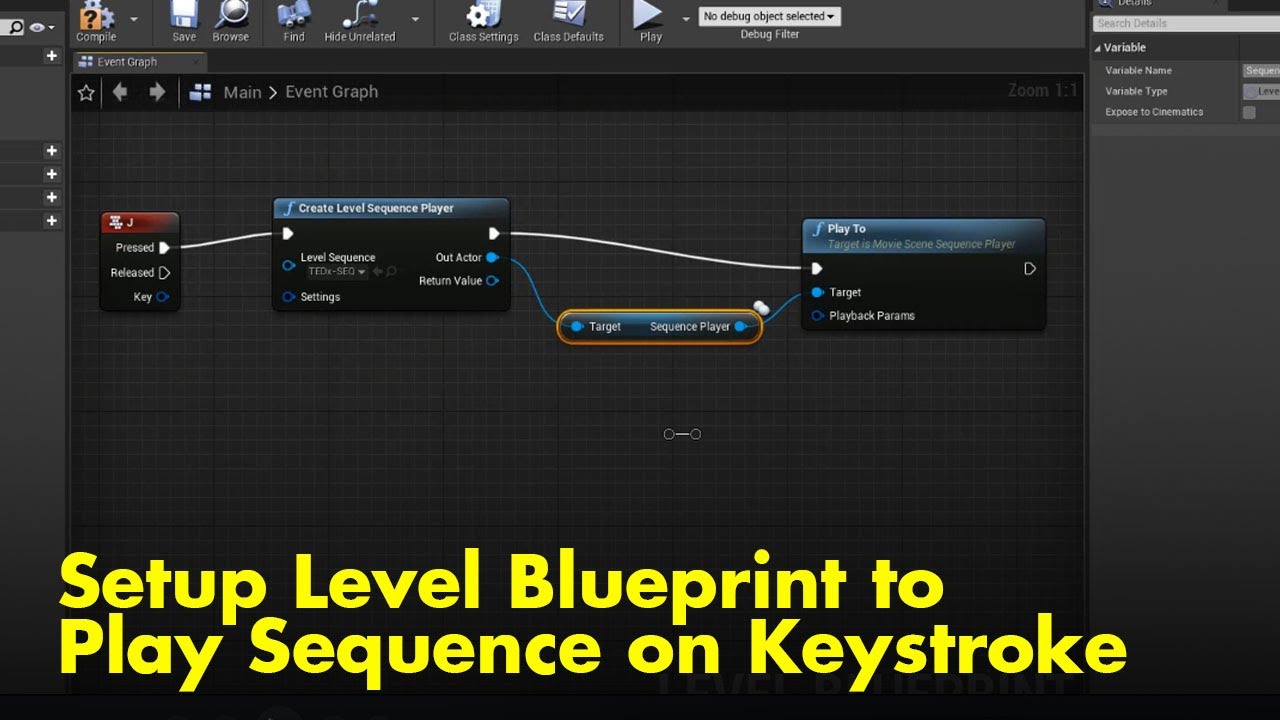
This quick 1min video was created in response to a forum question asking how to trigger a sequence to play in response to a keyboard key being pressed. This quick demo shows how to setup a simple Level Blueprint to perform this task.
spare pulsar
Hi all

how do I save after I edit some of the bones ?
for example I made the hand straight in the editor
but in game it's still as before

I also added keyframes, but in the game it' still not updating
craggy knoll
high musk
Anyone know why lyra locomotion animations jump/skip/teleport randomly? This is ...
Tried debugging with the Rewind debugger?
 proud lion
Everyone know that how to solve this flickr
 unreal trench
Still can't figure out why my deer is magic and can go invisible lol
 rustic plume
unreal trench
Still can't figure out why my deer is magic and can go invisible lol
rustic plume
unreal trench
Still can't figure out why my deer is magic and can go invisible lol
Looks like level streaming or draw distance, but im sure you checked those 🤔
unreal trench

It's something weird with the animations and how the controller is using them, any anim with that setting does that
rustic plume
Noted.
 inland heath
anybody know how can we use same animation blueprint for a body thats made of diffrent skeletal mesh
like customized character that has different body part
they use different skeletal meshes
 fiery snow
Is there a way I can parent the rotation of a control to the location/translation of another control in the sequencer?I can only parent rotation to rotation or scale to scale or translation to translation to translation.
fiery snow
I am currently trying to see if I can do this in the control rig window. There are contraints nodes: but there isn't any way to link rotation of a control to the translation of another control. Aren't there drivers in ue5?

 fiery snow
I am currently trying to see if I can do this in the control rig window. There a...
fiery snow
fiery snow
I am currently trying to see if I can do this in the control rig window. There a...
Found this:

Can this be used to drive the rotation of one control rig with the translation of another control rig?
minor wraith
im having a weird problem where my animation appears to have working root motion, but when i enable root motion it disappears.
anyone have this?
nvm i figured it out, disabling character movement also disables root motion
runic canyon
I disabled ignore z-axis on motion warping and my character falls under the floor infinetly
 minor marsh
My animation only work at UE4 skeleton and its buggy on UE5 skeleton, but blueprint dont accept UE4 skeleton, what can I do?
 visual estuary
hmmmmm. https://www.mocaplab.com/news/mocaplabs-sign-language-technology-gallaudet-university how possible would it to be to motion-capture ASL in unreal using just video footage?
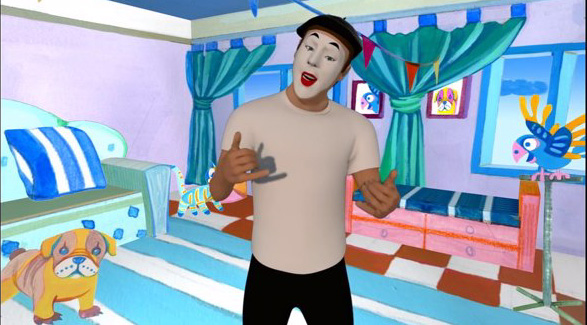
Mocaplab
FEBRUARY 2015
"Motion is fundamental to everything, of our human understanding of how the world works." Rémi Brun.
After several years of dedicated…
 idle tusk
So I have this set up

Which allows me to open a door 90 degrees and close it
I want it to open the same way, but with 30 degree angle to fit the walls
This is the time line

What can I do to alter the other angles?
ashen junco
minor marsh
My animation only work at UE4 skeleton and its buggy on UE5 skeleton, but bluepr...
Change the skeletal mesh, there's no way actor BP discriminate UE4 skel
 minor marsh
ashen junco
Change the skeletal mesh, there's no way actor BP discriminate UE4 skel
minor marsh
ashen junco
Change the skeletal mesh, there's no way actor BP discriminate UE4 skel
Normally I can use anim class with skmymannysimple but it doesnt work with ue4 model


 plucky fog
minor marsh
Normally I can use anim class with skmymannysimple but it doesnt work with ue4 m...
plucky fog
minor marsh
Normally I can use anim class with skmymannysimple but it doesnt work with ue4 m...
Your anim class (Animation Blueprint) is tied to a Skeleton. The UE5 manny has a different skeleton then the UE4 Mannequin.
The Anim Class you probably want to use is tied to the UE5 Manny.
You can share skeleton tied assets (like the ABP you want to use on the UE4 Mannequin) with other skeletons via the "Compatible Skeletons" feature:
 minor marsh
plucky fog
You can share skeleton tied assets (like the ABP you want to use on the UE4 Mann...
minor marsh
plucky fog
You can share skeleton tied assets (like the ABP you want to use on the UE4 Mann...
Doing this didnt do anything sadly
Oh, it worked when I tried it again, somehow
thanks
plucky fog
lol, good that it worked
minor marsh
now my crouch problem also solved, you just saved me from lots of work, thank you very much
idle tusk
idle tusk
So I have this set up
Bump
ashen junco
idle tusk
Bump
idle tusk
ah
dim slate
Hello. I have some root motion animations that are being played well as montages, but not when i play them in anim bp as a sequence. If i set root motion mode to everything, it is still not playing properly, and i cant even move at all. What may be the problem? 🙂
runic canyon
is there a way to have an actor mimic exactly position(with some offset) and animation of the player in every moment?
 obtuse parrot
Has anyone run into Set Master Pose Component being missing as an insertable node in the construction script of a character?
I'm using 5.1.
 unreal zenith
Hi, did some one try to use ML Deformer in 5.1 ? I tryed it for two times , two times i generated 5h mesh and it doesnt work right
 tired garnet
How can I add Inverse Kinematics to my bones?
 smoky shell
unreal zenith
Hi, did some one try to use ML Deformer in 5.1 ? I tryed it for two times , two ...
smoky shell
unreal zenith
Hi, did some one try to use ML Deformer in 5.1 ? I tryed it for two times , two ...
I figured it would have issues so didn't bother, will wait until I see Epic using it for Manny/Quinn 😄 I still just use their pose driver solution
ashen junco
obtuse parrot
Has anyone run into Set Master Pose Component being missing as an insertable nod...
Yes, and a heads up for everyone, Set Master Pose Component is now (as of 5.1) named Set Leader Pose Component.
This is definitely due to Epic's recent "inclusive language" policies, however, it might be too enforced that they don't implement search keyword for "master" to ease up on muscle memory. They do mentioned it in the Coding Standard part of the docs, but I don't see this mentioned elsewhere.
 ashen junco
Yes, and a heads up for everyone, Set Master Pose Component is now (as of 5.1) n...
ashen junco
ashen junco
Yes, and a heads up for everyone, Set Master Pose Component is now (as of 5.1) n...
<@&213101288538374145> permission to pin
ashen junco
tired garnet
How can I add Inverse Kinematics to my bones?
You can do it in Control Rig.
misty dagger
is it better to rig your model in Blender as a IK rig and then in UE5 you can change it to FK rig?
 iron thicket
Guys, how I can play two anim montages in same time?
 spare kraken
Can someone help me fix my control rig please? I mainly copied the control rig from the controlrigmannequin example onto my skeleton. Everything seems to be working but the legs are twisted. I've uploaded a project file with only the control rig and the mesh I'm trying to get it working with if you want to dive into it!
ashen junco
spare kraken
Can someone help me fix my control rig please? I mainly copied the control rig f...
Do you made the mesh in Blender?
spare kraken
It's a marketplace asset mesh
Here are some pictures of what it looks like, and what it's supposed to look like

 ashen junco
spare kraken
Here are some pictures of what it looks like, and what it's supposed to look lik...
ashen junco
spare kraken
Here are some pictures of what it looks like, and what it's supposed to look lik...
Looks like you got the controls starting transform wrong
 gusty tinsel
Hey, is there something like PoseableMeshComponent but without the CPU part and directly setting the VertexFactory Data?
 lofty marlin
ashen junco
Yes, and a heads up for everyone, Set Master Pose Component is now (as of 5.1) n...
lofty marlin
ashen junco
Yes, and a heads up for everyone, Set Master Pose Component is now (as of 5.1) n...
 old wolf
Is there something you need to check to make the states change visually while playing? It shows idle even when the state changes..

 little whale
I have in my project
1x UE4 Skeleton
1x UE5 Skeleton (Quinn/Manny)
1x Very old Mixamo Skeleton
1x Mixamo Mocaps (not part of the Mixamo Skeleton)
The Mixamo animation dont show up. I guess the skeleton is too old.
How do I apply the Mixamo mocaps to the Mixamo Skeleton ??
ashen junco
old wolf
Is there something you need to check to make the states change visually while pl...
Might be previewing the wrong instance
old wolf
ashen junco
Might be previewing the wrong instance
hmm? I didn't know that was a thing. I'm just looking at my anim bp
ashen junco
old wolf
hmm? I didn't know that was a thing. I'm just looking at my anim bp
Yes, that's a thing, by default its debug object is the instance in the preview viewport
old wolf
ashen junco
Yes, that's a thing, by default its debug object is the instance in the preview ...
cool thanks, that's a pretty tucked away setting
 wary plover
unreal zenith
Hi, did some one try to use ML Deformer in 5.1 ? I tryed it for two times , two ...
wary plover
unreal zenith
Hi, did some one try to use ML Deformer in 5.1 ? I tryed it for two times , two ...
Hey, I can help, I am one of the main devs on ml deformer. What exactly did you try? Or what goes wrong?
tired garnet
misty dagger
is it better to rig your model in Blender as a IK rig and then in UE5 you can ch...
Someone told me, that after you can't import ik from blender to unreal, and you have to add it manually
spare kraken
spare kraken
Can someone help me fix my control rig please? I mainly copied the control rig f...
This is the orientation of the effector bone, if it has something to do with that. Normally the axis is pointing straight down, or straight up

 devout bluff

I just need to know what to search
This one bone keeps disconnecting from its parent despite all my other anims being fine.
Using blender and tried with apply transform and without apply transform, both give the same issue.
 karmic rapids
Hello kind community , do you have any idea why this undesirable rotation of the barguest sometimes occurs during the death animation, please?https://www.youtube.com/watch?v=YHPmJqI_GAA

This barguest seems to rotate randomly when it dies. There are no rotation nodes in the pawn bp or anim bp as far as I can see. Any ideas why this might be occurring , please? I'm using the MMO Kit by CodeSpartan.
AnimGraph:


The Dead state is just a 1 frame animation of it lying down:

LOL Damn it, I just found the solution. Set the Use Controller Rotation Yaw to FALSE in the pawn BP:

Posting a question to a discord seems like a good idea to give oneself good ideas about possible solutions.
ashen junco
karmic rapids
Posting a question to a discord seems like a good idea to give oneself good idea...
Happens once in a while 😛
 pallid wraith
At this point would any of you say it is as easy to create a skeletal mesh animated humanoid character completely from scratch in engine, as it is to do the modeling and rigging in a DCC tool and import it into the engine and finish from there?
Searching around the internet, I do not see any workflows for the 1st approach, so I am guessing not.
minor marsh
I havent any knowledge about skeletons or animations, is there any way to change mannequin model with a similar model but protect the bones?
ashen junco
pallid wraith
At this point would any of you say it is as easy to create a skeletal mesh anima...
Not even possible.
Again, Control Rig doesn't make skeletal meshes from scratch, merely adding stuff on top of existing skeleton hierarchy
 lofty granite
When I edit existing animation with control rig
when switch Fk/IK the pose is not save
my rig work ok with testing and build from scratch
this happen only when I edit animation that already bake

 ashen junco
lofty granite
When I edit existing animation with control rig
when switch Fk/IK the pose is no...
ashen junco
lofty granite
When I edit existing animation with control rig
when switch Fk/IK the pose is no...
Do you have the backwards solve snapping the controls into the bones?
lofty granite
ashen junco
Do you have the backwards solve snapping the controls into the bones?
yes
for now look like I need to press the add key instead of rely on auto
that whay the pose from Ik save to fk

 broken bramble
Hey, I'm wondering if I'm able to animate components inside of unreal? I'm making a wall that the player needs to climb over and want to animate the camera while they do it
karmic rapids
broken bramble
Hey, I'm wondering if I'm able to animate components inside of unreal? I'm makin...
Do you mean to smoothly move the camera to a new position while climbing over a wall and then smoothly move it back to the original position again? For that I would use a Timeline that is executed in the Character BP when climbing the wall. The Update pin from the Timeline would be connected to nodes that update the location and rotation of the camera.
broken bramble
karmic rapids
Do you mean to smoothly move the camera to a new position while climbing over a ...
Timeline's work but I didn't know if there was any tools for creating custom animations inside of the engine like the tools in Unity
karmic rapids
broken bramble
Timeline's work but I didn't know if there was any tools for creating custom ani...
Yeah there is the Sequencer. Its very powerful and is probably an alternative. I've not used it much myself though.
 misty dagger

my animations have these extra empty frames on them and I can't even remove them in UE anymore
switched it to "animated time"
no change. Also noticing that for some reason it says my target rate for the walk is 24 (good) but my other two are 60?? I animate at 24 fps and these are all coming from the same file
 flat sluice
Does anyone know why when I set up this basic IK node in control rig the arm bones go horizontal?
 misty dagger
so something im trying to figure out right now is to rig the legs into FK
and then right now i rigged a Funtime Freddy for the first time and i did it
and now i want to export the model into UE5 so when i make an animation in Blender, i export the animations into UE5
however the problem is that once i export it into UE5 it says it has more then one hierarchy (edited)
so when i go to blender and see whats wrong, i see that the bones for the FK for the legs arent parented to the hierarchy

so i tried to parent them to the root and it doesnt work and completely breaks the FK function and no matter what i do, i cant parent them to any other bone
so my question is that, do i rig the model into a IK rig and once i set the control rig over on UE5, I change the rig into a fk?
(sorry if im asking a lot here, i just need help)
ashen junco
misty dagger
so something im trying to figure out right now is to rig the legs into FK
and th...
Disable Deform in your IK bones, and it won't get exported over if you check Only Deform Bones when exporting
misty dagger
what does deform do exactly?
 ember tundra
Can I add notifiers to a track in an animation similar to the sequencer that change the scalar parameter value of a material (using a parameter collection)?
misty dagger
ashen junco
Disable Deform in your IK bones, and it won't get exported over if you check Onl...
im still having the errors

 misty dagger
ashen junco
Disable Deform in your IK bones, and it won't get exported over if you check Onl...
misty dagger
ashen junco
Disable Deform in your IK bones, and it won't get exported over if you check Onl...
this is a video showcasing my problem

MediaFire
 sharp coyote
im using the new ue5 retargetting method here but one thing that i cant seem to get right is the angle of the wrist, still grappling with this new feature so i dont know what im fully doing would anyone have any advice how to get the angle closer to the mannequins?

i suspect it might have something to do with the model im trying to convert the animations to, the woman, missing certain twist bones that are present on the mannequin so id need ot compensate for that somehow but idk how
particularly lowerarm_twist_01
flat sluice
What does this error mean in control rig?

 outer trellis
My skeletal mesh import is fine, but the animation on the other hand it... questionable look Fixed


 mental canyon
Looking back on the history of this channel, I don't think my problem is going to be particularly new or exciting, but maybe that means it's easy to fix. I've got the UE mannequin rig in Blender, and I'm doing the weight painting. Honestly it looks pretty decent when I import it into UE, but there are two persistent problems I can't get rid of:

This is how it looks when it's rigged up to the default 3rd Person mannequin blueprint. I can gaurantee that there's nothing so different about the weight painting for anything on the left/right sides of the mesh that would cause the left shoulder to sag and the right wrist to push down like this (without it happening on both sides), so I'm wondering if there's something in the IKs for the default UE mannequin stance, or some kind of default gravity effect?
 finite girder
So I set up a strafing blend space with direction (-180 to 180 degrees) along the horizontal axis and speed (0 to 300 for walking and 800 for sprinting). When I didn't have the running animation at the top there and it was just idle to walking, the directional animations (forward left, forward right, backwards right, backwards left) would be extremely slow. But when I add the running animation, they all work perfectly. I was curious why this is?
 flat sluice
Is there an explainer on how to use Driven Controls for a Proxy Control in control rig?
I can't find any literature on it
I'm trying to have a proxy control manipulate the movement of a few other controls
ashen junco
mental canyon
This is how it looks when it's rigged up to the default 3rd Person mannequin blu...
Are you just changing the assigned skeleton? You'd have to retarget the animBP, considering it's different proportions, but with adhering to UE mannequin skeleton, you could have easier time doing so.
Using Control Rig + Sequencer?
ashen junco
flat sluice
I can't find any literature on it
Yeah, about that, it's still WIP
mental canyon
ashen junco
Are you just changing the assigned skeleton? You'd have to retarget the animBP, ...
Yeah, I'm just going into the blueprint for "ThirdPersonCharacter" and redirecting to the FBX for the rigged mesh that I've imported:

considering it's different proportions
This character was modeled to have the joints line up exactly with the UE mannequin. Unless I'm misunderstanding this?

 coral sequoia
ashen junco
Using Control Rig + Sequencer?
coral sequoia
ashen junco
Using Control Rig + Sequencer?
what should i select to export it from Sequencer?
flat sluice
How can I add a relative offset to a control in control rig? When I do this, it adds it every frame and eventually jumps offscreen instead of just being applied once

'm trying to apply RelativeChestOffset to a control once
basically I'll be using some good ol' perlin noise and feed that into RelativeChestOffset to add some wiggling motion to chest_ctrl
Checking Initial in the leftmost Get Transform - Control for chest_ctrl works, but then I can't manually move around the chest_ctrl
Simple, this was the solution:

Is there an equivalent of Transform Location but for a rotator?
ashen junco
coral sequoia
what should i select to export it from Sequencer?
Bake the control rig animation into an Anim Sequence asset, then you can export it as FBX
DEBUG HELP WANTED
In Control Rig, there is a reproduceable crash where transforming control type other than Euler Transform would crash the engine with D3D Device Lost and equivalent error to Vulkan. This is reproable in Intel GPU, but for now I don't have access to other GPUs.
If anyone willing to test this for me, let me know. I'm making Control Rig Compendium articles and I want to know whether this is a widespread problem or only exhibiting on potatoes.
smoky shell
No idea about that issue. But I dislike the issues control rig causes. When I use live coding if there is any anim graph stuff running it breaks the debugger (and I always run in debugging for obvious reasons). It seems to have been written quite messily.
Its also a pain in the butt to debug. Can it even draw traces yet?
severe escarp
slow salmon
<@276332925211901963> want to see your screenshot, i use that layer node but no ...
Sry for late reply I hope ur problem is solved. N when I'm using word "implement" that animlayer(self) node i mean using that node properly in animgraph.. n not anything related to implemented interfaces
U might have done everything properly like interfaces n then linking n all.. except using that animlayer(self) node properly.. use it in a state n connect it to state output which worked for me..
coral sequoia
@ashen junco oh i see.. thank you.. but how to keep my keys non baked if i need to change something later?
visual estuary
how would i do markerless hand tracking within Unreal?
something similar to: https://www.youtube.com/watch?v=uKwXQsIoxs0
ashen junco
coral sequoia
<@325627930484932608> oh i see.. thank you.. but how to keep my keys non baked i...
You could bake it again, as long as you don't lost the level sequence.
 fringe tiger
how can i change to another folder including other animations?

In the charachter animation bp
 polar grotto
hi how would you animate a simple object in unreal like just a circle going round ? in sequencer ?
 dusk tendon
polar grotto
hi how would you animate a simple object in unreal like just a circle going roun...
dusk tendon
polar grotto
hi how would you animate a simple object in unreal like just a circle going roun...

drag it in your timeline, then add a Transform, then you can set keyframes for rotation etc.
polar grotto
and then it will play when i press the play button right ? thanks !
dusk tendon
polar grotto
and then it will play when i press the play button right ? thanks !
yeah it should, depending on what you want.
sharp coyote
why does the ue5 retargeter put my characters feet in the ground like this

it looks fine before the export
 coral sequoia
ashen junco
You could bake it again, as long as you don't lost the level sequence.
coral sequoia
ashen junco
You could bake it again, as long as you don't lost the level sequence.
so let me clarify.. ill bale my keyanimation then it turns to keys on each frame right?
then how i unbake it back if i need it
 tender flicker

hey, does anyone know why my anim blueprint is crashing at FPoseLinkBase::AttemptRelink,
check(AnimBlueprintClass);```has anyone tried breakpointing the control rig and selecting your character as the debug object? for me, it won't let me step over, step into. I click the buttons and nothing happens, but using the editor preview lets you tab through (but obviously all values are false/default)
 old wolf
finite girder
has anyone tried breakpointing the control rig and selecting your character as t...
old wolf
finite girder
has anyone tried breakpointing the control rig and selecting your character as t...
Is it a cpp function?
finite girder
old wolf
Is it a cpp function?
I'm not sure, this is just from the third person example template under "CR_Mannequin_BasicFootIK"
old wolf
if you double click it does it open something or say reading c++ symbols?
finite girder
old wolf
if you double click it does it open something or say reading c++ symbols?
foottrace is done in blueprints, when I double click it, it opens another window showing the blueprints
old wolf
yeah strange, would imagine it would go into the function on step into then
finite girder
old wolf
yeah strange, would imagine it would go into the function on step into then
yeah it just does nothing when you click the buttons to step over or into
coral sequoia
guys how to Export Asset body with head? thank you
flat sluice
ashen junco
**DEBUG HELP WANTED**
In Control Rig, there is a reproduceable crash where tran...
Thanks for putting this together. Where might one find these articles when they're published?
ashen junco
flat sluice
Thanks for putting this together. Where might one find these articles when they'...
Either in my GitHub Pages blog, or plain GitHub repo, still haven't decided on that one yet (but both uses markdown, so no wasted effort)
 iron summit
So is it me or trying to make full control rig animations in the sequencer is painful af? Looks like it lacks some really basic functionality, or am i missing something?
 broken plume
Why can it be that the animation of a metahuman does not completely synchronize with a copy of the same skeleton when retargeting?
pale coral
I'm getting an editor crash when I try to reassign a skeletal mesh from a UE4-compatible content pack to a UE5 manny skeleton. There's some missing bones in the ue4 mesh, which have no vertices weighted against them in Manny, that I seem to be able to replace with virtual bones, would that work?
ashen junco
iron summit
So is it me or trying to make full control rig animations in the sequencer is pa...
It's getting easier in UE5 tho, are you still on UE4?
smoky shell
pale coral
I'm getting an editor crash when I try to reassign a skeletal mesh from a UE4-co...
You wont be able to assign different skeletons. There are a lot of hierarchy differences between UE4 and UE5. It can't know what to do with the weight even if there is somewhere to put it.
If you export the UE4 mesh and add any missing bones into the hierarchy it might work
lofty granite
@ashen junco hi did you ever do leg Ik ground offset for vroid by the new Ue5 Control rig sample
I can't make it to work because the bone rotation is not the same
I can do the normal Ik by change some xyz value
but this is not simple as that
do you know any work around?


 ashen junco
lofty granite
<@325627930484932608> hi did you ever do leg Ik ground offset for vroid by the n...
ashen junco
lofty granite
<@325627930484932608> hi did you ever do leg Ik ground offset for vroid by the n...
Change the IK's axis, perhaps?
As for VRoid models, I completely discard the rig and rerig them with UE4 compatible skeleton (as it's a carry over project from UE4, I don't use UE5 skeleton)
lofty granite
thanks
I mean it the ue4 controrig method also but anyway I think it had problem with the default full body function it give not compatible with how vroid rig
I try all the value axis the feet still go wrong will try other method with Ikrig
 mellow sequoia
Hi, I'm new here so I'm sorry if this is a silly question, but if I merge my meshes imported from Blender, can I animate them afterwards? Will each part still be an individual object?

Would it be better to merge the parts that don't move, then add the others as children?
lofty granite
as long as it rig to skeleton properly, it can animate later
and you don't need to merge it when import it will go in as one model anyway
if you want to edit some individual part like cloth
mellow sequoia
I see, it is currently multpile different parts, would it be better to put it all in one object in Blender and fully rig it before exporting it as an fbx?
lofty granite
I don't know how to rig in unreal
so I suggest for rig all in blender
if you mean control rig it is for control skeleton that already rig before import
mellow sequoia
Alright, thanks for the help, I have another model which already has a bit of a skeleton, I'll prepare that one to be exported
minor marsh
Is anybody know why my skeleton mesh looks like this as default, it plays its animation correctly but its default skeleton look like this(tilted), is there anyway to rotate it? And after rotate will my correctly showed animation rotate too?

Its a bit tilted, so I need to rotate it but cant find a way
ashen junco
minor marsh
Is anybody know why my skeleton mesh looks like this as default, it plays its an...
What 3D software you used to make it?
minor marsh
ashen junco
What 3D software you used to make it?
blender, but I reuploaded the model to mixamo(for animation) and redownloaded it, reimported it to blender and again exported to ue5(looks like blender is the problem, dont using it solving problem)
pale coral
smoky shell
If you export the UE4 mesh and add any missing bones into the hierarchy it might...
I did try that briefly but I haven't used Blender in 15 years and all the bones were poking out sideways so I gave up. I can just use the UE4 skeleton for now even though I don't have any IK on the feet 😦
minor marsh
pale coral
I'm getting an editor crash when I try to reassign a skeletal mesh from a UE4-co...
I dont know if I understood correct, but are you tried this?

or reverse
pale coral
Well, the UE5 skeleton isn't really compatible as he mentioned, but that is pretty cool, I will be using that for other things for sure
I have another character that has a matching skeleton that will need to share some animations so that's good, heh
Honestly it's probably easier just to continue using the older skeleton and figure out how to set up IK solvers for it
But that's a problem for future me
 hybrid pollen
Im currently using the anim starter pack and trying to merge the idle pistol with the walking animations but with no success. Would anyone know how i could do this?
craggy knoll
hybrid pollen
Im currently using the anim starter pack and trying to merge the idle pistol wit...
So upper body = idle pistol and lower body = walking animations?
Create an ABP with two Montage groups / slots, so you can play two animations on two different slots. Blend them together with "Layered Blend per Bone" and within a LevelSequence you can add two animations that occupie the Lower Body and Upper Body Slot. I'm not sure, but you can probably then bake the LevelSequence into a Anim Sequence.
https://docs.unrealengine.com/4.27/en-US/AnimatingObjects/Sequencer/HowTo/GameplayAnimBlending/ On how to add a Animation Sequence to a Slot in Level Sequence.
https://docs.unrealengine.com/4.27/en-US/AnimatingObjects/SkeletalMeshAnimation/AnimHowTo/AdditiveAnimations/ example for "Layered Blend per Bone"
hybrid pollen
ok thanks
 main ferry
Anyone know how I can remove the skinned mesh from a skeleton? I've gone through and attached sockets for each joint/ bone and the animation will be just moving static meshes that are socketed. But right now I can still see the base 'Mannaquin' mesh that is rigged - if I toggle 'Visible' the mesh no longer animates the sockets in the viewport, but if I leave it visible then I can see the static meshes that are socketed - travel along with the bones as expected
 ripe yew
UE 5.1 causes this issue not happens in UE 4.27 . Is it caused by absent of MasterPoseComponent function and usage of SetLeaderPoseComponent. So instead of if I apply animbp then it works but the SK meshes don’t sync. In the screenshot you can see, the hair and shirt SK meshes both stretches the front parts to 0 coordinates.

 umbral rune
does anyone know why when i export a skeletol mesh from unreal to blender add a bone and re-import the bone wont show up? only if i do a fresh import but that means i have to redo everything like the animbp
tired garnet
Why after I've added ik, parts of my mesh turned around?

 wanton frost
How do i switch animation state machine based on condition?
minor marsh
character animation stops after few seconds, what is the problem can be?
finite girder
does anyone know how to move an entire animation down a bit? i.e it's walking above ground. when I try to add keyframes to move pelvis up on start and end, it still moves back up again for the middle parts
ashen junco
finite girder
does anyone know how to move an entire animation down a bit? i.e it's walking ab...
Either move the whole mesh down in character BP, or you can shift the upper body down in animBP/Control Rig
ashen junco
minor marsh
character animation stops after few seconds, what is the problem can be?
Depends.
finite girder
ashen junco
Either move the whole mesh down in character BP, or you can shift the upper body...
hmm this is for the animation, not the mesh. Four of my animations are fine, but the other four are lifted up (from mixamo)
ashen junco
wanton frost
How do i switch animation state machine based on condition?
Make a transition between state machine (drag from one edge of a state node to another), inside the transition, give it a boolean value or a whole check logic. Optimally you should do the check logic elsewhere, set a bool value with it, and let the anim graph read the value as is.
ashen junco
finite girder
hmm this is for the animation, not the mesh. Four of my animations are fine, but...
Ah, in that case fixing it in 3D software would be more ideal, but it's hard to help Mixamo anyway, so...
minor marsh
ashen junco
Depends.
It works for entitys, but when I make it for player character animation stops after few seconds, is there anything wrong here?
 ashen junco
tired garnet
Why after I've added ik, parts of my mesh turned around?
ashen junco
tired garnet
Why after I've added ik, parts of my mesh turned around?
Try changing the primary and/or secondary axis of the IK node (either -1.0, 0.0, 1.0)
ashen junco
minor marsh
It works for entitys, but when I make it for player character animation stops af...
Probably want to do Try Get Pawn Owner on Initialize Event instead of on Update
finite girder
ashen junco
Ah, in that case fixing it in 3D software would be more ideal, but it's hard to ...
I found it, in import settings had to go -6 on z axis when importing it 🙂
minor marsh
ashen junco
Probably want to do Try Get Pawn Owner on Initialize Event instead of on Update
Like this? This isnt worked too, still same

animation stops after 2-3 seconds
jumping reset it
finite girder
anyone know how to bake in the curves in an animation sequence? used to be able to do it in 5.03, struggling to figure it out in 5.1
 tired garnet
ashen junco
Try changing the primary and/or secondary axis of the IK node (either -1.0, 0.0,...
tired garnet
ashen junco
Try changing the primary and/or secondary axis of the IK node (either -1.0, 0.0,...
What are primary and secondary axis
 spring karma
What triggers "On Interrupt" on the Play Montage node? What does interrupt a montage? It seems my montages are constantly being interrupted, I have no clue off why.
 strong swift
Guys im having an issue with alembic animation, apparently all is good, the fps, the time but for some reason im getting a flicker look, any clue?
ashen junco
Ah yes, analembic, the chaotic evil cousin of alembic.
 lofty vortex
 merry loom
Is that a metahuman rig? Did you change the rig in any way? looks the control is driven by something else, maybe disconnect parts of the rig graph and see if the behavior changes in any way
coral sequoia
@merry loom it is happening when i apply keys from pose library.. when i do it after i animated arms then it is fine. yes it is metahuman, didn’t change anything in rig
merry loom
might just be some weird bug then, yikes
 wild hollow
what is a good asset for climbing?
there are a few animation packs which look decent but they don't have an animbp with them
 blazing wave
I’m trying to figure out how to do something similar to this. like completely altering meshes during animation and making something small blend into another mesh that’s a totally different shape. So I don’t think it would be a blend shape. And a mesh swap would be too obvious I think. How can I approach this in an animation? Any help is appreciated!
 lofty granite
wild hollow
what is a good asset for climbing?
lofty granite
wild hollow
what is a good asset for climbing?
this one feel good in the demo
but I still didn't buy it
my project not reach that phase yet
https://www.unrealengine.com/marketplace/en-US/product/open-world-locomotion-system

Unreal Engine
OWL is an advanced network-replicated locomotion system that allows you to climb anything you want, even a moving object, glide through the air and traverse your game world with ease.
wild hollow
@lofty granite that is a full locomotion system, i don't want that
i am using ALS v4
lofty granite
well... even if you buy other thing you need to know how too merge it to als anyway...
ashen junco
blazing wave
I’m trying to figure out how to do something similar to this. like completely al...
This would boil down to mainly swapping the skelmesh to one that's fully ready for the transformation
It's definitely doable with a single skelmesh, but you may need a lot of camera cuts and different anim sequences
ashen junco
wild hollow
i am using ALS v4
You're going to have a hell of a time trying to merge both anyway
 stray quiver
hello, I am editing Mocap animation. How can I get the animation to play "in place". So what I want is for the animation to always play at 0.0.Z
or a smoot "in place" animation
And is there a video on how to fix bad parts of mocap animations in unreal?
lofty granite
never try but you can delete all root key frame and mark it to one place a long the animation
spring karma
spring karma
What triggers "On Interrupt" on the Play Montage node? What does interrupt a mon...
Does anyone have any idea?
pliant latch

Watch KannaLoverKillz's clip FPS Animation and discover the newest trending Unreal Engine clips on Medal.tv -- your place for gaming moments.
few issues like hand clipping slightly but i'll get that fixed up
i animated the fov zoom in using a scalar shape key on the aim animation to allow for cool things later
 stoic kiln
After reparenting my Anim BP, I have lost the Anim Graph in the child class.. What did I do wrong?

 main monolith
Hello, maybe someone here knows the answear.
How can I apply a snapshotted pose to a poseable mesh?
I tried to do a for each loop on the bones but it crushes my mesh into ground
 blazing wave
ashen junco
This would boil down to mainly swapping the skelmesh to one that's fully ready f...
blazing wave
ashen junco
This would boil down to mainly swapping the skelmesh to one that's fully ready f...
How can I swap a mesh or add more meshes mid animation?
 vale gust
Hi guys! Not sure if this is the proper channel to ask this but, here we go...
how would you address a 180 locomotion turn?
I mean, the character is moving toward input direction and the player just press the opposite direction
root motion animation? rotating the root bone in the animation blueprint and try to sync somehow the in place animation?
 iron pivot
Hey there, new to UE5. I'm following an animation tutorial and of course I messed up somewhere. While making controls I have a "Set Transform" and "Get Transform".
In the video this guy connects transform to transform....but in my boxes I have a transform and value. are those the same thing?
also would a tutorial in 5 be that off from 5.1?
ashen junco
blazing wave
How can I swap a mesh or add more meshes mid animation?
That's up to you modelling it.
misty dagger
Hello, how can such a cutscene be implemented in Unreal Engine? As for the camera, I know how, but how to make the model appear out of the darkness and that it was visible in the darkness?
 ashen junco
misty dagger
Hello, how can such a cutscene be implemented in Unreal Engine? As for the camer...
ashen junco
misty dagger
Hello, how can such a cutscene be implemented in Unreal Engine? As for the camer...
Logo like this is typically pre-rendered though 
misty dagger
ashen junco
Logo like this is typically pre-rendered though <:MinakoThink:959588097606176788...
I know that the logo must be made separately, I need to figure out how to make this kind of animation)
ashen junco
misty dagger
I know that the logo must be made separately, I need to figure out how to make t...
Well, lighting, emissive materials.
misty dagger
ashen junco
Well, lighting, emissive materials.
Emissive I get it, but how to make the lighting correctly, so that the screen is the same as in the gif?
 outer siren
Hello, it's possible to change the PlayRate of a animation montage based on a curve in the animation?
From what I remember it was very easy to do in Unity, but I can't figure out how I do it in Unreal
 languid parcel
hey got a question, for our game we are going to be animating a metahuman but don't need the facial bones, should we export the metahuman rag to blender and remove the facial bones so that we can animate outside of engine, or should we just make our animations in engine with the normal metahuman rig
ashen junco
languid parcel
hey got a question, for our game we are going to be animating a metahuman but do...
Both are valid in this case, just pick one that you're the most comfortable with.
languid parcel
yeah that makes sense, just don't know how much is possible with the animation tools of UE5.1
ashen junco
languid parcel
yeah that makes sense, just don't know how much is possible with the animation t...
UE5.1's animation tools are pretty capable, and it's only getting better from there.
Compared to prior versions, it's a huge improvement
blazing wave
misty dagger
Hello, how can such a cutscene be implemented in Unreal Engine? As for the camer...
So this can be achieved really easily if your project has a flat or cel shaded render style. If it’s using pbr it will be more difficult. But what I would do is either
A.) make an animation sequence with the character fading in
B. Make a material that shifts black to its regular texture and update it as a dynamic material in the bp
ashen junco
blazing wave
So this can be achieved really easily if your project has a flat or cel shaded r...
Or the lazy route of depth fog
blazing wave
This will probably be the easiest route @misty dagger

Need a character to dissolve away in your animation? Here's how you can make it happen....
For any pieces that you want to stay visible you could just have them as separate meshes that aren’t effected by the fade
Then turn those off once your character is fully visible
misty dagger
blazing wave
For any pieces that you want to stay visible you could just have them as separat...
That's something I've never worked with, so I don't understand what you're talking about.
misty dagger
blazing wave
This will probably be the easiest route <@456226577798135808>
https://youtu.be...
And thank you for that.
blazing wave
So you would set 2 actors on your sequence timeline. One that will fade in and the other will just be each individual mesh that will always be visible.
ashen junco
It'll be a little more difficult for modular character setup though
ashen junco
Also yeah, depending on the actual context of the scene he's trying to do, whether he wants the character to just thanos snapped or actually depth fading.
I've had some people in the past giving examples from other sources for their questions, just to have a different context/specifications from the example they sent.
blazing wave
The tutorial I posted allows for both fading and popping in
But yeah depending on your needs you may have to do some dynamic materials as well as an actor fade
 brittle raft
when i try to import a skeletal mesh from .fbx i get Assertion failed: PostEditChangeStackCounter == 1 [File:./Runtime/Engine/Private/SkeletalMesh.cpp] [Line: 1388]
anyone fammiliar with this?
 foggy comet
Heya. Looking for help to create some very simple animations. Really unfamiliar w/ Unreal's Animation pipeline compared to Unity's, but im looking to create something with 3-4 keyframes max. Any idea where I can stand?
flat sluice
I am completely lost on how I should be setting up this control rig to have the mech's arm aiming towards the aim target control such that the arm's gatling gun is pointing in the right direction

This is how I currently have it set up. I can get the upper & lower arm in the right direction but I can't get the forearm to twist such that the gatling gun is facing upwards
 spare kraken
PEOPLE WHO KNOW CONTROL RIG
spare kraken
spare kraken
Can someone help me fix my control rig please? I mainly copied the control rig f...
Bump because I haven't got it fixed yet
ashen junco
spare kraken
PEOPLE WHO KNOW CONTROL RIG
NO
ashen junco
foggy comet
Heya. Looking for help to create some very simple animations. Really unfamiliar ...
Look into Control Rig and Sequencer, there are some videos in the pinned messages
runic canyon
How to retarget from unreal 5 mannequin skeleton to mixamo?
spare kraken
ashen junco
NO
mmmm ok? Why the big NO
 covert geode
Hey, is there no way to make mixamo skeleton work with foot IK? I get warped legs like this when trying to follow Epic's guide.
 craggy knoll
While I transition from one state to another, I want to eventually immediately transition to the next state without continuing the blend.
Anyway of modifying the State Blend Duration at runtime? Or any other suggestion?
covert geode
can someone please tell me if its possible to use default mixamo skeleton with unreal foot ik 😢
ashen junco
covert geode
can someone please tell me if its possible to use default mixamo skeleton with u...
Probably? Mixamo's rig is awful, but the limbs isn't deviating that much from what to expect from gamey rigs
covert geode
hmmm
would you suggest animation retargeting?
or using control/ik rigs as a workaround
im new to this top i would really appreciate if you could help me out a little
ashen junco
covert geode
would you suggest animation retargeting?
I'd suggest retargetting/rerigging to UE4 or UE5 skeleton standard.
ashen junco
Also you might want to consider try alternatives like AccuRig for auto rigging side of things.
runic canyon
Does someone recommend the mixamo/unreal retarget paid plugin or is it better to just do it yourself?
 azure elm
Hello im trying to do a animation in unreal where the character puts his arm in front and the tattos in the arm start shining, i was wondering if that was possible to do in the animation phase or it has to be in another part of unreal
 rose crown
Has anyone ran into an issue where a montage won't play if the character is in the air?
ashen junco
rose crown
Has anyone ran into an issue where a montage won't play if the character is in t...
You probably having the slot not existing in mid-air state
rose crown
how would i check something like that?
ashen junco
It'll be in your anim graph
rose crown
lo and behold deafultgroup.fullbodyinair let me see if that does something
foggy comet
ashen junco
Look into Control Rig and Sequencer, there are some videos in the pinned message...
Is the Sequencer like the level sequencer? (i.e. it only works in world space) or can it be used to construct anims for player character
ashen junco
foggy comet
Is the Sequencer like the level sequencer? (i.e. it only works in world space) o...
It's exactly that, and Control Rig works on skeleton space
ashen junco
You could have the actor anywhere and the baked animation will be centered relative to the skeletal mesh
And it allows you to make animations on the spot, and/or making cinematics in context with existing maps.
foggy comet
ashen junco
You could have the actor anywhere and the baked animation will be centered relat...
Okay I will poke around w/ it. Would I be able to DM you w/ further questions potentially?
ashen junco
Sure thing, but I can't guarantee immediate response
flat sluice
For complex multi-joint movements with constraints in control rig, should I be modifying the transforms of the individual joints or should I only be interfacing through controls for each joint?
Also, it looks like CCDIK & FABRIK don't have per-axis constraints?
 pseudo oriole
can you make animx assets (bear, deer, foxes, wolves etc) dance? like using some preset dance animation from marketplace
dancing like human
 worthy geyser
Anyone have an idea how to actually use the new 5.1 Control Rig Proxy Controls? Aside from a single tiny section in the documentation it says almost nothing about how to actually implement it...

Also seems like theres no example content showcasing it either
finite girder
can anyone explain what this means exactly? What would you have to do to use root motion animations correctly?

 regal pivot
which is the difference between AddCurve and Add Metadata ?
 worthy geyser
finite girder
can anyone explain what this means exactly? What would you have to do to use roo...
worthy geyser
finite girder
can anyone explain what this means exactly? What would you have to do to use roo...
If you have root motion data that is being used to drive the movement of the character inside your animation, because the animation blueprints are being loaded on multiple cpu threads they can potentially be reading different root motion variables on the same frame. You would not generally setup a Parallel update AnimBp for that purpose. Instead, you would setup the bp in a way that receives the current movement components values, and uses those values to sync the playbackspeed/orientation/stride of the animation. This method achieves similar results to root motion as it solves foot sliding etc.
So in short rather than driving the movement with the animation, you drive the animation with the movement. If you still had specific sequences you wanted to trigger that included root motion, but is not part of the multithread BP you can use montages in combination with the above method.
finite girder
worthy geyser
If you have root motion data that is being used to drive the movement of the cha...
Oh wow thank you for that explanation, just to clarify, are you saying you use velocity, speed, acceleration etc from the CMC to drive the animation parameters for root motion animations?
worthy geyser
finite girder
Oh wow thank you for that explanation, just to clarify, are you saying you use v...
Correct. And for more specific distances/motions you would use Animation Modifiers to extract root motion data onto a curve track inside the animation. Then you could pull that curve data in a threadsafe manner to distance match etc.
But the key is that the animation will have to be force root locked if you intend on using it with this setup
finite girder
worthy geyser
Correct. And for more specific distances/motions you would use Animation Modifie...
very cool, I'll have to research into this more. we're making a game where performance is super important We're using non root motion for basic movement (walking, running, crouching, swimming etc.) but were going to look into root motion for some combat moves. So this sounds like a good approach. thanks again!
worthy geyser
finite girder
very cool, I'll have to research into this more. we're making a game where perfo...
A really good example and the philosophy epic has been using in terms of animation setup is derived from their Lyra starter project sample. So if you haven't dug around in that Id highly recommend starting there. Its probably worth looking into GAS as well, if you intend on having a lot of moves. But the general principle is you would do most of your basic movement animations in the optimized threadsafe setup, then play montages dynamically for specific moves. Feel free to dm me if you have more specific questions
finite girder
worthy geyser
A really good example and the philosophy epic has been using in terms of animati...
Yess started looking into Lyra, it's just a little overwhelming, will dive more into it over time. And yes, definitely using GAS for combat. And yus, setting up the FAnimInstanceProxy right now lol 😄 And awesome, you just play the montages in C++ with the rest of the gameplay code yeah? Does that mean montages run on the game thread?
 kindred phoenix
Hey guys, I have a question perhaps someone can help me out with, I'm trying to add rigid body simulation to a lantern hanging from a backpack.
i set the lantern bone to Simulated and during the physics asset it's working fine, but when i add the rigid bodies node in the anim graph the lantern gets scaled down when the alpha is at 1 and it's at full size when the alpha is at 0.
Any idea why this is happening and what I'm doing wrong?
ashen junco
kindred phoenix
Hey guys, I have a question perhaps someone can help me out with, I'm trying to ...
Let me guess, you're making the mesh in Blender.
kindred phoenix
ashen junco
Let me guess, you're making the mesh in Blender.
Yes
ashen junco
Make sure the unit scale is set to 0.01 and scale everything up x100 to compensate for it
kindred phoenix
ashen junco
Make sure the unit scale is set to 0.01 and scale everything up x100 to compensa...
Yeah, we have done that
kindred phoenix
ashen junco
Make sure the unit scale is set to 0.01 and scale everything up x100 to compensa...
I'll recheck this now.
 harsh reef
trying to have one skeletal mesh copy another with "retarget pose from mesh" but i cant seem to find any way to populate the variable. nothing shows up weather i search for it by name or not
 harsh reef
not sure why the field is white instead of pink either
 worn osprey
anyone know how to fix this error? i'm trying to assign a lip sync animation exported from iClone to the same source fbx
 craggy knoll
harsh reef
trying to have one skeletal mesh copy another with "retarget pose from mesh" but...
craggy knoll
harsh reef
trying to have one skeletal mesh copy another with "retarget pose from mesh" but...
Skeletal Mesh Component isn't a Skeletal Mesh Asset.
You need to set your Component variable via code.
thorn tendon
Is it possible to set up a editable anim sequence to a pose? I'd like to have more control over which idle anim a character may have

Also, this might be redundant haha
craggy knoll
thorn tendon
Is it possible to set up a editable anim sequence to a pose? I'd like to have mo...
use a "Sequence Player" and plug your variable in there and use the output pose
thorn tendon
@craggy knoll Thanks for answering. Seems like I get an error here. I just wanna be able to, on the fly, change idle anims if need be and blend between them.
Update: Error goes away when you place an anim in there. OKay, from here, how do I change this sequence anim?
iron thicket
Guys, how I can mirror my anim and save it in Anim Sequence?
ashen junco
thorn tendon
Update: Error goes away when you place an anim in there. OKay, from here, how do...
Expose the anim to play variable from the anim sequence player node.
It's in the details panel
Once you have it exposed, you can then turn the input pin into a variable that the animBP (or actor BP) can set
thorn tendon
Aye, thanks for answering. I understand that. I suppose I just need to make sure it blends well. Hence why I'm trying to set it up in the state machine. I plan on SETing the idle anim from another bp. I just don't know how to get that new anim to blend haha
Is it possible to take a anim sequence variable and convert it to a sequenceplayer?
Something like this?


Dude, I bound it, boom

Yeah...still does not work @ashen junco
main ferry
I have some animations that are working on the default mannaquin, I have a Character BP class that is using the mannaquin skeletal mesh asset

Now I have attached some parts to the bones
When I go to edit these animations with control rig (bake to control rig and then edit in sequencer)
All I see is the mannaquin, how can I see it with the attach parts from the character Bp I've aasembled
Is it even possible to animate a character BP instead of just looking at the base skeletal mesh asset?
What if you have 10 different versions all using the same skeleton
but each character has different parts
ashen junco
main ferry
Is it even possible to animate a character BP instead of just looking at the bas...
wdym by animating the BP itself?
Modular character?
main ferry
Right now my animations only show them playing on the mannaquin
When I edit in sequencer I want to see the Character BP that ahas all the parts attached
which IS using that skeleton
If I put the character in the scene I can switch to any animation asset and view the animation, with the parts from the character BP attached, but if I go to edit any of those animations - I can only see the mannaquin mesh
I made a character BP and attached some static mesh parts to the bone sockets. So they now move with the animation - but I'm not happy with the animation as it was done without those parts in mind, so now I want to open the animation up and edit it - in sequencer, using control rig. All of that is easy, but, I can't find a way to get the animation to show anything other than the original mannaquin that the skeleton is using, - when I would like to use my character BP, which is using the skeleton, but has introduced some static meshes socketd to the bones

There's a spot here in the Anim BP where I should be able to select a character
Yet

When I select the listed actor - it does nothing,
It doesn't even update the drop down box
craggy knoll
thorn tendon
Aye, thanks for answering. I understand that. I suppose I just need to make sure...
If you want the new value for your animation sequence to blend with the previous one, search for "Inertial Blending" (IIRC the name) in the Lyra project.
thorn tendon
@craggy knoll Thanks man. I searched for it and nothing came up in the state machine graph editor. I'm close if I can actually get this anim to play. It blends fine, but even if I have an animation inside the sequence player it won't play. My character just T poses

When ShouldMove is true, it blends well with my blendspace. If false, it's like it does not read the idle anim value OR if it does, it does not play
Even though the anim is set to play
craggy knoll
thorn tendon
<@772256981310111795> Thanks man. I searched for it and nothing came up in the s...
It's in on of the functions, so not in the Anim graph. Nvm, I think I'm wrong with the name x)
thorn tendon
Lol All good brother, well get this to work!
The anim is being recognized via anim bp, but it just does not play

 dense hound
Hey I have heard that you don’t need a state machine to get your character moving I heard you can just blueprint it all and add animations montages is this true and if it isn’t how do I use the bloody state machine
thorn tendon
@ashen junco @craggy knoll I got it working. Turns out I was using the wrong anims for the skel mesh I have. The naming conventions were very simular and I kept using idles that were for the wrong skel. This works
 main ferry
I tried this question earlier but I've figured out a simpler way to ask it and maybe it'll help.
- Is there any way to view a socket attachment on a skeletal mesh in the sequencer?
craggy knoll
main ferry
I tried this question earlier but I've figured out a simpler way to ask it and m...
If you right click on a socket / bone and add an attachment it should be visible in the animation sequencer.
main ferry
Is this only if you do it directly to the skeleton, not a character BP, where static mesh comps have been added - then assigned to a socket?


So I added a socket - where would you add the static mesh ?
If it's in the character BP then I'm back to square one
If you have 10 characters and each have different skeletal attachments but same skeleton, then this way will be very cumbersome
craggy knoll
@main ferry Do you want to add attachments in the game (to your Actor derived Blueprint) or in the Animation Asset (Animation Sequence, Animation Blueprint, Anim montage etc.) preview viewport?
main ferry
@craggy knoll I've already added the assets via the character BP, they were added as static mesh comps, and then I set the 'Socket' on the comp to the bone I want it to attach to. If you do it on the skeleton - you can only create new 'Sockets' or - you can add 'Preview Mesh' and this is what I want, except I don't want it to be a preview, I want the socketed mesh to remain there so I can see it in the Anim montage window, and the anim sequence (why would I not want my attached static mesh to be visible during these areas?).
To be clear, or attempt to, I have not found a way to add a static mesh to a skeleton outside of the Character BP. You mentioned via the skeletal mesh 'Add Socket' - I can add a socket, but you cannot add a mesh in that window unless it's a 'Preview Mesh' which only shows right there in the skeletal mesh window and not in the anim montage or sequencer.

at this point I'm looking at an anim I found in the montage window and I selected 'Bake to control rig' which adds it to the level seq
This lets me modify this anim using the control rig. that is great. But, as you can see there are no static meshes socketed to this
Whereas the actual Character BP that is using this very skeleton has them. So if I drag that character BP into the scene, I can see all the socketed static meshes, and I can even select an anim and watch the character jump into pose for that anim - so I'm certain the static meshes are on the character
So what I'm wondering is, is there any way to have a socketed static mesh viewable on an anim montage OR a Sequence
Or does the goemetry have to be an imported 'Skeletal Mesh'
The reason for all of this - Imagine you had a hard piece of armor (it does not deform) and you append it to the character via a socket. Now it will transform with the animation, but, what if the animation needs to be adjusted because this armor is bulky and would logically alter the movement to stop clipping or just because the weight is different. Well we have these nifty system in place to take an animation, add an 'ADD' layer in the sequencer and directly modify an animation - creating a one off, and it would only take a couple new keys instead of handling it all as a new Anim, more like a new anim with small tweak
craggy knoll
main ferry
<@772256981310111795> I've already added the assets via the character BP, they w...
It's not easy to follow ^^
You mentioned via the skeletal mesh 'Add Socket' - I can add a socket, but you cannot add a mesh in that window unless it's a 'Preview Mesh' which only shows right there in the skeletal mesh window and not in the anim montage or sequencer.
Preview meshes are visible in the Anim montage and anim sequence preview window. You might added the preview mesh on one skeleton and viewed an Anim Montage / Sequence on another skeleton. Preview meshes remain only on the skeleton you added them on.

 craggy knoll
Blueprint components aren't visible in the Anim Montage / Sequence preview window
 kindred olive
Is there a way to change a mesh's pivot point in BP or C++? From what I've looked up, it's either done in modeling software or directly in editor.
 thin mica
kindred olive
Is there a way to change a mesh's pivot point in BP or C++? From what I've looke...
thin mica
kindred olive
Is there a way to change a mesh's pivot point in BP or C++? From what I've looke...
Is this what you're looking for? https://dev.epicgames.com/community/learning/tutorials/vJ5b/unreal-engine-how-to-change-the-pivot-point-of-your-mesh-or-object
kindred olive
thin mica
Is this what you're looking for? https://dev.epicgames.com/community/learning/tu...
Yes, but in BP or C++ so that I can procedurally change the pivot location during runtime
For example, imagine a cylinder being tossed up from one end, flipped 180 degrees, then being caught at the other end. Utilizing a Fabrik anim node, procedurally catch said stick, re-attach with new pivot, all while keeping animations in both scenarios consistent.
 shell garden
Sheesh, I FINALLY came across your post about inability to audio scrub without dropouts and whether the viewport is set to LIT/UNLIT and I can confirm if one of my two viewports is set to UNLIT I can scrub audio in the sequencer timeline. I have TWO viewports, one is usually set to LIT and the other is set to a the piloting mode of a cinematic viewport. IF BOTH are set to LIT the audio dropout is so bad I don't here any dialogue. If I change ONE viewport to UNLIT, it scrubs fine WITHOUT dropouts. The other "FIX" for this was to use DLSS (not avail yet for 5.1) and set it to balanced. My theory was that DLSS offloaded processing to the GPU and allowed the audio processing to get a shot at playing the sound normally. Now I'm more convinced that this is the same root cause. Some thread priority assumptions are at issue.
 onyx pine
I’ve modelled a few characters in blender and rigged with auto-rig pro. I import the SKmannequin and copy it’s pose, stance and bone positions perfectly but whenever I import into unreal and apply any animation the mesh always warps and looks ugly. What is the best workflow to make animations look better? Control rig in unreal?
shell garden
I use the sequencer to lip synch animations to the dialogue track because any other workflow is just too expensive.
kindred olive
onyx pine
I’ve modelled a few characters in blender and rigged with auto-rig pro. I import...
The main enemy with animations is bone rotations... Are you just applying the same old animations, or re-targeting?
shell garden
Unbelievable, for months and many forums no one could even hazard a guess.
Did I mention THANK YOU!
Telling me NOT to do something because no one else does is akin to me going to my doctor and saying "Doc, when I do this it hurts!" and he says "Well, don't do that!"--Not a very helpful response.
onyx pine
kindred olive
The main enemy with animations is bone rotations... Are you just applying the sa...
Retargeting, everything seems to work as expected. I have quite a well developed character but it’s the subtle distorting applied by the animation that make my character look odd. Just looking for the best way to tweak the rig so that all the animations look natural.
Maybe I’m not using retargeter to it’s full potential.
kindred olive
Would need a visual reference to understand, but if you're saying the mesh is deforming differently then the epic mesh, you probably won't get 100% similarity. That being said, maybe your weight mapping is causing an issue?
Play with the re-target, make sure you're setting root to animation, hip/pelvis (rigify should be pelvis IIRC) to animation scaled, and the rest to skeleton.
You can also try individual bone retargeting as opposed to chains, to see how it's piecing together and if there's any modifications that can be done to improve the dynamics
thin mica
kindred olive
For example, imagine a cylinder being tossed up from one end, flipped 180 degree...
You can use a "null" parent with an offset pivot and rotate the parent. Outside of that there's always math. It's more complicated but it never fails when you derive the equations correctly.
onyx pine
kindred olive
Play with the re-target, make sure you're setting root to animation, hip/pelvis ...
Ah, I think this may be the problem. Given me some ideas. Thanks.
flat sluice
For the life of me I can not figure out how to aim the arm so that its wrist cannon is pointing at the desired location/control (in control rig)
 kindred olive
thin mica
You can use a "null" parent with an offset pivot and rotate the parent. Outside ...
kindred olive
thin mica
You can use a "null" parent with an offset pivot and rotate the parent. Outside ...
Applied an Arrow as parent, works like a charm. Thank you!
kindred olive
flat sluice
For the life of me I can not figure out how to aim the arm so that its wrist can...
Sounds like you're trying to use Pole Vectors?
flat sluice
kindred olive
Sounds like you're trying to use Pole Vectors?
I'm a few steps behind that. While I understand how to use a Basic IK node and position a PV, I don't understand how to position this arm such that its autocannon is aiming at the correct location. This arm consists of a lot of joints, with each joint needing specific rotation constraints that are axis dependent...
another layer of complexity is that the autocannon can translate into & out of the wrist. So theoretically the whole arm would point more up or more down depending on how recessed the gun is
kindred olive
Sounds to me like what you want is to setup a simple IK on the arm, get a normalized vector between the shoulder(or elbow or any beginning chain of your aim) and your target, multiply it by a value that leaves a point a little longer than the arm, and then use something like FABRIK in the animation graph setting the effector as your hand to said point.
With that you can procedurally aim at any target given it's location
if constraints are necessary you can use CCDIK
flat sluice
Thanks for the info @kindred olive. I see that CCDIK allows for constraints, however it appears the rotation limit applies to all 3 axises
Whereas I may need a joint to only be able to rotate on 1 axis
kindred olive
If you're working in control rig, have you tried using Aim Constraint?
flat sluice
I have but for some reason I don't see anything move when I use aim constraint, however if I use the regular Aim node then things move
kindred olive
Unreal did a video showcasing exactly what you're trying to do with a similar asset
Sorry not same asset, But look into the video about the sentinel in valley of the ancients
flat sluice
I would love to see the video!!
hehe
that would be interesting if it was the same asset :p
kindred olive
Unreal Engine
Technical Product Manager Jeremiah Grant explains how the massive robot in Unreal Engine 5 project "Valley of the Ancient" was rigged and animated.
flat sluice
kindred olive
https://www.unrealengine.com/en-US/tech-blog/animating-and-rigging-the-robot-in-...
Thank you so much 🙂
ripe yew
Hi - How do you adjust player's skeleton. I want to adjust the shoulders a little bit. Let's say I make the bone adjustment then what?
 winter surge
Good Day, How do I add animation sequences as variables to the Blend inputs?
I tried setting the variable type as "Anim sequence Base", "Anim Pose" etc...But the Blend node is not taking any of it.
I want to dynamically swap / load animation sequences into the Blend node input via a function.
 hardy reef
Hi friends, while playing an animation, I turn off and on the use controller rotation yaw from the character for a certain period of time. The reason for the vibration problem is that when I turn off use controller rotation yaw for a while and reactivate it, the character's rotation is reset, so the camera vibrates and looks blurry. Even though I simulate that image by activating and closing the enable lag for 0.5 seconds, it still moves slightly, I want it not to moves completely. Do you have any idea what can i do. Game is FPS.
worn osprey
could anyone explain to me how to change the ways that animations on the same skeletal mesh blend with each other in sequencer - I have one animation that is just curves handling lip sync, and another looping idle animation as a base - I want to take the lip sync curves and add them over the idle, not blend between the two, is this solved by changing the additive animation type in the import settings of the animation, and if so what settings are correct?
 willow verge
Hello folks!
AnimNode 'Sequence Player' with 'Sequence' exposed pin makes wrong pose
I have situation when player character can use a lot of different weapon animations (it depends on weapon item that equipped on pawn).
One way is using state machine with a lot of states, where each state fits one weapon (the count of weapons can be really big). So this approach gives me a problem, this state machine will be REALLY LARGE. I don't want that.
And found the solution (I thought this is good solution, but now I don't know).
I tried to do next:
I use two states: Armed and Unarmed.
Initially player in Unarmed state
When the player wants to equip some weapon, the array of relevant animation sends to AnimBlueprint and saves to variables that connected to the Sequence Player nodes (to pin Sequence, like on the picture).
Turn player to Armed state [!]
To switch to another weapon, player turning to Unarmed state
Change variables again
Turn to Armed state again
When I reach the 4 step, I got the picture below (a lot of wrong data, hierarchically scaled bones). I guess this is problem of multithreaded update of animation. If I turn off it in Project Settings everything is ok. But I want to use multithreaded anim!
Is there way to solve it? Or only use GIGANTIC state machine?
Thank you for any feedback!

 ashen junco
willow verge
Hello folks!
**AnimNode 'Sequence Player' with 'Sequence' exposed pin makes wr...
ashen junco
willow verge
Hello folks!
**AnimNode 'Sequence Player' with 'Sequence' exposed pin makes wr...
This looks like non additive animation treated as additive
winter surge
winter surge
Good Day, How do I add animation sequences as variables to the Blend inputs?
I ...
Can someone please help me on this...🥺
ashen junco
winter surge
Good Day, How do I add animation sequences as variables to the Blend inputs?
I ...
Expose the Sequence pin from the Sequence Player node.
 little wyvern
Hey guys, I'm really confused so asking here:
I got an animation blueprint. This animation blueprint is being used by a Skeletal Mesh inside a pawn.
I get the pawn owner, and then try to access one of the components inside it, but they return null - while the pawn owner itself is not.
The issue here is that these components are inherited and are always present in the pawn. I try to retrieve them at various points, and even ended up making a function which continually tries to retrieve them in a sort of initialization step.
All in all I'm just really confused at the problem, not sure where to begin with fixing it so my question is - does this sound like something you've dealt with before? What could it be? The components are for sure there, the Pawn is definitely there, too.
ashen junco
little wyvern
Hey guys, I'm really confused so asking here:
I got an animation blueprint. Thi...
What component are you trying to get? Last time I checked base Pawn class is pretty much empty.
little wyvern
ashen junco
What component are you trying to get? Last time I checked base Pawn class is pre...
Sorry, the pawn in question is not the default pawn. It's a pawn that contains a few components with gameplay logic and variables that are meant to dictate the animation blueprint
I'm trying to get the pawn's components, but despite being there they return nullptr
ashen junco
Have you tried casting it?
little wyvern
Yup, I'm retrieving the owner of the skeletal mesh and then cast it
It's kinda wild, I was wondering if maybe it's known behavior, some multithreading type shit
ashen junco
little wyvern
Yup, I'm retrieving the owner of the skeletal mesh and then cast it
So not Try Get Pawn Owner?
little wyvern
@ashen junco That's the node I'm using, let me open it up and check for sure
hm, looks like I was using Get Owning Actor
Okay, let me upload the screenshot of the initialization step

This gets called repeatedly at the beginning, so that I can save these pointers and not have to access them in a roundabout way every time
Once all three components are retrieved, the timer that calls the function stops
I think in this particular instance I wasn't using casting because I wanted this setup to be copy/pastable for other pawns
that have their own anim blueprint
The actor in question has all of the components I'm trying to retrieve by default - so if I understand the flow of the construction of an actor right, they should be present at any point in the initialization of the anim blueprint
 winter surge
ashen junco
Expose the Sequence pin from the Sequence Player node.
winter surge
ashen junco
Expose the Sequence pin from the Sequence Player node.
Sorry I didn't get you, This is the base setup I have. I want to convert the sequence players into variables.
 ashen junco
winter surge
Sorry I didn't get you, This is the base setup I have. I want to convert the seq...
ashen junco
winter surge
Sorry I didn't get you, This is the base setup I have. I want to convert the seq...
Yes, those Sequence Player nodes, in the Details panel, enable Expose as Pin on Sequence variable
winter surge
Nope...Cant find that option
 ashen junco
winter surge
Nope...Cant find that option
ashen junco
winter surge
Nope...Cant find that option
There it is, just open the Bind dropdown menu
winter surge
Yep accidentally found that just now 😆 .Thanks
 outer tangle
I just bought an animation pack, but when playing some of the animations on my character, the character does this weird fast 360/180 degree flip before playing the animation. Seems like something is off with the root bone or the retargeting, has it ever happened to anyone else? It's driving me insane.
outer siren
It's possible to edit my retargeting pose with mirror in the IK retargeter? I want to avoid having to adjust the pose in both sides
 outer tangle
Here is a video of my issue, in case it can help
 pure pebble
It seems that (only sometimes?) if I have an animation notify in an animation sequence, it only fires on the client and not on the server. However if I move the animation notify to the montage, then it also fires on the server.
Sometimes having the anim notify in the sequence seems to work, other times it does not.
Any ideas what is happening here? Must I always put the anim notify in the montage? If so, why?
Trying to better understand the notify system. Please and thanks! 
onyx pine
Is it possible to export animations from unreal to blender?
 velvet lion
Having an issue with the 5.1 IK Retargeter where the ik_hand_gun, ik_hand_l, and ik_hand_r bones aren't properly retargeting. This problem occurred in 5.0 but I worked around it using Bone Constraint solver in the IK Rig, which seems to be removed in 5.1. I am using the default IK Rig and IK Retargeters provided in Third Person template. Source animation is UE4 Mannequin that I want to retarget to UE5 Mannequin.
 velvet lion
onyx pine
Is it possible to export animations from unreal to blender?
velvet lion
onyx pine
Is it possible to export animations from unreal to blender?
Right click the animation you want to export, go to Asset Actions > Export. It'll export as an FBX which Blender should be able to import
 warm portal
I have event triggers that are keyframed in sequences if I simulate in engine they switch properly. When i render through movie render queue the event triggers are not triggering? Any ideas on how to fix this?
 river walrus
Hello. Hope someone can help me - 4.27. Simply put, crouching animations are not replicating. Crouch itself does, the capsule height changes, debug variables print out, players can clip through low ledges designed to be crouched under. But the animations themselves will not replicate. I'd appreciate any advice/tips on where to look. Feel free to @
 brittle cove
I'm slightly confused on how to 'play the animation until the curve reaches the calculated degree value, is there any way to pass in values for animation curves, as in a starting and ending value? From what I know there's only Get Curve Value and no Set Curve Value method, also how would you output the z rotation of the root bone into a curve, I'm also assuming that this person is referring to animation curves inside of an animation sequence, unless you can make curves inside of blendspaces which doesn't seem to be possible,
Or is there any way to start and end on a frame from a blendspace? There's a Set Start Frame and Set End Frame but from what I understand, they're for animation sequences and not blendspaces. Right now I have my character be able to turn [-360, 360]. Thanks to anyone who replies. To give context, this is for turning a character.

 green escarp
Hey guys, this is a super specific question regarding rigging, but I'm trying to rig a MetaHuman skeleton using the AdvancedSkeleton5 script for animation in Maya 2023, and the "NameMatcher" feature is supposed to have a preset for MetaHuman, but mine does not. The two pics below show what it's supposed to look like (?) and what mine looks like. Anyone know why?


Does AdvancedSkeleton5 work for Maya 2023 even?
Oh, found the solution. I just had to install it directly from the Autodesk app store instead of manually adding it as a script (perhaps the one on their site is not the latest version)
tired garnet
Is there a function that can move bone to a specific location, with normal offset or do I have to lerp manually?
 ashen junco
tired garnet
And, how can I control IK from C++?
ashen junco
tired garnet
And, how can I control IK from C++?
Why do you need to do it in C++?
Control Rig's VM is far cheaper than the regular BP VM.
At best you could make custom Control Rig nodes in C++
 grave dirge
can unreal import lighting animation path?
tired garnet
ashen junco
Why do you need to do it in C++?
Control Rig's VM is far cheaper than the regul...
I have whole movement component logic in C++, how can I communicate between them?
ashen junco
tired garnet
I have whole movement component logic in C++, how can I communicate between them...
And the character/pawn and the animBP are also in C++ and no subclassing to BP at all?
tired garnet
ashen junco
And the character/pawn and the animBP are also in C++ and no subclassing to BP a...
Pawn and animBP are exposed to BP, but I would prefer to do it directly from movement component
ashen junco
tired garnet
Pawn and animBP are exposed to BP, but I would prefer to do it directly from mov...
You could pass the values around with some interfaces.
 tawdry cloak
Quick question about exporting/importing from unreal to blender. I exported the UE mannequin to .fbx and then imported in Blender. Then I exported from Blender and imported into Unreal, but now the skeleton isn't compatible. There seems to be an extra SK_Mannequin bone above the root bone on the new skeleton that wasn't in the original.
ashen junco
tawdry cloak
Quick question about exporting/importing from unreal to blender. I exported the ...
Rename the rig's object name in Blender to Armature (I think it's case sensitive) and export it.
tawdry cloak
Is that the item right under 'Collection'?
 ashen junco
tawdry cloak
Is that the item right under 'Collection'?
ashen junco
tawdry cloak
Is that the item right under 'Collection'?
Not the Empty, the Armature object
tawdry cloak
This seemed to work, hopefully that was what you meant. I'm pretty new to Blender but thank you for the tip.

 faint canyon
Hi guys, I'm looking for solution of this simple problem: For some reason, after the animation end, my character goes to t pose and changes his transform:


anyone knows why this happening ?
- another animation starts from the tpose position and socket is weapon socket is broken

why is this so complicated T_T xd
ashen junco
faint canyon
Hi guys, I'm looking for solution of this simple problem: For some reason, after...
Because you're running no animation in the sequencer after that. No, it won't freeze on the last frame of the animation.
 ashen junco
Not the camera cut, your skeletal mesh's animation track
faint canyon

the purple part ?
I'm so sorry, for those questions
I fixed it, the pivot point in while exporting was in the wrong place, thanks! ❤️
fiery snow
Say I import a mesh with an alembic file that loops, is there a way to get each instance of the mesh placed in a level, to run at different starting times rather than them starting at the same time.
coral sequoia
guys how to add backplate on screen to use as reference video for animation?
onyx pine
Does anybody know of a decent, up to date tutorial video or course for making character animations and exporting to unreal.
faint canyon
onyx pine
Does anybody know of a decent, up to date tutorial video or course for making ch...
Hey! I'm kinda new in 3D, but what i do is: rigging with rigify - > creating blockout of my highpoly character (for animation purposes) -> copying the main rig -> parent the NEW rig with blockout (automatic weights) - > then i animate my LOWPOLY character - > select first the HIGHPOLY rig and then the LOWPOLY rig-> ctrl+l - > link animation data - > select HIGHPOLY rig - > export as fbx with those settings ->

first is good to export only highpoly character with rig
settings which worked for me:

not sure if this helps you, I'm trying my best man xd
 urban perch
https://gyazo.com/29fc4a09a47956acede5169246fab9f2 -- NPC is decelerating oddly. Runs almost in-place for a couple seconds before stopping the walk animation, as he travels SUPER SLOW to the final destination. Tried messing with walk ground friction, walking braking deceleration, and general braking friction/factor values....but can't seem to nail it?
Fixed by changing Fixed Path Braking Distance since I was specifically using Nav Movement and forgot about that.
minor wraith
im not sure if this is a weirdly specific problem, but i set up a strafing blendspace to use while im locked onto enemies, and for some reason no matter whether i have wrap input on or how long my smoothing time is, when my direction goes from -180 to 180 or vica versa it instantly snaps from one animation to another creating a jarring visual effect
anyone know a workaround or whats causing this?
 gleaming vale
Hey guys. Quick question: If I want to make a character customization system that separates my character models into parts ie. Head, upper body, legs, feet, can't I rig them all to the same skeleton in my 3d application then when importing, if I import the upper body first, shouldn't I be able to import the subsequent parts using the same skeleton rather than generating one for each of the parts?
 ancient wyvern
Any good tutorials or courses for creating animations?
regal pivot
Guys I have a question, according to the documentation I have read there are 3 ways to do retargeting,
- Using the same skeleton
- Using a different skeleton
- Retargeting from IK Rig
I don't know if the second one is still used because the documentation has some old unreal engine 4 images.
Also between the second and the third one, which one is better, or which one should I use?
ashen junco
ancient wyvern
Any good tutorials or courses for creating animations?
Look for one that suits your 3D software the best, but many of them have things in common once you look past the UI differences
ashen junco
onyx pine
Does anybody know of a decent, up to date tutorial video or course for making ch...
Pretty much the same as other animating courses, added extra steps for exporting it to Unreal Engine.
ashen junco
gleaming vale
Hey guys. Quick question: If I want to make a character customization system th...
Yes, you can.
When importing, you will be asked on what skeleton to use (will create one if set to None). Even then you can still reassign skelmesh to different skeleton if the hierarchy matches
gleaming vale
ashen junco
Yes, you can.
Ok so what would the be the best practice in my 3d application? Just skin the separated meshes to the same skeleton? I'm trying to think of a streamlined workflow for this
ashen junco
gleaming vale
Ok so what would the be the best practice in my 3d application? Just skin the s...
Yes
Although you could have additional bones that only one of the clothing piece can have, e.g. physics bones
gleaming vale
ashen junco
Yes
Hmm.. Ok so if I'm thinking about this correctly here would be the flow:
- Create the character mesh either in pieces, or as a solid mesh then divide it into the desired pieces.
- Create the character rig which will be the same for all characters in the game.
- Bind/Skin each mesh to the same rig/armature (not a copy of the rig/armature).
- Export the the master mesh/rig and import that one first so that there is a skeleton in Unreal.
- Export the other meshes along with the same rig, one at a time, so that they stay in pieces, and select the existing skeleton generated from the first skeletal mesh I imported.
sharp coyote
is it feasible to make a one size fits all aim offset or do they all have to be made separately to better fit with whatever blendspace is being used
 worn marlin
I just noticed the limitations of using rootmotion to drive the locomotion of the character (FPS setup: separate arms and legs*) is that its a bit challenging to modify it in a way where you try to slow down or speed up the character when you have equipment or stat bonuses. It seems the blendspace is much easier to tweak the speed in such instance
tired garnet
Why can't I select "NewFunction" from my control rig?

 ashen junco
tired garnet
Why can't I select "NewFunction" from my control rig?
ashen junco
tired garnet
Why can't I select "NewFunction" from my control rig?
Control Rig doesn't share the same BP codes (backend wise), and thus you can't call it from regular BP
ashen junco
tired garnet
Or, how can I pass values to control rig?
Exposed variables, and passing values from actor BP to anim BP, and have the anim graph read it
tired garnet
W8, if I create function from c++ and override it in blueprint control rig, will I be able to call it like normal c++ functions in c++
ashen junco
tired garnet
W8, if I create function from c++ and override it in blueprint control rig, will...
Again, CR is kind of its own thing
ashen junco
tired garnet
W8, if I create function from c++ and override it in blueprint control rig, will...
If you're really that concerned over performance, just pass values around with interfaces, and make sure nothing else breaks Fast Path in your anim graph
 dawn kite
does the new proxy control type need any node setup?
havent gotten it to work at all, even though the driven controls lighten up in white in the sequencer
or, is that feature even working at all?
merry loom
dawn kite
does the new proxy control type need any node setup?
Depending on wat u mean but you will need to make nodes to specify how you want your proxy to drive other ctrls
The two things special abt proxy are 1 they don get keyed in sequencer and 2 the highlight visuals you are seeing. Otherwise they are just transforms
dawn kite
merry loom
The two things special abt proxy are 1 they don get keyed in sequencer and 2 the...
oh i see
thanks
 agile nest
Dose anyone know good tutorials for UE5 motion matching?
 summer whale
i am trying to blend a firing from spine bone and up with the blend space so i can run and sshoot at the same time. however, the fire montage still get canceled even with the blendspace being blended


however it still cancel the firing montage.
 jovial herald
Hello, question. I retargeted anim bp onto imported skeleton+mesh, and it looks like this

And i have no idea what to google to fix this
ancient wyvern
is doing the animations inside of UE a bad idea compared to doing them in blender?
 trail elk
Unreal crashes when I add bones to the hierarchy. If I remove those bones I can import normal. But if I add tail bones without interrupting the hierarchy it will crash. I am parenting the bones to the pelvis, not between bones.
Does anyone else have this issue? I am using Blender and UE5.1.
trail elk
jovial herald
Hello, question. I retargeted anim bp onto imported skeleton+mesh, and it looks ...
The bone rolls/rotations are not the same from your model program to unreals skeleton
There are addons that can help with that, lke ue rigify or something like that
trail elk
Is it using the unreal manaquin skeleton?
jovial herald
yes
trail elk
link me to where you bought it so i can see which version of skeleton
jovial herald
it uses same hieratrchy

Synty Store
Synty Studios Presents - A low poly asset pack of Props, Characters, and Modular Building assets to create an Office themed polygonal style game.Includes a detailed demo scene(Character poses indicative only)Key FeaturesProps (x626)- Coffee cups, Printers, PC gear, Desks, Kitchen Props, Bathrooms, Party supplies.See La
in the youtube tutorials it works just fine, but when i do it - it comes out like this.
actually, i imported the FBX into 3d max and deleted part of the mesh, but that shouldnt be an issue. right? i didnt touched any bones or shit, just some verticies
trail elk
When you export from 3d max, 3d max has its own orientations
 trail elk
Then it is about animation retargeting
Look up "Animation Retargeting"
In the skeleton hierarchy you can see options for retargeting
jovial herald
I followed tutorial for synty store assets on youtube.
thats why im here
and btw, its only the hands. torso and legs aimating as they should.
trail elk
in the pose mode it is not playing an animation, your screenshot of it up earlier is playing an idle animation
The animations is not applied to the bones correctly
That is an animation retarget issue
jovial herald
so you telling me to do retarget from scratch in case i fukd up on hte way?
trail elk
 jovial herald
im on ue4
trail elk
Its there
Unreal crashes when I add bones to the hierarchy. If I remove those bones I can import normal. But if I add tail bones without interrupting the hierarchy it will crash. I am parenting the bones to the pelvis, not between bones.
Does anyone else have this issue? I am using Blender and UE5.1.
jovial herald
Ok i found the menu.. and what should i do now
trail elk
look up animation retargeting for unreal

 summer whale
does anyone have an idea why animation cancel even tho its blended with the state machine pictures above. cant seem to figure it out
 strong flame
Hello all. Can sockets hold animation bone data such as tranform values?
 woeful scarab
ancient wyvern
is doing the animations inside of UE a bad idea compared to doing them in blende...
woeful scarab
ancient wyvern
is doing the animations inside of UE a bad idea compared to doing them in blende...
yes
woeful scarab
ancient wyvern
is doing the animations inside of UE a bad idea compared to doing them in blende...
what unreal is good for when it comes to animations is blendspace
 stone moat
Does anyone know why my linked anim layers look like this

rather than this?

(Ignore the StartLayerNode tag in the second picture.)
I can't figure out why my linked anim layer nodes have the full title of ALI_ArchonItemAnimLayers - FullBody_StartState rather than simply FullBody_StartState.
ashen junco
ancient wyvern
is doing the animations inside of UE a bad idea compared to doing them in blende...
Either way is fine, and the in editor animating tools are significantly improving.
tired garnet
Is there some node in animation blueprint that can move my ik bone to the target location?
ashen junco
tired garnet
Is there some node in animation blueprint that can move my ik bone to the target...
Just set the transform of your effector bone/control
covert geode
hey is there any way i can debug sphere trace from control rigs in-game?
ashen junco
covert geode
hey is there any way i can debug sphere trace from control rigs in-game?
Currently there is no way to do so in main viewport, but you could use the preview viewport in the CR editor and change the debug object to the in-game instance.
covert geode
thanks for letting me know such an option exists
ember tundra
How can I force a specific animation to play in a loop for my character, disregarding other animations or blends?
tired garnet
ashen junco
Just set the transform of your effector bone/control
Do I need to refresh mesh to do this, or should I somehow reference control rig in the anim blueprint?
 ashen junco
tired garnet
Do I need to refresh mesh to do this, or should I somehow reference control rig ...
ashen junco
tired garnet
Do I need to refresh mesh to do this, or should I somehow reference control rig ...
You don't need to do that unless you have mismatch hierarchy
tired garnet
ashen junco
You don't need to do that unless you have mismatch hierarchy
I've added controls, do they count as hierarchy?
ashen junco
tired garnet
I've added controls, do they count as hierarchy?
Not as bone hierarchy.
Even then Control Rigs aren't strictly tied to a skeleton asset.
 summer root
Hi, Question related to updating skeletons in unreal;
I'm wondering if I can expect errors/issues/headaches if when I make a skeleton that I intend to use on multiple characters and later on want to add more bones to the skeleton (let's say a tail that wasnt on the original skeleton)? Is there anything I should take in account or avoid or plan beforehand?
The idea is that I will have a humanoid rig for 2 legged characters, a 4 legged rig for creatures on 4 (or more) legs and a rig for flying creatures.
 fathom rune
Hi, I'm just learning to IK rig and retarget animations for a cinematic project in UE5 and I've hit a wall if anyone could assist.
From what I can see, I have properly retargeted the animations as the retargetter shows everything is working as it should be in the preview and my walking animation is playing on the spot. However, once I export the animation and simulate it on my character's asset, the asset physically walks forward instead of on the spot and I cannot for the life of me figure out why. I have already tried disabling rootmotion, forcing root motion, enabling rootmotion and it still walks forward.
Any help would be appreciated.
ashen junco
 late sun
Can I use animations montage with physics enabled on my Skeletal Mesh ?
little whale
I have an idle animation applied to the body, which ork fine. The head follows the body.
But when I do a lip sync animation then the head detach the body.
How can I keep the head attached ?


 rapid arch
Trying to retarget animations and all looks fine except that the feet of my target rig are flying in the air and not sticking to the ground like in the source rig. Any ideas why?
 late sun
No one has an idea ?
 winged portal
Hi everybody!
Does anyone know any site like mixamo where you can download free animations compatible with unreal engine rig?
 merry loom
 narrow burrow
after i press the play button
narrow burrow
after i press the play button
Rightmost button in the same place that the play button is in
narrow burrow
merry loom
Rightmost button in the same place that the play button is in
no no, the dude in the screenshot is going to do something as soon as i press the green play button at the top
got the animation from mixamo
how do i stop that animation from loopign
lets say, one of these animations was the one i was mentioning before, how do i stop it from repeating
fiery snow
Is there a way I can make procedural wind animation that is loopable for trees and grass with wpo. Can I use a looping procedural noise to create this?
ashen junco
fiery snow
Is there a way I can make procedural wind animation that is loopable for trees a...
fiery snow
ashen junco
<#1014244767854510262>
Thanks mate👍
 swift edge
I'm trying to set up some ALI/linked anim layers.
https://www.youtube.com/watch?v=WAkiE6rQutU
this video is nice but I don't have the option to add 'implemented' layers in 5.1.

4 - Animation Layer Interface and Linked Anim Layers - Bow And Arrow - UE5 Blueprints
We learn how to link other Animation Blueprints to our main Animation Blueprint with the use of the Animation Layer Interface.
We start by linking animations with a Linked Anim Graph node. Then we create an Animation Layer Interface and see how Linked Anim La...
seems other people have this issue

Epic Developer Community Forums
Hi, This node needs to be moved to the Event Graph, so we cannot add this node inside Construction Script.
Does anyone know if this is an actual bug, or am I doing something wrong?
brazen wharf
well.. there have been some fixes since 5.1 release... https://github.com/EpicGames/UnrealEngine/commits/5.1/Engine/Source/Editor/AnimGraph
swift edge
ahh okay well I can update my source build and see if it works
 frozen pawn
Hello my dear fellow UE comrades. I'm having an issue when I bake animation to control rig. Both ball controls are twisted to a strange angle. How do I fix that? I've been mass around with transform and shape transform under Rig graph to fix the issue but it went even worse. Can some one please educate me how to deal with this type of situation? Thank you😀

 ashen ivy
hi, why my hand looks like this?
and also
could someone send a good tutorial about control rig please?
 little whale
The head detached when I play a face animation while the body is doing a idle anim. How can I solve this??
 hardy reef
i have a animation BP problem here, when i click again and again in order to interact with the door it just remains like this until the animation is completed, after i wait for animation to complete and try again it works without a problem how to solve this?
ashen ivy
can i create animation in ue with skeleton and not control rig?
craggy knoll
ashen ivy
can i create animation in ue with skeleton and not control rig?
#ue5-general message also do not crosspost #rules
smoky shell
stone moat
I can't figure out why my linked anim layer nodes have the full title of `ALI_Ar...
It makes no difference. Hitting compile might even condense it IIRC. It's just a minor display bug at best
hardy reef
hardy reef
i have a animation BP problem here, when i click again and again in order to int...
Can anyone help?
 copper dawn
Please be patient when asking for help :)
hardy reef
okey sorry 🙂
main ferry
Is there a way to get an event / anim notify from when a bone reach a desired rotation range?
craggy knoll
main ferry
Is there a way to get an event / anim notify from when a bone reach a desired ro...
https://docs.unrealengine.com/4.26/en-US/AnimatingObjects/SkeletalMeshAnimation/AnimModifiers/ create your own AnimModifier that checks that and creates a anim notify. Lyra has some examples on how to create anim notifies from AnimModifiers IIRC
 autumn moth
Hi, I was working with orientation warpin and tried to wrap(heh) my head around it. I did simple setup with UE5 manny and everything worked fine. I tried the same setup with ue4 based mannequin and it didnt work, when i switch to manual mode it work but graph mode dosent work. I have rootmotion and force root lock enabled. Does skeleton requires specific setup?
stone moat
smoky shell
It makes no difference. Hitting compile might even condense it IIRC. It's just a...
Okay. Thanks for the response, Vaei. I'll see if things still work as expected. I'm still setting stuff up. 😅
 grave drift
Hey guys, does anyone here know how I can use animation Key's and additive anim layers to reduce the length of which a rootmotion animation plays? I.e I have some stock rootmotion dodges from the marketplace and they travel way too far for my liking and I'd like to reduce it to a simple sidestep length. I saw this: https://forums.unrealengine.com/t/rootmotion-how-to-change-roll-distance-with-the-same-animation/477658/2, but I'm not getting any sorts of results when I add the keys and move the location 🤔
ember tundra
So I have a dead body and want my protagonist to slightly nudge and shake it to see if it's still alive. How do I do that? I have animations for my character to kneel and interact with something but how can I connect his movements to the body and make it move? Thanks in advance!
Edit: could it maybe work with a sequence/timeline I trigger when my character animation plays?
craggy knoll
grave drift
Hey guys, does anyone here know how I can use animation Key's and additive anim ...
I would have a look at Motion Warping Scale Modifier. Not tested it myself, but it sounds like you could scale the root motion with it.
 autumn moth
Hi, I was working with orientation warpin and tried to wrap(heh) my head around ...
autumn moth
autumn moth
Hi, I was working with orientation warpin and tried to wrap(heh) my head around ...
I worked it down and im pretty sure my problem with orientation warping is in animations. Is there any guide what animations need for orientation warping to work?
 rancid horizon
anyone ever experienced an editor crash when trying to add virtual bones to a skeleton? It's happening on a specific skeleton only, and it's always a 100% crash 😅
and i have no idea how to fix it
this is the error i get
 ashen junco
ember tundra
So I have a dead body and want my protagonist to slightly nudge and shake it to ...
ashen junco
ember tundra
So I have a dead body and want my protagonist to slightly nudge and shake it to ...
The dead body would play an animation together with the interaction
Dying in a game is merely a concept, not a strict rule for programming it.
main ferry
I'm trying to reduce the frame rate of all my animations. Right now my method is to load the animation in the sequencer, select the desired frame from the frame rate selector, this will create visible partitions along the timeline, I then go by each frame and with all bones selected hit 'Enter' to drop a key perfectly on the frame, then I select between the frames to get all the keys that are no longer needed, and delete them, then I open the curve editor and select all keys and put a constant key interpolation over everything - forcing stair step curve and frame to frame animation. So - this would suck to have to do this to all my animations. Any ideas?
ashen junco
main ferry
I'm trying to reduce the frame rate of all my animations. Right now my method is...
As in for optimization?
main ferry
No - for effect
 crisp bluff
what is best way to implement full body IK in UE5?
 burnt sleet
i've been doing motion capture and retargetting for a while in Unreal for human characters. Does anyone have some guidelines about how to handle non-standard characters like this robot whose knees bend backwards like a chicken? https://www.turbosquid.com/3d-models/mech-mecha-robot-model-1510708 Is there a way to retarget human animations to it and somehow swap the knees? thank you

Royalty free 3D model V Mech-2 for download as max, obj, and fbx on TurboSquid: 3D models for games, architecture, videos. (1510708)
burnt sleet
ah i see. that's a good lead!
 dim jolt
Anyone know where I can find this node in control rig? Or if there's a substitute workflow from getting an indexed name out of a collection?
 dim jolt
ashen ivy
why this doesnt work although i connected everything like on the video
dim jolt
ashen ivy
why this doesnt work although i connected everything like on the video
Looks like your skinning job or it's the wrong primary/secondary axis
 tall steppe
Is there a way to trigger character movement animations using AddActorLocalOffset? Anyone done this? I’m not very familiar with animbp but assume it’s done there.
merry loom
dim jolt
Anyone know where I can find this node in control rig? Or if there's a substitut...
ue5? You should probably use the at node under array category and use array instead of collections in general
merry loom
ashen ivy
can i create animation in ue with skeleton and not control rig?
Drop your skeletal mesh into level editor and use a built in fk control rig - basically animating with just the skeleton
merry loom
crisp bluff
what is best way to implement full body IK in UE5?
There is a demo game project called stack o bot in the market place. Which uses ik for its character in many ways.
dim jolt
merry loom
ue5? You should probably use the at node under array category and use array inst...
wow I didn't even know there was a difference. Is there any good courses over using control rig? I'm watching Gabrielle Pellegrini YT tut series atm
merry loom
@dim jolt His vids are good, might be a bit wordy tho. Idk if there is a good full course on cr. I mostly just rely on math which is straight forward to do in cr. It is basically programming math functions of transforms but using nodes.
 tranquil cradle
Can anyone tell me what I need to research to figure out how to make characters animate together, for instance, player sneaks up on NPC and performs a "stealth kill" animation where they grab the NPC and the NPC struggles etc. Like, what is the common/preferred methodology for doing this? I think I understand that you'd just animate the scenario in your DCC app, import all that, set up montages etc, but how would you go about cueing/placing the actors in the right spots and calling the animation from one to another? Thanks in advance!
 calm belfry
Any advice on setting up IK with a joint set up like this? The current set up I have "works" where the ankle will adjust but the true foot joint will stretch around and such. Is there a way to make it pretend the foot is in the hierarchy so it doesn't affect my finished animations?
 calm belfry
tranquil cradle
Can anyone tell me what I need to research to figure out how to make characters ...
calm belfry
tranquil cradle
Can anyone tell me what I need to research to figure out how to make characters ...
Part A and B
When animating in your software of choice parent the most moved around guy to a tag or dummy bone belonging to the leading character so that when you sync later on and when the root locks that character/victim/puppy/whatever down to your dummy bone/tag, it will make it one to one. Some tweaking may be needed. I hope that makes sense, I just learned it recently

 tawdry cloak
Is there any way to check if a bone belongs to a specific part of the skeleton tree hierarchy at runtime? For example, lets say a line trace hits a bone and we want to know if the right leg was hit. Then we could check if the hit bone exists under "thigh_r" in the skeleton tree hierarchy.
tranquil cradle
calm belfry
Part A and B
When animating in your software of choice **parent the most moved a...
Thanks a ton!
 terse obsidian
Is it possible to just define keyframe poses for a skeletal mesh and then interpolate between them procedurally using code?
craggy knoll
terse obsidian
Is it possible to just define keyframe poses for a skeletal mesh and then interp...
Your animations get interpolated between your keys. Except you set the Interpolation mode to "Stepped"
tired garnet
I've got such code, and for some reason my Leg_1_Ctrl control doesn't move. Why?
Owner->GetControlRigComponent()->SetControlPosition("Leg_1_Ctrl", HitResult.Location, EControlRigComponentSpace::WorldSpace);
My Control Rig looks like this

I can get controls data, e.g. location, but I can't set it. I mean, after I set it, it changes the location after I check it again, but it doesn't move the model
ashen ivy
how to make animation
that depends on speed variable
if speed is higher than 0 im walking
and etc
kinda there are 3 animations in 1
tired garnet
ashen ivy
how to make animation
that depends on speed variable
if speed is higher than 0 i...
Animation's blueprint state machine
You can change animations based on the data you provide
 ashen ivy
tired garnet
You can change animations based on the data you provide
ashen ivy
tired garnet
You can change animations based on the data you provide
i want to make animation
that depends on the speed
i saw that in asset
1 hour game asset from epic games
and there was an animation
it was called idleRun
and it depended on speed variable
which is player's speed
 lime dock
When using console command "ShowDebug Animation" I can't read all of the animations running, the screen is too small. Is there a way to scroll down the console output?
 civic vector
Hey guys! I am a complete noob in this topic so bare with me. I've been searching for my answer but couldnt find any proper information. So, my question is, how do you animate a weapon reload? Do you do it in ue or do you use a 3d software like blender? Do you animate the weapon and the player's hands together and export 2 animations, both for the weapon and the arms? Or do you only animate the hands and attach the magazine to a socket? What's the proper workflow? (that is usable in multiplayer)
ashen junco
- Ideally in 3D software, you're going to need a LOT of constraints.
- Personally I went with the former route
- As of multiplayer, you mainly have to get the timing for both first person and third person animation in sync
 short wasp
ashen ivy
and it depended on speed variable
which is player's speed
short wasp
ashen ivy
and it depended on speed variable
which is player's speed
I'm think you mean Animation Blend Space. So if your speed is for example 100, you play a walk animation, 500 you play a run animation, and if it's 300 it automatically generates a fast walk/slow run animation automatically.
ashen ivy
thx
tired garnet
Why doesn't my SetControlPosition work? PrintStrings shows like the control should be in different place, but mesh stays the same
 autumn moth
Hi, I have problem with sequence evaluator node. In update im reading accumulated time and it dosent seem to advance. I dont get any errors. Thanks in advance.
https://forums.unrealengine.com/t/function-in-sequence-evaluator-not-updating/693005 issue looks exactly like this but my cast is correct and i dont have problems with it in other places. Is there required setup for sequence evaluator?

Epic Developer Community Forums
Hello, From the Lyra project I migrated the animations to my project and retargeted ABP_Unarmed_AnimLayers to my character. But it looks like the Start and Stop animations are not being played, and my character will be stuck in the Start state and not go to the Cycle state So I tracked down the issue to this Sequence Evaluator supposedly o...
dim jolt
merry loom
<@292485425547837441> His vids are good, might be a bit wordy tho. Idk if there...
I see, thank you for responding! That saved me, very new to ue5 and rigging so working on the math logic. It's a very fun process
autumn moth
autumn moth
https://forums.unrealengine.com/t/function-in-sequence-evaluator-not-updating/69...
Ok, i found the issue, ExplicitTime was not set to dynamic
 cursive hollow
Hi I was wondering can someone direct me?? I made this in blender and would like to use it in unreal 5 does anyone know where I could look on doing this
craggy knoll
cursive hollow
Hi I was wondering can someone direct me?? I made this in blender and would like...
try uploading a .mp4 video, so we can view the video in discord. Almost no one will download a file from a stranger ^^
 iron jewel
How can i make an animation with assembly method, my thoughts are make a transform key for each object in sequencer and change it but is there another way better or smarter ?
 nimble cradle
Hi all-- just wondering if there's any procedural animation here or if it's all done with blend spaces? https://youtu.be/LI0gxpt5u50?t=62 can anyone shed some light for me?

Ready or Not gameplay really surprised me in a great way. A new tactical shooter with SWAT roots. Leave a LIKE and a comment, thanks for watching.
Specifically I'm interested in the weapon handling
dim jolt
.
 radiant matrix
Wasnt there a new node for animation
so that you could shake the character around
like while driving a car
simulate the shakes when the car shakes?
what is that new node called
 weary frost
Stupid Question : When creating a Blend Space can I preview the animations from the Asset Browser window without it occupying the current Blendspace Window I am using?
Currently I open Blendspace, Double click an animation to preview it and then it opens it in the current Blendspace window which then means once I have found the correct animation I have to reopen that Blendspace again from the Content Drawer.
 signal tiger
Hi! I made a little 3D character with UE5's capsule and sphere primitives.
It's not a skeletal mesh. How can I animate it? All tutorials I see are for skeletal meshes.
 exotic brook
signal tiger
Hi! I made a little 3D character with UE5's capsule and sphere primitives.
It'...
exotic brook
signal tiger
Hi! I made a little 3D character with UE5's capsule and sphere primitives.
It'...
To animate mesh u need bones system. You need to have skeletal mesh.
misty dagger
If you already have characters rigged with rigify in Blender is it possible to bring them over into Unreal and replace the default mannequin with that same model and have all the same animations work if you use Uefy?
Or would I be better off removing the rig and reskinning it with AutoRigPro or GRT's Unreal Module before exporting instead?
 barren zenith
Anyone else noticed that if you rotate a joint multiple times in the IK retargeter that the joints begin to shrink/translate?
 ashen junco
misty dagger
Or would I be better off removing the rig and reskinning it with AutoRigPro or G...
ashen junco
misty dagger
Or would I be better off removing the rig and reskinning it with AutoRigPro or G...
IMO you better off rerigging it with ARP
 pure cosmos
Hi, I have an issue where my skeletal meshes can crumple up into bouncy balls when ragdoll gets activated. It seems to only happen if another skeletal mesh is close by when going into ragdoll, or at least when they are alone it is extremely rare. Has anyone run into this issue before? I've tried ignoring PhysicsAssets and Pawns before switching on Simulate Physics, or AllBodiesBelowSimulatePhysics, but it doesn't seem to reliably fix it.
 safe ermine
Newbie question here, if I made changes to the skeletal mesh, how do I save it?
 craggy knoll
safe ermine
Newbie question here, if I made changes to the skeletal mesh, how do I save it?
craggy knoll
safe ermine
Newbie question here, if I made changes to the skeletal mesh, how do I save it?
save as what?
safe ermine
as a skeletal mesh
craggy knoll
I don't think that works. Why would you want that?
safe ermine
I want to change how my hand is posing in game
craggy knoll
then create a Pose / Animation
safe ermine
I can only use a skeletal mesh for my character though
 craggy knoll
safe ermine
I can only use a skeletal mesh for my character though
craggy knoll
safe ermine
I can only use a skeletal mesh for my character though
Why that constraint? You can apply poses / animations to your skeletal mesh
safe ermine
How do I do that?
craggy knoll
My Internet is really slow. Look for Documentation and Tutorials on how to use Animations.
 snow orchid
misty dagger
If you already have characters rigged with rigify in Blender is it possible to b...
snow orchid
misty dagger
If you already have characters rigged with rigify in Blender is it possible to b...
Uefy doesn't automatically convert existing rigify rigs. It has tools to remove the original rig and use a new metarig that works with both rigify and UE5. Skin weights can be transferred by following the process in the tutorials.
winged portal
Hi! does anyone know if there's a way to download all paragon animations separatedly?
I don't want to download all the characters and extract them manually if possible
ashen junco
winged portal
Hi! does anyone know if there's a way to download all paragon animations separat...
No. They're tied to each skeleton and skeletal meshes.
winged portal
I want to pick the ones I like and that are easy to retarget for the UE4 skeleton, but I would like to avoid downloading 80GB that i'm going to delete next Xd
i'm already downloading them
 real thorn
Hey guys... I have a query on the animations... Actually I am a programmer so, dont have much experience with animations... I imported a character animation from mixamo and I figured out that the animations work a bit differently in ue and mixamo... if you see both the videos, in the mixamo, the belt of that character is also moving with the character while it doesnt move in ue... can someone help me figure it out please
 twin jolt
ok, as suggested, I'll try to explain my problem here. my blendspace doesn't play my animations quite entirely correctly. most bones play well. and then I have a sword on the back of the character. the sword is always connected with the prop bone socket, which is parented under the hand. the hand sometimes moves a lot and the sword prop bone and socket, on the character's back, and a bit far away. so I get some odd wobbles in the sword bone. this happens only in the blendspace. the anims, I exported them at 120 fps, just to make sure they play cleanly in both fbx and in Unreal, if I export them at 30fps they wobble in fbx as well. anyway, at 120 there are enough samples to keep all bones interpolating cleanly, smoothly. and the anims play smoothly when played individually. in blendspace... disaster. any ideas?
ashen junco
twin jolt
ok, as suggested, I'll try to explain my problem here. my blendspace doesn't pla...
Can you show any video of the issue in question?
twin jolt
uhm.. I'm not sure I'm allowed to, I would have to ask tomorrow. probably not tho, it's not my project
so I was thinking there has to be some trick about having swords on the back. how do you constantly switch between sword on back and sword in hand? 2 separate sockets? I don't really know much about sockets and setups in Unreal. atm the socket is set to hand-based, but the sword is going to spend most of its time on the character's back.
narrow burrow
what are some sites to download animations from? just like mixamo, im not asking for something thats as good as mixamo
or are there arent any
ashen junco
narrow burrow
what are some sites to download animations from? just like mixamo, im not asking...
ActorCore had quite a lot of them for you to buy.
narrow burrow
ashen junco
ActorCore had quite a lot of them for you to buy.
are there any for free?
ashen junco
Oh, free...
ashen junco
Well, I learned animating since the past year or so for a reason...
narrow burrow
ah..
well that sucks
so
im thinking of making a character carry a bunch of mugs stacked on each other on a plate, is there any other way to depict this..? as in a guy trying to carry more than he can sort of thing
to make my scene a bit more chaotic
ashen junco
narrow burrow
im thinking of making a character carry a bunch of mugs stacked on each other on...
I can picture that, but you'd also need to animate the mugs wiggling for tension