#gameplay-ai
1 messages · Page 146 of 1
 hidden bloom
 bronze hill
@misty wharf ayyuuy
Managed to make it work!!!!
So damn happy
Thanks for the help!
 quiet shale
Hi, I'm kinda new to anything AI related, trying to mod a game's AI behavior.
The game has a Behavior Tree which starts with a selector based on a perception update service, which either puts the AI into the combat behavior tree, or the navigate-to-enemies/get unstuck from terrain path in the tree.
I'm trying to access that externally, such as (in the character) retrieving its controller and from there, I'm trying to figure out how to tell if a behavior tree is currently on a certain task (move to location or get unstuck etc.). In blueprints.
So I found the 'Is Service Active' node, but I have no idea where to retrieve a reference from that gives me that service.
In BP scripting there doesn't seem to be very much you can do with a Behavior Tree reference, other than run it. And the service(s) inside the behavior tree don't exist in isolation but I have no idea how to go about obtaining a reference to the service being run by the tree in order to access its state (whether an enemy is perceived)
Could someone give me a nudge in the right direction or confirm that I'm trying something hopeless?
 misty wharf
@quiet shale hard to say, they aren't really designed to be accessed in this fashion... C++ might be possible but not sure about BP's
quiet shale
I took a look at what c++ is available to me and it seems the devs exposed a function called 'perceives enemy' on their AIController so.... 🤞 that does something (returns a bool so....)
the last resort 'GetAllActorsOfClass' won't work either as BT services don't inherit from Actor, wonderful
if only we could mod the complete tree to expose the data ourselves..
quiet shale
quiet shale
I took a look at what c++ is available to me and it seems the devs exposed a fun...
praise the sun, it seems to work
 dawn edge
The tutorials pinned are a bit old, still relevant or something new probably should be better?
 queen fjord
Anyone else using navigation invokers for AI navigation? I have a map that is too large for a pre built nav mesh so I gave the AI nav invokers and followed the ue4 tutorial to get nav invokers working by setting the navigation to dynamic and check only generate navigation around invokers. The AI will follow me but only until I get outside of the initial dynamically generated nav mesh the AI builds upon playing in editor. For some reason the nav invoker doesn’t continually generate the navigation even though that is exactly what it is supposed to do. Can anyone help?
 tulip nebula
The AI in farcry primal the wildlife, is there a tutorial to have them interact and do what they want & interact with each other ?
 tulip comet
Anyone know how to fix the issue where the AI doesn't move after pressing play on my main menu? The AI works on all the levels when I test them normally but if I start from the Main Menu scene, the AI just sit in place just doing their idle animations
 celest python
dawn edge
The tutorials pinned are a bit old, still relevant or something new probably sho...
celest python
dawn edge
The tutorials pinned are a bit old, still relevant or something new probably sho...
If you want to learn the Game AI directly the last pinned message is golden but if you are looking for a starting to UE4 AI system its all fine nothing much changed since many UE versions about BTs and other things
If the first one, I recommend Dave Mark's GDC videos and analyzing real-world examples (there are tons of DOOM and Alien Isolation AI analysis on YouTube, DOOM is good for learning Finite State Machines and action-based AIs and Alien Isolation is good for BT systems), that pinned book also mentions these things with in-depth detail
If second one this is a great starting: https://youtu.be/iY1jnFvHgbE
 gloomy scroll
I have a question regarding AI and was wondering if someone here could help. I am setting an AI to dodge a projectile, however I want it to 1- Do within navmesh bounds, 2- Do so without interrupting its current state and 3- Without using EQS (since it is experimental and epic recommends we do not ship with it). Any tips?
gloomy scroll
celest python
Everyone ships with EQS
Oh, thats good to know. Will save a ton of time. Thanks
 lyric flint
hey I am facing a problem as I am using AI for my vehicle which is a pawn not a character so how can I fix this
misty wharf
Fix what exactly?
 ivory violet
gloomy scroll
I have a question regarding AI and was wondering if someone here could help. I a...
ivory violet
gloomy scroll
I have a question regarding AI and was wondering if someone here could help. I a...
I use dodge animations and cast line trace left and right to check so it doesnt hit the wall (the length of root motion from animation). If it doesnt hit, you can then project the point on nav mesh, and if true, allow AI to dodge in that direction.
What do you mean by without interrupting current state? From what I can tell, you can have boolean etc bCanDodge, and set it on false during states when you dont want the character to dodge. So when AI tries to dodge, at the beginning of dodge, before doing tracing to check the wall/nav mesh, it will stop cause the bool is false.
 flat linden
did anyone tried to use Avoidance manager on floating movement component?
gloomy scroll
ivory violet
I use dodge animations and cast line trace left and right to check so it doesnt ...
Thats a good approach, I was stuck with using the "trace not hit" part because it would mean AI can only dodge in two directions (because if there's more than 2 I cant tell which ones didn't hit from trace). But it should suffice for now. What I meant by interrupting current state is that if the AI state is "chase player" or "charging up" I don't want it to go back to the BehaviorTree root, just dodge and resume activity. For that I think I will try to make the dodge outside of the Behavior Tree.
ivory violet
gloomy scroll
Thats a good approach, I was stuck with using the "trace not hit" part because i...
You can make a function that would do trace for all dodge anims, one for each direction. So you check each anim direction trace, and if it doesnt hit, put it in temp array of available anims. In the end, you are left with anims that can be played, then do random pick and thats it. If no anim is viable, just dont dodge 😄
Oh you meant that. Yeah, I used to use service that would call dodge if needed. But if you play it from out of BT, it wont interrupt it, maybe something weird looking can happen, but I doubt since root motion will stop movement for the duration
Yeah, you only get 2, or how many you have, dodge anims, but thats it. Unless you make custom system with random dodging, where you move manually and play state anims inside ABP, but thats a lot of work to make it look nice
bronze hill
i have a problem with my behaviour tree
basically i have a node with a simple move to location, but the tree goes through it and to the next node without actually going to said location
ivory violet
bronze hill
basically i have a node with a simple move to location, but the tree goes throug...
can you show the picture of that part? so the node goes through as success, but the character is not moving? is there valid mode location?
bronze hill
it goes through as success
and it moves like a little
but then just goes onto next
ivory violet
are you using built it move to, or custom one? picture would help too 😄
bronze hill

using this
the move to that is built is lags for what i'm doing
basically the AI hears a noise, and it goes there to check it out
with this one when a new sound is perceived the ai just keeps going but to the new one
with the built in one it stops for a fraction of second to update, so if the sound is player footsteps the ai looks like it's lagging a lot hahaha
misty wharf
Simple Move To doesn't have a latent output
so you tell the pawn to move and you immediately finish the task, that's why it goes into the next one before it has reached the destination
if you wanted it to not continue into the next task in the BT until it has reached its destination, you need to use one of the move to nodes which has the separate pins for it finishes the move, and only finish the task from that
bronze hill
but if i do that it will lag every time a new sound is perceived
misty wharf
Yeah so you need to have some way of aborting it
bronze hill
thats the thing
it already aborts
every time a new sound is perceived it aborts the tree to recalculate the path with the new position
but while the move to stops briefly during that abort, the moveto doesnt
misty wharf
Yeah I mean try using one of the other move to nodes in your custom task
there's a couple others, one of them at least has the latent pins you can use for this
I don't know how it behaves with the abort though - if it pauses, you could perhaps just let it continue moving until the new move has been assigned, so it looks like it doesn't pause
bronze hill
Thats why i used the chase node till now
But actually you might be right
Cause i found some extra settings in the move to one
That i didnt see before
Also i had a issue with the chase one where since the ai is huge and can’t get too close to walls, if the player is next to a wall there is no path to get to it so the whole tree collapses lol
But with the move to i can setup an acceptance radius to fix that
actually it didnt fix it lol
and even the "partial path" setting doesnt work
because as soon as the player is in a place where the ai can't go, the ai just stops lol
misty wharf
I think you can try projecting the player position to navmesh
that should give you the closest navigable point to it
 misty wharf
there's a node called project to navigation or something like that which should do it
bronze hill
 bronze hill
misty wharf
there's a node called project to navigation or something like that which should ...
bronze hill
misty wharf
there's a node called project to navigation or something like that which should ...
i can't edit the standard move to node tho
misty wharf
Don't use it
Just do it like you did, but don't use the "simple move to location" - there's a few other nodes if you search for "move to"
some of them have the pins so you can wait for it to finish
bronze hill
i only found the move to node
but nothing didn't work
it had a project to navigation ping
which im using
but still doesnt work
queen fjord
Anyone using navigation invokers? I have a map too large for a nav mesh and for some reason nothing I do will get the navigation invokers to dynamically move with the AI. I followed several BS tutorials on YT that do not help.
 fallow gull
Question about EQS in behavior tree. Where does the Result go, inside of the selected blackboard key?

There are so many duplicates and Deprecated stuff in the 4.26, i don't understand what's what 🤔
misty wharf
Yeah it goes into the bb key
I don't know why they have an option to get all results when BB's don't support arrays, so only the ones that give you a single result will work correctly
 queen escarp
https://gfycat.com/tornenragedgoral
i excpected regardless of the ai controller, every instance runs a new instance of a behaviour tree, i have just a simple eqs, wich find the closest waypoint and moves to it, is this even possible to run multiple instances with one ai controller or the same behaviour tree, or iam just doing something wrong here?
 misty wharf
What is the problem here?
If the AI spawns in the same location, the closest waypoint is going to be the same one
queen escarp

ah yeah its a bad example, they do spawn in different locations as well, and the waypoints are scattered, so some instance should immediately pick a point and should stop, its just weird it seams they sharing all the same blackboard
misty wharf
Right
Blackboards aren't shared unless you've specifically ticked the checkbox on the variable
queen escarp
can i may ask what do you mean by checkbox
misty wharf
when you add keys to a blackboard, it has a checkbox which makes it shared between all instances of the blackboard
it defaults to off though, so I don't think that's the case
misty wharf
yeah I forget what it's called but that's probably it
queen escarp
i dont need to create instances for the ai controller as well ?
misty wharf
no, it's one controller per pawn
queen escarp
yeah fuck
misty wharf
most likely there's just something in the logic for picking the waypoint that's causing it to always pick the same one, so I'd start there
queen escarp
i could just create a bt task to pick some closest point instead of eqs
anyway thanks for helping
its eqs
it was the contex querier, fuck i am so stupid
misty wharf
yeah they can be a bit opaque if you're not used to debugging them
the gameplay debugger has some useful visualizations for it, as does the visual logger
 grave coral
Anyone know why calling the AiMoveTo completely stops the ai first?
queen escarp
it seams as soon you have some instances going on, eqs doesnt get all the actors or i am not sure how to feed them in


this was the issue


this works unfortunately

 normal mist
Hi folks, if AI does not have line-of-sight of target but there is a nearby hill that which if summited it would have line-of-sight, is there a way to programatically get the location of the hill's summit so I can instruct the AI to move there?
 simple crest
EQS can be used to search for candidates like that
normal mist
TIL EQS, never heard of that. Thank you @simple crest!
simple crest
Beware it's somewhat painful to learn how to use it 😄 god speed 
normal mist
hehe
that depends on a pre-built navmesh, right?
is it feasible to use navmesh on chunked terrain a-la world composition? Similarly, does it work seamlessly between two chunks?
scenario: long range combat against tank that is 1 tile away from me, and it needs to find a hill to summit that is on my tile
simple crest
It's a generic system, wouldn't have to rely on a nav mesh but having one could give you additional things to check
normal mist
ooo
 ocean wren
There's a thing called a navmesh invoker for large scale terrains, it basically tells the navmesh system to generate around wherever the invoker is
There's a sample Epic did for it, that uses it to nav the deer in the large scale terrain demo
although, its ages old 🙂
It was used for "A boy and his kite" demo
 buoyant geyser
is there any way to cut these things off from the main navmesh?

I have min region area set to 1000000 but it's not helping
 whole fern
Is there a way where I can change nav mesh to generate on visibility collision instead of player collision?
 quiet root
Sometimes I'll move my meshes around or change something small in the level and my AI will just stop working.
My Navmesh looks fine, I'm not sure what else to check. I did a full rebuild just in case. Anyone have ideas of stuff to check?
queen escarp
got finally the bounding overwatch setup working, It took me awhile and its still pretty poor at the moment,
https://gfycat.com/sizzlingwellmadefirecrest

 autumn ibex
Is it possible to change the Behavior tree of an AI character at runtime? I have an AI character that initially acts like an innocent bystander, but during the game, I want him to act more like an armed terrorist.
I have two behavior trees that apply to each of these behavior types, and I want my AI character to swap between the two trees at runtime. Is this possible / recommended?
My alternative would be to combine the two behavior trees into one, but that would look really messy
bronze hill
You can have multiple behaviour trees, remember that it’s you that using a “run behaviour tree” node use that, so you can definitely set up a timer or a condition and after that switch to the other tree
misty wharf
autumn ibex
Is it possible to change the Behavior tree of an AI character at runtime? I hav...
You can do what Ozeus suggestsed or you can use the run behavior tree node in your BT to run a different tree as a sub tree of your main BT
queen escarp
yeah just add enum states with a service to make the transition, you probably want to gather or update information on runtime to make the transition,
can you show us the different bts ?
 foggy sequoia
Hi. I have made a BT service for my AI that will detect a player and move to it, and when its under a set distance it will instantly be alerted and attack. But Im trying to make it work of a timer event now where I clamp map the range from the distance . so the nearer that are to me when they see me the quicker the timer will be . .... BUT iTS JUST INSTANTLY GOING TO ALERTED right now.
misty wharf
That doesn't really tell us much tbh
You could use a boolean in your BB to determine when the player should be considered detected, and set it using the timer you mention, or something like this
foggy sequoia
My Aggro range check based on distance

me trying to make it work of a timer

Basically I want the Alerted timer speed to be dynamically set based on distance. rather than the previous instantly detect when its under the set distance.
misty wharf
Right, that approach looks like it should work
Have you tried simply printing the time value that's being sent into the timer to see what the values are?
Given your Range B is 150 000, I suspect you'd mostly be getting fairly low time values unless your enemies are very far
foggy sequoia
I was aiming for about 5 seconds in line of sight for about 15 meters. and 1 second if they were 1 meter
foggy sequoia
:😳
misty wharf
remember that unreal units are centimeters, so 100 is 1 meter :)
foggy sequoia
math not my strong point
changed to 1500
Its working better now But Its taking 5 seconds to detec No matter the distance
queen escarp
normalize the distance value, that you are operating in a range from 0 1
misty wharf
Try printing the value and see what it says
I think the code should work because it's mapping it with the node
but I think it's a bit hard to tell a few seconds and the distances sometimes
so logging should help see if it's producing wrong values
foggy sequoia
Will do , Thanks
queen escarp
a right range map, can you try a other mapper
foggy sequoia
queen escarp
normalize the distance value, that you are operating in a range from 0 1
like this!
 queen escarp
min should be 1 and max 1500. you should get it mapped between 0,1, if you use normalize to range, you can multiply the value by 5, just to see if you get the same behaviour
misty wharf
Map Range Clamped does all this ^
foggy sequoia
ok. But It was educational at least.
Basically Im copying the Metal gear solid Method where the player is spotted by enemy If they remain in view. But quicker the closer they are. Feels more organic than Instant detect under a set distance.
queen escarp
@misty wharf if you have negative values the result changes between clamp and normalize
misty wharf
Does it? As far as I know with Map Range Clamped a negative with Range A being 1 would just clamp it into 1
Assuming you wanted to treat negative as 1 that seems sensible
queen escarp
yeah true, but the normalize doesnt do that, in some case you get a clamped value 1 whereas the normalize shoots 2
its always a thing with those min\max bounds
but in his case it doesnt really matter haha 🙃
foggy sequoia
Im doing a EQS DISTANCE TEST. How would I score a point within a preferred range Like not closer that 2 meters but no further that 10 .
queen escarp
filter range
foggy sequoia
Is that what the clamping under the score would be used for
queen escarp
just put down ah eqs testing pawn and play with the min max values
foggy sequoia
Im doing that but its a bit hit and miss
queen escarp
screenshot ?
foggy sequoia

black guy is the player. bluye is eqs
seems the outer is getting prefered But I want it to prefer a middle distance in between both
then I could set custom weapon ranges
so the AI would move to the weapons optimal range
queen escarp
no this just normalizes the values
foggy sequoia
please tell me what im doing wrong 🙂
queen escarp
just set it to filter only for now, and play with the min max values,
foggy sequoia
LIKE THIS?

 queen escarp
just use filter and score now together and you gonna see 🙂
foggy sequoia
Legend 👍
queen escarp
eqs is a pain in the ass
i just moved to c++ and kdtrees
GitHub
UE4 Plugin: k-d tree. Contribute to nutti/UE4-Kdtree development by creating an account on GitHub.
this works also just fine
foggy sequoia
just dipping my feet. But Im reading alot about how they did killzone bot ai in there GDC nots and it seems LIKE eqs
queen escarp
yeah but they combined it with influence maps and what not
even tho you would need to create owen eqs tests in c++ if you want to add tactical pathfinding
foggy sequoia
I actually find I really enjoy AI more than a lot of other stuff . its fun to watch them
Im reading through the Killzone notes and trying to recreate the ai SYSTEM iN UE4. good for learning and my own projects. I know Im going to struggel with pathfinding and not having the ai RUN in to friendly fire and avoid enemy fire. but Not got there yet
same with figuring out partial cover
like cover behind small walls and barriers
where it can still shoot from
but one step at a time
queen escarp
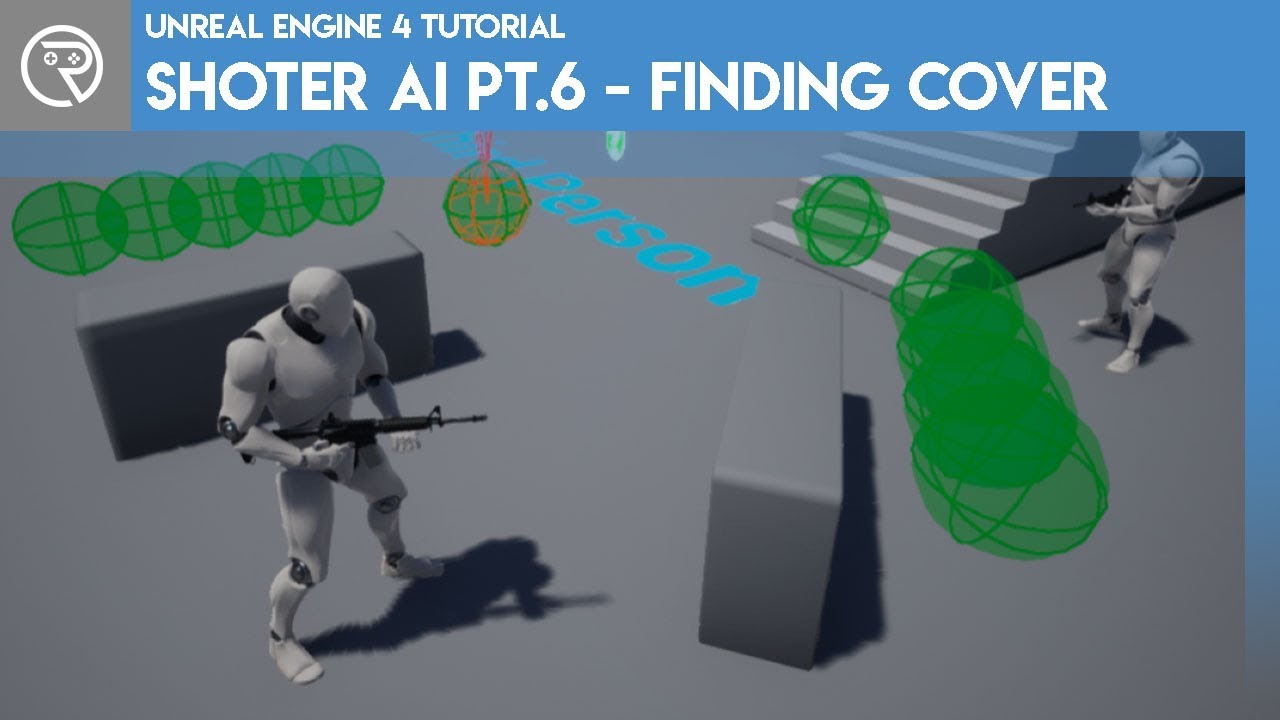
In this series we will be creating AI for a shooter game, including behaviour such as shooting, seeking cover, flanking, and random personalities (courageous, skilled etc.).
If you want the starting project file with the animation and shooting code already prepared for you rather than use your own shooting code, head over to Patreon.com/ryanlal...
foggy sequoia
Where I started. Ryans cool
queen escarp
i mean this is a nice tutorial but you dont need to create coverpoints on the fly since they are not moving
also a tip if you do some visibility thing just do edge sampling, you gonna spare a lot of traces
queen escarp
 queen escarp
yeah good luck
eqs trace does something like that anyway i am just not sure, if its cheap
 mystic reef
hi , if move between two levels the AI don"t working
ocean wren
Did you try setting the navmesh to dynamic?
 hardy sable
Hey, I was wondering if I could get help with setting up an ai that works on a custom movement component on a custom pawn
The first problem I was running into was that the nav mesh green surface was appearing on top of the pawn and leaving a gap below it
This meant that there seemed to be no path for it to follow as there was no nav mesh surface below the object to start the calculations
It is already set to not interact with nav mesh, but that didn't help
Turning off collisions on the object seemed to get rid of this problem, but that is not ideal as now the pawn just passes through the floor
quiet root
quiet root
Sometimes I'll move my meshes around or change something small in the level and ...
Still having this problem, tried rebuilding navigation. Not sure where else to look
hardy sable
The second problem is that even when I do that and turn off gravity, the pawn won't move. The move to function fails every time
There is strangely little info on this issue online
quiet root
quiet root
Still having this problem, tried rebuilding navigation. Not sure where else to l...
nvm I fixed it by forcing a rebuild on load with the Recast Nav Mesh.
Apparently when all else fails, just start clicking more checkboxes
 hardy sable
I solved the first problem I think. I just had to remake my entire blueprint with the same settings. Why? No clue
Still working on the second problem
 stiff gale
So my AI won;t move in multiplayer, 1+ client mode, The move target location is fine. Nav mesh seems right. MoveTo not moving the character. Anybody knows what's wrong?
stiff gale

 magic jasper
Anybody know off-hand if the HTN Planner Epic was building has anymore support in UE5 - i.e. some tools to make use of it?
 flint trail
magic jasper
Anybody know off-hand if the HTN Planner Epic was building has anymore support i...
flint trail
magic jasper
Anybody know off-hand if the HTN Planner Epic was building has anymore support i...
It would be easier to just tweet at Mieszko - he replies every now and then
hardy sable
Ok after reading the engine code a bit it seems that the AI methods do not summit input in the same way, and you need to code in methods that work specifically with what the AI inputs.
It is a bit of a pain, but isn't too much of an issue
 wraith anvil
is there any way to run a MoveTo instruction without behavior tree?
misty wharf
use one of the move to BP nodes?
wraith anvil
right, i only saw the functions on c++, thought they were just internal calls for the actual move to task
now i see there are nodes that seems to do the same. thanks!
 grizzled crane
Lets say I have a collection of AI characters performing actions in a map - patrolling, collecting, fighting etc. I'm planning on making a menu system that the player will spend a decent (potentially a long) amount of time in, but can exit out at any point.
Is there a way I can improve performance by simulating and interpolating the AI actions while the player is in the menu? Is there a similar method of limiting updates to save on rendering performance or would reducing quality be a better approach?
I'm essentially looking to create an "Overworld" meta-management system while still being able to "drop-in" to single actor without having to load levels
misty wharf
Turn off collisions and everything like that
then just move them between waypoints manually
Depending on how many there are that could in theory help, but you probably should profile your code first to see if you actually have a performance problem
If the player is browsing a menu then it shouldn't really matter if they're not getting 200 fps though
grizzled crane
Thats a great point actually. Thank you!
 winged grail
Just curious if anyone has thoughts/insights into which would be more performant in the following situation:
I've created a waypoint system for towns in my project, basically, the waypoints hold information about jobs and locations and such and pass them along to NPCs when needed, because the NPCs can move from one town to another they need to be able to access the information from different waypoints depending on where they are.
I'm trying to decide on whether I should be having the NPCs EQS a certain distance whenever they need to satisfy a need/town information (e.g., I'm hungry, where's the nearest food spot and are there any seats available, I need a bed, etc.) or if I should have a collision box associated with the waypoint that covers the whole town and update the NPCs waypoint variable upon overlap and remove it upon leaving the overlap.
Does anyone have thoughts on which would be preferable? Thanks!
ocean wren
I'd not call those waypoints 🙂 But yeah, using EQS to query for local needs-satisfiers does make some sense. I don't think I'd go with a collision box approach just because it'd confuse the crap out of designers to see a big box for apparently no reason. You can always have some sort of publisher-subscriber mechanism for needs providers that works within the EQS system. Maybe as a game subsystem. Add some custom filter types for EQS to reject busy needs-satisfiers etc. Generally you'd want to make this a pull-data-when-you-need-it kind of thing. So that you aren't incurring any cost if no new need has to be met.
 thorny jay
Hi everyone, is there an easy way to implement a factory robot type of movement, that is to say that it only moves directly forward and always turns to face the desired direction before moving? I have disabled strafe in the AI move to function, made it orient rotation to movement and given it a slow turn speed, but it will still start moving in the desired direction before it has fully turned to face the direction
winged grail
ocean wren
I'd not call those waypoints 🙂 But yeah, using EQS to query for local needs-sat...
Hey, thanks for the input! I think I'll stick with the EQS system then and put in a couple more checks to ensure NPCs aren't needlessly making EQS requests. Currently, they only EQS for the nearest "Waypoint" reference at the start of a need and then not again until their next need arises, I might add in a quick distance check first (i.e., if they have a Waypoint reference already, check distance between self and Waypoint, if less than X don't request). Thanks again for the response!
 fresh remnant
thorny jay
Hi everyone, is there an easy way to implement a factory robot type of movement,...
fresh remnant
thorny jay
Hi everyone, is there an easy way to implement a factory robot type of movement,...
Use an AI behavior tree? Make a behavior task called "Rotate to face target" or something, and once that is complete, do the actual moveto task.
thorny jay
@fresh remnant Thanks, I thought that might be the case but wasn't sure if there was a simpler way to handle it within the move task itself
The problem is navigating a more complex route, I'd need to then access each path point to face it before moving towards it
Generally speaking, the AI won't have a straight path to the destination, but I still want it to stop at each point in the path to turn before continuing on
fresh remnant
thorny jay
<@!270800762408402945> Thanks, I thought that might be the case but wasn't sure ...
Use navmesh and regular Moveto task that is already there for you? Or are you using your own movement component?
misty wharf
I'm pretty sure navmesh and moveto wouldn't help because if it navigates around obstacles, it wouldn't use the desired turning behavior
fresh remnant
Oh he wants EVERY point to turn huh
misty wharf
so you'd need to change something somewhere to prevent the pawn from moving and turning
that's what it sounded to me at least :)
it might be possible if you change the movement component logic but not sure since I never tried anythingl ike this
fresh remnant
Ok, well then, he has the path points(waypoints) from navmesh actually
he can just go through those manually
There's a way to get the path points
misty wharf
Yeah that'd work, I'm kinda curious if there's some way to do it so it automatically would behave in this fashion when moved without needing to do this
fresh remnant
Would have to customize the movement component otherwise, but I think that's more than needed here
thorny jay
Thanks both, I'm working in C++ as well so it should be trivial to get the path points. Might even manually move the character and not bother with a movement component at all
 shadow vortex
If i removed everyth8ing from the scene execpt for buildings, he moves like he suppossed to, THERE IS NOTHING IN HIS WAY why is he not moving?


here is with no decorations on thje other side of the map

he is moving like he is supposed to
why can i not decorate the other side of the map? why does the otehr side of the map matter for this path?
ocean wren
Probably doesn't. Did you check with collision visualization on that you haven't got some blocking volumes or something?
Also, check the logs to see if the move fails for some reason
 last sandal
Hi everyone, I am struggling with AI pathing on a nav mesh for a while. The problem is that the 'Does Path Exists' decorator says the path exists but the AI does not find one with the 'Move To' Behavior Tree Task and is just standing still. What would be good ways to approach this issue? Can someone recommend a debugging approach?
 kind shadow
hello! there's a decorator called COOLDOWN that lock the execution until some time expires.
anyone knows if is there some inverse of that? like keep the branch executing until some time expires, then fails the node
found it. decorator called time limit
 devout canyon
hi guys, I did few thing in ue4 so far, even some ai, but I always ended up doing it withing blueprint, what is the benefit of behavior trees? so far it just seems it divides all varaibles into random locations within tasks.
misty wharf
at least for me it's very convenient for writing the kind of sequential logic that I often need with AI
it's trivial to put tasks in order and have them follow each other, and it's also very easy to handle cases like if the task fails what happens, or if they need to be aborted in certain circumstances
devout canyon
yes but its trivial to do them in blueprint as well tho
misty wharf
not really, for example I have tasks that need to wait for a certain event, and then another task is performed, which waits for the player to do something
in a BT it's just two nodes in sequence, both of which have a simple blueprint implementation
if I wanted to code it say in my AI controller, it would become quite the jumble of hooking up event listeners into dispatchers, and making sure there's a separate way to abort those etc.
devout canyon
also where are majority of variables stored? dunno like combat enemy ai would have ammo, health, enemy proximity, other varaibles that it would decide if it wants to reload, would that bewithin blueprint so I would constantly need to pass them in blackboard and then pass them in decorators?
misty wharf
it kinda depends... I store some in the BB where it makes sense, others are stored directly on my pawns and I have custom decorators or such which read them
devout canyon
or where would be logic that decides if its supposed to reload stored? in tutorials its like ammo equals zero, then reload, but in my case it would be more complex with some math and stuff
misty wharf
custom decorators and tasks would probably be useful
eg. you could have a decorator like BTD_NeedsReload which does the relevant check, and you can gate a BT branch using it to trigger the reloading behavior that you want
Or if you store the ammo value in the BB, then you can just use a blackboard decorator to check if ammo == 0 to do the same
it's a quite flexible system and it makes it easy to reuse tasks and such so you can have like a custom set of building blocks for setting up your AI's easily
devout canyon
yeah I mean I will eventualy need to get used to it
for context I plan to make combat ai for shooter, like enemies in crysis, fear, escape from tarkov
misty wharf
Yeah, I use BT in my shooter project, although the enemy behavior is not super complicated in it :)
bronze hill
@devout canyon usually a behaviour tree is nothing but a "list" of tasks, only with different priorities. you can use different tests, checks and variables to ensure that the right branch of the tree is executed at the right time, therefore executing the right tasks or abort a task when a condition changes. usually a behaviour tree is paired with a blackboard, which is where the variables for those checks are stored, and i would say is somehow the middle ground between the blueprints and the behaviour tree. the behaviour tree gets its variable values from the blackboard, and you can change and update blackboard variables from your actors pawns etc. for example i imagine that the ammo variable would be stored inside the shooter's character blueprint. every time they shoot, you take 1 from the ammo variable etc etc. you can easily set a boolean in your blackboard called "noAmmo" so that every time that the ammo reaches 0 noAmmo is set to true, and in the behaviour tree thanks to those checks and tests (they are called decorators inside the engine) you can set it so that normal behaviour is only set up when noAmmo is false, but as soon as it becomes true, the AI looks for cover and then reloads
etc etc
it's really useful for all sorts of situations and data you may want your AI to interact with or react to
misty wharf
here's an example... this is for an enemy who attempts to keep its distance to the player, so this does an attack and checks if the player is close and tries to get away from it
 bronze hill
and what is your issue with it?
misty wharf
Oh, nothing, just posted it as an example relating to how an enemy in a shooter could function as a BT
devout canyon
yeah im looking at it
bronze hill
lmfao sorry i thought u were henry for a sec hahaha
devout canyon
like how much are tasks split up
bronze hill
cause i looked at it and i was like" that seems all right?"
bronze hill
devout canyon
like how much are tasks split up
that depends on you too, like for coding there are different styles
i would organize a tree in a different way from that, but it's just personal preference i think
there is a tutorial that i followed where i learned most of what i know on behaviour trees if you want
devout canyon
so far I took a brief look at crysis ai, debugger tells me sort of what behaivor ai has and found some data from tarkov ai
sure I want
bronze hill
also consider this
devout canyon
here is sort of list of behaviors from tarkov I minded
 bronze hill
crysis AI was far from perfect
devout canyon
it was most fun I had with ai in my life tho
bronze hill
it was in fact one of the most critiqued parts of the game
misty wharf
I think in terms of the split into tasks it kinda depends on what type of stuff it is... usually one per sort of general action is decent, eg. the attack task performs one attack
bronze hill
devout canyon
it was most fun I had with ai in my life tho
i know i loved it too, one of the best ever played
but still
it wasnt perfect hahaha
devout canyon
yeah like running into walls etc I ignore that
misty wharf
but in my other project I have a task which puts the NPC into a queue, and that task remains active until the NPC has finished queuing (the queuing logic itself is handled in the npc's blueprint code, which includes moving forward as the queue moves etc.)
bronze hill
if we talk AI the most advanced that used behaviour trees is alien isolation
it's not a shoooter
but a behaviour tree is a behaviour tree
devout canyon
like that enemy alien reacted to many things made his tree complex?
bronze hill
check it out maybe to learn about AI and games and then adapt what u learn to a shooter
bronze hill
devout canyon
like that enemy alien reacted to many things made his tree complex?
regarded as perhaps the best AI to date
devout canyon
I never played it so I dont have context
bronze hill
watch maybe some youtubers that played it?
usually an AI that is coded with behaviour tree cannot learn from the player
it doesnt learn
it just does this and that depending on script
but they made it so advanced that it SIMULATED learning
so portions of the behaviour tree would unlock under certain conditions to make it look and feel as if the ai was learning the player's behaviour
it could detect if a door or an object was moved
and act accordingly
devout canyon
btw you can link me that tutorial you mentioned
bronze hill
sure
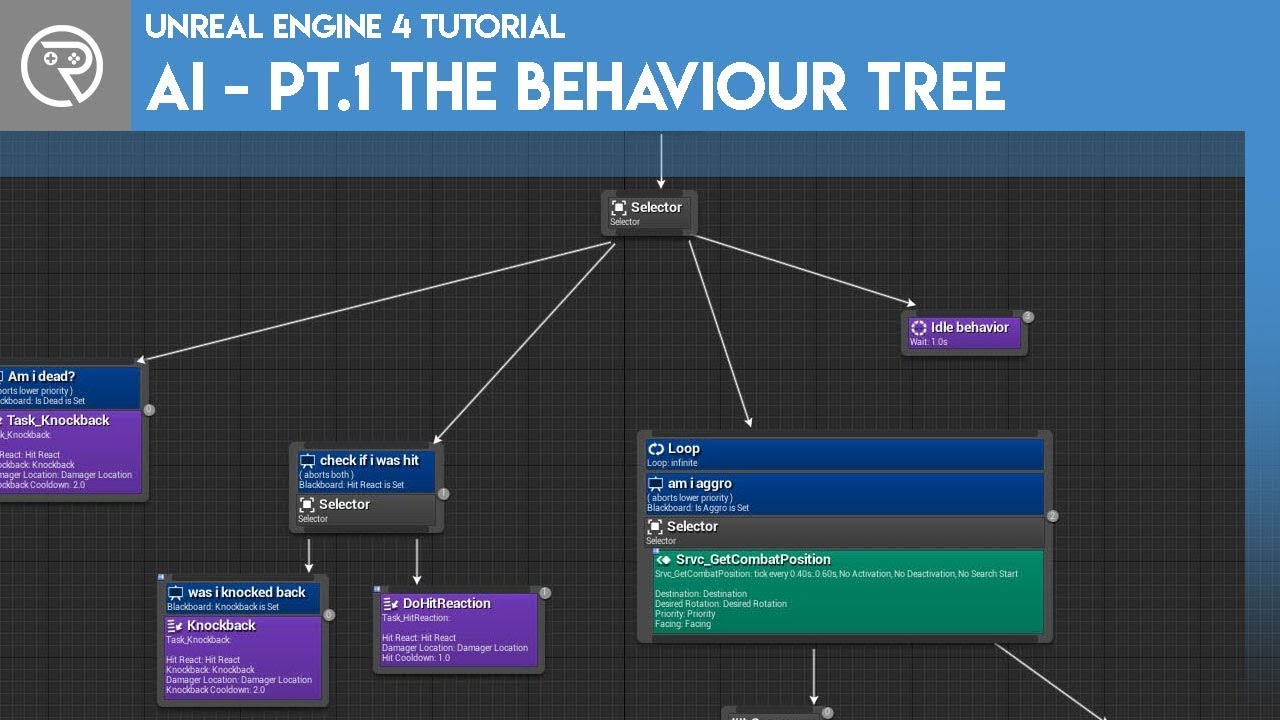
Welcome to the start of a brand new series. This time we are diving into AI for games. This episode introduces the concepts being used in AI design and in particular, the behaviour tree. In this episode we add an NPC that can randomly roam around the level.
Support me on Patreon and get access to videos early, join our developer community on Di...
its a playlist of 14 videos
devout canyon
oh Im watching that now
bronze hill
lol

If you've ever wanted to create a first person shooter game but weren't sure where to start, this is the tutorial series for you. You'll learn everything you need to create an FPS from scratch using Unreal Engine 4.
You'll learn everything ranging from creating characters to setting up weapon systems.
Head over to the next video to get started...
also check this out
devout canyon
heh that was literally thing I did first week when I started with ue
bronze hill
lmfao
devout canyon
while Im here, I tried to make custom decorator, any idea how that works? cant find too much info out there
misty wharf
Extend BTDecorator_BlueprintBase
then override PerformConditionCheckAI
that's what runs when the decorator check is done
devout canyon
what do you mean by extend?
sort of what I have, now, dont know what inputs and outputs shoud be in actual blueprint

what I mean is how to do this pseudo code that I hinted

like what node to start comparing it its supposed to abort or not, (then bunch of math nodes) and what node to set if its supposed to abort or not
here is example of those special nodes in tasks, need same but for custom decorator
 misty wharf
@devout canyon you have it correctly extending the BTDecorator thing - see top right corner where it says Parent class. Now where it says functions on the left, it has a button called override. Click it and find "Perform Condition Check AI"
You'll get a function which has owner controller and owner pawn as params, and a boolean return value
So you just do your decorator logic there, and return true if you want it to pass and false if not
devout canyon
oh that was really unintuitive, had no clue that I need to click that invisible override button
so these are those secred nodes hidden behind invisible button 😄

so I assume this would be correct thing to start its quite late so I wont be able to properly test it until tomorrow, but thx for tip, saved me tons of time
 misty wharf
yeah for a custom task that's how it works
you can use receive execute ai if you want controller and pawn instead of owner actor
if you need to do actions that don't finish immediately, make sure to also create receive abort and call finish abort once you've done any clean up (such as removing any event listeners)
devout canyon
thx will later take a closer look at it
 deep pulsar
Can anybody explain why my sequence is not moving on to the next task? I have a finish execute in the current task and it does get executed but the sequence is still stuck at executing the same task
ocean wren
Hmm, looks right to me. I guess it might be that there's different finish execution nodes? I seem to recall that being the case. Been a while since I messed with it in anger.
What happens if you take off the breakpoint and add a print string in the failed case?
 opal rain
Hey guys, Im trying to make a turn in place for my AI, I tried to run a simple parallel with a rotation to face BB entry and the turning animation, but doesn't seem to work well. How can I achieve a turn in place with an animation? Thanks
misty wharf
Sometimes I wish there was a "Conditional Loop" but just for arbitrary decorators 🤔
I have a lot of data that's used so it's not all living in the blackboard
the conditional loop node actually seems to handle an abort result, but the regular loop node doesn't, and the regular loop node is the one that would be possible to "combine" with another decorator to achieve this behavior if it had that function...
 twin hornet
im pretty sure you can write something like this in cpp
misty wharf
Yeah, I think so but just haven't bothered with it yet :D
 finite storm
Hi everyone! I was hoping to understand a little bit better how Aborting works in the BT's Decorators
Basically: how is the Abortion of a Node interpreted by it's parent Composite node? Does the Sequence stops when a child aborts, considering it as a failure, or does it keep going on? What about the Selector?
In the screenshot below: if the bottom Sequence gets aborted, does the top sequence continues and executes the Wait Blackboard Time, or does the top sequence fails?
 deep pulsar
ocean wren
What happens if you take off the breakpoint and add a print string in the failed...
deep pulsar
ocean wren
What happens if you take off the breakpoint and add a print string in the failed...
It doesn't reach the other node. I checked.
misty wharf
@finite storm iirc abort counts as a failure - but this should be quite easy to test if you need to confirm it :)
so if I do remember correctly and it counts as fail, the top sequence would also fail, and the node on the right does not run. If it was a selector, it would continue into the next branch as that's the selector behavior on failures
finite storm
misty wharf
so if I do remember correctly and it counts as fail, the top sequence would also...
Alright. That would make sense. I asked here first because I unfortunately don't have access to the engine right now, so I cannot do a test right away and I needed this information for some other reason; but I believe that you are right. I will try the testing it. Thanks for your answer! ^^
 runic flare
Hello! I'm making a game where my AI characters grow over time. I have a static navmesh (for performance reasons) for every different agent radius to account for the growing, so their pathing will adapt.
This works pretty well until higher levels when the bot is quite large -- the issue is that there are many small objects on the floor that create large holes in the mesh. What I would like to happen instead is that navmesh generation ignores smaller objects for larger radius agents. In that case I could simply make it so the large bots will crush the smaller objects, but smaller bots will still path around them.
Does anyone know if this is possible and if so how I would start?
fresh remnant
runic flare
Hello! I'm making a game where my AI characters grow over time. I have a static ...
This is possible in C++. You can inherit the Navmesh class and create different classes for each size. In each class you can set what supported areas you want that class to support. You would also create new Area types, and your small objects would be a "Small area type". Your large navmesh class can then ignore it.
UCLASS()
class RTS_API ANovaFlyerRecastNavMesh : public ARecastNavMesh
{
    GENERATED_BODY()
public:
    ANovaFlyerRecastNavMesh ();

    ANovaFlyerRecastNavMesh (const FObjectInitializer& ObjectInitializer);
    virtual int32 GetNewAreaID(const UClass* AreaClass) const override;

    // This helps us change the config settings
    virtual    FRecastNavMeshGenerator* CreateGeneratorInstance() override;

    void InitializeNavParams();
        virtual void OnNavAreaAdded(const UClass* NavAreaClass, int32 AgentIndex) override;
};```Yeah, C++ is the way to go here.
 hearty niche
does pathfinding need character movement? I am trying to automate a vr pawns actions which does not have a character movement.
misty wharf
@hearty niche afaik nav movement functionality tends to require a movement component of some variety, not necessarily character movemenet
ocean wren
I guess you could use the flying pawn movement?
But afaik that doesn't use nav movement anyway
misty wharf

these are all the movement components that derive from UNavMovementComponent, which is what is used by UPathFollowingComponent, which in turn is what gets used by AI movement tasks
so in theory all of these should be able to use navigation
(path following comp is on AIController by default)
ocean wren
Looks like the virtual camera movement component would be what you want?
Or the arch vis char
runic flare
fresh remnant
```
UCLASS()
class RTS_API ANovaFlyerRecastNavMesh : public ARecastNavMesh
{
...
thanks for this, exactly what I was looking for 👍
 misty trail
does anyone have a solution to the AI stopping short at the capsule bounds with the "simple move to location" node
fresh remnant
misty trail
does anyone have a solution to the AI stopping short at the capsule bounds with ...
There are check boxes for use actor radius. Uncheck that?
misty trail
fresh remnant
There are check boxes for use actor radius. Uncheck that?
where are said check boxes? I dont see any sorry
fresh remnant
misty trail
where are said check boxes? I dont see any sorry
This is the Moveto Behavior node?
misty trail
no its the simple move to so I dont think it applies
fresh remnant
Oh no it's not a behavior node, it's the BP
think you're going to have to just calculate that yourself then
because simple move to is a straight line, just get the normalized direction and multiply it with your capsule radius, and add that to your goal
and set that as your goal instead
misty trail
alrighty then thanks pal
 halcyon walrus
Does anyone know how to change the Turn Radius of a pawn moving along a NavMesh? I want my pawn to follow a curve when turning, rather than snapping to a straight line. Thanks!
 fathom quiver
halcyon walrus
Does anyone know how to change the Turn Radius of a pawn moving along a NavMesh?...
fathom quiver
halcyon walrus
Does anyone know how to change the Turn Radius of a pawn moving along a NavMesh?...
You should check "Orient Rotation To Movement (or some thing like it im sure it contains Orient) " in A.I 's character movement component
halcyon walrus
all that does is make a pawn rotate smoothly in place, which isn't quite what I'm trying to do
ocean wren
@halcyon walrus Its probably not a good idea of following a curve unless you can guarantee the curve is entirely within the navmesh. Otherwise you can follow the curve off of ledges and stuff.
lyric flint
This made me chuckle: "hand-tune until the AI seems to be behaving reasonably". From the paper above. Unexpected fuzziness is fuzzy 😄
 west saffron
Hey there. Is it possible to add an AIPerceptionComponent to a FoliageType_InstancedStaticMesh? I'm trying to get my AI Pawns to 'see' my instanced Foliage Actors
misty wharf
west saffron
Hey there. Is it possible to add an AIPerceptionComponent to a FoliageType_Insta...
You need a perception stimulus source component for that, the AIPerceptionComponent is the one that has the ability to perceive stuff. I'm not sure how the foliage works tbh, but as long as they have a hitbox of some type that the perception system's linetrace can hit, it should be possible.
Keep in mind that the perception system does one line trace per perceivable object, so if you have lots of foliage this could be very bad for performance
west saffron
right, stimulus. my bad. and good point -- I'd have to make sure to only add it to the foliage I care about (big, choppable trees)
But I see no options using the Editor to add a new component to a Blueprint deriving from FoliageType_InstancedStaticMesh at the moment. Am I just blind?
queen escarp
is there some ai discord server for unity and unreal?
misty wharf
I'm not sure how that relates to AI, but I suspect the answer is "no". Closest you'd get is some general purpose gamedev discord which isn't about any specific tech stack I guess if you can find one of those
queen escarp
someone should create one its a complex topic
misty wharf
I'm not sure why it would need to be a single discord when specialized servers like this one exist and make it easier for those who only care about one of them :)
But yeah I mean I guess if someone wanted to make one they could, just not sure what the benefit of that would be
queen escarp
people from the unity and unreal community could communicate with eachother, this alone would be great, with this channel alone the fous is more on "how do i implement this and that in unreal" instead focusing on the topic,
but yeah ur probably right, it wont change much i guess
west saffron
set one up, build a community. go for it!
west saffron
I don't think Hierarchical Instanced Static Meshes (which is what the foliage one derives from) support components (like the AI Stimulus) being added to them using the Editor. Has anyone ever tried doing it through C++? Or am I maybe looking for a crowbar to do a hammer's job?
I think I'll try doing it with EQS and see how that goes
 deft pumice
hey so i have made a flying AI that will chase after the player, i want them to fire when i am in range and in front of them, how would i do this? the behaviour tree would need to constantly run the chase function even when he would fire

theres also the issue that they clump together when chasing me, any way to avoid that?
 raven nacelle
Hello. Can you offer some plugin for 3d navmesh.
bronze hill
deft pumice
hey so i have made a flying AI that will chase after the player, i want them to ...
Make a single bigass task that does the whole thing?
Like a variable within the task where if set to true then it shoots too? And the variable is set to true if the distance between player character and AI character is less than x
deft pumice
bronze hill
Make a single bigass task that does the whole thing?
is this a common way of doing this? i was taught to work modular
bronze hill
Its not
Just an idea/temporary solution
But i really dont see how a behaviour tree can do two things at once
deft pumice
well sure i have had that idea too, but i want to avoid such problem solving
queen escarp
@deft pumice just create a big sphere in your npc actor and trigger the defense state with an overlap Event
queen escarp
no
deft pumice
but for random roaming you will always need a navmesh huh
queen escarp
i am not sure what do you mean, i was suggesting to create a hit event, with a static mesh and your player, you can do it in bp or in a bt service, a navmesh shouldn be involved
how did you setup your chaser behaviour ?
deft pumice
get random reachable point in range or something like that
i am talking about a new thing btw
no shooting involved in this behaviour, just random roaming and if player is in range the task should go to chase
queen escarp
than just create a bt service, and compute the distance to your player, if its in a certain range trigger chase, if its gets closer trigger shooting etc, no need to overcomplicate here,
deft pumice
how can i have a flying pawn roam around? the shooting i got working but the roaming i am not getting smart of, all the examples i find are about pawns on the ground
misty wharf
depends on how it's supposed to roam I guess
you could just have it roam the same way as a grounded pawn would, but just have it randomly adjust its flight height or something
west saffron
because NavMesh explicitly works for 2D ground-based movement. Flying is not something a lot of people tackle (but there have been examples and tutorials made! do a little YouTube search maybe)
good idea zomg
deft pumice
yea i might try that, thanks
queen escarp
there is Random Point in Bounding Box node
 grizzled bolt
deft pumice
hey so i have made a flying AI that will chase after the player, i want them to ...
grizzled bolt
deft pumice
hey so i have made a flying AI that will chase after the player, i want them to ...
use a parallel node for chasing and shooting at the same time
this is how I use it for mine

 glass falcon
In my case the main task handles shooting
Then the sub tasks do movement, strafing etc
 warm ibex
Hi Peeps,
I have a question on edit data for Behavior tree nodes.
I created a BBTask : public from BTTask BlackboardBase
I have one variable in there of struct FBlackboardKeySelector
This value I am setting to the actor I want from the blackboard.
But when I call GetSelectedKeyID() on the variable its always null.
I was thinking my variable being set in the editor to the actor I wanted would not have null GetSelectedKeyID()
I did see the SelectedKeyName is correct though? Am I missing something?
 fallow hound
are there any built in functions to smooth AIController focus shifting?
warm ibex
warm ibex
Hi Peeps,
I have a question on edit data for Behavior tree nodes.
I created a BB...
Answering my own question in case it helps anyone. You need to override InitializeFromAsset.
Get the UBlackboardData* BBAsset = GetBlackboardAsset();
Then call .ResolveSelectedKey(*BBAsset); on your FBlackboardKeySelector
ocean wren
shrooblord: It depends on what you're trying to do. You could get all the tree instances and spawn an empty actor with a perception stimulus. I did that for dead bodies when any enemies were killed. I also did it for interesting stuff in the world to get the AI to react to stuff like doors being opened when they shouldn't be etc. Just make sure to profile performance
 faint hare
NVM
thorny jay
Hi everyone, how do I retrieve an AI's current target path point in Blueprints? I have tried a variety of options including AIController->GetCurrentPathPoint but it always returns 0 regardless of where the AI is in its path
deft pumice
grizzled bolt
this is how I use it for mine
thank you, i solved it on my end by having a sphere trace check for player in front periodically using the set timer by event
how can i avoid that they crash into each other when chasing me? theres two chase modes, one tries to get to my location and the other one tries to get to a location near me.
they get activated depending on the distance between me and the AI
animations are placeholders so far
grizzled bolt
deft pumice
how can i avoid that they crash into each other when chasing me? theres two chas...
I think you can either try to use flocking algo so that they won't crash into each other or you can try to use EQS to find locations near player that are X distance away from other AI. Flocking should be easier and suits your AI more since they look like a swarm
deft pumice
flocking huh? i will look into it thank you
aw man i thought flocking was a integrated function or something and not a merketplace thing
 floral mango
flocking is a really simple algorithm. Google 'boids'
 azure coyote
Open sourced our IAUS BT plugin: https://github.com/ProjectBorealis/IAUS
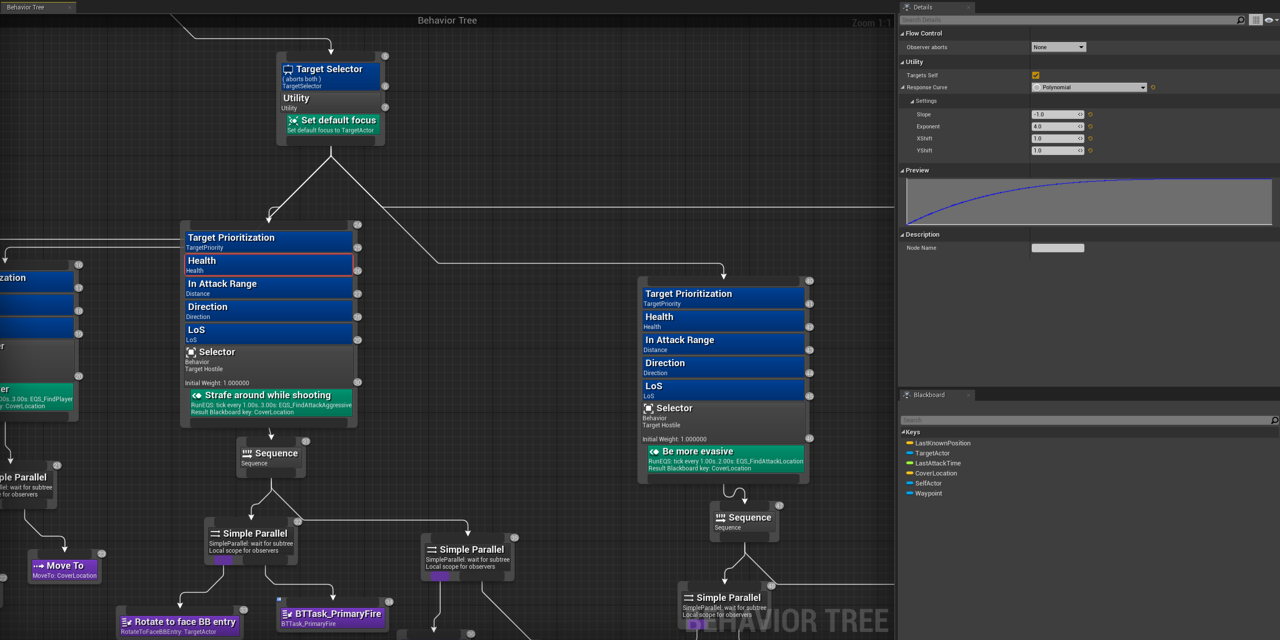
GitHub
Infinite axis utility system in UE4 Behavior Trees - GitHub - ProjectBorealis/IAUS: Infinite axis utility system in UE4 Behavior Trees
 tawdry crag
Does anyone know of any good resources on the underlying structure of the Navigation System? e.g. a breakdown of what the main classes are, what they do and where they update. I need to implement a custom navmesh and would like to get a grasp of how Epic's systems fit together before I start. Obvs, I will go poking around in the code, but if a breakdown already exists then it would speed things up a lot
edit - unclear to me if this is the right channel, but it feels the closest)
 shadow python
in terms of sanity. I have bunch of blueprint BT Tasks that modify blackboard all over the place. is it normal or not?
misty wharf
Seems necessary for a lot of things
As long as you set it up so you have a blackboard key selector variable on them which allows you to choose which variable it modifies it seems reasonable to me
It's a bit of a question of "how else would it work" :D
queen escarp
@azure coyote nice nice

Unreal Engine
A fast and flexible AI design framework using only Blueprints
this is nice as well
ocean wren
tawdry crag
Does anyone know of any good resources on the underlying structure of the Naviga...
The underlying core of the navmesh system is actually made by a guy called Mikko Mononen and he did a ton of blog posts on his development of the library. Its called Recast if you want to search for it.
I'd look at the files that include Recast.h etc.. you'll find the navmesh -> recast interfacing (recast is written in C if I recall).
Recast is an open source project, so you can find the raw recast codebase on github too
It has some super cool demos to explain whats going on, cos Mikko was a democoder (he worked for CryTek when he wrote Recast)
I think he's doing woodwork now or something 🙂
That said, I think I just started in the NavigationSystem module? You might want to follow it from where it gets used though, i.e. in the pathfollowingcomponent and see where that requests a path, then follow the code from there
The only tricky bit is where it marshalls the UE datatypes into Recast and vice versa, because Recast is kind of democoder style code.
tawdry crag
Oh that's perfect - "Mikko Mononen recast" is exactly the google search I needed 🙂 I'll quickly move onto digging into the Navigation Module directly, but having some insight / reference will help my brain get a shape of the problem, because otherwise I get super bored super quickly when reading other people's code!
ocean wren
It will probably help to understand what the library is doing, then look at the interface that's calling it.
Hit me up if you get stuck, its been a few years since I messed with it in anger, but I've worked with it before
tawdry crag
Thanks, I really appreciate it
misty wharf
Recast is kind of democoder style code
So basically performant but unreadable by anyone else except the author? lol
west saffron
@azure coyote sick stuff, thanks for sharing!
winged grail
I know this is a basic question but I can't seem to figure it out. Does anyone have any input on why this is not failing out?

It just shows as running, forever, and ever, and ever. Despite the fact that nothing is happening inside the node, the decorator says it shouldn't be passing and is set to abort self, and both the target actor and target location are correctly set in the blackboard and on the node. I feel like I'm going insane.
queen escarp
@winged grail did you use Finish Execute in the bt task?
ocean wren
misty wharf
> Recast is kind of democoder style code
So basically performant but unreadable ...
Basically yeah 🙂
ocean wren
Hmm, wonder if it would be wise making a plugin for UE5 right now
 marsh aspen
i have a little issue. I've a npc which works fine with its BT if it's on the lvl before i hit play, but i'm trying to make it spawn during an event. It pawns all right but without any "controller". Did i forget a step ?
misty wharf
@marsh aspen there should be an option called auto possess by ai, it might be on the wrong setting. There is also a separate node "spawn ai" or whatever it was called which spawns a pawn with a given controller. You can also just spawn the pawn, and then spawn the AI controller, and have the AI controller possess the pawn.
marsh aspen
misty wharf
<@!344427580788834314> there should be an option called auto possess by ai, it m...
will try when i get home, thx 🙂
winged grail
queen escarp
<@!445786984737275905> did you use Finish Execute in the bt task?
Hey, I appreciate the response, but yes I did, interestingly, I can also reproduce the problem if I remove the find target node and just use my "BTT_Move" node (which just houses a "Move to Actor or Location" with a "Finish with Execute Success" for the completed path and "Finish with Execute NOT Success" for the move failed path). However, the problem goes away if I replace the "Move to Actor or Location" with just a "Move to Actor".
 foggy pike
What's generally good practice for behaviour trees in regards to their scope? Obviously it depends on the game, but generally speaking is it best to keep a BT for like, chasing and then attacking a player, and then a separate BT for when it patrols a series of nodes or something, etc.? Or would one generally keep that all under one BT?
 neon linden
will having NavMesh on top of my level cause any foreseeable issues with AI movement? wanna know if I can just be lazy and just make a big NavMesh volume.
foggy pike
Navmesh is 3d so no
assuming you mean like, you have one floor with navmesh on it, and then another floor above it with navmesh on it
misty wharf
foggy pike
What's generally good practice for behaviour trees in regards to their scope? Ob...
It probably depends on how reusable you need them to be in different places. I'd just start with whatever is simple, it's quite easy to just copypaste the nodes into a new BT if you need to split it later
foggy pike
aye makes sense
next question: if this decorator is passing, why is it not being executed 
 misty wharf
not sure I would trust that :P
foggy pike

misty wharf
best thing to do there is to pause the game, you can then step backwards in the BT to see where it was
foggy pike
ahhhh I have another decorator that's failing, that'd be why 🙏
thanks! didn't know about that debugging feature 😂
neon linden
it's more like a cave, and the NavMesh is large enough that it generates on the outside top part of the cave that players or enemies shouldn't be interacting with. The different parts of it are at different heights though, so I was wondering if I could use one big navmesh volume or need to make them at different heights

like if I set AI MoveTo to a random reachable point, will it try to get up on the cave out of bounds? is it safe to just make a huge navmesh volume that encompasses the whole level?
foggy pike
I believe they will never go outside of a navmesh unless there's some sort of navlink set up that tells them to, if I'm not mistaken
neon linden
alrighty, thanks
grizzled bolt
Will that part of navmesh (outside the cave) be taken into consideration when doing pathfinding?
ocean wren
Yes, but it won't be reachable, so won't actually path there. If you want to get rid of it, add navmodifier volumes
grizzled bolt
ocean wren
Yes, but it won't be reachable, so won't actually path there. If you want to get...
I see, thanks!
 mossy latch
Hey Everyone I am working on a rts game. My issue is that i am unsure how set up my ai to attack a target i have task telling the ai to collect resources so know i can something similar with attack but like isaid before i am not exacly sure how set it up. best regards Mikael

 west saffron
Have you taken a look at this tutorial?
https://www.youtube.com/watch?v=iY1jnFvHgbE&ab_channel=UnrealEngine
It goes into defining separate behaviours for 'patrolling', 'investigating', and '"""attacking"""' (chasing in this case) -- maybe that gets you going in the right direction?

In this presentation, Epic's Paulo Souza uses Unreal Engine's built-in AI features to build smart enemy behaviors for a game with stealth-like mechanics.
By relying on the Gameplay Framework in Unreal, we're able to quickly create convincing AI using Behavior Trees. Behavior Trees are great for creating complex AI that can be presented in a way...
mossy latch
I will take a look thank you for answering
lyric flint
hey guys, I am looking for some help with Ai in my game. Just wondering if anyone could pop into feedback and support to gimme a hand, any help is appreciated. Thanks!
 charred lava
Is there a Solution for #1 AI to take another path if #2 AI is already using the same path as #1 AI?
Without setting AI up as Navmesh obstacles and build navigation in runtime?
I thought about creating a collision around each AI that when entered, the AI tries to take the second best path to the Player?
misty wharf
That's a good question
Depending on how your level is set up, you could potentially cut the paths off from the actual navmesh via an obstacle or something, and then use a smart nav link which can be toggled to not be valid once another AI is going through it, or some method where you toggle navigation area types on the paths
I guess you could in theory also get the navigation path the AI is taking, and spawn navigation areas on the path, but not really sure how/if that'd work
charred lava
So Instead of building Navmesh at runtime, I set the used Navigation cells from the AI to be "Used" and other AI's will ignore those used Navigation cells?
That sounds good
misty wharf
yeah at least with nav areas you can use a nav filter when doing a path finding query, and you can set the nav filter so it ignores certain nav area types
ocean wren
You can try and bias the path generation with nav modifier volumes. But most games just use local avoidance and steering to break up pathing
The fact is, that pathing is likely to force agents into the same spaces at some point, so better to handle that systemically rather than trying to solve it as a pathing problem
i.e. if they all have to go through the doorways to exit a building, then pathing really isn't the issue, its crowd avoidance and navigation
And for stuff like where you have to get a bunch of squad members up/down a ladder or some such, better to have a queing system handle that
So these are more meta problems than simply pathing
Have a look at using RVO/Detour Crowd Controller as examples
Naughty Dog does something similar to the Detour method for local avoidance for instance
Personally, I've used a modified Detour controller and added my own seperation forces so I can "push" AI out of the way as a player and have them step away as response to the pushing.
charred lava
Thanks for the input @misty wharf @ocean wren 💯
 kindred ruin
does EQS task test work for anyone? for me it gets no result what ever i do, other tests work fine
misty wharf
What exactly are you referring to?
There's no test called "task" in EQS as far as I'm aware of
kindred ruin
i mean Tag
added tags into DT, added DT to project, added few characters to level with different Tags, created EQS query to find chars with tags, EQS tester pawn never finds any
misty wharf
Did you add gameplay tags into the character, or just regular tags in the actor section of the properties drawer?
kindred ruin
i added gameplay tag variable, exposed it, then chose appropriate gameplay tags in editor
misty wharf
Okay so that won't work unfortunately
all of the builtin gameplay tags nodes/features require your actor to implement IGameplayTagAssetInterface
since without that, they can't really see what tags are on the actor
it's pretty easy to implement this interface, but it's only possible in C++
kindred ruin
ah, is that so easy that anyone without coding knowledge could do it?
misty wharf
well you'll need to know how to create a class in C++ and some other basics, but beyond that it just requires creating one function in your class. Then you inherit from the C++ class you created in your BP class and that should work
kindred ruin
is there a tutorial or something how to do that?
misty wharf
Not sure
for the implementation of the interface, you need to create a FGameplayTagContainer MyTags; variable in the class, then override GetOwnedGameplayTags and have it just return the variable
(you can call it something else besides MyTags too)
kindred ruin
ok i will try
 cold trout
damn ive had this problem all day, did you ever find any way around?
cold trout
now ive found SetPathFollowingComponent (with GetComponentOfClass) in bp construction script fixed my bp, but doesnt feel great
 last knot
Does anyone here have an idea as to how I would go about having AI spawn actors in the world so I can have them do jobs like building and repairing buildings also destroying buildings any advice will be greatly appreciated.
misty wharf
Spawn in an AI controller which just does that?
What you would need to put into the AI controller for this purpose largely depends on how you want it to work. It could be as simple as having a timer which spawns another actor at specific intervals, or something more elaborate
(if it's something simple like this it doesn't necessarily even need to be an AI controller)
 granite pewter
how to make ai stand in a waiting line to use a service?
Hello i am working on an rts style game right now
and i am having trouble with telling my ai to stand in line,
i have some arrows set in the service actor that tells them where exactly to stand but i cannot figure out how to have them actually work
my problem is that when they spawn the data does not update in real time so they will stand in line 1 instead of 2, and i tried having it update real time with an event tick and a delay but that just makes the ai repeat and they walk slowly and bugged out, as well as once 1 of the ais gets to service all the others will just exit for some reason?
can someone help me figure this out, this system should be procedural in a way so i can have other services that are a tiny bit different aka just instances of the original service, i shall be waiting for your reply kind folks! if possible i would like to keep things simple by using blueprints instead of the ai branch tree, but if i really must use the branch tree i am ok with that

 shadow python
How usually people configure built-in Pawn AIController? MyPawn has
AIControllerClass = MyAIClass
AutoPossessAI = Placed or Spawned
- Dumping all AI properties into pawn class?
- Having a separate component with AI settings?
- Having an instanced object with AI settings and single field in Pawn
misty wharf
I kinda think of it in the way that in theory the AI should work with any pawn with the required capabilities
so if I remove the AI controller, and plug it into another different pawn, it should still work the same as it did before (assuming the pawn has the same capabilities in terms of what it is, you can't put a human AI into a dog)
shadow python
i wish i could, but the person who making it in project is a mad blueprint coder
so need to deal with it somehow
misty wharf
Yeah I mean in my current project I have a lot of logic in the pawn because it was just simpler that way :P
but what I described seems to be sort of the "desired" way to do it
shadow python
right now I ideally want to allow fine tuning of AI placed in level, making some units more aggressive or allow props to be set
so trying #3
and let them play with it
misty wharf
Yeah, that's definitely one of the benefits of having it in the pawn
shadow python
as currently they add a custom blueprint components to each pawn in level and modify controller
misty wharf
It makes those kinds of configurations easy... it's not so simple if it's in the controller because you don't place those
shadow python
which is 
 grizzled plover
hello, is there any way to do PerceptionStimuliSourceComponent setup from c++ (fields from screen)?
 misty wharf
You can just set it up in the actor's constructor same as other component setup
Or if you need something that isn't accessible at that stage, OnConstruct or BeginPlay same as with BP's
You probably need to call UnregisterFromPerceptionSystem or something if you don't want autoregister since it is protected for some reason
and manually call RegisterForSense for the senses list
Haven't used it in C++ but that seems like the way you'd do it there
grizzled plover
I tried to init stimulus like this.
Unsuccessful 😦
PerceptionStimuliSourceComponent = CreateDefaultSubobject<UAIPerceptionStimuliSourceComponent>(TEXT("AIPerceptionStimuliSource"));
PerceptionStimuliSourceComponent->RegisterForSense(UAISense_Sight::StaticClass());
What's the problem? Is it not being perceived?
grizzled plover
after RegisterForSense(UAISense_Sight::StaticClass()); i have no Senses in Array
I mean, component does not have
misty wharf
I don't think it will go into the array since the array is a separate thing which seems only to exist for BP purposes
grizzled plover
idd
misty wharf
Hmm, actually looks like it might 🤔
RegisterForSense is adding it into the array
Hard to say tbh, you might be able to debug it if you put a breakpoint into RegisterForSense and see if it's actually doing what it's supposed to
grizzled plover
mb smth with UAISense_Sight::StaticClass()
misty wharf
but it looks like it should work
 mild bridge
I guess it is possible to find an AI pathfinding tutorial for 2d games (I'm doing a game in the style of Oxygen Not Included/Hammerting), but I can't seem to find one
grizzled plover
misty wharf
but it looks like it *should* work
Props UAIPerceptionSystem is not ready when c++ ctr is called, but it is when BP ctr is called.
Moved sense init to BeginPlay and it works.
misty wharf
Interesting, good to know
Normally it appears to trigger from OnRegister, but not sure what the exact timing of that being called is. Maybe it gets called a bit later
 indigo rain
How do? Where start? any suggestions?
bronze hill
????
 dull loom
hey guys, does anyone knows how to use the RequestMove or some other function to setup your path manually? I mean, I want to request the move with predefined path points, but in the FNavPathSharedPtr it looks like you can't modify the path points
if (const auto AIController = Cast<AMFAIController>(strategy.Pawn->GetController()))
{
    const FAIMoveRequest moveRequest(strategy.PathPoints.Last());
    FNavPathSharedPtr path;
    auto& pathPoints = path.ToSharedRef()->GetPathPoints();
    for (const auto& point : strategy.PathPoints)
        pathPoints.Add(FNavPathPoint(point));

    AIController->RequestMove(moveRequest, path);
}
this is what I tried
oh I need to setup the array before calling NavMesh->CreatePathInstance
dull loom
it's not crashing anymore, but it looks like request move doesn't make the move at all
 left hemlock
I am working with the ai perception and when the ai looks at the player it just instantly snaps to the player. How do I make the ai rotate towards the player using rinterp?
grizzled bolt
left hemlock
I am working with the ai perception and when the ai looks at the player it just ...
If it's smoothing the AI rotation you are talking about, this might help you.
https://couchlearn.com/how-to-smoothly-rotate-ai-characters-in-unreal-engine-4/#comment-1134
Just bear in mind that you have to create your own Rotate To task.
The default behaviour for Unreal Engine 4 AI characters is to instantly snap towards the direction they are facing. AI smooth rotation in Unreal Engine 4 is simple and requires very little change to your existing AI characters. In this guide we will be making your AI character smoothly turn when moving between locations. If...Read More
grizzled bolt
dull loom
hey guys, does anyone knows how to use the RequestMove or some other function to...
iirc you can't modify the returned path points.
If you found a way please do let me know.
dull loom
grizzled bolt
iirc you can't modify the returned path points.
If you found a way please do l...
I actually created a FNavPathPtr
you can modify the points if you create the path instance from the NavMesh
(take a look at the Findpath implentation on RecastNavMesh)
but I don't know how to manually call the move to with those points I have
 humble prism
Hey everyone... how can I check which sense perceived something? I wanna set the location if he heard something and set the actor if he see's him
:c
misty wharf
humble prism
Hey everyone... how can I check which sense perceived something? I wanna set the...
You can do Get Sense Class from the Stimulus object
humble prism
misty wharf
You can do Get Sense Class from the Stimulus object
well I have it done this way now
 misty wharf
that works but it would probably be more robust if you used the get sense class method :)
humble prism
might be more robust but also requires many more operations
misty wharf
Not really, it's just a straight up equality comparison
humble prism
yea that I have to sequence
misty wharf
get sense class -> equals whatever class you wanted -> branch, it's one additional node compared to using the switch on int
wait I don't know how to count, it's two :)
but in any case lol
humble prism
@misty wharf found an even easier way :o
 misty wharf
Ah yeah that does the trick :)
lyric flint
Hi, There is a way to align the rifle and so the character Ai when he's shooting to my controlled character?
so far i got the character to rotate and face my player but the position of the rifle and the bullet is offset

 storm sail
lyric flint
Hi, There is a way to align the rifle and so the character Ai when he's shooting...
storm sail
lyric flint
Hi, There is a way to align the rifle and so the character Ai when he's shooting...
Looks like you're rotating the AI capsule to face the player it's targeting. Either fix the incorrect offset on the gun or calculate the offset when rotating the AI to get the desired effect...
For Example: add + or - 20 to the Z rotation
ocean wren
Most games cheat and just take the vector from the muzzle of the gun and the direction to the enemy and shoot along that vector
or make sure that the gun vector is parallel to the character vector by some offset and then just subtract that same offset in the opposite direction from the target position
 magic perch
evening folks - anyone have much experience with AI MoveTo?
I'm using it in a simple BP, but whilst it is navigating through the level, and it is reporting success
it is however going somewhere that is not the destination input, and this is confusing the heck out of me
ocean wren
Have you tried the Ai debugger to see where its meant to be going?
I usually stick a debug sphere at the point I give it to head to as well, so I can visually tell if I've messed it up.
ocean wren
There's a few issues where for instance it can't project a move target onto the navmesh
magic perch
I mean the point is selected using a nav mesh function
so it's a reachable point, in theory
(and it really should be, it's on a flat plane right now)
ocean wren
Well, you can use the visual debugger to step it
magic perch
how does one use the AI debugger to see what it's doing?
ocean wren
There's a keypress, can't remember what it is.. ' or something

The Visual Logger, built into the Unreal Editor, is an incredibly useful tool for recording, visualising and tracking objects, locations and data in gameplay, but it’s rarely used outside of AI. Let’s change that!
In this talk by Rare's Principal Gameplay Engineer Andy Bastable, you'll discover practical tips and examples from Sea of Thieves, ...
about halfway through he talks about debugging pathing
magic perch
cheers - I was actually at that talk 😂
 ocean wren
looks like you got a NAN 🙂
magic perch
yeah, but how
ocean wren
something clearing your BB key?
 ocean wren
something nuking your move target position?
 ocean wren
Does the point look like its ON the navmesh?
magic perch
oh yeah, it's definitely on the mesh
I think the problem must be the navmesh itself
invalidating itself at run time or something
ocean wren
does it actually use a path?
I mean in the visual logger, you see a red line where the path is
it might be failing to generate a path? I don't know what the failure mode is for the BP moveto thingy
magic perch
there's no red line, but it is showing me green polys
it's avoiding obstacles happily, it's just.... not going where it's supposed to 0_o
ocean wren
Well, I'm out of ideas other than to break out the debugger and see whats going on 🙂
magic perch
yeah, the debugger isn't helping - I did record a video of it though, one sec
ocean wren
You could stick a breakpoint in the pathfollowing component to see what the path thinks its points are?
 ocean wren
You're screwed 🙂
magic perch
but this is the visual debugging output
it makes no sense at all
the pink debug sphere is the point it's being given, and about half the time it kinda heads towards it... but the other half the time it just doesn't
each time it reports success, and I'm just giving it a new location
ocean wren
Why is this wrong then? I mean it is going to a random point
ocean wren
did you make sure you only set the pink point once? because if that got called again..
magic perch
it draws a debug sphere as soon as the point is chosen
I don't think my BP is the issue :/
ocean wren
Famous last words 🙂
magic perch
aight, all additional debug info taken out, just a 3 second loop of pick point, move to it:

behaviour is totally incorrect
it is totally navigating somewhere else 0_o
ocean wren
just curious.. are you telling the pawn to move, or the aicontroller?
magic perch
self is a pawn
(function takes a pawn, so)
output log is absolutely full of NAN spam
ocean wren
suggests some math got a bit fruity doesnt it?
magic perch
"Nil matrix" suggests it lost something
ocean wren
it does rather
print out both the pawns position and its destination location every frame and see if they get munched?
ocean wren
unrelated then?
magic perch
yeah, nil matrix is camera code trying to find a best fit rectangle of a single point
huh, it seems to be working now
I think it's a pure function being fucky
in fact, I can see it

debug sphere isn't drawing 'Player Seek Location', the pure function is being called twice, because pure
crisis averted \o/
Epic shouldn't let you do this tbh, but eh 😂
thanks for the assist!
ocean wren
Its the gift of blueprints.. they keep on giving headaches 🙂
magic perch
pure functions should only allow one connection, and shouldn't be allowed to connect to macros, IMHO
both example cases can cause all manner of weirdness that can be very hard to catch
pure function / macro interaction in particular, we banned macros in the office for that reason
ocean wren
I'd try and avoid BP for anything other than glue personally. We had a hell of a time until we rewrote loads of things in C++ and just glued them with BP
BP's would just randomly crap out in a build and stop things functioning
At the very least I can attach a proper debugger in C++ and watch what's going on
magic perch
aye
misty wharf
BP debugger isn't too bad... the biggest problem with it is that the inspection of values is completely unreliable to the point that sometimes it just straight up crashes the editor
 crisp spindle
can existing engine navigation be adapted to work with vertical surfaces? or do i have to write everything from the ground up ?
ocean wren
Nope, you're gonna have to do it
You could definitely make recast do it I guess, it does a voxelization of the level geometry so it'd be doable, but the code isn't super well documented and its democoder style, so not always the easiest to jury rig unless you're of that ilk.
Or you could change your design 🙂
humble prism
magic perch
aight, all additional debug info taken out, just a 3 second loop of pick point, ...
I personally recommend using behavior trees
magic perch
Nah, I despise behaviour trees
humble prism
Why so ?
magic perch
stupidly performance intensive, painful to read
I use custom FSMs normally, totally state & event driven
humble prism
Well it's not more performance if you do it right... I'd say
magic perch
it's always intensive, it's resolving a lot of stuff on tick and it's unavoidable
but readability is also a huge issue
humble prism
I see :o well since I don't know what exactly you want your ai to do... I can't really tell ^^ If it's literally just a simple move to then fine go for it
magic perch
it's just game jam AI
humble prism
but yea I have a rather complex ai
magic perch
otherwise, I would be using said custom FSM tool
humble prism
with services n stuff

but yea I'm actually here to ask a question
My game has a Respawn logic that sets everything to it's start position if the player dies (so I am not destroying these actors)
My Problem is that if it's the AI killing the player it will not reset the NoiseLocation Value if it has one even so I have set the "Clear Blackboard Value" (which is also being called (checked via breakpoint))
However if the Player dies in some other way it does reset...
It's weird because it's literally the same logic
it's a bit messy but yea I don't think the problem is inside here. Has to be something else

(Yes I have checked for Typos already)
celest python
magic perch
stupidly performance intensive, painful to read
Well depends from case to case but I generally dont agree with you
UE4's BT system is almost amazing especially about performance
I usually bind FSM into BTTasks
Makes it even greater 
ocean wren
BT's can definitely be performant and readable. I think UE's is a bit weird because they've gone so far out of their way to avoid evaluating nodes. Typically you'd evaluate the tree top-bottom every frame so that new information instantly propagates. What they've done instead is only re-evaluate when a BB key changes (or if a service catches something). As for readability, part of the readability issue is that some of the UI is not... how to say this charitably... completely HCI vetted? 🙂
Many companies use BT's and far more complex ones than I've seen used in UE games just fine.
Having said that, I think the main issue for BT's isn't the BT-ness of them. But the concept that behaviours are boolean switches, when in fact mostly that just leads to more brittle behaviours where you constantly hit edge-cases where you didn't encode domain knowledge well enough in the conditionals. Personally I've moved to using probabilistic models as my approach to behaviour selection, to avoid the problem where I've forgotten to encode a specific edge case in some narrow decision logic gate.
I've made is slightly more complex for myself because I'm using machine learning to learn those behaviours. But the concept of probability can definitely be seperated out.
I've been convinced by the arguments for Utility selection for example. Which is basically probabilistic-capable.
crisp spindle
ocean wren
You could definitely make recast do it I guess, it does a voxelization of the le...
i looked at recast a little bit and changing it seems like a pain, i will look into rolling my own before changing the idea, thank you 
wraith anvil
is there any way to get the closest location viable to navigate? for example i got a square of 100x100, but only a circule of radius 25 is walkable. i want to know the max distance that the AI will walk if i point it to walk to a location outside the walking area
GetPathLength just returns error and 0 distance if i give the location out of the navmesh
ProjectPointToNavigation doesn't works either
crisp spindle
have you tried allowing partial paths?
UBTTask_MoveTo has it exposed
if you are looking up path yourself you can pass it through FPathFindingQuery @wraith anvil
wraith anvil
i haven't tried that, thanks!
ocean wren
I think there's GetClosestPointOnNavigation or something similar too. That gives you the closest navmesh point to your goal location if its off the navmesh
I've used it, but can't remember what its called 🙂
Not sure its exposed to blueprints or anything though
grizzled bolt
I am kinda surprised and amazed to find out that BTT_MoveTo uses FindPathSync and despite having hundreds of AI in the game, AI performance is still great
ocean wren
The navmesh poly's are generally pretty big, so path lengths are typically fairly small. Easy for an A* to generate. I'd still do some custom work if I were doing a large number of Units.
 safe sphinx
Hello everyone a quick question.
Bit of a noob with AI.
I am trying to load in saved file and then set the positions, rotations and scale of AI characters at runtime.
Problem I run into is massive BP errors because it looks like the behavior trees and AI is running while little characters are moved and then it freaks out because it cant look for player or random points to move to.
What is the best way to disable AI for these bad boys before their move and enable AI again right after their positions are set from the saved file?
What do you guys suggest?

There is an example of one of the AI characters as it loads in at the start of the game
safe sphinx
Just to explain it in simple words, I want to set the position, rotation and scale of AI characters at runtime (move them) while the AI is disabled so I dont get BP errors.
I tried disabling AI controller (by tag) and then enabling it again after move but it didn't work.
I used "get controller by ID"
Here is an example of the error I get:
Blueprint Runtime Error: "Accessed None trying to read property CallFunc_GetPlayerPawn_ReturnValue". Blueprint: BP_Find_RR1_location Function: Execute Ubergraph BP Find RR1 Location Graph: EventGraph Node: Set Blackboard Value as Vector
Blueprint Runtime Error: "Accessed None trying to read property CallFunc_GetPlayerPawn_ReturnValue". Blueprint: BP_Find_RR1_location Function: Execute Ubergraph BP Find RR1 Location Graph: EventGraph Node: Set Blackboard Value as Vector
Blueprint Runtime Error: "Accessed None trying to read property CallFunc_GetPlayerPawn_ReturnValue". Blueprint: BP_Find_RR1_location Function: Execute Ubergraph BP Find RR1 Location Graph: EventGraph Node: Set Blackboard Value as Vector
stiff gale
All AI config should be set via server RPC only right, such as speed, behacior type, etc. Also when you print string speed and behavior type, they should appear only in server but not client.
 velvet magnet
RTS pathfinding: How to deal with direct unit collisions?
ocean wren
Etienne: There's probably a pause on the BT component. But otherwise you could simply not call execute tree on the BT until you've done the moves. So have a BP function called OnPostMoveStartExecution which you call once everything is in the correct place, and use the Run behaviour tree call in that.
Masterblacksmith: Yeah you should RPC that to the server. If the server replicates some of the speed etc then you can print it out client side too. But generally you debug the AI from the server end.
wang: There's a few ways, but generally you'd disable unit-unit collisions and use local avoidance to keep them apart. Having rigid body collisions is definitely not something you want for an RTS. Have a look at Detour system in UE, it does local avoidance and is much better than the RVO version.
UE isn't ideal for RTS games without a lot of custom work though imho.
misty wharf
I think GlassBeaver is working on some sort of RTS thing, and yeah, it sounds like he's basically reinvented like half of the engine at this point to make it work really well :D
But I think his project is somewhat ambitious so perhaps a slightly less ambitious RTS wouldn't require as much tweaking
dull loom
velvet magnet
RTS pathfinding: How to deal with direct unit collisions?
you can do RVO, it will probably look crappy but that's the easiest way to do it
I'm working on something that also needs good collision handling, I made a grid pathfinder from scratch and I'm using the grids to predict paths and I'll also try heat maps in the future.
ocean wren
Why not use the epic grid pathfinder out of interest?
For some reason the Epic RVO implementation results in fairly poor looking behaviour. The detour version looks slightly better as default, but actually looks like it hasn't been properly implemented somehow (you can look at how it should appear by downloading the Recast+Detour source and running the examples).
RVO should actually be better too, plenty of RVO examples on youtube.
I've seen people implement ORCA too.
GlassBeaver has way too much coder energy 🙂
For RTS's I'd take a look on youtube for how they did the pathing for Supreme Commander, it was based off an academic paper so you can read the basic concepts etc. Looked like a reasonable approach to me. Although I've never worked on an RTS beyond some examples for my students.
ocean wren
You didn't already know? 🙂
queen escarp
had no idea
dawn edge
AI Move To doesn't seem to move my pawn at begin play, but it does if I put a timer event and wait at least a fraction of a second
anyone knows why thats happening?
ok, it's because get controled pawn is not valid at begin play
misty wharf
The pawn might not be possessed yet in BeginPlay
safe sphinx
ocean wren
Etienne: There's probably a pause on the BT component. But otherwise you could s...
I was thinking just this in my sleep last night 🙂 TY
dawn edge
what could be a way to pass parameters to something I spawn with spawn AI from class?
like, constructor parameters
misty wharf
if you add variables to your blueprint and make them "expose on spawn", they should get pins in the spawn node
dawn edge
I see, that seems useful
however, the problem is spawn AI from class doesn't allow me to select the AI class, only the pawn
misty wharf
you can spawn them using separate spawn actor nodes, one for the pawn, one for the AI controller, then call Possess on the AI controller with the pawn as the parameter
dawn edge
oh I see, so I can spawn the AI controller, then assign it to the pawn
never did it that way
misty wharf
yep
dawn edge
so I guess I can have multiple AI controllers for the same pawn, instaed of only using the default AI
useful
can I switch them on runtime too?
or for something more complex I should use behavior trees instead
misty wharf
Yeah, you can just possess it with a new controller
but yeah, using a BT could be a better idea depending on what you're doing
dawn edge
its not complex, basically units running through a path, and if they find an enemy in range, attack, continue if enemy is dead
kind of a "patrol" behavior
misty wharf
yeah I don't think there's any reason to switch AI controllers
it's probably best to think of the AI controller as the "player" in control of the pawn
normal mist
hey yall, suppose I want to spawn something and assign it a team. I assume that the normal way of assigning a team would be to assign it to the controller, not the pawn, right?
safe sphinx
So as far as moving AI characters and setting their position and rotation according to a saved file, I solved the problem by not having them on the map when the game loads and on loading saved game file I simply spawn them in at position and rotation that saved file data says and that works great.
Moving an AI character during runtime doesn't seem like a good idea 🙂
I tried all the suggestions and nothing worked
safe sphinx
Here seems to be the solution. I just found this node going to test it to see if this works (as the name implies)
 safe sphinx
YUP.
Thats the one.
Works great. No need to pause ticks or BT's just hook up that one node and thats it 🙂
It moves the AI character instantly without any errors
@ocean wren
velvet magnet
thinks
 lapis sigil
ocean wren
Why not use the epic grid pathfinder out of interest?
lapis sigil
ocean wren
Why not use the epic grid pathfinder out of interest?
i write an own pathfinder as well
and own npc ai implementation as well
ocean wren
Fair enough, just curious really.
hearty niche
should AI enemies be pooled or is it fine to spawn and destroy them?
misty wharf
pooling can be useful if you have performance issues related to spawning and destroying
but as with other optimizations, it's not necessarily useful to do up front
lyric flint
https://youtu.be/76bZiUwp5oY
Hey guys!
I'm having trouble understanding why AI i hitting invisible walls inside navmesh.
- It's on a procedurally generated map using instanced level streaming.
- Navmesh method is Dynamic + Generated only by Invokers.
I really cant understand why the AI stop like there are invisible walls.
The walls seem to appear at the edge between streamed levels but also inside streamed levels.
Anyone seen this before?
 ocean wren
You need to visualize the navmesh so you can see what its doing.
dawn edge
press P and see what happens
 smoky pond
Hi yall I need help with animations :/ so I was able to set up a simple AI tree to follow player but technically it's supposed to follow each other (AI) also wondering how I can place the same animation to the ai's and not having to create a different anim sheet for all ai's
 tight rapids
Guys i have a problem.... Even thought there is a wait node for 2 seconds... The AI sets focalpoint immediately after coming to this state.... Any ideas why?
 grizzled bolt
tight rapids
Guys i have a problem.... Even thought there is a wait node for 2 seconds... The...
grizzled bolt
tight rapids
Guys i have a problem.... Even thought there is a wait node for 2 seconds... The...
look at the little numbers on the top right corner of the nodes, they indicate the execution order. In this case, the tree executes SetFocalPoint first before Wait
 tight rapids
But how can that be...when wait ie before focal point node?
grizzled bolt
It's horizontal arrangement, in this case your SetFocalPoint node is on the left of Wait node
tight rapids
Thanks a lot for pointing it out.... I thought the order is based on the execution pin connectors
grizzled bolt
Nope, the execution order is based on left to right.
tight rapids
Got it sensei
misty wharf
The one thing behavior trees really need are better search tools 🤔
I have a BB value which I think is not being used... but in order to be sure I have to go through my entire BT and sub-BT's, because as far as I can tell, there's no way to search for usages
the semi-hidden ctrl-f search function which finds nodes doesn't find usages of BB variables somewhat annoyingly
stiff gale
So I've this return to spawn location bool. It still executes even when it's false. https://gyazo.com/10329b6983cda85f7f4f8204f15e80f7
 misty wharf
Why would it not execute?
There is nothing at least in that screenshot that would prevent the Sequence from executing if it was false (like a blackboard decorator or such)
stiff gale
It always executes event if the bool is false it still does
misty wharf
Yes but what is there to stop it from executing?
Decorators are used for this, there are no decorators
stiff gale
I think instead of decorator I created service
stiff gale
misty wharf
Yes but what is there to stop it from executing?
So I created a deco still happens
misty wharf
Screenshot?
 misty wharf
What does the implementation for that look like?
Pretty sure you need to implement something in that which would prevent it from executing the sequence
in blueprints you'd implement PerformConditionCheck, I'm not 100% sure what the C++ equivalent of that is
it might be CalculateRawConditionValue
stiff gale
Thanks that worked
 regal raft
Is there a way to focus debugging/hit a breakpoint in a particular instance of a BT Task node without playing the guessing game as to which instance? - like without adding any logic to it (checking actor displayname or whatever) - This kinda makes me crazy...
 misty wharf
at least sometimes it seems to work if you detach from your pawn, then click to select one of the AI's
it will preselect it then from that list
winged grail
Hey everyone, I've been working on a top-down, squad-based RPG for awhile now, and I'm in the process of revamping some combat mechanics. I just finished drafting up an actor to help with directing the flow of combat by assigning units with a turn order based on their stats and it got me thinking about AI and performance.
Currently, each character has it's own AI controller, but I'm curious if anyone has any insight into whether having a single AIController iterate through each unit in combat via a for loop and possess those units while they take their turn, before jumping to the next unit and possessing them while they taking their turn, would be significantly more performant than individual controllers that weren't currently iterating through a behaviour tree (i.e., just waiting)?
regal raft
misty wharf
at least sometimes it seems to work if you detach from your pawn, then click to ...
Thanks!
 glossy spire
Anybody know anything about serializing BTs, creating custom BTs, or porting BTs to FSMs? I need to update my AI to be totally serializable. I've been looking into things like Logic Driver Pro plugin.
If I have to rewrite everything, its tempting to make an HTN or GOAP, but its going to take forever
 pine steeple
why do you need to serialize bt's?
Saving the game should save the values needed for the BB, but the tree should just start from the beginning.
 sick herald
I'm stuck on making the AI auto find the way points, using c++, I'm using GetAllActorsOfClass but I dont know if I did it right or wrong

 misty wharf
pine steeple
Saving the game should save the values needed for the BB, but the tree should ju...
misty wharf
pine steeple
Saving the game should save the values needed for the BB, but the tree should ju...
I've ran into the "I wanna serialize BT's" thing too - it's mildly annoying having to build the behavior tree with savegame support in mind, you need to add tons of extra decorators to allow it to skip nodes to start from a specific node based on BB state
 hoary forum
How do you specify what type of Nav Agent a certain pawn will be? Currently I have two agents Large and Default. But my smaller units seem to be pathing using the large agent. Am I missing something? Thanks.
 nimble vessel
Hey I've decided I need a overarching brain for the units in my game. A way to decide when they peak from cover and how many that peak and so on.
Is there any name for such a system that I should look up before I code away?
winged grail
nimble vessel
Hey I've decided I need a overarching brain for the units in my game. A way to d...
Hey, mostly just piggybacking on this comment as I've been trying to come up with something like this myself and would love to be able to reference other materials. The closest I found were "Combat Directors/Managers", although I couldn't really locate any detailed examples.
I'm not sure what your needs are specifically, but so far, I've created a pawn that I labelled as a "Combat Director". That director uses an EQS within a specified range to get units within the combat area and then adds them to an array and sorts through them based on an initiative statistic to determine the order in which units can act (pros are that it's given me more control over what's happening and when, cons being that it currently has more of a turn-based feel to it, I'm hoping this can be reduced as I iterate). I'm hoping that I can take the idea and use it to direct the flow of combat more generally (e.g., sorting teams by faction, identifying when faction A is outnumbered, or when faction C, which is an ally of A, has entered the combat zone, etc.). Again, not sure if that's helpful and would love any resources you find!
ocean wren
AI directors are definitely a term used a fair bit, but that's more for deciding how to coordinate more global behaivour. Honestly the name for "popping up out of cover" is just AI 🙂
If you've got some kind of faction or squad or team system, you could throw coordinating that kind of thing in there. Personally I'd rewrite blackboards to allow shared BB's and have it as a BB item in there. But that's just me 🙂
You could I guess call it a cover system and have it coordinate choices of cover locations and the like
There's an RTS AI setup from one of the bigger devs on Github for UE4 and a youtube video talking about how they wrote it. Can't remember the dev's name though. Something beginning with D? 🙂
Honestly, stuff like popping up is a fun one. I mean it doesn't really make a lot of sense to coordinate it as long as you have a number of different units and they have different reload rates etc. That would like spread out fire enough and makes more logical sense. I guess what you could do is set an overall firing stance on a per-team setup and have the individual AI decide how often to pop up based on that stance? so return fire only, or supressing fire, or conserve ammo etc.
Its kind of depressing how many people have problems making AI with the tools. I guess the usability isn't the best. Given that BT's are still pretty standard for the industry, it feels to me that its more of a usability issue than the overall paradigm.
misty wharf
Tbh their usability seems fine to me. It's just that it's not super obvious how it's intended to be used because it's a very flexible system
The main usability issues with it imo relate to blackboard values and searchability and some stuff like that, eg. finding usages of things in the BT, or adjusting blackboard settings, but those aren't really issues until you have a larger amount of BT stuff going on
queen escarp
@ocean wren any links to the rts ai setup talk, its a gdc one i suppose ?
ocean wren
Yeah.. thinking about it, I think it was Daedelic that did it, might search for that?
Probably this one: https://www.youtube.com/watch?v=1Dm1G6fUuFs

The Gameplay Ability System in Unreal Engine allows developers to build powerful abilities for arbitrary games. In this Unreal Fest Europe 2019 talk, Daedalic Entertainment Technical Director Nick Prühs outlines how the studio combined Gameplay Abilities with Behaviour Trees to allow the heroes in A Year Of Rain to automatically prioritize, targ...
There's a github repo too
glossy spire
@pine steeple @misty wharf Sorry I missed your responses. I have to make my AI totally serialized because it's become a requirement by my employer. We've changed from checkpoint saving to quick-saving anywhere, and characters need to perfectly recover in the middle of task sequences. Not my choice, trust me.
Currently I'm using lots of small-ish, reusable tasks composed in sequences for many behaviors - e.g. stop, move, look, wait, action, turn, etc. I could potentially rewrite all these sequences as huge, monolithic tasks and probably get it working, but it will take time and I would rather reuse the work I've already done, if possible.
misty wharf
Yeah the best answer I have for this is try to use decorators
Eg. set it up so that if you save the whole blackboard state and anything else you use, then if you reload the BB, it would then automatically just end up at the correct node because you designed it so
it'll make it more complicated but not sure if there's really any other way to do it
glossy spire
Thanks, I'll have to think about how to do it in the most sane way possible. Maybe I can add something to my tasks to skip ahead until they get to the 'current' one. All the decorators should return the same results, so I think its possible.
 violet egret
hey i want to learn bhevaiour trees fully can anybody suggets me some good way or tutorials
 ruby owl
Hey, does anyone know why BTServiceNodes for Behavior Trees keeps ticks every frame, even if you specifiy it to tick less often? The node in question is programmed in C++ by the way.
ocean wren
Theoretically if you store the whole blackboard, then the BT should evaluate the same once you restore it anyway. Theoretically.
misty wharf
Yeah it will evaluate the same, but you need to add decorators to ensure that nodes don't get re-evaluated
Eg. if you have an enemy who is currently in an attack task and before it it has a "make angry shout" task, you probably don't want that to rerun, so you would need to have some way of making sure the angry shout task is skipped which can usually be achieved via a decorator... but if you don't have anything existing in the BB to indicate whether it should do that task, it will require adding more state into it which kinda sucks
as far as I can tell the currently executing node etc. are stored in some fashion in the BT, so in theory it seems like it should be possible to store that info and then reinitialize it at that point, but it's not built to do that as far as I know
 crude pawn
Hey I'm fairly new to BluePrint and I would like to know how to allow my enemy AI to dash straight forward my objective being to make this type of enemies appear to dash forward and destroy them, to force the player to dodge and becareful at their rotation when they spawn
 honest whale
Maybe out there but for anybody whos created their own custom Sense for the AIPerceptionSystem....do you find issues where they dont load all the time? Seems like about half the time somebody updates one of our AI Actors the "Implementation" field goes back to None
shadow python
Is there a way to visualise PathFollowingComponent path ?
 rotund sluice
Hello, could someone recommend me a good course on Udemy for AI dev?
dull loom
^ this would be helpful
dull loom
shadow python
Is there a way to visualise PathFollowingComponent path ?
yep, override the method UPathFollowingComponent::FollowPathSegment:
if (Path && bDrawDebug)
{
  // Just draw the current path
  Path->DebugDraw(MyNavData, FColor::White, nullptr, false);
}
tnx, battling implementing PathFollowingComponent to work with ChaosVehicles, they just refuse to move.
dull loom
does anyone have any material or docs on how to create your own composite nodes with custom behavior?
shadow python
dull loom
does anyone have any material or docs on how to create your own composite nodes ...
i think you simply inherit UBTCompositeNode but idk what to do with FBTBuilder
dull loom
I did that
and the thing is that I wanna do some kind of lookup in the children
and store some data in an array
dull loom
shadow python
i think you simply inherit UBTCompositeNode but idk what to do with FBTBuilder
the thing is that, it looks like the composite methods are all CONST
meaning that you can't write the data anywhere lol
shadow python
i'm not sure if it does copy nodes for each actor or just builds tree once and reuse it
thats why nothing is allowed there
if something is needed can store somewhere elsewhere
dull loom
shadow python
i'm not sure if it does copy nodes for each actor or just builds tree once and r...
I believe it builds once and reuse it
shadow python
do some kind of lookup in the children
you still can loop over children there and determine what to do next
dull loom
shadow python
> do some kind of lookup in the children
you still can loop over children there...
how?
shadow python
UCLASS(Abstract)
class AIMODULE_API UBTCompositeNode : public UBTNode
{
    GENERATED_UCLASS_BODY()

    /** child nodes */
    UPROPERTY()
    TArray<FBTCompositeChild> Children;
yeah, I'm using that variable
you can loop through it
see the values
do almost anything you want
but you can't store the information anywhere
that's the problem
I'm trying to implement the utility selector
as described here in chapter 10.6: http://www.gameaipro.com/GameAIPro/GameAIPro_Chapter10_Building_Utility_Decisions_into_Your_Existing_Behavior_Tree.pdf
shadow python
you can still get owner and store it in it
by implementing SetOwner
or access blackboard and set variables in it
dull loom
I'm pretty sure I can't
because the composite virtual methods are all const
and you can't call non-const methods inside of const methods
shadow python
i give up 😄
dull loom
shadow python
i give up 😄
thanks for the help :)
smoky pond
Anyone able to help with AI, I am really confused on what is going on and why my ai won't go to each other at all no matter which way I power em.
BT
Pawn sensing
or even collision
 uncut rune
Is there a way to prevent the navmesh generating on top of actors like this?

 cosmic stag
can a DetourCrowdAIController still use RVO avoidance on their CharacterMovementComp , for areas where they still end up running into each other? or is it an either/or system for avoidance
 prime niche
violet egret
hey i want to learn bhevaiour trees fully can anybody suggets me some good way o...
prime niche
violet egret
hey i want to learn bhevaiour trees fully can anybody suggets me some good way o...
try ryan laley on youtube or matt aspland
violet egret
yeah i am learning from them only but i want to be quit advance so that is why
any course or site
violet egret
uncut rune
Is there a way to prevent the navmesh generating on top of actors like this?
use nave mesh modular or resize nevmesh below table
stiff gale
So I've a decorator called InRange which checks for distanceTo against player and AI in CalculateRawConditionValue.
So when the AI has MoveTo on regardless of if it's true or false it still moves toward the player.

 misty wharf
you might need to separately stop the move if it starts it and afterwards the In Range is false
stiff gale
If moveto is still running how can I stop that
misty wharf
There should be a function you can call that will abort any active AI movement
stiff gale
misty wharf
There should be a function you can call that will abort any active AI movement
See the thing is InRange decorator runs once prior moveto. So to stop moveto I can use DisableMovement but i don't want to use event tick to check it over and over again
misty wharf
You could set up the Move to Target node to stop movement if it gets aborted
Or you could use a selector as the root of the sequence, so that if the sequence aborts which counts as a failure, it would go into the selector's other branch where you put the stop
stiff gale
I understand that part. I'm trying to figure out during MoveTo, where would I keep the distance checking.
Unless I use my custom move to
misty wharf
I recall there's an acceptable radius thing in moveto, maybe that could be used, not sure
stiff gale
Yea thanks. I am using custom move to, I can simply put my distance check there.
 orchid echo
Changing InRange to a service should work
 bold vapor
Is there an easy way to filter the querier from an Environment Query that returns objects of the querier's class?
misty wharf
If you have a ref to the querier, you can just remove it from the returned array
bold vapor
@misty wharf I'm just running the EQ in a Behavior Tree and then storing the result in a blackboard key, so I need the result to be filtered within the EQ
It looks like I'm able to just do a Distance query and check for a minimum distance of at least 0.1, but that feels cheap and inelegant. I guess it work but I'm curious if there's a better way to do it
misty wharf
Hmm
I can't recall if there was some option for it, but you could have a custom test which filters it out probably... but those can only be written in C++
bold vapor
I don't mind writing C++, but writing a custom test for it sounds like more work than I want to do right now. I'll keep that in mind as a possible option for future work though. Thanks!
uncut rune
Is there a way to pause and resume the MoveTo BT node? I'm trying to get my character to temporarily stop moving when opening a door and then continue to move to the same location after the door is open.
stiff gale
When a civilian is being attacked, if I use ReportNoiseEvent then how can the Guard AI receive this message. Are there any events that I can listen to? I already have OnSee and OnHear
 spring inlet
you sure that the noise is close and loud enough for the AI to perceive?
celest python
uncut rune
Is there a way to pause and resume the MoveTo BT node? I'm trying to get my char...
Its totally not a good practice but for a workaround you can disable movement component and activate it later on
grizzled bolt
uncut rune
Is there a way to pause and resume the MoveTo BT node? I'm trying to get my char...
Not sure if this is a good practice or not but I pause my AI's movement by setting their movement mode to None. To resume, I set to Walking
stiff gale
How do you get Sense Class for Stimulus from AIPerceptionComp?
grizzled bolt
stiff gale
How do you get Sense Class for Stimulus from AIPerceptionComp?
this is how I am doing it
 stiff gale
I know that in BP but trying to do that in c++
grizzled bolt
 grizzled bolt
bind to this which is in UAIPerceptionComponent

which will give you the AIStimulus, from there you can call UAIPerceptionSystem::GetSenseClassForStimulus , and get the AISense
stiff gale
grizzled bolt
bind to this which is in UAIPerceptionComponent
I've added this in event graph and also tried in PostInitComp(), neither detects it
    {
        AIPerceptionComponent->OnTargetPerceptionUpdated.AddDynamic(this, &ANPC_AIController::TargetPerceptionUpdated);
    }
void ANPC_AIController::TargetPerceptionUpdated(AActor* Actor, FAIStimulus Stimulus){
// ...
}
Did you register any AISense?
Example :
if (!SensorConfig_Hearing)
{
    SensorConfig_Hearing = CreateDefaultSubobject<UAISenseConfig_Hearing>(TEXT("AIConfig_Hearing"));
    SensorConfig_Hearing->HearingRange = 1500.0f;
    SensorConfig_Hearing->DetectionByAffiliation.bDetectEnemies = true;
    SensorConfig_Hearing->DetectionByAffiliation.bDetectNeutrals = true;
    SensorConfig_Hearing->DetectionByAffiliation.bDetectFriendlies = true;

    if (AIPerceptionComp)
    {
        AIPerceptionComp->ConfigureSense(*SensorConfig_Hearing);
    }
}
 jaunty peak
@desert moat So, I generally use Behaviour Trees, and allow the actor to decide what it's doing. The Animation_BP controls all of the movement choices so eliminates the need to set it there. The sliding movement is an odd one, must admit the cause is escaping me at the moment. One of the reasons I much prefer Behaviour Trees, as it gives you better control.
 desert moat
jaunty peak
<@!717384006466797568> So, I generally use Behaviour Trees, and allow the actor ...
desert moat
jaunty peak
<@!717384006466797568> So, I generally use Behaviour Trees, and allow the actor ...
Ignore the sliding issue I've just resolved that. It was simply the transition time set to 1 rather than 0.1
I did attempt to set up my behavior tree on a duplicated version but couldn't get the animations to play so went back to my current version
I was using this guide at the time https://www.youtube.com/watch?v=zNJEvAGiw7w
Welcome to the start of a brand new series. This time we are diving into AI for games. This episode introduces the concepts being used in AI design and in particular, the behaviour tree. In this episode we add an NPC that can randomly roam around the level.
Support me on Patreon and get access to videos early, join our developer community on Di...
jaunty peak
In the code you showed, you haven't changed the anim state once it gets to the player.