Demonstrates how to blend animations together, in this case, a character that can move and fire a weapon at the same time.
#gameplay-ai
1 messages · Page 142 of 1
 cold trout
It sounds like your default slot node is being overridden by the locomotion state machine
In animBP
Or looks like you're using an upper body slot rather
Either way locomotion is taking precedence over slot
 flint trail
@cold trout nah, I had Stop Montages node in my custom Move To BTT
so every time AI was on the move it would block montages from playing
 dense halo
are there any tutorials on how to setup a utility ai system?
 simple crest
the internet is full of tidbits, but that's about it. most helpful thing for me was watching Dave Mark's two GDC presentations. i'm hoping one day i'll be able to confidently github mine but it's not quite ready for that yet [and i'm going through a life period where i can't work on it much  ]
]
to make a good one that might rival the functionality level of UE's built-in BT would be quite an undertaking
dense halo

In this 2018 GDC talk, ArenaNet's Mike Lewis discusses how designers can craft behaviors in as intuitive manner as possible using AI systems.
Join the GDC mailing list: http://www.gdconf.com/subscribe
Follow GDC on Twitter: https://twitter.com/Official_GDC
GDC talks cover a range of developmental topics including game design, programming, a...
?
simple crest
nope, dave mark. I haven't seen this one, I would say watch any you can find
dense halo

In this 2018 GDC panel, designers Raph Koster, Dave Mark, Richard Lemarchand, Laralyn McWilliams, Noah Falstein & Robin Hunicke discuss what problems they wish artifical intelligence could solve for them when making games. These concepts include character AI, procedural content, animation, speech, or "director"-style pacing and content delivery....
 lyric flint
@dense halo I've seen some unreal implementation of utility AI on github over the years, did you get a chance to check out some?
dense halo
I only found one but it hasn't been updated in 5 years, I found some other links in forum threads but they seem to be taken down now
do you know any that are at least partially complete?
lyric flint
I think Tom Looman also has an article or two about it...
I have one under NDA I can't share I made a while back.... 😦 but I'm pretty sure the starting point was a repository on Github, I don't remember which one though...:(
dense halo
https://github.com/iskorotkov/UtilityAI was it this one? this seems to be the one that has the most content

GitHub
Utility AI plugin for complex AI decision-making. Contribute to iskorotkov/UtilityAI development by creating an account on GitHub.
lyric flint
Sounds familiar, maybe. Can't hurt to check it out, right? 🙂
The one I used, used numbers as weight, and it was very easy to drag-and-drop into the BT. It had one or two tasks and decorators, but enough to point me in the right direction.
dense halo
😫 kinda confused, do you use the utility AI scoring system to select the branch in BT?
 flat dome
Anyone ever have issues with EQS not filtering visibility traces properly? I have it set to filter out traces that are visible to the player, but it doesnt filter them out at all
 dull loom
hey guys, is there a smarter way of using the nav link proxy? I've created a simple jump logic, but it looks like I've got to add a bunch of smart links in the whole map
You know, I guessed by the name that it would connect every point in a specific area, but the ai only goes to the same spot before jump up or fall down
 low oak
anyone know how to do "Finish execute for BT Task in C++"
 ebon zenith

Today's MMOs often have hundreds of types of agents in their game world - each with potentially dozens of actions they can take. Hand crafting the AI for every agent can be a time-consuming process fraught with brittle, unpredictable results....
Probably this one? @simple crest @dense halo
 misty wharf
low oak
anyone know how to do "Finish execute for BT Task in C++"
misty wharf
low oak
anyone know how to do "Finish execute for BT Task in C++"
iirc I saw a "BT tasks in C++" guide somewhere, you could probably find it by googling something like that... If not, if you check one of the existing BT tasks, like BTTask_MoveTo, you can probably find out how it does that
simple crest
yeah, and this one @ebon zenith https://www.gdcvault.com/play/1012410/Improving-AI-Decision-Modeling-Through
ebon zenith
Thanks, I haven't seen these yet so will take a look. Obviously from the outline there will be pitfalls of this type of system.
ebon zenith
Yeah, tweaking as well
I remember when I was doing very simple AIs I thought about this before.
But it's very hard to do once your parameters starts to piling up.
simple crest
yeah, I didn't make mine exactly like his
ebon zenith
Maybe not the same but the wiki mentioned score and probability
That's what I was doing. It takes forever to tweak and test so I abandoned that
But they are smarter than I am so I will read what they do to deal with this issue
simple crest
I still used scoring with curves in mine
it's still young and I'm finding things about it I want to redesign otherwise I'd have it on github. needs more debug capability too above all
cons of building your own junk in UE
ebon zenith
Hehe
simple crest
most important thing for me was setting it up so the scoring could be designed fairly intuitively
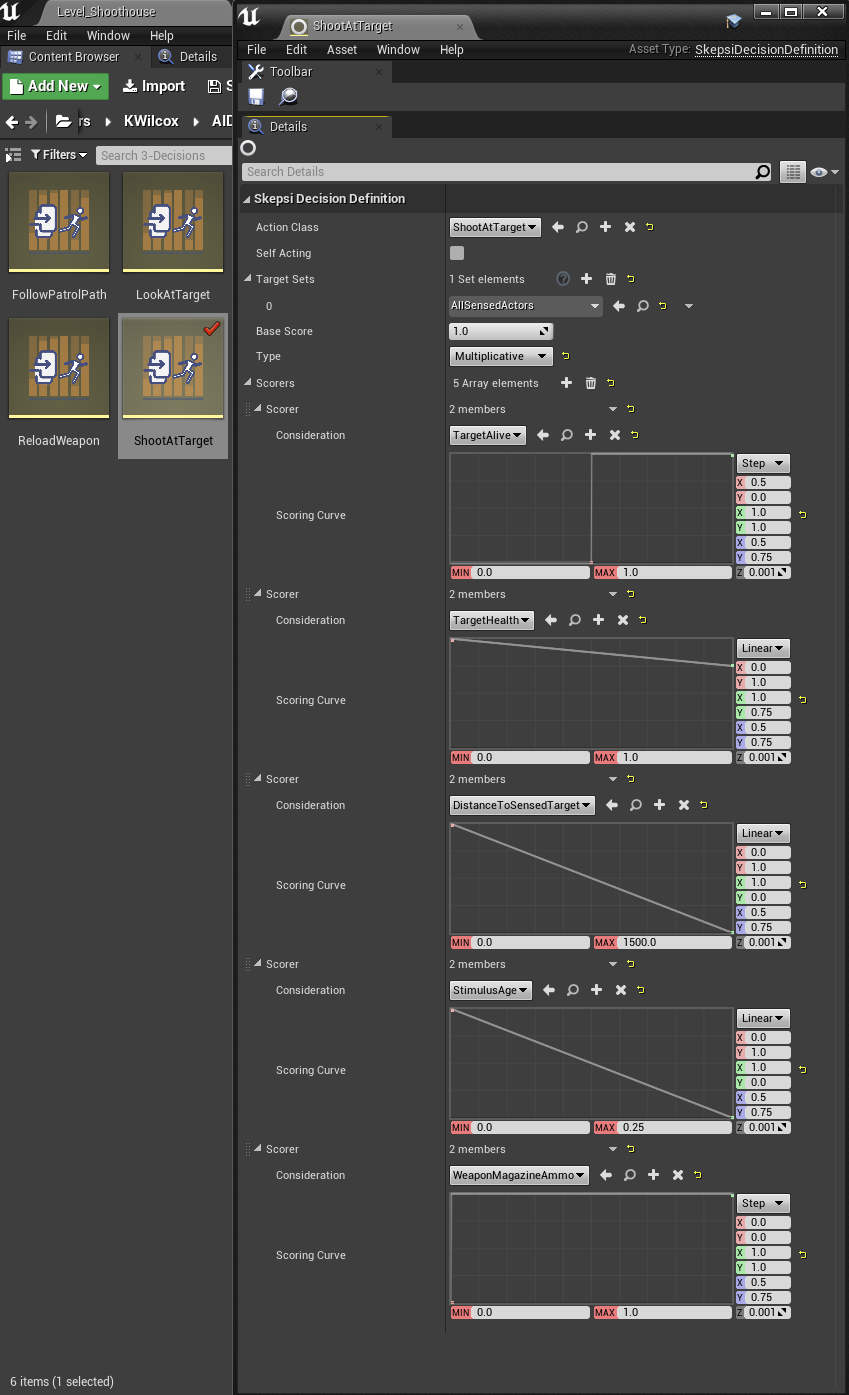
like, Dave Mark normalizes all his "inputs" so everything is scored 0->1 ... I didn't do that, I let designers input e.g. 100 -> 5000 for the X axis for things like distance
ebon zenith
Like the jrpg ability/skill chart?
simple crest
the details pane editor I have is asstastic... I need to make a custom window, but e.g. for a decision to shoot at a target, some considerations are percentage or stepwise (0-->1 for target health, or 0/1 for dead/alive), others such as distance are in unreal units, or time could be in seconds. https://i.gyazo.com/b36690eda19b71a0bf26e9ab7b3d3fd5.png
 ebon zenith
Interesting, so you build your own curve tweaking widget?
simple crest
yeah I made that
(just don't ask how long i spent on this thing) https://i.gyazo.com/9e8eaa7d3c1d2008ac88c0f463e39e82.mp4
low oak
I tried to use inprogress , but the execute task only call one time, I cant find which function will loop if I return in progress
ebon zenith
No I won't. It sounds simple to build curves, but actually the UI part is painful
I built one in early days with opengl
It sucks so bad even though ue4's older curve sucks I still don't want to touch it.
Like some long term trauma embedded in my brain.
simple crest
the curves are pure formulas, another important thing for sped  no curve sampling, which actually makes it a bit easier lol
ebon zenith
I know, the plotting part is the easiest part.
It's the setting up those tangent knobs that are painful.
I was doing some 3d curve building so the tangent is actually a point normal?(that decides plane is)
Thus you need widgets to handle mouse clicks in 3d.
That's back in like 2000 ish as my practice for opengl UI programming
It's off topic but it's painful with only basic API support from those older opengl supporting libs.(like glut)
 soft mantle
Hi everybody! one questin with disabling AI.
i'm working on procedural generation within a big map, i want to disable all the AI by default and only activate when player is near (most likely going to handle this with a sphere collision and on overlap activate the AI).
Calling the AI controller and just "Deactivate" would be enough or i need to do something else?
 glossy spire
@soft mantle This might be what you want
 soft mantle
Oh i gave up on that approach and i'm doing spawners that activate / deactivate when player in range and kill all creeps after player abandones range
but i'm gonna try that one and add it too
ebon zenith
I think the reason is that it takes time to process even do nothing AIs if he has lots of creeps that goes in/out of range.
Also, destroy/spawn new one is a lot of overhead. So deactivate is actually nice. (I did a wave shooting thing before and even with simple AI and pathfinding I can only supporting up to about 90-100 agent pooled)
Even like spawning 10 AIs takes a hit on frame rate.
In my case it's the usual one pawn per AI controller. I guess if you need to go even higher agent count you probably need to cluster them so the far/ambient AI controller can possess multiple and just do some wandering actions.
One of the tricks that capcom do with monster hunter world/iceborne huge map and lot ambient life AI is that when you are far enough, their animation skip ticks.
(they probably have like thousands of actual AI agents in a single map, most you can shoot/capture)
So it's a good compromise compare to popping/fading in agent, they just cut the animation to like 10 frames per second.
Thus they don't have to sacrifice draw distance for those flying agents.
I think epic should have video talking about this when they still developing Paragon
soft mantle
ebon zenith
One of the tricks that capcom do with monster hunter world/iceborne huge map and...
this is a very interesting approach, i'm gonna investigate more into that one, this way you could have all the agents moving even when they are offscreen and not hit that hard in performance.
glossy spire
We do something similar where enemies progressively turn off features as they get farther away or are no longer in connected rooms.
Deleting and spawning added too much of a performance hit
 junior quest
Hello!
I have been searching for quite long how to make patrolling AI character that follows the spline (using Behavior tree of course).
Any ideas how to make it happen?
misty wharf
Depends on how exactly you want it to follow the spline
For example, you could lock its position to a spline, or have it use character movement to move to different spline points
ebon zenith
one of the things I did before is to intentionally limit my distance and add some random offsets so AI don't look like robot walking a straight line.
but that requires some trickery so they don't walk/stop/walk/stop when they reach the radius(ie. I have service to update target position when AI is far enough from last update, so the position updates before they reach the current position. all the way until AI is about to reach actual target.)
so to walk on a spline I would assume you can do EQS query and then base on distance to the spline and the spline position(I don't know how it was represented in UE4, let's just say curveU follows the spline direction.)
then you can filter out points you don't want and pick the next likely position as your walk to position.
junior quest
Yep. What I would like to achieve is that my character wouldn't move in straight line. So as far as I understand, I could do the following:
- get the distance between two spline points - last one and the next one,
- query player distance between these spline points
- if closer to 0, move straight to next spline - if 0,5, then move to the midpoint of next spline point and the next-next spline point, if 1, then move to next-next spline point
I might have gone crazy or something, but that's how I see it now. Maybe I totally misunderstood. 😄
Maybe my "great" paint skills represent the idea a bit better. 1 - is when player starts moving and target location is next spline point, 2 - player is midway, target location is the point between the next spline point and the next-next spline point, 3 - player is at next spline point, target is next next-next spline point.
This really doesn't work as the player never ends up in position 3, but I don't know, maybe there is something that I am missing.
 ebon zenith

if you can run your EQS and generate points like I colored
you can filter out points that are "in front" and "closer to spline"
junior quest
so I would run this query quite often to keep the movement smooth?
ebon zenith
then pick like 3~4 green dots that are in a distance range(ie. in front but between 500~800 range)
yeah, you essentially want to keep updating the target location before your agent reach the current target
of course if your spline have like hairpin turns then this won't work properly
but for general map plots it should be fine.
junior quest
Okay. That sounds promising. In a bigger picture, I have a whole formation of characters that should follow the spline like that, so I don't know if it would add extra complexity or not.
The idea is to create a wave-based game, so 😛
ebon zenith
yeah, part of making it smooth is in the tweaking
junior quest
Okay. So it would run as a service (I haven't used that many EQS queries lately)
ebon zenith
there are 3 deciding factor. 1. look ahead decides how closely you can stay on curve, too far then you could cut through curve 2. placing current target with in look ahead distance that make sense so it won't immediately success(with in the reach radius) 3. how frequent you update from previous one so your agent don't look like it's constantly adjusting(jittery)
the above also depends on the fasted moving speed your agent can do. the slower your agent max speed is, the longer you can delay the update.
junior quest
Yep. I currently have some AI movement set up and I think it also looks quite jittery, because it is updating too often. It takes tweaking to get it right I guess 😛
ebon zenith
also you need to have some random range as well so they don't all update at the same time, the default spread is pretty good. 0.2~0.6 I think.
junior quest
As far as I can see, only the patrol "leader" in unit group should update the unit group location periodically (unit group then updates all unit positions locally). When update is done, then unit starts moving towards the updated position.
ebon zenith
you can just have the AI controller keeping the points otherwise if your leader getting taken off(say, player sniped the leader) you will be in trouble
ebon zenith
you could but you could have race condition
ie. the time before you assign a new leader and non-leader pulling for position to go to
or a non-leader becoming a new leader and stuck in weird situation(trying to fetch your own location while you aren't suppose to fetch as you are leader now)
junior quest
ah yes. It might get quite complicated.
Anyways, interesting idea how to solve the issue. Thanks alot for your time 😛
ebon zenith
np, have fun.
 jade haven
Okay, figured it out. attached weapon actor was colliding against the character. Disabling collision allowed movement to return to normal
 old adder
Anyway we can have GameplayTag as Blackboard key?
misty wharf
you can store it as a Name
You may need to create some helper decorators or such to compare it as a gameplay tag, but other than that it'll work just fine
(you can of course compare it using a regular bb decorator as a name, but you won't get the handy gameplay tag selector dropdown then)
old adder
But then you can't have a TagContainer right?
misty wharf
you mean saved as a BB value or?
old adder
Translate TagContainer to Name then convert it back to TagContainer when need?
Yes, as BB value
misty wharf
Oh, yeah not sure about that one. You said gameplay tag so I assumed a plain gameplay tag :)
tag container can contain more than one so I don't think it's quite as simple with that
old adder
Yeah... I can translate from TagContainer to String then somehow translate it back to TagContainer when needed.
But that is such a hassle.
misty wharf
Is the tag container part of some actor or such? If so, you could store a reference to the actor
old adder
I am creating an order system like in RTS.
And order has data and Tag is one of them.
When order is queued, the data is written into the Blackboard and use inside BT.
It is possible that I can write the TagContainer to pawn instead of BB, and change the BTTask to read the pawn instead.
misty wharf
you could probably store the order in the BB and then create some decorators that you can use to work with the data in the order object
old adder
Unfortunately I can't do that. As the data is in the form of C++ struct.
dull loom
Hey guys, about the NavLinkProxy, there can only be one smart link linking two nav areas?
I mean, I've set up a platform and two smart links linking the ground to this platform
however, the event on smart link reached is only triggered in one of those smart links
or maybe I'm missing something?
 rustic nova
@old adder have you looked at https://github.com/DaedalicEntertainment/ue4-orders-abilities
GitHub
Sample code of the talk "Hero AI: Gameplay Abilities Meet Behaviour Trees" at Unreal Fest Europe 2019. - DaedalicEntertainment/ue4-orders-abilities
old adder
Yes, they use Index for ablity activation.
Would be nice to use Tag instead for reusability of BT.
flint trail
I am guessing UE5 doesn't bring anything new for AI
 devout plume
Yeah doesn't look like it for now

 glacial sapphire
I'm trying to do an AI, but I don't know if a move is done by RootMotion or if it's done by AI Move To
i'm trying to make a Zombie
ebon zenith
root motion are mostly for going across places where navmesh can't do shit with.
(ie, if you want to climb over an obstacle, climb a ladder to a different place, etc)
 storm zephyr
hello, i have my nav mesh in the persistent level and i have sub levels that i toggle visibility during gameplay (they are always loaded), but when i set the sub levels to visible, the navmesh doesn't update to take those levels into account. Right now the only solution i've found for that is to set the recast nav mesh to be dynamic, but that hurts the performance quite a lot. Is there a way to have the recast nav mesh be dynamic modifiers only and on a callback once the sub levels have been set to visible, tell the nav mesh to rebuild completely?
ebon zenith
how about teleport your player/AIs around 2 set of level, they are loaded anyway.
You would need to update a lot of blackboard values on teleport, but it should be a lot less headache.
Hopefully you don't have other physics actors as well.
low oak
is that a way to know when the AI reach the goal when using MoveToLocation in c++?
 wet ether
Is there a way to make static mesh not block AI sight perception?
misty wharf
low oak
is that a way to know when the AI reach the goal when using MoveToLocation in c+...
Yes, move tos should have delegates you can assign to for events
misty wharf
wet ether
Is there a way to make static mesh not block AI sight perception?
Change the collision settings on the static mesh so it either overlaps or ignores the trace channel you use for sight
wet ether
misty wharf
Change the collision settings on the static mesh so it either overlaps or ignore...
But how can i know what channel is using for sight?
misty wharf
Hmm did it not have the trace channel option in its settings 🤔
@wet ether check in project settings under AI system
 wet ether
Yea, it says that my default trace channel is visibility too. But when i set its response to ignore or overlap nothing happens
If this way is correct by default, then is it possible that this is not working because i was overriding CanBeSeenFrom(or something like that) function in C++ from AI controller, which also used a linetrace?
I can show you the code if its necessary
misty wharf
Oh yeah if you used a different linetrace channel than visibility for CanBeSeenFrom, then it wouldn't work I think
wet ether
The problem is i don't actually know a lot about C++. Some good person just told to what and where to put and all worked perfectly
Give me a sec
bool AEnemyCharacter::CanBeSeenFrom(const FVector& ObserverLocation, FVector& OutSeenLocation, int32& NumberOfLoSChecksPerformed, float& OutSightStrength, const AActor* IgnoreActor) const
{
    const FName NAME_AILineOfSight = FName(TEXT("TestPawnLineOfSight"));

    FHitResult HitResult;

    const bool bHit = GetWorld()->LineTraceSingleByObjectType(HitResult, ObserverLocation, GetPawnViewLocation()
        , FCollisionObjectQueryParams(ECC_TO_BITFIELD(ECC_WorldStatic) | ECC_TO_BITFIELD(ECC_WorldDynamic))
        , FCollisionQueryParams(NAME_AILineOfSight, true, IgnoreActor));

    NumberOfLoSChecksPerformed++;

    if (bHit == false || (HitResult.Actor.IsValid() && HitResult.Actor.Get() == this))
    {
        OutSeenLocation = GetActorLocation();
        OutSightStrength = 1;
        return true;
    }

    OutSightStrength = 0;
    return false;
}
Here it is
Wait. I see that is it linetrace by object type, not by channel
misty wharf
Yeah I think that would collide with WorldStatic or WorldDynamic
the default sight implementation uses LineTraceSingleByChannel if CanBeSeenFrom isn't defined
wet ether
Well i just set every single collision responce type to ingore just to be sure and the AI still doesn't see me. This thing basically has no collision, it ignores everything, but still blocks the AI sight
misty wharf
Try checking with the gameplay debugger
it should draw some debug info for sight if you turn it on
wet ether
You mean that thing on ' ?
misty wharf
yep
wet ether
And what am i supposed to find in there? I see that this guy does not see me and that's it
misty wharf
it should draw a line from the guy to where you are
does it look like it's going into the correct place? and is it showing it's being blocked by the object in front?
wet ether
The Sight line draws only when the AI sees you, right? In this case he doesn't see me so there's no line
misty wharf
Oh does it 🤔 I thought it would draw every time it's attempting to see you
Maybe you can just try disabling the CanBeSeenFrom and remove the Sight interface from the player?
Because it definitely should work
wet ether
Well yes, but overriding this function fixed that problem with AI sees only the middle part of the player. Not the head or legs. Only the middle
Guess i need to contact that good guy who helped with the function. Maybe all i need is replace LineTraceByObject with LineTraceByChannel
Hey @pine steeple, are you busy right now? I need a little help here with the function you gave me a long time ago.
low oak
misty wharf
Yes, move tos should have delegates you can assign to for events
the assign event for delegate is only work on BP? or thatz another way to make it work in c++
misty wharf
It depends on the type of the delegate, but you can usually just do Whatever->OnSomeDelegate.AddDynamic or something along those lines
 misty wharf
Yes, if SelectedTarget is nullptr then it's "not set"
 midnight quartz
Has anyone packaged for shipping build with AiModule in 4.26? I am getting a "Expecting to find a type to be declared in a module rules named 'AIMODULE' in UE4Rules..." error.
midnight quartz
midnight quartz
Has anyone packaged for shipping build with AiModule in 4.26? I am getting a "Ex...
nm, solved. "AIMODULE" should be "AIModule"
ebon zenith
going through those gdc vault about utility theory now. @simple crest will try pop question here if I don't understand.
simple crest
 you're going down the rabbit hole too
ebon zenith
so far so good, but realizing it is gonna be a different beast.
it's also kinda what drives the neural network/deep learning from what I imagine so far(10 mins in to the gdc 2010 one)
ebon zenith
it just keep piling up. XD
ebon zenith
moving on to the 2nd clip from 2015
the first clip is very conceptualized and doesn't really talked about "tweaking" strategy wise. it says how you define those parameters and how to approach the overall decision flow, but doesn't mention how you tweak once you have that system in place.(you know how to tweak individual parameters and how to do a combination of scores, but doesn't mention if the system make the AI into a loop then how you tweak such.)
(ie. it mentioned about distance scores, but doesn't mention if a prior decision cause AI to move into another place where the score biased back to a decision that could lead into a loop.)
ebon zenith
half way into 2nd clip from 2015, so far I think both traditional BT and this approach all missed the "planning" part of AI.
ie. I do this because it would be more advantageous in the long run. (ie. say in arena shooter, you shoot rockets to armor spawns while moving into another part of map because you want to scare off opponent that might going there or baiting them to wait for you going for the armor) shooting into empty spot is just something I never see AI do. unless it's hand crafted or mimic human players based on replay data.(some bots can be trained with human player replays.)
ebon zenith

In this 2017 GDC talk, Bobby Anguelov, Mika Vehkala, and Ben Weber outline core principles to get the most out of your behavior trees while avoiding common issues.
Register for GDC: https://ubm.io/2yWXW38
Join the GDC mailing list: http://www.gdconf.com/subscribe
Follow GDC on Twitter: https://twitter.com/Official_GDC
GDC talks cover a rang...
I found this section from Bobby is very informative. 🙂
 spare raven
Is there a limit to navmeshboundvolume, when i change the scale from 100 to 1000, it doesn't generate the navigation data
I have a navidation invoker on my NPC
 frozen pawn
I've been fighting my mesh not responding to AI move commands. after days of watching youtube videos, and reading about others with AI move control issues, Mine is different, And I hope someone here can help me.
my character is creating a bubble around it that will not allow it to touch the Nav mesh bounds.

no matter where I move it. I get the error message 'Attempting to move a fully simulated skeletal mesh CharacterMesh0. Please use the Teleport flag' which I have others seen fix that same error by chaning the root-bone to something else. I've updated nav mesh bounds, I have changed it's location, deleted whole blue prints rebuilt them. Ive even re-created the entire character from scratch, matching every setting. and the rebult one dosent have this particular issue. Just so strange.
 alpine path
@frozen pawnCheck navigation settings of your character.
frozen pawn
Thanks for responding, What am I looking for?
alpine path
For example, Can Affect Navigation, Dynamic Obstacle
frozen pawn
checking
frozen pawn
both NAV settings are exactly the same, Under Nav, CapsuleComponant, Area Class, NavArea_obstacle is set. and underneath Dynamic Obstacle is checked.


 vast wharf
Is you character deleting the nav-mesh undeneath itself?
vast wharf
Don't check Dynamic Obstacle (maybe, not sure off the top of my head, but that's the issue, if you figure out what settings does that, turn it off)
 static crystal
Do people build enemy ai using GAS? Or is it mainly meant for player controlled characters?
frozen pawn
Both of the Characters have the same settings checked, and selected, yet the other one isn't deleting the nav mesh underneath it.
 grand atlas
If I call "Get blackboard Asset" on a BT component, isn't that supposed to return the BB that is associated with that BT? BT Component is in an actor.
 devout geyser
GAS doesn't have much to do with AI. It's an ability system that could be used by players and AI
grand atlas
Actually, I had to get the "default BT asset".
devout geyser
Characters aren't typically meant to be obstacles. It's going to force the navmesh to rebuild that tile constantly as they move around.
Turn off "can affect navigation" until you find what is responsible.
You can also change the area type. Iirc the obstacles area type removes navigation, while another area type that just increases cost will just be colored differently and have a cost penalty for traversing. If you need characters to be obstacles they will need to be cost based modifiers and not obstacles In order to allow themselves to navigate.
But again, dynamic nav mesh obstacles on characters is not recommended.
grand atlas
I am so confused by the BB/BT system. I can get the BB Data object from a BT with the "Get Blackboard Asset" interface, but how do I actually use that, to set values in the BB? The Set Value as.. functions requires the BB Comp.
 devout geyser
There should be a get blackboard. The blackboard asset is something else. Get blackboard may be on the ai controller iirc.
Behavior trees are assets, as such they don't hold instance level data like a reference to a blackboard, because that differs for each AI
grand atlas
What if I'm trying to get a BT to run on an Actor? Is that just not possible?
devout geyser
Should be able to do that. It's user responsibility to call initialize behavior tree and pass in a blackboard instance. I'm not at my pc atm to remember the entire process but I think you should be able to put the plumbing into an actor to run a BT on it.
grand atlas
The BT is running, it's just that I can't access anything useful on the associated BB, since it's not a component. And I can't find any way to assign my BB Comp to the BT.

 devout geyser
Look for a get blackboard component on the brain component
devout geyser
frozen pawn
#JSwigart, I have changed the settings you suggested, but still no change.
Is that nav hole associated with the character or that box collision sitting on top of it?
frozen pawn
hmmm.. its a collision to trigger a sound clip.
devout geyser
If you move it does the hole move
 devout geyser
Just trying to verify it's the character
Also did you check settings for all the meshes? If there are any attachments with that flag on
frozen pawn
ill go through and look at the barrels settings, they obviosly also block the nav mesh, see if there is anything simular.
devout geyser
Any primitive component actually. The capsule and the skeletal mesh are different components that could have can effect navigation turned on
frozen pawn
yeah, i have gone through all the componants
devout geyser
But that also includes all separate meshes as well like if anything is modularly piecing the character together
You have a mesh parented under your skeletal mesh for instance
grand atlas
Oh. so all that was needed was a BT comp and a BB component on an Actor. That's it, ~it just works~.
frozen pawn
#JSwigart Aw.. man.. Thanks for pointing me in the right Direction, There was one more componant I didnt see, one middle wheel click down hidden by the bottom of the window. It was a destroy actor componant.. it was causing the hole. Finally!
 alpine path
Does anyone know how to solve problem with dynamic nav meshes if destination point is further than invoker's radius?
devout geyser
Do you need to use an invoker? It creates more issues than if you just had a nav bounds around your level.
vast wharf
I'm having issues with Sight sense updating it's location. I can see the green debug balls changing, however only the very first time a sight sense is triggered does it trigger an event, and when sight sense fails, nothing in between... Comparing this to Hearing sense, which triggers an update for any intermediary step...
alpine path
@devout geyserIf level is very big. Does it make sense to build nav mesh before?
devout geyser
I would use a big nav mesh even in large levels. Navmesh data isn't that big. It would take some extraordinary circumstances to rely on a nav invoker and deal with the issues it introduces imo.
alpine path
What kind of issues it has? After quick look it seems to work properly
devout geyser
Having to work around its limited range if you need longer distance pathing. Sounds like that's what you are running into?
It works but the way it works create issues that don't exist if you have a global navmesh. Fine when you are good with those limitations but I see quite a few people trying to use invokers and then they to "solve" for long distance pathing separately.
Maybe I misunderstood your situation
alpine path
That was my initial question is there solution to this limitation? Full bounds do not scale well
Maybe 2 nav meshes with diffrent level of details etc
devout geyser
Depending on the type of world I would probably create temporary actors at intervals towards the destinations with invokers on it to temporarily ensure navigation exists
vast wharf
Is there any way to ensure that sight sense is being triggered whenver it is updated? Currently it only triggers on begin and lose sight, this is how I'm checking for the sense differences.
 alpine path
@devout geyserI am looking for more advanced solution than that. For example POV navigation, NavLinkProxiy already can be used for it
devout geyser
Are you listening to the events off the perception component?
vast wharf
 devout geyser
Isn't there another event ? Sorry I'm not at pc atm
vast wharf
Does it not trigger anything in between start and end by default?
devout geyser
I dont think it does no
vast wharf
OK, I see that probably explains it then
I was being thrown off by the footsteps sound which I'm triggering, on every footstep, but that is done through blueprints manually
alpine path
@devout geyserSome kind of fallback to low res navigation system. Second nav mesh (lower density) or way points
devout geyser
That sounds way more complicated and probably involves a preprocessing step. I'm not aware of anything like that in engine.
Temporarily expanding the scope of the invokers when a destination is outside the invoker radius seems about the easiest thing possible that doesnt add a bunch more complexity.
devout geyser
Did you add the vector variable to the blackboard asset by the same name?.
wet ether
How can i set AI Sight radius from blueprint on event?
 stiff gale
On AI death, do I need to do anything else beside Destroy Actor?
 wary ivy
why would my ai controlled pawns move only when they're in view?
I'm confused 😄
I'm simply getting random reachable point inside a navigable radius and doing ai move to there
this is without any kind of dedicated server or network play, just a local client that's in control of everything
this is how the pawns have moved after starting playing + 20 seconds or so

starting positions

I started playing in the middle of the left group of characters
oh and this is using the crowd manager
 wild hill
Hello! We're using dynamic navigation rebuild during runtime and our AI gets stuck in its own collision. Anyone know a way to prevent this?
 simple crest
Your AI shouldn't be cutting holes in the nav mesh like this, fix/turn that off
wild hill
simple crest
Your AI shouldn't be cutting holes in the nav mesh like this, fix/turn that off
How would one go about doing that? :)
Our ai is based on the Character Class and is a Capsule with the Collision preset Pawn.
wild hill
Solved it. Thanks anyway!
ebon zenith
wary ivy
oh and this is using the crowd manager
You probably have a avoidance radius too big compare to your unit.
wary ivy
That can make them not move?
ebon zenith
Yeah, but don't go too low otherwise they might pick a location too close to another character, also I think it hurts performance if you go too low.
wary ivy
The thing is they start to move once they get in view 🤔
ebon zenith
I think default is 1.5 times the capsule radius
So they aren't moving if you are not controlling?(but are controlled by a AI controller?) Also not in view?
 rich marsh
What is the best way to get an AI's perception component from a custom AI Sense?
ebon zenith
Why the right group not doing anything ?
rich marsh
AIOwner on a FPerceptionListener is private
wary ivy
They are controlled by an ai controller always. I want the pawns to wander and that only works after the pawn has been in player view (as in rendered). It is as if I have some frustum culling going on for the ai controller here
rich marsh
That would've been convenient lol. I could cast the body actor to pawn and get the controller that way, but it seems like there would be a better way.
ebon zenith
Lol, ahhh okay, yes there probably is
They mentioned it somewhere during a paragon or fortnite talk.
So if no one is watching, the ai cuts a lot of things or even not moving.
They calculate this by viewing and actual distance.
So, that's beyond me and you should try find out where it controls this parameter.
wary ivy
Hmm, makes sense because I have a top down camera with a low FOV and it is really high up
ebon zenith
Yeah, if you ever do is single player local you can probably turn those off first and that would be easier to measure your AI performance impact.
Anyway, have fun.
wary ivy
Cheers
rich marsh
IAIPerceptionListenerInterface* PerceptionListener = nullptr;
        const APawn* BodyListenerPawn = Cast<APawn>(ListenerBodyActor);
        if(BodyListenerPawn == nullptr) continue;
        IAIPerceptionListenerInterface* PerceptionListener = Cast<IAIPerceptionListenerInterface>(BodyListenerPawn->GetController());
Is there anyway to get the body actor but not as const?
I'm trying to write an idle sense, and I am close, but I can't use the body listener pawn, because RegisterStimulus requires the source to not be const
if (SenseProperties.LastKnownPosition.IsNearlyZero())
            {
                // First time grabbing the target's position, so it can't be determined whether or not it is idle.
                SenseProperties.LastKnownPosition = CurrentLocation;
                continue;
            }
            else
            {
                if (SenseProperties.LastKnownPosition == CurrentLocation)
                {
                    // Target is currently idle

                    if (Listener.HasSense(GetSenseID()))
                    {
                        Listener.RegisterStimulus(BodyListenerPawn, FAIStimulus(*this, 1.0, CurrentLocation, CurrentLocation));
                    }
                }
            }
 pine steeple
not sure i follower @rich marsh
if the "pawn" becomes idle, you set the last known position right
but you should not be registering stimuli when they become idle
that stimulus should be registered by default
then you return either 1 or 0 strength based on if they are idle/moving
feels like you are going a really hard way around things
rich marsh
I might be. I'm looking at some of the current built in AI senses and trying to mimic what they are doing
So register stimulus is not the right method to call in order to make the AI's perception component register updated stimulus data?
and yes, I am tracking the pawn being idle as you guessed
void UAISense_IdleTarget::OnNewListenerImpl(const FPerceptionListener& NewListener)
{
#if WITH_EDITOR
    GLog->Log(FName("AI"), ELogVerbosity::Log, FString("IdleTarget listener added!"));
#endif
    check(NewListener.Listener.IsValid());
    UAISenseConfig* ListenerConfig = NewListener.Listener->GetSenseConfig(GetSenseID());
    const UAIConfig_IdleTarget* IdleConfig = Cast<const UAIConfig_IdleTarget>(ListenerConfig);
    check(IdleConfig);
    // Consume the properties for the idle config instance
    FAISenseIdleTargetProperties PropertyDigest(*IdleConfig);
    PropertyDigest.OwningActor = NewListener.Listener->GetOwner();
    DigestedProperties.Add(PropertyDigest);
    RequestImmediateUpdate();
}

void UAISense_IdleTarget::OnListenerRemovedImpl(const FPerceptionListener& UpdatedListener)
{
#if WITH_EDITOR
    GLog->Log(FName("AI"), ELogVerbosity::Log, FString("IdleTarget listener removed!"));
#endif
}
Those get called during the registration / removal of the sense.
Well, I guess that information doesn't matter. I guess the most important question is the one I asked about if I should be calling RegisterStimulus
 magic coral
Does anybody have any idea why my zombies are vibrating lol. It's a group collision issue but aside from collision presets I'm not really sure where to look
https://gyazo.com/b34a6c8ce194da68ff3007b0590993b6
 alpine path
@magic coralThey lose focus for short time that is why you see glitch. You should debug BHT and make sure they stay focused
magic coral
@alpine path Seems to go away after switching to the mannequin. Could it be mesh related some how?
https://gyazo.com/25e8e41f420a410488b20e0747fdbc6e
 magic coral
Ah anim blueprint makes sense, I don't know much about any of that haha. I know the walk blendspace only takes into account speed rather than speed/direction seeing as how there is only one walk anim. Oh well. Thank you 🙂
alpine path
Just replace ABP with loop animation and check result
@magic coralBut I think real issue in BHT
magic coral
No sign of any kind of vibration on looped animation so looks like it may indeed be the anim BP
https://gyazo.com/9d0b4b096c4b5c8eacd7b69f61f37242
alpine path
@devout geyserI took almost day, but now I have LOD system for navigation. I have multiple nav agents with different density nav meshes. Every path request start from highest density and reduces it until path is found.
@magic coralABP could be ok, but data you fed to it is wrong. It is easy to debug with 1 actor
pine steeple
@magic coral using Crowd avoidance?
Detour?
could also be because strafing is enabled and you have no strafing animations
rich marsh
I'm pretty sure kaos that RegisterStimulus is the right move, because you pass in the stimuli strength into the FAIStimulus
not sure what I am missing
devout geyser
What's a "different density" nav mesh?
magic coral
@alpine path any idea how I can go about checking for loss of focus? the only thing the animbp really takes into account is speed
@pine steeple I'm not aware of crowd avoidance? not using detour controller, I did it try it at one point though and it only seemed to help a little. Strafing is not enabled either
alpine path
@devout geyserRecastNavMesh has many parameter to reduce computation load. For example, cell size. So I can build full level of low res nav mesh and high res dynamic for camera view
@alpine path As I said reduce zombie count and try to reproduce. Use pause and check on what value of speed it has issue. You just need to debug it.
Time dilation and pause really help to debug animations
lyric flint
Anyone know why pressing P doesnt show the nav mesh?
alpine path
It always shows. But you do not have nav mesh.
 celest python
Anyone knows if there is a way to freeze BT?
rich marsh
*freeze
celest python
Thanks 😄
rich marsh
Not sure if it freezes the BT, but you could try to pause the brain component and see if that does the trick
or, maybe there is a way to do that from the blackboard component?
meaning, from AI, grab the bb component, and then call a method on there that would do that? I've never looked into this, so I'm just throwing guesses out there
celest python
I couldnt find anything on the BB, I saw BP montages using BrainComponent->LockResource() but it didn't worked. Gonna try pausing now
celest python
rich marsh
Not sure if it freezes the BT, but you could try to pause the brain component an...
That seems to worked, thanks (sorry took me a while to test it lol)
stiff gale
How can I prevent AI from keep attacking my character after its dead?
alpine path
Add decorator to BHT
low oak
quick quesiton, is ScheduleNextTick can change the tick rate for beheviour tree forever? is that also affect bt task tick rate?
rich marsh
@stiff galeYep, what @alpine path said

The decorator is pretty simple. Here I have it in C++, but it would be very easy to replicate in blueprint
// Copyright © 2020 Digital Sync Labs, LLC


#include "BTTask_IsDead.h"
#include "BehaviorTree/BehaviorTreeTypes.h"
#include "RaevinCharacterEnemy.h"

EBTNodeResult::Type UBTTask_IsDead::ExecuteTaskInternal()
{
    ARaevinCharacterEnemy* AICharacter = GetAICharacter();
    if (AICharacter == nullptr) return EBTNodeResult::Failed;

    const bool IsDead = AICharacter->IsDead();
    if (!InvertedResult)
    {
        return (IsDead) ? EBTNodeResult::Succeeded : EBTNodeResult::Failed;
    }
    else
    {
        return (!IsDead) ? EBTNodeResult::Succeeded : EBTNodeResult::Failed;
    }
}
 magic jasper
@pine steeple here's my hilariously stupid workaround to that navlink bug.

Mileage of this technique may vary 😄
pine steeple
well
its for ziplines
that expand across distances of the map
just want the ai to attempt to use them
if the end point is near the player
magic jasper
yeah this was a similar thing.. portals in this case
pine steeple
they are following
magic jasper
Such a dumb bug
magic jasper
I just made a BP where I could chain up these invisible platforms with navlinks on them.
Yeah
I don't know why the links have no limits in Z, but they do in XY
so odd
magic jasper
they're just linked up to each other like this

then have a really low-cost nav area or something applied to them so the AI paths through it
pine steeple
so it just creates a path which makes them walk on teleporter that is it
teleporter just teleports them to the end
magic jasper
yeah they never actually follow the path, but the navliks at least let the AI generate a path from one teleporter to another, then they go through the first one and BAM
instantly at the end of the path
pine steeple
yeah thats like the zipline, as soon as they hit the trigger
the zipline moves them down
magic jasper
yeah
pine steeple
so its same kinda thing
magic jasper
It's like a bethesda-level hack 😄
pine steeple
couldnt it just be a normal navmesh walkable plane?
magic jasper
train heads on NPC's kind of stupid
magic jasper
Yeah maybe it could work if there was a long plane on top, then a link at the start and end maybe
 magic jasper
disclaimer I haven't opened this project for a while though 😄
pine steeple
heh i was kinda thinking the same route
when i was discussing with zlo, like just faking a path
 marsh aspen
Hey guys, so i think i've just lost my entire day, trying to updrade my NPC with a behavior tree because... I've followed a tutorial on youtube, did exactly like the guy BUT... the guy didn't use datatables. (he just wrote directly on the BT, under a text section he made on editable) And now, i'm trying to get this BT work with a datatable but i can't figure out how to display a line according to this datatable. (and also upgrade this line according to the ID of the datatable would be great) SO, do you know a video or any tutorial which could help me with that?
 patent hornet
@magic jasper i would expect bethesda level hack to corrupt your save games, at least
 rocky bison
is there a way to make an EQS return null/none if there are no matching results?
it'd be really frustrating if I had to do another overlap check on top of my custom EQS Query Generator
ebon zenith
magic jasper
disclaimer I haven't opened this project for a while though 😄
So, I am curious, can we just make an target location to a teleport trigger if the place/actor to go needs to go through teleporters?
Ie a selector so if actor location path returns fail, then next task start searching teleporters in a tree like structure to the target location/actor and return the closest teleporter trigger.
But yeah, they should fix the navlink bug.(maybe the link zapping might cause some weird shit so they limit the x/y distance?)
cold trout
what does it mean for a variable in a BT task/service to replicate?
how would a client access that var?
ebon zenith
cold trout
how would a client access that var?
Why would/should a client access that?
cold trout
i have no idea, but im curious why the option is available to make them replicated
magic jasper
ebon zenith
So, I am curious, can we just make an target location to a teleport trigger if t...
Because I need them to pathfind through the teleporter to follow other objects. I could tell them to go through the teleporter directly, but not to follow an object through a teleporter for example
I want the AI to use them on their own rather than me have to manually tell it to do so
wary ivy
has anyone managed to get the crowd manager working with anything else than a character movement component / character class pawn?
I figured I could just make a simple pawn with a subclass of floating pawn movement component that implements the avoidance interface that the crowd manager uses to move stuff around
but.. nothing works anymore 😄
I'm not at my computer right now so I can't really elaborate. Just wondering if anyone has tried the same
ebon zenith
wary ivy
has anyone managed to get the crowd manager working with anything else than a ch...
there will be a lot more work to make it work. I think during the first time they release that, they mentioned it only works if your pawn uses character movement component.(that's like really long time ago. ) I don't know if they even update it anymore after paragon ceased development. But yeah, it's more or less a C++ work to see why it only work on character movement component.
wary ivy
it doesn't use CMC in the code anymore, instead it uses a pointer to anything that implements IRVOAvoidanceInterface or something
ebon zenith
cold trout
i have no idea, but im curious why the option is available to make them replicat...
I think that's because they don't want to write a special attribute class that only the BT ones can't replicate. it makes maintain say, float for normal BP and float for BHT/blackboard special ones, would be maintenance headaches
ebon zenith
wary ivy
it doesn't use CMC in the code anymore, instead it uses a pointer to anything th...
the other thing to check is can your floating one using navmesh? cause their crowd manager depends on navmesh.( I should say was, cause like I said it was really long time ago I did crowd manager crowd)
wary ivy
I don't think it uses but I was under the impression that it could follow a navigation path just like CMC (albeit in a floating motion) 🤔
but I have no idea really
gotta study it more
cold trout
ebon zenith
I think that's because they don't want to write a special attribute class that o...
is the same thing true of AnimBP variables. Ive found they dont replicate either, but i might be wrong there
misty wharf
@wary ivy at least for me ICrowdAgentInterface works with CrowdManager. You register the actor with CrowdManager->RegisterAgent and need to implement a few of the functions in ICrowdAgentInterface in order for it to do anything
wary ivy
gotta recheck, I probably did something stupid 😄
misty wharf
TIL maybe all my AI enemies should not perceive each other because it takes time for them to do all those linetraces :P
implemented some Generic Team Interface stuff that just tells the player is in a hostile team and it sped up AI reaction time quite significantly
 kindred ruin
could someone please explain me with few words what those options i marked with red check marks mean?

could someone please explain me with few words what these option with red checkmarks mean
misty wharf
if you hover over the items I think it should explain some of them at least
anyway - lock ai logic: stops ai logic like BT from running during move, continuous goal tracking: if target is actor, it will update move position if target moves, project goal on navigation: attempts to make sure the target position is on the navmesh, async task: the async task which is executing the move, don't recall what the type of this value is but you might be able to use it to abort the move or such if needed
kindred ruin
it doesnt explain anything on hover, about "Project goal on navigation" dont quite understand still what it does, if the target is not on nav mesh it will not move to it anyway by default, so this option seems redundant
"Async task" still dont quite get how to use it, maybe someone can explain
wary ivy
misty wharf
<@!283940114252693504> at least for me ICrowdAgentInterface works with CrowdMana...
everything seems to work okay but for some reason detour obstacle avoidance decides that my floating movement component pawn should have a new velocity of 0,0,0 every frame 🤔
misty wharf
did you implement the get velocity function
wary ivy
yeah
hmm, actually it looks like it might be calculating the stuff okay in the detour component 🤔
so it's probably my movement component
I really, really dislike how movement input handling is spread over pawns, characters, movement components and controllers
wary ivy
yea it was my pawn and how it was done -_-
six hours well spent
default pawn does what I need 😄
 uncut rune
I’m using the AIPerception component for my AI character and using sight as one of the senses. The issue is that the PeripheralVisionHaflAngleDegrees only defines the horizontal FOV of the AI’s sight, but not the vertical FOV. This causes the AI to lose sight of the player just by crouching or jumping. Is there a way to increase the vertical FOV so that the AI can see up and down as well?
 ebon zenith
I don't really think that be the case? At least when I implement a cannon AI on a tower, it was able to sense a crowd running below on a terrain.
But I didn't do and C++ at the time.
 olive crown
Can anyone here recommend me some good starter ai tutorials? There are a lot out there that I have found but if anyone has a particular favorite then do tell.
uncut rune
ebon zenith
I don't really think that be the case? At least when I implement a cannon AI on ...
yeah, just tested it just to make sure. The horizontal FOV is definitly too small for me for some reason. Im not sure how to change it.
ebon zenith
olive crown
Can anyone here recommend me some good starter ai tutorials? There are a lot out...
Just follow the epic channel ones.
ebon zenith
uncut rune
yeah, just tested it just to make sure. The horizontal FOV is definitly too smal...
I can't be at my computer right now, but if you still haven't figure out later when I can, I will try check it out.
uncut rune
ebon zenith
I can't be at my computer right now, but if you still haven't figure out later w...
ok, please let me know. It could be a huge help to me.
vast wharf
uncut rune
I’m using the AIPerception component for my AI character and using sight as one ...
The green ball shows that the sight sense has perceived the actor at that location.
wary ivy
now my navmesh doesn't get built at all
siiigh
okay I got it building
but this is also weird: the destination is the green sphere that I get by "get random point in navigable/reachable radius" or so

then the path is that grey line there
this is the random path part in the controller

this is really bizarre 😄
wary ivy
navigation works fine if I use an actor as a destination
vast wharf
I've switched to using this for navigation because of my streaming levels setup which was causing too many headaches with the usual navigation system https://docs.unrealengine.com/4.26/en-US/BlueprintAPI/AI/Navigation/RegisterNavigationInvoker/
Register Navigation Invoker

Simple setup on AI Characters
 wary ivy
is that directed to me? 😄
so, the pathing works if I spawn an actor at the random reachable location
if I move to the location directly it does not
 light blade
hello there folks. How can I stop behavior tree? take it if we killed the enemy and wait for dead animation to end before destroy actor. Currently it's stand up a little bit before it got destroyed, and it could be better if I don't have to use more forceful method like make the enemy do animation stay dead. For now I think it's fine but in the future when my game getting more complex it's gonna become big problem instead. Thank you in advance.
wary ivy
I even tried projecting the destination vector to the navmesh and it returns true as the success boolean :\
now I tried using "find path to location synchronously" and that returns yet a different path
da fuq

random reachable point is the big green sphere, then there's the sync pathfinding result with the orange spheres and connecting line and then the ai debug view path
is pathfinding completely broken in 4.26.2? o_O
I'll sleep on it..
yea I'm guessing it's not that wide spread 😄
I gotta try this again with a fresh project
vast wharf
wary ivy
I'll sleep on it..
This is one of the better AI tutorials I've seen: https://youtu.be/iY1jnFvHgbE Might help, not sure.

In this presentation, Epic's Paulo Souza uses Unreal Engine's built-in AI features to build smart enemy behaviors for a game with stealth-like mechanics.
By relying on the Gameplay Framework in Unreal, we're able to quickly create convincing AI using Behavior Trees. Behavior Trees are great for creating complex AI that can be presented in a way...
 cursive igloo
Hi all
I made BB value as object, but it won't be shown in "Rotate to face BB entry" node
Why?? how to fix it?
 flint trail
how can I stop AI from moving and also resume movement after stopping it ?
 atomic badge
flint trail
how can I stop AI from moving and also resume movement after stopping it ?
atomic badge
flint trail
how can I stop AI from moving and also resume movement after stopping it ?
You can use a decorator to abort the MoveTo if you're using a behavior tree and when that decorator changes it can then resume its movement
wary ivy
@vast wharf I'm not sure what that has got to do with my issue
flint trail
@atomic badge thanks, although in the attack branch of my BT there is no MoveTo anywhere and yet NPC moves
atomic badge
flint trail
<@485109841711464449> thanks, although in the attack branch of my BT there is no...
Are you using an AIMoveTo node in your NPC blueprint instead then?
atomic badge
flint trail
I use BTT with AI Move To in another branch of BT
Then make a decorator that can cut that off, if it is the only place you are moving the AI
flint trail
So if AI is moving already on one branch and then BT is switched to another branch, AI will continue moving anyway?
@atomic badge ^^
atomic badge
flint trail
So if AI is moving already on one branch and then BT is switched to another bran...
Yes I think it'll continue that task until its completed.
Im sensing that you might be using a AIMoveTo node within a task. I dont recommend mixing the behavior tree and manual nodes like that. You should be using the MoveTo component in the behavior tree rather within a task. That way you have more control.
Like this
 flint trail
Stock Move To task is not flexible and I don't want bloated tree. So I made custom Move To task and it worked fine so far. I'll mess with decorator that aborts my custom Move To task, thanks.
misty wharf
You can also use lock ai resource
or whatever it was called
you can lock the movement resource for the AI using it, and this stops it from moving until you unlock it
flint trail
I never heard of that @misty wharf
misty wharf
yeah you can use it to lock and unlock ai resources like movement
I don't remember what the exact node was called, but I'm using it in one of my projects to stop ai's from moving before they should be able to
eg. when they're talking or such
flint trail
cool.. If only you remembered how to use it in BP/BTT 😛
misty wharf
I mean there's a node for it in BP's I just don't remember what exactly it was called lol
something about lock resource or claim resource I think
flint trail
I'll check, thanks
wary ivy
guess what it was
it was because my path target fvector wasn't stored in any variable
as soon as I promoted the path start and end points into variables everything started working
to me it sounds like bandaid for a blueprint VM bug or something 😄
I did?
oh wait
is it because the nodes are pure....?
goddamn I had forgotten about that completely
😄
good thing I slept on it
yup
maybe I'll someday learn that pure in blueprints isn't the same as pure in other programming languages
misty wharf
all "pure" in BP means is that you don't get exec pins
the "const" flag makes it behave a little bit more like what the word "pure" might imply
Oh yeah and that^
My unsafePerformIO would disagree with that statement 
Yeah I mean the const flag actually enforces constness to some degree
pure doesn't enforce anything
wary ivy
yea it should
misty wharf
But yeah the random node behavior is extremely confusing unless you just know
literally a beginner's footgun
(and also when you're not quite paying attention to how you're wiring things)
wary ivy
yeah looks like GetRandomReachablePointInRadius should accept some sort of seed value to make it work as you might expect
right now it just does
NavQuery.findRandomPointAroundCircle(OriginPolyID, &RecastOrigin.X, Radius, QueryFilter, FMath::FRand, &Poly, RandPt);
Well it behaves as designed and expected, it's just not clear that multiple pins on pure nodes will pull multiple randoms unless you've ran into this problem before and know that it behaves in that fashion
wary ivy
or the BP node could just not be pure 🤷
misty wharf
It's especially extra confusing if you have one pin coming off the node and that pin is split into multiple via redirect nodes
which feels like it should only call once but nope it won't
wary ivy
exactly what I did 😄
yeah, I have this vague memory of some forum post or reddit post that said "this does not do what you think it does" and it had a picture of a similar graph setup
wary ivy
5.0 could be a nice milestone for such a breaking change
misty wharf
Yeah the behavior is a bit strange, not sure if there's an actual use case for it 🤔
one line from the pin should be one value, if you wanted multiple values, you should be able to just pull multiple lines from it
imo this would make more sense and also allow for it to produce multiple values from one node if it was needed for some reason I can't think of
But yeah it probably won't change, it's easy enough to work around anyway
 crystal vigil
 steady elm
can anyone help me out, i'm trying to build my own goal oriented action planner but i'm struggling to figure out how to build it in c++, i managed in c# with the dynamic type but thats not a thing in c++ apperently 😩
or my actual problem is that for an actions required state and satisfying state i'd need to use partial versions of the entire global state and thats why in c# i used a dictionary of type Dictionary<State, dynamic> where State is an enum representing the state names, so that i could easily update the state in the actual path finding algorythem and so that i can just use maps for the required and satisfied state, but thats obviously not possible in c++ so how else do i do it 🥺 ?
 sick raven
so you really cant change the ai sight distance except in the general ai controller? 😦
flint trail
so, what worked for me is Stop Movement node in BTT when attacking @misty wharf @atomic badge
wary ivy
yea I'm kinda annoyed that 5.0 just seems to be a rendering + physics + audio overhaul so far with minimal if any changes to AI + other gameplay systems 😄
misty wharf
they should just fucking document the existing AI systems
that would be such a big improvement
right now they're just a black hole and they're so complex you can't easily figure it out by looking at the code either
wary ivy
yup
I just stumbled upon "Ai tasks"
wtf are ai tasks and how is the "transition to ai tasks" going?
😄
that's what the tooltip somewhere in editor says
 plush ether
Has anyone implemented Neural Networks before in UE4?
if yes what tips do you have?
I'm still following a basic Neural Networks tutorial in c++, not related to games, just trying to understand the basics
i get how it works, but do i really have to understand all the calculations? I mean I barely passes Calculus 1
 static dew
I have not done much with AI or BT - so i got a rather vague question.
Would it be just adding a needless extra layer to say... think about working a BT around checking actors for component. to track for variables. sorta like has tag but you can put some code in it.
misty wharf
The question I'd have is why would you need to use a BT for that?
unless you mean you'd have a BT node or decorator to test for it, which could make sense in some cases I guess
 vivid drift
@plush ether with all due respect, I'm not sure you do understand how neural nets work. Supposing you did understand the basics of how to train and test a machine learning model, translating that into something that can read the current state of the game, and make decisions to takes steps towards achieving a goal is a difficult task and not a well defined one either. A neural net isn't a general brain you can just dump into something with math. To pull off a neural net well in a game you need significant effort into thinking about your data structures and what you actually want to achieve, and then on top of that, it's pretty rare that you want a machine learning model driving your ai if your goal is to make the ai fun.
flint trail
how does simple parallel work ? I tried it to make NPC shoot and walk (with shooting on primary), but something seemed off
actually I need NPC to shoot, walk and face target (player in this case)
plush ether
vivid drift
<@!723345886305845248> with all due respect, I'm not sure you do understand how ...
First of all, you are 100% right, i do not understand NN clearly and honestly wasn't interested in learning it.
I'm making a game as a project for uni, and unfortunately my "prof." Isn't satisfied with it being "just a game" . He's an old dude can't blame him.
He suggested adding something to do with ai and machine learning.
Obviously i used unreal's amazing behavioural tree system and 3 different enemies, but my man wants to see code and not bp (which brings me to question, can i make the tasks in cpp rather than bp, just for his sake?)
Anyway so i thought that maybe i can make a level and then teach an AI to learn to play it.
So far, people have told that it would be a pain to do all that, especially since I'm nowhere near experienced in this, so what do advise me?
Anything would be appreciated.
I it's totally fine, if i find it too overwhelming, I'll skip it and focus on something that I'm actually good at
vivid drift
I would advise you to push back, HARD, on your professor because it sounds like he doesn't have a clue what he's talking about. Machine learning in games is pretty rare. If you have no way out of this, I would advise you to create a game with discrete choices so your "model" can just pick one of them rather than trying to make an open ended decision.
plush ether
I'll probably do that, thanks 😁
vivid drift
I'm a data scientist for a career and I would not feel confident trying to implement a NN based video game AI 🙂
plush ether
Kinda of a reliefbto hear that😆
I just want to a simple game developer
Get that away from me😆
misty wharf
vivid drift
I'm a data scientist for a career and I would not feel confident trying to imple...
You can create custom BT nodes in C++. That might be something at least
oh sorry wrong reply/ping
vivid drift
lol
misty wharf
@plush ether that was for you
plush ether
misty wharf
<@!723345886305845248> that was for you
That's actually perfect, when i showed my prof what i've done, he wasn't satisfied since there was not enough "coding". I asked him afterwards, "so it would've been good if i did all that in c++ rather than bp?", he said "it would be GREAT"
So i guess problem solved, thanks again
misty wharf
You can also tell him that now that they're in C++ they have higher performance, maybe that'll get you an extra point lol
Yeah so it seems based on the few times I've seen folks ask about them
I guess if you're doing something really complicated in one it might be worth the effort, or if you're writing a service that gets ticked often?
 delicate hazel
[C++]
I've been creating my custom BT nodes in C++, but for the love of god I can't find something like 'beginplay' for a node (in this case the UBTDecorator node)
I tried postinitproperties GameplayTaskInit``initializeFromAsset, but none of them work since they are being called inside the editor, which I don't want
so far my only solution is treating SetOwner as beginplay because it's being called because I set bCreateNodeInstance = true; in the constructor
false would not call this
any clue what I'm looking for?
also is there a way to slow the 'tick' of the behaviour tree itself? That the behaviour tree 'runs' every 5 ticks instead of every tick?
misty wharf
Why are you looking for a BeginPlay on a BT decorator?
It kind of sounds like you might be doing something weird :D
plush ether
misty wharf
You can also tell him that now that they're in C++ they have higher performance,...
Sounds about right lol
delicate hazel
misty wharf
It kind of sounds like you might be doing something weird :D
maybe, I'm just squaring the distance lol

so the input in the decorator node for the distance is still a nonsquared value
but under the hood it gets squared
less troublesome to think about for the designers and less mistakes
😂
delicate hazel
haha xD
misty wharf
since those are uobjects they don't have any lifecycle methods of their own, unless it's in the BTDecorator base class
delicate hazel
there's no begin play for sure
and I couldn't figure out any other similar functions
if I would put it anywhere else than setowner (like the constructor, postinit, or initializeFromAsset) it would square the input value I gave in the decorator node because it's being called in the editor lol
so it would get squared inside the editor and fuck up the values basically
and I refuse to use a second variable for it 😂
ebon zenith
So, why can't you pass in a different blackboard value that are squared?
I just finished typing before seeing last sentence.
misty wharf
maybe you can use DescribeRuntimeValues or InitializeMemory
not sure, but at least those seem like they'd run once for that sort of purpose
delicate hazel
i won't touch initMemory since it's better to use SetOwner then lol
misty wharf
there is also OnInstanceCreated "Called when node instance is added to tree"
misty wharf
these are in UBTNode
delicate hazel
btw what does this do ?
bCreateNodeInstance = true;
like would it mean kind of like the variables would be static if false?
that they all share the same values?
like the same return type
misty wharf
I think it makes the node have its own memory instead of sharing with other nodes
which you'd want to use when you need it to remember unique info about its things
(I think)
delicate hazel
because SetOwner (setting the AIController) isn't called if bCreateNodeInstance is false
delicate hazel
misty wharf
which you'd want to use when you need it to remember unique info about its thing...
yeah, I guess, kind of behaving like a static decorator
going to try those two functions out and see what they do
misty wharf
the memory one with bCreateNodeInstance might be the one to use... since this is instance-specific data you're storing... but I haven't really done anything with C++ decorators, only read a few things online about it so not 100% sure
at the end of the day the method that works is usually good lol
delicate hazel
DescribeRuntimeValues never gets called, OnInstanceCreated does get called only on begin play (not in the editor ever), so it seems that's the begin play ish
so that seems like a good solution 😛
Thanks!
misty wharf
looks like DescribeRuntimeValues is actually a debugging feature
it's only called in a couple of places gated with #if USE_BEHAVIORTREE_DEBUGGER
delicate hazel
I see 😛
delicate hazel
delicate hazel
also is there a way to slow the 'tick' of the behaviour tree itself? That the be...
any idea about this too btw?
@misty wharf
misty wharf
nope, not really sure what even triggers the ticking of the BT in that way
maybe there's something in BrainComponent or BehaviorTreeComponent, or in BehaviorTree itself which you could use to control that
I guess it could even be as simple as reducing the tick speed of the BrainComponent (which is a BehaviorTreeComponent by default)
delicate hazel
misty wharf
I guess it could even be as simple as reducing the tick speed of the BrainCompon...
hmm yeah maybe, I'll check it out later, thanks for the help ^^
olive crown
Been learning AI stuff the past few days and I've run into a problem. My behavior tree refuses to abort a task. I have a bool that is set when the AI sees the player, and is instantly set to false when it no longer sees you. This should cause the task that relies on the bool to self-abort, but the abort event is never called for some reason. In the ShootTargetActor task I have a receive execute ai event and a receive abort ai event. But as I said the latter is never triggered. And I print the CanSeePlayer bool to make sure it flips to false correctly.
When the player is spotted the task starts as it should but despite the bool being set to false it keeps going. Any ideas?
 flint trail
do you folks even use simple parallel in your BTs ?
olive crown
So does an object key where the object is null still count as the key being set or something? Since I really can't figure out why this isn't working. I've tried to abort both tasks pictured and neither work. And having the decorator in the sequence doesn't help either.
Seems like it has to do with me having a "finish execute" node when I apparently shouldnt. But not entire sure, gonna keep testing this.
Edit:
Yep that was the problem. I misunderstood the usage of the finish execute node.
lyric flint
I am making a TPS game and I have got some sort of AI
But they don’t move, they just stand in place and shoot, how would I fix this?
I don’t know if I did something wrong but I can send screenshots of the blackboard and blueprint of it
olive crown
I am a ue4 ai novice but my guess is the order of the tasks makes it so it chooses to shoot over moving. But that entirely depends on how you set it up. If you want moving to take priority over shooting you should let moving abort shooting. Or if you want both to happen at the same time you can put them in a sequence or something perhaps?
ebon zenith
Or use the simple parallel which is perfect for this task(move and shooting at the same time)
flint trail
I need for my NPC to shoot a target (player for example) and also move as it does so (or occasionally stand and shoot). Would it be better to use Simple Parallel with shooting on Primary and the rest is in background, or just have selector with Service to determine whether player shoots and moves, or stands and shoots ?
glossy spire
@flint trail The best I've gotten is move on the main task and attack on background
I also use a service that automatically moves my characters to their preferred distance from their target.
So for me, it depends on the type of attack.
flint trail
glossy spire
<@!223204723031932929> The best I've gotten is move on the main task and attack ...
from AnswerHub I gathered that primary task can only be a single task, while background one can be a sequence or selector or whole subtree. So I wanted shooting to be on primary one so I could run several tasks on secondary (set speed, face target, move to target, etc.)
ebon zenith
You can put service on the parallel node to update those so your tree is simpler.
flint trail
true, but I already have those tasks made and used all over my BT, so I don't really want to duplicate the code 😦
I guess I am just gonna dive into it and see whatever works
thanks
ebon zenith
Don't fall for the sunken cost, if there is better ways to do things to make your life easier down the road, it is worth the time to learn do those properly. Otherwise you are gonna get stuck pretty soon as you run out of option to force your way through.
flint trail
well, I've been learning from the best, supposedly 😅 (Epic, some AAA devs, etc.) and making/reusing a crap load of custom BTTs apparently the thing to do 🤷♂️
 flint trail
oh, I see
glossy spire
although it can get a bit wonky
not sure if I would recommend it for most things, but it can be done!
Let me know what you decide on, I'd be interested to know
flint trail
will do
ebon zenith
I am basically saying that to point out always have that "something might change down the road" when you are planning and implement pretty much any aspect of things. Even for things that only happen for this one project.
I linked this one as it shown even the best learn how to improve their design and setups, not just simply following one approach.
wary ivy
@edgy sierra continuing from #cpp: you should probably use the crowd manager
and then have the AIs move about using normal ai move to commands
 edgy sierra
Ok. Was hoping to simulate AIs circling around an exhibit using forces (some being more interested/closer than others). But I guess I can just simulate that with MoveTo commands as well
wary ivy
yea the crowd manager then handles the pushing of other pawns as they move about
edgy sierra
👍
vivid drift
I made a setup for generic animal ai that is meant to use dynamic subtrees, so each animal can have a unique approach to fighting or fleeing or whatever, but all of them have the same general framework:

The test cases worked, but now I'm finding that subtrees that don't have the same blackboard as the parent don't run. Is that supposed to happen?
Correction, subtrees that either have the same blackboard as the root tree OR subtrees that have no blackboard assigned at all.
I get that there is a reason to want overlap, but it seems stupid that I can't use an extension of the parent blackboard class which should inherit all of the same variables.
pine steeple
@magic jasper are you around? Having a weird issue with navlink
        {
            PointLinks.Empty();
            PointLinks.SetNum(2);

            PointLinks[0].SetAreaClass(NavLinkClass);
            //PointLinks[0].Direction = ENavLinkDirection::LeftToRight;

            PointLinks[1].SetAreaClass(NavLinkClass);
            //PointLinks[1].Direction = ENavLinkDirection::RightToLeft;
        }


        PointLinks[0].Left = NavlinkStart->GetRelativeLocation();
        PointLinks[0].Right = GetActorTransform().InverseTransformPosition(StartPointLinkEnd);

        PointLinks[1].Left = NavlinkEnd->GetRelativeLocation();
PointLinks[1].Right = GetActorTransform().InverseTransformPosition(EndPointLinkEnd);``` if i enable the directions on the linksthe path finding time jumps to 800ms, and fails to find a path on one of the end points


if i set them to both: http://www.thegames.dev/snaps/UE4Editor-Win64-DebugGame_RdX0TvinBp.png

if i enable the directions: http://www.thegames.dev/snaps/UE4Editor-Win64-DebugGame_AyhPqwA5ua.png
 magic jasper
Ah man I don't know, I only had very limited experience with them some time ago
magic jasper
Yeah that is really high..
I guess the directionality must make it harder to pathfind but.. to that extreme :/
Is that 823 seconds??
pine steeple
ms
magic jasper
Oh ms 😄
pine steeple
problem is tho
magic jasper
thank god for async
magic jasper
wtf
magic jasper
yeah almost definitely
pine steeple
going to switch the end point around
so left is on floor, right is air, and see if that fixes it
just have a feeling
nope still broken 😦

hmm :/
 rapid hound
I'm trying to get my AI to walk around more smoothly, and I need a way of checking whether the point it's trying to walk to is reachable, but I can't find the best way to do this. I'm currently trying to use something like UNavigationSystemV1::GetRandomPointInNavigableRadius, but I'm having a lot of trouble with getting the ANavigationData reference for it and I can't find a good tutorial. Is it a stupid way of trying to do that? Any advice or tutorials covering the right thing would be very much appreciated!
ebon zenith
pine steeple
hmm :/
I noticed that the path finding steps is way too high as if it couldn't find a path when the cost are low when it found one. maybe if there is a way to visualize how it traverse the navmesh could help you debug this.
also another possibility might be bugged if you set it to directional you might want to check the cost of the navlink. It could have really high cost travelling somehow after enabled?
ebon zenith
rapid hound
I'm trying to get my AI to walk around more smoothly, and I need a way of checki...
the AI move to blueprint node/task is using navmesh, so it already built in the reachable check.
pine steeple
i got it solved in the end, was the point was being placed off navmesh when not in BothWays
due to a bug in RecastNavMesh where it only projects the links properly in BothWays
not in direction
going to make a PR for it
pine steeple
yeah
ebon zenith
I later did a sanity check script so all the link point should be on mesh
pine steeple
still fighting one more issue
ebon zenith
but I probably lost the script somewhere.
pine steeple
and this one is odd also 😄
rapid hound
ebon zenith
the AI move to blueprint node/task is using navmesh, so it already built in the ...
So I have to use blueprints for this, and set up calling blueprint functions from c++ to access it? Surely there's a way of checking reachability from c++?
Thank you for taking the time to reply
ebon zenith
rapid hound
So I have to use blueprints for this, and set up calling blueprint functions fro...
maybe you want to check the source code of those nodes and see how there were implemented?
olive crown
Anyone experience situations where eqs queries just fail but still set their assigned key to some garbage value so the BT still thinks it is valid? I have characters that just query for all other characters around them and then face the one the EQS chooses. But one character always fails and just stares along the positive X axis instead of working like the rest. Always (at least) one and if I delete the character that fails then one of the previously functioning ones start failing instead. It is really weird.
ebon zenith
olive crown
Anyone experience situations where eqs queries just fail but still set their ass...
check your initialization then, maybe you missed one from the array or something
olive crown
I figured the init was fine since the majority of them work. And it is just an open area so there is nothing that should cause one to randomly fail
pine steeple
also the EQS task will return false
if it fails query
so it will break any sequence
olive crown
Yeah that is what I thought but the ones that break still seem to return a valid target
pine steeple
show me how you are using it?
olive crown
I just check if the blackboard key which is an actor is set
I regret reverting my changes now, but I'll set something up, give me like 5 minutes
olive crown
yeah that is what I do
pine steeple
i made my own BTTask which does the EQS query
and sets the key
gives me more fine control
olive crown
ah, true that is possible too
I produced the issue twice on separate occasions and now I cant even get the EQS to run 🤦🏿♂️. But basically I just scan for all characters in a radius and then choose to face one. And evidently the initialization fails for whatever reason so I'll suppose I'll try and make my own task that runs the EQS for me and maybe that way I can debug it.
this is all I do at the moment (Got it to work) https://media.discordapp.net/attachments/321006598044778496/850482365158785045/unknown.png?width=869&height=220

the two highlighted characters work but the other one (which always appears to be the first one placed) does not focus on a target. The EQS testing pawn shows that it should detect targets properly. The one not working doesn't stare down X+ for whatever reason now though but previous attempts it seemed to think it had a valid target even if it didn't. (I did have decorators before to prevent focusing when no target is available but it didn't help but didn't add them now when I remade it since Im just testing)

But I'll try and make my own task and see if that can help, I've often run into various issues that only happen on start because stuff isnt initialized and this feels like a similar issue.
olive crown
Looking at the EQS node that you can use yourself, it is so much better, I'll be sure to make use of it tomorrow and hoepfully get better results. Thanks for the tip.
 olive ore
When I press "P" with the nav volume highlighted, no green vizualizer for the nav mesh appears. When I build paths, it finishes instantly, which makes me think the build didn't find any surfaces to draw the nav mesh on.

This issue only happens in one project, nav mesh generation works fine in a blank project.

I wonder if something like custom collision channels I've created or generating mesh distance fields has messed with the nav mesh generation?```For anyone curious about my issue earlier, I figured it out. Turns out the EQS also returns the querier so the ones that ended up not working tried to focus on themselves. I wonder if there is a way to filter out the querier? (I can do it manually by checking but would have been nice if the querier wasn't even a part of the results to begin with)
Edit: Adding a minimum distance of 1 to the query filters out the querier.
 obtuse spoke
Does anyone have a good guide / documentation on C++ AI Team Perception? I'm not a giga noob when it comes to coding / dev but this part has been much harder to self-serve than others.
Currently trying to chew on with this post on the ue forums: https://forums.unrealengine.com/t/how-do-i-use-the-ai-perception-teams/120837/2 but I'm not quite seasoned enough to digest it at a reasonable rate for a learner

Unreal Engine Forums
Hi Rainbow! Don’t feel bad about been confused by this system, it’s a bit of a learning cliff. I had to read through quite a lot of code in order to figure it out. The ordering of this might be a little off, because I’m working on memory that’s a little old. First up, we need to define the Teams. I found the best way was to create a new UENUM...
misty wharf
That thread does explain it pretty much
If you want the very very most basic implementation, I think you need the AttitudeSolver, and implement the interface on your actors that need to belong to teams
ETeamAttitude::Type UBillysTeamSystem::GetAttitude(FGenericTeamId Of, FGenericTeamId To)
{
    if(Of.GetId() == static_cast<uint8>(EBillysTeamId::IrvingForce) || To.GetId() == static_cast<uint8>(EBillysTeamId::IrvingForce))
    {
        return ETeamAttitude::Hostile;
    }

    return ETeamAttitude::Neutral;
}
This is the simplest possible attitude solver from what I can tell - this one returns hostile for anything that compares against the IrvingForce team
FGenericTeamId ABillysCharacterBase::GetGenericTeamId() const
{
    return static_cast<uint8>(EBillysTeamId::IrvingForce);
}
And this is the simplest possible implementation for the team interface, in my case this is on my player character
it simply says the player is in this team, and since everything else is hostile towards this team, it makes the player show up as enemy for everyone
 solar pebble
Hey guys, I'm trying to figure out what would be a clean approach regarding having lots of different character types like zombies, vampires, werewolfs, etc.
Now, these characters in theory should have the same objective which is to get rid of the humans, so, they can search, chase, attack, etc. but there might be differences, for example the zombi can wander around searching for humans whereas the vampire already knows their location and can chase them directly.
My question is: Would you recommend creating an AI Stack for each of these characters or should I create only one? like having AI Controllers, BTs, etc for each character type or just one and enabling or disabling their tasks depending on the type?
obtuse spoke
misty wharf
```cpp
FGenericTeamId ABillysCharacterBase::GetGenericTeamId() const
{
retur...
So you're saying for this most basic Implementation I just need to implement the interface on my Base Character class, no need to mess around with the AI controller class or anything?
I will keep tinkering and let you know if I succeed or have additional questions
misty wharf
Yep if you set the AttitudeSolver like I showed
everything by default reports they belong to NoTeam or whatever it was called, so the attitude solver will just set everyone as an enemy for the player team, including NoTeam
olive crown
obtuse spoke
Does anyone have a good guide / documentation on C++ AI Team Perception? I'm not...
Incidentally I came across this a few days ago and I've used it successfully. https://www.thinkandbuild.it/ue4-ai-perception-system/

In this article I’ll go down the rabbit hole, showing how to setup and use the AI perception system. The official documentation about this topic is good but I had to scrape other needed information from various forum threads, Unreal-Answers posts and a lot of try-fail attempts. This article will condense my experience and findings into a single ...
Most likely quite similar but he explains it in a quick and concise manner.
misty wharf
Interesting, I could never get it working properly without the attitudesolver
obtuse spoke
Thanks for the feedback, both of you!
obtuse spoke
olive crown
Incidentally I came across this a few days ago and I've used it successfully. ht...
Woof, that is also linked at the bottom of the thread that I was first reading through.. convergence of people seeking knowledge is funny (I only just noticed, haha)
olive crown
obtuse spoke
Woof, that is also linked at the bottom of the thread that I was first reading t...
ah didnt notice myself 😛 But yeah the one I linked was pretty helpful to get going at least.
 last mango
Does anyone here actually use EQS with GameplayTags? They seem fundamentally broken in a very obvious way and now I'm wondering if my thoughts of how it should work are what is broken.
My main problem is here: https://github.com/EpicGames/UnrealEngine/blob/release/Engine/Source/Runtime/AIModule/Private/EnvironmentQuery/Tests/EnvQueryTest_GameplayTags.cpp#L108. When performing a query, if an actor doesn't match the gameplay tag filter, it just marks it as succeeded. If you are scoring based on the query, it's ok since an actor with the tag(s) will get a 0 score. However if you're doing a filter query, it turns the filter into a no-op because it marks everything as succeeded. Simply changing this line of code to fail actors without the tag(s) makes the entire system work how I expect.
last mango
I filed a UDN post on it
 cerulean sky
When I run a behaviour tree, will it stop any trees that were running previously on that same ai?
 olive crown
If you do get blackboard value as actor, does it not give you a reference or something?
misty wharf
It gives you a pointer
olive crown
Well then I am very confused. When my characters die they set a tag that indicates they are dead, but for some reason my behavior tree services do not detect it
misty wharf
Which nodes are you using to detect it?
If you're using the builtins, they check for gameplay tags, but nothing really implements the gameplay tag interface by default, so you're probably setting a regular string based tag on the actor
olive crown
I have a tag container, sec
wait if I set a blackboard key as object, can I then read it as an actor?
Actors are objects, no?
you cant even set keys as actors I assume that is the case
basically I set the key like this inside a service

and when the actor dies it runs some logic and sets a dead tag which i check for in another service
like so, but the tag check always fails even though I am 100% certain the tag is set

I must be doing something wrong since despite the target actor (that is held in the key) being dead and the tag being set, it still contains outdated information somehow. The key is set by the EQS and that should also be pointers so it should reflect any changes.
cerulean sky
This never returns a successful query. I tested the EQS with the eqs testing pawn and everything looks fine. It doesn't work in BP
 olive crown
I dont use the wrapper class parameter myself, no idea what it does yet. It seems you have set it to something?
cerulean sky
Tried it without that as well, doesn't work
 cerulean sky
Thanks for your time
olive crown
hopefully someone more experienced knows, Im stuck myself atm 😛
misty wharf
The tag thing looks like it oughta work 🤔
Have you doublechecked that the key is actually the object you think it is?
You could probably also try printing all the tags to check whether they've been set as expected
misty wharf
cerulean sky
Thanks for your time
What is Self in this case? If you're trying to run the query with a querier that isn't an actor or such it might behave strangely
cerulean sky
@misty wharf It's a character

 olive crown
misty wharf
You could probably also try printing all the tags to check whether they've been ...
olive crown
misty wharf
You could probably also try printing all the tags to check whether they've been ...
Just checked via printing, the tag is set the moment it dies. And it does work sometimes but rarely. Im wondering if my custom EQS test is the culprit. But Im busy debugging everything at the moment so we'll see soon hopefully.
misty wharf
If it works sometimes then it sounds like it could be a race condition
olive crown
misty wharf
If it works sometimes then it sounds like it could be a race condition
Could be, I run the status check service right after the one that sets it
albeit not as frequently
 misty wharf
cerulean sky
misty wharf
cerulean sky
have you tried removing the wrapper class? I've never seen that used lol
cerulean sky
I did, it doesn't work at all
misty wharf
what do you mean? it doesn't compile?
misty wharf
That's strange, especially since it works with the EQS tester pawn it seems the problem should be in the way you're running the query
so the query node is in your BP_WhateverCharacter ?
cerulean sky
exactly
misty wharf
Try running the gameplay debugger or visual logger before you run the query and see if there's anything of use in them
visual logger might have some extra debug logging for it
 misty wharf
I wonder if it counts it as a failure because it gave you no results
cerulean sky
I think the eqs testing pawn and my character's capsule heights were different
And so the "project down" wasn't reaching below enough
And wasn't working
cerulean sky
Yep, it's working, thank you guys for all the help
cerulean sky
misty wharf
Tbh I assumed zero results would just be zero results and not "failed"
I think it returns failed when there are no valid results
misty wharf
Yeah seems that way
olive crown
My issues are related to the team interface that ai controllers and whatnot can have. If I have two teams all is well, but if I have 3 or more then one character (or more) can never detect that its target has died for whatever reason.
So that's a fun bug to investigate
lyric flint
What's the difference between QuerierObject and QuerierActor in UEnvQueryContext_BlueprintBase::ProvideSingleLocation?
 cold trout
cerulean sky
This never returns a successful query. I tested the EQS with the eqs testing paw...
cold trout
cerulean sky
This never returns a successful query. I tested the EQS with the eqs testing paw...
who is the querier here
id guess the PathExist requirement is failing all items
cold trout
lyric flint
What's the difference between QuerierObject and QuerierActor in UEnvQueryContext...
just in case your querier isnt an actor, still gives you a plug
cerulean sky
@cold trout The box extent was too short to overlap with anything, increasing that solved the problem
olive crown
Seems like using EQS for ai perception is a bad idea. It is a huge mess trying to get this to work. Made an EQS query that finds suitable targets (and a custom eqs test that filters based on team), but looks like you aren't really supposed to use eqs in this way.
misty wharf
How so?
Tbh I'm not quite sure how you'd make that work given you'd probably want it to perceive targets when they come into line of sight, and with EQS you'd need to run it repeatedly to keep scanning
olive crown
Just a myriad of cascading issues no matter what I do. All tutorials just do "get player character" and call it a day when it comes to AI targeting. But I want to have teams so multiple ai can fight each other etc. And it became a huge mess.
And yeah I basically check in front of the character if any characters are found, then check their team and filter on that
I guess I should just abandon this and use the ai perception component like I should have
and just use EQS for movement/finding cover etc
misty wharf
I guess you could in theory use EQS for scoring available targets
olive crown
I put the EQS targeting in a service
misty wharf
Use AI perception to track targets, then create an EQS context that gives those as positions
You could then use an EQS to score them I guess
or otherwise perform some kind of filtering
but yeah not really sure if that's useful
olive crown
yeah the target tracking is my main issue
but I learnt a lot about eqs at least
gotta find some good guides on the perception components
misty wharf
it's fairly straightforward, you just stick an ai perception component on it and give it a sight sense and set it up
you get some events and functions like when perception updates, or get perceived info about some actor
olive crown
yeah I have used it a little but the reason I moved to EQS was that it didn't seem to update properly. But maybe I hadn't configured it right. Say the AI is looking at a target, I step into its FOV and then the target dies. It then doesn't seem to update its target and look at me instead. But I probably just did something wrong. I'll have to give it another go.
misty wharf
it doesn't send events unless the target goes in or out of perception
so if the target dies but remains within the view cone, you don't get a perception update event
olive crown
yeah I guess then I should check if it has died like I did with my eqs stuff
and clear the target
misty wharf
Yeah
It might be possible to also unregister the dead pawn from the perception system
olive crown
Thanks for the tips. My unreal dev life has gotten so much better since I joined this discord. 😛
ah yeah I did that too earlier
cursive igloo
Hi I have a question
Can I change variables of EQS generator in behavior tree?

I want to change this variables in BT, but Idk how to do it
 alpine path
How can I connect NavLink to NavMesh in runtime?
 faint hare
I have a question. Is it possible to unload a level but still allow the AI to travel through it? If not what method can I use to make that possible?
misty wharf
cursive igloo
Hi I have a question
Can I change variables of EQS generator in behavior tree?
I'm not a 100% sure, but it might be possible to use those with EQS parameters... but you would need to create a custom generator which supports parameters
I have no idea why none of the builtins have parameters on almost anything when they seem like a fairly common thing to use
cursive igloo
misty wharf
I'm not a 100% sure, but it might be possible to use those with EQS parameters.....
how to support parameters...?
It always grey out...
 alpine path
@faint hareWhen level is unloaded you transfer actor to another level and control it
misty wharf
cursive igloo
how to support parameters...?
It always grey out...
You would need to add a parameter into one of the tests or generators where they support it. But most of them don't for some reason... you can create custom ones with parameter support in C++
cursive igloo
ah sh@t I can't C++...
Okay thank you!
faint hare
alpine path
<@!209023561640181771>When level is unloaded you transfer actor to another level...
Okay thank you. I'll try that out
 shadow vortex
Is there a way to move the pawn sensing component or is it stuck in place?
misty wharf
What do you mean move it? It's an actor component, it doesn't move
(compared to scene components, which you can position in the component tree, and adjust the location of)
flint trail
I finally got my NPC to use anims and shoot the way I need it to ... almost
in my BT when I get to attacking branch and then select whether it's range combat, I run custom BTT that uses BPI to trigger shooting montage playback in NPC character. Montage has anim notifiy which also via BPI triggers shot spawning code in NPC.
the issue I have is that BTT fires constantly while AI is in range attack mode. I need for it to fire only once. How can I do that ?
should I use some bool, like startedShooting, and then add decorator on my shooting BTT to fail it if bool is true ?
this way looping montage anim will continue doing its thing, but the BTT that started the cycle won't be executed until next time AI is in range combat mode?
misty wharf
@flint trail the way I've done it for most actions is that the pawn has an event dispatcher like OnAttackEnded and the BTT listens to the event and it will not Finish Execute until it fires
this way it never starts anything else until whatever action has finished
flint trail
in my case BT is the one that ends attack (when AI branch switches from, say, Attack to Chase)
misty wharf
Ah
flint trail
shooting anim just loops until reloads kicks in and then go back to shooting loop
and it goes on until player is dead (not implemented yet), or NPC dies (not implemented yet), or NPC takes enough damage to go into Pain branch (not yet implemented) or player runs away (then attack switches to chase)
misty wharf
you could probably implement something to abort the montage in that case 🤔
I have an enemy who has a "burst fire" type attack and he just fires three times on the BTT_Attack regardless of what happens
and once the BTT_Attack is done it decides what else to do
 flint trail
misty wharf
you could probably implement something to abort the montage in that case 🤔
flint trail
misty wharf
you could probably implement something to abort the montage in that case 🤔
what I am saying is montage keeps getting retriggered by Task being continuously executed
Task > BPI > play montage
flint trail
so I need for the task to execute only once
misty wharf
you can see in the screenshot I posted it will keep attacking in a loop, unless the player is too close
flint trail
right, but once second task succeeds ir fails, it will loop back to Attack task
misty wharf
Yeah so you just need to decide what else it should be doing and plug those nodes into the tree
flint trail
ah, I see
misty wharf
or have it exit the attack branch entirely once one attack is done if that's what it should do
in my case the attack branch loops infinitely, but it has another branch in the tree which aborts it which gets triggered if it loses line of sight on player
flint trail
what triggers attack montage anim in your BT ?
misty wharf
BTT_AttackTarget
flint trail
so if it loops infinitely, how come montage doesn't get retriggered ?
misty wharf
I'm not quite sure I follow? If it repeats the attack, the montage should play again, no?
flint trail
not if montage has looped section
when you trigger montage that has looped anim, it just keeps playing.. No need to trigger Play Montage node anymore
misty wharf
Ohh I see
Yeah I'm not actually using montages, it uses paper flipbooks for animations
But if the montage loops when you don't want it to loop, it sounds like you need to fix the montage, or abort it somehow
misty wharf
Doesn't that depend 100% on what you're trying to do
I haven't used utility AI's but they seem more suitable for cases where the choices between AI behavior isn't very linear and the decision is affected by more factors
you could certainly do that with BT's as well but perhaps not quite as convenient
ebon zenith
Utility is going to be hard to formulate to solve edge cases and honestly you could implement some of it into your BT instead of doing it whole with Utility AI
It almost feel like you are wiring up a neural network of parameters and their threshold/dependencies. And it could be easy to pile on the rules, but hard to debug/fine tune behaviors.
But it's easier to run lots of AI as all the rules can be executed in batches. (Even share some general info like health amount so they can appear to be collaborate, ie casting heal spell shoot covering fire)
Ie, imagine you have a distance/threat, engage ammo check, what to do if under threat or not.
flint trail
is it possible that anim notifies are not reliable and won't always trigger ?
ebon zenith
Sometimes you could have numbers that just happen to do one thing after another in a loop(ie, 1. I need to go forward to engage enemy, 2. Found out ammo isn't enough to engage safely, 3. Retreat to cover to reload, 4 oh engage takes priority again.)
Now you need to add another rule so your engagement requires enough ammo in clip, so new temp parameters that saves new weight value in your execution
This is while things are still simple and easy
Now imagine you have a network of 40-50 parameters/rules depends on each other, how do you debug or find out what's wrong, and tweak them?
BT have it's own issues but at least the execution sequence and conditions are layout in a tree.
That's why I say you can implement the concept into some tasks checking conditions so different AI behaves slightly differently and still predicable
Human players loves predicable AIs
Cause you play game to feel smart and powerful.
Yeah, feel free to do it.
It should be good learning experience.
misty wharf
^no, that's probably why :P
devout geyser
Anyone have an idea why UNavLinkCustomComponent would not be blueprint spawnable?
obtuse spoke
nvm I'm dumb I figured it out
GetPerceptionComponent()->OnPerceptionUpdated.AddDynamic(this, &AFTS_AI_Controller::OnPawnDetected);
or something
flint trail
ah, finally made some measurable progress with AI: https://www.youtube.com/watch?v=PyXn8EGnA7Q
Finally making some measurable progress with AI in UE4
cursive igloo
I have a question~
Will "Attach to Pawn" cause performance loss?
 median mica
hi guys
im really stuck
suddenly my AI stopped working wont move even with nav mesh is there
its just stuck with simple commands like AI move to
i dunno what to do please help i even created new project and did simple AI still doesnt move


what seem to be the problem please if someone can help me i will really be appreciated
😫
its like AI doesnt want to work for me
 silver belfry
maybe you need a destination? 🤔
im a complete noob at this and need help with AI aswell if someone got a few minutes
cursive igloo
I need help
Can I get bool value from EQS? how to do it??
I just set bool value as BB key but not working
misty wharf
Bool value based on what? EQS returns a list of results
cursive igloo
based on trace
misty wharf
Ah, so if the trace hit something or not?
cursive igloo
yes
misty wharf
Maybe you could just do a normal line trace if you want to check for something like that?
cursive igloo
hmmm... so I can't do it only using EQS?
misty wharf
Well, you could I guess, but you would need to check how many results you got if you wanted a bool value from it
Eg. if you got one result then return true, otherwise false
misty wharf
Yeah it depends on how many actors are within the range, and how many are filtered out by your tests
 high summit
@median mica did you created AI player controller and assigned to your npc? and can you try to print string on begin play to make sure it is working : https://www.youtube.com/watch?v=Il7WMwPd-qw&ab_channel=TechnoNerd
Check out my Patreon: http://bit.ly/TechnoNerd_Patreon
DON'T CLICK THIS: bit.ly/2vBhU2s
PLEASE LIKE AND SUBSCRIBE
And feel free to request Tutorials.
#UnrealEngineTutorials
#AiMoveTo
How to use AI MOVE TO node in UE4
silver belfry
drag and drop seems really neat for people who are new, I cant seem to be able to do what he does in the video though 😅
 crystal haven
Having an issue with Move to Location, as the AI gets close it stutters. I've tried playing around with the delay and acceptance radius but I can't figure it out. It worked smoothly as AIMoveTo moving to an actor rather than a moving destination, is there anything I can do to smooth out the stuttering?
(Nodes are messy, sorry. I'm learning as I go)

 misty wharf
To me it looks like they're simply reaching the destination and slowing down
and then as the destination gets further away from them they move faster again
crystal haven
Yeah, their walk speed is increased when they aren't being controlled so they stay in formation. This method worked for me before when they were following a dummy actor sphere instead of a location. https://streamable.com/wjc1zr Is there anything I can do to keep them moving?

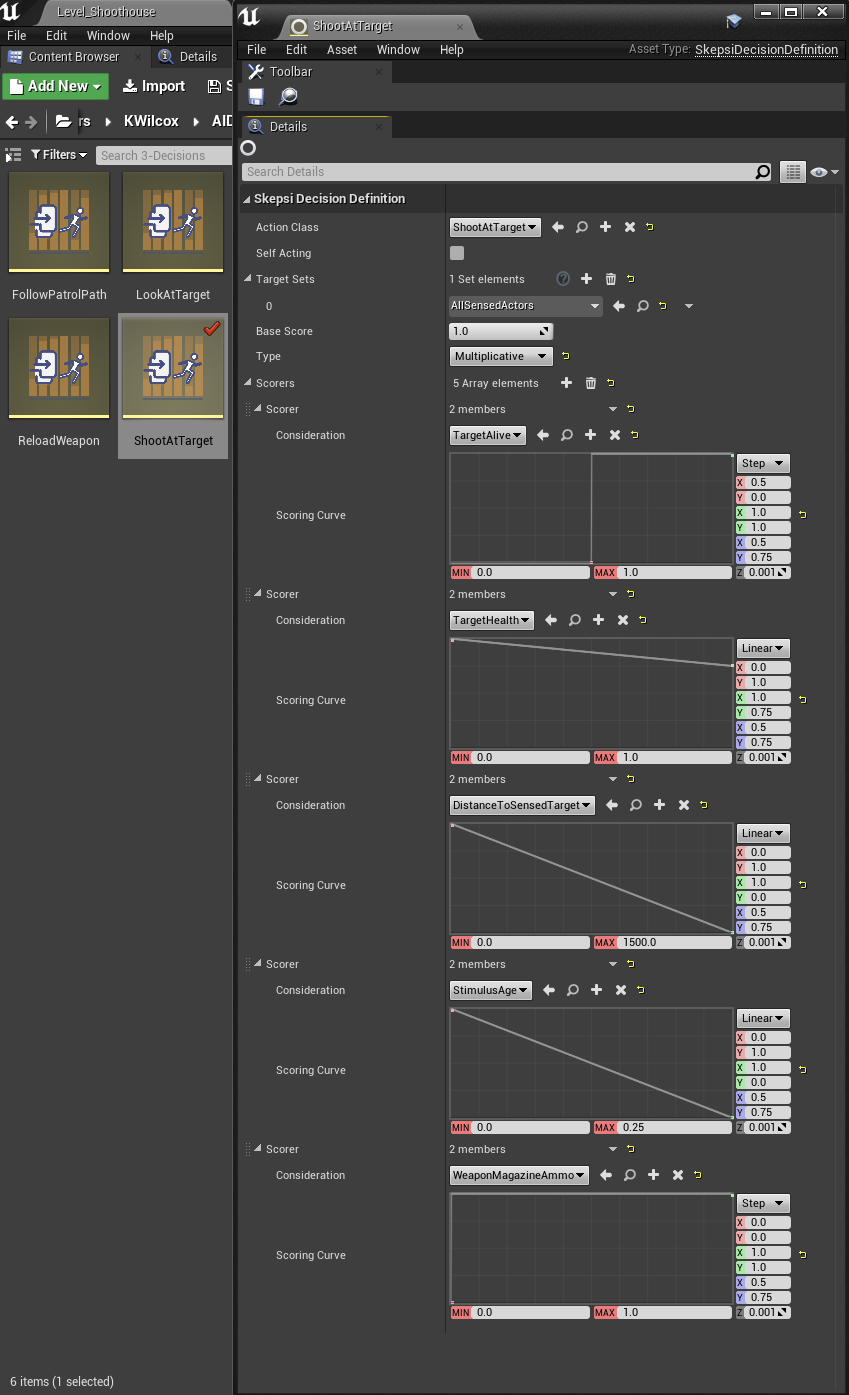


 misty wharf
Hmm, maybe if you continuously update the position they need to follow? The delays would likely make this problem worse
Tbh using a dummy actor for it seems entirely fine if it works around issues like this :D
crystal haven
Yeah the dummy actor was nice but it would clip through terrain and obstacles so the AI would lose track and stop moving. Spring arms at least get displaced by obstacles but components can't be used as an actor for AIMoveTo, I have to get the location and use that as the destination. Maybe I can slow the AI as it approaches the destination or something
 umbral musk
Does anyone have good intermediate AI tutorials with behavior trees? By this, I mean that I have the concepts of behavior trees down, and I've followed some beginning tutorials where I can get things to work. I'm just not sure that my implementation when things get a little complex is correct. It might "work" but I have run into weird issues (one even where things worked in the PIE but not in a packaged game?) To me, there's this relationship between the NPC, NPC AI, NPC AnimBP, behavior tree and blackboard that just feels like it's held together by duct tape. As a start, I suppose I'm looking for help on things like how to make the look at user (or object) non-robotic for the NPC, how to carry out more complex tasks and animations properly (like do you have to put a wait on the behavior tree for the length of the animation and if not, how do you know when the animation is complete?) and what should a more complex behavior tree look like?
misty wharf
crystal haven
Yeah the dummy actor was nice but it would clip through terrain and obstacles so...
You could probably move the dummy actor so its position is projected to the navmesh so it would remain in a reasonable position for them to follow
flint trail
any idea folks https://forums.unrealengine.com/t/anim-notify-fires-during-montage-segment-to-segment-transition-before-reaching-actual-notify-why/234314 ?
Unreal Engine Forums
My anim montage has first section that goes from holding weapon up to aiming it at target (player) and then second section is looped shooting anim with anim notify at the beginning of it (which makes projectiles spawn when triggered). Blend times are 0. Why would anim notify fire when animation is still in the first segment and not yet on the s...
lyric flint
Hey guys, i have some simple ball enemys that just need to follow the player, damage it and increment the score if deleted.
I'm using a pawn for that because it has the simple AI "moveTo"-node, but at around 300 enemys the frame just get decimated.
Does anyone know how to optimize this? I guess the pawn actor has a lot of overhead and the AI Agents aren't helping either.
pine steeple
its not the pawn actor
its the moving of the actor in the world
disable generates overlaps, reduce the amount of scene components
tick further away balls (balls not in the players view) at a higher rate (like .1f instead of every frame), etc
have the player detect if a ball hits him
not the ball detect the player
@lyric flint