#gameplay-ai
1 messages · Page 136 of 1
 pine steeple
 cobalt palm
pine steeple
cobalt palm
pine steeple
@lament linden it looks like they are set from the image
@cobalt palm did you verify that target actor and state is being set?
you can have the BT open and see the values in real time
also did you set the aborts up
like this?
cobalt palm
It should be self?
cobalt palm
pine steeple
<@!324230048506707968> did you verify that target actor and state is being set?
pine steeple
or lower priority depending on where the decorator is
self will abort the green
lower priority will abort the blue
both will abort both lower and self
cobalt palm
When I select lower priority the other selector with 5s wait doesnt highlight blue
cobalt palm
cobalt palm
oh. I didnt know that mattered
cobalt palm
Ok, so I had the Behavior Tree open while running that time and it always stay on the wait selector, so that must mean that the enum key is never set to combat to switch to the other selector.
cobalt palm
How do I do that?
cobalt palm
Ok. Yea so the State never changes from idle, so its something within the VisionCheck
pine steeple
now at least you have some ways to debug
hopefully find your issue
PS. Try using DebugLines/DebugCone, etc to draw to the world
so you can visualize thing
cobalt palm
I watched the VisionCheck this time during runtime and it doesnt go past the cast so its something in here
cobalt palm
huh. I kept going back and forth on that let me try again 😂
🤦♂️ Ok now the execution goes through but it doesnt move to player. Let me try again
It finally goes to the branch but never set the values
pine steeple
what branch
cobalt palm
pine steeple
so your dot angle check is broken
draw some debug lines
see if your forward vector is where you think it is, etc
debug draw line to player from tank, etc
cobalt palm
Yea, I feel the problem is getting the tank top but thats where I want it to stay so that the cone locks to the turret
cobalt palm
pine steeple
debug draw line to player from tank, etc
Is this correct? The start is getting the actorlocation and the end I take the actorlocation and add 1000 to it?
 lament linden
Not quite. You should get the forward vector, multiply by some value (like 1000), add that to your actorlocation and set that as end
cobalt palm
Welp. I may be doing this wrong but either way i did it, it wouldn't rotate with the turret.
cobalt palm
@pine steeple After some later debugging I have moved the Set Blackboard Value as Object to the Event Receive Activation as It only needs to update the key once and I can see that the execution "orbs" go to it, but in the blackboard the key is never set.
oop.
Well. Everything while looking at the Behavior tree seems to be fine. In the blackboard the key switches to combat and then in the BT it goes to the move to node but he doesnt move.
pine steeple
do you have navmesh setup properly?
cobalt palm
pine steeple
do you have navmesh setup properly?
Yep. I see the big green area on my level. There is like a square missing around the ai, I dont know if that make a difference?
pine steeple
that would cause it
make sure your AI meshes does not affect navigation
you must see green underneath it
cobalt palm
pine steeple
you must see green underneath it
Hm. I was able to remove the collision and now its fully green but it still doesnt move.
pine steeple
now its time to learn the visual logger
cobalt palm
Even the debug says its supposed to do it
cobalt palm
pine steeple
<https://docs.unrealengine.com/en-US/TestingAndOptimization/VisualLogger/index.h...
oh no 🤦♂️
cobalt palm
cobalt palm
but, its a pawn ai
pine steeple
that does not have a movement component
cobalt palm
I thought only Characters could have that
cobalt palm
Theres a floating pawn movement
pine steeple
there is a normal one
cobalt palm
pine steeple
there is a normal one
The only one is floating movement. Characters can have the normal one
pine steeple
ah PawnMovementComponent is abstract
cobalt palm
The floating one worked though 😂
cobalt palm
Not a humanoid
pine steeple
i use it for non humanoids just fine
cobalt palm
So making a tank as a character worked?
cobalt palm
I was always told that the Character class needed a skeleton and was a humanoid figure
cobalt palm
Ah so you rigged your own?
pine steeple
if floating movement works
then use it, but its not ideal
this is not multiplayer right?
cobalt palm
Correct.
pine steeple
should be fine then
cobalt palm
Ill have to look at some videos because just rigging a tank mesh seems weird let alone making the wheels tracks move.
cobalt palm
@pine steeple After what has seemed to be a lot of work but doesnt look like it. I made a new BT task where I have the tank rotate and move to when the State = Combat. It all works as you can see in the video however the tank turret seems to rotate relative to the world or something. How could I get it to not worry about the relative of thats the problem? https://streamable.com/npcx83

 celest python
pine steeple
4 legged monsters, flying monsters, etc 😄
celest python
pine steeple
4 legged monsters, flying monsters, etc 😄
Can CMC fly though?
 misty wharf
Doesn't have have a movement mode called flying or something like that
 gritty peak
So i am having an issue with my larger ai enemies that are quadrupeds. they have a charecter capsule collision that is verticle (it wont let you rotate it). So i added extra capsule collision parented to its bones. this works great except for one bug. when i have one (bi ped) enemy infront of it and they are walking together everything is fine. However if the bi ped enemy stops to attack the quadruped will continue walking forward thinking that the charecter capsule collision is what it should use as its navigation barrier. So the enemies get stuck in one another. Any idea for a fix?
 warm ibex
Hi Peeps,
Has anyone here used either
UAITask and or UGameplayTask
Pros and cons?
I see that the MoveTo behavior tree task just uses the AITask version of MoveTo
Haven't seen too much on AITask or UGameplayTask was seeing if anyone here has used them and or might have a great reference resource to study on them.
misty wharf
I've been wondering the same. It seems those things are completely undocumented and nobody anywhere on the internet seems to have much of a grasp of them either or if they do, they've never bothered writing about it
 dawn loom
Ah I guess I should have put it here
does anyone know if there is a way to rebuild the navmesh once at runtime?
I have level generation that happens at runtime and I need a navmesh on it but I'm completely struggling to get it done
if someone could take a look here it'd be awesome #level-design message
pine steeple
play the game, and bring up the console, and type show navigation
do you see anything>?
 cerulean coyote
Hey
I've been using some EQS and it works pretty well, but for my game I mainly want to use it so that it still pathfinds to the player (enemies chasing the player) but I want them to take the best path to the player while avoiding environmental hazards (that are all have their own actor class)
Any ideas?
So currently I have a bunch of traps and various hazards that cause damage to both enemies and players, but the enemy will still go over hazards if it needs to, I want to make that logic much better so they path around it instead
dawn loom
pine steeple
play the game, and bring up the console, and type `show navigation`
thanks for the info, I tried it and it shows nothing
dawn loom
cerulean coyote
So currently I have a bunch of traps and various hazards that cause damage to bo...
I think there is a way to add constraints to the pathfinding but I'm not totally sure about it
IIRC there is also way to substract from a navmesh but I'm also not sure about it
I tried doing it on the server and now it shows this
the navmesh isn't being built on the spawned actors however
on the client it doesn't show anything so I guess it's not replicated but that should be easy to solve
I don't see why it wouldn't build a navigation mesh on the actors
the static mesh components all have Can Step set to true
and I can put pawns on top of them without any issue
I'm not sure if the clients aren't allowed to see the navmesh as a setting or if it's not being replicated to the client
dawn loom
cerulean coyote
Any ideas?
https://m.youtube.com/watch?v=dDnHAUgaQQk I just found this while trying to solve my own issues

Today I show an often unknown but very useful tool for helping differentiate our AI movement.
dawn loom
Btw if anyone has a response for my issue please @mention me
I keep opening this channel again and again with no messages sent in between, it's depressing
 fresh remnant
Why does the navmesh generate a lot of cracks on hills between tile regions? How can I avoid this? Chunky Monotone generation helps a little but there's still cracks
lament linden
Hey guys,
I have a ChildActor inside a Pawn in blueprint. The ChildActor is another Pawn with AIPerceptionComponent.
If I place that Pawn in the world (i.e. not attached to another Pawn as ChildActor), it correctly starts picking up sight/hearing senses and shows in the AI debug tool.
But when it spawns as a ChildActor, AIPerception does not start (even if I call AIPerception->Activate on BeginPlay)
When I reset the ChildActor however, it correctly starts.
By reset, I mean clearing the ChildActorClass variable and setting it again.
No perception debugger when attached as ChildActor
Correct debugger when placed as a standalone pawn
lament linden
pine steeple
that seems a really weird way to do things
why do you say that
pine steeple
what is the purpose of the child actor?
lament linden
It will work as a sensing component that can rotate without having to rotate the entire actor
Imagine the childactor rotating to look at somewhere else, but the main actor stays the same
pine steeple
BasicSensor is another AIController then?
pine steeple
i would not do a child actor
i would just spawn the pawn
in beginplay
then attach it
ChildActors are buggy and garbage
lament linden
😦
They allow me to configure different defaults for the same class easily though. That would require more work to spawn in BP
Still doable though
lament linden
Well I must configure the properties of AIPerception
lament linden
I don't think I have access to SensesConfig during play
pine steeple
not in blueprint
lament linden
Well, at least not from BP. I saw a workaround using C++ but it was kinda ugly
pine steeple
but in c++ you can
lament linden
Alright let me see what I can do
lament linden
Well I don't want to make different classes for each little nuance of change
lament linden
Yeah exactly
pine steeple
but that can be adjusted dynamically
its harder to put a new sense in at runtime
but doable
lament linden
In C++ again, correct?
pine steeple
yes
lament linden
Oh wait I have done this in a previous project
You keep a pointer to AISenseConfig_Sight
pine steeple
you can get the config
pine steeple
{
    int32 ConfigIndex = SensesConfig.IndexOfByPredicate(FConfigOfSenseID(SenseID));
    return ConfigIndex != INDEX_NONE ? SensesConfig[ConfigIndex] : nullptr;
}```But I don't remember this happening when everything was BP
pine steeple
well ChildActor is just known for being bad
lament linden
pine steeple
```UAISenseConfig* UAIPerceptionComponent::GetSenseConfig(const FAISenseID& Sens...
What would SenseID be here
pine steeple
UAISense::GetSenseID(UAISense_Sight::StaticClass());
will return the sense ID for that sense
lament linden
I appreciate the help.
cobalt palm
Hello, in the video I have an ai tank line trace to the player if the player is within a certain angle of the tank. As you can see in the video the tank only checks the angle when the rotate is a certain rotation in the world.
https://streamable.com/13mm3p

Heres the code that gets the angle from the ai to the player
pine steeple
like i said before, draw debug lines
of your vectors
or draw arrows
so you can visualize what is happening
cobalt palm
So just draw debug line in the forward vector from the aitank and see if they rotate?
pine steeple
or draw an arrow, you need to visualize what is happening
cobalt palm
Yea, because for some reason it doesnt seem to be rotating but the get forward vector is in a tick so I dont know why it would be.
🤦♂️
cobalt palm
pine steeple
or draw an arrow, you need to visualize what is happening
I was taking the actor forward vector which does seem to rotate but when I take the forward vector of the tank bottom it works.
So the next problem is in the bt where if the tank can see the player, it sets an enum to combat and then the bt activates a selector that does the combat moveto/rotateto service that I made. It works, however when the enum is set to idle, it does switch to the other selector.
dawn loom
so I tried RebuildNavigation and it correctly built the navmesh on top of my generated actors
but I'm wondering if using a console command in the game at runtime is a good idea or not?
is it something that should be done?
cerulean coyote
@dawn loom YO thanks a lot!!
dawn loom
cerulean coyote
<@167122174467899393> YO thanks a lot!!
np np! I also found this https://docs.unrealengine.com/en-US/Basics/Components/Navigation/index.html doesn't look very helpful (just like all of the documentation when it comes to navigation) but well
Allows applying selected AreaClass to navmesh, using Volume's shape.
cobalt palm
Hello, I have a service that switches an enum variable. That variable has two states, Combat and Idle. When I start the game its set to idle and when the ai can see the player it is set to combat. However while in combat and it cant see the player the enum is set to idle but the selector doesnt change to the idle task even though I can see the value changing?
Could it be that the enum is updating in code but it wont switch until the task finishes?
 lyric flint
Anyone know a good tutorial on how to make flying enemy ai? I have looked everywhere but cant find anything
help me Im desperate 😦
 cold trout
cobalt palm
Hello, I have a service that switches an enum variable. That variable has two st...
cold trout
cobalt palm
Hello, I have a service that switches an enum variable. That variable has two st...
Are you using decorators?
Something would need to abort the task
cold trout
And the service is definitely changing the state bbkey?
cobalt palm
Yep. I have it to the side and watch the state change.
cold trout
I've had trouble with a similar looking setup
I was setting the state on service activate
And the decorators wouldn't observe the change
Switching to search start ai does work tho
But if your service is running a tick function that night be different
cobalt palm
I have an event receive Activation ai that sets the state to Idle then the tick function does the work of checking if the player is in view then sets it to combat if true.
cold trout
Yeh I think that's a similar issue
Try changing the state on activate to one or the other
And see if the decorators even respond to it
Cos I think they won't
cobalt palm
This should show you better of whats going on. I did set it to set the state to combat right at the beginning. https://streamable.com/p7txe9
 cold trout
that looks more like the MoveToIdle task just failing a lot doesnt it
cobalt palm
Yea, but it shouldnt be flickering as the state is set at idle, there shouldnt be a reason for it flickering.
gritty peak
if I lower the tick rate on my enemy BP would that improve performance even though the enemy does not use event tick?
 tawny rune
People such a question, how to optimize a large number of AI? I noticed that the char movement component is a very large and expensive thing, is that true? There is an option to implement each AI through a pawn, but then you have to write your own movement component, which is quite difficult for me, since I did not find suitable tutorials, so either it is very difficult or not necessary.
lyric flint
@tawny rune https://www.youtube.com/watch?v=CqXKSyAPWZYon
 pallid trout
gritty peak
if I lower the tick rate on my enemy BP would that improve performance even thou...
pallid trout
gritty peak
if I lower the tick rate on my enemy BP would that improve performance even thou...
Yes. If the enemy doesn't use tick then you can turn it off completely
pallid trout
cobalt palm
Yea, but it shouldnt be flickering as the state is set at idle, there shouldnt b...
Its not failing, just flickering. it's checking if the player is visible
Try increasing the time interval in the bts_visioncheck
 west saffron
hi! quick question: is EQS inextricably tied to NavMesh? I'm thinking about AI design in 3D space for a space simulator game and was wondering if EQS would be a good fit to drive my AI's decision-making
(since NM cannot be built for 'true 3D' environments as it only operates in planes)
cobalt palm
pallid trout
Try increasing the time interval in the bts_visioncheck
I increased the interval for the service but that made no difference. As of right now, I can see it switching the state variable from combat to idle, and sometimes the behavior tree switches the selector and other times it just disappears but the aitank still move to me.
pallid trout
cobalt palm
I increased the interval for the service but that made no difference. As of rig...
Did the time b/w flickering increase when you increased the interval?
cobalt palm
The flickering seemed to have stopped. However at some points the only thing lit would be the root.
pallid trout
It's flickering because after each interval, the moveTo part is stopping to check if the player is in the line of sight (for a frame)
cobalt palm
pallid trout
It's flickering because after each interval, the moveTo part is stopping to chec...
Correct. But when the variable is set to idle, it should then go to the other selector.
 nova prawn
Guys I have a question ? If i have 2 Types of Units a Worker and a Attacker would I do better having 2 behaviour trees for each unit type or 1 tree with shared behaviours and then switching based on a Unit Type for example a Worker will Walk to Resources then Gather where as a Warrior would walk to wards resources and do nothing.
Im not sure if Inheritance works on Behaviour Trees so they could both Walk To Location but then the Worker could Gather.
cobalt palm
pallid trout
It's flickering because after each interval, the moveTo part is stopping to chec...
What other thing could I do?
gritty peak
@pallid trout i turned off tick for my overall charecter. Do i need to further disable tick for each individual component like mesh and charecter movement component or should i be good?
 uncut python
hey guys, ive been trying to get my ai follow my character and im having an issue with it, they all surround me when the game starts then they ignore me for the rest of the game
I made a decorator and all its a bit odd
Thats my bp
the tutorial i followed was very simple
it just struck me as odd
dawn loom
is there a SimpleMoveToLocation (in C++) that's less simple?
I want to select a radius and/or a timeout to stop trying to reach the destination
AAIController.MoveTo?
lyric flint
You can do two things:
- Tinker with acceptable radius for goal destination (Don't remember if it's exactly called like this, quoting from memory :-))
- Set the timer for success/failure status
You can do it either in behavior tree or C++, maybe even in blueprints, I just don't use blueprints @dawn loom
pallid trout
cobalt palm
What other thing could I do?
It's working fine already. In your gameplay you can't see any effect
pallid trout
gritty peak
<@!779379720688631900> i turned off tick for my overall charecter. Do i need to ...
You're good
 humble mica
Can someone send a screenshot for the blueprint for making a physics based pawn cube roll to random locations?
 waxen ore
Hi guys, is there any way to stop Enemies blocking each other this way? I used RVO avoidance for my Enemy AIs (Consideration radius 300, Weight 0.5) But it doesn't do much.
pallid trout
DetourCrowdController
waxen ore
pallid trout
DetourCrowdController
Ok will I have to renable it somehow afterwards?
pallid trout
waxen ore
Ok will I have to renable it somehow afterwards?
You will have to replace your AI controller with the detourCrowdController and also turn off RVO avoidance in your character
waxen ore
Ok. I'm using satndard AI Controller now, so I need to reparent to Detour Crowd Controller right?
pallid trout
Yes
standard controller is the parent of dcc so all the remaining stuff can be copy pasted
waxen ore
ok I made DetourCrowdController to be the Parent Class, turned off RVO avoidance on my Enemies. And now it's even more weird...
p.s. White Guy (Player) is still using standard AI though
 unborn jungle
How can I stop navmeshes from being rebuilt every time I hide or show a sublevel in the world?
I have navmesh set to static, there is no nav mesh bounds volume in the persistent level (only sublevels) and I have built the sublevel navmeshes separately
Is the only option here to just keep the navmesh dynamic and wait for it to rebuild each time?
pine steeple
you can't have navmeshes on seperate levels
unborn jungle
So it has to be dynamic and rebuilt from the persistent level bounds volume?
pine steeple
as soon as they join the main level, they need to be rebuilt
we tried the same
i also tried some workarounds, but it just broke
unborn jungle
That's a shame
Since this'll increase load times which is one of the reasons I was using streaming
To not have to seamless travel every time a similar map is loaded
pine steeple
yeah, i am in the same boat as you
navmesh generation is slowing our game loading times
unborn jungle
I already have it at horribly low res too 😄
Guess I'll just try to reduce my level sizes as much as possible
pine steeple
you can tweak tile sizes etc
unborn jungle
At least only the server has to build it
pine steeple
what size are your agents?
unborn jungle
Yeah mine are at bare minimum
Going any lower doesn't build properly or has huge gaps
pine steeple
i can send you a config we use, maybe it would speed it up a bit
unborn jungle
That'd be great thanks!
 tepid pasture
Hey all, I'm in need of help with a problem,
I'm using the "RecastNavMesh" to change the variable "Agent Height" to 60, but every time I restart the level, or restart the editor it resets back to 144, breaking the path finding for my AI, How would I go about saving the options here?
pine steeple
bDistinctlyDrawTilesBeingBuilt=True
DrawOffset=10.000000
bFixedTilePoolSize=False
TilePoolSize=1024
TileSizeUU=1024.000000
CellSize=22.000000
CellHeight=20.000000
AgentMaxSlope=60.000000
AgentMaxStepHeight=40.000000
MergeRegionSize=340.f
MaxSimplificationError=0.990000
DefaultMaxSearchNodes=4028
DefaultMaxHierarchicalSearchNodes=4028
RegionPartitioning=ChunkyMonotone
LayerPartitioning=Monotone
RegionChunkSplits=2
LayerChunkSplits=2
bSortNavigationAreasByCost=True
bPerformVoxelFiltering=False
bMarkLowHeightAreas=False
bUseVirtualFilters=False
bUseVoxelCache=False
HeuristicScale=0.999000
RuntimeGeneration=Dynamic
bUseExtraTopCellWhenMarkingAreas=False
AgentRadius=24.000000
bDoFullyAsyncNavDataGathering=False```could give that a try @unborn jungle
it reduced our build times quite a bit
pine steeple
yeah
switching to chunky monotone, and cell size of 22 and 20, with a tile size of 1024 will be the big increases
but just cherry pick. make sure you turn off FullAsyncGathering
that is super slow!
unborn jungle
I have never tried changing region partitioning etc.
Very excited to try these
If I can get build times down to say 2-3 seconds on the server then that's fine
pine steeple
2 years of tinkering
unborn jungle
Clients by default will never build navmeshes right!
unborn jungle
😄
pine steeple
then no.
pine steeple
@tepid pasture there is a bug
best bet is to modify your DefaultEngine.ini and set it
with editor closed
tepid pasture
@pine steeple Thanks,
How exactly would I do that?
pine steeple
Sometimes those settings just reset, i have had it happen a lot
open DefaultEngine.ini in your config
find[/Script/NavigationSystem.RecastNavMesh]
AgentHeight=80.00000```for example
tepid pasture
Thanks again, but I don't know where to access the config.
tepid pasture
Thank you, I'll get on that.
Hope it works (:
dawn loom
lyric flint
You can do two things:
1. Tinker with acceptable radius for goal destination (Do...
my AI is extremely simple so I'm not using any behaviour tree (in fact all it does is move) but where would I find the acceptable radius and/or the timer?
pine steeple
what move node you using?
i like the Move To Location/Actor Task node
as you can come off the Finished move pin, to start moving again
pallid trout
kaos, any way to fix this?
dawn loom
@pine steeple I'm using C++ and I'm using UAIBlueprintHelperLibrary::SimpleMoveToLocation but it's too simple
pine steeple
in c++?
@pallid trout we used a move target actor that the AI track to solve the stop/start issue, we just teleport the move actor and have the AI move to the goal actor via goal tracking.
tepid pasture
pine steeple
```AgentRadius=24.000000
AgentHeight=80.00000```
It's working perfectly now, thanks for the help.
unborn jungle
@pine steeple Thanks it's a lot faster now it seems!
How big is your navmesh bounds btw?
For an average level
I had mine at like 80k XY
But might be able to get the levels smaller to about 50K
dawn loom
pine steeple
in c++?
yes
ah sorry
I thought you were talking to me
😕
I found my answer (it's AIController->MoveToLocation() )
pine steeple
@dawn loom also override MoveCompleted in your AIController
if you want to start pathing again
(i think there may also be a delegate you can bind)
dawn loom
thanks for the tip!
warm ibex
In a Behavior tree Composite blackboard condition.
I see you can pick any blackboard value then it gives you different Key Query options based on the type of blackboard value you have set.
Can anyone point me to how they're changing the options available on the editor?
warm ibex
yeah im in c++, been doing a lot of internal setting, i've been getting to know how to set like the default filtering so that ONLY a specific type or types can appear on the drop down for the blackboard key you can select.
But as far as like
here's your key type
and because you have this key type these are extra options on that key type
maybe 'compare checks' or 'oh you're looking at this specific class type? ok well in this composite these 3 new drop down options appear now.
uncut python
hey everyone quick question, i have this code for my ai sensed. My ai wont follow me, and I just realized that my ai is a child bp of my basecharacter that I am casting
will that affect my ai at all?
"Parent Class:BP_BaseCharacter"
uncut python
is my perception not updating?
warm ibex
@uncut python your AI comes from AIController
So no it shouldn't matter your AI inherited from Base Character
Hi peeps!
Question on component update related to inheriting from : public UAITask
I see we have NewBTAITask< for template creation from within a : public UBTTask_BlackboardBase
I saw inside of void UGameplayTask::InitTask(IGameplayTaskOwnerInterface& InTaskOwner, uint8 InPriority)
` UGameplayTasksComponent* GTComponent = InTaskOwner.GetGameplayTasksComponent(*this);
TasksComponent = GTComponent;
bOwnedByTasksComponent = (TaskOwner == GTComponent);
// make sure that task component knows about new task
if (GTComponent && !bOwnedByTasksComponent)
{
    GTComponent->OnGameplayTaskInitialized(*this);
}`
I was wondering if because my gameplay task is owned by a BehaviorTree Node and bOwnedByTasksComponent is false
If that would be the reason why the gameplay task might not be updating?
Breakpoints through out the entire UGameplayTasksComponent shows none of its updates are getting hit what so ever.
But the AIController is obviously updating if the behavior tree is processing, I'd figure?
uncut python
@warm ibex touché I’ll have to Investigate more
warm ibex
@uncut python sorry I can't be more helpful I dont use EQS for the stuff I've built, but if you're using behavior trees double check that you're setting up the EQS accordingly and that your AI character is actually hooked up to the AIController
uncut python
@warm ibex no worries! I appreciate the response, saved me the hassle from testing out that theory of the base character
lyric flint
@warm ibex If you still need to figure out filters for your keys in C++, look for things like AddObjectFilter or AddVectorFilter etc. in the engine source code, hopefully to give you an idea 🙂
warm ibex
@lyric flint its not a filter its a sub new option of a possible operation, depending on the blackboard key type specified.
I was looking at the blackboard condition composite in c++ for example but their operation expressions dont seem to append to anything even though it seems like it might be doing.
lyric flint
@warm ibex oh, I apologize for the misunderstanding! everything I learned AI C++ related was from browsing C:\Program Files\Epic\UnrealEngine\Engine\Source\Developer\AITestSuite\, But I'm guessing you already did that 🙂 I don't really use visuals in unreal, I do pretty much everything in C++, so I don't have an answer 😦
warm ibex
Yeah lol same I just do c++ but it's a waste of effort to not take advantage of the editor so i've been practicing more on making generalized services/composite/tasks so I can do more rapid AI designing rather than needing a new c++ implementation for another specific solution.
I'll figure out the extra options addition/removals sooner or later heh
lyric flint
uncut python
Do I need a crowd ai controller if I’m spawning in a horse
Perhaps consider https://www.youtube.com/watch?v=CqXKSyAPWZY for really huge horde
Displaying thousands of characters on-screen in real-time has always been a challenge - until now. Unreal Engine's Niagara visual effects system opens up doors to go far beyond what was previously thought possible and this presentation by Epic's Joseph Azzam showcases how you can utilize the power and versatility of Niagara to create massive cro...
uncut python
Aha I’ll take a look thanks
 thorny jay
Hi all, I have a really frustrating problem with a behaviour tree. I have a very simple sequence which just waits 2 seconds, and then runs a task, the idea being that the task is run every 2 seconds or so while the appropriate conditions are met
The problem I have is that for reasons I can't figure out, the first task keeps getting interrupted and restarting itself
This means that if the wait comes before the task, then the AI just ends up staring the target down for a good 10-20 seconds before it seems to correct itself and acts as it should
If the task comes before the wait, then the AI will go into a frenzy for 10-20 seconds or so before correcting itself
I can't see any evidence that the behaviour tree is branching elsewhere during that time, thereby interrupting the wait task
It just seems like the wait task keeps getting down to 0.5 seconds or so and then resets back to 2 seconds several times over before finally counting down fully
This happens regardless of whether I check the "ignore restart" checkbox
The tick rate for the task is also on -1.0
pine steeple
going to need to show us
also i highly recommend checking the Visual Logger (google it)
thorny jay
I'll grab a screenshot in a moment, sorry I was in the middle of compiling

The culprit is the wait 2.0 in the bottom right
It continually resets, so ManageLineEngagement never gets executed
I'm just not sure what would be triggering this. When observing the behaviour tree during gameplay, the execution remains in the wait task, I don't see any other branches executing even for a moment
pine steeple
don't see anything wrong, if you are sure nothing is aborting it out
thorny jay
I'm pretty sure, let me chec kthe visual logger you mentioned
I use the ' key on the AI to highlight it
pine steeple
Windows -> Developer Tools -> Visual Logger
run it, and see what is happening in the BT
it tells you a lot of stuff
thorny jay
Is there a better way to have a task only execute once every 2 seconds?
Without using a wait task node?
basically the AI is commanding line infantry, giving them orders to crouch, reload, stand, present, fire etc
All I want is to stop them issuing commands too quickly
lyric flint
thorny jay
Is there a better way to have a task only execute once every 2 seconds?
Sure, you can issue your troops a command that triggers an event that triggers an animation that triggers a timer that triggers an end. At start set the bool true, at end set the bool false. While the bool is true, don't do anything. You don't even need BT for this, although you can. Tick should be enough. But why? BT may have a learning curve which may be frustrating, but there are definite benefits overall 😄
pine steeple
@thorny jay just ditch the wait, run your task, and just use a timer to keep repeating
when it aborts, AbortTask gets called (which you can override to cleanup)
but this will keep it locked to that task
which might not be idea.
thorny jay
Hmm
@lyric flint Only problem with that idea is it requires significant work to implement, whereas simply having this task run every 2 seconds will solve everything
warm ibex
is it possible to Set a value of a blackboard variable on a Service?
I tried but I fail in here
bool UBlackboardComponent::SetValue(FBlackboard::FKey KeyID, typename TDataClass::FDataType Value) { const FBlackboardEntry* EntryInfo = BlackboardAsset ? BlackboardAsset->GetKey(KeyID) : nullptr;
it returns null
in the service constructor I have this variable set up
bCreateNodeInstance = true;
I was thinking that would allow me to change blackboard variables safely
 somber star
Usually you just expose a blackboardkeyselector as a uproperty on your class and set the one you want to use in the behavior tree. If you look at the implementation of the already defined stuff in aimodule, you can see how it works.
warm ibex
yeah thats what I've done, its interesting the selector name is filled out SelectedKeyName but GetSelectedKeyID comes out invalid.
yup weird GetValueAsEnum works just fine passing SelectedKeyName
GetValue<UBlackboardKeyType_Enum> passing GetSelectedKeyID() passes null and fails.
Not sure why the selected key might be null but at least I have one approach to accessing the blackboard variable
somber star
I had that problem with a task I wrote, and it was because nothing was calling this on my selector in C++:
FilterClassBBKey.ResolveSelectedKey(*BBAsset);
The task has InitializeFromAsset, not sure if the service has that same function
warm ibex
@somber star that did it 👍
pine steeple
https://www.thegames.dev/?p=70 @warm ibex @somber star
I get a lot of question on Unreal Slackers Discord about custom BTTasks in C++, how to create and someContinue readingAll about BTTasks in C++
going to also cover Decorators and Services in the future
 near jetty
@pine steeple I generally avoid making BTTasks in cpp
pine steeple
the benefit for frequently used tasks is the plus side
near jetty
inmense mayority of the time i have them as BP in the form of very high level tasks that interface with a AIController or Component where the actual logic is
the reason is that BP lets you do delay nodes
pine steeple
ie, i make them non instanced, and saves a BP vm call
near jetty
writing time-based code in cpp is a pretty annoying thing
yeh but thats more important for things like decorators and services (which i like to keep cpp only)
pine steeple
i have tasks that get called quite a bit, less time i have to spend entering the BP vm, the better
when your running 120ish AI
pine steeple
yeah i run character class also 😄
but i optimize the hell out of the AI when they are in FOW
and not visible
near jetty
yeh 120 AIs on character class with BTs running... that would not run at 60 fps on consoles
pine steeple
reduced tick rates, stop skeleton ticking, etc
near jetty
on DWVR i had my characters as BT + character classes
pine steeple
CMC ticks at reduced rate
near jetty
found that just 15 of them would tank framerate in PSVR
ended up having to also implement logic-lod type stuff (reduced tick at distance and the likes)
pine steeple
i can get 100 AI in fow at around .8ms on the CMC
near jetty
with some heavy throttling i guess because moving 200 character-style actors will spend 1 ms just in MoveComponent calls
pine steeple
oh before i optimized i was doing around 4-5ms for CMC for about 150
near jetty
its kind of pathetic this even has to be optimized
pine steeple
thing is, its not really just the CMC that costs
the bit thats costing me is the transform updates
near jetty
yeah thats a huge hit
the CMC itself doesnt cost that much if you use navmesh snap
one particularly nasty trick is to not have the character meshes attached to the capsule
you have 2 actors
pine steeple
when agents are off screen, i disable floor traces, and grab the path from the PFC, and just have the AI move from path point to path point, with no calculations
pine steeple
(floor navmesh projection, not trace)
near jetty
and you move the agent mesh (visuals) from a centralized subsystem
pine steeple
o_0
near jetty
i tried that one, but its very problematic
the disable floor traces thing
you can get stuck in geo or inside other characters very easily
from my tests, navmesh point projection is crazy cheap
so its spammable
on the "1000 traces per ms" level
its cheaper than a single blueprint tick XD
pine steeple
they don't really get stuck in geometry (floor wise anyway)
not that i have seen
i turn it on and snap them back to navmesh before player sees them
near jetty
ive had them stuck into geo a lot when doing that
pine steeple
interesting, yet to see that
i have seen them stuck in walls
but nav recovery shoves them back out
near jetty
nav recovery?
pine steeple
made a system to recover agents that end off of the mesh
X amount of failed moves, it checks to see if there is navmesh under the agent, if not, runs a recovery
near jetty
btw, the trick where visual mesh is different from actual character gives massive perf improvements
'character movement likes to end up calling move object multiple times
specially in mp
mostly in the cases where the actor has multiple stuff attached to it
lyric flint
Yo short question

Hey guys, in today's video, I'm going to be pushing Unreal and my PC to their limits! In a celebration of 5000 subscribers, I'm going to be spawning in 5000 AI's into UE4.
Thank you all so so much for 5000 subscribers! It really means a lot to me, thank you for all of your support :)
#Ue4 #UnrealEngine4 #5000AIs
_______________________________...
is the limit here the 5000 Rendered rigs OR
the 5000 ai's?
near jetty
it just runs like shite
the AIs isnt that much the problem
5000 Characters running around is
lyric flint
@near jetty so technically if i had 5000 characters as squares on a 2d map it would work just fine? it wouldnt render anything
near jetty
if they were 5000 actors with character movement components (derived from ACharacter) it would still run like absolute shit
as a bonus
if they were 100% empty actors
with absolutely nothing on them
also not moving
but with the Tick node active
it would already be unable to reach 90 fps needed for VR
lyric flint
So what if i make a center node which has only tick nodes
and just is like a manager for all ais
?
near jetty
that would run much better
but still like shit if you are moving 5000 actors
even if they are near empty
lyric flint
is it because of unreal engine or is it a generall issue?
near jetty
to run 5000 objects (of any kind) you need to look into niagara and/or instanced mesh components
unreal engine
lyric flint
so anyone know how I could have it so a root motion of walk animation of my ai can work
at the moment when my AI moves around it jitters cause velocity is always reading 0 so animation never switches from idle to walk in the blend space ??
waxen ore
pallid trout
pick your poison
Yean I do the same, but still I have weird foot sliding. Nevertheless - thanks for help!
 rapid ridge
is it possible to do EQS without an AI character as the querier?
misty wharf
Yes, you can do EQS from any actor or such iirc
 high summit
the red one is not executing, but the green one is executing, why this happen?
any behavior tree expert that can explain why toggle breakpoint not hit, but it hit on green side?
the green one is executing, but red one isn't
rapid ridge
if an EQS to find actors doesn't find any actors is it considered successful still?
pine steeple
if the generator fails, it will be a failure
rapid ridge
okay thanks
high summit
this video explain : https://drive.google.com/file/d/15YykZKkmUd0k9U_gLeCbSq0_bQ5pXCoD/view
Google Drive
here is above part, you can download video or it would be available after few minutes
or try to refresh
so the finish execute should be false?
inside playhumanoid task?
unborn jungle
When moving navmeshes at runtime, how come it's not rebuilding? The transform is at the correct location but only the original area ever gets rebuilt
Do I need to create new navmeshbounds volumes at these locations rather than move existing ones?
pine steeple
You can't move the navmesh actor
there maybe some workaround, like telling the navigation system that the area bounds had been moved, but would require some looking into the navigation system.
but normally your bounds actor is set and updated once only during runtime
pine steeple
you cant
unborn jungle
Hmm that udemy C++ course did it AFAIK for their endless procedural level game
They had AI walking around in an endless forwards path of new levels
pine steeple
hmm
unborn jungle
I believe they spawned new ones in and didn't move anytyhing
pine steeple
well i could never get it working, even when the nav was dynamic
unborn jungle
I'll give it a shot and let you know
pine steeple
we tried to do that with our prefabs
have navmesh bounds pre-set in the prefab
and spawn the entire prefab with its navmesh bounds
tho now i think about it, i think our issue is we wanted to keep the data, so yeah it might work, been a few years since i tried
@unborn jungle what you could do is..
    if (NavSys)
    {
        NavSys->OnNavigationBoundsUpdated(YourBoundsActorHere);
}```this might force it to update when you move it
unborn jungle
Thanks will try that also!
And just to make sure, sublevels can't have their own nav mesh bounds right?
Only the persistent level can have it, so if I wanted a long line of levels, the only way to get navmeshes on all of them is to update the persistent one?
high summit
so it mean if both blackboard condition are false then it would run parallel node?
unborn jungle
pine steeple
tho now i think about it, i think our issue is we wanted to keep the data, so ye...
It seems the udemy course just calls GetWorld()->GetNavigationSystem()->Build(); after moving
pine steeple
eww
unborn jungle
Is this a lot worse than your method?
unborn jungle
It's actually calling the editor build paths or something?
Just want to understand why one would be better
And of course would go for the cheapest option
high summit
in above screenshot you can see parallels node is working, but how these two other red condition become fail?
does it mean if bool value is false then blackboard condition is false or it is other failure
unborn jungle
pine steeple
this might force it to update when you move it
Works thanks!
 winged cargo
@lyric flint when did you see the light?
unborn jungle
Is the correct way to reduce the perceived performance hit of a dynamic navmesh rebuilding at runtime to lower the Max Simultaneous Tile Generation Jobs Count?
Seems to have a much smaller impact on perf at the cost of build speed which is fine in my case as I can have it generating ahead of where it needs to be
pine steeple
you can turn on fully async
this will not impact your gamethread
but at super slow build speed
warm ibex
Hi peeps,
Has anyone used the MoveTo task as a sub task within their own task before?
If so did it become an extreme hassle.
I see the BTTask MoveTo just calls the AITask Move To
Was thinking of doing a moveTo part to a bigger task internally in c++ so just seeing input on using the task move to internally and if it was too much of a pain in the butt lol
rapid ridge
I have some AI and I need to set some blackboard values before it spawns, but I can't access the blackboard if I defer spawn, what should I do
 clever skiff
wasnt there a way for ai perception to be seeing after being compiled i cant seem to figure out which way my character is looking.
having to play the game to see the sight is annoying
 glass onyx
rapid ridge
I have some AI and I need to set some blackboard values before it spawns, but I ...
glass onyx
rapid ridge
I have some AI and I need to set some blackboard values before it spawns, but I ...
I would probably instance blackboards in the gamemode and set the values in them from there. When a pawn is spawned, pass it the setup blackboard to use
rapid ridge
glass onyx
I would probably instance blackboards in the gamemode and set the values in them...
What happens with the Behavior Tree? I run the behavior tree on possess, should I still run it on possess with an empty blackboard asset or does your method do something else?
misty wharf
It sounds like the easiest solution would be to have a method on your actor that starts the BT when called instead of starting it automatically
this way you can set whatever values on the BB before starting the BT
 potent cosmos
Do you know a way to make AISense_Touch from AIPerception work in blueprints?
pine steeple
not really sure what touch is supposed to be or do
it seems like it was never fully implemented
lyric flint
Yes, it's called Collision with the capsule component 😄 Seriously though, touch versus hearing is just sense radius, put it at zero and hearing become touch hehehe
pine steeple
yeah but it seems like it was not properly implemented
lyric flint
I know, I was just being silly 😄
pine steeple
its like most of the AI systems, half implemented
potent cosmos
lyric flint
Yes, it's called Collision with the capsule component 😄 Seriously though, touch...
but what when you need also hearing normaly 🙂
apparently , only way is own code to call FAITouchEvent
misty wharf
You could probably make a BlueprintCallable wrapper for the code pretty easily if it works similar to the other senses
glass onyx
rapid ridge
What happens with the Behavior Tree? I run the behavior tree on possess, should ...
You’d call to get the prefilled blackboard in your OnPossess. What’s the use case here? Are you trying to load blackboard data from a saved state?
lyric flint
potent cosmos
but what when you need also hearing normaly 🙂
Hearing is a sight with 360° cone. Well, sphere in this case 🙂 but I still think of functional approach is collision with your mesh, instead of your capsule. And you can also make sure to turn on Use complex collision as simple Which in effect it should basically have a very fine touch result. I don't really understand your use case for touch so I'm just brainstorming 😄
 storm gulch
Hi! Could you help me with one issue - trying to implement builders for an rts. Everything is more or less done, but if a building is represented as an obstacle on a navmesh, builders occasionally walk right through it. If it's an empty navmesh, then they can't find it and get stuck on a MoveTo node
 cosmic stag
Im running a EQS test for PathExist to item, and it still returns QueryItems with incomplete paths. Is it supposed to happen that way?
storm gulch
cosmic stag
Im running a EQS test for PathExist to item, and it still returns QueryItems wit...
thank you, this may be a solution to my problem
nova prawn
Hi, Whats the best way to implement RTS Units moving to a position, I have all the selection and stuff and can click a location for the Units to move to but I added a Node with a Radius of 300 to create a random spot near the clicked location but this seems alittle weird.
Create Random Spot for Unit
pine steeple
just project the mouse click location to navmesh
if it fails, don't move unit
otherwise move them to that location
point would be your clicked position
 south bobcat
if i drop an AI BP multiple times in the world, do they share the same controller, or do they all get their own instance?
south bobcat
alright, thanks ^^

 mint elbow
Hi, I'm having an issue with my AI running the wrong Blackboard. I have an ai "AlphaJackal" and he uses the "AlphaJackalController" and you can see here that I have him set to use the AlphaJackal_BB and the AlphaJackal_BT. Well, for some reason, the AlphaJackal_BT is not running the AlphaJackal_BB, it's using a different BB and I don't know how to get it to use the correct one.
Anyone see what I did wrong?
misty wharf
@mint elbow check in your BT asset that you've set the Blackboard Asset property to the correct BB. I don't know if the Use Blackboard node overrides it
mint elbow
I think that did it, thanks!
nova prawn
@pine steeple Thanks , Just one last thing if i have say 10 units selected will they all "fight" to get on the one spot and if so how is the best way to approach so they say to themselves "Someone is already on that spot I need to find a spot nearer."
 echo lark
is there way to modify cost of path without using nav modifiers ?
Ie I want to plan path where the AI will be least visible to player (effctivly avoiding player forward vector at the start of path planning)
ok I see some solution FindPath(), but that's really global override not per move request -;-
 patent hornet
you'll need to EQS that @echo lark
make a grid around the player, score them by - (Point - PlayerLoc) DOT PlayerForward
for an entire path that will get tricky though
you can spawn a nav modifier in front of the player, update navigation, find a path, destroy the nav modifier and update the navigation again... if its small enough it will not kill your performance
pallid trout
You need to move towards a point while avoiding the player. An eqs with a trace test from the player pawn and a distance test from the target point(prefer less distance) will work
 feral marsh
Hey guys, how are you all doing today? quick question: I created a new blackboard but it has the same keys as the other blackboard i have, does anyone know why does it happen? (I have 2 different enemies and I want both of them to have different blackboard but they all share the same keys and I don't want it I want like a clear blackboard to work with)
pallid trout
feral marsh
Hey guys, how are you all doing today? quick question: I created a new blackboar...
DId you check if their behavior trees have the corresponding blackboard selected?
feral marsh
Thanks for the help brother I didn't see that🙂 @pallid trout
 shadow isle
I've got an AI controller with a AI perception stimuli which constantly gets sight and then loses sight:
The perception sets the target actor blackboard key, so unfortunately, this constant switching has effects on the BT and the AI behaves weirdly
does anyone know why this happens?
 verbal violet
Hi people, how i can set my character to use specific Nav Agent config. I've made in Project Settings -> NavigationSystem in supported Agents new config, and now I want to assign that config on specific Character, but can't find there I can do that, on some posts i read to engine select proper config based on CapsuleComponent size, i tried it but same result. I've made NavLinkProxy and i want to only one enemy can use it
pine steeple
use nav filter
verbal violet
pine steeple
better than using agent
pine steeple
if you want to force agent
goto MovementComponent of character, and set its nav agent properties
pine steeple
its the area class
you set this to a new Area
say "JumpPadLinkArea
i would not use multiple agents as filters
verbal violet
should add new area in front of nav link and there set that only one type of enemy can walk, in nav filter?
verbal violet
i understand it is problem
aha I understand you...I actually used it before as personal space for enemies
tnx man
pine steeple
so filters can exclude/increase cost of nav areas
you apply the filter to the AIController of the different enemy types
so maybe soldiers can say go in the tunnel, but Heavy can not because they are too big
that kinda thing
like this for example
verbal violet
yes it's logical and optimized, and can have multiple enemies with same agent type
tnx @pine steeple
pine steeple
np
shadow isle
shadow isle
For anyone wondering: setting the auto success range value to the sight radius solved this.
verbal violet
@pine steeple sorry, i make nav filter as on sc, but not understand? Does I need separated agent configs (i removed them now keeping only Default and Heavy) for this, or i need to set on character some nav flag ?
How area know whom to let inside and whom no? based on what, on agent config or this nav flag ? and should assign nav filter somewhere ?
pine steeple
you just set that in the AI controller
for that enemy type
Default Navigation Class
verbal violet
aha, so I need separated nav filter for each enemy (or at least one who can't go inside area) I tried now, assigned this in ai controller for swarmer but he still try to go through nav link
shadow isle
One question around Navigation Invokers: if you have many AI in a small environement, is it better to use them or not?
(the nav needs to be dynamic as there are moving platforms and doors)
pallid trout
shadow isle
One question around Navigation Invokers: if you have many AI in a small environe...
Navigation invokers are glitchy in packaged projects.
Might work perfectly in the editor but most of the time they break when i try in the standalone
pallid trout
That was on 4.25 though
shadow isle
i am and staying on 4.25.4
pallid trout
shadow isle
(the nav needs to be dynamic as there are moving platforms and doors)
There was a stream by ian shadden on nav links. That might help you
shadow isle
ok thank you.
lyric flint
anyone able to help with tagging objects and finding the closest one?
trying to use 2 loops but it kinda breaks..
first loop is finding all the tagged berrybushes and putting them into an array, second loop is then finding the closest bush among those and clearing the array
somehow it breaks after a while tho
pine steeple
use EQS
lyric flint
thanks! Ill try that instead 😄
lyric flint
if I only knew about this 3 days ago would of saved me a lot of time
this is so much simpler lol
 orchid agate
hey guys i have this in my character ai bp and was wondering why when it is tripped ALL zombies see me instead of the 1 who set the value in its own BB its like they have a hive mind :/
pallid trout
orchid agate
hey guys i have this in my character ai bp and was wondering why when it is trip...
There is an option for "instance synced" in your blackboard.
pallid trout
if it's enabled then all the zombies (on that blackboard) will work as a hive
otherwise they will be completely separate
shadow isle
I have an issue where the On Target Perception Event of the AI Perception component on the controller gets called continuously with the sight stimuli's Successfully sensed value switching quickly from true to false.
I'm basically using the Move To node to strafe left to right when the AI is in combat mode. However, when reaching the Move To node the Perception Event is triggered with a Successfully Sensed value of false, even though the player always remains in sight (the AI is strafing and it has a vision of 90 degrees), and this is followed immediately by another Successfully Sensed with value true and so on, in a close loop.
This is my configuration:
This is where I check the value:
And this is the result:
If I remove the MoveTo node in my BT, then this behavior stops and the AI does not stop to sense the player unless the player moves away from sight (so, the event On Target Perception Event is no longer raised with a successfully sensed value of false).
I've seen similar questions in this forum, however no real answer here. Has someone seen this behavior? What can I try to solve it?
Thank you....
You can see here that the node MoveTo is not followed by the wait node, and that's because the MoveTo resets the Target Actor so the decorator aborts the whole branch (but then the branch is run again immediately afterwards):
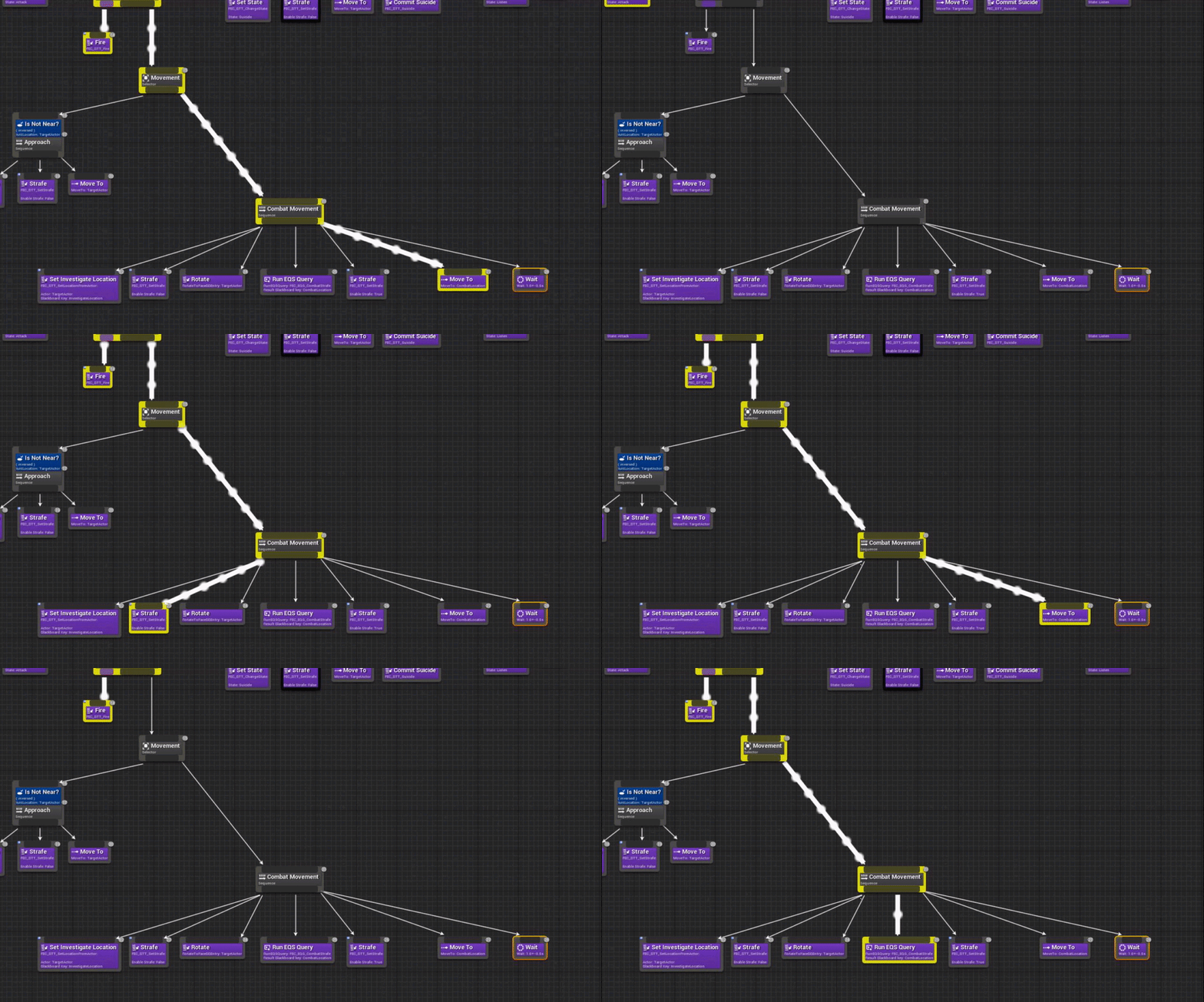
 deft sedge
shadow isle
You can see here that the node MoveTo is not followed by the wait node, and that...
deft sedge
shadow isle
You can see here that the node MoveTo is not followed by the wait node, and that...
why is your fire your main task in that parallel and not the background task? asking out of curiosity as I haven't used a parallel for anything yet
shadow isle
because in this way it keeps shooting while having separate nodes for moving
when the fire task is interrupted, the pawn gets notified
shadow isle
well yes and no
because as I said, the issue is that the Move To makes the AI perception of sight trigger with a perception value of false, which unsets the Target Actor, which aborts the node
the issue is not whether move to fails,
the issue is that move to generates a lose of sight perception, which aborts the whole thing
deft sedge
shadow isle
the issue is that move to generates a lose of sight perception, which aborts the...
that may explain why I've had fails too
shadow isle
It looks like using Move To with an actor as reference does not present this erratic behavior, it does present it with a Vector
I might put an invisible actor in the world just to hack my way through this, but before I try this out I'd like to fish for ideas
deft sedge
selector on blackboard key possibly
shadow isle
in both cases using a blackboard key. If just set MoveTo with a vector I see this issue, with an Actor it works as expected instead. weird.
need to investigate further
pallid trout
shadow isle
in both cases using a blackboard key. If just set MoveTo with a vector I see thi...
maybe try putting the perception in the pawn instead of the controller.
shadow isle
tried that, same result
deft sedge
shadow isle
tried that, same result
do you have the perception attached to the head socket so it matches where the eyes are
shadow isle
deft sedge
do you have the perception attached to the head socket so it matches where the e...
no, I cannot set the parent socket for some reason in the settings
deft sedge
you have to do it in c++
otherwise your perception is probably not pointing where you want
I don't think that's related though, was just curious
shadow isle
it is pointing where I want, on the X axis of the character
I've tried that from many different angles, and can see it in the AI debugger
deft sedge
did you make custom decorators for this? If so why do that and not use the built in "Gameplay Tag Condition" ?
pine steeple
the built in one does not handle aborting
mine handles aborts, etc
{
NodeName = "Gameplay Tag Condition";
// Accept only actors
ActorToCheck.AddObjectFilter(this, GET_MEMBER_NAME_CHECKED(UBTDecorator_CheckGameplayTagsOnActor, ActorToCheck), AActor::StaticClass());
// Default to using Self Actor
ActorToCheck.SelectedKeyName = FBlackboard::KeySelf;
// For now, don't allow users to select any "Abort Observers", because it's currently not supported.
bAllowAbortNone = false;
bAllowAbortLowerPri = false;
bAllowAbortChildNodes = false;
}``` vast relic
Is there an easy fix to custom collision and AI or am I stuck using Pawn object type?
 rigid portal
Is there a percent path completed on a navigated path? Say I use a MoveTo for going from pointA to pointB. Any way to query when the pawn is 90% traveled along the path?
lyric flint
hey guys, I have a super annoying problem that you guys probably will instantly know how to fix.. here is a gif and 2 pics
so its basically a kinematic "hovercraft" which detects the average surface normal with 5 raycasts, thats not important, that works..
the problem now it that i need the hovercraft to rotate towards that green vector (sometimes blue or purple because other vectors overlap)
the problem is that the green vector, the one i rotate to, also resets my Z rotation when i rotate towards it.. im out of ideas.. i tried everything 😦
lyric flint
rigid portal
Is there a percent path completed on a navigated path? Say I use a MoveTo for go...
do you mean in a straight line or like a full path with random directions?
pallid trout
rigid portal
Maybe around some obstacles
A dummy actor on the same controller and settings but no visibility and collision. It will move on the same path from A to B as your AI. Set its speed extremely high and calculate the distance. Now when your ai starts walking you can check the percent.
pallid trout
Yeah
rigid portal
Sweet, I'll try it out. Thanks!
pallid trout
I don't think this will be perfect if your character will slow down around corners. Worth a shot tho
rigid portal
I'm sure there is a function, I'm reading through the API now
pallid trout
Get path length node
rigid portal
Oh! Yup... that's it
 static crater
Suddenly this check fails, anyone knows why? I do have a navmesh bound in level
pallid trout
rigid portal
Oh that's kinda cool
This is better than using a dummy actor:Preprocess the path before even starting with "Find path to location/actor aysnchronously".
Length, cost or even draw the actual path
handy
rigid portal
Thanks!
 manic karma
Hi there.
Is there any way to allow AI Character strafing during movement without using a behaviour tree?
 wraith anvil
What does AiPerceptionStimuli does? if i do ReportNoiseEvent on an actor that doesn't have this component the Ai with hearing perception still hears it
i thought that the actor needed to have the AiPerceptionStimuli to be heard
wraith anvil
Sight sense works as expected
pallid trout
wraith anvil
Sight sense works as expected
If a vase falls and you report noise, does the vase have AiPerceptionStimuli
wraith anvil
it doesn't
but the AI catches it
same with MakeNoise and MakePawnNoise. the actor doesn't need to have AiPerceptionStimuli for the AI to catch it
and i'm extremely confused
 ocean delta
should i make a regular blueprint blackboard or are there use cases for using a blackboard CPP base class?
 noble shadow
So I followed: https://docs.unrealengine.com/en-US/InteractiveExperiences/ArtificialIntelligence/BehaviorTrees/BehaviorTreeQuickStart/index.html
And several other tutorials like this.
But my AI wont "move to" a location. It will follow the player, it will move directly towards an actor if I have placed one and connected it, but a random "move to" doesn't work. I have been stuck at this for like two days now. 🙂 If someone can help that would be appreciated.
- Navmesh has been placed.
- Tutorial has been followed.
- Move directly towards works.
- Move to doesn't work for any patrol points in 3 tutorials now.
- Behavior Tree loops over the Patrol Point, but doesnt seem to understand it.
- Tried in fresh project and working project.
- Engine version 4.26.1
I'm in the support channel if you want to have a look at it
SOLVED 🙂

This guide shows how to use Behaviour Trees to set up an AI character that will patrol or chase a player.
 midnight scroll
@noble shadow Have you tried putting Prints in the BTT_ChasePlayer to see if the cast succeeds or not?
noble shadow
@midnight scroll I just did and it is posting the strings, All the way to the end, but for some reason it does not update the patrol location. 🤔
 pallid mica
Would anyone know why a NavArea_Null child class would not actually set the Area to 0?
I can still see the edge of the NavMesh when using a child class of it.
It seems like only the Null one is actually properly cutting holes?
pine steeple
bug in the nav system
i did find the issue once upon a time, but i wouldn't remember now where to look
but basically any child null areas would not cut a hole cause of the issue in the generator
pallid mica
@pine steeple Hm, I kinda need custom null areas. Anything that you remember where I could start looking?
I checked where they use the Null class directly, but nothing giving me any pointers
Also strangely enough not hitting any breakpoints that would make sense
pine steeple
yeah, hmm let me see if i have it on my notes anywhere
so
this is how the null gets added
pallid mica
Right, I tried to do that with my custom class, but didn't do anything
pallid mica
Because UE4 automatically increments the AreaID
Why is AreaID even important if the AreaFlag is 0?
Can the DetourNavMesh only have 1 AreaID that provides 0 Flags?
pine steeple
ah from GetNewAreaID
now its ringing a bell
i overrode that
and made AreaClass->IsChildOf(UNavArea_Null::StaticClass())
{
    if (AreaClass == FNavigationSystem::GetDefaultWalkableArea())
    {
        return RECAST_DEFAULT_AREA;
    }

    if (AreaClass == UNavArea_Null::StaticClass())
    {
        return RECAST_NULL_AREA;
}```Right, I tried something similar by just returning RECAST_NULL_AREA when it's my custom class
You sure* that's all there is do that? Will try again
pine steeple
i can't seem to see anything other that i did
pallid mica
So basically if ChildOf, return 0 (NULL AREA) and if not, return Super?
pine steeple
i just copy and pasted the entire lot and did not call super
{
    if (AreaClass == FNavigationSystem::GetDefaultWalkableArea())
    {
        return RECAST_DEFAULT_AREA;
    }

    if (AreaClass && AreaClass->IsChildOf(UNavArea_Null::StaticClass()))
    {
        return RECAST_NULL_AREA;
    }

    if (AreaClass == UNavArea_LowHeight::StaticClass())
    {
        return RECAST_LOW_AREA;
    }

    int32 FreeAreaID = Super::Super::GetNewAreaID(AreaClass);
    while (FreeAreaID == RECAST_NULL_AREA || FreeAreaID == RECAST_DEFAULT_AREA || FreeAreaID == RECAST_LOW_AREA)
    {
        FreeAreaID++;
    }

    check(FreeAreaID < GetMaxSupportedAreas());
    return FreeAreaID;
}```this is what i have
pallid mica
Will try that too, what I did had no effect yet
You can still see it's not a cut but just a cost change -.-
pallid mica
Let me try again, to be sure
Yop
Compared to the actual null one, the AI wiggles itself over it
pine steeple
and you regenerated the navmesh after your changed?
pallid mica
Yeah it dynamically does
pallid mica
One of these frustrating things
I'm also not hitting any breakpoint on the GetNewAreaID. When is that even called?
pine steeple
when OnNavAreaAdded gets called
pallid mica
I breakpointed FRecastNavMeshCachedData::Construct and looked at the SupportedAreas, and my Child Class seems to have ID 3, so something doesn't seem to actually call
Is this like a config thing where it's only calling it if it doesn't exist or so?
Fixed it @pine steeple
The SupportedAreas are serialized into the Actor in the level
pine steeple
sorry got dragged into fixing a bug
pallid mica
What a horseshit idea
pallid mica
Yeah I misunderstood that
pine steeple
pallid mica
Thanks though, glad I was actually on the right track
pallid mica
Right, I was wondering why the SupportedAreas were not clearing -.-
And where they are filled. They aren't if the actor already exists


 pine steeple
but the engine hardcoded nulls tho i knew i only overrode that one function to fix
pallid mica
Yeah I'm still not sure why the AreaID translates to the Flags
But if this works, I'm fine
Yep, works. Can cut holes with custom NavArea and finally only cut them into some of my navmeshes..
That took too long -.- Thanks so much!
pine steeple
yeah good old Navigation system
2 years and counting and still fighting with it daily.
 tall rock
Anyone have experience using ESQ trace queries? I'm trying to do a capsule trace (instead of a line trace) but dont get any results when I make the capsule the same size as my TargetContext.
Is there a way to debug the traces in esq?
I know you can hit 'apostrophe and turn on ESQ debugging but it doesnt show trace information there.
wraith anvil
wraith anvil
What does AiPerceptionStimuli does? if i do ReportNoiseEvent on an actor that do...
Anyone got any insight about this? All tutorials show that AI_Hearing needs to be added to the PerceptionStimuli component but ReportNoiseEvent works with any actor that calls it (no need to have the component)
 lilac musk
tall rock
Anyone have experience using ESQ trace queries? I'm trying to do a capsule trace...
lilac musk
tall rock
Anyone have experience using ESQ trace queries? I'm trying to do a capsule trace...
try to use EQS testing pawn - https://docs.unrealengine.com/en-US/InteractiveExperiences/ArtificialIntelligence/EQS/EQSTestingPawn/index.html

Outlines how you can use the EQS Testing Pawn to debug and view what your EQS Queries are doing.
manic karma
Hi there.
I'm trying to make a sort of 'afraid' AI.
I have a bunch of little jawa things, and I want them to get to 500u away from the player.
If the player moves away, I want the jawas to follow, and if they approach the jawa, it should back away.
Imagine 10 of them forming almost a circle around the player, and keeping that shape as the player moves.
What do you folks think is the best way to do that?
fresh remnant
@manic karma make a circle around the player, have the individual jawa find the closest point on that circle to itself, navigate there
manic karma
fresh remnant
<@!186114455686479872> make a circle around the player, have the individual jawa...
Makes sense.
How do I smooth the movement out?
Too high a tick speed means the jawa stutters with movement
fresh remnant
FMath::VInterpTo( CurrentPosition, NewPosition, ..)
not sure if ur using blueprints or not, can use the Vector Interp To in blueprints too, I'm sure it's exposed
manic karma
Is there a standalone function to project a position onto the navmesh?
fresh remnant
You need to grab the navmesh, but then u can use it afterwards to project
if (!RecastNavMesh)
{
  return;
}
auto NodeRef = RecastNavMesh->FindNearestPoly(AdjustedDest, Extent, nullptr, this);
if (NodeRef != INVALID_NAVNODEREF)
{
    if (RecastNavMesh->GetClosestPointOnPoly(NodeRef,  AdjustedDest, OutLocation))
    {
        }
}
``` @manic karma I do something like thisFind nearest poly, then find closest point on that poly
manic karma
doing this, which seems to be working quite nicely
Only problem is there's an initial snap to a position
and they clump up together
I'm working on some spacing behaviour now
fresh remnant
@manic karma best spacing behavior is usually find nearest other javas and move away, add that to their velocity each frame, a move away from other java vector
manic karma
i've used a personal space sphere and I only move away if they're in that
20 as a force just seems to work okay
only issue now is a huge snap when they start tracking
@fresh remnant don't know if you're cool with @s
fresh remnant
or use Constant Interp. I thik this Vinterp does a curve, it snaps really fast
then it slowd down
use VConstantInterp?
or something like that
manic karma
I like the smooth interpolation
fresh remnant
I think VInterp expects range of a lot less than 150
manic karma
tend to lose that with constant
fresh remnant
try 1, or 4
manic karma
honestly they back away so slowly haha
fresh remnant
try 10?
fresh remnant
try 30? haha 150 is obviously the reason it's snapping tho
manic karma
yeah
I'll scale it on distance
it works really nicely after the snap
cause the 150 keeps it in
fresh remnant
ic
manic karma
I think I'll ramp up the interp speed when it starts tracking
just lerp 1 to 150 over like 2 seconds
but you're right - it is that
fresh remnant
cool, but btw, those jawas are not getting the closest distance to teh circle
so gotta fix that code too probably
they seem to be offset from the closest point in the circle around the player a bit
manic karma
yeah it's just vector from player atm
I might change that tomorrow
the ramp works
i'll let you know if you want
fresh remnant
is cool just post here, prob not on tomor
clever skiff
close range attack plays fine.
the animation play fine on it own so somewhere there a disonnect
 glass falcon
is there any way to see the complete execution process of an AI
like all the trees actions up to a specific point ?
clever skiff
who me?
glass falcon
wait no
I was trying to ask a different questin
question
imma try and take a look at your stuff
clever skiff
oh. the only way to see execution flow of behavior tree is to pause it
and then use the back buttons
clever skiff
when you open the behaviour tree and pause it therre button that you can use to go back thru the flow
glass falcon
clever skiff
the animation play fine on it own so somewhere there a disonnect
I dont see anywhere here when the attack is called
and is this multiplayer or single player ?
clever skiff
if you are in game then hit the pause button for the button to show
attack is called by task
glass falcon
imma test it out
glass falcon
can you open the attack task ?
clever skiff
it at the top
glass falcon
clever skiff
it at the top
i mean like can you open it
tall rock
@lilac musk Thank you, great idea - i'll give it go tonight
 vast wharf
Has anyone tried saving and loading ai states with any success?
misty wharf
It seems to be a bit tricky. You can do it by building your BT's in such a way that you can just load the right values into the BB and it'll go into the previous state
vast wharf
I can save out all the vars from a blackboard and then load them back in for my AI controller, but if the still have weird residual issues with perception system to restoring to original state
misty wharf
But it does add a fair bit of complication if you want to ensure everything restores into the right state in the BT
I've not tried with the perception system stuff 🤔 I guess if you can restore the internal state of the whole perception system for the AI that might do it, but not sure if that data is exposed
vast wharf
hmm
I can trick my AI, by saving the game after it lost sight of me (stopped perceiving) -- save the game -- continue playing and get the AI to see me again, then move some where else where it looses track of me again, (put still pursuing) then -- load the game -- the AI doesn't try to find me at my original saved last known position, but keeps going towards the after save last known position...
 scarlet bramble
Any advice or neat way to make AI spread out a little bit when they try to melee attack you? 😄
I'm using this blueprint to make them follow me. It seems to be continues, or update automatically. So they always go where I go. I just need them to spread out around me.
lyric flint
Maybe some tutorials on YouTube with RVO Avoidance and/or Detour Crowd can give you some ideas 🙂
scarlet bramble
lyric flint
Maybe some tutorials on YouTube with RVO Avoidance and/or Detour Crowd can give ...
Thank you. I'll check it out 😉
clever skiff
any idea why my montage not playing when being called in behaviour tree? it me the in range bool but animation dont play. pics are all above.
clever skiff
anyone able to help?
i found that i didnt have the abort set. but i change it to self and still not able to play animation it just walk towards me.
ocean delta
sup. i have my AIPerceptionStimuliSource set up but my actor is not perceiving. anyone have any ideas why this might be?
deft sedge
Is there a reason the blackboards don't support gameplay tags as keys? Is there a reason I should use blackboard keys instead of tags?
deft sedge
ocean delta
sup. i have my AIPerceptionStimuliSource set up but my actor is not perceiving. ...
I can help you quick
pallid trout
ocean delta
sup. i have my AIPerceptionStimuliSource set up but my actor is not perceiving. ...
In setting check for friendlies, enemies and neutrals and add a perception source component on the characters
deft sedge
pallid trout
In setting check for friendlies, enemies and neutrals and add a perception sour...
that's bad for performance. Should set up teams. Simplest way to set up teams is the free faction plugin
pallid trout
deft sedge
that's bad for performance. Should set up teams. Simplest way to set up teams is...
first to check if that is actually the problem
deft sedge
he probably doesn't have a stimulus source or is not auto registering
ocean delta
deft sedge
he probably doesn't have a stimulus source or is not auto registering
Yes I am lol
ocean delta
deft sedge
he probably doesn't have a stimulus source or is not auto registering
Yes to both of those things
ocean delta
pallid trout
In setting check for friendlies, enemies and neutrals and add a perception sour...
turning on all friednlies, enemies and neutrals worked
ocean delta
pallid trout
In setting check for friendlies, enemies and neutrals and add a perception sour...
THANK YOU
deft sedge
ocean delta
turning on all friednlies, enemies and neutrals worked
you should definitely use the free faction plugin so you don't have so many unneeded detections going on. Or add your own teams implementation.
 earnest kelp
Hello! Is there a good way to alert all enemies if the player is spotted by an enemy? Thanks
lyric flint
Absolutely! broadcast an event to all the members from the enemy team that spotted the player. The events should include current hostile state (Like suspicious if received the stimuli via hearing, or full-blown attack if by sight), and target, either by location or by object, things like that...
earnest kelp
Okay thank you! Been having trouble trying to implement it!
lyric flint
Take your time and look at some YouTube tutorials about AI perception in unreal, They should definitely help point you some good direction!
earnest kelp
Alright, thank you!
 opal bolt
Hi everyone. I use different supported agent to have different recast nav meshes. In EQS I can use Navigation Filter. In Navigation I can filter for Nav Area, but not for specific Recast Nav Meshes. How can I use the "Navigation Filter" in EQS (e.g. with PathfindingGrid) to limit the the query to a specific Recast Nav Mesh of a specific supported agent?
It seems also a supported agent spawns a "default Nav" mesh and nothing I can filter for in "NavigationQueryFilter".
opal bolt
I think the correct question is, how do I use a "NavigationQueryFilter" to filter for Recast Nav Mesh of specific supported agent?
ocean delta
what decorator should i use when i need to eval if a boolean in a blackboard is true
is this the correct decorator?
turns out it is
opal bolt
@ocean delta yes, it is
"is set" means true in that case
vor "actors" it checks "if valid" so it is true when it has a valid reference
I am nit sure for locations, I guess its true in every case there
opal bolt
opal bolt
Hi everyone. I use different supported agent to have different recast nav meshes...
No one active today with knowledge about navigation system. I googled hours but not really find any help. Seems such topics are not discussed public. 😦
misty wharf
You might have to look at the EQS source code to see how it chooses which navmesh it uses
It's entirely possible it's either not actually implemented and it just uses some default, or it's only available in C++ via some trickery
uncut python
@clever skiff im having a similar issue
this is my sevice
my bt
and it wont actually play the animation when I am close
im dense
i forgot to set the thing there
the selectors
opal bolt
misty wharf
You might have to look at the EQS source code to see how it chooses which navmes...
Thanks, Yeah, I also think that it will work. But my c++ skills are very limited, so look for someone who can give direct advises for this.
clever skiff
mine still wont play. do i need to set the montage in the animationbluepprint with the idle and run animation?
i think that what i didnt do
opal bolt
postet in c++ channel, perhaps it has more chances there
misty wharf
It looks like it might be using the navigation agent of the querying actor as the source for the navigation data... but I haven't really looked at those systems in much detail so can't offer any specific solutions
(from EnvQueryGenerator_ProjectedPoints.cpp line 22, then looking at EnvQueryTypes.cpp line 291)
uncut python
@clever skiff i just did animation i didnt set a montage
 mighty mesa
Hello. I can use the blackboard and the behavior trhee using a pawn e not the character?
opal bolt
Someone here knows a bit of **INavigationQueryFilterInterface **, **ARecastNavMesh **and GetNamedFilter and can tell me how I filter for specific RecastNav Meshes for specififc supported agents?
I guess I am really close and on the right track. But do not understand what I have to do with it to filter for a specific recast navmesh
opal bolt
@pine steeple It used in this combination in UE4 code, so I guess, it at least has something to do 🙂
#if WITH_RECAST Filter.SetFilterImplementation(dynamic_cast<const INavigationQueryFilterInterface*>(ARecastNavMesh::GetNamedFilter(ERecastNamedFilter::FilterOutAreas))); #endif // WITH_RECAST
from RecastFilter_UseDefaultArea
My goal: "... how I filter for specific RecastNav Meshes for specififc supported agents?"
GetNamedFilter sounds fine for me, but I do not understand how I change this filter to not get all default recast navmeshes, which seems to be all recast meshes available. But only 1 specific for one supported agent.
oh @pine steeple it's you. Nice to meet you, you helped me a lot with GetNavDataForAgentName. Thanks again, and I hope your project is runnig fine!
This time I have to use filter in EQS to use only a specific nav mesh in EQS. I found UE4 built in RecastFilter_UseDefaultArea, which has the code posted above. I think with a similar code snippet like this, I could filter for supported agent recast navmeshes.
pine steeple
    if (NavAgent)
    {
        return NavSys.GetNavDataForProps(NavAgent->GetNavAgentPropertiesRef(), NavAgent->GetNavAgentLocation());
}```ah so this is not what you want?
if you want a specific navmesh for agent type, sec
you mean you want to match it to a filter?
cause filters don't hold agents
opal bolt
One moment, I show you better:
`URecastFilter_UseDefaultArea::URecastFilter_UseDefaultArea(const FObjectInitializer& ObjectInitializer) : Super(ObjectInitializer)
{
}
void URecastFilter_UseDefaultArea::InitializeFilter(const ANavigationData& NavData, const UObject* Querier, FNavigationQueryFilter& Filter) const
{
#if WITH_RECAST
Filter.SetFilterImplementation(dynamic_cast<const INavigationQueryFilterInterface*>(INavigationQueryFilterInterface::GetNamedFilter(ERecastNamedFilter::FilterOutAreas)));
#endif // WITH_RECAST
Super::InitializeFilter(NavData, Querier, Filter);
}`
This is EQS, you can define/use filter there. I looked into code of one ue4 default filter. This it is.
But I do not want to filter for default recast navmesh, I want to filter just for one specific recast nav mesh for one of my supported agents
pine steeple
yeah not sure that is really possible with a filter
as filter doesn't have any concept of agents
opal bolt
Hmm, but I want to have EQS only search possible results on the recast navmesh which fits the supported agent and not on the default recast navmesh
I am wondering when this is not possible
pine steeple
yeah one thing i can think of doing is..
making a fake props
(with the dimensions that match the navmesh you want)
and calling the above function i showed, but passing in your fake props
problem is
that would have to match an exisiting agent that has spawned..
let me spend a few minutes, i have never needed to do this
opal bolt
But your function is returning "NavSys.GetNavDataForProps". The default UE4 built in function I posted, is not returning anything. It is a "filter". And as I see EQS gui, I have to select some C++ which is a filter and not a C++ code which return something.
Sorry, this is hard for me to combine 🙂