#gameplay-ai
1 messages · Page 134 of 1
 pine steeple
 flint trail

Unreal Engine
Utility AI with associated systems.
why is this free? what's the catch?
 misty wharf
I mean... what kind of an answer do you seriously expect?
You'd have to ask the dude who made it why it's free, I doubt anyone here can tell you
 hollow gull
@torpid juniper No it doesn't work in 4.25.4
 cold trout
anyone tried an Custom EQS Test, that would score QueryItems for how far they are to any other valid QueryItem? does that sound practical?
pine steeple
i mean if you want to sure
 narrow pier
How long has EQS been experimental for? Do you still not recommended shipping games with it?
 patent hornet
its perfectly fine at runtime
can be a little quirky in aditor
and at least since 4.13 or so
 verbal shore
There is no good alternative to EQS and Epic Games constantly makes tutorials that includes EQS so I'd say it's OK to use it. I haven't faced any problem yet. But maybe someone did, who knows. 🤷♂️
patent hornet
we do use it in production, no problems so far
aside from occasional editor crash
and so far is 3 years
 reef flax
Just jumping on here currently to ask about a Navmesh related question as well, was wondering if anyone knows much about Overloading the INavRelevantInterface::GetNavigationData( FNavigationRelevantData& Data ) function atm I am doing it on an actor with a static mesh with just
if( static_mesh_ != nullptr )
{
static_mesh_->bOverrideNavigationExport = true;
static_mesh_->GetNavigationData( Data );
static_mesh_->bOverrideNavigationExport = false;
}
in the function this then causes the object to generate navmesh on top of the object using the NavArea class set on the static mesh, without the need to use a NavModifierComponent and its hassle of setting up manual physics brushes/boxes on all of our assets that need a different nav area.
This is the exact behaviour I was hoping for I think the only other function we overloaded was the GetNavigation Bounds which we just use the BodySetup for the bounds, but all this also leads up to a crash in our Pathfind in a very obscure manor with basically a recursed set of path id's in our nav mesh.
the only information I can find out about the INavRelevantInterface was from last year which just mentions that you can overload it but not what valid examples are, was just wondering if anyone knows anything about it?
Also we have custom simplified geometry with convex shapes on near all of our assets if that changes the equation.
 night relic
So I added a "Does path exists" decorator between the actor and the bot point and it fails. I guess that's why the move to node is aborted, but can't figure the reason.
This is how navmesh looks, tried with a 100% flat landscape just in case, same result.
reef flax
Is your position you are querying actually on the nav mesh, if you render them out? You can try projecting points to navmesh before you actually set the blackboard member. What type of object are you actually passing into the blackboard there, is it a actor? The AIMoveTo node usually allows an Actor object or a Vector position, whats the default acceptance radius for your pathfinding by default, does it make sense for your world scale?
reef flax
ok and never mind with my issue for the nav relevancy, found a fix when diffing some of the nav changes on the git, repo for a fix in 4.25 thats not in 4.24 so ported that in and will do our christmas build from source for once yay, less xmas stress 😄
night relic
What type of object are you actually passing into the blackboard there
ATargetPoint
@reef flax
Radius was default, 5, tried many values, currently is 200, makes no difference
reef flax
your acceptance radius from what I found usually just needs to be bigger than your agents radius from memory
like their capsule component one
right so target point is just a empty actor with a scene component, so really just a position, might be worth just trying to change your blackboard value to being a FVector, then setting the value in the blackboard with a
will hopefully eliminate one variable of knowing if your endpoint is on the navmesh, if thats out of the way then you may want to start looking at settings within the Pawn itself?
one thing worth trying would be to change your pawns Default Land Movement Mode
to nav walking which I think might eliminate if you are having issues with physics, as it will ignore any physics in the level and just use the navmesh only to move your pawn
night relic
ok thank you, will check the API, I'm doing this with code mostly
reef flax
cool, yeah we overloaded the character movement component for it to default to navmesh walking by default for all characters in our game, you can overload default components with the whole Initializer object
night relic
I have tried pretty much everything at google about the navmesh.
I guess I'm doing something wrong when I build the character.
Will post the relevant parts of the class.
https://hastebin.com/timarozuwa.php
 ruby bluff
does anybody know how to make teleport points in navmesh? For the AI to both recognize the shortcut as a navmesh path and optionally to teleport to the other end of it? NavLinkProxy's doesn't seem to work, or I'm not using them correctly. I'm trying to make sorta infinite area, where npcs can walk off one edge to appear at another edge, and to use it to calculate shortest path correctly.
 pastel sierra
is there any way to make use of FBlackboardKeySelector outside of BT Nodes?
pastel sierra
nvm, I found it, the owner has to implement IBlackboardAssetProvider
 wild plover
if i want my BT to stay on a statefor some time, i have to use a while loop with a delay ?
pastel sierra
wild plover
if i want my BT to stay on a statefor some time, i have to use a while loop with...
you could put in a wait node, but it really depends. Not sure what you mean by state, but probably you have some task node that does a thing and maybe should just not finish until your pawn finished whatever ever the task triggered to execute?
 torpid juniper
This took me a while to grok. But your BT will stay on a given task until it is either aborted or calls finish execute. If you give it a receive execute event, and it doesn't call either of these, the BT will stay on that task forever.
 midnight scroll
Having an issue where my AI are able to step on top of each other. Problem is that these are Pawns with FloatingPawnMovement rather than characters. So I'm unsure of how to resolve that.
pastel sierra
midnight scroll
Having an issue where my AI are able to step on top of each other. Problem is th...
never used the FLoatingPawnMovement but you could look into the CrowdDetour or the RVO avoidance stuff
wild plover
thx, for the answers
night relic
So about the issue I posted before the Ai doesn't walk the navmesh, I found the capsule component is falling under the landscape.
For instance the character location z is -830.0 and the capsule one -6034.
Not sure if this can be causing the problem, anyway, any idea why it happens?
night relic
YAY, got it working
flint trail
when I test AI in PIE and I eject player's pawn, all AI debugging info disappears from the screen
(then one call up on pressing ' )
how can I make it stay on the screen even after I eject from player ?
@patent hornet any idea by chance ?
flint trail
also got EQS question
there instances when EQS generates no results and my AI gets stuck in the loop (EQS generates random location behind obstacles; sometimes obstacles end up being outside of the EQS radius and no location is generated)
I can have old location and new location variables, and then if both match - Finish Execute in failure to get out of the branch. However I am wondering if there is a better way of handling it.
https://www.youtube.com/watch?v=NpbF80ryhDc
 misty wharf
Yeah the debug info disappearing is kinda annoying, I've been wondering the same whether there's some way to keep it when ejected
 harsh slate
Ive got a bit of a situation and its rather important, I have one last assignment to do and basically its A* search algorithms and well I just need to make it so my player can see that a certain actor exists within a box component. If anybody is willing to help please do so cause I need this
basically just need to find where an object is located so I don't walk in that area
flint trail
@misty wharf I submitted a bug report for this a moment ago.. We'll see if they fix it.
flint trail
so, back to my EQS issue - I can see that where EQS has no results, my vector variable EQS generates values for is set to "Invalid". Apparently there is no (that I know of) obvious way to check if vector var is invalid or not (there is no Is Valid? node for vectors, only for actors). I am in a pickle with this 😦
 lament hemlock
Does anyone know how to smooth out the characters rotation when using Detour Crowd AI? I have an ACharacter class which I set the "AI Controller Class" to "Detour Crowd AI Controller". I then used AIController->MoveToActor() to move the character and it seems to work much nicer than the base AIController, except the rotation is all jerky, twitching right and left while trying to avoid the other characters?
 vocal linden
misty wharf
Yeah the debug info disappearing is kinda annoying, I've been wondering the same...
vocal linden
misty wharf
Yeah the debug info disappearing is kinda annoying, I've been wondering the same...
I guess you could use ; which is a debug camera. Not really ejection but it lets you free float
misty wharf
oh that's good to know :) @flint trail you might also be interested in above
midnight scroll
Are there any ways to affect default pawn navigation, or even a dynamically generated navmesh that don't involve having blocking collisions on?
vocal linden
@midnight scroll I don't know what you mean by that but I think you might be interested in nav areas/modifiers. Here are some links:
https://www.vikram.codes/blog/ai/02-nav-modifiers-links
https://docs.unrealengine.com/en-US/Basics/Components/Navigation/index.html
https://couchlearn.com/easy-dynamic-pathfinding-in-unreal-engine-4/
 slow bobcat
@midnight scroll you can use nav areas but, if there's only one path and it goes through a nav area, they will take it. no matter the cost. The only way to completely block AI to go through is to set it to Null.
General Path question: is there a way to know if an AI character is traversing a nav link? We have logic where we kill/destroy AI if it goes out of nav. I'm prototyping something that would require them using nav links but, while in between points, they are technically out of nav (FindNav fails), so we kill them.
Suggestions?
vocal linden
How do you verify if a character ran out of nav mesh bounds?
Literally doing aabb on nav mesh bound and character location?
midnight scroll
To be fair, that was a pretty vague question. I don't so much care if my AI overlap a little. But I'm finding that having any form of collision, overlap or blocking on my AI drops framerate by about half. Or more accurately I can have twice the ai on screen at the same framerate. This is even if I disable the component's ability to generate overlap events and whatnot. It's totally useless even when it has collision on, they can still walk through each other. But just simply having it on and there drops my AI count at the same framerate to half. So, I've been trying to come up with ways to keep them at least a little spread out without collision.
 rough cave
I have two behavior trees and I think the wrong one is being used. Where do I choose which BT is my controller using?
vocal linden
@rough cave you specify that in controller. You can chose explicitly by running Run Behavior Tree node in begin play inside controller blueprint/class
rough cave
so if I don't it just picks one on it's own?
rough cave
aight I was missing this part. I had my AI set up in some test project and now I'm moving it over to another project
and I think I got everything but this
thanks
vocal linden
You're welcome
slow bobcat
vocal linden
How do you verify if a character ran out of nav mesh bounds?
bool UCharacterMovementComponent::FindNavFloor(const FVector& TestLocation, FNavLocation& NavFloorLocation) const
Using that with your current location. It can get bit complicated due to location adjustments if you do them, but it's usually easy
midnight scroll
@rough cave You don't even really need to override the AI controller if you don't want to. You can use the kismet call in C++, or blueprint for SpawnAIFromClass, which will both spawn and apply a behavior tree to your AI. I don't think I've ever even subclassed the AI Controller yet after I started working with behavior trees.
slow bobcat
midnight scroll
To be fair, that was a pretty vague question. I don't so much care if my AI over...
But I'm finding that having any form of collision, overlap or blocking on my AI drops framerate by about half
sounds to me that you are doing something unusual. Like checking this things on tick with a physics profile that checks on everything or something like that.
You shouldn't have such a drastic drop. I would suggest give it a go with Unreal Insights and check what's costing that much
vocal linden
slow bobcat
`bool UCharacterMovementComponent::FindNavFloor(const FVector& TestLocation, FNa...
Do you usually use multiple nav meshes on a level or just one?
slow bobcat
We have 2 right now. Default one, used by the AI only and one we generate with different parameters (generates way less polys) that we use for player stuff
vocal linden
So, is there an option you could just check if an ai character is inside nav mesh bounds? Or do you have multiple obstacles it can get stuck on while being inside the bounds?
slow bobcat
I don't think nav mesh bounds are a thing at runtime (not sure, never checked) but, if they are a thing, I wouldn't rely on them, since you migh have a massive volume and just a tiny island in the center. Being within bound doesn't guarantee you are on nav
vocal linden
True
midnight scroll
@slow bobcat I'm just testing things out. My actual issue is sweeping movement. Pawn movements use sweeping moves. this is apparently incredibly expensive seeing as I can replicate the same exact behavior on tick with VInterpToConstant with SetActorLocation and sweep enabled. I get about the same numbers. Leaving sweep enabled but disabling the collision results in the same doubling. Leaving collision on, but disabling sweep has the same effect. Which is why I was wondering if there was a way to affect the nav mesh via something other than collisions. I wanted to test if a runtime generating nav mesh updating via pawn locations was less costly than pawns stopping each other via collisions. Unfortunately the pin in that happens to be that nav mesh is generated from collisions, thus I can't test that without another way to affect the navmesh.
slow bobcat
Sweeping can be expensive yeah.
Leaving sweep enabled but disabling the collision results in the same doubling
this doesn't add up. If there aren't any collisions, what are you sweeping against? since your pawn will be ignoring everything I mean (maybe I'm not understanding what you mean)
Leaving collision on, but disabling sweep has the same effect
Then sweep is not the problem I would say, but I agree it can get expensive
Which is why I was wondering if there was a way to affect the nav mesh via something other than collisions
I wanted to test if a runtime generating nav mesh updating via pawn locations was less costly than pawns stopping each other via collisions```

I think I'm not in the same page. Which one do you want:
a) affect navigation so pawns stop when colliding with each other
b) affect the nav mesh as in "create a hole in it so nav can't go through it".

Question:
- Are you using dynamic navMesh?
- Are pawns affecting navMesh?

Wonder if you are regenerating the nav every time a pawn moves. Because that can be extremely expensive.If you are looking for performance issue and you are not sure what exactly might be causing it I would recommend using Unreal Insights. Just make sure you use stat NamedEvents once you start PIE
midnight scroll
I know what's causing it. Sweeping movements with collisions enabled.
slow bobcat
not according to you Leaving collision on, but disabling sweep has the same effect
Unless I'm missing something
midnight scroll
Thus, when I do movements without sweeping, or turn collisions off so that the sweep hits nothing, it's magically faster. That's the problem. So that's why I'm asking if there's any way to affect the nav mesh that doesn't involve collisions.
slow bobcat
aaaah ok ok. That's a different thing. We're on the same page now
Ok, I need you to explain it like I'm 5 years old, because this doesn't make much sense to me
that's why I'm asking if there's any way to affect the nav mesh that doesn't involve collisions.
What is your goal exactly? what are you trying to achieve?
midnight scroll
Just minor detouring. I was hoping that I could create null or obstacle spots in the navmesh where AI would try to go around if there was something there already. I don't need perfect blocking so much
slow bobcat
aaaah
I've been there. Your best bet is using Detour Crowd Manager
tweaking parameters in the settings you can make them avoid more or less, from more or less distance, control how many agents are involved in the calculations, make them take corners more openly etc.
The only problem I have seen is that, in narrow corridors when it gets crowded, you can get agents pushed out of nav momentarily, but it's not as bad as RVO.
I think that your approach is expensive, not because of collisions, but because nav regeneration. What you are doing is to have moving volumes that affect navigation and that forces their current tile to re-generate. Add some more and you might need to re-calculate the tiling. That's expensive.
On top of that you have the swipe which doesn't help.
Try this, keep your expensive approach and run show navigation in the console. Check if your nav is basically red at all times. If it is: bad sign. Red means re-generating. Super expensive.
Side note: Nintendo Switch doesn't suport Dynamic NavMesh
well, correction: unreal doesn't have dynamic nav when using it for nintendo switch, but there's for nav modifiers only
rough cave
is there a way to find closest reachable location to provided vector? I'm trying to make my AI run away from player and so far I've made him run to a location specified by some vector math - basically run in the exact opposite direction from player until you're x units away or move closer if you're too far. But of course the AI gets stuck on walls and whatnot with this solution
slow bobcat
Use eqs. Do a query with min distance from player, point in nav etc and grab the best point
pastel sierra
misty wharf
oh that's good to know :) <@!223204723031932929> you might also be interested in...
maybe bit late to respond, however the gameplay debugger has it's own free cam mode, you simply hit TAB
 vast relic
Anyone here done an influence map? What did your data structure look like?
flint trail
back to my EQS question from yesterday.. Is there a way to fail Sequence that contain EQS based on EQS output ?
pine steeple
not with the built in node
i made my own custom EQS node which is a bit more advanced
flint trail
I see
the issue is that there can be a case where EQS generates nothing (vector var is invalid) and I am not sure if there is a way to check if it's valid to fail the Sequence
(either EQS it the vector var)
pastel sierra
vast relic
Anyone here done an influence map? What did your data structure look like?
for an open worldish game we've implemented something similar to the infinite resolution approach described here ( http://www.gameaipro.com/GameAIPro2/GameAIPro2_Chapter29_Escaping_the_Grid_Infinite-Resolution_Influence_Mapping.pdf ), works pretty well so far and isn't that slow, although we only use it for < 60 influencers. I guess for a smaller map a classical grid based approach is more efficient
vast relic
pastel sierra
for an open worldish game we've implemented something similar to the infinite re...
How often do you update it? Right now I actually have a small library with 2D grid manipulation data structures and functions for wave function collapse procjen soni can probably leverage that.
 real umbra
Anyone around can help with a basic AI question? I'm trying to do a very basic go to random node using a behavior tree. My AI is set up correctly and the tree is running, but the AI has no active task... ever. Not sure why or how to fix. Anyone help?
real umbra
real umbra
Anyone around can help with a basic AI question? I'm trying to do a very basic g...
AI is a pawn class, set to possess on spawn or placed, AI controller is running BT on beginplay, Tree is running with Root>Sequence>FindRandomLocation task - MoveTo - Wait...
real umbra
real umbra
AI is a pawn class, set to possess on spawn or placed, AI controller is running ...
Tree goes between FindRandomLocation and MoveTo repeatedly and updates BB keys with location to move to, but no movement ever happens and no task ever assigned to AI
Needs to be character, not pawn apparently. Moving now.
midnight scroll
@real umbra MoveTo in the behavior tree works fine on Pawns as well. The only difference between the two if you changed nothing else, is that Pawns require a FloatingPawnMovement component. Where Characters come with the CMC by default.
real umbra
ah, that would make sense. I couldn't get a simple move to node working either, probably for the same reason?
thanks for the heads up
flint trail
gah, this EQS sh!t...
so basically I fetch a vector from my EQS
however debug screen (pic 1) shows there is a bool
how can I get that bool out, cuz I really need to use it along with the vector (which I am already using)?
I tried adding second EQS node to my BT, but it doesn't work :/
(basically copy of the original, except outputting into a bool var, not vector var)
folks, really need help 🙏
flint trail
dug a bit more into EQS and still have weird issues going 😦
add bool parameter in the Filter
which showed up in the Query config in the BT
If I don't specify BB key in the Query config, debug view looks correct (looks the same with EQS Test Pawn)
if I specify BB Key as seen above (a bool I want to use in one of the tasks or in a service), things get out of whack:
all spheres should be blue and yet they are somehow green.
What I am after is for open areas like that for trace to fail (which is was doing fine before I specified bool var) and set bool so I could use it in BP code. For areas with walls, it will score items behind the walls and fail items in the direct visibility to the AI (which still works with or without bool set in the Query Config)
flint trail
Hmm... Never mind. I guess Query Config is for passing stuff to EQS, not getting out
flint trail
reported it
anyhow, I solved my issue by making custom BTT where I was able to get EQS success or failure
 slow pecan
This might be a stupid question but, i want my aicharacter to switch different animations when he sees me. Like when he is just hunting he is walking, and when he sees me i want him to play his little run animation.
 wise iris
Is there an extra implementation I need to do for defaultpawn to rotate during a MoveTo operation?
Right now, my pawn seems to be totally oriented the wrong way during the MoveTo, which I never saw happen with Characters 🤔
torpid juniper
Character Movement Components have a checkbox called orient rotation to movement which handles that.
wise iris
Yeah, figured I might have to implement something myself, to mimic that (as I have no CMC)
Had me scratching my head for a moment, but it does makes sense
 primal pond
My AI is trying to chase the player, so I run an EQS query to find the player and then MoveTo location of that player in my behavior tree. The problem is, the enemy keeps running to the location where the player USED to be. Now the player has moved, but the AI is still running the old location. Once it gets there, it will get a new location of the player but the same thing happens since the player is always moving.
Do I solve this by creating a service that somehow updates the MoveTo?
verbal shore
Can we use Floating Movement and Character Movement at the same time for AI?
patent hornet
all our AI have their MovaTargetActors that they move towards
we never move them to location
wise iris
patent hornet
we never move them to location
Not even for just roaming to a location?
pine steeple
@wise iris nope
our Move to is a custom node
we can pass in location or actor
but ultimately its goal tracking, we move a special move target (or attach it if we are moving to an actor)
this way we can also do a lot of debugging of where the ai has moved too, can see a proper path of the route it took in the Visual Loggger etc
pine steeple
we also have custom Gameplay Debugger pages
showing all kinds of useful stuff
current aggro on targets, current chosen loc, where we originally started, cost of that path, what navlinks we have on patch etc
wise iris
pine steeple
we also have custom Gameplay Debugger pages
Under NDA?
I'd be curious to see
 ember storm
anyone know if its possible to have a possessed actor navigate using pathfinding, without using some kind of AI Controller delegate?
in multiplayer that is.
pine steeple
No its not
I mean you could possibly make a custom player controller in c++
But we have player controlled pawns using both a player controller and ai controller
ember storm
yea... easiest solution is just to use a delegate ai controller, but give the real player controller input enabled over it, and network ownership, kinda a pesudo possession
but that did work
pine steeple
Our player is possessed by the ai controller
Our observer camera possesses the player controller
But we have full client side movement on navmesh so player gets instant movement
Using path finding
ember storm
pine steeple
But we have full client side movement on navmesh so player gets instant movement
thats an interesting idea. might play with that too.
pine steeple
Does take some setup and can't be done in blueprint
ember storm
pine steeple
Does take some setup and can't be done in blueprint
yea, I can see what you mean, I think I'm happy with it all being server side for the kinda project I'm doing, as long as I can have input/replication feed directly thru the pawn I'm happy, which I can do
 pallid mica
What could cause an EQS Test to always return null when calling const AActor* itemActor = GetItemActor(QueryInstance, it.GetIndex()); during iteration?
Generator added 24 items, which I can also see in the QueryInstance variable.
And I use the same EnvQueryItemType_Actor for Generator and Test ):
pallid mica
Tests work if I use a different generator, so something is wrong with mine...
Wondering how much one can do wrong when getting an array of actors and calling QueryInstance.AddItemData<UEnvQueryItemType_Actor>(array);
ActorsOfClass generator does the same
The f is this.
This works:
TArray<ASomeActor*> someActors;
for (TActorIterator<ASomeActor> ItActor = TActorIterator<ASomeActor>(GetWorld(), ASomeActor::StaticClass()); ItActor; ++ItActor)
{
    someActors.Add(*ItActor);
}

QueryInstance.AddItemData<UEnvQueryItemType_Actor>(someActors);
This does not work:
TArray<ASomeActor*> someActors;
someManager->GetSomeActors(someActors);
QueryInstance.AddItemData<UEnvQueryItemType_Actor>(someActors);
GetSomeActors looks like this: void GetSomeActors(TArray<ASomeActor*>& OutActors) const;
:D What exactly am I missing?
Also tried TArray<ASomeActor*> GetSomeActors() const; and in all 3 cases, the array has the proper Actors in it. But all but the ActorIterator (which I don't want to use) have the Items being returned as null in the Tests.
That function is a BlueprintImplemetableEvent, which returns an array member. Also tried calling GetAllActorsOfClass in that BP function to return the same actors as with the TActorIterator, but that had the same null problem in the tests.
 solar merlin
I havent used EQS much in general, and not at all in c++, but what exactly seems to be the issue? GetSomeActors fills up the array correctly, but the AddItemData does not work properly?
as in, at what point when stepping through the code does it not behave like you want it to? @pallid mica
 simple crest
i don't think it is possible to pass arrays by reference through BP
pallid mica
The Generator has a test on it that uses the Generated Item Actors.
That Test iterates over the Items and get the ItemActor
That returns null
But only if I get the Array via a function
The ActorIterator "works"
Both of them seem to add the items peroperly via AddItemData
I can't see what happens in between all of this.
solar merlin
why can't you step into the code to see at what point it decides to return nullptr?
it does sound weird
pallid mica
They save Raw Data uint8 pointers
solar merlin
ouch
simple crest
(why am I ignored)
solar merlin
you sure hojo? I know at least you can create function parameters and change them to use refs instead
there you go :P
pallid mica
So as soon as it's added via the AddItemData, it's not "visible" anymore
References in BPs work
But I wrote that I also tried it by value
solar merlin
sounds like a very nasty bug yeah. I don't see any obvious reasons why this would fail and I can't test rn either, not on my work machine
solar merlin
but he has confirmed the array does get filled correctly
pallid mica
So, I did another test now. Previously I had the Function that returns an Array.
Now I added the TArray to the Actor in C++ and filled it in BPs (instead of having the Member Array in BPs).
Same freaking result.
simple crest
no he hasn't, it's a different array
pallid mica
In the Generator I can see 24 entries, all properly accessible via the inspector.
All getting added. In the test I can see that the QueryInstance has 24 item entries
All return null
solar merlin
no matter if its a different array or not, the adding part seems to work with some content so that shouldnt be the issue
simple crest
what?
solar merlin
its only accessing the data after it was added that returns null if I understood correctly
simple crest
if you fill a different array and then try to read it from your original array...
pallid mica
So basically I did this now:
TArray<ASomeActor*> someActors = roomManagerComponent->TestActors;
QueryInstance.AddItemData<UEnvQueryItemType_Actor>(someActors);
he isnt trying to read from the original array
pallid mica
someActors has 24 correct pointers
solar merlin
but from the query instance
its like "AddToInstance(arrayContents)". Instance now has the contents
Then "GetFromInstance(someIndex)"
as far as I understood it
pallid mica
These are Actors in the Scene, they also remain valid, if that's what you are thinking.
Yeah
solar merlin
if adding works both ways (actor iterator and via the function) then I dont see a reason how it can fail in one way but not the other 
simple crest

if GetSomeActors is in blueprint, even if you're using reference symbols, unreal copies it
pallid mica
Generator (you can also insert the other code snippets from above here):
void UHEQG_SomeActors::GenerateItems(FEnvQueryInstance& QueryInstance) const
{
    // Some code to get the room manager
    [..]
    TArray<ASomeActor*> someActors = roomManagerComponent->TestActors;
    QueryInstance.AddItemData<UEnvQueryItemType_Actor>(someActors);
}
Test:
void UHEQT_SomeTest::RunTest(FEnvQueryInstance& QueryInstance) const
{
    const UObject* queryOwner = QueryInstance.Owner.Get();
    const int32 queryID = QueryInstance.QueryID;

    BoolValue.BindData(queryOwner, queryID);
    const bool boolValue = BoolValue.GetValue();

    for (FEnvQueryInstance::ItemIterator it(this, QueryInstance); it; ++it)
    {
        const AActor* itemActor = GetItemActor(QueryInstance, it.GetIndex());<<<<<<<<<<<<<<<<<<<<<<<<<<<<<<< NULL
        const ASomeActor* someActor = Cast<ASomeActor>(itemActor);
        if (IsValid(someActor ))
        {
            const bool biggerZero = (someActor->GetSomeInt() > 0);
            it.SetScore(TestPurpose, FilterType, biggerZero, boolValue);
        }
        else
        {
            it.ForceItemState(EEnvItemStatus::Failed);
        }
    }
}
at least IIRC
solar merlin
@simple crest surely cedric has confirmed with a breakpoint on AddItemData line that the array isnt empty
as he also confirmed that the instance gets filled with data
pallid mica
Yeah the QueryInstance and the someActors array have entries.
solar merlin
so it shouldnt be that
pallid mica
This here instead of Function or public Variable makes it work:
TArray<ASomeActor*> someActors;
for (TActorIterator<ASomeActor> ItActor = TActorIterator<ASomeActor>(GetWorld(), ASomeActor::StaticClass()); ItActor; ++ItActor)
{
    someActors.Add(*ItActor);
}

QueryInstance.AddItemData<UEnvQueryItemType_Actor>(someActors);
I don't know why though. Must be something stupidly simple that I don't see.
Ah
Let me try something stupid
solar merlin
the actor iterator seems the most straight forward so I can see why that would work
pallid mica
Yeah
I also double check with the build in Generator from Epic for AllActors that the Tests work just fine
So it must be the way I retrieve and ifll in the array
solar merlin
hmm maybe try returning by value instead like hojo suggested, I dont see how it would make a difference here but just to make sure
pallid mica
Okay, looping over the retrieved array and filling the local array by hand makes no diff (why would it..)
I tried by value already
solar merlin
yeah okay
pallid mica
TArray<ASomeActor*> GetSomeActors() const;
That's how the function looked like at the start
solar merlin
seems reasonable yup
pallid mica
I also have other code here that works and I don't see any difference
solar merlin
can you check the instance values after you added the actors, if something looks different from when it works?
solar merlin
kk
pallid mica
Obviously didn't work
solar merlin
if you refer to unreal provided tests and generators, is there a noteworthy difference in how they add actors?
pallid mica
Not at all
solar merlin
pallid mica
void UEnvQueryGenerator_ActorsOfClass::GenerateItems(FEnvQueryInstance& QueryInstance) const
{
    if (SearchedActorClass == nullptr)
    {
        return;
    }

    UObject* QueryOwner = QueryInstance.Owner.Get();
    if (QueryOwner == nullptr)
    {
        return;
    }

    UWorld* World = GEngine->GetWorldFromContextObject(QueryOwner, EGetWorldErrorMode::LogAndReturnNull);
    if (World == nullptr)
    {
        return;
    }

    GenerateOnlyActorsInRadius.BindData(QueryOwner, QueryInstance.QueryID);
    bool bUseRadius = GenerateOnlyActorsInRadius.GetValue();

    TArray<AActor*> MatchingActors;
    if (bUseRadius)
    {
        TArray<FVector> ContextLocations;
        QueryInstance.PrepareContext(SearchCenter, ContextLocations);

        SearchRadius.BindData(QueryOwner, QueryInstance.QueryID);
        const float RadiusValue = SearchRadius.GetValue();
        const float RadiusSq = FMath::Square(RadiusValue);

        for (TActorIterator<AActor> ItActor = TActorIterator<AActor>(World, SearchedActorClass); ItActor; ++ItActor)
        {
            for (int32 ContextIndex = 0; ContextIndex < ContextLocations.Num(); ++ContextIndex)
            {
                if (FVector::DistSquared(ContextLocations[ContextIndex], ItActor->GetActorLocation()) < RadiusSq)
                {
                    MatchingActors.Add(*ItActor);
                    break;
                }
            }
        }
    }
    else
    {    // If radius is not positive, ignore Search Center and Search Radius and just return all actors of class.
        for (TActorIterator<AActor> ItActor = TActorIterator<AActor>(World, SearchedActorClass); ItActor; ++ItActor)
        {
            MatchingActors.Add(*ItActor);
        }
    }

    ProcessItems(QueryInstance, MatchingActors);
    QueryInstance.AddItemData<UEnvQueryItemType_Actor>(MatchingActors);
}

pallid mica
That's their ActorsOfClass one
ProcessItems does nothing before you wonder
I have some other project that does this similar and has no problems
solar merlin
ah well yah they are using the actor iterator as well. Hm.
pallid mica
void UEnvQueryGen_Players::GenerateItems(FEnvQueryInstance& QueryInstance) const
{
    TArray<APlayerState*>& players = GetWorld()->GetGameState<AGameState>()->PlayerArray;

    for (APlayerState* player : players)
    {
        if (player && player->GetPawn())
        {
            QueryInstance.AddItemData<UEnvQueryItemType_Actor>(player->GetPawn());
        }
    }
}
They add one by one, but I tried that too.
I tried & the array the same way but no success
solar merlin
thats super weird lol
But surely if they store the data using byte pointers there still has to be a way they check for the actor in their data, so you get a nullptr instead of garbage
simple crest
ok, looks like I was mostly misremembering - it's if you attempt to return a array by reference in BP code and keep working on it, that doesn't work. probably not what you're doing
damnit baby stop hitting enter on my keebs
pallid mica
Items in the Item Array look the same in working and non-working version
Na, not doing that, Hojo
solar merlin
can you look into the GetItemActor function there and find a significant difference when it works vs. when it doesnt? some condition it fails at in particular?
pallid mica
Yeah one sec
solar merlin
@simple crest so you can specify an array input parameter as ref in BP and that works but if you return it as ref it doesnt?
simple crest
I don't think it's relevant to this chat anymore but... this https://i.gyazo.com/4086ddf9999d325329daed284a55d2e3.png
 pallid mica
Coolio, the Iterator now also doesn't work anymore.
solar merlin
fellow gyazo brother
pallid mica
Uff
solar merlin
I was thinking maybe it has to do with the actor iterator index
pallid mica
void UHEQG_NavigationalRooms::GenerateItems(FEnvQueryInstance& QueryInstance) const
{
    TArray<AHRoom*> allNavigationalRooms;
    for (TActorIterator<AHRoom> ItActor = TActorIterator<AHRoom>(GetWorld(), AHRoom::StaticClass()); ItActor; ++ItActor)
    {
        allNavigationalRooms.Add(*ItActor);
        UE_LOG(LogTemp, Log, TEXT("[%s] [%s]"), *FString(__FUNCTION__), *GetNameSafe(*ItActor));<<<<<<<<<<<<<<<<<<<<<<<<<< valid
    }
    QueryInstance.AddItemData<UEnvQueryItemType_Actor>(allNavigationalRooms);
}
void UHEQT_DoesRoomHavePlayers::RunTest(FEnvQueryInstance& QueryInstance) const
{
    const UObject* queryOwner = QueryInstance.Owner.Get();
    const int32 queryID = QueryInstance.QueryID;

    BoolValue.BindData(queryOwner, queryID);
    const bool boolValue = BoolValue.GetValue();

    for (FEnvQueryInstance::ItemIterator it(this, QueryInstance); it; ++it)
    {
        const AActor* itemActor = GetItemActor(QueryInstance, it.GetIndex());<<<<<<<<<<<<<<<<<<<<<< invalid
        const AHRoom* roomActor = Cast<AHRoom>(itemActor);
        if (IsValid(roomActor))
        {
            const bool hasPlayers = (roomActor->GetNumPlayersInRoom() > 0);
            it.SetScore(TestPurpose, FilterType, hasPlayers, boolValue);
        }
        else
        {
            UE_LOG(LogTemp, Error, TEXT("Room Invalid in DoesRoomHavePlayers test."));
            it.ForceItemState(EEnvItemStatus::Failed);
        }
    }
}
That's the full code
:D I think I will stop for today. I have no idea what is going on anymore. Also deleted saved and intermediate
solar merlin
okay, but like I said if adding doesnt seem to be the problem I would look into the retrieval itself, how it's performed
Ill be back home tomorrow, so remind me to try it out for myself
or inform me when you figure it out, because now Im invested
pallid mica
Just for the record, the ActorsOfClass generator with the same tests works just fine
Radius isn't used on that Generator, so it uses the ActorIterator too
solar merlin
its a weird issue for sure
pallid mica
I changed the TActorIterator to use <AActor> (but still only search for the AHRoom) and its tarted working again
for (TActorIterator<AActor> ItActor = TActorIterator<AActor>(GetWorld(), AHRoom::StaticClass()); ItActor; ++ItActor)
............
Actually, I changed the array too
solar merlin
is this on 4.26? Perhaps a new bug that was overlooked
pallid mica
Should still be 4.25
haven't updated yet
The array being Actor* doesn't make sense
I have other examples that have APawn and what not added
solar merlin
cant tell you honestly. It seems like a weird internal bug that isnt related to faulty code on your part
pallid mica
Maybe. Thanks for your time though. Hopefully solves itself soon
solar merlin
for sure
pallid mica
void UHEQG_NavigationalRooms::GenerateItems(FEnvQueryInstance& QueryInstance) const
{
    AHGameState* gameState = GetWorld()->GetGameState<AHGameState>();
    UHRoomManagerComponent* roomManagerComponent = gameState->GetRoomManagerComponent();

    TArray<AHRoom*> allNavigationalRooms = roomManagerComponent->TestRooms;
    for (AHRoom* room : allNavigationalRooms)
    {
        QueryInstance.AddItemData<UEnvQueryItemType_Actor>(room);
    }
}
Now this started working
Why not a bit more random...
And now even this works:
void UHEQG_NavigationalRooms::GenerateItems(FEnvQueryInstance& QueryInstance) const
{
    AHGameState* gameState = GetWorld()->GetGameState<AHGameState>();
    UHRoomManagerComponent* roomManagerComponent = gameState->GetRoomManagerComponent();

    TArray<AHRoom*> navigationalRooms;
    roomManagerComponent->GetNavigationalRooms(navigationalRooms);
    for (AHRoom* room : navigationalRooms)
    {
        QueryInstance.AddItemData<UEnvQueryItemType_Actor>(room);
    }
}
I've been through all those iterations already.
Anyway,...
pine steeple
ewww for (TActorIterator<AActor> ItActor = TActorIterator<AActor>(GetWorld(), AHRoom::StaticClass()); ItActor; ++ItActor) :( ```for (AHRoom* Actor : TActorRange<AHRoom>(GetWorld()))
Copy pasted from working code, just to debug :D
Still don't know what the reason was
midnight scroll
Are there any defaults for making an AI go to the closest point on a navmesh to an actor? In short, I have actors that null out the nav mesh in their area, dynamic generation. I do this because I don't want AI to use this area for navigating, because my AI have no collision and don't run into these actors. But at times AI need to move to the actor itself, or at least close to it, and if I null out the navmesh where this actor is, and tell the aI to move to it, the AI just ignores the movement.
pine steeple
use partial path, and you need some kinda breadcrumb system, like last known nav location
of the target
there is no get point close to point on navmesh
you could use EQS to generate some points
and choose closest to target, with the correct dot
midnight scroll
Allow partial paths is on by default. So basically my only choice is to create something to find a close point on my own?
 charred lava
After playing a bit around with the Behaviour Tree and Blackboard, I get an unpleasant feeling that I do something wrong regarding maintainability / structure.
Is it normal to have 20+ or 30+ Blackboard variables? I have an RPG project with multiple abilities and that get's multiplied with the weapon's I want to add in. I thought about having an Class Blackboard variable that when set with an Ability class is ready and I unset it when the Ability is on cooldown and that leads to me having a lot of Blackboard values. Is that the way to go? Or how should I pursue this?
pine steeple
we use Gameplay tags to overcome that
though you can't store a GameplayTag as a Blackboard key, we worked around that by storing the tag in the ai controller, and pulling it
charred lava
Thx Kaos!
 lyric flint
Doing the game ready tutorials, and hitting a wall at the start of ep03. My stats are not showing etc
Been back and forth over it, getting an error re: Blueprint Runtime Error: "Accessed None trying to read property CallFunc_Conv_FloatToText_ReturnValue". Blueprint: StatBar Function: Execute Ubergraph Stat Bar Graph: EventGraph Node: SetText (Text)
Blueprint Runtime Error: "Accessed None trying to read property OwningPawn". Blueprint: StatBar Function: Execute Ubergraph Stat Bar Graph: EventGraph Node: Set Percent
pine steeple
no idea what you tutorial, but your error is right there
OwningPawn has not been set
follow the tutorial again and make sure you have not skipped anything.
lyric flint
@pine steeple Have it as AIS Character. Went back through the tutorial a few times
pine steeple
where do you set Owning Pawn?
lyric flint
Not sure that I have tbh
Originally it was a cast to AIS_Character set to owning pawn
Then they removed it, did some random fuckery, and theirs works and I've missed something
After going back several times I'm kind of at a loss as to what I missed or what has changed between 4.11 and 4.26 that might have thrown it
lyric flint
Got the feeling I'm asking an really stupid question . . . Lol
And didnt see anywhere better to ask, its barely tangential to AI
 keen temple
How to optimize a lot of AI actors? All I need is a thousand actors following the player
pine steeple
Don't use the ACharacter, don't use the CharacterMovementComponent
keen temple
When I have about 200 - the performance goes off
pine steeple
use a multithreaded movement system
keen temple
I use the CharacterMovementComponent, yes
keen temple
What is a multithreaded movement system
pine steeple
you have to make it
pine steeple
where all calculations are done off the game thread, and you space out updates on the main thread
so as not to saturate a single frame
pine steeple
no idea, maybe google
keen temple
You never done it?
pine steeple
not many people here have 1K ai chasing a player
i have 150 AI max
and keep them spawning to make it seem like there is lots coming
smoke and mirrors.
 regal stone
Can someone help me setup a Cancel Movement for my Move to Task? (BT)
midnight scroll
@regal stone I just use the same function that sets the movement location initially, but input the aI's current location.
flint trail
Unreal Engine Forums
Hi, im creating a Blueprint based AI, meaning i´m not using any BT, everything works perfect, but i canot cancel "AI Move To" once it started, the only
lyric flint
So I have a need for 3D pathfinding which will involved fairly simple pathing to and from a 'hub' actor. I am thinking to use the fact that all my obstacles are rooted in the ground and use 2D pathfinding, maybe using an invisible character who walks on the ground underneath my flying character to direct movement. I'm just wondering how feasible this is and what tools I have at my disposal for this approach.
regal stone
This is what i use @flint trail @midnight scroll
flint trail
not sure what I am looking at - both tasks make character move to location?
regal stone
I have a cancel task I just don't know how to add it properly
flint trail
are they standard Tasks or the left one is a custom Task ?
regal stone
GotoLocation is where the character has to be heading and Moveto Makes the Character actually move
Left is custom
flint trail
why though ?!
regal stone
Do i not need it?
flint trail
anyhow
MoveTo works until character reaches the destination
so you can't just add a Task to stop it
regal stone
Oh so do I add something instead or remove it completely
flint trail
Either run simple parallel or make a custom Move To task where you can check for a condition for stopping and then stop movement if needed
midnight scroll
That's why when I stop my AI, I set their move to location in their blackboard to their current location, they stop immediately
midnight scroll
You have a vector named Nav in the blackboard, right?
regal stone
Yeah
midnight scroll
Just change Nav to the actor's current location.
The blackboard value will change, and the node will realize it's at it's target and stop executing.
lyric flint
So my level is absolutely enormous in Unreal Units. This has not been a problem so far (all the actors in the level are equally large in unreal units, it's just a dimension thing). However when I get to using the NavMesh it is incredibly slow to generate and play the level as well as I guess costly on memory. Basically the navmesh squares are far too small. Is it possible to tell the navmesh to use larger (in unreal units) squares to compensate for the dimensions of my level?
regal stone
I need to explain everything better what I'm trying to create is when the AI interacts with something it stops movement
And when that something Dies it continues to the Set location in the NAV
midnight scroll
I was planning on using two vectors for my movement in the end. One was going to be a desired location, where the player wants the unit to move to. The second being the actual move-to vector. Certain logic would change the move-to vector, but after all logic completed and the ai needed to start moving towards where the player wanted them to, it'd change the move-to vector to match the desired location one.
lyric flint
hello friends
I have a hard time understanding how to get navigation to work in my project, even AI move to is failing
Here is my setup which I simplified a lot for testing
I want to move the wasp a little bit forward roughly to where the arrows are
lyric flint
Doing some debugging looks like my movement mode is considered to be 'falling'? Even though I set gravity to 0
regal stone
Did i do something wrong?
lyric flint
turns out my destination was too far off the ground :/
midnight scroll
Does NavMeshWalking not show up in the details when clicking on an AI? I even tried setting it to Navmesh walking on tick, and it still just says "Walking".
I've been trying to enable it to see the performance difference between that and normal walking, but neither profiling or this changes when I set it to NavMeshWalking.
 manic cobalt
I had to set it in the component as well as on begin play of the ai to get it to work
pine steeple
the CMC will force back to Walking under certain conditions aswell
i had to override the CMC and fix it
pallid mica
Is there a way to have a "Simple Parallel" but for non-task nodes? Seems lacking
I basically have multiple BehaviorTrees that, based on the State of the AI, will be used.
Inside of each of those, there is some generic logic for moving around and what not, that slightly differs.
Now I need to have some more logic that needs to run at the same time, but there are delays in there, so I need both branches of the tree to run without waiting on each other.
Guess I could split the trees up even more -_-
 uneven junco
I'm working on a possibly novel AI tool but would like some help on deciding whether and how it can be useful. I find "AI" in UE4 always refers to direct gameplay and that is what behavior trees and EQS solves. What I'm missing in UE4 is AI in the form of logical reasoning, where as a designer/programmer you prepare rules for the game world in the form of: some parametrized facts let you derive other parametrized facts. So for example if you hurt an NPC's friend, that NPC will be angry at you. In symbolic form that could be written as IsAngry(NPC, You) is derivable from Hurt(You, OtherNPC) + IsFriend(NPC, OtherNPC) both being true, or
IsAngry(NPC, You) := Hurt(You, OtherNPC), IsFriend(NPC, OtherNPC).
^ this is very much the Prolog programming language for those who are familiar. The right hand side facts Hurt and IsFriend can be either directly stored in a knowledge base or outputs of other rules.
What I'm working on is a graph editor where a designer-programmer makes graphs to represent those rules and I provide a solver that takes whatever values you assign to graph variables and tries to fill in any unassigned variables. The properties of rules feed into other rules would be present as well, so there would be multiple graphs that define why someone could be angry at you. It could be because you hurt his friend, but also because you stole his wares.
Back to the realm of games, this tool would be aimed at making NPC decisions and provide details that can communicate to the player how the decision was made. Or those details can be stored for later and have later gameplay impact. But for example, it can be fed into dialogue like "[NPC John] is [Angry] at you, because you hit his friend [NPC Mark] with a [Legendary Baseball Bat of Power] on [December 14th]", but expressed in a more natural way.
I wonder if any game is doing stuff like this yet. The only example I can think of myself is Animal Crossing because you can easily spot the variables in the dialogue, but I'm sure there must be more. What games/game tools/research tools are out there that already do this?
 tight bluff
do ai tasks resets variables automatically?
uneven junco
BT task nodes?
tight bluff
yes the ones that u use on trees
uneven junco
if you have variables on the task node classes, they don't reset
but multiple characters will use the same task node instance
which is why variables should be stored on blackboards instead
tight bluff
oh so for example if i use arrays in a task, i always have to clear them before the task succeds?
uneven junco
if its a member variable of the task node class, then definitely
if its just an array in function scope then no
tight bluff
im not sure i know the difference between them, let me check a sec
its not inside a function so i guess i have to clear them everytime
just one more thing, if do navmesh volume works on planes as terrain? i mean is it able to calculate a path on planes? cuz if i press P the area does not turn green...
uneven junco
yes, it works on any geometry that is flat enough, has collision primitives and blocks the right collision channel
and the component has CanEverAffectNavigation checked
lament hemlock
Does anyone know how to access UCrowdFollowingComponent::SetCrowdAvoidanceQuality? I have an ACharacter class and set the AIControllerClass to DetourCrowdAIController, but I can't work out how to get access to any of it's functions?
uneven junco
Yes, it will be a component of DetourCrowdAIController so accessible by casting the AIController's GetPathFollowingComponent
UCrowdFollowingComponent* CrowdFollow = Cast<UCrowdFollowingComponent>(MyAIController->GetPathFollowingComponent());
@lament hemlock
lament hemlock
@uneven junco Thank you very much, that was what I was looking for.
 ocean wren
Zhikang: The sims does a lot of that kind of rule-based stuff. Have a look at GDC AI videos for what games have used.
I remember Richard Evans talking about huge rule-bases in Sims 3.
 forest brook
Hey, OnLinkMoveStarted's description mentions path following will NOT update velocity until FinishUsingCustomLink() is called on it
but even if its true, it continues to update velocity, and FinishUsingCustomLink is never called...
Am i missing something or the description is wrong
 strong plover
@uneven junco I think you could effectively achieve this same sort of concept with a mini-faction type system (on a per npc, or per small social group level), that uses a reputation point setup, where you propagate a comprehensive list of rules, set point weights to them, and then store any rule infractions into the npc's character. From there, you'd have to cycle the list and create clever dialogue covers (using the animal crossing example, you'd do something like (if 50 or more months) "It's been TOO LONG!" instead of "when you don't show your face for over 147 months"), and the like. What you're asking for isn't exactly tricky, per se... as much as it is time consuming/tedious.
Stardew valley did a very simplified version of this sort of thing, using point weights on items gifted, on a per npc basis. If you were to take that sort of idea, and explode it, you could essentially at the very least emulate something similar to what you're talking about.
 thorny jay
Hi everyone. Is there a way to disable EQS warnings? My server logs start to get very large after a day or two of uptime due to constant warnings about queries overrunning
uneven junco
Exactly I want to build a system to take out that tedium, while you can already script everything with one-off code or dialogue trees. Stardew Valley's NPCs are a bit too simple for my tastes, Animal Crossing is more like it except they lean too much on random blatter being cute (it suits that game, just wouldn't translate well to more serious settings)
@strong plover Do you know of any games with really interesting tech driving the dialogue? Emulating behavior by simplifying it is what I'm trying to avoid, I'm very interested in the subject of how can we achieve robust dialogue generation, like even theoretical stuff that just hasn't been implemented or put to the test yet.
I am very interested in how Bioware did it! Is that how they did things in Mass Effect or Dragon Age? both?
uneven junco
DA: Origins is one of my favorite games because it had such good dialogue and branching quest lines
Please do ramble 🙂
Alright I will when I'm more awake then, thanks! 🙂
strong plover
@uneven junco There's a wide variety of ways you could tackle it, but ultimately, you'll have to "simplify" to an extent, for the sake of time, sanity, and performance. The system I described above could works simply as a concept, but would take a LARGE amount of time to properly design and implement. While I'd love to wrap my brain around it at the level you are, the level of complexity it would actually call for is much more in-depth than the time I have available permits. I do wish you the absolute best of luck quenching that curiosity, though! Would love to read about progress when you've got the ball rolling
uneven junco
ocean wren
Zhikang: The sims does a lot of that kind of rule-based stuff. Have a look at GD...
Thanks for the Sims tip! I didnt see your message yesterday
Thanks for the encouragement. :) Yeah I will have to simplify at one point, probably to not layer experimental stuff onto experimental stuff and find out too late that its missing a key feature at the core. I'm looking forward to share progress actually because I might have a proof of concept soon that lets you make rules as graphs and perform queries from a knowledge base.
 dense stone
How can l set my ai Hand follow LOcation of my character player?
wise iris
FloatingPawnMovement (defaultpawn) doesn't seem to respect accel/decel with MoveTo commands, is this a known limitation?
Bascially these
Unanswered since 2016 & 2018 🇫
This...sorta works? But there's a really weird acceleration curve where it almost doesn't accelerate at all for a few seconds in the beginning.
Ah! Had to enable and tweak path braking distance 👍
 pseudo breach
Has anyone ever worked with AI navigating a moving platform? Something like the deck of a ship. As I understand it, traditional navmesh won't work.
 dusky lodge
Navmesh can be generated dynamically around an Actor.
pine steeple
yeah you want Nav Invokers
pseudo breach
Oh, awesome. I'll look I to that! Thanks guys
 wanton oyster
for some reason my ai stopped seeing things at all and in debug mode i see nothing
my behavior tree is working fine but the aiperception doesnt seem to be seeing anything and im not sure what could be wrong
strong plover
Anyone have any good reads for AI navigation to feel more natural, using EQS? I'm about to start working out the best course of action to get AI to path up stairs in a straight fashion, despite their destination being in a diagonal location from start, and other fun pretend-to-be-human stuff.
wanton oyster
wanton oyster
for some reason my ai stopped seeing things at all and in debug mode i see nothi...
nvm some how i removed the stimuli source from my player character lol
ocean wren
@uneven junco There's an interesting rule based approach that Elan Ruskin? at Valve did for Left4Dead, they used it for doing the dialogue, but its basically a contextual rule-based system. Was interesting because they reduced everything to interval arithmatic (basically floating point number checks). There was a presentation out on the net at some point. I think he did a GDC talk about it. If you search for Dialogue Left4Dead. Honestly, this isn't a million miles off a Utility architecture, but it is a bit more boolean than that. If you search for Dave Marks book "behavioural mathematics" you'll get the idea of a Utility architecture. Or look for Kevin Dill's presentations at GDC. I quite like the Valve approach because it worked well for narrative designers and was pretty quick to prototype, also because it was text based, the editing involved was pretty simple.
strong plover
https://www.youtube.com/watch?v=tAbBID3N64A is the video you're thinking of, I believe

In this classic GDC 2012 session, programmer Elan Ruskin shows a simple, uniform mechanism made for the Left 4 Dead series for tracking thousands of facts and possibilities, allowing intelligent characters to remember history, cascade from special to general cases, and select the optimal dialog, script, behavior, or animation for every situation...
Was a great watch tbh
ocean wren
Looks right yeah.
uneven junco
Perfect, yes I remember L4D had lots of cool dialog during gameplay. Proocessing from "thousands of facts" from history is also what I want, really relevant thanks guys. I'll also look into Dave Mark and Kevin Dills work.
lyric flint
Was the follow up info for this ( https://forums.unrealengine.com/unreal-engine/events/80049-training-stream-making-game-ready-ai-part-11-fast-forward-a-bit ) ever posted?
Unreal Engine Forums
Trade Shows, Livestreams, Dev Tours, Workshops, and Other Official Unreal Engine Events.
dense stone
L have create my ai character movement with blueprints.Now the problem is can l set the movement locations wothout need duplicate the actor?l mean copy paste actor on level but they will have different locations to go
flint trail
Happy New Year! 🎅 🎉
night relic
Is it possible to turn off the navmesh turning green?
Of course it's mandatory for debugging AI issues but the rest of the time is a pain in the ass
I mean, I eject while PIE and it automatically turns green, would like to avoid that
 smoky summit
As in you don't want to see the navmesh?
night relic
@smoky summit yes
pine steeple
or just press P
 slow peak
Hope this is the correct place to ask this, but I can't get navmeshes to work. The platform in the pic is little over 20 units tall, yet the navmesh with Agent Max Step Height of 50 can not step onto it. Internet just tells me "yeah increase max step height", but at 1000 it still doesn't want to step onto it, but starts stepping onto the house in the background.
Any ideas?
nevermind, rebuilding geometry, saving, then switching to another level and coming back fixed it.
 pastel gyro
Uhh my AI never moves when this happens
it constantly flickers between the Task and the MoveTo
WAIT
NEVERMIND
I was never setting a variable so it wasn't moving anywhere
thus the flicker
problem solved
lyric flint
So my 'AI move to' successfully moves my character in the direction I want, however neither 'success' or 'fail' ever fires, instead the character keeps the movement input forever and just walks past the target point in the same direction infinitely
Odd thing is I have 'orient rotation to movement' on. I am doing a trial where I get my character to move A > B > C > D > E
He moves to A and when he is at A he faces the direction of B but does not change his velocity.
 simple mantle
can anyone help me with a really simple issue? im making a side scroller game, and trying to make the AI aggro when the player steps on the appropriate platform. but there are gaps in the platform, so i tried to create a second nav mesh for the ai to use. however, only the first mob responds. when i reach the second mob, it stands still and doesnt recognize the new nav mesh
 lyric flint
Any good tutorial for a basic AI ?
 high moth
Sight
So I have a problem with AI focus
For whatever reason, instead keeping focus at player, it just takes somewhere very far and focus that one
The most interesting fact is that it never happened before
Nevermind, I accidentally disabled ticking on AIController
 tropic breach
Is it best practice to put AI movement on the actual AI Pawn or in the AI Controller?
 lament musk
Hey, I was thinking of trying to create a sand worm like enemy. Does anyone have an idea how to approach this. The sandworm would go under ground to relocate and come up again where the player is.
pine steeple
Smoke and mirrors @lament musk
we actually achieved that by having a special plane under the level, when the worm burrows, he hides himself, teleports to lower plane, and moves like normal, gets near target and burrows up, by teleporting to the position, showing its mesh and doing the unburrowing animation
pine steeple
KISS, keep it simple stupid is my philosophy
you could go super complex, or go super simple and achieve the same result.
lament musk
I'm trying to make a low poly sand worm as an enemy, I just had no idea where to start but, that way seems like the best way. Wish I would of thought of that xD Also, love that philosophy
lament musk
That model looks amazing!!
high moth
Ok, yeah, I'm back
For whatever reason, BT, instead of switching to another node, just flicks on one
This one
(Here's full BT for context)
I don't really understand why
(EQS)
(Context)
Enemy is valid in that case
 rigid portal
lyric flint
Any good tutorial for a basic AI ?
rigid portal
lyric flint
Any good tutorial for a basic AI ?

YouTube
Learn how to make games in Unreal Engine 4 following my tutorials where I not just show you how to make cool things, but I explain how and why they work. Check out my weekly released videos and my weekly live stream every Saturday and Wednesday 11pm GMT.
SUPPORT ME
Patreon I https://www.patreon.com/ryanlaley
Buy Me a Coffee I buymeacoffee.com/R...
lyric flint
Thx
rigid portal
I'm learning as well. There is very little. Most tuts are the same.
rigid portal
CodeLikeMe on YouTube has a lot of AI stuff.
thorny jay
Hi everyone. I have a bit of a pathfinding difficulty. I want my AI to be able to stand in tight ranks and columns, but the problem is that an AI trying to get to a position in a rear rank will attempt to force their way through the front rank and get stuck. RVO avoidance/detourcrowd won't help here as the problem is the front rank forms an impassable wall. I need the AI to actually run around the side of the rank to get to the back. Anyone know of a good way to handle this?
If there is an easy way to have AI already in position detect if an AI is trying to get past them and move aside for a moment to let them past, even better, but it seems like a more straight-forward solution for now to simply have AI take the long way around to get to the back
ocean wren
An easy option, is to sort your positions by distance, so basically make rear rank move to points behind the front rank
other easy options, is to turn off collision between units in the same group
RVO/Detour should push them apart so they don't penetrate too much, but having solid collisions is definitely going to cause issues.
 summer axle
Any good recommendations on Behavior Tree videos or writeups?
 grave fulcrum
@summer axle The Unreal Academy has AI content if you are looking to get started.
This is an AI controller. How can I intercept the move inputs being sent to my character from the AI controller?
I have a move to location moving the character around, but, I wanted to be able to use the move inputs being sent. How are the move inputs being sent?
Am I just misunderstanding how this should work?
wanton oyster
I have a sequence for having my ai move to a random location every so often and I have a wait for 5-7 seconds because I dont want him to move to much. The problem I am having is I have a selector above it and goes to an attack sequence if the player is detected and it can take 7 seconds before that happens. Is there a way to force the wait to end or maybe a way to make a wait task that can be interrupted
maybe i can make my own wait with a .1s loop or something
wanton oyster
this is a bit ugly but it works lol
 obtuse parrot
wanton oyster
this is a bit ugly but it works lol
obtuse parrot
wanton oyster
this is a bit ugly but it works lol
It's possible to clean it up with Create Events and setting some variables
Like this:
simple crest
you need to learn how to control task aborts in your behavior tree @wanton oyster
wanton oyster
can you control task aborts from services?
i have an aiperception that a service checks to see if the player is spotted and a decorator on the sequence for the patrol but it doesnt check until the sequence restarts which is after the wait
 languid horizon
why do u want to cast your BP, if it's a super-class you have access to the same (and probably more) methods/variables.
languid horizon
if you want to call a function, just search it (in the menu, I don't remember the official name), and it should be there as an option
tropic breach
BeginPlay() vs. OnPossess()....which is called first for AI?
 pulsar jetty
 crimson hornet
Hello, could someone save me please? I would need some resources to study about Behaviours trees and AI controllers for hundreds to thousands pawns. I tried it on my own, buts the performance is quite low. My current setup:
A building spawns units every few seconds and these units go to fight each other
Unit has CharacterMovementComponent (for easy networked movement)
Every unit has it's own AIcontroller
Every AI controller spawns it's own BT
BT searchs for other pawns and use MoveTo
With few of them it's ok. But once there is around 30 I drop into under 60FPS. I tried to profile it and what it seems is those BT are eating a lot of resources, but I don't know how to solve it. My go to google scenario was: "Process 1 BT with multiple blackboards" but with no luck so far.
Thanks for anything
pulsar jetty
any idea what im doing wrong here? i want to have the float from my "director" updated in the blackboard on tick; but it never gets updated even though i can use a breakpoint on the set value and it hits on the first frame
@crimson hornet blue print BT performance is at least 10x slower than c++ performance. maybe thats the problem
crimson hornet
Oh, ok, I can try to rewrite it into C++. Thanks
pulsar jetty
noone got an idea on why my float does not update at all? i mean there is no "finish execute" for a service huh?
crimson hornet
@pulsar jetty Probably a stupid question, but do you have the blackboard key set? Happens quite a lot to me.
pulsar jetty
crimson hornet
<@!335835599191670784> Probably a stupid question, but do you have the blackboar...
lol. im dumb, thanks for the hint man
pulsar jetty
no wait. that was not the issue wtf
pulsar jetty
what the heck is that?
 forest adder
is it possible to parameterize the Acceptable Radius on a Move To actor in a behaviour tree?
as in... I want that to be a variable, not a static number
wanton oyster
can anyone tell me how i can make an ai ignore certain smart links? i have shorter characters that should use a longer path to get somewhere and they keep going for the closest smartlink they cant use
uneven junco
forest adder
is it possible to parameterize the Acceptable Radius on a Move To actor in a beh...
Yeah I wanted that too. I made my own MoveTo behavior tree node for it that has an AcceptanceRadiusKey blackboard key.
forest adder
uneven junco
Yeah I wanted that too. I made my own MoveTo behavior tree node for it that has ...
Thanks. I realized that last night as well
uneven junco
It's my main issue with many of the out-of-the-box nodes, there's always that one parameter that you want to be more variable. 😄 In my case the acceptable radius had to be the maximum attack range of the weapon the character had equipped.
So ranged characters can stop walking once they are within 1000 range, whereas melee characters want to be at 100 range.
forest adder
uneven junco
So ranged characters can stop walking once they are within 1000 range, whereas m...
Yea that was my issue. Was trying to allow for a variable attack range (melee vs range) and not have to have a monster that was just one or the other. Now I can just track what NextAttack is and set the radius accordingly.
I actually ended up solving differently by reversing the logic a bit. I used a line trace by channel to check visibility and Distance and set a book flag, then set a decorator on my attack node checking if that book was set (CanSeeEnemy?)
But it’s pretty performance heavy that way especially with lots of monsters doing that on tick
uneven junco
I can imagine, you can still spread the workload like only line trace once every 30 frames and not do all monsters at once
But custom MoveTo node will be more performant, since the pathing will use some overlap check anyway, might as well be the right value
forest adder
Is there an easy way to spread the workload or you mean just track it in a counter myself?
forest adder
uneven junco
But custom MoveTo node will be more performant, since the pathing will use some ...
True. Though how do you deal with line of sight in this case?
pine steeple
i just do a distance check
a squared distance check is cheap
no trace needed
i have a bb key called InAttackRange
forest adder
pine steeple
a squared distance check is cheap
Same question. How do you deal with line of sight?
simple crest
EQS
pine steeple
that is handled via Perception system
simple crest
the answer you actually want is use EQS to find a valid shoot position
pine steeple
EQS is ok if you want to move to a position, but it depends on the nature of the game
forest adder
Maybe I need to look at EQS again. We’re using that for our movement decisions
forest adder
pine steeple
EQS is ok if you want to move to a position, but it depends on the nature of the...
It’s basically a tower Defense but monsters have variable priorities. Some want to kill the core, some want to kill the player and some want to kill the towers
Towers and core are static position. Player can move
forest adder
pine steeple
that is handled via Perception system
I tried that last night but wasn’t getting the result I expected. Might give it another shot later today. Mind if I DM you if I hit a wall?
uneven junco
I haven't checked out EQS yet and but I should. I have a question myself now.
There's a nice quality of AIController->MoveToActor that it follows a moving actor. If you use the weapon range as overlap radius, then until the character gets into 'weapon range' of the moving target, he will keep updating how to reach the target. If you use EQS, can you still achieve that? Or would you have to make sure to recalculate, for example the shooting position, yourself every few seconds?
Btw I definitely acknowledge that pathing towards an actor until you're within 1000 range is far from a strategic method. 😄
simple crest
actually if you're doing a tower defense with a lot of units I might worry about the performance impact of using EQS... it might be too slow. maybe you do want it to be "dumber" and just move towards the target and shoot once perception can see it
all EQS does is allow you to generate a set of "query positions" and score them by some means
the score can be affected by distance to target, distance to caller, line of sight obstructed, anything you can code
the naming of all the parts of EQS is super confusing when you first try it
uneven junco
Gotcha, and if you want to prevent having to repick locations the trick is to assign a higher score to locations that will remain relevant even as the target moves
simple crest
if I understand what you're asking, a simple "improvement" might be to ensure that a query position is always generated exactly on the shooting AI unit's position, and give it a bit of a score boost over other positions as long as it is still a valid shoot position - helping the AI "prefer" to stand in place and keep shooting from there. One annoying thing with basic EQS grids is that it generates a grid fixed around the AI by default, so sometimes the AI will keep moving left-right-left-right in place as the EQS regenerates constant new grids while he's in mid-movement. it doesn't snap to any world units or anything'
also for a tower defense it might instead be possible to use a subsystem or something similar to constantly and slowly generate and update sets of shared attack points, and then use EQS on each unit to score a limited set of attack points... that might not make sense unless you get into the systems a bit... not sure if it would be the best idea still either, I only deal with small unit counts in my projects
 modest totem
Why when i am spawning ai from class it ignors moveto commend
it only works when ai see another ai or me
i am bigginer so sorry if this is not good "code"
languid horizon
@modest totem I think it's because you didn't specify the Behavior tree of the AI (on Spawn AI From Class node)
languid horizon
modest totem
on my way to find how to use Behavior tree
You can check this course (Introduction to AI with Blueprints)
https://learn.unrealengine.com/course/3318392?r=False&ts=637454439843035416
modest totem
oki
Thank u ❤️
just found that ai works the same with spawn actor
its just dont move. need to see me or other ghost
pastel gyro
Is it better to have one AI Controller/Behavior tree for all enemies or should I have a Ai Controller/Behavior trees for every unique enemy type?
pine steeple
share what you can
i have a single behaviour tree for basic enemies
and for special/boss enemies, they have there own treee
BUT i reuse trees, as you can run trees inside trees
@pastel gyro
pine steeple
yes so i split trees into unique things
like Move To Waypoint Tree
which i can use on all AI if i like
look at Run Subtree node
pastel gyro
gonna do that now. Thanks a lot
 vast sluice
I'm having a issue with navigation, basically the AI can choose a random spot to move to when it can't see the player, but for some reason if the player enters the path the AI is moving in/to and it sees the player but then just stands still and doesn't chase, Anyone know a fix?
 frigid compass
Using the following method results in PathPoints containing points inside a dynamic obstacle. How can I prevent that from happening? I'm on 4.25
UNavigationSystemV1* NavigationSystem = FNavigationSystem::GetCurrent<UNavigationSystemV1>(GetWorld());
UNavigationPath* NavigationPath       = NavigationSystem->FindPathToLocationSynchronously(GetWorld(), StartingLocation, TargetLocation);
PathPoints = NavigationPath->PathPoints;
Blue debug spheres are the path points. I'm not sure what are the relevant factors for this to break so feel free to request as much info as needed
frigid compass
frigid compass
Using the following method results in PathPoints containing points inside a dyna...
Are the green vs red areas displayed by console command show Navigation 100% accurate? Or is the red area lying to me and is still pathable?
 peak solstice
was there a change in how ai works in v26? previous stuff isnt working for basic moving around anymore
pine steeple
nope
frigid compass
See how most waypoints take the dynamic obstacle in mind, but the last one doesn't care about underlying area being navigable or not. What could be causing this? Is the desired target location supposed to be included on the path?
peak solstice
I plug in the basic AImoveto into the base thirdpersonchar, and it never moves, even though im positive ive set it up right
frigid compass
@pine steeple any idea on my question? Am I giving so little info that you can't make any guesses? In that case, what data is missing?
 cyan sigil
Hello AI experts. One problem I keep running into is that I have a squad of characters that all need to navigate to a particular area via EQS. However sometimes that area can be quite small. How can I ensure that they pick destination vectors that haven't already been chosen by another character in their squad?
 echo lark
write manager which selects positions for all characters
echo lark
yes
it might be behavior tree still
but it will manage multiple actors
instead of one
cyan sigil
Is there some example or article I can read about how to properly make an object that manages multiple character AIs at once?
Does it just run an algorithm and manually edit their blackboards?
echo lark
I honestly don't know about articles, never needed them
but pretty much yes
you create single object
which will reference "squad" of AIs
cyan sigil
I guess I could make a EQS filter that excludes vectors that already exist on other units' blackboards.
Checking their destination instead of their current position.
cyan sigil
When would I kick it off, then?
echo lark
that I don't know
don';t know your design (;
either way, the simplest and standard way to do it
is to created single object say SquadManager
which will reference all squad AI
it will find positions for all AIs within squad and write it to Blackboard
it may or may not tell AIs to go here
squad communication is broad topic
you usually do it trough some centralized object, since it is easier
cyan sigil
Got it. thanks.
echo lark
though I have seen implementation where AIs communicate by sending messages to each other, Ithough it's complicated to get it working correctly
pine steeple
SquadDirector FTW
echo lark
really depends on game, I've stick to hierarchical command
 near jetty
of course\
cyan sigil
Commander? Is that a plugin?
ocean wren
Just to chime in on the squad thing (having done it recently), take care that movement is basically a thorny issue in tight spaces. I'm an advocate of turning off solid collision entirely and using force penalty methods (seperation) to push squadmates apart. That way you never get any rigid blocking that really messes things up. Also, when determining where to move, make sure you assign furthest points to agents that are closest to them first.. basically do it in distance order, so you don't have a guy at the back wanting to path to the front.
And yes, having a central system to keep track of target positions is a key feature. I created components that designers could add to objects that added positions to features like doors and windows. That way the components could register movement position features (one at the top and bottom of a ladder for instance, or ones near a door as stacking-up positions). Then having a squad order system that executes a given move order coordinate the agents via a squad controller (squad members are part of a squad that issues orders, checks completion, implements ordering of particular movements etc)
Also, using points isn't a great idea in general. Prefer using "rails" as per Cryengine where you can.
Rails being basically walkable volumes that don't contain a blockage. Usually placed along walls parallel to the surface. See Cryengine docs.
flint trail
I miss your AI tutorials @ocean wren 😊
cyan sigil
@ocean wren Doesn't the nav volume of Unreal handle that already?
cyan sigil
In addition, is there an online course I can take to learn more concepts of AI? I have bits and pieces but a comprehensive one would be nice. I've seen a few about Machine Learning but I dont know if they apply to games too.
cyan sigil
I am watching a tutorial for how to make melee attacking characters and part of it doesn't seem right to me.

In this series we will be going through how to create a melee based AI enemy, and go through how to get a group of these enemies to attack you as a team, often seen in many third-person action/adventure games.
In Part 5 we continue work on getting our AI to attack us.
Support me on Patreon and get access to videos early, join our developer com...
On the character Actor he puts an Attack function that makes the character animate (probably a stub)
Then he adds an Attack function on the AI Controller that calls Attack on the character.
Then he makes a Task that calls Attack on the AI Controller.
I guess why is there three steps when they could do two?
Task that calls Attack on the character? Or are tasks meant to only affect controllers?
I must be unclear when it's appropriate to add functionality to the AI controller as opposed to the Behavior Tree.
 meager imp
if you had to program a suuuuuper simple AI, say, the red koopa from the first mario....
would you still use a behaviour tree with the blackboard or just wing it in a blueprint?
where do you draw the line?
just curious 👼
flint trail
@cyan sigil not everything you see in YouTube tutorials is correct or best way to do it. Just learn what you can and then make your own AI.
simple crest
Impossible to judge without seeing the whole picture but it sounds like very basic clean code principals... I.e. Limiting dependencies between multiple classes, avoiding spaghetti code, etc.
uneven junco
cyan sigil
I must be unclear when it's appropriate to add functionality to the AI controlle...
The main benefits of behavior trees are the flexibility of experimenting with new behavior and the debuggability of it (breakpoints, inspecting blackboard values, seeing visually which task node the AI is in) so the part of behavioral logic that benefits from that makes sense to put in behavior trees.
As for why the behavior tree task doesn't call Attack on the character directly, that would mean that that behavior tree node can only be used by one character class. I'm not sure if this is his reasoning but generally behavior trees contain logic that does not need to be restricted to one Character class so it's a waste to program it that way.
echo lark
cyan sigil
I must be unclear when it's appropriate to add functionality to the AI controlle...

In this 2017 GDC talk, Bobby Anguelov, Mika Vehkala, and Ben Weber outline core principles to get the most out of your behavior trees while avoiding common issues.
Register for GDC: https://ubm.io/2yWXW38
Join the GDC mailing list: http://www.gdconf.com/subscribe
Follow GDC on Twitter: https://twitter.com/Official_GDC
GDC talks cover a rang...
the simple answer is that BT is not for decision making
but for plan execution
if you think you BT is about to make decision break execution make decision like
"I'm shooting now. I'm hungry, break shooting and go search for food" that you should move it out of BT
BT should only flow in one direction and never cycle
cyan sigil
@echo lark I'm watching that video. It seems like Behavior Trees are meant to be standalone encapsulations of high-level plans? And the AI Controller picks what it wants to do?
echo lark
yes, that's one way of doing it
you can use state machine to select decision
or some utility based selection
cyan sigil
Remind me what Utility selection is? Is that when you evaluate all possibilities and do the one with the highest score?
echo lark
yes
 errant basin
Hey guys, does someone know a good way to make traffic happen? im thinking about making navmesh modifiers on the side and in the middle of roads to prevent them from just going on the wrong side ect. but idk yet how im going to do trafficlights ect
echo lark
if I knew about that video sooner or actually cared to read that BT ia acyclic graph, that would save me shitload of time 😄
cyan sigil
I'm an amateur but my approach would be to create nodes and splines between the intersections, that represent paths the cars can follow.
Navmesh assumes the navigating entity can go in any direction at any time.
errant basin
cyan sigil
Navmesh assumes the navigating entity can go in any direction at any time.
so what would be a good approach?
cyan sigil
I think Unreal Engine already has the concept of Links. https://www.vikram.codes/blog/ai/02-nav-modifiers-links

Vikram Codes
Learn how to use advanced features of the UE4 Navigation system, including how to make an AI jump off cliffs, and also make use Launchpads to make your AI jump back up!
These are explicit paths that pawns can take, rather than ones derived from the navmesh. It's usually used for things like jump pads and ledges.
errant basin
so basicly i could use a nav link on a road to determ where it can go? and block navigation with collision/navmesh or?
errant basin
cyan sigil
These are explicit paths that pawns can take, rather than ones derived from the ...
iknow 😅
cyan sigil
I think you'd have your car prioritize following links instead of using the mesh. I don't know how complex you want your car AI to be.
Is this like GTA where cars will move normally but break traffic laws to avoid danger?
errant basin
something like that
basicly from point a to b and follow rules like traffic lights thats my first goal, whatever i do from then on, idk yet
cyan sigil
Okay let's assume that they will only follow explicit paths/splines/links for now.
As for traffic lights, they will need some way to inspect that there's a light nearby and wait for it to change when they get close.
You can have nodes on the path store a reference to traffic light objects for easy checking.
errant basin
i was planning to make a trigger box for the traffic lights, and when they get inside it and the traffic light is red/orange, they will have to stop, for the other cars behind it, basicly if something else with the tag "car" enters a trigger box infront of them, if a car enters it, they will also stop
or is that stupid?
errant basin
cyan sigil
Okay let's assume that they will only follow explicit paths/splines/links for no...
i would prefer just using navmesh and stuff like that
that way it would be faster to setup roads instead of making it all out of splines
or is that just lazy xD
cyan sigil
The reason Navmesh works is the assumption that a character on a particular polygon in the mesh can travel to any other part of that polygon, which may not be the case for a car. It also assumes they will take the shortest possible path, rather than obeying traffic laws like one-way streets and staying in a lane.
errant basin
hmm thats true
cyan sigil
I suppose you could mess with the navigation AI of your car to disallow any path that requires a turn that's too sharp.
You also need splines on roads anyway so the car understand which direction the road is travelling.
Cities: Skylines for example has their entire road system be splines that draws the road art/mesh around it.
errant basin
cyan sigil
Cities: Skylines for example has their entire road system be splines that draws ...
ive already setted that up with a community project, just applied my own textures
cyan sigil
So you already have nodes and splines?
errant basin
but that doesnt seperate right/left lanes
splines to draw meshes basicly, like a crossing of 3 ways, normal roads
cyan sigil
That's good. You can use the splines in your art too. You can try tweaking the car's AI to pick points that are adjacent to the spline on one side depending on the direction they are travelling.
errant basin
true! that sounds a like a good way!
so basicly what im thinking now, the AI will follow the spline points (always asuming its just one lane for now) and the next spline he has to move to, he will caculate whats there on the right so he has a point to move to without crossing the middle of the road
question is, how am i gonna let the AI decide how to drive from point a to b?
its not random driving around 😅
cyan sigil
Choosing final destination is separate from choosing the route, fortunately
Start with a single spline and get the vehicle to follow it back and forth with the behavior you want
cyan sigil
I don't have one. Sorry. 😦
errant basin
okay, then i gotta think about something, thank you for the starting point
maybe someone else will read this and have something
lyric flint
Hello so I've been following this tutorial and everything has been going smoothly so far, except I can't place a second path point, I can create one/duplicate the first one, but it doesn't show up anywhere and all I can see is "path point 0" but "path point 1" can't be seen, although it's supposed to show up inside the patrol path allowing me to move it https://youtu.be/eLI6TOXaG5k
In this episode I show you how to make a NPC patrol a route; travelling from point to point.
Support me on Patreon and get access to videos early, join our developer community on Discord, get exclusive behind the scenes videos on my projects and much more over at https://www.patreon.com/ryanlaley.
Subscribe now to catch each video as they are ...
vast sluice
I'm having a issue with navigation, basically the AI can choose a random spot to move to when it can't see the player, but for some reason if the player enters the path the AI is moving in/to and it sees the player but then just stands still and doesn't chase, Anyone know a fix?
errant basin
vast sluice
I'm having a issue with navigation, basically the AI can choose a random spot to...
do you mean that the ai has to avoid the player?
vast sluice
No the AI has to chase the player if it sees it
cyan sigil
Anywhere I can get a bunch of sample EQS Contexts in C++ to examine?
I am attempting to make a simple one for "Retrieve an actor from the current querier's blackboard"
Hmm, it looks like you can't actually configure any variables on an EQS. So how would I accomplish the above if I want to be able to configure the blackboard key?
errant basin
i dont know any about c++, sorry 😬
i got an idea for my ai tho:
use splines and navmesh
basicly whenever a car gets close to a spline point, he will move towards it
to sperate lanes, ill make a navmesh mod with a entery value
for outside of the road, ill make a more expensive navmesh, but the spline will make sure they cant getout but if there is some kind of reason (escape or something) they could
for traficing lights ect, ill just have colisions on all the road entries and switch between affects nav mesh or nah
 worn shore
Heya, anyone have little experience with navigation settings? I set navigation to dynamic and added agent component. All working fine with my character - AI avoid me as dynamic obstacle.
But when i add same option (can affect navigation) to AI character all area around NPC becomes red and AI character struggle to move.
cyan sigil
Maybe the AI character sees itself as an obstacle
 fresh remnant
Is there a way to slow down behavior node transitions so that we can debug it easier using the in-game AI debugger view(' key)? States switch really fast and just flash on the screen
misty wharf
Logging or breakpoints could help with that
You could for example create a decorator which just logs when entered and put it on the nodes you want to look at
cold trout
worth mentioning is the fact you can breakpoint nodes in the BT and step backwards to see what behavior led to it
 solid bear
I have problem.
My Enemies(AI) can see my character through walls if was spawned more than 1 enemy.
1 Enemy: all is working fine. 2 or more Enemies: they can see my character through walls.
fresh remnant
@cold trout oh did not know u can step backwards!
cold trout
yeh its sweet, the camera doesnt jump back to it tho as it you might expect, so it can be easy to miss what its doing
 young copper
Hi guys
Is there someone know how to do an ai like granny from the popular game granny
 verbal violet
Hi folks,
What is best practice to pass some values from some config file to behavior tree decorators/tasks/services ?
I need that for some distances for example, maybe some cooldowns?
Some values which i can expose to game designer and he can tweak that?
Earlier I made some custom tasks or decorators and get values from controlled pawn's BP ?
but i think that is not good, too many casts too many couples things...
young copper
Is there someone know how to do an ai like granny from the popular game granny
pine steeple
@verbal violet you would need to do that yourself, i exposed curve tables which i can tweak for different params
you can access these easily in C++ and BP
verbal violet
@pine steeple but how to do that? That require some custom task or decorator? There is no some other way, like using gameplay tags, where ask some in decorator or set in task...
pine steeple
i made all custom tasks, decorators and services
even my own move task
which supports more features
even made custom Gameplay Tag decorators cause the built in one doesnt handle aborting
verbal violet
Ok, i will consider that, thanks. I did similar thing but all my parameters is in BP...
That's wrong because cousing many cast and additional couplings
verbal violet
👍
simple crest
@solid bear sounds like shared blackboard keys
cyan sigil
How do you configure Named Params when doing EQS? Is it only in blueprint?
Can you have a named param come from a blackboard?
pine steeple
named param can be setfrom anywhere
🤷
Behaviour Tree, BP and C++
just fine
@cyan sigil not sure what you mean
 cyan sigil
Oh! Very nice. I was only looking at the code.
cyan sigil
pine steeple
<@!101389465238409216> not sure what you mean
Ah, I found that. So now I have another question. Rather than extracting the Min and Max values from blackboard, I already have an Object in the blackboard that I'd like to retrieve values from when the EQS occurs. Is that possible or reasonable?
pine steeple
would need to write your on EQS Task/Service
to pull that object and extract the values
or make a service to set BB values to those values
cyan sigil
I am torn, at the moment. I did a dive into how values are set and there's a robust object called the UAIDataProvider I could use.
I'd have to sublcass it and have it retrieve a value from a Query Context instead of query params.
cyan sigil
pine steeple
or make a service to set BB values to those values
Do you mean Behavior tree task/service?
cyan sigil
So I think it's possible I can do this. I'd have to subclass UAIDataProvider to extract values from the Ability. But this also means that people besides me would be unable to use the blackboard to set up the query.
cyan sigil
I am comparing Decorator and Service, and I noticed that both can tick. Is the only difference that Decorator can stop the task it owns while Service cannot?
pulsar jetty
is there an "easy way" getting the ai_sight to move up and down? seems like there is only rotation hard coded in, but how "high" does the sight sense stimuli? length of the actual vision? not very much in here :https://docs.unrealengine.com/en-US/InteractiveExperiences/ArtificialIntelligence/AIPerception/index.html

Documents the AI Perception Component and how it is used to generate awareness for AI.
misty wharf
afaict it's a cone from the direction where the AI is looking
based on the degrees value for sight
solid bear
simple crest
<@282513929920446465> sounds like shared blackboard keys
I resolved my problem. I just use on Target Perception for every sense.
I know.
That is sounds not good.
But now.
All is working fine.
solid bear
simple crest
<@282513929920446465> sounds like shared blackboard keys
And yeah, it's not shared bb. All okay with that.
Hello, guys. I need your help.
My AI don't sense damage.
Any damage. I dunno why.
Please, mention me. I can be AFK.
pulsar jetty
enabled detect neutrals?
 granite vault
anyone knows how to prevent RVO AI from walking into walls?
Without using RVO everything is fine and not even clipping through walls once.
pine steeple
rvo is just velocity based
it has no other checks apart from the pawn capsule blocking
so you will have to make your own system
granite vault
I see, no wonder it can even run through walls
Detour Crowd Controller is weird too
pastel gyro
if something in a sequence fails, does the sequence go back from the beggining?
For example if the highlighted selector fails, the squence never reaches the other selector
the middle selector will always fail. the right most selector will always pass, but it never gets to it.
ahhh it should be like this
cyan sigil
Yeah. Sequence stops if a node fails. Selector stops if a node succeeds.
I find it frustrating there is a default node to run a dynamic behavior but not one to specify a dynamic behavior. You need to write your own for that
solid bear
pulsar jetty
enabled detect neutrals?
Damage sense hasn't neutrals, enemies and so on.
@pulsar jetty
Maybe it's bug? I'm using 4.26.0.
U are just enabling sense and this should work.
But, nope.
meager imp
If I need my AI to just move a character in a direction (no pathfinding, just hold a direction)... what would be the correct approach?
Doing this ends up in stutterstepping 😦
pulsar jetty
meager imp
If I need my AI to just move a character in a direction (no pathfinding, just ho...
you tell your AI to move 1 cm and run the tree again. you could try 100 cm or set a location the ai is supposed to go to
oh and you use "add movement input" instead of move to location
meager imp
if I use move to location I need a navmesh and I am making a 2d platformer 😖
Can't I ask the AI to move without a path? just hold a direction?
uneven junco
You could try MoveTo some location 10000 distance way and uncheck path finding
Probably not the cleanest way to do it, and the task will continue for a long time so you basically have to abort it with a decorator 😄
Or make your custom task call MoveTo (some faraway location without pathfinding) once every 10 seconds and Finish the task whenever you want
uneven junco
uneven junco
You could try MoveTo some location 10000 distance way and uncheck path finding
I was thinking of the MoveDirectlyTo task
 frail summit
hi!
I have a couple of NPCs that I walk around via MoveToLocation on the AIController.
When they move in a pack, they tend to get stuck on each other, is there an event or something like that I could hook into?
 shell socket
hey, so this is probably a pretty dumb question, but I have a rabbit npc, and in MoveToLocation I want the pawn to hop over to it. I already have all the anims and all that, but how do I actually do that?
also should clarify, the radius i have MoveToLocation set to is very small, to simulate the pawn jumping, I just have no idea how to physically make them jump up in the BP
frail summit
@shell socket does your rabbit actually need to jump over anything?
Otherwise just make it an animation
would probably end up pretty hacky but I don't see how you could do it with just movetolocation
meager imp
How are EQS queries meant to be used in 4.26?
I tried to add a Run EQS query node and it yells deprecated all over the place 😦
 slim dome
quick question, is there no way to change ai perception parameters during runtime? (Hearing Range, etc)
I hear that it is possible with the pawn sensing component, but that seems outdated and slower compared to ai perception from my understanding.
 bleak gazelle
Is there a way to set ExposeOnSpawn variables through SpawnAIFromClass?
 worldly salmon
Has anyone made a custom env query context here? I have some problems
I want to use some volumes to mark some areas with different priorities, so that my AI is more willing to be able to go to the designated areas
I think I may need a custom env query context to provide such a location set to compare with the generated points, but I don’t know how to do it, I don’t understand how to write this blueprint
This idea came from this video https://www.youtube.com/watch?v=G8W7EQKBgcg&t=249s

In this 2017 GDC session, Naughty Dog's Matthew Gallant explores the development process of Uncharted 4, and the lessons they learned about partitioning control of the AI between design and engineering.
Register for GDC: https://ubm.io/2yWXW38
Join the GDC mailing list: http://www.gdconf.com/subscribe
Follow GDC on Twitter: https://twitter.co...
I imagined that this area has several priorities. For example, we divide it into ABC according to the priority from high to low.
We use the lowest priority C to set a basic "battlefield". For example, we have multiple sentinels, and each sentinel will have a large area with priority C. We use a large box to represent it. In this way, monsters belonging to sentinel 1 only need to consider the position of sentinel 1.
In the area with priority C, there are several areas with priority B. We can assign different areas to different AIs, or multiple, and so on. There are also areas with priority B The area with priority A can also contain multiple
I imagine that we can use the EQS system to deal with it. But I don’t know how make the context blueprint. Can someone help me?
verbal violet
Hi people,
is there any way to get something like "Input Axis" from AIController?
I find great tutorial for locomotion but for player, and it use Input Axis as some input parameters for animations, so i want to adapt and use same system for my enemies and npc.
https://www.youtube.com/watch?v=v0hB-GAEMuk&t=1927s&ab_channel=Filmstorm
Join our Filmstorm Motion Library: https://www.patreon.com/filmstorm
Join us on Youtube Gaming and click join next to the like button:
https://gaming.youtube.com/watch?v=v0hB-GAEMuk
Unreal Marketplace Link - https://unrealengine.com/marketplace/open-world-animset
Get the Open World Animset today: https://gum.co/openwas
Part 2 of the Root Mot...
Also I'm not sure it is right approach?
I suppose i can't use MoveTo task in BT with this, instead that i need some "axis input" where enemy should go, left/ rigt one axis and fwd / bkwd second axis?
Here everything smooth and well blended so i want something similar to achieve
meager imp
addMovementInput is as close as I got to what you ask @verbal violet
verbal violet
@meager imp that move pawn in some direction? I need reverse thing, something like MoveTo task which actually not move pawn just provide me information where pawn SHOULD move
task which mimic input controller
pastel gyro
how do you make an Actor blackboard variable?
I'd rather store this actor i'm targetting rather constantly recasting
cold trout
@worldly salmon heres how you use this: https://docs.unrealengine.com/Images/InteractiveExperiences/ArtificialIntelligence/EQS/EQSNodeReference/EQSNodeReferenceContexts/ProvideActorsSet.png

same for vectors
 solar bronze
meager imp
if I use move to location I need a navmesh and I am making a 2d platformer 😖
C...
solar bronze
meager imp
if I use move to location I need a navmesh and I am making a 2d platformer 😖
C...
bit late but you can use navmeshes on 2d sprites/tilemaps as long as the collision thickness is set to a high enough value (100, for example)
 blazing stirrup
Hello,
does someone know an easy way to let a crowd of NPC's form a certain shape? Like an army of Soldiers getting in formation (like in a strategy game) or just pedestrians coming together and gather in groups, forming a Letter or a Logo. The Best way would be if I wouldn't have to set every single goal for every NPC but could command them all together, so I can use different numbers and a large quantity of people, also different shapes at will.
Im working with Blueprints only.
Thank you and have a great Day everyone!
 maiden plume
Hi yeah I get this message on the Set Value as Bool. But everything checks out. What's going on?
can someone help please?
shell socket
frail summit
<@!353918243821453313> does your rabbit actually need to jump over anything?
nope, it's just in a forest so the harshest terrain will be a steep hill or two, otherwise nothing for it to jump over
maiden plume
DW It works now. Connected Get Blackboard Target Node to As ThirdPersonCharacter by mistake.
bruh
 dapper summit
Less how specifically to do something, and more how to approach something. I'm adding AI to my game and want them to move towards a player when within an arbitrary range of the player, my issue is that I don't want to have lots of AI down the line that are all checking if a player is in range, especially if there were multiple players and having to check them all.
The only idea that I have thought of so far is to "split" the world into grids. Each grid would have an array of enemy objects which are the enemies present in that grid. When the player moves into another grid, it "turns off" the grids it has left and "turns on" the grid and adjacent grids that it is going into, and the world tells the enemies within the now "off" grids to stop checking the distance to the player, and the "on" grids to start checking.
I'm asking before I implement as I'm sure there's a more efficient way to do this. Thanks :D
cold trout
@blazing stirrup off the top of my head (never done it) give all npcs a target actor, call it group waypoint. In the waypoint have an array of points that kinda form a circle. Always set the npcs target location to the target actor at some index of its own in the point array
Project point to navigation maybe
Then you could swap out the target actor for different shapes
lyric flint
so I've been using the same AnimBP and ThirdPersonCharacter for multiple things including parkour (vaulting with animations) pushing box mechanic (with push animation) and crouching, I've been using this since I didn't seem to have issues throughout following tutorial playlists- but then realized the NPC that used the same BP and thirdpersoncharacter was crouching, vaulting and pushing along with my character- but I continued because it wasn't a massive deal and I said I'd figure it out later, but up to the 10th in the AI tutorial series my character has the parkour mechanic working but he doesn't use the animations, I've been messing around for hours duplicating the character/animBP, renaming and such, but I'm truly at a point where I'm lost and don't know how to duplicate and have them separated without the game breaking and having a mess of technical issues.. please anyone here know what i can do?
holy shit nvm, I'm so dumb- all I had to do was duplicate the blueprint and delete the added anim-graph
young copper
is there/can you make a tutorial for First Person when the AI catches you it goes into a cinematic death scene (like a monster eating you example)
 manic karma
Hey there.
I have a character using a BTT_MoveTo node.
It's not taking the shortest path around obstacles. I think something is wrong with the pathfinding in the whole project, as the moveTo isn't dealing with obstacles very well at all
Anyone have any idea what's going on?
pine steeple
area classes do not prevent exiting
only way to achieve that is the outer area classes deny pathing

so you end up like this
and the AI can only move inside that area
but he can never cross the brown area
though that is situation specific
 wraith eagle
@lyric flint A NavigationFilter would allow you to achieve that would it not? If the inner NavArea was valid for the character, but the outer NavArea was not?
 atomic coral
hey all ltns 🙂 trying to get up to speed on how AI/Animation work together in the modern day Unreal.. The person who put together my Anim Blueprint tied in a couple of custom event triggers, which work real nice inside the blueprint viewer... but.. how do i access them from somewhere? specifically, a Behavior Tree ?
 warm dagger
What are Pawn Actions (seem identical to BT Tasks) and when would I use one over a custom BT Task?
patent hornet
@lyric flint that doesn't sound like a job for areas/filters
if the area that can't be exited is easy to describe / is simple shape
you can just mutate the target location, coerce it inside the box
 night panther
Looking for a little help
how do I get the ai to move to a custom location. I have a door. I want him to go up to it and start working on it. I know how to make him go to random position just not a custom one. Using Behaviour Tree.
I tried saving the location of the door as a public varibale
Getting the service to save it as a vector
meager imp
I have a problem with my query. I have a trace decorator thingy set to filter on my EQS and with the EQS testDummy works fine but when the AI runs it it tells me that the trace answered something janky.
I made it work before... How did I break this?
(setting it to scoreOnly works... but it used to work as a filter.... what did I break?)
 nova prawn
Hi, If i have a root class called Unit and have 3 Units of type Unit and a simple AI Tree which sets a random location can they all share the same behaviour tree? They are from the main Character class but I cannot find Run Behaviour Tree as a node when I try to add it to the Blueprint.
Thanks!
meager imp
meager imp
I have a problem with my query. I have a trace decorator thingy set to filter on...
Ok, I was using the BlockOut tools plugin and it was breaking my pathfinding and EQS system even when I was not using them. No idea why 😦
 rapid ridge
In general what are things that should be logged in order to debug AI? I'm using the visual logger and I'm logging locations of actors and EQS locations but idk what else would be good to log
pine steeple
anything that helps you visualize the AI
what paths they took, why they took it, why did they attack, why did they jump down there, how did they die
that kinda stuff
peak solstice
is it better to use multiple small navmeshes or one big one?
 toxic dawn
try multiple and see what happens when your AI tries to cross into a different nav mesh
peak solstice
yeah it seems to work fine with multiple meshes
ive just heard offhand that big navmeshes can slow down the game
meager imp
is EQS supposed to be janky in 4.26?
I am getting random crashes and weird query results and I don't know if I am messing up or this is still WIP 😖
 mellow horizon
dont use a huge navmesh
its not gonna work
properly
from when i tried it
this might be impossible, but is it possible to make an ai that mimics you, for ex if you jump the ai jump
meager imp
mellow horizon
this might be impossible, but is it possible to make an ai that mimics you, for ...
is this a question? 
mellow horizon
Yes
meager imp
probably, yes
the janky way I am doing now my AI is to have a task that never finishes and during the tick do your stuff 😛
less janky would be to use a service to look at the player and write the blackboard
and subset of tasks that run depending on the blackboard values 🤔
This is my new "go to location" task to not use pathfinding...
It is a good example
 midnight quartz
manic karma
Hey there.
I have a character using a BTT_MoveTo node.
It's not taking the sho...
midnight quartz
manic karma
Hey there.
I have a character using a BTT_MoveTo node.
It's not taking the sho...
I'm seeing similar problems on 4.26. Pathing is favoring pieces of nav mesh that it can't get to (e.g.: No path is available there; Break in nav mesh between Ai location and where its coming).
manic karma
midnight quartz
I'm seeing similar problems on 4.26. Pathing is favoring pieces of nav mesh that...
I actually figured this out. There's an option on the recast navmesh data, called 'Auto Destroy if No Navigation;
if you're spawning AI like me, then this messes things up completely
midnight quartz
manic karma
I actually figured this out. There's an option on the recast navmesh data, calle...
Is this what you are talking about? Mine was already on 🤔
midnight quartz
manic karma
if you're spawning AI like me, then this messes things up completely
Yes. Having issues with spawned Ai, and pre-existing actually. Both.
 gritty haven
anyone have a preferred method for AI Hearing Perception occlusion? Hearing perception is a settable radius around the AI Character, fair enough. But if the NPC is on the third floor of a building and the player is on the first, or the NPC is behind 3 walls, they shouldn't hear the player's footsteps etc. Visibility traces for blocking geometry seems too expensive.
manic karma
I don't really think it would be that expensive if you ran the trace only on a perception update, or stimuli received
gritty haven
I certainly can't think of an alternate solution
manic karma
try it and see if it's too expensive
gritty haven
I will. But there is an edge case where that might fail as well. AI is only a few feet away from player, but just around a corner. Line trace goes through two walls technically.
manic karma
radius based activation
small distance away = no trace
does the hearing perception have 2 spheres?
I seem to recall a falloff sphere?
gritty haven
I only have seen one sphere but I know you can add more
and small distance away = no trace seems to fail if they are 2 feet away with a thick wall between you and them lol
manic karma
how does a corner equal two walls but a wall doesn't?
are you thinking if the trace intersects the hollow area in the corner?
gritty haven
yeah I was just imagining two wall meshes meeting to form a corner
manic karma
I feel like the solution is obvious, and commonly documented
but I can't think of what it is
midnight quartz
manic karma
Turn off the auto destroy
Thanks. I will give that a shot.
 odd kite
I have a feeling that the question I'm going to ask won't really be answered but here goes nothing. Does somebody know how to have an AI enemy acknowledge a VR character because I've been trying to figure this mess out for a month and some change?
peak solstice
so im setting all my nav meshes, and from time to time, ill get something like this on a flat space, with the nav mesh definitely covering it. not sure why it would not link there when the collisions are fine and nothings blocking it?
meager imp
I was having those problems and they went away when I removed a plugin. But then they started again, luckily I can move away from navmesh on my game 😬
I am quite a rookie here too, so I am not sure what is going on 😦
 abstract gorge
Guys ive got a question, i wanna simulate a town where ais talk to eachother and interact and follow their own sheduel, i wanted to know when i will hit a bottleneck? would be 10000 possible? some people told me about level streaming and someone suggested that i create a 2d world for npc interactions adn the 3d world is just rendered around me, what are your thoughts on that
 quaint hill
gritty haven
I will. But there is an edge case where that might fail as well. AI is only a fe...
quaint hill
gritty haven
I will. But there is an edge case where that might fail as well. AI is only a fe...
Also Check navigation path distance from player to AI if trace fails to have another approximation IF ai should hear player.
gritty haven
@quaint hill thanks! That's a different check than pure distance?
quaint hill
Yeap, navigation path will give you path which AI would take to player, it is quite good indicator IF player is close even if line trace fails.
Find Path to Location Synchronously
 edgy sierra
Hello there ,I am currently doing a FindLookAtRotation for my AI for the focusing part of the player. I am having a weird bug where whenever the player gets close to the actual AI , the values of the FindLookAtRotation go crazy. The parameters of the FindLookAtRotation are:
First parameter: The muzzle socket of the gun
Second Parameter: The Spine_03 of my character.

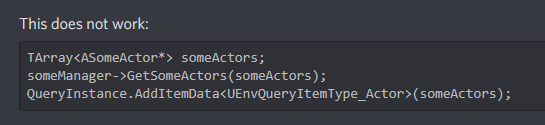
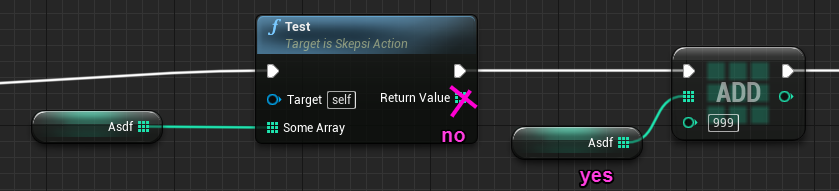


Any solution to avoid this jittering ?
 vague fjord
So can anyone help me?
What I’m trying to accomplish is an npc having like cone vision that the player can be in view of.
But I’m new to unreal and I’m not used to a lot of the stuff in it.
thorny jay
Hi everyone, I've got a really strange problem that I can't figure out the root cause for. Some of my AI see enemies just fine and engage them as expected, but some of them see enemies but don't add them to the HostileActors array in the perception component
I did some logging and found that the enemy is registered in GetTeamAttitudeTowards, and that it correctly returns ETeamAttitude::Hostile
But if I access GetAIPerceptionComponent()->GetHostileActors(Array), the array comes back empty
All my AI use the same controller, so same perception component
All use the same character class too
They are identical
It's just that some have an empty hostile actors array, and some don't. Any ideas on what could be causing this? I'm completely stumped
 cosmic stag
what exactly should SetFocus be used for? is focus just another term for the AIs rotation? atm im not using set focus at all, and handling changing the AIs rotation myself, and turning off bOrientationToMovement when i need to etc. Is SetFocus just supposed to be a simplified way around that or is there more to it?
edgy sierra
Essentially what focus is doing is doing a rotation of the controller's rotation which is the AI pawn's rotation yeah.
As of now you can do a SetRelativeLocation to the actual AI and achieve the same effect although SetFocus on the AIController has some more implications with the AI itself. (So it is not just 100% rotation code ) Because it has priority levels.
So I assume that it will be related somewhat to AI code.
pine steeple
Focus is really good actually
i have a few levels of focus which i override based on priority
i don't need to clear the lower focus either
so when im finished with the higher priority focus, it will drop back down to the previous lower priority focus
cosmic stag
oh cool, so you use it as a proxy for like a CurrentTarget variable?
 sturdy iron
@edgy sierra Well in this close distance it cant really do that. Your spine is literally inside the muzzle as I saw if not close to the AI
Imo you can implement an option to either keep the distance with player via moving backwards
or just draw a meele weapon when the distance is <= close combat that you can implement