
#gameplay-ai
1 messages · Page 128 of 1
 cerulean girder
 opal oyster
and when nothing is touch it it just dont simulate physics
ok
i will watch it
thanks alot for telling me this
 fallow hound
@glass moss I think you can set rotation speed on controller or character
cerulean girder
which is a huge part of the hit reactions used in tabs
opal oyster
ok, is it okay if I add your DM
cerulean girder
you can message me but i dont randomly accept friend request 😉
opal oyster
umm like I will try to implemnt the system but can i ask you a few more question later?
 lyric flint
Getting a little deeper into AI, I have numerous behaviors that an AI could do already implemented. The problem is that they always act on these behaviors if able. So for example currently the AI wander if they don't see enemies. If they do see enemies they ALWAYS chase them unless: they see an enemy who is "downed" then they ALWAYS go in for an execute.
What are some ways that this is typically addressed when making AI? My current guess is to just create a function that gets called every 3-5 seconds that essentially uses RNG to determine what an AI should do in the moment
fallow hound
As you learn behavior trees, you learn how to shape the tree to accommoplish stuff like that @lyric flint
lyric flint
yep that'd be why I asked, to continue learning. Do you have any resources I could use?
fallow hound
Epics ai state of mind is a good one
There's a great article by the project zomboid creators about behavior trees
lyric flint
cool I'll check it out now, thanks!
 urban wadi
As far as attacking in a behavior tree, do you recommend simple parallels?
 sullen escarp
Why not just a task that plays the attack montage beginning to end?
One neat way to use the simple parallel is to change the finish mode to Delayed that way on the main task you could have a min runtime by temp locking the tree (depending on how you're making decision updates, perhaps freeze certain BB keys from changing) and let the sub tree run until it finishes or gets aborted.
fallow hound
I do attacking with a service
urban wadi
@fallow hound who are you talking to? Me?
 glass moss
When I add in another AI enemy they start to break down
they will sporadically jump around in the BT
 fresh remnant
@echo lark nice talk there, thanks for sharing
 misty wharf
How does the "Gameplay Tag Condition" BT decorator work, exactly?
It seems to attempt to read a gameplay tag from an arbitrary actor... but actors don't have gameplay tags?
It looks like there's a generic "gameplay tag interface", but I don't see a way to implement that 🤔
Nevermind, looks like this is just one of those seemingly random things which are only available in C++ and nobody seems to know why
fallow hound
@misty wharf can you really not use tags in blueprint? https://docs.unrealengine.com/en-US/Gameplay/Tags/index.html
Gameplay Tags can be used to identify, categorize, match, and filter objects.
misty wharf
Yeah you can use them just fine but certain things don't work unfortunately, such as the Gameplay Tag Condition decorator
it uses the gameplay tag interface which you can only implement in C++
misty wharf
yeah that would be one workaround for it, I did something slighlty different instead.. might end up doing it in C++ at some point since I'm using gameplay tags already on my actors anyway, just wasn't aware of that particular interface until now
 pine steeple
i use gameplay tags in decorators
(i did make my own custom decorators, with aborts aswell)
glass moss
My AI violently snaps to the player when spotted, it was working much better yesterday. (it looked natural). I am not sure what I changed that broke it
Any ideas on how to fix it?
 warm ibex
implemented a move to on an AI and the movement speed is extremely slow.
It doesnt add up since the movement speed is identical to the 3rd person blueprint data.
I was thinking maybe something else can affect the walk speed?
Have you guys run into the issue of using move to and the AI moving extremely slow?
 stark zealot
Maybe make sure you are not setting his max walk speed to something slow somewhere?
 reef birch
im trying to allign up two characters for a interaction between npc's. how can i make sure that they are in the same postion before the animation plays?
like a handshake for example
im trying to use ai move to actor. but it feels not consistent
either they clip trough eachother or they stand to far off?
misty wharf
ah neat, you can actually stop BT's from doing stuff temporarily by using Claim Task Resource and Unclaim Task Resource
I was wondering how do I stop my AI from temporarily doing anything while it's in a pain state and that actually did the trick much more easily than I would have expected it to
basically when the pawn goes into a pain state it just claims the logic resource which stops the AI from doing anything until it's unclaimed, which seems to work pretty nicely
I wish some of these AI system features were better documented, I decided to give that a try purely as a hunch and it actually worked lol
fallow hound
thats good to know ^, thanks for sharing
I'm trying to figure out why this behavior tree is eating so much gamethread time:
it seems the subfunctions its ticking arn't that expensive, the total is greater than the sum of its parts
what might I be overlooking?
eg what might "self" be doing?
pine steeple
seems pretty normal to me
if you have a lot of nodes
then prioritizing them base don which should happen first normally helps
otherwise it has to enter each one and test
fallow hound
Ok, good to know it looks normal at least
 glass falcon
I don't use any logic apart from set focal point to tell my Ai where to look but recently it spazes out once I get to close to it
It just starts try to look up and down simultaneously
fallow hound
Your characters skeletal mesh is looking at the point? I'd follow that logic, start by finding how the neck is controlled in the animbp, and find what logic sets those variables.
@glass falcon
glass falcon
Noo
I drive it with an aim offset
That I get from some matrix calculations with vase rotation
*base aim rotation
And it worked fine till today
I basically use the same method used in shooter game
Then I use set focal actor so the actor knows which pawn to focus on
@fallow hound
fallow hound
Yeah I'd watch that value, whatever drives the aim offset
Then figure out what might be going on
Maybe its like, an angle not unwrapping right or something?
Maybe you need limits or something
There's a million things that could be happening haha
pine steeple
I don't have issues with control rotation and aim offsets. And I use counter rotation of root bone for turn in place
 fossil halo
hi everyone i'm new to unreal engine and i'm making my first game. is anyone able to help me with a problem with my ai please? it's a 2d sidescroller and i have a melee ai which chases the player once the player overlaps his sphere and that works fine. i've tried to add a 2nd attack which is a ranged attack and used all the same stuff to track the player but when i have both attacks enabled the ai turns 180 degrees and faces away from the player but still chases the player while shooting the opposite direction
 split ravine
I've got a question regarding the MoveTo Task in the BT's I noticed it moves basically "edge to edge" as in the edge of the character's capsule to the edge of the radius. I'd like it to move so it's directly centered on the desired location. Is it possible to do that? Even if I do Acceptable radius of 1, it's bascially "edge to center" if that makes sense.
(Feel free to ping me if you've an answer for me, thank you)
 thorny jay
Hi all, I have an EQS query which I'm executing in a service using the Run EQS node. How can I add parameters to the EQS query? The generator creates test points in a grid and I want the extents to be exposed as parameters so I can configure it for different situations
This is using Blueprints, by the way
 stiff gale
How do I start and stop a behavior?
 ivory violet
@stiff gale hey, you can use this to start/stop a BT
Hey @thorny jay , do you mean to edit the parameters before the EQS is ran?
If I understood correctly, you can create EQS Context inside which you can do whatever you need to single out a location that you will later use inside EQS.
For example, here Im using Pack ID to choose if enemy will position itself to the left, right or in front of the player. I use this Single Location as a centre around which I will generate EQS grid.
 grand atlas
I am having a lot of trouble figuring out how to handle AI walking through doors. Inspiration from Evil Genius where doors can have security levels, so some character types can only move through some security levels. This I've made, see image. Now I'm trying to figure out how to make the AI actually stop to open a door, so I thought as a first prototype the door would have a trigger that informs the character the perform a montage. That makes the BT abort the MoveTo task, while still being in the.. "MoveTo state" and starts a Montage Task. When done, MoveTo will run again.
Thing is, I'm not happy about the triggerbox method. In a second image I will post, from Evil Genius, you can see that a door opens when the character is still far away, and none of the side doors open. If I were to make that with trigger boxes, the character would enter those side doors when it actually does not need to go there at all.
If anyone got any insight on how to properly do this, I'd be interested. Though I can't really cpp.
fallow hound
@grand atlas navlinks
pine steeple
they also use navfilters
so one type can never pass through that door
nor attempt to
fallow hound
yeah
pine steeple
your triggers can also be smart
if you went with triggers
(the AI must be facing it to open)
so simply running past would not trigger an open
grand atlas
I did some searches for navlinks but I couldn't find any information that made me think they could be used for this. Any chance of an elaboration what the navlinks would accomplish?
fallow hound
so, they let you attach seperate islands of navmeshes
and attach some code to run when npcs want to use that path
so, if your doors blocked the navmesh
you could give the doors navlink components that would atttach one side of the door to the other
apply a filter to the link so only the right npcs could use
and supply some code that maybe opens the door, has an npc play an anim, when the navlink is used
grand atlas
I know about connecting navmesh islands part, but how would I execute some code when the AI arrives at the navlink? I'm not seeing anything that indicates that the navlink would be informed about an AI wanting to "use" it.
fallow hound
at 5 minutes here

In this series of videos we are going to create an NPC which can jump onto or over objects in the Unreal Engine 4. We are going to accomplish this by using the Smart Link component of the Unreal’s Nav Link Proxy, we’re doing this so that we don’t have to rewrite or add to any ...
grand atlas
Oh a navlink proxy. I was just looking at the navlink component. So the Receive Smart Link Reached only fires when something wants to actually use it I'm guessing. So agents could run over smartlinks without them triggering?
fallow hound
yeah
grand atlas
Thank you, I got some testing to do.
fallow hound
👍
they can be finicky, so prepare to debug haha
one hint is
if they are valid, you will see arrows in navmesh view mode
even when they arnt selected
if you dont see those errors, they wont work
grand atlas
All right
thorny jay
@ivory violet Hey, thanks for replying :-) I'm talking more about being able to modify the radius around which the points are generated. For example, if my AI is defending the objective, I want them to spread out wide to cover all attack points. If they are defending another player while they capture an objective, I want them to stay close and not spread too far
So in the EQS generator I can hard-code the grid radius, but I want to parameterise it
ivory violet
Someone correct me if Im wrong, but I think that has to be done in cpp (which I aint very proficient at). But idea that come to my mind is to create custom Servise that will inside have branch or something that would run different EQS depending on different parameters. Though youd have to make each EQS manually, so no parameters again :c
@thorny jay Unless you are already doing that and I misunderstood again, which I think is the case haha 😄
 thorny jay
@pine steeple Thanks, I had looked at that data binding. How do I then access it when executing the EQS query? If I try running it directly as a task or service, I don't get a list of parameters available, nor do I see anything when I place a "Run EQS" node. Do I need to bind it elsewhere?
pine steeple
No you should be able to assign it or use the function set named param
Which you can pull off from the run eqs node
thorny jay
Hmm ok I'll take a look, it may be I didn't set the data binding correctly
Thanks @ivory violet and @pine steeple 🙂
stark zealot
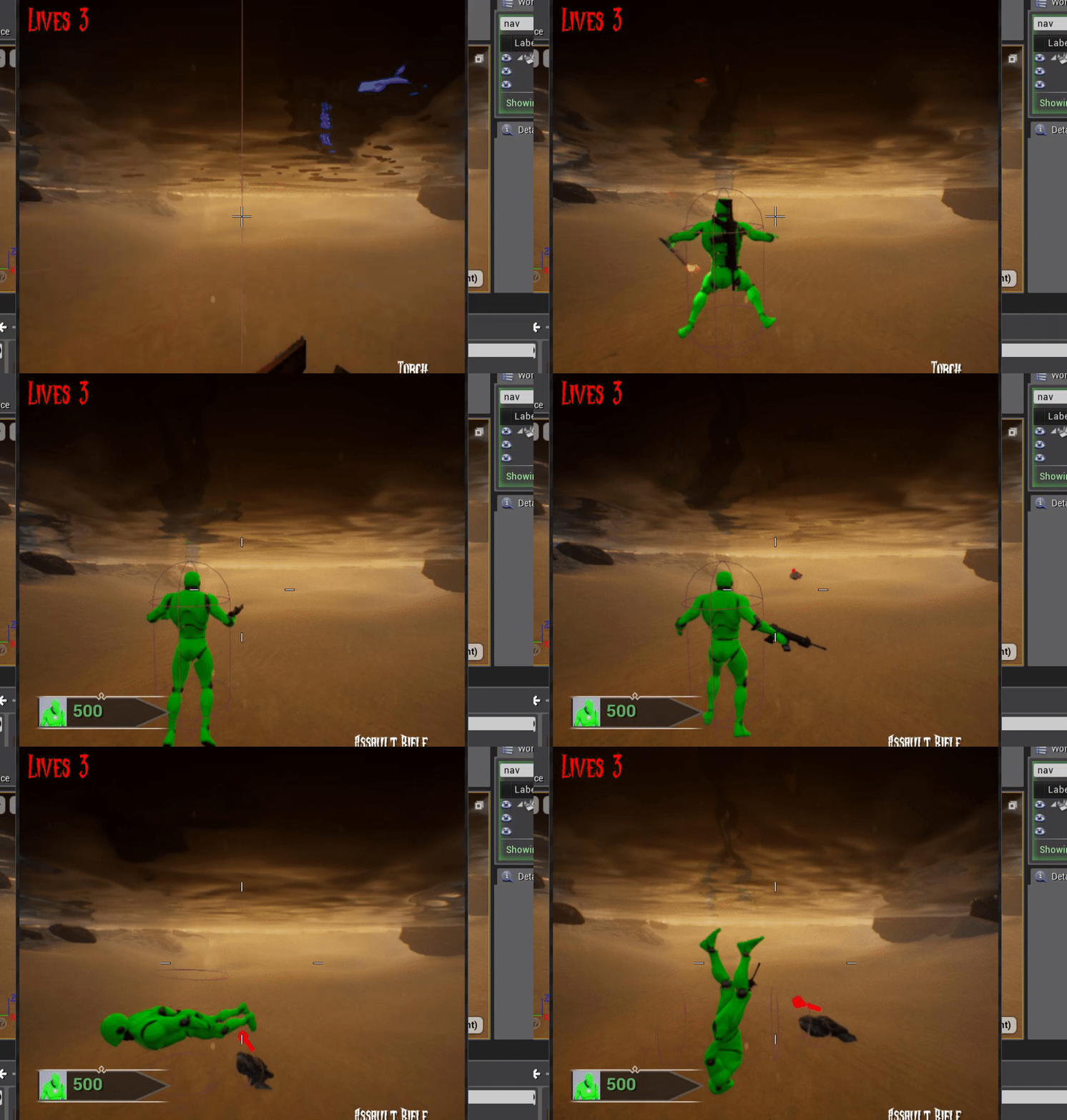
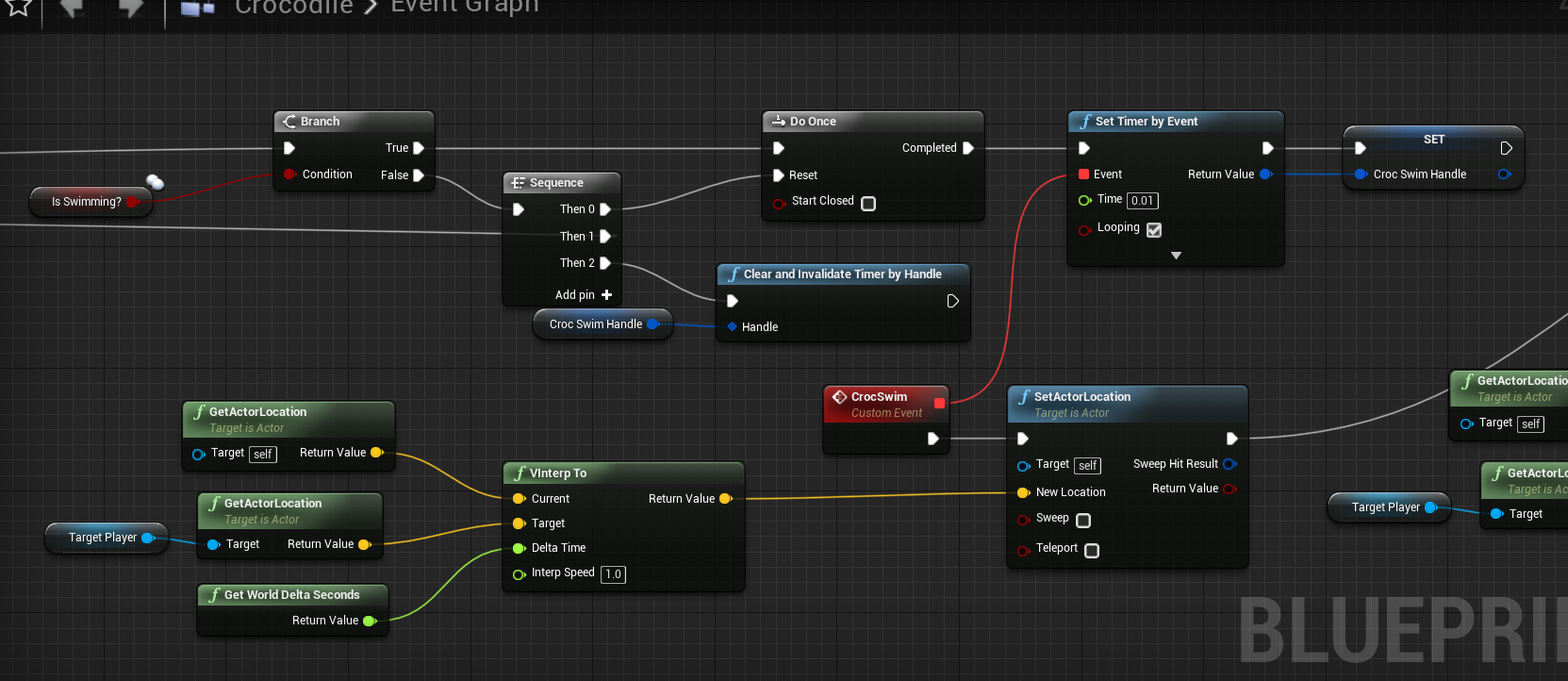
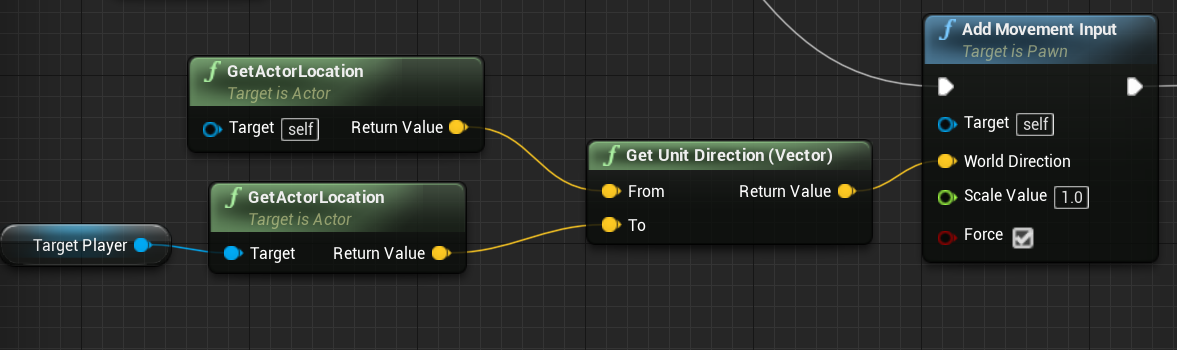
I'm working on an AI that swims. It's a crocodile 🙂 . I can't figure out how to make him swim towards me correctly. I used a VInterpTo node which sort of works but if I'm really far away, the crocodile swims super fast towards me until he gets close. I'm just setting his location using "set actor location". I tried using set input movement but doesn't seem to move forward, only up and down. If anyone knows how to make an AI swim towards my location but at a set speed, I'd be truly grateful.
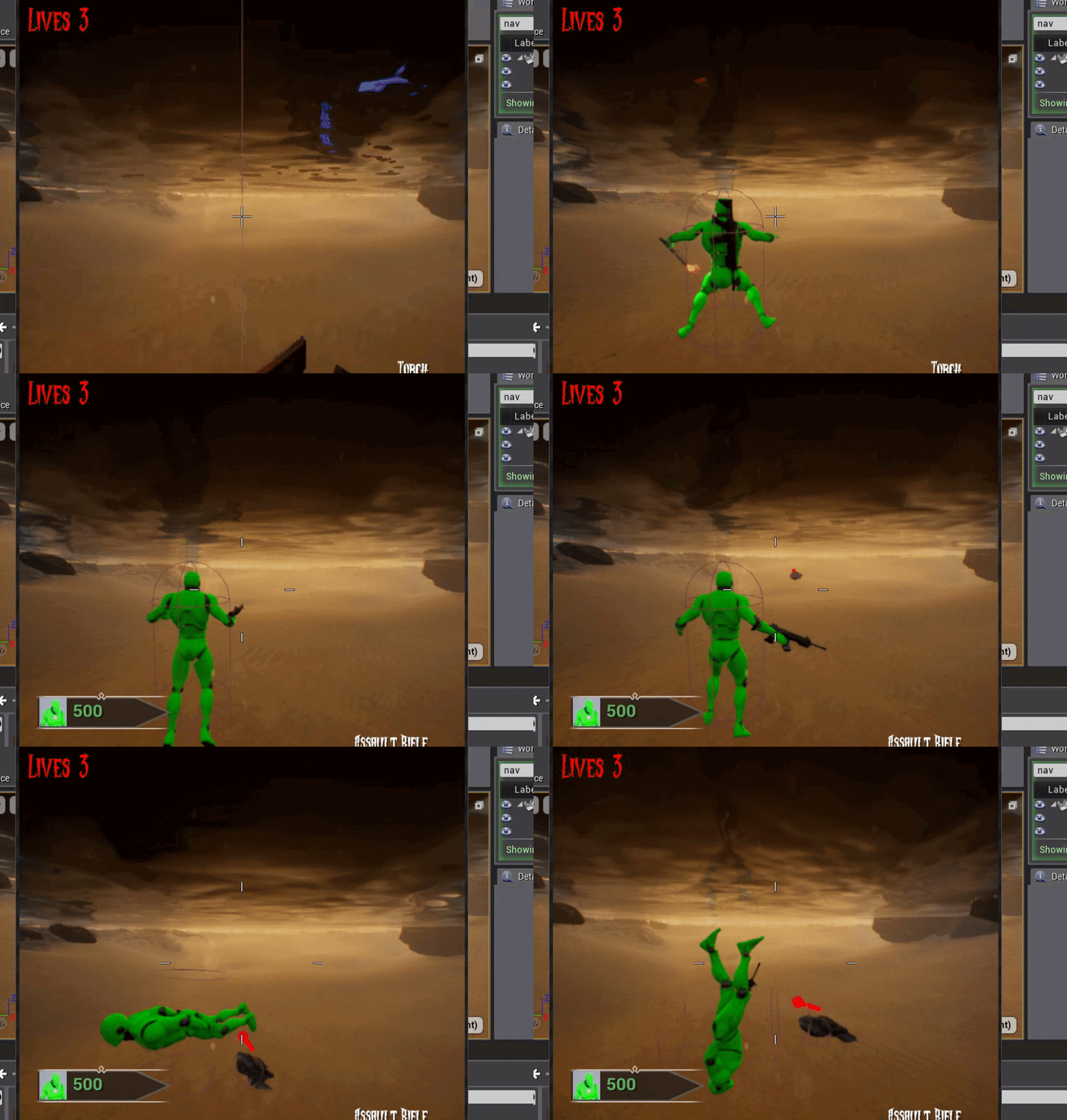
So I guess my question is really: "How do you manually move an AI towards a player in any direction (x,y,z) at a constant speed?"
pine steeple
is it using CMC?
shame you don't do C++ cause you could have used a root motion task 😄
stark zealot
Yes it's using CMC. It's just a simple AI that chases the player. I have him chasing you on land, I just want him to be able to chase you in the water. I just knew he probably couldn't use the "Move To" node to navigate while in water or he'd probably be on the bottom of the lake lol
pine steeple
you would need to do some match
math*
so the interp runs at a constant speed
get his movespeed, and distance to player, and calculate a constant interp speed
stark zealot
Ah that makes sense. I'm not sure what that formula would be lol but it makes sense. Here's how I have it setup currently: https://i.gyazo.com/5d66c0e552abbb51e61ab2a4ce1bd9dd.png
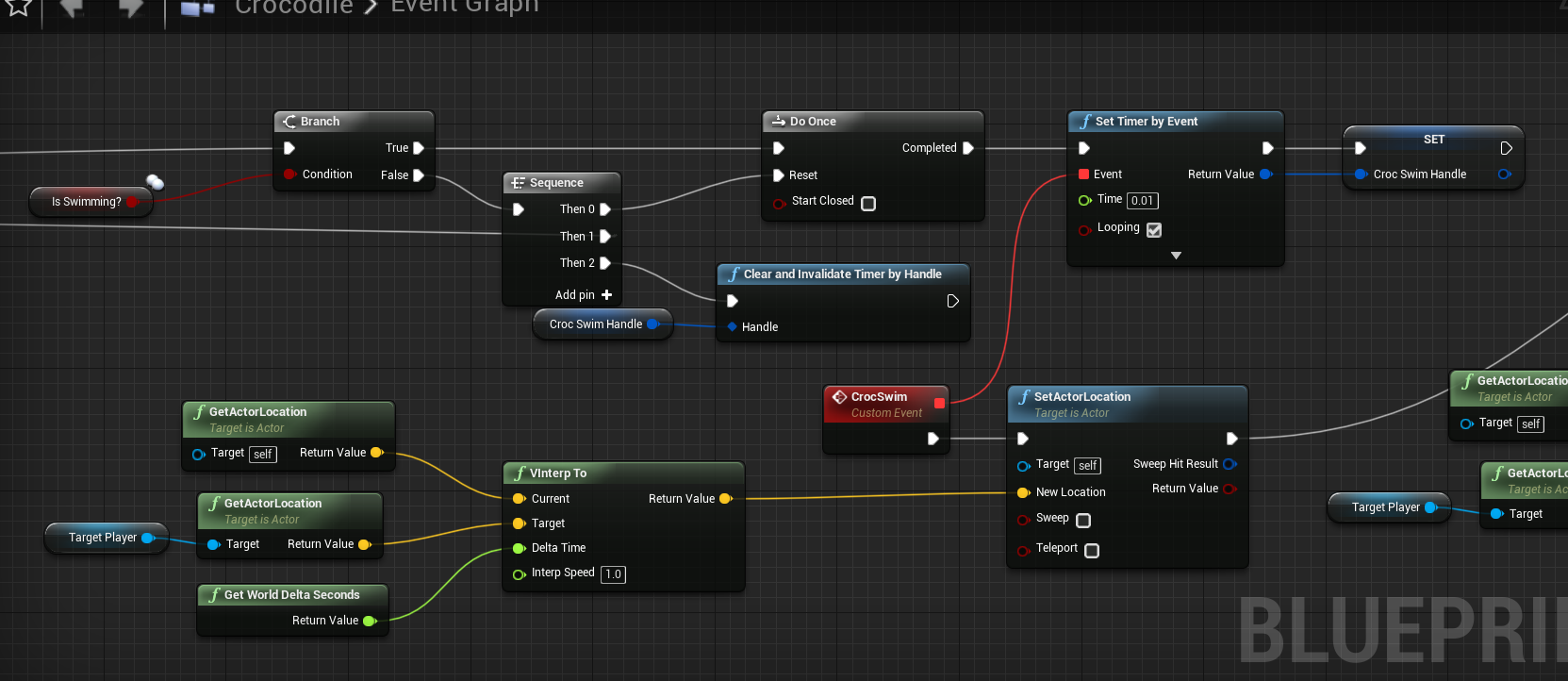
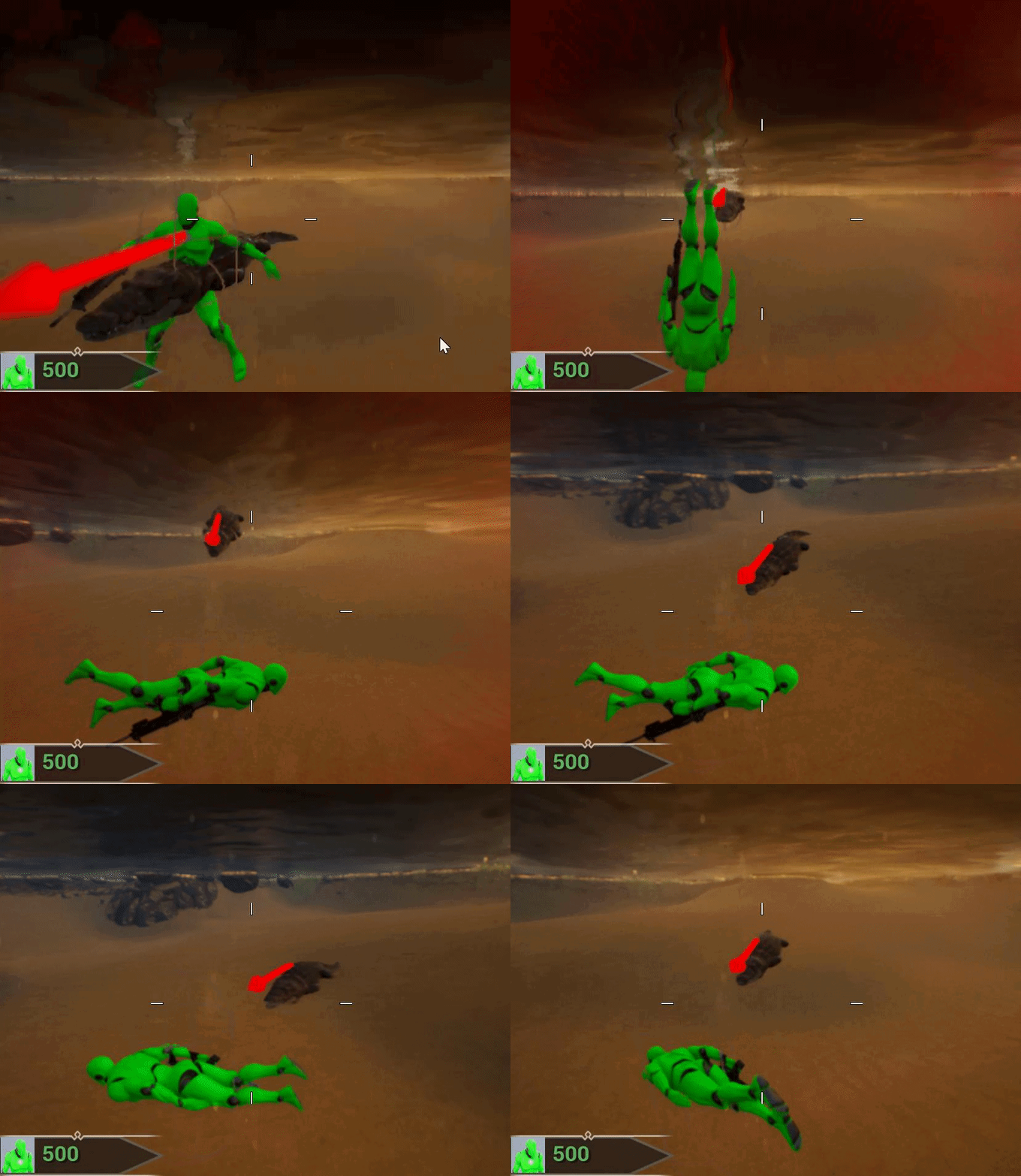
But he acts weird sometimes and doesn't fully reach me sometimes.
He just kind of hovers around me
pine steeple
yeah but you are using a constant speed
1.0
so the further away he is
the faster he will interp to it
could try VInterpToConstant
and pass in his Walk Speed
stark zealot
I was literally reading about that lol. Let me test it out
I'm still getting some crazy behavior. I'm not sure my setup is correct.
stark zealot
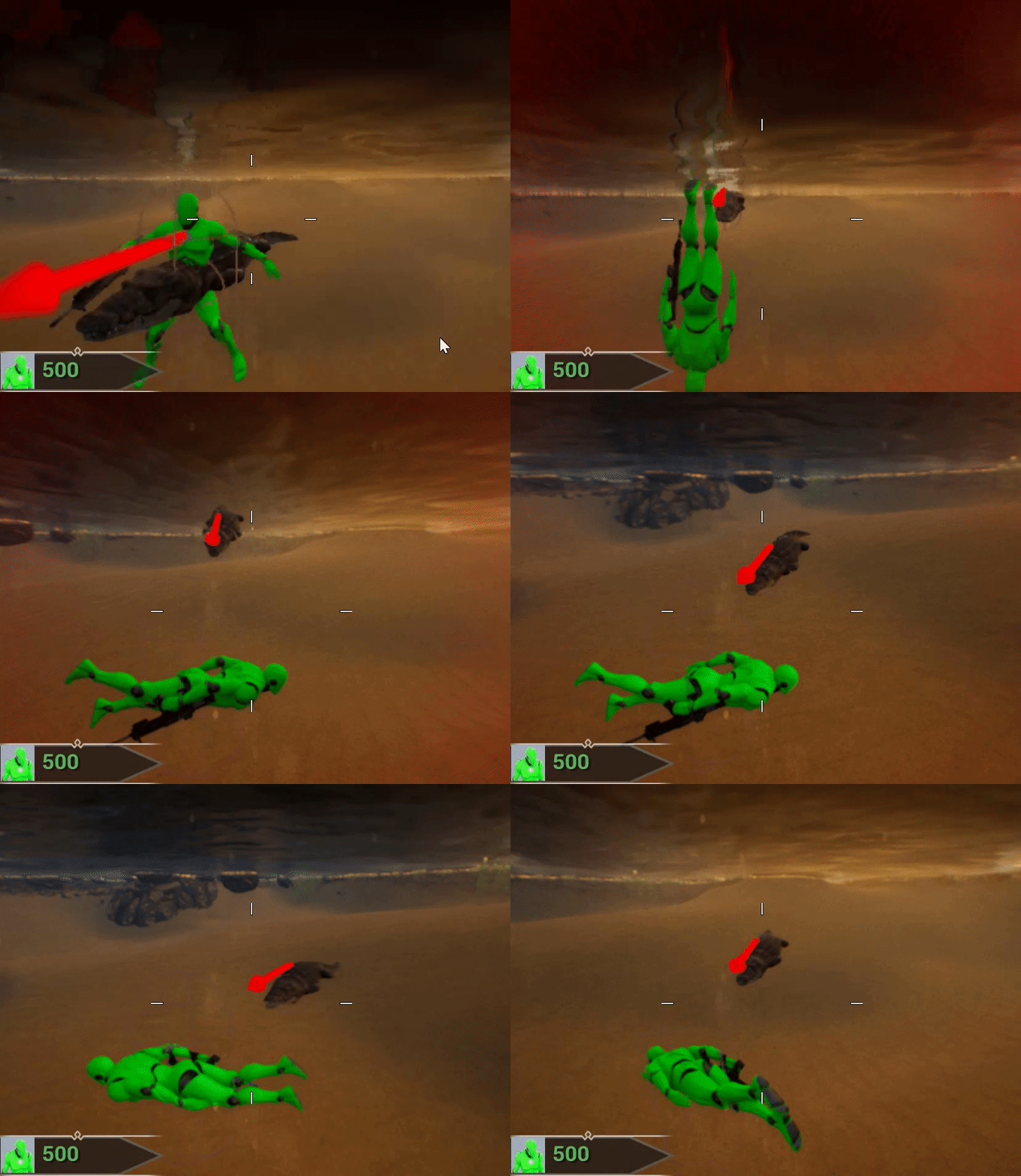
Ok so this seems to work pretty good. The only little issue I have now is that the crocodile sometimes moves to my last known land location first, then proceeds to chase me in the water lol. I have to somehow cancel his move and force him to chase me. https://i.gyazo.com/198cd33d0b44e1470c92e3e7a8545880.png
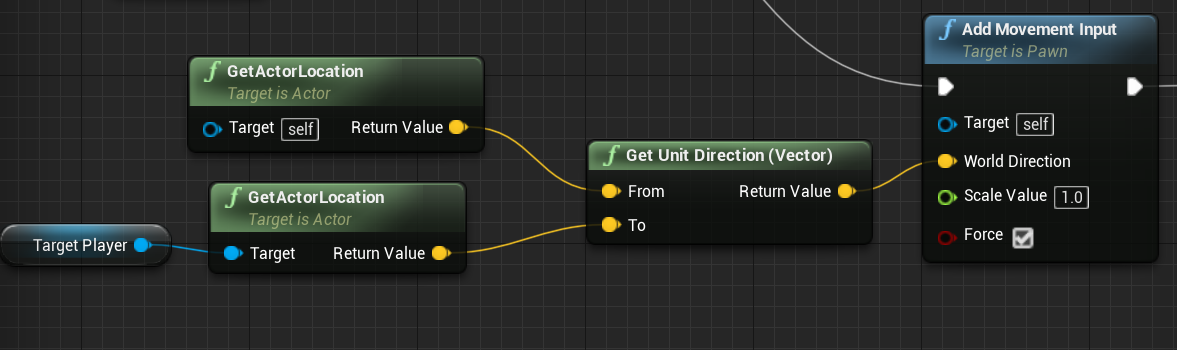
Whew! I believe I got it working. 🙂 Now for some sound effects 🙂
urban wadi
anyone know how to chain attacks together in a montage? I mean I have 3 attacks and they all start from a stepping point(location) behind where the attacks end. So the attack is a step to and attack
Do you think i should use a selector and have 3 separate animation montages or should I link them all up together?
any suggestions?
 reef glen
Is there a way to make ai not stop when ai move to finished? I´m trying to make an ai move along several actors, but when it reaches one, it stops for a small amount of time and then keeps moving.
urban wadi
So you just want the ai to run by each finish point
?
@reef glen and are you using a BT?
reef glen
Yes
I´ve been trying to raycast and see if the distance to the next point is lower to x so if true, set the next point to the other one.
urban wadi
so you have 3 points and you travel to the first one. Lets say the first point is from point 1 -> 2. When you get to point 2 you do a raycast to point 1 & 2 and get the distance from each and if the distance from 2 -> 1 < 500 you go back to point 1, and if the point from 2 -> 3 < 500 you go to 3?
urban wadi
Does anyone know why use controller desired rotation works but orient rotation to movement does not for my AI?
urban wadi
its weird when using orient rotation to movement you cannot use rotate to face BB entry
ivory violet
@urban wadi Have you tried changing Use Controller Rotation Yaw?
I always forget the correct combination, but those 2 options you mentioned and Use Controller Rotation Yaw can give varied results, one you might need too
Its in Class Defaults for character
urban wadi
Yes I did that already. I found out that using orient rotation to movement cannot be used because the AI is not moving to start in the blackboard tree. I have a behavior to rotate and roar at the enemy before movement, so I had to manually set rotation when the AI sensed the character which works so....
I think orient rotation to movement cannot be used when trying to use rotate to face BB entry unless your moving before hand
ivory violet
I use this inside a BT Task to make character face or not face the player. Use Control Orient Rotation To Movement is ON and Use Controller Desired Rotation is OFF. Not sure if the best approach, but works for me 😄 Basically changing the focus on or off @urban wadi But I also sometimes have to manually rotate character to player using task that does so, so I have some nice interpolation while doing so
glass falcon
Is there anyway to smooth Ai control rotation without overriding the calculations in CPP ?
So it's more gradual
Rather than snapping to its target
urban wadi
When using Attack animations, especially for AI, is it better to enable root motion or to disable it?
@ivory violet where do you have that logic at? I have mine in the actual controller
I only have focus set in the AI controller as that is something that the controller should always know. I am just curious if there is a more efficient way to maintain focus for AI?
urban wadi
@glass falcon the best solution is to disable use controller yaw, and to enable orient rotation to movement
 static crater
Why is this setting be reset ? its always rebuilding navmesh
urban wadi
@pine steeple hey bro I have a question about root motion attacks. So I took your advice and I am driving/toggling my moveTo with a boolean tied to Events that are binded to OnMontageEnded Events. I just wanted to know if you have a task that rotates your AI to face the player before attacking?
because obviously if you are moving to the character and telling the AI to attack when within a certain range it can execute the attack but miss if its not facing the player. I see there are two ways around this you can make the hit/collision volume larger or you can rotate the AI to face the character before attacking
pine steeple
i use Focus
i set focus to the actor the monster wants to attack
which keeps him rotated during the attack, and clear it after
glass falcon
@urban wadi I've tried that but all that does is smooth the movement. If your looking through the camera of the Ai the rotation is still instant
urban wadi
Do you have it like this
and this
@pine steeple do you have a focus Task then? I am sorry to bother you but I have looked at your game and I want to get advice from a veteran dev that has experience
pine steeple
i have my own custom service
urban wadi
ok i see
pine steeple
which i trigger focus with based on stuff
    {
        CheckForFocusClear();
        return;
    }

    const UBlackboardComponent* MyBlackboard = OwnerComp.GetBlackboardComponent();
    if (MyBlackboard)
    {
        UObject* const KeyValue = MyBlackboard->GetValue<UBlackboardKeyType_Object>(GoalActor.GetSelectedKeyID());
        AActor* const TargetActor = Cast<AActor>(KeyValue);

        if (!TargetActor || (bNotWhenMoving && MonsterCharacter->GetVelocity().SizeSquared() > 1.f))
        {
            CheckForFocusClear();
            return;
        }

        const float DistanceSq = FVector::DistSquared(TargetActor->GetActorLocation(), MonsterCharacter->GetActorLocation());
        if (DistanceSq < FMath::Square(LookAtDistance))
        {
            if (MonsterController->GetFocusActorForPriority(EAIFocusPriority::Gameplay) != TargetActor)
            {
                MonsterController->SetFocus(TargetActor, EAIFocusPriority::Gameplay);
            }
        }
        else
        {
            CheckForFocusClear();
        }
}```{
if (MonsterController->GetFocusActorForPriority(EAIFocusPriority::Gameplay) != nullptr)
{
MonsterController->ClearFocus(EAIFocusPriority::Gameplay);
}
}```that is getting upgraded in the future
cause i have more criteria now then when i first wrote that
that service only happens when AI is attack behaviour tree
urban wadi
Do you think my approach of disabling my moveTo with an Event boundToMontageEnded is a good solution?
@pine steeple
pine steeple
i don't use orient to movement
i use control rotation
even when moving
@static crater bug in editor
close editor, set it in the DefaultGame.ini file and load editor
then it will stay
urban wadi
The funny thing is I am doing everything for the Ai in Blueprints and Behavior Trees, while everything else is in C++. I might go back and change that after I have blueprinted everything out depending on performance. I heard that because there are very few tutorials/examples on AI using C++ that its hard to set it up. @pine steeple
@pine steeple why do you use control rotation vs orient to movement?
pine steeple
so i can use focuses
without switching from orient to control rotation
Orient to movement disables focuses
ivory violet
When using Attack animations, especially for AI, is it better to enable root motion or to disable it?
@urban wadi I have it enabled any time I can, cause its way nicer than me faking it and interpolating location. But it depends on the animation, for enemies, if you can and it looks good, enable it
@ivory violet where do you have that logic at? I have mine in the actual controller
@urban wadi Its in custom Behavior Tree Task called ''Set Focus'' that I call when I need to set or clear focus
ivory violet
Nop, this is the stuff that I do at work, so sharing that is not an option 😄
urban wadi
I want to create a alpha trailer for mine but I am definitely not ready to present lol
@ivory violet well i appreciate it. I really do as I am a lowly, solo dev
ivory violet
Work on it till looks good if you dont have deadline :D
Happy to help! I mostly do character programming and Ai at work, but I also hope to find some answers I need too haha
pine steeple
I do lots of stuff including air work
Ai
@urban wadi https://youtu.be/s5WDPYi5s-M this is entirely ai controlled
Weeks worth of behaviour tree design and custom tasks services and decorators
urban wadi
cant wait to embark on that journey my game is going to have Ariel AI too but not looking forward to it LOL.
I definitely knew this was going to be a lot of work for the AI, I just did not know how much. I hope that I am up to the task
I don't want to purchase AI toolkits because I feel like I will in the end learn a lot more and ultimately have more control over my AI
@pine steeple your work is inspiring
@ivory violet you come on here for help too? I feel like I am somewhat annoying to all of you experienced devs
ivory violet
@ivory violet you come on here for help too? I feel like I am somewhat annoying to all of you experienced devs
@urban wadi yep 😄 its a never ending cycle! I dont know how to implement new feature > I somehow find new way/tools > that create new possibilities > new problems.
Dont worry about that, we are all here to learn!

 fallow hound
ok - this is a very specific problem that I bet no one here has encountered... but worth a shot. Has anyone had multiple behaviortreecomponents in an actor, and had trouble getting blackboard decorators to react to bb values changing? It is like only one tree per actor can sign up for notifications, even if they each have their own blackboards.
pine steeple
why would you have multiple components?
that just feels wrong
i switch BT's when needed or inject bt into root node when i need to do different logic
i have never found a case where i need two or more BT's running at the same time
fallow hound
good question
they belong to a squad actor, which groups npcs into coordinated behavior
the coordinaiton is guided by a BT
and as a given squad can have multiple coordinations at a time, the squad actor has multiple BTs running at a tim
pine steeple
yeah i really don't think they were designed for multiple BTs per controller
just by looking at some code calls
fallow hound
yeah, I'm doing weird stuff, they arn't even attached to controllers
its a child class of BT that can run in an aactor
but I do agree, I think there is stuff behind the scenes that assumes one BB/BT per actor
urban wadi
Anyone every had an issue where a root motion attack causes an AI to slowly rotate/skew upwards lol?
ivory violet
Anyone every had an issue where a root motion attack causes an AI to slowly rotate/skew upwards lol?
@urban wadi cant say I have haha have you tried previewing animation with Process Root Motion option enables in Character Viewport to see if root motion is correct? though this question seems better suited for #animation
urban wadi
Hey @ivory violet how do you handle death animations when killed mid air lol so your not floating?
pine steeple
enable gravity?
dont detach the controller instantly?
detatching the controller on death, stops CMC from ticking, meaning character will be stuck in air
urban wadi
So do I its just in the state machine. Do you call your montage then?
Mine gets called through the state machine by a bool that is toggled by a custom death event
 patent hornet
if you have a death montage, you probably don't need the state for death
many states are terrible, and the anim BP state machine scales horribly
with the number of possible states
urban wadi
Cool thanks a lot
urban wadi
is there a reason why my characters Death animation plays then starts over from beginning?
pine steeple
turn of looping?
urban wadi
ok
I turned it off in the montage but its still doing it?
@pine steeple WTFG
weird this was not happening in the state machine
 livid beacon
When I use the "MoveTo" node in a behavior tree to move a character toward an object, I would expect that the characterwould move directly toward the center of the object (subject to navigating around other objects between them) until it comes within the acceptance radius. But that's not what it does. Instead, the MoveTo node charts a course toward a particular SIDE of the object and tries to go to the center of the object from that side. So, for example, in the image below, I have placed an arrow on the side of the box that the character tries to move to. If I call the MoveTo node to have a character move toward this box from the right side of the box, the character begins a path toward either the uppermost or lowermost edge of the box (whichever is closest) as if it wants to go around the box. If I set the acceptance radius to something small (say, 10), the character will go all the way around to the center of the left side of the box before stopping. If I set the acceptance radius to, say, 75, the character will go toward the uppermost/lowermost edge of the box, which happens to be within 75 units of the center of the box so it stops there. If I rotate the box so that the arrow points to the right, then a character on the right will move directly toward the center of the right of the box. So MoveTo is definitely paying attention to which way the arrow is facing.
This seems like a useful feature -- for example, if I want one character to move to another character and then begin a dialogue, I don't want the moving character to go talk to the other character's backside. But in my situation, the box doesn't have a backside. I just want it to go straight toward the center of the box without trying to go around. Is there a setting I can adjust to make that happen? Or a different function? I suppose I could convert the center of the box to a location and move to the location rather than to the object, but I wonder whether there's a better way.
ivory violet
Hey @ivory violet how do you handle death animations when killed mid air lol so your not floating?
@urban wadi hey, not 100% sure as I need to take a look, but you can enable ragdoll and have character fall nicely from the air too, along with animation. Just animation in the air, even if they fall, can look not so nice
patent hornet
@livid beacon it doesn't, its your box affecting the navmesh poly generation
reducing the tile size would reduce the effect you described, but would also increase pathing, and especially nav generation costs
 north vapor
yo my ai is damaging me but I'm far away wth does anybody know why
im using pawn sense
patent hornet
that gives no useful information
north vapor
are u talking to me or
patent hornet
yes
there is literally a million ways you can make that happen
with or without pawn sense
north vapor
lemme show the blueprint
thats it its pretty basic
@patent hornet if i got on top of a cube for example they can still damage me i dont want them to damage when i get on top of something
@patent hornet is that something with nav mesh bounds volume idk what it is
patent hornet
its not
its that move to gets close enough to determine it was a success
google and read about visual logger
north vapor
ok
patent hornet
takes a little bit to get used to it, but it will give you a good idea on what the AI does and when
all pathing and movement is logged in it
north vapor
they all doing crowd following? i have a crowd of ai that applies damage @patent hornet
there not using the nav mesh?
@patent hornet idk why but they are still able to damage while on two cubes like this you see that highest cube they can still damage me while im on that cube
 tough helm
can i somehow debug what caused navmesh to be invalidated?
or do I have to breakpoint in engine code?
fallow hound
maybe you can find something in vislog @tough helm but I'm just guessing
fallow hound
is there really a significant performance benefit to using node memory instead of just instancing the node when I want to stash some data?
north vapor
how do you add a crowd following component to a an ai character anyone
 stable valve
hello, i'm having an issue with behavior tree, can some body help me?
lyric flint
@gray willow hey
lyric flint
are you actually executing the move with navmesh enabled and stuff?
lyric flint
and all the mesh is green on screen?
 gray willow
yea
all the moving works
it just doesnt work while im moving
bcs it aborts
i need it to just refresh
lyric flint
if it keeps going until it reaches, abort it and then execute it again if the targetlocation is updated
lyric flint
what did you do?
gray willow
but the thing is
the vector is constantly updating
i see it in blackboard
the variable is changing
while moveto doesnt change
weird
oh well
thank u for ur time (:
lyric flint
might be an ui update issue
gray willow
probably
lyric flint
maybe do a forum post or something if you want to help the engine. or abug report. i did those a few times
gray willow
idk why i used vectors either lol
lyric flint
yeah
lyric flint
i have a 6dof game and i use vectors for impulse and thrust stuff
stable valve
sorry to get into the conversation, how do i use actor locations instead of vector location in Move To?
lyric flint
even for my 6dof i mostly use actor location for targetting
gray willow
just replace it
lyric flint
like i have mechs walking on the ground, and with a navmesh i use actorlocation like you did
gray willow
lol
oh welllll
@stable valve
just replace the blackboard key
with ur actor
reference
stable valve
only shows my vector variables, no the actor
gray willow
is it an actual actor or an object reference
oh thats weird
mine are object references
not actors
try that
stable valve
yes, in the blackboard i set it up as an object reference
stable valve
no, only vector ones
gray willow
is this ur move to node
pine steeple
damn i hae the UE4 Nav System sometimes lol
nothing chnages
and they just randomly stop, till the move task aborts
lol
stable valve
i'm trying to change the vector for the actor because that move to node is not working
pine steeple
move node not working with a vector?
that doesn't seem right
btw your tree seems a bit iffy
lyric flint
@stable valve
here's my BT / blackboard. might need to make sure you added the variable and set it properly
pine steeple
i don't see why people have issues with the MoveTo node lol
stable valve
pine steeple
ye im ok
lyric flint
set the Blackboard asset in the behavior tree settings yet? make sure to recompile the blackboard / BT by pressing save/compile?

 lyric flint
this is the limit of mine. i have a bunch of test nodes i never used. just there in case. i use this to have mechs walking on the floor to attack my 3d flying pawn in my 6dof
took forever to do lol
pine steeple
meh hold my beer lol
lyric flint
what does your tree do again?
stable valve
i don't see save/compile
pine steeple
that's for our "Hunter" AI
he can go in ceilings, under floor
break through doors etc
lyric flint
@stable valve make sure to save your file and make sure to set the var properly
cool
 lyric flint
crazy haha
misty wharf
all my AI is pretty straightforward... move to slightly random direction, shoot at player. repeat.
tried to make it smarter and got really confused about EQS with multiple queries in one EQS thing and throw my hands up in the air
lol
stable valve
@lyric flint worked, i was using object, change it to actor and it worked
lyric flint
i actually used perception to get it to move and it works ok for my needs
@stable valve nice
stable valve
thank you @lyric flint
lyric flint
yw




 misty wharf
Yeah, I use some simpler ones to find locations close to the player and such
I wanted to do something where the enemy would choose a location away from other enemies but also within some other criteria and that just got so confusing with the EQS thing :D
pine steeple
heh
that eqs just uses two tests
i combined it to save on resources


that is all it is
lyric flint
quad mech piddling about using perception
misty wharf
@pine steeple interesting, are those custom tests written in C++ or something?
pine steeple
yeah
misty wharf
ah, I'll have to look into that at some point if it offers some more flexibility
pine steeple
i have a whole bunch of them


and i use them all
EQS is very powerful
once you get to know it
misty wharf
yeah, I was trying to have two queries in one EQS and I don't even know if that's supported... it just didn't really seem to do what I was expecting it to do lol
but sounds like a custom test is exactly what I need
pine steeple
@lyric flint pm
 ocean turtle
mfw no google results
any VR bois know what the difference is between AI Sight Config and AI Sight VR Config'?
north vapor
why is my behavior tree not working?
this is my first task
this is my second task
thats how i run my behavior tree
ivory violet
why is my behavior tree not working?
@north vapor what exactly isnt working? is BT ran when you check it in debug filter?
Does it enter any task at all?
north vapor
@ivory violet i going to redo it again it wasn’t firing
 cerulean hedge
Hello, with AI perception (on sight) in a small corridor (it's a maze) the AI can't see the player pawn, what can I do? The AI works in big rooms
cerulean hedge
But if I open the AI debug tool, the cone sight moves over the player
pine steeple
what is the strength
pine steeple
in the visualizer
 verbal violet
i have similar problem, i want to always be able to see the target that has already been seen.
I set big value for AutoSuccessRangeFromLastSeenLocation (SightRadius + 200.f) but when my ai lose target it can't see previously seen target, even if I jump and run around him
can see only once
fallow hound
the way I do that is, once perception system picks up the target, I don';t use perception anymore
I just flip a bool on the npc like bSawPlayer
and just interact w/ a pointer to player directly
if its never going to not see the player anymore, no sense using perception anymore
verbal violet
based on what you set that bool bSawPlayer ?
how you know when player leave 'cone' ?
verbal violet
or come in cone. it's role of OnPerceptionUpdated and OnTargetPerceptionUpdated in my case
ok how to switch that flag from true on false and vice versa?
when my target (player) lose LoS, i set it on nullptr in BlackBoard, and when Perception detect him i set Target in BB on his refernce? that's my system. i see that on some tutoprials
do i did it on wrong way?
 wise iris
I seem to be struggling with the above issue, that didn't get an answer on answerhub
Having my AI characters call an RPC will cause the above error. Is this a workflow issue?
pine steeple
they cant call Server or client RPC's
and why should they?
AI are server owned anyway, they don't have a remote connection.
you need to forward all your rpc's via the PlayerController
in our game for example, the pawn is Owned by the player controller, but possessed by the AI controller
this allows ai navmesh movement, but allows us to rpc's inside the character.
 cerulean sky
Yeah i think i figured it out
There is a node that nullifies it
So now it makes sense
thank you tho
 hearty niche
Iwas working with some simple ai which spots that player and it seemed to have been working fine. I have not changed anything in the player or the ai code but the ai has suddenly stopped detecting the player altogether. Does this happen often? tried resetting stimulus and perception sight
lyric flint
trying to learn ai anyone got a good project to dissect or know where to find one. (3d)
hearty niche
the shooter game could be one but its in c++ @lyric flint
 shadow vortex
i have a general question about saving, anyone on that can maybe help?
see, i have enemies that are spawned into the game, i have a save and load system for the player but have not set one up for enemies. what i would like to do is, save save locations of enemies that have spawned in to respawn when the game laods instead of starting over again'
wise iris
@pine steeple The reason I was doing that RPC is that when a footstep anim notify triggers, I need to spawn a footstep at that location for everyone in the server.
pine steeple
Anim notify ?
 dusk kelp
Hey, guys
Do you know how to make so AI can see through other players (talking about seeing perception)?
pine steeple
have to implement the sight interface and override CanBeSeenFrom, that is C++ only though
dusk kelp
Well, I have characters w/ only Query, so I just changed smth and now it works like I wanted 😄
misty wharf
^one fairly straightforward way would be to choose which channel is used for sight and then just set it up as desired
wise iris
Right @pine steeple. When the foot hits the ground in the animation, an anim notify is fired, which asks the character that planted the foot to RPC to the server to get a footstep decal spawned.
wise iris
What if you were outside the replication range, and you enter the range later, not being able to see the footsteps?
There's a network relevancy thing right?
wise iris
For tracking, it would be.
pine steeple
Relevancy by default is 15k units
If foot step only lasts 5 seconds you boiler need to be moving around 3k units a second
To see it before it despawns
wise iris
That's a good point.
I bet it would also cut back on bandwidth usage, instead of having RPCs every single time someone plants a foot.
pine steeple
Yes
I mean dontbfirget the player moves on the server also
That also fires notifies
wise iris
Really? I seem to not get the anim notify fired from the server? The AI footsteps I mean.
pine steeple
So no rpc should be needed. You could have an array of footsteps and a repnotify if you really want
Ofc they do
Else NY ai would be screwed cause I rely on that lol
My
Sorry on phone
wise iris
Lemme check real quick, because I think something might be going wrong in that case
pine steeple
Think you have to set the mesh visibility options
Iirc
It does add a bit if overhead tho
wise iris
Yeah, I just checked, it seems like the AN is only being fired client side
Authority is never run, only remote gets executed
 final tree
I'm trying to create a path that is off of navigation
is it possible to use a navlink off of nav?
or a nav modifier that is off of navigation.
i haven't had any luck
 tidal void
I think Nav Links only bridge two points ON Nav. Perhaps you can create a path to the nearest point on Nav and then do a non pathing move to for the off nav segment? I've been exploring modifying the generated path to have detours, that may also work for your case but I have no proof of concept yet
 unique shale
Quick question involving behaviour trees. If an AI is moving to player location but player jumps on top of a rock and the AI cannot get within range, how does the AI determine that it will never be able to reach the player?
misty wharf
You might need to check whether the path selected is valid
unique shale
Can you do that directly from the AI move to ?
 harsh trail
Hi, I'm currently working on a moba project and I'm struggling a bit with my minions, the minions work fine except when Playing as a client, somehow the minions cause game lag (not fps drops) I recorded a profiling during testing and realized that the thing that was called the most is the replicated movement, the average amount of minions that can be simulated at once depends on match time but in general it can go up to 30~35 at once on the whole map.
When playing as server everything is fine, but when playing as client the lag is immense, is there a way I can optimize the character movement on My AI for multi-player? Or is there another way to simulate in an less expensive way a lot of AI's at once?
I'm using blueprints only project and the AI controller is the detour crowd controller
patent hornet
30-35 CMCs are not enough to saturate the network @harsh trail
we can run 150 AI with 16 players and it works just fine
harsh trail
whe I run 10~15 AI's it runs fine
patent hornet
odds are you went a little overboard with Reliable RPCs, and because of that the Unreliable ones don't get through
harsh trail
adding more causes lag
patent hornet
and CMC uses Unreliable ones exclusively
harsh trail
I have not a single reliable RPC
oh nvm I do have one on the begin play thats all xD
CMC?
patent hornet
you'd need equivalent of several Reliable RPCs on TIck
to clog the network that way
CharacterMovementComponent
harsh trail
I didn't get it sowwy 😅
that component is the one I'm already using
I tried tweaking it a lot such as ignoring errors on proxy , changing the smooth values, etc etc and nothing has a huge impact
patent hornet
whats your NetUpdateFrequency/Priority/Relevancy on minions?
patent hornet
the lag... how does it manifest?
harsh trail
like if u had 500ping
patent hornet
jitter/teleporting?
harsh trail
minions walk normally
then start randomly walking on a random direction
then teleport back to where they should be
after like 1s
sometimes they are attacking and just start walking (on the client only ofc) and then get teleported back to the fight
and also my player starts to have lag too like my shots 60% of the time take around 0.5s to come out and sometimes I cant even shoot anymore
if I remove the minions everything is fine so the problem definetly comes from the minions
patent hornet
number of replicated actors?
harsh trail
huh I cant remember now lehme open the profiler
patent hornet
you can just stat net while playing
harsh trail
yes but my project is closed rn xD
patent hornet
and by profiler you mean net profiler?
harsh trail
i just woke up
i mean , does that even appear on the profiller?
yes the network profiller tool
xD
patent hornet
replicated movement having a top entry in net profiler is normal
harsh trail
patent hornet
that is a lot of bandwidth though
harsh trail
patent hornet
unless its ingame chat, replicating text is unusual
harsh trail
yes a simple text render above players head but its only on the player
we are gonna remove it its oki ^^
patent hornet
they usually need to be replicated only once
harsh trail
yes i did the "initial" replication condition
so it does only once
dont mind about the ping on the bottom thats not a real ping
patent hornet
that RPC count seems high
harsh trail
timers on server are expensive?
patent hornet
no
patent hornet
you got any multicasts on Tick or anything like that?
harsh trail
then the all the rpc u see there is the damage application
nop
i juts said the tick is ran on client xD
the player team variable is also set to replicate initially only
patent hornet
variable replication is not your problem
harsh trail
the minion attacks are multicasted
and they attack quite fast
could that be it?
it would be strange coz sometimes minoins start laggin out even before combat
the moment they actually are the more stabble is while attacking
I just removed all multicast animations from the minions and it still lag , its less intense but still there xD
but now minions look weird xD
patent hornet
that is in PIE?
harsh trail
ye
but the profiler I showed earlier was on a dedicated server and a standalone version
patent hornet
[/Script/OnlineSubsystemSteam.SteamNetDriver]
NetConnectionClassName=OnlineSubsystemSteam.SteamNetConnection
MaxClientRate=25000
MaxInternetClientRate=25000```you can try to put something like that in defaultenging.ini
harsh trail
I dont use steam
patent hornet
dedicated server?
harsh trail
yes
patent hornet
whats its framerate?
harsh trail
its 30 by default but I changed to 60 fallowing some tutorials on the internet
patent hornet
not sure, you'll have to dig deeper
what i can tell you is
if you had 150 minions, you'd have more trouble with CPU / GameTIme then replication normally
harsh trail
like this ?
patent hornet
yeah
 proud copper
Hi guys, really struggling to get vehicles to use a different recast nav mesh any tips? ive read that you cant set its nav mesh ?
patent hornet
you can add more agents
each agent gets its own recast
and unreal will decide which actor belongs to which recast on its own
proud copper
Hi Zlo, ive added two different recasts
agents*
my vehicles uses find path sync to get their paths points
proud copper
are there any key defining settings that really push the engines choice between recasts?
patent hornet
just the nav agent properties
generally unreal will fit it into the "smallest agent" recast that can support it
proud copper
is there anyway in c++ that i can hardcode it? it seems like a really silly design
patent hornet
it is a silly design
also crowd avoidance doesn't work across different recasts/agents and RVO just pushes stuff out of the way, doesn't care where
proud copper
;/
patent hornet
you can configure nav agent propertties manually in CMC for characters iirc
but Pawn has a GetNavAgentProps or something similar to that function
 craggy bloom
I have a question regarding strange behavior about the "Rotate to face BB entry" task in behavior trees. Whenever my AI Pawn reaches 90 degrees in rotation, the task just gets stuck. I was wondering if there's a solution to this. Or if anyone has an alternative solution (new selfmade task perhaps?).
In the debug info you can see that the player has a current angle of 90 degrees. When that threshold is reached, the task never ends.
craggy bloom
Created my own service that tries to replicate the behavior of the previously mentioned task. The results aren't that good, the rotation doesn't match where the target location is. Do you know what I'm doing wrong? @pine steeple
pine steeple
eww
dont use add rotation
use the proper stuff
controller has a function call SetFocus
switch your AI to use Control Rotation not Orient to movement
then SetFocus will make them look at an actor/location, and ClearFocus will stop them looking at it
and your service should not be there
this is C++ but hopefully you get the idea ``` if (!TargetActor || (bNotWhenMoving && MonsterCharacter->GetVelocity().SizeSquared() > 1.f))
{
CheckForFocusClear();
return;
}
const float DistanceSq = FVector::DistSquared(TargetActor->GetActorLocation(), MonsterCharacter->GetActorLocation());
if (DistanceSq < FMath::Square(LookAtDistance))
{
if (MonsterController->GetFocusActorForPriority(EAIFocusPriority::Gameplay) != TargetActor)
{
MonsterController->SetFocus(TargetActor, EAIFocusPriority::Gameplay);
}
}
else
{
CheckForFocusClear();
}```
{
    if (MonsterController->GetFocusActorForPriority(EAIFocusPriority::Gameplay) != nullptr)
    {
        MonsterController->ClearFocus(EAIFocusPriority::Gameplay);
    }
}```I was able to implement this using C++. Thank you so much, I wasn't aware of Set Focus. It's working perfectly now. Also, I should have realized to put the service in the selector. Sorry about that.
craggy bloom
Here's the result. The player controls a ghost. They can lure a human to a spot by making a noise. The human will go and investigate it. If the human sees the ghost, he passes out. lol 😅
pine steeple
lol
tidal void
What causes the Navigation System to not be able to find a random reachable point? I can't seem to identify why mine randomly won't find a spot on a wide open area.
// Inside my Controller.cpp
const FVector AgentNavLocation = this->GetNavAgentLocation();
// A unit vector of a direction to go (currently just the GetActorForwardVector)
const FVector Direction = this->GetDirectionOfInterest();
const float Distance = FMath::RandRange(500.f, 2000.f);
const FVector GoalLocation = Direction * Distance;
FNavLocation ResultLocation;
bool PointFound = NavSys->GetRandomReachablePointInRadius(GoalLocation, 200.f, ResultLocation);
PointFound is sometimes false. I've drawn debug sphere's on the Map to see what might be wrong but they are completely normal. Just out in the open. Still on the navigable area. Am I missing something? For more context, this is my simple attempt to find a random point in the direction of interest instead, instead of random point in any direction around the agent. That's why I'm using GoalLocation as the origin.
My worry is its trying to generate a path from GoalLocation to ResultLocation instead of generating a path from Agent to Result Location and Result Location is near Goal Location. My AI does sort of hobble to the right location
pine steeple
i dislike people using this-> lol, its like a bad smell. also not using lowercase b for bools 🤢 . Anyway, have you actually tried to draw the points
to make sure they are where you think they are (on the navmesh) ?
can you show me what GetDirectionOfInterest does?
@tidal void
tidal void
FVector AMonsterController::GetDirectionOfInterest()
{
    return this->GetCharacter()->GetActorForwardVector();
}
Goal location should be 500 - 2000 units in front of the character
pine steeple
nope
how can that happen?
you have a unit vector
multiplied by some value
that is it
so what must ya do?
pine steeple
onst FVector GoalLocation = GetCharacter()->GetActorLocation + (Direction * Distance);
w/e you understand
lol
tidal void
Drat, thank you. And what should I use instead of this-> . I'm 12 years deep on web dev and trying to remember my college days of C++ 😄
pine steeple
is it working properly now @tidal void ?
btw you might want to use EQS to do that
cause you can guarentee to find a point
and can do a dot product test to make sure its in front of the player
tidal void
The point generated is much closer to my character and makes more sense but it's still randomly failing to find a point. I had to step away though so I will be back with more help later. I'll look into EQS via CPP. I've watched a few videos but haven't tried it yet
final tree
is there a way to add navmesh where it isn't suppose to exist?
based off thenav build settings
proud copper
has anyone got a resources on AI prefer road behaviour?
misty wharf
If you mean in terms of pathfinding, one way would be to change the cost of navigating on the road so it's lower than other areas
this can be done using one of the nav mesh thingers you can add, but don't remember the name off the top of my head
lyric flint
How on earth are you suppose to check if you Damaged your AI?
I added the damage perception
when my ai takes dmg it used the anydamage function
this is what i tried
misty wharf
afaik you need to listen to the damaged event of the pawn that the controller possesses
oh actually sorry you did mention the damage perception - I haven't used that one
but at least listening to the damage event from the pawn is one way to do it if that's not working out for you :)
misty wharf
I think the damage perception should trigger on perception updated same as other senses
lyric flint
yah thats what i though but i wasn't sure how to check if that was the case
lyric flint
think i figured it out
misty wharf
nice, did you end up using perception updated or?
lyric flint
well i used this i guess
then this report damage event fires the event any damage in my ai's controller
not really sure if is doing anything with the damage perception
does say the target is AISense Damage though
lyric flint
managed to get it to work then i messed it up
lyric flint
after killing AI enemy what are you suppose to do?
stop logic? stop behavior tree?
just unpossess i guess
urban wadi
Anyone have a tutorial on how to set up multi-direction blend space for animation
lyric flint
@urban wadi like frw bck left right animations?
urban wadi
yeah I was able to get the standard blend space set up just not one with rotations
I just need to know how to link up the rotations
lyric flint
there is a really good tut on the official documentation that does AimOffset
really makes a world of difference
This third person project?
urban wadi
Yes
lyric flint
ill show you what i'm talking about 1 moment
urban wadi
\
lyric flint
Using an Aim Offset, a character aims a weapon in the direction of your mouse or controller.
also this is the ai section you might want to go to #animation
patent hornet
you probably want to ragdoll/play death montage, probably turn off collisions and possibly gravity
then either destroy the pawn, or sent it to the pool
@lyric flint
lyric flint
already did all that so i just unpossesed it seems to stop the behavior tree so.
just wasn't sure if that was the proper way
am i suppose to do other things too? not sure.
ivory violet
am i suppose to do other things too? not sure.
@lyric flint I unpossess to stop the BT and in character blueprint I stop tick if it continues to exist on the map for a long time, turn off collision, and other stuff you might need. But ye, regarding Ai, just unpossess 😄
lyric flint
lol ye tick forgot u can do that lel
 daring sierra
where to use OnPossess vs BeginPlay on AI Controllers?
 glacial heron
I am lately missing my navmesh ...
Seems not to build anything.
Tried to clean the project files, but doesn't change anything...
All that things are static over there, and i can't see, why it doesn't rebuild my navmesh ...
Can't see the indicators, too, as you can see ...
dragging in cubes - no navmesh ...
ivory violet
@glacial heron have you tried deleting recast nav mesh and then rebuilding? sometimes that fixes it for me
glacial heron
yup ... a couple of times ...
ivory violet
Out of ideas then 😦
glacial heron
let's see. out of different reasons, i reset my pc last hour
so i will see, what it is, when i reinstalled unreal completely again 😉
 abstract granite
Ok so I'm confused. I have a BT_Task that finishes but the behavior tree never moves on to the nest task???
urban wadi
Is there a reason you have a connection after finish execute?
I thought the point of having finish execute is to complete the task? I think if you're doing something after finish execute shouldn't you just add another node in your BT?
That could be causing the issue no?
maybe disconnect the connection after finish execute and see if it works bro
@abstract granite
ivory violet
Ok I am having an issue with AI animations, it just spins in position then chases me? I want to get it to turn around with a rotation animation. Any ideas?
@urban wadi you could create a rotate in place animation and set it up inside the ABP so that it plays if character ain't moving but rotating in place, for example
You would calculate the angle and whether its rotating left or right, and play matching animation
abstract granite
@urban wadi there is nothing connected after Finish Execute
ivory violet
It seems it is on the picture. I also suspect that
abstract granite
Just old spaghetti
sorry
I just thought that when Finish Execute is called, that the behavior tree moved on to the next task in the sequence
abstract granite
No it's in Move to Actor
Which means Deploy should be called after, right?
But it never gets hit
urban wadi
did you create your own moveTO?
urban wadi
first things first delete the old spaghetti coming out of the finish execute
then recompile and try it again
misty wharf
Also be sure to verify the Finish Execute node actually gets called if you didn't do that yet :)
urban wadi
@abstract granite did you delete the spaghetti
abstract granite
Ok will try deleting spaghetti now
Ok tried deleting the spaghetti, same result :/ Breakpoint hits (Finish Execution gets called) but the BT does not move on to the next task...
urban wadi
hmm? I use the built in moveTo because it has the actor to move to along with the acceptable radius
ivory violet
I use custom one and it works nice. Have you tried disconnecting MoveTo altogether to see if next task gets called then? Just random thought
urban wadi
Is the moveto task working in game
@abstract granite i mean is the movement taking place?
abstract granite
Yes movement is indeed taking place
Have you tried disconnecting MoveTo altogether to see if next task gets called then?
Will try that now
urban wadi
@ivory violet is the custom move to better? What are you doing that is different from the built in option?
ivory violet
Not sure about ''better'' part. But, for example, if you change ''move location vector'' mid movement, I made it so it recalls itself to automatically moves to new location, since live tracking vector doesnt work for built in one. Also, right after movement is called I calculate total distance to travel that I use inside ABP or to influence movement speed. I dont want my character to run or play run start animation if distance is less than etc 600.
misty wharf
One thing I didn't like about the builtin was that if you had several AI's move to the same target they'd all tend to follow the exact same path
it made it look very robotic :P
otherwise it seems fine tho
urban wadi
I see
ivory violet
Yep, built one is good enough. I made this so long ago I forgot initial reason 😄 But I prefer to have extra level of control inside the task
urban wadi
I use a service for the movement speed change. I want the AI to start running as soon as they spot the character. But I do like your approach with moving to new location while chasing might make it look less robotic. It does feel that way when multiple AI are chasing me so....
abstract granite
Ok even weirder... if I use the default Move To node then nothing happens
Like the pawn doesn't move at all
But with my node the pawn does move
misty wharf
Problem with navmesh?
abstract granite
But it never gets out of the move node
ivory violet
I honestly never figured crowd 😦 So I just spawn my NPCs on wide enough area for them to never group up. But depends on the type of the game
ivory violet
Create a rotate in place animation and set it up inside the ABP so that it plays if character ain't moving but rotating in place
You would calculate the angle and whether its rotating left or right, and play matching animation
urban wadi
Yeah i will look into that lol
I tried using a blendspace for the Ai but it just doesnt seem to work
@abstract granite any luck?
ivory violet
You could do it in BT. Make custom ''rotate towards player'' node inside which you will play AM_RotateInPlace, but I tried that and it aint flexible, too man bugs. So I just stick most animations in ABP, like it should be I guess
urban wadi
so how would you do it in ABP then?
ivory violet
One moment, let me open my project
urban wadi
what is your game type?
ivory violet
I work in a studio, so its not mine mine 😄 But we have 3D characters with a lot of anims
abstract granite
@urban wadi Not yet. Removing the custom movement node does seem to let the deploy node hit
Maybe it is something with my nav data?
Is there a movement node that doesn't use nav data?
ivory violet
If you make it custom, yes. Flying Ai doesnt use built in navmesh, but is also custom by itself 😄
Try testing it out on new level?
misty wharf
btw anyone know if you can make a BT service not tick at all? it's probably not a huge deal if I just make it tick like once per second even though it doesn't need to, but figured I'd ask so I'm not overlooking anything :)
ivory violet
@urban wadi Like this. Rule to enter Turn would be that angle is bigger than set amount AND char not moving. Rule to go back would be if char starts moving OR angle is close to 0
Why would you need service not to tick? I thought thats their purpose @misty wharf
misty wharf
I'm using it to have a timer trigger an action which needs to cancel out if the tree branch gets aborted
it's a service so it can happen simultaneously while the BT does something else
ivory violet
If you dont need tick, can it be done in custom decorator?
misty wharf
hmm, maybe 🤔 I didn't really think of it because I always think of decorators as conditions or something else that alters the behavior of how the tree does stuff
I'll take a look, thanks :)
ivory violet
You can put anything in decorator as a condition 😄 No problem!
lyric flint
@abstract granite isn't the move to node just trying to move to say an actor location that keeps getting updated or is unreachable therefore it keeps running?
abstract granite
I believe that is what the default move node does, yes. But pretty sure it need nav mesh data
 random jay
Anyone know any good examples/docs for generic AI behavior while using GAS?
(IE What are the best practices for triggering AI abilities with GAS from a behavior tree, is it just activate ability by tag?)
 sturdy iron
what are some cool crowd algorithms for zombie like AI so they wont hit into each other?
pine steeple
RVO but doesn't use navmesh
or Crowd Avoidance
but i find it buggy as hell
if you use rvo make sure you have proper loco animations
as rvo likes to make enemys strafe
sturdy iron
Thanks const cast
 forest brook
any way to have some kind of automatic nav links? my terrain is dynamic and i want the AI to be able to jump between gaps, or any other runtime solution other than navlinks?
pine steeple
not built in
you could take a look at UT4's navmesh implementation
it makes navlinks automatic
be warned its a lot of C++ stuff
 worldly mural
@pine steeple You answered me in #blueprint about adding a turn radius
But what you said doesn't work
It just does this
The AI starts moving and as the mesh is trying to rotate towards the forward direction
I'm looking for adding a turning radius
Heres what I wan't to achieve
Its a bad drawing
But the black is the path I want the AI to follow
If its facing right
But the green is the path it follows to its target, which is the blue dot, by instantly snapping the rotation so the mesh faces that direction.
Ping me when you answer since I probably won't be looking in here
worldly mural
I found this image:
But the issue is, it doesn't show anything about how they modify the navigation path
 desert cipher
Anyone have any resources on more realistic pathfinding? Like not perfect or optimized or something like that, I'm looking for pathfinding that has a little more variety to it. I'm struggling a little bit with how to have my AI not make a beeline for the next point, especially with a flying AI, I'd like to see a little back and forth, up and down, movement in the way that it moves.
glacial heron
It looks, i have changed sth. and don't know, what it is.
My NavMesh isn't building on the floor, ... and i don't get why that is so ...
somehow "can ever affect navigation" is off by default
but i don't know why
lyric flint
@gray willow i do something similar in my 6dof game for random ai pathing. i just use random float in range, add that value to the X, Y, Z movement/ velocity at a specific interval of time. this "nudges" the enemy pawns randomly as they fly toward the player. you can use similar logic for navmesh enemy pawns. (after each time interval, i also have the enemy pawn "face" or orient towards the player so it faces the same direction. but with navmesh destinations this is done automatically if you update it with your behavior trees)
lyric flint
@gray willow idea - pick a random destination by using get random point in radius (and only have this be if the radius is within the degree amont you specify) and zeroing out the Z value. then, set this destination in your AI script. then have it choose the next random point after each one is reached, comparing the end and start points and that it is still relative to the actual endgoal.
lyric flint
you have to use the trig values, such that the random point in radius must be within the opposite value magnitude. @gray willow
you could also do something like this in the picture. where you have the local orientation of the pawn you want to move facing the direction of the target, (X location always faces target) then you always move it some distance along X, same distance. then vary the Y distance (deviate it from the straight line) using get random float in range
gray willow
uhhh
my math skills are
👎
are u saying like
take distance
and split it between x and y
randomly
lyric flint
@gray willow hi sorry for delay. i was not mentioned so i didn't check back here in a while. i mean have it orient towards the end destination by doing a rotation of the pawn. then you can always know you want to move forward say 10 units towards the destination pawn, right? but the amount you move left, right (Y) or up or down if it's a flying object (Z) can be determined by get random float in range (-1,1) for example, at most 1 unit left, 1 unit right, 1 unit up, 1 unit down
gray willow
Rip xD issok
I figured it out dw
I generated a vector to add to the actors location and use the sum as the “move to” point
But i was just saying “move to” the point i generated
So it was just go to around 0 0 and move around a tiny bit
@lyric flint
lyric flint
ah nice yes
summing the vectors @gray willow good idea
as long as the sum of the vectors ends up with the goal
my vector math isn't that good i always resort to trig lol sry
gray willow
Yea I basically got the direction to face the player, rotated the z axis by a random float, and just multiplied it by distance after converting it to a vector
@lyric flint
gray willow
Random float within range yup
tough helm
hey if I use bCreateNodeInstance = true; on BTTask it means they are not shared for every node, but does it mean that each run of that node is the same instance?
Cuz I get data leakage from consecutive runs of the same node in the same BT
can this be fixed by using UPROPERTY() on those variables or do I manually need to reset them?
pine steeple
instanced means it is created
and remains
if you don't want to use instanced, you can use the memory pointer
and a custom struct, and recast the memory pointer
i don't use instances for example, i use the memory so i don't keep instances alive
issue is, everytime its accessed its a new instance
but they are dirt cheap to instantiate anywa
north vapor
i need help with something is anyone still active in the channel
@pine steeple are u good with ai i need help with something
pine steeple
..
lyric flint
What would be the object "wildcard" for a BTS and BTT?
north vapor
@pine steeple how do i make ai of the same class with the same blueprint and ai controller stay together
patent hornet
@north vapor that question really doesn't make any sense
north vapor
@patent hornet how do make ai of the same class move together thats what im asking
actors of the same class
patent hornet
make a MoveTarget Actor for each AI
have them move to their MoveTarget with GoalTracking on
make a GroupMoveTarget Actor as well
and attach the individual AIs MoveTargetActors to GroupMoveTarget with offsets to match formation you want
and then moving them becomes SetActorLocation for GroupMoveTarget
north vapor
its just a single ai class
its not mutiple ais
i want ai of the same ai move in formation
patent hornet
that doesn't matter, its still multiple instances
north vapor
ok how do i make a groupmove actor do you know any tutorials
patent hornet
you don't even have to make it, you can use vanilla Actor class
better if you do to hold some UX later on
but you didn't understand any of what i said above, did you?
patent hornet
its just an empty Actor
AI can move towards Actor, or location
instead of choosing Actor/Location to give to MoveTo task
you have MoveTo follow an Actor spawned by each instance of the AI
their MoveTargetActor
and when you want AI to move you just teleport the MoveTargetActor around
and AI follows it
now if you were to take 10 AI each with its own MoveTargetActor
and Attach their MoveTargetActors to another Actor
in this case, GroupMoveActor
whenever GroupMoveActor is moved, all AI move with it
north vapor
@patent hornet can i do something with this?
patent hornet
keeping formation pattern depending on what offsets you used to Attach their MoveTargetActors to the GroupTargetActor (relative location)
no
lyric flint
so i have a task that finterps to actor location but how would i do a check to see if the blackboard key was a vector?
i guess this
misty wharf
if you're trying to do like.. either actor or vector, there's a separate node that can get a position from blackboard value
afaik that one will handle both actors and vectors
lyric flint
hmm
im trying to make my task compatible with both actors and vectors
i can get a vector but if its set to actor does it just return null?
or will it give actors location or something
misty wharf
the node which gets a location from a bb value should return the actor's location
I just forget what it's called :D
lyric flint
this?
ivory violet
Where do you get that node? I cant seem to find it 😦