#gameplay-ai
1 messages · Page 124 of 1
 vale rose
 wary ivy
are you using acceleration/deceleration for input in the movement component? Or whatever the setting was, can't exactly remember
 slow bobcat
Hi!
Context:
in our game, when an AI agent is far from the player, we disable everything we can in it to make it super cheap to maintain on the level. Among this things we stop the BT, the tick in the AI controller etc.
I was profiling to check what else could we deactivate and I noticed that, even when stopping the BT and the AI Controller tick, we have a decorator ticking during the TG_DuringPhysiscs.
This decorator is a custom decorator that is instanced (bCreateNodeInstance = true;).
Does anyone know how to detect instanced decorators and destroy them or how to stop them when pausing the BT?
UPDATE: turns out we weren't stopping the BT component tick...
 lethal flame
My AI shoot in the direction of the player ,but when I move to a height so it will not change its pitch please help!
@lyric flint
Make an Aim Offset for your AI and try with a forward vector to an 'Arrow component' which attached to your gunhold socket. This might help
 past stone
Does anyone know how to stop an AI controlled pawn moving to a location on the ground if the move to point is slightly over an edge? I've made a custom actor which attaches to a character and acts as a moving go-to point for an AI pet. It automatically moves closer to the player character if it reaches the edge of a ledge etc (basically, if the floor is too far below or above) but if it gets too close to the edge the AI still sometimes runs away, down steps to get near the point at ground level, below where the player character is.
 patent hornet
run EQS, generate a point grid around your attached actor
filter out all the points that are over the ledge
choose one at random or score them
and move there
or better yet, generate a grid around the player, then move the MoveTargetActor to that point
 hoary tide
Can anyone help me. How can I make a decorator in BT that get player range from the AI character and based on that it do actions. Whether to detect or to hunt. Merci :)
patent hornet
is this single player?
hoary tide
Yea
is this single player?
@patent hornet I've run EQS query to find player location and then done distance 2D vector and saved the stat in ENUM. Is it the right approach? Can you give me a better idea?
patent hornet
then you can just run a decorator that compares the distance between your GetPlayerPawn[0] and your AIPawn
with whatever range you had in mind
past stone
@patent hornet Thanks - will try that
 lime orchid
Would you use a Pawn parent class or a Character for an AI enemy BP ?
 midnight scroll
Depends on the AI. If it generally acts like a humanoid, definitely Character. The class can be optimized even in blueprint. Beyond that, it greatly depends.
Flying Drones? Definitely Pawn. Animals, I've seen people get great results with both.
lime orchid
it's an animal, it should be able to move/walk
midnight scroll
Hard to say. I might start with a character base for that myself.
lime orchid
thanks
 pine steeple
problem with using pawn, is networking
if you aint networking, its fine
otherwise you need to handle replication and smoothing
lime orchid
I want my AI to move toward the player only if the player is on the nav mesh, is there a behavior treen node that can check that?
pine steeple
turn of partial path
in the move to function
and it wont move if there is no valid path
partial path will move it to closest point on the navmesh near its target
lime orchid
@pine steeple on the behavior tree? cant find that option
pine steeple
its on the moveto task
 lyric flint
Is There a way I can make it so my AI randomly chooses what task to do?
(example In Idle my AI can Walk around then Do the task after that) is there a way to make it so the AI randomly chooses what to do first?
 brisk zinc
I'm trying to build approach/fall back behaviour for my AI in a behaviour tree, this is based on distance to the player plus range of their available attacks. Should I have a service that puts the distance to target + attack range into the blackboard and do float comparisons using the
blackboard decorators, or should I have a service that updates flags/enums on the blackboard which represent the behaviour to take e.g. too close/too far? i.e should I update the blackboard with floats on every tick or with bools/enums that only change only when a relevant status changes
is there a performance difference?
or should I move that decision making out of the behaviour tree entirely, and instead just have approach/fallback as separate branches toggled on a bool/enum
 plucky marten
Is it possible to create an A.I. which by default jumps towards its target instead of just walking? For instance if you wanted to create a rabbit.
brisk zinc
@neon stirrup perhaps do that in the animation instead of in the AI?
plucky marten
@lyric flint You can use your A.I.'s blueprint to randomly select an integer in range, with each integer representing a different action, then pass those integers along to the blackboard, which you can then use to choose different tasks in your behavior tree
@brisk zinc Thank you, I'll try that 👍
brisk zinc
@lyric flint @trim sleet enum probably more elegant/descriptive/foolproof than using an int
 exotic current
Is there anywhere (a video/article/anything) online that explains what all this shit does?
I feel like every time I try to work with NavMesh it never does anything I think it's doing
One minute the AI is moving around just fine, one small change and then everything breaks
brisk zinc
@exotic current not sure but I've found you can get an idea of what some of those parameters do by enabling navmesh display (default P key) and then playing with the various navmesh display options just above the ones you posted
helps for visualisation if you're working with something other than flat surfaces for the navmesh e.g. effects more obvious on a rolling landscape than in a flat hallway
 fresh remnant
Does anyone know of any pathfinding plugins or code out there that works well with RTS's? The built in pathfinding have too many issues with going around objects, whether ROV is set or using DetourCrowdAI. Any flow based pathfinding plugins that anyone knows about?
lethal flame
Can anyone help me. How can I make a decorator in BT that get player range from the AI character and based on that it do actions. Whether to detect or to hunt. Merci :)
@hoary tide
Make an 'Is at location' decorator. With inverse and set a range value and according to that value, assign a task. Whether to detect or to hunt. Peace
hoary tide
@hoary tide
Make an 'Is at location' decorator. With inverse and set a range value and according to that value, assign a task. Whether to detect or to hunt. Peace
@lethal flame
Merci. Was a good idea
 echo lark
what does ClearKey on Blackboard do ?
I though it will will clear key and set it back o invalid (not set state)
but nothing happens..
 mossy stratus
Does anyone know of any pathfinding plugins or code out there that works well with RTS's? The built in pathfinding have too many issues with going around objects, whether ROV is set or using DetourCrowdAI. Any flow based pathfinding plugins that anyone knows about?
@fresh remnant I'm using the normal pathfinding for my game. But I added some logic that my actors drop navmesh modifiers as soon as they stand still or get blocked somewhere. That way other actors avoid them. Took me a while to get this to work properly.
brisk zinc
Took me a while to get this to work properly.
@mossy stratus what was your general approach? were there gotchas to be aware of? I was about to implement something similar
@echo lark you mean ClearValue?
mossy stratus
@mossy stratus what was your general approach? were there gotchas to be aware of? I was about to implement something similar
@brisk zinc My current approach is for each actor to have a tiny collision capsule with the right navmesh modify properties set, each time the actor stops moving it enlarges that capsule to hit the ground so it affects the navmesh and other actors immediately navigate around it. Before I had the issue that actors would always get stuck behind each other, even with ROV which didn't work very well for large amounts of actors.
brisk zinc
@mossy stratus interesting, was there a reason to enlarge an existing capsule rather than creating a new one?
I guess it keeps it visible and convenient to edit
mossy stratus
I don't think you can dynamically adjust the navmesh modifiers, but I'm not sure anymore
brisk zinc
thanks
echo lark
@brisk zinc yes, though it was my mistake. I was ovriding the same key multiple times in the same frame
mossy stratus
This is what it looks like now.
brisk zinc
ah nice, looks good
ah yeah so without that modifier only the first one would be able to reach the target, the rest would just line up behind the first one
mossy stratus
Exactly
brisk zinc
ue4 "AI"
 sturdy iron
Hey, I want to learn proper way to create AI architecture are there some tutorials/books where I can learn this?
fresh remnant
@mossy stratus Looks awesome now! Thanks, that's great, makes sense that you drop it when its standing still since while they're moving they collide with their own capsule when they change the navmesh. I'll try to do that as well. Haha seems like a lot of folks are trying to do RTS these days.
Wish solutions like this can be saved in some knowledge base like a forum, chat is so transient. I guess we all will hold that knowledge as long as we're active.
 supple tiger
Does anyone have suggestions on a good way to have an AI detect it's been flanked?
IE: It's crouched behind a wall, the player runs up and around the wall, invalidating the cover
past stone
Anyone know if it's possible in a Behavior Tree to check the value of a bool BB key?
In the blackboard decorator I can only find the option to check if it has been set or compare it with another BB key
supple tiger
As far as I can tell, 'is set' is also a bool check.
past stone
@supple tiger Oh, so if the bool is false, 'is set' would return false also, and vice versa?
supple tiger
Yeah
past stone
Great, thank you 🙂
supple tiger
I just tested it and that's how it's working for me
 pseudo breach
@supple tiger You could do a line trace - let's say, once every second, between all AI within a radius of the player. If the vector is within a defined cone behind the AI, set a variable "flanked", and have it kick off another action.
That's just my very basic, non-AI-minded way of imagining how I'd do it
past stone
@supple tiger much appreciated, thanks again
supple tiger
@pseudo breach The trouble with that is, in theory the AI is turning to look at the player the entire time
pseudo breach
Get last movement location and set a forward vector from that.
supple tiger
Hmm
pseudo breach
Then base the cone off that vector
That way it won't matter which direction it's turning.
supple tiger
Still no good, like I said, the AI can in theory get a LOS on the player the entire time, the issue is the player bum rushing the AI and then the AI just stupidly standing behind what was cover, but now completely exposed
As a workaround right now I've just got the AI transitioning to melee if the player gets too close
pseudo breach
Hmm. I still think getting the location the AI last moved and holding that in a variable - regardless as to whether it's trying to keep LOS - would still be viable. At that point, it's just a position in world space.
past stone
@supple tiger What if you check if the player has line of sight with a socket or a sphere component or something placed on the lower body of your AI character?
pseudo breach
But I am definitely not an AI whiz. I have just done so much jujitsu with line tracing lately I'm starting to believe there's no problem it can't solve 😄
past stone
The cover would block the lower body from the player's view right?
supple tiger
Yeah
past stone
@pseudo breach I'm in the same boat. Been using line tracing for everything and just discovered EQS 😣
supple tiger
EQS is great
It's how I'm getting cover points to begin with
Right now I'm just trying to clear up some edge cases so the AI doesn't seem completely stupid.
pseudo breach
@past stone I'll look into. Or no, maybe I won't, and I'll live in my comfortable ignorance and relish in my glorious line-trace chains that are overly complicated yet work beautifully.
past stone
Hahah
supple tiger
EQS uses traces as well, it just does them a bit differently
pseudo breach
tbh, I'd happily go to something more simple for characters and AI being aware of stuff in the environment.
I should probably study up
supple tiger
As an example: You can tell EQS to generate a field of results in a circle around the querier and all it's doing is projecting a bunch of traces down to the floor, from there you can filter or score them with further tests to get your desired best result
past stone
It seems pretty amazing so far
pseudo breach
Neat. Sounds similar to what I'm already doing to have characters find cover.
Anyway, I do have a big dumb problem of my own, if anyone wants to have a look at it. It's pretty simple.
RTS style movement queuing system.
The problem is - randomly, without being able to replicate it - "AI Move To" won't move the actor.
But, I don't have the same problem with Simple Move To Location.
I've boiled this down to an AI issue. I know for a fact the move points are being generated and that they're valid.
And can further validate by just testing with the Simple move To Location node.
it works, every time.
past stone
What if you just just move the nearest unit and have each other unit follow the unit in front?
pseudo breach
Eh, it's a whole big thing. They find cover and hold position all on their own.
Through this line trace stuff. All that works.
past stone
Ah ok
pseudo breach
I'm like 99% certain it's an issue with AI MoveTo, but I don't understand how to troubleshoot any further.
Spent the last couple days troubleshooting, trying to refine, even making some things better than they were, but it's always the same "random" bug
past stone
Anyone else on here/google had similar issues?
pseudo breach
Not that I've found.
supple tiger
@pseudo breach Try plopping a get controller and then a get pawn and then plugging that into the AI move to instead of self?
Which seems dumb I know, but I've seen doing stuff like that work
past stone
Those kinds of issues are always the most frustrating
pseudo breach
like that?
Eh, well, it works, but still doesn't solve the issue.
One lonely boi left behind
supple tiger
They're moving though right? 😄
pseudo breach
They are, yeah. But not all of them
That's what doesn't make sense. For most of them, everything is fine. It's these random ones and twos that just...don't
supple tiger
What's different about that guy?
pseudo breach
I don't know. I'm at the edge of my debugging skill
pseudo breach
I have a "build squad" system that takes selected actors and puts them into an array, and then into a struct
past stone
How are you iterating on the array?
supple tiger
Yeah, might want to double check your build squad for anything goofy
Like.. and I know this is obvious, keep in mind an array starts at 0
past stone
Yeah. It's easily done.
pseudo breach
That's how the actors are told to move
Ok, so I should also add, that if I don't use my cover system, and just click out into open ground, it's fine.
They all move
Sorry, should have provided that bit of information
past stone
Could stick a print string on that last cast failed, just in case
pseudo breach
Well, it's the same cover system, but it's just checking to see if it hit landscape, and not actual cover
past stone
What if the loop is ending before the last guy has been moved?
pseudo breach
That's the critical branch there
@past stone that's a good thought
And while I don't know how that would happen, because the loop doesn't complete until it's gone through everyone...I will investigate it
past stone
Could keep a count of units moved, then only return when it reaches the array count or times out or whatever?
Yeah, it should be fine, but who knows. Depends what's in your UnitMove function
supple tiger
Yeah, I'd throw a check somewhere to be sure your array of vectors is the same length as your number of squaddies
It might be coming up short
pseudo breach
Ok, interesting...I printed "moving" at the beginning of the Unit Move event, and they all receive that instruction. So it's not any loop antics with the squad.
All that seems solid
But alas, this time now we have two randos left behind.
But click into open ground, and everyone goes where they should
I feel like there is something about the points being generated that Ai MoveTo just does not like, but there's nothing consistent about it
supple tiger
Maybe you're feeding the unit points they can't actually navigate to?
past stone
Are you using a navmesh?
pseudo breach
Yeah
past stone
what does it look like? (p)
pseudo breach
And again, this doesn't happen if I use Simple Move To Location
I'd use that, but I have a hard time figuring out how to queue up waypoints with that
navmesh
past stone
What if the point is too close the the box? Beyond the navmesh
pseudo breach
Alright, so something is occurring to me
supple tiger
Up your acceptance radius to 30, see what happens?
pseudo breach
yes
supple tiger
🙂
pseudo breach
Hmm. nope
supple tiger
Oh, also if you're not aware hitting aphostrophe (') shows the AI overlay, that might help
pseudo breach
Oh interesting
past stone
😦
supple tiger
That should even show the navmesh paths the units are walking
pseudo breach
Yeah, so the ones that don't move also don't show any navmesh
So, that's something I guess
Not sure what to do with that information yet
supple tiger
I really think it's bad destinations
I'd work an 'is walkable' check into your cover generation somewhere
past stone
Is "IsWalkable" an existing check? I wrote a manual check for that last week using surface normals and such :/
supple tiger
Is Walkable
past stone
Thanks @supple tiger , will have to remember that in future
pseudo breach
I guess I could trace back from that point a tiny bit, just to completely clear it from the geometry
past stone
Could you manually move the point slightly back from the wall's normal?
yes, that haha
Is it possible to have a selector going into a selector on a behavior tree?
brisk zinc
@past stone why not
supple tiger
Yeah, that's the point of a tree
past stone
Just doesn't seem to be running anything beyond the root when I do
supple tiger
Remember everything goes priority left to right top to bottom
brisk zinc
note that it only evaluates decorator conditions when it searches the node
or when related keys on the blackboard change
supple tiger
That too
past stone
Ah ok, that could be it. Ty 🙂
brisk zinc
you may need to set upstream decorators to abort: self
otherwise they will continue to completion
and probably want abort: lower-priority too
past stone
I'm probably missing something obvious. I've only dabbled with BT's so far.
BTDec_IsAlive is returning true
but it doesn't even seem to be getting ran according to the simulation
brisk zinc
Try making isAlive into a blackboard key
and using the blackboard based condition decorator
past stone
I guess, but I have other more complex decorators to set up next so this was really a test to see if I could get one working
It' a bit worrying that it isn't working
brisk zinc
does the IsAlive decorator return false at first?
I have a feeling it's just not being re-evaluated
supple tiger
Oh, you're using the selector wrong I believe
You want either down-tree selector or sequence to check for the status of is_alive
past stone
@brisk zinc Always true
brisk zinc
hm
past stone
@supple tiger Oh. When would it be ok to use Decorators on selectors?
Still no joy with a sequence instead :/
pseudo breach
@supple tiger @past stone Hey guys, that was the ticket.
Huge thanks for brainstorming that with me
past stone
@pseudo breach Nice! 🙂
supple tiger
So, it was bad destinations?
pseudo breach
Yep! If you notice, within the sphere trace, there's another short trace coming back. Had them all move there, and that fixed the bad destination issue.
pseudo breach
Me too. This was a tough one
past stone
It could be, but I've used a decorator BP for now to make sure I can get them to work. I was using the same decorator in another BT and it was working fine.
supple tiger
Yes, you want to use decorators
But you don't want to put it on that first selector node, you want it on a sub-node
past stone
Ah ok. That makes sense, thanks.
There's something fishy going on though. Even after paring right back, it still won't run
removed the decorator in case that was it, but still nothing
supple tiger
Is the AIController set to run that Behaviour Tree?
past stone
Yeah, it was running properly earlier before I started reorganising and adding the new decorator
hmm it runs if I bypass that first "AI State" selector
supple tiger
Yeah, I'd remove that completly
And then only add a selector back in if you actually have an alternate branch
past stone
I do need several branches though 😦
I just removed the others to see if that was the issue
Even if I copy and paste the working part and add it to another branch on the "AI State" selector, nothing runs
past stone
Will give a go 🙂
I've sometimes had it not work unless making a change, saving, then changing back and saving again but that didn't work this time
no good. Was worth a try though.
past stone
Thanks for the help anyways guys, will keep digging
past stone
I think I found the issue, but not sure how to rectify
I'm calling a service which populates the blackboard values in one selector, then in the next selector I'm checking that one of those values has been set before proceding. If I remove the check, it works fine, but with the check left in place, it seems to be checking the BB key before running the Service to set it. So it's seen as unset.
brisk zinc
@past stone you might want to try the "call tick on search start" flag on the service
in details -> Service -> advanced
 pine steeple
@past stone for next time, remember for a flow to work, it must run a Task.
if there is no valid route to a task, nothing with work and the tree will just sit at the root node.
@worldly flame you need to check if the sense is active
 worldly flame
@pine steeple how do i check that?
 mighty light
Hello just a question i just wondered could anyone help me out a bit i made this post on answerhub https://answers.unrealengine.com/questions/956523/view.html I would really appreciate if you could help.
 still lark
guys need help how can i fix nav mesh location?
 dawn berry
quick question, can I put a navmesh inside a blueprint? and if so, how?
still lark
guys need help how can i fix nav mesh location?
@still lark found issue 😄 my RecastNavMesh object was cousing location problems
 untold jolt
 bleak raven
hello, is there way for AI to walk to point not on navmesh? By that I mean walk to point on navmesh closest to point outside navmesh.
 cerulean girder
Far as i know ai will never walk outside of nav mesh ever. It wouldnt know how to travel to that point...
bleak raven
yep, this is why I need to find point on navmesh that is closest to that unreachable point
cerulean girder
Oh the boundrys?
bleak raven
yes
cerulean girder
Thats tough...you can try setting an eqs in the behavior tree to check for points on an eqs that have it weighing the furthest points higher than the ones in the center
Then weigh closer distance to your pawn higher than further from that quarry
bleak raven
ugh, there is no function like "find point on navmesh closest to given point"?
if that is so, then I will have to implement something like this on my own...
 forest brook
hey, i have a simple parallel set to immediate, that is not aborting when the main task finishes
the node it gets stuck on is a custom node with Move to Actor or location node
i did override the ReceiveAbort so it aborts the move task, but it never gets called
 silent light
Hello, all. I am building a 2D top-down open-space shooter (think Asteroids) but I am struggling with how to create a navmesh for my AI to use. If I add a "floor" plane with the proper collision channels to get the navmesh to generate, it collides with all of my ships and stops them from moving. Because everything is constrained to the XY plane at Z=0 this approach doesn't seem like it's going to work. Can anyone suggest a way to build a navmesh for a XY-plane constrained play space? Thanks!
cerulean girder
@bleak raven yeah, eqs returns points based on conditions which you can set up and the points are scored...the highest valid point becomes the winner and the ai chooses it...as far as a single node that does it...no...only thing i can think to do to get that type of behavior is set up eqses for finding furthest points, then check against it to find the closest furthest point...and using behavior trees to tell the ai to do that and then to move to it once it chooses a point
You can also set up eqs to find an actor you create like "destination choices" where you can set them down in a level and have ai track those points
bleak raven
thanks for tips, though I think setting up eqs for this is kinda overkill
cerulean girder
If you dont care about where it goes
Then just have it run 10k units from player
bleak raven
I also though I got something when I found "Accept Partial Path" option but it just does not work, wheee.
cerulean girder
It will always end up near the bounds
In the BTree have it check if player is closer than 10k units, if so run...it will literally keep them at the bounds of the nav mesh at all times like that
What exactly is it for btw if you dont mind me asking?
bleak raven
basically I have zone that player can enter but mob does not, but I need mob to be close. that zone is pretty small (it is basically cylinder-shaped), so melee attack will hit if mob is next to border of navmesh. that forces player to use it as temporary obstacle and not as "haha you cannot get me" place
cerulean girder

DoN The Nature Game uses a 3D pathfinding system for it's flying creatures to navigate a dynamic and procedural world.
Now this plugin is available for free to all Unreal Engine users!
Download the plugin, sample project and source code here:
http://www.drunkonnectar.com/3d-...
@silent light
Have you tried this
If the ai is told to continuously move to player it will automatically move to the closest edge of the navmesh by default
Have it move to actor instead of to player-getlocation
And pass it the players pawn ref
bleak raven
Will try to do that. though is there any difference? I thought moving to actor just means it moves to plocation of that actor
cerulean girder
I might be simplifying honestly cause I always use eqs
@bleak raven idea...what if you do a trigger box that changes a bool on the enemies...
And where theyre being told to moveto you check first if it is allowed
bleak raven
you mean some workaround? zone has navmesh but when mob gets close I block mob from coming closer?
cerulean girder
Its a solution right? Once they overlap the box have them stop moveto
Then if player ends overlap...reset all the mobs bools to allowed to move
So they can chase
bleak raven
I guess it is solution... though it is very disappointing that there seems to be no option to go as close as possible on navmesh to point outside navmesh 😦
cerulean girder
There is...you just dont want to use it lol
Eqs does exactly what youre trying to do
It just requires a more complex ai set up than just basic bps
bleak raven
I never used eqs so I would learn to use them first, all I know is that eqs puts bunch of points all over and weight them so you get best points for your perusal
cerulean girder
Right and you can alter weights with rules that you add yourself
Like getting as close to end of navmesh as possible
bleak raven
but that would require at least function that says "is given location on navmesh"
is there something like that?
cerulean girder
That part gets handled in behavior tree yes
bleak raven
hmm you mean that these points are always on navmesh automatically?
cerulean girder
There is a solution that does what you want but you would have to learn behavior tree and eqs to do it
bleak raven
and I simply find which point is closest
cerulean girder
Eqs system itself lays out points in a shape, and in as many points as you want
bleak raven
independently of navmesh?
cerulean girder
Independent sort of...it lays the points on the nav mesh...but it knows about points outside of it...
Which navmesh doesnt know
Like eqs can tell a zombie a player is inside a car
Even though navmesh doesnt allow the nav through the car
Eqs will find all the points around that car to give zombies
bleak raven
maybe i will look into eqs
cerulean girder
And they swarm it
Kinda like left for dead 2 where you could be somewhere off nav mesh but zombies seem to know where you are
bleak raven
but still, it is pretty werid there is no simple function to get location on navmesh closest to given location... ah well.
anyway thanks for help
cerulean girder
Np and dont fret once you learn BTrees and eqs youll never want to do it simple again
Cause it make ai seem so much smarter than they actually are lol
bleak raven
isnt that entire point of AI in games, to behave seemingly intelligently despite fact they are still bunch of bites in silicon 😉
cerulean girder
Yup 😋 ...i actually made an archer enemy last night that seeks higher ground...and its ruthlessly difficult to melee kill it to the point i have to dumb it down...all i did was instruct it to get distance from the player and seek higeher ground
bleak raven
well I dont know context but you dont have to dumb it down, archer can simply tire off and became slow so player can catch up and kill him
cerulean girder
Yeah I've thought of that...also thought of giving it 1 melee attack and have it attempt to melee the hero when it gets close rather than run
That way the player at least has a few swings before it starts running
bleak raven
second one would be dumbing him down right
 pastel gyro
Hello! can someone explain to me why in my C++ BTTask MoveToLocation spazzes out, while MoveToActor does not? Look like this (below):
silent light
@cerulean girder It's still only a 2D space
I would like to use standard tools for navigating the 2D space in the game world
It just happens to be quite different from UE4's "FPS-preferred" setup
 quasi viper
Reposting my question from #ue4-general as I think this channel is more appropriate:
I have a landscape and a plane representing my ocean in my map. My AI should be able to move only on the ocean plane. How do I tell Unreal to exclude my landscape from the nav mesh generation, but not ingnore it? When I disable Used for navigation on my landscape my whole plane is accessible to my AI, which I don't want to happen.
The screenshot shows my ocean plane in red, I only want my nav mesh to be generated where it's red, excluding my landscape
 steady obsidian
Hi... I used EQS to make the AI run away from the main character but I'm not satisfied with the results the movement is so systematic and I think it repeats itself sometimes, Is there any way to make it look smarter or like more natural maybe?
cerulean girder
@silent light have you considered adding an invisible plane?
silent light
@cerulean girder I add a BlockingVolume on the Z=0 plane, but the NavMeshBounds requires the BlockingVolume to have collision (not just query) enabled, which causes my Actors to collide with the BlockingVolume continuously
I am trying to experiment with turning off collision with the BlockingVolume at BeginPlay, setting it to other collision channels, and other seemingly "hacky" things
 rough cave
hey guys. I'm working on AI for my project and it moves to random location - really basic setup. I need to be able to make him stop walking to that location on some bool change or whatever and then >>continue walking to that location he picked before he stopped<<
and I'm a bit stuck here. No clue how to set that up in behavior tree
 static crater
why is there no async version of this function ?
UNavigationPath * Path = UNavigationSystemV1::FindPathToLocationSynchronously(GetWorld(), GetActorLocation(), Location);
 sullen escarp
Asynchronously looks for a path from to for agent with properties .
static crater
@sullen escarp thats not the same function i think, im using my own simple ai Actors that dont have agents
 timber flax
hey, quick question
i'm sort of struggling here with custom decorators
the way i understand it, if i use conditioncheckAI, if it returns true the behavior tree will go through
so in this case, i have a decorator that checks the Aggressiveness value within my AI code
simply like this
and it should, when true, allow the 'UnCrouch' task to execute
correct?
silent light
@timber flax That looks correct to me, as long as the Cast To BP_EnemyAI is succeeding
timber flax
yeah i just realized i forgot to put a FinishExecute on my tasks
silent light
Otherwise, this kind of thing is exactly what Blackboards were created to handle
timber flax
so of course they got stuck on one task
silent light
Ah, yeah
timber flax
so all of that was correct i'm just dumb xD
 wheat talon
hi I've created a custom navigation system class that inherits from UNavigationSystemV1 -- does anyone know how to set my custom class as the navigation system for my project?
wheat talon
ah found it, it's in World Settings -> Navigation System Config
cerulean girder
@timber flax not dumb at all, the BT and blackboard and more complex ai has very little info short of a few paid course and the ue4 doc...compared to people making simple ais that dont use BT at all...
timber flax
Nah t'was pretty dumb :p
I've done this before just forgot
But I agree, very little stuff out there for BT
pine steeple
i use bt exclusively
i have lots of complex trees
but the key to good BT's is reusing what you can, make stuff as generic as possible
echo lark
i got so sick of bt
that i made my self IAUS
there is always something in BT that breaks the other part for no apparent reason
i prefer to have list of possible action and let solver select whatever scores best
lyric flint
I've got a simple one task behavior tree with some decorators that works completely as intended. One of the decorators checks to see the value of boolean X. Boolean X is the only thing that's checked on this simple behavior tree. When I add a service that sets the value of boolean Y, something that is absolutely in no way associated at all with the existing behavior tree, the tree starts freaking out and stops working.
lyric flint

I've been having some pretty wacky issues with behavior trees in my projects so I decided to make a totally fresh project to see if the issue was replicatable, and it was.
here's a video where I document my issue, you could probably watch it at 1.75 speed
slow bobcat
@lyric flint
things about the video:
- you can use the node Event Recieve Execute AI, it already gives you the AI controller
- I would move the entire logic of Find and Go To random location to the BTTask itself and use Black Board Key Selectors.
- you are always returning true from your BTTask, no matter if the AI Move fails or not
- Your service is wrong. You need to make the black board key selector Public and then, selecting the Service in the BT, set it to the right value. Right now, you don't know what is that black board key selector pointing to (probably the 1st bool it finds in the black board)
lyric flint
thanks @slow bobcat this advice is great, I hadn't seen most of it. Another user was able to give me the heads up on your last point I jsut havent' figured out how to "set it to the right value" I'm sure I can find it in a tutorial though
slow bobcat
then you should see your key selector there and be able to set it
lyric flint
turns out I was just lucky in all my past project where I was only using one of each variable type so when it defaulted to the first I wasn't noticing a problem
lyric flint
this is how I'v ebeen handling my decorators
I assume this is incorrect as well @slow bobcat ?
slow bobcat
That's what the BlackBoard decorator does for you, no need to create your own
slow bobcat
if what you are asking "is this how I read a value from the blackboard within a task/service/decorator", then yeah, that's correct
hahaha don't be. Nobody knows things from the crib. Well, maybe Carmack, to be confirmed. The rest? simple trial and error
static crater
how to use this function : https://docs.unrealengine.com/en-US/API/Runtime/NavigationSystem/UNavigationSystemV1/FindPathAsync/index.html
Asynchronously looks for a path from to for agent with properties .
can i find a path to a location using that?
 grand storm
 lofty sail
how i can resolve these bugs ?
like passing a obstacle
or to make them stay at a big distance of each other
without colliding
pine steeple
put a modifier over them
if the navmesh is null they will walk around.
a nav modifier
clearly that tree is not blocking the navmesh
meaning they think they can walk straight through it
pine steeple
yes but you only want it on the tree
mossy stratus
@lofty sail I think you want something like my melee unit AI: https://cdn.discordapp.com/attachments/221798778208780288/703639201307951234/melee.gif
 lofty sail
@mossy stratus yeah
like this
i want to know how to do this ai move
to go around the enemy
mossy stratus
What I do is for each actor I have a tiny collision capsule with the right navmesh modify properties set, each time the actor stops moving it enlarges that capsule to hit the ground so it affects the navmesh and other actors immediately navigate around it. Before I had the issue that actors would always get stuck behind each other like you.
mossy stratus
You know how to set a nav mesh modifier on a collision capsule?
lofty sail
Unfortunately i'm not very good at AI in ue4
mossy stratus
I'm not on my desktop now so I don't have unreal open. But you can probably google how to do that
Just in the blueprint, no need for any code
lofty sail
did you put a capsule in him back ?
mossy stratus
The capsule is always there, its normally just too small to affect anything.
In your case your tree should always have a collision capsule that blocks the navmesh.
lofty sail
but a other problem is like , the ai can't avoide the obstacles
like
a ai to another ai
if they walk
mossy stratus
They only need to avoid each other if they stand still, not if they are also moving
lyric flint
How do you all handle movement in your behavior trees? I can't seem to find a straight answer and all the solutions I've found online seem to be pretty rough
Do you do something like this?
Or this?
Or something else? I haven't been a fan of the first solution since it locks the behavior tree until movement is completed. Is a simple parallel system what most people use?. Or is movement normally transitioned over to services?
lyric flint
using project to navmesh because my character isn't directly on the navmesh and my ai needs a target location but with navmesh projection of 100 value in x-y-z(1000). my ai likes to run downstairs
does anyone know a good solution for this
ill try to fix it myself in meantime
 alpine talon
I think you can create a nav mesh area with a higher cost on the stairs
so that when it calculates it's more efficient to drop off than to run back down
do you have a nav link proxies set up?
@lyric flint
lyric flint
yah you're right but i did tune my projection really good
that should fix it
i dont have any proxies yet but i had 1 before
alpine talon
Does the AI controller only control one pawn at a time? I'm sending an interface message, and I want it to go to every NPC but it's only sending it to the first one I placed in the editor. It's set to auto possess on spawn or place in world and it's set to my custom AIController
I don't think you can walk off ledges unless you have nav link proxies, I just put one in my level for that purpose, it was the only way I could find
alpine talon
I'm using Get Controlled Pawn and sending it the interface message
All the NPC's are using their AI, so I feel like it's working, I'm just missing something
Maybe I need to get All Actors of Class and send the interface through a loop instead?
oooooh, hey Get All Actors with Interface might do it
Well that worked at least
 old adder
Hello! Is there any way to force the sequence to move on if RunQuery fail to return value?
I am using a Query that generate cover point around AI but if there are no cover points I want the sequence to keep moving on the Behaviour Tree instead of looping.
 quiet fiber
how do you go about sending an interface message from the controlled pawn to a specific task on a blackboard?
pine steeple
you don't do things like that on a blackboard
blackboard just holds variables the BT uses.
quiet fiber
It's aight I got what I wanted, cheaped out and just casted
 frail bolt
I am looking for advice
I am trying to populate anywhere from 1500 to 3000 ai characters who are autonomous. Build things, harvest things, hunt things etc
Anyone have advice on making it work? Anyway I should be coding it?
 near haven
I made a very simple roaming ai. However, when MoveTo runs, he seems to spaz out and turn in random directions while moving to target. Any idea why this would happen?
pine steeple
1500 to 300 ai ?
3000*
good luck getting that many working
complete custom pawn, basic movement (should be fine if single player)
slow bobcat
I am trying to populate anywhere from 1500 to 3000 ai characters who are autonomous. Build things, harvest things, hunt things etc
uff tricky in unreal.
1st thing: forget about character movement controller. It's waaaaaay too expensive for something like that. You will have to do your own thing, like have multi thread path calculation + move the actors yourself. No collision, no gravity and nothing like that (this is what the cmc does when using navwalk).
Then you will have to write and keep in mind all optimizations possible. The main one: disable all the ticks in all the components possible (skeletal mesh component is a pain in the ass for performance if you don't keep an eye).
Tick will kill your performance, even if you do nothing. It will call every frame on every component on every actor. 1500 you say? multiply 0.001 (veeeery cheap tick) * 1500. Say bye to your framerate as soon as you do anything.
Same thing for behavior trees: let's say they have to harvest. They move to a place, play anim. Disable bt and everything but the minimum required for the animation and a timer than every X amount of time will say "go back with berries to storage". Then disable the timer, calc path and so on.
Do not use tick for anything. Make everything event driven, it's always much cheaper. If you need something to happen periodically, use timers or set tick to the lowest rate your gameplay allows.
Physics: careful with using big colliders. Even if they are AABB, they will test against everything inside. That can get expensive quickly.
If you need to do things like "get me all peasants in a radius of 10000u", use an eqs with squared distances.
Have a manager and a AI pool. Spawn and destroy actors (garbage collection) are 2 of the most expensive operations in unreal. Avoid when possible
Do estimates of how many characters might you have on screen at any given point. An average. Spawn them when loading the game etc and send them to a pool. When needing one, check if you can get it from the pool. If not, spawn a new one.
Same thing when killed/getting rid of them: do not destroy, recycle.
The sooner you write Reset/Restart function in your AI, the better. It gets tricky over time
when in pool, switch them off. your performance with 100 ai agents in the pool an 1 on the level should be the same that if you only had that one (or at least the closest you can get)
research on shared anims etc in ue4. lots of optimizations you can do out of the box
and get familiar with the profiler. You are going to need it. A lot
pine steeple
but yeah, good luck with 1500-3000 AI
even moving an actor using SetActorTransform is expensive
so no unneeded scene components
near haven
re my question I solved the problem
old adder
Hello, I am having a problem with AI always locking their orientation to their movement.
I have set the Pawn to bUseControllerOrientation.
Set the Controller to bAllowStrafting.
The AI can rotate around when standing still but always face the movement direction when move.
Does anyone know something that I might miss?
 orchid agate
hey peeps is there any way to add randomness to a selector in a behaviour tree?
sullen escarp
@orchid agate One way is to make a custom decorator, the one in screenshot takes a weight you can assign on each instance. Place it on the first two Play Animation nodes and leave the third as the default fallback.
orchid agate
yeah think i had a brain storm just after asking and came up with this
and the randomness was easy too
static crater
another question about UNavigationSystemV1::FindPathAsync
the first parameter is a FNavAgentProperties. i think my actors dont have agents implemented. could i pass something like a empty struct for that?
maybe i have to use pawn instead of actor.. anyone knows?
slow bobcat
@old adder try setting the focus of the pawn before moving. That will work unless you are using navwalking. If you do, it will automatically use a PathFollowingComponent. If that's your case, I think there's no other solution than overriding FVector UPathFollowingComponent::GetMoveFocus(bool bAllowStrafe) const in your path following extension component
I had a jittering problem recently due to that function. I slowly rotate the AI while it moves to focus towards the target (we don't want instant-focus rotation) and we ha jittering. Turns out that we were telling it to rotate and, the next frame, that function was telling it to focus on the next path point
static crater
got the async pathfinding to work on my actors, just to inform
static crater
actually i expected that FindPathAsync would atleast fix the gamethread hang, however its even worse 😐
 drowsy imp
Question: My AI sensing components are not working. Is it possible my bot has Covid-19?
static crater
just be sure to put a mask on your ai @drowsy imp like this: 😷 lol
 maiden veldt
I have an issue that AI Sight does not rotate with character? Anyone knows how to help?
 jaunty peak
In what way does not rotate? At all, even if the character completely turns their body, or do you mean only if the head moves?
jaunty peak
And you added the AI Perception component correctly etc?
maiden veldt
It seams to freeze on initial rotation. I added it through Add Component in BP to char BP. And later added sight sense.
I can see on gameplay debugger that it does not rotate, but does detect stimuly.
maiden veldt
Might be issue related to spawning anyway solved it by turning on Attach To Pawn in AI controller
wheat talon
does anyone know what it might mean if on map load only the bots close to my player are moving?
it's like the ones within a certain radius will start moving, but beyond that radius they just stand there
 rapid ridge
is there something I could watch or read to make AIController controlled pawns move smoothly, with avoidance the beginning of the movement isn't constant as I want it to be
maiden veldt
@wheat talon is your navmeshmodule big enough?
wheat talon
hm yeah it covers the whole map
this problem only shows up outside the editor though
it looks like the whole navmesh is rebuilding when the game starts
my navmesh is dynamic -- does anyone know how to prevent a dynamic navmesh from completely rebuilding when the map starts?
if I use static the rebuild doesnt happen, but I need the dynamic tile cleanup behaviour
lyric flint
I have a NavLink blueprint that allows my ai to jump but when he's going to A-B he turns around and the momentum keeps him on the ledge
lyric flint
just turned off there movement while in air
 dusk wigeon
Hi, im trying to get the AI pawn distance to player to decide on optimizations, like disable animations, hide the mesh, etc... Whats the best way to detect if the player comes into/out of range without using tick or collision? If i need one of them, which one is cheaper?
slow bobcat
@wheat talon
my navmesh is dynamic -- does anyone know how to prevent a dynamic navmesh from completely rebuilding when the map starts?
dynamic mesh will rebuild the navmesh of the level streamed in. If you stream 1 and then, X seconds later, the second one, you will see only the second one is streamed I think.
On a personal note: I'm in a project where levels are big and we stream in sublevels here and there. We had to move away from dynamic nav mesh towards static streamed nav mesh. Dynamic is crazy expensive in cpu. Unless you want procedural stuff or you have platforms etc, it's not worth it. It will make your game more expensive just because
 lean echo
Hey guys I'm really new at ue4 I'm trying to make a basic enemy AI that just moves somewhere once in spots the player based on a line tracer, but I'm having trouble with the moving part since its a sidecroller and I'm trying to make it move in the Z axys, any help appreciated.
 hollow plaza
Is there any way to stop executing a sequence after a certain number of loops in the Behavior tree?
wary ivy
it bothers me that it's not possible to clear FVector values in a blackboard
how would you unset it? Or should I just use a separate bool to mark it's "unset"?
 livid dome
Hi! Did anyone here played around with influence maps?
 stable void
So AI perception cannot be edited in blueprint right ?
livid dome
@stable void can you elaborate please?
stable void
@livid dome this is all I can expose ?
livid dome
@stable void for the component, yes.
What are you looking for?
stable void
I was looking to change the component details
@livid dome such as sight lenght etc
at runtime
livid dome
@stable void The config is not exposed.
stable void
alright, thank you @livid dome
livid dome
@stable void you are welcome/
slow bobcat
I'm having a super weird problem.
When setting AI to crouch, the capsule shrinks (expected) but it doesn't do it on the floor, but in the air. It's shrinking at the same position it was when standing. This makes the AI to fall for a frame or 2.
I managed to record it in super slomo and I can confirm this happens (picture. Sorry, can't post the video fro NDA reasons).
Is this a common problem?
I'm using the Character Movement Component Crouch/UnCrouch. Am I supposed to, manually, move the actor down and the crouch?
slow bobcat
ooook. Turns out that I was missing a very important flag: bCrouchMaintainsBaseLocation
in case you have the same problem due some custom code for crouching
if (CanCrouch())
{
   CharacterMovement->bWantsToCrouch = true;
   CharacterMovement->bCrouchMaintainsBaseLocation = true;
}
What's the difference between Pawn Sensing and AIPerception ?
AI sensing seems more of a complete package but it's not exposed at all to blueprints
sullen escarp
Perception is the newer system
stable void
I'm finding ancient posts asking to expose AIPerception to blueprints ... I guess at this point they never will ? Do you know anything about it @sullen escarp
sullen escarp
You can use the sight perception in BP pretty easily, add a perception stiumli component to things to be seen.
The other senses need a bit of code support AFAIK
sullen escarp
Like you'd want a smaller angle when they're casual and bigger when in combat?
stable void
yeah, and changing based on different pawns ... I guess I could have a different one for each different actor
lime orchid
Hey, im using a NavMeshBoundsVolume, in the editor it looks like it's it calculates the correct surface area, but in game it's at an offset, what am i missing?
In Editor
In Game
lime orchid
deleting the auto generated RecastNavMesh solved it
slow bobcat
had the exact same problem yesterday in 1 specific level. No clue why
 rotund lintel
I don't have a specific example, but everytime I try to use run subtree dynamic in the BehaviorTree, it never works. I think it's because I'm losing scope so the variables I was relying on for the subtree are now no longer there. Does anyone have any workarounds for this?
 flint spoke
hi, i like to make a turet enemy or a spaceship enemy. Do i need to create a character or can it be an actor? example, if i want them to On see Pawn?
pseudo breach
Is there a more efficient way of doing perception? I see many people prefer this very high fidelity way of tracking every limb, but this feels like tremendous overkill for my situation. https://www.youtube.com/watch?v=hp0CBAArAr4

Currently working on a custom perception component for UE4 with a more realistic human visual perception model.
This perception component raycasts to several bones rather than the center of the actor.
This perception component is attached to the AI's head bone and rotates a...
Is there a way to look only for the capsule? Or maybe just the mesh itself?
 glossy spire
Anyone have thoughts on behavior trees and serialization?
is it possible to save and load a BT state?
lyric flint
@glossy spire I don't see why not.. I have some vague recollection that UPROPERTIES are serializable 🙂
So data can be moved to / fro the save object....
Maybe poke around Property->ShouldSerializeValue to make sure 🙂
it's also possible that I'm sending you on a wild goose chase 😄
slow bobcat
@pseudo breach
You can override the CanBeSeenFrom() function in the IAISightTargetInterface. In there you can do whatever logic for detection you want. We use a list of bone socket names that every agent has. Line trace in a very specific physics profile using the socket location as trace end. As soon as we get a hit, we return true. No need to check more than one bone (unless you want to use the OutSightStrength, then you can check how many bones you see and give back a number related to the % of total bones)
The perception system is optimized, but not so much.
It time-slices the calculations for the stimuli. It divides it in batches and dedicates a fixed amount of time to process them.
Example of what I mean:
let's say you have 100 targets the AI can see.
The logic can only process, because of the calculation cost, 20 each frame.
The 1st 20 enemies will be perceived in the 1st frame. The last 20 5 frames later.
I have a process in a different thread where I disable things in enemies that are far from any player, among them, their perception stimuli. That way only AI agents near a player are considered for the perception.
We run into problems where AI would take long to react to a player in the proximity (specially in low framerates)
There's a UDN thread where Miezsko (the AI programmer behind BT's and the perception system) mentions that they made it to be more or less efficient up to 40 agents. If you have more, you need to enable/disable things and discard as much as you can.
wary ivy
only 40 for perception system? Seems like an awfully low amount of pawns
slow bobcat
yeah, I think that was the number. That's 40 paws checking against the other 39
ok, I looked for the message.
Sorry: it's not 40. My memory betrayed me.
 hoary peak
Is there anything that mimics macros but for BTs?
pseudo breach
@slow bobcat that's quite shocking to hear how much performance drops off. I am seriously considering just spawning a bounding sphere around controllable units, putting overlaps into an array, and then tracing to those from the units themselves. I feel like it replicates the behavior of sight just fine. without any unnecessary complexity.
I could have potentially hundreds of unit on the field at any given time, so I have to find a more efficient way to do this.
slow bobcat
I don't think that solution would be more performance friendly
the perception component doesn't drop performance thanks to the splitting they do
but it can be slow reacting if a lot of units are around
if you are going to use in the hundreds I think you should rely in Timer+EQS and handle stuff from there
pseudo breach
Doesn't EQS use the same perception component though?
Sorry if that's a dumb question, this is my first foray into anything to do with AI
slow bobcat
no, eqs will do whatever you tell it to do in a separate thread and give you the results into a callback function.
You could have a timer triggering an EQS that loops every ai agent and do line traces to all the others or something like that
they are 2 different things: perception is a system to easy operations on detections for AI, EQS is a multi-thread system to do queries on the environment
pseudo breach
Gotcha.
I think, heh
So, a line tracing solution might be reasonable, if it's in EQS?
(a line tracing solution like what I described? bounding sphere and all that)
pseudo breach
Or, should I just be using the normal AI Perception component through EQS?
mossy stratus
I build my own system where I throw all actors in a KD-tree once every 100 milliseconds and query that KD-Tree for nearest neighbours. I use https://github.com/jlblancoc/nanoflann which is super fast even for thousands of actors. Building this tree every 100 milliseconds is accurate enough for my use.

GitHub
nanoflann: a C++11 header-only library for Nearest Neighbor (NN) search with KD-trees - jlblancoc/nanoflann
pseudo breach
Might be way above my skill level, as I'm not a C++ programmer.
But thank you.
I'll try to study it and see what I can figure out on my own. Might have some questions for you 😄
sullen escarp
Use the stock perception with as many AI as you need to get your gameplay on screen first, it's good enough to start with, then worry about performance and fidelity. You'll have a better idea later at that point on how to scale back and what custom tech to use
pseudo breach
That's fair. Probably more important to just get something working at first
echo lark
when running EQS queries on multiple agents
they take some ridiculous amount of time
I thought they were time sliced ?
slow bobcat
eqs is multithread. ridiculous amount of time to finish you mean? what are you doing inside?
 torn ermine
@pseudo breach
https://www.youtube.com/watch?v=e_zw28YvPFU

https://unrealengine.com/marketplace/en-US/product/sensesystem
SenseSystem is a flexible, extensible, and multi-functional system for detecting and responding to the detection of game objects in UnrealEngine. The ease of implementation and fine-tuning makes it suitable for pro...
https://i.imgur.com/5jnSCPZ.jpg
https://i.imgur.com/3fw3OM9.jpg
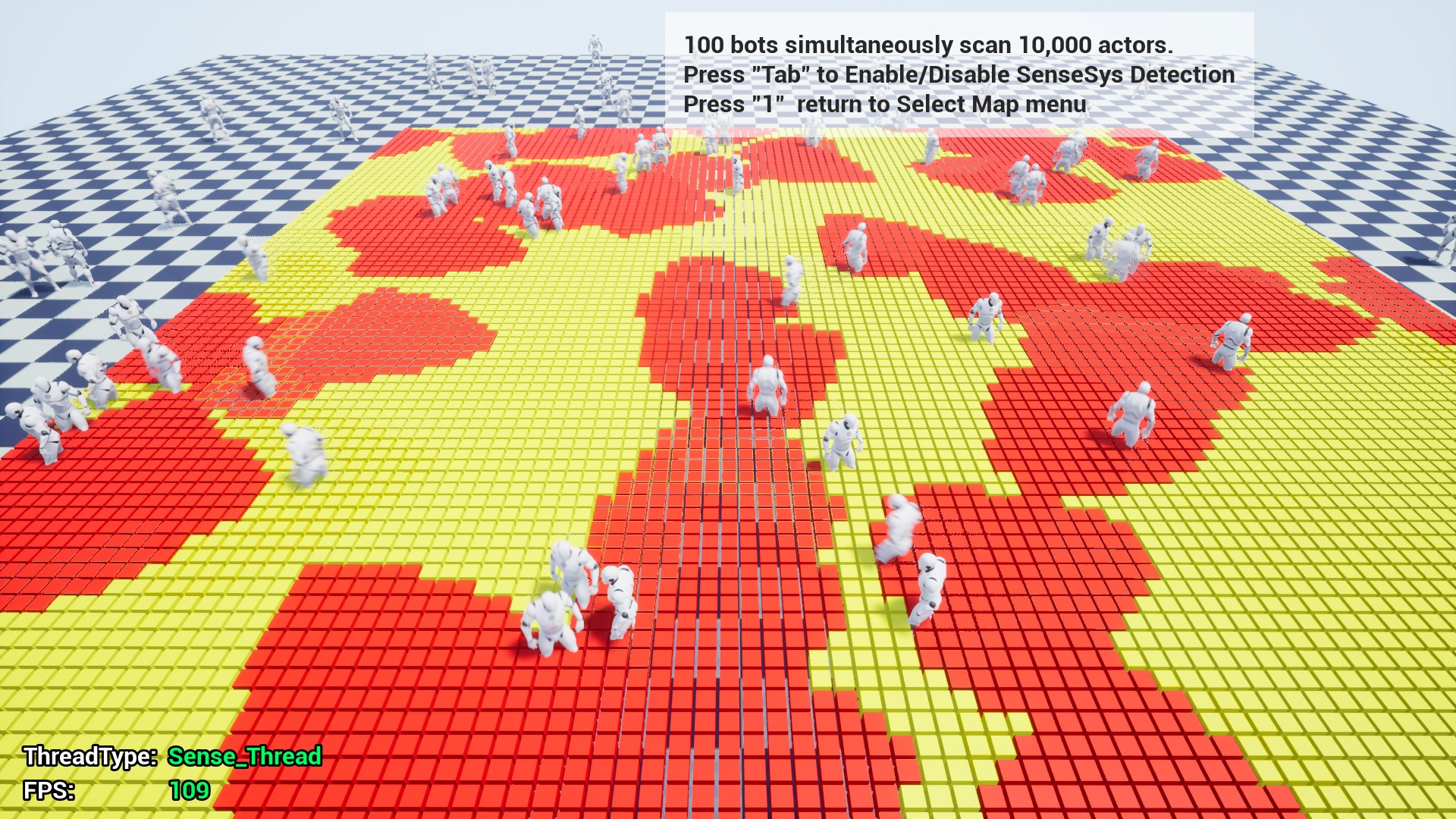
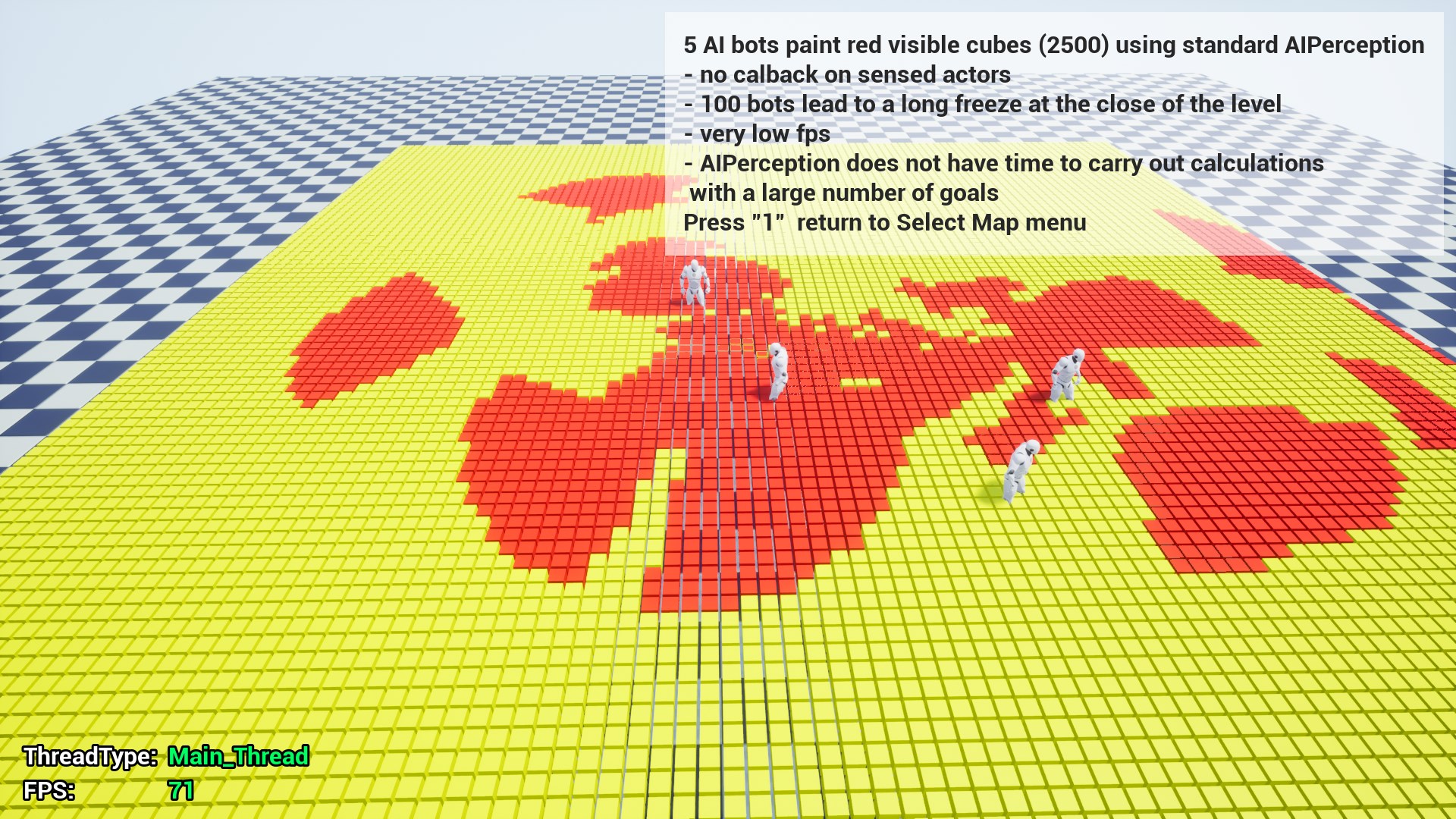
100 bots 10К targets on SenseSys - 109fps, clear and full result per every update
VS
5 bots 10К targets on standart AIPerception - 71fps - not full result per every update
ue4.25
 pseudo breach
@torn ermine Wow, that's really impressive
cerulean girder
I asked some questions to the dev hoping he anwsers...from the looks of it he took the 3 different systems we currently have and wrapped it into a highly expanded super version with a ton of new features...if thats the case this will literally replace ai perc for me from now on... depending on how convoluted the actual set up is...cause our current systems are add to components and done....
mossy stratus
@torn ermine what kind of game are you making that requires this?
 simple crest
I've played with his system/demo a little, it seems quite well set up - very generic system using a set of tests you can build up. useful for traditional AI perception, also useful for things like active player interaction with the world. unfortunately the manual is a bit rough to understand, if only I had more free time right now I would love to help revise the english PDF manual...
cerulean girder
Does it atleast contain the basic stuff from the 3 other systems? Meaning it sets up the same...or is it a mess compared to the current drop in and it works we have now?
simple crest
exactly which 3 systems are you talking about?
simple crest
ah. pawnsensing is dead/not relevant anyway. for the other two, I only played with Snake's plugin enough to generally see how it works... I'm not sure how it could replace EQS without looking some more though. from what I saw it relied on created components on both sides - the sensor and the stimulus. Epic's EQS system is more like a single-sided system... just the EQS which can probe blindly at the world. I don't know if his SenseSys did something like that. if he comes back maybe he can explain what he meant
cerulean girder
Pawn sense still has some uses...its half the load of aiperc while providing just enough for simpler ais to act relatively decent...but yeah supposedly it is supposed to have all of that functionality which like you say how would it replace eqs..but if it does ...man...just seems too good to be true
I mean i can see all 3 represented in the video
....but what about the set up? Did he replace a single node function with a spider web of convoluted nodes
torn ermine
well in order i can answer your questions, give me a minute
the system does not replace EQS completely, it does not know how to look for shelter, or on the map according to special tests.
the system helps to connect the interaction of sensor and stimulus objects; I implement a set of tests
code from existing systems AIPerception, PawnSensing, EQS epic games not used.
At the moment, the system can completely replace AIPerception, PawnSensing and only some EQS functionality.
using the system is pretty simple: you need to add two kinds of components - we set them properties and define delegates similar to the delegates of the physical engine (hit / overlap detection)
standard test suites: hearing, sight and touch - are already prepared by the system and a project with various use cases has been prepared(it can be seen in the video)
cerulean girder
Ok so a aiperc on steriods?
torn ermine
it is much better
AI perception is unusable in my opinion, which is why I developed this system
cerulean girder
So drop in 2 components and use it the same as if it was the aiperc creating my reaction nodes ect tweaking radiuses and such to match my needs
Still possible
Using only what i need from it
torn ermine
You can download the assembled project with a demonstration of the system and see its capabilities themselves.
https://drive.google.com/drive/folders/1atJzhBuEcQyUeMrZbVL-5p9DVAVhif4Z
I can demonstrate some code in blueprints if you are interested in any of the levels

https://unrealengine.com/marketplace/en-US/product/sensesystem
SenseSystem is a flexible, extensible, and multi-functional system for detecting and responding to the detection of game objects in UnrealEngine. The ease of implementation and fine-tuning makes it suitable for pro...

https://unrealengine.com/marketplace/en-US/product/sensesystem
UE4 SenseSystem ImplementInterface
cerulean girder
Eh what the heck, at that price im going to buy it and if it dont work out for me no biggie 🙂
torn ermine
be sure to write to me what you like and dislike, if I see the directions for the development of the system correctly, I will definitely release updates version.
version 4.25 is waiting for an update from the epic and will be released soon
cerulean girder
Yeah of course...ill also let you know how easy/hard it ends up being to swap a currently set up aiperc with your system
torn ermine
i can record a video for you.
What functionality are you interested in?
cerulean girder
Sight mostly and ...no need to make anything special for me, unless you were planning on making guides for it anyways
torn ermine
ok give me some time
cerulean girder
No rush
torn ermine
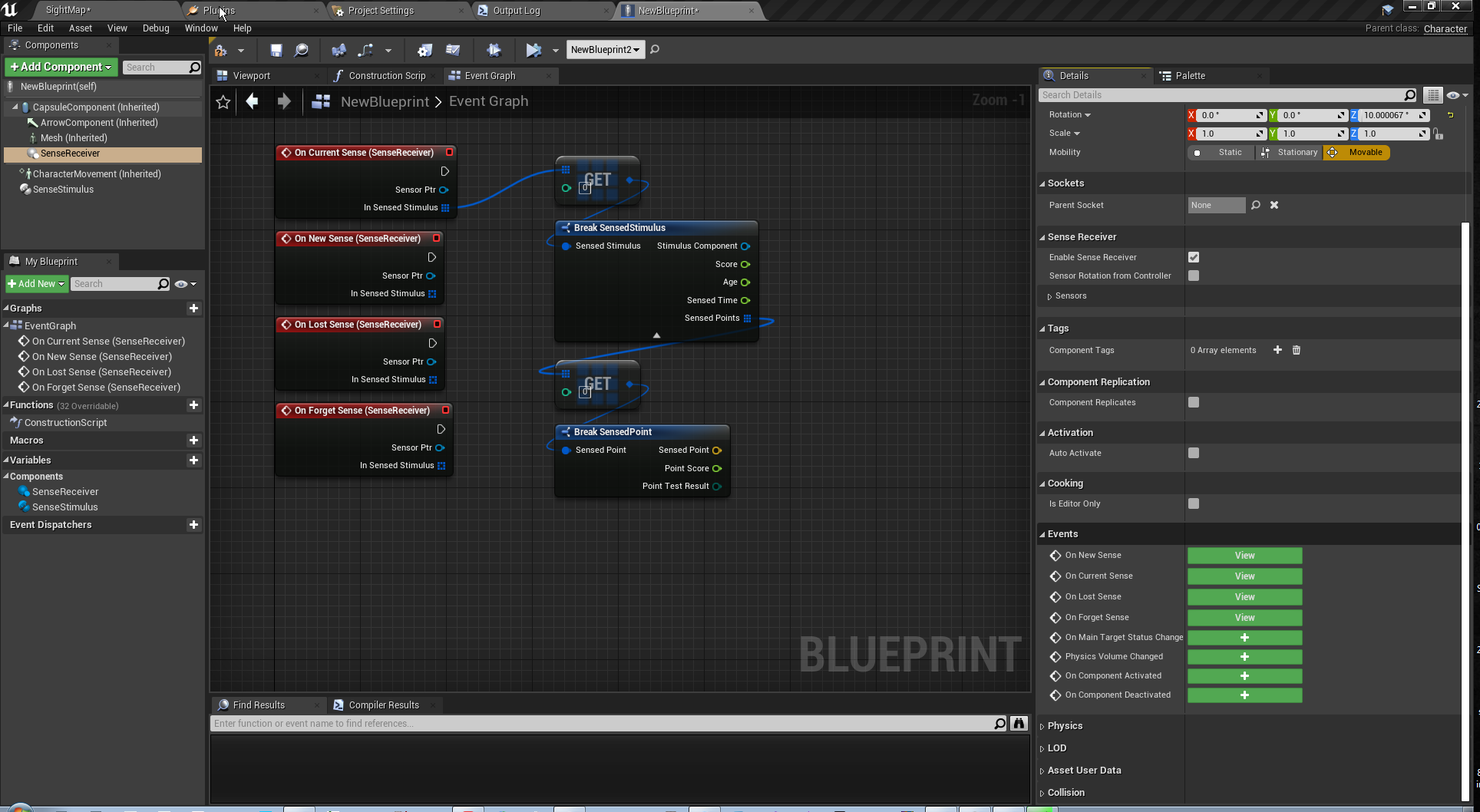
https://youtu.be/UGeAL1H_oCE
https://i.imgur.com/wRhk5oF.png
https://i.imgur.com/31zNcgT.png
define events for delegates where we can get data about the opposite side of the system.
for the sensor - an array of what we detect
for stimulus - information about who detects it


@cerulean girder
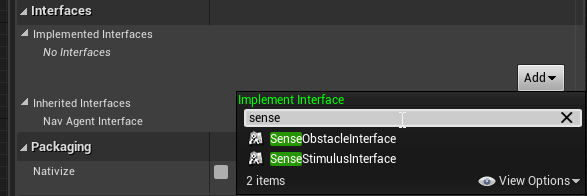
also if you need special points for detection
https://i.imgur.com/kaovp0f.png
you need to add a StimulusInteface to the actor, and define a getter of points as you want.
For example, the position of sockets, or the position of bones with pre-cached indexes for quick search
 cerulean girder
Nice so it can target specific areas with senses like seeing the character hand(bone)?
pseudo breach
It shows that in one of the videos he posted
cerulean girder
Right im just echoing...meant as a statement not an actual question
Its impressive...cant wait to install it later today
pseudo breach
I'm wondering how it scales with hundreds of actors looking at hundreds of other actors, like in an RTS
cerulean girder
Probably no worse than using current aiperc
Probably better actually
Yeah this system screams rts
torn ermine
Nice so it can target specific areas with senses like seeing the character hand(bone)?
absolutely right
cerulean girder
14$...why so low, if you dont mind me asking?
torn ermine
I'm wondering how it scales with hundreds of actors looking at hundreds of other actors, like in an RTS
https://youtu.be/e_zw28YvPFU?t=635
link with time
https://unrealengine.com/marketplace/en-US/product/sensesystem
SenseSystem is a flexible, extensible, and multi-functional system for detecting and responding to the detection of game objects in UnrealEngine. The ease of implementation and fine-tuning makes it suitable for pro...
at 10 minute
cerulean girder
Seems like so many of the great plug ins the makers always price at a complete steal...while ive purchased some over 80$ that dont do half as much
torn ermine
14$...why so low, if you dont mind me asking?
if it is bought by a sufficient number of people, then earnings as an independent developer will quite suit me
pseudo breach
@torn ermine While running, it still looks like FPS is dipping quite a bit. Or no?
torn ermine
video recording + on the old version of the engine when recording + editor with debug information. + a lot of skeletal mesh without lods.
if at some point a performance loss is noticed, you can always multiply the update interval by a few milliseconds
pseudo breach
I also notice that in that part of the video it looks like you are doing the bone sensing as well. For my RTS project, I would probably do detection for infantry based on head bone only, to account for cover and reduce points it has to sense. I assume that improves performance considerably?
torn ermine
better performance is achieved - no bones at all,
for example at the position of a component or actor,
the position of the bones is served by a different animation system, and the blueprint api is not designed for good interaction with them outside the animation plan.
pseudo breach
I see, so perhaps just an invisible component attached to the character's head?
torn ermine
but with some C ++ magic, you can get the bone transformation without searching by name, getting them by the index previously obtained and stored in a variable, which will significantly increase productivity.
although there may be an API to get the index without c ++, I don’t remember this for sure.
pseudo breach
Nice. I think I will pick this up. It seems very useful.
torn ermine
https://i.imgur.com/2jHOgW0.png
this is a method from the video example how to get
locations for checking the sensor
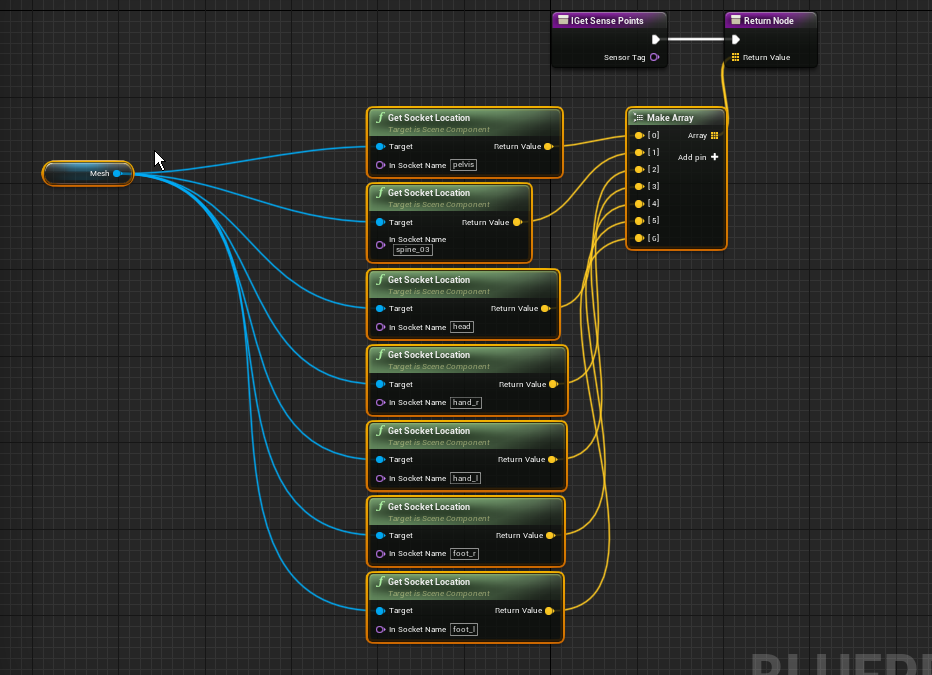 pseudo breach
ah, that is easy enough. So based on the vector position in the sense point array, you could put them basically anywhere? Very useful for vehicles, which do not have "traditional" shapes.
torn ermine
I just checked and disabled the system on this map with bots
I get the same FPS in the editor
pseudo breach
Nice
torn ermine
skeletal mesh reduce it
pseudo breach
How is this so much better than the normal perception component?
torn ermine
much better
cerulean girder
Well off the top of my head...getting a query on a visible bone is impossible with normal aiperc without running a very heavy custom function to do it
 quiet zinc
Hi, in 4.24 I made use of a behaviour tree with a SelfActor (actor object) which would always be populated as the actor being controlled by the AI controller that used the tree. The value could then be read in a decorator/task as a valid value. In 4.25 this key seems to never be populated and requires a casting to get the controller and it's controlled pawn. I believe this is was being done when the SelfActor was populated behind the scenes? Was just interested if anyone knows a bit more about this? I didn't see any mention of this change in the release notes. (image below)
cerulean girder
I alway used the ai get controlled pawn for that...never tried it with a selfref...
 obsidian wolf
Hello everybody. I have a question. How do you handle when you spawn multiple NPCs for example on the second floor of a building? Because right now my NPC are following my location from x,y only so they don't go down the stairs to my actual location. Thank you!
cerulean girder
do you have nav mesh set up so they can path to you?
@obsidian wolf
i mean you can see nav mesh on the stairs leading up to the 2nd floor
 inland hatch
Has anyone else run into the unregister blackboard component crash when exiting the game on 4.25? Seems it could be something to do with the blackboard being incorrectly initialized twice
EDIT: Removing synced keys from the blackboard has resolved the crash, but hopefully a long-term solution comes soon
 royal tapir
Hello fellow humans. there's an issue that's been bugging me for a while and that is AI Perception. Perception by sight doesn't detect stimuli that stand at a lower altitude to the perceiving character.
Has anyone run into this problem? And if so, how did you deal with it?
silent light
Hello, all. I wrote an Attitude Solver implementation using a static function, and set it using FGenericTeamId::SetAttitudeSolver(&USoEFaction::AttitudeSolver);. However, even with AIPerception and AIPerceptionStimulus components in place, this AttitudeSolver is never called (based on breakpoints I have set). How can I figure out what I am missing? Thanks!
I run the SetAttitudeSolver function in my GameInstance::Init override, in case anyone is curious
THAT is run, the breakpoint there is triggered
But the solver itself is never invoked
 silent void
@royal tapir I have noticed the same. If I'm on a higher or lower area but we'll within the perception distance they ignore but the moment I drop down to around half a characters height above their head they can see me.
Is this what you mean?
silent void
Yeah I've not found a way around it yet but it's very annoying. I can't use AI in an area with multiple levels like say a shopping mall with 2 or 3 levels and the player is on the 2nd level shooting at them on the first level they are meant to turn to face them and shoot. They turn but cant find the player and walk around aimlessly turning to them as the player shoots at them
But if they on ground level with them then they work.as intended.
cerulean girder
Is something blocking thier sight cone @silent void
Like a guardrail or anything that could be chopping off the bottom/top half of thier sight
Also are you using linetracing to determine if they can hit before shooting...maybe your not letting them aim up if so
Looking at your convo it sounds like your sight cone settings are incorrect... Eject from your controlled pawn and take a look at thier cones
jaunty peak
Sounds like a situation EQS might be useful for,
cerulean girder
They probably can't see you cause the cone is too narrow
jaunty peak
with AI Sight the cone isn't affected in height, it's width only.
cerulean girder
But it a cone... If you are 20 units away from the enemy as soon as you drop below it's capsule it can no longer see you
You can see it if you eject from pawn
cerulean girder
Eject is easier to tell someone to do then explaining the tilda debug
Or whatever it is
jaunty peak
I'd disagree. Debugger is just using numbers to select or deselect what you need to see. It's not rocket science
jaunty peak
But everyone has their own preferences, and neither is right or wrong 🙂
cerulean girder
Peripheral Vision Half Angle Degrees...this setting
Is probably flying right over your characters head
 celest anvil
anyone know if I set a navmesh radius smaller than my character it stops using that navmesh, is this intended and is there a way round it if thats the case, want the ai to get close to the edge of a platform
closer^
cerulean girder
It needs enough room to stand on a spot in the narrow areas based on the characters capsule radius
jaunty peak
Use EQS if you need to get more exact locations for the character to move to.
cerulean girder
Eqs doesnt care if theyre too fat to stand there....
Lol
If the spot scored high enough its going through
jaunty peak
Still not sure where you're getting the height part of AI Sight. As far as I can see it is purely a horizontal variable. Up and down are not affected or even shown in any debug @cerulean girder Unless you're using a plugin that adds that functionality?
cerulean girder
In aiperc its the lightblue cone..
I don't think it's a plug-in that I have but I'm not in front of my computer to check
jaunty peak
light blue? Not seeing that. By default it's green
cerulean girder
Whats your Peripheral Vision Half Angle Degrees set to...
jaunty peak
all I see is what is listed in the docs, scroll right to the bottom https://docs.unrealengine.com/en-US/Engine/ArtificialIntelligence/AIPerception/index.html

Documents the AI Perception Component and how it is used to generate awareness for AI.
loading a level to play with the half angle
cerulean girder
90 creates a cone with blind spots from the character eyes to the end of the vision distance...180 is literally everything in the forward vector is visible
Messing with it in real time shows you how the cone fans out
Yeah I don't think that that was any special plug-in I have but who knows I buy so many assets from marketplace it's hard to tell anymore
@jaunty peak do you see it yet?
jaunty peak
Interesting, I'm not seeing the height part at all, but I do admit I was wrong about the angle not affecting the height perception. It does indeed change but there isn't a visual debug for it. Hmm.
cerulean girder
There is...but i think its a check mark somewhere to enable the debug draw for it
I cant remember where
It draws as a lightblue cone
At 180 it looks like a gaint half of a sphere
Thats transparent
Showing you the up and down coverage of the ais vision
As well as left and right
If these 2 users are not putting 180 in thay setting...or atleast forcing the ai to turn thier head bone to the character shooting to "look at" whats shooting them
jaunty peak
I get what you mean, but I can't find it either 😄
cerulean girder
As soon as their below or above that cone the ai cant see them
jaunty peak
AI Sight isn't attached to the head bone by default either though.
That's a cpp thing to change. So if you have that, you've either done it yourself or got a plugin for it.
cerulean girder
That could be very possible...
Then unless they make some modifications to move the cone around a bit... The player character is invisible
jaunty peak
Yup, I know there is at least one in the marketplace which I only saw after I made a plugin for myself 😄
cerulean girder
The Peripheral Vision part is still valid tho....it defaults to 90 which is aweful...real vision is probably closer to 145...
Lol funny thing is i wish i could remember where i turned on the stupid cones...theyre always there during level design now...so distracting
I dont even have to have the ais selected
Which is what makes it suck for me
jaunty peak
there is an option in project settings for AI debugging but it doesn't do what we're looking for
cerulean girder
I want them only drawn on selected ai actors...
😥
By the way there's no actual height setting for that ... Picture it more like an ice cream cone... The angle is the bottom of the cone... Projected out to the sight distance... Making a literal cone
The wider you make the angle at the bottom of the cone with that setting the more coverage it has in the front
Just explaining it for anyone else thats reading by the way
celest anvil
@cerulean girder I think its only selected actors if you use the simulated/in play one, which is default to ' key not tilde but on a uk keyboard Shift @ then use the numpad key think its 1 for perception
and remember Peripheral Vision Half Angle is 90 either side of the center, not the entire angle so 90 is actually 180 degree vision
same as half height for capsules
cerulean girder
hmm, idk...pretty sure 90 gives you a 45* split to left and right no your right, it defaults to 45 giving 90 total
bumping to 90 makes it 180
jaunty peak
yarp, as it's called half height angle. A setting of 90 = a left and a right of 90 each, 180 total.
 gritty haven
Anyone know how to get the Sense type from AIPerceptionComponent->OnTargetPerceptionUpdated event? I'm using the event to know when my AI sees something, but now that I've implemented hearing, it fires off just the same when the AI hears something and I'd like to be able to tell whether the event came from the Sight Sense vs Hearing Sense
gritty haven
The only way I've been able to access whether it was Sight vs Hearing in code from the perception update event is Stimulus.Type.Name , feels a little weird to have to do all that, and then a string comparison probably, just to find out whether my AI Perception saw something or heard something
cerulean girder
are you tagging all your sounds? @gritty haven ...after a sound is played you can "report noise event" and give the noise a tag...then you can compare if the tag is == "SoundTagIUsed"...if you have only sight and hearing as senses if it is not tagged as "myawesomesoundtag" or whatever..then obviously its sight
gritty haven
@cerulean girder oh man, thank you so much that sounds like what I’ve needed to do all along
I’m using MakeNoise events, should I use Report instead?
I kept wondering where the Tag on the struct came into play!
cerulean girder
not sure if make noise has a tag section on it 🙂
make noise is for "make this sound and no one should care if its a sound"
i think
but if youre doing like a spy type game where you make sounds throwing rocks
gritty haven
Ok, not at my PC atm but just want to check if u needed to use both MakeNoise AND Report
cerulean girder
np :)...you still need to play the sound btw
the report ONLY reports how the ai should precieve it
you can use make noise
it has tags also
so either node...just make sure to tag it "Loudsound" or whatever you plan to use as an identifier
@gritty haven
gritty haven
Ok, nice. Yeah a designer had already set up the SFX to play (it’s player footsteps in this first example), so I just added the call to MakeNoise right after the call to play the sound
gritty haven
I kept seeing the Tag in the code and feeling like “this would be perfect” but then when testing tag was always “Empty” lol
Makes sense now!
cerulean girder
haha
yeah on the perception you can drag off it and == it
and check if it matchs your tag, heck you can check if it match off a switch of tags
and have the ai react differently to different types of noise
gritty haven
Yeah I mean, now that know this? I’m seeing all kinds of potential to ...
Took the words out of my mouth lol
cerulean girder
tinyrocksound....go investigate...loudfootstep...run over there its an intruder
cerulean girder
np you almost had it...i bet you did what i did and even printstringed it and never realized why it reported "none"
i still havent figured out if you can tag sight events tho...so if you figure that one out hit me back
gritty haven
Yeah I was printing it out in my delegate and it was driving me crazy. Ok I will! But ... how would that work? Like sight perception normally just works by mesh overlap ...
I mean best I can figure is add a tag to the object that can be seen, grab object on sight update, see if it has Tag?
I’ll let you know if I find anything additional though
cerulean girder
yeah i looked all over to see if you can assign a tag to a mesh
if that would be preceived
but no whammy :/
wary ivy
does anyone know why aigamedev.com went under?
it's pretty upsetting that they had a ton of good content and everything has just disappeared :\
all nucl.ai conference presentations are gone
I'm also pretty pissed off that I paid for premium access and then they just took the site offline 😄
stable void
can someone explain these variables to me in non programming language please >?
 misty sail
lol this is a weird question i'm sure but my AI is very slowly moving up
stable void
also, what to do if an actor is not built vertically ? the agent proportion will be off no matter what right ?
wary ivy
change the capsule size for starters
stable void
@wary ivy this was an exaggeration, but if my character width is lets say 300, height cannot be less than 300 right ? it wouldn't make much sense I guess
wary ivy
then it isn't a character most likely 😉
character is meant for two legged humanoids
if you want something special then you need to do it from the pawn class and build your own custom functionality
wary ivy
but if the character works for that spider I see no reason not to use it
stable void
I was planning to use for everything haha, I'll do some more research. By the way, you seem to know a lot, got any tips deciphering https://cdn.discordapp.com/attachments/221798778208780288/708623433260335104/unknown.png ?

like quering extent? no Idea what it does and can't find info
wary ivy
does it have any mouse hover tooltip?
stable void
the spider?
wary ivy
no, the "default query extent"
stable void
this is everything inside : /
wary ivy
no idea
cerulean girder
you drag off it and "make" a nav data structure
it override what the ai would use
cerulean girder
useful if you have an ai that suddenly needs to change modes like he is a walking guy that hopes on a plane
stable void
Ok, I think I get it ... I think
cerulean girder
oh sorry im telling you about the struct
stable void
I didn't get it then haha
stable void
oh ok. Maybe I don't even need it but I'm trying to understand the whole navigation system a bit better. It's such an undocumented mess
 quiet dove
Has anyone else had issues opening the AI Debugger?
I have it on my F6 key and it doesn't seem to open (I have checked the setting in the project)
misty sail
is there any way to MoveDirectlyToward for a set amount of time?
it seems to just keep going until it gets there
or is obstructed
nevermind there's a decorator for it
slow bobcat
@cerulean girder
yeah i looked all over to see if you can assign a tag to a mesh
if that would be preceived
but no whammy
Same situation and we discovered a kinda hidden thing in the engine that is just what you want: UAssetUserData
Object that can be subclassed to store custom data on Unreal asset objects.
Do your own class inheriting from that with whatever data you want. Artist can just add that object to a static mesh.
We use gameplay tags to label stairs, doors and stuff like that. It's fast and very easy to use
https://docs.unrealengine.com/en-US/API/Runtime/Engine/Engine/UAssetUserData/index.html
Object that can be subclassed to store custom data on Unreal asset objects.
once your actor is perceived, you can check for that through a custom interface etc
cerulean girder
That's brilliant!!! Thank you @slow bobcat
 storm zephyr
hey guys, do you know why the nav mesh doesn't work/load when i play the game if i don't make the level, that has the nav mesh, visible in design time?
slow bobcat
navmesh will not exist if the level where it lives is not visible
 prisma pike
Is there a way to set a minimum radius for RandomLocationInNavigatableRadius ?
im making a boss teleport when it reaches a set health, but sometimes it just teleports a very short distance and its kinda anticlimactic
i tried using float+float to make it larger
but it then there are the cases where it just clips into the surrounding meshes
i picked up ue4 last friday so dont expect me to know much haha
slow bobcat
Use an eqs with a distance test
gritty haven
@cerulean girder I was also going to suggest using different team Affiliations and just different ID's for each object but idk how feasible c++ work is for your project atm
pseudo breach
I am trying to understand how to call the pawn's variables and events from within the Behavior Tree. This is probably a noob question, but I'm new to behavior trees and am a little confused. What am I doing wrong here? I just want to do a simple line trace, but I think the cast is not working correctly (it does print "AI Stuff" once, but not again).
pseudo breach
Generically, how do I get information in and out of the behavior trees? I know there are blackboard keys, but can I then call those within another blueprint?
gritty haven
@pseudo breach it looks like your second pic is from within a bt task bp, which is what you're looking for
cast into your specific pawn bp from the ControlledPawn pin
pseudo breach
@gritty haven Isn't that what I'm doing? "Cast To FootUnitMaster" ?
gritty haven
If FootUnitMaster is your pawn then yes
pseudo breach
Hmm...it is. Not sure why it only works once, then.
Well, nothing past the cast works.
gritty haven
Ok so the cast is failing
pseudo breach
yeah
gritty haven
are you sure the pawn that's running the behavior tree is the exact thing you're casting to?
put a breakpoint on that Cast node, and when it hits, hover over the ControlledPawn pin while you're breaked and see what it says
storm zephyr
@slow bobcat but the level is set to initially loaded when the game starts
slow bobcat
Are you setting it to "not visible in game" in the editor by any chance?
storm zephyr
whether its visible or not in design time shouldn't matter as long as it's loading in the beginning
in the beginning i have the level loaded but not visible. when i reach a trigger it makes the level visible but the navmesh doesn't work
pseudo breach
@gritty haven Currently it's the FootUnit_MasterControllerAI that runs the Behavior Tree
Which is the AI Controller Class specified in the FootUnitMaster actor
slow bobcat
yeah, that's the thing. If it's not visible, there will be no navmesh
I might be wrong, but I recall having problems with exactly that
storm zephyr
but i make it visible afterwards, shouldnt it generate when i set it to visible?
slow bobcat
we usually have the navmesh in a always visible level
no if it's not a dynamic navmesh
storm zephyr
its dynamic with modifiers only
slow bobcat
then I'm not sure what could be going on
storm zephyr
thanks anyway
gritty haven
@pseudo breach sure that makes sense - did you try putting a breakpoint on the cast to see what's coming through on your pins in EventReceiveExecuteAI node?
pseudo breach
@gritty haven Confusion intensifies
gritty haven
print a string off of the CastFailed pin to ensure the cast is failing. Just as a sanity check
if it is indeed failing, there's got to be a reason for it
pseudo breach
Did so just now, and it doesn't print
gritty haven
Ok that makes much more sense
It's not actually failing
there's some reason why whatever you're trying to do after that Cast, you're not getting what you want
Perhaps the behavior tree is only calling the bt task bp once?
Can put a breakpoint inside the behavior tree as well
prisma pike
im trying to use some of the paragon blueprints for practice, and idk how to increase the acceleration
when i use AImoveto
apparently it doesnt increase acceleration?
it only says im accelerating when im taking control of the character
this is so weird
 fallow hound
hey all, weird question, I'm using behavior trees in my own actor for behaviors, not in the typical controller way. These BTs don't show up in the BT debugger, anyone been in this situation? Is there a fix that doesn't involve building custom engine? Thanks
fallow hound
haha just had to call RegisterComponent()
is there any way to monitor the status of an injected tree?
fallow hound
nvm solved it like so:
 desert bison
Is there a debug option which allows me to visualise AI paths when using AI Move To?
My use case is that I would like to see the path the AI selects when navigating throughout the level, without having to wait and watch the NPC complete their route.
sullen escarp
@desert bison You can get PathPoints off the controller's current path, then debug draw line through them.
desert bison
Would the controller still have path points if the Move To is called from a different blueprint? If so, thanks for this solution!
sullen escarp
Yup, you can reference the current path and path points in any BP you can get a hold onto the controller. That snippet I have on a component tick attached to the pawn.
 hybrid cipher
hey sooo uhm, just discovering Nav Links and there seems to be very little known about this, but I was curious, is there a way to only use some Nav Links for some AI? say some AI can jump but others can't?
 soft lynx
So the nav mesh looks good in the viewport and if I play the game in the viewport everything works fine but when I want to play the game in standalone mode, the nav mesh is totally broken
Any ideas on how to solve this?
hybrid cipher
@soft lynx first thing would be to try and delete RecastNavMesh and add it again, this wouldn't happen to be MP game?
pseudo breach
@gritty haven Hi again, I'm back. Sorry I couldn't follow up with your recommendations, had to step away that day. In case you don't remember, I was stuck on that cast issue. Finally getting some time to sit and look at it, and indeed, after putting a breakpoint in the behavior tree, I can see that the issue is definitely with the "GetThreatDirection" node. It never gets past it, and can't get to "Wait".
pseudo breach
And just to clarify, "Controlled Pawn" is the Character making use of the AI Controller Class, right?
Huh, so apparently the cast is not the issue, as I was able to print a string later on in the chain.
It's with the behavior tree. It's only executing once and not progressing.
torn ermine
in your BTTask all branches are processed to call FinishExecute with the success parameter - true / false depending on the success.
A task will be considered completed only if it is successful. and then the next task will begin
@pseudo breach
gritty haven
Yep after I saw the cast wasn't failing my suspicion was the behavior tree. Glad you got it figured out @pseudo breach
quiet dove
Is there a clever way of handling AI Senses that I'm missing here? I'm trying to separate Sight & Hearing from each other on an AI but the only way I'm finding is using Tags? Something doesn't seem right to me of using text fields to split different reactions and sounds pretty prone to issues.
 astral topaz
Hi! is it possible for the ai to pick objects and bring them to the player ?
bleak raven
question about navmesh: is there any easy way to determine two things:
- is given vector on navmesh
- is there path between two vectors
I need to know it before mob even attempts to go to that point
context: player sometimes can became inaccessible to mob (there are areas passable by player and inpassable by monster) and in this case mob could be stuck. I want it to shrug and walk away (idle state).
soft lynx
@hybrid cipher (ai navmesh standalone not working) I have deleted and added the nav mesh bound volume and the RacastNavMesh and it still does not work. The strange thing is that normaly I would need to change two settings in the NavMeshRecast actor settings, otherwise the path is not detected because the Object is too small but now I didnt needed to change those so I think the NavMesh is not getting updated. Are there any cache files that I can delete?
hybrid cipher
hm I wonder, I assume you made sure the scene is saved before running standalone? I guess you can run the standalone, bring up console by typing ` and then use "show Navigation" command to display navmesh in standalone, see what is happening there
@astral topaz yes, I'd assume so
@bleak raven by vector you mean a position (as in single point) or do you also want direction (more like a line?), UNavigationSystemV1 has methods to test Path between two points, if you are running from BT you can use Path Exists decorator
bleak raven
I mean position on map
woulld this do job? https://docs.unrealengine.com/en-US/BlueprintAPI/AI/Navigation/FindPathtoActorSynchronously/index.html
Find Path to Actor Synchronously
though decorator sounds interesting
hybrid cipher
yes, but there's also Test Path which should be faster as it doesn't need to return actual path, so if you only want to know if there's a path but don't need to know what it is, I'd go for TestPath
astral topaz
thanks @hybrid cipher ! I've kept researching on it and now i'm trying to practice with sockets ( i'm a noob on UE4 hehe ) but i've found myself with a problem, seems like i can't edit the UE4_Mannequin_Skeleton , when i add a socket f.e on the right hand , and push the save button it gives me an error that is unable to save, is that skeleton read only or something?
bleak raven
zue thanks, will check it out
hybrid cipher
if TestPath is exposed to BPs ^^
@astral topaz nope, shouldn't be, works for me
this skeleton right?
but if you don't need a specific socket, you can always just attach your object to a bone instead (I think ^^)
astral topaz
yeah that skeleton @hybrid cipher , i'm confused now, it let's you save it? because it let's me create it but not save the skeleton with the socket
hybrid cipher
yup all saved
soft lynx
@hybrid cipher What I tried: build path, delete and readd, delete all unimportant folders in project folder, delete config folder and replace with one from a clean new project, verify ue4 installation.
next I will try show Navigation
Ok the nav mesh looks fine so maybe the "goal" points are wrong
hybrid cipher
well you can draw that too, though you will have to write that part yourself :)
astral topaz
@hybrid cipher i've made a new project and now it lets me save the thing, so i think it was some problem with the project i was using. Thanks for the help :))
hybrid cipher
^^ glad it works
soft lynx
@hybrid cipher The problem way the way I'm getting the target... But thanks for your help!
hybrid cipher
sweet :)
 devout geyser
anyone using UAISense_Damage::ReportDamageEvent?
I have the sense registered on my perception component, when I UAISense_Damage::ReportDamageEvent, I can even debug trace it through the perception system, and it gets processed by UAIPerceptionComponent::ProcessStimuli
but when the OnPerceptionUpdated event is fired, and I try to call GetHostileActors, it doesn't return the damage source actor, even though I can see it in the internal PerceptualData container
quiet dove
What would be the simplest way to have an AI not head to the player in a straight line? (For example, strafing to make aiming a projectile at them harder as they run)
EQS?
hybrid cipher
@quiet dove well you give AI a point to get to, which, if you don't want to get straight to player but flank them, would be just a point to a side of player, EQS can do this via generators, but frankly you can do the same with custom implementation, so it's up to you
 knotty sorrel
i need help with ai pathfinding. I want my AI to try to get to its location but then stop if another AI is in the way blocking. At the moment, it continues to try to walk through the other AI until it glitches a strafe around as it slides against the blocking AI's capsule. So i think the issue is the pathfinding is working but seeing through the blocking AI. I would like it to sense that something is in the way and then stop
quiet dove
You can get the individual positions of a Path's key point so you can probably make a decorator that checks if there's an ai in the line between the point where the ai is going and them.
hybrid cipher
@zealous bough is the event called?
 zealous bough
what do you mean?
hybrid cipher
Well do you get anything printed?
hybrid cipher
ok, so I believe you need to call this node https://docs.unrealengine.com/en-US/BlueprintAPI/Game/Damage/ApplyDamage/index.html so that the event is fired
Apply Damage
when something happens (like you hit AI), you tell it to apply damage and then any damage event should be called
zealous bough
dont i use this node on things that i want to do dmg?
hybrid cipher
yea you pipe AI you want to do the damage to Damaged Actor
zealous bough
so i have this node on a falling rock that i made and it dmg the character and then destroyed but when it touches the AI it doesn do anything
hybrid cipher
do you have the rock set to overlap with AI and to Generate Overlap Events?
then you register OnOverlapBegin event as rock hitting the AI?
hybrid cipher
and is it being called? ^^
zealous bough
on the ai no it doesnt do any dmg or being destroyed
on the character that you play yes
hybrid cipher
ok so then it could be just collision profile issue
that your rock doesn't overlap and/or is not set to generate overlap events with AI
zealous bough
hmm i didnt use pawn tho i used character class to make the AI
ill try to make a new collision
nope didnt work
ill ask the guy who teaches me how to use URE4 thanks for trying to help tho
hybrid cipher
🤷
 dusk pewter
does anyone have a working set up for pawnsensing or ai perception to register noises or sounds? I have tried both options with several noises and noise makers but the AI never hears it... sight is no problem though 🙂
sullen escarp
@dusk pewter https://youtu.be/sbV7MT1nn28?t=320
We first improve our existing AI perception, and then we go through to how to make a distraction to distract a guard and call their attention. The guard will then investigate for hostiles.
Support me on Patreon and get access to videos early, join our developer community on D...
dusk pewter
I saw that one but now my issue is how to separate hearing vs sight using the AI perception component
i thought pawn sensing would work but hearing doesn't do a thing for it
sullen escarp
Can go off the meta data? On Target Perception Updated event provides the stimulus struct, check the tag meta data
 heavy ore


