#gameplay-ai
1 messages · Page 116 of 1
 stark zealot
@barren crypt Awesome! Thanks I'll give it a shot
 barren crypt
Haha no probs man 🙂 hope it helps
 potent bridge
Hey there ya'll, I need to do my due diligance here, as I know nothing about AI in UE4.
Quick question before I begin, however.
I'm working on getting some spaceships flying around a scene. Obviously navmesh is out of the question here. Currently I am just moving some mockup cubes around with a 'set world location' node, and some target vectors, all quickly mocked up in their blueprint.
I sense this is a terrible approach, especially as their functionality grows.
Question: Should I be learning the AI controller/behaviour tree stuff, and will that help me in this case if it cannot be used with a navmesh, but must translate to direct prop manipulation/physics forces?
Is there a better way I am unaware of, perhaps?
Thank you so much in advance!
 pine steeple
you can use Behaviour trees for anything
you can make tasks to do different movements
 misty holly
I built this ai in an rts type format as in where I as the player give it a command to do something like attack a tower and to attack an enemy if they see one well my problem is once it sees an enemy and is done attacking the enemy it forgets the command I gave it which was to move to a tower how can I get my ai to resume my move to command once I no longer see an enemy
 ocean wren
@potent bridge Yeah, you can use BT's with non navmesh agents. Have a look at UFloatingPawnMovement for your agent too.. I use that in a top down 2D space game and it works fine..
Check: You'd have two variables in your BB, you'd have a "enemy" and an "attack target", the attack target would be used in a condition for your AI command.. so basically you'd have "Is variable set" test and do a branch of your behavior based on that.. BUT... then you'd also have a higher priority branch with a condition of "Is enemy Set" which aborts the attack tree and runs its enemy attack logic. Once the enemy is killed, you reset the enemy BB value to null and the "Is Variable set" condition goes back to false, which then lets the lower priority "attack target" tree run again (because the Is variable set value on the attack target is still true)
so what it comes down to, is two different blackboard values, two conditions, two subtrees and one having higher priority
TLDR: dont use the same blackboard value for enemy and building attack targets 🙂
OR! you can always implement a stack of attack targets.. push new ones and pop them off when finished
 livid beacon
@misty holly There might be a simpler solution to your problem, but you might take a look at this idea for an order system in an RTS. I've been incorporating something similar into a traditional RPG, and while it is more complex than utilizing a single Behavior Tree, it provides a pretty flexible and elegant solution to problems like the one you are encountering. (You can ignore the part about the Ability System if it isn't relevant to you.) https://www.youtube.com/watch?v=1Dm1G6fUuFs

The Gameplay Ability System in Unreal Engine allows developers to build powerful abilities for arbitrary games. In this Unreal Fest Europe 2019 talk, Daedali...
 feral hinge
Hello, i am trying to set an animation blueprint for different AI characters. I am using the same animation blueprint that my player controlled character is using, but the problem is that the AI mesh gets animated when my main character moves, even if it just standing. The animation blueprint i am using is getting the information for speed and direction from the player controller node, how can i make it get the information for speed and direction for each individual AI npc, so the animations work correctly? I know it's a long question, i am sorry
barren crypt
In your anim BP use try get pawn owner instead. Cast to your character and use that character as a reference to get variables
For your AI, you can make a duplicate of the anim BP and do the same thing but cast to that AI character instead if it's not a child class of your main character
But really idk why your AI would move when your character moves unless it's coded to do so.
 patent hornet
@feral hinge you generally don't read the Velocity from the PC, you read it from the MovementComponent on the Pawn
as ConFUcious said, in BlueprintUpdateAnimation, TryGetPawnOwner, but casting to Character is sufficient to get Velocity, so unless you have another reason to Cast to a more specific subclass, don't
misty holly
im in my player character trying to call a custom event from my ai bp but its not getting pass my cast I think it may be my object reference
barren crypt
Yeah it's a bad reference. You need to get the correct ai reference to feed the cast. Perhaps get all actors of class, filter your AI and use a get index O as your AI object..... Unless all the AI are the same class, in which case you'll have to find a way to get your specific one, maybe by giving it a tag name and get all actors of that tag
Oh and once your have the correct reference, store it as a variable for you to use again - saves having to get it again and having a heap of redundant code
misty holly
oh yeah... ig I should get a line trace first in my case ugh im so bad at referncing lmao
stark zealot
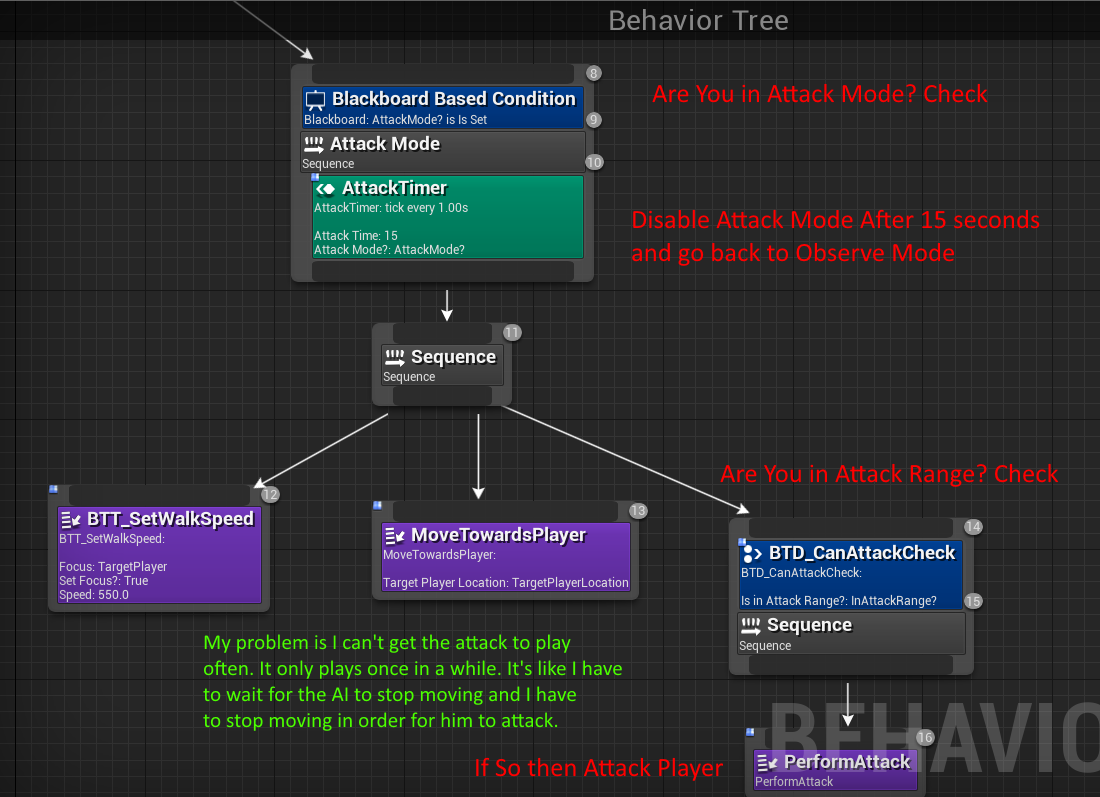
Is my logic off? I can't make my AI attack me all the time when he's in range of me. What am I doing wrong? He only attacks once in while when he feels like it. LOL
barren crypt
Take the attack off the sequence and move it to the same sequence as the move, and put that decorator on it again
Also print out and make sure the AI is still actually registered that it's in range
Also give it an abort condition in the decorator
stark zealot
Hmmm Ok. So It is printing that it's in range. But it's still not attacking as soon as it happens. It's hit or miss. https://i.gyazo.com/2e555c91f0401fec77f482535119470a.gif

Is this right?
ocean wren
Whippy, that shouldn't be a sequence, it should be a selector.. have the attack as the higher priority with a condition on the attack range.. have it abort lower priority.. the lower priority should then be a sequence that sets walk speed and moves towards you
so basically.. it should only attack if the range test is true.. otherwise it should fail that test and move onto the movement sequence
remember, the higher priority goes on the left
so what you want, is for the higher priority (the attack) to "take over" from the default (the movement) when it can
ocean wren
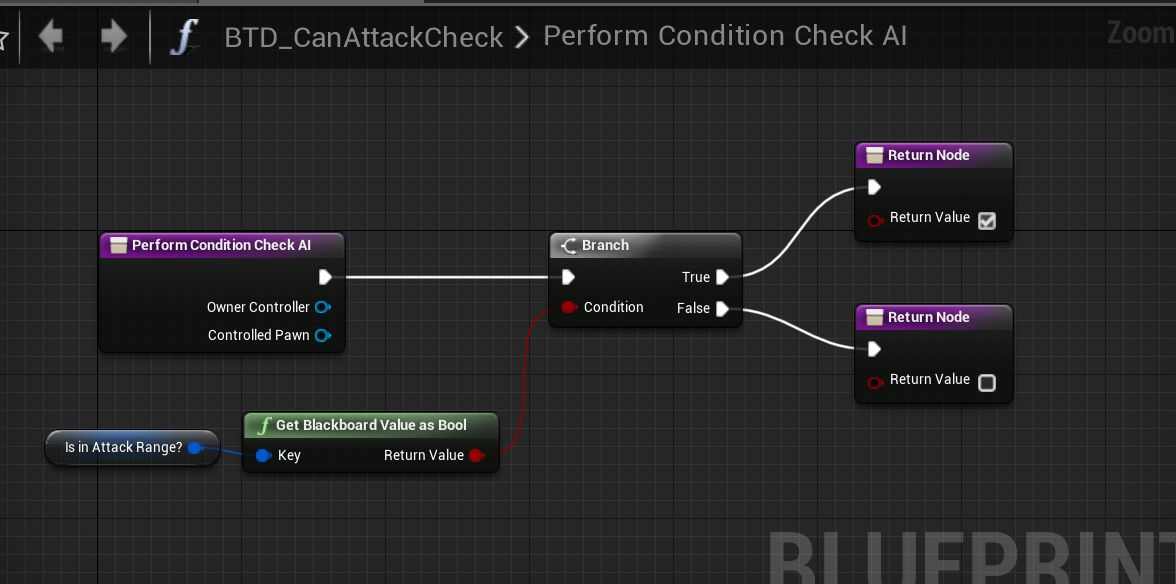
its a condition
barren crypt
Holy crap I didn't know you could make a function in a condition - I set every BB variable in the top of the tree ... Man I could make that service so much smaller now
Cos my AI is huge
stark zealot
@ocean wren 🙂 That seems to have worked! Thanks. Now I have to add in something to keep him from trying to attack every .2 seconds lol.
ocean wren
Well, you live and learn right ? 🙂
stark zealot
That makes sense though what you told me.
ocean wren
Good stuff
The hardest part of AI is figuring out all the different edge cases in behavior and then figuring out how to write conditions that exclude or include the right stuff.. not easy 😉
stark zealot
Yea I've been struggling with behavior trees for the past week. I made the same ai in blueprint alone but really wanted to recreate him using a behavior tree so I could hopefully expand upon him more easily in the future. But It's been tough lol
ocean wren
Keep at it, it does make sense once you get into the swing of things
stark zealot
Thanks I'ma keep trying. 🙂
pine steeple
@stark zealot honestly it is not that difficult
 tawdry zephyr
How do I access individual senses from an AI Perception Component? Not fussed whether its C++ or BP
Also, can I know which triggered the stimulus
I think.. writing custom perception component might be better, this is really unfriendly to work with
The AI system as a whole is yuck
barren crypt
Its still pretty usable tho - you can do plenty with it
patent hornet
true, functionality is there, but API kinda sucks
barren crypt
yeah there needs to be more on the stimulus struct
potent bridge
Hey guys, just quickly, could someone please kindly summarize the difference between and AI controller, and a behaviour tree?
Is it either or, or is the tree making decisions that the controller is implimenting? Is that the idea?
patent hornet
BT is part of the AIController, executed by its BrainComponent
there are many design approaches to the AI: one closest to being a norm is have the Pawn itself know how to implement every one of its actions, so you can swap out the controllers without having to c/p few square meters of blueprints / pages of code
and the Controller/BT just collecting data from the environment and based on that deciding which action should the Pawn execute
as for which one makes the decisions: it can be either a Controller, or a BT, there are many ways of structuring an AI that BTs don't cover
it can even be a mix of both, but there you have to be careful not to obfuscate the code too much - if the execution jumps from Controller to BT and back again, it will not be readable at all, and it will be a nightmare to debug
each BT service/task/decorator has a reference to the AIController that's running it, and the Pawn
BT is essentially a flow control system - if it suits your needs - great, if it doesn't - you'll have to implement an alternative
i would recommend going BT for someone who is just taking first steps into AI - it is much easier to visualize
 stable void
How do I set an actor to be friendly/neutral/enemy using blueprint ?
patent hornet
more information required
at this point im just guessing using AIPerception system
ocean wren
Bengaman: essentially the AIController is the container of the brain of the character, it owns a BT which is actually the logic the brain runs..
patent hornet
there was a group of editable properties for it either on Sense or Perception component
i don't actually remember if those ever worked in BP tho
@pine steeple
potent bridge
Thanks so much guys
stable void
I can't find the setting where you told me to look, only what kind of actor to perceive (neutral,enemy,friend), not to set the actor itself
@patent hornet
pine steeple
@stable void teams are a bit of crap implementation
stable void
@pine steeple does that mean I can't use the feature and work around it ?
pine steeple
i know you have to implement the team interface
and return what team via a virtual function, not sure thats possible in blueprint
patent hornet
as long as its blueprintnative, you can
ocean wren
There is a genericteamid structure.. but.. you can't access it properly in BP
pine steeple
but i just have all my tickboxes ticked for the teams and just manage it through the ai themselves
patent hornet
you can add a small tumor with teamID to your actors
ocean wren
and its kind of broken anyway, because it overwrites the team id post construction, so you can't set it at begin play and have it work if I recall, although that might be fixed
pine steeple
so
patent hornet
and ignore perception updates for some teams, or handle them differently based on a team
ocean wren
you could use generic tags
pine steeple
AAIController has the interface
    // IGenericTeamAgentInterface
    //----------------------------------------------------------------------//
private:
    FGenericTeamId TeamID;
public:
    virtual void SetGenericTeamId(const FGenericTeamId& NewTeamID) override;
virtual FGenericTeamId GetGenericTeamId() const override { return TeamID; }```AAIController has the generic team thing.. but thats dumb, because then your player doesn't have it
patent hornet
yeah, that won't work in BP
ocean wren
it should be on the character
pine steeple
not really
pine steeple
i mean it should be on APawn
ocean wren
otherwise youre going to do a lot of "is this an AI? oh it is? then get its team.. is this a human? oh.. well, figure something out then"
well, ok.. I'd go with pawn if you like too
patent hornet
i'd put it on a PS, even if it means you'd have to instantiate PS for AI if you want to sort them in teams
ocean wren
hell, even on AController 😉
pine steeple
and it should have a bp exposed way to set/get the team
ocean wren
agreed
I mean this shit is simply setting an int..
or a set of flags.. can't remember
such a poor job of simple usability it makes me weep 🙂
patent hornet
@stable void i agree with zoombapup that generic Actor tags is the least painful way to get the teams working with perception system
ocean wren
yeah, slow, but at least it'll work
stable void
mmm ok
patent hornet
they had plans to do it right, but they didn't do anything on it last 3 years
pine steeple
or implement GameplayTags if you really want
stable void
can you set tags on the fly to change enemy behaviour ? I've never touched them
ocean wren
yeah
pine steeple
actually GameplayTags require c++, nvm 😄
stable void
cool
patent hornet
its just an array of FNames
ocean wren
and you can use heirarchy in them too
patent hornet
the generic Tags
pine steeple
actually you dont need c++ for GameplayTags
so yeah that might be an option
with GT's you can do a lot more stuff aswell
stable void
what's the difference ?
patent hornet
IGameplayTagAssetInterface is BP exposed?
ocean wren
If I recall right, the tags system is basically what almost all of the fortnite stuff uses
patent hornet
all GameplayTags have to be predefined at compile time
so you can't invent new ones at runtime
stable void
oh ok
patent hornet
they are slightly more complicated to implement but not by much
stable void
what's teh benefit then ?
patent hornet
and they have a hierarchical structure
Character.Incapacitated.Stunned
Character.Incapacitated.KnockedDown
ocean wren
Are they properly documented yet?
pine steeple
Cheap to replicate, can handle matching multiple tags, in containers, pretty nice
patent hornet
and it would return a match for any or both of those 2
pine steeple
i like to think of them as "Glorified booleans"
patent hornet
they replicate as Integers, unlike FNames that replicate as strings
pine steeple
example heirachy: http://www.interkaos.com/grabs/UE4Editor_LFfpfdL05p.png
 stable void
cool. i'll look into it. Thanks guys
patent hornet
because you have to predefine them, that's possible
ocean wren
AAAND because they're used in fortnite, they have actually been tested and fixed
stable void
another thing, it it possible to view the perception debugger in editor ? It's annoying to tweak values in between play/stop/tweak repeat
patent hornet
at least some of it should be visible when you hit apostrophe
pine steeple
you cant see the values without the game running
stable void
bummer. I suppose that all of this shabang cannot be edited from the character owning the perception AI either ?
as nothing is coming up here
😑
@pine steeple
stable void
I'm going to have different NPCs requiring different AI settings
pine steeple
to expose some values
you mean different percpetion settings?
if so, impossible in blueprint to change them
stable void
I'd buy it
pine steeple
which exposes some of the core ai stuff
stable void
coders need to release more plugins on the store for us peons
pine steeple
cause its stupid thats it all gated behind C++, i mean for me its fine
it will probably just be a github plugin as it will be pretty basic
patent hornet
yeah, with him blueprint code magically moves into c++ overnight because he was bored 😄
pine steeple
😄
not all the time
i sped up widgets though
and annoyed syrus in the process
@stable void how long can you wait, cause i can probably knock a plugin out and would require someone to test it tomorrow
some QOL stuff for the ai/perception system
stable void
I'll probably skip on using the plugin because I have no way to keep it updated myself but if you want a tester it's no problem for me.
patent hornet
nothin in AI changed since ~4.11
 spiral shuttle
wat
patent hornet
its not likely to require maintenance
stable void
go epic i guess :/
spiral shuttle
thought they've added some stuff with gameplay abilities
spiral shuttle
yeah, not the core
pine steeple
they depreceated pawn sensing
spiral shuttle
it just added another layer of confusion when going through the AI module
stable void
god I wish they would stop working ion that game and focus on the engine ... people can't keep playing it forefer
.... here's hoping
pine steeple
fortnite did bring some nice changes to the engine tho
stable void
true
stable void
double true
stable void
i just wish they kept the promise to make blueprint similar to C++
pine steeple
they merge stuff in from the fortnite engine
patent hornet
they are mostly similar
spiral shuttle
that's also my guess
pine steeple
yeah but they are seperate branches
stable void
lots is missing
spiral shuttle
ofc different branches
pine steeple
and i bet fortnite version has engine changes we wont see in the engine versions we get
spiral shuttle
i'am talking about severe divergent versions
pine steeple
oh yeah ofc
but repgraphs could have been kept internal
even tho tbh, they need to do better documentation for it
cause it looks nice, just lack of anything useful, like GameplayAbilities has been out since Paragon, but only started gaining traction the last year or so
spiral shuttle
is mieszko still working at epic?
pine steeple
nah
spiral shuttle
no wonder then
stumbling upon lots of answers, posts by him, but those stop around 2016
spiral shuttle
you're right with 2018
so ... nobody working on AI at epic right now?
(my naïve conclusion)
patent hornet
might be a pretty accurate one
spiral shuttle
you know .. sometimes i don't want to be right
patent hornet
there is nothing in roadmap i remember seeing
pine steeple
i might just make a small plugin to expose some useful stuff
from the AIModule
as i kinda know what stuff is missing in BP and would be nice to see
 simple crest
(Re "is mieszko still at epic")
spiral shuttle
so where's the AI impl that would make Skynet blush? 😛
simple crest
Hopefully they have him squirrelled away in a dark corner working exclusively on the experimental HTN planner system
 flint trail
maybe he was helping on AI work for Gears 5
he still commits to source every now and then, and the release notes show small features added and small issues being fixed (although who knows who does that)
stable void
@queen moon How do you gameplay tag an actor ? All I can seem to do is to crate a gameplay tag/container and se it there but then it's not recognized in queries ?
 queen moon
how's that AI stuff 🤔
queen moon
also I have no clue for your question, you should ask in #blueprint or #ue4-general I guess
patent hornet
you need to implement IGameplayTagAssetInterface
flint trail
@queen moon do yo happen to know if anything important / new /big, AI-wise, coming to UE 4.24 ?
queen moon
no clue @flint trail :/
pine steeple
might be better to ask Victor Lerp
or ask in the forums
i wouldn't ping the dev's 😄
patent hornet
ssssssssh Kaos
as long as they are invisible on the members list, nobody can ping them 😄
stark zealot
Do most "Sword" based AI play their attack animations based on distance to the player? Such as "if within 1000units do a long range" "if within 500 do medium" "if within 200 do close range." Is that how most AI determine what kind of attack to play?
stark zealot
Oh ok cool. I'm trying to figure out how those type of AI determine what to do. Such as a common Knight AI from Dark souls. I'm trying to figure out his behavior.
@near jetty Does your AI strafe and backup, roll, etc.?
 near jetty
yes
its literally an RNg roll
but in general movement is separated from the action selection. The movement will try to randomly walk around you. Basically just selects a random point forwards of the player and moves there
looks like its strafing or moving
things like roll/attacks/defend are rng rolls
i also had some stuff like if distance is too big it would do a leap attack to close
 wheat tree
Does anyone having problems with loading/unloading streaming levels with AI characters placed on it? When I'm reloading streaming level, AI Perception Component got broken all the time. Not sensing anyone around according to AI debugger (Using Sight Sense)
stark zealot
Did you have a combat mode and a Observe/chill mode? Meaning the AI will stop going crazy attacking and maybe just strafe around a bit if not in range?
wheat tree
Have no idea how to fix it. Even created new character and nothing
Upd. Nvm, adding stimuli source component fixed it
stark zealot
I just don't get how people make their AI move so fluid with their animations. I'm using the same animations and mine looks clunky and stupid. No matter what I do.
near jetty
@stark zealot i have components for stuff
for movement and melee i have a melee combat component
it activates when the AI is in "active" mode
the melee combat component deals with the strafing, running to player, and doing "basic" melee attacks
i then also run a behavior tree for higher level AI
the BT is the one that activates/deactivates combat mode
 fallow hound
That's interesting vblanco, thanks for sharing. Is the componant on the actor or controller? @near jetty
 devout plume
Do you guys implement your own State machines ?
I'd like to have an hybrid between FSM and BTs
I found this plugin but not sure if that's worth it https://www.unrealengine.com/marketplace/en-US/slug/ufsm-plugin
Do you guys just use simple enums to switch between states ?

UFSM is a simple, yet powerful, Finite State Machine system which allows you to manipulate Actor States through Animation Graph's State Machines, Behavior Tree Tasks, Blueprint Graphs, or C++ Native Code.
ocean wren
yeah, I make my own state machines
devout plume
For reference I'm making an action game (something like DMC, Bayonetta, Ninja Gaiden and such) so I don't want a smart AI, just something with clear predetermined patterns. Would that hybrid between FSM for general states (wandering, fighting etc) and BTs for precise actions (what does the AI do in the fighting states) be a good approach ?
ocean wren
you'd probably be better off not trying to mix FSM and BT, it'll screw you up 🙂
to be fair, a lot of the "tutorials" I've seen basically use a BT like a FSM anyway
which is a bad idea
the whole point of a BT, is that you get rid of the dumb state transition issues
devout plume
Yeah it felt to me like BTs (cause acyclic by nature) can't emulate cyclic behaviors unlike FSM so I was wondering if mixing the two would be a good thing but it doesn't seem so lol
ocean wren
Well, the problem is you have to have the mindset to use each properly
when you mix them up, you get the worst of both imho
devout plume
Ok I think I'll stick to BTs then
ocean wren
I would.. you can still do very distinct sequences animation wise
its just easier to setup priority-based changes is all
devout plume
I see, would you recommend to break the BTs in smaller BTs btw ? Like a BT for wandering, another for attacking etc ?
ocean wren
yes, that's not a bad idea, because you can then replace the sub-trees for different enemy types
what I've been doing is making a generic version of each subtree, then extracting those out into their own tree and executing them from the main tree once they're debugged
But then, I've got a whole bunch of systems going.. utility and whatnot
devout plume
Oh I see
lol
So I'd basically emulate my states with different BTs and the transitions would be made by the controller, is that a good way to think about it ?
ocean wren
well, generally, you'd have a BT with some higher level selector that chooses what the current priority is
dont think of it as "states"
the problem is, if you think of it as states, you start trying to code a FSM in your BT and you lose your mind
better to think about how your behavior partitions across different conditions and then working out how each behavior is prioritized
so for instance, if you have a lot of behavior that deals with breaking up combat, then maybe combat distance is a good way of breaking out the priorities
so near, mid, far types of combat
those aren't "states" so much as different selections based on a distance value
devout plume
Ok I understand much better now thank you !
And I see why it wouldn't work with states now
ocean wren
it does take some practice to think of it that way, but it works much easier if you can avoid thinking of state
devout plume
I mean it would but with many transitions and weird rules
Yeah I see it as attributing a score to each option and then picking the best one now
ocean wren
yeah, the point of BT's was that a bunch of people got annoyed of trying to figure out when to transition under which condition and how to restore previous state once finished etc
lots of people ended up with HFSM where you could have sub-states within states etc..
which then people realized that state transitions were the issue and created the BT
these days, you do get quite a bit of a mix and match graph kind of approach
I mean, nothing inherently bad about FSM, if a thing is obviously simply stateful, then use an FSM
but... those things tend to be quite simple and the transitions are generally 1-1 rather than 1-many
devout plume
Ok I understand much better thanks to you now, thank you so much !
ocean wren
no problem, good luck with your game
devout plume
Thank you, same to you !
 hoary peak
Is it possible to call a task form another task? I have a sequence that's the same in a lot of BT's but making a new BT for a single sequence seems overkill
ocean wren
You'd generally just make a subtree and use that in your main BT's
devout plume
Btw when using Run behavior in a tree, does the cpu goes back from the root of the parent if there's some kind of looping in the subtree ?
ocean wren
not that I recall, you can see it in the debugger if you drill down into the subtree, but afaik it doesn't backtrack to root
pine steeple
when the sub tree finishes, it exits the subtree and carries on through the parent tree to the end, then once it runs out of nodes, it loops back, so think of the whole BT as one big loop. Which is why when designing a BT you put the high priority nodes at the start of the tree and whittle down to the low priority ones.
misty holly
my ai go flying when they overlap with each other anyway to fix?
ocean wren
turn off pawn collision? its not an ai issue, its a collision thing
ocean wren
no, just disable collision with pawns
misty holly
ohhhh
ocean wren
so that it doesn't collide with characters
devout plume
@pine steeple Please let me know when you release the plugin, cause for some reason my AI enemies are attacking themselves even though they're on the same team and I'm starting to get fed up with this team system
I might just use tags everywhere
devout plume
i'm a bit confused cause I set the enemy teamID like so (AITeamController is a subclass of AIcontroller)
I set a separate team for the player. Everything works fine but the enemies perceive themselves as enemies too, I don't understand why since they're supposed to have the same ID
barren crypt
Yeah tags are are pretty good way to get the AI to differentiate. Works well, and is also the way that really popular AI Behaviour toolkit does it
devout plume
Yeah I really like tags since I use them a lot because of the Ability system plugin too. I'll do that, it's much cleaner to me than this team ID stuff
 errant maple
So I've got an AI with a pretty simple behavior tree as seen here:
I'm positive the issue isn't with the behavior tree because I use the same thing in another level and it works just fine, but for some reason the character just isn't moving. I do have a nav mesh in the level and it doesn't seem to matter where I place the character. I tried using an AIMoveTo node in the character blueprint instead and hooked up the Movement Result to a print string, and it always prints out "Aborted" every time. Any ideas why this might be happening? The nav mesh cell size is 1, the cell height is 1, and the agent height/radius are both 0.
pine steeple
why is agent height and radius 0?
check the visual logger and use the gameplay debugger
google them if you are not sure how to access them
 solar kayak
Complete noob to AI here, I'm trying to implement really basic following for vehicles which aren't characters and so found this: http://zombpir8ninja.blogspot.com/2015/09/basic-moveto-behavior-for-vehicles-in.html
But it's a bit too vague for me to understand what he's doing
It seems like he's using a BTService_BlueprintBase because of the node pictured but based on the notation looks like he's using a c++ BTService
Whether or not that matters I don't know
It's a little hard to find good material online because I don't quite know what to search for past "how to use a btservice"
Would anyone be able to add some clarity to that blog explanation or suggest a different learning resource on vehicle ai? (I'm looking to make combat ai not racing ai)

Baldur's Gate , MechCommander , Neverwinter Nights , Dragon Age: Origins and Pillars of Eternity : games featuring squad-level real-time w...
barren crypt
For vehicles, if they just have to drive a track, you can use a spline and code the vehicle to follow it by calculating how much to steer and how much throttle to use along the spline divisions I think it was from memory. You can then have triggers that give the thing full boost or whatever extra. I followed a tutorial ages ago that did it for a vehicle class vehicle. You could.make a pawn class vehiw do it too with a little extra code
solar kayak
@barren crypt It's not following a path though, it's combat ai. It finds a target (the nearest target for now) and then needs to move to that location while shooting. But "move to" doesn't work unless it's a character moving to a character. I just need help understanding the logistics of how to set up that tutorial so I can modify it for what I need
Think demolition derby kind of ai
 jovial wolf
@solar kayak I am new to UE4 altough I have used engines in the past. I am trying to relearn a lot of things. If I remember working with other engines I would setup a BOT to drive the vehicle, then the MOVE TO works with the BOT driving. Something to think about anyway.
solar kayak
Thanks, but I'm not really concerned about the "how do I do it" as much as "how do I execute what is described in the tutorial"
Particularly this image:
jovial wolf
Based on what @barren crypt mentioned, the Pawn Class should work.
@solar kayak Gotcha, I will be looking at the Tutorial later this week myself. I know in UDK we have vehicles moving like you are talking about as a Convoy.
barren crypt
Oh ok I didn't know it was like that - I may have a play with that as at some point soon, as I need cop cars to try run my vehicles off the road like GTA. Will try it with both and see what happens
For now tho, I'll have a look through what I have and see if there's anything that might help you. Really, the basic idea is just for the AI to constantly have your location as a vector and update it's steering to keep it trying to point toward that spot. So the service would keep getting info from the pawn sensing or whatever, and update the BB with the location which gives you variables for the steering calc
solar kayak
Yeah, the logic is simple and makes sense. The problem is that I've made a BT service with the FindPathToLocation node he mentions, but I have no idea how to actually use the node within the service and get the destination, or what NavPoints[] is supposed to be, or how to deliver input to the pawn
barren crypt
Ahh
barren crypt
Well looking at the node, obviously the top vector is your AI current world position, the lower is the players world position, the context you would have to get your navnesh data so maybe get all actors of class navnesh and get the first one from the array and plug it into context (or however you can get nav data really that suits this pin). Filter youd leave blank unless needed. The only thing I'm not sure of is the object output... I can't figure it out just by looking at the ue4 docs. Cant say I've used this node yet
Idk if you are supposed to drag off this object pin and use it to cast to your AI or what - I do know that of you want to pass values to your pawn, make events in the pawn and then using the pawn pin on event execute AI in a task, you use that to cast to that pawn and then feed it values from the blackboard into the pawns functions/events you'd call
barren crypt
@solar kayak
 rancid ore
I have a decorator set to check a boolean and the observer abort is set to both but for some reason when I update the boolean value the rest of the tree still executes
any ideas?
JK, apparently root node decorators don't do anything
sick
barren crypt
Lol
 storm zephyr
hello is there a way to detect that a perception stimuli is being detected for the first time without having to make an array on my own? i'm overriding the OnTargetPerceptionUpdated delegate, but at that point in time he already updated the age to 0
stable void
How do I know what stimulus has beet triggered ?
sight/ sound etc ?
nevermind, you have to get sense class
pine steeple
yeah its crappy
i am working on a plugin in my spare time
to offer more generic features
to make this stuff easy
 tropic lark
Anyone know why this is returning "False" when I'm generating a sound?
errant maple
So I've tried turning down the cell size and agent size, but regardless of what settings I use, I can't get the nav mesh to go through this vent. Any ideas as to why?
tropic lark
Is the vent an actor?
stable void
I've set up my stimulus but changes are registered only when meshes enter or leave the area of influence, making the detection binary. Either perceived or not. How do I keep testing the detection if the mesh is not triggering when within parameters ?
 half sage
@errant maple Have you also increased the step height? And turn on collision visibility, maybe your mesh has a weird collision in the doorway.
 pure oar
i have a section of my behaviour tree that has a decorator, basically "if normalised health <= 0.2", basically meaning if the AI character is low on health, do this... i want it to keep a distance from the player character wherever it can at this point, without just running to a random location. whats the best way to approach this please?
this is generally a melee actor AI system, so keeping a safe distance means it basically cant attack, for now
for characters that have a ranged attack, they'd still be able to
i think perhaps i could make a service to do it?
it seems like what i need is "get random navigable point in radius, but of at least a certain distance from the centre"
Perhaps what I need to do is project a line from the player outwards n units then navigate the character to a point in a radius from the end of that line?
 tawny steppe
Hey guys so i've made it like when my AI Catches me its deleted and respawned but once its deleted the game becomes laggy
any solution?
 muted dagger
Hey guys should the task works inside a Behavior three just to EXECUTE or even to retrieve data?
I mean what would it be the best for a task
Since i want to avoid casting to controllers inside the task so some function are done inside the actual task (Simple functions, like move to location)
But i want to know if it's actually a good idea or not.
Thanks in advance
 midnight quartz
@pure oar If you have not already look into Environmental Query System (EQS) to find a point for that. You can create rules to find a point a certain distance away from your AI, in a certain direction, within a grid pattern, etc.
pure oar
@midnight quartz thanks, EQS can do that?
i wasnt going to play with that until i added ranged enemies, as it seemed good for finding vantage points
pine steeple
@muted dagger Tasks are for things the AI does at that point of the tree, can fetch data, setup next attack point, etc
Services are for getting data/information that is required whilst the below trees are running for example grabbing ai health so you know when to evade, etc
Decorators are for blocking/allowing access to certain trees/tasks based on the condition
midnight quartz
@pure oar Yup. EQS can do that. It would be similar to what you probably were going to do for Ranged Enemies (e.g.: Find a location to retreat to that has LOS on the target, shoot, repeat if target is "too close", etc.)
pure oar
Is EQS still labelled experimental like the docs say?
So far I've got a melee AI that can patrol a set of waypoints, or walk randomly around a home location. When it spots a player it goes toward them and melee attacks unless it's health is below a threshold in which case it tries to keep a distance but enough of a distance that you may be able to catch it. It would use that time to try and use healing potions etc if it had them. Did I miss anything obvious? This is a third person fantasy RPG.
 tribal lagoon
Have you guys heard of a bug where backboards are not recognized in a shipping build?
Ok so apparently the backboard was in the character and not the controller
Why would UE4 work with that in pie and not in shipping tho
asking for a friend, haven't encountered this myself as I don't do stuff in the character
 balmy coyote
Hi I am new to ai in ue4 how do I play an animation when my player gets close
muted dagger
@pine steeple Thanks a lot!
pure oar
@balmy coyote heres what i did
first put this in your behaviour tree
you'll need to make a new task and service:
this needs a blackboard key called 'EnemySpotted' which is a bool, this is separate to the 'Enemy' key as it is set once the animation completes by the task.
to make this work, you'll need to have a bool in your animation blueprint of your character (in my case, my character is called GenericAggressive, and it passes that bool through to the anim BP). Putting the anim in the anim bp means you still have smooth control over it via blend spaces etc, if you play the anim via a node in the behaviour tree, it can conflict with the anim blueprint. also, the Wait node is important, as it gives some time for the animation to complete before the AI then takes action, e.g. moving into an attack position.
let me know if you need more clarification, also i dont state that this is the only way, or the true correct way, its just how I did it.
the EnemySpotted bool also stops it running the aggro animation more than once. i didnt find any obvious DoOnce function in behaviour trees themselves.
stable void
I can't find how to set up AI touch sense.... It's never firing and the collisions are sut up properly :/
on component begin overlap works : /
makes no sense to me
get it ... sense
hehe
patent hornet
thats a terrible pun
stable void
: (
patent hornet
i tried to get either touch or damage working, was almost 2 years ago
concluded that its just not implemented
stable void
Thank you @patent hornet I'll do it my way then !
patent hornet
good chunk of AIModule, especially perception
looks like they just abruptly stopped developing it
some 3-4 eyars ago
patent hornet
hearing does too
stable void
cool
patent hornet
but touch iirc isn't connected to anything
stable void
Well I'm not wasting anymore time on it then, thank you for the tips !
pine steeple
i really should get this addon library for UE4 working, tbh i am really considering re-writing the perception system cause it kinda is half implemented
but meh too much hassle and i doubt anyone would buy it 😄
stable void
You should consider a marketplace plugin ... There's plenty of noob artists like me that would happily spend on it !
Not enough plugin in the marketplace, so many things missing if you compare it to the unity store
patent hornet
don't get your hopes up, hes mentioning he should do that for a year now 😄
stable void
hey, another drop in that vase ; )
pine steeple
yeah
i just don't find the time
i also need to re-write the CMC
for AI without all the prediction stuff but just simple simulation
 strange echo
guys just wondering if anyone can help me with delegates in c++
void UCellControl::Recevier(int test[])
{
UTimerPulse* Sender = ???;
Sender.AddDynamic(this, CellDoSomething());
}
like how do i get the sender
 sleek holly
Hey I'm getting weird bugs while I'm trying to make my ai go through door using nav link
sometimes it just pass through normally but sometimes it just start to roatet in front of door and I as a player have to move around to make him go through
misty holly
@sleek holly when its rotating check the location its trying to move to in bt or bp w/e you are using
solar kayak
Not really finding anything online about this
How can you let an ai controller know how large the pawn is so it doesn't navigate through (for example) hallways that are accessible to some ai (therefore in the nav mesh) but not others?
simple crest
Haven't done it yet but pretty sure the basic idea is to generate independent nav meshes for each character size... Project settings might have something relevant
 ruby flint
@solar kayak Your options range on how large the radius differs between the agents. As HoJo suggested, one of your options is to use a new RecastNavMesh for the larger size to prevent the agents penetrating walls and squeezing through narrow passages etc. This method takes a little more management because you may need to subclass RecastNavMesh specify it as a preference in CharacterMovement or manually assign NavMeshData to navigation queries for the larger agents. If you're using CharacterMovement you could try adjusting the agent radius there for smaller differences. If you can afford to manually specify restricted areas take a look at NavigationQueryFilters.
solar kayak
Thanks! Good to know there isn't some option, slider, or checkbox I'm missing
I can't use character movement so I'll look into those other options
 tribal drift
There should be a way to basically cover it with terrain types to make it easier
I read the example but never implemented it so sadly it's not really written on my brain, but basically you can flag bonuses or detriments to a terrain type and then you could use size as a flag to interpret those.
patent hornet
problem with multiple nav agents is that avoidance doesn't work with more then one
tribal drift
There was a way to do it using the terrain itself marked. Or at least that's what the ai book for unreal I was reading said, the rest seemed to work.
I know the ai was measuring the paths different, and this was a spin on that to get size controls, he suggested.
Basically iirc (It's been a few months) you could place one of the more specialized terrains over and have that work as a modified form for affecting ai, then just place a number to make it avoid that at pretty much all costs if it's size was too large etc, based on your code effectively.
Been working on learning replication so I'm a bit off of that atm. 😦
patent hornet
nav modifier volumes can do it
tribal drift
That sounds about right
patent hornet
you assign then nav areas based on agent's size
then you assembly nav filters with those
 viscid oasis
Just checking - EQS isn't really good at setting bool values, right?
patent hornet
say whaaaa?
viscid oasis
Like BB Values?
patent hornet
it can do it just fine
viscid oasis
Say I want to check whether a player is within range.
patent hornet
and you can always just run a EQS query from a service and set BB based on result
viscid oasis
If I pass through the BB value as a bool to the EQS, will a score of 0.0 equate to false?
 wide mirage
@pure oar Possibly could create a line trace
Relative to the AI position
And having the end position going into a random position along with the distance
And have the AI move there
pure oar
thats basically what i did
i took the players forward vector, multiplied it by a fixed length, then found a position in radius of that end point and sent the AI there
so it hovers just out of reach, ready to rejoin combat if its able to heal itself
hovers probably isnt the right word, as its not a flying creature 😛
lurks?
stable void
Is there a way to force an actor to use a particular navmesh ?
instead of using bounds
stable void
If you know please @ me !
tribal drift
eqs could be used with costs to basically prevent traversing on conditions like we were discussing earlier
tribal drift
I would guess it's because the ai can't hit the space so the command is ignored... Maybe give an outer follow distance then an inner?
Basically ai won't "using built in system" try to go where it can't go.
 crystal grotto
I got my AI now to work a bit.
The new location for Move To will be updated via C++ code.
But when i start my BT it will spam the Move To task with the first PlayerLocation.
I'm not sure why :S
patent hornet
just teleport an actor around and have the AI chase after it
so much simpler
you can get away with starting a single move task per game
 modest wharf
in c++ what does EBTNodeResult::InProgress actually do?
 solar flint
how can i create a police car ai to chase me?
 vapid mist
How can I create GTA8?
solar flint
type how to download gta 8 highly compressed apk 100% work
 fallow moat
make the tamagotchi AI, develop gta8
vapid mist
I am half way in to it
But having problems with configure scripts and pkg-config defines
Hmm I will try to send my pet to computer science university and come back to it after 4 years
tribal drift
One byte. Super efficient.
viscid oasis
Is there a way to chase the police car?
 narrow pier
is it possible to pass inputs to a behaviour tree
fallow hound
I suppose that's what the blackboard is for
viscid oasis
hey dumb question - is BB values set per AI Controller? I believe they are, just sanity checking
@narrow pier yeah, that's what BB is for.
 wary ivy
you can have shared values in black boards too
viscid oasis
Yeah if I've got them sync'd right?
wary ivy
don't remember the option name, could be that
fallow hound
Instanced?
 nocturne charm
I’m seeing some weird perception behavior only on mobile (iOS)
The ai can get in a state where it no longer get perceives me. Anyone seeing something like this?
This is in 4.23 worked without issues in 4.22
patent hornet
i don't think they touched the perception system since 4.13 or so
 neat nova
i'm having trouble with UNavigationSystemV1::ProjectPointToNavigation - is there a good way to restrict the points that I get back to be on the same nav mesh "area" that my character is currently on?
here's a diagram to explain what I'm looking for - i'd like to create a filter to feed into UNavigationSystemV1::ProjectPointToNavigation that will only return points on the GREEN outlined navmesh area (the area that my character is currently moving around on), and ignore any of the RED/ORANGE/YELLOW areas.
Is UNavigationSystemV1::NavigationRaycast (https://docs.unrealengine.com/en-US/API/Runtime/NavigationSystem/UNavigationSystemV1/NavigationRaycast/index.html) the right API to use for this kind of check?
nocturne charm
Only wondering because I saw this in 4.23 release notes:
Bug Fix: GetKnownPerceivedActors used with a given Sense class no longer returns actors once stimuli are forgotten.
patent hornet
@neat nova ProjectPointToNav already takes NavFIlterClass as an argument
 true gazelle
Hey peeps. I'm just switching over from Pawn sensing component to AI Perception and I'm confused on something. Pawn Sensing Component had a Pawn Seen and a Pawn Heard delegate, but AI Perception just has On Perception Updated. I don't see how it distinguishes between the two as far as firing off unique events for each goes
Can anyone tell me what I'm missing? : )
ocean wren
AiPerception returns an array of current stimuli, which you can query to get the sense class from, which can be sight, hearing etc. so basically, you have to do a bit of casting, but yes you can get sight/hearing/whatever
 silent nexus
how can i make the AI always see/chase the player?
silent nexus
anyone?
 pallid mica
This is a simple enough question to find basic tutorials about.
silent nexus
i've been googling my ass off.. there is NOTHING online on this!! everyone uses the freaking "Pawn sensing" and that doesn't give me what i want! cause the damn AI needs to actualy SEE me (90 view angel) so if im behind him he wont chase me so...
pallid mica
This is a basic behavior tree setup
With an AI using MoveTo to an Actor or Location key which represents the Character
That's all you need
silent nexus
ty! i'll try
another quick question, why do the AI follow the "Capsule Component"?
cause if i let the Capsule Component remain the enemy AI will go to it and stop there, but if i destroy the capsule right after going into ragdoll the AI always goes to the center of the map and wait there :S
patent hornet
its going after root component which in your example happens to be a capsule
actor has no location without it
so explicitly destroying a root component is a terrible idea
no location for actor = 0,0,0 + error message in BP, or crash in c++
silent nexus
oh! ok ty for that info 🙂
im looking into optimizing my AI!... i spawned in 200 of them and it lagged like crazy 😛 i googled and found this -> Consider simplifying your animation and/or using simpler movement component. Also, if you have any AI blueprints make sure you don't run it too often (implementing Tick is the single worst thing you can do here!).
is this good advice?
patent hornet
animation BPs will save on performance if they don't have any logic implemented outside of its event graph
even if you just AND two booleans in anim graph to get some state - it will force the animation on the game thread
BlueprintUpdateAnimation should prepare all required variables for anim graph
simpler movement component, sure, CMC is a resource hog
NavMeshWalking as movement mode will save some performance, but it might look odd depending on type of the camera you have
as your AI would walk on navmesh instead of floot, which is ~30 UU above the floor
as for Tick, depends on what's on it
we have a fairly complex AI, and running the AI logic itself doesn't take too much resources
but we can barely do 200 AI active at the same time and still have a framerate over 60
spiral shuttle
is that with or without CMC @patent hornet
patent hornet
with
spiral shuttle
my totally uneducated guess is a lot of perf is eaten by CMC ?
and not so much by the behavior tree themselves?
ocean wren
almost none in the BT, most of it is going to be CMC and anim
Krisrevi: I did a tutorial series on YouTube about pawn sensing AND then updating it to AI Perception, its a tiny bit outdated, but comments suggest it still mostly works
this was years ago now though
obviously all the AI code has changed now.. oh wait.. not it hasn't! 😉
true gazelle
Hey all, I have an aiperceptioncomponent in a controller on an NPC. I'm just trying to figure out how to fire a separate event for sight and hearing detection. Right now OnPerceptionUpdated fires for both doh
could anyone point me in the right direction? The PawnSensingComp already had separate events
ocean wren
you need to get the actors perception, break the actorperceptionblueprintinfo, then the array that returns (last sensed stimulus) has records for all current senses firing for that actor

Updated the AI Guard tutorial series to use the new AIPerceptionComponent for sensing.
some of it might have different BP names now.. but that's basically how it works
you get an array of stimuli, for instance a sight stimulus or a hearing stimulus,
and a time since it was sensed etc.. who caused the sense, that kind of thing
true gazelle
@ocean wren thanks for the tip. I'll try. I'm doing this in c++ which is making things much more difficult and undocumented
ocean wren
yeah, definitely undocumented
what you have is basically the same though
there's a function call you can get from the AIPerception component, that basically gives you all active senses
you then get the array of senses, and look for ones that are zero age (i.e. current)
if recall, its an AISenseInfo struct you get
its actually reasonably easy to understand though
ocean wren
thats kind of the wrong way to do it
you want to ask the AIPerception what it perceives
then from the arrays it gives you, store the things you care about
and keep checking them from the stored list against the current ones
unless you only want to percieve one thing I guess?
true gazelle
Maybe i'm a tad over my head on this but gonna keep trying. That second param needs to be a struct from what i see in the engine code so far.
my NPC detects with sight and hearing. I'm ok with perceiving just one thing per sense i guess
ocean wren
well, on the AIPerception, I think its PerceptionUpdate or something.. that will give you everything percieved
true gazelle
basically want the AI to detect where my projectile hits base on sound and also to detect the player by sight
that's all : /
ocean wren
you can then iterate what has been percieved and act on whatever info
true gazelle
Yes, if I could figure out how to iterate on what's perceived that's all I need!
by default perceptionupdate gets called on any detection
ocean wren
well, it gives you an array of sensed actors if I recall right.. then you get the percieved info for each
and that returns a senseinfo array
and that is basically current list of any senses (or recent ones until they timeout)
you can use the type on the senseinfo to find out what kind it is etc
I'd show you code, but it'd only confuse you, I changed that code quite a lot
true gazelle
ya right now I just iterate through all actors detected. If I could maybe check if it's a projectile or a character that could work, but i like your idea of senseinfo beter
I'd still love to see the code if u don't mind but no worries
ocean wren
well, its for someone else's project, so I'd feel bad showing it
but if you;re around tomorrow I'll show a sanitized version if you like
going to head off to bed in a minute
true gazelle
cool that'd be much appreciated
going to try and figure out how to pull out senseinfo from a detected actor atm
OnPerceptionUpdated only has one param, the actor array, no senseinfo array
ocean wren
look for where it uses the AISense_<type> classes
yeah, you have to request the sense info array for each actor in the actor array
true gazelle
promising code i found
ocean wren
yeah, if you look at the FAIStumulus, I think there's a type on it
which is something you can check for sight/sound/whatevs
FAIStimulus even
ocean wren
I might have added that myself then
the suggestion there was to GetSenseClassForStimulus and then cast it
I think I did that, but then stored the result as a type
right, off to bed, ping me tomorrow if you haven't cracked it and I'll open up my old code
true gazelle
@ocean wren sorry to bother, but believe it or not this is completely working for my needs. Just not sure if it's the best way to do it
i don't even understand it, but it seems like sight is [0] in an array and hearing must be [1] so my if / else statement separates the two
pine steeple
i would honestly not trust that
0 and 1 can flip any time
depending on how they are inserted into the array
im working on a AI QOL plugin
 tawny steppe
Is there a way to do where the AI sees a door which he never opened and would raise his suspicions in blueprints?
 slow bobcat
well... yeah:
- find a way to define what's a door in your game. You could use the class, a gameplay tag, an enum... up to you.
- make your ai identify relevant objects (you can use the perception system or a manager of relevant objects that can run queries where the querier is an enemy for example)
- Make sure your door has some kind of struct where you hold info of "was open" "openerActor" so you can check things like "if(DoorIsOpen() && GetOpener() != this){
Broadcast.Alert(Door)}" where the door is a pointer to said door and alert is a delegate to whom things can register
something like that. You will have to figure out the details @tawny steppe
 untold sail
Does anyone know of a good tutorial for AI in a paper 2D side scroller?
 deft sedge
anyone leveraging compute shaders for ai? or like, just pushing data to gpu in to help with ai?
pls ping me
patent hornet
why would you do that? the cost of AI is pretty insignificant to the cost of the CMC or the cost of animation
 fiery sorrel
Maybe scaling up the ai into insanely high levels?
Although i'd go to a flyweight or in some cases job system/ecs before going to gpu. Unless i'm doing bird/fish flocking for background effects
patent hornet
using GPU is pretty much like opening the floodgates, it can just process the raw data that needs to be prepared in advance
fiery sorrel
You can instance animations really effectively. and if you are even considering gpu i'm sure the cmc has been "fixed"
patent hornet
it can't query anything
fiery sorrel
yeah thats a bigger issue
patent hornet
and the cost of preparing the data to process on the GPU will be about as high as just doing the processing on the CPU
but the code complexity will go up significantly
fiery sorrel
yeah. the projects ive been on are usually gpu capped anyway
But if it's a school project. or prototypeing
Go for it
 thick surge

hi guys as you can see I'm casting to the parent class but I'm getting the controlled pawn which should affect that specific children is that right ? because if it is is not working
deft sedge
@patent hornet I'm working with hundreds or thousands of AI
I want world war z numbers of AI for horde and or crowd systems
@fiery sorrel
I have a utility AI system where tasks are scored as float between 0 and 1. thinking about packing all the floats up into shader or something, processing them and sending them back
the exact structure of that I'm a bit hazy on as I could have each AI pack all tasks into 1 shader or I could have all instances of that evaluation packed into a shader for evaluation. so I could technically evaluate as many pixels as there are in a 4k texture and have a different data evaluation on each rgba channel of that texture
ie: I can brute force a system check much faster than looping over it on cpu
so for example one shader could be these 4 evaluations

the important part of the struct thats output from every evaluation is the float score
fiery sorrel
@deft sedge A Job system and an ECS should get you the numbers you want. GPU will be very difficult with. really unsure results.
deft sedge
@fiery sorrel could you elaborate on what you mean
I'm building out this, I can pay you for consulting if you can walk me through this
Unreal Engine Forums
Click image for larger version Name: UtilityAI_284x284.png Views: 1 Size: 35.6 KB ID: 1609961
Light weight, modular, and scalable AI solution. Comes with
fiery sorrel
I know patterns and what they are good for. I'm just a general programmer that's been working AI for awhile. Not sure I'll be much help. And i was under the assumption this was for a specific game implementation not a generic project like you currently have.If i was doing utility in UE4 i'd start by extending the braincomponent taking inspiration from the behavioraltree objects and just keep is cpu bound. But even then. There is a bit of work needed to just keep it's usability likes the BT's has
deft sedge
eh
works already, just making it more performant and modular etc
like I already would use this over BT for regular AI use cases
my goal is to be able to run 200 ai on my 3rd gen i7 and 980 ti IN VR at 120 fps stable
might not happen with cpu like that but gunna try my hardest
50 ai runs at 120 ish stable currently on my 3770k, on my friends whatever 6 core amd cpu he gets more like 200 or higher. so
yeah
@fiery sorrel
patent hornet
we have a fairly complicated AI, haven't optimized it fully
can hit around 100ish FPS with 150 AI running around on Ryzen 2700
atm
and the worst resource hog is the CMC
actual AI takes almost nothing
fiery sorrel
CMC eats so much
 buoyant ravine
Why does AIPerception see through BlockAll toAIPerceptionStimuliSource and how can I stop it?
UE 4.23
buoyant ravine
Well shit
 sick badger
Could anyone who has the "AI Behavior Toolkit" possibly help me?
I'm trying to add more behaviors to my AI, like a "relax" mode where the character does random exploring (similar to "RandomLocation") but also decides to interact with the closest interactable item within a radius at random times as well? (think of how the NPCs work in the game Skyrim) I have the code for interacting with the items working (currently only to sit down on a chair) But my ai now does that and ONLY that. she really loves chairs...
Is there a better way that I can do this correctly in my Behavior Tree / Blueprints? I'm also hoping to make it switch between the different tasks so that when the character is done using an item, they will go back to exploring for a while and vice versa.
I am still a newcomer to behavior trees, i'm better with blueprints but i'm still a bit of a newbie. Here's the messed up BT section....
Any advice will be extremely helpful!
ocean wren
Here's my advice.. think of each beheavior in terms of its priority and what conditions enable/disable that priority
so in essense, your priority should be right to left
and then you think about how to disable the higher priority behavior
and it will "fall through" to the lower priority
so it depends where you put the conditions.. you should have a condition that essentially overrides the lower priority behavior
sick badger
I'm a little confused by what you mean, i'm sorry @ocean wren
buoyant ravine
So "Walk to Random Location" is failing for some reason? Or does she move 1 tick towars random location and sits in a chair? Why is there both a service for EQS and a function?
Anyone know how to stop AI from seeing through objects?
 quiet basin
what implementation is set for AI?
buoyant ravine
quiet basin
so, sight
quiet basin
show the aidebug trace
buoyant ravine
This?
buoyant ravine
Yeah, the advice I've seen is just to enable everything 'cause that part is not really implemented
 deep pecan
I'm having trouble aborting a behaviour tree task while the task is at a wait or delay node.
It wont work for some reason
sick badger
@buoyant ravine yes, it completely ignores the random location part, and only goes to sit on chairs, over and over
deep pecan
I've been trying things out like playing an idle anim montage at the end of a move to, but for some reason the montage wont fire. They work on the player, but not the ai
quiet basin
can you spawn a line trace when it sees you? you have 2 locations from stimulus that you can use
*debug line
buoyant ravine
@sick badger Watch the Behaviour tree while running...see if it goes into the random move or if it marks it with red on the side or something. Sometimes the AI ticks once and then moves on.
deep pecan
sick badger
How do I do that?
deep pecan
I'm able to abort and go Into a different behaviour when the tree isnt on the wait node
buoyant ravine
Open the BT and have it open while you play in editor
sick badger
ah
buoyant ravine
@quiet basin 2 locations from stimuli?
quiet basin
reciever and stimulus
buoyant ravine
@quiet basin Ok, go slow...do you mean make a debug line trace in the Blueprint or something else?
quiet basin
yeah, just plug a debug line there, right after player detect event
buoyant ravine
Like this?
deep pecan
It only interrupts the task when the ai is on the move to node
I can't find anything online this is so stupid
buoyant ravine
@quiet basin
quiet basin
why not just?
buoyant ravine
@deep pecan Ah, thank you
deep pecan
?
buoyant ravine
lol, sorry, was gonna write something to you @deep pecan but ended up with a message to Alexey
@deep pecan Change "Observer aborts" setting on the Decorators and try that? (This message is really for you)
 deep pecan
Change how?
buoyant ravine
@deep pecan In BT click the Decorator
buoyant ravine
There are only two settings so switch
deep pecan
Yeah
buoyant ravine
Just switch and try
deep pecan
I did
The other option does nothing
Basically the stuff on the left is a wander behaviour that I want to interrupt. The right side is when I enter into a conversation with the ai. I want to be able to interrupt him when he is walking around, and switch his behaviour to the BTT look at.
It works as long as he isnt waiting @buoyant ravine
Maybe a whole series of wait nodes set to 0.5 might work
Do that at the end of the wait node it will check the conditions
I'll try that
buoyant ravine
Ok, try adding a decorator to the Wait maybe?
aborting itself if something changes
buoyant ravine
yeah...I'd probably make a looping wait task of 0,5 sec that breaks if the correct Key is changed
Or just do what you were going to if you don't want to reuse it for something
deep pecan
Still wont work
If I set it to abort then the tree will get stuck at the root
And not go into the conversation behaviour
And if I don't set anything to abort, the ai will continue to finish the wander behaviour and then enter the conversation behaviour.
Why wont it go into the conversation behaviour after calling an abort?
It just goes to the root and doesn't change
quiet basin
@buoyant ravine and the mesh is block all? and has a proper collision on it?
buoyant ravine
@deep pecan I'm pretty new to this too...try moving the right side to the left side and see what happens.
@quiet basin They are Infinity Blade assets, collision is set to BlockAll...they have collision Simple and Complex...are they not using them for some reason?
Nav mesh is working with them. EQS is working with them according to the goblin
goblin AI*
quiet basin
can you check with different meshes? like box
buoyant ravine
@quiet basin That worked! It doesn't detect through them now. Thank you so much for helping me. Any concluding thoughts on that behavior?
quiet basin
@buoyant ravine yeah, so...this mesh probably had complex collision enabled, but it had no actual collision, so the green box you seen on the mesh info is simple collision, and since it was there we used it as complex (complex is used for visual/linetraces...simple is used for physics
buoyant ravine
@quiet basin Aha, good to know! Thank you so much for your time, help and the knowledge. The knowledge will hopefully keep me from coming back too soon:)
quiet basin
stuff like debug lines and boxes especially useful sometimes...not much people use them tho -_-
buoyant ravine
Debugs are super nice to have. I thought the AI debug button ' (apostrophe?) showed the same info?
@deep pecan I would recommend https://www.youtube.com/playlist?list=PL4G2bSPE_8ukuajpXPlAE47Yez7EAyKMu

YouTube
buoyant ravine
So happy
 wet iris
what am i doing wrong, trying to filter out places where AI eqs line trace doesnt hit player
player in the left , ai sniper on top of the building
fixed it
item height was at 0, so obviously trying to trace from the player to the floor or even vice versa was in vain
nope , did not fix it
he should be going to that red one
so, funnily enough, turning off boolmatch for the trace filter makes it work
so require not hit, will make him go to a place where he can hit player
... ... ...
i must be messing up the score somehow
 pine steeple
@deep pecan you are using a sequence, a sequence will execute till it fails, as its failing on the first node, it will NEVER hit the second
you would need to use a selector
tawny steppe

can anyone tell me how to make my ai do it like this
with bp
i mean i tried doing it it went too wrong
this is one i found from internet
i want it to do like this
tribal drift
I'm not sure if you want the jumpdown, or the through the window bit.
Jump down would be an option, something like nav link, stupid arrow thing that will let you connect points so the ai knows they are traversable.
tawny steppe
Yes but how do i tell the nav link to communicate with the AI to jump
i want it to jump down
tribal drift
Yeah I can't recall the name, but it's something like nav link lol, I'll see if I can find it, basically you add it to the map, then the ai can follow that route
tawny steppe
Is it possible to add it inside the window bp?
tribal drift
Yeah I believe it's nav link proxy
See the window bit I'm not sure how you'd handle, that would probably require a separate setup where the ai considers the window to be terrain it can move through.
tawny steppe
im sure it can break the glass but how do i manage to it to pass through the window
tribal drift
The nav link proxy tells it there is a connection it can move, with the caveat that it has to have movement capacity to take the route.
so like just try using one at say the top of a hill, connecting to the bottom with the arrow facing that direction, they're very intuitive to use.
tawny steppe
So when it overlaps the nav link the ai should jump?
tribal drift
since gravity isn't a movement constraint, you'll find they jump down fine, put the arrows the other way, any ground bound won't be able to go back.
yeah
tribal drift
If of course you've given it the reason etc, but a quick test in the demo room will show how it works
tawny steppe
he'll surely fall down
tribal drift
Pretty much if you disable collision, then just have an on overlap destroy or some such, so the ai doesn't stop at the window.
but like I said, just test it in demo map, put a link at the top, have some quick ai follow you, you should see them jump if everything is enabled
I have a map where I do that.
tawny steppe
alright i'm actually trying to attach the ai perception to head after when i finish that i'll work on this one
@tribal drift what should i overlap destroy btw
tribal drift
Oh the window I'd handle after the other, I was just giving one way around
I just don't want it to fail because the ai percieves a window in it's way.
I'd test without first tbh, and if it requires a jump etc, then make sure the character can do whatever movement needs evaluated.
 midnight scroll
Having a problem with a character actor. Everything else is working flawless, and so was this up until a bit ago but my character actors suddenly aren't responding to an AI Move To order. Nothing on it has been changed, navigation is fine. No collision problems, but the order keeps returning failed every time. Not even sure where to start looking.
midnight scroll
No need to answer, turns out Nav Mesh Bound Volumes do not work on levels other than the persistent one. Shows it working in editor, but won't work once in game.
 wraith eagle
They should work in streamed levels... Did you also have a NavMeshBoundsVolume in your Persistent Level? @midnight scroll
tawny steppe

i used trigger boxes @tribal drift
but its not really a proper way to do it
i couldnt do what you said so i did alternative way when hes jumping i disable his capsule
wraith eagle
Are you doing this with Blueprints @tawny steppe ?
tawny steppe
yea
i setup the ai perception attaching to head with c++
this stuff im doin with blueprints
tribal drift
yeah honestly the window I figured you could handle post nav links, that was the big piece
Just showing ai there is a path is this side.
 hidden beacon
any way to check if a AI can reach its destination?
tribal drift
But that was assuming different heights above natural navigation.
 lyric flint
how do i make this into OR logic??
wraith eagle
@hidden beacon The Move To function will have a PathFollowingResult. If you check that, you can see if it's Blocked etc.
hidden beacon
@wraith eagle Can it be done without moving the AI? will disabling movement work?
ill check now
wraith eagle
You can use FindPathToLocation for that I guess @hidden beacon
hidden beacon
ok
I cant find anything that would return a true or false in FindPathtoActor
nevermind solved it
pine steeple
@lyric flint use a compsosite decorator
tawny steppe
for some weird reason my controller isn't being destroyed when im calling it
wide mirage
@tawny steppe
Try using a line trace
The line trace will be the foward vector of the AI
And have a certain distance
If any object is in the way it'll jump
Of course you can also check the objects Y axis
lyric flint
@pine steeple oh my god i had no idea thats what that did
this changes my whole world
true gazelle
Hey All, could anyone pass me a quick tip? Hitting a wall 🤦 is there any function similar to MoveToActor() or MoveToLocation() in an AIController that just rotates to face a location or an actor?
right now I'm lerping to do it and it works fine but i'd like to use the movement component on my ai char bp with the ai controller
true gazelle
figured a half ass solution! I'm setting bconstraintoplane to true and it's locked to one axis, then i can movetocharacter
true gazelle
@pine steeple I noticed SetFocus() only takes an actor. In this case, I have a stimulus location from the aiperceptioncomponent. Any ideas?
pine steeple
Setfocalpoint
true gazelle
ah will try in a few, thanks!!
 modern vale
Hello, i would like to make a character walk but using strering behaviors instead of MoveTo in a BT
So to move it with forces while playing the walk animation
May u guys please point me in the right direction to achieve this? Thx very much
wide mirage
Strafing?
 cedar quartz
where is a good place to read about heuristics? i am trying to come up with a way to choose between a giant list of possible actions
i am vaguely aware of a heuristic that chooses a best fit based on the weights of the options but i really have no idea what that means or how to program it
 static wyvern
hello, first time i write here
i want to fix something is not good to see when my animals are on patrol
Animals go in a random point
if the point is on different side, the animal just turn 180° and go, is not natural, animals need to turn by curve or smooth. Do you think there is something to flag or need to think about it? Something to watch or read? 😄 Thanks
fiery sorrel
@modern vale
Extend the path following component and rewrite the follow path segment to use steering and a requestdirectmove.
That way you can still use move to nodes and still have steering
 austere temple
Is there a way to delete AI perception stimulus via blueprints?
Like, I want to delete hearing stimulus when X happens
flint trail
why don't you set stimulus to a silent one, instead of deleting existing one ?
or set it to None ?
austere temple
I'm only just started learing about the AI, following a tutorial. I got to the point where I get the AI to chase me when it spots me, and investigate sounds. The problem is if I make a sound, AI spots me, I escape, the sound stimulus still stays, and the AI still goes back to check it out. I would like to delete/remove/make it silent etc. if player is spotted.
Still, it would be nice to know how I can manipulate stimuli.
lyric flint
@austere temple in CPP try AIPerceptionComp->RequestStimuliListenerUpdate();
austere temple
Sadly I'm still at blueprint level of coding. I guess I could just make my own array for storing stimuli, that way I will be able to to tweak it however I like. Very roundabout, but it might do.
ocean wren
chilean cheese wiz... best place for that is a book by a guy called Dave Mark, I think its called behavioral mathematics
he also has some presentations from GDC on youtube, also another guy called Kevin Dill, I think they both did the same GDC presention at one time
Atreyu: thats a pretty difficult thing actually.. the animation of quadrupeds, theres some work on using a machine learning approach for that at Siggraph in the last few years
TLDR: hard 🙂
 stiff gale
Looking for an example or tutorial or code to learn how AI can ride an object/car/horse to go from destination A to B including mounting/dismounting. ????
true gazelle
Hey peoples, hoping to get a recommendation or two to avoid bad AI development practices. Does anyone put NPC movement and perception logic inside the AI Controller or is it always best practice to put NPC logic inside the NPC itself?
I have all the perception logic tied to movement logic (targetpoint paths, focal points, etc etc)
ocean wren
Generally put the logic in the controller, because then you can teleport it to another character if you need to via possess/unpossess
true gazelle
ya right now it's all in my AI Controller .cpp
ocean wren
just make sure to check the checkbox to keep the aicontroller attached to the thing its controlling
think of it this way. the "controller" is basically the thing that does the input for the "character" to then use to do its movement
so in a normal player, its just an AController, but for an AI its an AAIController, theyre both like joystick interfaces for whatever they control 😉
true gazelle
ya that's why i chose the controller to do my programming since it's the thing moving the npc character .cpp/bp
ocean wren
thats the basic idea at least
true gazelle
or I mean the thing "controlling" the movement
ocean wren
yeah
so the AI controller would set data for the character to then use to move
same as the controller would ideally
true gazelle
If I have very different logic for another set of NPCs, I should just make a second, third etc etc AIController?
ocean wren
well, ideally you wouldn't need to.. you'd just load different BT/BB
true gazelle
the benefit i was wondering of doing logic in the character is that I can use the same AIController and AiPerception Comp on all NPCs if I don't have NPC specific logic in the controller
so I got myself confused
ocean wren
well, you want the logic in the controller for sure
its the "brain" of the operation
the character is the body that does what the brain commands
true gazelle
What's BT/BB? sorry hehe
ocean wren
behavior tree + blackboard
true gazelle
OH ya!
ocean wren
so your controller for different characters would simply load different behavior trees and blackboards
the rest would be exactly the same
unless you had vastly different functionality I guess., then you might consider different AI controllers
true gazelle
So in this model, one AIController with an AIPerceptionComp is enough for all NPCs?
true gazelle
i'm a BT/BB noob. Does that attach to the AIController or the NPC Character?
ocean wren
so for instance, you could have a human character, one with a "soldier" behavior tree and another with a "commander" behavior tree
the AIController would be the same for both, as they're both humans
but the behavior would be different because of the trees
true gazelle
i'll dig into BT/BB tnght
ocean wren
good luck 🙂
modern vale
@fiery sorrel thanks, i will try that, may i chat with u directly?
fiery sorrel
Sure. I'm out atm. So I'll respond when I can
modern vale
Ok, thanks😊
 night harbor
anyone experienced with modular influence maps
half sage
What could be causing my navmesh to be build outside the bounds?
 fringe rose
@half sage you rotated your navmesh bounds? cause it looks to be building a bounding box from that... dont use a navmesh so just a guess
ocean wren
B-ry, yes, I am.. why? 🙂
Schmollefick: Have you checked for invisible colliders? If you visualize colliders you might find some extra collision boxes there.
half sage
Yes i rotated the navemsh, are you not supposed to?
There are is no invisible stuff interfering with it
fringe rose
I am not using the navmesh so I don't know but I can see 2 of your corners of your bounding box are touching the edges and I guess the other 2 are as well. An educated guess says that the navmesh doesnt get orientated to the rotation of the bbox so it just creates a new bbox from the extents.
half sage
Ok, but how are you supposed to adjust you navmesh to your needs when its not possible to rotate them?
Is there an alternative, I just cant believe that thats normal
fringe rose
no idea mate 🙂 ... I am making quite a vertical platformer and the navmesh was just too much of a pain in the arse, so I ended up making my own solution using pathfinders and raycasts
half sage
Oh ok thank you anyways 👍
 red tapir
Check this documentation for the senses, I think it'd fix your issue, specifically prediction and hearing @lyric flint https://docs.unrealengine.com/en-US/Engine/ArtificialIntelligence/AIPerception/index.html
Documents the AI Perception Component and how it is used to generate awareness for AI.
lyric flint
yeah, I know about stuff like report noise, but it feels tiring to put it on everything
how do I even really do that with footsteps?
I think doing it for every inputaction with a branch, checking if the person is crouching or not, is pretty redundant
lyric flint
animnotify?
red tapir
In your animation for walking, etc, you can add notifies that trigger events
lyric flint
so I shouldn't bother with the whole auto-success?
also, I'm very, very new to animations, I'm thinking about adding a hit animation, but I don't really know how to implement it
for now, I just used this as a stopgap
red tapir
Again, I haven't worked much if at all with senses since I'm using an entirely different light system
lyric flint
red tapir
Aight, so this is how an animation looks, you can add notifies in the tab
lyric flint
uh..
lyric flint
ah
red tapir
And when you open that animation you can add notifies
lyric flint
well, these already have these
red tapir
You can create a custom notify event afaik
And from that you make a noise stimuli when it's cast
lyric flint
can I check what these notifies are for?
red tapir
They're basically events that trigger when the specified moment in the animation was reached, but for the notifications from the default, they're usable for footstep sounds/effects
lyric flint
yeah, but.. I didn't make those notifs that are already there, so I'm wondering if I can check what kind of notification they're doing
or to see if I can look at it at all
and edit it
red tapir
It'd be better to create your own notify and remove the existing ones
lyric flint
so, can I not use a notify for two things?
or, well, do I use play sound, and.. or do I just make an animation notify here?
red tapir
Lightweight
It's a simple multihit trace checking for enemies in vision and then chasing until a certain range
Though I have a custom vision/LOS system I use since it's made for a MOBA
lyric flint
ah, alright
red tapir
It's not requiring any "check for player after out of range" and has a timeout on chasing before checking for another enemy (like a minion it should be fighting instead of a hero) before continuing on a set path
lyric flint
I've got some very primitive crowd AI here, and was wondering if anyone had any tips on making it more natural (following the sidewalk better, mostly walking on the right, and not "clumping". A GIF of the current behavior and behavior tree: https://www.dropbox.com/s/9057he8ep0aufgi/dmeOXv9mOy.gif?dl=0 https://www.dropbox.com/s/6rk9ejm34y06cdv/UE4Editor_s0QaFbb6qL.png?dl=0
 pine steeple
only way would be EQS queries and path following
or blocking navigation so they can only walk on pavements not the road
 modern owl

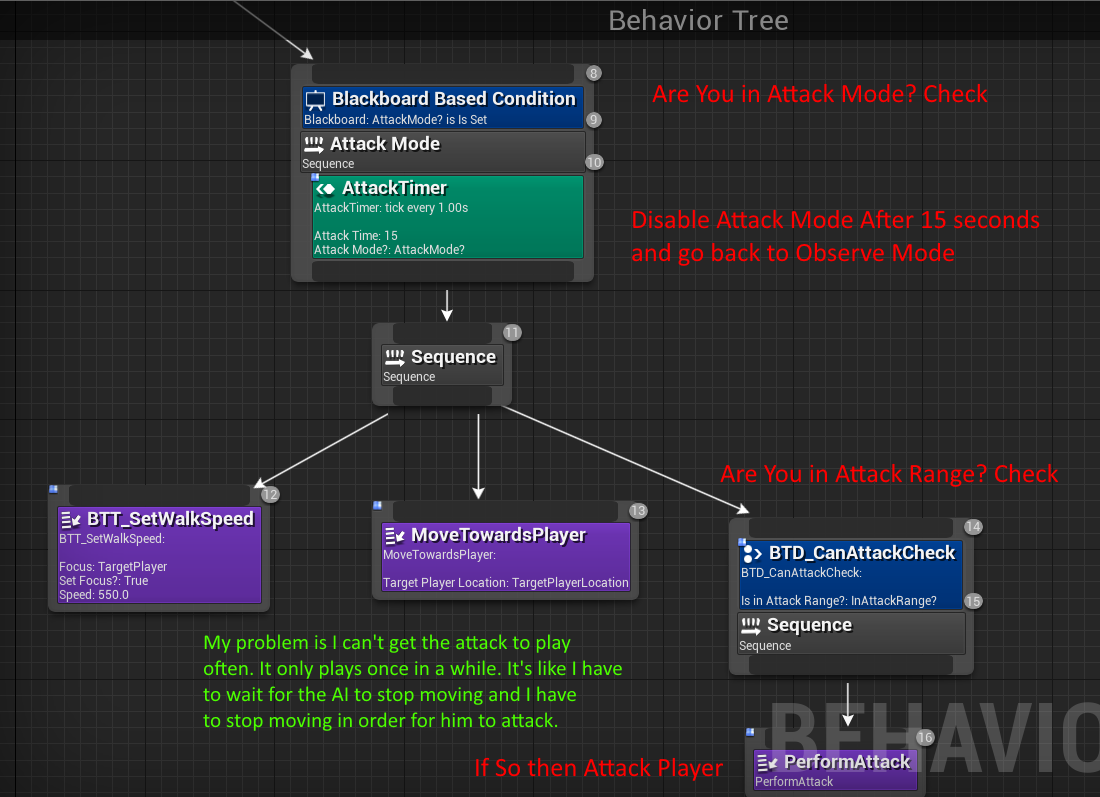
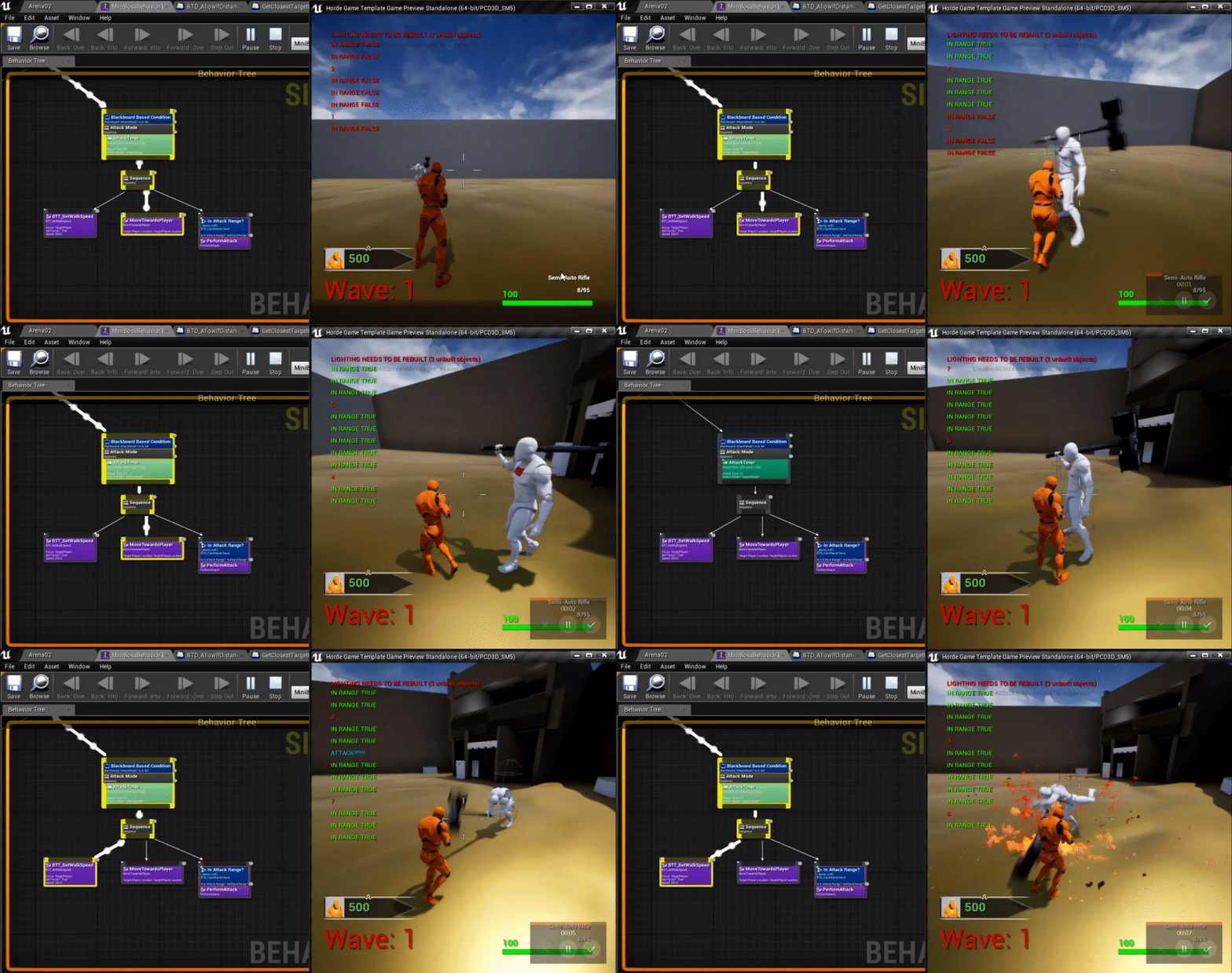
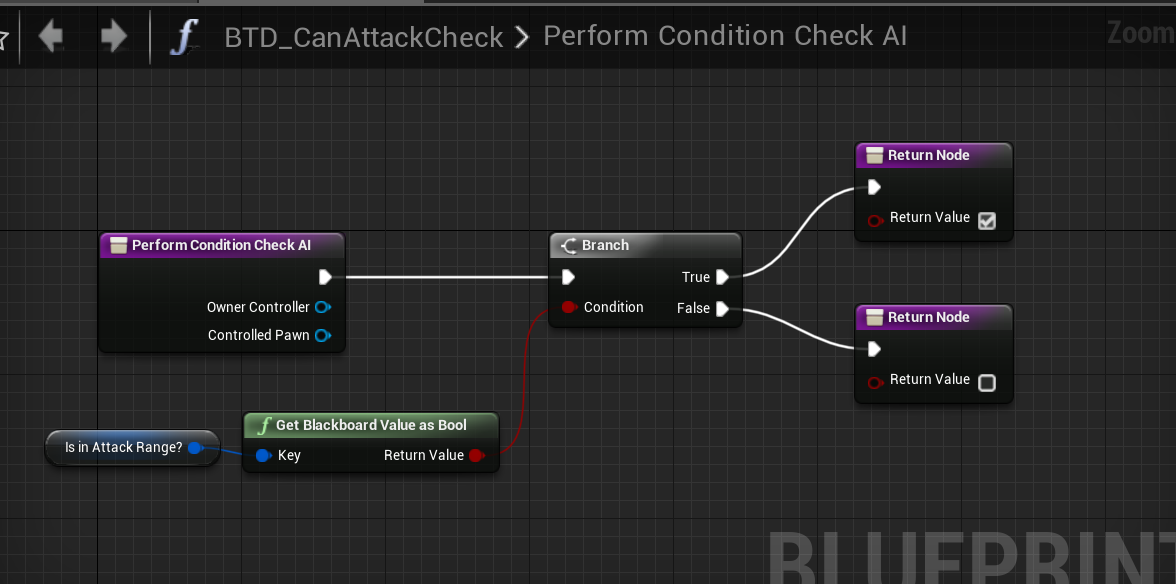


 pine steeple
what is the result of Query Status?
 vast relic
Pretty new to AI here, how should I implement a behavior interrupt, like running for water if ignited? Is a decorator the approach?
pine steeple
a service
which checks, and sets the correct BB value, then a decorator which aborts all lower priority and runs a task which takes them to water
vast relic
Ok so service does the detection and decorator does the abort
ocean wren
Solaris: My advice would be to use the DetourCrowd component, switch off collision between the AI characters and let the Detour Crowd component separate them.
 rain summit
I have an issue with AI and need help guys. I had to set up a custom collision object type for my player called player instead of using pawn. But now my ai aren't able to see my player using the ai perception component. But if I set the character back to pawn they work perfectly
How can I change it so the ai perception can see something other then pawn object type
patent hornet
You should leave your capsule as Pawn, there is a CMC issue as well iirc
Set your skeletal mesh to player
rain summit
The issue is that my Ai have a navigation plane that only pawn can use. So if I separate my player I can swim freely and they swim across the plane
patent hornet
can solve that with NavigationFIlters
rain summit
Thanks I will do some research on that one. If not I will have to find a way to let AI 3d navigate over 2d navigate
wraith eagle
Is there a "nice" way of seeing if two neighbouring polys have a connecting edge? e.g. on a flat surface, they'll be fine, but if one is up on a block and one is down on the floor, they won't be connected? Short of getting poly edges and then doing a position check on them, I can't think of anything right now?
 topaz inlet
Hey, how would you guys handle smooth pathfinding to a moving target. I'm using this for spaceships. I'm planning to use a pathing object as a target, and let the spaceship rotate towards the moving target, and using thrusters to let it fly towards it. This would look pretty good I think, but it's maybe not optimal in terms of performance, and there would also be cases where the spaceships would collide in obstacles (although they should reach the target eventually).
it's a top down thing, so having a "floor" is ok.
fiery sorrel
I'd just use steering behaviors and clamp rotation. And keep orientation into the movement. That way you can make it also overshoot their target if they are moving too fast
You can then "layer" steering behaviors like flocking and object avoidance
topaz inlet
So not using pathing at all?
fiery sorrel
You can. But if your wanting a 3d environment, it might not be needed
if your game is 2.5d then stick with a floor. if your game is 3d go with dynamic steering
topaz inlet
I could do some kind of simple obstacle avoidance using linetraces, but it wouldnt be as good as the built in pathing I think, and the ships could get stuck in corners.
it's 2.5 d yep
fiery sorrel
Might not be needed then
topaz inlet
what about using a "helper" object for pathfinding then, and using this to guide the enemy spaceships. does it sound viable?
I coudl add additional controls to avoid collisions also I guess.
fiery sorrel
Not sure =/
topaz inlet
Would be nice if the pathfinding nodes could be accessible. Then I could steer directoly towards theese.