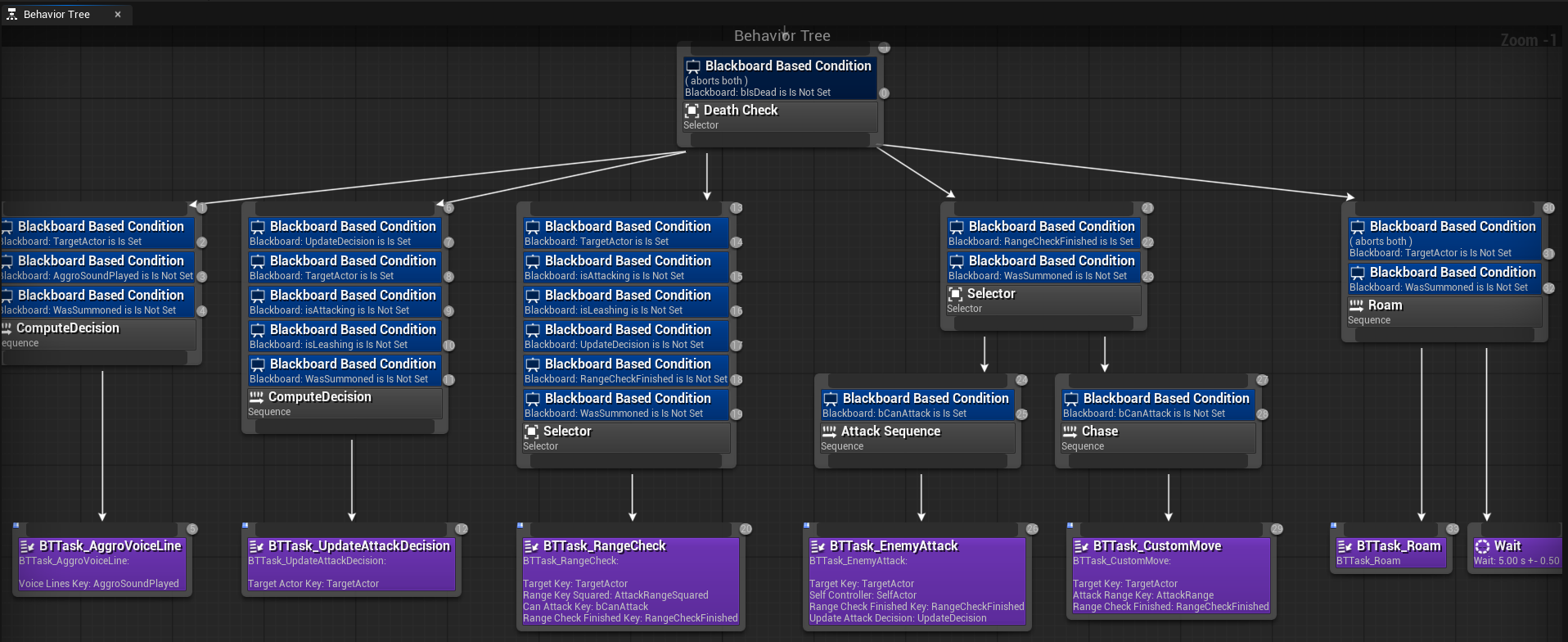
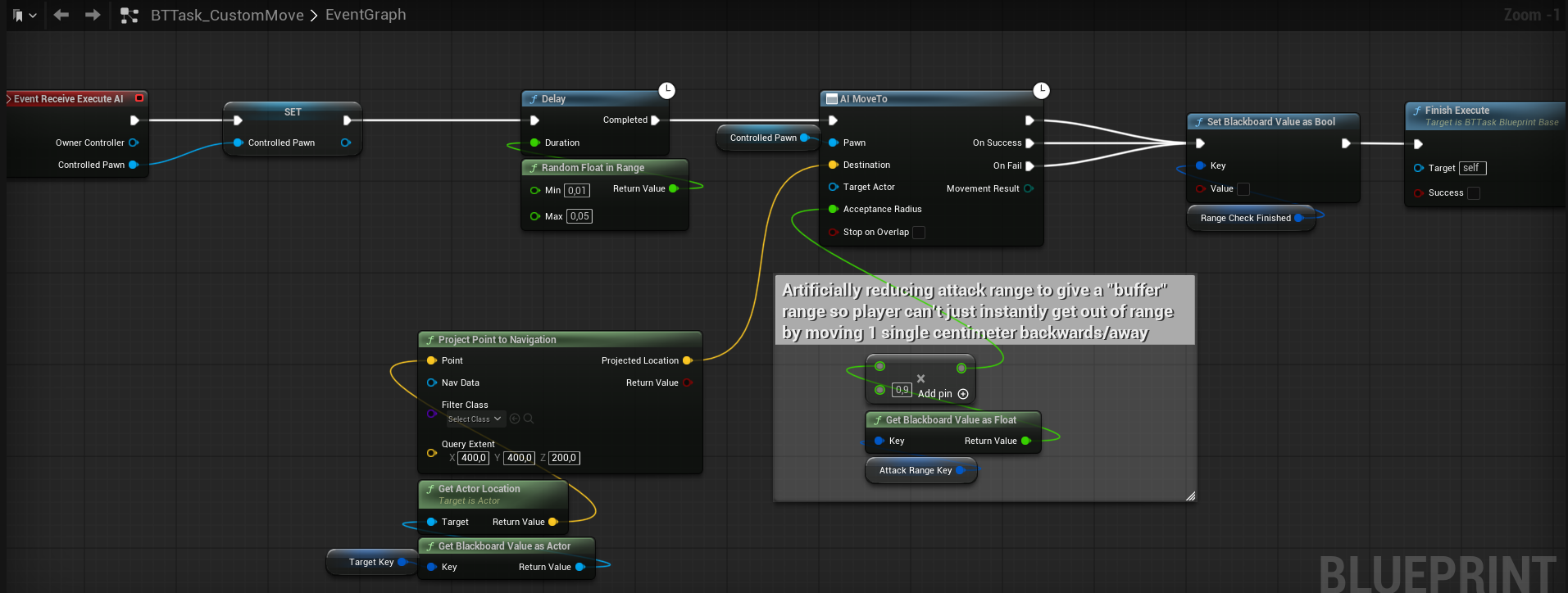
#gameplay-ai
1 messages · Page 89 of 1
 mental quail
mental quail
mental quail
hmm that won't be that easy I would have to touch all tasks because they are linked to BP_AI_Master 😄
I'll put it on my backlog for end of week
Extra logging would be really helpful because I have no idea why is it failing
 chilly nebula
mental quail
Extra logging would be really helpful because I have no idea why is it failing
chilly nebula
mental quail
Extra logging would be really helpful because I have no idea why is it failing
If you are building from source it should be pretty easy to add a breakpoint or logging where the context is being set
 harsh storm
building from source
In this economy?
chilly nebula
I'll ask around tomorrow regarding the issue
 hallow compass
any ideas on when the debugger widnow will propaly work for linked states ?
having everything showing only on the parent tree is kinda annoying
afaik 0 isnt "forget instantly" but "never forget" as it says on the var comment, and as you can see with the perception debug draws
dumb question but ... is this state tree component placed on your AIController or your AIPawn ?
also, @mental quail check up if you have any ST errors in the visual logger, most AI and state tree stuff is logged there (and not in the output log ...)
there is a few possible paths where UStateTreeComponentSchema::SetContextData logs an error saying the context actor wasnt found
UStateTreeComponent::StartTree -> UStateTreeComponent::SetContextRequirements -> UStateTreeComponentSchema::SetContextRequirements -> UStateTreeComponentSchema::SetContextData
and from what i can see, the State tree can fail to get the context actor if you called StartLogic before the pawn is set on the controller, this can happen if you have bStartLogicAutomatically true (it just calls StartLogic on beginplay)
 severe oar
Has this ever happened before to ya'll?
 severe oar
Has this ever happened before to ya'll?
severe oar
severe oar
Has this ever happened before to ya'll?
UKW: I saw it again and realized it's doing exactly what it's supposed to. I'm just trippin

 chilly nebula
@mental quail can you confirm for me that you are placing your State Tree component on a AI controller BP class? (ie is BP_AI_Master and BP_AI_Skeleton both AI controllers? and deriving from AIC_Aggresive_StateTree_Base)
Also worth checking your AI Controller configuration on your pawn to make sure its instantiating the correct controller type
mental quail
@chilly nebula


AI_Master is using a different controller, but it’s being overridden in the child class.
chilly nebula
mental quail
AI_Master is using a different controller, but it’s being overridden in the chil...
That should probably work, but worth putting a breakpoint in code and stepping through to make sure the instance is of the correct class.
The controller is being set in method UStateTreeAIComponentSchema::SetContextData and calls GetAIOwner() from the brain component
I recommend you add some logging or use breakpoints and step through what is going on here. Also, see if there is any additional information in the ST debugging tools in RWD.
 pseudo solstice
Hey! Hopefully this is the right channel to ask questions about NavMesh related issues.
I'm having a super awkward bug/issue where the NavMesh refuses to (sometimes) update the "CollidingGeometry" (in relation to the NavMesh) of an Actor after I move it.
The attached image showcases it beautifully. There, in the green circle, you can clearly see the proper colliding geometry. All the other red circles however, are these remnants of that same actor, where I moved them around the navmesh a bit, but it absolutely refuses to update and fill those phantom holes in the NavMesh.
I've obviously tried rebuilding the NavMesh, changing the Bounds Actor, but to no avail.
Did anybody else ran into this issue? How can I truly force my NavMesh to build and update itself?
I'm using UE 5.5.4 and the navmesh has static generation selected, with no fixed tile size pool, and the cell size is 5 across the board.
 chilly nebula
pseudo solstice
Hey! Hopefully this is the right channel to ask questions about NavMesh related ...
chilly nebula
pseudo solstice
Hey! Hopefully this is the right channel to ask questions about NavMesh related ...
Are you using a dynamic navmesh or using Rebuilt All in the menu? We just discovered a bug with that recently, which I think you can workaround by reloading the map.
Fix is here: https://github.com/EpicGames/UnrealEngine/commit/ae6a688c3f19e930178514222bff845171e823a3
pseudo solstice
I'm using a static navmesh and spamming Rebuild Paths in the build menu like a madman
... So I assume I'm hitting that bug in this case?
Yeah, reloading the map fixes it. Damn.
chilly nebula
try the CL above 🙂 if you are using a source build you can cherry pick it, its not a big change
pseudo solstice
- I reload the map.
- The holes are still there.
- I move my mesh a tiny bit
- A rebuild is forced in the editor
- The holes are gone.
Very interesting, thank you.
chilly nebula
np! Apparently this has been broken for a while 🙂 but fixed now!
mental quail
LogStateTree: Error: UStateTreeComponentSchema::SetContextData: Could not find context actor of type BP_AI_Master_C. StateTree will not update.
LogStateTree: Error: UStateTreeComponentSchema::SetContextRequirements: Missing external data requirements. StateTree will not update.
LogStateTree: Warning: Context Requirements in UStateTreeComponent::StartTree failed. Component tick is disabled.
LogStateTree: Warning: Parameters for 'ST_AI_Agressive' stored in StateTreeReference were auto-fixed to be usable at runtime.
LogStateTree: Error: UStateTreeComponentSchema::SetContextData: Could not find context actor of type BP_AI_Master_C. StateTree will not update.
LogStateTree: Error: UStateTreeComponentSchema::SetContextRequirements: Missing external data requirements. StateTree will not update.
LogStateTree: Warning: Context Requirements in UStateTreeComponent::StartTree failed. Component tick is disabled.
hallow compass
When you put a breakpoint in the function is the schema values correct ?
Maybe there is some sort of incorrect serialisation, i would try to make a new empty ST + parent + child actor and see if it also fails
 simple crescent
Is this failing on the CDO object of BP_AI_Master since that doesn't have an AIC_Aggresive_StateTree_Base as its controller? The pawns you spawn in game might correctly set their controller class to something derived from AIC_Aggresive_StateTree_Base, but unreal will still create an instance of BP_AI_Master.
hallow compass
StartLogic isnt called on CDO so no
 proud ruin
AI NPCs jittering/getting stuck when using DetourCrowdAIController
Hi everyone! I'm working on a basic NPC ambient movement system (similar to GTA/Assassin's Creed streets but much simpler).
The Setup:
Controller: DetourCrowdAIController.
Logic: Simple MoveTo commands to random points on the NavMesh.
The Problem: When NPCs encounter each other or the player, they often get stuck or start jittering (rotating rapidly left and right). It seems like they are fighting between the path they want to take and the avoidance logic of the Detour component.
What I'm looking for: I don't need a AAA-level crowd system, just basic, smooth avoidance so they don't get stuck in a "dance" when they collide.
Are there specific Crowd Manager settings or Avoidance Config parameters I should tweak to stop this jittering?
Should I be using a different approach for simple "street walk" AI to avoid this bottleneck?
Thanks in advance!
 charred dome
I recently noticed that in UE5.6 I don't seem to get debug data for linked assets or dynamic overrides in State Tree. That data only appears to be present for the root state tree asset. Is this something that's been added to 5.7 or is on the roadmap? I feel like that's a pretty big blocker to using the linking features.
hallow compass
yeah i find it annoying
simple crescent
In 5.7, you do get the transition debug information, both within the rewind debugger state tree channel and the rewind debugger detail windows, but you don't get to see the visual representation of the linked tree asset in the details.
 charred dome
This looks like 5.6 I get the transition data into the "slot" but i don't see any data about transitions in the linked asset making it difficult to debug more complex linked state trees
simple crescent
The transition debug in the screenshot is the transition between the OverrideDelay and SecondOverrideDelay in the linked asset.
This is the transition from the parent tree into the linked asset root

 slow bobcat
chilly nebula
np! Apparently this has been broken for a while 🙂 but fixed now!
slow bobcat
chilly nebula
np! Apparently this has been broken for a while 🙂 but fixed now!
Oh my god. I can't believe you guys fixed that! If it is the bug I think... It's been there since ue4
 lost mauve
incase anyone else runs into this, (UE 5.7.1), State Tree Evaluators and Global Tasks if you start a latent action on Event TreeStart (Evaluators) or Event EnterState(Global Tasks) it looks like it gets pruned after about a minute. For example if you have an evaluator and on enterstate you do BindEvent to an Actor's delagate or Set Timer by Event, both of them will stop working after about an minute. Not sure if that is by design and I completley missed that or if that's a bug. If this is working for you let me know hopefully I'm just doing something dumb. My incredibly janky workaround is to rebind on tick every now and then because tick seems to work.
mental quail
Hey guys,
how do you make a task that would rotate a pawn towards given actor?
this won't recognize that player is behind npc
 hallow compass
anyone worked on a AI pathfinding system which uses only connected points/spline ?
when usual navmesh cannot work for specific environments
lets say i got a list of points, for each point their neighbor (lets say with cost of 1)
im wondering how could i implement an algorithm so an AI can know what points to use to go from A to B (more specifically what algorithm)
here is a basic example of those "points" and "connections"

and possible shortest paths


Dijkstra is probably the best thing to start with
mental quail
Is there a example project where can I learn state trees for AI?
lyra is still old-school
hallow compass
not project but there is a lot of resources to learn from
 warped tiger
mental quail
Hey guys,
how do you make a task that would rotate a pawn towards given actor?
warped tiger
mental quail
Hey guys,
how do you make a task that would rotate a pawn towards given actor?
Do you mean a turn in place rotation? You could create a task that receives the actor as an input parameter and probably a data asset with multiple turn in place animations. Then you can select one of the montages and play it with motion warping. The task would end after the montage has ended
hallow compass
there is also the Focus system for AI controllers
SetFocusActor and SetFocalPoint iirc
warped tiger
hallow compass
Dijkstra is probably the best thing to start with
You could use AStar, actually Unreal has a FGraphAStar<T> AStar algorithm that you can customize with custom cost functions and nodes
hallow compass
will check that, thanks
mental quail
break points are broken in 5.7.1?
 hallow compass
is this a nested linked tree ?
chilly nebula
lost mauve
incase anyone else runs into this, (UE 5.7.1), State Tree Evaluators and Global ...
Im not aware of anything that would do that by design, those tasks and indeed any task on root state should state and persist as long as the tree is active.
chilly nebula
mental quail
Is there a example project where can I learn state trees for AI?
Some of the new starting templates in 5.6 onwards have State Tree functionality built into them.
mental quail
yeah break points are broken 🙁
state trees are not diffable?
I have some old version in repo but can't diff it :/
warped tiger
mental quail
state trees are not diffable?
I think they are since 5.6 or so
lost mauve
chilly nebula
Im not aware of anything that would do that by design, those tasks and indeed an...
Thanks for clarifying. I think this must be my bad. I tried it in a template project and it seems to be working as intended. Now I just have to figure out what I'm messing up here
 rugged vapor
hello, i am trying to bind those 2 parameters to my EQS but I cant create an array entry, why ?

I am trying to copy the FPSArena template, they have those 2 Query config params, idk how they added them
 warped tiger
rugged vapor
warped tiger
rugged vapor
What parameters of your EQS do you want to be bindable and how are you defining them? I think you need to set the Data Binding Property to Query Params
 rugged vapor
warped tiger
What parameters of your EQS do you want to be bindable and how are you defining ...
rugged vapor
warped tiger
What parameters of your EQS do you want to be bindable and how are you defining ...
thank you, its working but I just unselected the eqs, selected it again and then the query config was bound to the eqs parameters
 ivory hawk
What's a good RVO / Detour Crowd Manager as a cheaper alternative in terms of performance?
I know RVO is kinda bad and CMC in general is quite heavy in terms of performance. For the most part most players in my game will only be fighting 1-3 AI at the same time so there's not a HUGE deal in terms needing a really robust pathfinding solution, but as I am introducing special mobs that summon other AI, the player can start to get crowded by 8-10 AI and they all sort of just beeline towards the player and it just looks bad. I know I can use the Detour Crowd Manager but I wonder if there's a simpler alternative that's also cheaper in general for performance without having to rely on it. Again, I don't need something super robust just a way to ensure the AI actually tries to find a walkable spot around the player if it cant proceed in a straight line.
Right now what I'm doing is a simple behavior tree which checks the AI attack range, tries to move within that range, checks range again, if within range, proceeds with the attack, etc...
https://i.gyazo.com/fda6fb5a5b4d5e0f4be58e103274c5d6.png
https://i.gyazo.com/b5e354170ddaacd3050f0eb3329581be.png

 simple crescent
ivory hawk
What's a good RVO / Detour Crowd Manager as a cheaper alternative in terms of pe...
simple crescent
ivory hawk
What's a good RVO / Detour Crowd Manager as a cheaper alternative in terms of pe...
Have you considered using an EQS query to find a position around the player with an additional check to disallow positions that are too close to existing teammates. It doesn't completely solve the problem of them trying to walk over each other, to get close to the player, but they will spread out around the player.
It's also pretty easy to create a kung fu circle type result, since you can easily set it up so that if there are no positions directly next to the player they will choose a position with a greater radius from the player. This will result in only some attacking the player while the remainder spread out around the player in a wider circle.
ivory hawk
simple crescent
Have you considered using an EQS query to find a position around the player with...
Yea I did some research and saw people suggesting the circle stuff as well, although one guy did mention he manages to use the detour crowd manager with 300 AI moving at the same time at over 60 fps so maybe ill give that a try as well and compare with RVO & compare with my current setup in terms of performance
 robust veldt
Does InstancedStruct support core redirect yet?
hallow compass
i dont see why not
rugged vapor
hello,
I am currently developping ally NPCs that follow and protect the player from ennemy AIs. So I am discovering the "Detection by Affiliation" feature in AIPerception component, that lets you choose if the AI should sense Ennemy/Ally/Neutral. Apparently, if you want to implement this, it is mandatory to do it in C++.
But I was wondering, how is it different from using Tags ? On my player I use Player tag, and on Ally NPCs "Ally" tag, and on Perception update, I check if the NPC has Tag "Ally" or "Ennemy", and I ignore the sensed actor, depending on its tag. I didnt implemented this yet just to be clear, I am still digging Unreal documentation.
Seems simple to implement, but I guess there is a huge drawback to this ?
 tight cobalt
is it just me or the state tree seem incredibly randomly broken if u add any task to the Root node like debug text or delay?
harsh storm
Broken how?
If the task completes and it is on the root or is a global task, it'll end the state tree
(Unless they changed the root node)
tight cobalt
thats the thing, i wanted to learn it, but it seems the docs are lacking a little and there is no one explaining it deep dive and with the Root node example as it looks like the "issue" is only with the Root node
just wanted to test things, now i have this super simple tree for testing, it goes to initial and then switches between state 1/2
now it all works, but if i put delay or debug text task on the Root node it stops working, it stops on initial loop, but not always, depending if i set Root Tasks to Any or All and if there is both tasks or not
and im not sure why, shouldn't it just go to next state when any or all tasks finished, seems im missing something here
 harsh storm
Just don't put stuff that finish the task on the root node
It is that simple
Every state's tasks that is active will be executed. All the way up the chain.
Root will always be active pretty much.
Finish a task on Root - state tree is finished
tight cobalt
ah, ok, thx
 coarse smelt
Hello, I'm trying to run a BehaviourTree from an AiController OnPossess event. This wasn't working in my level (a default TopDown level), but I created a new level and it works fine in the new level.
The "bad" level is using WorldPartition, but otherwise there's nothing in there, nothing in the LevelBP etc that I can see that would be causing this. Is there anything I should check, or anything that might be stopping my BehaviourTree from being run in a particular level? I've checked the "PossessedPawn" object reference on the "OnPossess" event, and it's returning true, so it's not that!
Note: I've tried placing the Ai Pawns and spawning them, and that doesn't seem to make any difference in either level.
hallow compass
rugged vapor
hello,
I am currently developping ally NPCs that follow and protect the player ...
I suppose its for some more dynamic runtime checks
And its faster than checking for a tag (a little)
 olive turret
rugged vapor
hello,
I am currently developping ally NPCs that follow and protect the player ...
olive turret
rugged vapor
hello,
I am currently developping ally NPCs that follow and protect the player ...
AFAIK the only difference is your perception will fire the delegates for detecting and functions will return even the friend units that it detected if you don't set up teams(your tags). It will force you to check for teams every time you want to get the perceived actors.
However depending on the game, you may want to do that anyways. (To see a dead friendly unit for example). I would still try to go with built in teams to not create a step that is already in there.
 trim bone
So I have this cart that moves through my level, I want my AI to goto specific points on it and take supplies off of it. I am trying to use Smart Objects because slots with specific behaviors sounded like a perfect solution for this, but when I Get Slot Location it's the location of the slot at the beginning of the game, not the current location. What am I doing wrong?
warped tiger
trim bone
So I have this cart that moves through my level, I want my AI to goto specific p...
Smart objects are cached at some point, so I think you would need to update the cached data if you move it at runtime
warped tiger
trim bone
So I have this cart that moves through my level, I want my AI to goto specific p...
Check out USmartObjectSubsystem::UpdateSmartObjectTransform
trim bone
warped tiger
Check out `USmartObjectSubsystem::UpdateSmartObjectTransform`
That got it! Thanks!
hallow compass
how does the state tree component handles event based only transitions (to have a tickless ST)
from internal funcs it seems like it has some paths to avoid the main TickComponent function
 keen palm
Is utility broken for State Trees in 5.7.2 ? My parent state "Try Select Children With Highest Utility" is always ignored
Also, is there a way to debug utility ? Every error seem silent (logs, or debugger)
Still on utility, I feel there are some restrictions on the input variable types for considerations, is that the case ? (I needed a gameplay tag input for instance but it failed. Any reason for that ? )
olive turret
If I have this property ref on anywhere on a task graph it is triggering the ensure on load. Does anyone know why this is happening?

 hallow compass
keen palm
Is utility broken for State Trees in 5.7.2 ? My parent state "Try Select Childr...
hallow compass
keen palm
Is utility broken for State Trees in 5.7.2 ? My parent state "Try Select Childr...
Check visual logger
keen palm
hallow compass
Check visual logger
not much to see about utility there. It just says "Try Select Children With Utility" but it does not compute the considerations (it acts like if it was a "Try Select Children In Order" ) as otherwise I would see my custom logs in the visual logger which report the scores.

("Engage with Gun" is the "try Select Children With Highest Utility" state)
 hallow compass
Its a seperate tool, not the same as the rewind tab
keen palm

 hallow compass
¯_(ツ)_/¯
keen palm
turns out it had nothing to do with the update 5.7.2 ... lost some stuff in a crash that made the utility fail ...
Still...some logs would have helped 😅
coarse smelt
Hello, is it better to add an Ai Perception Component to the AiController or to the Pawn? I've seen both approaches. Judging by tutorials online, it seems like people used to put it onto the Pawn, but in later Unreal versions, it's added to the controller.
simple crescent
The general pattern is that all of the AI decision making should be on the controller. One of the reasons is that it allows you to have an AI controller that can possess different types of pawns and the logic will keep working.
There are games though where you still want a single ai controller, but it will be used for different types of pawns that have different sensory systems. In that case, it can be useful to put it on the pawn and forward all of the events to the controller.
For most cases, it's easier just to have it on the controller.
For what it's worth, Unreal 5.7 (and probably much, much earlier) has this message if you put it on the pawn to make sure you receive the events.
Owner %s is not an AIController so make sure you bind to OnPerceptionUpdated, otherwise you won't get notified about updated actor perception events
 slim egret
Hello, I'm trying to use a simple state tree on a smart object. All the state tree does is running 3 child states where each runs 1 task of "PlayContextualAnimation" and then should go to the next.
My problem is with "going to the next". For some reason which I don't understand why, finishing playing the animation doesn't trigger the FinishTask I assume and it gets stuck.
(I made sure that the task are flagged as considered for completion of the state)
Another angle I had is maybe it is something related to ticking. Gameplay interaction state trees (ones that on smart objects) doesn't have tick policy, so who controls their tick? maybe it is not ticking or something?
btw, I also tried to add anim notify and in the properties to check the option to wait for anim nofity to end the task, but this doesn't fire also
simple crescent
slim egret
Hello, I'm trying to use a simple state tree on a smart object. All the state tr...
Assuming you've looked at the state tree debugger and there isn't anything there that says why the transition isn't being run, you can check that the state tree is receiving the notification that the anim has ended:
If you put a breakpoint in UStateTreeTask_PlayContextualAnim_InstanceData::OnMontageEnded does it ever fire?
If you're not building from source you can add this to your DefaultEngine.ini and then you should get a log message that the state tree received the montage ending event:
[Core.Log]
LogStateTree=All
That will also add some extra info to the log which may indicate why the transition didn't fire.
slim egret
simple crescent
Assuming you've looked at the state tree debugger and there isn't anything there...
When looking at the debugger and also in the VisLog, I can't see any FinishTask or even more than 1 Tick() of the smart object state tree.
When enabling the logs like you suggested (which is cool, I wasn't aware of this, that's also why I wasn't seeing the logs which I was sure reaching there when debugging in the source code).
I do see the montage ended callback:
LogStateTree: UStateTreeTask_PlayContextualAnim_InstanceData::OnMontageEnded EndedMontage: AM_Anim_Body_Stretch_1 bInterrupted: 0
But for some reason it doesn't trigger the transition.
Generally, to handle transitions, the tree must tick, correct? because all of the logic related to this is reached only through the tick?
slim egret
Ok, got it.
The issue is with the specification of the setup of my "parent" state tree, the one that activates the smart object state tree.
SO state trees are gameplay interaction state trees and doesn't tick. they are event driven.
So the responsibility of the NPC state tree is to manually tick them.
But i've setup my NPC state tree as an event driven by player input so it doesn't tick... so if I as a player triggered 1 event that lead to activate the smart object tree, the NPC state tree won't tick anymore (triggered manually only by player input) -> meaning that even if the montage ended, no tick on the SO state tree, so no transition possible.
 orchid salmon
I have practically 0 experience with using Behavior Trees. Is there a way to add some kinda event dispatcher to a Behavior Tree? Or at least any way for it to call an event within an Actor BP that's using that Behavior Tree?
olive turret
For my state tree, these are not affecting whether a task is gonna tick or not. Am I missing something? The task is in blueprints. Does anyone know how to make a specific task tick or not?

 slim egret
olive turret
For my state tree, these are not affecting whether a task is gonna tick or not. ...
slim egret
olive turret
For my state tree, these are not affecting whether a task is gonna tick or not. ...
Scheduled tick policy should be true for custom tick behavior if I'm not mistaken.
The tasks tick based on the state tree tick, but the state tree tick is determined by the fastest tick rate you set on any of your tasks (lowest tick value you set as custom tick).
Regarding disabling tick for specific task, I'm not sure if this possible via BP (or even cpp) but I'm not 100% sure.
olive turret
slim egret
Scheduled tick policy should be true for custom tick behavior if I'm not mistake...
I think in bp if you have a tick event node it will tick no matter the booleans or tree's policy due to this bShouldCallTick = InstanceData.bShouldCallTick || InstanceData.bHasLatentTick;
I Didn't try in cpp yet.
harsh storm
orchid salmon
I have practically 0 experience with using Behavior Trees. Is there a way to add...
Yes. You get a reference to the pawn running the behavior tree in the nodes. You can just cast to the type and then broadcast as you see fit. Or you could set up an interface or use a component. Really, the choice is yours.
orchid salmon
harsh storm
Yes. You get a reference to the pawn running the behavior tree in the nodes. You...
And I'm doing this in the Behavior Tree or the AI Controller?
harsh storm
The AI Controller. Nothing else can really listen for an event in a node.
orchid salmon
Hero. Thanks.
 spare cloak
Why is he so twitchy?
 pine steeple
this is a known issue with crowd avoidance and
movement
if you dont set things up correctly, blend the rotations properly
it will look so jerky
so
spare cloak
How do I set the things up, where?
pine steeple
well its not that easy
and crowd avoidance will not make it walk middle
whoever said that, it's not true
if you want to make it walk middle you need to put a nav area in the middle of the path
and make the ai favour that
by making that cheaper
or you make the edges more expensive with a nav area
spare cloak
Someone else said to use eqs iteratively with low cost near walls but when I tried, it just made him oscillate through two different points so that also didnt work
spare cloak
pine steeple
if you want to make it walk middle you need to put a nav area in the middle of t...
Ohh, but I have a lot of walls
pine steeple
the way i did something similar
was use a spline to make a navmesh
which was cheaper cost
and spanned this across the middle
this made the ai favour the middle as it was cheaper
its all about pathing costs
spare cloak
pine steeple
was use a spline to make a navmesh
How? Like spline generated walls?
pine steeple
not walls
just a spline creating a navmodifier
there is a splinenavmodifier component
you just use a spline and it creates the nav area
spare cloak
Ohh ok
pine steeple
 *    Used to assign a chosen NavArea to the nav mesh in the vicinity of a chosen spline.
 *    A tube is constructed around the spline and intersected with the nav mesh. Set its dimensions with StrokeWidth and StrokeHeight.
 */
UCLASS(Blueprintable, MinimalAPI, Meta = (BlueprintSpawnableComponent), hidecategories = (Variable, Tags, Cooking, Collision))
class USplineNavModifierComponent : public UNavModifierComponent
{```so you make an actor, with a spline and this component, set this component to use your spline
then you simply either carve out the edges and make them more expensive
or you carve out the middle and make that cheaper
spare cloak
Ohh ok
pine steeple
im talking about nav area costs
you probably want to automate this
and thats also doable
we generate ours dynamically
spare cloak
pine steeple
you probably want to automate this
As in automatically align the spline on the walls?
pine steeple
well depends what your trying to do, make the edges more expensive? that could be even easier
your walls could have a nav modifier box
which expands furhter out and gives a higher cost
so its null > expensive > cheap
 devout plume
In Hitman Absolution they "pushed" the path based on the edges
 devout plume
Yeah for sure
spare cloak
devout plume
In Hitman Absolution they "pushed" the path based on the edges
Someone sent me a video that Im supposed to be offsetting the navmesh path but never told me how to do it
spare cloak
pine steeple
which expands furhter out and gives a higher cost
Ahh ok
Thanks Ill try that
hallow compass
spline nav modifier is definitely something i didnt knew about
spare cloak
pine steeple
this is a known issue with crowd avoidance and
Dude I removed crowd following component and hes still twitchy
Pls help
pine steeple
spare cloak
Dude I removed crowd following component and hes still twitchy
sorry was not around
looks like your rotation rate is super high
and its not being smoothed
spare cloak
pine steeple
and its not being smoothed
I have bOrientRotationToMovement set to true and the rotation rate is like 0,0,360
 drifting ginkgo
Odds anyone know's a workaround to GetRandomLocationInRadius detecting variant heights?
Eg Here a 20 radius search detects my hovering island, I'm gonna gamble on the NavMesh behaviours being primarily 2D given this nav is being generated from an Invoker that's intended to be 9000 units below it.

Attempted GetReachableLocation... but same outcome, I'm not using the NavData or Filter inputs currently though so maybe something there, just feels odd there's no natural Z filtering available on base functions, so think I'm missing something
 keen crow
drifting ginkgo
Odds anyone know's a workaround to GetRandomLocationInRadius detecting variant h...
keen crow
drifting ginkgo
Odds anyone know's a workaround to GetRandomLocationInRadius detecting variant h...
is there a reason you don't want to use EQS for this?
drifting ginkgo
keen crow
is there a reason you don't want to use EQS for this?
Mainly just doing item placement and useful simple queries for 'put thing in reasonable to navigate place', is EQS viable for similar setups? Never really dug in
keen crow
drifting ginkgo
Mainly just doing item placement and useful simple queries for 'put thing in rea...
IMO EQS is the thing you should use for it: craft assets in editor where you explain rules to find a location(s) or actor(s) , Basically any rules you can imagine you can do there, but it comes with a lot of stuff out of the box
drifting ginkgo
keen crow
IMO EQS is the thing you should use for it: craft assets in editor where you exp...
I guess I always saw it as a more 'expensive' query although maybe it isn't, any ideas on the perf? I'm gonna bet it's a little more costly but wondering against using custom traces.
The Nav being 2d based makes sense for optimizations but really surprising user facing
keen crow
drifting ginkgo
I guess I always saw it as a more 'expensive' query although maybe it isn't, any...
in my experience performance can get concerning if you constantly (e.g. in BT service) run some crazy queries that have a lot of items and you have pathfinding tests in them. And even then EQS execution is "time sliced" in terms of global EQS manager keeps track of how much time was spent on executing EQSs this frame and just stops for this frame if it has been too much already. So at worst case you will just have some delay between requesting EQS and getting results. But if you only need to spawn some things at begin play or at some quest trigger then I wouldn't worry
drifting ginkgo
Legend appreciate the insights, will give it a go. Honestly sounds like a solid place to start, then can crank it to 100 and trace to understand the individual cost worst case
 final loom
Is there an event for when a Navigation point is reached?
final loom
Or when they stop or are stopped?
drifting ginkgo
final loom
Is there an event for when a Navigation point is reached?
Depends what you're using but the standard MoveTo style nodes you can bind from this AsyncTask output or use the above variant and SWITCH on the MovementResult
 drifting ginkgo
keen crow
in my experience performance can get concerning if you constantly (e.g. in BT se...
drifting ginkgo
keen crow
in my experience performance can get concerning if you constantly (e.g. in BT se...
Requires a PAWN/Controller? 💀 Trying to find loopholes but seems like it'd have to be some janky AiController for spawning.
 harsh storm
drifting ginkgo
Requires a PAWN/Controller? 💀 Trying to find loopholes but seems like it'd have...
harsh storm
drifting ginkgo
Requires a PAWN/Controller? 💀 Trying to find loopholes but seems like it'd have...
It doesn't require one
I use it on non-pawn/controllers all the time
drifting ginkgo
Do you just tick that to avoid the block then it functions as expected? o.O

This is running without a blackboard/aicontroller, entirely attempting to use it as a BP trace style setup
harsh storm
I've never touched that setting in my life
There is no block
If the querier can't be cast to a controller, that if section doesn't run
 simple verge
Is there a concept of executing code on a specific StateTree transition? It seems like I could make a Task and check for a desired from or to state but it feels a bit hacky to mix that concept with normal state tasks
 polar nexus
Are there any decent state tree examples that you guys used to learn? I'm okay with fab plugins too
harsh storm
No. Its just a state machine really.
slim egret
Hi, does anybody know if smart objects have a built-in toggle or console command to draw their slots and entrances with colors indicating their state in PIE?
Edit: ok found it.. need to press apostrophe and then, enable smart objects with NUMPAD-7 and then Shift+Multiply to enable slot information
slow bobcat
devout plume
In Hitman Absolution they "pushed" the path based on the edges
just randomly answering and disclaimer: I haven't read the full conversation, so sorry if this was mentioned already or solved, but you might want to check how I solved it
Firs 17min of the talk is a detail explanation of how I did move paths away from corners.
Not sure how Hitman did their logic, looks much simpler to get the same result, can't be sure
https://www.youtube.com/watch?v=XKQfMZOXFv0
In ‘Lords of the Fallen’, CI Games Mediterranean Projects SL customized Unreal Engine’s AI systems to meet the demands of a fast-paced, modular, and scalable AI ecosystem—one that supports rapid iteration and is designed to extend across future titles in the franchise.
This talk recorded at Unreal Fest Stockholm takes a deep dive into...
 silent hamlet
slow bobcat
just randomly answering and disclaimer: I haven't read the full conversation, so...
silent hamlet
slow bobcat
just randomly answering and disclaimer: I haven't read the full conversation, so...
It's great giving you a face now!
devout plume
slow bobcat
just randomly answering and disclaimer: I haven't read the full conversation, so...
Thanks for sharing! I somehow missed this talk, looking forward to watching it after work :)
 round lake
Hello, I am using state trees and my debug text isn’t showing. The task is ongoing it says that and the state needs to do all the tasks before finishing but the text won’t show up.
simple crescent
round lake
Hello, I am using state trees and my debug text isn’t showing. The task is ongoi...
Are you passing in a world position to the debug text node or an offset, and if an offset are you binding the Reference Actor parameter?
Also, with the built-in debug text node the position doesn't get updated while the task is running. It stays at the position calculated when the EnterTask was run.
round lake
simple crescent
Are you passing in a world position to the debug text node or an offset, and if ...
I am binding the reference actor parameter with the global actor.
And the text doesnt appear anywhere. It just wont.
Not even at 0,0,0
simple crescent
Does the state tree debugger show the task failing?
Are you able to draw any other strings from code or blueprint with DrawDebugString?
round lake
Like i said the whole state tree works. Everything works except for the fact it doesnt show the text
simple crescent
The reason I ask is that the state tree debugger shows a tick or cross if the task succeeded or failed and not if it is still running. The Debug Text task clears the text when it completes. So if the task is failing (even if the other task is still running) you won't see any text.

I think this case is unlikely. The only way that task completes is if it isn't bound correctly and doesn't have a world context, or if the state completes.
Another possibility is that the DrawDebugString function clears all text for an actor if you draw an empty string for that actor (that's how the task clears the string when the task completes). It's possible something else is causing this to happen. It might be worth putting a breakpoint or some logging in DrawDebugString (DrawDebugHelpers.cpp)
 alpine bone
Hey all, general question about Behavior Trees
- Does anyone see any practical reason(s) to use the
Blackboard Decorators?
I've been banging my head against them for the past couple of days and my work-around was to remove all my Decorators and instead have myBTTaskinstead do Blackboard checks within their Blueprints. Trying to figure out why my logic would die on a branch and never getting a restart because of the use of my Blackboard decorators has been most of my frustration of recent.
For example, I have some custom logic for checking if an Actor is within range of another & that it hasn't moved. (The latter would re-trigger updating my pathfinding, so it's an optimization measure)
I found doing Blueprints check way easier to understand & debug so far.
 dull arrow
anyone ever had issues with AI pawn capsule overlaps when using navwalking?
chilly nebula
dull arrow
anyone ever had issues with AI pawn capsule overlaps when using navwalking?
If two characters are walking the same path, you need avoidance set up.
keen crow
alpine bone
Hey all, general question about `Behavior Trees`
* Does anyone see any practical...
IMO decorators are very useful. You can control BT flow with them by putting decorators in (abort self/abort lower priority/ abort both) modes on selector child nodes (although I'm not sure it's doable in blueprints. IIRC you can't register blackboard keys observers in BP BT nodes). You can use them as "states" or the underlying branch. Like activate gameplay effect when execution gets into some branch and deactivate it once it leaves. And you can use composite decorators to mix various decorators in logical (and-or-not) expressions. Decorators are also helpful for debugging BTs in visual logger: if some branch was aborted or not allowed by some decorator, vislog will show details about that
dull arrow
chilly nebula
If two characters are walking the same path, you need avoidance set up.
Nah I meant overlap events not firing with other volumes
final loom
Anyone know why my nav mesh won't generate? I'm using invokers only with the right settings and all that.
 harsh storm
You won't see them at editor time
Otherwise - you do still have the nav mesh bounds volume, correct?
round lake
simple crescent
Another possibility is that the DrawDebugString function clears all text for an ...
I am just using blueprints for this. And using the premade task for debug text
 thick gorge
Hi, I'm having trouble synchronizing my character's facing direction with the AIController's facing direction (using AIPerception). The controller turns instantly when I begin Move To Location or Actor (not desired), while the character is set up to have a slow lumbering turn, essential for stealth gameplay.
 thick gorge
I'm trying to accomplish this now without AIPerception. So I can ensure the detection direction matches the character's.
hallow compass
If you want you can probably change in c++ how the angle is taken for sight detection so you use the same as the character facing direction
Check what the AISight class does to get the direction
keen crow
thick gorge
Hi, I'm having trouble synchronizing my character's facing direction with the AI...
you should try to override GetActorEyesViewpoint on pawn. Instead of default values try providing location and orientation of "eyes" socket. IIRC this is the one that affects AI perception sight cone
olive turret
keen crow
you should try to override GetActorEyesViewpoint on pawn. Instead of default val...
GetActorEyesViewpoint returns Actor's rotation and Controller overrides it to return pawn's rotation. In this case I don't know why perception is not rotating 1:1 with the pawn. I am going through similar issues with @thick gorge.
My agent's sight rotation is NOT following pawn rotation if it is moving to an actor.
Edit: To fix it Enable AllowStrafe on the controller. PathFollowingComponent is setting destination as focus point if it is set to false.
Edit 2: Since strafing is also not something I wanted, I found the solution in creating a child PathFollowingComponent and overriding UpdateMoveFocus and leaving it empty so it doesn't tell my agent to focus to destination or on the target movement actor.
This is how you use your child component instead of the default one:
YourAIController::YourAIController(const FObjectInitializer& ObjectInitializer) : Super(ObjectInitializer.SetDefaultSubobjectClass<YourPathFollowingComponent>(TEXT("PathFollowingComponent"))) { // Your other initialization code here }
olive turret
thick gorge
I'm trying to accomplish this now without AIPerception. So I can ensure the dete...
My agent's sight rotation is working with these settings if it moving around. However as I showed in the video it is not working as intented if it moving towards an actor.
Controller //Tick needs to be enabled for perception sight rotation to update PrimaryActorTick.bCanEverTick = true; PrimaryActorTick.bStartWithTickEnabled = true;
`Character(AI)
//DisableTick
PrimaryActorTick.bCanEverTick = false;
PrimaryActorTick.bStartWithTickEnabled = false;
//These are needed for smooth rotation towards the movement
//Orient to movement and disable controller rotation yaw
GetCharacterMovement()->bOrientRotationToMovement = true;
bUseControllerRotationYaw = false;
`
keen crow
olive turret
GetActorEyesViewpoint returns Actor's rotation and Controller overrides it to re...
GetActorEyesViewPoint doesn't really "return" location and rotation, it sets them and in an override you can set them yourself. For example, I do it like this:
void AG2VS2BaseCharacter::GetActorEyesViewPoint(FVector& OutLocation, FRotator& OutRotation) const
{
  // Super::GetActorEyesViewPoint(OutLocation, OutRotation);
  FTransform EyesSocketTransform = GetMesh()->GetSocketTransform(EyesSocketName);
  OutLocation = EyesSocketTransform.GetLocation();
  OutRotation = EyesSocketTransform.Rotator();
  // this is hack for current animations. Ideally head always has reasonable rotation
  OutRotation.Pitch = 0.f;
  // OutRotation.Pitch = FMath::Clamp(OutRotation.Pitch, -10.f, 10.f);
}
But maybe I have misunderstood your problem. What I do here essentially forces AI sight perception to be directed along "eyes" socket which is oriented from character's head forward
ivory hawk
I need some help figuring out how to fix an issue. I made my AI behavior tree movement like in the screenshot. Essentially it follows the player when not within range and the acceptance radius is attack range of the AI * 0.9 so that it's well within range to perform the attacks.
The issue is that if I move slightly bit backwards, I get just outside the range and the AI for some reason gets stuck and does not move within range to perform the attack. I gotta move like a full 1-2m for it to move again and get within range again.


Watch Issue by Steeljardas and millions of other Unreal Engine videos on Medal. #unrealengine
Notice how I move just slightly backwards just enough to get outside of his range and he just gets stuck
it gets into the move to node but never actually moves enough to get within range
olive turret
ivory hawk
Notice how I move just slightly backwards just enough to get outside of his rang...
the video is not opening for me. Can you try just moving ai in same place but buffer range amount away. maybe "already in place" is happening thus movement is failing. put a print node to onfailed and see it is firing or not.
simple crescent
thick gorge
Hi, I'm having trouble synchronizing my character's facing direction with the AI...
You can overload GetActorEyesViewPoint on the AIController to set the location and direction of the eyes.
This is the value that is used by the sight perception tests
Oh, I just saw @keen crow has already responded with the same suggestion.
The only thing I would add is that if your perception component lives on your controller then you need to override GetActorEyesViewPoint on the controller and not the pawn.
Oh, scratch that. If the controller is possessing a pawn, then it calls the function on the pawn. Forget everything I've said.
 hushed crescent
shouldn't I have in binding params my classes which I setup in State Tree schema? How can I access to the variables from my custom classes? Controller class inherits from AIController, NPCBase inherits from ACharacter

or if I want access to my variables, functions should I make new bluebrint base condition for state tree?
 random jay
ivory hawk
random jay
ivory hawk
I think? its looping from the MoveToLocation node not finishing as its immediately failing due to being within the acceptance radius
hallow compass
hushed crescent
shouldn't I have in binding params my classes which I setup in State Tree schema...
Are your variables public ?
hushed crescent
hallow compass
Are your variables public ?
yes
hallow compass
Declared in cpp or blueprint ?
hushed crescent
cpp
hallow compass
Show its decl
 hallow compass
Try readwrite
hallow compass
?
hushed crescent
I didn't see it appeared on the top xD

that whole thing labeled as Actor lost me, I thought it should be my class name here
 hushed crescent
yeah, thank you 😄
hallow compass
Dont forget that in UE cpp convention bools need a "b" prefix
So you should rename to "bIgnorePlayers"
hushed crescent
hallow compass
Dont forget that in UE cpp convention bools need a "b" prefix
i know, I usually use hungarian notation lol 😄
ivory hawk
random jay
I think? its looping from the MoveToLocation node not finishing as its immediate...
I tested and it's proceeding as finished because it's already within the acceptable range it seems
random jay
ivory hawk
I tested and it's proceeding as finished because it's already within the accepta...
Not sure, but is the RangeCheck being set to false in the BTTask with the MoveTo node correct?
ivory hawk
random jay
Not sure, but is the RangeCheck being set to false in the BTTask with the MoveT...
yes, basically waht it does is:
Range Check -> If within attack range -> Attack
Range Check -> If not within attack range -> Move To (the screenshot) -> Range Check again
It's doing the range check every time and returning as not being within range so it's spamming the AI to run the "move to" but the move to isn't actually moving because it's already within acceptable radius. It's probably some inconsistency between the way I do the range check & the internal range check the move to does for the acceptable radius.
I figured that if i use Attack Range * 0.79 instead of 0.9 it always works but it forces the AI to be WAY too close to the player which is a bit annoying.
random jay
Might be easier to set "ContinuousGoalTracking" for the MoveTo and assume that you're in range after completing the task
ivory hawk
I tried the continuous goal tracking but the issue is that the task never finishes
it's permanently running the move to
so the "on finished" never runs
 dim gull
I'm looking for more resources regarding the navmesh and complex AI navigation. I see nothing satisfactory for having AI be able to do complex parkour movements like wall running, grappling, etc.
The best lead I have is using reinforcement learning, which is going to be my next approach and is something I've been wanting to learn anyway, but I was wondering if anyone here had any solid resources / alternatives?
random jay
ivory hawk
it's permanently running the move to
hmmm check that the acceptance radius is large enough?
But you could work around it with a basic distance check to determine how you want to set the RangeCheck
 olive turret
dim gull
I'm looking for more resources regarding the navmesh and complex AI navigation. ...
coarse smelt
simple crescent
For what it's worth, Unreal 5.7 (and probably much, much earlier) has this messa...
olive turret
dim gull
I'm looking for more resources regarding the navmesh and complex AI navigation. ...
coarse smelt
simple crescent
For what it's worth, Unreal 5.7 (and probably much, much earlier) has this messa...
Thanks for this (belatedly!)
final loom
Is it better to move the nav mesh bounds than have it too huge?
thick gorge
simple crescent
The only thing I would add is that if your perception component lives on your co...
Thank you and the others that responded! I will look into the EyesViewPoint. That is new to me.
 maiden dust
Does anyone know why my "Move to Work" State doesn't move to next state which is "Working" State even though the actor has arrived the destination?
here is the visual logging


 warped tiger
maiden dust
Does anyone know why my "Move to Work" State doesn't move to next state which is...
warped tiger
maiden dust
Does anyone know why my "Move to Work" State doesn't move to next state which is...
Can you show how DailyRoutine state transitions are setup? It may be selecting DailyRoutine's transition to root state because it's higher in the hierarchy, and this is triggering the selection of Root > DailyRoutine > Work > Move to Work states again
hushed crescent
are there significant changes in state trees betwen 5.6 and 5.7 version of unreal?
 olive turret
Does anyone else get this ensure whenever opening a state tree with a vector property ref.
 keen crow
Sharing information for those who might encounter the same problem I "fixed" recently. I had a weird issue with my behavior trees when execution would get stuck on some task and never leave it, and the task wouldn't tick or anything. It reproduced when the following events occured:
- Latent BTTask ||attack|| received abort signal from a decorator (it could be either decorator in self mode on the same branch as the task or a lower priority somewhere even layers of trees above of current tree)
- In my case the attack task can't always be aborted immediately ||GAS ability with montage which shouldn't be stopped at some moments of course unless ability is cancelled|| so I overrode the UBTTaskNode::AbortTask to check if I can abort and if I can't instead of returning EBTNodeResult::Abrted I return EBTNodeResult::InProgress and wait for brain messages that attack has completed/cancelled
- After a decorator requested an abort and BTTask halted the abort, if some time later, before task latent abort finishes, these things occur at the same frame (or in a very short timespan but in that order): BTTask receives brain message that task can be completed -> BTTask calls FinishLatentAbort -> BehaviorTreeComponent->PauseLogic is called ||in my case it was called by a "got staggered" ability|| ->
then, upon BehaviorTreeComponent->ResumeLogic is called, the BT remains stuck in attack BTTask indefinitely.
The "solution" here was to override UBehaviorTreeComponent::ResumeLogic to add this
```c++
EAILogicResuming::Type UEnhancedBehaviorTreeComponent::ResumeLogic(const FString& Reason)
{
auto Result = Super::ResumeLogic(Reason);
if (bRequestedFlowUpdate == false && (PendingExecution.IsSet() || ExecutionRequest.ExecuteNode != nullptr)) ScheduleExecutionUpdate();
return Result;
}
It basically sets bRequestFlowUpdate to true and without that BTComponent for whatever reason wouldn't be able to catch up with finished latent abort, even though UBTTaskNode::FinishLatentAbort actually sets bRequestFlowUpdate to true down the call hierarchy, so it gets reset somewhere after PauseLogic, but at this point I'm just too tired to dig deeper. Also maybe it's an engine bug, idk. I just know that I'm now at 5.7.2 and I've had this problem like since 5.3 or something.
keywords for search: ||BT stuck BTTask stuck behavior tree is stuck behavior tree gets stuck BT freezes ||please take a look
 warped tiger
maiden dust
please take a look
warped tiger
maiden dust
please take a look
So... this is transitioning to root state every time the task ticks (every frame) without evaluating any sort of conditions? 🤔 Why do you need that transition? Perhaps it's supposed to happen OnSucceeded rather than OnTick?
maiden dust
warped tiger
So... this is transitioning to root state every time the task ticks (every frame...
The evaluation occurs inside each children states of "Daily Schedule", checking whether the "CurrentTime" value output from evaluator is within the start and finish time (you can see this on my state tree condition). I keep "Daily Schedule" OnTick return to roots is because I was trying to return to root and loop the check again.
 maiden dust
warped tiger
So... this is transitioning to root state every time the task ticks (every frame...
maiden dust
warped tiger
So... this is transitioning to root state every time the task ticks (every frame...
Oh I think OnSucceeded fix that. It really does seems to be the case you described in previous message.
Thx for your help!
warped tiger
maiden dust
The evaluation occurs inside each children states of "Daily Schedule", checking ...
The OnTick transition in DailyRoutine state has priority over the transition in MoveToWork state, and that transition is going to be evaluated every frame, since DailyRoutine will be active as long as one of it children states is active. In other words, that OnTick transition is going to make the ST start from root every frame
maiden dust
warped tiger
The OnTick transition in DailyRoutine state has priority over the transition in ...
Understood. tysm
final loom
What does lockAI logic do here?
 hallow compass
wdym
final loom
What does setting the bool do?
How does it impact the rest of it?
Is the AI Perception source point from the world position of the actor? So, feet for characters? I can't move it at all, can I?
hallow compass
-
bool bLockAILogic: ~"stops BT's (and probably ST's) from running while the move is active"
hallow compass
digged source code in the past
final loom
Ah.
polar nexus
For AI sight config, Is there a way to make it relative to animation (sight changes when head turns), rather than the capsule?
 wise sluice
polar nexus
For AI sight config, Is there a way to make it relative to animation (sight chan...
wise sluice
polar nexus
For AI sight config, Is there a way to make it relative to animation (sight chan...
Hey! You can override the c++ function AActor::GetActorEyesViewPoint on your pawn
polar nexus
wise sluice
Hey! You can override the c++ function **AActor::GetActorEyesViewPoint** on your...
Thank you!
wise sluice
Also if you're using the ControlRotation of your AController, you could use that
It is driven by the functions AAIControllerller::SetFocalPoint, AAIController::SetFocusActor, AAIController::ClearFocus
simple crescent
final loom
Is the AI Perception source point from the world position of the actor? So, feet...
AI Perception uses the eye position of the pawn. By default that is 64cm above the center point of the agent. You can either set BaseEyeHeight on the character or override GetActorEyesViewPoint to change it.
Also, the world position for characters is the center of the capsule, not the feet position.
If you're asking about the stimuli source (where on the character an NPC will line of sight to) then by default it will ray cast to the center of the character capsule, or you can add a component that implements the IAISightTargetInterface.
polar nexus
Hey guys, I was wondering if there was any way for State trees to capture gameplay events sent to the owningASC. Sorry if this is more GA focused question.
Right now, I trigger abilities on NPCs by sending gameplay events. But I would like all of that to be centralized in my State Tree
I see, so we also have something like sendStateTree event hmm
final loom
simple crescent
AI Perception uses the eye position of the pawn. By default that is 64cm above...
Thanks. Huge help.
harsh storm
polar nexus
Hey guys, I was wondering if there was any way for State trees to capture gamep...
I don't recall if there is something in the ASC that will broadcast the event or if there is some function you could override to do w/e - but generally, to handle cases like this, all you need to do is write a task that you put as a global task and it just gets stuff from the ASC and binds to it and then does w/e you want.
polar nexus
harsh storm
I don't recall if there is something in the ASC that will broadcast the event or...
Yep, I was trying to do that, Just can't get it to bind on when it receives a gameplay event
Maybe Im not looking at the right place
harsh storm
I'm not able to look at the ASC at the moment, so you'd just have to browse through the source code. It might be something that is C++ only.
Epic likes to do stuff like that.
final loom
simple crescent
AI Perception uses the eye position of the pawn. By default that is 64cm above...
Can I do these in BP somehow?
Well. For the eye sight one I can, yes. The other I don't think so, seems like a C++ thing.
That may be wise to do so, to make it follow animations and such?
simple crescent
Correct, you can set BaseEyeHeight on your Pawn/Character's blueprint, but overriding GetActorEyesViewPoint can only be done in code.
final loom
Alright. I think I may want to do it in C++, since that way I can attach it to a skeletal mesh socket, right?
What all else can I do? That question is probably too vague, though.
simple crescent
yes, if you want the eye position to follow animation you will need to override it in code so that you query the socket location (and maybe orientation)
final loom
Is that what most do, though? I dunno what is standard for people.
It would be more realistic, at least.
simple crescent
In my experience player's don't notice the location being slightly off. (Except in combat, where I think it is important that the eye position matches where the gun muzzle will be when aiming so you don't end up in situations where the NPC thinks it can see the player but there is something blocking shots).
In stealth games, players do find it odd if the NPC looks at them and doesn't see them, so matching the rotation may be important. However, there is normally some sort of delay or detection progression that means that the NPC doesn't see the player immediately anyway.
harsh storm
Depending on how many enemies you have, doing it in BP could be fairly trivial as well. Just writing a sight component specifically.
All it really is:
- Distance check
- Dot product test
- Line trace
@final loom
final loom
Well. I think I'll stick with the built in. I prefer not to mess with things that aren't broken.
 jaunty peak
I'm stumped. Got a simple BT, as shown here. However the task never gets aborted. I've printstringed and run breakpoints. The data is getting set, but the decorator is not self aborting. Thoughts?


 crystal brook
is there a way to make wait a alpha/lerp?

ok nm i got it
just reduce the wait that is the alpha
or threashold for movement
chilly nebula
Hey all, come join us on Thursday for a livestream on State Tree, and be sure to bring your questions 🙂
https://www.youtube.com/watch?v=X4-PFAb3th0

A deep look into StateTree showing how the underlying tech works as well as some best practices and use cases for the tech!
Helpful links:
Your First 60 Minutes with StateTree | https://dev.epicgames.com/community/learning/tutorials/lwnR/unreal-engine-your-first-60-minutes-with-statetree
Tickless StateTree Changes | https://dev.epicgames.com/c...
 still kettle
Does it still have that secret handshake where you enter a keyword (Context?) into a property's Category field, when that is only supposed to be a cosmetic setting?
still kettle
Looks like they do it with "Output" category too. Why not make those 2 new checkboxes, same pattern as "Expose on Spawn"?
 worn mesa
Thinking about how I should start with logic for this. I'm making a game where I control a group, like in pikmin. All of the group (goblins) are the same entity, but I need it so that when they are holding an item, they are in a different list than the others in the group, and will have different functions. Arrays and enums seem good for this, any tips on it? Haven't really done much with arrays but I'm trying to learn them
 full pagoda
Hello everyone! As part of the StateTree livestream tomorrow, we would love to be able to answer some questions from the community. I cannot promise we can get to all of them, but I would love to collect some additional questions from the Discord community. Feel free to reply to this, @ me with them, or send as a DM if you prefer anonymity.
drifting ginkgo
full pagoda
Hello everyone! As part of the StateTree livestream tomorrow, we would love to b...
Not sure what a good level is but maybe a good common question to have in the stream, why is OnCompleted called down an entire active hierachy chain? This was definitely one of the first things that surprised me. In relation to changing a branch state the entire trunk triggers OnComplete
warped tiger
full pagoda
Hello everyone! As part of the StateTree livestream tomorrow, we would love to b...
What's the best way to bind a task's output variable to another tasks' input variable when the tasks are in sibling states?
warped tiger
full pagoda
Hello everyone! As part of the StateTree livestream tomorrow, we would love to b...
What's a good way to create a StateTree that manages the interaction between multiple actors? One could create a custom context/schema, but usually the context is just one actor or controller, and tasks that are getting data from the context can't be reused in a state tree with a different context.
warped tiger
full pagoda
Hello everyone! As part of the StateTree livestream tomorrow, we would love to b...
What's the current status of mass state trees when it comes to multithreading? Can they already be safely executed in background threads?
slow bobcat
full pagoda
Hello everyone! As part of the StateTree livestream tomorrow, we would love to b...
Maybe not a good question for a live stream, but one I have none the less.
As of 5.6.1, the file StateTreeExecutionContext.cpphas this piece of code to ensure that EnterState behaves as expected.
The issue with this logic is that you can end up getting up to 5 calls to EnterState, which can be a problem if you have logic to execute on EnterState, like augmenting a variable our printing anything to the log.
It being 5 feels quite random also. Is this something your team is aware of / trying to address? Seems the logic loop can use some fine tuning
 slow bobcat
full pagoda
Hello everyone! As part of the StateTree livestream tomorrow, we would love to b...
slow bobcat
full pagoda
Hello everyone! As part of the StateTree livestream tomorrow, we would love to b...
One for the Live stream.
One issue I find with state trees is the lack of a unified container for data, which impacts re-usability of tasks.
In Behaviour trees we have a unified data container, the Black Board. If I have a BT_Task that uses a Location BBK, it doesn't matter where do I use said task. All I need to worry about is to set the bbk I want to use in it and make sure I update its value through the BB whenever necessary.
But in State Trees this is problematic. Since there isn't a similar approach, a task using a location (input parameter) needs to bind the parameter to something in the related to the State tree context. The most common approach is to bind to a value member within an owner actor's component. Which makes State Tree Tasks quite difficult to re-use since you need to make sure said value member is accessible from the State Tree binding system. Let alone if you use a specific component as a binding parameter that doesn't exist for some other actor that wants to re-use the ST_Task in its tree.
What's the best approach to achieve the closest level of abstraction that a Black Board provides when using State Trees?
Thanks
wise sluice
full pagoda
Hello everyone! As part of the StateTree livestream tomorrow, we would love to b...
Hello ! Glad to hear a new statetree livestream will happen
Would love to see an exemple of use in Fortnite or an Epic Game sample.
If not,** do you plan to publish a demo project using intensively StateTree ? (like the GameplayAbilitySystem RPG Template or Lyra) ?**
jaunty peak
Hey folks. I have a ST task that is grabbing an array thats updated on tick from another component. On entering the task it gets the data immediately however it only updates every 3 seconds. I've tried putting it on tick but that didn't change anything [I turned on tick in the schema]. Any suggestions as to the cause / a fix?
harsh storm
full pagoda
Hello everyone! As part of the StateTree livestream tomorrow, we would love to b...
Honestly, covering data flow and how things are expected to work would help clear up a lot of confusion for people. It has been the thing I've taken issue with most about STs.
I will say, in our most recent game, STs made it stupidly easy for our boss to do multiple things at the same time.
jaunty peak
full pagoda
Hello everyone! As part of the StateTree livestream tomorrow, we would love to b...
Agree with what's been said so far. Data flow to and from StateTree / Tasks / Conditions etc.etc. Whether its from data directly in a character / in actor components etc.etc it's confusing as hell.
 near condor
Any recommendations for in state trees how to "slow down" artificially the switches in states? I know it can be done, I am just blanking really hard on what one could do to achieve that (in State Trees).
You could add a delay as a task, but that doesn't seem to look so hot when after the delay, it starts to do the next action according to whatever state it entered next. Is this an animation thing mostly?
jaunty peak
ST behave weirdly from what I've saw so far. Things not updating when you'd expect them to update etc.
still kettle
@full pagoda Have you considered making ST a graph-based editor? Graphs via array/list representation are difficult / non-intuitive to work with.
chilly nebula
still kettle
<@186467549771333642> Have you considered making ST a graph-based editor? Grap...
Livestream has started, probably better to ask your question in stream chat now 🙂
(but yes we are considering UX options for future versions)
harsh storm
@chilly nebula I thought of another task that Epic could probably provide out of the box (I recall you asking for ideas)
A cooldown enter condition
chilly nebula
yeah, thats a common request 🙂
hallow compass
inputs to delegates would be nice as well
chilly nebula
hallow compass
inputs to delegates would be nice as well
Context? you mean state tree task delegates? Our intention is you would just use output parameters instead of payloads. Last fixes for that on route for 5.8.
hallow compass
chilly nebula
Context? you mean state tree task delegates? Our intention is you would just use...
yeah right now ST delegates cannot send any payload/params
they are just signals
i dont mind using the task out params as the "delegate params", but last time i used it (5.6) there wasnt any way to know from what task a delegate fired
chilly nebula
hallow compass
i dont mind using the task out params as the "delegate params", but last time i ...
You would bind an input parameter on the target task to an output parameter on the one exposing the delegate. So you bind both delegate and a parameter. Just be aware that there are some bugs in this atm that we are fixing atm
 silent cove
Mornin folks. Got a question for the group. Is anyone aware of a way to make an obstacle relevant to the pathing of certain AI but not others?
chilly nebula
silent cove
Mornin folks. Got a question for the group. Is anyone aware of a way to make an ...
I believe you might be able to do that with custom nav areas and navigation query filters
 slender edge
silent cove
Mornin folks. Got a question for the group. Is anyone aware of a way to make an ...
slender edge
silent cove
Mornin folks. Got a question for the group. Is anyone aware of a way to make an ...
Curious if a custom collision channel would work as well?
harsh storm
I wouldn't imagine that would work. The navmesh is built based on collision. Siggi's approach is the intended way.
silent cove
chilly nebula
I believe you might be able to do that with custom nav areas and navigation quer...
Yep this ended up being the route I took. Nav mesh is being generated dynamically anyway due to the proc gen, so I figured out I can set the ISMCs to dynamic obstacles and set the nav area type on them directly. From there was just able to use the filters like you suggested. Thanks for the idea!
mental quail
How would you solve this situation? I need some kind of cone shape which would check if AI is facing player and therefore can attack

Box collision attached to pawn and on leave component send event to tree?
chilly nebula
mental quail
How would you solve this situation? I need some kind of cone shape which would c...
Take your facing vector and the enemy facing direction, and use the dot product to determing if the are facing the same way or opposites
much cheaper than checking if something is contained within a cone
dot product 0 = vectors are perpendicular
dot product 1 = same direction
dot product -1 = opposite direction
and its a float, so anything below 0 technically means in front
mental quail
cheers man 🙂
 hoary peak
Just had an idea and want some input, some or in my case a lot of my decorators use blackboard keys and they always expect the same blackboard key. Currently I'm exposing them and setting them through the dropdown, should this even be preferred over just getting the key by name inside the decorator?
hallow compass
no promo here
 patent zenith
Anyone seen this before? Currently on 5.5.4.
NavMesh Obstacles are causing the entire NavMesh Tile to be deleted when they're disabled at runtime.

 mental quail
Can I bind debug text to parameter?
My goal is to have debug text with gameplay tag value


debugger broken again 🙁

 radiant karma
I recently studied the EPYC documentation on AI. What would you recommend studying further to deepen my knowledge
hallow compass
mental quail
Can I bind debug text to parameter?
My goal is to have debug text with gameplay ...
you can if you make a state tree function that takes as input a gameplay tag and returns a string
so you can use it on the "Bindable Text" param
near condor
slow bobcat
One for the Live stream.
One issue I find with state trees is the lack of a uni...
Maybe not the answer you are looking for, but I did create a struct called ContextCore, which is a struct of structs
ContextCore/
-Engage
-Patrol
-Target
-Idle
-etc
Then the base condition and task blueprints have getters to each of those context core sub-structs
-GetEngageFromContextCore
-GetPatrolFromContextCore
-etc
That way, I am not whipping around the entire massive struct when updating/reading variables from the core params
hushed crescent
I am switching from BT's to State Trees, how can I provide a location(to generate points around it) to the EQS Query? In BTs I was using Contexts but I don't see how should I done it in State Trees
robust veldt
I am getting issue where FStateTreePropertyRef alway invalid although it is correct binding on ST. Anyone got idea?
InstanceData.SelectedMarkerActorsRef
{RefAccessIndex=0 }
    RefAccessIndex: 0
In our project, we start the eqs from a task and we created custom context that get location/actor from this task with an interface (or could be a simple cast)
hushed crescent
wise sluice
In our project, we start the eqs from a task and we created custom context that ...
yeah but how would you provide the location into EQS Query Context?
because it takes only ActorsUObjects as args
wise sluice
Cast your UObject to your statetree task and get the location from this task
So :
- Your statetree task run the eqs query
- EQS Context return location or target by casting the query owner as statetree task
wise sluice
Native STT are not but STT in BP are UObject wrapping a native STT
full pagoda
patent zenith
Anyone seen this before? Currently on 5.5.4.
NavMesh Obstacles are causing the e...
There is a known bug with Dynamic Modifiers Only navmesh generation mode and the automatic navlink generation. Trying to update/modify a tile where a navlink exists in Dynamic Modifiers Only causes the entire tile to be removed as the system wants to fully rebuild the tile, but the generation mode does not support full rebuild actions.
patent zenith
full pagoda
There is a known bug with Dynamic Modifiers Only navmesh generation mode and the...
Is there a fix in latest UE? Or an issue post somewhere?
(Also, thanks for context, this is helpful!)
full pagoda
patent zenith
Is there a fix in latest UE? Or an issue post somewhere?
I do not have a public issue tracker link for this currently. I do not believe this is fixed in 5.7.
patent zenith
full pagoda
I do not have a public issue tracker link for this currently. I do not believe t...
Darn, thanks for the info. Gonna have to disable Auto Navlink Generation for now. Thanks!
full pagoda
patent zenith
Darn, thanks for the info. Gonna have to disable Auto Navlink Generation for now...
I created an issue so we can put it on the public issue tracker. It can take a couple days for things to be approved, updated, and mirrored, but it should be available here once that is done.
patent zenith
full pagoda
I created an issue so we can put it on the public issue tracker. It can take a c...
Thanks, If I manage to find a fix I'll add info. Shipping a game this week though so I may be distracted haha
 bitter citrus
How do I "Clear" the focal point of an AI controller?
"Set focal point" defaults to 0,0,0
wise sluice
Hello !
Just noticed that the StateTreeTask are instanciated per state of the statetree.
I guess it was the same for BehaviorTreeTask
Is there any way to reuse those task to prevent instanciation? (such as instantiation per actor for GameplayAbility)
 hallow compass
why would you prevent that
doesnt cost much to create a task, and pooling tasks isnt a thing for state trees
wise sluice
I was wondering if it could have a huge memory impact
My MoveToBase task has a lot of parameters (a dozen)
Especially if the number of instantiated tasks are : AI x Task in State
harsh storm
wise sluice
Hello !
Just noticed that the StateTreeTask are instanciated per state of the s...
In BP? No. Just like in BTs. In C++, I believe it is the default. Which is why you still need to deal with the task instance data stuff. Haven't actually confirmed that part though. But in C++, you're making structs which are more lightweight than UObjects. BP tasks are UObjects though.
wise sluice
Yes in BP
Yes StateTreeTask in BP are uobjects so i guess there is overhead of spawning hundred of them (but i guess statetree is not the main culprit for this)
Thanks!
chilly nebula
wise sluice
Hello !
Just noticed that the StateTreeTask are instanciated per state of the s...
You seeing this for BP tasks, or also pure C++ ones? We know of an issue around BP tasks we want to fix in the future.
ok I see the above response, confirming 🙂
workaround is to make your frequently used tasks in C++
simple crescent
bitter citrus
"Set focal point" defaults to 0,0,0
You need to set it to FAISystem::InvalidLocation. There is a ClearFocus function that will do that.
slim egret
wise sluice
Yes StateTreeTask in BP are uobjects so i guess there is overhead of spawning hu...
I was just watching the latest state tree stream from a few days ago of epic.
They talked about it in around 1:24:00.. Explaining that in cpp the task itself is instanced once while the instanced data is what differentiates between the running tasks.. So nothing new from what others said here
wise sluice
Thanks for all your answers! Make sense
 reef minnow
guys, can you think of any car AI I can buy that would work for a mario kart style game with power ups and a lot of physics objects on the road or can I commission somebody to help me out?
I have something playable, but my bots are so basic that I can't race agains't them, they're super dumb. would be hard to make a demo with such braindead AI cars :/
final loom
Hey. Does anyone know internally how the nav mesh checks a point for an obstacle? Does it like do a capsule trace or something?
I'm trying to write a long distance A* pathfinding system.
simple crescent
final loom
Hey. Does anyone know internally how the nav mesh checks a point for an obstacle...
I'm not sure I understand your question. What do you mean when you say "checks a point"?
Do you mean during generation of the navmesh?
final loom
Yeah, how does it check if there's something there for an obstacle? Like a wall or whatever?
simple crescent
Unreal's navmesh is based on recast. Recast voxelises the world. Typically each voxel is around 5-10cm in size. Each voxel is tested to see if it overlaps any objects in the level.
From that a horizontal grid is created. Each grid contains spans of voxels that are occupied. Recast then tries to put navmesh on top of each span of voxels. As it does that it builds up a list of voxels that block the edge of the navmesh and it turns those into boundary edges of the navmesh.
Its a bit more complicated than that. You can read more about the generation at https://github.com/recastnavigation/recastnavigation (updated link)
I also found https://www.unrealdoc.com/p/navigation-mesh
NavMesh Series - Part 1
spare cloak
Im like a month into unreal so Im new but how do I make it so pathfinding is dynamic? Like lets say the AI want to get from A to B but the player is in the middle room and the AI has to pathfind around the player to get from A to B through other rooms, how do I do that? I just want the ai to move around the player in such a way the player doesnt notice the ai
spare cloak
spare cloak
Im like a month into unreal so Im new but how do I make it so pathfinding is dyn...
or vice versa
hallow compass
if you make the capsule or other collision shape modify the navmesh the AI will "take into account" the player
look for nav modifiers
spare cloak
hallow compass
if you make the capsule or other collision shape modify the navmesh the AI will ...
I meant like lets say for example a 3by3 grid of rooms, lets say the AI has to get from the top right corner to the bottom left corner while not seeing the player, while the player is in the middle room, but AIMoveTo will always find the shortest path and go through the middle so what do I do to make him take a different route through other rooms?
 night wave
spare cloak
I meant like lets say for example a 3by3 grid of rooms, lets say the AI has to g...
night wave
spare cloak
I meant like lets say for example a 3by3 grid of rooms, lets say the AI has to g...
you have to generate a custom path if you don't want to go on a straight line with more then 1 point
generating a path for the AI where the player can't see him isn't possible
the player can move while the AI is following the path
it's too expensive too check visibility on each point of the path
you would need to have something that tracks every point that the player can see and that is something you dont have, you can only do raycasts from specific points
doing stealth AI is not easy
you can generate a very short path that is only a few meters long and then check on a few points like 2-3 or max 5-10 along the path and at the destination to check if the player can see that from his current position, move and repeat
if you keep checking visiblity of the short path while moving then you can abort it if the player suddenly can see it and if you make sure your short path destination is queried in a way where it tries to bring you closer (minimizes the distance) to your final goal then it should get there eventually and pause behind corners before crossing if the player can see the path
 tawny kestrel
Hi,
I'm currently trying to learn how to use the SmartObject, for the IA it was pretty simple for a basic behavior, and as the page said it's possible to make a player use it too, but I cannot get it to work
Has anyone managed to do this and could give me some advice? (sorry if I'm asking this in the wrong channel)
spare cloak
night wave
if you keep checking visiblity of the short path while moving then you can abort...
Oh
spare cloak
night wave
if you keep checking visiblity of the short path while moving then you can abort...
I didnt mean something that complex, I didnt mean like in the sense of visibility, I just meant that the AI shouldnt cross the room the player is in,
spare cloak
spare cloak
I didnt mean something that complex, I didnt mean like in the sense of visibilit...
Im sorry Im bad at english
night wave
spare cloak
I didnt mean something that complex, I didnt mean like in the sense of visibilit...
there is no concept of rooms unless you make one
spare cloak
night wave
there is no concept of rooms unless you make one
I made a zone class with a box component
Now what?
night wave
if you generate a path you can check manually if the path intersects with the player room
it will probably need c++
spare cloak
night wave
if you generate a path you can check manually if the path intersects with the pl...
I did it thanks. I dont think its the best way to do it but I just did a bfs from that zone until I reached the end zone and then fed the array into the state tree
hallow compass
Are smart objects still a decent system to use in latest UE versions ? With state trees and all
tawny kestrel
it seems so, they a currently working on it and they are trying to make it work easily with state tree, from what i'm reading
warped tiger
hallow compass
Are smart objects still a decent system to use in latest UE versions ? With stat...
Yes, specially with mass state trees
hallow compass
im working on a game with similar AIs than The Escapist 2, still thinking about using mass or not
since prison might have around 40-50 players + AIs
not a big volume tho
harsh storm
Dont need Mass
hallow compass
yeah, seems CMC will be enough as a optimization target
slim egret
hallow compass
Are smart objects still a decent system to use in latest UE versions ? With stat...
yes, it is pretty neat, you can assign to a smart object definition a state tree that would control the interacting actors etc
simple verge
I have a vibey sort of question.
I feel as though I'm repeating myself a lot with StateTrees. It takes a lot of boiler plate to make a condition to check a float and then I still need to make a task that outputs that same float if I want to use it elsewhere.
I realize that tasks are stateful and have an Enter/Exit flow and conditions should be cheaper and instantaneous but I can't help but feel the wasted effort.
Is this a common feeling?
Then in general it feels like tasks themselves take a lot of boilerplate for one liners. I feel like I have a lot of throw away, one-off tasks.
I could possibly move functionality onto Actor code/BP and just use state trees to manage state but.... it doesn't seem easy to do that either. Maybe I set properties on Actors and that triggers behavior with BP Setters?
Are there better patterns or are these one off tasks and conditions expected?
slim egret
simple verge
I have a vibey sort of question.
I feel as though I'm repeating myself a lot wi...
can you give an example for what you mean? maybe there is a better way to do what you describe with state trees
hallow compass
how does Scheduled Tick Policy works ?
is it enabled/disabled state tree componennt ticking depending on if any tasks requires ticking ?
hallow compass
i was also wondering why Linked State Tree Overrides requires to use the type "Linked Asset" and not also "Subtree" ?

and finally, since 5.7 the debugger window was migrated to the rewind debugger
this is very annoying when you have to debug things that happens very early, BEFORE you can even pick the debugged actor and record its events (for example in my case i needed to debug a init issue when spawning my AIs on game mode init)
it would be nice to be able to predict a debugged class, so as soon as a actor class instance is spawned, track it in the rewinder
chilly nebula
hallow compass
how does Scheduled Tick Policy works ?
is it enabled/disabled state tree compone...
https://dev.epicgames.com/community/learning/tutorials/z3km/unreal-engine-tickless-statetree-changes

Epic Games Developer
Tips and tricks for optimizing performance for StateTree by utilizing the new Scheduled Tick Policy to limit the amount of ticks or to use async tasks t...
final loom
So are StateTrees to replace Blackboards and old behavior trees? How are they better?
hallow compass
many things, such as more optimization and more control over AI logic
also, not limited to AI
spare cloak
They jitter once I switch ai controller to detour crowd ai controller, Im a beginner, pls help
 mild walrus
my ai is not moving through spline points can any one help to me to solve problem ?
bitter citrus
Hi all,
When I shoot and kill an AI target, I am destroying it (destroy actor).
What in the AI Perception system is supposed to register this? The only thing I've gotten basically any response/impulse from is "On target perception info updated" but even that can't return what the actor object reference was.
(it returns null)
night wave
if you're acessing pointers without first checking they are null then you found your issue
there are on destroy or on end play callbacks
 mental knot
if i change my agent radius, other than build paths do i need to do anything? I'm using WP and it's giving me a warning to run WorldPartitionResaveActorsBuilder
spare cloak
spare cloak
They jitter once I switch ai controller to detour crowd ai controller, Im a begi...
pls help
keen crow
bitter citrus
Hi all,
When I shoot and kill an AI target, I am destroying it (destroy actor)....
if I understood you right, then the answer to
What in the AI Perception system is supposed to register this
is nothing. AI controllers perception only gets automatic updates from sight perception. For all the rest (noise, damage, team) you must manually report those events to NPCs in code/BP. What exactly do you need to get from it? A "last hit from" info, or just a fact that an AI has been destroyed? If former, then you could handle it just like with perceiving any other hits by reporting a damage to AI by calling UAISense_Damage::ReportDamageEvent ||or whatever it's called||. If latter, AI perception system is probably not the best thing to use for it. Just before calling Destroy on NPC call its "i've been killed" event dispatcher (or broadcast delegate). Of course, you must create one if you don't have one already
 humble compass
Is it normal that having disabled global tasks in my State Tree blocks all ticking within the State Tree?
UE 5.7.3
bitter citrus
keen crow
if I understood you right, then the answer to
> What in the AI Perception syste...
Thanks
 worthy lagoon
My Navmesh has randomly updated itself and now I cannot get it to stretch to the location in-which the NPC spawns at (the door), any ideas?
 worthy lagoon
hallow compass
worthy lagoon
hallow compass
can you mix zonegraph with navmesh ?
my level is a mix of buildings and exterior, i plan on using zonegraph for most interiors because i want to control flow directions, but in the other areas such as the exterior, i would like to use navmesh pathfinding
 fierce lava
Man, seems like no matter what I do, I can't get a TObjectPtr<UMyActorCmp> task data output to show up as a valid pointer anywhere else in my state tree. I remember this working just fine back in 5.4 ... but in 5.7, it just isn't working at all. I've got my task settting the output in Tick, EnterState, ExitState, and StateCompleted. I'm missing something. What can I do to get this pointer to come accross as valid in child tasks?
hallow compass
show code and UI, shows what missing more explicitly
fierce lava
I've tried lots of different configurations for this setup, but this communicates the bindings sufficiently.


The code:


Pretty simple setup. Really just trying hard to get this pointer to actually show up as valid. I've tried using this as a global task as well (though I had to modify it to return Running to ensure the tree wouldn't exit).
Also, I'm 100% certain that the component is valid. And the logs shown in the screenshots there also state the the component is valid. It seems to be a disconnect with when the pointers are copied / bound to tasks further down in the state tree ... but I just can't seem to pin down what needs to be done to get this to work correctly. Maybe I shouldn't be using pointers for this type of thing at all? Just have a well-known component which the actor logic can reference to perform the equivalent? I don't want to tick every frame for a task which will extract a reference to a component which will never change again after that.
hallow compass
so basically your first task successfully finds a valid component ptr, but when its used as input on your second task its invalid ?
seems like your "Extract ..." task never ends so it never triggers the transition to the Utility state
returning "Running" status will not mark the state as finished
nvm, ur doing it afterwards on tick
found the issue, you are copying the instance data

use auto&
fierce lava
It does end. As you can see in the screenshot, the tick component returns Succeeded. And I see the Idle state get transitioned to. However, it is skipping the Patrol state because it thinks that the pointer is invalid.
hallow compass
so the component you are giving it isnt on the real instance data, but on the function copy
hallow compass
hallow compass
found the issue, you are **copying** the instance data
this little icon tells you that if you hover it
 fierce lava
Damn ... so using auto may have indeed been the source of the issue then.
Ok, changed that to be the actual ref to the data struct. Will try agian.
hallow compass
auto just replaces the type, and sometimes if its implicitly const or not
it doesnt handle ptr/ref
so when you use auto, be sure to know if you want a literal type, a ptr or a ref of the type
fierce lava
Yea, I've dealt with this exact issue before in other contexts; however, my bias was telling me that it was an issue with StateTree semantics or the like.
Also yes, that was indeed the issue. Damn. Wasted a few hours on that ☠️ Couldn't see past my bias that StateTree was doing something stupied, but it was me.
@hallow compass thx
harsh storm
If you use auto, always include if it is a * or a & as well.
fierce lava
That's good advice. I've seen that in a lot of code in the wild, I def need to adopt that.
humble compass
I'm having some very weird behaviour with State Trees in 5.7.3.
The Delay task doesn't work. I have it in a state that completes on all, and even if I only use the Delay Task, it doesn't wait for anything and goes back to Root immediately, causing a tick rate loop of states.
I tried leaving the custom tick unchecked, checked with 0, checked with a non-0 value, the result seems to be always the same.
I tried disabling tick on the StateTreeAI component, enabling it, Starting Logic manually with a delay after Possess, but I can't seem to get it to work
humble compass
I made another ST asset with some delays and it works. I'll try recreating the ST in it to see if it's the asset that broke for some reason or something in the logic that stops delays from working
This task seems to be the one breaking it. If I remove it, Delays start working again.
I can't understand why this would break ticking or delays anyway. There are no other methods in this task

Not even the function, the simple fact that Finish Task is called. Seems like Succeeded true or false don't matter either
Wtf is happening here. This has been the most confused I've been in 5 years of using UE lol
hallow compass
is it possible that if an state tree event sustains a state, the bound payload data will be the one of the initial event ?
i got a event that triggers a state, if the event is triggered while the state is still active it is sustained, which triggers OnEnter again, but i dont have the new payload but only the old payload data
5.7
yeah, if i leave the state and let the event retrigger an enter, i got the new payload data
warped tiger
Hi Siggi, do you know what's the current status regarding UObjects as instance state? I see engine tasks such as FStateTreeRunEnvQueryTask are using a FStateTreeWeakExecutionContext, but others likeFStateTreeTask_PlayContextualAnim are using instance data UObjects. Are both approaches fine as of 5.6?
chilly nebula
warped tiger
Hi Siggi, do you know what's the current status regarding UObjects as instance s...
yes, uobjects work just fine
hallow compass
hallow compass
is it possible that if an state tree event sustains a state, the bound payload d...
still wondering if this is a bug or not
spare cloak
spare cloak
pls help
.
wise sluice
humble compass
Wtf is happening here. This has been the most confused I've been in 5 years of u...
Task Completion is not waiting for tasks in children states
You asked the task to finish so it ends immediately your task (so your state) and loop to root since the children has this transition
So it repeats this indefinitely each frame.
I would say to check this to avoid the task to mess with children states if you want your task "GetPatrolTarget" to be a fire and forget

Hello ! I have a very weird crash on this line
FStateTreeExecutionFrame& CurrentFrame = Exec.ActiveFrames[FrameIndex];
FrameIndex is out of bound (Array index out of bounds: 1 into an array of size 1)
My setup is like this :
- I have a state that call a linked subtree in my Statetree "BecomeAgressive" (screenshot 1)
- This linked subtree calls a linked asset (screenshot 2)
- When the subtree finished, it seems that we want to continue what we were doing and go to "MoveToTarget" (screenshot 1)
In some specific scenarios, this lead to a crash since FrameIndex is 1 while the ActiveFrame only contains one entry
Anyone already encountered a similar issue? Or did someone make a similar setup with state that call Subtree then at the end of the subtree return to where it started ?


From what i understood, we have 3 frames there :
- main frame which starting from the root of the statetree
- Subtree frame (Subtree EnterFight)
- LinkedAsset frame (SST_EnterExitFight)
It seems that at one point, we had 2 frames and one got removed during the for loop (in TriggerTransitions) and i ended with an invalid index
 scenic ingot
 full pagoda
humble compass
This task seems to be the one breaking it. If I remove it, Delays start working ...
full pagoda
humble compass
This task seems to be the one breaking it. If I remove it, Delays start working ...
The Get Patrol Target task causes a transition as it completes all tasks for its state. Although all tasks are active for all the states in the hierarchy, the tasks are grouped by state for completing. If you add a delay task to the state that calls FinishTask on EnterState with the tasks set to use All for completing, the tree should wait for the delay task to also finish. There is one caveat to this in that a failed task will still cause transitions as a failed task is treated as an overall failure and will not wait for other tasks regardless of if the state is set to wait for all to finish.
 royal igloo
A.I behaviour tree attempt 1😪😭
hallow compass
how would you share a state tree parameter to its nested linked assets when using the overrides of the state tree component ?
simple crescent
hallow compass
how would you share a state tree parameter to its nested linked assets when usin...
Assuming you're setting up the override from code, you can set a parameter on the linked asset using SetPropertyOverridden
            FStateTreeReference StateTreeReference;
            StateTreeReference.SetStateTree(OverrideStateTree);

            FInstancedPropertyBag& Parameters = StateTreeReference.GetMutableParameters();
            const FName TextPropertyName("Text");
            Parameters.SetValueString(TextPropertyName, TEXT("Override"));
            StateTreeReference.SetPropertyOverridden(Parameters.FindPropertyDescByName(TextPropertyName)->ID, true);

            StateTreeComponent->AddLinkedStateTreeOverrides(ScratchGameplayTags::SCRATCH_LINKEDSTATETREE, StateTreeReference);
That might not be what you want though since that requires you know the value when you set up the override.
hallow compass
hallow compass
is it possible that if an state tree event sustains a state, the bound payload d...
.
 wide robin
I have a question regarding the SendEvent function of UStateTreeNodeBlueprintBase.
We use it to send events to our main tree, with the idea that the tree should re-evaluate their decision when such events are sent.
Lately, we've been getting this error Failed to send the event. The instance probably stopped..
While digging into the code and trying to understand the issue, we find out that using the same function but from the UStateTreeComponent instead of the task is safe and doesn't cause any issue.
We were now thinking that we could cache the StateTreeComponent in our task base class and then create a new function called SendEvent_Safe or similar that would then use the component to send the event.
Does anyone have any input or insights on this? Are we using the StateTree in a way that they're not supposed to?
wise sluice
wise sluice
Hello ! I have a very weird crash on this line
```FStateTreeExecutionFrame& Curr...
More info on this for anyone that could have a similar setup
variable TriggerTransitionsFromFrameIndex stores an index that could be wrong in some case
This seems to be used only when dealing with subtrees (subtree or LinkedAsset)
const int32 EndFrameIndex = TriggerTransitionsFromFrameIndex.Get(Exec.ActiveFrames.Num() - 1);
If this is set but the value exceeds Exec.ActiveFrames.Num()
Editor/Game crashes
hallow compass
wide robin
I have a question regarding the `SendEvent` function of `UStateTreeNodeBlueprint...
well seems like you are trying to do a workaround for something you did wrong on your side
Failed to send the event. The instance probably stopped. occurs when you called a SendEvent on a task that isnt running anymore (or on a state tree that stopped)
did you tried to debug that first ?
wide robin
hallow compass
did you tried to debug that first ?
Yeah, and I don't get how that's happening.
We have a GlobalTask in the tree that caches a component, this component sends a callback when a value changes. When that happens, we send the event from inside that task.
When we exit that GlobalTask we unbind that task from the delegate, so we don't send the event anymore
wide robin
Will have to dig more and see why we get that if, in theory, we shouldn't send the event while the tree in question is not running
wide robin
hallow compass
are you using a weak context ?
mmmh, I think so, since we didn't do any change regarding that
hallow compass
show the code so i can look at your callback
wide robin
hallow compass
show the code so i can look at your callback
Sending it as a spoiler so I don't send a log message here
hallow compass
unreadable
wide robin
Yeah, I noticed 😅
UFUNCTION(BlueprintOverride)
void LatentEnterState(FStateTreeTransitionResult Transition)
{
    DecisionComponent = UAIDecisionComponent_Simplified::Get(InActor);
    DecisionComponent.OnClosestResourceChanged.AddUFunction(this, n"OnResourceChanged");
    Resource = DecisionComponent.GetClosestResourceToEat();
    OnResourceChanged();
}

UFUNCTION(BlueprintOverride)
void ExitState(FStateTreeTransitionResult Transition)
{
    if (!IsValid(DecisionComponent))
    {
        FinishTask(false);
        return;
    }

    DecisionComponent.OnClosestResourceChanged.UnbindObject(this);
}

UFUNCTION()
private void OnResourceChanged()
{
    Resource = DecisionComponent.GetClosestResourceToEat();
    if (IsValid(Resource))
    {
        BarkFood();
    }

    if (!ShouldBroadcastEvent)
    {
        return;
    }

    FStateTreeEvent Event;
    Event.Tag = GameplayTags::StateTree_Event_Resource_Changed;
    SendEvent(Event);
}
It's in Angelscript
wide robin
hallow compass
where is DecisionComponent saved ?
That's saved on the character itself
hallow compass
what functions is this then ?
not a task ?
also, OnResourceChanged doesnt store a weakcontext of the state tree context
it may be an anglescript issue, i cannot debug this since idk how it internally does its black magic
wide robin
hallow compass
not a task ?
Yes, these are inside a GlobalTask.
OnResourceChanged doesn't store the context since it's not really needed, no?
The flow is currently:
If resource is changed and we want to send the event -> send the event to the tree
hallow compass
in real UE cpp context is needed to send state tree events and general interactions with the state tree
when doing async stuff you store a weak wontext, which is safe to later try to use it when something finished
example
 wide robin
Yeah, I guess that's the issue in this case. Angelscript basically has exposed BP functions, so the SendEvent you see there is the one from BP, which can fail since it has a weak context, as you said
hallow compass
weak context is valid if stored properly AND if the task is still running
i think AS is doing something bad under the hood which breaks something
humble compass
wise sluice
Task Completion is not waiting for tasks in children states
You asked the task t...
Gotcha, thanks!
humble compass
full pagoda
The Get Patrol Target task causes a transition as it completes all tasks for its...
Thanks for the explanation, I went back to a new ST and used only very basic tasks to get an understanding.
So, if I wanted to get a sequence of possible things to do, all at a second duration, do I understand correctly that the best use I can do in this kind of flow is to create a selector state and then give it a number of children that will transition to next state at completion?
spare cloak
How do I remove the jitter in the ai when I switch to DetourCrowdAIController?
slow bobcat
spare cloak
How do I remove the jitter in the ai when I switch to DetourCrowdAIController?
The jitter happens because all AI's are trying to reach the exact same location and crowd control tries to accommodate them. Try to find a location for each that is nearby to the point you want then to reach.
spare cloak
slow bobcat
The jitter happens because all AI's are trying to reach the exact same location ...
Oh ok
dull arrow
what's a good way for getting an AI (multiplayer) to do a quick custom movement thing in a bt task?
eg. getting a grounded AI to fly up and then back down using some controlled logic?
setting the velocity works fine in editor but in multiplayer for clients there's some crazy corrections/jitter. is there some magical function im supposed to use rather than hard setting the velocity so that the CMC replicates correctly? Launchcharacter typically works but I need something more controlled atm
dull arrow
tried doing some PhysCustom stuff and some AddForce stuff and both worked in the end
slow bobcat
dull arrow
what's a good way for getting an AI (multiplayer) to do a quick custom movement ...
most games I worked on use montages with root motion for such actions. Thing like "jump to your side do dodge a projectile" , "go up and quickly down", "jump backwards" and the likes.
When using G.A.S. montage replication is already there and it replicates de root motion when using them within Gameplay Abilities. If you don't use G.A.S. you need to look for how to replicate montages.
Alternative B is use the CMC but setting a location and calling MoveTo to said location with the neccesary changes in velocity, but that's more unpredictable.
It seems there are some tutorials. This popped when doing a quick search in google
https://www.youtube.com/watch?v=GhItSfY4sDk

Hi All and welcome back to the Channel!
Edit: First 2-3 videos came out with poor quality since i had the wrong OBS settings but it gets fixed in episode 4 or 5 i think!
In this video we will cover how we replicate animation montages that we will use as a base for alot of functionality in the future.
If you are new to the channel and like t...
wise sluice
Hello !
I discovered an issue in build only
If a Blueprint StateTreeTask is marked as deprecated
UStateTree::ValidateInstanceData won't instantiate its instance data and throw an error telling the node was deleted.
UE_LOG(LogStateTree, Error, TEXT("%s: node '%s' failed. Missing instance value, possibly due to Blueprint class or C++ class/struct template deletion."), *GetPathName(), *WriteToString<64>(Node->StaticStruct()->GetFName()));
In editor, it works without any issue
keen crow
is CMC's movement prediction enabled for NPCs by default or is it limited in any way? I'm filling in some knowledge gaps about AI locomotion desync in multiplayer and the clanker says there's no prediction/interpolation for AIs, only for players. I don't know I think he's bullshitting me so before I set up a test project to figure it out myself I wonder if anyone here could shed some light on this matter
full pagoda
dull arrow
what's a good way for getting an AI (multiplayer) to do a quick custom movement ...
A colleague of mine did make an article and talk about some best practices for networked movement abilities. I do not know if you have had a chance to go through it, but it does have some examples of what to do and not do.

Epic Games Developer
Deep dive into how to interact with and extend the Character Movement Component when making new movement mechanics in a networked game.
 twin gate
is it feasible to have a car being equipped with environment query system to find the fastest way around a track based on its speed rather than following a spline? and are there any good resources to read up for this use case?
night wave
lol no
show your track layout
how would you calculate "fastest path" in the query..
twin gate
making the forward vector the most attractive for the car and for turns i would use the help of waypoints to determine the optimal entry and exit point
night wave
not sure what that means to make the forward vector the most attractive, what's wrong with defining a spline as ideal path and trying to stick to that
twin gate
night wave
not sure what that means to make the forward vector the most attractive, what's ...
lots of manual labour for each track to find the best path as i use custom physics and breaking is not needed to take sharp turns also less dynamic racing
so i would like to have a system that is essentially drag and drop onto any level and the system does the rest and eqs does look very promising in that regard
night wave
twin gate
so i would like to have a system that is essentially drag and drop onto any leve...
i would do something where you calculate as much as possible in code
 sick dome
I have a question of State Trees vs Behavior Trees. I have started building BT for use in an RTS game. I have moving, attacking, and resource gathering. I am starting into more advanced behaviors - abilities and more advanced targeting. Is there a advantage for performance or multi-player going with ST vs BT? I have only read a little on ST and it seems a little more intuitive.


 slow bobcat
bitter citrus
anyone see this before
slow bobcat
bitter citrus
anyone see this before
Delete the recast object and generate it again. That happens when you accidently move it. You can try resetting the location to 0 0 0 again but, in my experience, you are better off regenerating it from scratch
sick dome
I would like to have a behavior tree run two tasks in parallel. What I want is to have a unit move to another unit with (MoveTo) and when it gets to that unit, execute the attack and then continue moving and attacking while the target unit is moving. I have the tree working with moving to unit and then attacking and then when that is over moving to the target again and attacking. What I want is to have the attacking and moving happening at the same time.
Thoughts?
 sick dome
After changing to Immediate for finish mode, it is now working
I also added another decorator to the right to check for in melee range
slim egret
Hi, does anyway encountered an issue where every time when you open your project, there is some task in a state tree that reverts to a different task (specifically to the task that in the state below)? I have to manually change this every fricking time.
I tried to duplicate the ST, replace its references and delete the old one. I also tried to create another state and replace it with the corrupted state and its task but this also didn't help.. I tried to delete the state, close UE, open UE adding back the state with different name, close UE, open UE and again the task just switches to the task that inside the state below it.
Is there a solution for this without recreating the whole tree?
 ivory patio
slim egret
Hi, does anyway encountered an issue where every time when you open your project...
ivory patio
slim egret
Hi, does anyway encountered an issue where every time when you open your project...
tried clearing all ur cached and generated files? or copy paste everything but the 2 affected states into a new st and recreate the 2?
slim egret
ivory patio
tried clearing all ur cached and generated files? or copy paste everything but t...
well, I (more accurately Codex did) found the culprit. It was a corrupted redirect in C++ 😵💫
I changed the task name via c++ couple of weeks ago and probably did it in an illegal way somehow
 cosmic kernel
Hey all, anyone happens to know good documentation or tutorials on making state tree transitions/child selection with randomness?
night wave
how do you want the random ness to work you can just have a condition on the state that has x % chance to succeed
 pastel moth
Did 5.7 change the way events work with state trees? In 5.6, my state tree was functioning just fine using events. Now it looks like even if the events are firing no transitions are occurring.
 shadow shore
I'm having a bit of a brain fart with State Trees. I want to make a ForEach task. Given an array, try-select-children for each element in the array. I'm not sure how to make such a task. I know I can hack it by making multiple states but it seems like something simple like a loop should be easier
slim egret
pastel moth
Did 5.7 change the way events work with state trees? In 5.6, my state tree was ...
I don't think so, see https://www.youtube.com/watch?v=X4-PFAb3th0 starting around 43:00

A deep look into StateTree showing how the underlying tech works as well as some best practices and use cases for the tech!
Helpful links:
Your First 60 Minutes with StateTree | https://dev.epicgames.com/community/learning/tutorials/lwnR/unreal-engine-your-first-60-minutes-with-statetree
Tickless StateTree Changes | https://dev.epicgames.com/c...
overall, very recommended talk with the native developers of state trees
near condor
pastel moth
Did 5.7 change the way events work with state trees? In 5.6, my state tree was ...
do you see the error: Trying to GetMutablePtrToProperty while node is not active.
 celest python
@slow bobcat I did give it another read last week, with Claude reading the decompiled lua mess for me. I think its the most brilliant system I've ever seen before.
It has "states" at the high level, that adds which goals can be selected. Then each goal is selected without a requirement/condition at first. Only by score. Like, "attack", "evade", "block" etc.
When "attack" is selected, it requires AI to be close to the target. But it is not, so it checks all other "subgoals" that can "resolve" the "distance" condition, and finds "MoveTo" goal to a stack, then keeps adding new goals as new problems arise, then pops them as they completed until AI reaches the initial goal of "attack". This allows dynamic behavior insertion/removal and bottom-up task/goal design instead of a static/compiled asset like BTs and STs.
harsh storm
celest python
<@397712228435886091> I did give it another read last week, with Claude reading ...
Sounds like it is "I want to X, keep finding behaviors until I can actually complete X"
simple crescent
slim egret
I don't think so, see https://www.youtube.com/watch?v=X4-PFAb3th0 starting aroun...
Looping through an array of objects is not something that either static state machines or behavior trees (both precursors to state trees) are well suited for. What problem are you trying to solve?
pastel moth
near condor
do you see the error: Trying to GetMutablePtrToProperty while node is not active...
nope
pastel moth
slim egret
I don't think so, see https://www.youtube.com/watch?v=X4-PFAb3th0 starting aroun...
I think I figured out my issue.
In 5.6 I was able to use try enter and have transitions from parent -> child -> sibling. In 5.7 I noticed my state tree was no longer working with that set-up. I changed my tasks from parent->child to sibling->sibling. The farming loop was how I had it set-up previously. The resource harvest loop is how I have it set up now.
Previously I was able to go from go to resource to farming action but with the old set-up I was unable to after upgrading. Not sure why was an issue..
 slow bobcat
celest python
<@397712228435886091> I did give it another read last week, with Claude reading ...
slow bobcat
celest python
<@397712228435886091> I did give it another read last week, with Claude reading ...
This is called GOAP (goal oriented action planner). Famous game study-cases are F.E.A.R., Halo (1 and 2, not sure about the rest) and War Of Cybertron. I think last of us companion AI also used GOAP. DS GOAP comes from Armored Core. They re-used the engine for Dark Souls. The problem for souls games is that GOAP doesn't really work. It's not adequate. Combat needs to be very predictable and GOAP makes it difficult in that sense. Even though you are seeing all that logic, DS only uses one action: move to target -> attack. You can find reverse engenered builds of the game online etc. There used to be a discord where people dissected them. The entire system is there from Armored Core, but in DS is uber simple (for a reason)
The rest of the AI is meh. But it works, it's what that game needs. But all the "return to home", coordinated behaviors etc... Very simple (blocks and parries are handled outside GOAP IIRC) . Now... Does it work for the kind of game it is? Fantastically well. Not sure about other entries in the series but I would guess it's the same judging by gameplay.
In case you want to learn more
https://youtu.be/gm7K68663rA

In this 2015 GDC talk, AI Programmers Chris Conway, Peter Higley and Eric Jacopin revisit the Goal-Oriented Action Planning method of game AI programming to see how it's held up for the last 10 years, and how it influenced the AI of Middle Earth: Shadow of Mordor and Tomb Radier.
GDC talks cover a range of developmental topics including game de...
harsh storm
slow bobcat
This is called GOAP (goal oriented action planner). Famous game study-cases are ...
Honestly - the best part about this is you actually remembered that they were the ones who originally made Armored Core
Armored Core 2 was my jam
slow bobcat
harsh storm
Honestly - the best part about this is you actually remembered that they were th...
It's in the bucket of games I will play when I'm retired and I have nothing better to do than eat soup in my couch. The retirement home better have a good pc rig XD
harsh storm
In this economy?
harsh storm
As nature intended
celest python
slow bobcat
This is called GOAP (goal oriented action planner). Famous game study-cases are ...
I've read GOAP from FEAR, but the C++ code was not easy to understand and figure out how the big picture works
but I think DS/AC use less steps than GOAP and resolve single path, and rely on randomization a lot when scoring things to make it both predictable and random. Like best score is not selected, but each score forms a percentage/chance of selection and something with 5% chance of selection can still be executed that way even if something else got 95% chance
celest python
slow bobcat
It's in the bucket of games I will play when I'm retired and I have nothing bett...
Armored Core 6 is my favorite game
slow bobcat
celest python
I've read GOAP from FEAR, but the C++ code was not easy to understand and figure...
Yeah that's because they mark actions with Utility for randomness and to avoid repetition and. We do soemthing similar without GOAP in Lords
near condor
slow bobcat
This is called GOAP (goal oriented action planner). Famous game study-cases are ...
I think Dark souls uses real basic utility scoring for choosing a target at most and what kind of swing to use. (just to add on). Like if a target is using Estus, get that mfer
slow bobcat
near condor
I think Dark souls uses real basic utility scoring for choosing a target at most...
Something like that yeah. I looked at this briefly ages ago so I might be wrong, but that's the general idea. As I said, simple to sumarize, but perfect for the intended result
 remote magnet
Does anyone know some good references for high-level theory for managing combat AI? I'm thinking like, something action-RPG-esque where different enemies follow similar but unique patterns, various abilities may or may not be available, and they may have different strategies or preferences for using them.
I've got a good grasp on the basics of State Tree, but I'm still generally new to AI programming and thinking in this kind of design pattern.
harsh storm
game ai pro - its a book you can read with multiple editions
 small hamlet
Hi all, I'm still learning the basics but I've placed a navmesh on a persistent level to keep all AI stuff there. It works fine (npc can move around) but I'm constantly getting the "navmesh needs to be rebuilt" error. Rebuillding or replacing the whole navmesh didn't help. The error is not there when I move the navmesh to the main persistent level. My question is, am I not supposed to keep it out of the main persistent level? It seems to work fine anyway but I don't know if something could break because of it. Am I doing it right?
 inland oar
Hey folks. Is there a way to configure AI Perception hearing sense to not trigger when the actors are in different rooms inside a building? I could just run a line trace between the actors, but I want them to be able to hear around corners.
slow bobcat
inland oar
Hey folks. Is there a way to configure AI Perception hearing sense to not trigge...
Only way is for you to have your own hearing sense and design a system to support what you want. It's not an easy thing but there are some articles online about it. Check Game AI Pro books, they are free online and have interesting stuff about perception. They probably have an article about accurate hearing like the one you described
slow bobcat
small hamlet
Hi all, I'm still learning the basics but I've placed a navmesh on a persistent ...
I'm confused. You mentioned you have it in the persistent but then that the issue goes away when you move it to the persistent. Could it be you have it in a sub level?
inland oar
slow bobcat
Only way is for you to have your own hearing sense and design a system to suppor...
Thanks. I'm just checking for line of sight right now. I think a good way would be to add volumes for each room, tagged "SenseHearing" and check if the actors are within the same volume. But it would add overhead to level design. Plus an unknown performance hit. Maybe if I was making a stealth focused game but I don't need that level of sophistication. Regardless I appreciate the answer.
celest python
How do we use property functions?
 celest python
How do we use property functions?
celest python
celest python
How do we use property functions?
(how can I assign a parameter)
small hamlet
slow bobcat
I'm confused. You mentioned you have it in the persistent but then that the issu...
Sorry, I meant that it works fine in the persistent level but shows the error in the sub level.
slow bobcat
small hamlet
Sorry, I meant that it works fine in the persistent level but shows the error in...
the main thing with nav is that the recast object needs to be in the persistent. The thing to do:
- place a small nav bounds volume at 0 0 0 in persistent
- place the rest of the nav bound volumes in the sub levels
- build the nav (I'm assuming we are talking about static nav, doesn't matter if pure static or Dynamic with modifiers only)
The recast object will be generated in the persistent level (it's the first level where the engine will look for a present nav bound volume to determine if a recast object is needed). Since the recast object is created in the persitent level, it will be always present and, the rest of the nav data, will be added / removed to it as you load unload sub levels (through the nav chunk they hold).
If you only place nav in sub levels. you might miss it unless the sub level owning the recast object is loaded. Moreover, when you do that and build the nav, the engine will place the recast object in the level that owns the first nav bounds volume it can find. There's no guarantee this will be always in the same order, meaning your recast object might jump from one level to another in between nav build processes. You can end up with several recast objects in your game at the same time because two or more sublevels might end up with recast objects of their own and loading them upon streaming into the game
harsh storm
celest python
(how can I assign a parameter)
Make a struct that inherits from a specific struct. I forget the name though. Can't look at my code to tell you unfortunately. Not at the machine. But in source, you can look for the GrtActorLocationPropertyFunction or something like that.
Oh, how to assign it. You just use it like any other assignment really.
small hamlet
slow bobcat
the main thing with nav is that the recast object needs to be in the persistent....
Ah ok. Is this how it's generally done in game dev then? Or do people normally keep it all in the persistent level? I'm trying to avoid bad practice
spare cloak
Im a beginner. Im trying to add sight to my ai (using the default sight config). However, at first it works properly like a cone. But once it loses me, You can see that it only detects things in a straight line. I don't change PeripheralVisionAngleDegrees anywhere so I don't get the problem.
slow bobcat
small hamlet
Ah ok. Is this how it's generally done in game dev then? Or do people normally k...
There's no golden rule. What I explained is what is needed when using sub levels and you want to keep the nav needed by each sub level in it (so the nav data streams in/out with it). You could keep all your nav loaded in persistent, but that's a waste of memory
celest python
harsh storm
Oh, how to assign it. You just use it like any other assignment really.
Cant see any UI util to assing something to (None) part
harsh storm
celest python
Cant see any UI util to assing something to (None) part
What schema are you using?
celest python
 harsh storm
 spare cloak
Im a beginner. Im trying to add sight to my ai (using the default sight config)....
spare cloak
spare cloak
Im a beginner. Im trying to add sight to my ai (using the default sight config)....
Pls help
spare cloak
spare cloak
Pls help
Btw when I go behind him to trigger the sight line that appears behind him (somehow) it resets it back to a cone
small hamlet
slow bobcat
There's no golden rule. What I explained is what is needed when using sub levels...
ah, got it, thanks
keen crow
spare cloak
Im a beginner. Im trying to add sight to my ai (using the default sight config)....
it's like your NPCs eyes viewpoint gets left behind for whatever reason. Do you override GetActorEyesViewpoint function?
keen crow
inland oar
Thanks. I'm just checking for line of sight right now. I think a good way would ...
It's not really an advice, but what first came to my mind is that when your NPCs get new noise event ||whether you poll it or react to it in AIC/AI perception component delegates|| under certain condition (like it's a specific noise tag or it's not an ally) they could run find path async requests and then, if path exists, you can build further calculations like how long is the path, run some async line traces from each 2 meters to receiver to calculate "how blocked the sound is".
Question to the auditory: how dumb is this idea? I can immediately tell that 2 drawbacks here are that I'm assuming async path queries and line traces there will be delay between potentially hearing a sound and qualifying this sound as "heard". But then again, humans IRL also don't react immediately to perception triggers. Another problem I can foresee is that when there's too much relevant noises, thread pool can get clogged which could affect other stuff
spare cloak
keen crow
it's like your NPCs eyes viewpoint gets left behind for whatever reason. Do you ...
No
inland oar
keen crow
It's not really an advice, but what first came to my mind is that when your NPCs...
I'm not trying to simulate the real world here. Your approach is way too complex and resource intensive imo. Also for my project I already decided on the simplest approach possible - check for line of sight, done.
simple crescent
inland oar
Thanks. I'm just checking for line of sight right now. I think a good way would ...
I've used the volume approach before on AAA games. Invariably you run into cases where you need to handle audio events in a "room" that is not completely enclosed: eg you have NPCs that can engage the player through windows or doorways, or at the end of a hallway, or in L-shaped rooms, or even a room with only three walls.
It works. It's not much of a performance hit (you can almost ignore those checks if you are already in combat with a target). It's not that bad for level design because there typically aren't that many rooms. There might also already be similar volumes set up for player audio.
You just need to expect to deal with painful edge-cases.
wise sluice
Hello ! Anyone already tried to use **UStateTreeComponent::GetActiveStates **or UStateTreeComponent::?
I generated some ensure with a dump of the active States just before calling a FinishTask in a StateTree and it set the **ExternalDataBaseIndex **of one of the FStateTreeExecutionFrame of the Statetree to Invalid (I suspect the destructor of the StateTreeExecutionContext to be called) 🤯
Then it propagates this Invalid ExternalDataBaseIndex to more frames and end up with a nasty crash when trying to access ExternalData
This person told the game was crashing when using this method
#ue5-general message
Why does it use a FConstStateTreeExecutionContextView and not a FStateTreeReadOnlyExecutionContext ?
wise sluice
Update : I have a wrapper to dump the statetree states, i don't use anymore UStateTreeComponent::GetActiveStates
BUT
I now use FStateTreeReadOnlyExecutionContext and it doesn't crash anymore
FStateTreeReadOnlyExecutionContext ReadOnlyContext(GetOwner(), StateTreeRef.GetStateTree(), InstanceData);
 wise basin
Hello, Im trying to make my AI rotate towards the player and then do their attack, right now Im using default AI move to and set focus nodes and my AI keeps missing a lot of the times (the player is pretty agile) so im trying to implement a function to make the AI make sure that they are facing their target before trying to attack
spare cloak
spare cloak
Im a beginner. Im trying to add sight to my ai (using the default sight config)....
Pls help
slow bobcat
spare cloak
Im a beginner. Im trying to add sight to my ai (using the default sight config)....
Maybe you can show us your perception logic? See if there's anything off there
slow bobcat
wise basin
Hello, Im trying to make my AI rotate towards the player and then do their attac...
Are you using ST's or Bt's?
spare cloak
slow bobcat
Maybe you can show us your perception logic? See if there's anything off there
    MasterSightConfig = CreateDefaultSubobject<UAISenseConfig_Sight>(TEXT("MasterSight"));
    MasterSightConfig->SightRadius = NormalThresholdDistance;
    MasterSightConfig->LoseSightRadius = NormalThresholdDistance + 200.f;
    MasterSightConfig->PeripheralVisionAngleDegrees = 90.f;
    MasterSightConfig->SetMaxAge(0.f);

    MasterSightConfig->DetectionByAffiliation.bDetectEnemies = true;
    MasterSightConfig->DetectionByAffiliation.bDetectNeutrals = true;
    MasterSightConfig->DetectionByAffiliation.bDetectFriendlies = true;

    StalkerPerception->ConfigureSense(*MasterSightConfig);

    StalkerPerception->SetDominantSense(MasterSightConfig->GetSenseImplementation());
    StalkerPerception->OnTargetPerceptionUpdated.AddDynamic(this, &AStalkerController::OnTargetPerceptionUpdated);```

This is the setupI understand this is in your constructor somewhere?
spare cloak
slow bobcat
I understand this is in your constructor somewhere?
Yeah
slow bobcat
That looks OK. And you are not doing anything else to mdofy the sense config anywhere else right? If not... Maybe you can debug where the sense is drawn for the gameplay debugger, see what's going on there.
wise basin
slow bobcat
Are you using ST's or Bt's?
BT
spare cloak
slow bobcat
That looks OK. And you are not doing anything else to mdofy the sense config any...
Im sorry Im a beginner and Im not familiar with alot of terminology. But I already checked the ai perception debugger thing and I showed it in the video.
slow bobcat
wise basin
BT
There are different solutions:
- you could have a branch before "attach"with a decorator that checks alignment and aborts the behaviour to rotate if needed
- you can have a parallel tree with attack and rotate (rotate would be the one done in the background, right side of the paralel node)
- you can have a service that rotates the AI to face the target and runs for the entire attack tree
slow bobcat
spare cloak
Im sorry Im a beginner and Im not familiar with alot of terminology. But I alrea...
what I mean is to debug the code that prints the perception debug you saw in the video to see why is not painting the cone
spare cloak
slow bobcat
what I mean is to debug the code that prints the perception debug you saw in the...
I tried that and it only says Detected if I step in the line. The perception does not detect me unless I step in the line. And if I go behind him, it resets the line back into a cone. And once he loses me, its resets back into a line once again
slow bobcat
spare cloak
I tried that and it only says Detected if I step in the line. The perception doe...
no, what I mean is that you go to UAISenseConfig_Sight::DescribeSelfToGameplayDebugger in code, set a breakpoint and debug what's going on there.
But that's the "brute force" way.
I would first try to check with Visual Logger what info is the Perception throwing.
 final prism
Hey, what's the typical way of emulating bt "selector" behaviour in a state tree? I.e. I want to select one of X child states instead of running it like a sequence. Would it be to create transitions on the parent state and set the transition behaviour to "try follow transitions"? Or is there a more elegant way?
harsh storm
Enter conditions
You still keep the selection behavior as try select in order
The, for the states themselves, you just give them the transitions that you want.
Once you're in a state, the onus is on you to tell the state tree how to leave that state.
UE just has some stuff in there to make it not always as hard coded.
That's the state machine part of the state tree.
So you could have the transition for the selected state just go back to the root state for example
And you will have achieved the selector logic pretty much.
In UE BTs, you gate how a node is selected via a decorator. That's pretty much your enter condition.
 visual sluice
Is it bad practice to do something like this for the ai tree, like having the same blackboard decorator on different branches with different blackboards?

Generally
keen crow
visual sluice
Is it bad practice to do something like this for the ai tree, like having the sa...
Well, it will work, but it looks ugly, has 1 redundant decorator (in your case) and has poorer readability. Disregarding that I don't really know what kind of behavior you are crafting, I would suggest to have just one selector "Give/Take" with a decorator "is at object", and then have 2 sequences: "give" with a decorator "inventory item is set" and other - sequence "take". It would also make sense to have a "if inventory item is not set" decorator in case "give" sequence fails
 rancid mural
so if I'm trying to move towards using more generic approach to BTs (I'd imagine STs are best handled the same) instead of my current mess of any interesting enemy having its own (combat) BT, would this example 'make sense' or is there a mistake in my understanding of how to format such things.
BT just figures out enemy should do a melee combo, BTT tells the character to do a melee combo and is just a messenger for that (and sits waiting for confirmation of success or failure), and enemy then figures out executing the melee combo, including choosing the right move (or early termination) that's appropriate to end the combo for maximum inconvenience to the player depending on whether the player is eating it, blocking it, backed out of range, or has circled to their flank or back.
I'm ignoring GAS for now, I guess if I use GAS for enemy abilities too, which I haven't thus far mostly out of laziness, all that last bit would go on an ability instead of on the character. Which probably makes more sense.
Is it normal for the character to be collecting and acting on that much information independent of the BT? I suppose I could make a much more complicated BT that would be responsible for determining whether enemies should continue combos at each step of the process, but then it has to identify a situation that warrants a different move and whether the enemy in question has a matching move and I need to have combos stored as data the generic combat BT (at least partially, more generic than 'meant for this single enemy' at any rate) can parse and act on even though they might be wildly different between enemies, which might be slicker but sounds daunting to implement and keep up with.
 terse coral
Ask for Manage Navmesh in level streaming :
I have 1 Level Persistant that contains Level A and Level B,
in these both level they have each one a navmesh, I build manually the Path in each level, it work,
but if I return in the Level Persistant, there is no more all the path builed in every Level,
if I return in the Level A I have to Rebuild Path, If I just open the Level Persistant and instant return back to Level A, all the builded path has left :/
slow bobcat
terse coral
Ask for Manage Navmesh in level streaming :
I have 1 Level Persistant that cont...
Make sure you have a nav mesh bounds volume in the persistent. A small one anywhere will be enough. That will make sure that the recast object is generated in the persistent level and, when you stream in other levels, their nav will be added to it
hallow compass
slow bobcat
Make sure you have a nav mesh bounds volume in the persistent. A small one anywh...
so you have to have a nav mesh bounds in the persistent level and each level instance ?
slow bobcat
hallow compass
so you have to have a nav mesh bounds in the persistent level and each level ins...
Yeah. The one in the persistent is just so the engine finds it and generates the recast object there. Then each sub level will have its own nav volumes to generate nav data in them, which is stored in the Nav Data Chunk each ULevel holds
hallow compass
but each sublevels will have a recast actor being created no ?
since thats what the engine does when it founds a nav bounds
slow bobcat
No, only creates one for the first level it find with a nav volume. It always checks first the persistent level and then the rest in no particular order.
Once one recast object is created, that's it. Then each sub level gets it's nav data in a Nav Data Chunk actor
hallow compass
but inside the editor, when you place the nav mesh volume in a level (that will be used as a sub level elsewhere), a recast object will be created tho ?
slow bobcat
hallow compass
but inside the editor, when you place the nav mesh volume in a level (that will ...
If no mesh volume exists in persistent, then yes
If you load the sub level by itself in the editor and you build nav on it, then it will create the recast object there
The way to work with them to generate nav is to open the persistent and then load the sub levels
And then you generate the nav
hallow compass
how do you proceed when you cant do that
for example in my case its a almost empty persisten level, with runtime level instances
will it work if the persistent level has a nav volume, and i build path in each level (used as level instances) with a nav mesh volume ?
hallow compass
slow bobcat
Make sure you have a nav mesh bounds volume in the persistent. A small one anywh...
their nav will be added to it
can this all be built/generated path ?
slow bobcat
hallow compass
will it work if the persistent level has a nav volume, and i build path in each ...
This I'm not sure. My guess is that you would need to load the persistent level (will need to have a nav bounds volume) and all the level instances, the same as with Sub-levels (which is what I was referring to).
But I haven't worked with level instances (yet) . Funny enough, that's my next Jira at work. Maybe I will have an accurate answer in few days
We are researching into nav generation and performance for world partition and that's one of the inquiries from our level designers
crystal brook
any one played with Mass AI much?
I was wondering if am correct in my understanding that it only works for forward/backward movement or can it be taken to the scope of Mass Ship Ais for example?
warped tiger
crystal brook
I was wondering if am correct in my understanding that it only works for forward...
You can program any kind of movement you want in a Mass processor, it's not limited to forward/backward movement. You can totally program ship movement like you would do with the actor framework, you just need to
- Create fragments with data about the movement.
- Create the mass processors with movement logic that reads/writes those fragments
- Sync the fragments data to actor (and/or their components) using a mass translator processor.
Also, check out #mass , you may find more info about mass in that channel
spare cloak
slow bobcat
no, what I mean is that you go to `UAISenseConfig_Sight::DescribeSelfToGameplayD...
I don't really know what to make of this

 crystal brook
warped tiger
You can program any kind of movement you want in a Mass processor, it's not limi...
crystal brook
warped tiger
You can program any kind of movement you want in a Mass processor, it's not limi...
thanks 😄
crystal brook
warped tiger
You can program any kind of movement you want in a Mass processor, it's not limi...
allot of the online ones i saw with usefull usecase's just seems to end up being backward and froward examples
warped tiger
crystal brook
allot of the online ones i saw with usefull usecase's just seems to end up being...
I guess those are zonegraph movement processors that move an entity along a zonegraph lane. There are navmesh mass processors too since 5.6 I think
crystal brook
yes
slow bobcat
spare cloak
I don't really know what to make of this
Visual logger should get an entry in the Perception category per event that happens. Helps to understand the situation
spare cloak
slow bobcat
Visual logger should get an entry in the Perception category per event that happ...
In the perception category, all I can see is those two logs even after waiting a while
slow bobcat
spare cloak
Im a beginner. Im trying to add sight to my ai (using the default sight config)....
Quick question about this. If you spawn the player outside the sight cone, does it detect you the first time only in a straight line too?
spare cloak
slow bobcat
Quick question about this. If you spawn the player outside the sight cone, does ...
No, its a cone the first time
And after he loses me it becomes a straight line
slow bobcat
It's super weird. Do you have any logic for when it loses sight of you etc?
night wave
having worked on AI for quite a bit in my experience if you want to spawn them and have them go into combat instantly dont rely on perception but just set the player as target manually
spare cloak
slow bobcat
It's super weird. Do you have any logic for when it loses sight of you etc?
When it loses sight I send a "Stalker.Perception.LostPlayer" tag to the state tree. And in the state tree it transitions to investigate
spare cloak
night wave
having worked on AI for quite a bit in my experience if you want to spawn them a...
Its a persistent stalker
night wave
do you always instantly want it to start investigating where the player is when it spawns ?
spare cloak
No
night wave
you can do a manual line of sight raycast check when it spawns to determin if you want to do it instead of using perception
spare cloak
night wave
you can do a manual line of sight raycast check when it spawns to determin if yo...
Every tick?
night wave
usually there is a bit of reaction time in perception
you can also check the opposite; if the enemy is visible from the player
spare cloak
night wave
usually there is a bit of reaction time in perception
I did that, like a detection variable whose rate increases based on the angle and distance from the stalker, and if detection becomes 1, he chases you.
spare cloak
spare cloak
I did that, like a detection variable whose rate increases based on the angle an...
Only if the perception can see you*
night wave
on your angle perception issue after it has seen you once can you check the value of PeripheralVisionAngleDegrees is it still 90 ?
something must be changing in the perception to cause it
spare cloak
night wave
on your angle perception issue after it has seen you once can you check the valu...
Ahh ok one sec
 tacit flicker
Question for the state tree pros. I'm not sure how to set this up. I want to have an enter condition in the LowHealth state that only enters if the character is low health. I'm not quite sure how to do this so I have set it up so that I have a GetAttributeValue task (that's something I made) in the parent state and then read it in the enter condition of LowHealth.
Problem is, whenever I have the GetAttributeValue task in the parent state, the state tree decides to immediately return to the root state and doesn't transition to Wait. It just ignores the transition to Wait that I have.
two questions:
- What's the ideal way of getting an attribute value inside a state tree? putting something in a parent state seems like a hack
- Why is it skipping the transitions? why does having a task on the parent state determine whether it runs the transitions of the child state? What am I not understanding about how state tree works?


 harsh storm
tacit flicker
Question for the state tree pros. I'm not sure how to set this up. I want to hav...
harsh storm
tacit flicker
Question for the state tree pros. I'm not sure how to set this up. I want to hav...
Finish Task is causing it to trigger the transition
Personally, I wouldn't have that as a task. I'd just get it on an as needed basis.
If you want it just as a data gathering task, don't call finish task
Any state in the active state tree can cause the transitions to trigger via calling the finish task stuff
tacit flicker
Thanks yea I've figured out that I need to press that blue icon so it doesn't use that task to determine whether it should consider the state completed. but how would i gather it "as needed" without the task?
harsh storm
tacit flicker
Thanks yea I've figured out that I need to press that blue icon so it doesn't us...
Just get the value in the task itself that you actually need.
Yeah - you can press that icon you're talking about to have the ST evaluate the task for completion, but for a data gathering task, I'd say (for design purposes) to just not have it finish the task at all
tacit flicker
harsh storm
Just get the value in the task itself that you actually need.
it's a GAS attribute value so i can't bind to it
i need to use a getter of some kind. it's not exposed as a value in blueprint
tacit flicker
harsh storm
Yeah - you can press that icon you're talking about to have the ST evaluate the ...
is this just to eliminate the mistake of not having the blue icon on?
harsh storm
tacit flicker
is this just to eliminate the mistake of not having the blue icon on?
Yeah
harsh storm
tacit flicker
it's a GAS attribute value so i can't bind to it
But you can have the ASC as a property you can bind to
tacit flicker
harsh storm
But you can have the ASC as a property you can bind to
sure but it doesn't show me the attribute values if i do that. i can see the ASC but not its attributes
harsh storm
tacit flicker
sure but it doesn't show me the attribute values if i do that. i can see the ASC...
Make the type just GameplayAttribute
And expose it
I just tested it - it works


If something isn't working right, could be an issue with the AS bindings
You don't need the values specifically, no? That's for the task to decide
So, for this kind of data, I say get it on demand.
Rereading your original problem, just make a State Tree Condition that gets the health and returns if it is < X% or something
Not a task
Should be StateTreeConditionBlueprintBase
tacit flicker
harsh storm
Rereading your original problem, just make a State Tree Condition that gets the ...
yea i was thinking about a condition but if i make one then do i get to use these cool math and logic nodes? i assumed no but i'll have to check it out
 harsh storm
So, to recap:
-
Your
Idleparent state was immediately transitioning because of yourFinishTask(true)call. Take that out because this is a data gathering task. You don't want to have to remember to change the evaluation stuff each time you use the task. -
It depends™ - for this, get it on demand.
-
When the state tree runs, it will try to get to the leaf most state. Once it successfully finds one, ALL of the states in that chain are active. So any state can trigger a transition. (Ignoring if you change the enter children behavior)
Generally speaking, ST is meant to have data as local to the task as possible. So, think of it like regular programming. If only one task needs the data, get the data in said task. If multiple sibling tasks need the data, put it one parent up. If multiple different substates need the data, put it in the global, so on and so forth. Just like regular programming variable locality stuff.
harsh storm
tacit flicker
yea i was thinking about a condition but if i make one then do i get to use thes...
I don't think so. But you can write your own in C++. Those are property functions. They're not that hard to write honestly. Look up the get actor location property function. It's a simple one and easy to digest.
Pretty much, just inherit from FStateTreePropertyFunctionCommonBase and override Execute() and then write it like you would a normal-ish task.
tacit flicker
Dope alright thanks. Very helpful. I'll have to try some things
 dusky gust
How would I know querier is to left, right or to the center of the player

 simple crescent
dusky gust
How would I know querier is to left, right or to the center of the player
simple crescent
dusky gust
How would I know querier is to left, right or to the center of the player
I think you will need to write your own UEnvQueryContext that represents the querier rotated by 90 degrees. You can then dot product it's rotation against the item direction the same as you are using to test in front of the querier.
It doesn't look like you can extend the line direction mode dropdown in the dot product test without changing the EEnvDirection::Type enum in AIModule\Classes\EnvironmentQuery\EnvQueryTypes.h
It's possible that there is some convoluted way to do your own RegisterCustomPropertyTypeLayout for the "EnvDirection" layout that replaces the direction mode (search for FEnvDirectionCustomization and how it's used). But that seems like a lot more work than making a new query context.
spare cloak
night wave
on your angle perception issue after it has seen you once can you check the valu...
I checked and its always 90
 hallow compass
is there a way to mannualy fill in an array of locations for a AIMoveRequest ?
i dont want to loop the array and run a move to foreach location because when doing this you can see the AI going slower each time its close to a target location
night wave
request moving to the next path before you start slowing down?
simple crescent
hallow compass
is there a way to mannualy fill in an array of locations for a AIMoveRequest ?
You'd have to write your own task that talks directly to the UPathFollowingComponent. If you don't need to perform a navmesh pathfind between each pair of points you can just past the points to the RequestMove function on the path following component. Otherwise, your task would need to find the path for each pair of points, merge them with the MergePaths function on AAIController, and then pass it to UPathFollowingComponent::RequestMove.
hallow compass
sadly i cannot just "pass" the points to RequestMove
its using a very specific path struct and use quite of it
simple crescent
Or, you could use shroom's suggesting and set the acceptance radius large enough so that it triggers before the slowdown, and then do a new move request with bStartFromPreviousPath = true
That way the new move will be appended to the current path.
hallow compass
nvm, seems like yes
 rancid mural
Hm. I'm just getting into State Trees, and I'd read that using global tasks to get the variables your tree needs to make decisions was ideal now over evaluators or messing with parameters, but I get the sense that if my pawns are handling a lot of the nuance of their own behavior, then it probably also makes life easier to make sure they have any relevant variables available, cleaned up and calculated as necessary, so I can just pull them directly to whatever needs them instead of through global tasks or parameters or whatever?
Especially if I want to use linked asset state trees and don't want to have to set up a bunch of parameters and then bind them in the linked asset node to the outputs of a global task providing those variables to the root state tree?
Makes said state trees locked firmly to the context actor and controller classes, but that's not a problem for my purposes...
 wind adder
Hi there, I'm currently working on a campaign-only spiritual successor to Halo in UE5.6. As you can imagine, such a game will require a lot of AI running around. I've set the goal of getting at least 30 NPCs active at a time while maintaining at least 60fps. I've been laying the groundwork for my AI systems for the past week, but I'm already running into performance issues with only 12 NPCs.
I'm going around to all the game dev discords I can find, looking for tips. I'm pretty experienced with unreal, so I just need to be pointed in the right direction.
What I've found so far is that the character movement component can hurt performance. I've removed attached components from them, which improved things a little bit, and I've configured the component to do less iterations and use nav mesh movement. But I need more performance gains than what this gives me.
I know animations can be a problem too, but for now I don't think it's the issue, as I've tested my AI without any animations and the gains are negligible. The actual AI side of things is pretty basic at the moment. No EQS and the behavior tree is little more than shooting at a target, strafing and go to where you last saw the enemy.
Any tips you might have for me are welcome. I just need to know what I should be looking at!
 mild gust
FindFloor tends to be the most expensive part of the CMC, certainly also moving other colliders attached to your character it'll add your cost but thats a huge driver. If you can find ways to not FindFloor, you'll get some wins. That might mean other approaches to fast look-ups for floor that aren't tracing and doing depenetration
wind adder
That does help a bit. I guess optimizing this is probably going to involve changing lots of little things rather than one big thing.
slow bobcat
wind adder
Hi there, I'm currently working on a campaign-only spiritual successor to Halo i...
I would recommend to look into the significance manager and change things based on distance to the closest player. For example, lowering the tick rates or disabling AI (I could bet out of your 60 enemies active very few are in actual reach of the player).
One thing that helps is to have a performance testing level. Have an empty level with only the floor and place 10 enemies walking back and forth between two points. Measure it in a Development build with Insights using -trace=cpu -statnamedevents to figure out which parts are the most expensive.
Then you could do the same with all of them attacking etc.
In Development you will get some "false positives" like spikes for ensures or things that are more expensive in Development vs Test/Shipping, but being in development will allow for more readability
As you already know, CMC hurts the CPU. So does Chaos when using overlap events.
As a final recommendation (and sorry for the shameless plug here), I wrote two articles with some advice about performance for AI.
Level Of Detail: Saving Crucial CPU Time.
This one talks about how to implement an LoD and concepts for it (like reducing the tick etc)
https://www.taylorfrancis.com/chapters/edit/10.1201/9781003324102-20/level-detail-bruno-rebaque
AI Spawning Fundamentals A General Guide to Spawning AI Agents in Games
This one is about how to handle spawning, which can also be expensive in unreal, not only due to creation/destruction of objects, but also because BeginPlay etc can be expensive in Unreal
https://www.taylorfrancis.com/chapters/edit/10.1201/9781003411130-15/ai-spawning-fundamentals-bruno-rebaque

Taylor & Francis
For games that are especially crowded or where the player can move freely in a big world, handling efficient AI spawning is not an obvious topic to tackle the

Taylor & Francis
This chapter describes what constitutes a basic system to handle AI Agents spawning in games, describing common practices and approaches to the topic. The
last but not least, this is a game changer when you implement it. This talk is gold
https://www.youtube.com/watch?v=CBP5bpwkO54

This Unreal Fest Europe presentation by Rare's Senior Software Engineer Jon Holmes covers the techniques employed to efficiently manage the scale of Ticking Components and Actors within Sea of Thieves while also diving into a few real-world examples of how the team optimised these systems and detailing how it all plugs in neatly inside Unreal En...
the other thing is, if you really need 60 enemies at all times, you might want to consider Mass? give it a thought.
Also keep in mind the Perception System struggles to manage high numbers of stimuli (over 30)
warped tiger
wind adder
Hi there, I'm currently working on a campaign-only spiritual successor to Halo i...
If you've tried all that Bruno suggested and still have performance issues with CMC you could also try replacing CMC by Mover component. I haven't done any benchmarking myself, but as far as I know Mover should be easier to tweak and adapt to your custom use case. It's still a experimental component, though
slow bobcat
that's good advice for single player games. I would put an extra "careful" pin on that if you were doing multi player. But yeah, Ales is right, performance is noticeable better based on public benchmarks
warped tiger
Good point
wind adder
slow bobcat
I would recommend to look into the significance manager and change things based ...
Thanks for the info. I hope I can find something in here that helps!
wind adder
warped tiger
If you've tried all that Bruno suggested and still have performance issues with ...
Hmm, haven't heard of this mover component before. I'll look into it. is it just an alternative to the CMC?
harsh storm
slow bobcat
that's good advice for single player games. I would put an extra "careful" pin o...
Is it? Last I heard mover perf wasn't much different than CMC
harsh storm
wind adder
Hmm, haven't heard of this mover component before. I'll look into it. is it just...
Experimental new way to handle movement in Unreal.
slow bobcat
harsh storm
Is it? Last I heard mover perf wasn't much different than CMC
I saw someone in YouTube comparing performance and it was a save. But can't find the video now. Am I spreading fake news?
harsh storm
slow bobcat
I saw someone in YouTube comparing performance and it was a save. But can't find...
My info is like...3 versions old, so idk
lol
tawny kestrel
hi,
does anyone know how i could test if an IA has a gameplayTags in a condition in the transitions of a State tree ?
night wave
slow bobcat
I saw someone in YouTube comparing performance and it was a save. But can't find...
it seems like 5.3 doesn't have the mover component yet, is there a way to get around the bad performance of the character movement component for AI ? is the performance actually that bad ? can it be optimized?
slow bobcat
night wave
it seems like 5.3 doesn't have the mover component yet, is there a way to get ar...
I suggest your first take a good insight capture of your AI while moving and see what's expensive in your game. There're probably a bunch of things you can improve before going deep into the cmc
night wave
we have already decided to scrap everything and start from scratch so im just trying to figure out what the best approach is for that
slow bobcat
Good old reboot...
Best aorooach is to build things and, once they work in the way you like, worry about performance. And for that, insights
Then tackle all the obvious spikes in your code base to then move to the ones in the engine code (much harder to fix)
final prism
Whats the typical way to get the controller/owner inside of a state tree node? (both code and bp variants)
I've been using a few different variants, but not quite sure what the "proper" way would be
slow bobcat
tawny kestrel
hi,
does anyone know how i could test if an IA has a gameplayTags in a condition...
Grab the tag interface or the gameplay ability component.
final prism
Also has anyone had a look at the new gameplay interaction stuff? Is that still experimental?
tawny kestrel
slow bobcat
Grab the tag interface or the gameplay ability component.
Unreal is telling me that the AI character GameplayTag is empty, so the issue must be coming from somewhere else.
Thanks!
harsh storm
final prism
Whats the typical way to get the controller/owner inside of a state tree node? (...
Just make a variable for it and put it in the Context variable. If you're using the AI Schema, it should auto bind it (I think it might have to be the same name as what is in the schema as well?)
final prism
Cool yeah that approach works
harsh storm
rancid mural
Hm. I'm just getting into State Trees, and I'd read that using global tasks to g...
Data flow is one of the more annoying parts of STs, one that is still actively being worked on by Epic (thanks Siggi!). That said, if you want to design things around your actor having all of the variables that are needed for your ST, that is fine. Just know that it makes it less flexible overall. But if that isn't a problem, then go right ahead. It does simplify some stuff with managing the data overall.
To answer the other question - yes, global tasks are generally preferred over evaluators these days for global data to the state tree.
 royal dirge
wind adder
Hmm, haven't heard of this mover component before. I'll look into it. is it just...
royal dirge
wind adder
Hmm, haven't heard of this mover component before. I'll look into it. is it just...
cmc has extra overhead in pie , i remember i was stress testing 50 characters with cmc in a fairly minimal level and i was getting 8ms (120 fps) total game time in editor whereas in standalone i was getting 5 (200 fps) on a ryzen 7900x
also would not recommend targeting 60 unless you're testing on an older or low end cpu
if i were to make an fps (cpu intensive design) i would target at least 120 in editor and at the worst case scenario on a somewhat up to date cpu. if it's a perfectly up to date cpu ideally somewhere around 180
royal dirge
slow bobcat
I saw someone in YouTube comparing performance and it was a save. But can't find...
from what i've heard mover runs multithreaded through chaos physics while cmc is... well cmc is cmc lol and we all know it does its own thing all on gamethread
night wave
Should a State tree component be on the AI actor or on the AI Controller
royal dirge
night wave
Should a State tree component be on the AI actor or on the AI Controller
depends on the type of state tree lol
night wave
How do i pass the target from perception in the controller to the state tree
It's doing idle roam -> chase target
royal dirge
there's a state tree asset type to be used directly inside the ai actor and one that's meant to be used inside the ai controller
night wave
dont think i need 2 state trees
royal dirge
night wave
How do i pass the target from perception in the controller to the state tree
theres infinite ways to go about it. for my game project i just cache all the data that must be used by the state tree inside the ai actors then access them on the actual state tree tasks
royal dirge
night wave
dont think i need 2 state trees
you only create one
but you have regular state tree component and state tree ai component
night wave
royal dirge
theres infinite ways to go about it. for my game project i just cache all the da...
oh right i was gonna do it like this lol and then i got caught up in the unreal confusion
royal dirge
the former should be on the ai actor, the latter should be on the ai controller, either or
royal dirge
night wave
oh right i was gonna do it like this lol and then i got caught up in the unreal ...
always the unreal confusion isn't it lolol
just to make it clear are you using statetree component or statetreeaicomponent?
night wave
as you said, it depends on where you use it
i guess the one on the actor is run on both client and server
and the one on the controller is obviously server only
so i probably should put it on the controller since its a multiplayer game ?
royal dirge
night wave
so i probably should put it on the controller since its a multiplayer game ?
not sure about multiplayer sorry , well you could disable the state tree on client on beginplay for safety lol
you do that and you should be fine with either or
harsh storm
night wave
How do i pass the target from perception in the controller to the state tree
Just make a task that binds to the events from the perception component. Then handle it that way.
 shut swan
Say, when checking on the BT's different states, how would you translate it for use in ABP and some gameplay elements, like checking for a flag for when an enemy moves normally vs moving towards an enemy?
I imagined just making a task that toggles it on and off.
 sudden bolt
I am having issues with this threat environment query written using cpp. It is suppossed to return the target with the highest threat value but it is sometimes returning targets with 0 threat values which is often the AI itself.

 night wave
sudden bolt
I am having issues with this threat environment query written using cpp. It is s...
night wave
sudden bolt
I am having issues with this threat environment query written using cpp. It is s...
it says filtermin in your code maybe try setting it higher ?
final prism
sudden bolt
I am having issues with this threat environment query written using cpp. It is s...
You can debug the eqs query to see if the threat score it is returning is fine. Outside of that we would need to see the full eqs query you're using, this is just a envquery test that needs to be hooked into a full query

 night wave
Is there a way spawn AI with disabled AI perception and only enable it after a few seconds
final prism
sudden bolt
did you set the properties of the eqs request to always get the highest scoring entity? by default it uses the top 5%
final prism
sudden bolt
I am having issues with this threat environment query written using cpp. It is s...
You've also set work on float values to false, even though your scores are floats
final prism
sudden bolt
I am having issues with this threat environment query written using cpp. It is s...
The "maximum" test is only valid for float scores, not booleans. It also only filters values lower than the set maximum - I don't see what you've set that value to, but it means a score of 0 is probably still valid. You probably want to set work on float to true and use the "minimum" test instead and set the minimum value to 0.1 or something close to 0, then anything below that value will be filtered out
If you look at the code for "set score" it should make sense
 worthy yacht
I am new to Unreal and have a simple question. After the enemy gets me, he automatically deals damage whenever he sees me. In the debug view I can see that the value of canAttackPlayer is never set to false after hitting me once.
 final prism
worthy yacht
I am new to Unreal and have a simple question. After the enemy gets me, he autom...
final prism
worthy yacht
I am new to Unreal and have a simple question. After the enemy gets me, he autom...
where is can attack player set/unset?
worthy yacht
isCloseToPlayer. When I reach the distance, it automatically sets to true . i tried to set it as false in damagePlayer but i couldnt cast it correctly
final prism
maybe check the visual logger, or add some debug text to check if what you're doing in that service actually unsets the key correctly
Also if its not setting it to false after damaging you then why would it do that?
That service may also be set to tick every X seconds, so it might be setting it back to true?
final prism
harsh storm
Just make a variable for it and put it in the Context variable. If you're using ...
Would that be using the external data handle stuff to link from the context to a variable?
 stiff gale
I disabled char movements for all my ai, why it still shows
 shut swan
Need some help with State Trees, just something quick and basic to understand it better
How do you make it so a State's MoveTo task constantly runs until a criteria is met? Like MoveTo in order to chase at the Player Actor
slow bobcat
stiff gale
I disabled char movements for all my ai, why it still shows
Even the player? If you set a breakpoint in the CMC tick, does it ever break?
shut swan
Okay this is driving me crazy... For some reason, this Evaluator will always start as True


Nothing I find seems to logically answer or fix it. I thought maybe somehow the evaluator read it before the attribute got init, but even tweaking that does nothing
slow bobcat
shut swan
Nothing I find seems to logically answer or fix it. I thought maybe somehow the ...
Attribute as in a GAS attribute?
shut swan
slow bobcat
Attribute as in a GAS attribute?
Yeah, that's right
The idea was to create a running task to not do this on tick
But all reference I found on how to do a Death state is around Variables, not attributes...
harsh storm
What is the default value?
If it is 0, that makes sense
0 <= 0 would evaluate to true
What version on you on as well?
shut swan
UE 5.7, latest
As for default value I declared them in cpp like so
UCharacterAttributes::UCharacterAttributes()
{
    MaxHealth = 100.0f;
    Health  = MaxHealth;
    Damage = 0.0f;
}
No, the default value on the variable in the evaluator
The attribute will have already changed by the time this runs, so it won't set the value like you think
shut swan
Ohhhh
So the evaluator will run and return something...
And thus enter the state before it even gets a chance to return anything...
harsh storm
You start at 100 health. You only set the variable when the attribute changes. The variable is at 0 because it hasn't changed.
Thus the enter condition passes
shut swan
Yeah I see now
harsh storm
Health Attribute is 100
Evaluator Health variable is 0
Wait for Attribute Change does not run its Changed delegate because nothing changed
shut swan
And since grabbing a direct variable is not an evaluator
It will just start with whatever health is on initialize, thus why I didn't realize evaluators also did that..
Yeah I wouldn't have figured this out on my own, hands down.
harsh storm
Evaluators don't do that
shut swan
No well, I mean
harsh storm
There is nothing setting the variable to anything other than the default value
shut swan
Evaluators also return the variable
harsh storm
They output the variable. They don't return anything.
shut swan
Like as soon as they are required to
I need to learn the difference between output and return...
So then, just setting the variable default to an arbitrary value above 0 should fix it
harsh storm
5.7 should allow you to not have to mess with the set-by-ref stuff anymore
harsh storm
shut swan
So then, just setting the variable default to an arbitrary value above 0 should ...
Yeah
But I'd say just set it to the current health value
shut swan
I mean current health will vary from NPC to NPC
harsh storm
Sure. But you can still set it correctly.
 ocean depot
Hey everyone, I'm trying to make my first AI system, its for an open tower defense style game where units should move towards a target object, but I want them to switch to chasing the player if they get close. I am not familiar with behavior trees or states trees and I'm wondering if there is any reason I should choose one over the other or if it is just a matter of preference? Any advice is appreciated
night wave
pick state trees
make a move towards target state
make a chase player state
have a condition that checks range to player to trigger the transition
ocean depot
night wave
pick state trees
I'll trust, but could you tell me why?
night wave
they are so much simpler to understand and debug
they are a lot newer
everyone agrees that BT sucks
they wouldn't make something new if BT were great
ocean depot
Alright, thanks
slow bobcat
night wave
everyone agrees that BT sucks
Hot take here
slow bobcat
night wave
they are so much simpler to understand and debug
Depends on what you want to achieve
slow bobcat
ocean depot
I'll trust, but could you tell me why?
For what is worth, you will find much more documentation and proved work when using bt's but, since you are new to ai, you might as well jump into st's
They are different approaches to achieve things. Each have their own goods and bads
ocean depot
slow bobcat
Depends on what you want to achieve
Thanks, I was thinking that they seem different enough that the use case could matter, but I don't really understand the pros/cons of them.
slow bobcat
ocean depot
Thanks, I was thinking that they seem different enough that the use case could m...
At this point, it matter but second to what is your prefer way to work with AI. And since you don't have one, you can choose whatever. Try ST's. They are useful outside AI too (like for Mass entities for example)
warped tiger
ocean depot
I'll trust, but could you tell me why?
I suggest STs. You can implement both a state-pattern and action sequencers with STs. BTs main use case is action/task sequencing and while you can also implement a state pattern if you rely on BT decorators, it's not the best way to do it
Once you are somewhat familiar with any of them it would be nice to take a look at what the other framework has to offer, though
You can also use both of them at the same time if you feel like it
harsh storm
night wave
everyone agrees that BT sucks
That is hardly true. Not everyone. BTs are still great.
rancid mural
Bit of a shot in the dark, but does anyone know a good resource that gets into the details comparing different approaches to the relationship between your state tree(s), AIC(s), and pawn(s) (and maybe GAS abilites)? Or have multiple tutorials or examples they could recommend that take different approaches that are valid? don't wanna just start looking at random things on YT and feed garbage into my brain, I'm dumb enough as is.
I'm currently leaning towards having a relatively simple generic state tree and AIC communicating with a single parent class for all my combatants, with the state tree conveying desires instead of specific orders (player is attacking you in melee, handle it, your life is low, handle it) and the pawn (or the GAS ability each pawn has for each desire, I'm on the fence about that approach) then doing things like updating its desired range and attack range variable or blocking or backhopping or doing a dodge roll or whatever that particular pawn class wants in that situation.
but I know there are a ton of different ways this could go, like the ST being way more complicated, parameterized with a lot more detail about what the pawn can and can't do via data asset containing all its potential moves including combos and variant combos and desired ranges and a personality and who knows what else for different scenarios, and the pawn moving exactly as directed without ever 'considering' anything within itself. or using more STs, or at least subtrees within the bigger ST, for more nuance. And so on and so forth.
shut swan
Say, for a state tree, I used to Move To default task, but it just makes it run to the location of the actor for when it was originally run. What's the method instead to use to make it chase after a moving actor? Make a custom task?
Or create a funciton in the controller that then a task runs
shut swan
night wave
you can pass a target actor into ai move to
Issue is the target actor makes it move to where that actor was
BNut when the actor moves then the AI does not update...
I can share some screenshots soon as rider feels like loading
night wave
is your destination empty?
shut swan
Well, after the target actor moves away from it yues
 shut swan
I didn't use the node, just the default task
night wave
shut swan
BNut when the actor moves then the AI does not update...
well this does update for me
shut swan
@night wave This is what I'm using
 night wave
idk 5.3 doesn't allow me to do that i think
shut swan
Oh I'm on 5.7...
That explains a bit. This Move To is a simplified move to point thing...
ocean depot
im using a similar setup now but its working fine, how are you setting the actor variable?
rancid mural
Hm, I'm using that task and it works as I'd expect. But I'm pretty sure that if my enemy didn't reach the player they would just restart that section of the tree and end up moving again, so maybe...let me test something.
Yeah, they follow my moving player. If not, the changes I just made would make them attack the air where the player used to be.
shut swan
ocean depot
im using a similar setup now but its working fine, how are you setting the actor...
I used senses with a task
Here's the task
ocean depot
i dont think tasks are able to do that properly, try an evaluator
 ocean depot
i couldn't get it to work with a task so i did this,

just make sure you set the variable category to be "Output"
shut swan
I did
ocean depot
Thats an evaulator not a task
rancid mural
global tasks have largely replaced evaluators, from what I've read
I'm just using parent pawn and AIC classes with the relevant information as context actors and pulling all my variables directly, so I'm not helpful here
Could the problem be that perception is being forgotten somehow during the movement, rather than an issue with the movement itself?
rancid mural
it's worth noting that for state trees in particular, 5.3 and 5.7 are worlds apart