#gameplay-ai
1 messages · Page 83 of 1
 harsh storm
 pine steeple
    FStateTreeExecutionContext Context(*GetOwner(), *StateTreeRef.GetStateTree(), InstanceData);
    bool bContextValid;
    {
        TRACE_CPUPROFILER_EVENT_SCOPE_STR("UStateTreeComponent::TickComponent::SetContextRequirements");
        bContextValid = SetContextRequirements(Context);
    }

    if (bContextValid)
    {
        EStateTreeRunStatus PreviousRunStatus;
        {
            TRACE_CPUPROFILER_EVENT_SCOPE_STR("UStateTreeComponent::TickComponent::GetStateTreeRunStatus");
            PreviousRunStatus = Context.GetStateTreeRunStatus();
        }
        EStateTreeRunStatus CurrentRunStatus;
        {
            TRACE_CPUPROFILER_EVENT_SCOPE_STR("UStateTreeComponent::TickComponent::Tick");
            CurrentRunStatus = Context.Tick(DeltaTime);
        }
        if (CurrentRunStatus != PreviousRunStatus)
        {
            TRACE_CPUPROFILER_EVENT_SCOPE_STR("UStateTreeComponent::TickComponent::OnStateTreeRunStatusChanged");
            OnStateTreeRunStatusChanged.Broadcast(CurrentRunStatus);
        }
}```but some profile scoping here
want to see what part of this is costing
if its that delegate
ill nuke it, im not using it
but i doubt it
my money is on SetContext
being also expensive

 heady silo
so I have this bbkey bool that is only supposed to flag true when out of ammo. And when it's true, this decorator is supposed to lock off this part of the tree. The bool is currently false, but it's still not letting execution flow in

 slow bobcat
heady silo
so I have this bbkey bool that is only supposed to flag true when out of ammo. A...
slow bobcat
heady silo
so I have this bbkey bool that is only supposed to flag true when out of ammo. A...
If you check for a bool in a decorator, true will allow execution of the task, false would not. If you want to allow execution when the bool is false, then you need to invert the condition check (there's a flag for it in the details panel of the decorator)
pine steeple
that logic looks cursed
heady silo
alright so I have the funniest issue ever with behavior trees. I was rebuilding the logic of my tree and taking parts I'm not sure I'm going to use and putting them aside. However, I accidentally scrolled too far and I can't find my tree again. Reopening the tree or the project folder does nothing. The Search panel does nothing. How do I get my tree back???
leaving this for posterity if this ever happens to you:
crtl+A, F9 to hit every single leaf with a breakpoint, then run the tree
heady silo
pine steeple
that logic looks cursed
well I'm new, everything I'm going to make is cursed until I do it better
I am having a heck of a time getting the enemies to shoot. Before they would only shoot a single shot, now they refuse to even move past facing me. RotateToBBEntry works, but keeps returning an invalid location in the tree so it will just continually abort attempts to attack no matter how I set it up


even though the model actively turns and tracks me
that's... damn weird
and what's weirder is that it was technically working before, but the AI would only ever fire once before freezing on root
 thin harness
Hey all, how much realistic combat AI can UE5 handle and replicates before it starts lagging? I have LOD levels, i'm really just looking to handle like 100 fully simulated AI's around the players but that seems unrealistic.
(There's 4 players)
 hallow compass
it all depends on your system
and how much your other systems already takes
100 is unrealistic without smokes and mirrors and optimization
thin harness
Yeah there's already a lot of smokes and mirrors and optimizations, the 100 is what needs the less smoke and mirror. I should use ECS but Mass's replication seems to be very barebone, i think i'll just use Unity
 final prism
heady silo
I am having a heck of a time getting the enemies to shoot. Before they would onl...
final prism
heady silo
I am having a heck of a time getting the enemies to shoot. Before they would onl...
youre using a selector composite, you're probably looking to use sequence instead
heady silo
I swapped it to a sequence, they still only fire a single round sadly
but it is more consistent at least
It's probably an issue with the task
 night relic
Any idea how to determine what's causing a MoveTo BT task being aborted?
The FPathFollowingResult at AAIController::OnMoveCompleted doesn't really provide any information other than the status.

The ai moves for a while but quickly stalls.
night relic
A MoveDirectlyToward node fails equally, so it doesn't seem to be a pathfinding issue
 celest python
what vislog says?
slow bobcat
night relic
Any idea how to determine what's causing a MoveTo BT task being aborted?
The `FP...
As Eren mentioned, check VisLog. Also, if you have a breakpoint, you can just follow the call stack and see why is it aborted
 simple crescent
night relic
Any idea how to determine what's causing a MoveTo BT task being aborted?
The `FP...
simple crescent
night relic
Any idea how to determine what's causing a MoveTo BT task being aborted?
The `FP...
A value of 24 for Flags maps to FPathFollowingResultFlags::UserAbort | FPathFollowingResultFlags::OwnerFinished. My guess is that the behavior changed and the BT node aborted the move when it exited. Did your NPCs react to seeing the player?
hallow compass
idk if anything changed much between 5.4 and 5.5 but i cant figure out how to makje the state tree debugger work in 5.5
when i start recording, play, then exit and go in my state tree, no traces are there (and the recording stoped itself)
State tree fails at SetContextRequirements in StartLogic but i cant debug it because weirdly the debugger doesnt break inside
because of invalid AIController, but im running StartLogic when the pawn is possessed
slow bobcat
hallow compass
State tree fails at `SetContextRequirements` in `StartLogic` but i cant debug it...
If that fails, the tree will never run and the debugger will not work. You have to debug in code the issue
slow bobcat
hallow compass
because of invalid AIController, but im running StartLogic when the pawn is poss...
Sounds like a good start. Check the controller passed, see if it's being destroyed or garbage collected after/during
hallow compass
slow bobcat
Sounds like a good start. Check the controller passed, see if it's being destroy...
ah the classic error, i added the ai state tree on the pawn instead of the ai controller
im surprised i cant changed the used StateTreeRef UStateTree at runtime before running the tree
like why StateTreeRef and LinkedStateTreeOverrides completly no accessible from outside
slow bobcat
hallow compass
im surprised i cant changed the used StateTreeRef UStateTree at runtime before r...
I think you can in 5.6. If you want to do it in earlier versions, we handle it by having our own state tree component (inherits from the engine) where we have functions for it. It's not straight forward because you have yo initialize it etc
hallow compass
yeah i will update to 5.6 as soon as i dont see to many issues
5.6.2 will probably be it
hallow compass
how do you use the AIMoveTo state tree task and not cancel it when you finished all task for the tree ?
if i dont have any "On State Completed" transitions the state tree is defaulting to transition to root ... which cancels the move task
and if i add a transitions well it cncels to

FStateTreeMoveToTask doesnt even return Failed or Succeeded in my case but running, but somehow a transition occurs with calls ExitState (chich cancels the move state task)
yup, this is causing the root to be the auto new state when the state tree tries to find a new state when none where found

isnt supposed to find the current state as NextState if its still Running ?
simple crescent
hallow compass
@thin fossil, correct me if I'm wrong, but I think the behavior in unreal 5.5 is for a state to finish as soon as any of the tasks have finished. In this case STTBP Tests Get Player triggers the state completed.
hallow compass
yep, i was testing that rn
i guess it makes sense, i removed the Finish Task call
harsh storm
simple crescent
<@105181069954842624>, correct me if I'm wrong, but I think the behavior in unre...
This is correct
It isn't until 5.6 that you can set it so you can wait for all tasks to complete.
hallow compass
harsh storm
It isn't until 5.6 that you can set it so you can wait for all tasks to complete...
oh neat
i was about to ask if you can change that behavior
harsh storm
5.6 also lets you use state tree delegates to trigger transitions as well
hallow compass
i really want to get 5.6
harsh storm
Main downside, at least in my opinion, is the lack of payloads for said transitions though.
slow bobcat
You can't pass payload through the transition delegates?
Weird since you can do it with Event Transitions
hallow compass
yeah i wished you could here

like "target player payload" for instance
instead of using global/parent params
harsh storm
slow bobcat
You can't pass payload through the transition delegates?
Correct. Thought you knew this. Pretty sure it was something you asked for Siggi to try and support at some point.
slow bobcat
yeah... I somehow was under the impression that it got added too. Wishful thinking I guess
harsh storm
hallow compass
yeah i wished you could here
If you use an event transition, you can. Then you would send the state tree an event.
hallow compass
harsh storm
If you use an event transition, you can. Then you would send the state tree an e...
yeah so instaed of using the complete state event just extra code
harsh storm
Then you need to set the enter condition to require an event to enter
And in there, you'd have access to the payload stuff. Which you would then use that to bind to the exposed variables from the task.
night relic
slow bobcat
As Eren mentioned, check VisLog. Also, if you have a breakpoint, you can just fo...
Thanks, I think I have detected what is causing the problem already, I just need to figure how to prevent it
night relic
simple crescent
A value of 24 for Flags maps to `FPathFollowingResultFlags::UserAbort | FPathFol...
The AI actually starts fleeing when it sees the player, it seems the BT branch is aborted when it loses vision, when the distance to the player is greater than LoseSightRadius
I immediately return on OnTargetPerceptionUpdated if the AI is fleeing but it's aborted anyways
night relic
Increasing LoseSightRadius fixed it, but it's weird because the message that the moveto failed keeps appearing. 🤔
I guess it was unrelated.
harsh storm
<@&213101288538374145> Spam & Scam 👆
 lethal dove
Hello anybody knows what can cause my Ai's ( Right now theyre simply using a "Move To" node to follow me around) to stop following me when i move ? if i stand still they come to me and it works fine . But as soon as i move the Move To node seems to always fail causing the Ai's to stop . The moment i stop my movement they begin following again
slow bobcat
lethal dove
Hello anybody knows what can cause my Ai's ( Right now theyre simply using a "Mo...
Bt's or st's? Can you post a screenshot of your logic?
 maiden cargo
I'm doing a cover system and I have generated cover points (using GB cover system) to check if the spot is safe from known enemies.
I'm currently doing a naive implementation by doing a basic trace from the cover point to each enemy then iterating over each cover point until one is safe.
Is there a better way to do it? Any specific keywords I can search for this? 
slow bobcat
maiden cargo
I'm doing a cover system and I have generated cover points (using GB cover syste...
When I worked with covers I did a cover struct that will have the cover location in Nav and the direction it protects you from (this was obtained by tracing towards the object that acts as cover, getting the normal of the hit and inversing it). All cover points were allocated in an Octree for fast search. I used eqs to gather cover candidates. The eqs generator will grab the l cover points within radius from the Octree. Then some custom eqs test will dot product the dir towards the targeted player vs the cover direction. The more aligned, the better
The cover points were generated during cooking time, so we could do as many traces as needed since we will not run them in runtime
hallow compass
so im setting this global var from a task but the next var that used it tells me its null


this was working fine when i wasnt using a global var and having the fiurst taks return the TargetPlayer as an Output task var
whatever category i use for the get player task it wont have a valid value for the move to task
 silent cove
Pardon my supremely terrible paint drawing, but running into an issue where my navigation doesn't seem like it's generating properly with world partition. We're using navigation invokers and my recast nav mesh is set to use world partition, but it seems like only this weird square in one of the quadrants is actually generating nav data. I have Generate Navigation Only Around Navigation Invokers checked as well so I would've expected the behavior to be that I'm generating around the nav invoker. Anyone have any thoughts on what I might be missing here?

Also I have 0 idea why paint decided to make that background transparent, so my apologies 😂
maiden cargo
hallow compass
so im setting this global var from a task but the next var that used it tells me...
Assuming your TargetPlayyer is an actor, you need to set the Category to Context and the same name
Also, you have named it TargetPLayer
hallow compass
oh yeah, i think object and structs have a special behavior

 hallow compass
doesnt work in my case
only diff is that my task isnt calling FinishTask because i dont want to end the state


 maiden cargo
try using the GetPlayer => Get Pawn instead of Get Player Character
hallow compass
the Player var points to a valid when is valid is triggered character
the logic here isnt flawed
but something about my state tree setup is
maiden cargo
I agree, printing the pawn give a valid pawn, but when I try with GetPlayerCharacter it doesn't work, but with PC=>Pawn works
maiden cargo
hallow compass
the Player var points to a valid when is valid is triggered character
nvm, it's just because I don't use a Character for this, disregard what I said :^(
hallow compass
you are using a pawn for your AI ?
maiden cargo
Yes
hallow compass
what nav component do you use ?
i bet the pawn by itself isnt enough to use navigation and basic movement ?
i dont need all the features of the CMC so i wondered about using a pawn instead
maiden cargo
A custom one, give a 2 min to reproduce using classic char
hallow compass
any findings ?
maiden cargo
hallow compass
any findings ?
Yeah, I fucked up somewhere, the way to do it is this...
There probably was something with my setup that I didn't disable that made it walk to the actor

 hallow compass
thanks !
maiden cargo
hallow compass
thanks !
note the default value for the property ref, you NEED to set it to the ref type
hallow compass
so i wonder if navlinks, how do you expand them in a "box area"

i suspect you dont copy/paste 10 times the simple nav points ?
or add a new nav comp/nav actor if you want smart nav links
hallow compass
i know there is the auto gen thing but this doesnt fully answer the issue
slow bobcat
hallow compass
i suspect you dont copy/paste 10 times the simple nav points ?
You either place them annually on the level as proxy actors or you create an asset with 10 components. In our project we have hacked the auto-nav generation tool to generate nav links within volumes like the red ones you draw. Designers can select start volume, end volume, distance between links and orientation
hallow compass
is it expected to have these AI trying to nav towards the player to be stuck there ?

(they didnt navigated here, they got pushed and landed there)
slow bobcat
hallow compass
is it expected to have these AI trying to nav towards the player to be stuck the...
Did they re-calculate the path after being pushed there? If you look at their path in Visual Logger, does it make sense?
hallow compass
slow bobcat
Did they re-calculate the path after being pushed there? If you look at their pa...
yeah, they are currently spamming new move requests
not sure about the path, let me check
i got a few of these

otherewise its looping these logs

it also randomly get unstuck
slow bobcat
Does it happen the same with just one enemy?
hallow compass
well i cant repro the push effect with just one
yes its the same issue

the weirdiest thing is that after maybe 20-40s (usually while i debug the issue with PIE running) it will work again (moving to me)
otherwise it just spam EntreStae and ExitState (meaning the MoveTo request fails at some point)
 cosmic gull
Can a state tree that is running inside another state tree as a parallel tree task access the parameters that are defined in the parent state tree? I dont see them listed (like normal/usual) when i try to bind the input var of a task in my internal tree
 thick fossil
even though the AI controller is server only, would it be possible to make it run on the client in case of temporary disconnect with the server?
It wouldn't be anything important so it is okay if there are a bit of hiccups along the way
slow bobcat
thick fossil
even though the AI controller is server only, would it be possible to make it ru...
You need to implement in your game a system where the hosting role is passed from the host that was disconnected to the client. It's not just the AI Controller, but pretty much everything that is run server side
Not and easy feat
thick fossil
slow bobcat
You need to implement in your game a system where the hosting role is passed fro...
gotcha, ty
Actually wait, if all of the unreal engine AI things are forced into being run on the server, would the third option be to create all AI behaviour logic from scratch so that it can specifically switch from server to client and vice versa seamlessly?
slow bobcat
thick fossil
Actually wait, if all of the unreal engine AI things are forced into being run o...
When you play coop or whatever in p2p fashion (your friend's pc hosts the match and you are a client to it) there's the concept of net authority. You need to transfer that and, probably, reboot some systems. I would ask this in a network channel, they can point you the right direction way better
thick fossil
Gotcha
slow bobcat
"host migration" is the term you need to look for
 warped tiger
Has anyone used a state tree to execute tasks on actors that don't own the state tree? If so, are you reusing tasks executed in state trees that execute tasks for its owner?
Context: I'm using a smart object with a state tree to execute a behavior for the actors that interact with the SO, but I can't reuse already existing tasks because those tasks access data such as the actor owner from the state tree context.
 bitter citrus
Do my AI pawns need to have an AI controller to be able to move? Or can they move without being possessed by a controller
(I.e. by the character movement component)
harsh storm
They need the AIController to use the built in navigation things. But you could also always just write your own.
But nothing is stopping you from just doing a simple AddMovementInput call on the character
The AI controller is where the path following component lives for AI.
hallow compass
whats the minimal required setup to have a walking Pawn ?
im wondering about not using character with CMC
harsh storm
Pawn with a floating pawn movement component that just moves via AddMovementInput
No gravity though
Need to extend in C++ to have gravity.
Though, I guess you could argue that you don't need the movement component at all.
hallow compass
i mean, i could technically just read the output points from the nav system and interp between ?
i just wondered if i could use some base like the nav comp
harsh storm
You can yeah.
Nav is the parent of all the movement comps except the base one.
But I thought you wanted the most minimal that would work out of the box.
hallow compass
sorry, by minimal i wondered about a "minimal walking NPC using navmesh"
slow bobcat
Technically you dont need an AI Controller to query the nav data for paths and you could use the returned path points to interpolate movement with floating point as you mentioned
 vapid night
I cant figure out why the nav mesh is generating like that, the collision is perfectly fine, the area on the bottom right is a static mesh, the rest are instanced mesh tiles (the nav mesh tiles are in sync with the mesh tiles)

It also happens here (the nav mesh is lower than the top part) , in this case all the parts are instanced meshes

It happens with the same tiles too

ah... it really hated that I used complex as simple for the collision preset
 digital pilot
maybe take off partial path?
also, anyone here know if we should be using motion matching for ai, or is it not good to use?
heady silo
digital pilot
also, anyone here know if we should be using motion matching for ai, or is it no...
Depends entirely on your use case and how important it is to your gamefeel
I currently have motion matching across my player and AI characters, but I spent a long time getting it working correctly
digital pilot
horror character. Stalks you, walks to you. Evades you etc. Maybe does some creepy shit.
heady silo
I wanted it because I have a stealth game in mind and I want my characters to move smoothly at all possible speeds and turn naturally
in some ways motion matching is easier than building animation state machines, but if you want more control over what animations play when, you may want to avoid them until they're more complete
There's a lot of experimental stuff currently driving motion matching, and if you want to ship something in the near future it's probably not a good idea to switch until the tech matures
digital pilot
that's what I like to hear. I'll stick to the legacy system for now. If it broke, don't fix it right
aint*
heady silo
one example I ran into is turn in place animations, in motion matching you need a special node called an Offset Root Bone to allow motion matching animations to disjoint from capsule direction
this is hard to tweak correctly
it looks GREAT on AI characters but depending on your player control it could look worse
digital pilot
can't you just correct using ik goals?
heady silo
I don't know about that, I'm somewhat new to the engine but I have been working with MM setups for a few months now
I kinda hacked mine together with a combination of old and new stuff
Motion Matching has its own IK solver but I didn't use it
I used the legacy one instead
it does work, somehow
digital pilot
im new to animation. But am always forced to be a generalist. LOL fml
heady silo
https://www.youtube.com/watch?v=pRuTFhytG3Q
This helped me figure out turn in place with motion matching, but this is old and technically a bit obsolete potentially, as MM setups are still evolving technology in UE5

We're going to try and unpack the turn in place challenge together in a series of tutorials. Live. I'm sure it'll "go fun" so many ways. Starting of with an explanation of the challenges and then working on a motion matched implementation.
🎓 Anim Blueprints
🎓 Turn in Place
🎓 Motion Matching
🎓 Pose Search Data Base, Schema, Choos...
if you wanna go REALLY into the weeds and don't mind a voice that sounds like a chain smoking history teacher, I highly recommend Unreal DevOP, he goes insanely in depth

In this video we'll overlay a single pose onto the Motion Matching system in a natural way using an advanced Dynamic Additive Layering Technique.
This setup was just something I threw together without much thought. It was meant to be fairly simple. I fixed problems as they came up without any foresight. I will likely re-analyze my approach at a...
but he can be very hard to follow at times
but if in doubt, make a tutorial project and do this

Epic Games Developer
A getting started guide for Motion Matching. We cover Character blueprint setup, Motion Matching assets, and how procedural fixup can be used to compen...
I started there and made modifications based on videos I tracked down and Epic's Game Animation Sample project
It is a very neat system to use, all told
I prefer it to anim state machines
but I will likely need some blend of the two to execute on what I'm doing
unless I can just take a week and just smash my head into UnrealDevOP vids until I understand what the fuck motion matching anim blending works with
I think you can use an upper body socket to pair off and do specific animations and just leave the locomotion to motion matching, it's probably most practical for gameplay
for context, I rebuilt my project with motion matching and it took me... 5 months to get it to the point where it was working much better than the original, but I was also heavily reworking game mechanics and AI
and I had to learn it along the way
needed a lot of help
so it's a risk
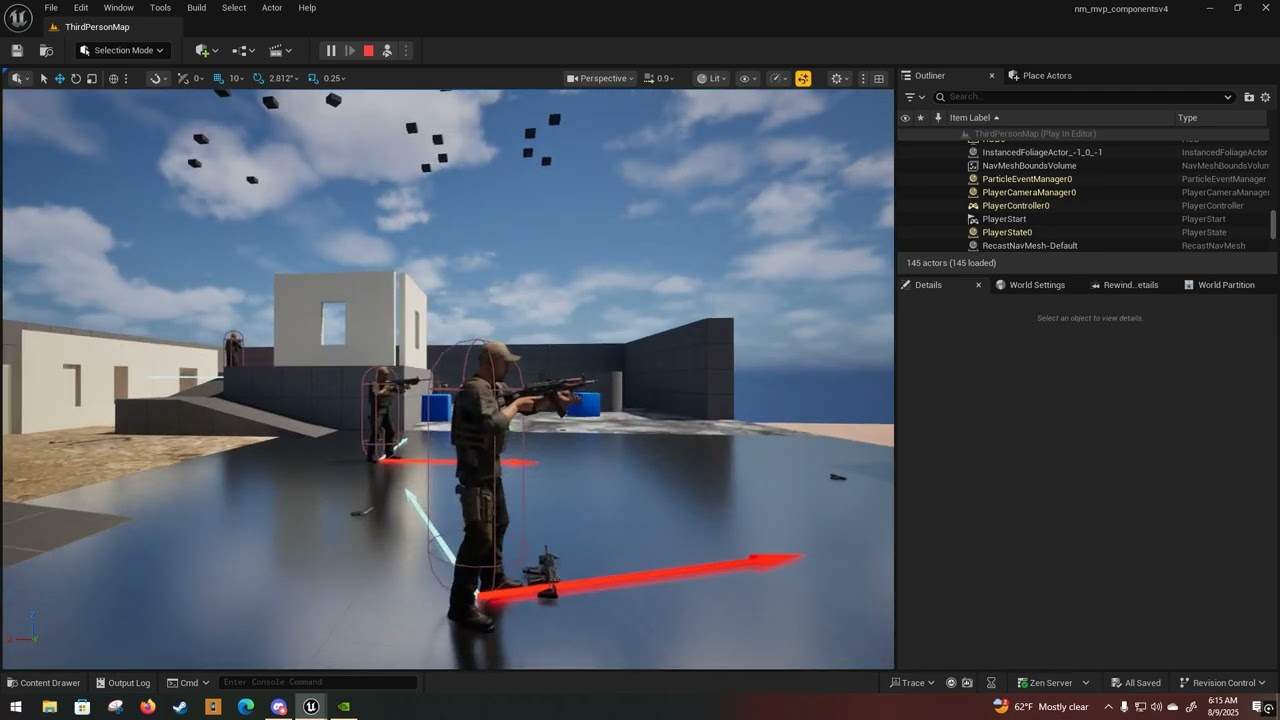
This is how it looks on my test enemies
https://youtu.be/QWNnDr01BWo?si=Zu7_6FDwiOCUdCkA
and this was how turn in place looked on my player character controller. It was bugging out a lot.

I wound up doing a silly tempfix where I put a bool on the parent class and if it's checked as a player than I update the offset root bone on every frame
so that way it doesn't really do turning anims much but the player control feels much smoother
Here's a look at the area of my ABP where I do that for reference

as well as plenty of my notes on what kind of bugs I was fixing when I last touched this
basically my issue was that my weapon system wasn't keeping up with the disjoint so the player model would turn but the weapon would just point in some random direction
anyway, I probably should have posted that in the animation section ^^II
heady silo
https://www.youtube.com/watch?v=9IPpkag-GwQ
I'm not sure why but the enemy AI seem to be making my framerate take a shit when they swarm

man the framerate went to SHIT lmao
but hey. people can die, you can grab their guns too. The AI even fires while moving, which is an improvement on the last attempt at MVP.
Feels good.
I have a feeling my task design was less than optimal
is running 4 services at once a bad idea?

my setup is pretty basic now compared to the previous attempt at a MVP build
do services run even when the task isn't selected or only when the exec is in that part of the tree?
slow bobcat
heady silo
do services run even when the task isn't selected or only when the exec is in th...
They run when a children runs
You could always run unreal insights in editor and check what's expensive
 misty wharf
Yeah probably best to run Insights, so many things going on in that vid that could be affecting it
Even the fact it starts spamming prints is probably having an impact on FPS :D
misty wharf
Any navmesh gurus?

I've been trying to tweak the navmesh settings so it would generate better around smaller gaps in geometry, and it visually looks to generate ok - but you can see there's an NPC walking on top of the geometry
like... what on earth is going on? it's not even on the navmesh?
also just randomly poking at the settings, tile size uu minimum value seems to be 426? And having it at 426 seems to affect the generation somehow in that a larger cell size will actually generate through a small gap
I have no idea :D
slow bobcat
misty wharf
I've been trying to tweak the navmesh settings so it would generate better aroun...
Let's see if we can figure out this one
Does your nav generation agent radius match your AI character radius?
if you look at the calculated path in Visual Logger -> Navigation, does it make sense?
misty wharf
Yeah the radius etc. should match. I'll have to check with vislog, that's a good idea
slow bobcat
"should"
misty wharf
:D
I mean should as in I'm pretty sure I checked they match last time when I was tweaking it, but I don't have it open now so I can't say for absolute certain :D
If there was a radius mismatch shouldn't it be noticeable with the navmesh generation anyway? Eg. the edges of the mesh would appear too close to objects?
The visualization at least appears correct in that sense.
slow bobcat
misty wharf
If there was a radius mismatch shouldn't it be noticeable with the navmesh gener...
Let's say you generate nav with an agent radius of 30.
When a character moves to the nav edge, the center of the capsule will be aligned with the nav edge.
- if your AI character has the same radius, the side of the capsule will be just be by the wall but slightly slightly away, just enough to not "scratch the surface and get stuck"
- if your character radius is bigger than the agent radius (let's say 40), the issue will be that the capsule will collide against the wall and get stuck
- if the character radius is noticeable smaller, what can happen is that the character is a but too far form the objects to interact with (very rare issue in general)
I know none of them explain "my character is out the nav" but it helps to ensure your setup is right, starting by the most evident part.
Also check your recast object is at 0 0 0. Sometimes people move it without noticing and weird shit happens (generally AI's don't move)
 unreal inlet
misty wharf
I have no idea :D
unreal inlet
misty wharf
I have no idea :D
Try using nav modifiers to increase the resolution of those tiles to high as well (It probably was your agent radius but just an FYI)
slow bobcat
unreal inlet
Try using nav modifiers to increase the resolution of those tiles to high as wel...
can nav modifiers change params in the generation for resolution etc too? I alwasy used them for simple Nav Area changes
unreal inlet
That is why there is three different levels of resolution, the modifiers can choose the resolution of affected tiles (so high or low in most cases since default is default)
 slow bobcat
unreal inlet
That is why there is three different levels of resolution, the modifiers can cho...
slow bobcat
unreal inlet
That is why there is three different levels of resolution, the modifiers can cho...
aaah true true! I always ignore that because we never had a case where we needed higher resolution. TY for the advice
unreal inlet
yaya, its nice for stairs or high geo areas where you can go kinda crazy with resolution where it's needed instead of the entire nav mesh using the same resolution
slow bobcat
unreal inlet
yaya, its nice for stairs or high geo areas where you can go kinda crazy with re...
Nice. Now that you mention it... This would have solved an issue we had in a game some years ago for our stairs...
misty wharf
slow bobcat
Let's say you generate nav with an agent radius of 30.
When a character moves to...
Yeah, that's what I figured with it as well, the edges of the navmesh at least look roughly the correct distance for the capsule radius to be right so that's why I wasn't really considering that, but will have to verify it
misty wharf
unreal inlet
That is why there is three different levels of resolution, the modifiers can cho...
That's interesting, I was wondering what exactly controlled the resolution since it had those three settings in the navmesh generation settings but I couldn't really see any indications as to what would affect the resolution. Mine is dynamically generated based on how the player places stuff around so I'm not sure if modifiers will be suitable for it though 🤔
misty wharf
Welp, I went into the project to test it again - radius is ok, everything looks ok... and now they're not doing it anymore
So I guess it was just AI module doing AI module things
 solid spire
If I wanted to have more information on a stim, how do people usually go about that...? Feels like having just an FName feels very out of date. I'd want a tag container, especially for noise. And probably a direction as well
Do people tend to build something on the side, or just rewrite the whole perception system?
heady silo
If you're trying to make a state machine out of a behavior tree, you should probably learn StateTree. It gives you more control over transitions between tasks
digital pilot
Hey Beritra, you use motion matching on the AI? If so, mine seems to be weird when executing the move to in the state tree. Like it doesn't update predictive trajectory when my player moves. Any ideas?
I watched all of those videos too btw. But they're just for player motion matching. Not so much ai, and the one that was, it wasn't what I was looking for
 hasty turret
check those settings that determine what pathFollowingComp think weather they are about to reach path point or the end

might help
heady silo
slow bobcat
You could always run unreal insights in editor and check what's expensive


shell casings never destroy
six bots in full auto will spawn a lot
577 casings at this specific moment in time, no less
heady silo
even after coming up with a way to destroy them after they come to rest it's still shitting the bed
slow bobcat
Insights is the way
misty wharf
@heady silo if you've identified the casings as the problem, one suggestion that comes to mind is using Niagara for them
slow bobcat
Yeah that's definitely something that should be done with particles
misty wharf
Yeah I've definitely made the mistake of spawning casings as actors in my naive implementation :D
digital pilot
make the casings nanite
harsh storm
Make the casings render using the mesh proxy api stuff
digital pilot
or HISM
harsh storm
We want to overcomplicate the shell casings as much as possible.
digital pilot
or just set there life to end 15 seconds after firing
or something like that
why do they even exist in the first place lol. You can't actually see a casing fly out when shooting, and you can't see a bullet travelling without a tracer round
harsh storm
Depending on the camera - you can absolutely see shell casings
digital pilot
im talking about real life
harsh storm
You can still see them eject in real life though?
digital pilot
nah not really
harsh storm
Yes, really.
digital pilot
i have more shooting exp than you
harsh storm
Bold claim for being so wrong
digital pilot
im licensed to drive a tank
harsh storm
Good for you
digital pilot
at the max, you'd see just a quick flash of brown, if the sun is at the right angle. Waste of reproduction in terms of performance trade fofs
offs
harsh storm
I don't know what to tell you dude. Maybe you can't see them, but it is 100% possible to see shell casings eject from a fired firearm.
digital pilot
yes, no one disputed the possibility, but now you're grasping at straws. The sole reason for me stating what I did is that, even having a real bullet actor, or anything is a waste of performance, and doesn't add to the value of your creation
harsh storm
You can't actually see a casing fly out when shooting
I'm not grasping at straws. I'm directly refuting your statement that you can't see it.
As for not adding to the value of the game, that is also false. There are many people who enjoy being able to see the shell casing come from the firearm and/or just lay on the ground for some time.
misty wharf
Shell casings flying off is definitely a necessity for a good shooter lol
Cool Factor
digital pilot
I guess so. It never did anything for me. Can't speak for anyone else
I just love seeing realism, but never played a game that captured true shooting realism. I suppose it wouldn't be enjoyable
harsh storm
I mean, you seem to believe that you can't see the shell casings eject when firing a firearm, so if you don't believe in things that actually happen, it'd be hard to sell you on capturing "true shooting realism"
misty wharf
It's probably one of those realism vs not factors
In more "classic" style FPS games having cool animations and effects etc. even if unrealistic are a big factor of how enjoyable they are I think
ArmA is totally different
:D
digital pilot
https://www.youtube.com/shorts/PInRCfY9lx8?feature=share
there you go, only the pistol shows it in first person
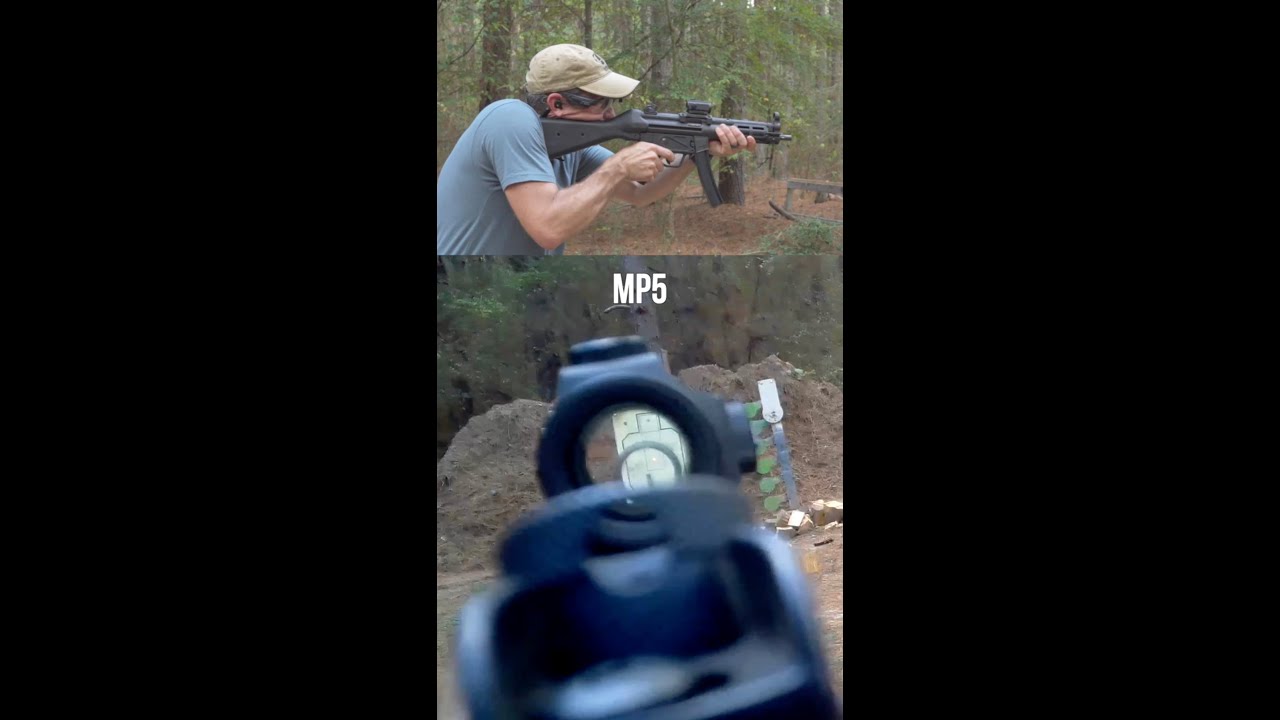
Full Video including target results: https://youtu.be/ute69a_bKYQ
How full auto ownership is legal: https://youtu.be/li5T1hFHE_o
10% off AimCam glasses with code “topshot”: https://www.aimcam.com/?ref=topshot
#asmr #asmrsounds
misty wharf
You can see it on a few of them, you probably could see it on most of them if the FOV was more like it tends to be in games when aiming down the sights 🤔
I guess the ejection is faster on some guns
harsh storm
You can absolutely see it when actually shooting because your eye isn't 2 cm from the rear sight like how the camera is
digital pilot
the camera is in his eyewear bro lol
but couple what you're seeing, with the fact that this guy looks like he's on a turbo washing machine
misty wharf
Well even if it is on the eyewear the real FOV of the eye is wider, so most likely you would be able to notice the ejection in your peripheral vision
digital pilot
I guess you know what you know
misty wharf
If you really want to I guess you could math it out and see how fast the casing ejects from the gun
It would need to eject really fast for the eye to not see it I think
digital pilot
Eye only see 60 FPS
misty wharf
I thought it was 30 fps lol
harsh storm
digital pilot
I guess you know what you know
Yes, I do know. And you also don't know if he has the camera zoomed in even further as well. Because the distance the camera is from the rear sight compared to his actual eye placement is quite different.

And you can also see the shell casings eject from the M4 portion
Even with the potential camera issues
misty wharf
now it matches where the camera is lol
 digital pilot
lol alright GI Joe. You all win. Useless argument, I was just stating what I know to be a fact. You may know different facts, but lets stop flooding the forum now about it. Hope it makes you happy
harsh storm
You're the one who tried to say you have more shooting experience than me while knowing absolutely nothing about me. And you tried to use your license to drive a tank as some sort of relevance? If anything, you're the one trying to be GI Joe.
Your own video literally refutes your claim as well
lol
misty wharf
What even is a license to drive a tank lol
My friend who drove Leopard 2's in the army never said they got a license for it
digital pilot
negative. I stated facts. And you do get licenses for them. You're friend probably just never had it handed to him.
misty wharf
Can you use it as ID to buy beer?
digital pilot
no. It's not an id. It's literally a piece of paper stating military vehicles you are trained to operate
misty wharf
Oh I see, that's probably why it never came up then lol
digital pilot
you can use your CAC to buy beer though, depending on the state
you can also use it to buy firearms
digital pilot
even if the state you live in before, bans it
misty wharf
harsh storm
If I recall correctly
You do :D
digital pilot
yea he gave it away when he said leopard 2
misty wharf
Apparently they are quite fun on the highway in winter because they have terrible grip with the rubber track protection things whatever they're actually called
digital pilot
I could drive M1 Abrams, and Bradley
harsh storm
I'm still trying to find the relevance in stating that you have a license to drive a tank and experience with firing firearms.
digital pilot
The bradley is fkn crazy. LOL. You can spin that mofo 360 degrees at like 20mph
misty wharf
That sounds uncomfortable
digital pilot
kid got hit by the door in the back. Paralyzed him. Dangerous as shit
misty wharf
Jeez
digital pilot
harsh storm
I'm still trying to find the relevance in stating that you have a license to dri...
To state military relevance and MOS / exp
harsh storm
Just because you were in the military doesn't mean you have more firing experience than someone else though? 🤔
digital pilot
well sure it does statistically right
harsh storm
No
digital pilot
it sure does
harsh storm
I knew people in supply who never fired outside of boot
digital pilot
still fired though right?
misty wharf
harsh storm
I knew people in supply who never fired outside of boot
You must be really bored to come on #gameplay-ai to argue about this with some rando lol
harsh storm
The amount of live ammo you fire during boot is hardly enough experience to make much more of a claim than someone who has never fired.
harsh storm
misty wharf
You must be really bored to come on <#221798778208780288> to argue about this wi...
Compiling and in between meetings
misty wharf
Ah the usual
digital pilot
I know lol right. I was just saying something to give the other person insight, and this guy won't let things go
harsh storm
Your insight was objectively wrong though
Even showcased in your own video you tried to use as proof
And then it just got fun when you, out of nowhere and with no basis, made a claim that you had more experience than me in pretty much anything without knowing anything about me, lol
digital pilot
it was not objectively wrong. You can't just state something is wrong without providing evidence. I stated I have more exp than you, you said I don't. So who is wrong? How can you objectively say what I said is wrong, but you said it correct?
harsh storm
Well, thankfully, you provided the evidence for me (that you were wrong)
digital pilot
haha, you don't have a lot of friends do you?
 harsh storm
Ad hominem- beautiful.
digital pilot
asking a question is not an attack
harsh storm
We both know that wasn't a question in good faith.
misty wharf
Well we're pretty friendly right Duro? So I think you have at least one friend while he so far has shown evidence for zero
digital pilot
idk he's just a troll. Uses ad hominems and bare assertion fallacies to argue on a forum.
harsh storm
misty wharf
Well we're pretty friendly right Duro? So I think you have at least one friend w...
I'd say so. I have many friends, lol. This whole conversation could've went differently if they didn't randomly try to say they have more experience than I do without knowing a lick about me. Then their entire basis revolves around being licensed to drive a tank. Them talking the Bradley tells me that they are most likely in the Army. They could've instead, asked me about my experience. In which I would've told them. But they're not interested in that.
misty wharf
Yep lol
digital pilot
not my job to ask that. You're job to tell me if you dispute something
I didn't dispute with anyone buddy. That was on you.
harsh storm
This entire conversation was a dispute between the two of us. lol
I'm not going to inject my experience every single time I make a refute on something.
misty wharf
digital pilot
I didn't dispute with anyone buddy. That was on you.
I think at this point the only thing you can do is get your friends to come here to vouch that you do infact have more friends than he does
I've shot a BB gun when I was 13
harsh storm
misty wharf
I've shot a BB gun when I was 13
Practically an expert
misty wharf
I have a license to drive a moped so I would say so
harsh storm
Does my background give me qualifications to talk about firing firearms @digital pilot?
digital pilot
let me ask you. Right handed or left?
 regal mist
Having no military experience it took me a while to figure out why that one lady at the front desk at one of my jobs always had a box of crayons and when I asked she said it was a snack
 as usual
digital pilot
as usual
digital pilot
I actually came here to ask about AI lol
harsh storm
So now that you had the time to read it - time to 86 it. Too much info for my liking.
digital pilot
yea but right handed or left handed shooter?
harsh storm
Right handed
digital pilot
you can see the casing when firing?
harsh storm
Yes.
harsh storm
Wouldn't be able to see it with bullpup though 😛
digital pilot
I aint ever seen that thing. But burnt the shit out of someones neck with the casing hahaha clearing houses
harsh storm
Bullpup is like the AUG - where the magazine is towards the rear. Which is also where the ejection port would be. And when holding it, it shouldn't even be in your peripheral really.
digital pilot
For real AI Question though. How the hell do you get ai to go to a target using motion matching
harsh storm
Those are two different concepts. Motion matching is animation. I'd imagine a call to Move To would be the same regardless
digital pilot
nah because a path is chosen, then sent to cmc. This updates the trajectory component, but motion occurs based off predictive trajectory
It's all sorts of screwed up
or root motion rather.
harsh storm
I haven't used motion matching really (and have no interest in it honestly) so I couldn't say. But if it is based off the trajectory, maybe it needs the point after the current nav point as well?
digital pilot
Yea idk. I'd have to extend the trajectory component and don't really feel like it. I'll probs just switch to in place anims
harsh storm
I'm still not convinced that motion matching is even good for indies. But that could also be due to my inexperience with it overall.
digital pilot
it's like nanite. It's great for big data sets. Bad for small. I just like messing with the new features
simple crescent
I'm not sure that motion matching should require using root motion. Isn't the point that the "animation selection" depends on the predicted trajectory which you can generate from the desired path.
heady silo

but it's interesting that shell casings sparked that much discussion because of my implementation method as projectile/physics. As for why I did it that way instead of a particle system, it's because I wanted to recreate the feeling of this sequence from "Warfare" (2025). I was hoping that with physics, if, say, someone was crawling around on the ground during a firefight, the loose brass could get knocked around like in this clip
https://youtu.be/qOuNQygbqY0?t=86

Check out the new clip for Warfare starring D'Pharaoh Woon-A-Tai and Will Poulter!
► Buy Tickets to Warfare: https://www.fandango.com/warfare-2025-239291/movie-overview?cmp=CSYT_YouTube_Desc
Subscribe to the channel and click the bell icon to be notified of all the best clips and behind the scenes content: http://bit.ly/2CMX5D1
US Release...
(by the way this is an excellent movie, do see it in full if you can)
but this is becoming more of a particles question
 mighty geode

Join Luis Placid and Shazzy Gustafson of ICVR for an in-depth look at how publicly available AI tools can drastically accelerate 3D content creation for Unreal Engine—and explore areas where it still falls short.
This case study shows how a handcrafted Unreal Engine scene was recreated from the ground up using AI tools and workflows. The sess...
Is it worth watching? The comments say the opposite.
heady silo
mighty geode
https://youtu.be/BrCipmXR4Ag?si=rq3BdSTxEaSw2GJw
Wrong channel, this should go in #generative-ai
mighty geode
heady silo
Wrong channel, this should go in <#1001804697885216870>
My discord is not showing all channels
 vocal ruin
I encountered a case where StopLogic() and RestartLogic() messing with BT
Setup:
Two NPCs: A and B.
Behavior Tree branch (for both NPCs):
Sequence with a top decorator: Blackboard condition, Notify On Result Change, Observer Aborts = Lower Priority. All other decorator in this branch has none abort.
Inside Sequence:
Task T. Task T stops/restarts logic on another NPC (do something,StopLogic(), RestartLogic(), do something).
Next Task.
Process:
NPC A runs the branch, executes T on NPC B → everything works, the Sequence continues to the Next Task.
Later, NPC B runs the same branch to affect another NPC. T runs and succeeds (FinishExecute(true)), but the Next Task and following tasks in the Sequence is skipped (ReceiveExecuteAI never fires).
There’s no BB key changes happen during this process, get rid of the Stop&Restart Logic did solve this problem
any idea what’s going on?
slow bobcat
vocal ruin
Setup:
Two NPCs: A and B.
Behavior Tree branch (for both NPCs):
Sequence with...
It's impossible to make a mental image for it. If you observe the execution in visual logger Behavior category, you might get some clues. If you observe the BT flow in the BT editor, you should also see what happens. Many times it's a silly mistake like forgetting to return finish task under some conditions
vocal ruin
slow bobcat
It's impossible to make a mental image for it. If you observe the execution in v...
BT flow is skipping nodes after the task and repeating that branch, it's expected since there's a node after that task kinda responsible for changing BB key then exist that branch. I added some breakpoints up to the finishExecution and they're fine
slow bobcat
Can you post an image of the tree?
vocal ruin
Speak to NPC is the task calls Stop and Restart Logic on another NPC. CE receive is the task being skipped (if the NPC was Stop & Restart Logic by another NPC).

And after RestartLogic, there's a few seconds gap to enter this branch
slow bobcat
So let's see if I get this right:
- npc A runs the tree
- npc A reaches the task "Speak to NPC" which will cause NPC B to restart its logic (restart its tree)
- NPC A continues just fine.
- Later NPC B runs the same tree after having its logic restarted
- NPC B reaches task "Speak to NPC" which will reset de logic on NPC C
- NPC B then fails to properly execute the next taks in the tree
Is that right?
If that's right, double check npc B is actually resetting someone else's tree and not itself. Sounds like you are reading the same npc pointer as for NPC A and B within their respective "Speak to NPC"
 lucid plover
Can someone help me to fix this behavior? The AI use a smartnavlink to jump on the platform to reach the winning location of the EQS, but after jump fall down and get stuck. i dont know why.. 🙁
slow bobcat
Check using visual logger. Navigation or Path Follow categories might have some useful info
vocal ruin
slow bobcat
If that's right, double check npc B is actually resetting someone else's tree an...
That's right. It's called base on the TargetActor BB key, so I dont think it's Restarting itself
slow bobcat
vocal ruin
That's right. It's called base on the TargetActor BB key, so I dont think it's R...
Double check just in case. It will not hurt. And the logs in Visual logger make sense you said right? Usually when a tree is stuck like that is due to some task not calling Finish Task, I would print something before the last one executing before the bug calls finish task
hallow compass
any optimization tricks for state trees ?
is there any kind of usages/bindings/taks types/ etc that arent good ?
misty wharf
Not sure if there are any general ones, you probably would need to profile if you have issues with it
Blueprint tasks can be noticeably slower than C++ implemented ones if you have a lot of them running at the same time, but beyond that hard to say
 ruby shard
anyone could tell me what's nav mesh cluster link in NavMesh module ? what the usecase of WITH_NAVMESH_CLUSTER_LINKS ?
slow bobcat
ruby shard
anyone could tell me what's nav mesh cluster link in NavMesh module ? what the ...
I would love to know too. Specially since this is the comment about them.
/** Navigation links (segment to segment) added to navigation data
*    @todo hidden from use until we fix segment links. Not really working now*/
UPROPERTY()
TArray<FNavigationSegmentLink> SegmentLinks;
My guess is that you have a way to cook the nav where nav links are clustered for large nav worlds. That way you can skip loading them when far away making path calculations cheaper.
But that's just a wild guess.
you can enable clustering in the Target.CS of your project but if you look at the comment....
// This is an unsupported feature and has not been finished to production quality.
if (Target.bCompileNavmeshSegmentLinks)
{
   PublicDefinitions.Add("WITH_NAVMESH_SEGMENT_LINKS=1");
}
else
{
   PublicDefinitions.Add("WITH_NAVMESH_SEGMENT_LINKS=0");
}
There's even debug for it but I guess it will not draw anything

they have been like that sin 2022 at least
I would just pretend you never saw anything
 queen furnace
Hey all, are they any in-depth ways for finding out why my AI pawn won't move.
I've used a Move To task in an AI state tree and can see with the visual logger that the path is valid & the navigation system has accepted the path, but the pawn just doesn't bother moving.
 analog crown
Can I override the local transform of the PawnSensing component somehow? (prefer this over AIPerception for my use case)
 bleak plank
Does anyone know why State Tree is running on Begin Play even though "Start Logic automatically" is checked off in the details panel? I don't call start logic anywhere
bleak plank
Where would I put them? The issue is it's not supposed to be running at all
bleak plank
I'm using blueprints so I'm not sure there's an equivalent
hallow compass
but unless you forgot something elswhere there is no reason for the ST to start if you disabled the auto start
hallow compass
bleak plank
I'm using blueprints so I'm not sure there's an equivalent
you cant
is your AI placed in the level ?
or spawned at runtime
bleak plank
It's spawned in at runtime
hallow compass
so auto start is off in the AI controller BP class ?
bleak plank
Yea in the AI controller it's turned off
bleak plank
No parents no children
I even try to stop the logic on begin play and it only works after a delay
hallow compass
by "state tree is running" do you mean some tasks are called ?
are you sure about that
bleak plank
Yea the debug text is running and the NPC is moving around
so it's doing the tasks
What's weird is if I call "Start logic" that turns it off on begin play
Oh I found it
there's another option called "Start AiLogic on Posses" i missed
Not on the component but on the controller itself
bleak plank
hallow compass
are you sure about that
I appreciate your help!!
hallow compass
i forgot about it
bleak plank
No worries I'm a bit dumb at this lol
 graceful wind
guys, any idea how to make the state tree task tick works in UE5.6? some says, we need to set custom tick rate > 0. but somehow the task is still not ticking
graceful wind
it is in active state
graceful wind
my bad, I should check this first https://dev.epicgames.com/documentation/en-us/unreal-engine/API/Plugins/StateTreeModule/FStateTreeTaskBase/Tick

Epic Games Developer
Called during state tree tick when the task is on active state.
 sacred stone
Anyone here experienced with the nav link generation feature that was added? (still experimental)
More interested in the jump up part.
maiden cargo
Any idea why my Pawn decide to not take the cover point that is closest to him, and instead find the farthest while still in range, even when the scoring show it should take the closest?


 slow bobcat
maiden cargo
Any idea why my Pawn decide to *not* take the cover point that is closest to him...
slow bobcat
maiden cargo
Any idea why my Pawn decide to *not* take the cover point that is closest to him...
Might be soemthing in the eqs or how do you get the results from ot
slow bobcat
maiden cargo
Any idea why my Pawn decide to *not* take the cover point that is closest to him...
How are you getting the results debug in that image with the scores?
 chilly nebula
Sorry for necro 🙂 we would rather use property binding here, and are working on fixing some issues there with async patterns. Basically if you bind to an output parameter on an async task, the value is read on state enter and not updated in tasks that are bound. Trying to get that fix in for 5.7.
Is there a use case you have in mind that wouldnt be solved with that?
chilly nebula
harsh storm
Correct. Thought you knew this. Pretty sure it was something you asked for Siggi...
We agree this is something we need and are looking into it, not sure though when we'll be able to deliver.
maiden cargo
slow bobcat
How are you getting the results debug in that image with the scores?
debug pawn (its sprite is the pawn sprite on the right for the image), I put it roughly where my pawn was to check the eqs values.
maiden cargo
slow bobcat
Might be soemthing in the eqs or how do you get the results from ot
Locations is a custom generator to get my cover points, the trace is a basic line trace toward player capsule

I'm getting the single best item, in my state tree eqs query, so it should output the closest cover point instead of one that is around the cover. u_u
slow bobcat
maiden cargo
debug pawn (its sprite is the pawn sprite on the right for the image), I put it ...
I strongly suggest you run the real thing and check with visual logger. I run into issues in the past where the pawn test was not yielding real results because things where different at runtime
It might getting the best point, but the best point at runtime might be different that what you see with the testing pawn
maiden cargo
slow bobcat
It might getting the best point, but the best point at runtime might be differen...
Good point, running the visual logger, it show the real values, but the scoring is "wrong" because it's a distance scoring and the diag one is clearly farther than the close one? 
 maiden cargo
slow bobcat
I strongly suggest you run the real thing and check with visual logger. I run in...
maiden cargo
slow bobcat
I strongly suggest you run the real thing and check with visual logger. I run in...
nvm, i'm dumb. The query owner wasn't the actor but the controller so I guess the data wasn't actually correct when the EQS was running. 🙇
slow bobcat
Classic
heady silo
maiden cargo
Any idea why my Pawn decide to *not* take the cover point that is closest to him...
Congratulations, you have made a flanking task
 lyric flint
👋🏽 I am using find path to location synchronous. Does it ignore nav links?
 oblique surge
What is the general opinion re: State Trees vs. Logic Driver?
harsh storm
I've never been a fan of logic driver. Too expensive for a state machine
But some people like it.
These days, I'd definitely recommend against it personally. State Tree can serve as a state machine pretty well.
But maybe they have better debugging tools
¯_(ツ)_/¯
harsh storm
Yeah
They filled the void of UE not having a state machine for logic
Made people happy.
hallow compass
oh its a paid plugin
oblique surge
well they have a free version. I'm not promoting it, I just used it b/c I didn't care for behavior trees
state trees seem like a good compromise but last time I tried I spent all my time creating tasks
slow bobcat
oblique surge
What is the general opinion re: State Trees vs. Logic Driver?
We used the free version until state trees were released.
slow bobcat
oblique surge
state trees seem like a good compromise but last time I tried I spent all my tim...
Exactly the same will happen with logic driver
slow bobcat
lyric flint
👋🏽 I am using find path to location synchronous. Does it ignore nav links?
No, links are used all the same
oblique surge
Alright I was planning to switch to state trees anyway, thanks
lyric flint
slow bobcat
No, links are used all the same
I have tested several ways with simple and smart links, both ways and single direction, messed with the snapping, confirmed they are enabled and relevant, etc, etc and no matter what the find path to location never seems to account for the nav links, like, not even a partial path to the link; its just straight up ignored.
slow bobcat
lyric flint
I have tested several ways with simple and smart links, both ways and single dir...
Are your nav links supporting your nav agents used for the path calculation? Are they properly generated? If you show the nav in editor (pressing P) are the nav links generated?
lyric flint
slow bobcat
Are your nav links supporting your nav agents used for the path calculation? Are...
Project wide setting for nav agent is default, yes.
Nav links appear to be generated as it shows the low poly line with arrow(s) same color as the nav mesh, yes.
slow bobcat
lyric flint
Project wide setting for nav agent is default, yes.
Nav links appear to be gene...
You can alsways do a test:
- drop a simple Proxy Nav Link Actor in the level
- From a BP call Move To from a point on one side of the island of the nav link to the other. See if that works.
I wonder if there's some bug in your logic somewhere because all this works by default.
A screenshot of your case wouuld help to understand it too
celest python
slow bobcat
Exactly the same will happen with logic driver
<opinion> this is why sometimes I like when AIs become scripting languages instead of tools encapsulate behaviors </opinion>
slow bobcat
celest python
<opinion> this is why sometimes I like when AIs become scripting languages inste...
but that doesn't solve the issue either no?
You have a state machine / HNT / BT / whatever that checks logic and does things considered "actions".
You still need to write te logic for those actions.
ST's will do ST Tasks, BT's BT_Tasks and scripting will call functions
celest python
slow bobcat
but that doesn't solve the issue either no?
You have a state machine / HNT / BT ...
this was something I have been brainstorming for a while - its still a very immature thought so I dont know if it even makes sense or not but this is actually to move the mechanics of tools to scripting lang instead of replacing them. In my head right now I am thinking something similar to C#'s task functions and a custom DSL integrated into a scripting language so a behavior tree in editor could be represented in text with
behavior_tree:
  root:
      selector(selector_func(params))
          .something()
          .something_else(params)
I saw XML based BTs, custom/handwritten FSM systems (  ) but never seen something similar to this in the industry yet. So its something I want to experiment in the far future. In this instance editor tools become scripting language extensions or DSLs
ideally anything under behavior_tree would be removed and transformed into a different form with codegen, in a language that supports this
chilly nebula
celest python
this was something I have been brainstorming for a while - its still a very imma...
IMO if you have a DSL then you often end up with a text-based alternative for a binary asset 🙂 often these get too verbose to write by hand, so you end up making a tool for it.. and then in the end what have you achieved?
I agree its interesting to write behaviors as scripts, and it can give you more control, but more often than not you end up either copy/pasting blocks between behaviors or creating a library of "code snippets" for common behavior blocks?
celest python
chilly nebula
IMO if you have a DSL then you often end up with a text-based alternative for a ...
I think that exact idea what made it appealing to me on idea level. Small lego blocks of code forms a behavior piece by piece and same functions/libs/tasks can be used across different execution flows (BT<->HTN<->FSM) if DSL supports it
then something like becomes very easy to implement:
root:
  behavior_tree:
    ...something...
    ...something...
    state_machine:
       ...we embedded BT into FSM now!..
so... basically what you already have in Unreal with the BT editor but without the UI (except for that State machine runnng inside the BT)
the different execution flows... we combine ST's and BT's as "things that run side by side" but embeding them might be a nightmare to implement
celest python
yeah, not just in UE, probably every other BT system 😄 I just think having execution flow defined in script as latent tasks might be nice
editor tooling vs maintaining a DSL
workflow-wise I'm not sure how convenient this would be for open world games though - maybe with very big graphs it's better to work on it on editor
I usually implement Bobby Angelouv's behavior stack idea in my projects and keep every behavior modular and small so similar-ish ideas work for me
harsh storm
I'm in the same camp as Bruno and Siggi personally. In that, I'm not sure what you're gaining here other than doing the stuff in text instead of binary.
celest python
text is more flexible and requires less tooling compared to editor
your platform is the semantics of the script
behaviors and scripted events are not encapsulated under tasks or decorators either
chilly nebula
celest python
yeah, not just in UE, probably every other BT system 😄 I just think having exec...
I agree, and we are considering something like that for the future 🙂 using Verse which has great concurrency expressions
harsh storm
chilly nebula
Sorry for necro 🙂 we would rather use property binding here, and are working on...
Sorry - thought I responded.
A quick usecase for payload support with the new delegate stuff would just be transitions as well. Right now, with state tree events, you can have an enter condition be set on a task for them and then bind to the state tree event payload through that.
Sure, for delegates, I could have multiple variables that could be set before I fire off the delegate and then other things could bind to those and the delegate. But that is a lot of clicking. Then, we could also just create a payload struct and bind to that and the delegate as well. Then we'd just set the payload struct values before broadcasting the delegate. But that feels hacky.
But I think the transition scenario is the big one. At least for @slow bobcat if I recall.
chilly nebula
harsh storm
Sorry - thought I responded.
A quick usecase for payload support with the new d...
Yes, we are looking into ways to pass some context data with transitions.. primarily for conditions to act on.
harsh storm
chilly nebula
I agree, and we are considering something like that for the future 🙂 using Vers...
Yeah - wish we could get verse sooner rather than later 😭
I don't care as much about the transaction stuff that Tim does. I just love the concurrency stuff 😅
Makes it insanely easy to write that.
slow bobcat
harsh storm
I don't care as much about the transaction stuff that Tim does. I just love the ...
How does Verse handle concurrency? Something like Co-Routines?
harsh storm
slow bobcat
How does Verse handle concurrency? Something like Co-Routines?
You have all kinds of options. But if you look up (or remember) skookum script, it is pretty much like that but in a much more digestable format.
celest python
slow bobcat
How does Verse handle concurrency? Something like Co-Routines?
TL;DR coroutines and the regular state machine that makes you write tons of OOP or other programming patterns are abstracted by a few built-in keywords through a task system
second link Duro sent goes through it
lyric flint
slow bobcat
You can alsways do a test:
- drop a simple Proxy Nav Link Actor in the level
- F...
I plan to test like you mentioned later this evening. I have a vague memory that the "Find Path to Actor" node actually did use the nav links but I could be fooling myself with false memory. Below are screenshots of my setup and the scenario. Any additional insight would be much appreciated.
- Project settings
- Pawn settings
- Controller settings
- Node in question
- Scenario


 slow bobcat
lyric flint
I plan to test like you mentioned later this evening. I have a vague memory that...
slow bobcat
lyric flint
I plan to test like you mentioned later this evening. I have a vague memory that...
I wonder if your nav links start and end has something to do with that. Technically speaking, using the nav link is a path more expensiive than not. Have you tried setting the nav links by the border of your platform?
oblique surge
celest python
text is more flexible and requires less tooling compared to editor
Also, in my experience, designers don't tend to write AI. It's usually handled by programmers, and we're more used to text-based systems
celest python
oblique surge
Also, in my experience, designers don't tend to write AI. It's usually handled b...
My observation is most fascinating AIs are made by small group of dedicated AI teams. AI design tends to get worse when you spread it over to the whole company
So designers are often not a concern if your team is on that side too
oblique surge
yeah I honestly don't see a lot of justification for visual AI systems. The easiest time I had writing AI was in Lua
harsh storm
I mean - I strongly prefer text over binary for any game thing.
oblique surge
having gone through the time when you had to adjust your UI element one pixel, compile, run, then do it over and over, I get visual systems for that
slow bobcat
oblique surge
Also, in my experience, designers don't tend to write AI. It's usually handled b...
Talking from the AAA realm:
- we have combat designers that construct the bt's entirely
- programmers give them the tools they need: tasks, decorators, services, contextual data, callbacks... Keeping performance and scalability to (potentially) other projects
We give them the parts and they build the car as they like it.
UI is unbeatable for quick iteration for designers. Let alone having flags in a visual manner, thing they can connect and disconnect quickly, menus with debug options...
They also can quickly prototype in Bp's and then we port things right to code
lyric flint
slow bobcat
I wonder if your nav links start and end has something to do with that. Technica...
I will try placing the nav link end point to the edge of the nav mesh on that upper platform.
So long as I can get the path to go to the nav link and trigger nav link reached then my teleporter will teleport them to the upper platform where they will resume pathfinding again; that is the overall goal.
Ill get back to you later with the result of trying that.
Do you see anything else that could be an issue from those images?
oblique surge
I added a basic state tree and it is immediately being put to sleep by ScheduleTickFrame
oblique surge
okay, I don't understand. I have an idle state and a pursue state. The pursue state has an enter condition that checks if you have a perceived enemy. The idle state is below that and has no enter condition. If I have my enemy facing away from me, the state tree checks once to see if it perceives me, fails, enters the idle state, and then disables its tick unless I change the scheduled tick policy to disabled
oblique surge
alright looks like a change to tick behavior in 5.6
I'm sure this was to solve a problem but I can't imagine what
aaaand changing the scheduled tick policy doesn't register in the undo buffer lol
 hexed cedar
is there a way to use navlinks for teleporting
hallow compass
i would use regular teleport on the agent
hexed cedar
i don't think i have that in my version im on 5.1
hallow compass
just call set actor location on your AI
 hallow compass
what was the issue ?
hexed cedar
i had it set to simple link
also i got a question how come navlink only works at specific spots
chilly nebula
oblique surge
I'm sure this was to solve a problem but I can't imagine what
That problem is performance for large scale games 🙂
For most cases scheduled ticks work just fine, but you need to take it into account when writing your tasks.
slow bobcat
chilly nebula
That problem is performance for large scale games 🙂
For most cases scheduled ti...
What exactly do we need to take into account? What I mean is: how can we know if our taks is conflicting with the task scheduling? Are there examples to follow?
Asking because we disabled it comeletely in our trees due to issues we were having, but we are unclear why is it an issue (never had the time to debug the scheduled tick system properly)
chilly nebula
slow bobcat
What exactly do we need to take into account? What I mean is: how can we know if...
First of all, you can opt in on a per-task basis if it wants to use scheduling. Then it can.. schedule for when next to tick 🙂 even the delay task now does just that.
Can also setup for async patterns if your task is for example listening to an external delegate
slow bobcat
Ok, but how does the scheduling works? Let say I have a task that does A on start, B on tick, C on Exit.
What does the scheduling measure in my task to schedule for its ticking?
 kindred stratus
Hi, did you find out? :)
 thin arch
kindred stratus
Hi, did you find out? :)
thin arch
kindred stratus
Hi, did you find out? :)
nope! i ended up implementing cooldown on the surrounding object (the one holding the SO def)
kindred stratus
thin arch
nope! i ended up implementing cooldown on the surrounding object (the one hold...
oh what a shame, I'm tempted to do the same, that or extend the S.O. definition myself, since i just need to expose a tuple on the result queries
 final wing
Hey All. I'm failing at the most basic level to get a State Tree working. I just want my AI to move to a specific location. I know the Controller is working, I know the nav mesh is in and valid, along with the location. Yet all my character wants to do is stay in the same spot. Am I missing something really obvious? The weird thing is, it won't even trigger the breakpoints.

 harsh storm
Override on possession and then start the state tree
Don't have it start automatically
Sometimes the timing can be wonky
If that doesn't work, going to have to use the state tree debugger
final wing
harsh storm
Override on possession and then start the state tree
So manually possess every instance and manually start the tree? It is on Start automatically and I know when I've had some debug stuff in there it is firing through the actions, just refusing to move
harsh storm
If the tree is working, but it just isn't moving, then you have to open up the debugger and see what is happening
Visual Logger will provide info about move requests (if I recall correctly) and the ST debugger will provide info about the state tree itself
Have you also been able to confirm that the hardcoded location you put is even on the navmesh?
final wing
hardcoded location is 100% on the navmesh. I've had it pull through both this and randominnavigablerange both fail to do anything. I hadn't actually realised their was a State Tree Debugger. Looking through it it is just constantly returning a State Failed

 wide robin
final wing
hardcoded location is 100% on the navmesh. I've had it pull through both this an...
wide robin
final wing
hardcoded location is 100% on the navmesh. I've had it pull through both this an...
At this point then I would do what Duroxxigar suggested and use the Visual Logger to check why the MoveTo fails, you should be able to get the info from there
final wing
wide robin
At this point then I would do what Duroxxigar suggested and use the Visual Logge...
Ah I wish! Visual Logger makes no sense to me. I hooked it back up with the "In Navigable Range" node, but its freaking out at the values it return as being valid
 slow bobcat
final wing
slow bobcat
final wing
Debug draw a small sphere in the level for start and end locations for your path while you show the navigation and mesh in runtime. Let's see where said locations are.
hexed cedar
is there a way to make the nav link go pass it limit of 3128 for the x and y
oblique surge
chilly nebula
That problem is performance for large scale games 🙂
For most cases scheduled ti...
Sure, just a bit odd to have "shut off all ticking" be the default 😛
Does anybody know how to add a new property function to the state tree? For example, if you want a location there is a property function GetActorLocation.
 robust veldt
I am getting this error:
ConstructTiledNavMesh: Failed to create navmesh of size 0.
And then some random crash happen.
Does anyone know why.
oblique surge
alright I give up on state trees man
harsh storm
oblique surge
alright I give up on state trees man
What issue are you encountering?
harsh storm
robust veldt
I am getting this error:
```
ConstructTiledNavMesh: Failed to create navmesh of ...
Try deleting your recast navmesh actor and place it again. Maybe a corrupted actor
oblique surge
harsh storm
What issue are you encountering?
The most recent issue I was facing was trying to setup 'global' states like hit reacts and death. I can't find a consistent, non-hacky way to interrupt an ongoing task for major events such as those
Or reliably trigger out of every state to things like death/react without manually defining a ton of transition rules
slow bobcat
oblique surge
Or reliably trigger out of _every_ state to things like death/react without manu...
- global task that checks the conditions you need to trigger your reaction. Let's say you want your AI to bark "I'm hit" upon getting their health below 30%. You check in your global task your health.
- add a transition by Event in your root node that triggers a state called "Reaction". Reaction is a sibling state from root that can't be accessed any other way than through a state.
- when below 30% health, your global task for "hit reaction" will send the event reaction with the reaction information in the payload (let's say a string or whatever).
- the root reaction will immediately transition to the reaction state and a task inside will bind to the event payload and do what you need.
Alternatively you can have parallel state trees running in the Root node for each reaction you want to consider and trigger the event transition from there instead of a global task. That's a better approach since you will be able to control ticks and have conditions for the flow.
slow bobcat
hexed cedar
is there a way to make the nav link go pass it limit of 3128 for the x and y
It's not a distance issue. It's a problem with how nav links work internally. Nav links can't connect tiles that live in different branches within the binary tree that conforms the navigation and data. One option you have is to use several nav links in a row, like a chain Another is to tweak the nav generation and create bigger tiles and hope for them to be neighbours in the tree structure. Both are messy solutions.
What are you trying to achieve with this large nav links?
robust veldt
harsh storm
Try deleting your recast navmesh actor and place it again. Maybe a corrupted act...
I found out, it seem like a bug in NavMesh system, CrowdManager still use nav mesh data that already deleted.
slow bobcat
robust veldt
I found out, it seem like a bug in NavMesh system, CrowdManager still use nav me...
Because it copies it somehow?
hexed cedar
slow bobcat
It's not a distance issue. It's a problem with how nav links work internally. Na...
i wanted to achieve 2 things large jumps for fast enemies and teleporters i also got them working now
robust veldt
slow bobcat
Because it copies it somehow?
Nope,
In the FRecastNavMeshGenerator::ConstructTiledNavMesh , DetourMesh is allocated and init.
Then DestNavMesh->GetRecastNavMeshImpl()->SetRecastMesh(DetourMesh); is call to trigger delegate OnNavMeshUpdate, which will cal to UCrowdManager::OnNavMeshUpdate() to update new DetourMesh
That is the case when DetourMesh init success. But in case it failed, delegate won't trigger and UCrowdManager still ref to old DetourMesh which already freed.
slow bobcat
Right. Sounds like a bug indeed. Let me know if your figure out what happens, I'm very interested in this stuff
slow bobcat
hexed cedar
i wanted to achieve 2 things large jumps for fast enemies and teleporters i also...
How did you solve the issue?
oblique surge
slow bobcat
- global task that checks the conditions you need to trigger your reaction. Let'...
I tried a global task. Tick isn't being called. It runs once and stops
slow bobcat
oblique surge
I tried a global task. Tick isn't being called. It runs once and stops
never call Finish Task in a global task. That's probably your issue
hexed cedar
slow bobcat
How did you solve the issue?
i set the tile size uu to 9980 and the cell size to 15 in the project setting
final prism
Does anyone know how to get the poly id of a navlink or the polys it connects to?
slow bobcat
final prism
Does anyone know how to get the poly id of a navlink or the polys it connects to...
if you want an easy way, you can do this at the location of the nav link side with a small extend
ARecastNavMesh* NavData
const NavNodeRef nearestPoly = NavData->FindNearestPoly(traceStart, NavPolySearchExtent);
having a poly ref, you can check if it's a nav link grabbin its flags
ARecastNavMesh::GetPolyFlags(NavNodeRef PolyID, FNavMeshNodeFlags& Flags)
and check if it's a navlink
recast->GetPolyFlags(polyRef, flags);
bIsNavLink = flags.IsNavLink();```To get the other side of a navlink once you get one side poly ref
NavNodeRef nodeRef = NavNodePolyRef;
const dtPolyRef polyRef = static_cast<dtPolyRef>(nodeRef);
const dtMeshTile* polyTile= 0;
const dtPoly* poly = 0;

const dtNavMesh* m_nav = Recast->GetRecastMesh();
m_nav->getTileAndPolyByRefUnsafe(polyRef, &polyTile, &poly);

unsigned int linkIndex = DT_NULL_LINK;
linkIndex  = polyRef->firstLink;
if (linkIndex != DT_NULL_LINK)
{
  ......
}
First link is the poly connected to the one you are checking
    unsigned int firstLink;```

so in a nav link connecting polyRefA and polyRefB
``` polyRefA->firstLink = polyRefB
polyRefB->firstLink= polyRefA```Yeah I've been trying to avoid the projection based on location, since that seems to return unreliable results
But I believe it should be possible to get the detour navlink via the associated tile and the navlink ID
slow bobcat
final prism
But I believe it should be possible to get the detour navlink via the associated...
yeah, there is a direct conversion for sure.
if (OffMeshCon)
{
    CurVert->CustomNavLinkId.SetId(OffMeshCon->userId);
    CustomLinks->Add(FNavLinkId(OffMeshCon->userId));
}```btw there's also this flag DT_POLYTYPE_OFFMESH_POINTto check if a poly is a navlink.
poly->getType() != DT_POLYTYPE_OFFMESH_POINT
ah ok it's super easy. That CUrVert above is just a FNavPathPoint. So you can straight get the point from the path that represents the nav link if you are doing this over a calculated path
slow bobcat
final prism
Yeah I've been trying to avoid the projection based on location, since that seem...
about this... if you do the trace at the nav link side location with a small trace... it should be fine. Or have you experienced some other issue with it?
final prism
It seems to find the wrong polygon in some cases, not sure why, but I'd rather do it properly
Finding a tile based on a location is weirdly difficult though
slow bobcat
final prism
Finding a tile based on a location is weirdly difficult though
only way I know is to call FindNearestPoly and wiith the result polyRef call getTileAndPolyByRefUnsafe (or the safe version if you prefer)w
final prism
Yeah then if I need to do a projection either way, I guess I'll try to figure out why its finding wrong polys
slow bobcat
final prism
Yeah then if I need to do a projection either way, I guess I'll try to figure ou...
Good luck. Let me know if you figure it out. Very curious about it
I wonder if the nav link extent has something to do with it
Just a theory and not actually sure it works like that but, if your navlink is at the purple location but your nav link extent actually connects the poly at the yellow cross.
Something like that. Not sure
 chilly nebula
oblique surge
Does anybody know how to add a new property function to the state tree? For exam...
chilly nebula
oblique surge
Does anybody know how to add a new property function to the state tree? For exam...
Look up the ones that come with the engine, the code is very simple to write.
final prism
slow bobcat
To get the other side of a navlink once you get one side poly ref
```
NavNodeRef...
Not quite sure I understand this, wouldn't the poly you found here be the navlink itself? Wouldn't that be connected to 2 neighboring polys?
Or is the polygon that has the navlink flag equivalent to the start polygon on the navmesh?
slow bobcat
final prism
Or is the polygon that has the navlink flag equivalent to the start polygon on t...
This. There's no nav link object per se. A poly is flagged as Offlink and its firstLink value is filled
final prism
Yeah it makes sense now, dtLink is just a link to a neighboring poly, not an offmesh link (aka navlink)
I do think navlinks are unique polys, because they can be marked with unique area ids and flags for traversal
slow bobcat
final prism
I do think navlinks are unique polys, because they can be marked with unique are...
No they are not. They are just a poly that happens to have the nav link flag too
What always bothered me is that the nav link flag is 100000 in the area and type flags. Does that mean that if you have custom areas, you can end up overriding that one?
because the areaandtype variable is something like this
T T A A A A A A
where 2 bits on the letf are for Type and the rest for Area.
not sure if this corelates to Nav Areas in the engine.
digital pilot
oblique surge
The most recent issue I was facing was trying to setup 'global' states like hit ...
Yo idk if you figured out a solution to your thing but, events are much better and cleaner for transitioning
oblique surge
slow bobcat
never call Finish Task in a global task. That's probably your issue
Yeah I caught that pretty early - putting a FinishTask in a global task stops the entire tree from running. Right now I have just a Tick function and it never executes (I am on 5.6.1 if this is relevant).
oblique surge
digital pilot
Yo idk if you figured out a solution to your thing but, events are much better a...
I did give that a shot, it seems that events don't interrupt tasks? I wouldn't be surprised if I just have something configured wrong, but I have a MoveTo for pursue player and if I shoot my zombie enough to kill him, sending the Status.Dead event to his state tree doesn't break him out of MoveTo. He has to finish the MoveTo, then he collapses to the floor
I was digging into this and some people are going as far as to restart the entire state machine in situations like this. That just seems very hacky
digital pilot
ahh classic move to. So the move to is a weird one. which move to function call are you using?
oblique surge
I created my own task using AI Move To, b/c before the MoveTo starts I have to add a tag so the enemy ABP uses root motion, and remove the tag when the MoveTo finishes
I can listen for an event in that task but I'm pretty sure I'll eventually create another task that can't be interrupted and having to carry forward special cases seems a great chance to introduce bugs
digital pilot
are they moving toward the player?
oblique surge
this is the main reason I asked about STs vs Logic Driver, I have all this working pretty easily in Logic Driver, I would just like to get AI working in something more commonly used (for future employment purposes :-P)
towards the player or towards the player's last known position
digital pilot
does the ai move fine to last known location and not fine to the player?
oblique surge
no it just continues the MoveTo until it finishes or errors out. The task seems immune to StateTree events
digital pilot
oo do you have tasks: All set or tasks: Any?
oblique surge
any, but it only has the one task
digital pilot
alright, so move to's never finish btw. The path following component actually terminates. It is super dumb, however, you can terminate it early. Call an event on the controller or wherever your path following component is, like OnDeath -> pathfollowcomponent -> Stop movement, then call your event to transition
or you could transition by doing a switch on the movement state and in abort or interrupted whichever fires, set finish task true
oblique surge
I'll give that a shot, thanks
digital pilot
hey no problem, let me know. Also, if needing to know when the movement is complete, rely on the binding in controller -> Bind Event to MoveCompleted. It's built in
oblique surge
my main concern is that this won't be the only task that doesn't get terminated by an external transition event
but I guess I can deal with that if it comes up
oh and yeah I still am not getting Tick on my global tasks, which is driving me crazy
oblique surge
digital pilot
alright, so move to's never finish btw. The path following component actually te...
Worked! And since the purse target state goes back to root on completion, just a standard 'has tag' condition for my death state works as well - no event needed
might switch to events just so I don't have to remember to order the states to have the 'global' ones up top
digital pilot
yes sir! I figured as much. The path following component is a pain, but i banged my head on that recently. Glad I could help
I always use events on that. Trick with events is consumption. Be sure that it don't consume event too early. Like if enter condition is by event, but the transition consumes the event, then the enter condition will never work. You'll want the enter condition to consume it
oblique surge
if a state tree task defers internally to another task (such as AI MoveTo), it appears to never have its tick called. Is this by design?
 vast relic
Anyone have any thoughts on using nav data but doing the movement through AddMovementInput calls, not directly navmeshwalking?
slow bobcat
vast relic
Anyone have any thoughts on using nav data but doing the movement through AddMov...
We do that here and there. For example, if we want to move laterally for 3 seconds, we check with a nav trace if we have enough space for it to the right, then add movement input to the side (left / right) for 3 seconds
That input triggers the right animation in the animation blueprint
Sale thing with "move backwards". We don't necessarily calculate a path, just check if we have the space for it and apply the input for X seconds
harsh storm
Yeah, that's pretty much how I handle it as well
 valid sparrow
Hey guys! Have you ever had a situation where DoesPathExists decorator succeeds but then the MoveTo fails? The MoveTo fails instantly. I tried with regular pathfinding setting too (slow one), same result.
I'm adding a safeguard so if an enemy AI gets off the navmesh, the AI chasing it will go back to Idle. but DoesPathExist succeeds even if the target is outside the navmesh. While MoveTo fails.
slow bobcat
valid sparrow
Hey guys! Have you ever had a situation where DoesPathExists decorator succeeds ...
IIRC does path exist uses a default Extent to project the points onto the nav mesh while move to doesn't unless specified. Check if that's the case. The best way to know why these things happen is to debug draw the starts and end points you are using for the move to
valid sparrow
slow bobcat
IIRC does path exist uses a default Extent to project the points onto the nav me...
Thanks for the tip. Project point seems to have fixed it
slow bobcat
Nice
 prisma quarry
How State Tree bindings works for C++ blueprintable classes?
in my C++ class (UStateTreeEvaluatorBlueprintBase) I've specified:
    UPROPERTY(EditAnywhere, BlueprintReadWrite, Category = "Context", meta = (Context))
    APawn* Pawn;
    UPROPERTY(EditAnywhere, BlueprintReadWrite, Category = "Context", meta = (Context))
    AAIController* AIController;
    UPROPERTY(EditAnywhere, BlueprintReadWrite, Category = "Output", meta = (Output))
    AActor* HuntTarget = nullptr;
    UPROPERTY(EditAnywhere, BlueprintReadWrite, Category = "Output", meta = (Output))
    FVector HuntLocation = FVector::ZeroVector;
etc.
Context works as expected, Output is also marked in state tree as "out", but I can't bind any of this value to other tasks. Same blueprint made class works though.
Is this a bug? Or am I missing something there?

 slow bobcat
prisma quarry
How State Tree bindings works for C++ blueprintable classes?
in my C++ class (US...
slow bobcat
prisma quarry
How State Tree bindings works for C++ blueprintable classes?
in my C++ class (US...
Try using the category Parameter instead of Context
prisma quarry
slow bobcat
Try using the category Parameter instead of Context
why?
Context category works. I'm expecting an issue with Output category. I can't bind any output specified values to other tasks
slow bobcat
prisma quarry
why?
Context category works. I'm expecting an issue with Output category. I can...
ah sorry, missunderstud the problem, didn't read properly.
try this meta=(AllowAnyBinding)
I have params in an evaluator with category Output and that meta and it works.
Also: evaluators will be deprecated at some point to favour global tasks.
prisma quarry
slow bobcat
I have params in an evaluator with category Output and that meta and it works.
A...
I've made this as global task at first, but than found out what were evaluators are for.
Ok then, I'll reparent this thing.
Also, I've just googled my question and it was it lmao
 final prism
Ok I think ive managed to successfully get the navlink poly via the ID, however the polys it gives me as neighboring are complete gibberish.. I've tried getting the vertex locations, converted them to unreal locations and looking at those in editor - they dont seem to correspond with any polys I can see? How is that possible?
slow bobcat
final prism
Ok I think ive managed to successfully get the navlink poly via the ID, however ...
There are in-engine functions for said conversions. Are you using those or your own? If you get the poly center and debug draw it, does it make sense?
final prism
Yup the recast2unreal is what I use, the center does not make sense, which is why I checked the vertices, which also don't make sense
slow bobcat
final prism
Yup the recast2unreal is what I use, the center does not make sense, which is wh...
Can you show how are you looping the neighbours? Are you looping the neighbours array once you get it from detour?
final prism
yeah its a copy paste from engine code so it shouldnt be wrong, its just iterating over the link ids
slow bobcat
yeah its a copy paste from engine code
 paper sparrow
Trying to get AI Perception implemented and it looks like the current BP implementation is missing a LOT of essential BP functionality. You can't seem to do basic things like get all current senses and query their status, or update their variables (e.g. sight, hearing).
Is it worth extending this in C++ and trying to make this work? Or should I scrap it and implement my own simple perception system?
 heady silo
paper sparrow
Trying to get AI Perception implemented and it looks like the current BP impleme...
heady silo
paper sparrow
Trying to get AI Perception implemented and it looks like the current BP impleme...
You absolutely can update variables. Not sure what you mean.
https://m.youtube.com/playlist?list=PLNwKK6OwH7eW1n49TW6-FmiZhqRn97cRy
I dislike how this guy will randomly gate some of the setup behind Patreon but he does a very through guide on using BTs. He does however seem to try and hack states into BTs which isn’t great. Ryan Laley also has a decent AI guide.

YouTube
This tutorial series will teach you how to use advanced AI features in Unreal Engine 5 to create Smart enemies that: - Collect data from their environment an...

YouTube
In this series we are covering how to make AI in Unreal Engine 5. We take a look at all the available tools and show case how to use these tools to create so...
My current efforts blend some stuff from here and from Lyra. Lyra is super hard to understand since it uses GAS but since you’re talking about code anyway you might be able to figure it out better
paper sparrow
heady silo
You absolutely can update variables. Not sure what you mean.
https://m.youtube...
I can't find anywhere where this guy updates the variables at runtime or from BPs? He sets the variables in design-time.
I cannot find any function or variable from the Perception component that allows for updating or accessing the AI Perception Sense data? Or am I being blind?
heady silo
they’re later in each series, there’s a video dedicated to sight sense updates, and passing perception data to the blackboard
hearing too, as well as touch sense and prediction events
 prime terrace
I was trying to make a state tree that enters a given state if the character AI controller has a particular gameplay tag. However, my state tree never responds to changes in that value. Specifically, if my tag is invalid or "Action.Idle", it's supposed to go to the Idle State, but if it changes to "Action.Move" it should enter the move state. I know my check works because if the default value is "Action.Move" the character moves. What could I be doing wrong? It seems like the tree runs once then never checks the updated value again.


 heady silo
paper sparrow
I can't find anywhere where this guy updates the variables at runtime or from BP...
heady silo
paper sparrow
I can't find anywhere where this guy updates the variables at runtime or from BP...
https://www.youtube.com/watch?v=UuqKC0AgeXU
If you'd rather do it in StateTree, there's also a tutorial here that involves perception updates under StateTree. I personally haven't watched it yet but the comments are reacting positively

To download the project from my Patreon -
patreon.com/HardcastleGames
To join my unreal engine learning community - https://discord.gg/TQkfbDHruR
In this video I create an enemy AI which can patrol, chase the player, attack the player, and update its behaviour according to three senses, sight, hearing and damage. I show you exactly what to do ...
hexed cedar
im having this weird navlink bug where they use the wrong nav link some time they teleport to different parts of the map and use a ladder i even use a print string and there grabbing the wrong navlink
slow bobcat
prime terrace
I was trying to make a state tree that enters a given state if the character AI ...
are your transitions between idle and move checking on tick the value of the tag or are you doing that event driven listening to tag changes and firing a State Tree Event transition?
slow bobcat
hexed cedar
im having this weird navlink bug where they use the wrong nav link some time the...
No idea what's happening in that video at all.
Have you checked with visual logger the path calculated etc? see where does it go off course?
hexed cedar
it getting a different navlinks when i made the ladder navlink it started acting like this it using other nav links instead of the one it reach
slow bobcat
hexed cedar
it getting a different navlinks when i made the ladder navlink it started acting...
if you look at the path calculated in Visual Logger, how does it look like?
hexed cedar
i don't see anything in the visual logger but i don't use this the visual logger that much
ok now there climbing the ladder and there only one ladder on the map
hexed cedar
slow bobcat
if you look at the path calculated in Visual Logger, how does it look like?
i have no idea when looking at this
slow bobcat
hexed cedar
i have no idea when looking at this
#1 : right click the Navigation category -> disable all but this
#2: click on the time line marks. You will see the path calculated for each move to request you do drawn on the level alongside the path's nav corridor (group of nav polys used by your path)

I strongly suggest to watch this talk if you plan to do gameplay or AI with unreal
https://www.youtube.com/watch?v=hWpbco3F4L4

The Visual Logger, built into the Unreal Editor, is an incredibly useful tool for recording, visualising and tracking objects, locations and data in gameplay, but it’s rarely used outside of AI. Let’s change that!
In this talk by Rare's Principal Gameplay Engineer Andy Bastable, you'll discover practical tips and examples from Sea of Thiev...
hexed cedar
slow bobcat
#1 : right click the Navigation category -> disable all but this
#2: click on th...
this look like some sort of id problem because it first gets the teleport nav then it get the ladder nav then it complete ignore the nav that it suppose to do which is the wall jump nav
for some reason it grabbing the navlinks that are very far away
if i remove the ladder nav or the teleport nav from the map then it works but i look into the code for both of them and none of them are affecting each other
slow bobcat
hexed cedar
for some reason it grabbing the navlinks that are very far away
how does the path look? might it be string pulling? I doubt unreal string pulls nav links, but you never know. Is what happens something like the image?
- Nav links are in green
- Blue path is what you get
- Yellow path is what you expect.
Is this what you are seeing? the AI skipping the nav link end of the first nav link and going straight to the last one?
IF you show us the path from visual logger, we might be able to understand the issue
 hexed cedar
slow bobcat
how does the path look? might it be string pulling? I doubt unreal string pulls...
hexed cedar
slow bobcat
how does the path look? might it be string pulling? I doubt unreal string pulls...
will these help
slow bobcat
hexed cedar
will these help
the file you sent is not the one in the video. It only has one entry. But in the video, if you select the last entry as you do and then zoom out to show the path drawn on the level, you will be able to see which path is your AI following
hexed cedar
here i press save instead of save all this should have all of it
slow bobcat
We might not be in the same engine version or something, because this is all I see is one entry in your nav
but anyway, Just observer the path drawn in your game, check if that makes sense
if you only show NAvigation, there should be entries for the path
hexed cedar
it looks correct
paper sparrow
heady silo
https://www.youtube.com/watch?v=UuqKC0AgeXU
If you'd rather do it in StateTree, ...
I thank you for the link, but maybe I am being thick as wood, I absolutely cannot find anywhere where the creator accesses the senses from BP nodes. Only initial setup.
To be clear, I am looking to access & update it via blueprint methods at runtime, not on initial config/setup ("hardcoding").
I checked the C++, and it looks like the only methods to access the config is not set to be Blueprint Callable? In which case, I need to create some C++ helper functions to access and update it?
This feels like a seriously short-seighted limitation of the system
 hexed cedar
slow bobcat
We might not be in the same engine version or something, because this is all I s...
hexed cedar
slow bobcat
We might not be in the same engine version or something, because this is all I s...
also the version im on is 5.1
paper sparrow
hexed cedar
also the version im on is 5.1
Brah, update your stuff! 5.1 is old sauce
hexed cedar
paper sparrow
Brah, update your stuff! 5.1 is old sauce
i would there is a few plugin i need on 5.1 and i try at one point at lost a lot of stuff
slow bobcat
hexed cedar
it looks correct
what I mean is that you should see somehting like this
THe blue parts are the polygons used by your path, the green line is the actual path

if you observe that with visual logger, you should see your path and see which points is it calcuylating
hexed cedar
ok
slow bobcat
ah ok you show that in the second video
can you show us, like you do in the second video above, what's the issue exaclty?
hexed cedar
the ai think the navlink is a ladder navlink instead of a walljump navlink so it climbs upwards it getting the wrong navlink
also there only one ladder in the level which is all the way over here from it current location
slow bobcat
ok you are getting to something. Seems you foung the issue
paper sparrow
heady silo
https://www.youtube.com/watch?v=UuqKC0AgeXU
If you'd rather do it in StateTree, ...
I've given up, I'm convinced looking at the source code that these are not blueprint accessible at runtime. I've augmented by BP Function Library with helpers that can get/set the AI Perception Senses I am using
Anyone reading in the future, you are welcome to DM me for the full code if you need it
public:
    // ===== SIGHT CONFIGURATION =====

    /** Get the complete sight configuration from an AI Perception Component */
    UFUNCTION(BlueprintCallable, Category = "AI|Perception|Sight", CallInEditor = true)
    static bool GetAISightConfiguration(UAIPerceptionComponent* PerceptionComponent, FAISightConfigurationBP& OutSightConfig);

    /** Set the complete sight configuration for an AI Perception Component */
    UFUNCTION(BlueprintCallable, Category = "AI|Perception|Sight", CallInEditor = true)
    static bool SetAISightConfiguration(UAIPerceptionComponent* PerceptionComponent, const FAISightConfigurationBP& NewSightConfig);

    // ===== HEARING CONFIGURATION =====

    /** Get the complete hearing configuration from an AI Perception Component */
    UFUNCTION(BlueprintCallable, Category = "AI|Perception|Hearing", CallInEditor = true)
    static bool GetAIHearingConfiguration(UAIPerceptionComponent* PerceptionComponent, FAIHearingConfigurationBP& OutHearingConfig);

    /** Set the complete hearing configuration for an AI Perception Component */
    UFUNCTION(BlueprintCallable, Category = "AI|Perception|Hearing", CallInEditor = true)
    static bool SetAIHearingConfiguration(UAIPerceptionComponent* PerceptionComponent, const FAIHearingConfigurationBP& NewHearingConfig);

    // ===== GENERIC SENSE UTILITIES =====

    /** Get list of all configured sense types for this perception component */
    UFUNCTION(BlueprintCallable, Category = "AI|Perception|General", CallInEditor = true)
    static TArray<TSubclassOf<UAISense>> GetConfiguredSenseTypes(UAIPerceptionComponent* PerceptionComponent);

    /** Check if a specific sense type is configured for this perception component */
    UFUNCTION(BlueprintCallable, Category = "AI|Perception|General", CallInEditor = true)
    static bool HasSenseConfigured(UAIPerceptionComponent* PerceptionComponent, TSubclassOf<UAISense> SenseClass);
Maybe I’m not understanding the question. Are you trying to modify perception events at runtime? Because if you’re trying to just pass values to the blackboard ingame you have to call it by literal name. Pull out from the AI Perception component, Set Value as (datatype) and pull from the name pin to MakeLiteralName
But I wouldn’t be surprised if there is something wonky. You have to set all detection by affiliation to true for perception to work, because affiliation isn’t exposed to BP either.
hexed cedar
slow bobcat
ok you are getting to something. Seems you foung the issue
i have no idea what wrong with the navlink proxy code after testing none of it make sense i will ask about more of this tomorrow because it 4 am i been trying to figure this out for 8 hours
paper sparrow
heady silo
Maybe I’m not understanding the question. Are you trying to modify perception ev...
Fundamentally I am trying to flexibly interact with the AI Perception configuration variables for multiple use-cases:
- I want a "debug" setting in editor time to visualise the AI perception radiuses
- I want to update the config variables (e.g. sight radius) on a per-actor basis, driven by variables on the character in the BP and/or overwritten on an instance of it in the level
In its current implementation, these configs are not exposed to BPs natively in a way I can easily see. But I have implemented my helper functions and they seem to work ok 🙂 Just annoying is all.
It makes me loose confidence in any feature / system if it lacks basic accessibility thing like this. But creating my own, of course, is a time investment which I would rather not make if possible!
slow bobcat
paper sparrow
Fundamentally I am trying to flexibly interact with the AI Perception configurat...
I want to update the config variables (e.g. sight radius) on a per-actor basis, driven by variables on the character in the BP and/or overwritten on an instance of it in the level
UAISenseConfig_Hearing* pHearingSenseConfig = NewObject<UAISenseConfig_Hearing>(PerceptionComponent);
pHearingSenseConfig->Implementation = UCustomAISense_Hearing::StaticClass(); // we use a custom class for some custom logic
pHearingSenseConfig->HearingRange = aiData->AIConfiguration.SensesConfig.Hearing.DistanceListen * 100.0f; // <- aiData->AIConfiguration.SensesConfig.Hearing.DistanceListen is how we grab the value from data assets defining enemy attributes

// The sense is already registered. Keep in mind that ConfigureSense will just update info, not change any relevant data
// like SenseID, the class implementation or the config class/file
PerceptionComponent->ConfigureSense(*pHearingSenseConfig);```
^ this you can do in runtime whenever you want to modify the perception ranges. For example: our AI's see less when in idle than in combat. Their senses enhance while in combat, so it's more difficult to get rid of themI want a "debug" setting in editor time to visualise the AI perception radiuses
that's what Gameplay Debugger is for
But, If by "debug in editor time" you don't mean PIE (Playing in Editor) and you mean "i want to select an enemy or a spawner on the level and debug draw the senses" you can do that with a Component Visualizer that is Editor only attached to your character/spawner.
This blog explains it beautifully
https://www.quodsoler.com/blog/unreal-engine-component-visualizers-unleashing-the-power-of-editor-debug-visualization

Component Visualizers are a set of tools in Unreal Engine 5 that enable game developers to visualize and interact with specific components within their game world. These tools are designed to help developers better understand the behavior of their components, debug any issues, and create more polished and optimized gaming experiences.
we use this in our spawner objects, read the data assets of the enemy to be spawned and paint the senses ranges and other gameplay setups. It's nice for designers since they don't need to play to arrange gamepley stuff
It makes me loose confidence in any feature / system if it lacks basic accessibility thing like this. But creating my own, of course, is a time investment which I would rather not make if possible!
Welcome to Unreal.
The vast majority of stuff is c++ only.
It's up to you to expose things.
And wait until you get into "why the fuck is this function private? I need to override this in my children!" and other joys of modifying the engine source
paper sparrow
slow bobcat
`I want to update the config variables (e.g. sight radius) on a per-actor basis,...
Thanks for the reply.
this you can do in runtime whenever you want to modify the perception ranges. But how? I can't find any BP nodes exposed that do that? Unless I am being very blind and very stupid?
This is what I've made now in my C++ Helper Function, which are the type of functions I was looking for.
 slow bobcat
yeah, pretty much what I posted then. Sorry for being late to the party
paper sparrow
slow bobcat
-
-
`I want a "debug" setting in editor time to visualise the AI perception radi...
Yeah I was thinking about an editor module (I've already got 2 for some other stuff). Might be a bit OTT but a good shout none the less. I think just some basic debug draw spheres in the actor construct will work for me for the time being.
paper sparrow
slow bobcat
yeah, pretty much what I posted then. Sorry for being late to the party
I am always very happy for someone to come in mid-panic and tell me I am being stupid and there is this X obscure named BP function that does everything you want 
slow bobcat
paper sparrow
Yeah I was thinking about an editor module (I've already got 2 for some other st...
check the component thing I mentioned. It's exactly what you want
paper sparrow
slow bobcat
check the component thing I mentioned. It's exactly what you want
Yeah just gave it a read. Editor modules are a PITA from my experience setting two up already.
I always kinda prefer to use the most basic tool possible. Reduces the surface area for stuff to go badly wrong and waste more of what little time I have
heady silo
Wrong channel, go to #generative-ai
misty wharf
Is this a serious question?
 paper basin
Hello. I had some bugs with navmesh recently. First, the AI stopped being able to get to some chairs, even though they could before. I spent like an hour modifying settings. Only then I discovered the navmesh bugged (it looked like it didn't dump old data after recalculating), restarting the engine fixed it.
Then after some more changes, the navmesh stopped showing up during Play, even though it was there in editor. Restarting the engine fixed it.
My question is - is there something I'm doing wrong and/or should I set something else up first, to stop the navmesh from bugging out? Or is it just how working with them and AI looks like - frequent restarts.
I'm not using anything special, just the default navmesh, with a High modifier inside a building. I did only some edits to values like agent radius etc, nothing too in-depth.
 torpid juniper
paper basin
Hello. I had some bugs with navmesh recently. First, the AI stopped being able t...
torpid juniper
paper basin
Hello. I had some bugs with navmesh recently. First, the AI stopped being able t...
to start you can press p in the editor to show the navmesh.
paper basin
Yes I know. This is how I found out the navmesh was bugging out and not rebuilding. Because after moving an actor, the previous position was still marked as blocked - even though I have it enabled to rebuild automatically if anything changes
hallow compass
Whats some heavy processing that AI perception can have ?
For example, im interested on how sight perception works, how does it trace ? Does it do a sphere check then ignores all objects not in the cone ?
harsh storm
hallow compass
For example, im interested on how sight perception works, how does it trace ? Do...
You can trace the code yourself - but it can feel a bit messy. But the gist really is that it'll do a simple dot product check if they're even facing a direction that could see the target. Then it'll do a check within a cone. Then it'll do a linetrace to see if there is anything obstructing the view.
So, the first operations are purely math.
hallow compass
but how does it get the initial objects (before the maths etc)
sphere sweep where the origin is the AI character ?
harsh storm
It just loops through the list of stimuli's in the system
hallow compass
and how do you end in the stimuli list ?
(i guess ill have to dig that in source code)
harsh storm
What do you mean?
Stimuli component registers an actor to certain sense configs. Then the perception system just loops over that stuff for each perception component
It's a fairly sensible system - just somewhat messy code to follow 😅
hallow compass
harsh storm
Stimuli component registers an actor to certain sense configs. Then the percepti...
oh
so it doesnt do anything special at the beginning before the testing, it just get all stimuli components in the level ?
harsh storm
Nope. Not really.
No real need to
An overwhelming majority of games aren't going to have some crazy AI number
hallow compass
maybe only if you have a lot of them you could impl extra logic for the initial gathering
harsh storm
Depends on what you mean by "a lot"
hallow compass
i was asking because i was afraid of the perception system cost be it seems very cheap now
(didnt got time to profile yet so just assumptions)
harsh storm
You could write a simpler perception system if you wanted. The big gain with the built in one, at least in my opinion, are the visualizations/debug stuff.
hallow compass
yep AI debugging tools are cool
 green silo
How do y'all go about sending data between tasks in different states..? I'm trying to find a clean way to send a Vector that's calculated in STT Move in Random Direction into STT Activate Ability Generic. I'm a bit lost since I can't bind to properties in one state from another state and I also can't bind a StateTree parameter to an output parameter from a task. I feel like I'm missing something simple 
 hallow compass
green silo
How do y'all go about sending data between tasks in different states..? I'm tryi...
hallow compass
green silo
How do y'all go about sending data between tasks in different states..? I'm tryi...
in my case i go from Roam to Attack from an event, i just send this in the payload
green silo
I transition from Roam to Attack via event, but I couldn't figure out how to access the payload from within the Attack tasks 
hallow compass
pretty sure you can bind the output
green silo
I do not follow. I have the following in the Roam state, but I haven't the slightest idea on how to access that data from the Attack state.
 hallow compass
what does it show if you uncollapse the payload struct
green silo
 hallow compass
make your own payload struct with a FVector param
it will pop out like that (one OUT vector)
it should then be visible from any input task
green silo
So the payload is an output vector now

But it's still not an option for binding in a task in the Attack state

This is UE5.5 if that matters
hallow compass
maybe its a 5.6 thing then
hallow compass
green silo
But it's still not an option for binding in a task in the Attack state
does Testtwo no show the payload to?
green silo
Correct
hallow compass
well the dirty solution is to use state tree global vars
 pastel moth
Is there a way to get a claim handle from the smart object component itself?
green silo
hallow compass
well the dirty solution is to use state tree global vars
I feel like passing data around the state tree would have been a pretty fundamental thing 🫠
green silo
Okay so FStateTreePropertyRef lets me write to a StateTree parameter from within a task.
harsh storm
green silo
How do y'all go about sending data between tasks in different states..? I'm tryi...
I'd put them in a parent state and have that parent state have variables that get written to. Then the move in random direction would write to it and the ability activate would read from it.
So it'd look something like this:
Root
    OverallState
        Move In Random Direction
        Ability
Gahh - stupid discord formatting
As for reading the payloads that you send when you use the send the state tree event - you need to make it an enter condition on the receiving state
Then you can bind a tasks exposed event struct to that enter condition
green silo
harsh storm
I'd put them in a parent state and have that parent state have variables that ge...
But how do the tasks in the child state write to the parent state parameters? Unless you mean to use FStateTreePropertyRef and just use a parent state instead of global/statetree params
harsh storm
Yes, you use that struct
Data flow in State Trees are far more complicated than BTs, but it is what it is.
green silo
It feels, to me at least, unnecessarily complicated/involved to send data "up" the tree
harsh storm
It's been a rough journey. That's for sure.
green silo
Thank you for the input tho. That's a good call before I bloat up my state tree params 
 granite rover
Hey everyone, looking for someone with deep knowledge of StateTrees., i've been setting LinkedStateTreeOverrides on my state trees and then recursively setting the LinkedOverrides on child trees via cpp to achieve potentially infinite depth of modularity. This is no longer functional in 5.6
I can confirm that setting the overrides via the Component details panel at editor time works fine for sanity, but i need to be able to dynamically set these at run time.
I've confirmed using the newly exposed blueprint function to set overrides does not fix the issue as i was already using the same logic in cpp.
Has anyone experienced the issue where setting nested linkedstatetreeoverrides at runtime only works to first level of depth. (Again editor time works fine)
 cunning vault
is there any performance difference between the StateTrees and the behavior tree?
slow bobcat
cunning vault
is there any performance difference between the StateTrees and the behavior tree...
State trees run faster. It's less heavy at its core. But ultimately it's going to depend on what you do within tasks
oblique surge
I fundamentally do not understand why they went with this design for StateTrees
it feels so convoluted
celest python
if you ever worked with a traditional FSM graph it doesnt scale well
oblique surge
AnimBPs are state machines, they should have just genericized that model
harsh storm
Nah - StateTree aims to solve the problem with FSMs
Which is transitions
And that's what BTs are better at than FSMs
The data flow and binding stuff is more of thing on top of the core idea of ST imo
You can even build one yourself that is more simple
celest python
harsh storm
And that's what BTs are better at than FSMs
they are not better, they are just an abstracted form to simplify it. Its not uncommon BTs unable to serve you when you need explicit transition between arbitrary nodes
celest python
oblique surge
AnimBPs are state machines, they should have just genericized that model
LogicDriver is out there in Fab and works very well for that purpose
but it (raw HFSM) has its own uses and downsides
harsh storm
celest python
they are not better, they are just an abstracted form to simplify it. Its not un...
Yes - BTs aren't meant to serve the needs of the architecture of jumping directly to states. But BTs scale way better than FSMs with transitions
celest python
If I had to choose something between Division 2's cursed BT graph vs Doom's cursed HFSM graph..
hmm
I might quit gamedev entirely
harsh storm
HFSM suffers the same problem as regular FSM, just higher level. And it may not actually affect your particular stuff.
But transitions are a fundamental problem to FSMs in general.
celest python
HFSM just makes it a bit easier, doesnt really solve the scaling problem
hexed cedar
slow bobcat
ok you are getting to something. Seems you foung the issue
hey i fix that code btw i found out the problem i needed to change the navigationsystem in the engine cpp file to fix it
slow bobcat
hexed cedar
hey i fix that code btw i found out the problem i needed to change the navigatio...
How / where? I find that you have to change engine code estrange. Not unlikely, but estrange
hexed cedar
slow bobcat
How / where? I find that you have to change engine code estrange. Not unlikely, ...

Epic Developer Community Forums
Sorry, I should have posted the solution we went with. This is in NavigationSystem.cpp. Look for the following line in the RegisterCustomLink function. // Fix for link id overwriting an existing link id in the CustomLinksMap while (CustomLinksMap.Contains(LinkId)) { LinkId = INavLinkCustomInterface::GetUniqueId(); } void UNavigationSy...
since im using 5.1 i had to do this to fix it and now everything works
harsh storm
5.1? Oh that's ancient
slow bobcat
riiight. I can see it was added to 5.3.
What is what doesn't work from that plugin you use? Maybe it's easier to fix the plugin and upgrade than select fixes here and there? Specially considering 5.1 is not great
harsh storm
I'd, at minimum, look to upgrade to 5.4
slow bobcat
harsh storm
I'd, at minimum, look to upgrade to 5.4
if you are going to use state trees, jump to 5.6 and skip the pain
hexed cedar
slow bobcat
riiight. I can see it was added to 5.3.
What is what doesn't work from that plug...
a few plugins which are some i made i try to update one time and it deleted my custom plugins i made
slow bobcat
hexed cedar
a few plugins which are some i made i try to update one time and it deleted my c...
Well that's just bad upgrade handling. Don't let that stop you. You can put your plugins in the project plugins folder and will not have issues. If they are in the engine plugins folder, then you need to properly merge it when downloading the source from github
hexed cedar
ok i will try that but later
simple crescent
celest python
If I had to choose something between Division 2's cursed BT graph vs Doom's curs...
In our defence, our BT editor and debugging tools on The Division 2 were much better than Unreal's making the complexity a lot more manageable.
slow bobcat
celest python
If I had to choose something between Division 2's cursed BT graph vs Doom's curs...
Haven't seen doom's. Is that in a talk I missed?
celest python
slow bobcat
Haven't seen doom's. Is that in a talk I missed?
Yep, I remember I saw it some GDC
celest python
simple crescent
In our defence, our BT editor and debugging tools on The Division 2 were much be...
iirc, Snowdrop had no reflection and it was a template/macro(?) based exposure to editor. That was a bit scary to me. And right to left* node connection might require some adaptation 😅 I agree debugging looks very nice in videos though!
simple crescent
celest python
iirc, Snowdrop had no reflection and it was a template/macro(?) based exposure t...
Yes, creating new nodes was a major hassle for programmers, but most of the time developing AI behavior is iterating on the BTs in the BT editor. If the tools are good enough that game designers can do it directly that's even better.
One of the reasons that the BTs were so complex was that we exposed enough of the data and logic so that designers could do most of the iteration on their own without a lot of programmer support.
celest python
Curiosity question: what was the scale of people doing AI in general? Was it scoped to a small team of designers/programmers or it was widespread to the studio?
I believe in a theory good game AI often comes from small teams with high expertise
Division 2 was pretty good
simple crescent
For The Division 2 all of the combat behaviors were made by 2 game designers, with another 2 or 3 designers handling out of combat behaviors and civilians.
I think we had 12 or so programmers (it was split across two studios so I can't give an accurate count) of programmers working on AI, which included supporting the behavior work plus all the other pieces - navigation, locomotion, and all of the game systems eg threat prioritization, focus, barks, gestures, spawning, LD controls, etc.
Not exactly a small team 🙂
celest python
Behavior wise it's small enough though (with question mark here) - just 4 or 5 designers setting up the combat while programmers engineering the core
simple crescent
Yes, in the lead up to release all of the combat behaviors were being developed and supported by one very good designer. That was for some 70+ different NPC archetypes (our tools allowed for a lot of sharing parts of behaviors between behavior trees).
celest python
That's really impressive
simple crescent
It requires good tools and a modular approach to how behaviors are authored
And strong technical designers
harsh storm
simple crescent
In our defence, our BT editor and debugging tools on The Division 2 were much be...
In Unreal's defense - they kinda stopped working on the BT about a decade ago 🤣
 gilded tree
Hey guys, Im using EQS and having my AI only attack the player from behind, and while not attacking it should always try to remain out of view. So, I set the AI to find a location behind the player, out of sight using EQS, to hide in, but if the AI is behind the player and the player then turns, the AI needs to find a new location behind the player which would require the AI to travel past the player, maybe even revealing itself completely.
I also have setup a backstabbing mechanic using EQS, where the AI generates a point behind the player to attack from. The issue is the same here, if the AI finds a location opposite from the player, it must walk past it to get into it's backstabbing location.
I'm doing a check if the player sees the AI and if so, it should stop backstabbing, but that's more in the case of the player -finding- the AI. The AI should obviously attempt to prevent this from happening.
Any ideas on how I can force the AI to not use shortest path if it's in view of the player? 🤔
oblique surge
NavModifiers?
slow bobcat
gilded tree
Hey guys, Im using EQS and having my AI only attack the player from behind, and ...
is this what you need when the AI is within the cone vision of the player and needs to go around?
- Blue triangle: player
- Yellow cone: players sight
- Red triangle: enemy
- Green line: desired path to follow
 warped tiger
Hi, has anyone implemented a "previous states" stack in state tree? I'd like to return to the previous state after some behavior is executed and I'm not sure if there's any built-in functionality to cache the previous states
celest python
How do you plan to preserve the parameters?
slow bobcat
warped tiger
Hi, has anyone implemented a "previous states" stack in state tree? I'd like to ...
This you control with transitions by transitioning to the parent no?
The the parent will decide what to do and derive to another children or to another parent
Option B would be a state tree event that is read in the Root node and "force" a transition to whatever state you want
 bold dagger
Controller doesnt work help please
warped tiger
celest python
How do you plan to preserve the parameters?
Currently I don't need to preserve them, actually I would like to recalculate them, but I guess I could cache them in parameters variables if needed
warped tiger
slow bobcat
Option B would be a state tree event that is read in the Root node and "force" a...
Do you know whether it is possible to store a reference/pointer to a state? Or should I create some sort of ID-to-state mapping and register the ID whenever a state is executed so that I can return to it later if needed?
slow bobcat
bold dagger
Controller doesnt work help please
if your perception is shown in the gameplay debugger, you definitely have a controller.
What is not working for you?
 slow bobcat
warped tiger
Do you know whether it is possible to store a reference/pointer to a state? Or s...
slow bobcat
warped tiger
Do you know whether it is possible to store a reference/pointer to a state? Or s...
you need to do the ID thing. I think 5.6 introduced some ID stuff? I can't recall now. We have g.tags to identify states internally
warped tiger
slow bobcat
you need to do the ID thing. I think 5.6 introduced some ID stuff? I can't recal...
Does it scale well? I mean, do you need to manually create a g.tag to identify states internally whenever you need a state to be identifiable or are you use some tooling to automate the tagging?
slow bobcat
warped tiger
Does it scale well? I mean, do you need to manually create a g.tag to identify s...
Ok I boot the editor to double check. Yeah you have tags to identify states now (maybe it was there from before 5.6?)
Yeah you manually have to create a tag for each state. But I guess you could have a tool run in the editor where you loop all your states and generate tags based on their name?
 warped tiger
slow bobcat
Ok I boot the editor to double check. Yeah you have tags to identify states now ...
warped tiger
slow bobcat
Ok I boot the editor to double check. Yeah you have tags to identify states now ...
Yes, they are there since before 5.4 I think. Thank you, Bruno
gilded tree
slow bobcat
is this what you need when the AI is within the cone vision of the player and ne...
Yes, essentially.
By default the AI needs to find a location hidden from view from the player. I removed the necessity for the location to be behind, as that forces too much recalibrated movement on the AI. I also made them prefer closer distances, which in most cases will prevent it from exposing itself, and in the rare cases it does I’ll accept it - it’s a goblin assassin we’re talking about, the guy isn’t perfect. This works, leveraging EQS.
Would be interesting tho for research to know how one would find out if the player can see any of the points along the navmesh that the AI needs to move on in order to get to its new location, and if so find a different path. ChatGPT said I could line trace to each individual point along the AI’s path, from the player, but I found that very hard to figure out.
However - if the AI is infront of the player and there’s clear line of sight, then the AI should do two things:
1: Hide.
2: Give up on hiding and attack the player.
Sorry for the ramble 😂
gilded tree
oblique surge
NavModifiers?
Runtime Nav modifiers? I mean, that could work. While hiding, add a Nav modifier around the player, and remove after?
It appears that it’s an expensive solution, and ChatGPT again refers to an improvement which would be a NavPathfinding test. Does anyone have experience with this? Does it tank peggormance? I could attach a navmodifier to the player and activate it when necessary
chilly nebula
granite rover
Hey everyone, looking for someone with deep knowledge of StateTrees., i've been ...
There was sadly a bug in 5.6 with this method. If you are doing a source build you can cherry pick this fix:
https://github.com/EpicGames/UnrealEngine/commit/f602e71240d38286955b13232cdbb436f3186ada
slow bobcat
gilded tree
Yes, essentially.
By default the AI needs to find a location hidden from view f...
Would be interesting tho for research to know how one would find out if the player can see any of the points along the navmesh that the AI needs to move on in order to get to its new location
you can create a custom Test where, for every item to be tested (in this case a potential location).
There are 2 ways:
-
you could rely on line traces to offsets of the location. Let's say your location is on the nav. Then you can fake capsule points. You grab the AI's capsule side (width and height) and use that for offset points and simulate the head and body sides of your AI. Do a line trace with your prefer profile for this (ie agains static and dynamic objects) and, if there's no hit, it means the Player will see the point. In the image you can see how 2 traces hit the blue wall (no visibility) but the point representing the right side of the body is visible. In a game I was part of, we used 5 points (head, L, R, heap, feet) and if 3 / 5 were hidden, that was a good cover.
-
Purple tirangle is player
-
Blue square is a wall
-
Orange dot is a point on nav (painted in green)
-
red dots are locations you calculate based on the orange points obtained by the EQS using Capsule measures
-
arrows are phsics line traces, dotted from hit onwards
-
Oprion B would be to simply calculate one offset point at capsule location (this would be point in the nav + half capsule height up), grab the Player's camera FOV and do a visibility check with that. Basically grab the players camera location, it's fov and simulate a frustrum to see if it will be visible.

The issue with this is that, if the AI takes long to get there, there's plenty of time for the player to move and render your tests useless. If you ran this often with many points (items in the eqs test), it will be quite expensive to run and take long.
I suggest you filter out as many points as possible first with simpler test
slow bobcat
gilded tree
It appears that it’s an expensive solution, and ChatGPT again refers to an impro...
it's a really bad solution for different reasons:
- rebuilding the nav is not cheap, which you will need to do for the tile/s affected by the nav modifier. it will happen every time the player moves even a bit, so constant re-build. While this happens, paths crossing the tille will be invalidated and junkiness will happen
- cost itslef will not work. Even if the cost of the area is set to FLT_MAX, if it's the only way to get to the point, the path will cross that area. You need a filter applied to your path request where you use the nav are as exclude flags so the path will always go around.
One thing I did in the past was to discar every point behind the player (DOT test in an EQS) to ensure my AI will never go pass the player.
Blue points are ok. Red ones are not

this though fails in situations like this, because the path (Yellow line) will take you effectively in front of the player.
IIRC I socred higher closer points and I think we had a test to check for points with straight path vs paths with angles (if only 2 points in path, it's a straight line) and score those higher.

One option is to use something resembling RVO/Crowd Management / Flocking. Something where, while following a path, you move the AI away from the player. It's not easy to implement since you will need to check for obstacles, not pushing the AI out of nav etc.
granite rover
chilly nebula
There was sadly a bug in 5.6 with this method. If you are doing a source build y...
Thank you
slow bobcat
I'm having an issue with a state tree where I get this warning always with the client but not the server.
Has anybody experienced anything like this or knows what can I check to know why the warning happens?
 chilly nebula
slow bobcat
I'm having an issue with a state tree where I get this warning always with the c...
chilly nebula
slow bobcat
I'm having an issue with a state tree where I get this warning always with the c...
I have not seen that before, are there any tasks on that state that are signaling completion?
slow bobcat
chilly nebula
I have not seen that before, are there any tasks on that state that are signalin...
yep, there's one task returning success
granite rover
chilly nebula
There was sadly a bug in 5.6 with this method. If you are doing a source build y...
I added a comment to the commit with a workaround 👍
gilded tree
slow bobcat
this though fails in situations like this, because the path (Yellow line) will t...
Wow, thanks a lot for the superbly explained answers! You're very appreciated, you helped me understand more on the subject!
I actually tested out the method you displayed last, where it omits points opposite of the player, so the AI never has to cut across. I need to look into that path with angles test you made, sounds like a useful test to add into the frey!
On another note, my AI is set to try and backstab the player. Once it has reached a hiding location it'll randomly decide to go for an attack, in which case it must attack the player from behind. Then it's in a relatively bad position to do so, because since we're omitting points from behind the player, the AI is rather surely going to pick a path that puts it in line of sight of the player (maybe I should do opposite, not just infront/behind, but the problem persists either way).
Afaik it's not possible to make custom tests in Blueprint? Is that only possible with C++ in 5.6?
slow bobcat
gilded tree
Wow, thanks a lot for the superbly explained answers! You're very appreciated, y...
Glad it helped. No idea about the tests in BP's, I always made them in c++
gilded tree
Makes sense, it seems EQS is catered more towards C++, since Tests are not supported
 candid sequoia
I found that the staff in epic have added the AI Assistant module in the 5.7 version. It looks very much worth looking forward to.
oblique surge
🙁
slow bobcat
candid sequoia
I found that the staff in epic have added the AI Assistant module in the 5.7 ver...
I think this is for the Editor aimed for Verse users.
But yeah, future versions of the engine have lots of new AI stuff incoming. You can see several examples in the State Of Unreal from the last Unreal Fest in USA
granite rover
Hello, from within a state tree task, what is the recommended way to get the source state handle now that Transition.SourceState is deprecated. We have SourceStateID but that does not align with the index of the source state. It's possible i just subtract 1 from the SourceStateID to get the source state but i do not feel 100% confident in this as i cant confirm a state's ID is simply it's position in the states array starting from 1.
Also i'm using linked assets, so i'd potentially be transitioning from states within a different tree.
misty wharf
Ugh, I wonder if I need a better way to determine if an object is inside a room than using the navmesh because apparently that just randomly broke because I changed navmesh generation settings to be more precise and I cannot figure out for the life of me why it is not working with the new settings...
All it does is run a NavSystem->TestPathSync between two points, so just because the navmesh generation is more precise around objects should have no impact on this check 🤔
misty wharf
Ah well that explains it.... Apparently it just stopped using my custom recast class for some reason even though I didn't change any settings related to it
It still generates a navmesh for it but it ignores the custom class because that makes sense?
Or rather, it's ignoring the fact I've enabled bUseVirtualGeometryFilteringAndDirtying which prevents it from working correctly 🤔 Why would adjusting the mesh resolution affect this...
I guess that'll do it, why did this end up in DefaultEngine.ini randomly when I adjusted navmesh settings I have no idea, especially when this isn't a config value you can even change from project settings...

I'm guessing this overrides the value I set in the constructor because it loads the UPROPERTY(Config) value after the constructor has run, so that's fun
slow bobcat
What is that setting doing when set to true?
misty wharf
It makes the navmesh generation code call ShouldGenerateGeometryForOctreeElement which allows you to run custom logic to decide whether a particular thing should affect navmesh generation or not
I have a "regular" navmesh for regular usage, and a secondary navmesh for "room check" usage, where the roomcheck navmesh ignores certain actors based on a few rules
so if the should generate function doesn't run, the roomcheck mesh gets generated incorrectly and the functionality breaks
slow bobcat
So with that bool to true, it will then run Should Generate Nav Mesh and it's there where you can decide if the object should affect nav or not?
solid spire
Curious to know what you're doing here. A "room" in your case is just a nav poly (or collection of polys) that is disconnected from another poly? Are you able to mark individual polys as distinct rooms (with ids, let's say) and query them at run time? Asking to learn, not to help 😛
hallow compass
can i use functions for bindings ?

here i would like to use GetActorLocation (after more checking i found out that GetActorLocation is a thing, but im still wondering how i could add custom functions)
slow bobcat
hallow compass
here i would like to use GetActorLocation (after more checking i found out that ...
Bindings are only for values. Values you read or write. What you can do is to have a task expose the Actor Location as an Out parameter, then bind to thay value from another task
hallow compass
slow bobcat
Bindings are only for values. Values you read or write. What you can do is to ha...
So how did epic made the GetActorLoation binding ?
It takes a target actor as input
slow bobcat
hallow compass
So how did epic made the GetActorLoation binding ?
Not sure what are we talking about. Can you show me?
 slow bobcat
hallow compass
seems hardcoded because this is the only function showing
slow bobcat
hallow compass
seems hardcoded because this is the only function showing
Ah... I think this is new in 5.6? Haven't checked the code
hallow compass
5.6
slow bobcat
ah this is super nice.
That's how they do it. Now looking at it... I think someone mentioned it here some time ago
 graceful wind
slow bobcat
ah this is super nice.
That's how they do it. Now looking at it... I think someo...
graceful wind
slow bobcat
ah this is super nice.
That's how they do it. Now looking at it... I think someo...
looks good, usually I just create a task just for a single goddamn simple function
oblique surge
Would AI Touch (for the AI Perception component) be a good way to handle triggering an enemy to turn towards a facing when shot?
I'm using Sight for walking into the enemy's vision cone, but if I shoot the enemy from behind I would like it to turn to where the bullet came from
could use custom logic but I was thinking it would be nice to use the ranking system so if it sees me that takes priority automatically
oblique surge
The answer is yes
misty wharf
Interesting approach, I just have custom damage handling code
slow bobcat
Same for us. Damage Sense
 oblique basin
hallow compass
here i would like to use GetActorLocation (after more checking i found out that ...
oblique basin
hallow compass
here i would like to use GetActorLocation (after more checking i found out that ...
Pure functions can be exposed for property access
hallow compass
oblique basin
Pure functions can be exposed for property access
how do you that without the special ST struct wrapper ?
slow bobcat
oblique basin
Pure functions can be exposed for property access
Interested in this too. Generally against pure function usage for what they imply in BP's, but this might be a nice use case
 runic flare
Interesting talk here, particularly wrt how perception interacts with the top level State Tree https://www.youtube.com/watch?v=zovPQnq7ndE

Watch this recorded session from Unreal Fest Seattle 2024 that explores the development of ‘Goner’, a survival game with dinosaurs.
You’ll get an insight into how developer Black Shamrock gained extensive experience with State Tree, the new system for supporting AI development in UE5 and how they developed a set of tools and best practice...
They've got a stim sorter task on Root

Neat because it's got configurable steps

I can't really understand the flow here though, like when is this sorting actually running if it's a task on Root -- on tick maybe? (edit: oh yeah I see Sort Time Interval now... 2 seconds seems like a long time to wait to respond to a new stim)
Wondering if anyone with more State Tree experience than me can intuit how they likely would have structured this
oblique basin
hallow compass
how do you that without the special ST struct wrapper ?
UFUNCTION(BlueprintPure)
As @slow bobcat said, the property access is not to do stuff but the get stuff, so if that's your intention, then no more whisky for you.
Otherwise it's a very good way to harness the ABPs multi threaded functionality by packing a complicated bool (e.g. is hungry && is near a kitchen && has food) into a single call (CanEat).
Must return a value, can't have any inputs and is almost always const.
So the use case is to run non-stochastic calcs/logic in cpp and spit out a value in a single call.
slow bobcat
My issue with Pure functions is that, in BP's, they call once per connection on every call... And that can tank your cpu if what you do inside is not cheap. I wonder how that translates to state trees
 static crystal
runic flare
I can't really understand the flow here though, like when is this sorting actual...
static crystal
runic flare
I can't really understand the flow here though, like when is this sorting actual...
parent states and their tasks also run and can tick and can complete
 silver gate
Is it possible to keep data between state tree executions? Using Pause, Resume parameter is getting reset to default value.
 near condor
runic flare
Interesting talk here, particularly wrt how perception interacts with the top le...
near condor
runic flare
Interesting talk here, particularly wrt how perception interacts with the top le...
I do not think I have been so excited to see a video randomly on opening a chat
thank you for this
runic flare
near condor
thank you for this
np yeah it's very interesting! Still trying to wrap my head around the nuts and bolts. Like here they show off their state sorting task which takes the sorted stims and then filters and sorts potential states based on those results, which makes sense intuitively. But it's unclear to me how they actually perform the transition.

 minor egret
runic flare
np yeah it's very interesting! Still trying to wrap my head around the nuts and ...
minor egret
runic flare
np yeah it's very interesting! Still trying to wrap my head around the nuts and ...
Can't you force a state back to the Root so it re-evaluates the tree? I'm guessing in one of the tasks they are setting a variable that says "this was the state chosen" - then they exit that task / part of the tree, and force evaluation at the root.
I think that's probably how its done? Too bad we don't have the State Tree in front of us.
What makes me think that is the "Auto Transition on State Response Change" checkbox they've implement - that is context passed into the task
runic flare
minor egret
Can't you force a state back to the Root so it re-evaluates the tree? I'm guess...
Nice yeah that was my assumption too (re-evaluation from Root) but I'm not sure what function does that? I see that this slide where they discuss processing the state response is titled Transition Requests which makes me think they're probably the StateTree Request Transition node inside that task -- I know that people have reported bugs with that node up to 5.5 but apparently it works correctly in 5.6. I haven't used it yep but seems like that this triggers re-evaluation from Root... I'll mess around with it 🤷

 stable crag
why does this keep switching to moveto and chase player in a instant, its like twitching between them

 slim egret
Hi, sorry for this being long😅 . I'm new to state trees and decided to learn it to implement my NPC AI decision logic.
I'm not sure I'm approaching it the correct way and wanted to hear some thoughts.
I have NPCs with kinds of "needs" to do tasks of some type. So for example, socialize, do chores, relax etc..
So I started by adding a parent state which I thought would run the task to choose what type of action the NPC will do.
Then I have 1 child state that is always entered that does nothing, this is for the task in the parent state to run first, because its output is a requirement for selecting the other child states that represent the action types.
And then child states for each of these types that will have various different tasks like choose a sub-action, like for example if relaxing was chosen, it will then choose between watching TV, relaxing at the pool etc..
I thought the transition between the parent to its children will be by event firing the TAG representing the action types.
Now, my logic to choose type of task is something like utility - choosing between weighted scores of the "need's urge". But then it seems to me that i'm doing it manually inside of a parent task instead of utilizing the utility selector. Is my approach could be converted to use the utility selector or it doesn't apply to what I describe?
Does my approach make sense or i'm overkilling it or missing some crucial part of state trees that I'm not utilizing?
I also want to note that this tree shouldn't run nonstop every tick but run once at the beginning of a "time frame", like morning, noon, evening etc.. So in this case, do I need to somehow complete and rerun the tree at the beginning of every time frame? or do the tree keeping being alive and triggered somehow?
slow bobcat
stable crag
why does this keep switching to moveto and chase player in a instant, its like t...
Seeing you are controlling each branch with a decorator checking if the a value is set or not, If it can jump between the two, it means that value is set an unset constantly. Are the decorators abroting the flow upon the bbk changing?
slow bobcat
slim egret
Hi, sorry for this being long😅 . I'm new to state trees and decided to learn it...
Hi!
Is this for a job interview? Asking because I went through this exact exercise for one.
This is your perfect use case for utility
Let's break down a little.
You have a series of choices (socialice, do chores, relax...)
Then you have needs for them. These are your scores. If your need for having a laugh is high, you score more sozializing. If your need for sleep is higher, you score higher relax.
For me the time frame is just a multiplier or a bonus score. If it's mornign, do chores gets extra points. If it's noon, socialozing gets extra points. If its night, relax gets extra points.
You don't need to run your logic 3 times, just once and weight in everything, needs and time of the day.
I suggest you "don't re invent the wheel" and use the utility system in State Trees. Should be enough to do this
slim egret
slow bobcat
Hi!
Is this for a job interview? Asking because I went through this exact exerci...
Thanks for the response. Ahh what a coincidence, no, it's for a personal project I'm working on.
Got it, so what I'm asking is how do I utilize the utility selector of the state tree, because inside the ST asset, it seem like constants that I manually tweak. Is there a way to populate the utility values of the states there at runtime?
Is there some resource or tutorial of how to use it in cpp or something?
I'm not currently in front of my project, but are the values bind able and I just need to output the scores from my parent task that calculates the scores and bind the utility to them?
slow bobcat
There are tutorials for sure. First result looking in YouTube, no idea if good or not
https://youtu.be/7oN-JW7IQeI

UE5.5 brings Utility AI to State Trees.
In this Unreal Engine Tutorial we use Utility AI in our State Tree to control the behaviour of our NPC.
slim egret
slow bobcat
There are tutorials for sure. First result looking in YouTube, no idea if good o...
Hehe thanks, I'll look into it. I didn't go searching this yet because I wanted first to get a feel if my approach is correct or I'm far off using utility for my specific scenario
slow bobcat
Right or wrong is usually a grey area because it all depends on what you need and what are you comfortable with in terms of tools and pipelines. I would suggest to look first for "simple" and "out of the box functionality " in this case
 undone trellis
Hi everyone!
I have been trying to use Gameplay Behaviors for Smart Objects, and I cannot seem to get it right
I have a Behavior Tree with a Branch called Sleep.
I would like for this branch to Loop while the Decorator is Valid.
In Screenshot 3, you can see the Sleep Task -> It finds the Gameplay Behavior and starts it.
The Gameplay Behavior (Screenshot 2) starts a Montage that has 3 sections (Enter, Loop, Exit). The Montage goes from the Enter section to the Loop section.
I would like to start the OnFinished event from the Gameplay Behavior once the BTT_Sleep task is aborted.
The logic is basically:
- AI Pawn enters Sleep: he finds the Smart Object, Moves to it and Starts Sleeping via the Anim Montage (which is set to Loop)
- Once he hears something (done through the Ai Controller), he changes his State, gets up, and the Bheavior Tree goes to another branch once that is done
Any advice on how I could achieve this ? My current setup does not work.
Let me know if something is not clear or if you have any questions, thank you so much!
 signal island
whats the difference in those?
 harsh storm
@slow bobcat Have you had to mess with finding shadow locations in the past for AI? Right now my solution is to just manually place markers where dark enough spots are and then just find the closest actor that is a dark zone marker and then go there. Outside of automating that, any other smart way to approach it? I don't want to go down the route of stuff like Splinter Cell or Thief either. As this isn't really a predominantly stealth game. Just need the enemy to find a shadowed spot and hide.
harsh storm
signal island
whats the difference in those?
Can you show both methods in the header file?
signal island
harsh storm
Can you show both methods in the header file?
 slow bobcat
harsh storm
<@397712228435886091> Have you had to mess with finding shadow locations in the ...
slow bobcat
harsh storm
<@397712228435886091> Have you had to mess with finding shadow locations in the ...
Not me, but my former colleages from my previous company have been working hardcore on this. I recall them trying to measure the ammount of light through the render pipeline but that was a big issue due to how unreal handles things. I can ask them see if I can get an answer for you
harsh storm
slow bobcat
Not me, but my former colleages from my previous company have been working hardc...
Yeah - it is a big headache. So I'm trying to look for a smarter solution. Some out of curiosity, some out of necessity for a future game.
Because right now - the monke way is working
But it certainly isn't ideal!
slow bobcat
let me ask. They told me how they did it a year ago, but can't recall
harsh storm
I know this exists https://github.com/zurra/LXR-Flux
But it doesn't really solve my specific problem with AI being the ones looking for the hidey spots. It can be more of a compliment.
harsh storm
It solves one part of it.
Which is detecting the luminance. But I would still need to place some kind of actor in various shadow'd locations and route the AI there.
Like, yeah, I can use it to detect the light level of 1/2/3 while something is already there
 harsh storm
signal island
harsh storm
signal island
Now look inside of the FStrateTreeReference struct
Hmmm - maybe I'm overthinking this and just being blind during my hunt for the solution
slow bobcat
harsh storm
Like, yeah, I can use it to detect the light level of 1/2/3 while something is a...
I'm confused. Does that mean that you need some kind of actor in the point in question to know if there's a shadow there or not?
harsh storm
As I'm typing it out - it should work as a compliment.
harsh storm
slow bobcat
I'm confused. Does that mean that you need some kind of actor in the point in qu...
Yeah, I do.
slow bobcat
harsh storm
Yeah, I do.
what exactly in the actor you need to measure the light with that library?
harsh storm
Well, this would just slap a component on my placed shadow actors and then I can look for the closest one that is in the most shadowy part
So, maybe combine this with some kind of eqs test of only getting parts in the shadow'd areas
slow bobcat
Ok so the component does some stuff. I woul look into what does it do, because you might be able to adapt it into a EQS Test. If all it uses is the location or something it spawns when needed....
You might be able to get rid of the actor in the shadows
harsh storm
That's what I want to do. To save the manual part of the process.
slow bobcat
You could even spawn an empty actor with a Scene component for tranform and the light thing, no collision or tick. Nothing. Then your EQS test would just place it in each Item Location and run the Component logic to test shadow levels
slow bobcat
then instead of one per shadow place, have one in the persisten level and move it to each item location in the eqs test
no need to do manual work
make sure the component doens't have any tipe of collision, overlap or anything like that when you move it
harsh storm
Yeah, all of that is disabled already
So, move marker - make it the context and also write a test for luminosity.
slow bobcat
something like that yeah
when done with the eqs, you can jsut leave it wherever it ended up in the test until the next time you have to move it
harsh storm
I may even be able to just send the locations from the generator.
No need to move it to each location. Would have to dig into the component to see. 'Cause I'd imagine all they really care about is the location.
runic flare
I want to call the StateTree Request Transition node from within a task, but want to choose the state dynamically from within that task. The task itself doesn't have access to the State Tree State Links of the tree (which makes sense), so does anyone have suggestions for how I can choose a state and get a handle to that state from within a task?
Context: I'm looking at this architecture from the video I posted yesterday and trying to make sense of the nuts and bolts:

 uncut slate
