
#gameplay-ai
1 messages · Page 80 of 1
 teal gull
Definitely have the blackboard set though 
Is it finally time to make room for UE source code 🫠
 slow bobcat
Umm I'm using this and it works for me. Are you 100% sure your event is being sent with the new payload every time? I'm in 5.5.4 btw
That setting is fine. You now need to set the focus to whatever you need to.
 final prism
slow bobcat
Umm I'm using this and it works for me. Are you 100% sure your event is being se...
final prism
slow bobcat
Umm I'm using this and it works for me. Are you 100% sure your event is being se...
Yeah 5.5 too, can't go into too much detail, but I know it works because the data in the payload is used to decide on the child state and that is always picked correctly. I think it's just the data binding but I'm not sure where to even debug next
slow bobcat
final prism
Yeah 5.5 too, can't go into too much detail, but I know it works because the dat...
They way I have it is:
- I send an event with a payload
- the root node has a transition that need that type of event
- in the state I have the Requires Event to Enter with that event. All the payload values are automatically shown as OUT
- the task run in the state is bound to them. It's working as expected
Do you do anything different?
final prism
slow bobcat
They way I have it is:
- I send an event with a payload
- the root node has a tr...
I have the binding logic on the root node in your case. What kind of variable do you use to bind to the event? Im using instance data with an input parameter, though ive tried the property reference to no avail
 serene fern
slow bobcat
That setting is fine. You now need to set the focus to whatever you need to.
serene fern
slow bobcat
That setting is fine. You now need to set the focus to whatever you need to.
So I'm doing that but it's like when the ai moves it seems to rotate in that direction then snap back to facing the focus that's been set
 slow bobcat
final prism
I have the binding logic on the root node in your case. What kind of variable do...
slow bobcat
final prism
I have the binding logic on the root node in your case. What kind of variable do...
My instance data is a UObject and my bind data is Category = Parameter
slow bobcat
serene fern
So I'm doing that but it's like when the ai moves it seems to rotate in that dir...
but is that BT your custom move task or what is that? you need to set the focus before moving IIRC
serene fern
slow bobcat
but is that BT your custom move task or what is that? you need to set the focus ...
So that st task is one that happens on the main attack state so before any of the logic for attack happens
slow bobcat
serene fern
So that st task is one that happens on the main attack state so before any of th...
one thing you cuold try is to have a service that sets the focus on your attack logic. That might work
serene fern
slow bobcat
one thing you cuold try is to have a service that sets the focus on your attack ...
I'm doing state trees and surly that's what is being done there in that logic
This is in ues example arena shooter they do what I've done from what I can see unless there is something somewhere I haven't spotted that needs to be set
final prism
slow bobcat
My instance data is a UObject and my bind data is Category = Parameter
lmao that was it. It updates it if its set to be a parameter, not an input
that.. seems like a bug?
slow bobcat
final prism
that.. seems like a bug?
yep. Is your data intance also a UObject based?
final prism
Oh wait nevermind, I was looking at the wrong thing, Im going insane with this issue
final prism
slow bobcat
yep. Is your data intance also a UObject based?
No its a Ustruct
final prism
slow bobcat
yep. Is your data intance also a UObject based?
Ive tried changing to a uobject, that also doesnt work
slow bobcat
Unless you have a good reason for it, don't make your Instanced datas UObject
final prism
So the issue seems to be the following: It only updates the binding if the state was left before the event occurs. If the event triggers a re-entrance it will not bind to the updated payload..
slow bobcat
final prism
So the issue seems to be the following: It only updates the binding if the state...
what do you mean?
Ah wait... correct me if I'm wrong:
- you are in a StateA
- you send an event that, upon triggering, will run StateB
- StateB happens and you are in it
- You send another event
- Because you are in StateB, you expect the event to pass to the StateB with an updated payload?
If that's what you expect... that's not how transitions work
if you are already in a state, the transition to said state will be ignored while the state is running
Otherwise it would imply things like interrupting the running state to re-start it or something
final prism
slow bobcat
what do you mean?
Ah wait... correct me if I'm wrong:
- you are in a StateA
- yo...
Not quite, the scenario is following:
- StateA has StateB and StateC as a child
- StateA has a transition condition on event
- StateA has the property binding to a payload on the event
- StateB is running and a new event occurs, this will trigger the transition of StateA
- In this case, when the task on StateA with the binding gets called on transition, it will not update the binding, it will give me the old payload value
serene fern
@slow bobcat thats what i'm doing within my state tree
 final prism
slow bobcat
what do you mean?
Ah wait... correct me if I'm wrong:
- you are in a StateA
- yo...
final prism
slow bobcat
what do you mean?
Ah wait... correct me if I'm wrong:
- you are in a StateA
- yo...
actually yes thats also sort of how it works. Just theres a transition condition on StateB that should re-start it, not just on StateA
serene fern
but my confusing bit is if I'm setting focus on AI Controller for the specific target so surly the npc would remain focused on it until well the focus is cleared
slow bobcat
final prism
actually yes thats also sort of how it works. Just theres a transition condition...
I don't think you can transition from a State into itself while running it based on what I saw yesterday in the Trigger Transitions code
final prism
It does seem to work though, it calls exit then enter on the task on it
slow bobcat
serene fern
but my confusing bit is if I'm setting focus on AI Controller for the specific t...
you will need to debug who's changing the focus then. Difficult to say for me just by looking at the image. Maybe someone has a better idea
final prism
The use-case is if you want to re-evaluate child states on an event
slow bobcat
final prism
The use-case is if you want to re-evaluate child states on an event
yeah... that said makes sense but... it still sounds weird to me. If you have a Transition with the event in root and another in the current running state that respond to the same event... which one does trigger?
final prism
Its just to avoid needing a transition on every single child state
final prism
slow bobcat
yeah... that said makes sense but... it still sounds weird to me. If you have a ...
There are explicit rules around transitions that are mentioned in a few of the state tree talks. I believe it goes bottom up and selects the lowest level transition, or the highest priority if you have a priority set
final prism
slow bobcat
what do you mean?
Ah wait... correct me if I'm wrong:
- you are in a StateA
- yo...
But in this case you were mentioning statea and stateb are parallel states
serene fern
@slow bobcat I believe thats the issue

when it does that move it acts wierd but when it's say in the wait state it focuses fine on the player
serene fern
so my issue seems to be the move to function
it auto set focus to where it's moving to which I need to disable that ability cause thats what is causing the issue
Anyone know what I can do here at all please ??
slow bobcat
serene fern
Anyone know what I can do here at all please ??
I would debug the focus. Get the focus and print it in visual logger. See if it does unexpected changes. Seeing it will help understanding the issue
serene fern
How would I debug focus ??
slow bobcat
Get the focus direction, print it in visual logger, record some gameplay, observe what was recorded
serene fern
am i doing this on AIController i'm guessing
serene fern
slow bobcat
Get the focus direction, print it in visual logger, record some gameplay, observ...
so I can't get focus direction but I can get focus actor
slow bobcat
serene fern
so I can't get focus direction but I can get focus actor
there are a bunch of things you can do with focus. Mentioning just in case you want to print more info
 slow bobcat
Focus Actor != Focal Point (although they will be the same in 99.9% of the cases)
serene fern
i've done that in the AI Controller but when I run visual logger and record whilst game is running I don't see anything
 slow bobcat
show only that log category in VisLog
you should get entries. I have never used vislog from BP's, so no idea if it has issues (I doubt it has problems)
serene fern
thats what I get

and then if I scrub through I can see it change where it then give that location

so from what I can see the focal point lines up with there it should
so something is going on when the NPC move to thats when it goes wierd in terms of the odd rotation happens
slow bobcat
then it might be something in the animation.
You could also print the forward of the character, the location/actor you want to move to... all those things
try to figure out where is there a missmatch
serene fern
the issue onlly seems to happen when the AI does the bit in the state tree of move to
slow bobcat
If you have an easy repro, check with the REwind Debugger, just in case you are having a weird anim blend at some point
serene fern
so if I do this the issue goes away

but I don't have anything in the anim instance that rotates the mesh in any way
@slow bobcat found it thats the issue so at the moment my anim doesn't have any 4D movement animations just the standard idle and move FWD and it's this which is causing the issue so I somehow need to implement 4D movement
 slow bobcat
you mean up and down?
 slow bobcat
Now knowing this, try the Rewing Debugger and look for this issue. It's a very very powerful tool. It's a great example to understand how it works
you would have found this issue in the first minute
serene fern
so the issue I've worked out is that the anim is the issue
so rather then the anim keeping the AI looking forward but the feet doing whats needed for that movement instead the whole body is animated to rotate
so what I'm seeing is actually the anim playing out as the AI moves whilst looking at player
final prism
slow bobcat
yeah... that said makes sense but... it still sounds weird to me. If you have a ...
Okay I think I know what the issue is. The property binding to the payload is only allowed if there is an enter condition. This means that this binds to the payload associated with the enter condition, not the payload associated with the transition itself, I guess those are separate
Or do the transitions consume events, so the payload exists in the enter condition, but not in a task?
I see there is a flag called "bConsumeEventOnSelect" for the event description, but its not properly exposed to the editor interface. Could that be an oversight?
slow bobcat
final prism
Or do the transitions consume events, so the payload exists in the enter conditi...
I'm out of my waters here, but when the transitions evaluate, they delete the event queue (State Tree Context tick)
The only way to get data within a task that I have found was to bind the payload of the event in the task.
@pine steeple has been playing with the event queue, global tasks and what not lately. Maybe he can add more info
serene fern
slow bobcat
Now knowing this, try the Rewing Debugger and look for this issue. It's a very v...
what rewing debugger
slow bobcat
serene fern
what rewing debugger

Epic Games Developer
With the Rewind Debugger you can record real-time segments of projects and preserve the data for debugging workflows.
 near condor
slow bobcat
this
https://dev.epicgames.com/documentation/en-us/unreal-engine/animation-rewin...
near condor
slow bobcat
this
https://dev.epicgames.com/documentation/en-us/unreal-engine/animation-rewin...
That debugger is so cool
serene fern
slow bobcat
this
https://dev.epicgames.com/documentation/en-us/unreal-engine/animation-rewin...
arrr thats 5.6 I'm on 5.5
slow bobcat
serene fern
arrr thats 5.6 I'm on 5.5
no that's 5.4. It's been there for a while. I'm in 5.5.4 and I use it constantly to track down weird anim stuff
slow bobcat
A video from 2 years ago
https://www.youtube.com/watch?v=oZihdYwmPdk
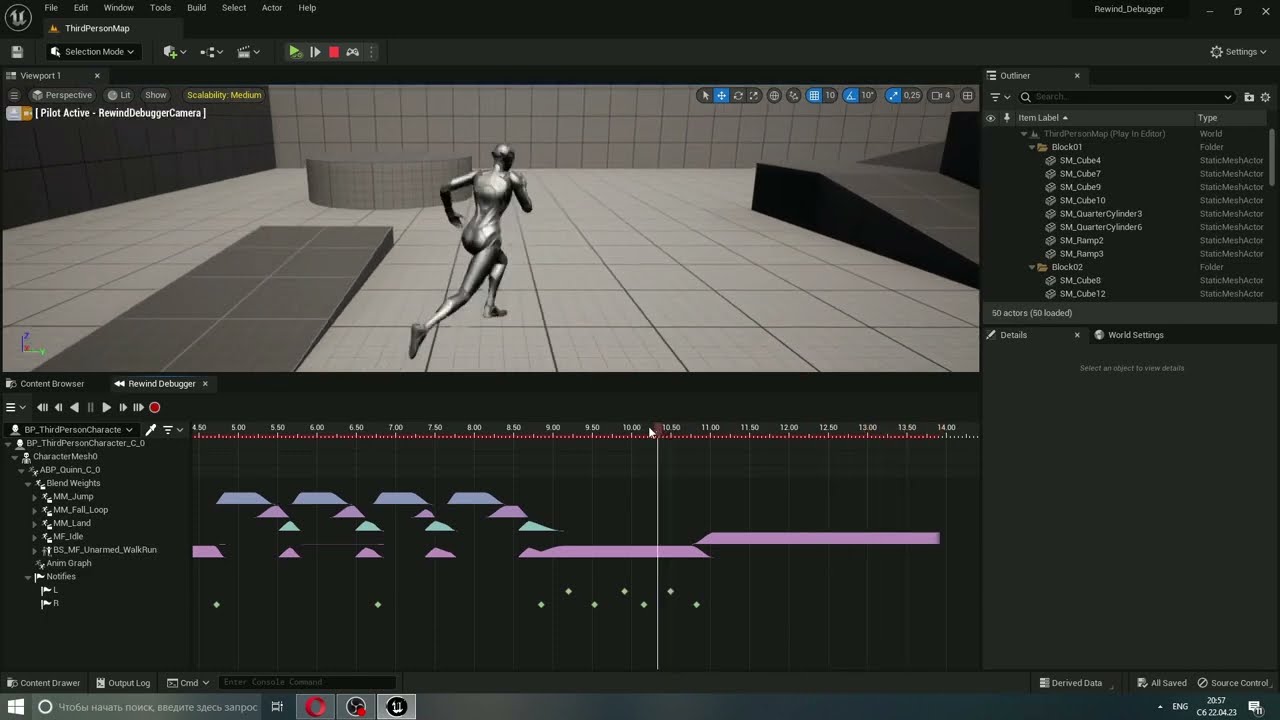
Good day!
This short but very useful video shows how to use the debugger to work with animations. This useful feature is activated after installing the Animation Insights plugin.
With this debugger you can track playback, blend functions and much more.
More details here:
https://docs.unrealengine.com/5.0/en-US/animation-rewind-debugger-in-unrea...
near condor
Finally in 5.6, excited to play with the State Tree additions
 dusk kelp
Yo guys
Is there a good way how to remove navmesh under WaterBodyRiver and Lake?
 nimble smelt
Is there something more I need to do when killing an AI pawn? I'm noticing this thing still gets a BUNCH of movement ticks from its controller after it dies, but how is that possible if i've detached it?

 misty wharf
nimble smelt
Is there something more I need to do when killing an AI pawn? I'm noticing this ...
misty wharf
nimble smelt
Is there something more I need to do when killing an AI pawn? I'm noticing this ...
I've never heard of that function. You should probably use Unpossess or whatever it was called
Or possibly just destroy the controller if it isn't going to be used for anything
near condor
hohohoho, the Make State Tree Reference node fleshed out is so nice
Man, that will save a lot of time
slow bobcat
near condor
hohohoho, the Make State Tree Reference node fleshed out is so nice
What's that?
final prism
Finally coming back to this - Is it then possible to generate an event on transition or how would that work? Im just trying to setup a state that can only be selected via a very specific transition from another state, but should never be entered via the normal selection behaviour
 cosmic tendon
Does anyone have a good way to calculate the velocity needed to clear a jump from a navlink such that the entire pawn's body makes it through? I'm using SuggestProjectileVelocity, but some of my larger AI agents end up either hitting the ledge when dropping down or hitting hitting the side when jumping up. I have the radius and height settings configured correctly for the navigation, I think it's just the velocity calculation being off or not being high enough. I set bFavorHighArc to true so not much more I can do to get a higher arc I think


 prime terrace
Hope this is the right channel, I wanted to create a UStateTreeTaskBlueprintBase in C++ to put some functions in instead of writing them in BP. I've put "StateTreeModule" in my Public Dependencies in the Build.cs, and done #include "Blueprint/StateTreeTaskBlueprintBase.h" as the C++ documentation says, but it seems that it isn't recognized. Am I missing something, or is this not allowed for some reason?
slow bobcat
final prism
Finally coming back to this - Is it then possible to generate an event on transi...
I think you are a bit confused on how this works, but close.
Here's how I do what you want
RED: in the root state I have a transition that is triggered when an Event with a specific tag and a specific payload happens. The transition pushes the tree to the Bottom State (RunReaction_WithInternalData)
GREEN: you can add a condition to your transition and use the payload to evaluate it.
BLUE: the state to transition to if the tag event is correct, the payload is what is needed and the condition (which checks the payload) passes

GREEN: That state has a Required Event To Enter condition. This is mandatory to achieve what you want. This means this state will never enter unless the transition that moves the tree into this state is triggered by an event with that tag and payload.
BLUE: you can use the payload of the event in your state tasks

The result:
- you are in some state in the tree
- you send an event with your tag and payload.
- The next tick the event will be processed because Root always runs. It will check the conditions and trigger the transition
- It will try to run the state and, to do that, it will check the transition was triggered by the event needed by the state.
This is exactly what you want
slow bobcat
prime terrace
Hope this is the right channel, I wanted to create a UStateTreeTaskBlueprintBase...
try addind these two
"StateTreeModule",```

you already have the right one but just in case

That said, it's a bad idea to create a BP base in code. If you do tasks in code for your AI, you have to inherit from `FStateTreeAIActionTaskBase` (StateTreeAITask.h).
If it's not for AI, use `FStateTreeTaskBase`
Then you will be able to use the InstancedData in your tasks for all your runtime-mutable values.

```// Base class of all AI task that expect to be run on an AIController or derived class
USTRUCT(meta= (Hidden, Category = "AI"))
struct FStateTreeAITaskBase : public FStateTreeTaskBase
{
    GENERATED_BODY()
};

// Base class of all AI task that do a physical action
USTRUCT(meta = (Hidden, Category="AI|Action"))
struct FStateTreeAIActionTaskBase : public FStateTreeAITaskBase
{
    GENERATED_BODY()
};```
in case you need more info about it
#gameplay-ai message
final prism
slow bobcat
I think you are a bit confused on how this works, but close.
Here's how I do wh...
Thanks for the info this is super interesting.
So yeah this actually looks like what I was doing, just the transition you have on the root is on the reaction state. It's weird that my task doesn't properly bind even though it's setup the same
final prism
Whats the purpose of the "none" selection type on a state tree state? It doesnt allow transitions to it either, so it seems completely useless?
prime terrace
slow bobcat
try addind these two
```"GameplayStateTreeModule",
"StateTreeModule",```
you al...
Thank you!
misty wharf
final prism
Whats the purpose of the "none" selection type on a state tree state? It doesnt ...
I've wondered the same. Maybe for being able to temporarily disable states? Not sure
near condor
slow bobcat
What's that?
 slow bobcat
near condor
slow bobcat
near condor
ah I see. Is taht from a talk somewhere or your own documentation?
near condor
My own documentation
I would love a plugin in Obsidian for note taking that has the nodes from Unreal though...
misty wharf
near condor
I would love a plugin in Obsidian for note taking that has the nodes from Unreal...
How'd that work?
near condor
misty wharf
How'd that work?
In my fantasy? It would have vector images of the nodes haha.
misty wharf
Ah I see :D
near condor
I feel like you could automate that, but my brain doesn't feel like trying to figure that out as it would be a full project all its own
misty wharf
What would be the purpose of having images of them in Obsidian?
near condor
Documenting the nodes, maybe a button that lets you copy and paste them into Unreal. Share them easily between projects. Give docs to others without having to download the project. Etc
misty wharf
Right
I think you could in theory integrate BlueprintUE into Obsidian since it's basically just a web view
near condor
I know a couple of sites that support the copy paste feature. But as I type this all out it's like "wow this would be a pain in the ass to support"
I will look into that.
Thank you 😄
misty wharf
Not sure how complicated that's gonna be. I would compare it in concept to the Obsidian Excalidraw plugin
Excalidraw is also a webapp and the Obsidian plugin essentially just embeds it into Obsidian with a few additional niceties
slow bobcat
does the Instanced data of tree do not get properly clean in Unreal?
I'm storing the time stamp of something I do and I noticed it's failing the second time I play.
I printed it and...
- previous check -> 48s into the game
- current time stamp -> 8.69 (nice) seconds into the game.
Which means the Instanced memory of the condition didn't clean in between PIE sesions (not closing the editor)
Is this even possible?


the variable is not even a UPROPERTY that could get serialized into anything
near condor
I think the "Support" bit of creations is what prevents me from releasing them ever.
Like two years ago-ish, I wrote an app that automates creating sprite sheets and normal maps for them, similar to Donkey Kong Country (Blender 3D model->Load Model and animations you want exported->export renders at every angle specified->Auto create spritesheets with them based on angle via aesprite interface->again via aesprite interface, generate json data files for them->User can then import into Unreal and have them auto load in as flipbooks).
But no way in hell I would release it. I do not want to support it for free, I feel it would eat up my time.
misty wharf
near condor
Thank you 😄
But yeah was just curious because I have a small Obsidian<->UE integration plugin. It basically adds two buttons to the toolbar. One button opens an Obsidian file for the currently open asset, the other opens the asset's parent class' file in Obsidian. The buttons also change color based on whether those files already exist, so you can tell if there's documentation for something you're editing
near condor
misty wharf
Excalidraw is also a webapp and the Obsidian plugin essentially just embeds it i...
I love excalidraw. I was advised to watch GDCs on AI in this channel a few weeks ago, and I took tons of notes via excalidraw.
misty wharf
Yeah Excalidraw is nice. The Obsidian plugin for it is quite well done, you can have links and embeds etc.
near condor
misty wharf
But yeah was just curious because I have a small Obsidian<->UE integration plugi...
Oh man that actually sounds like a superb alternative and far easier to maintain. I have always wanted UE to integrate some sort of "Open this to view notes about this file" button.
misty wharf
The author, Zsolt, also has a bunch of PKM related stuff on YouTube which are an interesting watch
near condor
That old dude?
well
Older
He was very well spoken and it was sweet seeing how passionate he was about it when showing what it can do in his videos
near condor
misty wharf
The author, Zsolt, also has a bunch of PKM related stuff on YouTube which are an...
I will have to watch these. Just from the excalidraw intro video he has, clearly knows how to sort information. Where was he when I was in school 11 years ago
OH
uh
@misty wharf can I dm, since it is out of scope at this point of this channel
misty wharf
Sure
slow bobcat
slow bobcat
does the Instanced data of tree do not get properly clean in Unreal?
I'm storing...
@chilly nebula am I missing anything incredibly obvious here? I have no idea how is this even possible
 chilly nebula
slow bobcat
<@187650553168265216> am I missing anything incredibly obvious here? I have no i...
chilly nebula
slow bobcat
<@187650553168265216> am I missing anything incredibly obvious here? I have no i...
Instanced data in conditions specifically has some weirdness around it yeah, and there are different levels of instanced data buckets used in the tree. From what I remember the condition is run before the state is instantiated, and its possible its using a different instanced data bucket there.. I would have to check, but I do remember this coming up in the past.
ie when a state is selected/acativated it gets its own instanced data that is cleared when the state is exited
I would recommend looking into the types of instanced data and the difference between whats in an active state vs the shared instanced data.
Sorry I dont have a super clear answer, but thats where I would investigate 🙂
slow bobcat
chilly nebula
Instanced data in conditions specifically has some weirdness around it yeah, and...
Ah I see. OK I can investigate this on Monday. Is there any thing I could do to force cleaning up Instanced data when the game stops PIE?
The part that breaks my brain is that this happens in between PIE session (play, stop, play). That means some data is serialised somewhere no?
 silent cove
So I'm looking at using navigation invokers for a procedurally generated and dynamically streamed in level for a variety of reasons. Something we were doing previously was using a FPathFindingQuery to decide if a location was pathable for our AI from their current location, but seems like that's no longer an option if we swap Generate Navigation Only Around Navigation Invokers to true. Anyone have any thoughts on how I could potentially maintain functionality at least similar to this? I imagine the answer is no given my understanding of nav invokers & that project setting, but figured I'd ask.
chilly nebula
slow bobcat
The part that breaks my brain is that this happens in between PIE session (play...
that doesnt sound right at all, it should all be scoped to at least the tree instance
chilly nebula
slow bobcat
The part that breaks my brain is that this happens in between PIE session (play...
If you can make me a repro here that would be super useful
slow bobcat
chilly nebula
If you can make me a repro here that would be super useful
That's going to be super complicated I'm afraid, but I can try.
Ummm I think I have a clue of what could be happening.
I have a data asset with hard references (to be changed) yo state trees. I fill up an array with said st's and I tick them. I wonder if the St instances are alive and that's why all this happens....
Where in the tree instance is all this stored?
chilly nebula
slow bobcat
That's going to be super complicated I'm afraid, but I can try.
Ummm I think I h...
that might do it, and that could keep the state object alive. Please use weak ptrs if you can
chilly nebula
slow bobcat
Where in the tree instance is all this stored?
Iirc the conditions are stored in the shared instanced data, but I cant verify that for you right now
slow bobcat
chilly nebula
that might do it, and that could keep the state object alive. Please use weak p...
Yeah, this was a leftover from some test that ended up being the actual system. It should be soft obj pointers loaded async into weak pointers own by the component.
slow bobcat
chilly nebula
Iirc the conditions are stored in the shared instanced data, but I cant verify t...
Thanks a lot. Please don't waste time checking. I will do on Monday. Thanks a lot for the time Siggi. Super appreciated
 harsh storm
No no no Bruno. Let Siggi cook.
slow bobcat
harsh storm
No no no Bruno. Let Siggi cook.
Can't have the Michellin Star Chef warming up hotdogs in the microwave dude... He needs to create great gourmet stuff
harsh storm
But its a sweet microwave.
 meager raft
Can anyone help me figure out why I needed to add a delay in wander to point to make my enemy move? In this project it required it to work but I implemented the same thing in a separate project and it didn't need it. Same state tasks too. I am calling find wander point in BP, and setting random location there. Then doing movement in cpp. Using theexact same code and bp, but for one project it doesnt work and for another it does... just curious if anyone has any ideas!! been trying to think about why
 slow bobcat
meager raft
Can anyone help me figure out why I needed to add a delay in wander to point to ...
slow bobcat
meager raft
Can anyone help me figure out why I needed to add a delay in wander to point to ...
What happens if you don't add the delay?
Does it move to a rnd location?
Also, your transition from getting the location is always happening. Maybe set it to "on success" and "on failure", see if that's failing somehow?
Just brain storming here
meager raft
slow bobcat
What happens if you don't add the delay?
so if i dont add the delay, it will wander to the values I randomly put in. Originally I had it all at 0,0,0 but noticed the enemy just kept going to origin. So instead of getting a new random point it will fail over and over and then return that (1000, 500, 0) as the point to go towards. Therefore, itll stay idle since it never wanders to a new point. For some reason the delay fixes it

Im just stumped how the same setup can work in one project but not the other
and its such simple logic too... so weird
misty wharf
the way the actors get spawned and how your navigation is set up could affect it
for example if it's a runtime generated navmesh, it's possible they might end up getting a point before the navmesh is ready, or some other circumstance like that
hard to say what the specific issue here is - your best bet would probably be to use the Visual Logger to find out more about why it's failing. It should log info both about the state tree and navigation
meager raft
hmmm interesting. From the logging I did it seems like it just never finds a new random point -- so maybe it is connected to the navmesh. maybe the delay just gives it time to do it.
 gaunt ivy
I have a variable that determines what method an AI uses to select its next target (technically an enum but practically speaking it's effectively a bool for whether I use random or iterative). I've tried storing it on the AI controller with the EditAnywhere uproperty. I'd like to be able to update this per AI instance, but can't seem to find where the AI controller instance actually exists in world.
Am I missing something? am I fundamentally misunderstanding Model-view-controller and should instead put it on the character class?
misty wharf
gaunt ivy
I have a variable that determines what method an AI uses to select its next targ...
If you mean you wish to place your AI characters into the level, and edit their controller settings - you can't. Controllers only exist at runtime.
And yeah one solution would be to put the value on the character instead, as that would allow editing it. Another could be using some kind of spawner actor solution - eg. you put your controller configs into a struct, and allow it to be configured on the spawner which then spawns the actual character and its controller
harsh storm
Also, the pawn/controller stuff isn't MVC.
gaunt ivy
misty wharf
If you mean you wish to place your AI characters into the level, and edit their ...
hmm ok, so what does that mean in terms of how to assign values that dictate the AI's controller logic? I would've thought that AI behavior logic should go on the controller rather than character (which is supposed to be reserved for more physical behaviors such as movement).
harsh storm
The separation is however you want it actually.
gaunt ivy
I guess maybe not full MVC, but similar conceit wrt how the logic/info is organized
harsh storm
There isn't really a "right" way per se'
gaunt ivy
sure but aren't there conventions?
harsh storm
Game dictates.
harsh storm
gaunt ivy
I guess maybe not full MVC, but similar conceit wrt how the logic/info is organi...
The only similarity between MVC and pawn/controller is that both have the word controller.
gaunt ivy
gotcha ok lol
misty wharf
gaunt ivy
hmm ok, so what does that mean in terms of how to assign values that dictate the...
The most straightforward way to do it is to put the configuration on the character but the logic into the AI controller, which can read the configurations from its character and go based on that
harsh storm
That's typically how I do it.
gaunt ivy
misty wharf
The most straightforward way to do it is to put the configuration on the charact...
this clear it up perfectly, thank you.
meager raft
OK. I have another big problem. I am now finishing configuring my sound AI hearing config. I am properly reporting that I am making noise and I created my evaluator and my state task. However in my AI controller I am wondering if what I am doing is invalid. So first I am sensing sight which is working well, but i dont know how to connect the pins to sound correctly so it gets called


This is my Ai controller ^
my state tree evaluator for hearing

then my state tree and how I am handling my notify event


I know its a long shot but just thought Id ask!
slow bobcat
meager raft
OK. I have another big problem. I am now finishing configuring my sound AI heari...
I'm confused by the quesiton. What is it you don't know how to connect?
meager raft
slow bobcat
I'm confused by the quesiton. What is it you don't know how to connect?
i figured it out I didnt know how to sequence it so that I could use one target perception updated but call two AI senses
I just made custom events and broke down logic that way instead of making it one big mess
near condor
With the 5.6 update, I am noticing a State in my State tree that has no considerations, no tasks, and is only for allowing the tree to select states below it based on highest utility score, is throwing an error when enabled in the logs:
LogStateTree: Error: Trying to GetMutablePtrToProperty while node is not active.
Anyone else run into something similar? I would not expect this if it is not accessing anything since it doesn't have references tied to it, nor tasks/conditions/params/transitions
near condor
I feel like this one is harder than other errors to track down since it doesn't tell me which state/task is triggering it. The Debugger is not aiding either.
slow bobcat
Do you compile the editor?
You could always add a breakpoint where that log is in code. If you surround the function with UE_DISABLE_OPTIMIZATION
function with log
{}
UE_ENABLE_OPTIMIZATION
And re compile, you will ensure you can read the values upon break
near condor
slow bobcat
Do you compile the editor?
I do not, this is from the launcher
slow bobcat
Maybe downloading the debug symbols for it and using rider you can attach and debug what's going on
Some things will be optimized out but maybe....
slow bobcat
near condor
I feel like this one is harder than other errors to track down since it doesn't ...
Debugger but the rest of the log or Visual Logger maybe?
near condor
Visual logger I will take a peak at next, as well as the tip about UE_ENABLE_OPTIMIZATION, I actually was not taught that before, so thank you tons.
The rest of the logs do not show anything else at all, which is super odd. And if I disable all other states and leave this fairly blank state up, it still throws the error.
Oh....? If I switch the state from:
Selection Behavior: Try Select Children With Highest Utility
to
Selection Behavior: Try Select Children In Order
The error goes away.
Though, this does mean the children states flag warnings that while they have Considerations applied to them, they will have no impact because the parent is set to Try Select Children In Order.
Hopefully this helps @slow bobcat

(I love snaggit so much)
I found it
In the consideration, which was working before this I am pretty sure.

I narrowed it down through brute force haha
so the child consideration is being executed (even if the children are disabled, something to note).
and during that it is outputing this error when it gets to the node Get Propert Reference:
LogBlueprintUserMessages: [STConsid_IG_TargetSense_Gen_01_C_22] WARNING: Conditional operating PRE Get Property Reference
RESULT WAS SUCCEEDED
LogStateTree: Error: Trying to GetMutablePtrToProperty while node is not active.
LogBlueprintUserMessages: [STConsid_IG_TargetSense_Gen_01_C_22] WARNING: Conditional operating POST Get Property Reference
RESULT WAS FAILED
The UE_Disable.... Macro is only if you can recompile the source code.
slow bobcat
near condor
and during that it is outputing this error when it gets to the node Get Propert ...
No idea mate sorry
near condor
Ahhh... Yeah only an older build has that and that was pre state trees.
I have figured out a work around. I wonder if the error is literal
The consideration is in the child states technically, but when doing them to figure out which one to enter, the tree still has the Parent state active
therefore, it errors because the child states with the considerations aren't active.
I fixed it! I realized I was passing in the Context core via a get property ref, and I don't know why. And while that may have worked in UE 5.5.4, clearly it errors now, so I just passed in the core anyways since Considerations shouldn't be setting variables.
 lean crater
Hello there. I have a NPC running a simple BT wich uses MoveTo-Task to walk to the player. What I dislike is the rotation speed to the direction the NPC is moving to. It is an instant rotation. But what I would like to see is some kind of "TurnCircle"-Movement.
Is there a way to make it more smooth? Rotation over time or something? What is the best practice here?
harsh storm
You control the rotation speed by a property on the CMC (or maybe the Character itself), rotation rate or something like that
lean crater
I'vd tried it with a turnrate of 1° for testing purpose but the NPC still rotates instantly to the target
Edit: I made it work by enabling the "RotateTowardsMoveDirection".
Thank you
 deft palm
Hi, guys do you know where to talk about unreal's neural network plugin?
 bleak drift
Are state tree tasks executed parallel or serial?
If I have a task that will calculate the target location and then the move to task.
I can't seem to get this to work :/
misty wharf
"parallel" but in reality they do get executed in order
but if you have a latent result from task A then task B will execute before A will finish
bleak drift
It does not work for me 😦
 bleak drift
misty wharf
but if you have a latent result from task A then task B will execute before A wi...
bleak drift
misty wharf
but if you have a latent result from task A then task B will execute before A wi...
Yea so i tried to have it on a parent state, did not change, do tasks of parent states have to finish for the child to be executed?
I even tried it with tick but it didn't work
Also does a task has to finish?
or is it just one task of a state finishes and the state counts as succeeded?
misty wharf
Prior to 5.6 if any task finishes the state will finish
5.6 allows you to configure the state finish behavior
bleak drift
Ok thats cool
misty wharf
So prior to 5.6, if you have a task which fetches data, you don't necessarily want it to actually finish, and just leave it in the running state
bleak drift
misty wharf
So prior to 5.6, if you have a task which fetches data, you don't necessarily wa...
But in my case, this won't work, since move to and the target range run paralell and move to will just take the initial value right?
misty wharf
Assuming the first task will immediately return a value, and doesn't finish, then the second task should be able to get the value from the first one iirc
but if the first one is asynchronous, then the second one would need to somehow wait for it to produce a value
bleak drift
misty wharf
but if the first one is asynchronous, then the second one would need to somehow ...
Hmm you are right, not sure why it didn't work probably the state tree not compiling or somthing
thank you a lot! 🙂
misty wharf
👍
bleak drift
Also may I ask one more thing, having a ticking task on a parent state, appears to have really weird results.
Should it be possible, for example to have a task that will check in tick if the targeted range has changed and then send a event to the state tree?
or will a ticking task just cause issues there
misty wharf
I've never tried it but at least to me it seems like that should work as long as the task isn't finishing at any point
slow bobcat
bleak drift
Also may I ask one more thing, having a ticking task on a parent state, appears ...
Sounds like what a global task would do
misty wharf
Yeah was thinking the same, but maybe you only want this action to occur while in a particular branch of the tree so you wouldn't want it to be global
bleak drift
Yea I was thinking of a global task, I even tried it but the issue was, that I have a global task, that will set the target actor, and (maybe I'm wrong here) the target attribute for the global task was never updated? (Are variable bindings just set once and then not anymore?)
Also it just relevant in the attack branch and it might be a bit more perfromant that way.
Also there is no way to set a parameter from a task right? binding is just downwards never upwards?
misty wharf
StateTreePropertyRef might be one that can do it but I've not yet gotten around to trying them so can't say for sure
near condor
Version: UE 5.6
In a state I have, Task A is first in the list, followed by Task B.
I can see that Task A fires off the broadcast, and Task B fires off the Delegate Binding.
The Problem: It seems as though Task B never receives the Broadcast, and I am unsure why it wouldn't. I have code accounting for the possibility that it was somehow broadcasted before bound (that is what you can see in Task B that has a node-line going out of the node Bind Delegate), but that code also is not seeing that it was called already.
Am I doing State Tree Task Delegates incorrectly?

 steep pewter
So, I want the enemy ai to follow me whenever I touched the green area of the map. How do I execute this method?
and then stop following me when I'm out of the greeb box
misty wharf
One way to do it would be to try having the AI find a path to the player. If it has a valid path, it should mean you're within the navmesh.
...also that certainly is a 3D model lol
steep pewter
haha thanks
 brave minnow
steep pewter
brave minnow
steep pewter

 stable plover
I have an issue that im facing, i have deer ai that run from the player, here is my query this works fine but i have an issue with confining them in a certain radius from the spawner location that they were spawned from, i thought i could create a custom eqs test but my project is in bps, I want to basically change a radius and have eqs keep the deer in that radius, i dont want to hard code anything. if anyone can help that would be nice thanks

I thought by iterating and sorting would work and it may but thats a lot of performance right there

I was thinking on shell sort but i would have to sort on first on if they are in the radius then the score
so thats two for loops
i mean im probably going to have to make a custom collision shape and channel, its the only thing that makes sense for bps
if it was c++ that would be easy just make a custom task
near condor
near condor
Version: UE 5.6
In a state I have, Task A is first in the list, followed by Task...
I fixed this, I needed to create a small enough of a delay... But that means that I need to create some "rescue" method just in case the cancellation/interruption of the state is not covered.
slow bobcat
stable plover
I have an issue that im facing, i have deer ai that run from the player, here is...
the problem here is that you are mixing contexts.
You want the center of your simple grid to be the spawner while the dot product, trace and path is related to the Deer.
should be fine if the tests allow a different context than the Generator
stable plover
slow bobcat
the problem here is that you are mixing contexts.
You want the center of your s...
no the issue is that I want dynamic radius calculation, i should just be able to put in a number and thats the max distance they can travel, but the distance task is hardcoded, I have a config component for a spawner and I want to use its max distance
i wanted to bind to this float value max

and use the spawners max allowed distance
slow bobcat
Aaaah. You mean that. I have used test values as parameters where you set a string to identify it in the test and then you pass the value through the EQSWrapper using said string.
They can only be float, integer and boolean
If you expand "advanced" isn't it there? I don't remember how you set it up right now, I can look into it in our project tomorrow
I mean this

I guess in that test they don't use that type but a simple float
harsh storm
Oh yeah - I can see Bruno's API now. EQS_FindGrenadierAttackPosition, stealing!
steep pewter
Made some great progress but how do I re-activate my enemy's to move again when I come back in the green areas?
 pastel moth
Is there a way to change weights on the fly for a utility AI?
I see there is weight in the selection utility part of the editor. The only thing I don't see is a way to make that a variable to access it? Is there something I'm missing?
slow bobcat
steep pewter
Made some great progress but how do I re-activate my enemy's to move again when ...
You will need to check periodically. You could have a timer checking every 1 seconds if the character is on the nav
If you use Bt's, you can do that in a service
Of you use St's, you can do that in a global task controlling the time in tick
final prism
Does anyone have any ideas how I would implement a state in a state tree that follows these rules:
- Should not participate in the usual selection process (try select children should never select this state)
- Can be transitioned to if a transition points to it
It feels like there should be a selection behaviour that works like this, but I dont think that exists
ANd I dont think selection behaviours are extendable, since its an engine enum
Or an enter condition that succeeds only if its coming from a transition, though I don't think that's possible either, since a condition could be used as a transition or an enter condition, so that information wouldn't exist at that level
misty wharf
final prism
Does anyone have any ideas how I would implement a state in a state tree that fo...
This used to work with a None selection behavior but as of 5.5 it no longer works
I think I mentioned this to Siggi and it was the usual case of "oh we didn't think anyone was using it like that" or something to that effect :D
 proper elk
is there much practical value in learning how to write your own pathfinding algorithm? asking from the perspective of curriculum design. it's traditional in an AI course to teach A*, etc. on the one hand, there's an argument that it's valuable to know how to do this, just like we teach how to implement other fundamental data structures and algorithms. the counter argument is that time is better spent on getting more depth in something else with more real-world relevance..?
misty wharf
Interesting question... I suppose it depends on the length and depth of the curriculum
I think there is value in having at least a rudimentary understanding of how pathfinding algorithms work, but if you have a limited amount of time and/or it doesn't matter so much for the overall goals, then there could be a reason to teach something else instead
final prism
misty wharf
This used to work with a None selection behavior but as of 5.5 it no longer work...
sadge
final prism
proper elk
is there much practical value in learning how to write your own pathfinding algo...
I think djikstra is usually part of algodat curriculums and I think that's a good one to know. A* is game specific and is really just adding a heuristic, so I wouldn't say it needs to be taught
proper elk
final prism
I think djikstra is usually part of algodat curriculums and I think that's a goo...
thanks!
near condor
Wrote out a GAS related subsystem for the state trees to communicate with to know when an ability is done being used
So far seems good, but I am sure it will break at some point, didn't do super thorough testing yet
stable plover
slow bobcat
Yea I am aware of that but unfortunately I am only using state trees, c++ and behavior trees are the only way according to my knowledge to access it dynamically
slow bobcat
stable plover
Yea I am aware of that but unfortunately I am only using state trees, c++ and be...
Then custom test made in Bp's using a variable feed through data
 delicate rain
I am having a problem where when I move to a different position while the ai is approaching me, it continues approaching but slows down the closer it gets to me. It's approaching via the Move to Player task in a State Tree

 silent hamlet
delicate rain
I am having a problem where when I move to a different position while the ai is ...
silent hamlet
delicate rain
I am having a problem where when I move to a different position while the ai is ...
Are you using rvo or detour controller maybe?
slow bobcat
delicate rain
I am having a problem where when I move to a different position while the ai is ...
You are probably using acceleration in paths. Check the settings in your character movement component

 misty gale
final prism
I think djikstra is usually part of algodat curriculums and I think that's a goo...
misty gale
final prism
I think djikstra is usually part of algodat curriculums and I think that's a goo...
Guess one could argue that learning how to add heuristics is valuable, even if A*'s specific implementation isn't very relevant
final prism
misty gale
Guess one could argue that learning how to add heuristics is valuable, even if ...
That's true too, plus if you can have students writing actual pathfinding simulations with a*, that could be fun
 elfin smelt
Hello, I have started to learn state tree in my spare time.
Have I an issue with understanding input/ouput params
exemple: I have a state Defend that as Two child state FindBuildings and LoadBuildings
in the first the task has an array of building with output category
and in the second I want the array in input.
But I found out that I can't take input from output variables from another siblings state.
How I can manage that ? what is the rules for what you can pin as Input params ? I have only done with Context, Parameters or value from GlobalTasks for now
I just think of that it need to be in the parent state maybe ? like you can take output params only from task of parents states maybe ?
(I don't have access to the project now, will need to wait to test)
slow bobcat
UPDATE: works if called in UnPosses.
I have noticed that, when I stop PIE, the trees Stop Logic fails to execute this part (image) fue to the state tree views not being valid.
Is that expected?
Doesn't it imply that the trees are never cleaned up?

also... does anybody what are these for?
 near condor
slow bobcat
also... does anybody what are these for?
near condor
slow bobcat
also... does anybody what are these for?
The meta config?
slow bobcat
near condor
The meta config?
yeah. Not sure I get what the schema override or the path definitions are for in the meta
near condor
I usually use those to set the defaults
so I would assume that is what they are being used for in this case
stable plover
slow bobcat
Then custom test made in Bp's using a variable feed through data
I cant create custom tests in bps though to my knowedge its only custom generators right?
slow bobcat
stable plover
I cant create custom tests in bps though to my knowedge its only custom generato...
Really? I'm not at my pc so I can't check the code or base classes for it
delicate rain
slow bobcat
You are probably using acceleration in paths. Check the settings in your charact...
Unfortunately not, it's unticked :/
delicate rain
silent hamlet
Are you using rvo or detour controller maybe?
I am new to AI, what are rvo and a detour controller?
steep pewter
I tried giving it a bridge using nav link proxy but it just go haywire for some reasons
steep pewter
how do I solve this issue?
slow bobcat
steep pewter
It's quite difficult to know what happens without any debug.
I suggest you use visual logger and print the forward at the character location. That way you can see that with some perspective.
I'm also very confused with who's the player and who's the AI here (or what the topic of the game is... A bit disturbing judging by the video)
slow bobcat
delicate rain
Unfortunately not, it's unticked :/
Are there any other acceleratiin values in your CMC or anything you set in the movement task?
delicate rain
slow bobcat
Are there any other acceleratiin values in your CMC or anything you set in the m...
Nothing I am aware of
slow bobcat
chilly nebula
If you can make me a repro here that would be super useful
found an easy repro in 5.5.4 vanilla (fresh download from Git). Ended up opening a UDN thread about it.
Basically the Shared Instance Data never resets in between PIE sessions. If you have a condition using its own Instanced Data (struct based, nothing "weird" this time), the data written into the Instanced data values persists in between PIE sessions.
misty wharf
slow bobcat
found an easy repro in 5.5.4 vanilla (fresh download from Git). Ended up opening...
This sounds a lot like a bug I fixed at work pretty recently lol, we make a wysiwyg editor type a dealio as well. Maybe the functional programmers with their lack of state are onto something
slow bobcat
misty wharf
This sounds a lot like a bug I fixed at work pretty recently lol, we make a wysi...
happy to pass you the udn thread if you are curious. It's quite easy to repro.
Add that condition to your project, add the condition to a state.
Play in Editor until the condition fails.
Stop the game. Play again and see how the condition fails on the first time it runs because it still has the values from the previous run
misty wharf
Thanks but don't have UDN access :) Good to know how this happens though, I think I have one or two custom conditions that could be problematic in some cases like this 🤔
near condor
Please ignore the tag formatting and default values, but I am really happy with this system I created.
A problem I had to design a solution for was when the enemy has several abilities, some of which are not combat orientated, how can the AI decide which one to use in a State Tree (or behavior tree, haven't tested, but easy to assume it works).
I already had default Character Class Info set up for the project so AI and players spawn with default abilities based on what "Character Class" they were configured to. So I extended what parameters are available in that and created a component that characters spawn with, and gets configured after abilities have been initially granted. The Component then can be used in C++ or in Blueprint to do several functions, the primary function being a simple way for the AI to figure out what ability should be queued to be used next based on factors.
The screenshot shows all the factors that can have weighting configured for it, as well as min/max settings for the values.
(Be somewhat gentle with me if what I created is technically already a thing and I just created overengineered hot garbage)

Adding a screenshot of the node that is used to Select an ability to use.
 slow bobcat
near condor
Please ignore the tag formatting and default values, but I am really happy with ...
slow bobcat
near condor
Please ignore the tag formatting and default values, but I am really happy with ...
Welcome to the data driven approach!
Powerful ain't it? Good job mate. That's how games are properly done when you have lots of variety and need fast iteration times
near condor
Oh most of what I do is data driven, anytime I have come here with questions, I usually have broken it down to really simple stuff because I don't want people helping me to feel like they are frustratingly read my mind haha
But thank you, data driven is 10/10, my day job uses a lot of it for automation through middleware and utilies (WebSphere, Ansible, etc)
steep pewter
slow bobcat
It's quite difficult to know what happens without any debug.
I suggest you use v...
The player is the goat lady, the enemu ai is the default manniquine
there is no visual logger in 5.4
slow bobcat
steep pewter
The player is the goat lady, the enemu ai is the default manniquine
But how does the gsme play? The player sees the POV of the AI like in the video?
steep pewter
elfin smelt
Tools -> Debug -> Visual Logger
ah thanks
steep pewter
slow bobcat
But how does the gsme play? The player sees the POV of the AI like in the video?
it's a 2nd person camera where you control a 3rd person template
it's that easy to understand

so what does it do?
 slow bobcat
steep pewter
it's a 2nd person camera where you control a 3rd person template
slow bobcat
steep pewter
it's a 2nd person camera where you control a 3rd person template
Opph very interesting. I don't think I ever played a game like that
slow bobcat
steep pewter
so what does it do?
No better way to explain it in depth
https://m.youtube.com/watch?v=hWpbco3F4L4

The Visual Logger, built into the Unreal Editor, is an incredibly useful tool for recording, visualising and tracking objects, locations and data in gameplay, but it’s rarely used outside of AI. Let’s change that!
In this talk by Rare's Principal Gameplay Engineer Andy Bastable, you'll discover practical tips and examples from Sea of Thiev...
steep pewter
so what do I do to fix the ai?
slow bobcat
steep pewter
so what do I do to fix the ai?
- first identify what's wrong. For that end, you need to start debugging. I suggest visual logger because it helps a lot
- my suggestion is that you add debug to print the forward in a custom category, add some debug about the movement, the focus and so on. Then you can analyse (and show us maybe) what you see/get.
My guess is that you are focusing to something related to navmesh and, since there's none while passing through the nav link, issues happen
steep pewter
but I want the character to move when I go to another green area
like have a moment where the enemy stopped chasing them and give the player a break
slow bobcat
Ah I though the issue was the jittering on the movement/camera
steep pewter
nope, its just it wouldn't follow the character or leave the green area when the player is on another navmesh green area

get the idea?
slow bobcat
steep pewter
like have a moment where the enemy stopped chasing them and give the player a br...
Ah I see. My suggestion is that you look for the nearest point in nav when the Player goes out of nav. Which implies checking periodically whether it is on nav or not. If it's not, look for the nearest point until it is.
 slow bobcat
The issue then will be that you will stop a movement request to an actor and start one to a point (and the other way around when the player gets back on nav). That will cause some start/stop. One alternative would be to, instead of moving towards the player actor, move towards an invisible actor that matches location (on tick for example). Qhe the player goes off nav, you can move said actor to the calculated point each time until the player is back on nav. That will make things less jittery
slow bobcat
steep pewter
nearest point?
You can get the closest point on nav using a radius. There's a funtio funtio for it
steep pewter
slow bobcat
You can get the closest point on nav using a radius. There's a funtio funtio for...
where do I find it in the details?

this one?
slow bobcat
Google mostly
Quick search will give you several results about it
Like this one (first one offered)
https://m.youtube.com/watch?v=L1zEGNTioO8

After discovering that there's no built-in method to find the nearest point on a navmesh to the actor's location, I came up with my own system to handle this and wanted to share it with everyone else who was asking how to do this.
steep pewter
ok thanks
cosmic tendon
Is there a way to get a delegate or something once the max age for a sense is up and know which sense it is? I'm doing this right now:
void OnTargetPerceptionUpdated(AActor* Actor, FAIStimulus Stimulus)
{
    if (Stimulus.WasSuccessfullySensed())
    {
        if (Stimulus.Type == UAISense::GetSenseID<UAISense_Sight>())
        {
            OnSeePawn(Cast<APawn>(Actor));
        }
        else if (Stimulus.Type == UAISense::GetSenseID<UAISense_Hearing>())
        {
            OnHearPawn(Cast<APawn>(Actor), Stimulus.StimulusLocation, Stimulus.Strength);
        }
    }
    else
    {
        if (Stimulus.Type == UAISense::GetSenseID<UAISense_Sight>())
        {
            OnLostPawnSight(Cast<APawn>(Actor));
        }
        else if (Stimulus.Type == UAISense::GetSenseID<UAISense_Hearing>())
        {
            OnLostPawnHearing(Cast<APawn>(Actor));
        }
    }
}
But OnLostPawnSight goes off as soon as the pawn leaves its sight, not once max age is up. I know there's a delegate OnTargetPerceptionForgotten, but that only gives me the actor that was forgotten, not a sense, so I don't know if it was sight, hearing, damage, etc.
stable plover
slow bobcat
Really? I'm not at my pc so I can't check the code or base classes for it
yea i looked into it and cant find anything
slow bobcat
steep pewter
still stuck
Is the radius big enough? Why does it fail finding an alternative nav mesh point?
steep pewter
No, the radius is quite small
steep pewter
slow bobcat
Is the radius big enough? Why does it fail finding an alternative nav mesh poin...
Maybe that’s the reason
slow bobcat
I suggest you create some debug for your logic so you can see how the radius looks like, relevant locations etc.
slow bobcat
You could also consider use an eqs to handle this and the debug will be done for you
slow bobcat
stable plover
yea i looked into it and cant find anything
I looked into it just in case but yeah, that's a c++ only thing (like most of the EQS custom stuff)
silent hamlet
cosmic tendon
Is there a way to get a delegate or something once the max age for a sense is up...
If i recall correctly you can use "successfully sensed" and check if that is false. You need to integrate it with some checks to ensure you were seeing a target before the update but it worked quite well for me
 thin arch
this is the right forum for Gameplay Behavior Smart Objects right? I've found that if a smart object gets destroyed, UAITask_UseGameplayBehaviorSmartObject::Abort() gets called and barfs if OwnerController->GetPawn() is not well defined. Trouble is, perhaps that Pawn has already been destroyed and if so a check() fails and folks that don't run from source have to restart the editor. I'm getting this whenever I stop PIE when any NPC is in the middle of a GameplayBehavior at a Smart Object. Any advice? I should perhaps note that I believe I am locked into this destruction ordering due to how things are spawned (PCG graphs spawning BPs that have PCG components). I don't think the issue is with PCG though, shouldn't it be possible to destroy in either order?
misty wharf
thin arch
this is the right forum for Gameplay Behavior Smart Objects right? I've found t...
I've been using gameplay behavior smart objects no problem. Not using PCG though, but I spawn both the smart objects and the npc's using them at runtime. Never had this specific issue
gameplay behavior smart object bits do occasionally feel a bit half-baked in lacking things you'd think they didn't, so I guess it's possible there could be some issue like this in there. It shouldn't be too hard to fix it - if it's specificly about the AITask, you could quite easily just copypaste it to create your own AITask and fix the issue there
thin arch
yeah word that was what i was thinking too, ill take your advice
misty wharf
I'm actually using my own AITask for it for some other reasons which could be why I've not ran into this :)
thin arch

this is in UPCGComponent::CleanupLocalImmediate - the NPC is part of the GeneratedResources but the SO is deleted on the last line in the image
so i think the order is locked
stable plover
slow bobcat
I looked into it just in case but yeah, that's a c++ only thing (like most of th...
yea it sucks tbh
i just got the spawner location and said 10000 units
although it works I would like more custom entries, because for some animals i may not want them to wander that far
steep pewter
slow bobcat
Is the radius big enough? Why does it fail finding an alternative nav mesh poin...

which radius?

This is my enemy's ai blueprint
silent hamlet
delicate rain
I am new to AI, what are rvo and a detour controller?
Hey sorry for the late response! Two avoidance algorithms that come with the engine and might lead to the behavior you were referring to
delicate rain
silent hamlet
Hey sorry for the late response! Two avoidance algorithms that come with the eng...
I am not using anything unusual I believe
silent hamlet
steep pewter
I didn't really read the thread so its most likely an unrequested advice but i was looking at your bp.. you are sending a moveto request every .3 seconds and most likely you dont need that kind of spamming
steep pewter
elaborate?
silent hamlet
steep pewter
elaborate?
Why do you need to send a new request on loop so often?
If you send it once should be enough!
steep pewter
silent hamlet
Why do you need to send a new request on loop so often?
unchecked loop then?

just uncheck it?
silent hamlet
Or just call the moveto on begin play. But im suspecting you used the loop to re-path in other circumstances so also there you should call the move to.
If you uncheck it your agent will move to the target on begin play. Then you probably want to define what happens when you reach the target or when you fail reaching it
steep pewter
game over screen obviously
silent hamlet
Was it obvious? 🙃
steep pewter
but we're talking about the nav mesh thing
not looping
tell me how to get my ai to pass over to another navmesh area?
silent hamlet
Yes as said I didn't look at the whole thread I just saw that requrst spamming and wanted to warn you
silent hamlet
steep pewter
tell me how to get my ai to pass over to another navmesh area?
You want to jump from one navmesh to another one? Use a navlink
steep pewter
that's what I'm doing

and it doesn't do anything but do this
why does the enemy stop in the middle?
silent hamlet
What? I see your actor moving across already...what's the issue?
silent hamlet
Oh
silent hamlet
I see. Do you get the nav link on Reached event?
slow bobcat
steep pewter
which radius?
The one you will need to find the closest location on nav to the player when is put if nav
steep pewter
silent hamlet
I see. Do you get the nav link on Reached event?
no?
I just spawn it from from the place actors
the square with the + sign
I don't remember putting any reached event nodes
silent hamlet
steep pewter
no?
So the navlink won't automagically bring agents over a non-navmesh area. You need to write some custom logic in the (smart) navlink to bridge the actor on the other side (eg. Launch character)
 slow bobcat
silent hamlet
I see. Do you get the nav link on Reached event?
slow bobcat
silent hamlet
I see. Do you get the nav link on Reached event?
the player is the lady. You see the player form the perspective of the AI. The issue is that the AI follows the player. The player goes out of nav (in between islands) and the AI doesn't follow because well...there isn't any nav. I suggested, with a video link, to find the closest nav location when that happens (while player is out of nav) until is back to it
steep pewter
that video didn't help me at all.
slow bobcat
steep pewter
that video didn't help me at all.
Didn't it explained how to get the closest point in nav? If not, have you researched ways to do that? There's even a function for it
silent hamlet
slow bobcat
the player is the lady. You see the player form the perspective of the AI. The i...
Ah you mean simple move to the other side?
silent hamlet
steep pewter
that video didn't help me at all.

Use Nav Link Proxies to control the flow of traffic, jumping up and down from ledges and across chasms, and collecting power ups for bigger jumps. Create both basic Nav Links and Smart Links and use them for different types of jumps.
Follow Along:
00:00 - Controlling the flow of traffic
02:34 - Jumping down to a lower ledge
03:11 - Jumping up t...
Not sure if this was the video
But just in case. This does what you want and it explains it quite well
slow bobcat
steep pewter
Agree with what it was pointed before. No need to trigger move to constantly. Just wait for it to finish and re-evaluate what to do. You are reseting oyur move to request constantly
steep pewter
Then where the fuck is Smart Navlink?
I can't find it on unreal 5
I stopped right there when I can't find it
slow bobcat
silent hamlet
But just in case. This does what you want and it explains it quite well
The problem is that the move to is to the player (the lady). When the lady is out of nav, it doesn't matter there's a nav link. The move to is going to fail since the point to follow (lady's location) is out of nav
steep pewter
this
Exactly what I'm trying to say
Do I have to make a Blueprint for proxy link?
How do you even start off making one?
silent hamlet
slow bobcat
The problem is that the move to is to the player (the lady). When the lady is ou...
Ah I get it! Well there is not a hella lot to do then. Not something that doesn't suck at least. No the proxy won't help you with that.
Maybe another obvious answer but...why no navmesh there? 😃
slow bobcat
steep pewter
Then where the fuck is Smart Navlink?
There's documentation online, but pretty much in the details panel of the nav link proxy.
slow bobcat
silent hamlet
Maybe another obvious answer but...why no navmesh there? 😃
I was going to suggest this too but could be jumping building or what not.
 steep pewter
slow bobcat
I was going to suggest this too but could be jumping building or what not.
steep pewter
slow bobcat
I was going to suggest this too but could be jumping building or what not.
There is no jumping off buildings
Just walking and running
silent hamlet
Yea but jumping would bridge a height gap not a proper hole between to navmeshes. It's a bit different. This is an area uncovered by navmesh that although the player can reach. So not much to do, at least when using recast
slow bobcat
steep pewter
There is no jumping off buildings
Ok then question is relevant: wouldn't it easier to just have nav in that gap?
silent hamlet
But my guess is that its a design issue rather than a ai issue
slow bobcat
steep pewter
No idea what's the image about, but you have this for example
https://youtu.be/iu7cjp1Gg7U
Use Nav Link Proxies to control the flow of traffic, jumping up and down from ledges and across chasms, and collecting power ups for bigger jumps. Create both basic Nav Links and Smart Links and use them for different types of jumps.
Follow Along:
00:00 - Controlling the flow of traffic
02:34 - Jumping down to a lower ledge
03:11 - Jumping up t...
slow bobcat
steep pewter
but I don't have SMART LINKS in 5.4
You definitely do
steep pewter
alright then where can I find em?
slow bobcat
They have been there sin ue4
steep pewter
Just tell me where it is.
slow bobcat
steep pewter
alright then where can I find em?
Again: in the details panel of a proxy nav link. Send a screenshot here so we are on the same page
slow bobcat
slow bobcat
There's documentation online, but pretty much in the details panel of the nav li...
This
slow bobcat
Where it says Smart Link yeah
steep pewter
 slow bobcat
Smart links are an extra layer if features ang logic on top of nav link proxies
But again, that's not your problem
steep pewter
ok?
slow bobcat
That's not going to fix the issue: your move to is towards an actor (the lady) that is out of nav. That will fail the movement request. You will know this if you add debug to your game. For example adding print nodes to On Success and On Fail in your movement request
And printing the reason why
steep pewter
then why am I in the smart link section if it's not gonna fix it?
slow bobcat
Don't know, told here several times that's not helping you
You kept asking where smart links are
steep pewter
Then why am I here? Do I just start off watching the video at this point?
oh right
the video
slow bobcat
I keep saying you need to find the closest point in nav to follow when the chased actor (the player) is out of nav
steep pewter
I'm suppose to find the smart nav link and then watch the video right?
steep pewter
fine.
slow bobcat
-
your move to fails and the AI stops. That's because your AI is chasing an actor that, at some point, goes out of nav
-
two choices to fix it: either you remove all the gaps without nav in your level or you give the AI an alternative.
-
the alternative can be some other point to chase while the player is out of nav (the closes point to the player that is on nav that you can find) or you make your AI wait until the player is back on nav.
- waiting in your case seem a bad option since that implies the camera will be far away from the player
Now, pick a solution: do you want to remove all the gaps without nav or do you want to keep them and find an alternative point?
And whatever you pick: start building debug functions and tools. You are going blind into this
steep pewter
Im not removing the gap
silent hamlet
But why?
steep pewter
Because it's my game and you have zero context what I'm using for my game
silent hamlet
Thats why im asking
slow bobcat
steep pewter
Im not removing the gap
Cool. Then you need to deal with "my player might be out of nav and it needs to be permanently chased, which demands a navigatable point at all times"
slow bobcat
steep pewter
Because it's my game and you have zero context what I'm using for my game
Don't be rude please. People is curious, just that.
silent hamlet
Yea but more than anything. ..without context its hard to help
slow bobcat
steep pewter
I would start first by understanding how movement works. This loops is playing against your interests. You should do a move request and wait for it to finish. Then check what happened: success? Fail? Why?
silent hamlet
slow bobcat
- your move to fails and the AI stops. That's because your AI is chasing an acto...
Anyway this is a good summary of your alternatives. And unless i do understand what's the end goal, i still think removing the gap is the solution
steep pewter
slow bobcat
I would start first by understanding how movement works. This loops is playing a...
love request?
slow bobcat
slow bobcat
Like this one (first one offered)
https://m.youtube.com/watch?v=L1zEGNTioO8
You said this didn't help and I literally just saw what you need to do in 5:38. I would carefully watch this video to learn things that will help your case
steep pewter
 harsh storm
Time for me to restart my YT career so Bruno can watch my videos and timestamp them.
harsh storm
steep pewter
The AI Move To node is what creates the Move request in your case.
slow bobcat
harsh storm
Time for me to restart my YT career so Bruno can watch my videos and timestamp t...
You don't pay me enough

 harsh storm
Yes
steep pewter
What?
slow bobcat
Call it once, wait for it to finish, do the next thing
steep pewter
again, what?
harsh storm
You're constantly calling it through the timer you set in Begin Play
Bruno is saying you don't need to do that
steep pewter
 harsh storm
In begin play, just call chase player
No timer needed
Then call chase player again based on success or failure from the AI Move To node
 slow bobcat
Call move to, wait for it to finish (either on success or on failure will call)
steep pewter
I have 2 chase players
slow bobcat
You just need one
 harsh storm
Put chase player at the end imo. Just in case you want to use that variable you set
 harsh storm
Now remove the first chase player call
slow bobcat
Now add a print node ok success and another one on fail. To the one on fail, attach the reason, so you can see it
 slow bobcat
Good
slow bobcat
slow bobcat
Now add a print node ok success and another one on fail. To the one on fail, att...
Now this
harsh storm
attach* (not attack).
slow bobcat
I feel like in a twitch stream where people play pokemon writing things in the chat, but with a dev making bp's
silent hamlet
harsh storm
attach* (not attack).
You're the official Bruno autocorrector
 slow bobcat
Which part?
steep pewter
I put the chase player at the end, what do I do now?
slow bobcat
Add print nodes to the out pins of move to, called on success and on fail
 slow bobcat
Print string
 slow bobcat
And attack the reason enum to the print in On Fail so you can see why it fails
silent hamlet
Im lost too. But man, stop a moment and think what your ai should do. This step by step feedback loop will get you nowhere i fear.
steep pewter
silent hamlet
Im lost too. But man, stop a moment and think what your ai should do. This step ...
I deleted it.
slow bobcat
silent hamlet
Im lost too. But man, stop a moment and think what your ai should do. This step ...
We are pass that. Reaching the debug point
Almost there, patience
steep pewter
slow bobcat
And attack the reason enum to the print in On Fail so you can see why it fails
attached what reason?
silent hamlet
No I mean this...conversation as a whole is the loop Im referring to
silent hamlet
Not the one on begin play 😙
slow bobcat
silent hamlet
No I mean this...conversation as a whole is the loop Im referring to
Hahha yeah... But everyone has a starting point
 harsh storm
On the Cast Failed pin - pull off from it and add a print string. For the string, just say something like, "Player is not a valid class!"
Then pull off from the On Success pin from the AI Move To node. Do the same thing, pull off a print string node and enter in "movement was a success"
Now, pull off from the On Failure pin from the AI Move To node. Add another print string. For the string, pull off the from the movement result pin and attach it to that print string node's "in string".
slow bobcat
steep pewter
like this?
No, to the move to node. To the on Success and On Fail pins
slow bobcat
harsh storm
On the Cast Failed pin - pull off from it and add a print string. For the string...
Thanks chat gpt!
steep pewter
 slow bobcat
Yes, now the other one
harsh storm
slow bobcat
Thanks chat gpt!
ChatGPT wishes it could be me. 😎
steep pewter
 slow bobcat
harsh storm
On the Cast Failed pin - pull off from it and add a print string. For the string...
slow bobcat
harsh storm
On the Cast Failed pin - pull off from it and add a print string. For the string...
Follow this instructions
steep pewter
harsh storm
On the Cast Failed pin - pull off from it and add a print string. For the string...
Im lost
slow bobcat
It's easy. Read it carefully and go step by step. It's just adding 3 print nodes in 3 places
You got it champ
harsh storm
On what part? Because this was pretty step-by-step. So I'd need to know in order to change how I describe it.
 steep pewter
ok
harsh storm
Do this now
 steep pewter
 harsh storm
This way, when the move to fails - it will print out the reason why it failed
So you know what is going on.
steep pewter
now what?
slow bobcat
Now you play and reproduce your bug
steep pewter
ok
slow bobcat
And you will get text saying why it failed
And you would have learned the most important lesson of your life as dev: do debug tools. 1h making debug saves days of headaches
slow bobcat
Form that moment on, you will understand a bit more what's the issue and how yo approach the solution to
steep pewter
aborted
slow bobcat
steep pewter
When it touches me it says success but when I leave the green area it does this
Yep. Makes perfect sense. Your movement was aborted because the player went out of nav (you can see this better checking Navigation and Path Following categories in Visual Logger)
And now off you go to implement the solution
steep pewter
 slow bobcat
- your move to fails and the AI stops. That's because your AI is chasing an acto...
slow bobcat
slow bobcat
- your move to fails and the AI stops. That's because your AI is chasing an acto...
Make your pick and go for it from that list ^
steep pewter
but we're already doing it and nothing worked
harsh storm
The point of all of this was that Bruno was showing you how you could add debug stuff to diagnose this stuff more quickly.
steep pewter
I pretty much figured it out already before the whole debug thing. I apprciated but that was a waste of time cause it's exactly why the game is the way it is
slow bobcat
No dude
steep pewter
or ai for that matter
slow bobcat
Hahha
You didn't figure out shit
We told you what the issue was and also that your movement logic was very wrong
You now know the movement is aborted
And now you can think: why is it aborted? How can I avoid it?
steep pewter
alright then how do I make it move through the nav link?
slow bobcat
It will not until your player is on the other side of that gap and the path calculation weights in the nav link
Hence me repeating: you need to pick a solution form the list and implement it
silent hamlet
steep pewter
alright then how do I make it move through the nav link?
You can reliably move ai only on nav mesh. If there is no navmesh you go an build your own solution that depends on your game
 silent hamlet
Oh no gaps. That will work. As long as you stay in that mesh
slow bobcat
That said, I'm going to sleep. You already have enough info to tackle your issue: debug advice (print and Vis log), the failure reason, a list of alternatives, a video that points out how to implement one of the alternatives (closest point on nav) etc
steep pewter
silent hamlet
Oh no gaps. That will work. As long as you stay in that mesh
it doesn't it does this
silent hamlet
You got out of the navmesh
steep pewter
silent hamlet
Oh no gaps. That will work. As long as you stay in that mesh
it stopped chasing me even if I go back to my navmesh
silent hamlet
Then you need to handle the failure
steep pewter
BEFORE, it chased me back when I went back with the green area
silent hamlet
In the first moveto
harsh storm
That is because you were calling chase player all the time
silent hamlet
Yea because you had the loop
slow bobcat
steep pewter
it stopped chasing me even if I go back to my navmesh
Now you need to add that logic. Whether it fails or success, trigger another movement request if the player is on mav
 slow bobcat
steep pewter
slow bobcat
steep pewter
But of advice: record the videos with the command show navigation so we can see the nav at least
harsh storm
Correct. We just told you why it was working before.
slow bobcat
Now it's a very good moment to check what a behavior tree is and how they exist precisely to do AI logic
steep pewter
what?
slow bobcat
Because this is the 101 example
steep pewter
harsh storm
Correct. We just told you why it was working before.
then why it isn't working now?
slow bobcat
Be aue there no loop calling move to constantly
harsh storm
slow bobcat
Now it's a very good moment to check what a behavior tree is and how they exist ...
I fear BTs might be too much indirection for them at the moment.
slow bobcat
Yep
silent hamlet
steep pewter
then why it isn't working now?
Cause the moveto fails. And nothing happens when it fails (besides print string)
steep pewter
silent hamlet
Cause the moveto fails. And nothing happens when it fails (besides print string)
so what node do I add?
slow bobcat
silent hamlet
Cause the moveto fails. And nothing happens when it fails (besides print string)
Exactly. You need to deal with that now. Ideally you will check if the player is on nav and, if on nav, trigger ankther move request
silent hamlet
steep pewter
so what node do I add?
Not what node do I add but: what do I want my ai to do while player is off mesh?
slow bobcat
The move to node

 harsh storm
Genuine question Poly - are you learning anything we're trying to teach you?
steep pewter
this one?
harsh storm
Because I've clarified what Bruno means (not even like 10 minutes ago) when he says "move request"
silent hamlet
love request?
steep pewter
harsh storm
Genuine question Poly - are you learning anything we're trying to teach you?
No. Because you guys kept making typos and mentioning nodes I never heard of
harsh storm
- Bruno made the typos. Blame him 😛
- People aren't going to remember the exact node name if they don't work with it too often.
- I've literally told you directly that when he says "move request" he means the "AI Move To" node.
silent hamlet
steep pewter
No. Because you guys kept making typos and mentioning nodes I never heard of


 harsh storm
That will fail if the player isn't on the nav mesh
So it won't actually solve your problem.
steep pewter
so put it on success?
harsh storm
You need to give it a destination that is on the navmesh
harsh storm
steep pewter
so put it on success?
No. You put logic on success when you want to execute logic based on the move to succeeding. IE - what to do when they get to the destination.
Right now you are trying to solve what to do when the move to fails
steep pewter
follow the damn player when they're back in the green area
harsh storm
Then write the damn code to do so
There is absolutely no reason for you to be as hostile as you have been throughout most of this. We're all voluntarily helping.
steep pewter
we already did. and it's this node is the reason why it kept following me
 harsh storm
That was masking it
You had a problem with your code that was being masked by this improper solution
If you don't care about that, then sure, go back to that. But you still have the original problem which is what to do when the player is off the navmesh
steep pewter
alright then how do I fix it properly?


 harsh storm
You already said you don't have intention to fix the gap in the navmesh for game design reasons. So you need to figure out what the AI should actually do in the case of the player not being on the navmesh.
This is something you, as a designer, have to figure out.
We can't tell you
Because it is your game
Writing the code is the easy part.
We can't say yes or no to anything unless you explain your goal
slow bobcat
Side question that might help before switching my phone off: what do you plan to do if the player stops out of nav and doesn't get back to it?
steep pewter

then I'm back to this as before
oh great the previous nodes that worked before no longer works
Now it works
Im out.
slow bobcat
You didn't understand your problem. It is still there. You will in time. It's a train wreck about to happen
For when it happens:
- you are spawning move to every 0.3 seconds, not letting it to finish properly (I think the on success pin will never trigger in this scenario)
- you are not solving the issue where your player is out of nav and your AI is frozen. If the player stops out of nav, game over
 fringe aurora
I'm told Mover has crowd detour support in 5.6, but I can't seem to find any information on it. Any idea how to turn this on?
My mover AI controller uses the CrowdFollowingComponent, but doesn't do anything.
 eternal saffron
I closed my level to edit another level, and when I came back to this one the enemy would no longer move when spawned. This was also before I migrated everything to a new project to clean up some old assets, and this issue hasn't been resolved.


It spams those print dialogues on the left
Navmesh is still there and it's not stuck in the ground
slow bobcat
eternal saffron
I closed my level to edit another level, and when I came back to this one the en...
I would suggest to return finish task - fail with the Fail pin and Success with the success one
Aborted can be many things but usually means no nav or a move to task interrupting another. Do you have navmesh?
eternal saffron
eternal saffron
Navmesh is still there and it's not stuck in the ground
^^
Yeah
I only have a roam and chase tasks in the behaviour tree
The roam task is usually aborted by the chase one when a player is detected but that's the only overlap that'd happen
I have a print node on the roam task as well and it doesn't fire at all after it's been initially aborted
It was working just fine before I have no idea what changed when I was working on the other level
slow bobcat
I would start with simple things.
Would make that task finish with a false On Fail.
Then I would check visual logger navigation and path following categories. Also Show Navmesh at runtime to ensure there is
You could also check the gameplay debugger and print behavior and navigation
 hidden herald
i'd expect the decorator on the sequence node to interrupt the wait task whenever NoiseLocation changes, but it doesn't

in order to make the wait interrupt when NoiseLocation changes, I have to put the decorator on the wait node itself

is that expected?
misty wharf
hidden herald
is that expected?
I believe the decorator on the sequence should work but note that it has that little box about root level decorators there. You might want to try adding another sequence under it so it isn't on the root level, and put the decorator and tasks on that instead
hidden herald
misty wharf
I believe the decorator on the sequence should work but note that it has that li...
you are 100% right, this solves it
sorry for making the question harder by not showing the entire tree including the root node, i didn't expect that to matter at all
for completeness, the solution
 hidden herald
misty wharf
I believe the decorator on the sequence should work but note that it has that li...
hidden herald
misty wharf
I believe the decorator on the sequence should work but note that it has that li...
hey wait, it's you! i've even stumbled https://zomgmoz.tv/ before. good stuff, thanks for helping out other devs!!!!!
misty wharf
No worries I probably would have forgotten they had that root level issue if the warning box hadn't been visible in the screenshot anyway lol
Yeah that's me :) nice to hear it's useful
hidden herald
it does ... display a rather big warning box ... whoops
 marble shale
this issue hasn't been fixed in 5.6, has it been captured anywhere?

the implementation contradicts the declaration comment
 marble shale

 celest python
AI systems has been very cruel to the ones who dont have luxury of modifying the engine source since a while 😄
chilly nebula
marble shale
the implementation contradicts the declaration comment
Dang. Im away atm, can you do a quick PR for this and I’ll make sure it gets to the right person
Theres a chance we can get this into a hotfix, 5.6.2 perhaps
slow bobcat
chilly nebula
Dang. Im away atm, can you do a quick PR for this and I’ll make sure it gets to ...
Would a UDN work the same way?
chilly nebula
slow bobcat
Would a UDN work the same way?
UDN is great to get attention to an issue or specific answers, but the best way to get a change into the codebase fastest is a PR. UDN+PR is ofc the best 🙂
 royal hemlock
Hello everyone! I want to pass more parameter to FindPath(const FNavAgentProperties& AgentProperties, const FPathFindingQuery& Query) when using NavMesh in C++. However, UNavigationSystemV1.FindPath(also the Async version) is not passing FPathFindingQuery as reference. This causes data loss because of object slicing. It seems FPathFindingQuery is not the right place and I guess ANavigationData is a better place to implement this. Anyone experienced with this? 🧐
slow bobcat
royal hemlock
Hello everyone! I want to pass more parameter to FindPath(const FNavAgentPropert...
Hi! Look inside the path request object. There's a pointer for custom data where you can pass anything UObject based. Since it's passed in the Path query, you can set things from the very begging (the constructor of the AI Move To task) and retrieve them in the end (path following component) and everyqhere in between
royal hemlock
slow bobcat
Hi! Look inside the path request object. There's a pointer for custom data where...
I need to pass deeper into navmesh to find path. Path following component seems following the result path. GetUserData seems not helping 🥲.
slow bobcat
royal hemlock
I need to pass deeper into navmesh to find path. Path following component seems ...
The move request custom object can be retrieved at that level. We use it to influence the path following. As I mentioned: you can set it in the movement request when it's created
slow bobcat
royal hemlock
I need to pass deeper into navmesh to find path. Path following component seems ...
Out of curiosity, what are your trying to do?
royal hemlock
slow bobcat
The move request custom object can be retrieved at that level. We use it to infl...
I am working on custom recastnavmesh. Oh really? I thought the signature does not support that. I am trying to pass into static NAVIGATIONSYSTEM_API FPathFindingResult FindPath(const FNavAgentProperties& AgentProperties, const FPathFindingQuery& Query);
slow bobcat
Yeah what for? Asking in case there's a workaround for what you want to do
royal hemlock
slow bobcat
Yeah what for? Asking in case there's a workaround for what you want to do
One of the goal is that if the end goal is blocked by something or not transversal, look for secondary end goal.
slow bobcat
royal hemlock
One of the goal is that if the end goal is blocked by something or not transvers...
Blocked as nav blocked?
As in "path can't reach"?
royal hemlock
slow bobcat
Blocked as nav blocked?
I don't think so, the main reason is that I don't want the FindPath to be GoalUnreachable.
slow bobcat
But, unless I'm missing something, you don't have to "tap" into low level.
You launch a nav query, check the result, if it's a partial path, that's not one you want (you can't straight pass false to Allow Partial Path in your request). Then launch another path request. If, on the other hand, you are worried about the goal becoming unreachable while following a path (which was initially valid), you would react to that using a path observer and re-pathing (check how the AI move to task handles it's path observer events)
royal hemlock
slow bobcat
But, unless I'm missing something, you don't have to "tap" into low level.
You l...
I have some attempts to use IsPartialPath, however I remember I come across Epic GraphAStar implementation does not return partial path if the goal is unreachable.(I may be wrong)
 solemn garnet
Is it possible to use getters in data bindings for State Trees?
/** Returns the current ammo count of the active weapon */
UFUNCTION(BlueprintPure, Category="Weapon")
virtual int32 GetCurrentAmmoCount() const override
don't think you can call getters directly, but it might be worth trying to define BlueprintGetter for a property and seeing if it gets called
solemn garnet
misty wharf
don't think you can call getters directly, but it might be worth trying to defin...
Unfortunately the data is not stored on the NPC
int32 AShooterNPC::GetCurrentAmmoCount() const
{
    return Weapon ? Weapon->GetBulletCount() : 0;
}
I'd consider creating a task which pulls the value from it then. You should be able to bind into that
royal hemlock
solemn garnet
Unfortunately the data is not stored on the NPC
```cpp
int32 AShooterNPC::GetCur...
use UStateTreeEvaluatorBlueprintBase and bind it
royal hemlock
misty wharf
What?
Oh really? at what version, I am still using 5.3 sadly
misty wharf
I might misremember but it might've come up here 🤔
I guess if you need the value globally then you could use an evaluator
but if you only need it locally in a particular branch of the tree, it seems using a task would be more suitable
solemn garnet
misty wharf
Aren't evaluators deprecated?
Yeah I think you are meant to just use global tasks instead now
solemn garnet
misty wharf
I'd consider creating a task which pulls the value from it then. You should be a...
I might have to do that, its a shame because using pure getters in bindings would make for a cleaner state tree. Maybe it's something to be added in the future
misty wharf
You could probably ask Siggi if they have any plans for it
I don't remember if it's been discussed at least on this channel
solemn garnet
I am pretty sure there is something called a binding function but I can't find any information on it except this: https://notes.hzfishy.fr/Unreal-Engine/AI/State-Tree#binding-functions
Resources Detailed explanation of State Trees (from Epic dev) (The content of this video was noted in General view) Talk on it (from a studio) Another one (from another studio) Your ...
misty wharf
@hallow compass maybe you could elaborate on that, I've never used those either so can't say at this point :D
slow bobcat
royal hemlock
I have some attempts to use IsPartialPath, however I remember I come across Epic...
Ummmm yeah that's right, forgot thag. If the goal is out of nav, the partial path does nothing. It's only for "in between nav islands" cases. But if you don't get a path, the your oath request will fail and you can request towards a new goal then. No need to do stuff at low level
royal hemlock
slow bobcat
Ummmm yeah that's right, forgot thag. If the goal is out of nav, the partial pat...
I come across this too, But I remember there is some lag between resubmitting request and the character overshoot or something. Btw, I implement my solution a while ago, I don't quite remember why I did this or that. I would like to revisit and try to discuss with you. Would you mind adding me as friend?
slow bobcat
royal hemlock
I come across this too, But I remember there is some lag between resubmitting re...
Yeah no problem. Send a DM
 hallow compass
@misty wharf @solemn garnet i never used it sorry, but everything i noted comes from UE docs/source/ue fest videos so it has to exist somehow.

In this presentation we'll have an in-depth look into what State Trees are, how they work and can benefit your work.
As we'll walk you through the UI, we'll showcase how efficient and flexible this tool can be for both designers and programmers. We'll cover the core functionality, useful features and of course the latest coming out in UE 5.4 and...
misty wharf
Looks like it's just mentioned basically with as much info as on your page :D
I did a quick code search but didn't find anything so no idea how that's intended to work
hallow compass
5.5 thing btw
misty wharf
It might be FStateTreePropertyFunctionBase
/**
 * Base struct for all property functions.
 * PropertyFunction is a node which is executed just before evaluating owner's bindings.
 *
 * The property function's instance data is expected to have one property marked as output.
 * This property is used to find which properties the function can be used for,
 * and that property is hidden in the UI. It is expected that there's just one output property.
 *
 * Example:
 *
 *    USTRUCT()
 *    struct FStateTreeBooleanOperationPropertyFunctionInstanceData
 *    {
 *        GENERATED_BODY()
 *
 *        UPROPERTY(EditAnywhere, Category = Param)
 *        bool bLeft = false;
 *
 *        UPROPERTY(EditAnywhere, Category = Param)
 *        bool bRight = false;
 *
 *      // This property is used to find which properties the function can be used for.
 *        UPROPERTY(EditAnywhere, Category = Output)
 *        bool bResult = false;
 *    };
 *
 */
USTRUCT(meta = (Hidden))
struct STATETREEMODULE_API FStateTreePropertyFunctionBase : public FStateTreeNodeBase
Running into an error:
AbilityPositioningBlueprintLibrary.h(88): Error : Unable to find 'class', 'delegate', 'enum', or 'struct' with name 'FStateTreeExecutionContext'
While my header looks like this:
#pragma once

#include "CoreMinimal.h"
#include "Kismet/BlueprintFunctionLibrary.h"
#include "GameplayTagContainer.h"
#include "StateTreeExecutionContext.h"
#include "AbilityPositioningBlueprintLibrary.generated.h"
But any method in the header that uses FStateTreeExecutionContext produces the error I mentioned earlier. Here is an example of a method:
    UFUNCTION(BlueprintCallable, Category = "IG|State Tree|Positioning",
        meta = (DisplayName = "Analyze Ability Positioning",
                Keywords = "positioning ability movement AI state tree",
                CallInEditor = "false"))
    static void AnalyzeAbilityPositioningForStateTree(
        UPARAM(ref) FStateTreeExecutionContext& StateTreeContext,
        bool bForceReanalysis = false,
        float MinAcceptableScore = 0.6f,
        bool bEnableDebugOutput = false,
        bool& bSuccess,
        bool& bMovementRequired,
        FVector& OptimalPosition,
        float& CurrentScore,
        float& DistanceToOptimal
    );
My build.cs has these in PublicDependencyModuleNames, and haven't been an apparent issue:
                "GameplayStateTreeModule",
                "StateTreeModule",
Advice would be super appreciated!
Thank you!
misty wharf
near condor
Running into an error:
```c++
AbilityPositioningBlueprintLibrary.h(88): Error ...
I don't think FStateTreeExecutionContext is a USTRUCT
misty wharf
I would definitely expected to get a different error than that though :D
That being a UHT nag
near condor
UHT?
misty wharf
UnrealHeaderTool
That's what usually complains if you try to use non-ustructs or such with things
near condor
Oh sorry, it feels like 11pm, but it is only noon, thank you haha.
 kindred zephyr
I don't suppose anyone's got any good values for the 'navigation cost' property in NavAreas? If I look at the default values for 'normal', 'obstacle', and 'low height' I get 1, 1000000.0, and... er... 339999995214436424907732413799364296704.0

Which I assume is because 'low height' works in a different fashion, but still, as far as the interface is concerned it's just a dimensionless number that sits somewhere between 0 and MAX_INT
I've got some escalators and I'm trying to get the AI to walk along them the wrong way IFF a) there's no other route within a sane distance or b) they're sufficiently angry. I can sort the latter with a nav filter, but the former requires that I set a sensible value that discourages going the wrong way up escalators but doesn't force the AI to walk to the other side of them map
(actually the code suggests it's not MAX_INT but actually UE_BIG_NUMBER, which is my favourite constant after UE_DOUBLE_KINDA_SMALL_NUMBER)
marble shale
chilly nebula
Dang. Im away atm, can you do a quick PR for this and I’ll make sure it gets to ...
sure thing! been using a temp state tree component as a work-around, thx 🫡
 celest oracle
Im lazy to google for now, if anybody is free to help, thanks in advance
-
how do i see the EQS generated points grid gizmos in my viewport?
-
Im having trouble getting a reference to my ai controller inside my statetree Task BP.
slow bobcat
celest oracle
Im lazy to google for now, if anybody is free to help, thanks in advance
1) ho...
Lazy answers for lazy questions
- visual logger / Eqs test pawn / gameplay debugger
- state tree schema
celest oracle
Thanks that’s actually helpful I think
 obtuse gate
i am messing with the RTS variant but it is selecting the unit a good distance from the unit itself and i cant find a selection box or anything it is touching to make the selection activate. I just want the marquee system to select the unit if the unit is actually within the box
 mint terrace
celest oracle
Im lazy to google for now, if anybody is free to help, thanks in advance
1) ho...
mint terrace
celest oracle
Im lazy to google for now, if anybody is free to help, thanks in advance
1) ho...
if you want to look at EQS results, use the gameplay debugger, hit ' while looking toward the agent, or shift+' to debug the player character, then hit the numpad key associated with EQS
celest oracle
mint terrace
if you want to look at EQS results, use the gameplay debugger, hit `'` while loo...
Ah thanks! Somehow the AI debugger ‘ does not show the current state of the state tree, is this a bug?
mint terrace
no idea i havent used state tree
slow bobcat
celest oracle
Ah thanks! Somehow the AI debugger ‘ does not show the current state of the stat...
Use the state tree debugger. It's better
 main aurora
Hi, is it possible to re generate a nav mesh at runtime if for instance a building was destroyed ?
slow bobcat
main aurora
Hi, is it possible to re generate a nav mesh at runtime if for instance a buildi...
Yeah. If you use dynamic nav, it will made automatically. If you use With Nav Modifier Only, you will need to have a nav modifier volume in the building that should be disabled (or deleted) from the level upon destruction of the building
celest oracle
slow bobcat
Lazy answers for lazy questions
- visual logger / Eqs test pawn / gameplay debug...
Yeah to get a ref to the AIController or actor need to access the schema for the actor or Aicontroller context associated with state tree.
But it’s strange that you have to put the variable category As Context and only then it will auto connect the aicontroller context var
misty wharf
celest oracle
Yeah to get a ref to the AIController or actor need to access the schema for th...
Strange how? If you don't specify the Context category, it doesn't know what you want to do with the variable
You might want to do something totally different with it
 static crystal
with StateTrees whats a good way to handle doing two tasks at once, and only calling "finish task" once they're both complete. If they both finish task, then they can cut each other off. Do I need to make a new task that runs subtasks or something?
misty wharf
@static crystal I think 5.6 has a feature that can be used to require all tasks to finish which would probably be the easiest way to do this
Otherwise you would need some kind of custom solution as you suggested
static crystal
misty wharf
<@116523519877054473> I think 5.6 has a feature that can be used to require all ...
oh thank god. but none of my plugins are 5.6 yet 
Surprised it's only just been added. I thought state trees have been around since 2022
misty wharf
I think they were since 5.0 or 5.1
static crystal
I think 5.0 had an early access preview
I remember seeing it and thinking hmm I'll check that out in a couple years haha
misty wharf
It seems Epic has put more focus into it recently, there were some larger updates to it 5.4 forwards I think
static crystal
BT are totally fine, but I just haaaaate laying stuff out with nodes. so I'm glad the state tree stuff is maturing
celest oracle
misty wharf
Strange how? If you don't specify the Context category, it doesn't know what you...
I would prefer a something simple like GetOwnerActor() as per usual.
slow bobcat
celest oracle
I would prefer a something simple like GetOwnerActor() as per usual.
You can still do that in code/bp's though the context (context->GetOwner())
celest oracle
slow bobcat
You can still do that in code/bp's though the context (context->GetOwner())
Right now I have to put the aicontroller variable under context, to let the state tree do its thing
 celest oracle
slow bobcat
You can still do that in code/bp's though the context (context->GetOwner())
celest oracle
slow bobcat
You can still do that in code/bp's though the context (context->GetOwner())
How do i get the context from the state tree task bp?
 lost mauve
Anyone else encounter crashing in statetrees when you send an event with a payload from a linked tree and the event is consumed in the outer tree? I'm on 5.6 but I had similar crashes in the older version with this same problem of passing events with payloads between nested trees. Works fine with just a tag though.
slow bobcat
celest oracle
How do i get the context from the state tree task bp?
Isn't it passed to it as a parameter OnEnter/Tick/OnExit like in code? Sorry if I'm wrong here, I do everything in code and I'm assuming it works in a similar way on BP's.
celest oracle
slow bobcat
Isn't it passed to it as a parameter OnEnter/Tick/OnExit like in code? Sorry if ...
This is all we get in BP
 slow bobcat
right... they are instanced in BP's... Then you need to bind params as you were doing
slow bobcat
celest oracle
Yeah to get a ref to the AIController or actor need to access the schema for th...
You either do this or you set them as Input (or param) and you bind them manually
celest oracle
Yeah, maybe I can poke around the C++ to find the context and expose it
slow bobcat
You can't expose it. The context is created when the tree ticks and is passed to Enter/Tick/Exit. Every time a new context object. The context is created from the Instanced data. It's your way to access the Instanced data within the tasks and conditions
The way to "expose it" in BP's is by binding the parameters of your tasks, which is what you are doing already by setting them within the Context category
Alternatively you can use other categories like Input or Parameter
harsh storm
I believe if you name the variable the same name as the context one from the schema, it'll autobind as well. Pretty sure it is name based at least.
So if you use the ai schema, you'll get the AIController in the context. Then you can just autobind to it.
celest oracle
slow bobcat
You can't expose it. The context is created when the tree ticks and is passed to...
i gotta wait for 5.7 i guess haha
harsh storm
Why?
You have access to the ai controller already
What is 5.7 going to bring for you with this?
celest oracle
Just making it less strange that to get the owner actor of the state tree I have to make a variable and set it to a specific category. @harsh storm
I dont think its very intuitive.
Same thing as not being able to copy and paste variables between blueprints, its just irritating that simple QOL features were never implemented
harsh storm
celest oracle
Just making it less strange that to get the owner actor of the state tree I have...
How does 5.7 change this?
harsh storm
celest oracle
Same thing as not being able to copy and paste variables between blueprints, its...
I've done this many times - what is not working for you?
celest oracle
harsh storm
I've done this many times - what is not working for you?
For 1 at a time sure, but what if there is 20 variables
harsh storm
Then use inheritance or a separate object
celest oracle
In C++ or C# its just copy and paste , takes like 10 seconds
Now i have to create another base class?
harsh storm
And in C++ or C# it is still horrible to even do that
If you are copy/pasting 20+ variables from class to class, there is something seriously wrong with your design
slow bobcat
Sounds like you could benefit for a data driven approach in that case (to avoid inheritance if not wanted)
celest oracle
Yeah but if its 5 variables , that hardly warrants a new base class
Its just copying some random vars so i dont have to click so many times
slow bobcat
celest oracle
Just making it less strange that to get the owner actor of the state tree I have...
Partially agree. But you have to understand that state trees work in a different way. A state tree is a data asset and an instance is created from it. Its data is handled through Instanced Data. The schema tells you all the info you need about ownership and its ultimate user. It's a different architecture that Bt's. The owner of a tree is not a clear concept in this case. A tree owner can be a door that doesn't have an AI Controller at all. That's were The differences start: state trees are not tied to AI like Bt's are. Hence the different schemas and the concept of Execution Context
slow bobcat
celest oracle
Yeah but if its 5 variables , that hardly warrants a new base class
it's exactly why you would create a base class. Even one shared variable. You have different approaches:
- Hierarchy
- Interface
- Data Driven approach (your variables are in a data asset your different classes can use).
You don't just copy/paste variables if you can avoid it. It's just asking for problems when refactoring, creating common functions etc.
My 2cts
celest oracle
Thanks for the replies guys I gtg for now, but i defnitely like the combining of a StateMachine with a Behavior Tree. Definitely appreciate the graph layout.
final prism
Hello does anyone know if its possible to have multiple custom navlink component on a single actor? The ANavlinkProxyActor seems to have a hard restriction on only a single custom navlink, but multiple simple navlinks. Is there a reason for this or should it be fine to have a custom actor with multiple custom navlink components attached?
slow bobcat
final prism
Hello does anyone know if its possible to have multiple custom navlink component...
I think in unreal you can have as many repeated components in an actor as you want. As far as you know which one to pick when you need to do stuff.... Should be fine
final prism
Yeah I was wondering if there's any specific restriction to the custom navlinks since they have a lot of logic to them I'm unsure of.. I'll just give it a try I guess
pastel moth
I dont understand this. I'm trying to build a utility AI but my utility selector state/task is throwing this warning
"UtilitySelector State's Utility Considerations data are compiled but they don't have effect.The Utility Considerations are used only when parent State's Selection Behavior is:"Try Select Children with Highest Utility" or "Try Select Children At Random Weighted By Utility"."
I have it set to "Try Select Children with Highest Utility"
is each child task supposed to have that as well?
oh I see...
I need to make root also have that selection as well...
near condor
slow bobcat
Partially agree. But you have to understand that state trees work in a different...
This is really well worded to start people off with understanding the differences
pastel moth
pastel moth
I dont understand this. I'm trying to build a utility AI but my utility selecto...
oh nevermind Im dumb. My child utility selector had a utility consideration on it causing that warning..
celest oracle
My EQS's get query results as location is always invalid despite there being many green points. Hmm...
slow bobcat
celest oracle
My EQS's get query results as location is always invalid despite there being man...
Show here how are you getting the results
celest oracle
slow bobcat
Show here how are you getting the results
🤔


EnvContextBP returns player pawn
 hasty turret
 slow bobcat
^ this
Queries are async operations (latent actions in Epic's lingo). You need to subscribe to the delegate that will call with the results once it's finished
celest oracle
It Works ❤️
 agile widget
Hi All, I have a EQS that is painting some positions in a Circle around the player, but for some reason some points are not set in the Circle, I'm gesing it has to be an issue with the Z extent for the point not finding the Landscape in the specific locations, is there anyway for me to increase the value of the Z extenet in the EQS Query?

 hasty turret

but you have to determine weather you want the position to be on NavMesh/Geometry/or just simply generate it without considering both
agile widget
thank you, I turned both of and just let it generate around the player and now it works like I wanted
hasty turret
Awesome!
agile widget
Yeah, thanks
slow bobcat
slow bobcat
happy to pass you the udn thread if you are curious. It's quite easy to repro.
A...
Got confirmation from Epic: there's a bug indeed.
In any case, after investigating this further, I now believe that there is indeed a bug with how the InstanceData for Conditions is handled. I noticed that every time PIE is entered or exited (and probably every time StartLogic and StopLogic is called on a State Tree), a new InstanceData object is created or destroyed for every Task, but not for conditions. Furthermore, if multiple actors in the level use the same State Tree, each one gets its own InstanceData object for every Task, but not for conditions. This means that the same condition InstanceData ends up being shared by multiple actors, which does not seem correct and will probably also affect your project.
hidden herald
when a decorator interrupts a node, that does not count as failure or success, right? the behavior tree just executes again, starting out from the root node, right?
im confused...
so KillTargetClosestWalkableLocation
- does change
- the decorator does detect the value change and interrupts itself
- but the decorator only restarts the the wait task
i need the behavior tree to cancel the entire parent sequence rather than only the wait node
 hidden herald
to answer myself: the tree re-executes the node that was interrupted. to get out of a sequence like i have the sequence node has to be the interrupted one. it needs additional logic so that it doesnt enter again
the additional logic in my case is a location check. it can also make sense to have flags that show intent

 simple verge
Quick question (I hope)... Are StateTree State and Task Enabled/Disbled toggles persisted to the build or is it some debug feature only?
 unkempt marlin
I'm having trouble getting my nav meshes to work at runtime
- I'm using Runtime Generation -> Dynamic
- Generate only around agents -> False
- I have a Nav Mesh Bounds that I have at a really far away transform (-100000 or so)
- At Runtime, I'm moving that nav mesh into the correct position/scale such that it overlaps my dynamic level size
- It doesn't seem to work - pawns won't use it and all eqs fails
I can't visualize nav mesh in a PIE session so it's really hard to debug why this would happen
If I manually place the nav mesh bounds in an attempt to "approximate" the level space instead of moving it in blueprint, the nav mesh is fully useable and builds correctly
harsh storm
<@&213101288538374145> 👆 Mr Beast scam
slow bobcat
unkempt marlin
I'm having trouble getting my nav meshes to work at runtime
- I'm using Runtime...
Why do you need to move the volume/resize it? It's possible that's a case that is not covered in code. The code checks for nav mesh bounds volumes added/removed, but not moved (for example when you stream in them with a sub level) . What you are doing is the kind of thing you do with a nav modifier
Maybe you can make it work manually calling Rebuild through the Recast object.
celest oracle
Not quite sure why my GoToSpot state is unable to execute the MoveTo -> Param.Location. It works if i do it via my BP Task (GoHideSpotTask) in the prev state ( CheckHideSpot )

 celest oracle
unkempt marlin
I'm having trouble getting my nav meshes to work at runtime
- I'm using Runtime...
celest oracle
unkempt marlin
I'm having trouble getting my nav meshes to work at runtime
- I'm using Runtime...
Pressing P doesnt let you see the navmesh?
slow bobcat
celest oracle
Not quite sure why my GoToSpot state is unable to execute the MoveTo -> Param.Lo...
What does the debugger say?
celest oracle
LogStateTree (Verbose) AIC_Hider_C_1: Task 'State Tree Task BP Go Hide Spot'.ExitState()
LogStateTree (Verbose) AIC_Hider_C_1: Task 'Debug Text Task'.ExitState()
LogStateTree (Log) AIC_Hider_C_1: State 'Hide' (Changed)
after my BP Task it doesnt change state to GoToSpot but it goes back up 1 level to 'Hide' State
This is the 'Hide' state

Cant be the event right?
celest oracle
slow bobcat
What does the debugger say?
It already fired once to start the hide off .
slow bobcat
celest oracle
Cant be the event right?
If you are triggering the event again... I guess? All that info should be in the transitions debug within the debugger I think.
I would set a breakpoint in the place where you fire the event
unkempt marlin
slow bobcat
Why do you need to move the volume/resize it? It's possible that's a case that i...
The short answer is that I'm spawning a level and I need it to move and resize to wrap the extents of the level - its like a randomized dungeon. I could make a nav mesh thats 30x larger than it needs to be just to account for how the level could end up looking, but I'd prefer to shrink wrap it to the right size.
I don't know how to call any sort of nav mesh re-building in blueprint (or is that something I'd have to expose myself?)
I could be happy to add/remove a nav mesh, but again since it's not an actor, it's not easily spawned from blueprints
slow bobcat
unkempt marlin
The short answer is that I'm spawning a level and I need it to move and resize t...
Isn't your randomized dungeon made out of blocks? Like how diablo 3/4 builds it's dungeons
As in: you have a hallway, rooms, path-cross etc and you combine them
Asking that because maybe the solution would be for each of said blocks to have it's own nav volume
That assuming your blocks are sub levels or something similar.
If on the other hand you have an empty level you fill up with props (no sub levels involved or cells in World partition), then you might as well just have a big volume covering the entire "template level". That's fine, it will not affect your performance in any particular way. That will be defined by how many objects you add/remove within it
final prism
Has anyone played around with the state tree event queues? The system seems really cool, I was thinking to do some custom management of events (i.e. control how and when they are consumed), but it resets the queue after every tick after handling all transitions.. It seems it would be possible to "take ownership" of a queue by providing your own, but it also seems to be a feature only used for parallel state trees that share the event queue with its parent. Is this something I could try or maybe not a good idea due to possible side effects?
slow bobcat
final prism
Has anyone played around with the state tree event queues? The system seems real...
Don't have the answer but very interested if you get any info about it. Please ping me.
As you say the event queue is reset on tick within the Execution Context. You can't even access it in tasks (but you can do in global tasks since they evaluate before the events). It's an strange concept
final prism
slow bobcat
Don't have the answer but very interested if you get any info about it. Please p...
I believe this is what the "triggertransitions" override on tasks is for. It's called during transition handling but before the queue is reset
And should also be called in the correct order of transition requests
So a global task with this override should be called last in the transition request queue. Could be a good place to manage/copy out events in the queue
final prism
slow bobcat
Don't have the answer but very interested if you get any info about it. Please p...
So initial testing shows that:
- Trigger transitions on a global task is indeed always called and always called after all other transitions are handled
- I can take ownership of the event queue by creating a shared ref in the task and calling "setsharedeventqueue" via the context. It seems the events are not reset as expected, though I'm not sure if there are any other side effects I may be missing
chilly nebula
marble shale
sure thing! been using a temp state tree component as a work-around, thx 🫡
Hey, Ive escalated the case internally and we have a fix ready. Not sure we'll be able to get it into a hotfix or if it will land in 5.7, but you'll always be able to cherry pick it from main branch once submitted.
Thank you for reporting this 🙂
marble shale
chilly nebula
Hey, Ive escalated the case internally and we have a fix ready. Not sure we'll ...
thank you! 🙏 
 devout plume
There's no out of the box way to add metadata (tags for example) to spline points right?
static crystal
whats a good way for a StateTree state to have cooldowns?
I was thinking of making a cool-down evaluator, a set cooldown task and a parameter on the state to store the time the cooldown ends. But that seems really tedius to do for every state that needs a cooldown
It'd be much better if it could just fit inside the evaluator
harsh storm
What version of UE are you on?
 summer hazel
Hello there, I have a system where when the ai catches the player he gets destroyed but when he repawns suddenly the ai's anim bp breaks and basically doesnt update. I thought it might be an issue of destroying the player and spawning him again, is it bad practice or is there something else going on?
misty wharf
summer hazel
Hello there, I have a system where when the ai catches the player he gets destro...
There's nothing in UE's AI that controls all of this. So the problem is 100% in how your own logic handles what happens when the player is destroyed.
You need to debug your AI logic to see what happens when the player is destroyed, and why this results in the animation breaking
My guess would be that you're keeping a reference to the player, and when it gets destroyed, your code doesn't know how to handle it because the reference is no longer valid.
summer hazel
misty wharf
My guess would be that you're keeping a reference to the player, and when it get...
A "is valid" check sounds like would fix that
misty wharf
Potentially :)
summer hazel
misty wharf
There's nothing in UE's AI that controls all of this. So the problem is 100% in ...
Is there a way to save where my ai's logic was when the save happened ? Like in order to revert back to the specific task
misty wharf
Save..?
summer hazel
misty wharf
Save..?
I have a basic save system set up and currently for example when loading the ai reverts back to the saved position I'm asking if there is a way to do that with the behavior tree
misty wharf
ohh I see... no, not really as far as I know
it's one of the problems I've ran into which is why my game only saves at specific points where it won't be an issue :P
In theory you could maybe somehow serialize/deserialize the BT state, but last time I looked at it, it looked nigh impossible
summer hazel
misty wharf
it's one of the problems I've ran into which is why my game only saves at specif...
Really? And what do you do if the player quits while the bt is running? Sure I can save more scarcely but if the player wants to quit it feels bad to just make him restart
misty wharf
Yeah I mean if it's a problem in your game then you would need to find a way to take it into account
In my other project it allows saving/loading at any point, but in that the AI logic is simpler and when the BT restarts from the beginning, it usually returns to where it was before based on the information it gets immediately
So this is something you may have to take into account in how you design the AI logic, to make it easier for it to go into the expected state or such
summer hazel
misty wharf
Yeah I mean if it's a problem in your game then you would need to find a way to ...
In your new game what do you do if the player leaves the game ?
unkempt marlin
slow bobcat
That assuming your blocks are sub levels or something similar.
If on the other h...
If I make the nav mesh volume huge, the time it takes to build the nav mesh scales with that (even if it's all empty space). That's why I wanted a cleaner solution. I thought that moving and scaling a nav mesh bounds object was supposed to trigger a nav mesh rebuild when the generation type is set to Dynamic - is that not true?
slow bobcat
unkempt marlin
If I make the nav mesh volume huge, the time it takes to build the nav mesh scal...
What? That doesn't make sense. The nav mesh creation should take the same time on an empty level if nothing affects nav, no matter the size of the nav bounds volume. The octree that holds the geometry bounds will be empty. Since there are no objects.... Nothing to compute.
By empty space do you mean you have a floor with nothing else or are we talking about empty as in "vacuum empty"?
About the triggering when you resize the volume... I don't think so. That applies for nav modifiers but nav volumes are code in a static way. 99% sure, always double check but...
unkempt marlin
slow bobcat
What? That doesn't make sense. The nav mesh creation should take the same time o...
In an isolated test, I can put a nav mesh bounds with a tiny plane inside - if I scale the nav mesh bounds up (like 1000x), the editor shows a latent task for "Building Navigation (###)". The "###" inside scales geometrically with the size of the nav mesh bounds size - it finishes fast (a few seconds), but the smaller size nav mesh is instant becuase it only has to computer a couple cells.
This means that even when I have a vaccuum of space around a nav mesh, it must still test things inside the bounds, which at a large scale can take entire seconds to load, which seems wasteful
slow bobcat
unkempt marlin
In an isolated test, I can put a nav mesh bounds with a tiny plane inside - if I...
Aaaaaah cells.... You are using world partitioning.... OK. Yeah in that case.... Not sure. Haven't used it yet (still using level streaming)
unkempt marlin
I'm not using world partition. - I'm using streaming levels
slow bobcat
Maybe there's a way to disable cells from the process?
Then I don't understand what could be going on
Wonder which part of the process is actually taking time
It shouldn't
unkempt marlin
It's being dynamically generated - if I wiggle the nav bounds, I can watch it regenerate
(with P preview)
I can also back up and ask - what's a better way to approach nav mesh generations for dynamic level generation? I don't have monolithic blocks (like Diablo) - more like smaller cells (like wave function collapse). The size, direction, and orientation of the "dungeon" is highly variable, but I have access to the correct bounds numbers to potentially wrap the result in a nav mesh and let it figure it out at runtime
the problem is, nav meshes aren't actors, aren't spawnable, can't be constructed from class, and just generally aren't able to be "manipulated" at runtime. I'm confused and I assume I misunderstand some better workflow for this I can't see
How hard would it be to just define a volume at runtime and say "Make nav here"?
slow bobcat
There must be a way since you can have dynamic nav and stream in put nav volumes with sub levels
What about adding actors to key cells to act as nav invokers?
Then generate nav around invokers
unkempt marlin
does that mean I have to make invokers for all the agents and places I've made nav meshes in the entire project? I thought I rememebr it's a binary choice to either use invokers or not
slow bobcat
Not really, you can just place one here and there. If you always use the same nav invokers radius, you could calculate cell distance and make sure you out the bare minimum to cover the walkable areas?
About nav agents.... Yeah? Like you would do with the nav volumes, generate for all your agents
Yeah it's binary
Not sure I follow with "places I have made nav meshes in the entire project".
unkempt marlin
So, I'm playing around with the invokers - It works if I don't move the nav mesh, but it does NOT work if I move, scale, and adjust the nav mesh into place. Basically, it seems like no matter what, I have to "guess" the area I want to make navigation. I don't understand why.
Is there some way to debug or check things to see if something's weird? The fact that it works perfectly fins with a static nav mesh bounds means my ai/pawn setup is correct. I just can't figure out why I can't move stuff
In this scenario, yes I can now make a 1000x sized nav mesh bounds and it won't choke, but I'm still just confused why it doesn't just work like it says on the tin 🤷
slow bobcat
unkempt marlin
So, I'm playing around with the invokers - It works if I don't move the nav mesh...
My guess is that you need to call rebuild manually somehow. Far from home for the weekend but glad to help on Monday
unkempt marlin
I appreciate the advice. I'll play around a bit to try and isolate the issue
 woven bobcat
hey folks so im unsure what topic this is under so i'll assume mass/AI for now. so im currently working on interaction system and i want to use smart object with my player character instead of doing the claiming with AI.. in traditional tutorial, lots of examples of using AI but i want my player character instead to claim the slot and play the behaviour.. i cant find any node in BP to play smart object.. anyone knows how to do this?
in my current interactionactor, i have a smartobjectcomponent attached and set it to my smartobjectdefinition. inside my smartobjectdefinition, this is it, set the object actor class to my interactionactor. Then the default gameplaybehaviour definition is just default which have a GameplayBehaviourConfig which have my SMB_Use which just print string for now
 pastel moth
are subtrees still buggy?
lost mauve
pastel moth
are subtrees still buggy?
in my experience yes, both subtree and linked assets if you are relying on events and specifically event payload to drive state changes. I've spent the past day debugging a Assertion failed: Event.IsValid() crash. Throwing in the towel and going back to my custom event solution.
pastel moth
lost mauve
in my experience yes, both subtree and linked assets if you are relying on event...
Thanks, are you on 5.6 BTW?
celest oracle
celest oracle
This is the 'Hide' state
So indeed it was the enter event condition that messed to the transition. @slow bobcat
Another question is, its strange how sometimes the debug text task print position is not on the ai character itself. Sometimes it is, sometimes not, hmm any ideas?
royal hemlock
Is it true that in StateTree, evaluators are going to be depreciated?
slow bobcat
royal hemlock
Is it true that in StateTree, evaluators are going to be depreciated?
That's what epic people said here. Global tasks are to be used. They are pretty much the same
lost mauve
pastel moth
Thanks, are you on 5.6 BTW?
yeah, on 5.6. Although I've had similar issues with the older ones as well.
slow bobcat
lost mauve
in my experience yes, both subtree and linked assets if you are relying on event...
What does the crash log say?
Or is lot a crash and just an ensure?
 cyan ivy
Theoretically, my AI suddenly stopped acting like my NavMesh exists.... what uh... where do i start troubleshooting that?
slow bobcat
cyan ivy
Theoretically, my AI suddenly stopped acting like my NavMesh exists.... what uh....
Visual logger, navigation and aoth following categories will help out
cyan ivy
slow bobcat
Visual logger, navigation and aoth following categories will help out
i see Navigation in the logger and disbled all other choices but i don't see an AOTH title
hell, i don't even know what i'm looking at to begin with 
cyan ivy
ah, i have a persistent "navmesh needs to be rebuilt" however building the paths does not seem to solve this.
slow bobcat
Can you describe your problem exactly? If you use the command show navigation while playing... Do you see the nav etc?
slow bobcat
cyan ivy
i see Navigation in the logger and disbled all other choices but i don't see an ...
Ah sorry... Damn phone keyboard....
Path following
cyan ivy
slow bobcat
Ah sorry... Damn phone keyboard....
ain't no thang, i think i've been burdened with a new issue for the same issue
LogPathFollowing (Log) OnPathFinished: Invalid[]
that's the only error i got in the visual logger, but with my navmesh not rebuildiong i guess i shouldn't be surpriosed
okay, got rebuilding working but these bastards stilla ren't pathfginding
in my blueprints i've gone from using get actor(self) location to get actor navmesh location and uh... now they move. So i guess i just need to redo my BP's now since ue5.6 does things differently? idk.
wait... thgat won't work with how my enemy ai works... i can't get a detected actors navmesh location
 frozen brook
Hi everyone, can anyone help me understand the Blackboard Based Condition Decorator? I am constantly having issues understanding how this decorator works with Boolean values as the values.
slow bobcat
cyan ivy
wait... thgat won't work with how my enemy ai works... i can't get a detected ac...
Suggestion: debug draw the start and end locations of your path and show here a screenshot with both showing also the nav