
#gameplay-ai
1 messages · Page 7 of 1

 crystal hatch
right, so you don't know the details 🙂
 flint trail
maybe also add Get Perceived Friendly / Neutral Actors by Sense ?
crystal hatch
the detail is: there's no BP way do define which teams are hostile/neutral/friendly to which.
flint trail
that is a pickle for sure
crystal hatch
without access to native you use the default "affiliation solver" which boils down to A == B ? Friendly : Hostile 🙂
flint trail
so basically tagging actor and then filtering them by tag is the best way at this point ?
flint trail
unless built-in drop down option is added to default actor class to define whether it's neutral, hostile or friendly actor
alrighty then
crystal hatch
flint trail
unless built-in drop down option is added to default actor class to define wheth...
this will never happen. Not all devs care about AI, not all games have AI, so polluting the generic Actor with AI elements is out of the question.
flint trail
gotcha
then I will stick to tags for this purpose
Here is another thing I remembered
some time ago I was asking on Twitter of you can add a way to attach perception to a bone/socket on an NPC
naturally AI Perception is static, so NPC rotating head looking around doesn't really represent its "vision"
there is a plugin for VR, called VRE (VR Expansion Plugin), where the author added such functionality. The problem is that not all projects will use VRE plugin.
By chance, is it possible to add such functionality to UE5 natively ? @crystal hatch
crystal hatch
I'm unclear on what you mean by "such functionality"
flint trail
attaching AI Perception to a socket

that's a field in the NPC's class, where I put socket's name.. Socket is created on the head's bone
so say PeripheralVisionHalfAngleDegrees is 20.0. Without this feature NPC can turn its head to the side and stare directly at me as player and not do anything, because I am not in the 40 deg. fov of the sight
but with that feature, sight turns with the bone and so naturally NPC will see me
crystal hatch
flint trail
By chance, is it possible to add such functionality to UE5 natively ? <@33398165...
well, if they did it then it's definitely possible 😉
Actually people did suggest that couple of times already. We never needed that internally so it never got any traction. Having said that, if anyone was interested in putting together a PR that would add that we'd definitely iterate on it and pull it in.
flint trail
I mean, source is available.. A lot of devs are kinda bitter with Epic not fixing lingering bugs in UE in general (not AI specifically), so asking for a PR for Epic will only cause knee jerk reaction.
I'll ask the dev, but I doubt he will be enthusiastic about it
crystal hatch
I'm not asking for a PR, I'm just saying that we don't have manpower to add small features like that but are willing to work with contributors to pull things in.
Also, reusing some else's code (even open source) in PR for Unreal is against EULA (AFAIK) so only the author could do that, and since they already supply it via their own plugin I don't see why they'd be interested in donating the code to Unreal's codebase.
 uneven cloud
flint trail
naturally AI Perception is static, so NPC rotating head looking around doesn't r...
uneven cloud
flint trail
naturally AI Perception is static, so NPC rotating head looking around doesn't r...
There already is functionality to do this by overriding a function and giving a socket location/rotation instead instead of the actor location. I believe it's get pawn view location.
 haughty coral
flint trail
so basically tagging actor and then filtering them by tag is the best way at thi...
haughty coral
flint trail
so basically tagging actor and then filtering them by tag is the best way at thi...
is it because your project is BP only?
flint trail
uneven cloud
There already is functionality to do this by overriding a function and giving a ...
then it should be even easier for Epic to implement, by simply giving us UI option to specify bone/socket name !
(since it's already implemented under the hood, so to speak)
uneven cloud
flint trail
then it should be even easier for Epic to implement, by simply giving us UI opti...
Except not everyone wants it exposed in that way.
haughty coral
If you can afford precompiled plugin then I can suggest having something small and reusable, we call it ExtendedTeams. There you could expose attitude solver to BP. We have there also TMap<> in project settings which maps FGenericTeamIds to FGameplayTags. Then we have funcs for converting between these two and everywhere in game code we use gameplay tag instead of generic team id. Basically a tag based team system but compatible with the built in stuff. Or better said, it is a tag based extension of the built in system as you still use interface and the core from Epic.
but I agree it would be nice if teams stuff was more BP friendly by default but I get the reason why interface is not.
 misty wharf
I always assumed it was a perf question since those get queried a lot by various systems which do a buncha stuff on tick, like perception which can do it many times for many actors per frame
flint trail
misty wharf
I always assumed it was a perf question since those get queried a lot by various...
I don't think there is any different between AI Perception following pawn rotation or bone rotation (or socket, rather)
misty wharf
If the interface was BP-implemented there would be a performance impact from it from what I understand
I could be mistaken of course
Or maybe the impact wouldn't be that noticeable
flint trail
misty wharf
If the interface was BP-implemented there would be a performance impact from it ...
from what I understand, the whole code is in the engine already.. All is needed is a text entry field in the Editor's UI to specify socket to be used as an override. If there is nothing in the field - default way works. If there is a correct socket name there - alternative way works.
flint trail
There is no BP interface or anything like that, at least how VRE plugin implemented it.
misty wharf
I was commenting on the FGenericTeamId stuff
flint trail
misty wharf
socket? are we talking about somethign else
we were talking about 2 things, one is team sense (team affiliation) and AI Perception attached to a socket 🙂
misty wharf
Right yeah for that it doesn't make any difference I guess
crystal hatch
flint trail
from what I understand, the whole code is in the engine already.. All is needed ...
the code is not quite there, no sockets are being used by the perception system. But there's code that would make adding it pretty straightforward. If only we had time 😛
 modern owl
Is it possible to have a gameplay tag as a blackboard key
 charred lava
modern owl
Is it possible to have a gameplay tag as a blackboard key
charred lava
modern owl
Is it possible to have a gameplay tag as a blackboard key
You could create a Blueprint class holding your gameplay tag, construct an instance of your Blueprint class and initialize a Object Blackboard key with it.
crystal hatch
modern owl
Is it possible to have a gameplay tag as a blackboard key
there's BlackboardKeyType_GameplayTag in GameplayBehaviors plugin (I believe user-exposed name is AI Behaviors). You can enable the plugin or copy the code.
modern owl
THANK YOUUU
 gilded tree
Hey guys. How can I tell an AI to follow a road that goes past his house, and direct him to the tavern?
I have the locations of house/tavern set in BT, but I struggle with the spline point movement. I thought using spline points along the road would help, but my issue is:
- Selecting the AIs closest spline point and move to it.
- Once moved to the spline point, choose to follow the road left or right to the next point depending on where the final goal is, aka the tavern.
Any suggestions? I'll post my code once Im home for a better view ☺️
 brisk willow
Help! My AI still avoids their dead mates after i kill them! Looking for a way to change avoidance groups on runtime to prevent this. I'm also using the crowd detour controller and wondering if something could be done there? I'm trying to basically have the avoidance altered on enemy death some how.
crystal hatch
brisk willow
Help! My AI still avoids their dead mates after i kill them! Looking for a way t...
Which kind of avoidance - RVO or Detour?
brisk willow
Detour! Be stoked if you have ANY insight into this!
Bear in mind im in blueprints too.
crystal hatch
brisk willow
Bear in mind im in blueprints too.
With code access (I'm mentioning it for the record) it would be as easy as calling UCrowdFollowingComponent::SetCrowdSimulationState(ECrowdSimulationState::Disabled) for the dead pawn AIController's pathfollowing component.
Since this function is not BP-exposed we need to be a bit more creative 🙂 I suggest giving this a try, upon Pawn's death:
- get pawn's AI controller
- call UnPossess on the controller
DestroyActorthe controller.
This should result in callingUCrowdFollowingComponent::Cleanupdown the line, which in turn will unregister the agent from the crowd simulation.
note that if you're leaving the pawn's body around after their death I also suggest disabling its collision.
brisk willow
I'll try that right now. Cheers. I'd really like the knowledge of C++ one day, its hard when things aren't BP exposed like you mentioned.
crystal hatch
brisk willow
I'll try that right now. Cheers. I'd really like the knowledge of C++ one day, i...
I strongly encourage you to get to know C++, there's so much more you can do! Plus 20x perf gain 😉
brisk willow
Yep! Agreed. Hard now though, im pretty deep in this game now to start learning something so fundamental.
@crystal hatch Works! Nicely done sir!! Thats made my night, and i can sleep well now! LEGEND!
 manic karma
brisk willow
Yep! Agreed. Hard now though, im pretty deep in this game now to start learning ...
manic karma
brisk willow
Yep! Agreed. Hard now though, im pretty deep in this game now to start learning ...
Au contraire, translating blueprints to C++ code is one of the best ways to learn Unreal C++
You'll find that a lot of gameplay programmers even prototype in blueprints, and then port to C++
brisk willow
@manic karma I really will take the plunge one day! I will say this though. How good is UE4!! My favorite piece of software EVER!
manic karma
brisk willow
<@186114455686479872> I really will take the plunge one day! I will say this tho...
ahaha - You sweet summer child - Wait til you see Unreal's real quirks
crystal hatch
manic karma
ahaha - You sweet summer child - Wait til you see Unreal's *real* quirks
hush, don't spoil the surprise! 😉
 paper kettle
Is there a way to create own RecastQueryFilter ?
 fair ore
hey guys looking at basic behaviour tree stuff and having an issue with the function GetRandomRadiusPointInNavigableRadius. I have drawn a debug sphere and made sure its suitable for the AI but it always seems to fail


is there anything extra i should be setting up?
charred lava
fair ore
hey guys looking at basic behaviour tree stuff and having an issue with the func...
Is the NavMesh generated in that area?
fair ore
how is that done? I've built the level thats as much as i know
fair ore
Thank you 🙂
 late elk
Hey, I have multiple wandering enemies, is there a way to assign each of the enemies their own navmesh bounderies?
uneven cloud
late elk
Hey, I have multiple wandering enemies, is there a way to assign each of the ene...
You could use nav areas and filters, but it's much easier to use distance.
late elk
uneven cloud
You could use nav areas and filters, but it's much easier to use distance.
oh I see, so I'd just allow the AI to look for a point in a certain area from their starting location rather then looking for a point from their current location?
uneven cloud
gilded tree
Hey guys. How can I tell an AI to follow a road that goes past his house, and di...
-
There's a function to get closest point on the spline to move to.
-
Becomes a graph search. It might be easier to use a nav area for the road and just use pathing.
uneven cloud
late elk
oh I see, so I'd just allow the AI to look for a point in a certain area from th...
That or just make sure the point they choose is within the desired distance from the start location.
late elk
perfect thank you!
crystal hatch
paper kettle
Is there a way to create own `RecastQueryFilter` ?
Yes.
gilded tree
uneven cloud
1. There's a function to get closest point on the spline to move to.
2. Beco...
Thanks!
-
I found the node, will have to check how to use it as it seems kind of complex to me. What do you mean with a graph search?
-
In regards to nav area rather than road, would it be possible to have the AI move to a random location within the NAV mesh of my choice? I.e I generally want AI to move anywhere, as it's open world, and they will have to be able to flee from players if they get attacked or robbed. Didn't expect this to be so tricky 😅
uneven cloud
gilded tree
Thanks!
1. I found the node, will have to check how to use it as it seems kind ...
You're welcome.
It becomes a graph search of spline points, like an A* for pathfinding. A simple distance check can work in some cases, depending on how the world layout.
Nav Areas allow you to define the cost of an area. So you can have your AI greatly favor the road instead of forcing it on the road.
gilded tree
uneven cloud
You're welcome.
It becomes a graph search of spline points, like an A* for pat...
Wait, is that a thing? Never heard of nav areas, gotta check this out haha.
Thanks again for all your assistance, it's truly appreciated 🙏
gilded tree
uneven cloud
You're welcome.
It becomes a graph search of spline points, like an A* for pat...
Using a low cost nav area worked fantastically in my small demo scene! Here the guy is on his way to the house over there to sleep! 😆 https://i.imgur.com/Z5F2xU9.png
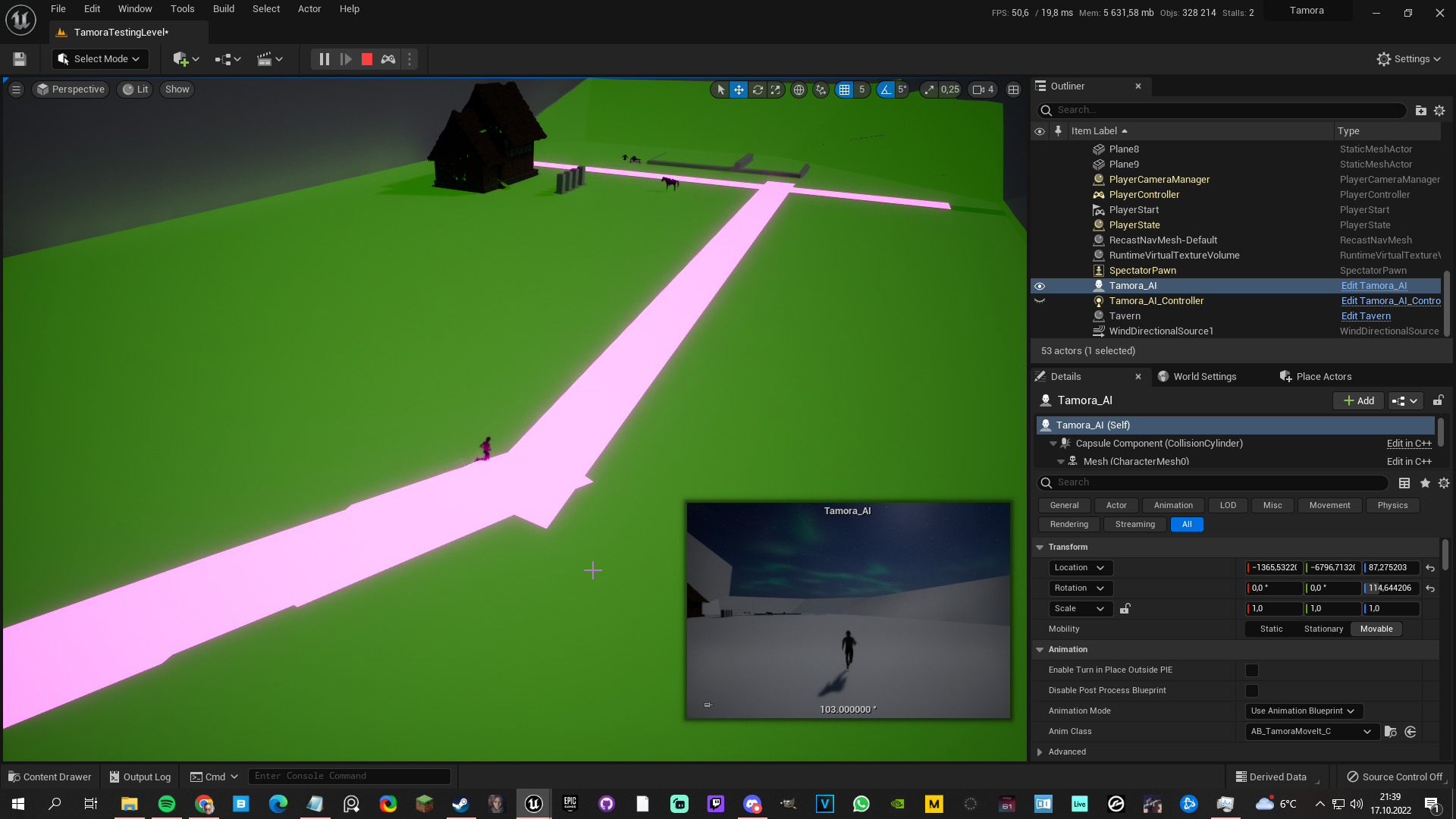
The only problem is that if the AI enters a nav area, he snaps onto the new rotation. I can somewhat reduce this by adding a round shape modifier, but it occures on entering/leaving any sort of nav modifier
 fluid goblet
Did something major change in how UE5 works with AI Move To? I upgraded my project and none of my enemies can move. So I made a dirt simple test enemy. Just a cube and on begin play, calls a move function that is just "GetRandomReachablePointInRadius" with a radius of 600, then AI Move to with this. Then a small .5 delay and then it calls the Move function again. I can't get this to move at all. No errors being logged.
Something's going screwey. Restarted UE5 and it works. Great.
fluid goblet
Ok WTF? If I have the Animation Blueprint in focus in the editor and I press Play, then "Try Get Pawn Owner" is not valid. But if i have a different editor window in focus and press play it is valid.
 autumn sluice
Hey, does anyone have a link to useful documentation for UE5 StateTree? The official documentation is all of 1 page and I'm going to need a little more than that
 rocky sedge
Curious - Is there a way I can add in a custom-made Enum to a C++ task and when selecting it in the Behavior Tree I could click a drop down to pick an Enum state to change it to? How would I go about creating that variable in my UBTTask class?
 quiet basin
How well do navmeshes work with landscapes
crystal hatch
quiet basin
How well do navmeshes work with landscapes
Well enough. If you elaborated your question we could be more helpful.
uneven cloud
rocky sedge
Curious - Is there a way I can add in a custom-made Enum to a C++ task and when ...
Same way you would expose an enum in any class. The enum has to be a blueprint type and the variable in the class needs to be a UPROPERTY.
crystal hatch
rocky sedge
Curious - Is there a way I can add in a custom-made Enum to a C++ task and when ...
Unless you mean a user/editor-created enum, then I'd suggest looking at UBlackboardKeyType_Enum for inspiration. It's an old piece of code so it can probably be done better now, but it's a working starting point.
 wary ivy
gilded tree
The only problem is that if the AI enters a nav area, he snaps onto the new rota...
wary ivy
gilded tree
The only problem is that if the AI enters a nav area, he snaps onto the new rota...
I would handle rotation issues like that directly inside the animation blueprint
instead of worrying about actor rotation
gilded tree
wary ivy
I would handle rotation issues like that directly inside the animation blueprint
I use MoveIt for locomotion, which does smooth rotations, it seems to be more of a snapping factor when the AI enters the high priority nav area, as once it enters said area the AI immediately has a new direct path to its target location 🤔
 lyric flint
when using AI MoveTo and a nav mesh volume, in order to have the ai actors "wake up" and follow me when I come close to them do I have to attach the nav mesh to my actor?
Or do I just make the nav mesh map wide? lol
 normal dagger
hey, does anyone know to make an AI that responds to my voice?
wary ivy
lyric flint
when using AI MoveTo and a nav mesh volume, in order to have the ai actors "wake...
you make a large navmesh volume
if you want dynamic navmesh generation then look into using navigation invokers https://docs.unrealengine.com/5.0/en-US/using-navigation-invokers-in-unreal-engine/
lyric flint
ok cool I have noticed that aimove to eventually stops working
Or if I go out of the navmesh the actors stop moving
Is there any way to keep them active?
paper kettle
crystal hatch
Yes.
Could you give me hint about how to create it ?
crystal hatch
paper kettle
Could you give me hint about how to create it ?
Yes 😆
 brittle lynx
paper kettle
Could you give me hint about how to create it ?
brittle lynx
paper kettle
Could you give me hint about how to create it ?
Make a subclass of UNavigationQueryFilter and a subclass of FRecastQueryFilter. Have the former, in its InitializeFilter function, call Filter.SetFilterType<FMyCustomRecastQueryFilter>()
and wrap things involving FRecastQueryFilter in #if WITH_RECAST
crystal hatch
It all really depends on how you want to use it. You can simply instantiate FRecastQueryFilter or subclass and instantiate. If you care about the default filter you can subclass ARecastNavMesh and set DefaultQueryFilter in the constructor, similar to how ANacigationData'c constructor does.
Or what @brittle lynx said. All depends on what you need. Asking precise questions will get you precise(r) answers.
 harsh storm
@crystal hatch Do you work at HQ or one of the satellite offices? If HQ - do you enjoy going to Cookout? So jealous that ya'll are right down the road from one 😭
crystal hatch
I used to live a walking distance from HQ 🙂 Moved back to Poland some 5 years ago.
harsh storm
Ahhh
 warped juniper
Would EQS be more performant for figuring out where a herd of animals would go to eat, drink, rest etc?
Both on a large scale EG where is a zone of food located
But also on a smaller scale EG where does every animal need to stand in order to be able to drink water
crystal hatch
warped juniper
Would EQS be more performant for figuring out where a herd of animals would go t...
Would EQS be more performant for figuring out where a herd of animals would go to eat, drink, rest etc?
More performant than what?
warped juniper
crystal hatch
> Would EQS be more performant for figuring out where a herd of animals would go...
Ha that's a fair question. I guess currently I am asking the gameManager where the closest zones are, telling the herd to go there. Then finding points on a spline to get individual positions around watering holes
All in BPs currently
crystal hatch
warped juniper
All in BPs currently
if you do things in BP then EQS will definitely be more performant. Especially if you need to find/generate more than a single point.
warped juniper
crystal hatch
if you do things in BP then EQS will definitely be more performant. Especially i...
Cheers good to know. Mind giving me any pointers on where to start learning EQS for this kind of thing
I'll be using it a lot for what is essentially a small point based eco-system
 soft mantle
Hi everybody! i'm having some troubles with this interaction i'm trying to do.
I want one actor to walk up to another actor and when overlap, do "Something".
i'm using Move to location or actor and using the "On Move finished" with Stop on Overlap. But it's never triggering finished or failed.

Does anyone know why that may be happening? The overlap seems to be triggering okey
Here is a quick video showing the problem

It only triggers "On Move finished" after I click again
crystal hatch
warped juniper
Cheers good to know. Mind giving me any pointers on where to start learning EQS ...
there's nothing out there I know of that can teach you about EQS use for this specific case. You need to learn how EQS works and then combine it with your creativity.
Here's an article I've wrote long ago about EQS's predecessor we used in Bulletstorm - EQS is an UE4, extended reimplementation of the same design: http://www.gameaipro.com/GameAIPro/GameAIPro_Chapter33_Asking_the_Environment_Smart_Questions.pdf This will lay out the principles of the approach.
There's A LOT material out there about EQS, just look through top 5 an you should be good.
As a final point: using EQS via BP is all good and fine, but extending it makes sense only in native.
warped juniper
crystal hatch
there's nothing out there I know of that can teach you about EQS use for this sp...
Wow this is perfect thanks again
crystal hatch
soft mantle
Does anyone know why that may be happening? The overlap seems to be triggering o...
Default answer #1: Check VisLog
misty wharf
@crystal hatch would you happen to have any knowledge on why EQS' internals are they way they are? Like why does it marshal all parameter types into floats? This makes it kinda hard to parametrize them for any even slightly complicated scenario 🤔
crystal hatch
misty wharf
<@333981651245727755> would you happen to have any knowledge on why EQS' interna...
Well, I parametrized EQS queries for Paragon bots, so there you go 😉
But the reason for using floats was to encode all numeric data with a single type. In retrospect it would have been better to use uint32 or whatnot. A mistake will surely rectify with EQS2.0 😉
misty wharf
I see :)
I had some solution to it which felt super clunky, I think I had it iterate the tests in the query and find the right one from them to set the value directly on a property on it
It's not really a big deal, was just curious if there was some particular reason it was set up the way it was... but sounds like it was probably difficult to predict up front how it might be used in the future
soft mantle
crystal hatch
Default answer #1: Check VisLog
Hmmm all i get is this message
LogPathFollowing (Log) Moving directly to move goal rather than following last path segment
But i didn't knew about the visLogger, i'm gonna see what else i can get from there, thanks!
paper kettle
brittle lynx
Make a subclass of UNavigationQueryFilter and a subclass of FRecastQueryFilter. ...
I did what you said. However, InitializeFilter function wasn't called. How can I tell the engine to use my custom class to use ?
brittle lynx
paper kettle
I did what you said. However, InitializeFilter function wasn't called. How can I...
You need to specify the filter class when you do movement. You can set the default one on the AIController (DefaultNavigationFilterClass), or in the FilterClass property of a specific MoveTo task.
charred lava
@crystal hatch did you watched this video https://www.youtube.com/watch?v=5ZXfDFb4dzc&ab_channel=BobbyAnguelov from Bobby Anguelov? I would like to know your take on this topic on how to approach Scalable AI Systems 😄 If you don't mind. His approach is similar to UtilityAI (imo) and he wouldn't recommend using Behavior Trees. StateTree seems promising for UtilityAI.

This stream will cover my preferred solution to game AI decision making.
Timestamps:
00:00 - Stream Start
01:05 - Intro
03:45 - Past Experiences
12:36 - Problem Definition
20:49 - Approach Overview
31:...
crystal hatch
Oh man... this is an endless topic!
fluid goblet
it looks like in UE5 On Target Perception Updated (AIPerception) now has an array of actors and no longer the stimulus. Is the old node deprecated?
charred lava
crystal hatch
Oh man... this is an endless topic!
Understandable if it is to much. No worries if you don't want to answer it. Just wanted to ask 🙂
soft mantle
crystal hatch
Default answer #1: Check VisLog
The VisLog helped a lot, i found a sort of workaround, thanks!
crystal hatch
charred lava
Understandable if it is to much. No worries if you don't want to answer it. Just...
I'd actually like to answer, but not strongly enough to take the time required to do it properly 🙂 I'm a true Unreal Slacker!
charred lava
Understandable. Still thanks. It's really cool and helpful to have Engine developers here in Unreal Slackers 🙏
paper kettle
brittle lynx
You need to specify the filter class when you do movement. You can set the defau...
thank you for your assist. I did it.
uneven cloud
charred lava
<@333981651245727755> did you watched this video https://www.youtube.com/watch?v...
What a lot of these fail to explain is that there is no perfect architecture choice. Utility works great in certain circumstances and is terrible in others. Same with behavior trees.
Completely dismissing behavior trees is absolutely ridiculous.
 ancient wedge
Does anyone know what could cause an error like this?
NavigationSystemV1_0 Object from PIE level still referenced. Shortest path from root: (PendingKill) (async) NavigationPath
PS, sorry if it's in the wrong channel 😅
crystal hatch
ancient wedge
Does anyone know what could cause an error like this?
`NavigationSystemV1_0 Obje...
this could be caused by you storing a reference to a UNavigationSystemV1 instance
ancient wedge
crystal hatch
this could be caused by you storing a reference to a `UNavigationSystemV1` insta...
Is there a way to find out where it's coming from?
the crash log isn't helping me too much 😅
crystal hatch
the log should contain more information, the full chain of references.
Which UE version are you on? And are you willing to temporarily modify engine sources?
ancient wedge
crystal hatch
the log should contain more information, the full chain of references.
Which UE...
I could 🙂 Currently in 5.0.3
The crash report is only pointing me here
In PlayLevel.cpp

 haughty coral
crystal hatch
I used to live a walking distance from HQ 🙂 Moved back to Poland some 5 years a...
haughty coral
crystal hatch
I used to live a walking distance from HQ 🙂 Moved back to Poland some 5 years a...
oh, so for years I falsely admired Guildford as place to work at because I thought Epic has there its AI team
crystal hatch
ancient wedge
I could 🙂 Currently in 5.0.3
The crash report is only pointing me here
In Play...
slap the following before the line that prints out the error
FReferenceChainSearch RefChainSearch(Object, EReferenceChainSearchMode::Shortest | EReferenceChainSearchMode::PrintResults);
``` should print a detailed references chain description to the logI used to visit Guildford on a semi-regular basis because that was the closest regular office to where I live now. No AI programmers there, but really good Animation guys!
 celest python
crystal hatch
slap the following before the line that prints out the error
```
FReferenceChain...
celest python
crystal hatch
slap the following before the line that prints out the error
```
FReferenceChain...
Hmm, couldn't they just run with Debug config and inspect the value of "Object"? 
crystal hatch
celest python
Hmm, couldn't they just run with Debug config and inspect the value of "Object"?...
they could, but telling the references from UObject alone is pretty hard
the issue here is "who owns a pointer to me?" and not "who am I?"
celest python
Oh right, so Object is pointing to UNavigationSystemV1, not to owner object
ancient wedge
oh, very interesting! I'll try this 🙂 Thank you ❤️
crystal hatch
celest python
Oh right, so Object is pointing to UNavigationSystemV1, not to owner object
Yeah, Object is the leaked object
 terse panther
Hey there everyone, i am trying to create a custom AISENSE and trying to understand the existing senses, but its short-circuiting my mind. Can anyone help me 😦
crystal hatch
terse panther
Hey there everyone, i am trying to create a custom AISENSE and trying to unders...
which is the part you don't understand? "All of it" is not a valid answer 😉 What are you trying to do and what fails?
quiet basin
crystal hatch
Well enough. If you elaborated your question we could be more helpful.
I didn't think I needed to elaborate, I saw a forum post from like 2010 about navmeshes not going around landscapes and I just wanted to know whether or not it'd immediately die 12 years later lol
But I'll take your response as they do in fact work, so thank you
crystal hatch
We did improve a thing or two during those 12 years 😉
soft mantle
Hi! does anyone know if there's a built in way to get AI Sight Radius value on BluePrints?
charred lava
soft mantle
Hi! does anyone know if there's a built in way to get AI Sight Radius value on B...
I think there is none.
 sullen gate
does anyone know why i cannot view the perception of my ai even though i am spamming 6 on the numpad?

i have a perception component on the controller
trying to debug sight
 crystal hatch
make sure your NumPad is enabled first 😄
(verify that it's not by pressing any other key to toggle another category)
 mortal umbra
@sullen gate you need to look at the AI
sullen gate
crystal hatch
make sure your NumPad is enabled first 😄
i actually cannot toggle any of other categories lol... how do i enable my numpad
sullen gate
mortal umbra
<@308125155337699328> you need to look at the AI
i don't understand what you mean. shouldn't there be a debug circle around the ai to show the sight radius and stuff
mortal umbra
@sullen gate press num lock
sullen gate
oops i'm stupid my num lock was not enabled
thanks guys
hi okay now i'm confused again
why am i not getting any output when i enter the perception radius of my bots


not getting any log output even though i am in radius
 crystal hatch
make sure the player is registered as perception source. There's a component you can add to an actor to get registered, or use bAutoRegisterAllPawnsAsSources sense config value
sullen gate
crystal hatch
make sure the player is registered as perception source. There's a component you...
is this config value part of the perception component?
crystal hatch
sullen gate
is this config value part of the perception component?
add the following to your DefaultGame.ini
[/Script/AIModule.AISense_Sight]
bAutoRegisterAllPawnsAsSources=true
``` There's probably a way to do it in the editor, but I don't remember how.note that I don't recommend that for larger numbers of paws. Mainly for performance reasons.
sullen gate
crystal hatch
add the following to your `DefaultGame.ini`
```
[/Script/AIModule.AISense_Sight]...
is that part of the source files?
crystal hatch
it's part of your ini files. Look around your project files, easy to find.
paper kettle
Does UE fills those variables m_includeFlags, m_excludeFlags, or they are meant to fill by us ? I could not find usage it besides reading values ?
 crystal hatch
We're not using poly flags directly. IIRC the poly flags indicate type of a polygon (whether it's a link, which type, side, etc) that we don't mess around with. But you can create a custom filter and play around with those.
paper kettle
crystal hatch
We're not using poly flags directly. IIRC the poly flags indicate type of a poly...
I understand. Thank you for your reply.
normal dagger
Hi, I want to ask to how to make a dog ai scout a certain area for items and returns them for the player
paper kettle
UnrealEditor_CoreUObject!UObjectBaseUtility::GetInterfaceAddress() [D:\build\++UE5\Sync\Engine\Source\Runtime\CoreUObject\Private\UObject\UObjectBaseUtility.cpp:439]
UnrealEditor_AIModule!UPathFollowingComponent::HasReached() [D:\build\++UE5\Sync\Engine\Source\Runtime\AIModule\Private\Navigation\PathFollowingComponent.cpp:1085]
UnrealEditor_AIModule!UPathFollowingComponent::HasReached() [D:\build\++UE5\Sync\Engine\Source\Runtime\AIModule\Private\Navigation\PathFollowingComponent.cpp:1119]
UnrealEditor_AIModule!AAIController::MoveTo() [D:\build\++UE5\Sync\Engine\Source\Runtime\AIModule\Private\AIController.cpp:671]```
I get crashed while playing game. Unfortunately, it happens rarely so I am having hard time to catch it in debug mode. I followed callstack and I failed to understand how and why it crashed. Is it a Unreal Engine bug or I did something wrong ? misty wharf
normal dagger
Hi, I want to ask to how to make a dog ai scout a certain area for items and ret...
misty wharf
normal dagger
Hi, I want to ask to how to make a dog ai scout a certain area for items and ret...
This can be done in very many different ways depending on how you want it to work. You could for example have it go to the designated area and then do an overlap query for objects and pick one to go to and return
charred lava
Are SmartObjects meant to be static? So it can't change it's position in runtime? For example a cover point behind a slowly moving car, with the cover points being SmartObject Slots?
Each Slot includes the location and rotation relative to the parent anchor (baked from editor placement) from the doc https://docs.unrealengine.com/5.0/en-US/smart-objects-in-unreal-engine---overview/
crystal hatch
paper kettle
```Unhandled Exception: EXCEPTION_ACCESS_VIOLATION reading address 0xfffffffffff...
Is it a Unreal Engine bug or I did something wrong ?
This code has been around for a long time so it's a safe assumption that it's something you did. The callstack seems to suggest that something taking part in theMoveTooperation is no longer valid (the path following component, move target [my guess], etc). If that's the case it's possible the crash can be expediated with forcing GC pass via theobj gcconsole command.
crystal hatch
charred lava
Are SmartObjects meant to be static? So it can't change it's position in runtime...
yeah, right now that's the case. I'd like to change that at some point in near-ish future.
(so 5.2 for you)
charred lava
Okay, gtk! Thanks MieszkoZ
paper kettle
crystal hatch
> Is it a Unreal Engine bug or I did something wrong ?
This code has been around...
yeah you are right. High chance that I messed something up. That address 0xffffffffffffffff got me thinking since it is not a nullptr, so what could it be ?
 unique pilot
Quick question about the NavMesh, on a big landscape, is it possible to "whitelist" naviguable areas instead of putting the NavMeshBounds volume over everything and adding hundreds of NavModifierVolumes to block areas?
uneven cloud
unique pilot
Quick question about the NavMesh, on a big landscape, is it possible to "whiteli...
You can have multiple nav bounds volumes.
 little hull
When ai is partollin and hear player it finishes "move to" and after that starts investigate. How to set it immediately starts investigate?
 harsh storm
Have a decorator abort the tree when bShouldInvestigate is changed.
 storm sail
Unpopular opinion: Blueprint AI > Behavior Tree
 high summit
How to check if navmesh path exist in world location?
Let say if player is on where is not navmesh.
So I need to see if path exist or not
celest python
storm sail
Unpopular opinion: Blueprint AI > Behavior Tree
 Blueprint AI
 Behavior Tree as decision maker & stateful BP tasks
celest python
high summit
So I need to see if path exist or not
BP or C++?
for BP you need to use findpath node
in C++ you can test if there is path directly
or if you are fine with a risky approach try to project point to navigation with very small box extent and see if it returns false
way faster than findpath
paper kettle
If I use AI Move To, it does not care about polygons default and first enter costs, but, Simple Move to Actor does. Why they behave differently ?
storm sail
celest python
<:drakenah:509710691385606154> Blueprint AI
<:drakeyeh:509713098794336266> Behav...
couldn't get my AI this crispy in BT
celest python
paper kettle
If I use `AI Move To`, it does not care about polygons default and first enter c...
Simple Move To Actor doesnt use pathfinding afaik
storm sail
switching to Blueprint AI event based from BT allowed me to spawn up to 50 AI while maintaining 30 FPS on server, with BT I could barely get 10
maybe it just depends on what they do
celest python
BTs are generally very optimized and rarely cause any issues
unless you abuse it
I also have around 70 BTs in my game, and tons of BP tasks on top of it
BTs are not even visible in profiler
celest python
storm sail
couldn't get my AI this crispy in BT
You could encapsule this whole behavior into a task and still get benefit of BT's prioritization algorithm
celest python
Idk never worked with any propertiary engine but from what I can see from GDCs I can say it's very good compared to many other systems
BTs dont have much overhead on its own, its usually your context in the nodes
because it just evaluates the tree and it does it in most optimized way as possible
heck, if you even go through tons of boilerplate if you do tasks in C++ because of that optimized design
celest python
storm sail
couldn't get my AI this crispy in BT
This behavior in the example is not suitable to implement in BTs directly but you could just encapsulate the fighting behavior of AI into single task and still manage the high-level decision making in BTs
storm sail
celest python
This behavior in the example is not suitable to implement in BTs directly but yo...
yes and no, the point of switching to blueprint originally was so I could take advantage of event based AI and not have anything ticking, I don't believe this would have been possible with BT's
celest python
sure it would, what ticking is only BT itself which shouldnt be a problem at all
you can disable/enable ticks in BTTasks
It's just a matter of if you need prioritization behavior of BTs or not, performance is rarely a problem for BehaviorTreeComponent's internals
And BT's tree evaluation is also event driven: https://docs.unrealengine.com/5.0/en-US/behavior-tree-in-unreal-engine---overview/#behaviortreesareevent-driven
storm sail
celest python
This behavior in the example is not suitable to implement in BTs directly but yo...
https://gyazo.com/3c1e85f3ebf120bc7c37063efce0edec
I don't know man

was a lot of code that I feel would have been infinitely harder to manage in BT
celest python
As I said you wouldnt have this logic in BTs as multiple BTTasks, I'm just arguing about "Blueprint AI vs BTs"
I'm a fan of having this exact BP in a single BTTask
and still keeping BTs on high level decision making system
I have similar BPs in my project, not big as that, but similar, they are just BTTasks and BT just selects which gigantic BP task is going to be executed
So in that case only overhead of BT is a few selectors and a few sequence nodes, which is almost nothing in terms of performance cost
storm sail
I don't know how you do it man, my experience with BT's just ends in millions of bugs
as things are still going on inside of a BTT when you'd expect it not to
uneven cloud
celest python
or if you are fine with a risky approach try to project point to navigation with...
Why is that risky? Project point is incredibly useful.
celest python
I thought since we are relying on box extent, it might produce wrong result sometimes
Since just testing path with cheapest option is less expensive than project point
uneven cloud
If you don't provide an extent, it will use the one set up for the agent data.
How is testing a path is less expensive than project? You get perf gains when checking first if the location is actually on the nav mesh.
celest python
If you don't provide an extent, it will use the one set up for the agent data.
ah, didnt know that. thanks
How is testing a path is less expensive than project? You get perf gains when checking first if the location is actually on the nav mesh.
afaik testing path with most cheap option is a single nav raycast
project point goes through a few extra steps then does a nav raycast, but I'm not sure
I'm relying on information I've heard in #gameplay-ai
uneven cloud
It's been a few years since I used the built-in navigation, but I don't remember that being the case.
uneven cloud
storm sail
switching to Blueprint AI event based from BT allowed me to spawn up to 50 AI wh...
Scripted AI has it's pros and cons as does Behavior Trees. One is only better than the other based on project and team needs.
The UE BT is actually event based and incredibly optimized, however you have to understand how it works to fully utilize it.
 versed maple
storm sail
Unpopular opinion: Blueprint AI > Behavior Tree
versed maple
storm sail
Unpopular opinion: Blueprint AI > Behavior Tree
I think they are friends who have to work together, I use the BT only to decide the part of moving, patrolling, chasing the enemy, etc, and the BP for the decisions of attacking and defending.
I remember asking a long time ago to be able to use more than one BT, because BTs are monotasking, that can't be thinking about two things at the same time, and when you discover it, everything is easier.
I hope that with the StateTree you can put more than one per controller.
sullen gate
how do i get the ai controller of an actor? getcontroller() does not seem to be a function i can use it's only getinstigatorcontroller()?
celest python
cast to aicontroller from getcontroller()
or use the static function getaicontroller() and plug a pawn to it
sullen gate
celest python
cast to aicontroller from getcontroller()
getcontroller() does not seem to be an option for me?

do i need to cast these to pawns?
celest python
because its an AActor
actors are simplest form of a thing that you can place to level and contains utils for networking, thats all (and also is a container for components etc)
you need APawn
Pawns can have controllers, has some other utils for shooter type of games too, like rotating to controller's direction etc
celest python
sullen gate
do i need to cast these to pawns?
if you are 100% sure the AActor you are evaluating is a pawn, use CastChecked<APawn>(member);
if it has a possibility of not being a pawn, use Cast<APawn>()
celest python
celest python
if you are 100% sure the AActor you are evaluating is a pawn, use `CastChecked<A...
though in that case you might also prefer just having an array of APawn*s instead 😄
sullen gate
celest python
if you are 100% sure the AActor you are evaluating is a pawn, use `CastChecked<A...
just a sanity check for myself but if my class is an character, it technically is also Apawn too right?
celest python
yep
sullen gate
okay thank you ❤️
 keen crow
repost from #multiplayer
how do I prevent RecastNavmesh actors from loading on clients? AFAIK there's this bNetLoadOnClient property on AActor, but this one is inaccessible on ARecastNavMesh in editor for some reason 🤔
inb4 recast navmeshes are autodestroyed on clients anyway - yeah I'm aware of that, but we have a strange bug where sometimes recast actor's NavRenderingComponent holds a reference to the world in its Outer property and doesn't let the GC to finalize something which causes client crashes

 crystal hatch
you can use AllowClientSideNavigation NavigationSystem's ProjectSettings-configurable property.
that will affect the whole navigation system however.
For finer control you'll need to extend the navigation system and override ShouldLoadNavigationOnClient(ANavigationData* NavData = nullptr)
keen crow
crystal hatch
you can use `AllowClientSideNavigation` NavigationSystem's ProjectSettings-confi...
I actually have it off but a breakpoint still triggers here in client builds

 crystal hatch
That should result in NavigationData getting loaded, but then discarded
keen crow
crystal hatch
That should result in NavigationData getting loaded, but then discarded
Yeah and that exactly what happens, but some time later in the game we get a fatal error crash where it states that the previously loaded level navdata is not cleaned by garbage collection because it is still referenced by the respective NavRenderingComponent
crystal hatch
huh. That's a bug. Which UE version are you using?
keen crow
4.26.2, a bit custom, but nothing was changed about controlling the lifecycle of navmeshes and all related actors
 shadow furnace
keen crow
Yeah and that exactly what happens, but some time later in the game we get a fat...
shadow furnace
keen crow
Yeah and that exactly what happens, but some time later in the game we get a fat...
In this case the macguyver solution of just deleting it when destroying the world is definitely a thing you could do
gross but I have had to do that with things like the physics settings stuff
paper kettle
My player character has a nav_area volume under its capsule component. While player is moving, AI's keep updating their paths due to change player's location. Is it okay that AI's keep updating their paths ?
keen crow
paper kettle
My player character has a nav_area volume under its capsule component. While pla...
i once asked the same thing here and the answer was no because that'd be too expensive unless you really need to and can't get away with EQS
paper kettle
keen crow
i once asked the same thing here and the answer was no because that'd be too exp...
So, I need to remove nav_area from player character ? If so, how can I avoid them pass through player character and other characters ?
crystal hatch
keen crow
4.26.2, a bit custom, but nothing was changed about controlling the lifecycle of...
if you can modify the engine sources the easiest workaround would be to not create the rendering component for NavigationData instances created in client worlds. ConstructRenderingComponent seems like a good place to do that.
crystal hatch
paper kettle
So, I need to remove nav_area from player character ? If so, how can I avoid the...
Avoidance. There are two implementations in the engine, play around to see which one suits you better.
keen crow
paper kettle
So, I need to remove nav_area from player character ? If so, how can I avoid the...
NavModifier component you mean? I'd say yes.
If so, how can I avoid them pass through player character and other characters
i ended up with making an EQS to find proxy move to locations that looks something like this
 keen crow
crystal hatch
if you can modify the engine sources the easiest workaround would be to not crea...
keen crow
crystal hatch
if you can modify the engine sources the easiest workaround would be to not crea...
ok thanks, I'll see what I can do
paper kettle
keen crow
NavModifier component you mean? I'd say yes.
> If so, how can I avoid them pas...
when do u use EQS exactly? Do you use it to change path or find a location to move?
and what do u mean with the proxy point exactly
keen crow
well I needed to make NPC to get behind player's back and I didn't want it to go right through the player so I ran an EQS to find a point somewhere to the left or to the right from the target player and after that I ran a following move to behind the players back
paper kettle
keen crow
well I needed to make NPC to get behind player's back and I didn't want it to go...
i see thx for reply
gilded tree
Hey guys! Whats the best ways to unload AI that are out of view from the player? I.e I dont want a smith to be hammering all day long while the player is in a dungeon on the opposite side of the map. Performance and all that plays heavily in here, and I would love some advice on a possible spawn/despawn system if anyones got time ☺️
sullen gate
Why is my AI not moving? The movetolocation functions goes through but it doesn't actually move? I can confirm the navmesh is working because the agents are moving when i call movetolocation on other functions but for some reason it's not moving on this one?

 crystal hatch
sullen gate
Why is my AI not moving? The movetolocation functions goes through but it doesn'...
crystal hatch
sullen gate
Why is my AI not moving? The movetolocation functions goes through but it doesn'...
Default answer #1: what does vislog say?
sullen gate
crystal hatch
Default answer #1: what does vislog say?
there's no error on the vslog?

?
all the errors regard something else
 crystal hatch
vislog = VisualLogger
sullen gate
crystal hatch
vislog = VisualLogger
oops okay give me a sec
sullen gate
crystal hatch
vislog = VisualLogger
thanks for tip regarding the visual logger. my math is just wrong and the location is the same
my bad
crystal hatch
VisLog is your friend!
keen crow
gilded tree
Hey guys! Whats the best ways to unload AI that are out of view from the player?...
i once heard you could do something like that with significance manager. like disable AI entirely when a player is some distance away. or increase tick interval
lyric flint
Can an AIController control multiple actors?
Right now I have about 200 actors that all do the same thing (kinda like zombies) and I was wondering if there's a way to optimize it without spawning 200 ai controllers
crystal hatch
lyric flint
Can an AIController control multiple actors?
Not out of the box. But AI controllers are pretty cheap, and you can configure them to be even cheaper, so until you notice AIControllers in your perf profile I wouldn't worry about it.
lyric flint
What I'm trying to do is very simple - just AI MoveTo
(my actor location)
However sometimes they home in for a bit then stoo moving
celest python
lyric flint
Right now I have about 200 actors that all do the same thing (kinda like zombies...
At that scale AIController spawning cost would be your last worry 😅
rendering, character movement component, pathfinding etc
lyric flint
They're vertex animated nanite actors
I can spawn 2000 of them with no issues
My issue is that AI MoveTo stops working sometimes
celest python
check visual logger and see why its stopping
crystal hatch
lyric flint
My issue is that AI MoveTo stops working sometimes
no it doesn't. Not without a reason at least 🙂
Like @Eren said - Default Answer #1 😉
lyric flint
so visual logger should tell me why they stop?
celest python
yep
 crystal hatch
yeah, but the point is too high above navmesh's surface, it's in the air ergo unreachable
this is by design
if you want these points to be projected to navmesh anyway you can either explicitly pass larger query extent to path finding request, or extend DefaultQueryExtent in project settings.
once again VisLog saves the day 😄
lyric flint
crystal hatch
if you want these points to be projected to navmesh anyway you can either explic...
not really sure what this means
I'm just using the "AI MoveTo" node in blueprint for some quick testing
crystal hatch
DefaultQueryExtent then.
lyric flint
can't find that in project settings
crystal hatch
It's one of the properties of SupportedAgents so I guess you need to add one
keen crow
Is it a sane idea (and would it be technically possible) to combine state trees and behavior trees in a following manner: I run a state tree on AI controller (hence BrainComponent is the UStateTreeBrainComponent) and right after I create a second behavior tree brain component, say BrainComponentBT. Then in the ST at some moment I run custom task RunBehaviorTree, which launches some BT on the 2nd brain component and handles starting and ending/aborting BT? Or are STs supposed to be substitutable rather than complementary to BTs?
crystal hatch
keen crow
Is it a sane idea (and would it be technically possible) to combine state trees ...
To what end?
In principle ST is a substitute for BT. ATM it's not fully featured, mainly missing tasks useful for AI behaviors.
keen crow
We were thinking about using ST as higher level planner for global things like states (idling, patrolling, attacking) and then utilizing BTs power for lower level, more concrete behaviors and actions like running EQSs, MoveTo tasks, attack services, etc
harsh storm
Dang - I should try out the vislogger. I just typically don't need to because my AI tends to work without issues 😅 (not a brag, they're just dumb zombies 🤣)
paper kettle
Is there a way to get which navmesh polygon an actor is standing on ?
crystal hatch
paper kettle
Is there a way to get which navmesh polygon an actor is standing on ?
yes, but why?
paper kettle
crystal hatch
yes, but why?
I would like to close polygons that an AI stands on to avoid each other
Built-in avoidances are not good enough.
uneven cloud
keen crow
We were thinking about using ST as higher level planner for global things like s...
I do something similar with Utility and not state trees, so the idea is not completely ridiculous. Not entirely sure how it would work with state trees, because I haven't really looked at them yet. For mine, each utility state has a BT subtree that gets started on start state. It works really well.
 ocean wren
Mixing utility and BT/FSM is really my goto for most non-ML applications
Having layers that communicate etc.
Just adding some NLP into that right now for voice command and such
uneven cloud
It's so good and flexible, but it really doesn't work with every project.
ocean wren
I doubt anything realistically will cover every project
 noble silo
hello, I was wondering if anyone had an idea how to move away from a location or actor in a behavioour tree? i.e I have actor1 chasing actor 2. actor 1 moves towards actor2. I want actor 2 to move away from actor 1
any help on this would be awesome. I've looked through teh node reference and can;t find a node for it so I imagine I need a work around
harsh storm
There isn't a node for it specifically. There is no "work around" it. It's just custom behavior. You can use EQS to find somewhere and then move there for example. Or you can just simply take the direction velocity actor1 is moving towards the AI and just match that (it would look super awkward in a lot of cases). There are some videos online explaining some other ways to do it.
crystal hatch
I'd say BT + EQS is by far the easiest way to pull this off, once you know how to use these tools. I suggest investing time in getting to know them, will save you a lot of time in the long run.
warped juniper
The more I hear in this channel the more I am tempted to relearn BTs and EQS from the ground up...
noble silo
Thank you I will look into it!
 olive prism
Hello, a question, how can I make my AI keep a distance from my character?
 celest python
add acceptance radius to move to task
for advanced scenarios use EQS and try to position AI based on query result
olive prism
Thanks you Eren
Another question, I'm making an attack system watching a video tutorial but it's not working for me and I don't know the reason, but I think it's because I haven't added the Slot in the Anim blueprint, but it doesn't work for me to add it either
This is my ABP

And this my Montage with the punch

The video tutorial has it like this, but I can't add the UpperBody Slot like he does, what can I do?

Oh, I was able to add it there, but I still don't know what the Blend Pose is (MovementCache)
gilded tree
What would be the best way to attach a wagon to my AI? I want him to drag it behind himself 🤔
uneven cloud
gilded tree
What would be the best way to attach a wagon to my AI? I want him to drag it beh...
Attach it to a socket on the mesh.
gilded tree
The root would be the best maybe?
crystal hatch
gilded tree
The root would be the best maybe?
Try it and see what happens 🙂
gilded tree
Yeah, not at my PC for a day yet, its just that I heard about it SmartObjects for AI navigation and was thinking the standard for such an operation couldve changed. Was a late night question from me yesterday 🙈
uneven cloud
Smart objects are more for interacting with objects in the world. Such as a bench or a door. The key point of them is that the behavior exists in the object instead of on the AI. So an AI doesn't need to know how to sit on a bench, just that it's an object that it can interact with.
While a wagon is technically an object in the world, it has to move with the character so it's better to attach it. Also smart objects can only be static.
gilded tree
uneven cloud
Smart objects are more for interacting with objects in the world. Such as a ben...
Aaah okay, I see! I have interaction logic within my BT, i.e each unique AI has a workstation and stores its location. Its nice as the smithy will only be handled by smiths, but I wanna enable them to have random interactions too, i.e take a rest on a bench, and as a bench would just fit two people Id need to lock other actors out of using it. I guess Smart Actors would be good for these types of interactions, while the actor workplaces can be unique 🤔 Does that sound like an okay setup? Trying to simulate believable/realistic medieval life ☺️
normal dagger
is there a way to make a voice interaction system in ue4
harsh storm
You have the full power of C++ available to you, so yes.
normal dagger
I don't know anything about C++ what I mean is, is there a plugin for that
crystal hatch
normal dagger
I don't know anything about C++ what I mean is, is there a plugin for that
ltgtfy?
harsh storm
normal dagger
I don't know anything about C++ what I mean is, is there a plugin for that
I'd imagine there might be a plugin on the marketplace for it.
If not, can try and google around. If there isn't anything public, you're going to have to learn C++ or pay someone to implement it for you.
 undone hull
hi guys! hope everything is going great 💙 I've got a weird issue that on UE4 there are times were agents won't use the NavMesh correctly, I mean, if there is a blocked path BUT there's a good enough route a lil bit to the right, the agent will ignore the other path and try to go towards the blocked path, fail and then do its other stuff.. due to randomization I've go the recast on Dynamic runtime generation but it does look like the nav mesh generated properly
crystal hatch
Default Answer #1: what does vislog say?
 fresh remnant
Has anyone done Async detour crowd? Wondering if there's any gotchas before I start trying to make it async.
undone hull
crystal hatch
Default Answer #1: what does vislog say?
according to VisLog "OnPathFinished: Success" D:
crystal hatch
undone hull
according to VisLog "OnPathFinished: Success" D:
there you go, success means good, stop complaining 😉
there's probably more, and also path debug drawing.
undone hull
hahaha
crystal hatch
it usually is enough to send you in the right direction
undone hull
crystal hatch
there's probably more, and also path debug drawing.
😮 where can I turn on that option?
crystal hatch
wow... I've actually forgotten it's something one needs to enable 😄 Try these flags:
 uneven cloud
gilded tree
Aaah okay, I see! I have interaction logic within my BT, i.e each unique AI has ...
uneven cloud
gilded tree
Aaah okay, I see! I have interaction logic within my BT, i.e each unique AI has ...
Smart objects have a way to filter actors who can use it, so you can use them for the work stations as well. It will clean up your BT.
uneven cloud
undone hull
hi guys! hope everything is going great 💙 I've got a weird issue that on UE4 th...
Do you have partial path set to true?
undone hull
crystal hatch
wow... I've actually forgotten it's something one needs to enable 😄 Try these f...
great thanks! ❤️
undone hull
uneven cloud
Do you have partial path set to true?
yup, actually with path visualization for some reason the agent gets stuck in the middle of a road
if I deactivate that option, it just ignores the movement and starts doing its other stuff
uneven cloud
undone hull
yup, actually with path visualization for some reason the agent gets stuck in th...
Since you have dynamic regen, have you looked at the nav mesh drawing while playing? If you hit F8, you should be able to see it.
undone hull
uneven cloud
Since you have dynamic regen, have you looked at the nav mesh drawing while play...
yuuup and it does generates correctly, no holes or something like that
uneven cloud
What does the vis log say with partial paths unchecked?
undone hull
is there a way to tell an AI to re calculate its current path? looks like the path that's being generated is incomplete if the goal is pretty far away
undone hull
uneven cloud
What does the vis log say with partial paths unchecked?
lemme check that
undone hull
uneven cloud
What does the vis log say with partial paths unchecked?
OnPathFinished: Invalid 😮
gilded tree
uneven cloud
Smart objects have a way to filter actors who can use it, so you can use them fo...
Oh that's interesting! Does it actually save performance? I have a pretty solid framework for my AI atm and I'm enjoying the current workflow I have, but if SmartObjects is the way to definitely go I'll just have to make the transition 😆
harsh storm
No need to make a change like that unless your framework isn't meeting the requirements.
gilded tree
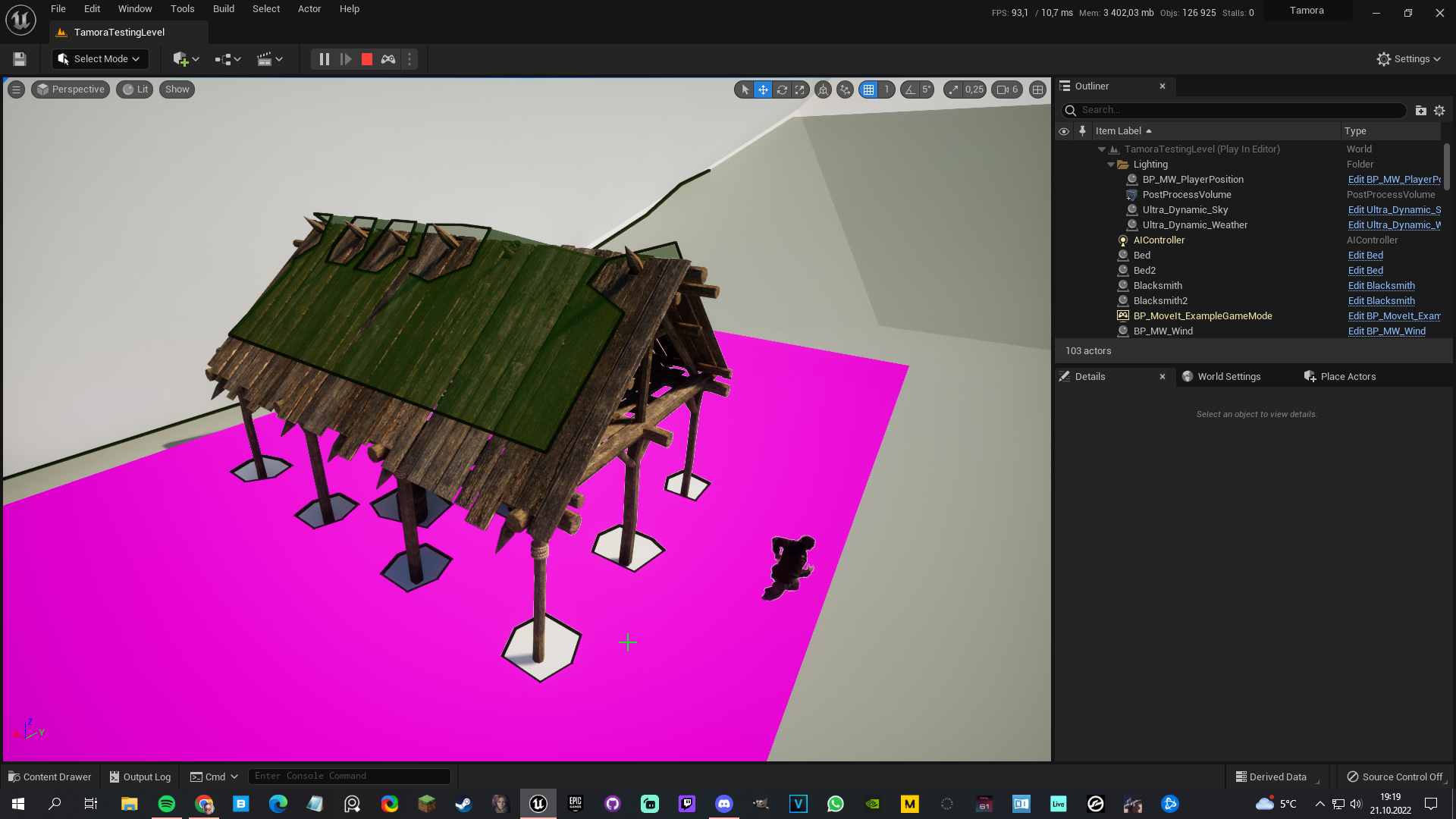
Oh also, is it possible to tell a NavMesh to not calculate whether an inaccessible area is navigable? Like here, the roof is set to green, I assume in a huge world it would lead to some unecessary calculation? https://i.imgur.com/ukI85ZF.png
 gilded tree
harsh storm
No need to make a change like that unless your framework isn't meeting the requi...
gilded tree
harsh storm
No need to make a change like that unless your framework isn't meeting the requi...
Good point!
uneven cloud
gilded tree
Oh that's interesting! Does it actually save performance? I have a pretty solid ...
Smart objects just make it easier to add new variations, but if your current version is working it's not necessary to change.
You can add navigation modifiers to cut out the nav mesh in areas that you don't want it to build on.
gilded tree
Ahh right, like a - box at the height of roofs etc. Wouldve been cool if it cut out untraversible landscapes by itself, or by a togglebox 😉
 terse bear
what's the difference between using a service and a parallel node? I mean the simple parallel node does not push sub-trees as a main task so what's the point?
uneven cloud
terse bear
what's the difference between using a service and a parallel node? I mean the si...
A service happens while you are on the branch, so you can have multiple tasks in that branch that don't need to run at the same time.
Simple parallel runs a task while the main one is active.
terse bear
uneven cloud
A service happens while you are on the branch, so you can have multiple tasks in...
but services also run only when there's a branch running under it, it's kinda the same thing!
I wanted to run two tree in the simple parallel but couldn't
so why should I use it over a combination of tasks and services?
uneven cloud
terse bear
but services also run only when there's a branch running under it, it's kinda th...
It's not really the same thing at all.
terse bear
uneven cloud
It's not really the same thing at all.
could you give an example difference please?
I mean I can have a sequence with a service and under that sequence a task and they both run at same time just like a parallel node, right?
I thought a parallel node can run 2 sub-trees at the same time
uneven cloud
It is not like a parallel node. While they technically run at the same time they work differently.
The service does a thing, waits until the next interval and does the thing again. This continues to happen while you are in that branch. You can also have it do a thing when entering a branch and do another thing when exiting.
A parallel node does the thing on the left and does the thing on the right UNTIL the thing on the left ends.
terse bear
uneven cloud
A parallel node does the thing on the left and does the thing on the right UNTIL...
but I can still have that with a combination of tasks and decorators under my service, right?
warped juniper
Can't find anything online. Can an array of smart objects be made at runtime?
Trying to create multiple smart objects along a spline
uneven cloud
warped juniper
Can't find anything online. Can an array of smart objects be made at runtime?
T...
I don't believe the system currently supports dynamically created objects.
warped juniper
uneven cloud
I don't believe the system currently supports dynamically created objects.
ahh that explains all the tests that failed to find them
ocean wren
normal dagger
is there a way to make a voice interaction system in ue4
There's an open source plugin on github that uses Azure cognitive services speech-to-text that works ok.. but you'd have to build it from source.. so probably not so useful to you.
Working on a new project that will eventually bring voice control across UE as part of my current research effort (about language guided generative models for interactive storytelling). Voice is just a part of that though.
celest python
New navcorridor thing looks awesome... tons of math functions and very well commented
almost every scenario considered to make movement natural along the path, i guess
I wonder if I should stop developing my spline movement thing
modern owl
crystal hatch
there's `BlackboardKeyType_GameplayTag` in `GameplayBehaviors` plugin (I believe...
😦
 crystal hatch
modern owl
😦
crystal hatch
celest python
I wonder if I should stop developing my spline movement thing <:thinkblob:396382...
crystal hatch
modern owl
😦
crystal hatch
celest python
I wonder if I should stop developing my spline movement thing <:thinkblob:396382...
No. It’s not the same plus you learn A LOT developing things like that.
modern owl
crystal hatch
You calling me a liar? 😉 https://github.com/EpicGames/UnrealEngine/blob/ue5-mai...
haha no no no I was calling me a dummy 🥥 Thank you so much
What is this library? I've never heard of this before and nothing comes up on google. What is a gameplay behavior?
 short aurora
Anyone happen to know why per-state evaluators were removed from statetree in 5.1?
https://github.com/EpicGames/UnrealEngine/commit/6aed2400cfbab82bfa0f3ca30802bc14dabb9efd
modern owl
If anyone can give me a quick rundown of what a dynamic behavior tree is, when you would use it, limitations, etc I'd reallllllly appreciate it
uneven cloud
modern owl
What is this library? I've never heard of this before and nothing comes up on go...
It's a plugin added in UE5. A gameplay behavior is a class for behaviors, primarily used by the smart object system
uneven cloud
modern owl
If anyone can give me a quick rundown of what a dynamic behavior tree is, when y...
A dynamic behavior tree is a subtree that can be dynamically set with a given tag.
Let's say you have 5 different AI types and they are all the same except for how they execute combat. Instead of making 5 different trees, you can make 1 main tree and 5 subtrees. Then the different AI types set up their combat subtree based on a tag that is set in the Run Behavior Dynamic node.
modern owl
That's exactly what I need thank you so much!
Oh okay I'll have to look up this smart object system thank you super helpful
uneven cloud
You don't have to use the gameplay behaviors just with the smart objects. It's just the only thing in the engine I've seen use them. From what I can tell is that instead of a gameplay task (or AI task) that does 1 thing, like move to, it can do multiple things. Such as run through a sequence of gameplay tasks.
modern owl
Oh whaaaattt I just looked up smart objects fuck this is kinda exactly what I've been implementing myself
uneven cloud
It also allows you to set up the data in a data asset via a behavior config.
modern owl
Can you point me to a recommended video for this new ai stuff?
Scratch that found the docs about it. Awesome! Thanks again
 old lichen
So when I execute a MoveTo task, do I need to calculate terrain elevation every time?
Assuming my landscape is not flat.
old lichen
It looks really awkward but the only way I know of doing this is by setting the destination as an FVector blackboard key, which asks for a Z value.
Isn't it possible to pass just X and Y coordinates and let the engine to handle the Z one so the pawn doesn't go underground or try to walk in the air?
celest python
MoveTo projects points to navigation when you move
it wont walk on the air but if given location is too irrelevant to navigation mesh's location it wont move
because it wont be able to find a point to move in navmesh
old lichen
That let me in the same place, needing to calculate the terrain elevation at destination.
uneven cloud
How are you deciding where it goes? You don't need to "calculate the terrain", but you do have to first find a reasonable place for it to go. How it decides that is dependent on the situation and not something an engine should be doing.
old lichen
Sure, but that's not what I asked
So far I'm directly passing a random FVector, just to perform some test.
But anyways that's how it's supposed to work, isn't it?
The player clicks at some point in the map, you grab that location and update the blackboard key with its coordinates.
mmm I think the "constrain to plane" in the movement component must be what I'm looking for
Or maybe not
celest python
I'm confused what is the problem about, but if I understood correctly you are asking
- you have a terrain that is has different heights at different locations
- when you move to a place you want engine to find the Z towards that location so AI wont hit an obstacle or move in the air etc
when you provide a location to MoveTo, it first does a pathfinding, and pathfinding projects your given location with a box extent, so engine handles a Z value for you, up to default box extent's Z
so if terrain is almost flat with up to 5 meters of heights etc you can provide FVector(Location.X, Location.Y, 0.f) to move to
red shape in default box extent: <#gameplay-ai message>
 shrewd leaf
Good morning. I have created an EQS query for my AI to locate a weapon based on the weapon state in the weapon BP. I did this by extending the EnvQueryGenerator BP class and filtering all the weapons found.
The AI finds a weapon that is not equipped to another AI or player and then moves towards it. The problem is that if the AI detects a weapon and starts moving towards it and another AI or a player equips it, the query does not update to reflect that the weapon is now equipped and the AI does not stop moving towards it or look for another weapon.
Is there any way I can force it to update?
 celest python
I think you can stop the running EQS Instance when you receive a callback like "OnWeaponEquipped"
shrewd leaf
celest python
I think you can stop the running EQS Instance when you receive a callback like "...
I can't find any docs online or any info on how to do that
uneven cloud
shrewd leaf
Good morning. I have created an EQS query for my AI to locate a weapon based on ...
I recommend implementing a claim functionality. When an AI picks a weapon to move to, it first claims it. Then you don't check if it's equipped, you check if it's been claimed.
shrewd leaf
uneven cloud
I recommend implementing a claim functionality. When an AI picks a weapon to mo...
If I do it that way won't I still have the issue if the player picks up the weapon before the AI?
shrewd leaf
celest python
Are you using built in BTTask?
Yeah, It's very simple for now
 celest python
shrewd leaf
Yeah, It's very simple for now
celest python
shrewd leaf
Yeah, It's very simple for now
create a new BTTask, use Run EQS function, it returns an object to EQS Instance, check if it has "stop" function
uneven cloud
You still need to do what Eren is saying, to interrupt if it's status has changed.
However claiming means 2 AI don't look ridiculous trying to go for the same weapon.
celest python
you would need to write a custom test in EQS actually, to efficiently achieve this
ocean wren
You can always tag the claimed object and not allow it to be picked up by any agent that isn't the claimed one
Just reset any claims if your agent dies
celest python
when two AIs query a weapon and save it as "not claimed" and another AI equips the weapon after this operation, you can either re-run EQS or remove the weapon inside of the eqs test after receiving the callback of claim
shrewd leaf
OK cool. Thank you all, I'm sure I can piece it together from your advice
One last question - from the Run EQSQuery node in my BBTTask, how do I get the highest scoring value? Do I loop through the array with "Get Item Score" to manually check or is there a simpler way I am not seeing?
crystal hatch
shrewd leaf
One last question - from the Run EQSQuery node in my BBTTask, how do I get the h...
It should automatically store the best result in blackboard, under the key you indicate. Look at BTTask_RunEQS’s params. If you implement your own you can configure the query to run in “single item” mode which will produce a single, highest-scoring item.
shrewd leaf
crystal hatch
It should automatically store the best result in blackboard, under the key you i...
I must be doing something wrong? I don't see an option to indicate a key
 crystal hatch
Like I said, the option is in the generic, engine-provided BT task. You seem to be implementing your own, so you can/need to handle the result the way you want.
shrewd leaf
OK, that's what I wanted to know. So best option I can see there is to loop through results and set the one with highest score on the blackboard. Thanks.
crystal hatch
shrewd leaf
OK, that's what I wanted to know. So best option I can see there is to loop thro...
If you implement your own you can configure the query to run in “single item” mode which will produce a single, highest-scoring item.
shrewd leaf
crystal hatch
> If you implement your own you can configure the query to run in “single item” ...
Ah I completely missed that, makes sense. Thanks!
gilded tree
Hey guys, I'm setting my AI to do different tasks depending on time of day, what would be a good way of setting a time offset for this, so they all dont start their tasks at the same time like robots?
 old lichen
celest python
so if terrain is *almost* flat with up to 5 meters of heights etc you can provid...
old lichen
celest python
so if terrain is *almost* flat with up to 5 meters of heights etc you can provid...
Alright thanks, it seems I was using a wrong movement component (floating pawn), when I upgraded to character movement it started to work.
But still, my concern is, as someone else mentioned, if the elevation is too different between origin and destination it will fail to move?
If that's so I would be force to calculate Z at destination anyway, to make sure the move to won't fail.
Please correct me if I'm wrong
crystal hatch
You can use a different query extent for pathfinding. You can change the DefaultQueryExtent (it has been mentioned in this channel before) or pass it in as a parameter (native only though).
uneven cloud
gilded tree
Hey guys, I'm setting my AI to do different tasks depending on time of day, what...
You can data drive the times for the routine instead of hard coding it or just do a random range.
shrewd leaf
Is there any way to get the AI to stop whatever it is doing and re-evaluate the behaviour tree from node 0?
misty wharf
you could use a decorator which causes it to abort
or you could stop and start the tree again
maybe some other methods too
shrewd leaf
So much to learn. Thank you, I will do a bit of research.
 plucky sun
in a game like Banished would one use AIControllers? What about RollerCoaster Tycoon?
 hearty niche
can ai controllers be spawned like actors to posses pawns? I wanna spawn ai npcs for driving cars which are controlled by traffic AI which uses a separate controller class.
I also wanted this so I can pool civilian actors for our open world map.
gilded tree
uneven cloud
You can data drive the times for the routine instead of hard coding it or just d...
Oh sorry, forgot to note it as solved, I added in a random float ☺️
uneven cloud
hearty niche
can ai controllers be spawned like actors to posses pawns? I wanna spawn ai npcs...
Yes. You just need to possess. I pool all my AI and just turn the controllers off.
 supple sigil
I have a EQS service running on the 'root' selector. The enemy has to run to a objective actor or the player. (whichever the EQS finds) but the EQS dosn't seem to update while its moving
How can I get it to update while moving?
hearty niche
uneven cloud
Yes. You just need to possess. I pool all my AI and just turn the controllers ...
so unposessing will not destroy the controller or the reference?
Also, how do you turn off your controllers? Disabling tick or something else?
uneven cloud
hearty niche
so unposessing will not destroy the controller or the reference?
Unpossessing does destroy the controller via garbage collection. Spawning is actually expensive, so I pool the characters.
I made a function that locks all functionality. Stops perception, behavior tree, and all other logic.
hearty niche
uneven cloud
Unpossessing does destroy the controller via garbage collection. Spawning is ac...
what stuff do you stop?
celest python
probably everything ticks
shrewd leaf
My AI moves around the map while not in the presence of the player. I'd like to abort this behaviour if the AI detects the player, but I am not sure how to do it. This is the best I could come up with so far, but it is not working. Any advice?
 versed maple
uneven cloud
Unpossessing does destroy the controller via garbage collection. Spawning is ac...
versed maple
uneven cloud
Unpossessing does destroy the controller via garbage collection. Spawning is ac...
I don't think the controls are destroyed, I spawn a controller and use BT to control a bunch of nps without posses them.
uneven cloud
versed maple
I don't think the controls are destroyed, I spawn a controller and use BT to co...
They are when you unpossess the pawn. You are not going through the possess and unpossess functionality.
versed maple
oh ok, thanks for the info! I didn't know.
uneven cloud
shrewd leaf
My AI moves around the map while not in the presence of the player. I'd like to ...
You'll want to use an observer abort when the AI detects the player. You can make a decorator for your target blackboard key and set it to abort lower priority.
shrewd leaf
uneven cloud
You'll want to use an observer abort when the AI detects the player. You can ma...
I take it I will have to build a custom decorator? I don't see a node I can use out of the box
uneven cloud
shrewd leaf
I take it I will have to build a custom decorator? I don't see a node I can use ...
No. It's a blackboard decorator
shrewd leaf
Ah ok I see
shrewd leaf
uneven cloud
No. It's a blackboard decorator
I am using the condition "PlayerActor is Valid" in the blackboard decorator. Do I have to run the function to detect the player in parallel?
shrewd leaf
uneven cloud
No. It's a blackboard decorator
Ace, I got it working. Many thanks.
crystal hatch
shrewd leaf
I am using the condition "PlayerActor is Valid" in the blackboard decorator. Do...
I'd suggest running an EQS service for that purpose, no need for a Parallel.
 obsidian igloo
how would one set an AI's rotation manually? ie. I wish the AI to face a certain direction when they go into cover
ive tried set actor rotation and set control rotation but neither of them work
crystal hatch
obsidian igloo
how would one set an AI's rotation manually? ie. I wish the AI to face a certain...
Use AIController::SetFocus or AIController::SetFocalPoint and make sure your pawn has bUseControllerRotationYaw = true
 tawdry crag
I'm getting a really weird navmesh behaviour in 5.0.3. In editor all my navmesh generates correctly, but when I switch to PIE, the whole thing shifts by 1 meter in negative Y. I don't have runtime generation and it's 100% repro. Anyone know what might be causing this?

It seems to also drift by 1 meter if I change any of the Navmesh Actor settings in the defaults panel in editor, unless that setting causes a regeneration (i.e. if I change the heuristic scale)
crystal hatch
make sure your RecastNavMesh actor is in (0,0,0)
tawdry crag
It is
crystal hatch
is this a regular level or some kind of world partition?
tawdry crag
Just a regular level
tawdry crag
No BSP
All static meshes
deleting the navmesh actor and reloading the level (to get the auto-spawned actor seems to have fixed it, so apparently some corruption in the Navmesh
crystal hatch
tawdry crag
deleting the navmesh actor and reloading the level (to get the auto-spawned acto...
"Have you tried turning it off and on again?" 😉
 winged elm
Hey! does someone know how the observer abort works? I would expect it to abort all children nodes and return a failed state but for some reason when im in the second children state it still executes the blue marked one for some reason and returns them as "success"
 crystal hatch
winged elm
Hey! does someone know how the observer abort works? I would expect it to abort ...
crystal hatch
winged elm
Hey! does someone know how the observer abort works? I would expect it to abort ...
how can you tell it returns success? Have you looked at what visual log say? It should contain detailed information on the BTs execution flow.
gilded tree
What would be the best way to move my AI to a certain location and then face a specific way? I know of the Rotate BTTask, but it rotates towards an actor, and in this case the AI is moving towards said actor, and the rotation will be the way it arrived to the actor from, somewhat. Meanwhile, I want the AI to move to the location and then face towards the stall, as shown here:
Essentiall an AI tending a stall as a merchant (facing the goods and the buyer), and a random AI approaching the stall will look at the wares & the merchant.

Maybe grab the location of the waypoint that they're moving to, and grab their rotation (which I would point towards the stalls), and rotate the AI on a lerp? Not sure how to make the rotation happen in a natural way, any tips? I.e turning in place and such 🤔
misty wharf
I think there's two problems here:
- Moving the AI and deciding which way it should look to
- Doing it in a natural way (ie. when it turns in place it doesn't snap and plays some animation)
for 1 you can just use any method you feel like really - depending on how much precision you want, you can for example have the stall include some component which defines the "merchant position" and "buyer position", and use those as your waypoints and rotation targets when the position is reached
for 2 it's mostly just a question of animation bp stuff I guess, and yeah you can for example lerp the rotation over time to smoothly rotate
 elder perch
How can you access a sense so you can call RegisterSource(AActor& SourceActors)?
I want to have my AI, when it sees an enemy that it is going to run from, do a sphere trace around it, find the same, and then tell their perception component to register the enemy they've seen, and to run away from that.
uneven cloud
gilded tree
Maybe grab the location of the waypoint that they're moving to, and grab their r...
You can have the movement component set the rotation via the control rotation instead of having the AI controller do it.
- Turn off use control rotation on the character.
- Turn on use control rotation on the movement component.
- Set the rotation rate on the movement component.
uneven cloud
elder perch
How can you access a sense so you can call RegisterSource(AActor& SourceActors)?...
Register source only says it's something they can be sensed, not is sensed. What is the problem that you are trying to solve?
 deep pawn
Help, i am developing a small indie rpg game where the player teams up with some npcs that help the player defeat and crush enemies and bosses, but i don't know how to do that propperly
uneven cloud
deep pawn
Help, i am developing a small indie rpg game where the player teams up with some...
I recommend starting with the AI with Blueprints course in Epic's learning library.
elder perch
uneven cloud
Register source only says it's something they can be sensed, not is sensed. Wha...
Sorry went and had dinner. I have an AI that is a prey and when it senses a carnivore, I want it to alert all of the other prey around it and have them register the carnivore, then they'll run away. Got the perception component seeing carnivores and running away, but one runs away and others nearby may have their backs turned and not see the incoming carnivore, so I want them to all register and then run away.
uneven cloud
elder perch
Sorry went and had dinner. I have an AI that is a prey and when it senses a car...
Normally I don't do this in the perception, but you could make a new sense to do it. It's sort of like a sound event, but triggered by the one that is alerted.
elder perch
There is no way to access the sense objects that are doing the tracnig?
uneven cloud
So you make a new sense, possibly called alert, and a config for it would have a max distance to the one alerting others to care about it. In the sense you'll need a static function for AIs to call to trigger an alert. Then the sense decides if it's perceived based on that config distance. The hearing sense does something similar, so if you have source you can use that for guidance.
uneven cloud
elder perch
There is no way to access the sense objects that are doing the tracnig?
There is not an easy way no. Another option is to add it into whatever you are using to interpret the perception targets.
Either way you need to create a way for AIs to tell each other about the predator.
deep pawn
uneven cloud
I recommend starting with the AI with Blueprints course in Epic's learning libra...
I was thinking to use a trigger sphere with a custom raycast for the AI to move to the player, since i am able to create custom events
gilded tree
misty wharf
for 1 you can just use any method you feel like really - depending on how much p...
Thanks for your input, it's really appreciated! Currently I have a base actor which serves as waypoints, in this case any AI can move to the waypoint set in front of the stall and do a random idling animation, whereas only the stall owner can move to the merchant's waypoint, so movement wise it does the job right now. The rotation part is the big issue here, where I will try Luthage's approach if I'm able to implement that correctly 😅
gilded tree
uneven cloud
You can have the movement component set the rotation via the control rotation in...
I turned on Orient Rotation to Movement, which made the AI's rotation in most sharp turns and such blend more smoothly, and it seems to also have affected the rotation a bit within the stalls. I placed the waypoints further inside the stall's mesh, and then the RotationTo BTTask works fine. Thanks!
 gilded tree
Now to figure out how to make AI group up and initiate a talking sequence 😆
ocean wren
There's some work by a guy called Claudio Pedica who did some work at the University of Reykyavic for CCP on social situations like conversations, there might be a presentation out there on the internet. It was based off the work of a social psychologist called Edward Hall, in a field called proxemics.
Has some good idea.. there's a whole bunch of academic literature in this area too
Kendon and the like
celest python
ocean wren
There's some work by a guy called Claudio Pedica who did some work at the Univer...
I'm thinking about how it would be cool to make beta.character.ai to handle NPC conversations in the games
since its able to mock any character, with any context of the world
ocean wren
Well, yeah, the whole aspect of character interaction is ripe for a load of cool stuff right now
there's some amazing text to voice models going round
nvidia have some really nice voice to animation stuff
we can render decent enough characters, although we could do with improvements there 🙂
and yeah, we can generate conversational text amazingly well
honestly, the bit that is missing is about the smaller animation stuff.. face, body, social signalling and all that
celest python
best thing about the conversation AI is, its able to roleplay
ocean wren
and of course tools
celest python
celest python
best thing about the conversation AI is, its able to roleplay
it can react to "inputs" you give, like if you somehow can make it appear as an NPC in the world, and bind some animation stuff on top of it, it'll be able to react world events like physics etc
the real problem would be performance i suppose
ocean wren
We're still getting our mocap lab setup, but I'm hoping to spend some time in there figuring out a ML model for social interaction mocap synthesis
They kind of need it for the robotics thing anyway
celest python
how do you gather data?
ocean wren
i.e. how humans and robots interact, how robots can understand human posture and gesture
we stick a robot and a human in a mocap lab and capture hours of it 🙂
in fact, we get a bunch of PhD students most likely.. get them to do social interactions with each other and with robots
You can see stuff like it from CMU's lab, they've got a fairly big multi-camera dataset for this kind of thing
celest python
we stick a robot
do you have a robot too? 😄
ocean wren
Well, not me personally
but yeah, we have a bunch of robots
I'm surrounded by goddam robots 🙂
celest python
haha nice 😄
ocean wren
mostly agricultural ones to be fair.. only a few of the humanoid types
we have a big robotics group doing agri-robotics (trying to harvest stuff with robots)
They have to train the robots to do stuff like pick fruits without damaging them and the like
but also how to not kill the humans they're working alongside
And of course robots will have to model humans somehow so they understand what they want, for stuff like healthcare robots
character AI is basically robotics without the balance and motor controller part 🙂
celest python
ocean wren
but also how to not kill the humans they're working alongside
I know it'll be very dumb question, but how do you prevent an AI to harm a human if it's too trained to achieve it's goals? In the end as you said because its a function approximator and I assume based on training data it'll choose to do what it's trained to rather than caring about a human life by default
for example in the beta.character.ai no matter what if you act offended AI steps back from it's character and try to act nice. How is that boundaries set?
ocean wren
That's a good question.. it goes back to asimovs laws of robotics I guess.. you have to encode "prioritize not doing harm to humans" in your solutions
celest python
I see, so that boundary usually not being achieved with raw training data, but hardcoded into it
ocean wren
The thing is, for social robots, its quite challenging. We had a robot in a museum as a guide and kids kept being mean to it and hanging off it and hitting it and generally sticking stuff in it's openings 🙂
Well, your model would encode stuff like proximity and use that to maintain distance where possible.. it isn't like there's a hard rule ever
celest python
lol 😄 i guess so. I remember how Microsoft's twitter AI turned into a racist character in a few days. I guess it comes with a challenge of not getting biased but still being natural
ocean wren
which is why tesla's occasionally run someone over
In general, you try and learn models of social interactions and then use those.. stuff like where to stand in relation to someone else, how to understand gestures and produce them in the right cadence etc.
Its still a huge area of research though.. things like having a theory of mind (i.e. trying to understand what someone else is thinking)
and all the stuff around language understanding and being able to move
and understanding what its looking at via the camera sensors
basically, to be honest, robots are still a bit crap 🙂
as are videogame characters for the most part
celest python
ocean wren
Its still a huge area of research though.. things like having a theory of mind (...
I guess some surveillance companies doing a good job about categorizing people by their facial expressions
I saw China's leaked AI by myself...
ocean wren
that stuff is shaky as hell
celest python
I guess if you try to focus on one specific thing like
"find sad people"
or
"detect angry faces"
it really does a good job
ocean wren
we can recognize faces, but trying to determine stuff from that is a bit wonky.. things like emotion recognition are pretty bad
I mean in the real world, stuff is more complex
There's a load of work by guys like Paul Eckman that show for instance, that people mask their emotions.. so we don't always show on our face how we're really feeling
Eckman came up with the concept of microexpressions, small twitches that tell you more about the real emotional state of someone (because its not a cognitive thing)
celest python
And I think its actually proven, right?
ocean wren
Yeah, I mean he's been researching it forever.. and people have followed up his work
You can see it yourself if you study faces long enough too
its part of the issue for good and bad acting 🙂
good actors are capable of convincing themselves to feel a certain way.. which means they do have those microexpressions to some extent.. and of course as humans we're good at unconciously reading those signals
celest python
hmm, i guess you cant beat someone who can take control of their microcontrollers in a sense 😄
ocean wren
people are really quite complex sacks of meat 🙂
Well, there's always adversarial attacks, you could reasonably fool any vision system if you care to
when they inevitably start with the thought police machine learning models, look to the adversarial 🙂
And if you're faced with a hunter killer robot, be aware that a jam sandwich has been proven to disable a museum robot if you stick it into its openings before 🙂
celest python
oh.. that sounds like experience speaking 😅
( why would anyone do that to a museum robot  )
)
ocean wren
kids are pure evil-chaos?
Have you ever seen video of kids interacting with robots? its like a wounded gazelle surrounded by a pack of lions
celest python
hahaha 😄 I can imagine 😂
ocean wren
makes you feel bad for the robot honestly 🙂
apparently pensioners are no better
they had a robot in an old age hospital/home and they kept locking the robot in a room, or cornering it in a corridor with cones and signs..
crystal hatch
face it, people are dicks 😄
ocean wren
they really are 🙂
 pliant quest
Im having trouble with my AI as they always crowd together and i want them to maintain distance
I am already using and a detour crowd AI controller
crystal hatch
If you send all AI to the same location they’ll bunch up regardless of avoidance.
charred lava
Does UE5 provide functionality to check if the AI's path is blocked in the process?
celest python
Which process?
charred lava
MoveTo for example with UsePathFinding
celest python
It provides a "pathfinding result" enum at first path find attempt and provides a path request result that UPathFollowingComponent provides
If first pathfinding test doesnt end up with a failure result, when AI moves if it gets blocked by anything UPathFollowing yeets and notifies MoveTo with error type
charred lava
It can only get blocked by NavMesh obstacles correct?
celest python
it thinks its blocked if it can move further than a tolerance value
so its not dependent to a specific scenario, if AI doesnt move but following a segment that means PFC will yeet soon
i dont know if it factors movement component velocity etc though
charred lava
that's what I wanted to ask. Probably have to write that velocity check bit by myself
celest python
are you having some sort of unexpected behavior currently?
charred lava
Not unexpected. It's just sometimes that AI tries to follow a path infinitely long, even though they are blocked.
To check if they are blocked would be great, so I can cancel their MoveTo Task.
celest python
hmm, pretty sure path following was suppose to handle that for you already
charred lava
In my understanding only when I work with a Dynamic generated mesh and NavMesh obstacles.
I have to look at UAITask_MoveTo 🧐
celest python
maybe changed in 5.0 but probably you need BTTask_MoveTo instead
charred lava
true, thx Eren
 echo grotto
Hey, I am having trouble finding a solution for my problem.
I am making a game in blueprints and want AI to chase the player. I need the AI to jump over gaps when needed, but I have no clue how to do so without manually placing jumping points everywhere.
I am currently using navmesh and simple move to behaviour to get the AI to walk to player
crystal hatch
echo grotto
Hey, I am having trouble finding a solution for my problem.
I am making a game i...
I have no clue how to do so without manually placing jumping points everywhere.
You mean NavLinkProxies or do you have something else in mind? I mean: what's your workaround?
celest python
I remember there was a github repo for creating navlinks on every nav poly edge automatically, though I couldnt find it
echo grotto
crystal hatch
> I have no clue how to do so without manually placing jumping points everywher...
Yeah I used Nav Link Proxies
crystal hatch
echo grotto
Yeah I used Nav Link Proxies
there's no automated solution for that out of the box.
celest python
Unreal Tournament has a (C++) solution for that btw. I couldnt find the repo I'm talking about but I heard a few people were talking about UT's solution was nice
uneven cloud
charred lava
Not unexpected. It's just sometimes that AI tries to follow a path infinitely lo...
They do, in the path following component. There's a function that checks if it hasn't moved in X time. I think it's called CheckBlocked or something like that. The default time might be longer than you want, so you can change it.
undone hull
hey guys forgot to update on the issue, I wasn't able to find the issue and solve it right away cuz it seems like there's a path complexity/length limit or that's my guess at least.. so I created a service that would check if the current path is longer than my limit estimate, then make the agent go to midpoints so that the movement is not cancelled
crystal hatch
undone hull
hey guys forgot to update on the issue, I wasn't able to find the issue and solv...
There's no path-length limit. There is however A* node pool size limit that's always hit when pathfinding to unreachable locations or very long distances. Note that in both cases it's terrible for performance, so it should be avoided whenever possible at higher decision level.
charred lava
uneven cloud
They do, in the path following component. There's a function that checks if it ...
Gtk! Thanks, I have a closer look on that.
paper kettle
Why I cant see navigation in standalone mode with ShowFlag.Navigation 1
crystal hatch
paper kettle
Why I cant see navigation in standalone mode with `ShowFlag.Navigation 1`
I'm going to assume you're actually asking a question, not just keeping us in suspense 😉
NavMesh drawing does work in Standalone as expected, as long as the navmesh is there to be drawn, and the debug drawing functionality is available (so it won't work in shipping builds for example).
paper kettle
crystal hatch
I'm going to assume you're actually asking a question, not just keeping us in su...
I guess I was missing show Navigation before ShowFlag.Navigation 1 command.
crystal hatch
paper kettle
I guess I was missing `show Navigation` before `ShowFlag.Navigation 1` command.
show Navigation alone is fine, it's toggling the flag but also ensures the relevant rendering components are created and registered.
 lethal helm
Are nav links expensive?
obsidian igloo
anyone know of any good classes or tutorials covering Hierarchal Task Networks?
 quick bobcat
Hi there, I have a quick question about AI Perception.
I think I am missing a key component or misunderstanding this completely
I have created an AI controller class for hostile mobs:
UCLASS()
class TOWERDEFENCEGAME_API AHostileAIController : public AAIController
{
    GENERATED_BODY()

public:
    AHostileAIController();

    virtual ETeamAttitude::Type GetTeamAttitudeTowards(const AActor& Other) const override;
    virtual FGenericTeamId GetGenericTeamId() const override;
};
AHostileAIController::AHostileAIController()
{
    SetGenericTeamId(FGenericTeamId(3));
}

ETeamAttitude::Type AHostileAIController::GetTeamAttitudeTowards(const AActor& Other) const
{
    GEngine->AddOnScreenDebugMessage(-1, 15.0f, FColor::Yellow, TEXT("Checking! Hostile"));
    if (const APawn* OtherPawn = Cast<APawn>(&Other)) {
        if (const IGenericTeamAgentInterface* TeamAgent = Cast<IGenericTeamAgentInterface>(OtherPawn->GetController()))
        {
            FGenericTeamId OtherTeamID = TeamAgent->GetGenericTeamId();
            if (OtherTeamID == 1) {
                return ETeamAttitude::Friendly;
            }
            else if (OtherTeamID == 2) {
                return ETeamAttitude::Neutral;
            }
            else if (OtherTeamID == 3) {
                return ETeamAttitude::Hostile;
            }
            else {
                return ETeamAttitude::Neutral;
            }
        }
    }
    return ETeamAttitude::Neutral;
}

FGenericTeamId AHostileAIController::GetGenericTeamId() const
{
    GEngine->AddOnScreenDebugMessage(-1, 15.0f, FColor::Yellow, TEXT("getting! Hostile"));
    return FGenericTeamId();
}
And I have a tower (that shoots at enemies) with an AI Sensing component calling GetCurrentlyPerceivedActors()
In the blueprint for that it is set to only sens enemies
I figured this would set the mob id to 3 (in the constructor)
And the tower would get that it is hostile via it's own GetAttitude() function which is the same as the mobs
brittle lynx
obsidian igloo
anyone know of any good classes or tutorials covering Hierarchal Task Networks?
For the theory of it, this could be a good place to start: https://www.gameaipro.com/GameAIPro/GameAIPro_Chapter12_Exploring_HTN_Planners_through_Example.pdf
obsidian igloo
brittle lynx
For the theory of it, this could be a good place to start: https://www.gameaipro...
thank you!
quick bobcat
What am I missunderstanding here? Should I call the function manually somewhere?
 keen onyx
anyone know why it wont let me select a template?
 uneven cloud
quick bobcat
What am I missunderstanding here? Should I call the function manually somewhere?
uneven cloud
quick bobcat
What am I missunderstanding here? Should I call the function manually somewhere?
With GetTeamID, you are sending the default team ID and not the one that you are setting. Also do both sides have a team interface and different team IDs?
uneven cloud
keen onyx
anyone know why it wont let me select a template?
That's deprecated. There should be another variable to set it.
quick bobcat
uneven cloud
With GetTeamID, you are sending the default team ID and not the one that you are...
Yes, I did get them the towers to shoot when set to hostile only as well. But I am still not understanding something.
I am having a hard time understanding what team id's are getting compared here.
Here is everything I have setup for this:
I have a controller for hostile creatures:
AHostileAIController::AHostileAIController()
{
    SetGenericTeamId(FGenericTeamId(3));
}

ETeamAttitude::Type AHostileAIController::GetTeamAttitudeTowards(const AActor& Other) const
{
    GEngine->AddOnScreenDebugMessage(-1, 15.0f, FColor::Yellow, TEXT("Checking! Hostile"));
    if (const APawn* OtherPawn = Cast<APawn>(&Other)) {
        if (const IGenericTeamAgentInterface* TeamAgent = Cast<IGenericTeamAgentInterface>(OtherPawn->GetController()))
        {
            FGenericTeamId OtherTeamID = TeamAgent->GetGenericTeamId();

            if (OtherTeamID == 1) {
                return ETeamAttitude::Friendly;
            }
            else if (OtherTeamID == 2) {
                return ETeamAttitude::Neutral;
            }
            else if (OtherTeamID == 3) {
                return ETeamAttitude::Hostile;
            }
            else {
                return ETeamAttitude::Neutral;
            }
        }
    }
    return ETeamAttitude::Neutral;
}

FGenericTeamId AHostileAIController::GetGenericTeamId() const
{
    return FGenericTeamId(3);
}
A controller for friendly creatures team id 1:
AFriendlyAIController::AFriendlyAIController()
{
    SetGenericTeamId(FGenericTeamId(1));
}

ETeamAttitude::Type AFriendlyAIController::GetTeamAttitudeTowards(const AActor& Other) const
{

    GEngine->AddOnScreenDebugMessage(-1, 15.0f, FColor::Yellow, TEXT("Checking! Friendly"));
    if (const APawn* OtherPawn = Cast<APawn>(&Other)) {
        if (const IGenericTeamAgentInterface* TeamAgent = Cast<IGenericTeamAgentInterface>(OtherPawn->GetController()))
        {
            FGenericTeamId OtherTeamID = TeamAgent->GetGenericTeamId();

            if (OtherTeamID == 1) {
                return ETeamAttitude::Friendly;
            }
            else if (OtherTeamID == 2) {
                return ETeamAttitude::Neutral;
            }else if (OtherTeamID == 3) {
                return ETeamAttitude::Hostile;
            }
            else {
                return ETeamAttitude::Neutral;
            }
        }
    }
    return ETeamAttitude::Neutral;
}

FGenericTeamId AFriendlyAIController::GetGenericTeamId() const
{
    return FGenericTeamId(1);
}
and a team id on the towers and mobs: both implementing GenericTeamAgentInterface
    TeamId = FGenericTeamId(3); //in constructor

FGenericTeamId ABaseMob::GetGenericTeamId() const
{
    return TeamId;
}
It seems like neither of the GetTeamAttitudeTowards() functions are ever being called because none of the debug messages ever show up.
So I definitely feel like I am missing a crucial piece somewhere
uneven cloud
quick bobcat
It seems like neither of the GetTeamAttitudeTowards() functions are ever being c...
I believe that the perception uses functionality that doesn't actually call that. It calls a static function in the GenericTeamID
ocean wren
Try printing out the id values every frame too.. I had a weird one where the construction order of classes meant that my team id's were being reset to some default that wasn't correct once
crystal hatch
lethal helm
Are nav links expensive?
no.
lethal helm
So I would be fine with making say a thousand nav links in a level?
crystal hatch
obsidian igloo
thank you!
Yeah. Troy's article is one of the best I've read on the topic and it was the basis for my HTN implementation back in the day (the plugin is still there thought).
crystal hatch
lethal helm
So I would be fine with making say a thousand nav links in a level?
it's like forcing nav polygons. 1k polys/links is not a lot.
lethal helm
awesome. I'm automating the nav link functionality so I can have every single vertical surface that spans two nav tiles have a link
crystal hatch
lethal helm
awesome. I'm automating the nav link functionality so I can have every single ve...
Note that with the Recast version we have the nav links are limited to link only polys inside a given tile and with its immediate neighbors.
keen crow
I'm trying to do some custom logic with pushing behavior tree instances in my custom behavior tree component and I get these errors. What am I missing? I included AIModule in the Build.cs files (tried both public and private dependencies). the FBehaviorTreeInstance seems like a regular class and its methods i used are public 🤔
 crystal hatch
keen crow
I'm trying to do some custom logic with pushing behavior tree instances in my cu...
crystal hatch
keen crow
I'm trying to do some custom logic with pushing behavior tree instances in my cu...
FBehaviorTreeInstance type is not exposed as part of AIModule's API and as such can't be effectively used outside it. Having said that I don't see a good reason for that, so feel free to slap AIMODULE_API to it and post as PR.
keen crow
oh, ok, thanks
quick bobcat
uneven cloud
I believe that the perception uses functionality that doesn't actually call that...
hmm, so does it only work with the team ids specified in the class and not the ai controllers at all? Would it work if I just removed the controllers all together?
I found it really hard to find documentation or examples, but I found this: https://www.thinkandbuild.it/ue4-ai-perception-system/
And it seems to suggest you can use the GetTeamAttitudeTowards in the ai controller to basically define how different teams see others as ally or hostile, which is the functionality I want to have.
Do you have any good resources that explain better how this works?

In this article I’ll go down the rabbit hole, showing how to setup and use the AI perception system. The official documentation about this topic is good but I had to scrape other needed information from various forum threads, Unreal-Answers posts and a lot of try-fail attempts. This article will condense my experience and findings into a single ...
and that question is open to anyone too, do you have any good resources on how ai perception works with affiliation?
uneven cloud
quick bobcat
hmm, so does it only work with the team ids specified in the class and not the a...
The perception works by getting the team ID for the listener from the controller. Problems start to happen with the source. I just looked at source. Sight should be calling your get attitude towards function, but hearing won't.
quick bobcat
uneven cloud
The perception works by getting the team ID for the listener from the controller...
ty for the reply
yeah that is the problem I am having. The GetAttitudeToward function is never being called.
It is definitely using the correct controller class though as I can see the name of it during the simulation
uneven cloud
How I do it is to put the interface on the controller and the character. The character just pipes the calls to the controller.
quick bobcat
I have the interface on the characters and on the characters I have a teamid and the getteamid function which is set to the teamid of the controller.
The controller already has the interface because AAIController implements the same interface. In there I have a teamid for the controller (which is the same as what it is controlling) and the GetTeamAttitudeTowards function.
does that structure seem correct?
uneven cloud
The problem is that the senses use FGenericTeamId::GetTeamIdentifier(TargetActor), which the target is always the character, but doesn't check if the controller implements the interface.
That sounds right. Let us know if that works for you.
Also, did you create a perception component? I don't see one in your code.
quick bobcat
yes I do have a perception component and stimuli components and all of that is working (and this all works when things are set to neutral)
I only posted everything I added for this specific functionality (affiliation)
hmm maybe a step by step would help a little more:
We have the tower, the tower controller, the enemy, and the enemy controller
The tower senses the enemy with sight,
which one of these pieces should be calling getteamattitudetowards?
uneven cloud
The AISense_Sight would be calling it.
quick bobcat
ok I think I might be understanding the problem then.
My perception component is in the tower class along with the Sight config.
The getteamattitudetowards function is in the tower controller class.
Is this why it is not being called?
Would the correct way to structure this be:
Tower has the GenericTeamAgent interface and an ID which is pulls from its controller
Enemy Has the GenericTeamAgent interface and an ID which it pulls from its controller
TowerController has the perception component, sight config, and the GetTeamAttitudeTowards function
Enemy controller has its percption component, sight config, and its own implementation of GetTeamAttitudeTowards
thank you for spending time on this btw
currently the perception and sight configs are in the tower and enemy classes
uneven cloud
Oh the perception component is on the character and not the controller? That really should be on the controller.
quick bobcat
yes. I basically just started doing cpp and while developing this game I learned about how to setup sensing before I have needed to make custom controllers. So I made them in the classes. But it does make sense for them to be in the controller.
I will change that now and see if it fixes it
uneven cloud
Also you might want to consider using an attitude solver instead of relying on that function. There are 2 ways to check affiliation and the function you are overriding covers one of them. Setting the attitude solver will cover both. See instructions here: https://forums.unrealengine.com/t/how-do-i-use-the-ai-perception-teams/120837/2
Unreal Engine Forums
Hi Rainbow! Don’t feel bad about been confused by this system, it’s a bit of a learning cliff. I had to read through quite a lot of code in order to figure it out. The ordering of this might be a little off, because I’m working on memory that’s a little old. First up, we need to define the Teams. I found the best way was to create a new UENUM...
quick bobcat
uneven cloud
Also you might want to consider using an attitude solver instead of relying on t...
Ty you for the resource. I did find that and read through it, and it went a little over my head, but I will diver deeper into that after I get it working this way since I am already so far into it.
I have another question though, should the perception stimuli component for the enemies also be in the controller? Or should that be in the pawn class?
uneven cloud
quick bobcat
Ty you for the resource. I did find that and read through it, and it went a litt...
It should be on the pawn class.
crystal hatch
I've put this together as a response to a licensee query, but figured there are people here that could use it as well (directly or as an inspiration): https://github.com/MieszkoZ/LoSPathFollowing.git
 frosty patio
Hey guys
I'm struggling to create an AI for a car race
I really need help
Is anybody available?
charred lava
frosty patio
Is anybody available?
 frosty patio
yeah but i don't know what to ask
i told my me problem which is Vehicle AI
@charred lava
charred lava
frosty patio
yeah but i don't know what to ask
You will know when you try. Try finding a tutorial, if not for Vehicle AI then maybe AI in Unreal in general and start from there. Will be hard to find someone who is available to guide you through this.
crystal hatch
Like David said, your question is simply too broad. You need to read up on the basics, enough to start experimenting and failing and asking questions about what went wrong and how do to it better.
 potent stone
Hi all
I'm wondering for AI, should I use a Character Blueprint or Actor Blueprint or another ? Controller maybe ?
crystal hatch
potent stone
I'm wondering for AI, should I use a Character Blueprint or Actor Blueprint or a...
depends on what you mean by "AI". It sounds like you could use some Unreal AI basics tutorial. There's plenty of good ones out there - do yourself a favor and go through at least one
potent stone
I mean for enemy for example, or friendly NPC
I'll go through some tutorials, thanks !
 ruby epoch
Is anyone well versed with how the AIController interacts with the various movement components? I'm digging around in UNavMovementComponent and it's subclasses but I'm not understanding how it all comes together.
Essentially, i just want a pawn that can be moved by the AIController without the bloat of the CMC. I'm trying with a subclass of UNavMovementComponent, but it doesn't move.
Is FloatingPawnMovement the bare minimum it needs to be able to move along the navmesh properly? It's all a confusing web to me
crystal hatch
ruby epoch
Is anyone well versed with how the AIController interacts with the various movem...
I'd say yeah, UFloatingPawnMovement is the simples one that actually works.
Regarding how AIController interacts with the movement component: it doesn't. It's the PathFollowingComponent that talks the owned pawn's movement component.
ruby epoch
crystal hatch
I'd say yeah, `UFloatingPawnMovement` is the simples one that actually works.
R...
Excellent! Thanks for your help. All the pieces are starting to make sense
celest python
UNavMovementComponent, but it doesn't move.
iirc this one just implements a function that takes an FVector as a direction, and PFC calls it. it also implements some functions to provide info agent properties
Is FloatingPawnMovement the bare minimum
this one adds actual velocity calculation on top of that NavMovemment provides
ruby epoch
celest python
> UNavMovementComponent, but it doesn't move.
iirc this one just implements a fu...
Thank you !
quick bobcat
Ok I have come across another issue.
I have moved my perception component to the custom AIController class for the towers, but I cannot get it to see anything.
My enemies have stimuli components and were able to be seen before I moved the perception over.
I am creating the sight config in the tower class so that I can have uproperties to control the range and what to detect, and that is getting fetched in the OnPossess function of the controller and getting set up like so:
        GEngine->AddOnScreenDebugMessage(-1, 15.0f, FColor::Yellow, TEXT("Configure sense"));
        SensingComponent->ConfigureSense(*SightConfig);
        SensingComponent->SetDominantSense(SightConfig->GetSenseImplementation());
        SetPerceptionComponent(*SensingComponent);
Should there be any problem with doing it this way or any ideas what may be making the sensing component not detect anything?
quick bobcat
In the debug mode I can clearly see that the config is being used because I can see the perception circle and it is the correct size for the range setting in the tower class
quick bobcat
I changed it a little bit but this is all happening in my OnPossess method now:
        SetGenericTeamId(Tower->GetGenericTeamId());
        SightConfig->SightRadius = Tower->Range;
        SightConfig->LoseSightRadius = Tower->Range + 1;
        SightConfig->PeripheralVisionAngleDegrees = 90;
        SightConfig->DetectionByAffiliation.bDetectFriendlies = Tower->SenseFriendly;
        SightConfig->DetectionByAffiliation.bDetectNeutrals = Tower->SenseNeutral;
        SightConfig->DetectionByAffiliation.bDetectEnemies = Tower->SenseHostile;
        SensingComponent->ConfigureSense(*SightConfig);
        SensingComponent->SetDominantSense(SightConfig->GetSenseImplementation());
        GetWorldTimerManager().SetTimer(FireTimerHandle, this, &AShootingTowerAIController::FireTower, 60.f / Tower->FireRate, true);
I still am not detecting anything though :/
 normal tapir
If you turn on show navigation in game (PIE), does it show the same way as in editor? Green, etc.?
I am having terrible trouble getting any nav mesh to work in my project, possibly because it's quite complex (C++ with a lot done unusually). The mesh shows in editor fine but never in game, and AI can't use it naturally. It doesn't return null, though. Maybe I should add a log entry to see where exactly it is.
It's not where I place it. It's also not attached to anything the game moves.
normal tapir
Huh, I'm now trying AI debug mode and it shows green paths when the bot tries to partol...
Does that mean the navmesh actually is there? Maybe my motion is messed up...
 rich veldt
anyone have any experience with AI getting stuck on Landscape Spline Meshes?
Mine will walk along it fine for a few seconds then suddenly stop. There are still move direction being input and consumed but he just doesnt move. Then will continue moving again sometimes maybe after the pathfinding updates im not sure.
 hasty badge
are there any cases where AIPerception could return false "successfully sensed" besides losing sight of a target?
crystal hatch
normal tapir
Does that mean the navmesh actually is there? Maybe my motion is messed up...
Sounds like it.
Re navmesh not showing, regular navmesh debug drawing doesn’t work on Clients (if you run client-server) since there’s no navmesh on the client (unless configured otherwise). GameplayDebugger can replicate that over though and draw it for you.
celest python
rich veldt
anyone have any experience with AI getting stuck on Landscape Spline Meshes?
check visual logger
crystal hatch
hasty badge
are there any cases where AIPerception could return false "successfully sensed" ...
Return from what? Individual actors’ can be forgotten when the stimuli expires. Then they are no longer considered sensed.
hasty badge
well there's a Target Perception Updated event and I can break it and get Successfully Sensed bool, could it be false with for example hearing or damage, or when those are updated it's always successful?
rich veldt
celest python
check visual logger
what should i be looking for? it seems like once my AI acquires their target, its BT goes into my custom MoveTo node and then nothing ever changes after that, even in the moments when it gets snagged on the Landscape Spline Mesh.
celest python
PathFollowingComponents logs the state of the current state of the path following action
and reports if its blocked or not etc
rich veldt
so when I use the default MoveTo task, and he's stuck, this is what it reports. i dont know how this Path following changes is helping me solve why this only happens on Landscape Spline Meshes though.
 celest python
if PFC doesnt report anything negative that means your AI is still moving to target
but just not able to update it's location
though in that case PFC was suppose to cancel the path
rich veldt
i wonder if the landscape spline mesh is interfering with pathfinding somehow then
There's no stopping in the movement if i disable the collision on the meshes.
celest python
the thing is if you havent move much further than your current location in a few seconds PFC just understands it and aborts the movement
my real curiosity here, why its not doing that
rich veldt
yeah right? it thinks its still moving and even when i use my custom AI Move task i coded, it behaves exactly the same. it still thinks the FindPathToActorAsync UNavigationPath is totally valid and keeps trying to move to the next waypoint
the AICharacter itself is just unable to traverse the mesh
celest python
sadly if everything is right and if you are not missing any logs PFC reported you need to debug to understand what is going on
rich veldt
The red X is where it gets stopped, black box is where I usually stand

right around there, where the spline mesh connects to a static mesh

give or take 100uu though it's not always exact
but it's almost always right around there
celest python

it actually makes sense if it ignores the path and moves to directly last path point
it maens its not following the path
rich veldt
meaning the path is invalidated?
celest python
nope
rich veldt
oh another weird thing is, if i walk right up to the AI then walk away it magically starts working again
celest python
it would log if it was
yeah, there might be a lot of things going on, ensure you are seeing everything AI systems logging and continue debugging
because its impossible to guess
but im confident its just pathfollowing is doing weird thing at one place and easy to fix once you find it
rich veldt
celest python
but im confident its just pathfollowing is doing weird thing at one place and ea...
many "one place"s only on landscape spline mesh 🙂
happens over here too

pretty much anywhere on a landscape spline mesh lol
rich veldt
in my custom moveto i store the UNavigationPath's path points and i have a spline drawing those points to debug. not sure how to do with vislog
or i can use show Navigation because i have draw debug enabled for the UNavigationPath too


both pics he's stuck
celest python
what are the chances its related with your custom move to task
rich veldt
celest python
what are the chances its related with your custom move to task
none, regular MoveTo does it as well
it's 100% related to the Landscape Spline Mesh
my custom MoveTo currently just creates a navpath, gets the points, then navigates the points and moves the AI in the direction of the next waypoint and updates the path along the way if the target moves. it's super simple. this is almost not a navigation issue i think
it's maybe a collision issue? but idk
celest python
tbh, I dont even know what is a lanscape spline mesh.. but since pathfollowing just moves to raw FVector you provide...
rich veldt
yeah my moveto just uses charactermovement and adds input toward the next path waypoint's FVector
super simple
pretty certain this has nothing to do with navigation or pathfinding at this point.
thanks for your help though
crystal hatch
hasty badge
well there's a Target Perception Updated event and I can break it and get Succes...
Out of all engine-provided senses only Sight can report "false", and that happens when the target is no longer seen by the listener.
hasty badge
that means only Sight needs to be checked for success which makes things easier, thanks!
crystal hatch
rich veldt
it's maybe a collision issue? but idk
My guess would be that it’s collision related, yes. Use ‘show collision’ console command to visualize collision at runtime.
I’d also check “agent’s step height” (don’t remember the exact property name, somewhere in movement component IIRC) and make sure it’s high enough to step on curbs.
 regal willow
Hey guys i ran into a bit of a problem for my ai. im making a game with infinite spawning rooms and i was wondering how i could generate nav mesh dynamically.
is there a way to do that
keen crow
regal willow
Hey guys i ran into a bit of a problem for my ai. im making a game with infinite...
You can try navigation invokers, there's a built in component for that, you could place it on an empty actor and spawn in your rooms. Just consider its generation radius
regal willow
i have tried that. it works but as soon as im out of the nav mesh bounds it dosent generate
its infinite
so i eventually walk out of the nav mesh
keen crow
Hmm. Spawn nav mesh bounds volume too? You can configure it's extent in the runtime I believe
regal willow
the problem is that moving it dosent generate and everyone online is saying that it only generates in editor and at intial runtime. people said to expose the blueprint and call on (UNavigationSystem::OnNavigationBoundsUpdated) but i dont know how to c++
keen crow
Maybe it's high time you start cpping 🙂
rich veldt
crystal hatch
My guess would be that it’s collision related, yes. Use ‘show collision’ console...
damn that'd be good advice if the roads didn't have totally flat box meshes for collision, totally ignoring the curbs.
celest python
rich veldt
damn that'd be good advice if the roads didn't have totally flat box meshes for ...
can you try printing the path following state enum
i just wonder if its just not logging or not
uneven cloud
regal willow
the problem is that moving it dosent generate and everyone online is saying that...
You can move the bounds and call On Bounds Updated on the navigation system via BP. I would recommend setting the nav mesh to dynamic and not use invokers. Whoever said that you can't is incorrect.
quick bobcat
Is there any reason that configuring sight in the OnPossess method would not work?
quick bobcat
I am still having an issue with my perception component not sensing anything. Here is the relevant code in the AI controller
AShootingTowerAIController::AShootingTowerAIController()
{
    SetPerceptionComponent(*CreateDefaultSubobject<UAIPerceptionComponent>(TEXT("PerceptionComponent")));
    SightConfig = CreateDefaultSubobject<UAISenseConfig_Sight>(TEXT("SightConfig"));
}

void AShootingTowerAIController::OnPossess(APawn* Possessed)
{
    AAIController::OnPossess(Possessed);
    GEngine->AddOnScreenDebugMessage(-1, 15.0f, FColor::Yellow, TEXT("possess"));
    Tower = Cast<AShootingTower>(Possessed);
    if (Tower) {
        SetGenericTeamId(Tower->GetGenericTeamId());
        SightConfig->SightRadius = Tower->Range;
        SightConfig->LoseSightRadius = Tower->Range + 1;
        SightConfig->PeripheralVisionAngleDegrees = 360.f;
        SightConfig->DetectionByAffiliation.bDetectFriendlies = Tower->SenseFriendly;
        SightConfig->DetectionByAffiliation.bDetectNeutrals = Tower->SenseNeutral;
        SightConfig->DetectionByAffiliation.bDetectEnemies = Tower->SenseHostile;
        GetPerceptionComponent()->ConfigureSense(*SightConfig);
        GetPerceptionComponent()->SetDominantSense(SightConfig->GetSenseImplementation());
        GetWorldTimerManager().SetTimer(FireTimerHandle, this, &AShootingTowerAIController::FireTower, 60.f / Tower->FireRate, true);
    }
}
in the enemies I have a stimuli component:
StimuliSourceComponent = CreateDefaultSubobject<UAIPerceptionStimuliSourceComponent>(TEXT("StimuliSourceComponent"));
And that is registered to sight and set to automatically register in their blueprint
I had this working before so I imagine it has to do with doing the setup in the onposses function
uneven cloud
quick bobcat
I am still having an issue with my perception component not sensing anything. He...
After you set up your perception, you need to call RequestStimuliListenerUpdate()
quick bobcat
uneven cloud
After you set up your perception, you need to call RequestStimuliListenerUpdate(...
Oh I didn't know about doing that, I didn't have to do it when I had it in the tower class.
let me try it.
Do I need to do this every time before I call GetCurrentlyPerceivedActors() on the component or only once in the onpossess?
quick bobcat
uneven cloud
After you set up your perception, you need to call RequestStimuliListenerUpdate(...
IT's working! You are my hero
Is there a reason I need to be calling that now when I wasn't in the tower class?
uneven cloud
quick bobcat
Is there a reason I need to be calling that now when I wasn't in the tower class...
If you set up the perception component, change senses or set the team after construction, you need to call that function for the changes to be applied. You only need to call it when you are changing the senses.
quick bobcat
uneven cloud
If you set up the perception component, change senses or set the team after cons...
Ah ok that makes sense. Thank you! Learning some of this stuff has been a challenge!
 river laurel
anyone know how to do this task?

also, "Random location " has to stop mid execution, if "scanning Task" succeeds
uneven cloud
river laurel
also, "Random location " has to stop mid execution, if "scanning Task" succeeds
A service is what you are looking for.
crystal hatch
I'd have LaunchTask and the following Wait as a high priority branch guarded by a ScanningSuccessful BB condition decorator. Then have the RandomLocationTask et al as a "fallback/idle" behavior (meaning: always performed when there's nothing better to do). The ScanningTask should be transformed into a Service, like @uneven cloud suggested.
rich veldt
celest python
can you try printing the path following state enum
sure thing. starts as Idle, changes to Moving and doesn't go back to idle when snagged on the collision
i've confirmed it only occurs when on bent spline meshes. straight tangents seem not to cause the sticking
rich veldt
i would say that's interesting that deformed spline meshes have weird collision, but show collision just shows normal collision and my player character has no issue walking on them.
so now i'd say that spline meshes create fucked up nav meshes? but it looks fine to me
celest python
what are the chances you're sending invalid FVector
to movement component
since you said you're updating movement component with your custom spline direction
rich veldt
celest python
what are the chances you're sending invalid FVector
zero
celest python
tbh I'm still puzzled by why PFC doesnt cancel/abort path
crystal hatch
navmesh is not the issue here, it's the movement's interaction with collision (it seems). If your player pawn can walk just fine over these meshes check if there are any differences in movement component properties between player's and AI pawns. One other thing to try is to toggle the bRequestedMoveUseAcceleration (you'll need a character movement component for that)
rich veldt
I've been playing with the movement component settings for the past hour or so, ill have another look.
oh what the hell. this child bp from the parent bp has a bunch of crazy settings so my changes to the parent class weren't being reflected.
i didnt think to check the child bp's movement settings
idk how or when they got set all weird like this. i reset them all to the parent class's defaults and it seems to be working fine now
🙄
crystal hatch
so... solved?
rich veldt
yeah
thanks anyway, sorry lol
i had a github/source control glitch happen the other day, where half of my map's old deleted assets returned and some deleted and moved content files was somehow duplicated, brought back from the dead, and put back where it was, and references got messed up and some classes broke. i wouldnt be surprised if this child class also had some settings all jumbled up as well.
celest python
 misty wharf
the good thing with version control screwups you fix them the same way: You just revert to the previous commit :P
celest python
its too "punishing" on mistakes though 😄
I didnt have a chance to learn p4 in a team so far and keep bouncing between #source-control and stackoverflow to solve stupid mistakes that I made in a 50gb project 😂
misty wharf
Sounds like p4 just being shit
celest python
yeah people were being like "its great for artists, easier to use" but tbh with a good client git is more straightforward
lyric flint
I am very new to working with AI behavior trees, but I had everything working just fine a day ago, then after working my level for a day, I try to bring the AI character BP into the newly created level, and it won't move. It will attack me if I get close enough, but it won't walk to the points that I have specified. Can anyone please help me to trouble shoot this? I am able to get in a voice chat and share my screen if that helps....
I am freaking out a bit on this, because this project is for a game jam that has a submission deadline in 5 hours.
 desert kelp
have you run the game in editor, with the behaviour tree in a different window watching the AI character? It can show you what its doing in the tree.
oh, did you update the navmesh? maybe something broke there and theres no valid navmesh in the ai's area
lyric flint
let me check the navmesh...
brittle lynx
you need to have a NavMeshBoundsVolume in your map for navigation to work
lyric flint
Yeah there was a Navmesh...it looks like my partner must have accidentally moved it below the map. I didn't think to check on that since it was in place a few days ago. Thank you.
desert kelp
No problem, glad (and surprised) I could help 🙂
 faint stirrup
im using the ALS ai and they wont move, ive got no clue why ive tried debugging and when i look in the behavior tree its showing that its working, the navmesh isnt below the map or anything and it seems like everything should be working but they just arent moving
crystal hatch
Default answer #1: check the vis log.
Also - what does ALS mean? Amyotrophic lateral sclerosis? 😉
faint stirrup
crystal hatch
Default answer #1: check the vis log.
Also - what does ALS mean? Amyotrophic lat...
als = advanced locomotion system and what is vis log? im fairly new to unreal sorry
crystal hatch
Just run console command vislog and take it from there, it's pretty self-explanatory.
What is "advanced locomotion system"? I'm fairly new to ALS (apparently)
faint stirrup
crystal hatch
Just run console command `vislog` and take it from there, it's pretty self-expla...

Unreal Engine
An advanced bipedal locomotion and layering system focusing on high quality character animation with responsive movement. Built to be flexible, extendable, and to provide a solid starting point for new projects. Currently Singleplayer only. (100% BP)
crystal hatch
Oh, so it's not part of Unreal, just an ad-on 🙂 Never heard of it 😄
still: vislog.
 crystal hatch
first of all I'd suggest limiting the debugging to a single agent (you have 8 now) and then look through the individual entries (there's one per frame). The one you've shown just tells us the AI rotated towards its target 🙂
faint stirrup
crystal hatch
first of all I'd suggest limiting the debugging to a single agent (you have 8 no...
what exactly am i looking for inside of here? what "entries"?
crystal hatch
you can save a log and send it my way and I can take a peak (I have a spare moment right now 🙂 )
crystal hatch
we'll see 🙂
faint stirrup
the ai is supposed to be moving to a random position inside the nav mesh every 4 seconds i believe. i went back into the ALS starter project level thing and the ai moves just fine there but its not working inside of my project
celest python
how did you migrate the ALS to your project?
faint stirrup
im like 99.9% sure its still the als demo level or "ALS starter project level thing" but ive just changed the map
it was working just fine yesterday but now its not and i havent touched the ai until just now when i noticed it stopped working
faint stirrup
crystal hatch
we'll see 🙂
see anything?
crystal hatch
wait for it, I'm compiling the engine 😄
faint stirrup
👍
crystal hatch
Ok, here's what I see:
- You have a sequence as a root node (your
Roamnode) which is not recommended - a selector is a better root node so that you can add a dedicated node at the back to handle default behavior (good both for debugging as well a behavior consistency). - first child of the
Roamnode isSetFocuswhich executes just fine - then there's
GetRandomLocationnode that fails. No idea what it's supposed to do, but since it's failing it's fail the wholeRoambehavior which in turn causes your whole BT to recalculate.
(man I love vislog! 😄 )
such a great tool 🙂 Fun fact: the origins of the tool reach back to Bulletstorm days when we created a very similar tool and it proved insanely useful 🙂
faint stirrup
crystal hatch
Ok, here's what I see:
* You have a sequence as a root node (your `Roam` node) w...
so what could i do to replace the GetRandomLocation node? its supposed to get a random location within in a 1,000m or foot whatever unit of measurement it is and then move the ai to that position
faint stirrup
crystal hatch
such a great tool 🙂 Fun fact: the origins of the tool reach back to Bulletstorm...
thats cool
uneven cloud

The Visual Logger, built into the Unreal Editor, is an incredibly useful tool for recording, visualising and tracking objects, locations and data in gameplay, but it’s rarely used outside of AI. Let’s change that!
In this talk by Rare's Principal Gameplay Engineer Andy Bastable, you'll discover practical tips and examples from Sea of Thieves, ...
crystal hatch
faint stirrup
so what could i do to replace the GetRandomLocation node? its supposed to get a ...
I'd go with Run EQS task or service. If you don't know what EQS is do yourself a favor and read up on it 🙂
faint stirrup
heres the blueprint for getrandomlocation
 faint stirrup
crystal hatch
I'd go with `Run EQS` task or service. If you don't know what EQS is do yourself...
faint stirrup
crystal hatch
I'd go with `Run EQS` task or service. If you don't know what EQS is do yourself...
ok

heres a more zoomed in screenshot
crystal hatch
faint stirrup
heres the blueprint for getrandomlocation
this blueprint says that it fails only if your AIController doesn't control a Pawn, which is baffling.
 crystal hatch
wait. that's not true. It fails if a random location fails to be found.
celest python
crystal hatch
such a great tool 🙂 Fun fact: the origins of the tool reach back to Bulletstorm...
Bulletstorm
was such an awesome game btw. I wasnt even on high school when I first played it, but still remember the joy 😄


 crystal hatch
which is baffling 😄
crystal hatch
celest python
> Bulletstorm
was such an awesome game btw. I wasnt even on high school when I ...
the best game I've ever worked on (in terms of amount of fun had while developing it)!
faint stirrup
crystal hatch
which is baffling 😄
eee thats frustrating what can i do?
crystal hatch
faint stirrup
ok
Again, EQS is a better tool for picking random locations. Especially since you can use EQSTestingPawn for testing eqs queries in the editor mode. I strongly suggest reading up on it. It might take you some time to read and understand, but it's well worth it since EQS is awesome, useful for a lot more than just AI (at one point Fortnite used EQS to spawn loot locations; not sure if that's still the case)
 cyan locust
is there a way to make an ai press a key?
crystal hatch
cyan locust
is there a way to make an ai press a key?
on behalf of whom?
cyan locust
yes
celest python
why dont you prefer calling the functions input events call instead? is there any specific reason you directly want AI to work with input events?
i.e. if your LMB button calling FireWeapon() function just directly call FireWeapon() on AI when you need it
cyan locust
so if i had something the ai should interact with, should i just call the event when it needs it?
celest python
yeah, in the end interactions are just functions/events any other class can call. If you design your systems properly both AIs and players can work with them
cyan locust
cool
celest python
hugely depends on the project, but a common way to create interactions just having an interface with OnInteracted function and defining what will happen on owner actor, be it door, weapon or anything else
so both AI and other actors can just call OnInteracted() and leave the rest to the interacted actor
cyan locust
yeah, i got it working now, now i just have to make it that only one can interact with it (2 just did it at the same time)
thanks for the help :)
river laurel
uneven cloud
A service is what you are looking for.
? what
do you mean to say i would have to pay for the answer of my question, or,
do you say there is a node setup called "service" ?
uneven cloud
river laurel
do you mean to say i would have to pay for the answer of my question, or,
do yo...
There is a BT node type called a service. I recommend that you read the behavior tree documentation and/or do the AI with Blueprints course on the learning library.
 real arrow
Anybody know if there is any event that is like an OnActorForgotten? I'm trying to acheive this but so far the only resource I've gotten is this https://forums.unrealengine.com/t/is-there-a-event-when-aiperception-forgot-an-actor/427905, which doesn't suit my use case since I need the forgotten actor
uneven cloud
real arrow
Anybody know if there is any event that is like an OnActorForgotten? I'm trying ...
You can try the on target updated event.
real arrow
uneven cloud
You can try the on target updated event.
You mean OnTargetPerceptionUpdated right
I swear that doesn't update forgetten actors
uneven cloud
Yes. I had to change the source to get the general one to fire for forgotten ones.
real arrow
😭
That was the same conclusion I came too
But I really don't want to switch to source, I would prefer to stay on binary
but oh well, maybe I'll just have to suck it up and switch
uneven cloud
If you use the EQS to generate targets, you likely won't need it, if your game is small.
real arrow
unfortunetly the answer is no to both things
uneven cloud
Running EQS as a service isn't that costly.
real arrow
I'm not sure I understand what you are saying, are you saying I should be using EQS as a substitute for the AI perception system
uneven cloud
No. You can use the EQS to get the perception targets. Then run tests on each one, such as distance. Then the BT nodes will set the target in the blackboard for you. So if a target is forgotten, the blackboard key is cleared.
real arrow
ok I see what you're saying
uneven cloud
Otherwise it's a simple 1 line change in the Process Stimuli function in the perception component
real arrow
yup
The other solution I was thinking about was just implementing a seperate wrapper layer
but that seems kinda convoluted and could get expensive because Idk about run times of things
i.e. doing something like creating an additional TArray and then comparing that TArray to the PerceptionComponents TArray every tick and then updating it that way
uneven cloud
Yeah that's not very performant.
real arrow
You know I would wonder if it was a one liner if it would be accepted in a PR, but idk, unreal seems kinda werid about accepting prs
uneven cloud
Unless you have turned on forget targets, they aren't actually forgotten. You can always query the perception component to get the perception info for a specific target or iterate through all of them and check for recently expired ones.
uneven cloud
real arrow
You know I would wonder if it was a one liner if it would be accepted in a PR, b...
I'm not sure if it's how they intended it to work. It's actually only the sight sense that doesn't notify when a target has been forgotten and it's specifically set to do so. Not sure if it's an oversight or intended.
crystal hatch
real arrow
You know I would wonder if it was a one liner if it would be accepted in a PR, b...
Only the sight sense cares about "forgotten actor" notification since it's the only one doing active testing (as opposed to reacting to events) and the testing is utilizing previous results. This is by design.
But I don't see why we wouldn't add a OnActorForgotten BP bindable delegate and trigger it from UAIPerceptionComponent::ForgetActor. Would that work you?
If you prepared a PR like that I'd pull it right in (with potential massaging).
real arrow
crystal hatch
Only the sight sense cares about "forgotten actor" notification since it's the o...
oh shit, yes
well, in that case expect a PR from me soon then
crystal hatch
real arrow
well, in that case expect a PR from me soon then
feel free to tag me so that it doesn't get lost due to some bot malfunction
real arrow
crystal hatch
feel free to tag me so that it doesn't get lost due to some bot malfunction
alright, sounds good. what's your github in that case
I'm assuming you are Epic Games Staff
crystal hatch
real arrow
I'm assuming you are Epic Games Staff
you're assuming correctly 🙂 My github make is MieszkoZ (a shocker!)
real arrow
alright cool : D
I'm surprised you don't have the Epic Staff tag in this discord lol, seems like you should get it
crystal hatch
nah, I'm good. It leads to funny discussions on occasion 😄
crystal hatch
whichever, I'll pull it in 5.2 anyway.
normal dagger
Hey, Quick question how do you run a behaviour tree in another behaviour tree
celest python
Use "Run Behavior" node
normal dagger
it doesn't work
normal dagger
I don't know why it doesn't work I'll send you pic of what I did
celest python
when in doubt check visual logger https://docs.unrealengine.com/4.27/en-US/TestingAndOptimization/VisualLogger/
normal dagger
the first behaviour tree is the main one and the other one is the shooting behaviour tree


my problem is that when the enemy sees me it doesn't do anything but when it doesn't see me it performs the moving behaviour only
crystal hatch
Like @celest python said, check the vis log. I bet it contains relevant information.
crystal hatch
The Shoot task seems to be implemented as "instant" task, meaning it calls a function and quits - if "shooting" takes (or should take) time and doesn't handle repeated calls well that could be your issue.
hasty badge
Is there much difference between storing variables in AI blueprint and using blackboard?
crystal hatch
hasty badge
Is there much difference between storing variables in AI blueprint and using bla...
yes.
hasty badge
Afaik blackboard is just easier to use in a behavior tree
crystal hatch
hasty badge
Afaik blackboard is just easier to use in a behavior tree
BP and BB variables are totally different. Depending on what you want to do one is better than the other.
real arrow
In all fairness, the sub behavior trees can be super finicky at times, at least in my experience
For variables I’d be interested to know if there’s performance differences between the 2 as well, like whether accessing a BB variable is faster than a BP one
celest python
BB has additional lookup cost which is mostly negligible
also probably it's casting to type when you access it and still not something important
on C++ i think accessing by key is faster
crystal hatch
real arrow
For variables I’d be interested to know if there’s performance differences betwe...
To be honest I don't understand why it matters. BB is intended to be used with BTs and in that context are efficiently processed and observed.
harsh storm
crystal hatch
To be honest I don't understand why it matters. BB is intended to be used with B...
I need code to go brrrr
celest python
harsh storm
I need code to go brrrr
have you tried aggregating your ticks?
normal dagger
@celest python Thank you for telling me about the vis logger I manged to fix my problem