#gameplay-ai
1 messages · Page 4 of 1
 north cape
Hi! Is there a way for AI to multi-task? In my example, I'd like the attack logic and movement logic to be performing simultaneously (so the AI can shoot while strafing for example)
My understanding is that I should wrap up all of 'shooting' or 'moving' into as single task and chuck it into a simple parallel?

 charred lava
north cape
Hi! Is there a way for AI to multi-task? In my example, I'd like the attack logi...
charred lava
north cape
Hi! Is there a way for AI to multi-task? In my example, I'd like the attack logi...
You can also chuck one side into another behavior tree and use "Run Behavior tree" on the left side of your Simple Parallel node.
 brittle lynx
EQS does time-slice per item, not per test. FEQSItemIterator::operator bool() returns false if you go over the limit, even if the iterator is pointing at a valid EQS item.
This way the for loop over the items inside a test is automatically stopped if the test is taking too long. On the next frame the test starts the for loop again, but the iterator starts after the items that were already processed.
 analog root
AI can not sense the player correctly when I use spawn actor, but it works perfectly when I put them on the map, what is the problem?
normaly , AI can detect and kill the player when I put them on the level , but when I want them to be spawn and using SPAWN ACTOR function , AI does not work good
 crimson token
 wary ivy
it uses the navmesh projection function
wary ivy
it uses the navmesh projection function
Never heard of that, I'll check it out
Anyway, how would the cpp/bp implementation work? It would just create a class like any other, that I can use normally in my queries?
crimson token
analog root
normaly , AI can detect and kill the player when I put them on the level , but w...
Any chance you're getting and using a list of all currently existing actors on beginplay?
analog root
crimson token
Any chance you're getting and using a list of all currently existing actors on b...
what is your mean ? can you explain more?
when I use spawn actor,AI can not sense the player unless I shoot him, but when I put the AI on the level, it can sense the player as soon as seeing him
brittle lynx
analog root
AI can not sense the player correctly when I use spawn actor, but it works perfe...
Look into the AutoPossessAi setting on the enemy character. It should be PlacedInWorldOrSpawned (instead of PlacedInWorld). This setting determines when (or if) to spawn the AIController that will control the character.
analog root
it is PlacedInWorldOrSpawned butstill same issue exist
analog root
ok I fixed that, I was working on a kit from the marketplace, a TPS kit, creator of that used a strange thing for the "on seen pawn Event" ,that his code did not work for spawning actors AI but I customize it and now it work, thanks guys
 ocean wren
There's a checkbox that tells the controller to spawn attached to the enemy.. can't remember what its called off the top of my head though
Just set it to dynamic and it'll recompute when you change the level
 celest python
Any ideas about what would be the best way to have some sort of "layered" target goal (an actor) that is integrated in BBs, and works with other external systems together with BTs?
Basically, I have enemies that selects a target player in the world and run behaviors to attack and follow it. But some external factors can distract the enemy, like L4D2's pipe bomb etc
I thought of three possibilities, all of them would work but I'm trying to select the best one would scale well on the long run:
1- Have "main target" and "external target" keys, update "external target"in AIController (or with a component for modularity) with some sort of utility systems and let "distractors" pass some params to do utility math, if it's score higher than current distractor, start following it. Meanwhile keep an array of external targets in AIController to switch between external targets.
2- Ignore the "external key" in BB, have "main target" key and store an array of external targets in AIController along with actual "non distractor" target and if there is no external target left, switch to main target
3- Create CDO-only "target" objects, store them in "target component"s and let each target define their own behaviors with high level commands (probably tags) like "follow" "attack" "avoid", and let AI update the closest target component's logic in AIController
Third one gives a nice bottom up approach but with some undesired side effects like possible performance issues
ocean wren
I've traditionally kept utility outside of the BT, so for stuff like targets, I'd build a utility decision system that takes the perception system output as input and itself outputs the current target into the BB, that way you can allow people to author different utility decisions. Usually by modifying curves (I had curves that modified perception values for stuff like being visible, in cover, if the agent was aware already or not)
You could probably do a rough pass of it using the EQS system now I think about it 🙂
celest python
this doesnt interop with perception system, this is for things that directly affect the AIs without any other middle-man
i.e. if a bomb exploded in a radius, AI's will always register it to their external target array
but just not sure which one would scale better
ocean wren
Well, its just data isn't it? add a component that deals with the data and decision making
celest python
So you say I should go with 2nd option then
ocean wren
I guess my point is that you can use another component to do some of the decision logic to then feed data into the BB
Yeah, second option
The BT just deals with the results, the other system decides what the target is
I have a squad target system that allocates enemies to the squad do this kind of thing too
because it makes sense to coordinate fire
celest python
Roger, thanks 
ocean wren
Just make a nice design surface for the utility scoring so that its mostly data/designer led
I've used curves and such, but those aren't always the easiest
Its where UE shines though, because you can write custom editors for it.. and custom asset types and whatnot
celest python
Talking about utility systems, do you think FMath::GetMappedRangeValueClamped is enough to normalize values into 0-1 range?
EQS has an example but my system does not have negative scores
so their math doesnt match with mine
ocean wren
easiest way to find out is to test it
ocean wren
You should have some unit tests for this kind of thing anyway
celest python
true
ocean wren
I usually try and identify some common use-cases and write up tests for those, in case you get regressions later
But math for utility scoring is notriously tricky
Dave Mark's book on behavioural mathematics is a worthwhile read there, but its pretty expensive now last I looked
celest python
I saw some examples from Dave Mark but I guess he is not a fan of pseudo math codes, he gives the math with notations directly 😄
I'll try to check CryEngine source
maybe I can find some stuff there
surprisingly they have some solid AI module btw
even better than UE
they even have Valve's AI driven dialogue thing out of the box
celest python
celest python
they even have Valve's AI driven dialogue thing out of the box
I'm also about to finish this by the way, currently writing a parser to support defining criterions with a text format. I'll open source it later on
Went through a few crazy things from implementing 3rd party tuple matching thing for C++ to random forest algos and such 😂
ocean wren
celest python
I saw some examples from Dave Mark but I guess he is not a fan of pseudo math co...
Yeah, a bunch of that was done by Mikko Mononen and Matthew Jack (who now runs Kythera AI) and a few others. Definitely compare the EQS system with the Cover point system in CryEngine, basically Matthew's design and Mieszko saw it and added it to UE
If you can't get along with Dave Mark's stuff, try looking for Kevin Dill's papers on Dual Utility reasoning, its basically utility systems, but a pretty simple implementation.
You really should learn what the math notations mean though, they're not scary, just not obvious until you see them
celest python
ocean wren
You really should learn what the math notations mean though, they're not scary, ...
I skipped a lot of math lessons at high school, so I gotta learn basics of algebra, trigonometry etc first.. probably will happen before I participate in uni exams next year 😅
I expect it will empower my development skills a lot though
ocean wren
Its kind of intimidating, but honestly its not that hard. The problem is that the math notation changes based on the problem domain, plus there's a lot of unspoken rules and stuff 🙂
I couldn't believe it until someone went over some of the symbols with me 🙂 "this just means the sum of all the terms" and whatnot..
 fringe patrol
@uneven cloud hey, i found out it's something wrong with the project, i tried it in a new project and it worked, i don't know why it happens, this is why it's better to give ue5 more time to adapt, anyway thank you so much for helping me figure it out!
 granite vault
Welcome. Good to know that it works better for you.
when are you launching your game?
celest python
Next year hopefully
granite vault
game name is?
 keen sonnet
I tried asking this before but ill ask again. Will any tutorial that allows ai to follow "sound" work for any game that does the same thing. I want to make a horror game that tracks microphone and in game sound that is created upon like stepping on glass or something. I think I can easily do in game sounds but how would I make sound tracking for when the player speaks into their mic. And will most tutorials show me how to do it in a basic sense. For whatever reason I'm too nervous to try any tutorial.
 misty wharf
You'll just have to try them and see
It might not give you the exact steps you need to use for your game, but it should help you understand how it works, and adapt it to your own needs
You can't really "go wrong", if one tutorial doesn't help you, just watch another
 quaint radish
I cannot seem to get the hearing sense to work properly.
I have sight working and setup with AIPerception component within the AI controller and the AIPerception_StimuliSource component within my player.
Sight is working properly and I set up/added hearing the same way to both components.
In the AIController, I have 2 methods confirming which sense was triggered, and neither result in Noise/hearing

Both output "Sight" perfectly fine
Followed this tutorial where adding sound/hearing is discussed/shown at 17:19 https://youtu.be/iY1jnFvHgbE?t=1039

In this presentation, Epic's Paulo Souza uses Unreal Engine's built-in AI features to build smart enemy behaviors for a game with stealth-like mechanics.
By relying on the Gameplay Framework in Unreal, we're able to quickly create convincing AI using Behavior Trees. Behavior Trees are great for creating complex AI that can be presented in a way...
When I jump, I have it set to "Report Noise Event" within my player character.

here is the Report Noise Event node

Not using the tag at all


even as a dominant sense, Hearing doesnt trigger the event
here is the entire bp logic from event to print string

figured it out. The tutorial didnt say that this was necessary but solved it

Needed an instigator for unknown reason. Anyone understand why?
 uneven cloud
quaint radish
Needed an instigator for unknown reason. Anyone understand why?
uneven cloud
quaint radish
Needed an instigator for unknown reason. Anyone understand why?
All senses need an instigator to check if it should be ignored based on teams.
quaint radish
oh wow. It would not trigger at all without the instigator though. Some reason worked for the person who made the tutorial.
Its not a surprise that this got me. Not every Instigator input pin is required.
 stiff gale
Hi - What's the concept behind underwater AI using NavMesh? Since navmesh works horizontally but not vertically...
celest python
probably nothing different than flying AI
north cape
charred lava
You can also chuck one side into another behavior tree and use "Run Behavior tre...
Thank you for the suggestion! I've been trying this, and unfortunately when in a simple parallel, 'run behaviour' doesn't seem to function (it constantly gets called repeatedly (flashes yellow) but the logic within never turns yellow). Do you have any documentation or resources I could take a look at for reference?

(subtree)
 celest python
granite vault
game name is?
celest python
granite vault
game name is?
Didn't name it yet, but so far going on with "Zombie Game" thing
charred lava
north cape
Thank you for the suggestion! I've been trying this, and unfortunately when in a...
Maybe it doesn't work on the left side? 🤔 I had a similiar scenario like you and I think I had my Sub behavior tree running on the right side (no subtree needed here actually) and on my left side the move action.
The doc has the section "Concurrent Behaviors" https://docs.unrealengine.com/4.27/en-US/InteractiveExperiences/ArtificialIntelligence/BehaviorTrees/BehaviorTreesOverview/ which describes which option the Behavior tree has available for Parallel actions.
maybe try something like this? @north cape

 fast bridge
Hey, can anyone help me? I made an enemy NPC. It seems to be working perfectly in the editor when I press PLAY.
However, when I package the thing, the NPC doesn't move in the packaged game.
I'd really appreciate some help.
I'm using Unreal Engine 5.0.3
 green fiber
Hey guys. I've got a Find Player -> Catch Player AI. So Pretty simple, and everything works fine. Is anyone here who knows ai pretty good, and maybe could help me/give some tips so i can improve the ai and make it even better. Cause sometimes it looks a bit weird, and i want it to be perfect 🙂
 misty wharf
"this"?
brittle lynx
 bleak lance
If you mean navmesh edges not matching the geometry, try reducing “Max Simplification Error” in the Project Settings under Navigation Mesh. If that doesn’t help, also try to reduce “Cell Size” there.
 storm gulch
Hi! Does dynamic navmesh work with instanced meshes?
I have a procedural level generation done with those and the navmesh only appears when I tweak something in the actor that contains the instanced meshes
edit: manually tweak at runtime
uneven cloud
storm gulch
I have a procedural level generation done with those and the navmesh only appear...
It should do if they are set to affect navigation. It's likely that the order of loading things isn't correct or that your procedural generation takes too long. In C++ you can delay when generation on load happens until after your world gen. In BP, you might just have to trigger another regen.
 lusty nebula
storm gulch
I have a procedural level generation done with those and the navmesh only appear...
lusty nebula
storm gulch
I have a procedural level generation done with those and the navmesh only appear...
How are you doing the procedural world generation? Do you have any resources you used to learn that? I can’t find much that’s good?
 storm sail
https://gyazo.com/a129393e58eae1c50375ec848727709d
Anyone know how to get AI to run towards a player by curving? Red is what the AI currently does (runs directly toward the target) Green is what I would like the AI to do (curve toward the target and not run directly at him)
 celest python
either create points with EQS and follow them with order by checking movement state on path following component or dive into depths of navigation system and alter how path finding works
 misty gale
Or spawn a helper object that the AI can follow
storm gulch
uneven cloud
It should do if they are set to affect navigation. It's likely that the order o...
how do I trigger navmesh regen from bp? Can't find that
storm gulch
lusty nebula
How are you doing the procedural world generation? Do you have any resources you...
basically had to figure it out myself and not that it's particularly great or anything 😔
brittle lynx
storm sail
https://gyazo.com/a129393e58eae1c50375ec848727709d
Anyone know how to get AI to ...
You could look into Steering Behaviors. What you described sounds like Seek. Here’s a tutorial: https://gamedevelopment.tutsplus.com/tutorials/understanding-steering-behaviors-seek--gamedev-849

Game Development Envato Tuts+
Steering behaviors aim to help autonomous characters move in a realistic manner, by using simple forces that are combined to produce life-like, improvisational navigation around the characters'...
celest python
storm gulch
how do I trigger navmesh regen from bp? Can't find that
not sure but iirc it's a C++ only thing
unless there is a way to "indirectly" trigger navmesh regen in BPs
I vaguely remember some people were trying to regen their navmesh so hard they ended up doing it in C++
uneven cloud
storm gulch
how do I trigger navmesh regen from bp? Can't find that
Not entirely certain, because I don't use BP for that kind of thing. You can try making sure regen on level load is turned on in the settings. You can also try on bounds updated and see if that works.
uneven cloud
storm sail
https://gyazo.com/a129393e58eae1c50375ec848727709d
Anyone know how to get AI to ...
Have you tried slowing down the rotation rate? It won't give you exactly the drawing, but it will be closer.
celest python
or setting up ground friction in CMC
if Rotation Rate is set below to 270 and ground friction is around 1-2 is should be slightly curvy
anyway quick question:
does integer based utility systems has any downsides compared to EQS-like floating point utility systems? just generically speaking.. I want to build a generic utility system that is going to work everywhere (basically a static function) but I'm not sure how would it scale on the long run
    template<typename T>
    static T IntegerUtilitySelect(const TMap<T, FIntegerUtilityBooleanArrayWrapper>& Map, int32& OutHighestCount)
    {
        T HighestValue{};
        for (const auto& [Type, BooleanArray] : Map)
        {
            const int32 Count = BooleanArray.Evaluate(); // get count of "true" booleans
            if (Count > OutHighestCount)
            {
                HighestValue = Type;
                OutHighestCount = Count;
            }
        }

        return HighestValue;
    }

The reason I want to prefer integer based ones, it's not easy to maintain and design a system that takes too many parameters like this
 storm gulch
uneven cloud
Not entirely certain, because I don't use BP for that kind of thing. You can tr...
storm gulch
uneven cloud
Not entirely certain, because I don't use BP for that kind of thing. You can tr...
okay then, how to do it in C++?
uneven cloud
celest python
----------------------
anyway quick question:
does integer based utility system...
Floating point utility gives a large range of possibilities in a clamped range. I always use 0.0 to 1.0
celest python
So you don't normalize to 0-1 but provide a value between ranges of 0-1 from the beginning?
celest python
storm gulch
okay then, how to do it in C++?
probably UNavigationSystemV1::Build()
uneven cloud
celest python
So you don't normalize to 0-1 but provide a value between ranges of 0-1 from the...
It depends on what I'm scoring. It gives you the freedom to normalize to 0-1 or provide a value between 0-1. If the utility function only returns 0-1 it really doesn't matter how it's getting that score.
storm gulch
there was a RebuildNavigation console command in earlier versions, but its not there now (I guess)
storm gulch
in UE5?
uneven cloud
storm gulch
okay then, how to do it in C++?
I don't remember the specifics as I haven't done it in ~6 years, but the general approach was block navigation from building, start world gen, trigger a nav build when world gen finished, started the game when nav gen was done.
celest python
uneven cloud
It depends on what I'm scoring. It gives you the freedom to normalize to 0-1 or...
Alright Luthage, 
celest python
celest python
I lost it already though
@storm gulch
else if (FParse::Command(&Cmd, TEXT("RebuildNavigation")))
RebuildNavigation command
storm gulch
 celest python
0.00s is odd
either you're using a NASA computer or you dont have a navmesh
wait does it say command not recognized after executing it 
storm gulch
...yes
celest python
it still executes though
maybe some legacy code interfering
logs are defined in function body in source code
uneven cloud
The function is RebuildAll.
storm gulch
when I replace the instanced meshes with ordinary static ones it kinda works, but I guess that'll be optimisation going straight out of the window
celest python
UNavigationSystemV1::Build() calls that
celest python
storm gulch
when I replace the instanced meshes with ordinary static ones it kinda works, bu...
at this point I'd just debug
it does bunch of things but seems straightforward to understand if you have C++ knowledge
function names are clear at least
storm gulch
it all works for non-instanced meshes

and only generates the navmesh for instanced meshes when I manually do something to it in the editor

is there any way to emulate that "move it in the editor" part at least?
storm gulch
30h without sleep and all I see is the giant middle finger from UE
Found this method but it's not working either
https://forums.unrealengine.com/t/navmesh-ignoring-instanced-static-mesh-actors-generated-through-a-blueprint/338862/7
Unreal Engine Forums
Just to add onto this a bit for posterity, this also fixed my problem in 4.15, I added the delay node in my level blueprint just before it calls my ISM’s method, which actually does all of the loading, and it works great, not sure why it’s needed though, would love to understand that.
uneven cloud
storm gulch
is there any way to emulate that "move it in the editor" part at least?
That "move it in editor" is just changing the location which triggers a rebuild.
storm gulch
uneven cloud
That "move it in editor" is just changing the location which triggers a rebuild.
this doesn't help either

 solemn wasp
Hey everyone !
Is it possible to access a specific object from a task blueprint to use in a Behavior Tree ?
In my case, I want a task "LookAtTarget" for a turret, and I need to access different parts of it for Pitch and Yaw.

I started doing it in in the event graph of that turret and it works, but I want to use the Behavior Tree workflow
uneven cloud
solemn wasp
Hey everyone !
Is it possible to access a specific object from a task blueprint...
Yes. You need to either save that object into the blackboard and send it to the task or make a way to get it.
storm gulch
solemn wasp
Hey everyone !
Is it possible to access a specific object from a task blueprint...
iirc you need to just cast from the controlled pawn if that's your turret
and the target should be stored in the blackboard
solemn wasp
aaah right ! Totally forgot about casting, didn't know it was available for tasks
alright thanks guys
celest python
storm gulch
it all works for non-instanced meshes
I have an idea
Create an editor subsystem
find a relevant delegate in FEditorDelegates that triggers when any actor's location is changed
Check if actor has instanced mesh in scene components
if true, rebuild navigation manually
this is a workaround to trigger nav rebuild
 peak oxide
do anyone have a tutorial or documents for how to make an ai for cars with Collison avoidance
solemn wasp
Hey guys ! Quick question: is it always best practice to use the AI Behavior Tree even for simple behaviors ?
Because right now, I have turrets and flying drones, but their behavior is really simple (find target, shoot, and for the drones just follow a spline path). I got them working in their Event Graph, they do what I want, but I find that the Behavior Tree makes it a bit more difficult to access certain values.
Is the tree better performance wise ? Or is it the same as tick ? Knowing that the drones could be a swarm of like 20+ drones (but they all access the same variables from one place, they don't have their own arrays or anything like that).
celest python
Tree itself rarely affect performance
but the content of your nodes can affect
BTs provide tools to debug easier, design easier and iterate mechanics easier
If you don't need those or your behavior is simple as that, you dont need to use it
but to unify systems, especially if you have a "top down AI manager" works with BTs, it might be better to just do it in BT
so its a huge "depends™️"
solemn wasp
alright, thank you !
peak oxide
peak oxide
do anyone have a tutorial or documents for how to make an ai for cars with Colli...
help
celest python
peak oxide
help
It's not something that can fit into "tutorial category"
Even if you would find one, you should avoid it imo
That's something GDCs can explain or papers
or sample projects
BlueMan has a plugin for exactly what you're looking for btw, but its paid on marketplace
peak oxide
celest python
It's not something that can fit into "tutorial category"
shit
i just wanted to know the basics of it
peak oxide
ik
peak oxide
celest python
but not for vehicles
i wanted to make simple traffic
peak oxide
celest python
so why not <#966517152947527740> ?
idk what they do there
i thought it is ai thing
celest python
its what citysample is lol
built on top of #mass
its exactly made for a traffic simulation
it can be easy or complex, up to you too
celest python
well #mass already has some people made traffic sim, and they are pretty helpful and sharing about what they have done. If you have no way to convince your manager, then probably just make cars follow a spline and do traces to stop when it's about to hit something 😄 I swear what CP77 is doing the same
peak oxide
celest python
well <#966517152947527740> already has some people made traffic sim, and they a...
i am already doing that 😆
but it would not be smart enough
peak oxide
me too
celest python
try to search through GDC vault
for traffic sim implementations
or get inspired by mass
or copy mass and say i made it
peak oxide
celest python
imagine a manager doesnt want to use built in solutions
he just do not want to be forced by unreal stuff
and i understand it
what if unreal removed a system or stopped supporting it
celest python
like almost everything about AI
but thats how UE works
what matters is shipping a product
peak oxide
yep
celest python
one way another without wasting thousands of dollars you wont be able to make an equivalent of mass anyway
at least maybe you can hire people on the long run to support on your own etc
thats what some studios does for BTs
I saw studios rewrote some parts of BT
though recently they just use 3rd part ones
peak oxide
i argued with him once about that
i would not argue again
i might not tell him the real reason why i am leaving
wary ivy
why does UEnvQueryGenerator_PathingGrid run the projection step twice?
it calls Super::ProjectAndFilterNavPoints which projects the points to navigation and then it does its own projection later on
seems... weird
ocean wren
Doesn't make a lot of sense.. don't want to use an UE system because they might not support it? I mean they literally don't support it anyway, so use it and modify it and take ownership of it
unless the plan is to sell it to someone else, which is perhaps the only decent reason to build stuff yourself other than for performance/usability reasons
brittle lynx
wary ivy
why does UEnvQueryGenerator_PathingGrid run the projection step twice?
It doesn't do that for every point. I only does that if it couldn't find a path from the context to the point. It's a fallback for the case where there are multiple floors to the navmesh and Super::ProjectAndFilterNavPoints projected the point to the wrong one. This is why the fallback uses NavMeshData->ProjectPointMulti to project the point onto all floors and check if there is a path to any of the projected values.
wary ivy
Yea that just occurred to me too
wary ivy
there's one other weird thing about it, it's that the projection extent doesn't seem to work properly. It's set at zero but still the projected points are shifter on XY axis

for example see the point on the lower left side of the testing actor
whaat, the extent X only affects the x asis of the trace
well I suppose it makes sense now, it just didn't work the way I assumed 😄
I don't understand why the property rendering has been made so that it's not visible there
this is a bit weird
FPImplRecastNavMesh::ProjectPointMulti uses all X, Y and Z of the projection extent vector but then FEQSHelpers::RunNavProjection uses only the X to construct the projection extents
 twin plinth
Hello i want to ask how performance demanding is build-in unreal pathfinding system for real time strategy (i want use about 200-250 units in total) or it is better to try to create own A* in the form of flowmaps? Or is any good solution for RTS pathfinding on the market?
ocean wren
Default UE pathing probably isn't great for 200 ish units, unless you do a bit of work to batch queries and whatnot. But it'd probably be sensible to come up with a better system, HPA* and the like
wary ivy
you'll most likely run into problems with the actors themselves (if you use them) and how slow it is to move them in a scene
 fathom sun
Is it correct making a platform a pawn if I need to add some logic?
For example to allow a platform to use a behavior tree to move from one location to some other. As I understand actors don't have a controller, so they can't have a controller, so they can't have some AI, so that's why I'm asking 😄
brittle lynx
fathom sun
Is it correct making a platform a pawn if I need to add some logic?
For example...
If you have to use a Behavior Tree to move it around, then yes. Or you could just make an actor blueprint for the platform with some code in there that makes it move, without using a Behavior Tree. If all you need is for it to move back and forth between some locations that's what I'd recommend.
fathom sun
Yeah, I already made such thing, I mean some patrol system, but then I remembered that I can do it with AI stuff
 lethal helm
is there a way to set the tick rate for a service from a blackboard key?
misty wharf
Might be possible in C++
lethal helm
huh yeah
getting intimate with the source code seems the best way to get stuff to work in BTs
misty wharf
At least for less common things like this :)
There is a function you can call in C++ to set a component's tick interval at least, so I would imagine there could be a similar function available for BT services which you could call after reading the BB value
lethal helm
voila
void UService_DynamicTickBase::ScheduleNextTick(UBehaviorTreeComponent& OwnerComp, uint8* NodeMemory)
{
float DynamicInterval = GetInterval();
const float NextTickTime = FMath::FRandRange(FMath::Max(0.0f, DynamicInterval - RandomDeviation), (DynamicInterval + RandomDeviation));
SetNextTickTime(NodeMemory, NextTickTime);
}
public:
UFUNCTION(BlueprintImplementableEvent, BlueprintCallable)
float GetInterval();
don't even have to reimplement my original service just need to reparent it to this thing
misty wharf
Oh nice
I would not have expected them to think ahead and make it BlueprintImplementable lol
lethal helm
they didn't
I used to the source code as a reference to make a child of service_blueprintbase that uses this blueprint implementable func
though I would expect people wanting to have dynamic tick rates to be more common tbh
misty wharf
Who knows, the AI systems aren't known for their forethought lol
 tawdry crag
What's the standard way of setting up navLinks so that my AI can identify how to interact with them? i.e. this part of the path is a jump, ladder, etc.? The Things I can see in FNavigationPath is the PathPoints that have
- CustomLinkId, but I'm not sure how to set that to anything but 0, nor how it interpret it
- Flags, which I can't event see where they are set, let alone what they might mean
misty wharf
I've used smart links for that type of stuff
Eg. AI enters smart link for a door which triggers it to do a door open animation and such
tawdry crag
As in, the level tells the AI what to do?
tawdry crag
How would you query in advance what that smart link is going to do?
misty wharf
I don't recall how exactly it was set up but at least the ones I've used it for like doors and jumping you didn't really need to know it in advance
tawdry crag
hmmm, so it's like "Using a Nav Link Proxy to Allow Your Agent to Jump to Its Goal" about 2/3 of the way down in here?
https://docs.unrealengine.com/5.0/en-US/overview-of-how-to-modify-the-navigation-mesh-in-unreal-engine/
For at least the trigger condition, right?
misty wharf
Ah yep that's pretty much how you can do it
You can do more elaborate stuff with it in C++ but it gets messier :)
tawdry crag
Alright, I'll dig around in the smart link and see if it will suit my needs. Thanks
fathom sun
What are the methods that Move To node use? I'm trying to implement an own movement component, but the only thing it found out is that it edits the velocity vector inside base movement component. The thing is that in my implementation I also change the velocity (in the tick function), but how can I easily distinguish between my velocity and the one set by that node?
 low iris
fathom sun
What are the methods that `Move To` node use? I'm trying to implement an own mov...
low iris
fathom sun
What are the methods that `Move To` node use? I'm trying to implement an own mov...
iirc it calls some combination of RequestDirectMove and RequestPathMove from UNavMovementComponent, but I don't recall exactly how it works
fathom sun
low iris
iirc it calls some combination of `RequestDirectMove` and `RequestPathMove` fro...
alr, I'll check it out later and tell what I got
low iris
fathom sun
alr, I'll check it out later and tell what I got
yeah it looks like RequestDirectMove is where it's setting the velocity, so you can override that to do whatever you want

 runic patio
Any information someone can recommend on AI path finding when there is lots of actors in the way? So they end up like the first image instead of the second one.

 storm sail
runic patio
Any information someone can recommend on AI path finding when there is lots of a...
storm sail
runic patio
Any information someone can recommend on AI path finding when there is lots of a...
decrease the collision boxes of the actors that block AI navigation, RVO avoidance can also help actors get where they need to be without getting stuck and timing out
if you're talking about like AI formation, you're gonna have to program that yourself
runic patio
@storm sail The collision boxes for blocking AI navigation is a nice one, didn't know about it thanks.
ocean wren
DetourCrowd is better than RVO
 hearty niche
I am using set focus to make the AI aim at the player. But it seems to aim at the capsule center instead. How can I fix this?
hearty niche
runic patio
Any information someone can recommend on AI path finding when there is lots of a...
I think eqs would be a good idea. I have heard a lot of people say that it is better to have ai positioned well in the first place. You could generate an eqs around the player and do a trace on each point to check if it is blocked by something or not.
charred lava
hearty niche
I am using set focus to make the AI aim at the player. But it seems to aim at th...
Aim at a component of the player where the position is more suited. Like Character Mesh Spine or Head.
hearty niche
charred lava
Aim at a component of the player where the position is more suited. Like Charact...
How do I do that? As of now I am using a set focus service which handles this stuff
 winter moon
does aidamage only work with line traces?
charred lava
hearty niche
How do I do that? As of now I am using a set focus service which handles this st...
Overwrite AAIController::GetFocalPointOnActor
hearty niche
charred lava
Overwrite AAIController::GetFocalPointOnActor
does this have to be done on cpp?
charred lava
I think so yeah
hearty niche
oof
Alright on it
Any chance I can override this via an actor component? I don't want to increase dependencies
charred lava
dunno, I don't think so
fathom sun
low iris
yeah it looks like `RequestDirectMove` is where it's setting the velocity, so yo...
You're right, RequestDirectMove is the function I'm looking for, it gets called every time by a behaviour tree, while apparently RequestPathMove doesn't, I have overriden both functions to just print a log message, and only the first one did.
btw do you have any ideas what given velocity to the function is based on? I'm asking because it always give me vectors with 5 digit length or something like that, and it differs from frame to frame, and it makes no sense for me, the direction is correct though
 green goblet
anyone can please guide, how did he make the enemy light of sight, which is occluding from object, I want to make as it is, https://www.youtube.com/watch?v=iY1jnFvHgbE&ab_channel=UnrealEngine
In this presentation, Epic's Paulo Souza uses Unreal Engine's built-in AI features to build smart enemy behaviors for a game with stealth-like mechanics.
By relying on the Gameplay Framework in Unreal, we're able to quickly create convincing AI using Behavior Trees. Behavior Trees are great for creating complex AI that can be presented in a way...
hearty niche
how do I set the abort condition in a custom decorator? I am checking if the stored target location is too far from the player
 quick steppe
Hi
I tried to follow the tutorial for mass ai in 15min
but when i press play crownd dont show up

Discord server https://discord.gg/XrQjK7hseN
In this UE5 video, we are adding MassAI with City Sample Crowd to a new project or an existing project... using City Sample Crowd, Zoneshapes and MassSpawner
Part 2 : https://www.youtube.com/watch?v=4-qcSrAxGCc&list=PLKNsvWABWRceGFLyCWBz33f1aw4WjyYGs&index=2
MassAITraffic : https://www.youtube.com/w...
it's this one
i litteraly copy cat everything but it seem to not be working
hearty niche
How can I prevent ai from moving towards the same eqs point
brittle lynx
hearty niche
How can I prevent ai from moving towards the same eqs point
What I usually do is add a "distance to reserved locations >= X" EQS Test where "reserved locations" is a custom EQS Context that returns locations from a shared tracker. When a character decides to go somewhere, they add the destination location to that tracker, when they're done moving to it (succeeded or aborted/failed) they remove it. This way locations picked by one character will be avoided by others.
However, there is a corner case with this approach, when multiple characters run the EQS at the same time, such that they end up selecting the same location before one of them reserves it.
hearty niche
brittle lynx
What I usually do is add a "distance to reserved locations >= X" EQS Test where ...
So I could register them centrally somewhere right?
brittle lynx
hearty niche
So I could register them centrally somewhere right?
Yes.
hearty niche
Subsystem time XD
brittle lynx
brittle lynx
However, there is a corner case with this approach, when multiple characters run...
This can be caught by having the reserving of locations be done by a decorator, such that the decorator condition fails if it failed to reserve the destination (because it's reserved by someone else).
brittle lynx
hearty niche
Subsystem time XD
WorldSubsystems are 🔥. I don't think you can make them in BP though.
hearty niche
brittle lynx
WorldSubsystems are 🔥. I don't think you can make them in BP though.
I know cpp not to worry. And there is an AI Subsystem class to derive from.
brittle lynx
hearty niche
I know cpp not to worry. And there is an AI Subsystem class to derive from.
UAISubsystem is not an actual subsystem though. It appears to be something to latch onto the AISystem.
quick steppe
Anyone has an idea on why i got no mass ai ?
brittle lynx
@hearty niche I think subclassing UWorldSubsystem or UTickableWorldSubsystem (they actually inherit from USubsystem) is more convenient because then the subclass is automatically instantiated by the engine for each UWorld (and ticked in the latter case).
hearty niche
brittle lynx
<@428266140385411075> I think subclassing UWorldSubsystem or UTickableWorldSubsy...
I think it's a child of World Subsystem only or what is the scope of this class? https://docs.unrealengine.com/5.0/en-US/API/Runtime/AIModule/UAISubsystem/

A class representing a common interface and behavior for AI subsystems
brittle lynx
hearty niche
I think it's a child of World Subsystem only or what is the scope of this class?...
It's just a UObject
 uneven cloud
hearty niche
I think it's a child of World Subsystem only or what is the scope of this class?...
uneven cloud
hearty niche
I think it's a child of World Subsystem only or what is the scope of this class?...
The scope is the world. It was made long before the world subsystems, so it doesn't use them. The world does own and initialize it though.
hearty niche
Good to know thanks 🙂
low iris
fathom sun
You're right, `RequestDirectMove` is the function I'm looking for, it gets calle...
if I remember correctly it's just the distance from the current position to where the AI is trying to move to
fathom sun
low iris
if I remember correctly it's just the distance from the current position to wher...
Are you sure? The length between my pawn and the point it has to move to isn't even 4 digit, but the velocity length is more than that
 tawdry yew
I need a quick refresher on basic ai, please correct me if I'm wrong:
to get the most barebones AI
- you optionally make a APawn class e.g.
MyAIPawn, might aswell use 1 class for players and ai's - create AIController class, with AI perception component.
- set AIController class in APawn class
right?
storm sail
tawdry yew
I need a quick refresher on basic ai, please correct me if I'm wrong:
to get the...
pretty much that'll do it
but there's already a default Aicontroller
 uncut python
hi everyone, im having an issue where my AI run inside of eachother. They get stuck and they start walking really weird. I already turned on detour crowd controller, and it still doesnt help. Is there any way i can get them to avoid each other?
 rancid wing
anyone know how to get a bb value or a boolean from the tasks of ai to another bp? pls @ me
uneven cloud
rancid wing
anyone know how to get a bb value or a boolean from the tasks of ai to another b...
You get the AI controller, then get the blackboard component and use get value as bool node.
uneven cloud
uncut python
hi everyone, im having an issue where my AI run inside of eachother. They get st...
Are they set to collide with each other?
rancid wing
uneven cloud
You get the AI controller, then get the blackboard component and use get value a...
thats exactly what im doing lol, but what do I put in as the key name ?
uneven cloud
rancid wing
thats exactly what im doing lol, but what do I put in as the key name ?
Whatever the name for the blackboard key is.
hearty niche
how can I prevent an ai from shooting his own team mate in front of him?
A misfire should be fine but it should not just mow down everything in its way.
celest python
Trace and check hit?
hearty niche
so trace before shooring?
celest python
yes
celest python
Anyone knows should I just tweak SeparationWeight in CrowdFollowingComponent or should I change RVO settings in CMC?
 shell horizon
Hey, while I was working on an AI system, I found something that I'm not sure if it's a bug in the engine or it's something I messed up somehow.
I've already set every changed value back in the navmesh settings, so I'm not sure what can casue this.
So not always, but sometimes the FindPathSync puts an extra point to a nav mesh poly edge, not sure if to the closest always. It does the same with all the MoveTo functions.
Does anyone know what can cause this?
Two images that shows the issue:

 uncut python
uneven cloud
Are they set to collide with each other?
uncut python
uneven cloud
Are they set to collide with each other?
Which component would I be checking?
Pawn collision or collision sphere
 rose terrace
Hey guys, just want a short yes or no for now,
Is it possible to blueprint AI to try at all cost avoid friendly fire? Aka shooting an ally?
Hope its possible
Like am i expecting too much from a machine? 😅😅
brittle lynx
rose terrace
Hey guys, just want a short yes or no for now,
Is it possible to blueprint AI to...
yes
rose terrace
Woop woop 😎
uneven cloud
celest python
Anyone knows should I just tweak `SeparationWeight` in CrowdFollowingComponent o...
You should use either RVO or detour crowd. Not both.
celest python
I thought Crowd extends the RVO framework?
uneven cloud
It does not. Both being on will give unexpected results.
celest python
Ah, alright. Thanks for the headsup
uneven cloud
For the crowd settings, everything tunable without C++ is in the project settings. The rest can be done via the crowd path following component.
celest python
Do you know if I need to make every other pawn try to avoid a single pawn, should I just tweak agent's SeparationWeight in CrowdFollowingComp or should I assing a new agent group to it? So far I wasnt able to observe which one was better, probably because RVO and Crowd was active together
uneven cloud
uncut python
Which component would I be checking?
Ideally you want the capsule root component to be the only thing that blocks other pawns.
uneven cloud
celest python
Do you know if I need to make every *other* pawn try to avoid a single pawn, sho...
Not sure. It's been a few years since I used either. I do remember crowd to be better, but that wasn't a very high bar.
celest python
uneven cloud
Not sure. It's been a few years since I used either. I do remember crowd to be...
Alright,
shell horizon
I have been looking at the source code of the CrowdManager, CrowdFollowingComponent in the past few days and pretty much most of the code that is related to the crowd avoidance.
I've tested most things, but I couldn't find what I was looking for.
So is there a way (without overriding any of it) to not use the MoveTo functions in the engine, but keep Crowd Avoidance working? So e.g. there is a spline, I want my AI to move on it, but keep the crowd avoidance ON? So it can pause the spline movement and just follow what the crowd avoidance tells it to do. And when the avoidance is "finished", then give the control back to the spline movement.
So here I'm looking for a public bool that tells me if crowd avoidance should happen, or like a direction FVector that controlled by the crowd avoidance, etc. What I found variables in c++, only works with the MoveTo functions.
I've tried to use CrowdManager->RegisterAgent, but it did not do the avoidance, only registered it. Am I missing something with this registration process?
If there's no correct way to make this without overriding any of it, is there a protected variable/function that could help with this?
(Not sure if this should be in #engine-source or here tho, sorry if this is the wrong text channel for this)
uneven cloud
shell horizon
I have been looking at the source code of the CrowdManager, CrowdFollowingCompon...
Not without a significant amount of rework. Crowd is tied with path following.
 cinder spear
Hey there! Is there any way to degrade the AI sight stimulus perception strength over distance? I want my enemy to detect my character faster the nearer it is to it, and its driving me insane
shell horizon
uneven cloud
Not without a significant amount of rework. Crowd is tied with path following.
I see, thanks.
uneven cloud
cinder spear
Hey there! Is there any way to degrade the AI sight stimulus perception strength...
You would need to make your own sight sense, which is only available in C++
celest python
shell horizon
I have been looking at the source code of the CrowdManager, CrowdFollowingCompon...
Why do you need to avoid actual path following?
Can't you just alter the path finding and follow a spline-ish path?
or if you prefer zoombapup's way you can dive into string pulling algorithms etc (not a spline movement but more smoothed curves) #gameplay-ai message
shell horizon
celest python
https://discord.com/channels/187217643009212416/221798778208780288/1010249565393...
Well, yeah this would be good to achieve. So by "alter the path finding" you mean change the actual path finding to work with curves? And that would work with crowd avoidance? By any chance could you give me some clue how would I start making this?
celest python
shell horizon
Well, yeah this would be good to achieve. So by "alter the path finding" you mea...
I dont know how path finding exatly works yet; but one way or another this will require you to dive into depths of AI framework, and you won't be able to find a good support around the community since almost no one worked on such things, at least in this discord.
From what I can see you can do some things in PostProcessPath function, which I assume will require you to override some classes and set some function pointers since most of the things are not virtual in the engine when it comes to path finding for optimization purposes
though I should say engine is ambigious about if this will work with crowd or not
you might need to disable some flags
Now I'm even questioning if string pulling is even active on most of the cases its enabled by default but everything is mutating the variable
shell horizon
Hmm, I wanted to leave diving really deep for the last-case scenario.
I was just wondering on this plugin: https://www.unrealengine.com/marketplace/en-US/product/ai-spline-based-movement-system
In this video(https://youtu.be/9wwzi85BviY?t=147) it can be seen that a spline based movement works with crowd avoidance. And at around 2:10 it can be seen that it's with the default DetourCrowdController. So this is why I thought it's possible to make it without diving that deep as you said.
Maybe I'll buy the plugin to see how it works tho, I'm just too curious.
I mean it obviously doesn't work like Death Stranding's system, but this isn't bad either.
celest python
You can always ask before buying though
When it comes to marketplace, by Epic standards people can bug the seller as much as they want 🥲
shell horizon
I guess yeah, but I thought it's not a question anyone would answer lol. I mean "hey how ur plugin works?" Obviously in a more formal way. But I'll give it a try.
Anyway, thanks for your help and the links! It really did help a lot and gave new options.
uneven cloud
You can use splines and path following together. Where the next move to location is the next spline point. It's really easy to set up.
shell horizon
uneven cloud
You can use splines and path following together. Where the next move to locatio...
I already have the spline generation, I only need to make moving on it work with crowd avoidance.
Or I'm not sure what do you mean by "splines and path following together", could you explain that?
celest python
They probably mean getting world location of "spline point" and moving towards to by incrementing an integer to follow up to last spline point in the spline component
But last time I tried that, with multiple agents moving close to each other, it didn't work as I expected
But I was using RVO
shell horizon
ah, yeah I've tried that, but doesn't really work as I want.
shell horizon
shell horizon
ah, yeah I've tried that, but doesn't really work as I want.
If I don't use the MoveTo function then crowd doesn't calculate. If I use MoveTo function then forcing it to move on the spline, it would be just broken.
 hazy swan
Hey guys, is there any good tutorial you can recommend for studying the behavior tree?
I want to make simple A.I for enemy detection around my turret
 keen crow
is it ok to put multiple navmeshes on a level with navigable areas on very distant heights? or should I put a single navmesh and extend it all the way from top to bottom? which is better performance-wise?
 wary ivy
you mean multiple bounds?
keen crow
yeah
wary ivy
there's no difference performance wise
only difference that there could be is generation time in editor
winter moon
how do i make my ai stop chasing after a certain time period?
im doing ai sense on damage
winter moon
I’m using behavior trees
Would make this way easier if I wasn’t tbh I’d just put a timer on ai move to
misty gale
Cant you have incremental time tasks in bt aswell?
Or have it start in the ai bp whenever the following state is set ?
ocean wren
shell horizon
If I don't use the MoveTo function then crowd doesn't calculate. If I use MoveTo...
The detourcrowd ends up as a vector "where I want you to go" that gets integrated every update, you can integrate a spline following into that calculation, so its a "move towards this point on the spline" as part of the summed forces in the detour calculation. I used a seperation force so that I can push AI out of the way and a few forces to allow players to push the AI more than the other way around
shell horizon
ocean wren
The detourcrowd ends up as a vector "where I want you to go" that gets integrate...
So if I understand it correctly I should just override the class this gets calculated and basically modify the calculations to move along the spline instead of towards the next path point? So this way detour crowd could do it's own thing?
Please correct me if I'm wrong.
Could you tell me if you know in which class or where is this calculation that you refer to? Or the place of that vector? Just so I know which calculation you mean.
ocean wren
Its more about incorporating the spline following into the vector calculation, so you don't override it, but include it in the movement vectors that get summed. The basic idea is that you have a bunch of competing vectors and the logic runs to sum them together and then get a final desired velocity which is then solved with the constraints of collision avoidance etc.
Its a few years since I did it, but basically follow the DetourCrowdFollowing? component and you should eventually get a function that has like a "desired velocity" value... which it then integrates for movement..
shell horizon
ocean wren
Its more about incorporating the spline following into the vector calculation, s...
Yeah, I know a lot of things gets calculated and a result comes based on pathfinding and detour crowd, but I'm not sure how would you modify that without overriding it.
Is there something simple I missed? Something that I can use to include anything in those movement calculations before it gets locked and decided finally for that tick?
I mean after we start the MoveTo function, we can't do anything useful with those vectors, we can "fight" against it, but that's not a solution.
The only thing I can think of at this point is to derive a class from CrowdFollowingComponent and override what's necessary to include spline to the calculations.
 signal olive
How do you implement custom nav links that the AI can use or ignore based on specific abilities they may or may not have?
uneven cloud
signal olive
How do you implement custom nav links that the AI can use or ignore based on spe...
You can either use point links (C++) or smart links (C++ or BP). Both are available in the nav link proxy. Point links you would use nav areas and filters and smart links have a function you can override to determine if an agent can use it.
uneven cloud
hazy swan
Hey guys, is there any good tutorial you can recommend for studying the behavior...
There is a tutorial on Epic's learning site called AI with Blueprints. It goes over all the AI systems, except for the new ones added in UE5.
uneven cloud
shell horizon
If I don't use the MoveTo function then crowd doesn't calculate. If I use MoveTo...
Crowd works with the current path, so it's not going to work without a path unless you do some rework. If you really want to not have a path, then it might be easier to do your own obstacle avoidance.
What is not clear is what about using the spline as navigation points is not giving you the results you want.
hazy swan
ill go through it thank you man
shell horizon
What is not clear is what about using the spline as navigation points is not giving you the results you want.
Not exactly sure what you mean by this. Could you rephrase it?
 spiral urchin
I have a sequence, and I only want this sequence to execute if my bool blackboard key has a value of true.
What kind of decorator do I need for this?
Edit: Nvm, there is a perform condition check function in the base decorator. You just can't search for it, but rather have to check manually.
shell horizon
uneven cloud
Crowd works with the current path, so it's not going to work without a path unle...
The result I want is basically a smoother turning/rotation (with avoidance) for mainly animal-like AIs, so for horizontally longer creatures.
Something what I could achieve with root-motion. But I don't want to use root-motion for this.
uneven cloud
shell horizon
The result I want is basically a smoother turning/rotation (with avoidance) for ...
Have you tuned the rotation rate in the movement component? You need to uncheck use control rotation yaw in the character class and check use control rotation in the movement component and then adjust the rotation rate.
shell horizon
uneven cloud
Have you tuned the rotation rate in the movement component? You need to uncheck...
Yeah, but that doesn't give too nice results I think.
uneven cloud
spiral urchin
I have a sequence, and I only want this sequence to execute if my bool blackboar...
There is a built in decorator for checking a blackboard condition.
celest python
celest python
Try setting Ground Friction to 1
It will manipulate the velocity direction and interop with crowd easily
shell horizon
celest python
It will manipulate the velocity direction and interop with crowd easily
Changing ground friction to 1 or 1.75 in the character movement comp doesn't really do anything visible to me.
celest python
then crowd overriding everything about accel and velocity
which sucks
you're up to what death stranding does then
shell horizon
I guess yeah.
celest python
I'd still brute force every other option
until I see it's my only chance
no one would want to dive into string pulling and depths of AIModule
shell horizon
Yeah, I'll first just try with the overriding process, that isn't that hard and then the plugin, but as I saw some reviews it doesn't work too good with crowd avoidance too in some cases, so maybe I really have to work out my own solution.
celest python



Are you looking for something like this
shell horizon
Yeah, I saw this twitter post, this would be nice but without root motion. Not sure if this was done with that tho
celest python
no idea about that, though it's worth to annoy them about it 😄
shell horizon
that's true
celest python
learner (another regular in this discord) told they shared the configs somewhere
but I couldnt find
shell horizon
really? At least I have my plans for the whole weekend lol.
I guess this comment under the post makes it clear that they probably used rootmotion
 celest python
that doesnt mean same behavior can be achieved without root motion though
 mortal umbra
how can i make it so that if the AI hears a bullet impact he will go investigate around the area of the impact?
i know i have to use a report noise event
why is the AI debug thing sometimes empty?
it seems bugged
hearty niche
Is there any common function called in BTTask on finish execute?
misty wharf
mortal umbra
i know i have to use a report noise event
Yep - You can use report noise and give it some tag, for example "BulletImpact". You can then test for this in your perception handling code
hearty niche
How do I run a separate behavior tree in a behavior tree?
charred lava
hearty niche
How do I run a separate behavior tree in a behavior tree?
search for "behavior" when right clicking on the behavior tree graph
mortal umbra
@misty wharf i have that working but it was a bit buggy
it still might be but i think i fixed it a bit
what causes the perception debugger to do this?

it should show this instead

it just randomly doesn't show stuff sometimes until i restart the PIE
it is annoying
 empty fossil
hello. According to this part of the doc about StateTrees, I can reuse data within the same state beteween Tasks. Could someone tell me how? Also, is there anything else on the internet about how to use StateTrees apart from that epic doc? It's very basic and shallow 😦

I have a state wander, and I want the task in GoTo to use the location found by the parent state
 shell horizon
Is this a normal behavior of the crowd ai controller in UE4.27.2? Does anyone with 4.27.2 experience this?
celest python
Doesn't happen on me
But I'm on 5.0
Though dtour crowd didnt get updates
since... ages
Maybe cube is colliding with the wall
if it has collision enabled
shell horizon
ahh... Seems like I won't even be able to use crowd avoidance then if this is a version bug.
I've tried to make it much smaller, but doesn't work
celest python
Doubt 4.27 has a such bug like that
shell horizon
I've already set everything back to default that has to do anything with pathfinding, but I'm gonna just download 4.27.2 from epic quickly and see if this happens there too. If not, then maybe my source build has some problem.
uneven cloud
mortal umbra
what causes the perception debugger to do this?
You need to center your camera on the AI before hitting ' to bring it up.
Crowd has always been a bit weird on edges of the nav mesh.
shell horizon
uneven cloud
Crowd has always been a bit weird on edges of the nav mesh.
ohh, so this weird behavior is an actual existing thing? Probably this is a reason why they made that path point offset value in the project settings, but not like it works too good...
isn't there a way to minimize this? I can't believe this is just how it works in 4.27.2
uneven cloud
shell horizon
ohh, so this weird behavior is an actual existing thing? Probably this is a reas...
I've seen it a lot before and there are settings to minimize it, but it's been years since I've used recast.
Epic hasn't really made any changes to navigation since UE4 released. So I'm not terribly shocked it still exists.
shell horizon
I see, this is kinda sad.
uneven cloud
It is incredibly frustrating. RVO is even worse than crowd.
You might want to see if they made any changes with 5. The only ones I saw were with level streaming with world partition, but I wasn't looking too hard since I use Havok now. They may have done more smaller fixes with the Matrix demo.
celest python
Even though RVO sucks, somehow it's cheaper than I expected btw

but probably still expensive compared to other implementations
shell horizon
Now I'm not even sure if I want to use crowd avoidance, maybe I'm better to work out my own avoidance and make AI behavior not to be around each other that much.
uneven cloud
RVO is super cheap, but doesn't really do what it's supposed to. I've written my own and it's not terribly difficult to write an efficient one. Lots of information out there on obstacle avoidance.
celest python
Real problem about AI algorithms is they require you to understand some concepts of CS and if you're a self-taught learned things with game engine context rather than raw programming it's getting difficult 😄
I assume AI is second most difficult area after graphics programming
Also most of the resources just display an abstract example of how things can be achieved, when you try to implement them in UE you get lost in AIModule's depths 😦
Since zoombapup mentioned it first I'm looking for string pulling algorithm, which is amazing covered by many resources but UE's implementation is so weird that you can not override even most simple behaviors without tons of hassle
celest python
celest python
I assume AI is second most difficult area after graphics programming
But I'm pretty confident about "mastering" AI is more difficult than mastering graphics programming because more people interested in graphics these days. Without having a senior to watch your back it's probably very difficult to get used to low-level things in short time
uneven cloud
There's a lot out there about steering behaviors. It's also included in any book about game AI.
UE's implementation was to take the open source Recast and put a wrapper on it.
I think graphics programming is considerably more difficult. It's such a black box of unknowns.
AI can be very difficult. But I think a lot of people over think things when they are starting out, which makes it harder.
mortal umbra
@uneven cloud seems like a bug to me
thanks
it makes sense when there are many AI
so it might not actually be a bug
uneven cloud
mortal umbra
<@228699554034221065> seems like a bug to me
It can only show information for one at a time. Not a bug, but also not terribly intuitive.
mortal umbra
@uneven cloud do you know how i can make AI turn in place using ALS v4?
i currently have it set up to patrol to points but when it has to turn around it just slides and doesn't turn in place like it does when using set focus
uneven cloud
mortal umbra
<@228699554034221065> do you know how i can make AI turn in place using ALS v4?
I've never used ALS, so I don't know how it works.
mortal umbra
@uneven cloud how would you do it without ALS?
uneven cloud
mortal umbra
<@228699554034221065> how would you do it without ALS?
I use turn in place animations + a rotate to before moving, if the angle is larger than a given threshold. During movement a blendspace for turning left/right. I also adjust the rotation rate in the movement component and have that do control rotation instead of the pawn.
mortal umbra
@uneven cloud can you make a short video on how you have it set up? it might really help me out
uneven cloud
mortal umbra
<@228699554034221065> can you make a short video on how you have it set up? it m...
Can't, sorry. I work at a studio and can't show in progress work.
 viscid gulch
Anyone here have any experience with the World Director Pro plugin?
ocean wren
For what its worth, the detour crowd stuff is actually pretty reasonable, but Epic's implementation isn't ideal.. look at the raw Recast+Detour non UE example codebase for what it can really do
That said, you got the code, write your own and make it better 🙂
shell horizon
ocean wren
For what its worth, the detour crowd stuff is actually pretty reasonable, but Ep...
just to make sure, by raw recast and detour you mean these stuff, right? https://github.com/recastnavigation/recastnavigation
Or you meant something else?
ocean wren
Thats the one, build the demo and take a look
celest python
why detour crowd always tries to follow wall lines?
even in the open source version
 ocean wren
no, its about making the shortest line that forms a path to the goal
celest python
gamedev.net failed me 
so is there any algorithm or a setting to make it more smooth?
ocean wren
its called string pulling because it works like pulling a piece of string
it depends on what you mean by smooth
smooth in what way?
celest python
ocean wren
its called string pulling because it works like pulling a piece of string
I guess it also makes it more costly right?
because when I looked at the code, I saw string pulling makes path finding repeat itself
until a valid "string" created
ocean wren
Well, if it didn't do string pulling, it probably just passes through nav poly edges.. so it'd look a bit zigzaggy
celest python
smooth like this ^
In theory it should be easy as just tweaking the string pulling but in practice it doesnt work at all
ocean wren
ah right, so you can just take the path points and fit a spline to them, just look at different types of splines and continuity
hermite, bezier, etc.. different types of splines have different properties in terms of "smoothness"
celest python
so basically I just need to curvature the given path point array
directly in string pulling function
ocean wren
Well, look at that video, they're obviously doing string pulling, but they're also calculating a spline with specific continuity (how the in and out of the spline points smooth out)
celest python
I guess they integrate the "spline" directly into pathfinding though
celest python
so this is literally just projecting path points to navmesh by spline points?
ocean wren
I mean you can do a string pulled pathfind.. then take that and spline it.. makes more sense to me
celest python
celest python
so this is literally just projecting path points to navmesh by spline points?
does it suppose to be a math operation happens with path points or just like how I described?
ocean wren
Well, simplest first step, is to take the string pulled path and fit a bezier curve to it
see what that looks like
celest python
ah, alright. I'll see by iterating
ocean wren
I mean, no idea if that's actually it.. but that's where I'd start looking at it
or just contact the guys who did the presentation and ask 🙂
celest python
ocean wren
or just contact the guys who did the presentation and ask 🙂
Never did such a thing like that before tbh 😄
But if I end up being so desperate I'll definitely try that too 😄
ocean wren
Well, why the hell not? 🙂
I mean if they did a GDC demo, they're open to talking about it
ocean wren
most AI guys love talking about the crap they've worked on 🙂
celest python
ocean wren
Well, simplest first step, is to take the string pulled path and fit a bezier cu...
#cpp recommended this by the way: https://martinfleischmann.net/line-simplification-algorithms/
probably you're familiar with it
since it's used on openCV
I guess taking the "spline interpolation" math from engine would work
if I can get the constraints work
🥳
ocean wren
the important part is the continuity.. the bit that determines the incoming and outgoing smootness, different spline types have different guarantees and whatnot
I'm sure wolfram has info on different splines
celest python
When you mean continuity, do you mean the math term?
ocean wren
its the term for how continuous the path is through the point
celest python
I should have attend to those math classes on at high school 🥲
but at least I have a good chance to practice
ocean wren
the idea is that you want a spline that passes through the points, but you also want to have a smooth transition as you pass through the points (so you can maintain speeds etc)
celest python
now I see why it needs to hug the wall

otherwise it looks so rigid

it also makes sense death stranding constrained the spline to hugged wall vertices
ocean wren
yeah, you want your spline to pass through the points where they hit the corner points right?
so you do a string pulled path, then spline that so it hits the control points and passes through them smoothly
ocean wren
Look forward to seeing it in action 🙂
Hmm, might be catmull-rom spline I was thinking off
couldn't remember which ones pass through the control points or not
might even be a chordal catmull-rom spline
lethal helm
 ocean wren
Catmull-Rom splines method is a smooth polynomial function that is piecewise-defined that passes through all of the control points.
lethal helm
what could cause a MoveTo to just randomly pause for a couple second like this
celest python
ocean wren
might even be a chordal catmull-rom spline
assuming from the images, thats the one
celest python
lethal helm
what could cause a MoveTo to just randomly pause for a couple second like this
check visual logger
lethal helm
 lethal helm
meh that doesn't really tell me anything
going to debug the moveto cpp to see why it's having mini-aneurysms
winter moon
my AI event on perception updated never gets called despite the actor receiving damage

enemy controller:


i also have the simuli source on the actor doing the damage

 midnight scroll
Curious if someone with more experience in Detour AI might know more correct settings for it? Am having trouble where an AI will not detour around stuff if it's move starts up against other agents and it needs to go around them. If it starts further back it seems to detour around them fine.
lethal helm
looks like it was some sort of redundant collision check confusing the moveto
not sure why it was even bothering to check collision when thats like the whole point of spending all the processing power on pathfinding
mortal umbra
@uneven cloud oke thanks anyway
i will see if i can do it with the information given
uneven cloud
winter moon
my AI event on perception updated never gets called despite the actor receiving ...
Are you sending a damage event when taking damage?
winter moon
uneven cloud
Are you sending a damage event when taking damage?
it was several issues. component had to be on the controller not actor, and i had to report the damage on applydamage, not anydamage
shell horizon
Okay I can't believe crowd works like this in 4.27.2. What even is this pathfinding. But it goes that way first with the basic pathfinding too.
The other thing I don't understand is this value for crowd manager:

It sometimes offsets the path point, but sometimes it doesn't and sometimes it does, but to the wrong direction.
This makes the path sometimes go out from the navmesh, but crowd avoidance makes sure it doesn't go out of the navmesh and it just starts the shaky movement.
This is really how it is in this version?
 mortal umbra
how do i get the player speed from within an AI controller without casting?
is that possible?
 harsh storm
It's possible, sure, but also convoluted. Why don't you want to cast?
midnight scroll
Still wondering about detour AI, or if I should look into something different. Detour only seems to work for flowing AI. But in the case where I have grouped up agents, if I tell one to move to the other side of the group, they just run against the group and get stuck. If I move them away from the group a little and then have them move to the other side of the group, they correctly detour around the group.
I have two cases. Bottom and top. These are on default settings. Have done nothing but override the AIController with the detour controller. Have tried messing with several settings in the detour project settings but nothing seems to affect this behavior.
Top: Will try to detour, but doesn't seem to detour enough. Gets stuck on non moving agents.
Bottom: Will detour around the group, but still brushes up against the other agent, slowing it down oddly, but reaches it's point.
 midnight scroll
<@&213101288538374145>
 fair zealotBOT
:no_entry_sign: eikonoklastes#9758 was banned.
hearty niche
are old blackboard values retained if I run a different behavior tree or purged?
winter moon
I’m trying to create an aggro system similar to WoW. Is there a way to store all actors that hit a mob in an array, and keep track of their damage on some sort of timer? Probably as a BTService
ocean wren
midnight scroll
Still wondering about detour AI, or if I should look into something different. D...
Turn off the colliders for the agents so they don't use collisions against each other. Have a "push" force on the moving agent so they can push other agents out of the way with more force. The default detour setup in UE isn't really correct.
midnight scroll
Hmm. Not really what I'm looking for. I may not go the detour route. Mostly just looking at having the one agent able to path around any non moving units, but I don't want them to be shoved by movement.
uneven cloud
mortal umbra
how do i get the player speed from within an AI controller without casting?
If you have a reference to the player, you can cast to the character and get the movement component. Casting to a code class doesn't create a hard reference like it does with BP.
keen crow
winter moon
I’m trying to create an aggro system similar to WoW. Is there a way to store all...
i haven't played WoW but regarding
Is there a way to store all actors that hit a mob in an array, and keep track of their damage on some sort of timer?
have you considered using UAIPerceptionComponent method to get all valid damage events? The data there has the amount of damage and expiration info
uneven cloud
^ that. You don't need to store an array of the actors that generated threat as the perception will handle it for you. Just need to send damage events and query the information.
hearty niche
hearty niche
are old blackboard values retained if I run a different behavior tree or purged?
guys?
uneven cloud
hearty niche
guys?
I believe so.
hearty niche
Retained? Purged?
uneven cloud
I believe are retained if the different behavior trees use the same blackboard. But that is something you can easily test with the visual logger.
hearty niche
I am trying to keep AI states in different behavior trees that's why I asked.
uneven cloud
I do the same thing. If you use run behavior dynamic, they are retained. But the trees have to share the same blackboard asset.
hearty niche
What would be a good way to send the AI into search mode after they lose sight of the player. I was thinking of storing the player location centrally and using it as a last seen location. This would update only if at least one baddie can see the player.
hearty niche
uneven cloud
I do the same thing. If you use run behavior dynamic, they are retained. But t...
Same BB so I guess I'm fine.
harsh storm
hearty niche
What would be a good way to send the AI into search mode after they lose sight o...
That's pretty much all I do. Get to last known location - if they don't see the player, find an area or two in X radius to check. If still no find, go back to wandering or w/e
hearty niche
harsh storm
That's pretty much all I do. Get to last known location - if they don't see the ...
I mean making the AI go into that state.
harsh storm
I do it if my enemy loses sight of the player
hearty niche
I was thinking of separating AI into zones and making a zone manager that stores this stuff.
hearty niche
harsh storm
I do it if my enemy loses sight of the player
individually? It would look weird if one guy is searching while the other shoots.
harsh storm
Meh - I have a subsystem that I created that helps with a bunch of AI stuff.
hearty niche
harsh storm
Meh - I have a subsystem that I created that helps with a bunch of AI stuff.
I do it for reserving locations for pathfinding
uneven cloud
hearty niche
What would be a good way to send the AI into search mode after they lose sight o...
Why not use the perception component? You can query it and get the last perceived location.
winter moon
uneven cloud
^ that. You don't need to store an array of the actors that generated threat as...
So every damage event can be queried? Does it have refs to the actor that damaged them?
hearty niche
harsh storm
Meh - I have a subsystem that I created that helps with a bunch of AI stuff.
problem with subsystem for this is that it eould shake up all enemies in the map while I would want enemies across the map to remain unaware
winter moon
I ask because I’m also trying to divide exp gained by the amount of players that hit the mob as well
I probably need to look into ai perception more as I’m assuming it can handle all this data
uneven cloud
winter moon
So every damage event can be queried? Does it have refs to the actor that damage...
You can query all the perceived actors and check if they are perceived by the damage sense. You can also get the perception into for a given actor.
winter moon
Does damage sense not reset to a new actor on every damage hit?
hearty niche
uneven cloud
Why not use the perception component? You can query it and get the last perceiv...
I am trying to keep the state of all AI controlled by a director class. If all AI lost sight of the player send them all to search.
winter moon
It’s not like sight where it can perceive multiple actors
uneven cloud
winter moon
Does damage sense not reset to a new actor on every damage hit?
It stores every target with every sense that it's perceived with.
uneven cloud
It also will clear it after it expires. You can set how long it takes to expire on the perception component.
hearty niche
uneven cloud
Why not use the perception component? You can query it and get the last perceiv...
The problem with this approach is one AI could end up in search while others are still shooting the player.
uneven cloud
hearty niche
The problem with this approach is one AI could end up in search while others are...
Does it or are you solving problems that don't exist? I find that setting a max age of a reasonable time actually keeps them all engaged.
Your approach will actually cause edge case bugs where AI that should lose sight from the player perspective won't.
hearty niche
I want to start search a few seconds after all AI cannot see the player. Even if one AI can see the player no AI would go into search. I might be wrong in this approach but what is wrong with doing it this way?
I am talking in theory considering there will also be in context voice lines like ai saying find him and stuff. Imagine if one guy says find him and the rest can see the player? @uneven cloud
uneven cloud
It's an over complication which generally cause bugs. It's also likely unnecessary. The trick with AI is to try the simple version first and only do complicated behavior when needed.
With your solution, you will have AIs that should start searching from the player perspective, but don't. This makes the player feel like the game is cheating.
hearty niche
So I was thinking if the AI loses sight, I could use a wait and get the last known location and make the AI walk there wait again and shift to search?
uneven cloud
With your example you can have the others say: they are over here. Or check if others see the player before saying the line. It's a simple fix.
harsh storm
If this were a problem for me, I'd just use my AI subsystem to query it and ask if any AI in my area can see the player, if so, get the location, if not, then that means no one can see them or are actively in the hunt state or w/e.
hearty niche
uneven cloud
With your example you can have the others say: they are over here. Or check if ...
hmmm so start dialogues for find when the AI enters search?
hearty niche
harsh storm
If this were a problem for me, I'd just use my AI subsystem to query it and ask ...
that is my first idea which Luthage says might not be a good one so I'm curious
harsh storm
Go ahead and do it. See if it works for you. Tweak from there.
hearty niche
I think I'll make the singleton approach plan B. The perception one might be easier to prototype
uneven cloud
Start simple, fail fast.
hearty niche
Also, is there any way to check if the bttask variable blackboard key is of a specific data type. Say, I want to do location logic but my param could be either vector or actor?
I'm tired of making actor and vector counterparts.
harsh storm
hearty niche
that is my first idea which Luthage says might not be a good one so I'm curious
I don't really see where luth is saying it wouldn't be a good one. The difference is I talk about doing things in the area, where your first idea sounds globally.
Which if it's global, yeah, could be lame.
uneven cloud
hearty niche
Also, is there any way to check if the bttask variable blackboard key is of a sp...
There is in C++. I don't remember what it is, but if you have source one of the built-in tasks does it.
Simple way is to get it as an actor, if not valid get it as a location.
hearty niche
uneven cloud
There is in C++. I don't remember what it is, but if you have source one of the...
hmmm wont that be expensive per tick? I am using it for decorators in some cases.
uneven cloud
Premature optimization never works. There are cases where it would be expensive, but generally no.
hearty niche
alright
celest python
fwiw one day I was very bored and decided to calculate how much time does it take to get a value from BB and value was around nanoseconds level
uneven cloud
If you are getting it by name and you have hundreds of blackboard keys, it can get costly because it needs to iterate over all of them. But yeah mostly cheap.
harsh storm
FName's are cheap to compare
celest python
TMap lookup adds up a little bit though
uneven cloud
The TMap only works if you are looking it up by key ID, not name.
 distant snow
I'm pretty new to Behavior Trees and all but... should this node be reappearing after I delete it and hit "Save"?
I restarted the editor already.
celest python
I got this issue on 4.27
I guess this is a serialization error
try plugging it to something else
and save
then remove it again
hearty niche
uneven cloud
If you are getting it by name and you have hundreds of blackboard keys, it can g...
what about key selectors?
distant snow
celest python
then remove it again
Ah, so it seems to be a feature of Simple Parallel. Even with a brand new Behavior Tree, that "Wait" will appear when I hit Save.
But yeah, I've had plenty of fun in ABP with serialization errors, so that's what I figured too 😄
celest python
Honestly UE has some badass reflection system but serialization errors are everywhere 😄
Corrupted assets, corrupted properties, broken BTs etc.
30% of my development time goes to fixing serialization errors 
uneven cloud
hearty niche
what about key selectors?
Key selectors look up by name in BP, but can use key IDs in C++.
mortal umbra
@uneven cloud i already figured it out
i could have done either get player character and then iscrouched or what i did now is just get the stimulus and then stimulus strength
hearty niche
any good suggestions for how to select cover points? I'm confused between doing cover detection manually vs procedurally.
Also, how do I make the AI not go into search if it is in cover?
uneven cloud
hearty niche
any good suggestions for how to select cover points? I'm confused between doing ...
I would use the EQS.
How to make them not search is entirely dependent on how you set things up. There isn't one way to do anything.
 dense condor
Can you use Launch character node for AI?
mortal umbra
if i use EQS do i need a testing pawn for it to work?
brittle lynx
mortal umbra
if i use EQS do i need a testing pawn for it to work?
No
mortal umbra
@brittle lynx oke, thanks
hearty niche
uneven cloud
Why not use the perception component? You can query it and get the last perceiv...
how do I do this?
 tawny forge
has anyone done obstacle avoidance without using the NavMesh/Pathfinding? Basically I have a very simple AI that moves to a target location in a straight line, but I want it to be able to detect static obstacles/walls and go around them if possible.
brittle lynx
tawny forge
has anyone done obstacle avoidance without using the NavMesh/Pathfinding? Basica...
If it’s simple enough, you could get away with something like the Obstacle Avoidance steering behavior: https://gamedevelopment.tutsplus.com/series/understanding-steering-behaviors--gamedev-12732
Why not just use the navmesh though?

Game Development Envato Tuts+
tawny forge
brittle lynx
If it’s simple enough, you could get away with something like the Obstacle Avoid...
Thanks I'll have a look at those. The reason I'm not using the NavMesh is because the pawn is actually possessed by a PlayerController (so it's more of like a player assisted AI than pure AI). I also need to be able to tell it to move around in places with no nav mesh, such as on the back of a giant flying monster etc.
hearty niche
Is it possible to run a BT sequence by force on some event ignoring the last sequence on a specific event? Something like hearing gunfire?
winter moon
How do I get all the actors that are sensed by the AI?
mortal umbra
@uneven cloud do you know how i can use these functions?

it is from the lyra content sample
but i can't find where it gets referenced other than that
or this

it doesn't reference the weapon reload thing anywhere i can find
it seems like a better way to do it than this

which is what i currently have
the documentation doesn't say anything about it either
celest python
those are not even related with AI module
Gameplay Events exists to communicate with external systems outside of the GAS, and GameplayEventDatas are replicated between client and server
Gameplay Abilities listen for Gameplay Events with WaitForGameplayEvent ability task
inside of their graph
mortal umbra
then why is the lyra example using them to communicate within the behaviour tree?
celest python
When you send a gameplay event, any listener will receive the GameplayEventData
uneven cloud
Because it's communicating to the gameplay ability system via the BT
celest python
celest python
Gameplay Events exists to communicate with external systems outside of the GAS, ...
Quick correction to myself: It's also commonly used to communicate between different abilities too, not just external systems
It's nothing but a fancy delegate at most simple level
uneven cloud
It's also used to trigger abilities
mortal umbra
abilities being for example reloading or shooting?
uneven cloud
Yes
uneven cloud
You don't need to cast
mortal umbra
i don't?
how would i do this then?
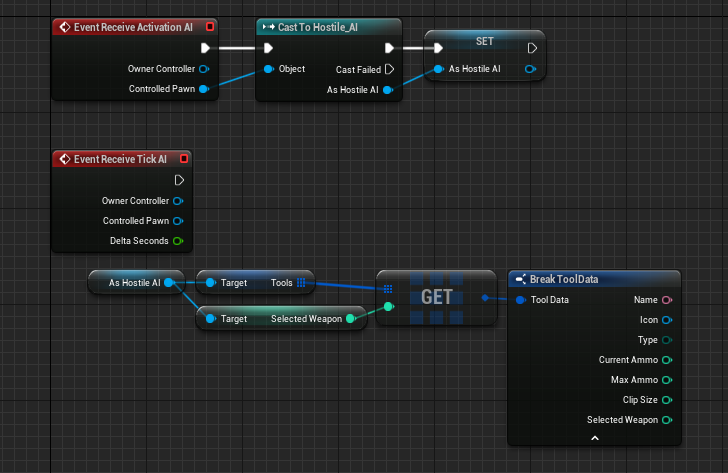

if i don't cast?
i need the information stored in the character bp
uneven cloud
Oh. Yeah if you are calling a function on the character you need to cast. Don't need to cast if you are using the GAS event. It's early here.
uneven cloud
Are you using GAS?
hearty niche
hearty niche
how do I do this?
umm @uneven cloud ?
uneven cloud
hearty niche
how do I do this?
If you Google "EQS cover" there are a lot of results. You might want to start with the documentation: https://docs.unrealengine.com/4.27/en-US/InteractiveExperiences/ArtificialIntelligence/EQS/

Documents the Environment Query System (EQS) and how it can be used to query the environment for data. That data can then be used to provide the AI with data used in the decision making process on how to proceed.
hearty niche
uneven cloud
If you Google "EQS cover" there are a lot of results. You might want to start w...
last perceived location not cover. This is for lost sight.
uneven cloud
hearty niche
last perceived location not cover. This is for lost sight.
You can query the perception component for lots of information. Such as if the AI is currently perceiving a target, if it is currently perceiving it with a specific sense and the last perceived location. If you are using only BP, I'm not sure how much is exposed.
hearty niche
uneven cloud
You can query the perception component for lots of information. Such as if the ...
its fine if I have to use cpp but how do I query stimulus locatiom
uneven cloud
hearty niche
its fine if I have to use cpp but how do I query stimulus locatiom
I typically use the function GetActorInfo which returns FActorPerceptionInfo
The FActorPerceptionInfo has a lot of functions. You can get the last known location or the last known location for a specific sense, such as sight.
hearty niche
uneven cloud
I typically use the function GetActorInfo which returns FActorPerceptionInfo
I found the actor perception info. How do I know what stimulus it is?
uneven cloud
hearty niche
I found the actor perception info. How do I know what stimulus it is?
What do you mean? You can ask for information based on a given sense, but you need to get the sense ID. I believe you can get the ID for AISense_Sight from the perception component.
hearty niche
uneven cloud
What do you mean? You can ask for information based on a given sense, but you n...
you mean the index?
uneven cloud
hearty niche
you mean the index?
The FAISenseID
hearty niche
then how would I query via sense ID?
uneven cloud
hearty niche
then how would I query via sense ID?
There are a lot of functions on the FActorPerceptionInfo that take in a sense ID. Such as IsSenseActive is used to check if the target is currently seen.
hearty niche
Get Actor Info is cpp only?
uneven cloud
I do not know how much is exposed to BP.
Looks like for BP it's Get Actors Perception
hearty niche
uneven cloud
There are a lot of functions on the FActorPerceptionInfo that take in a sense ID...
How do I check if it does have a stimulus info or not?
mortal umbra
@uneven cloud why does EQS never work for me?
this is annoying
i have copied it exactly from the Lyra thing
it doesn't work
uneven cloud
mortal umbra
<@228699554034221065> why does EQS never work for me?
I can't possibly know that. The visual logger will give you some hints.
mortal umbra
the testing pawn?
that doesn't work either
the plugin is enabled
can i share my screen for a bit? maybe you see what i am doing wrong
uneven cloud
hearty niche
How do I check if it does have a stimulus info or not?
In C++ it returns a pointer. If there is no perception info, that pointer would be invalid. I don't use BP enough to walk you through it.
uneven cloud
mortal umbra
can i share my screen for a bit? maybe you see what i am doing wrong
Can't. I have meetings all day. The EQS is being logged out to the vis log. All you have to do is run it and walk through what is actually happening.
mortal umbra
@uneven cloud how can i enable the visual logger?
i can't find it in the window menu
To activate the Visual Logger, use the menu in Windows > Developer Tools > Visual Logger. In Unreal Engine versions prior to 4.7, enter the console command "VisLog". If you are in the Editor, the Visual Logger viewport will also open.
its not there in 5.0.3
uneven cloud
Tools -> Debugging
mortal umbra
@uneven cloud i have this

the result should be the blackboard key TargetActor
it however says it is none
quaint radish
How would I have 2 conditionals within the same composite that act as an OR statement?
Like I want a Selector to run IF the player is in Attack or Patrol state.
I currently have a conditional (decorator) checking for idle, another for not idle.
quaint radish

currently decorators act as an And
requires both to be true
how do i make it so it will run if one of the decorators are true?
 opal crest
Use a composite decorator. Then you can configure how the logic of your decorators combine inside the mini node graph inside the composite.
 fleet cradle
Hey everyone, I wanted to make 2 characters one is playable and the other copy the same movements, should I use AI for that?
fleet cradle
fleet cradle
Hey everyone, I wanted to make 2 characters one is playable and the other copy t...
got it working, if someone is interested to know

good call
hearty niche
is it possible to forget a stimulus by sense? I could only find forget all but that could cause problems in case I also have stuff with multiple stimulus
 rich veldt
Hello, I'm lower-mid-level understanding with AI and the navigation system, and I'm looking into researching standard methods for having an AI understand that a closed door may be blocking the line of their path (and perhaps also allowing Find Path To Location Sync to "pass through" closed doors in the process), and subsequently move to open it when at a certain distance on the path to it, but I'm not having an easy time finding definite examples. I've found Nav Link Proxy but unsure if it can be used for this just yet. Any suggestions for things to look into/learn about some more?
celest python
rich veldt
Hello, I'm lower-mid-level understanding with AI and the navigation system, and ...
Back three years ago I did spawn a NavMeshModifier thing that makes AIs impossible to move to a specific location to placed when doors are closed
then called find path to door's location
then also to be sure checked door's state if doorClosed
if two of them matches I told AI that the door is closed
there might be more modern and better solutions
but for a quick prototype this one worked out without any problems
ocean wren
NavModifierVolume
set a new navarea class for the volume.. change the value for the path through depending on the door state
Rama did a video on how it all works
uneven cloud
rich veldt
Hello, I'm lower-mid-level understanding with AI and the navigation system, and ...
There are 2 routes you can go that are pretty equal. Using nav modifiers and area classes like others have suggested is a good option, but it takes a bit more setup for opening the door.
Using a nav link proxy is another option and makes it a bit easier to trigger the door to open. Point links use nav areas (C++ only). Smart links (BP or C++) don't, but are more expensive.
rich veldt
Awesome thanks all, I'll try both methods for learning.
mortal umbra
what is the best way to get a variable from the player bp to an AI controller bp?
i know i can cast, but i rather not
hearty niche
Any idea why I am getting this error on build? It seems to be something AI related
UATHelper: Packaging (Windows): LogInit: Display: LogOutputDevice: Error: begin: stack for UAT
UATHelper: Packaging (Windows): LogInit: Display: LogOutputDevice: Error: === Handled ensure: ===
UATHelper: Packaging (Windows): LogInit: Display: LogOutputDevice: Error:
UATHelper: Packaging (Windows): LogInit: Display: LogOutputDevice: Error: Ensure condition failed: ObservedKeyNames.Num() > 0 [File:D:\build\++UE5\Sync\Engine\Source\Runtime\AIModule\Private\BehaviorTree\Decorators\BTDecorator_BlueprintBase.cpp] [Line: 68]
You have an error with one of your BP decorators.
uneven cloud
mortal umbra
i know i can cast, but i rather not
You can cast to the player or cast to an interface.
hearty niche
uneven cloud
You have an error with one of your BP decorators.
seems like it needed a Blackboard Key selector set to self actor as a workaround. I was using possessed pawn directly from the function override. Engine Bug?
 random jay
Anyone have any good talks on AI?
I'm curious about melee AIs in games like dark-souls/elden-ring/zelda etc
celest python
random jay
I'm curious about melee AIs in games like dark-souls/elden-ring/zelda etc
No idea about Zelda but souls games are notorious with terrible hit boxes
celest python
random jay
Anyone have any good talks on AI?
Check pinned messages
celest python
celest python
No idea about Zelda but souls games are notorious with terrible hit boxes
Something like this would work: https://twitter.com/Wabbaboy/status/1548299662754402305?s=20&t=eAyApM3szUIz8nBUql12sA
I was saved it a while ago to recreate but never had enough time
mortal umbra
how can i have a CCTV camera detect a player and communicate it to an enemy AI?
should i just cast or interface it?
harsh storm
celest python
I was saved it a while ago to recreate but never had enough time
Do you just not use anim notifies or something? 😅
Anim notifies are one of the reasons I like Unreal, lol
celest python
I use it but it's also tracking the bone rotation properly and somehow able to draw debugs in anim editor which I couldnt find how back a few months ago
There is a relatively small boilerplate process to do it like how it's shown in the tweeet
Oh btw I forgot to read your ping in lounge, I was outside
Will read it in a few mins
signal olive
So it turns out nav links can be pretty damn buggy
Especially if you're using blueprint
Which is frustrating for someone like me who basically needs to make use of nav links, especially smart links
 dim lynx
could someone advise me? there will be 100 AI in my game, each of them I would like it to be so that if a player approaches the AI close enough, the AI will gradually approach it every 20-50m >>> wait 5 sec >>> go 20-50m >> > wait 5sec and until it comes close to the player at 10m

i do it with Overlap Sphere and task but i think will be better do it with EQS
but I don't know much about EQS
here is 50 AI
 novel flower
@dim lynx What do you use the overlap sphere for? To detect if the player 'is close' to the ai? Maybe you can use the perception system in stead?
 lament maple
How do you see the bounding box for a nav mesh volume? I see the green area for debug with "P", but not the extents to tell how far I should scale out the volume
harsh storm
It shouldn't scale outside of the volume
As for actually seeing the lines, it might be that it is scaled to the point where it is off the map. Try and find it in the world outlier and select it. See if you can actually see it when it is highlighted. Perhaps the lines are too thin for you.
lament maple
I'm a dummy, it was just so big I didn't realize the bounds were outside my viewport
lament maple
harsh storm
As for actually seeing the lines, it might be that it is scaled to the point whe...
Yes exactly thank you 😄
 rotund lynx
NavMesh is driving me crazy! I try to fine tune values but nearly all the time when I change value and mesh shows agent error, I change value back and error won't go. I have to delete the navmesh and start from scratch. Anyone else experience this?
brittle lynx
dim lynx
could someone advise me? there will be 100 AI in my game, each of them I would l...
Why don't you just check distance between the player location and character location on tick? Even without any optimizations it will be massively faster than overlap checks with huge spheres.
ocean wren
Hmm, it might not actually.. the broad phase of the physics engine might well prune out a lot of potential overlap checks as it does a sort and sweep
brittle lynx
ocean wren
Hmm, it might not actually.. the broad phase of the physics engine might well pr...
Given that UpdateOverlaps takes 22ms per frame in the provided screenshot, I doubt that.
ocean wren
it'd depend on your scene and how many things are moving
and the size of the spheres
and if you sorted them into a seperate physics channel
I guess you could do the sweep and prune yourself.. its not hard
 noble totem
Hi. I have an AI Pawn (a flying object) moving inside the navmesh volume at a 1000 units above the navmesh plane. Is there a way that I can tell it to detect the navmesh below it? It works fine when the plane is at 100units below. Antything further than that and the AI stops working.
harsh storm
I mean, when you get the new nav location, just take the X and Y parts of it. Then write some custom stuff to monitor the Z.
noble totem
Ok there are a lot of nodes that can detect the navmesh but none that actually says use it. Using the FloatingPawnMovement component btw. Also I don't need my AI Pawn to change height. Just need it to move on a plane that is 1000units above the navmesh plane.
 quick oak
Look for ProjectPoint in the ANavigationData actor. You can specify extents that will stretch those 1000 units to find the navigation "below". YMMV if you have multiple "layers" of navigation- it should find the closest to the origin you provide though.
noble totem
Will try that, thanks.
rotund lynx
@noble totem depending on the task, you can have the transparent non-collidable plane 100 units below for nav
that's what I've done for pathing in empty space
noble totem
Actually it was way simpler than that. If you go to the RecastNavMesh actor in your level, go to the the Query section and increase the Vertical Deviation from Ground Compensation to the height your actor is, it works like a charm.
Thanks for all your input that led to me figuring it out. Hope this helps someone.
 alpine path
I need rotate my NPC to target actor and keep looking at it. I use RotateToFaceBBEntry but it resets focus when finished. Do I need to implement custom node (so it never finishes) or there is better way?
dim lynx
how to do so that the AI approaches a given object every e.g. 20m
I mean just approaching the object
I have Distance to this object
and i have location of this object
and i have AI location
Can someone help with the calculations?

all is valid
could someone help with the rest? 😅
I have no idea for this
alpine path
dim lynx
Can someone help with the calculations?
You can use node moveTo
dim lynx
alpine path
You can use node moveTo
i used it
but I want him to go this way every 20 m
target is 100m
he should go 20m >> wait >> go 20m >> wait >> go 20m >> wait .....
and finish
if 100m complete
sorry
finish if distance is < 10
alpine path
What is problem? Switch to wait every 20m from Move state to Wait state
You just need local variable to mark location when NPC started movement then every tick compare to 20m
dim lynx
alpine path
You just need local variable to mark location when NPC started movement then eve...
but in behavior tree
in task
I would prefer to calculate the distance to be traveled and set in a variable the location to which it is to go
dim lynx
the goal is only to set the first location where it will wait... everything is done in the behavior tree, when the location is set goes to this place and waits, the problem I only have with the location.


these green points may be random, but all the time towards the player
someone can help? i want do it with only calculation
I have no idea for this
uneven cloud
alpine path
I need rotate my NPC to target actor and keep looking at it. I use RotateToFaceB...
You can also set focus. There is a built in decorator that sets default focus.
uneven cloud
dim lynx
the goal is only to set the first location where it will wait... everything is d...
I would use the EQS to generate the points. The problem with doing it only with a calculation is dealing with situations where it can't go in a straight line.
uneven cloud
dim lynx
someone can help? i want do it with only calculation
If you really want just the calculation: you get the direction vector by subtraction of locations. Target location - AI location. Then normalize that vector. Multiply that by how far you want to go in unreal units (centimeters). That will give you a point on the red line.
 young thorn
I'm so confused. I'm looking into the AIPerception system and I can't find any way to consume its events in C++. Everything is about doing it in blueprint. Anyone familiar with this?
uneven cloud
young thorn
I'm so confused. I'm looking into the AIPerception system and I can't find any w...
The same events that are in BP are in C++. What are you trying to do?
young thorn
Ah, I see. For some reason I assumed I shouldn't touch events that are exposed to the blueprint interface. 😝 I got it working. Tyty
 fallow gust
Hi. I have been developing a plugin to extend the AIModule in UE5. It takes a hybrid approach to Utility AI and GOAP with a focus on enabling AI behavior design through a data driven editor. I feel as if it has been maturing quite well from the AI implementation side of things as I have been integrating it into my upcoming project. The way it works is that it uses Utility AI concepts to determine a goal from a generated state provided by a new type of Brain Component. Once a Goal is determined - using either dual utility or absolute utility - it creates a plan of actions to accomplish the determined on goal via GOAP. Right now the only planner is AStar, but I am thinking of adding a Fringe search to reduce memory load when there are more agents (but it does cost on CPU) and perhaps other types of searches for creating plans. I would love to see if there is any feedback as there is a short tutorial to help you get started. https://github.com/hollsteinm/ReasonablePlanningAI Currently, for the most part, it has a lot of feature parity with Behavior Trees as far as making your AI controlled characters doing stuff in game. It also has integration with Environment Query System natively, and a small tutorial on how to (in C++) integrate with Smart Objects Module or any other AITask based plugin/module. I also have a ton of automated tests on the basic stuff so I feel it is stable enough, but it is rapidly going through a lot of changes.
It is free for anyone to use while it is in this development stage (just clone it into your Plugins folder) and I would love to hear some feedback after you have tried it out. Figured it would be a fun way to add a reactive and thoughtful AI using something other than state machines, events, and/or behavior trees.
It is also integrated with Visual Logger for debugging and plans the AI is executing are shown under the debug overlay (using the ' key in game/PIE)
GitHub
Designer Driven Unreal Engine 4 & 5 - UE4 / UE5 - AIModule Extension Plugin using Data Driven Design for Utility AI and Goal Oriented Action Planning - GOAP - GitHub - hollsteinm/Reasonable...
Also, this project had me deep in the weeds in the AIModule... so open to help out with any questions on that as well, especially the C++ side of things.
dim lynx
uneven cloud
I would use the EQS to generate the points. The problem with doing it only with...
I don't know too much how to do it in EQS, I don't understand this system
fallow gust
dim lynx
I don't know too much how to do it in EQS, I don't understand this system
The quick start guide shows you how to generate a point and travel to any areas X distance from player and has the AI wait. Sounds like your use case. https://docs.unrealengine.com/4.27/en-US/InteractiveExperiences/ArtificialIntelligence/EQS/EQSQuickStart/

The Environment Query System Quick Start aims to get you up to speed on some of the systems and tools for working with EQS and AI.
dim lynx
fallow gust
The quick start guide shows you how to generate a point and travel to any areas ...
thanks
celest python
fallow gust
Hi. I have been developing a plugin to extend the AIModule in UE5. It takes a hy...
I wanted to take a quick look and provide feedback but it looks huge lol. At least I can say idea behind the implementation looks really good. If I can find time from daily job I'll try to read source too. Thanks for sharing with community
fallow gust
celest python
I wanted to take a quick look and provide feedback but it looks huge lol. At lea...
Thanks! It was a ton of work over the past 9 months and still growing especially after being yanked out from my upcoming game and refactored. For a slim reading I would ignore Composer directory as most of that is just objects for data driven configuration, with the exception of Composer/ActionTasks which are similar to BTTasks.
dim lynx
fallow gust
The quick start guide shows you how to generate a point and travel to any areas ...
ok, I used the EQS more or less, I did the same, just a little different, but it works the same, and how to make it go towards the player every 20m?
dim lynx
someone can help?
uneven cloud
dim lynx
ok, I used the EQS more or less, I did the same, just a little different, but it...
You want to generate points around your agent instead of your target. Then test the points on direction to target, distance to target and has a path to both target and agent.
signal olive
Any suggestions on how to make an AI react to player actions? Like, say, if there is an incoming projectile or the player has triggered a melee attack animation
fallow gust
dim lynx
ok, I used the EQS more or less, I did the same, just a little different, but it...
There is a Behavior Tree decorator called Cooldown, use that on the node or the parent selector. Assuming 20m = 20 minutes: Engine/Source/Runtime/AIModule/Classes/BehaviorTree/Decorators/BTDecorator_Cooldown.h
fallow gust
signal olive
Any suggestions on how to make an AI react to player actions? Like, say, if ther...
I think the perception system would be a good place to do that. https://docs.unrealengine.com/4.27/en-US/InteractiveExperiences/ArtificialIntelligence/AIPerception/

Documents the AI Perception Component and how it is used to generate awareness for AI.
signal olive
Well, incoming projectiles are easy enough to identify, but not enemy animation types
Also how the hell do you set up teams/factions, the senses imply such functionality but I've never seen it
uneven cloud
signal olive
Well, incoming projectiles are easy enough to identify, but not enemy animation ...
You need to tell the AI about it in some way. I use the perception system for it, but I don't believe that you can add new senses if you are only in BP.
uneven cloud
signal olive
Also how the hell do you set up teams/factions, the senses imply such functional...
The Generic Team Interface
signal olive
uneven cloud
The Generic Team Interface
That gives nothing to work with
dim lynx
uneven cloud
You want to generate points around your agent instead of your target. Then test...
I don't understand a bit


in QC_WechPlayer... i get all actors of class BP_Character
Could it work that it checks how many points are up to the player?
and e.g. if it is less than 5, then it moves every 1 point and 5 seconds wait for each point
uneven cloud
signal olive
That gives nothing to work with
It gives you a term to search for. The perception system uses an interface that is on all AI controllers called the generic team interface.
dim lynx
if 6, 7 ... etc, then not move
signal olive
uneven cloud
It gives you a term to search for. The perception system uses an interface that...
Right, it's just that there's no obvious way to set teams
uneven cloud
signal olive
Right, it's just that there's no obvious way to set teams
In BP there is none. In C++ it's SetTeamID.
signal olive
I'm really starting to consider using C++ at this rate.
uneven cloud
There are a lot of things, especially in AI, that are just not exposed.
You can just not use the built in filtering and use your own team functionality after perception gets everything.
mortal umbra
what is a good EQS tutorial?
i can't get it to work
it says that the vector of movetolocation is invalid in the behaviour tree when debugging
@uneven cloud
when i follow this exactly
In this series we will be creating AI for a shooter game, including behaviour such as shooting, seeking cover, flanking, and random personalities (courageous, skilled etc.).
If you want the starting project file with the animation and shooting code already prepared for you rather than use your own shooting code, head over to Patreon.com/ryanlal...
it does not work
the AI does not move to the player at all
it just stands still
don't mind the shooting bit, that isn't important for this
uneven cloud
dim lynx
Could it work that it checks how many points are up to the player?
You could do, but that's not a simple way. You can just use tests to find the next point as they move.
uneven cloud
mortal umbra
it does not work
Is the EQS failing to run? Is the EQS not generating anything? Is it failing all the tests? The visual logger should give you some insights as to where it's failing.
mortal umbra
the EQS runs
it is just that the blackboard vector is invalid
try and follow the tutorial and see it will probably also happen to you
dim lynx
uneven cloud
You could do, but that's not a simple way. You can just use tests to find the n...

I just want something temporary until I learn EQS
uneven cloud
mortal umbra
try and follow the tutorial and see it will probably also happen to you
Does the visual logger say that it found an item?
dim lynx
uneven cloud
If you really want just the calculation: you get the direction vector by subtrac...
this doesn't work
dim lynx
uneven cloud
If you really want just the calculation: you get the direction vector by subtrac...
and i don't understand 100%
mortal umbra
@uneven cloud now the EQS thing doesn't give a score
it just says that the score is 0
uneven cloud
dim lynx
and i don't understand 100%
It's easier to debug if you add some debug drawing and debug print strings.
dim lynx
uneven cloud
It's easier to debug if you add some debug drawing and debug print strings.
could you show it on blueprint?
mortal umbra
@uneven cloud what am i doing wrong here?

No description provided
it doesn't generate EQS points
but if i change it to generate actors it does generate that
uneven cloud
dim lynx
could you show it on blueprint?
No. Debugging is incredibly easy with all the UE tools. You need to verify all your actors are valid and draw the location on the screen. Draw debug sphere is really good for drawing locations.
You are also multiplying by 20 which is a very small number. That's 20cm not 20 meters.
fathom sun
I'm trying to add perception component to my ai controller component through C++, but for some reason I can't change class of a sense in their config (in BP). Whenever I add a new element to senses config it's None by default, and if I try to change to anything else it just doesn't, any ideas what may be wrong? The only thing that I did in C++ is adding a declaration in header file like that
UPROPERTY(VisibleAnywhere, BlueprintReadOnly, Category="Components")
TObjectPtr<UAIPerceptionComponent> PerceptionComponent;
and creating the component in the source file
PerceptionComponent = CreateDefaultSubobject<UAIPerceptionComponent>(TEXT("AI Perception"));
You need to add an edit specifier to your UPROPERTY. EditAnywhere or EditDefaultsOnly
 west lark
I am trying to make an IA vehicle that runs off spline, but instead of using the time it takes to complete, i want it to have a set speed, so i can have multiple vehicles going the same speed right noext to each other. How do i do this?Please help
 leaden mural
I have never used a perception component in my life lol
did you think I knew about this because of #mass ?
sorry buddy 😔
what do you mean by resetting its peception anyways?
harsh storm
ForgetAll()
 languid mirage
hi all, I'm using pawnsensing, I'm trying to make AI character 1 to follow and shoot only AI character 2. I could not figure it out. Can anyone gimme a hand?
 hasty badge
How do I make a behavior tree execute smth only when a blackboard value is changed?
keen crow
languid mirage
hi all, I'm using pawnsensing, I'm trying to make AI character 1 to follow and s...
Try implementing IGenericTeamAgentInterface:: GetGenericTeamId on both ai controller and character and return different value for different NPC types
keen crow
hasty badge
How do I make a behavior tree execute smth only when a blackboard value is chang...
Have you tried putting this something under a selector node with a blackboard decorator that aborts lower priority?
uneven cloud
hasty badge
How do I make a behavior tree execute smth only when a blackboard value is chang...
Blackboard decorators have observer aborts that can be set to result change (the result of the decorator) or value change.
There is a function you need to call when changing teams. RequestStimuliListenerUpdate on the perception component. Using ForgetAll will only make the AI forget the targets, not reconfigure for a different team.
hasty badge
I'm trying to make a character go to where I right click, follow the cursor when I hold RMB, and not call the move function when the target destination doesn't change (it makes using nav links impossible)
idk maybe I don't need to use the behavior tree for that at all, I'm very new to AI
hasty badge
How do I edit navmesh so characters can walk on narrow surfaces like this?
 celest python
you probably still need RequestStimuliListenerUpdate though
 rose bramble
hello, when i launch a game, behavior tree is extrimlee flickering

i mean market parts is just bright green and grey in next second
i mean i watch a tutorial, everybody have stable bridght green
 cursive wave
rose bramble
hello, when i launch a game, behavior tree is extrimlee flickering
cursive wave
rose bramble
hello, when i launch a game, behavior tree is extrimlee flickering
First of all, it is unnecessary to use two sequencers, according to the picture you posted. You can delete one. If you're having a flick in the behavior tree, your task is probably failing. Can you show the contents of the task blueprint?
rose bramble
cursive wave
First of all, it is unnecessary to use two sequencers, according to the picture ...

npc is space ship
gravity is 0
so i move it by velocity
also NPC is Character blueprint
cursive wave
rose bramble
Don’t you get blueprint runtime error?
Because character movement ref is null I mean it is not assigned to anything. You should call get character movement component from As Character pin and assign return value to character movement ref
Also you can use breakpoints to debugging nodes. Right click to node > add breakpoint or select the node and press F9
rose bramble
cursive wave
Because character movement ref is null I mean it is not assigned to anything. Yo...
i dont think it failed, cause nps is flying to me
could it fail and fly to me anyway ?
cursive wave
Okay so, I think it’s flicking because there is nothing else to do. You can add wait task to left your task’s to test
rose bramble
cursive wave
Okay so, I think it’s flicking because there is nothing else to do. You can add ...
yes, it not flickering, when it do wait task
but it making Fly_To_charecter task is less than a second. is it ok ?
rose bramble
cursive wave
Okay so, I think it’s flicking because there is nothing else to do. You can add ...
oh wait, you actully was correct. how to solve it ?
 cursive wave
Yeah true. For example Move To task takes time to happen but your task finishing immediately
cursive wave
rose bramble
oh wait, you actully was correct. how to solve it ?
Drag from As Character pin and call get character movement and assign the character movement ref to this component
 storm zephyr
hello i'm trying to use a box component behind an enemy as a dynamic obstacle to serve as a way to do avoidance, and it works good enough for what i need (and better then the solutions for avoidance like RVO and the CrowdFollowingComponent), the only problem is that it hurts performance quite a bit, is there a way to reduce the impact on performance? maybe by making smaller or bigger cells on the nav mesh?
cursive wave
Can you show how did you use to box component. For example overlap event
rose bramble
cursive wave
Drag from As Character pin and call get character movement and assign the charac...
it is still flickering, but no error message already
 rose bramble
cursive wave
Drag from As Character pin and call get character movement and assign the charac...
rose bramble
cursive wave
Drag from As Character pin and call get character movement and assign the charac...
so it is not flickering when it make Wait, and make my custom task like less in a second. and that should be ok ? am i correct ?
cursive wave
After you set the velocity, you can look at the distance between the player in the tick event and run the finish execute accordingly. this way your task is not finished right away.
rose bramble
cursive wave
After you set the velocity, you can look at the distance between the player in t...
but there is nothing bad that it execute less in a second since it fly to me ? or i miss something ?
or it eat a lot of resoursce that way ? like because it execute every second ?
cursive wave
rose bramble
or it eat a lot of resoursce that way ? like because it execute every second ?
Yeah it’s casting almost every frame