Now I'm using Windows 10 on my laptop, it got a i5 7200U, a GTX 950M, 16gb ram and 1tb ssd.
And I really want to play games like fortnite or else but I usually have a cpu bottleneck.
So I wanted to know if it would lower my bottleneck to have an os with less processes
and also can and how can i install the os without losing my files
#Changing the OS
1 messages · Page 1 of 1 (latest)
 digital lake
 pseudo violet
A low powered dual core CPU from what's essentially 9 year old tech?
Forget about it. Fortnight is quite CPU heavy nowadays.
The laptop did have some pretty good mileage, but if I were you I'd start considering getting a new computer
But before that... have you checked what frame rates are you getting in game? (Use a single player mode, such as Lego Fortnite, to easily verify)
(That mode is free and persistent (saves), so it's easy to check with.)
digital lake
pseudo violet
But before that... have you checked what frame rates are you getting in game? (U...
im at 30-45 fps
with drops at 0 fps when the cpu is maxed out
so i have freezes when its loading or else
pseudo violet

Start to analyze your hardware right now! HWiNFO has available as an Installer and Portable version for Windows (32/64-bit) and Portable version for DOS.
Can you check the stats of this in sensors-only mode when the game starts to drop frames?
digital lake
alright
digital lake


 digital lake
yes but i can lower it a bit with closing processes no ?
pseudo violet
digital lake
yes but i can lower it a bit with closing processes no ?
Can't do much shit with a dual core CPU in 2024
Let alone something that is hamstrung by power and clock limits too
Even though you aren't thermally throttling
You're hitting power limits
digital lake
i already got an issue like that on val
pseudo violet
You ARE already at minimum settings right
digital lake
as i remember you told me that i was thermal throttling
i changed my thermal paste and all that stuff but same temps
digital lake
pseudo violet
You ARE already at minimum settings right
yes
720p
60 fps lock
performance mod
and all low
pseudo violet
Frankly I think you need a new computer at this point
digital lake
yes i know that but i dont really have money so im just doing what i can do to get more and more perfs
pseudo violet
Just as a sanity check, can you show the stats when the game isn't running?
pseudo violet
No background apps stealing CPU, then
All signs point to not enough CPU
digital lake


before some games updating i was getting about 100 frames on every games i was playing
i was at a stable 120 fps on fortnite
but now the cpu cant load the game with 120fps
pseudo violet
Did it happen after Fortnite updated to UE5?
digital lake
i was with the same issue on valorant but they fixed it somehow
digital lake
pseudo violet
Did it happen after Fortnite updated to UE5?
yeah i think so
digital lake
but months ago i wasnt getting issues like this
pseudo violet
Long term service games tend to eventually increase in requirements
Usually tied to major updates
pseudo violet
Lemme guess... it's not exactly with the UE5 (since that's early last year), but with the very recent update that gave it Lego Fortnite among other things?
digital lake
pseudo violet
Lemme guess... it's not exactly with the UE5 (since that's early last year), but...
yes
i got the same on val but i dont have the issue anymore
pseudo violet
digital lake
i was playing on 1.8.9 version which released on 2015
With laptops, always check if it's actually running on the dGPU, since technically it's not Minecraft, but the Java runtime
pseudo violet
digital lake
yes
Not enough CPU for current versions for Fortnite, then
digital lake
i was getting low fps like 40
pseudo violet
digital lake
and it was running on my apu
Always always check
digital lake
i changed it to the gpu
pseudo violet
So basically, Minecraft and Valorant should still be fine
The problem is Fortnite since it's constantly updated
digital lake
and now i get like 160 fps average but freezing when loading
it does the same when its capped to 60
pseudo violet
As both a platform and a UE5 technical showcase
On modern Windows frankly two cores at 2-3ghz is painful
If you start gaming
pseudo violet
Your computer is really old
digital lake
yes i know that its 8 or 9 years
pseudo violet
7 generations ago, or 7 years ago. Games that ran fine but end up getting updated down the line will eventually stop caring about a dual core laptop CPU of that era
digital lake
i was thinking about buying a new pc but firstly i need the money and also talk about it with my parents
digital lake
i think the 950 is still good for the games i play
wait
im not english actually so
wait a sec
year 9
in high school
right now i have 450€
i was thinking of getting an xbox but i will still need a pc for university and all that stuff
so i think im just gonna build a pc when i will be at 700-800€
pseudo violet
you should hold off on the xbox tbh
and if you are bringing said pc to the university, go straight for a gaming laptop
for the most part, pretty much every xbox game is also a pc game
digital lake
most of my friends are playing on pc
and most of the games i play are only on pc
but i was thinking about buying a really gaming pc
and using this laptop for school
so i would actually be able to play without any problem
and also work without any problem
pseudo violet
Why not fold the budget for your Xbox, desktop, and laptop together?
pseudo violet
Laptops are PCs too
digital lake
yeah but heat issues
also way more expensive
and harder to upgrade or repair
its gonna be easier to change parts of a desktop pc
and i mean
a 2 core surely can handle word
pseudo violet
the main problem being that you want a gaming capable PC and a laptop at the same time
 weak sonnet
digital lake
Now I'm using Windows 10 on my laptop, it got a i5 7200U, a GTX 950M, 16gb ram a...
weak sonnet
digital lake
Now I'm using Windows 10 on my laptop, it got a i5 7200U, a GTX 950M, 16gb ram a...
Well first of all fuck all the theories and test the fortnite game at low settings with performance mode. If you're happy with the whole experience then no need to worry about it
pseudo violet
weak sonnet
Well first of all fuck all the theories and test the fortnite game at low settin...
...didn't they already say that?
also, this thing is stuttering
weak sonnet
pseudo violet
also, this thing is stuttering
Ah damn I just checked
weak sonnet
digital lake
and now i get like 160 fps average but freezing when loading
This is a different one
Single stick 16GB? DDR3?
Maybe RAM usage is more than 75% and getting too many hard page faults
@digital lake download this utility http://www.mediafire.com/file/ewpy1p0rr132thk/MSI_util_v3.zip/file

MediaFire
Run as admin and show the result
digital lake
uh
firstly i was on 4 gb and a 2 gb ddr4 sticks
i upgraded to 2x8 16gb 2400
because the motherboard doesnt support more
and i dont know why but on the task manager it says only 2133

i searched xmp and old that stuff in my bios but i dont have it
and sorry btw i was at school
digital lake
pseudo violet
the main problem being that you want a gaming capable PC and a laptop at the sam...
i want a gaming desktop pc so i can run games without having heat issues, saving money and also upgrade it when i can
but i also need a laptop to use it for school
i just think that im gonna buy a pc without an ssd, take my old ssd from 200gb to put it in this laptop, and put this 1tb ssd to the gaming pc so i can save more money
so i will reset this pc and put it on energy saving things
weak sonnet
digital lake
Normal
Aight first of all, go to Nvidia control panel and restore 3D settings
Then download and run "autoruns64" as admin

See what programs are configured to startup automatically when your system boots and you login.
Save the result and send here
Look, these are just micro optimizations. That ain't gonna boost your fps to 50 or 100 lol
But at least it may or may not give your system stability cuz your whole system is old
digital lake
weak sonnet
Look, these are just micro optimizations. That ain't gonna boost your fps to 50 ...
alright im gonna try
but tbh 50 or 40 fps is still playable
i just wanna get rid of these drops to 0
weak sonnet
digital lake
but tbh 50 or 40 fps is still playable
Mate ngl nowadays fortnite kids are deadass sweating and try hard. 40-50 fps ain't good enough..
digital lake
im not playing that much of fortnite but this is the game where most of my friends are
im more playing fps type games
i was playing csgo
valorant
i get good frames on these games
the only issue is that it isnt stable
its freezing everytime

how do i use this
weak sonnet
digital lake
its freezing everytime
You sure it's freezing or maybe "rubberbanding"?
digital lake
weak sonnet
You sure it's freezing or maybe "rubberbanding"?
what is rubberbanding
as i saw with afterburner
weak sonnet
It's a concept related to gaming over network
weak sonnet
Are the CPU and gpu frequencies are correct?
digital lake
i dont know about that
i just know that my cpu cant handle the gpu correctly
the only game i run properly is css
weak sonnet
digital lake
what is rubberbanding

Left- my viewpoint, Right - server's.
Ping was 30-32 ms.
Just happened half-way through a competitive game. Hasn't happened before, hasn't happened since. I use a wired internet connection and found this more amusing than anything else, though I can understand how it could quickly become frustrating!
A follow-up to
http://youtu.be/5BpK-OzEb1E...
digital lake
it came in 2004
weak sonnet
digital lake
I'll get on pc later and let you know
weak sonnet
Also did you try driver version 537.58?
Recent drivers are horseshit
For maxwell gpus like yours
digital lake
idk i just have the latest i think
weak sonnet
Nah
digital lake
wait let me see
weak sonnet
Mate try the older version
digital lake
uhh how am i doing that
weak sonnet
Nvcleaninstall to remove Telemetry & enable/disable bunch of options which you don't get in express installation. Also NVcleanstall will remember previous settings for a start. It will also download the latest driver for you. If you don't care, don't care then
digital lake
so i install nvcleaninstall
weak sonnet
Aight do you know how to use DDU?
digital lake
uh i think so
weak sonnet

Download the English (US) GeForce Game Ready Driver for Windows 10 64-bit, Windows 11 systems. Released 2023.10.10
Download the driver
weak sonnet
digital lake
i remove with ddu and install with nvclean ?
Yeah install it using nvcleanstall
digital lake
do i have to install ddu ?
weak sonnet
Download and launch the DDU installer from the Wagnardsoft website
Extract DDU.
Boot Windows into Safe Mode
Launch DDU and select the NVIDIA driver from the drop-down menu
Click "Clean and restart"
Wait for DDU to remove all the drivers and restart your computer
Install old driver using nvcleanstall
 digital lake
digital lake
digital lake
and like this ?
weak sonnet
Yeah
digital lake
alr
weak sonnet
First uninstall using ddu
 weak sonnet
weak sonnet
weak sonnet
Select the bottom option too (not shown in the Pic)
weak sonnet
Also another option it didn't show about "MPO" it's really important. Tick "disable MPO"
digital lake
weak sonnet
Also another option it didn't show about "MPO" it's really important. Tick "disa...
alr
im doing all that and comming back
cya
weak sonnet
Ok
 digital lake
alr
it's installing
but It didn't ask me the tweaks you wanted me to select
oh okay I just got them
I put everything the same ?
I have things you don't have
I have enable dlss indicator, disable multiplane overlay, disable Ansel and apply nvenc session limit patch
do I also enable the one you removed with the pen ?

 digital lake
alright
weak sonnet
Once done, build the package and then install it. Don't just directly install.
The built package will come in handy next time
Once done with nvcleanstall shenanigan, download and extract this
Use this tool to quick test FPS
And you'll see stutters in graph if there's any
digital lake
I'm using afterburner

I have 124 fps average on deathmatch
I don't really remember but I think I was at 90 before
and I'm gonna test in a game where there is more effects
actually it's loading quicker
and even if the CPU is maxed out it doesn't look like dropping the GPU usage
I still have the issue
it's more stable but I'm still bottlenecked by the cpu
I'm dropping at 50 fps from 120 when it's loading
I mean it fixed it a bit but still here
I'm gonna try on cs
it stutters more
weak sonnet
Yuh
digital lake
uh
not more
still*
yeah it fixed it on cs
so I think that it's only fixed on old games
weak sonnet
digital lake
so I think that it's only fixed on old games
MPO did it
There's actually more we can go deeper
I'm talking about drivers, syscalls, interrupts etc
digital lake
well
if it's gonna be better I will do it cor sure
nah it's just worse on fortnite
but really worse
weak sonnet
Bruh I'm on my phone about to reach 100 tabs.
digital lake
 digital lake
weak sonnet
Bruh I'm on my phone about to reach 100 tabs.
digital lake
weak sonnet
Bruh I'm on my phone about to reach 100 tabs.
what tabs
weak sonnet
My browser tabs
digital lake
omg
weak sonnet
Yeah around 3GHz
weak sonnet
Ngl games like Fortnite, GTA 5 are heavily based on cpu
weak sonnet
For games always choose higher single core performance
digital lake
wdym
weak sonnet
For games single core performance matters more than having low freq but more cores
digital lake
yeah but I have 2 cores
weak sonnet
Also this game will have a few stutters until the shaders have finished compiling
weak sonnet
digital lake
yeah but I have 2 cores
Doesn't matter how many cores. 3GHz is slow for fortnite duh
digital lake
yes but the frequency isn't an issue
rn I just need the CPU to handle the game
2 cores aren't enough to load all this
weak sonnet
Running game from ssd?
Back in my days I remember core 2 duo was fast enough. I blame developers for poor coding optimizations
digital lake
I was running perfectly at 120 fps back then
digital lake
just with the updates the game became more intensive
weak sonnet
Open Epic Games launcher go to Fortnite options & enable the Pre-download Streamed Assets (This will install like 30GB of files that should help in-game performance)
weak sonnet
Ssd or hdd?
Also if you're planning to use your laptop a year more then install Windows 10 enterprise LTSC that will add some 13-15 fps extra
digital lake
weak sonnet
Also if you're planning to use your laptop a year more then install Windows 10 e...
firstly I wanted to download atlas os
or tiny10
because they lower CPU usage
but I don't know if it's gonna delete my files
what do I do with latency mon
weak sonnet
digital lake
or tiny10
I'd recommend you test it with a virtual machine first. Though, i wouldn't really recommend it as your main OS. As much as I don't like all the extra things in win 10, you have no clue what future problems you may run into & you're also going to leave future updates out of the question
weak sonnet
digital lake
what do I do with latency mon
Install and run
weak sonnet
You'll see what drivers are causing the most issues
digital lake
alright
wait I'm giving you the screenshots
and I already have predownload the shaders


 weak sonnet
Show me the first page too to compare easily
digital lake
 weak sonnet
And what do you get when you play games
Keep it running
Wdf is still high for idle tho
weak sonnet
Btw do you use ethernet?
digital lake
yes
weak sonnet
Aight
weak sonnet
If it stutters then it's your game issue not driver issue. Meaning shader cache or something
weak sonnet
digital lake
but my cable is broken
Do ping test to 1.1.1.1
digital lake
but yeah maybe its just messed up
weak sonnet
In cmd type ping 1.1.1.1 -t
After 60 seconds press ctrl+ c to stop
And show me the bottom page I wanna see packet loss
digital lake
i did 46 sec
46 sent
46 received
0 loss
min : 5 ms
max : 7 ms

but sometimes it just stops
weak sonnet
Meh don't worry your cable is fine
Otherwise you would have seen packet loss and in ethernet page wrong link speed
digital lake
its because i just replugged it
i broke it by walking on it actually
and sometime it just moves and i dont have connection until i unplug and plug it back
and also
my ram is at 2400mhz
but on the task manager it says 2133mhz
weak sonnet
digital lake
but on the task manager it says 2133mhz
Maybe either motherboard or cpu limiting it
In fortnite latency markers can cause Fps drop. Switch it off.
digital lake
same with or without
weak sonnet
I'ma check your autoruns file
digital lake
weak sonnet
I'ma check your autoruns file
alr
weak sonnet
digital lake
maybe its the update idk
When did you update
digital lake
just before launching to try if it still freezes
weak sonnet
I'ma tell you software to uninstall
digital lake
alr
weak sonnet
Unnecessary burden and context switching
Opera, java, mega, Google (switch to edge browser)
digital lake
opera is just my main browser
java is for minecraft
mega is for syncing photos on my phone
weak sonnet
Oh damn

 weak sonnet
As admin
digital lake
alr
weak sonnet
 digital lake
i tick them or untick ?
weak sonnet
They should be ticked.
digital lake
yeah they are
 digital lake
how do i untick all ?
weak sonnet
One by one
weak sonnet
Leave the yellow highlighted entries alone tho
digital lake
it just desapeared
digital lake
autoruns.exe on admin
weak sonnet
64

 weak sonnet
digital lake
nope i dont think so
weak sonnet
digital lake
nope i dont think so
yeah cuz it's there along with so many clutters
weak sonnet
digital lake
i dont see the nvidia ones
wym
 weak sonnet
They supposed to be there
weak sonnet
digital lake
can i open the file i just sent you ?
Yeah but don't open as admin.
Close autoruns64 and run as normal user not admin
Then open it
digital lake
ah shit
alr
okay i just did
but cant i just do it on this file ?
so i see the same ?
weak sonnet
First of all what happened to those entries
Hold on close everything. Run autoruns64.exe as admin and check again
digital lake
wait i'll just send you a new one
weak sonnet
No need
digital lake
alr
weak sonnet
Just forget about Nvidia
Disable other entries
Keep the nvidia entries ticked as you see
digital lake
i untick all and only tick what you told me to do ?
weak sonnet
digital lake
i untick all and only tick what you told me to do ?
Exactly
digital lake
weak sonnet
Keep the nvidia entries ticked as you see
i just dont have the nvidia ones
i cant tick or untick
they arent there
weak sonnet
digital lake
i just dont have the nvidia ones
maybe in schedule task
digital lake
nah they arent there
uh
i keep the yellow ones on ticked ?
as they arent here anymore
weak sonnet
digital lake
i keep the yellow ones on ticked ?
yeah
dont touch em
don't even try to delete em unless you know what you doing. I've seen BSOD just cuz of deleting one of em
digital lake
i think its all good
weak sonnet
U done?
finally run this

Download Malwarebytes AdwCleaner 2023 for free to remove adware, bloatware, unwanted toolbars, and other potentially unwanted programs (PUPs) from your Windows PC. AdwCleaner destroys adware and restores your PC's performance.
delete everything it shows you after the scan
then reboot. Check your fortnite performance and tell me
digital lake
im exporting the file ?
weak sonnet
digital lake
im exporting the file ?
huh?
weak sonnet
once you done with tick and untick everything close the software
weak sonnet
weak sonnet
finally run this
and start from here
digital lake

 weak sonnet
ye
digital lake
its gonna remove the ticked ones ?
weak sonnet
in adwcleaner? yeah select all
digital lake
 weak sonnet
yeah
digital lake
 weak sonnet
just select all bruh
do it quick. reboot. fire your game and tell me it's performance
digital lake
rn I'm on the spawn
it looks like it's better
I'll play 5 min and tell you
I don't know how to explain
it isn't freezing when it isn't loading anything
and when I go to combat it freezes
now it's not freezing like before
but I got a freeze when someone shot me
a big freeze
weak sonnet
I'm reading your texts while listening to Russian music
https://youtu.be/yJ67byj1Dbo?si=eieHCnJGB2SHVIGk

Fuck Putin Trailer Game, fuck putin trailer game, fuck putin, fuck putin gameplay, putin, vladimir putin, ukraine, fuck putin steam, gaming, fuck putin trailer, fuck putin video game, oc-gameplay, overwatch gameplay, funny, war, путин, fuck putin walkthrough, fuck putin game, fuck putin lets play, simulator games #FUCKPUTIN #Gaming #JeuxVidéo
weak sonnet
digital lake
now it's not freezing like before
I've seen this happening before in GTA back in my days
digital lake
nice musix
digital lake
how do I do that
weak sonnet
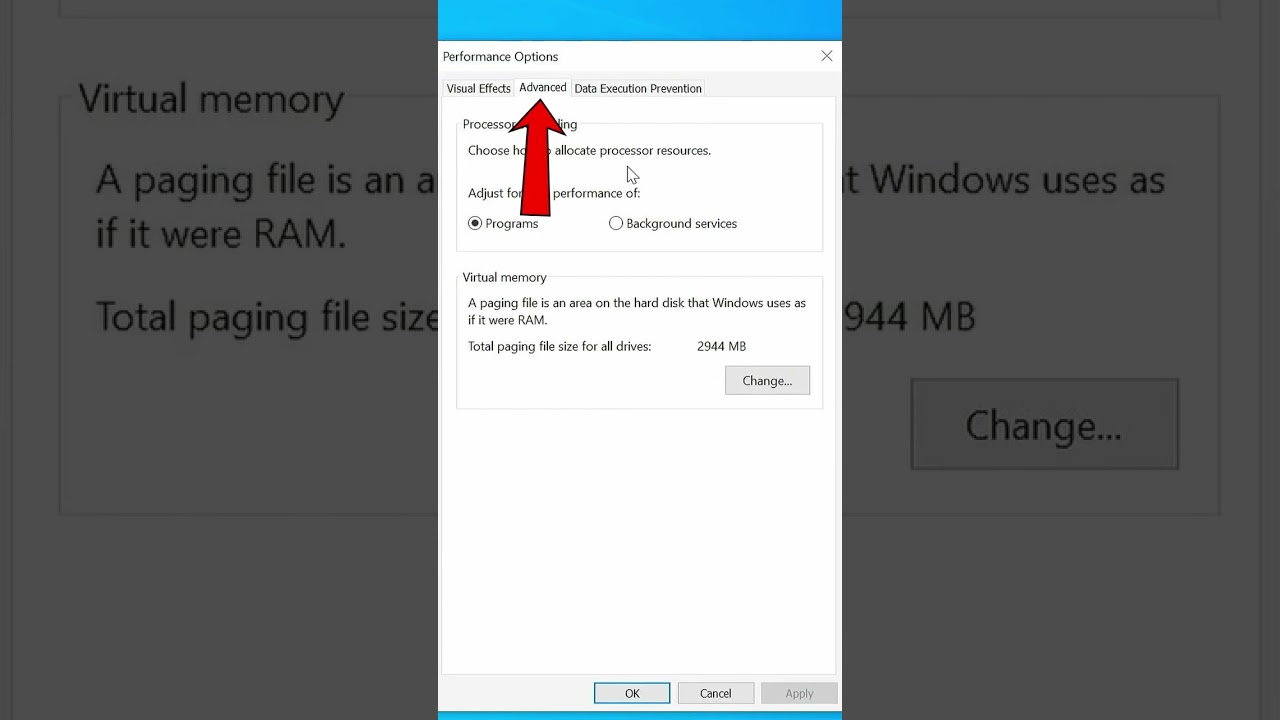
The fast and easy way to set your page file size in Windows. This works in all modern versions of Windows including Windows 7, Windows 8, Windows 8.1, Windows 10, and Windows 11.
Setting a manual page file size in Windows can be helpful as it allows you to control the amount of disk space that is allocated for virtual memory. This can be useful...
Follow this
Show me the final window I'll tell you what to set
 digital lake
but he's putting the same in the 2 cases
I put 16 on the upper and 2927 down?
and it says initial size
with maximum
weak sonnet
digital lake
but he's putting the same in the 2 cases
Different system
weak sonnet
digital lake
I put 16 on the upper and 2927 down?
yep
digital lake
same thing
weak sonnet
well then nothing you can do
weak sonnet
ppl been complaining the same thing everyewhere since 2 months
digital lake
I'll try with valorant to see if it's running better
weak sonnet
Has to do with new update
weak sonnet
digital lake
I'll try with valorant to see if it's running better
aight lmk
digital lake
weak sonnet
Has to do with new update
yeah I saw people complaining about it
there is people freezing with 4090s
wait
I think I got 40 fps more
or 50
 weak sonnet
digital lake
I think I got 40 fps more
weak sonnet
digital lake
I think I got 40 fps more
what about other games
digital lake
weak sonnet
I'm working on my program
is this basic ?
digital lake
weak sonnet
what about other games
i'll see
I just need to get the same map
well actually
I only got 50 fps more where the CPU isn't high
weak sonnet
hm you get issues only when it's at 100%
In theory what if you limit cpu usage for that particular process?
digital lake
yeah but only on cs I think
I'm gonna try css
way older
I wonder how much I'll have
I was getting 250 on css
weak sonnet
Try to limit cpu usage to 90% for only fortnite process
and maybe you'll have some luck
digital lake
300
weak sonnet
bruh i just made your day lmao
weak sonnet
damn
i was expecting like 15-20 fps boost
you got more than 100 lol
aight look we gonna try something advanced
digital lake
but on cs my CPU is at 50%
weak sonnet
nah I'm talking about fortnite
digital lake
on valorant or Fortnite its at 100%
weak sonnet
valorant is a bitch
digital lake
actually I haven't tried creative but maybe I'll take more than 120 fps
digital lake
weak sonnet
valorant is a bitch
it was way better back then
weak sonnet
I think I got a way better tool for your cpu
weak sonnet
BES is a small tool that throttles the CPU usage of the process you “target”: for instance, you can limit the CPU usage of a process which would use CPU 100%, down to 50% (or any percentage you’d like). With this, you can use other programs comfortably while doing something CPU-intensive in the background. For more than 10 years, BES has also helped various gamers as a handy “anti-freeze” agent, though that was not the original purpose of BES. Well-known examples quick-fixed by BES include The Witcher 3 + dual-core (2015); Steel Panthers: World at War; Kingdom Come: Deliverance; and Red Dead Redemption 2 on PC + 4-core (2019).
digital lake
alr
weak sonnet
you know the Fortnite process name which hogs cpu
bes.exe "C:\your\target.exe" 100;80;120000
Start with 100% CPU usage (unrestricted)
After 120 seconds (2 minutes), apply an 80% CPU limit
digital lake
alr
weak sonnet
pass: s
U gonna see the gui

select the process and set to 80%
tell me if it works
weak sonnet
digital lake
what is the password
"s"
digital lake
how much do I put