
#GPU Spike Problem
1 messages · Page 1 of 1 (latest)
 graceful current
 dapper dirge
If driver version is latest then..
DDU from safe mode
Reboot
Install 537.58 driver
Disable auto update
If you're using Windows 10 then disable MPO
graceful current
dapper dirge
If driver version is latest then..
yes
graceful current
dapper dirge
DDU from safe mode
what is DDU and how can i go to safe mode ?
graceful current
dapper dirge
Disable auto update
how ?
graceful current
dapper dirge
If you're using Windows 10 then disable MPO
yes i have windows 10
I put New Windows Also But Not Working
dapper dirge
graceful current
what is DDU and how can i go to safe mode ?
Download the DDU tool from the Wagnardsoft website.
Restart Windows into safe mode. This can be done by going to Settings > Update & Security > Recovery > Advanced Startup, or by holding down Shift while clicking "Restart" under the usual Windows power-down menu, then selecting "Troubleshoot" > "Advanced options" > "Startup Settings" > "Restart" > Press 4 on your keyboard for "Enable Safe Mode
Once in safe mode, run the DDU tool and select the option to uninstall the NVIDIA drivers
After the uninstallation is complete, you can restart your computer and then install 537.58
graceful current
dapper dirge
After the uninstallation is complete, you can restart your computer and then ins...
why old one ?
graceful current
dapper dirge
If you're using Windows 10 then disable MPO
Should i Do THis ?
dapper dirge
graceful current
not latest ?
latest are horseshit for old gpus. also it's really stable
dapper dirge
graceful current
Should i Do THis ?
yes
graceful current
i will inform you after i do it
dapper dirge
also enable hardware acc scheduling
graceful current
how ?
dapper dirge
 graceful current
were i found this in windows settings ?
dapper dirge
Open the Start Menu and tap on the Settings cog icon.
In Settings, click on 'System' and open the 'Display' tab.
Under the "Multiple Displays" section, select "Graphics settings".
Turn on the "Hardware-accelerated GPU scheduling" option.
dapper dirge

MediaFire
Download it
more info on this https://forums.guru3d.com/threads/windows-line-based-vs-message-signaled-based-interrupts-msi-tool.378044/
guru3D Forums
... or another attempt to improve latencies
Little bit of theory:
From "Windows Internals" by Mark Russinovich, David A. Solomon, Alex...

 graceful current
dapper dirge
more info on this https://forums.guru3d.com/threads/windows-line-based-vs-messag...
graceful current
dapper dirge
more info on this https://forums.guru3d.com/threads/windows-line-based-vs-messag...
ip banned
my ip
dapper dirge

Download the English (US) GeForce Game Ready Driver for Windows 10 64-bit, Windows 11 systems. Released 2023.10.10
graceful current
Download the English (US) GeForce Game Ready Driver for Windows 10 64-bit, Windows 11 systems. Released 2023.10.10
is it okay ?
thank you
dapper dirge
graceful current
ip banned
why? what did you do lol
 dapper dirge
ok
dapper dirge
dapper dirge
https://www.mediafire.com/file/ewpy1p0rr132thk/MSI_util_v3.zip/file
did you download?
Run as admin
show me ss
dapper dirge
You gotta run as admin
dapper dirge
right click on .exe and run as administrator
dapper dirge
MSI_util_v3.exe
graceful current
dapper dirge
https://www.mediafire.com/file/ewpy1p0rr132thk/MSI_util_v3.zip/file
i need to install ?
dapper dirge
no. just run it
graceful current
dapper dirge
more info on this https://forums.guru3d.com/threads/windows-line-based-vs-messag...
this ?
also ?
dapper dirge
mate you high? lol
dapper dirge
https://www.mediafire.com/file/ewpy1p0rr132thk/MSI_util_v3.zip/file
Download this. extract it. Then run extracted exe as admin
MediaFire
graceful current
dapper dirge
https://www.mediafire.com/file/ewpy1p0rr132thk/MSI_util_v3.zip/file
Download thi...
its not downloading oof
what i do after run ?
dapper dirge
show me ss
graceful current
 dapper dirge
looks good
graceful current
its crash
dapper dirge
huh
graceful current
when i use premiere pro
graceful current
its like again it use 0to 100 % then again 0 and crashed
i did in safe mode
WAIT
I need to install nvidia driver in safe mode ?
when i did ddi
DDU
after done DDU my laptop reset
graceful current
dapper dirge
If you're using Windows 10 then disable MPO
how to do this ?
seeing in youtube
dapper dirge
graceful current
I need to install nvidia driver in safe mode ?
No. 3rd party apps are tempororily disabled for debugging purpose
dapper dirge
graceful current
after done DDU my laptop reset
You mean restart*
graceful current
okay
like i am normally opening nvidia geforce experience it i see this every time

and when i change to igpu it open to normal
dapper dirge
graceful current
it's white cuz of no internet rn
graceful current
dapper dirge
it's white cuz of no internet rn
i have inter net
internet*
its conneted
idk
see i send you again with igpu load
dapper dirge
aight you're in safe mode. then open cmd as admin then paste "sfc /scannow && DISM /Online /Cleanup-Image /RestoreHealth && sfc /scannow"
let it scan
graceful current
when i load gf exp with igpu
with internet

normal boot up
wait ido to safe mode
go to*
wait i need to do all this in safe mode ?
oof
dapper dirge
graceful current
wait i need to do all this in safe mode ?
yeah if you can
dapper dirge
well wherever you're just do it
graceful current
dapper dirge
aight you're in safe mode. then open cmd as admin then paste "sfc /scannow && DI...
i am doing this now
i will do this all again tommow
but in safe mode
39% verification done
corrupt files found
now what i do scan compelet
in safe mode


just nvidia is not working
with any software
with igpu its working like butter
dapper dirge
graceful current
did it finish?
dapper dirge
also you tried installing nvidia driver right?
graceful current
okay
dapper dirge
dapper dirge
open event viewer
then run your premiere pro
graceful current
i opend
dapper dirge
once it crashes go to event viewer > Windows logs
graceful current
event
dapper dirge
show me errors on appliaction and system on that time frame


 graceful current
graceful current
graceful current
is this correct ?
 graceful current
okay
graceful current
no display information ?
dapper dirge
ok
graceful current
what i do now ?
dapper dirge
man so many events will need time
graceful current
okay
thanks a lot man
for help
and some knowledge
i will contact you later
its near 5 am bruh 💀 and i havent sleep for 2 days this nvdia problem oof
dapper dirge
oof okay bro
 dreamy robin
Hmm... if the GPU crashes when used...
Can it survive 1 3DMark run? (Steam store page, download demo button at the right, run Time Spy)
graceful current
Hello
graceful current
dreamy robin
Hmm... if the GPU crashes when used...
Can it survive 1 3DMark run? (Steam stor...
No like when I use is use software it crash
With nvidia GPU
If I use igpu it's works good
dreamy robin
graceful current
No like when I use is use software it crash
So basically anything that activates the dGPU crashes
Choose either manual DDU or automatic DDU. Pick only one from the next two links.
https://www.guru3d.com/download/display-driver-uninstaller-download/
OR
https://github.com/Evernow/AutoDDU_CLI/wiki
Download drivers from here if using method 1
https://www.nvidia.com/Download/Find.aspx?lang=en-us

www.guru3d.com
Download Display Driver Uninstaller (DDU) - Remove AMD/NVIDIA/INTEL Graphics Drivers Cleanly - DDU is a driver removal utility that helps you completely uninstall AMD/NVIDIA graphics card drivers and packages from your system, leaving no leftovers behind, including registry keys, folders, files, and driver store.

Advanced Driver Search official NVIDIA drivers
If, after broken software has been ruled out, consider the video card as defective. Since this is a laptop, not much you can do. Good news is that modern integrated graphics are faster than this (for Intel, make sure it specifies Iris Xe or Arc graphics)
graceful current
I did ddu
I uninstalled nvidia graphics from ddu
Then installed also
At last same things happen
dreamy robin
Probably dead
graceful current
I think it's cooked
 royal ore
@dreamy robin hey uhh
can you help me
i deleted the nvidia drivers from device manager and i also selected the option "delete driver software for this device"
how do i get it back
graceful current
dreamy robin
Choose either manual DDU or automatic DDU. Pick only one from the next two links...
whats this ?
i use filmora itt opens
graceful current
dapper dirge
oof okay bro
is it done bro ?
dapper dirge
@graceful currentyuh I'm here
I'll give you bunch of ppl solutions for this issue
You tell me
- "I saw this and I had the same problem, I take it you are using a dedicated GPU, try a different power PCI-E power cable from the GPU to the power supply."
- "Inititally I tried to stick the card in the x4 slot but it wouldn't fit. Then I disabled the x4 slot in the bios and it's now sorted.! (HP Prodesk gen6)"
- "Another person disabled his wireless adapter completely. Perhaps try that and see if it works or not. Hope you can get it fixed."

- "ISSUE REOLVED! - Error Occur Events: WHEA Logger 17 Errors when GPU (NVIDIA GeoForce RTX 3080) connected to connected to PCIEX16.
I followed up with GIGABYTE Support (Email-ID: 1439277)
The cause of the issue was related to the PCIE Gen 4.0 riser cable. The issue was resolved by mounting my graphics card horizontally, direct to the PCIEX16 slot, and not using the PCIE riser cable."
===========================================
I saw you also have "The driver \Driver\WUDFRd failed to load for the device ACPI" issue
- "Following a fresh install of Windows 10 Pro x64 the chipset drivers were all from Microsoft. They produced a great many inconsistencies with my system and made it unstable. Make a system restore point. Install the ASUS chipset drivers for your motherboard or system support site to resolve. For example, the Rampage IV Extreme motherboard current drivers for W10x64 are chipset_v10_1_2_8_WHQL_X99 and MEI_Consumer_V11051189. If you encounter issues installing these, uninstall all your MS Visual C++ runtimes and try again. If you installed the Intel Driver Update utility be sure to uninstall that too. After rebooting you may also want to update your USB drivers from the same support page, such as asmedia_usb3_V116351 in my sample here. Lastly, make sure the service for windows foundation driver is set to automatic. You will be doing some system restarting as you make these changes. Once complete run windows update to get your MS Visual C++ runtimes back."
- "I have the same issue. I believe it has to do with downloading the intel driver directly from the intel website. even though it says it is function properly it is not. & it is causing major issues with my laptop also.. I believe once this is done it over rides the manufactory driver that come with the device. In my case HP. Even when you uninstall the intel drivers bits and pieces are left in the registry & windows still finds these pieces in the registry and try to use that driver. I have no idea how to fix this error but I really need to get it fixed"
========================
you got "The speed of processor 3 in group 0 is being limited by system firmware." some say it's by design. I say it's bs. get it fixed if you're getting random spikes
- "It's a Windows bug caused by Intel DPTF or Intel CPPC in new machines. It's caused by throttling of the CPU by the Intel software.
You can try putting the power-plan to performance and also try setting min and max processor states to 100%."
- "Did you change the advanced options in the power plan such as the PCI express and processor power management? I know the default for the cooling policy is passive which will slow the processor before increasing fan speed. Active will do the opposite increase fan speed before slowing the processor. Also the minimum processor state will need to be changed it allows allow the CPU to automatically down clock. Default is 5% increase it to 100%. Also change the graphics to max performance since it is built into the CPU. Changing all of this will really cut the life of your battery an heat things up. I will warn you though, if you are in a situation where some rouge process is unknowingly maxing out the processor for a period of time and the fan can't keep up with the cooling the thermal protection will kick in and shut your pc off with no warnings. Bad flash is a prime example. I think you all are getting this warning because you are running hot at times and some function is kicking down the processor speed to dissipate the heat and this is where the firmware and power saving in windows is conflicting generating the warning. A example might be a windows process says I need 100% CPU and the firmware says sorry I am to hot you only get 5% and logs it as a warning or vice versa."
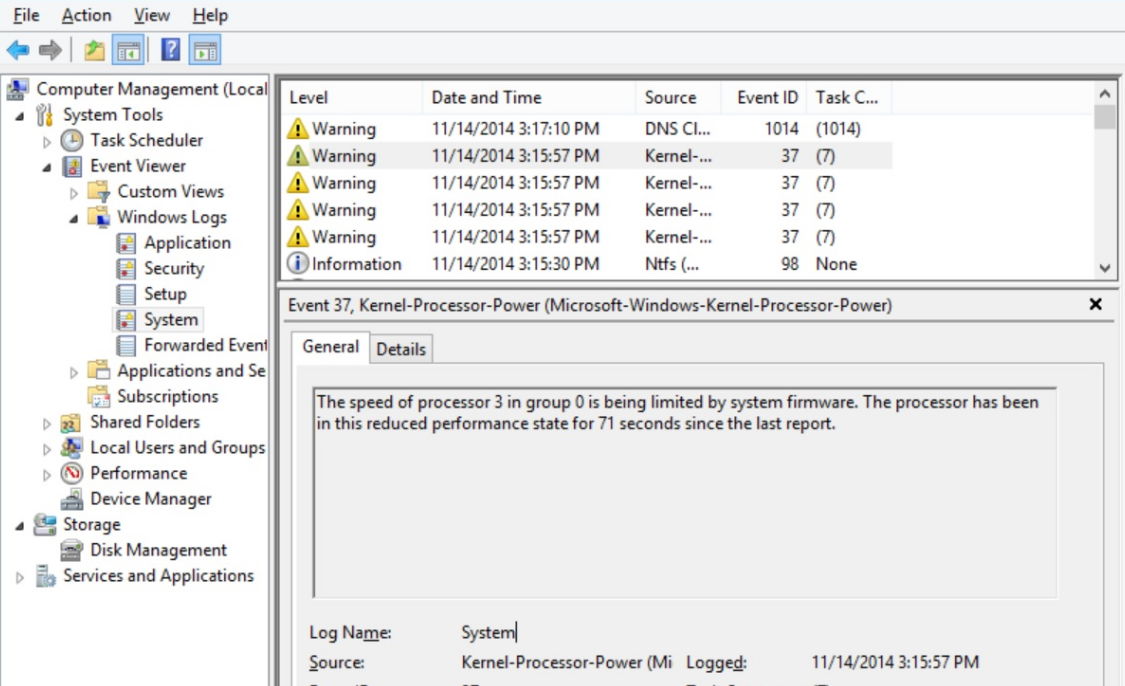
This tutorial contains instructions to resolve the "Speed Of Processor in Group is being limited by System Firmware" (Event ID 37) error in Windows 7, 8 & 10 OS.
graceful current
dapper dirge
1. "I saw this and I had the same problem, I take it you are using a dedicated G...
its shoing pci e bus shoing 1
in nvidia gpu
graceful current
dapper dirge
1. "I saw this and I had the same problem, I take it you are using a dedicated G...
how its in laptop
graceful current
whats that ?
graceful current
dapper dirge
Yep ignore that then
i can do anyting only in software
dapper dirge
graceful current
whats that ?
well open device manager > expand "universal serial bus controller" and show me ss
graceful current
nvidia ?
dapper dirge
On windows
graceful current
nvidia bus ?
dapper dirge

 dapper dirge
thanks
graceful current
dapper dirge
this one rigth
dapper dirge
right click on each of em and try to update
graceful current
all of them are up to date
dapper dirge
have you installed any 3rd party apps like msi after- etc
graceful current
dapper dirge
https://www.mediafire.com/file/ewpy1p0rr132thk/MSI_util_v3.zip/file
this is only i used
dapper dirge
I've a question
graceful current
yep
dapper dirge
You're on windows 10 and when you disable MPO and rebooted. That didn't fix your issue?
dapper dirge
Aight gimme some time rn I'm working on a project but later I'll sure look into it
graceful current
sure np
graceful current
I think it's a hardware problem
dreamy robin
honestly, if everything that uses the dGPU breaks
you can stop troubleshooting, the dGPU became ewaste
since it's clear software changes did nothing
graceful current
can i disable nvidida gpu ?
graceful current
dreamy robin
honestly, if *everything* that uses the dGPU breaks
its became ewaste
its hwoing this why my nvidia showing hardware reserved memory 39.5 mb
in task bar
task manager
umm
anyone can help me ?
that my nvidia is showing hardware reserved memory 39.5 after update it showing 45.8 mb
dapper dirge
At this point I'd either fresh install Windows 10 or replace the hardware as he said. Sorry
graceful current
dapper dirge
At this point I'd either fresh install Windows 10 or replace the hardware as he ...
how its on laptop
i did fress install windows 10
dapper dirge
Sorry mate either try fixing those errors I told you or just get a new laptop :/
dapper dirge
Disable it in device manager
Or in bios choose igpu as your primary gpu
All the best bro sorry for your loss
graceful current
UM
graceful current
dapper dirge
Disable it in device manager
beo
graceful current
dapper dirge
Disable it in device manager
are you free ?
dapper dirge
With my gf sup
dapper dirge
graceful current
are you free ?
Not exactly tho
graceful current
okay
dapper dirge
Why what happened
graceful current

see my gpu
but idk whatits running
but now also its not open any app
just seeing this
idk what weeb my laptop take
when i open obs
it use 9%
but its not recording
dapper dirge
Obs is crypto mining secretly
Jk
The same thing happens with Snapchat Lens studio and other soft too
Try HWinfo64 and you'll get the understanding
graceful current
dapper dirge
Try HWinfo64 and you'll get the understanding
were ?
dapper dirge

Start to analyze your hardware right now! HWiNFO has available as an Installer and Portable version for Windows (32/64-bit) and Portable version for DOS.
graceful current
okay
dapper dirge
You'll see that it's only looking like it uses a high percentage as the GPU is not running at full tilt, so that 9% is of a much lower ceiling. It's still non-negligible
graceful current
okay
dapper dirge
OBS, Lens etc software need a bunch of work done by the GPU for compositing the scene, which occurs whenever it's open regardless of if you're recording or streaming or not
graceful current
dapper dirge
OBS, Lens etc software need a bunch of work done by the GPU for compositing the ...
HELLO BRO SUP
sorry for caps