I have a 2080 and my PC is no longer recognizing it in device manager (only visible via hidden devices) and when I click on it, my PC only responds with the device needs to be connected. I have plugged in and unplugged the card from the PCI port and changed the cables and constantly checked for updates and drivers to just be up to date and I can't find any help online either. I as well haven't spotted any damage to the pins on the GPU
#RTX 2080 super code 45 can't seem to fix
1 messages · Page 1 of 1 (latest)
 bleak blaze
 solemn maple
bleak blaze
I have a 2080 and my PC is no longer recognizing it in device manager (only visi...
solemn maple
bleak blaze
I have a 2080 and my PC is no longer recognizing it in device manager (only visi...

Can you take a photo of the PC from this angle
 bleak blaze
It's a optiplex 3020 with a SSD and a GPU in it
solemn maple
@bleak blaze
Make sure you are connecting the display to the GPU. Your motherboard has display ports yes, but the GPU also has them, to run off the GPU you need to connect them to the GPU, not the motherboard.
As shown here: https://imgur.com/a/zx0QbRk
Also shown here: https://i.imgur.com/z4dHNGU.jpg
Restart after doing this.
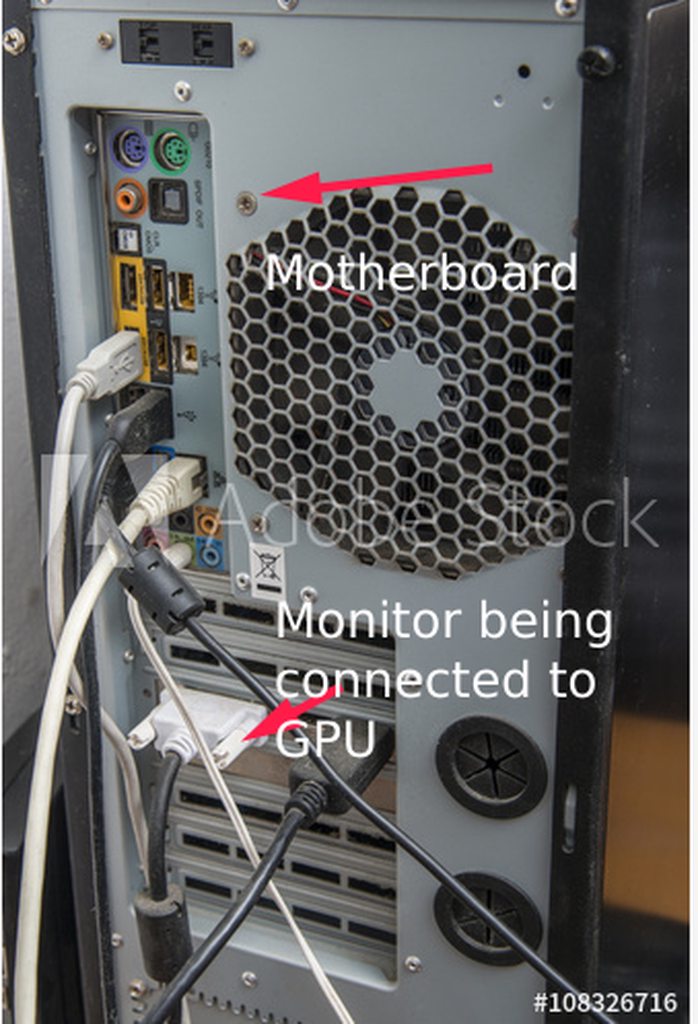
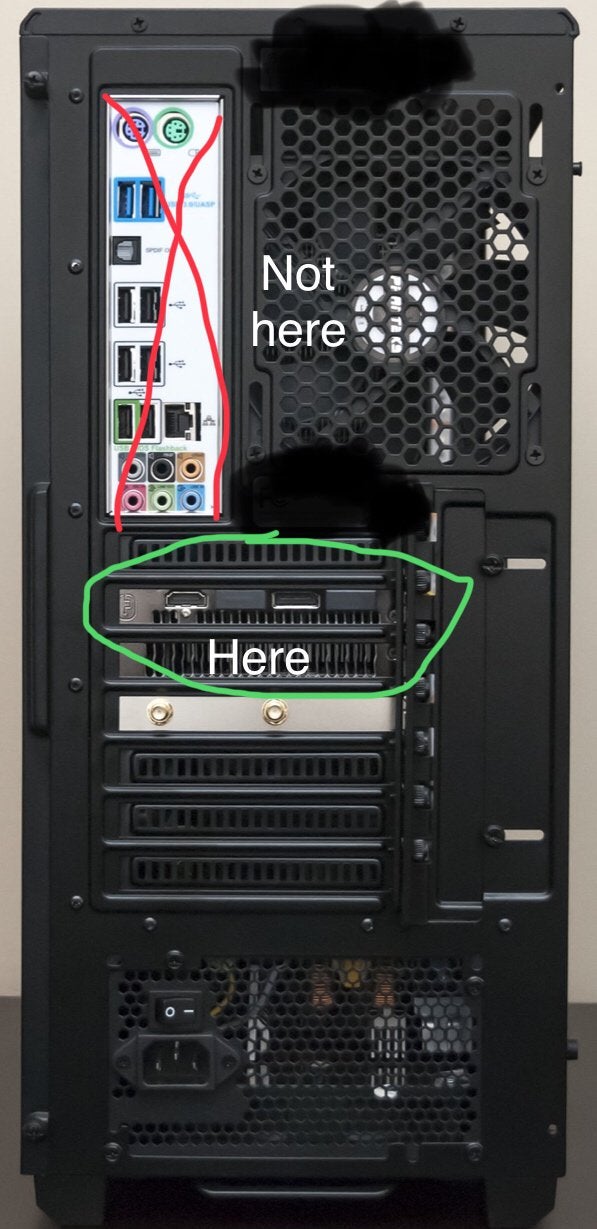
 bleak blaze
@solemn maple I know bro I just had had to use my integrated graphics to use discord
And to find fixes
Like I said it's plugged in but my computer is saying it's not (hence code 45)
Also the led on the card isn't working or the fans
So there isn't any power to card from the motherboard
solemn maple
bleak blaze
Also the led on the card isn't working or the fans
Did you make sure to plug in the dedicated power connector from the PSU?
bleak blaze
solemn maple
Did you make sure to plug in the dedicated power connector from the PSU?
yeah
solemn maple
Is this issue still ocurring?
bleak blaze
solemn maple
Is this issue still ocurring?
Yeah
bleak blaze
solemn maple
Is this issue still ocurring?
i looked online everywhere and i cant find any fixes and i can wait i know ur busy bro
solemn maple
bleak blaze
i looked online everywhere and i cant find any fixes and i can wait i know ur bu...
This does sound like a hardware issue, not necessarily a GPU issue but a motherboard or PSU issue is also possible.
If you do this:
- Shutdown
- Disconnect all hard drives, SSDs, etc from mobo
- Connect all monitor(s) to dGPU
- Boot up
Do you see video on the monitor? You should see bios
bleak blaze
Dude I'm so sorry but I'm about to go to bed and I will follow these instructions and get you updated as soon as I can and agian I'm so sorry
solemn maple
No worries, timezones suck
bleak blaze
solemn maple
No worries, timezones suck
I shut it down and unplugged all the cables to my ssd (internal and external) started the computer and still no display I'm running tests on the bios and the PC hasn't given any power to the card (resulting in code 45 ofc)
I am currently displaying through IGPU
solemn maple
bleak blaze
I shut it down and unplugged all the cables to my ssd (internal and external) st...
If bios is not displayed when connected through the dGPU then it is a hardware problem.
solemn maple
bleak blaze
So what does that mean I have to do
Gotta start ruling stuff out. Test the same GPU in another system or another GPU in yours.
bleak blaze
Ok
bleak blaze
solemn maple
Gotta start ruling stuff out. Test the same GPU in another system or another GPU...
The GPU is the problem I plugged it up to another computer and no light or display
Im pretty sure it's within warranty since I got it in July after my 1060 had the same problem
Well the led would light up but no display on the 1060
bleak blaze
@solemn maple sry for re ping idk if the reply pinged or nah
solemn maple
bleak blaze
Fyi, even though it's not gonna help you now, I highly recommend upgrading this PSU. If you've had multiple GPUs die with it then I would replace it. Consult this tier list when doing so: https://cultists.network/140/psu-tier-list/

PSU Tier List will help you to choose the best PSU out of hundreds of models on the market. From budget to the highest end Power Supplies.