#How to create a sample WinUI3 GUI in PowerShell?
160 messages · Page 1 of 1 (latest)
 magic pumice
how did you install PowerShell? via msi or from the windows store?
first thing you want to try then is install from msi
store apps have some weird virtualization that sometimes impacts COM. REGDB_E_CLASSNOTREG is common for isntance
yeah not sure then. If the task in VS is building an appxbundle and launching that, it's possible that being launched from that context is what registers the component
That's just a guess though
I would assume but I don't just VS so I can't give any pointers there. I know when I briefly looked in to MAUI I couldn't get it to work out of the appx that was built, before even getting to trying to get it working in PowerShell
I don't think it's impossible to use winui outside of an appx, because you can extract WT's appx and run it directly. But I couldn't tell ya what is done differently there
I can't say with certainly at the moment if it's possible or not from PowerShell specifically. I can only really say that finding out would likely require a lot of knowledge about winrt and probably the internals of PowerShell
 lunar marsh
I don't think WinUI3 is ... dynamic like that
magic pumice
wouldn't shock me, but anything in particular make you think that? or just vague memories of something?
it seems like cswin32 gets sorta lumped into memory - that one is pure source generator for sure if that's what you're thinkin' of
lunar marsh
Well, it's been awhile, but basically ...
In WPF, the XAML is shipped in the app and there's a parser class in .net
But when the Windows team did it, the XAML is parsed at compile time, not run time
Add-Type doesn't handle xaml
magic pumice
lunar marsh
But when the Windows team did it, the XAML is parsed _at compile time_, not run ...
totally possible it has that capability, but it does seems to be able to also create UI components from parsing xaml https://learn.microsoft.com/en-us/windows/windows-app-sdk/api/winrt/microsoft.ui.xaml.markup.xamlreader.load?view=windows-app-sdk-1.5#microsoft-ui-xaml-markup-xamlreader-load(system-string)
lunar marsh
There must be existing XAML content; you cannot replace the entire tree of content. You must at the very least preserve the original root element so that the app model implications of a loaded XAML page remain active.
Hypothetically, you'd need to write a WinRT app and then ... access PowerShell
right
because you need the root window to add this stuff to
Then you can hook up event handlers
I'm not sure you can access PowerShell from a WinRT app though
At least, not in the sense of hosting it
magic pumice
yeah I dunno. If WT uses winui I can say for sure there's some way to use winui outside of an appx bundle (but I'm not 100% on if WT uses it, but that is my impression)
even if you do need to compile some bit of xaml first, presumably there's a way to compile that at runtime and hook it in. Not saying that's easy and may indeed even be slightly less than feasible but there's probably some way
lunar marsh
I assume a real WinRT app can't host PowerShell
That's true (that WT is UWP)
But it's not .net
And it's not actually "hosting" PowerShell in the sense of being able to interact with the object model
Still though. Hmmm..
magic pumice
I more meant you can extract the appxbundle and launch wt as a win32 app and it all works fine, so presumably there's a way to do it outside of store apps
(well, it doesn't all work fine, some of the settings that point to weird appx paths have to be changed, but that's mostly like icons and what not)
lunar marsh
oh, but that's ... XAML islands, right
I mean, it's a "traditional" Win32 app with UWP Xaml content
Maybe that route would work
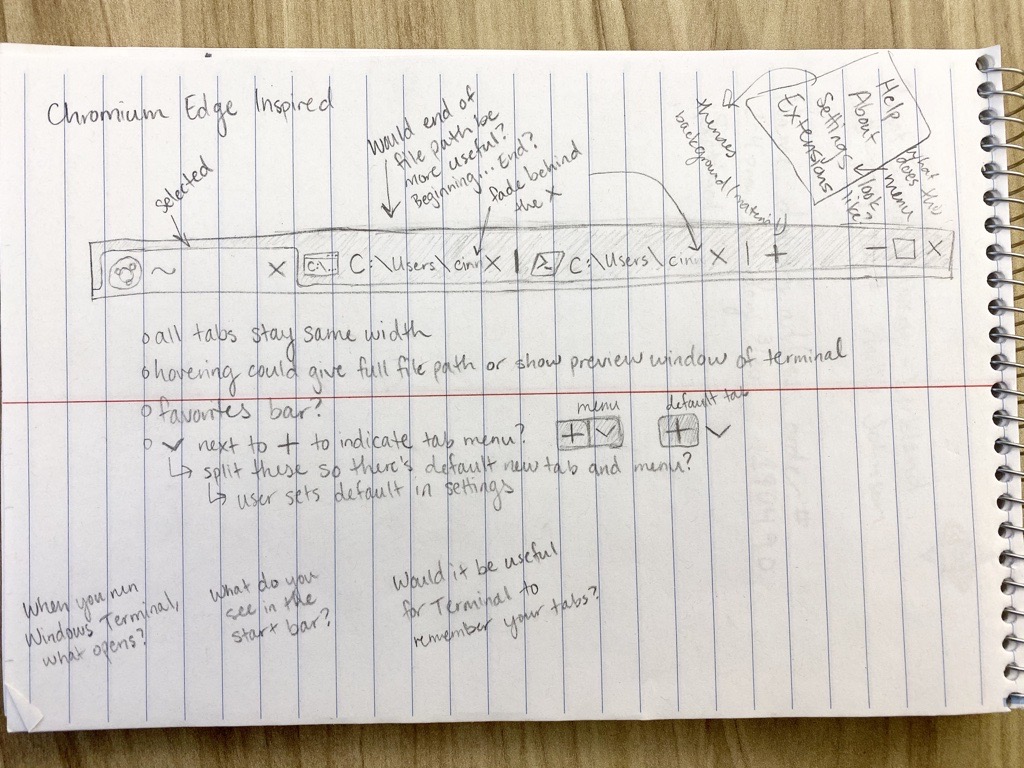
WinUI and Windows Terminal have a strong relationship that goes back to the origins of Windows Terminal. This blog post goes into the history and architecture of how these two technologies came together. History The history of WinUI and Windows Terminal goes back to December 2017.
lol
- A thin Win32 window that is mostly just responsible for drawing a window to the screen and starting up the XAML Hosting infrastructure
- The rest of the app as a UWP XAML Application that uses WinUI
As a Win32 application, able to use all of the legacy Win32 APIs... But with access to UWP XAML and WinUI...
But yeah, Edge and WT basically share the design and created the tab control in WinUI 😐
Personally, I would ... write a WPF app 😉
Hypothetically, you can host a WinUI Xaml Island in Windows Forms or WPF

This topic demonstrates two ways to use XAML Islands to host a Universal Windows Platform (UWP) XAML control (that is, a first-party control provided by the Windows SDK) in a Windows Presentation Foundation (WPF) app that targets .NET Core 3.1.
That article is kind-of grossly out of date 😕
magic pumice
tbh even if it is possible to use purely winui3 in PowerShell, someone still needs to figure out how. There's a reason you can't find any examples of it being done, and it's not because no one has tried
(so until the day someone cracks it, your options are somewhat limited)
(well, not very limited, just limited to not using purely winui3)
have you considered just writing your app in C# as an actual uwp app?
lunar marsh
Do the old WPF acrylic windows not work anymore?
magic pumice
you can make some very pretty things with WPF
lunar marsh
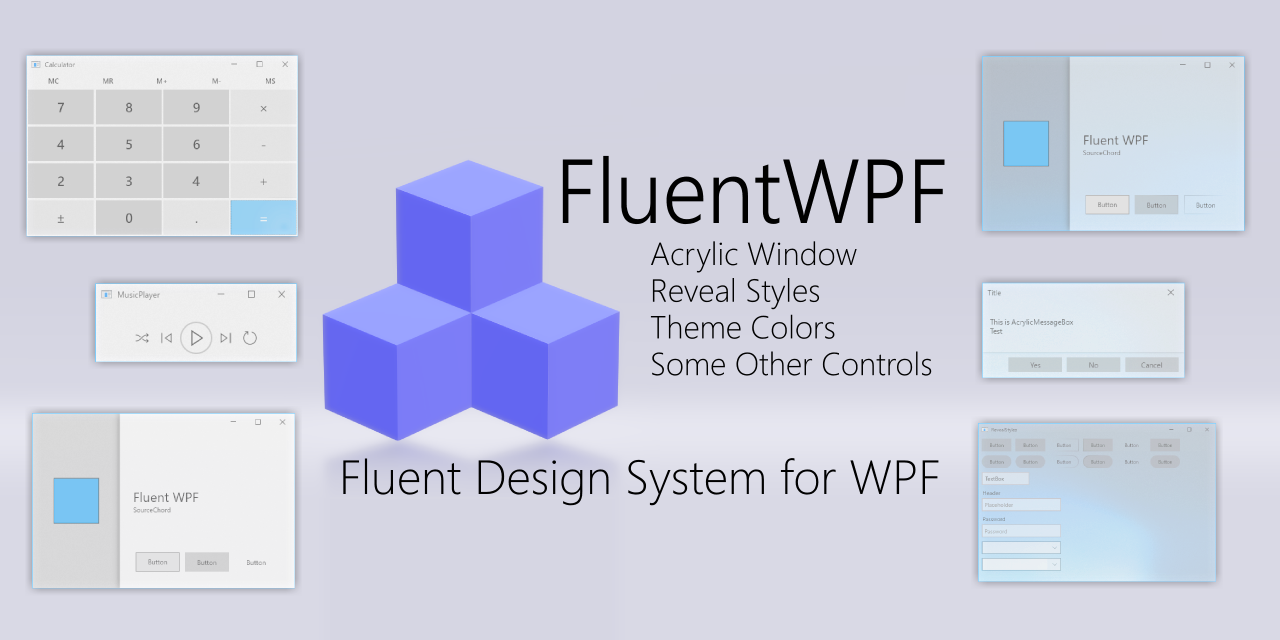
GitHub
Fluent Design System for WPF. Contribute to sourcechord/FluentWPF development by creating an account on GitHub.
Yeah, but they might drop WinUI3 too
lol
Honestly, given they brought WPF forward to .NET Core, I wouldn't be too worried about it's future
magic pumice
it would be a very surprising move if they made all WPF apps stop working completely. At most they'd move to security fixes only (maybe already there?) but full disabling is very unlikely even in the somewhat distant future
definitely wouldn't say it's perfect for that, other languages make UI significantly easier. The way PowerShell handles state and threading is particularly problematic for UIs. Possible to work around for sure, but tedious
but that's all unrelated anyway as same would be true for winui3 if that worked
it has some abstractions that make it easier than if those abstractions did not exist, but async await with implicit closures and otherwise lexical state is way easier
lunar marsh
There's no equivalent to async/await except jobs (which aren't equivalent)
magic pumice
yeah, those are all language features. The closest thing to an equivalent is rolling your own version of what those language features generate. Which would ultimately be less useful than doing whatever you're doing now
right, state is lexical so you can access whatever you could already access. Even locals are captured into a closure for you to use in the other thread
a lot less management of background work as well, don't need to receive a job for instance
I do have a side project where I'm building a transpiler for true async await, but no idea when I'll finish as it's annoyingly complicated (example https://gist.github.com/SeeminglyScience/c125321b75f9591093268bdb50d48656)
lunar marsh
Well, the thing is, it's not meant for that 😉
magic pumice
yeah it's sorta just the wrong tool for the job, so there's not really any focus in that area
lunar marsh
Back in the day, I wrote a whole PowerShell WPF framework, with a WpfJob for threading, etc, so you could actually keep your terminal live, and send updates to the UI window ...
But it obviously didn't work in PowerShell 6.x so it got a bit abandoned
Now we could make it work again, but ... since WPF is Windows-only, it hasn't seemed like a great idea
Have you seen ShowUI? 😉
sighs
I really hoped that MAUI would give us something more like Avalonia
Of course, the .NET ecosystem is built on extension methods nowadays, and anything that uses them extensively is really hard to use in PowerShell
Nope, the syntax just doesn't work in Powershell
And you can't find them
Take MarkDig for instance
PowerShell 7.4 shipped a ConvertFrom-Markdown that's based on MarkDig
$MD = ConvertFrom-Markdown C:\Users\Jaykul\Projects\Modules\ModuleBuilder\ReadMe.md
So now, $md.Tokens is a Markdig.Syntax.MarkdownDocument
No
It's that the people who developed them used a .NET feature (Extension Methods) that, like "await" just never made it into POwerShell ( PowerShell had already created something similar, but in a different way)
magic pumice
just to explain real quick, an extension method is a special syntax that lets you essentially add instance methods to a class, but defined outside of the class
lunar marsh
So like, see this example:
https://github.com/xoofx/markdig/blob/master/doc/parsing-overview.md#configuration-options
magic pumice
(but in PowerShell, the invoke member binder won't look for them so they're just like every other static method)
lunar marsh
All those methods like ConfigureNewLine and DisableHeadings are actually static methods on MarkdownExtensions
So where they show:
new MarkdownPipelineBuilder().ConfigureNewLine("\r\n")
In PowerShell, you'd need to write:
using namespace Markdig
$md = [MarkdownPipelineBuilder]::new()
$md = [MarkdownExtensions]::ConfigureNewLine($md,"\r\n")
But first, you'd have to know about the method 😉
In C#, your editor will show you ConfigureNewLine as a method on the $md because you can call it as $md.ConfigurationNewLine(...
Now, in this particular case, we could add that with an XML file
But in most cases it's not that simple, because the extension methods are generic
Anyway
magic pumice
(doesn't help make it any more pretty, but fwiw I did build something into class explorer to do the actual finding: )
 lunar marsh
@magic pumice yeah, there's been a Get-ExtensionMethod in my Reflection module forever.
But in many cases, calling them is complex because you have to explicitly cast the object to the right type in order for PowerShell to figure out which overload of the extension method you mean ...
And it gets really ugly
hehe
Well ...
I don't know, since we haven't done that 😉
magic pumice
if ugliness is scaled compared to complexity, then a simple language feature being that ugly makes them pretty comparable probably 😁
lunar marsh
regex are in the std library
magic pumice
but really that's closer on the side of a UI framework than it is to generic args. Supporting regex ain't no joke for sure
lunar marsh
you know what's fun?
(randomly)
All the old ShowUI stuff still works (in Windows PowerShell)

The weather widget didn't work, but that's just because Yahoo's weather API is gone 😉


Yeah
I mean, ShowUI ships a dll
to make the threading stuff
Oh, the llama pic is my desktop background

GitHub
ShowUI is a PowerShell module to help build graphical user interfaces in script. - ShowUI/ShowUI
Right
I mean, mostly 😉
https://web.archive.org/web/20120103121440/http://huddledmasses.org/more-showui-widgets/ <-- the original blog post is missing all the screenshots for some reason

oh, boo

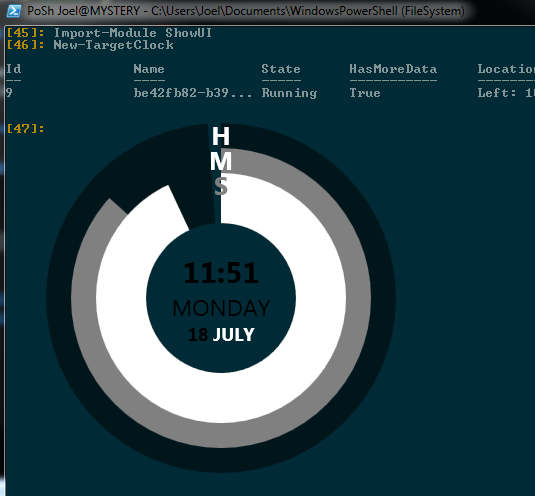
lol, I actually used that on my desktop for ages


That one was transparent too, but I need a new source for weather
heh
Desktop widgets were ... a thing ... at the time
yeah, these float ...
I don't think I ever did "pin" them to the desktop to force them to stay at the bottom
but you can drag them around by any part of the window...
We had defined a ShowUI "Style" called "Widget" like this:
https://github.com/ShowUI/ShowUI/blob/aa34c4d579366b3f74e7d274ed581d4a604ef162/ShowUI.psm1#L251-L257
Which is just a set of properties you have to apply to a Window to make them look like that
Nowadays, I would merge them into the main .psm1 when I shipped it
But I would still keep them separate
It looks like the only thing stopping this from working in PS7 is breaking changes to Add-Type
Oh yeah, probably simple
Of course ... there's probably a ton of other stuff
And if I look at the C# code after a decade or so, I'll probably get sick to my stomach
But ...
It's just ... very old
lol, ok, there might be some library updates needed too 😐
lunar marsh
The compiler was all red
The type name 'Thread' could not be found in the namespace 'System.Threading'. This type has been forwarded to assembly 'System.Private.CoreLib, Version=8.0.0.0, Culture=neutral ...
etc
How are you building GUIs currently?
I mean, are you loading XAML?
Oh, but their example uses a pack: url
The simplest thing would probably be to import the assembly and use the fw:AcrylicWindow way, with the xmlns:fw="clr-namespace:SourceChord.FluentWPF;assembly=FluentWPF"
As long as you've pre-loaded the assembly, that should "just work"
ShowUI had some stuff for generating wrapper functions, but based on the last hour, I'm going to guess that's all broken 😉
Although ... it would work in PS5
you don't need to worry about multiple xamls in this case
because it's just a custom control
(I think)
It's possible you need to do the merged ResourceDictionary thing, but it's been too long since I touched those, so I don't remember
magic pumice
hey look at that! very cool
it's a cool proof of concept! and definitely the first example of it's kind no doubt
you still can't use xaml and most of the code there is C# anyway so realistically you should probably still just use WPF
(and really even for WPF I'd still recommend writing a C# app and simply host PowerShell in process. That way you get the best of both worlds, can still use the nice PowerShell modules, but handle all the UI stuff in C#)
still very cool though!
lunar marsh
for what it's worth, if you're interested in that route ...

GitHub
PoshConsole is a WPF control that self-hosts PowerShell, a framework for building PowerShell-based managment apps! - Jaykul/PoshConsole
This is a very old project (at least as old as ShowUI) that I rewrote from a standalone terminal to a terminal control for WPF ....
It's not PowerShell Core
And frankly, writing such a thing for PowerShell Core is a lot more work, because you pretty much have to ship all of PowerShell, which means you have to build a new version every time there's a new PowerShell release....
magic pumice
magic pumice
(and really even for WPF I'd still recommend writing a C# app and simply host Po...
@final warren I think that was a response to you saying that this ^ is an interesting idea. So less about WinUI3 and more about ^
 sturdy garden
.ThrowExceptionForHR( errorCode )
That sounds like human resources getting special treatment when something goes sideways