#linux-🐧
1 messages · Page 14 of 1
 steep linden
 The CPU power is there I think and iirc the steam deck is just 720p, should be able to run poe I think
 cedar turret
I would not count on it PoE already runs well on Linux and the biggest challenge is getting ale the antycheat software working there
But they probably have one on order tho^^
steep linden
They have been talking about getting controller support to PC :3 But with the steam controller PoE actually works pretty nicely already, only issue is stash management
There is also the option to stream poe from your main machine to the deck which would be great for a lot of people ^^
 halcyon moat
@dusky goblet yes but it's native Vulkan was problematic that's why I recommended async
to use dx and get a closer performance to the native vulkan
ge's proton dxvk is already async patched as far as I know, just not enabled by the default
halcyon moat
steep linden
Wonder if GGG got a steam deck to test poe on <:pogchimp:785546125063094353> The...
it should regarding to my knowledge but I'm doubtful about getting stable 60 fps and no stutters on mob pack encounters
solid 30 fps is also playable btw
steep linden
I did find that linux had less of a issue with the normal shader/drive stutters ^^ You'd always run the deck on vulkan as well which has less problems with this as well.
Seems it has nice high speed ram as well so I really doubt that you will see a lot of stutters
 dusky goblet
anything works but gnome-shell, don't use it for gaming or that cinnamon fork, they eat your fps
xfwm and kwin both disables compositing for fullscreen/borderless games
we need native version to get rid of wine translation slowdowns in heavy density "endgame"
steep linden
I did benchmarks on pop_OS in I think 3.13, had close and almost exceeding native Window performance (proton experimental at the time) ^^ Running against a very optimised windows install (most background processes removed to free up as much resources for programs)
This is of course on Vulkan engine and not DX11 but who would not run Vulkan on linux?
GPU: 5600XT
CPU: R7 1700
 ebon prism
steep linden
I did benchmarks on pop_OS in I think 3.13, had close and almost exceeding nativ...
ebon prism
steep linden
I did benchmarks on pop_OS in I think 3.13, had close and almost exceeding nativ...
An idiot, unless it can't be avoided
steep linden
I do wonder how Intel and Nvidia vulkan drivers are for Linux, AMD has been very good to us and now with Valve pushing AMD hardware for the deck it's going to be even nicer.
On Windows it does seem that Nvidia vulkan drivers is quite unstable given most Nvidia players are crashing on vulkan.
 edgy sierra
I would expect the Intel vulkan drivers to be pretty good (bearing in mind iGPU limitations), they're distributed as part of Mesa and some backend is shared. Portions of the RADV ACO driver have been ported to Intel's for significant speedup.
steep linden
oo nice Intels new cards might have a future for Linux then ^^ Always nice to get competition
ebon prism
steep linden
I do wonder how Intel and Nvidia vulkan drivers are for Linux, AMD has been very...
I've not had an issues with vulkan on my GTX 1660 Super and RTX 2060. My only AMD cards are too old for a real comparison though RX 470 and 460 both of those are 4GB cards
The GTX 1060 3GB Do have issues though I'm not sure if it lack of gpu ram with vulkan or not
cedar turret
lack of vram
steep linden
ebon prism
I've not had an issues with vulkan on my GTX 1660 Super and RTX 2060. My only A...
oo interesting ^^ Might retract my statement then, I wonder what is the underlying cause of people crashing. It is a fact that most people run Nvidia so might be that which caused me to only have helped Nvidia users.
But I also noticed that they all did not crash on DX11 and not vulkan. Might be some other underlying issue that is common 
ebon prism
I wonder if they are are installing the proprietary drivers from NVIDIA or using the mesa ones? I've always used the proprietary ones form NVIDIA and mesa for AMD. Well for gaming that is.
steep linden
Ahh helped windows users that is ^^ Not to be biased but Linux users are often tinkerers themselves 
Also you mentioned you had no issues on Nvidia for Linux? Might still be driver issues windows side for Vulkan then
good to hear it might not be present for Linux drivers
ebon prism
steep linden
Ahh helped windows users that is ^^ Not to be biased but Linux users are often t...
I use both, some times I just don't want to fight with Linux to play a game either Or it's an Xbox live game through the windows store
Though it is funny I can run a Minecraft bedrock server on Linux directly but not Minecraft bedrock on Linux without jumping through hoops to make it work
steep linden
Does bedrock still have issues with redstone timings? And yeah, servers are often linux based, sad windows is linux allergic when it comes to the customer space
ebon prism
tbh I'm not sure with redstone and bedrock I've not played in quite some time now
Microsoft see's Linux as a threat to their core business, so it's not really surprising but annoying none the less
 stiff pumice
Ironically poe runs better for me on linux than windows
steep linden
stiff pumice
Ironically poe runs better for me on linux than windows
Also had the same experience ^^ Most likely because windows uses more background resources then Linux, as you are CPU bound it helps a lot
stiff pumice
steep linden
Also had the same experience ^^ Most likely because windows uses more background...
Yeah and i read that windows 11 takes 4gb of ram instead of 10 that takes 2
Unironically Linux could be PoE gaming future lmao
steep linden
Unironically Linux could be gaming future 🙏
Steam machines was such a promising application for a linux distro designed for games ^^ Would essentially give the ez of use of a console to a PC
stiff pumice
Vulkan and Proton is really cool. Sad that league and apex is borked but PoE shows the potential of Linux gaming.
steep linden
But that is because of anti cheat right? For the steam deck valve is working getting eac working on wine
 hexed pivot
as someone who plays on linux but also has to develop for linux... disparity in user choices of compositors, DEs and WMs will always make linux a tough sell to big studios in terms of developer effort
reminder that the pedantic definition of "linux" ships no default graphics or audio libraries, no DE, few drivers
and it's entirely by convention that the largest distros happen to ship similar combinations, except for the big 70-30 split on x.org vs wayland which is a huge pain point for display driver-intensive applications
maybe steamos will set a de-facto standard for what developers need to target if they want their games to run

Fortunately, the charging one has been solved now that we've all standardized on mini-USB. Or is it micro-USB? Shit.
the vast majority of studios will just tweak their windows builds to run nicely under wine/proton over ever embarking on a native client
 floral wyvern
stiff pumice
Vulkan and Proton is really cool. Sad that league and apex is borked but PoE sho...
floral wyvern
stiff pumice
Vulkan and Proton is really cool. Sad that league and apex is borked but PoE sho...
I play on linux and you can get league running on it. there are instructions to follow on lutris.
steep linden
hexed pivot
the vast majority of studios will just tweak their windows builds to run nicely ...
Yeah this is what I think will happen, we will not get more linux games, but we will get less games that just straight up does not work on linux through work arounds.
Hopefully vulkan will be bigger then DX, that would improve linux support by a lot. But windows will most likely not be helping to push vulkan over DX  Wonder if GGG is committed to make vulkan the main engine in the future. Iirc the mobile version will be vulkan
hexed pivot
as far as I know, vulkan is a mandatory component of supporting macos and consoles, so I don't see ggg ever dropping vulkan support
 vivid badge
steep linden
Yeah this is what I think will happen, we will not get more linux games, but we ...
vivid badge
steep linden
Yeah this is what I think will happen, we will not get more linux games, but we ...
yeah but there are already morons spamming devs left and right if they will enable proton or linux support, that makes me a bit sad because if they get pissed we will just get the big middle finger...
cedar turret
Linux is just not worth the effort for most devs like in this example: https://twitter.com/bgolus/status/1080213166116597760

We shipped Planetary Annihilation on Win, Mac, and Linux. Linux uses we're a big vocal part of the Kickstarter and forums.
In the end they accounted for <0.1% of sales but >20% of auto reported crashes and support tickets (most gfx driver related).
Would totally skip Linux. https://t.co/3m9ZZgElzB
Retweets
727
Likes
2484
 Twitter
·
cedar turret
Twitter
·
cedar turret
But lets hope that SteamOS 3.0 will improve things and mby Devs could just focus on that.
steep linden
cedar turret
Linux is just not worth the effort for most devs like in this example: https://t...
That's why it's better to not offically support linux but not make it a headache for people to run the game on linux ^^
If SteamOS becomes a good thing it would be on valve to support the development and iron out crashes related to drivers instead of pushing that work on game devs or the users.
But I do wonder how much work they will do outside of their own hardware, let's hope they plan to support all hardware and not just steam deck.
vivid badge
well if they get optimized and running for the deck that isn't very powerful, anything above that spec should work I think 🤔
the steam deck will be the bottom line or near the bottom for anyone interested to play on linux with almost 0 issues
steep linden
Yeah but it might be that just AMD drivers get full support and Nvidia might be left behind as said in that tweet most crashes was gfx driver related
vivid badge
yeah but the game was released in 2014 it might be different nowdays 🤔
ebon prism
steep linden
That's why it's better to not offically support linux but not make it a headache...
I'd imagine that at least AMD would get better since the steam deck is running on and AMD platform
 hazy briar
cedar turret
Linux is just not worth the effort for most devs like in this example: https://t...
hazy briar
cedar turret
Linux is just not worth the effort for most devs like in this example: https://t...
I mean PA came out on a brand new custom-made engine too, I'd be surprised if this didn't happen :p
other devs make their own engines and seem to do alright though (most recently, Arkane's Void engine seems to work pretty well through proton)
I don't trust the PA devs either lmao, but that's not really something I can explain easily, just a bunch of little things I've seen over the years
cedar turret
Arkane Void engine seams trash on Windows tho
Mouse movment bound to framrate and generaly bad performance
they did much better with Cryengine than own engine imo
Not to mention that you are comparing Native Linux version to Proton "emulation".
 terse rune
Steam proton is amazing
For casual gamers like me who game old or rather small games proton does the job well
Problem occurs when league etc gets pulled into the question
But thats what you get with Linux, cant have them all
 flint laurel
cedar turret
Not to mention that you are comparing Native Linux version to Proton "emulation"...
flint laurel
cedar turret
Not to mention that you are comparing Native Linux version to Proton "emulation"...
Proton is based on wine. Wine stands for "wine is not emulation"
hazy briar
cedar turret
Mouse movment bound to framrate and generaly bad performance
yeah the mouse movement-framerate thing is real funky, the performance seems alright for me and my friends though
which suggests its hardware dependant, if people are having differing experiences
so I guess linux ain't the only one with driver issues for game devs ;p
hazy briar
cedar turret
Not to mention that you are comparing Native Linux version to Proton "emulation"...
PA actually runs better on my system through wine than natively, funnily enough
which is... hmm
I don't like criticising game devs bc their jobs are tough, but maybe they shouldn't have built a whole new engine for their company's first game lmao
cedar turret
hazy briar
I don't like criticising game devs bc their jobs are tough, but maybe they shoul...
Wasnt it like 4th game ? Total Annihilation then Supreme Commanders for the devs not company I mean.
I rly hope that Valve manages to push linux gaming forward as what is see with Windows 11 is not something I like.
They already did amazing job with Proton but it still not enough for me 2 switch.
Not to mention they got Battle eye and EAC to support Linux 📈
ebon prism
cedar turret
Not to mention they got Battle eye and EAC to support Linux 📈
Nice, Guess I can go the easy for Apex Legends now.
Still seems like all good news though. Tbh though is it really bad if we have to wait a month or two for game to drop before we are installing it on Linux anyway. It's not like the dev's of any game have a glowing record of releases as far as smooth paly goes even on Windows.
I would like to point out that running android on Linux is still some how harder than on windows systems through emulation. I don't think that Google will ever be making that into a desktop OS anyway to much would have to change in that school for that to happen.
hazy briar
cedar turret
Wasnt it like 4th game ? Total Annihilation then Supreme Commanders for the devs...
I've just been on a little wikipedia hunt and turns out the history of TA SC PA and their engine development is more complicated than I expected :p
- cavedog made TA, with its own engine (it was the 90s)
- TA modders made the Spring 3D engine, which is open-source, for TA
- lead TA dev founded own company (GPG) and made SC using Spring (I'd imagine they probably contributed to the project a lot)
- different TA devs (including the graphics dev for TA and lead dev of SC) found Uber to make PA
there are claims that engine and server dev for PA had been going on for years before the kickstarter announcement, too
so maybe I'm wrong to say they shouldn't have made their own engine in principle, but what with the game being out and quite the mess at release I'd say hindsight is 20/20 :p
lol sorry to keep derailing the convo to PA
I think windows is slowly losing its grasp on gamers
the day I can convince my friends to try out linux I'll cry with joy
terse rune
Btw looks like we got huge news

pcgamer
The update means Apex Legends, Dead By Daylight, and Halo multiplayer should all work on the Steam Deck at launch.
Looks like apex finally will be playable using proton
vivid badge
let's hope the devs enable it
but the statement that is easy as flipping a switch is a bit off imo, it is never like that when it comes to do the stuff to make it work 🤔
flint laurel
The devs may not be willing to support linux even with this support. In some cases, they may have avoided a linux release because the anti-cheat lacked support. But there are likely many devs who wouldn't want to support linux in favor of praying that the windows build of their game can one day run in linux just like starcraft 2 and heroes of the storm and so many other games. Development costs time and money but hope is free.
They would just need to prevent wine from being flagged for interacting with the game's runtime. Windows itself and the epic launcher and many things interact with the game without being flagged so they just need to somehow include wine or proton within that whitelist system. This way, the game could function in linux whether the devs create a linux build or not. Perhaps following this announcement, the wine and proton devs could follow up with these people to ensure that this gets done. It would be in valve's best interest to do so.
terse rune
I like your funny words magic man
 iron charm
I really am curious how long it'll take for Linux EAC to be cracked. I suspect it isn't long
ebon prism
It's not like the windows one isn't already cracked
 hidden dome
Proton is more or less a Valve project
hazy briar
for anyone interested in nixos, I've tried my hand at making a nix derivation for PoB: https://www.magnostherobot.co.uk/git.cgi/personal-projects/magpkgs/commit/
in short it's a mess but it works kinda well
 frosty acorn
does anyone have a way to use scroll wheel to emulate mouse clicks? i tried with sxhkd and xdotool and it didn't work
frosty acorn
nope, im using xorg
flint laurel
frosty acorn
does anyone have a way to use scroll wheel to emulate mouse clicks? i tried with...
Here's my .xinitrc file where I swap my escape and caps_lock keys. Maybe click could be assigned to mouse wheel in the same way?
#!/bin/sh

xrdb -merge $HOME/.Xresources
xmodmap $HOME/.Xmodmap
xset s off
xset -dpms
exec dbus-launch i3
xmodmap
Here's my .Xmodmap file
remove Lock = Caps_Lock
keysym Escape = Caps_Lock
keysym Caps_Lock = Escape
add Lock = Caps_Lock
keycode 135 = NoSymbol
Using "xev", it appears that my scroll up and scroll down are button 4 and button 5.
My left click is button 1.
So we try something like keysym button 4 = button 1
No idea if that would work but that's they idea.
 mild urchin
ive used autohotkey on windows to do similar
 rotund ridge
frosty acorn
does anyone have a way to use scroll wheel to emulate mouse clicks? i tried with...
rotund ridge
frosty acorn
does anyone have a way to use scroll wheel to emulate mouse clicks? i tried with...
You can do this using xinput
xinput set-button-map 11 1 2 3 1 1 6 7 8 9 10 11 12 13 14 15 16 17 18 19 20
the first 11 is my mouse id from
xinput list
 karmic solar
flint laurel
xmodmap
karmic solar
flint laurel
xmodmap
you don't need to modify .Xmodmap for capslock rebind, it's enough to have in .xprofile
xmodmap -e 'clear Lock'
setxkbmap -option caps:escape
this also prevents capslock light
and capslock being stuck
flint laurel
My capslock light is never on when capslock is not on. And my capslock hasn't gotten stuck in the two years I've used this config.
But good to know there's more than one way.
 cosmic glade
Anyone running PoB through Lutris having very laggy movement on the skill tree? Logged into it for the first time in weeks and the performance is very slow. No change with the new update.
 wide quail
Latest update complete broke keyboard input for me, using proton experimental
Hm restart fixed, restart again bricked
flint laurel
Im running native pob git version from the aur. No problems
vivid badge
cosmic glade
Anyone running PoB through Lutris having very laggy movement on the skill tree? ...
when that happened to me somehow I was using a fshack version of the wine runner, now im using the lutris-ge-6.16-1 with no problems
cosmic glade
vivid badge
when that happened to me somehow I was using a fshack version of the wine runner...
Thanks, works perfectly. Glorious Eggroll saves the day once more!
 deft sandal
pobfrontend 2.10: 3.16 Passive Tree for Linux 🐧 and macOS 🍎
hazy briar
is anyone else's mouse getting messed with in poe?
mine is getting replaced with a lil black square
vivid badge
problem with proton experimental, use GE or other version
vivid badge
hazy briar
mine is getting replaced with a lil black square
just had a update on experimental, it fixed for me
hazy briar
ah nice tyty
 limpid oak
Guess I'll switch back to experimental then haha
 red loom
I was wondering if anyone had any luck getting acquisition to work with Arch, thank you in advance
 fading topaz
you've tried one of the versions on the AUR?
I seem to be having an issue where various models and/or textures aren't loading
fading topaz
seems nothing updates and a reboot couldn't fix
red loom
fading topaz
you've tried one of the versions on the AUR?
I was hoping there would be one on the aur but i didnt see one
fading topaz
Inventory management tool for Path of Exile.
Inventory management tool for Path of Exile.
ok this is weird. My graphics get corrupted when running PoE with PoB in the background
red loom
fading topaz
https://aur.archlinux.org/packages/acquisition/
Wow how did i miss that, thank you for that
 wet wadi
Linux Mint 20, trying to run through Steam, Proton Experimental and 6.3-7, it just does not launch the game at all, no error message, no nothing, the "PLAY" button just turns into the "STOP" for a few seconds and then reverts.
red loom
wet wadi
Linux Mint 20, trying to run through Steam, Proton Experimental and 6.3-7, it ju...
Do you have your poe install on a separate NTFS drive?
wet wadi
Not to our knowledge.
 spring mountain
@wet wadi Start Steam from the command line, run the game and see if you get a error message there
wet wadi
As in, like this?

This is what the Proton log gives, as far as we can tell, nothing.
====================== Proton: 1634751995 experimental-6.3-20211020 SteamGameId: 238960 Command: ['/home/wereparanoid/.local/share/Steam/steamapps/common/Path of Exile/PathOfExileSteam.exe', '--nopatch'] Options: {'noesync', 'forcelgadd'} depot: 0.20210923.28 pressure-vessel: 0.20210906.2 scripts: v0.20210917.0-0-g1cf127d soldier: 0.20210920.0 soldier 0.20210920.0 Kernel: Linux 5.4.0-89-generic #100-Ubuntu SMP Fri Sep 24 14:50:10 UTC 2021 x86_64 ======================
spring mountain
Hmm, just tested it, doesn't work anymore(?) that way. But it hasn't been to long i debugged something that way
The reason my game crashed back then was the one that Cerealfordinner listed: My library was still on my ntfs partition, after creating a new on an ext4 partition everything worked just fine
Are you really sure you are on ext4?
(or probably any other partition that is not ntfs)
wet wadi
Well the thing is, we believe it is not crashing, the game just does not seem to launch at all in the first place(or if it does it exits instantly without creating problems).
spring mountain
Jeah, that was the exact same thing i had
Just recheck where your steam library is installed and what partition you use there 😄
And if you have execute permissions on that game directory
edgy sierra
Can try resetting the proton prefix by renaming ~/.local/share/Steam/steamapps/compatdata/238960/ to something like 238960_old(I wouldn't delete it outright, you might want your POE configuration files later) . Being on a NTFS partition and bad proton prefix are the two main culprits when it comes to launch failures in my experience. Has the game worked previously or are you just starting to play on linux?
 spring mountain
Now check if the steam library where poe is installed is on that
wet wadi
How does one reset the proton prefix?
spring mountain
dkamerad described it to you
wet wadi
Renaming a folder and then what?
spring mountain
Thats it
hexed pivot
I believe that once the steam client is running, you can run steam -applaunch 238960 to launch poe and get stdout
Also check client.txt
Normally when apps crash immediately with no window it’s because you’re missing a core library, though
wet wadi
Ookay, so this time when we launched steam from terminal, it decided to be a lot more verbose.
Just "steam", like before.
hexed pivot
Possibly if you’re using proton without also having wine installed via package manager, you might be missing some dependencies
wet wadi
We have Wine.
ERROR: ld.so: object '/home/wereparanoid/.local/share/Steam/ubuntu12_32/gameoverlayrenderer.so' from LD_PRELOAD cannot be preloaded (wrong ELF class: ELFCLASS32): ignored.
wet wadi
spring mountain
Now check if the steam library where poe is installed is on that
Seems to be.
/home/wereparanoid/.local/share/Steam/steamapps/common/Path of Exile/
Well then.
 hexed pivot
wrong ELF class says steam isn't finding dependencies correctly
you can back up your PoE instance, reinstall steam & restore poe from backup
which should push steam to reconfigure itself
alternatively make sure you're disabling steam overlay & any other integrations in steam's game settings
wet wadi
Okay then, apparently this is unimportant.
 hexed pivot
yeah I was about to mention that
sometimes it's a normal part of discovering libraries, it'll try everything and skip the ones in the wrong format
wet wadi
Backing up PoE takes so long even on an SSD 😩
hexed pivot
it compresses at the same time, so it's bound by how quickly your cpu can do gz or lz compression
wet wadi
Yeah our CPU is not great, at least 10 years old by this point(Core i7-3520M).
wet wadi
Trying to restore backup aaand...


Alright just needed to enable Proton for other games apparently.
wet wadi
Welp, nothing changed.
Huh, updated OpenGL drivers to 460(390 previously, apparently unsupported by modern Proton versions) and it launched, though crashed with an error this time, so that's an improvement.

Welp, apparently that was caused by using some Wine commands, after deleting those from launch options the game seems to run.
So, uh, solved, yay! Thanks for helping!
 brisk mountain
had to create a new wineprefix for poe and game runs fine. the launcher window is missing parts again though and i cant remember how i fixed it in the past. i think it was some web component that has to be installed with winetricks. currently installed via winetricks are: win7 msls31 riched20 usp10.

 quasi lily
can you click that empty space (where should be the launch button)?
if yes, then dont bother 😄
brisk mountain
i can
and i had it correctly displayed in the past
i do use the custom wine build from lutris but manually configured poe start outside of lutris. the lutris wine somehow depends on libjpeg.so.8 an old library i cant find on debian stable. the setup was a bit annoying. after that i could use the lutris wine though
ah i should check the wine debug which i disabled... 🤦♂️
it migth actually be that jpeg library issue:
0128:err:wincodecs:jpeg_decoder_create Failed reading JPEG because unable to find libjpeg.so.8
0128:fixme:ole:CoCreateInstanceEx no instance created for interface {9edde9e7-8dee-47ea-99df-e6faf2ed44bf} of class {9456a480-e88b-43ea-9e73-0b2d9b71b1ca}, hr 0x80004005.
0128:err:olepicture:OleLoadPicture IPersistStream_Load failed
ok so i had to extract that libjpeg.so.8 library from the ubuntu repo into the lutris wine lib64 folder which is loaded with LD_LIBRARY_PATH. that fixed the lauch button and the loading bar.
0254:fixme:wincodecs:jpeg_decoder_get_metadata_blocks stub
0254:fixme:wincodecs:jpeg_decoder_get_metadata_blocks stub

the missing part is html iirc. so a browser window from a system library?
 tawny obsidian
Hey.
I'm not sure if I don't know how to update PoB on linux or maybe there is no update yet for 3.16. Anyone have some info? Or maybe use 3.16 pob on linux now?
!edit
nvm. It just updated while I was looking for an answer.
wet wadi
Seem to be crashing fairly consistently after two to three zone loads on the Vulkan renderer, can't play on DX11 due to constant stuttering(and it still crashes), noticed people have had these issues before but have not found a consistent fix, enabling Vsync seemed to help reduce stuttering on DX11, but did not eliminate it enough to make it playable.
fading topaz
any proton logs?
 viral trench
Just wanna drop in that these problems are likely to be something locally to your system. I am using stand-alone PoE with wine-tkg-staging-fsync-6.19 with the Vulkan renderer and I don't have any of these problems. I can play hours without any crash or degrading performance. I don't have stuttering. The only issue I have, but that's something to be expected, is that some models/particles are black until dxvk was able to first create the shader for it. But that is a one-time thing as all these shaders are cached.
edgy sierra
Also, based on your proton log from earlier you seem to be on a system using an older kernel version (5.4). Might be worth while seeing if a newer version can be installed, preferably one that implements valve's fsync patch set.
wet wadi
wet wadi
Seem to be crashing fairly consistently after two to three zone loads on the Vul...
Funnily enough it isn't a straight crash, it just slowly freezes the whole OS in around 10s, occasionally allowing the CPU/GPU to process something until either the game crashes and normal operations resume or it just freezes the OS completely(or just keeps getting slower progressively), on one such occasion we forcibly shut down the laptop and managed to corrupt our graphics driver through that and had to reinstall the driver.
ANYHOW, we also noticed we were on wine5.0, so we installed wine6.20 and a 5.11 kernel(thanks dkamerad, had no idea about that), time to see if these two combined will help us.
wet wadi
Nope, still the same slow-freeze of the whole OS and then either crashing or never-ending freeze, also tried to play with DX11 just for the heck of it and apparently that makes no difference, still freezes, tried twice just to be sure.
The Proton log from the latest crash if anyone is interested. 14413 lines.
EDIT: Noticed it is using esync, can one even use fsync on non-Arch distros(we are on Mint)?
edgy sierra
It looks like XanMod is the recommended debian/Ubuntu based kernel with fsync. You'll just need to add the repo/ppa and install it.
XanMod also makes some tweaks for gaming that may improve performance. What you are describing sounds worryingly close to thermal problems however.
fading topaz
Hmm well I'm not sure what's going on, but I seem to be getting this texture filtering issue

It seems to happen while some other applications are open, possibly ones using VRAM. Can't really explain how it gives me this though
wet wadi
edgy sierra
XanMod also makes some tweaks for gaming that may improve performance. What you ...
Highly improbable, we just cleaned and applied new thermal paste at the end of this summer and we always have our fans running at 100% despite the noise.
Oh, and this did not happen on Windows 7 a few weeks ago.
wet wadi
Well, quitting for now unfortunately. Too bothersome.
vivid badge
fading topaz
Hmm well I'm not sure what's going on, but I seem to be getting this texture fil...
this happens on windows as well, are you using a 2gb card?
also saw someone post on reddit this happening on the mac version
the op deleted the post I think but, I took a screenshot to show a friend
 fading topaz
vivid badge
this happens on windows as well, are you using a 2gb card?
fading topaz
vivid badge
this happens on windows as well, are you using a 2gb card?
Mine's 3GB
Sounds like it isn't related to Proton then, at least
vivid badge
yep
fading topaz
aand now with the latest patch, my game won't start. Guess it's time to update and reboot again 😦
fading topaz
Well reboot seems to have done it, and I don't yet see the graphical corruption. More extensive playtime will confirm though
dusky goblet
it doesnt happen on windows with dx11, only vulkan, due to ggg's own resource management code
but directx is laggy on shaders
also, vulkan version is more gpu heavy, like i can play 6man party on dx11 without fan noise, but not on vulkan
vivid badge
I saw a few ppl complaining about this texture issue on dx 11 as well
 sleek snow
vivid badge
the op deleted the post I think but, I took a screenshot to show a friend
sleek snow
vivid badge
the op deleted the post I think but, I took a screenshot to show a friend
i had this problem on PC, have to change Vulcan to dx11
fading topaz
Looking at the PC Known Issues page, they do list:
Visual artifacts when running low on GPU memory
specifically for the Vulkan renderer
cosmic glade
Anyone else's fonts a bit messed up this league? Div cards and some filter items aren't displaying properly with huge spaces between characters.
vivid badge
yep it bricks here and there sometimes, pretty random on my end
dusky goblet
this is interesting, proton/vulkan uses less vram than on windows
im like at 1390mb including kde plasma, while on windows 11 it will be nearly oom
fading topaz
Currently my workaround is to launch PoE directly through the shortcut provided by steam, rather than through the library. Seems the Steam client can use a fair bit of VRAM
 crude shoalBOT

Anomalous Sweep - Chieftain (Lvl: 93) by: tkowarhawk
Defenses
Life: 5,968 (192%) | Reg: 482/s (8.1%) | Leech 1,074/s (18.0%)
Net Regen: 299/s
Mana: 105/700 (0%) | Reg: 12/s (1.8%)
Resistances: :fire: 78(+114) :snowflake: 78(+6) :zap: 77(+32)
Secondary Defense
Secondary: Armour: 8,737
Attributes: Str: 452 Int: 34 Dex: 86
Keystones: Resolute Technique, Call to Arms
DPS
Total DPS: 8,481,274 @ 6.16/s
Charges
Frenzy: 3/3
Skill
Anomalous Sweep (20/20%) + Multistrike (20/20%) + Anomalous Rage (20/20%) + Melee Physical Damage (20/20%) + Cruelty (20/20%) + Elemental Damage with Attacks (20/20%)
Configuration
Player: Leeching, Flasked, Onslaught, Rage: 20, Ngamahu Flame's Advance
Playercharge: FC, EC
Enemy: Burning, Ash, Ignited, Intimidated
Playerrecently: Lost ECs recently (8s), Used Warcry, Hit by Fire
Info:
Pastebin | Web Tree | Web PoB
Created in Path of Building.
edgy sierra
Proton/wine
fading topaz
Considering PoE supports Vulkan though (but in Beta), it's overall support is pretty decent
fading topaz
best of luck~
edgy sierra
If you use proton via steam make sure you install to the Linux partition. NTFS and proton no play nice.
dusky goblet
it works with ntfs, its just ntfs-3g driver has not the greatest performance
ntfs3 new driver from paragon is better, but you need custom kernel for that like xanmod
ebon prism
Why the hell are you even using NTFS on Linux, just use ext4, btfs, or something else. It' snot like we are at a lack for options.
dusky goblet
w/e
im not using steam, but this https://github.com/Kron4ek/Wine-Builds/releases

GitHub
Wine builds (Vanilla, Staging, TkG and Proton). Contribute to Kron4ek/Wine-Builds development by creating an account on GitHub.
for dxvk installation you have to add wine/bin into PATH first
dusky goblet
ebon prism
Why the hell are you even using NTFS on Linux, just use ext4, btfs, or something...
im using same standalone poe from windows/dualboot on mageia
ebon prism
Is there a reaso9n your not just using Vulkan on Linux like a GPU with sub 4GB of RAM?
reason*
the dxvk is a render that uses Vulkan to run DirectX if you can just stick with native support as much as possible
ebon prism
dusky goblet
for dxvk installation you have to add wine/bin into PATH first
For this step I'd have to look it up I'm using lutris for anything that needs dxvk. Though PoE can be installed with wine and use the Vulkan render.
dusky goblet
im using vulkan, but you cant start poe without directx11 dlls
or just manually change config
ebon prism
You should be able to choose it manually with a flag. let me see if I can find it. the only one I've used is --nologo
dusky goblet
also ingame fontrendering is a bit ugly on mageia than i had on opensuse (fully identical items descriptions to windows)
and wine spam a lot something like "cannot find glyph"
no idea why, poe using fonts from ggpk file and not system, something with fontconfig configs mb
ebon prism
Fonts not being native isn't a real surprise, that's almost to be expected when you want things to look a certain way.
dusky goblet
gonna try to port xanmod patchset into mageia kernel src rpm and update nvidia drivers to 490 tomorrow
items descriptions and chat fonts different on linux
on *ubuntu you get close to windows items descriptions
but not chat, its doesnt looks nice in any distro
dusky goblet
mb after experiments with mageia i will switch to kubuntu :P but not neon fk that always crashing shit
ebon prism
You might see if Arch Linux has a distro for x86_64 I only know of them from arm hardware so not sure on normal hardware
dusky goblet
gnome shell eats FPS too
cuz its doesnt stop window compositing, xfwm and kwin are better
ebon prism
xubuntu uses xfce so no gnome
The other distro a lot of people use on here is PopOS
I've never used though
dusky goblet
i think its modified gnome shell
ebon prism
Though I may try it out with the new chip I got in Linux, Can't wait to see what an Ryzen 5 5600G can do on it's iGPU
I do wish they were at least RDNA cores though
dusky goblet
that will have lower fps than full gpu due to shared memory
ebon prism
😦
dusky goblet
gddr6 is faster than shared ddr4 for vram
ebon prism
yay I know just good to know if it will do when you have to wait for fans or crap from a manufacture when they break
that' true the first AM5 boards will have DDR5 and those chips are shipping with RDNA2 cores
dusky goblet
chris should permaban all accounts if they have bitcoin installed
ebon prism
Why, if your mining BTC on GPU's your an idiot
ebon prism
those have long ago gone ASIC's
ebon prism
dusky goblet
latency on that ddr5 tho
it sends data 4 times each clock cycle so it's really only 1/4
dusky goblet
ebon prism
Why, if your mining BTC on GPU's your an idiot
so we can buy gpus for original price 😡
ebon prism
dusky goblet
so we can buy gpus for original price 😡
well that's not the coin/s to go after, even Nvidia can't figure out how to keep miners from mining
just wait they will drop like a rock soon enough
Just look after 2017/ 2018 and that drop
ebon prism
yup and they just moved to America
edgy sierra
Proton tries to create symlinks in the steam library folder the game is installed to, which will crash and burn on NTFS drives immediately. It's fine if you're using wine/standalone.
I loiter on the linux_gaming subreddit, and "My games won't even start, here's my steam error log" it's always loading a steam library on an NTFS drive
quasi lily
I just got kick out of the game due to 3.16d upgrade patch. Now cant entering the game after picking the character (got Deserialised a mode that we dont recognized exception). Anyone facing the same error? auto fixed, maybe because of the old instances
dusky goblet
ntfs supports symlinks, before issue with ntfs was that by default it mounts with wrong gid,uid, can be found on proton issues github
i think ntfs supports everything ext4 supports, and compression but not native encryption (only bitlocker)
iron charm
dusky goblet
ntfs supports symlinks, before issue with ntfs was that by default it mounts wit...
iirc, the semantics of NT junctions are different enough from POSIX symlinks that they aren't really equivalent
a POSIX symlink can have any string as its referent. it doesn't have to be a path that exists, or even a syntactically valid path
ebon prism
The main thing I don't understand on this is why the Linux OS is installed on an NTFS partition. It would have been just as easy and at this point less problematic to shrink the NTFS Partition to install the Linux OS and then use the NTFS partition for your installs or make the linux OS partition to handle what you want to run on it. Better yet get a second drive and use the windows boot manager to select your OS that you want to use.
iron charm
ebon prism
The main thing I don't understand on this is why the Linux OS is installed on an...
It isn't. What people are trying to do is mount their Windows drive in Linux and run the copy of Path of Exile they've already installed on there
ebon prism
iron charm
It isn't. What people are trying to do is mount their Windows drive in Linux and...
Shouldn't they just run the installer twice then for each system but have the linux install go to windows directory? This should fix the symbolic links far faster than running into them at random and playing wack-a-mole.
Also using the uuid/ guid that's presented in Linux should be the one added to the fstab file as well imo.
edgy sierra
Even with uid/gid set in the fstab and all the appropriate mount options I still had to play whack-a-mole with individual games acting up even with an empty Steam library added on my NTFS drive. Steam would still do patching (which usually worked) and occasionally try to set up proton prefixes on the NTFS drive and things would go boom. I can't really retest now since I've reformatted everything to ext4.
ebon prism
So is the guid/ uuid changing then with each boot of the system?
ebon prism
edgy sierra
Even with uid/gid set in the fstab and all the appropriate mount options I still...
though what you did imo is the best option you should just be able pull over your ggg directory/ folder from the ntfs system after install at least so you don't have to patch.
Would making a fat32 partition solve this issue since both OS's do recognize that partition table format, I am aware you can't install windows to a fat partition anymore because of the file and folder permissions/ inheritances, etc ...
edgy sierra
You might be able to use an exFAT partition if you were really committed to having the same steam library under linux/windows. But like I said, the problem lies in the proton prefixes in the compatdata folder. I should clarify this isn't a "I'm having this problem" situation, just a continuation of me warning a user wanting to try PoE on linux to make to not use his NTFS drive with Steam+Proton.
I've had everything converted to ext4 for a 2 years at this point.
fading topaz
It's highly recommended to run it off a non-windows filesystem
dusky goblet
in steam you can create "shortcut on desktop" (poe context menu in library) then close steam and start via that shortcut it saves from like 100 to 300 vram
that CEF (chromium embedded framework) uses in steam for interface (html/js crap)
i got worse performance on kubuntu (maybe due to xanmod kernel not sure) but works fine on fedora 35 kde spin (has issues for nvidia users due to autologin into wayland)
i found some weird non-consistent bug like when you afk in hideout your cpu time (on new graphs) show like 7ms
but sometimes you start poe it shows 7 and jumps to 20 and back non stop
edgy sierra
@sonic viper If you're using standalone you'll want to use wine-staging (with WINEESYNC=1) or add the game via Lutris and use one of their wine builds. The installation itself can be copied so there's no need to download it again but the NTFS3G driver really chugs in demanding workloads.
dusky goblet
its for linux distribution developers to remove ntfs-3g (old tuxera opensource driver) from packages and enable new ntfs3 by paragon by default comes with kernel 5.15
you can't simply remove ntfs-3g its gonna eat some metapackages and remove half of system
edgy sierra
I am simply suggesting he copies the game from his NTFS partition, to his EXT4 partition. He's installed (presumably) the latest kubuntu release, which means he doesn't have the native NTFS driver because he's not using the 5.15 kernel, which means if he's accessing his drive it's through the NTFS3G FUSE driver. His comments indicated to me that he was running the standalone client, not the Steam client. If you try to run Path of Exile standalone as a "non-steam game" under linux with Proton it will fail to patch.
fading topaz
Most distros aren't on 5.15 yet
dusky goblet
i got bad performance on kubuntu
just manually compiled xanmod kernel 5.14.16 on fedora 35 kde
and manually installed nvidia 490
performance nearly windows level thats good
and poe steam version via shortcut on desktop so that chromium embedded in steam wont eat any vram
when you afk in hideout with default mtx template cpu time should not jump like 7 < - > 20 non-stop
or w/e your cpu frame time is
thats first time i got stable 7ms afk
5.16 kernel will be big, its getting some improvements for proton in kernel without patching
probably steam deck devs work hard on that
dusky goblet
on vulkan?
you pc should run poe easily 60fps on zoom zoom builds
what
so, i did a bit of testing in delve with vulkan windows11/fedora35(xanmod compiled kernel)
on windows when i open delve map game nearly out of vram and unloads some background textures
doesnt happen on linux, also videocard much colder
i just don't know how to make mouse pointer act like on windows
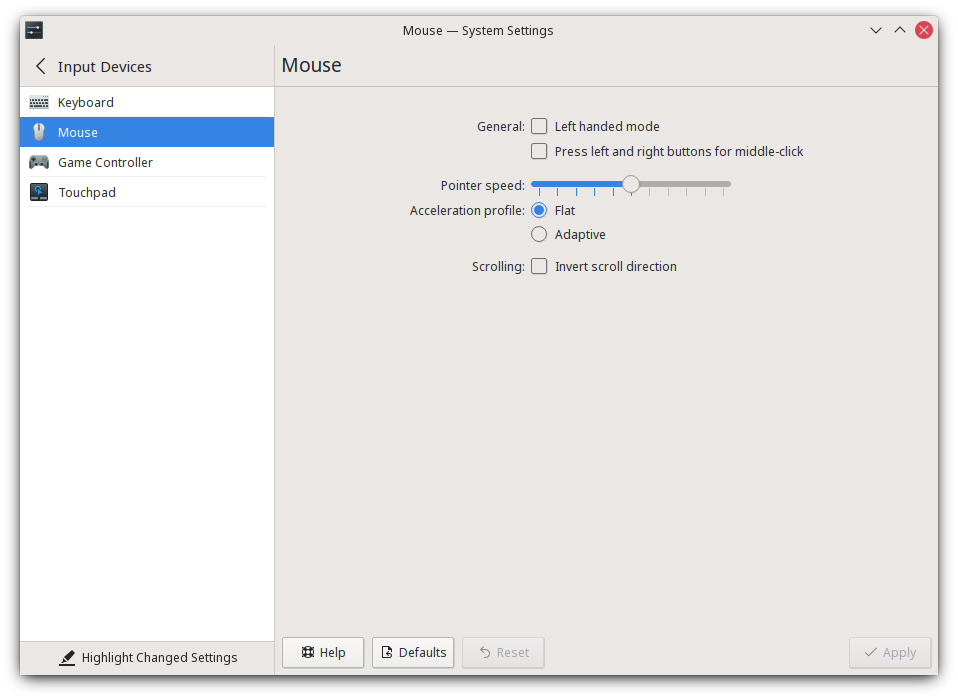
adaptive mode is pepega
i think its kubuntu 20.04 (neon?) fault
i had good performance on opensuse leap, mageia, fedora kde 35
you should enable "Force Composition Pipeline" in Nvidia Settings (X Server Display Configuration - Advanced)
and setup limit to 61 fps and disable vsync ingame
that's how i got rid of micro stutters
also twitch on background/second monitor can eat good chuck of gpu performance
cuz nvidia can't just support vaapi properly for hardware video decoding / rendring so linux browsers use 3D core for that instead of Video Engine
but shouldnt be problem on your PC
dusky goblet
proton experimental
fading topaz
Personally I find running protonGE to work well, especially when passing it the DXVK_ASYNC=1 flag
dusky goblet
dxvk_async does nothing for vulkan render
thats just kubuntu neon issues, poor configuration on system parameters by default, no idea what they did
dxvk_async its for directx11 render to avoid game freeze on shaders compilation
you can also copy dxvk_async patched direct3d dlls into poe installation on windows and that will translate game into vulkan (under directx11 render)
vivid badge
open steam through terminal
 worn sierra
Anyone getting errors on login about needing to update? My release tag says 3.16.1 so it appears to be updated.
https://www.pathofexile.com/forum/view-thread/3206793 Nevermind, this isn't unique to Linux.

Path of Exile
Path of Exile is a free online-only action RPG under development by Grinding Gear Games in New Zealand.
 tulip dome
wich linux is more appropriate for poe ??
vivid badge
the one that suit your needs and is easy for you to use but I personally recommend fedora
dusky goblet
fedora's default kernel doesnt perform well for gaming
kubuntu also perform bad for gaming, no idea why
you really should use xanmod kernel if its possible on urs distros, or compile it manually 
i haven't checked debian 11 with kde yet, they have a little newer packages overall than opensuse leap
also hardmode when? that directx under windows/nvidia generated 2.5gb of shaders and still sometimes keeps freezing game when you open scourges, i want to do hardmode completely on linux
mild urchin
snapos is w/e is good i hear
 split radish
Is it possible to run awakened poe on linux?
edgy sierra
@split radish Should be, just grab the Appimage from their release page. It says "ubuntu" but appimage is a portable format and works on other distros. Overlay functions probably will not work if you're using a Wayland compositor. I don't use it myself so I can't really attest to how well it works.
split radish
Ok thanks
quasi lily
if u use kde with kwin compositor its... bad luck. Im currently stuck with version 2.13.1 because 2.14.1 is really frustrated to use
dusky goblet
so no hardmode until next year/league i guess?
chris wolcen lied once again? 😦
also that winesync kenel module don't needed
because futex2 is better
winesync its just for some old games
 weak crag
hi im new to poe and ive been having a problem with the game running through proton where whenever i switch from directx to vulkan and restart the game it gets stuck on the rotating gears loading screen (sorry if this isnt the right place to ask)
fading topaz
are you passing in any flags, like --waitforpreload? That could cause the game to wait until it finishes loading textures and whatnot
also, recommend you run the game with PROTON_LOG=1 to debug
weak crag
i ran it with PROTON_LOG=1 and checked the output and it looks like it's in some sort of loop where every couple seconds it outputs these lines (sorry for late response i took a nap)
2316.084:010c:0110:trace:seh:NtSetInformationThread (0x19c,3,0xd3e95c,4)
2316.085:010c:0278:trace:seh:NtSetInformationThread (0x19c,38,0xab76fc60,10)
2316.085:010c:0278:fixme:seh:NtSetInformationThread Can't set other thread's platform description
2326.066:010c:0278:trace:seh:NtQueryInformationThread (0xfffffffffffffffe,12,0xab76fe2c,4,(nil))
2326.067:010c:0110:trace:seh:NtSetInformationThread (0x19c,3,0xd3e95c,4)
2326.068:010c:027c:trace:seh:NtSetInformationThread (0x19c,38,0x7aedfc60,10)
2326.069:010c:027c:fixme:seh:NtSetInformationThread Can't set other thread's platform description```and the game runs (not good performance) when dx11 is chosen as the renderer but the problem only happens when I switch to vulkan
edgy sierra
Are you passing any flags or setting any environment variables? Cubethethird asked before but I want narrow things down. Also knowing your hardware and Distro will be helpful.
Also which proton version you're using.
mild urchin
maybe ur gpu not support vulkan
weak crag
i'm not exactly sure what passing flags means (i assumed that it meant if i was launching with any launch options which i wasnt) and im not sure what environment variables are either (sorry im new to a lot of things)
for hardware im using my laptop which has a ryzen 7 4700u and integrated amd graphics (which i think works with vulkan considering that it works with other games) and im running linux mint 20.2
poe is installed on an ssd and i have 16gb of ram
for proton ive tested both experimental and 6.3-7
mild urchin
have u tried proton ge
idk if its still the best option but ge has custom fixes
helped my performance when i was trying it
weak crag
i tried one but i havent updated it in a bit ill go try that out
edgy sierra
I got an idea.
Have you actually installed the vulkan drivers?
By default your distro might not come with them
In this case you'd run apt install libvulkan1 mesa-vulkan-drivers vulkan-utils
weak crag
doesn't seems to be doing anything
but after running with proton-ge the log was stuck on this for like 30 minutes (i want to do other things)
264.859:0288:028c:fixme:system:SystemParametersInfoW Unimplemented action: 53 (SPI_SETTOGGLEKEYS)
264.859:0288:028c:fixme:system:SystemParametersInfoW Unimplemented action: 51 (SPI_SETFILTERKEYS)
951.710:0288:028c:fixme:keyboard:X11DRV_ActivateKeyboardLayout 0x4090409, 0000: semi-stub!``` unreal kiln
weak crag
but after running with proton-ge the log was stuck on this for like 30 minutes (...
unreal kiln
weak crag
but after running with proton-ge the log was stuck on this for like 30 minutes (...
these fixmes aren't related to the vulkan/ogl drivers, probably just a side effect of a loop in the application triggering harmless stubs.
I would verify that you actually have a working vulkan driver because it is totally possible Mint could have screwed that up in their distro.
see if you have vkcube installed and try to run that, if you cannot instantiate a vulkan context, then it's your driver. Nothing to do with wine/proton.
weak crag
i can run vkcube fine
unreal kiln
do you have other vulkan-capable titles you can run via proton/dxvk?
perhaps specifically with proton; steam uses a runtime on Linux to try to avoid distro-specific annoyances with dependency versioning, but things get weird when certain system libraries are out of date. Valve is likely developing proton to best match SteamOS 3.0, and that brings along some considerable differences compared to the ubuntu-backed update cycle that Mint carries with it.
Also, it's worth double-checking to see if a Wayland compositor is causing issues here. I believe wine still relies on Xwayland compatibility, but that is also another place where things can go wrong, especially if out of date.
Since you are relying on AMD graphics, a lot of desktop environments default to Wayland now.
weak crag
my desktop is running x11 and im currently installing no mans sky to check vulkan and proton
no mans sky seems to run fine which uses both proton and vulkan
unreal kiln
that narrows it down to some specific driver interaction PoE triggers that other titles don't. I am assuming it is not an instantiation bug because you're getting the loading screen, but likely some issue with how PoE loads assets. Could be a weird race condition, since you're stuck in a loop that is querying other threads.
Modern wine/proton doesn't really cause race conditions on its own anymore, at least not in the sense that the actual NT/WIN32 implementations wouldn't
weak crag
i might try loading the game overnight if its just taking an extremely long time to load
unreal kiln
it will likely not lol.
usually these kinds of bugs are hard to track down because it tends to boil down into spec non-compliance from the driver or the application. Usually, it's the application.
in theory, GGG should be writing their Vulkan backend for any implmentation of it, not just how the major vendors' drivers behave on Windows
but in practice if they are invoking UB that only triggers on your specific chip on the *nix driver, you're going to get groans if you try to report it to GGG
so let's just hope it's not the application, and it's the driver. Update your kernel.
if it is the application, then I would suggest giving up and using DX11, unless you want to start tracing every single call into the Vulkan API and try to track down the bug yourself, and then report it to GGG.
the reason why I can infer all of this is because there is functionally zero difference between how Vulkan applications function on Windows and Linux, there is no "compatibility" layer for Vulkan since direct support is available from drivers now, and the issue is demonstrably isolated to the Vulkan backend since you can run with DX11->OpenGL translation and other Vulkan titles just fine.
In the graphics programming world, it is common to run into difficult to reproduce bugs because code is technically invoking UB according to the spec, but only actually triggers a bug on a particular driver on a certain series of chips, while the rest of the vendors behave deterministically.
In the rare event this is some sort of thread race condition/deadlock separate from the Vulkan API that happens to be triggering on your hardware, you can also play with process affinities to lock PoE to a single core while it is loading. The taskset command will allow you to do this, and you will need a script to wrap POE accordingly so the restriction is removed after loading is finished (you could probably automatically skim the logs to determine this).
It is also highly unlikely different versions of proton will solve the issue here because the components in focus here are threading (the implementations for these functions do not change frequently in Wine, and predate proton itself), and Vulkan, which proton does nothing for.
Hopefully this provides enough information so you can decide if it's worth fixing. I would update your kernel and play with taskset to see if you can release a potential threading issue, but beyond that it's not worth the time.
mild urchin
theres preload flags that might be doing something but idk if they matter
my linux is bricked rn so i just play on windoze 🤤
unreal kiln
LD_PRELOAD is for working around dependency issues. Usually, if there is a dependency issue, the application will not even execute.
some applications do dynamically load dependencies at runtime with dlopen/LoadLibrary, but in PoE's case that will be entirely DLLs distributed with the application itself (if any), so if that didn't work, then every Wine/Proton user would fail to run PoE.
 lyric dust
I keep on running out of memory when playing this (I have 16GB). Delve is really bad at it. Sometimes It will use a huge amount of RAM when I scroll out in the delve map.
This has been happening since Ritual. Anyone else see this?
I am talking like PoE is using 10GB+
vivid badge
well some leak issues been happening at random since heist for me
had some on ritual as well but ultimatum I had 0 ram issues
edgy sierra
It's been a bit gnarly this patch in my experience. I actually get DC'd scrolling the delve map too fast
edgy sierra
I did however, just confirm that that particular problem is a RADV/ACO bug already fixed (in mesa-git).
At least on my hardware*.
 wide cipher
can anyone help? I somehow crapped my perfectly working poe installation, biggest issue atm getting stuck in loading screens
on steam
 jolly oar
what proton version are you running
edgy sierra
I would suggest dropping proton experimental, if you were using it before. Experimental (now) relies on the new futex2 (waitv_multiple) implementation which you might not have .
And there is a known issue where using the old FSYNC patch set causes the new Futex2 implementation to cause infinite loops
So drop down to proton 6.3-stable, whatever the version is at and try again
unreal kiln
edgy sierra
I would suggest dropping proton experimental, if you were using it before. Exper...
was that pulled from upstream wine?
it was my understanding the futex2 patches were merged into the kernel specifically to implement WaitForMultipleObjects-esque behavior
edgy sierra
Only in kernel 5.16+
It might be fixed now I don't have the bug report handy but what it boiled down to was the new proton futex2 patch set in proton-experimental was causing hangs on kernels running the old fsync patchset.
 viral dirge
is there a path of building for linux systems?
 sharp maple
viral dirge
is there a path of building for linux systems?
sharp maple
viral dirge
is there a path of building for linux systems?
https://lutris.net/games/path-of-building/ Community fork version
 flint laurel
@viral dirge If you're on something arch based it's in the aur.
 full radish
 iron charm
Standalone, unless you live in Korea
 trail vector
Has anyone ran this on manjaro/arch?
fading topaz
Runs fine on Arch
dusky goblet
imho debian 11 with xanmod kernel is better but w/e 🙂
i prefer steam/proton version
and i won't recommend kubuntu or fedora or anything with gnome shell
xfce or kde is fine
edgy sierra
I would recommend xanmod/zen for a kernel (AFAIK they contain very similar if not identical changes), I would keep LTS/normal kernel installed as a standby. It's never been a problem for me, but I'd like to keep it that way.
 urban tendon
ahoy! i got a linux-related discord problem - i cannot see the message on how to activate voice ^^
i.e. i can't "react" on the linux discord client
edgy sierra
Can always try it in the discord browser client.
 full violet
Has anybody tried getting this working on Bullseye recently? Having a nightmare here.
full violet
Stupid mesa/vulkan issues.
edgy sierra
Any specific errors/error messages in particular?
 agile rampart
Anyone happens to have crashes on Linux? More precisely Ubuntu
 worn parcel
You'll have better luck figuring it out / getting help if you take a log
 tawdry gull
Hey, I spent almost the whole league playing on ubuntu and recently I had a lot of crashes and freezes. I came back to my beloved Arch, and even though I know that probably noone would switch distros just to try if a game would work better, it looks like indeed I no longer have any problems.
What if the gpu drivers in Ubuntu aren't best? I use nvidia drivers from aur (version 495.46).
What other differences between these distros could be there? I'm not sure, but I also noticed that electron applications would freeze on my Ubuntu, so I suggest turning them off when you play the game.
@agile rampart I hope you can figure it out. Also, use Experimental proton (assuming that you use Steam, idk)
agile rampart
tawdry gull
Hey, I spent almost the whole league playing on ubuntu and recently I had a lot ...
Yeah I do use steam, but I am wondering how did Arch fix the issue
tawdry gull
can you open the game, or does it crash when trying to?
 simple orchid
Really dumb question
Where does Proton/WINE store the artificial c: it makes?
Nevermind.
The Find command finally came back
agile rampart
tawdry gull
can you open the game, or does it crash when trying to?
It crashes while playing randomly, mostly while i change zones
Or freezes, makes it really difficult to play on hardcore
 vestal pier
🙂 i just want to say thank you. i have been playing POE for almost a year now through Steam. Arch btw. I can't think of a single time it has crashed.
flint laurel
vestal pier
🙂 i just want to say thank you. i have been playing POE for almost a year now t...
Also arch btw. Nice to meet you.
full violet
One day GNU/Linux will be the place to be for all the latest game releases.
worn parcel
Shhh. let's keep it viable with minimal migration over from windows
 raven canyon
any problems on fedora? havent tried it
edgy sierra
Fedora is going to be fine. Realistically all you need to do these days is install Steam/Vulkan Drivers for your graphics card, download the latest Proton in Steam, and tell Steam to use Proton for PoE. Proton containerizes things so there's a lot less room for tomfoolery.
Unless you're some kind of Silverblue masochist, in which case you're on your own, that there is the undiscovered country.
full violet
Treating myself to a more up to date card tomorrow. Can then finally set fire to my Windows partition. I'm stuck on the radeon driver atm. (AMD 7570 HD)
 halcyon sable
edgy sierra
Fedora is going to be fine. Realistically all you need to do these days is insta...
halcyon sable
edgy sierra
Fedora is going to be fine. Realistically all you need to do these days is insta...
using the non-steam version with lutris shouldn't be much harder, right?
edgy sierra
@halcyon sable It will work but in my experience Wine chugs on the content.ggpk and the standalone client runs noticeably less smooth. The steam version doesn't use the the GGPK file and loads a lot of loose files instead of content.ggpk.
As always your mileage may vary. The last time I did any A/B testing was in Ultimatum and since then I've just used the steam client.
halcyon sable
thanks ^^
vestal pier
occasionally, i see the text in the labels of names of dropped currency and white items looks either crazy spread out or squashed together. not a big deal. using arch. really not a big deal at all, but i thought i would report/ask.
edgy sierra
That's a PoE problem, it happens on windows as well. Only fix I'm aware of is to restart the client.
iron charm
“bug-for-bug compatible”
raven canyon
edgy sierra
Unless you're some kind of Silverblue masochist, in which case you're on your ow...
well maybe i am
halcyon sable
it works perfect! genuinely surprised something conflicts with discord voice calls , im thinking wine being dumb?
edgy sierra
How so? Also some environment questions: Wayland or X11? Gnome/KDE/other? Push to talk or voice activation?
halcyon sable
x11, kde plasma. It gets stuck on the rtc connecting thing (my dns is configured properly, since that would normally be what to look for in solving that issue)
everything works normal until i launch the game, after that a call goes silent if im in one, and it doesnt join me into a new one
edgy sierra
That's a stranger problem than I anticipated. There's no way it is resource starvation (network or CPU) because that would make things completely unusable. The only real way I can see things interfering with Discord directly is "Discord Rich Presence". Did you wind up using Lutris to install PoE?
halcyon sable
lutris, yes
i downloaded canary instead of normal discord and it seems to be working for now...
edgy sierra
A solution is a solution I guess.
 unkempt goblet
I'm thinking of switching back to Linux, however last time I tried the known trade helper XenonTrade fork wasn't working with Wayland. Does anyone know if it's been updated to be compatible (I don't see any notes about it on GitHub) or know of an alternative that works with Wayland or am I stuck with X if I want to use a trade helper?
edgy sierra
I think Awakened POE Trade works with Wayland, but I haven't tried it.
mild urchin
anyone tried gpu passthrough for gaming in a vm on linux
edgy sierra
I looked into it for a while but felt it was too much hassle when basically everything I wanted to play ran well enough via Proton/Wine, so I just couldn't be bothered. I do know NVIDIA has some anti-VM measures built into their drivers so you've gotta jump through some hoops (some gnarly, like modifying the GPU BIOS) if you intend to use it for the Windows guest OS. From what I hear it does work well once it is setup, but that "getting it setup" part can be simple or a nightmare.
I eventually spec'd myself out of that option when I bought an NVME drive; AMD b350 chipset doesn't have the lanes for 2x GPU + NVME. I also never thought NVidia would support GBM/Wayland any time soon and even if they did they wouldn't support my old card (750Ti) but the latest drivers do so
mild urchin
yea last i checked was a few years back and it was a pain, im just rly set on doing this in the future
kind of the ideal setup if you can just spin up VMs with hardware passthroughs
edgy sierra
I do hope it's a feasible route forward. There is a lot of potential; unfortunately reliant on Motherboard firmware support, GPU driver support, anti-cheat VM detection going away, crypto transition to proof of stake, and the global chip fabrication crisis at least dying down somewhat 
At least for those of us without a ready-to-go system.
If you have one, live the dream for us.
halcyon sable
i retract my previous statement, it is just as broken on canary as on normal
edgy sierra
The only thing I could suggest is disabling Discord Rich Presence in Lutris. There's not a whole lot of other avenues for Discord and a Wine application to interact.
Could also try installing Firejail and using that to launch discord.
 hollow oyster
I wonder if GGG is going to add controller support to PC version once the Deck comes out in a few weeks

 dull surge
hollow oyster
I wonder if GGG is going to add controller support to PC version once the Deck c...
dull surge
hollow oyster
I wonder if GGG is going to add controller support to PC version once the Deck c...
maybe not when the deck comes out but i think they did say controller support will be there soon "TM"
probably in between here and the release of poe2
 dire crater
hey guys, i awakened poe trade available on linux, if yes where can i find it?
edgy sierra
https://snosme.github.io/awakened-poe-trade/download is the download page, the link says "Ubuntu" but it's an Appimage, which is a portable format that will work on most distros.
dire crater
thanks a lot!
what. Is that normal that all my character are now in standard? (I played during scourge btw)
edgy sierra
Yes, all characters are migrated to their parent league (Softcore Scourge -> Softcore Standard, Hardcore Scourge -> Hardcore Standard) once a league ends.
dire crater
so the league has technically ended even if archnemesis is not out yet? I thought they would migrate this friday
edgy sierra
Nope, it's done a couple days beforehand so they can process the database changes. They made a booboo before Ultimatum league and someone forgot to run the migration and it was basically impossible to get in or stay without being kicked back to 15,000 in queue after 5-10 minutes.
dire crater
haaaaaaaa i see now
i usually don't connect to poe days before the end of a league but i just migrated to linux so i wanted to test if everything was working properly.
Do you have any optimisation to do for poe to work fine in linux?
edgy sierra
In my experience the Steam client with Proton runs better than Standlone via WINE. If your graphics card supports Vulkan, make sure you choose the Vulkan renderer in game.
There's not a whole lot of tweaks needed these days.
dire crater
ok great, i run it through proton with vulkan so i should be good then. thx 🙂
edgy sierra
No problem. Good luck on Friday.
dire crater
thx you too!
brisk mountain
i am unable to select Vulkan as renderer in the login screen. I use an old GPU with 4GB VRAM which is able to run the game with Vulkan fine in my other newer computer. renderer_type=Vulkan is set in the config
does someone know if there are minimal requirements for Vulkan to be selectable?
edgy sierra
Can you run vkcube in a terminal?
or provide the output of ls /usr/share/vulkan/icd.d/ if vkcube isn't installed.
And depending on the age of your GPU there may be additional hoops to jump through, how old is "old" in this case?
brisk mountain
vkcube runs fine (no output)
intel_icd.i686.json intel_icd.x86_64.json lvp_icd.i686.json lvp_icd.x86_64.json nvidia_icd.json radeon_icd.i686.json radeon_icd.x86_64.json
GeForce GTX 760 - Gainward version with 4GB. runs quite fine in my new computer together with threadripper and fast ssd but throws errors on that system. i assume the MMU of the card is faulty now. that error does not happen on the old system. the wine prefixes differ a lot - i tried to recreate it from scratch and it worked after some work well with vulkan on the new system.
both systems are uptodate debian stable. wine versions are taken from lutris but started via a shell script
the computers are in different locations, currently only have access to the old computer
edgy sierra
Nvidia did end Kepler support after driver ver 470, but vkcube works and debian looks like it's packaging 470 still so that's a strikeout.
Running through a system installed wine or a lutris-wine but just starting it through a shell script?
brisk mountain
nvidia-driver is version 460.91.03-1. i dont use the wine from the system that is far too outdated.
edgy sierra
I thought as much but some people still do it.
I can't really rule out some kind of hardware failure but I think if it was the card dying the results would be more messy than the drop down being disabled.
Maybe try running it via lutris with wine-ge-custom? https://github.com/GloriousEggroll/wine-ge-custom . I generally avoid lutris and prefer shell scripts too but I've been using the steam version for 9 months so I can't speak to any bugs that might've cropped up in Wine since.

GitHub
My custom build of wine, made to use with lutris. Built with lutris's buildbot. - GitHub - GloriousEggroll/wine-ge-custom: My custom build of wine, made to use with lutris. Built with lutri...
brisk mountain
that was the last i tried https://github.com/GloriousEggroll/proton-ge-custom/releases/tag/7.1-GE-2

GitHub
-This is a hotfix to restore WMA audio support.
The FAudio author removed GStreamer support -- which is needed for WMA playback.
The reason he did it is because WINE is in the process of upstreamin...
can test more tommorow
edgy sierra
Last idea before I go to bed myself, the Lutris script does a completely unnecessary thing (assuming it is this one https://lutris.net/games/install/6653/view)
    key: VideoMemorySize
    name: set_regedit
    path: HKEY_CURRENT_USER\Software\Wine\Direct3D
    prefix: $GAMEDIR
    value: 2048```
Completely unnecessary, but not enough to bork things on it's own. Now that in conjunction with Poe patch 3.14.3 ```Vulkan users with less than 2600mb of VRAM are now unable to select High texture quality, as there isn't enough video memory for the high-quality textures. DirectX users can continue to select it, but like before, performance will suffer on low memory systems as DirectX swaps assets into and out of system memory to try to cope.``` So make sure textures are on medium (AFAIK they still default to high), and then see you can switch to Vulkan.If the main issue is PoE not finding the GPU with Vulkan, you could try something like this:
https://wiki.archlinux.org/title/Vulkan#Selecting_Vulkan_driver
https://wiki.archlinux.org/title/Vulkan#Nvidia_-_vulkan_is_not_working_and_can_not_initialize
Alternatively set the environment variable
VK_ICD_FILENAMESto/usr/share/vulkan/icd.d/nvidia_icd.json.
brisk mountain
here are my game options. it shouldnt be a vulkan issue. an old wine prefix with dxvk starts the game slowly with very slow reaction times ingame - without working vulkan dxvk wouldnt work. my wine prefix without dxvk starts the game the screen stays black mouse pointer is visible and music starts thats it. renderer is set to vulkan in the config file the displayed option should be an enforced overwrite from the game.
 edgy sierra
Don't think I have any other ideas then, I checked the Vulkan feature level cert and your card and mine are Vulkan 1.2 certified, and 1.3 only came out last week or so. So maybe it is your GPU dying? Out of ideas other than trying the steam version as a last resort. Recent Proton versions use a a flatpak based container environment which probably won't help but it's the last thing I got.
brisk mountain
ill try to get a driver newer than the one from debian stable - backports or unstable
brisk mountain
i did mess around a bit in the new wine prefix and somehow made it work... not sure what fixed it now. i did install dxvk via winetricks which let me see the login screen from the new wine prefix and there i could select vulkan, restarted and it works fine 🙂
brisk mountain
pasting from the clipboard doesnt work
hexed pivot
clipboard depends on what DE you're using. XFCE, KDE, Gnome, ...?
brisk mountain
mate 1.24.1
brisk mountain
when i press "v" or Ctrl-"v" in game i get an "ö". after linked items i see a rectangle. somethings not yet correct
EDIT: new prefix works now!

 restive phoenix
im trying to play poe on linux through steam remote play on a windows host and i get like 60-80% frame loss. yesterday it worked fine and 2 others games run good too
dire crater
hey guys, i'm new to poe on linux, i'm on mint and was wondering, where do i but the filterblade file to access it ingame>
edgy sierra
for steam it's going to be ~/.steam/steam/steamapps/compatdata/238960/pfx/drive_c/users/steamuser/Documents/My Games/Path of Exile/
If you have your steam library on a different drive, you'll need to go there for the compatdata folder, but the rest of the path is going to be the same
 terse cedar
what method of running the game do you recommend for Linux Mint? running it through Lutris or steam proton?
edgy sierra
My personal experience is Steam w/Proton working best.
terse cedar
ok, ty :)) :D
 sharp wraith
Hey, not a clue what is going on, for some reason starting today my mouse right click inputs are glitchy af. It seems like it is system-wide but I can't really tell. I recorded with OBS and input overlay and at times when I'm standing still, I am holding down the mouse the whole time, yet you can see the mouse input randomly releases and presses down... https://streamable.com/tk84tf

Anyone else seen this behavior before?
edgy sierra
I don't really want to say it's always the hardware, it just almost always is.
Time for a new mouse? Replicated the behavior on a windows machine?
 bold pine
i play on PC with the standalone client (no steam). can i play on linux without steam?
edgy sierra
Yes. You will want to use lutris to run PoE. It's also basically a hard requirement to have a Vulkan capable GPU.
edgy sierra
RTX 2060 is well above the min requirements so that'll be fine. As far as I'm aware Lutris should run out of the box. I use the Steam version so I've never really used Lutris, but I do know from discussions with others that it does work. Lutris is designed to be pretty simple to use.
karmic solar
anyone around to help with troubleshooting PoE closing after displaying black window?
Verified data and checked steam output when launching PoE
/bin/sh\0-c\0/home/shana/.local/share/Steam/ubuntu12_32/reaper SteamLaunch AppId=238960 -- '/home/shana/windows/Games/Steam/steamapps/common/SteamLinuxRuntime_soldier'/_v2-entry-point --verb=waitforexitandrun -- '/home/shana/.local/share/Steam/compatibilitytools.d/Proton-7.0rc6-GE-1'/proton waitforexitandrun  '/home/shana/windows/Games/Steam/steamapps/common/Path of Exile/PathOfExileSteam.exe' --nopatch\0
Game process added : AppID 238960 "/home/shana/.local/share/Steam/ubuntu12_32/reaper SteamLaunch AppId=238960 -- '/home/shana/windows/Games/Steam/steamapps/common/SteamLinuxRuntime_soldier'/_v2-entry-point --verb=waitforexitandrun -- '/home/shana/.local/share/Steam/compatibilitytools.d/Proton-7.0rc6-GE-1'/proton waitforexitandrun  '/home/shana/windows/Games/Steam/steamapps/common/Path of Exile/PathOfExileSteam.exe' --nopatch", ProcID 62360, IP 0.0.0.0:0
ERROR: ld.so: object '/home/shana/.local/share/Steam/ubuntu12_64/gameoverlayrenderer.so' from LD_PRELOAD cannot be preloaded (wrong ELF class: ELFCLASS32): ignored.
ERROR: ld.so: object '/home/shana/.local/share/Steam/ubuntu12_32/gameoverlayrenderer.so' from LD_PRELOAD cannot be preloaded (wrong ELF class: ELFCLASS32): ignored.
pid 62448 != 62401, skipping destruction (fork without exec?)
GameAction [AppID 238960, ActionID 1] : LaunchApp changed task to WaitingGameWindow with ""
GameAction [AppID 238960, ActionID 1] : LaunchApp changed task to Completed with ""
Installing breakpad exception handler for appid(steam)/version(1642451672)
ProtonFixes[63466] INFO: All checks successful
ProtonFixes[63466] INFO: Using global defaults for "Path of Exile" (238960)
ProtonFixes[63466] INFO: Using protonfix for "Path of Exile" (238960)
ProtonFixes[63466] INFO: Adding env: WINEDLLOVERRIDES=dxgi=n
Installing breakpad exception handler for appid(steam)/version(1642451672)
Game process removed: AppID 238960 "/home/shana/.local/share/Steam/ubuntu12_32/reaper SteamLaunch AppId=238960 -- '/home/shana/windows/Games/Steam/steamapps/common/SteamLinuxRuntime_soldier'/_v2-entry-point --verb=waitforexitandrun -- '/home/shana/.local/share/Steam/compatibilitytools.d/Proton-7.0rc6-GE-1'/proton waitforexitandrun  '/home/shana/windows/Games/Steam/steamapps/common/Path of Exile/PathOfExileSteam.exe' --nopatch", ProcID 64461
// created interface
Game 238960 method call count for IClientUtils::RecordSteamInterfaceCreation : 5
Game 238960 method call count for IClientUtils::GetAppID : 7
Game 238960 method call count for IClientUser::GetSteamID : 1
Uploaded AppInterfaceStats to Steam
No cached sticky mapping in ActivateActionSet.Installing breakpad exception handler for appid(steam)/version(1642451672)
 abstract sedge
Hi guys! What kind of performance is everyone getting this league? Proton/Wine? I have atrocious stuttering that didnt exist last league, so I'm wondering if the Proton performance is smoother than the wine standalone one.
I've tried some things. Vulkan vs DXVK. Disabling multithreading as the spikes seem CPU related and many Windows users seemed to think it fixed things in 3.17.
FPS going from 90 to singledigits, or below 20fps, basically. It's almost unplayable. Playing on Ryzen 3700x, 1070gtx, medium or recommended setting @1440p. Latest nvidia drivers, Wine 7.0 - TKG protonified. Sometimes it's smooth, mostly in battle, it's not.
I can't test STeam at the moment because I'm family sharing my library with my sister and she's playing something all the time 😦 But I could make a dummy account to play POE if Proton and maybe Steam shader pre-caching allows for smooth gaming...or maybe someone is playing smoothly on standalone, and could point me to some optimal settings?
I'm trying to think what has changed since last league, apart from POE, and the main thing I can think of is that I switched to pipewire for audio instead of pulse. Coincidentally, my previous Wine Alsa setting produced no sound, and I had to swap to the default wine pulse driver in winecfg. I have no idea if that matters even a little bit, but I once had Pulseaudio issues with a game due to custom sampling rates increasing CPU latency to the point of game stuttering.
abstract sedge
Loading into cities also takes a long time, on an NVME ssd.
abstract sedge
ok I was impatient so I made a new steam account for POE and am trying it out. will report back soon, how it goes with Proton Experimental.
vestal pier
are there good reasons to use poe outside of Steam? i have had almost no significant issues with it there
edgy sierra
'/home/shana/windows/Games/Steam/steamapps/common/Path of Exile/PathOfExileSteam.exe'
NTFS formatted drives have always eventually caused me issues.
re: Shoshin, ever since they fixed the steam client's patching, the only real reasons to run it outside of steam is personal preference, or PoE isn't available on steam in their region.
vestal pier
awesome. thank you!
 feral grotto
I am having some font issues on divination cards mainly
it's spaced weirdly so it runs through the bottom of the card, does anyone know what font I am missing if that's the case?
 wind perch
feral grotto
it's spaced weirdly so it runs through the bottom of the card, does anyone know ...
wind perch
feral grotto
it's spaced weirdly so it runs through the bottom of the card, does anyone know ...
There are weird spacing bugs on windows too, can you take a screenshot? It might be the same issue which can't be solved.
Otherwise you can try installing the Microsoft font package, if your distro has one
feral grotto
is that the cascada font stuff?
that's the only thing I can find in pacman
*cascadia
I'll take a screenshot
wind perch
You could try https://wiki.archlinux.org/title/Microsoft_fonts
feral grotto
it's easier to figure out then
wind perch
Ttf Ms win10 sounds like the kind of thing I was thinking of
feral grotto
hmm now it's fine lol
wind perch
Lol. It was probably the same bug people get on windows
feral grotto
might be
wind perch
Sometimes Poe just forgets how to render fonts 
feral grotto
hmm and no mention about flask sound being played when you have insufficient charges and use a flask
is that only happenig to me?
edgy sierra
Sounds are kind of all over the place with this patch, loud death screams, etc. It is a PoE problem.
 outer pagoda
feral grotto
hmm and no mention about flask sound being played when you have insufficient cha...
outer pagoda
feral grotto
hmm and no mention about flask sound being played when you have insufficient cha...
that is not new, and has been the case since at least expedition
feral grotto
why isn't it being fixed? It's very annoying
dire crater
hey small question here, i use steam on linux mint to play poe and very often when i click on start, steam will appear to be opening the game (the start logo change to a blue logo saying "stop") but the game don't start. I often have to stop and repeat 4-5 time before it finally opens, sometime restarting the computer works but sometime it doesn't. Is that common?
edgy sierra
It is unusual. Would you happen to have your steam library on an NTFS formatted drive?
dire crater
no it's on an ext4 drive!
 elder needle
dire crater
hey small question here, i use steam on linux mint to play poe and very often wh...
elder needle
dire crater
hey small question here, i use steam on linux mint to play poe and very often wh...
ive encountered this before on Arch. An uninstall/reinstall fixed it. sometimes it is just a bad file somewhere. I have even run into this with other games on Windows before
dire crater
i’ll give it a try if it doesn’t get better, thxn
edgy sierra
Could try forcing steam to recreate the proton/wine prefix by moving ~/.steam/steam/steamapps/compatdata/238960/. You can back-up your settings/filters from ~/.steam/steam/steamapps/compatdata/238960/pfx/drive_c/users/steamuser/Documents/My Games/Path of Exile/
steep linden
Somebody tested poe on the new proton release? ^^ Already ran really well from my testing, interested if there was any improvements since
OO somebody has tested poe on the deck

https://media.discordapp.net/attachments/930798537623633931/943689757374947358/unknown.png
Seems only controller support is needed for verified status

Controller support launch and first shipment of decks coincide. Coincidence?
edgy sierra
I think it is at best a secondary benefit. Controller support has been asked for for a long time but has been on their back burner for a long time, even since the console release.
steep linden
I'm just very excited to see how it performs on the deck ^^ and getting controller support with maybe the deck as a option is amazing, there is nothing right now in terms of handheld that can play it at juiced levels
dusky goblet
anyone know how to improve font rendering? that ingame font looks different from windows
dusky goblet
also latest proton 7 got even further performance improvements, its smooth like a butter
but wine still causes some cpu extra usage compared to windows
 lofty lintel
how to run proton without steam?
fading topaz
Lutris is the recommended way
 bleak forge
anyone tried running poe in the volvo deck yet?
steep linden
Only seen some very short gameplay, but seems to be running nicely ^^ but most play with unoptimal controller schemes, the touch pads last time I played poe with a steam controller is a god send for inventory and the sticks can be made to control the mouse in a circular ring around the character.
Might be possible to fully play with the touch pads but the stick limits the builds you can make.
From other games I have seen it run there should be no issue running almost any content I think, other then content even a higher end PC would struggle with ofc 
 full plover
Oh wow this is here.
I have been trying to get this installed on ubuntu 20.04 with nvidea all day to know avail.
Steam proton launches then instanlty closes.
Luttris was so annoying to try and figure out I gave up
full plover
Hmm just realised the disk is in NTFS format which could be a permission issue.
edgy sierra
Not just a permission but a feature issue. Proton relies on linux filesystem features that do not exist on NTFS.
If you absolutely must have your steam library on an NTFS formatted drive, the compatdata folder has to be symlinked to a linux filesystem.
But odds are eventually it will stop working, either patching will fail, or failing to launch like you're seeing now. And you will tear out your hair trying to figure out why, and it's NTFS.
 knotty cedar
Hi, anyone else having trouble with Awakened PoE trade/PoE overlay community? Both haven't been working for me on Arch KDE for quite a while. I'm even on a fresh install now.
sharp wraith
Anyone know of any trade overlay (not price-checking) that works on Linux? I think I've tried them all...
 noble lion
I'm using Awakened PoE trade on KDE Wayland, ctrl+alt+d works, but to get back to PoE I need to alt tab
On X11 you need to use compositor, for me with kde it causes stutters until i toggle vsync(change then cancel)
sharp wraith
I am using Awakened PoE Trade for price-checking as well, but I am talking about actual trading. e.g. Sidekick, Trade-Companion, MercuryTrade, etc
knotty cedar
Has anyone been able to get Exilence Next working? I have been trying unsuccessfully for days on KDE Plasma. It always breaks on OAuth, the app opens but the OAuth doesn't take place. I have tried both wine and AUR package.
unkempt goblet
sharp wraith
Anyone know of any trade overlay (not price-checking) that works on Linux? I thi...
Have you tried the PoE Overlay Community fork? I have only tried it on Windows so far but it looks to support both a native deb package and appimage
https://github.com/PoE-Overlay-Community/PoE-Overlay-Community-Fork

GitHub
An Overlay for Path of Exile. Built with Angular. Contribute to PoE-Overlay-Community/PoE-Overlay-Community-Fork development by creating an account on GitHub.
sharp wraith
ooh, did not notice the appimage before, will try thanks
sharp wraith
knotty cedar
Has anyone been able to get Exilence Next working? I have been trying unsuccessf...
I compiled from source and it's sort of working
i18n doesn't work, but it's usable
knotty cedar
Guess I'll try that, cheers.
sharp wraith
unkempt goblet
Have you tried the PoE Overlay Community fork? I have only tried it on Windows ...
alas, even this fails me, looks like they are using an insanely old version of electron and it just refuses to work with my compositor (mutter):
❯ ./poe-overlay-0.8.12.AppImage
19:05:17.290 › App starting...
19:05:17.295 › App args []
[78821:0318/190520.708522:FATAL:gpu_data_manager_impl_private.cc(1034)] The display compositor is frequently crashing. Goodbye.
[1]    78821 trace trap (core dumped)  ./poe-overlay-0.8.12.AppImage
 hardy ginkgo
Thinking about switching to Linux. How well does the game run and is it troublesome to get it set up?
 willow jay
hardy ginkgo
Thinking about switching to Linux. How well does the game run and is it troubles...
willow jay
hardy ginkgo
Thinking about switching to Linux. How well does the game run and is it troubles...
Rn I have: old core i5, 16gb ram, nvidia 1660. Pretty common stuff. proprietary drivers for nvidia. Kde as desktop environment.
OS is gentoo
Im playing through steam and its fine, but I still didnt touched some endgame content like 100 percent delirium maps.
Tldr use Proton experimental, choose vulkan option ingame
hardy ginkgo
Thanks! I'll make a partition and try it out.
willow jay
Also, yeah, its my tribute to steam and valve. They did it really good for gaming under linux. I tried to run non-steam client with wine +dxvk and it was a mess on my machine
edgy sierra
Chucking in my experience for posterify, performance is roughly equivalent. This is on an RX570 and Ryzen 3600, so I am almost always completely GPU bound regardless of content. For AMD the open source Mesa RADV driver works better in my experience than the proprietary driver AMDVLK. You will need the NVIDIA proprietary drivers if you have an NVIDIA card.
Common pitfalls:
If you're using the Steam client/Proton, your Steam Library needs to be on a linux native partition, (ext4,btrfs, etc). If you're running a game with Proton off an NTFS drive you will probably encounter problems. Copy pasting an earlier message on the topic If you absolutely must have your steam library on an NTFS formatted drive, the compatdata folder has to be symlinked to a linux filesystem.
If you want or need to run the standalone client, Lutris is your best bet.
 hollow oar
Anyone knows a way to create a log out macro myself?
edgy sierra
On a basic level you're looking to send specific packets on the TCP connection used by the game. As referenced to this reddit post https://www.reddit.com/r/pathofexile/comments/31qzdn/im_challenging_altf4_being_the_fastest_way_to/ you'll want to send RST,ACK to the TCP socket. This is from the author of the lutbot AHK macro.
reddit
66 votes and 100 comments so far on Reddit
There's a variety of ways to go about that, so much further than that would be basically implementing it myself, so good luck, godspeed.
 woeful matrix
 zenith canyon
with new PC, i get 236fps on linux (proton 7.0) versus 217fps on windows10
zenith canyon
with new PC, i get 236fps on linux (proton 7.0) versus 217fps on windows10
lol
hollow oar
zenith canyon
with new PC, i get 236fps on linux (proton 7.0) versus 217fps on windows10
You can probably make it go higher too
 drifting pecan
does anyone know how to change UI scaling in path of building? I'm using a 4k screen and the text is unreadable unless I have a magnifying glass lmao, I tried fiddling with wine settings and lutris, but no luck
edgy sierra
Does firing up winecfg in the prefix and going to Graphics -> screen resolution and bumping it up not work?
drifting pecan
it does not, I tried that
edgy sierra
POB might be bypassing the windows UI scaling then since it's got it's own custom UI renderer. I think I remember seeing something similar while I was working around another Wine+POB problem in the past so I'll have another look and see if I can find what I was thinking of.
drifting pecan
thanks, I appreciate it
actually I just noticed winecfg seems to reset to the default (96px) every time I re-open it, weird
edgy sierra
There's a file called SimpleGraphic.cfg located in YOUR WINE WINEPREFIX/drive_c/users/YOUR USERNAME/AppData/Roaming/Path of Building Community/SimpleGraphic/ with the line set con_fontSize "14" try adjusting that
drifting pecan
sadly it also doesn't work
for some reason, fontSize also keeps defaulting to a set value
drifting pecan
I asked on reddit and the guy who created the community fork said that it's hardcoded and that adding dynamic UI scaling isnt on top of their priority...bummer
hollow oar
drifting pecan
I asked on reddit and the guy who created the community fork said that it's hard...
Have you tried steam?
If not navigate to your production_config.ini and manually change your resolution. I also recommend putting ”false” over chat alerts and other sounds you don’t like to boost some FPS at the loss of sound.
If you decide to change it by editing the production file its SUPER important to do this to it afterwards.
sudo chmod 444 production———-
You can just hit tab after the first letters to auto complete it then press enter. This will make it so their client does not change anything and you are stuck at constant settings
drifting pecan
hollow oar
Have you tried steam?
I'm confused by this, what does steam have to do with path of building?
hollow oar
drifting pecan
I'm confused by this, what does steam have to do with path of building?
myb thought you meant PoE
drifting pecan
no worries, thanks anyway
 hard eagle
Can someone give me an estimate on how much storage is taken up by their shader cache, and possibly how this affects the steam deck
64GB is pretty small.
I don't have a steam deck right now, but remembering the shear size last time I was playing POE on a linux distro was a little worry some, and I don't think I would see steam giving options to store them to an external SD card.
edgy sierra
The Mesa shader cache is limited to 1 gigabyte. My POE shader cache is only 1.1 GB
It's kind of splitting hairs anyway since you'd absolutely need a SD card if you went with the 64 gb eMMC model
hollow oar
@hard eagle its enough for 1-2 PoE sized games but would not be very good with the newest bloated games that have 1GB trees
quasi lily
anyone checking dx12 settings? Mine display as vkd3d, and performance is worse than vulkan. If Im not wrong in dx12 game like tomb raider, it did show dx12 isn't it? Sure I hope for better performance with dx12 setting?
edgy sierra
Like Dx11, or 9, there is no linux support for dx12, vkd3d is just going to add extra overhead converting dx12 to vulkan just like dxvk. The Vulkan renderer is the best you're going to get.
 white rose
Hello, have some problem with Awakened Poe Trade. I'ts take keyboard stream and don't returns it to game.Anyone seen that problem? What solves can try for that?
hollow oar
white rose
Hello, have some problem with Awakened Poe Trade. I'ts take keyboard stream and ...
Only problems afaik
Even tried it on ubuntu and found no success at all.
white rose
hollow oar
Even tried it on ubuntu and found no success at all.
Maybe duplication of keyboard istream to both apps can solve it? Or dev certain deamon for catching keys combo and redirect? I'am noob in linux, so don't sure what way make sense.
hollow oar
I tried both kde and gnome and it messed up a lot
So idk, just be a gigachad log out urself
mild urchin
are there any major drawbacks to nvidia drivers on linux?
 warped nest
works perfectly well for me at least
mild urchin
im buying a new card and id like it to do well on linux as well as windows
warped nest
gtx 1080 here, ubuntu 20.04.1, Nvidia 470.103.01
I have had more problems on windows compared to linux tbh
what I had to do: Install steam, install poe, with it comes proton etc., start poe and select "VULKAN" in graphics
mild urchin
my only concern is how nvidia handles virtualization and things on linux
if the drivers will support wayland etc
i have no doubts that amd cards will be future proof
edgy sierra
Nvidia Wayland support is buggy but it is coming down the pipe as opposed to a fantasy. I can't speak to any virtualization quibbles though.
edgy sierra
You might get some better answers on reddit, kind of a small sample size on this discord.
hollow oar
mild urchin
are there any major drawbacks to nvidia drivers on linux?
No and for some reason poe feels lighter on linux than windows
 undone stone
Moved to linux a month or so ago, can confirm that i dont get the constant fps stutters that i used to get on windows
Definitely an improvement in performance
hollow oar
undone stone
Moved to linux a month or so ago, can confirm that i dont get the constant fps s...
Welcome to the incel mancave or ultra lgbtqia2+ or wizard community
undone stone
😎
mild urchin
one day ill get around to reinstalling linux 😴 im noob at maintaining it
broke the kernel with no backups so im just hanging out on windoze
 alpine wyvern
undone stone
Definitely an improvement in performance
alpine wyvern
undone stone
Definitely an improvement in performance
could it be that u were using dx11 on windows and linux is using vulkan?
alpine wyvern
may i ask which gpu u are using?
undone stone
1080ti
alpine wyvern
interesting
undone stone
Mostly the CPU that was struggling
alpine wyvern
ah, yea true
undone stone
i5 7500, bit of an oldie
alpine wyvern
yea.
wet wadi
agile rampart
Anyone happens to have crashes on Linux? More precisely Ubuntu
Mint, we crash in almost exactly the same way you do as well, random freezes either between zones or less often during gameplay(walking/fighting/standing/etc, the action on the screen doesn't matter), this has been happening for the last three leagues for us.
We do have one more interesting tidbit though, after the game starts freezing(and eventually completely hangs) so does the rest of the OS, eventually the cursor only moves every minute or so and we've even been able to kill the game through terminal after some minutes of waiting, though upon restart we need to uninstall/reinstall the GPU drivers because this somehow borks those every time.
outer pagoda
What grahpics card are you using?
ive only had crashes that windows players were also experiencing. using vulkan renderer, mint, nvidia graphics card/drivers
sharp maple
If anyone runs into an issue with the Path of Building community fork on Lutris not starting at all, for me disabling the Lutris runtime libraries solved it. I did try to reinstall Lutris and PoB before disabling it, but that didn't fix the issue by itself
Right click PoB in Lutris -> Configure -> System options (last tab) -> first switch should be Disable Lutris Runtime
 hollow oar
wet wadi
Mint, we crash in almost exactly the same way you do as well, random freezes eit...
hollow oar
wet wadi
Mint, we crash in almost exactly the same way you do as well, random freezes eit...
Do u have swap?
fading topaz
Doesn't PoB community fork run natively?
outer pagoda
if a linux version has been pushed recently, sure
but atm you can easily just use wine
edgy sierra
I honestly find running it through wine to perform better and have less bugs.
At least on KDE+wayland+the aur package. The fonts are wrong and mucks up the spacing, any part of the skill tree is partially transparent with any windows behind it, and is overall janky.
fading topaz
I'm running it on Gnome + X11 + aur without issue. Interesting
edgy sierra
The one gripe with Wine is power report is really slow, much slower than I remember it being on Windows.But I only use that for the last 3-4 points anyway
edgy sierra
Oh, actually it's been fixed. Font is still iffy, but it's usable now. Was broken for a long time. Disregard.
hollow oar
Just download the tar.gz package and set it up yourself.
wet wadi
hollow oar
Do u have swap?
Swap as in...?
hollow oar
wet wadi
Swap as in...?
Swap space
Could be that u dont have enough ram and just freeze
wet wadi
That would be odd as during the freeze the RAM usage shows around 65%.
hollow oar
Idk XD
fading topaz
what about VRAM? What kind of GPU do you have?
wet wadi
Quite the old one actually(Quadro K3000M w/ 4GB), but that is beside the point, we've run dual-boot before and the game works fine on W7 for hours, it's just Ubuntu-based distros where it seems to freeze, though, the graphics drivers on Windows are much older.
stiff pumice
undone stone
Moved to linux a month or so ago, can confirm that i dont get the constant fps s...
Honestly as someone coming to linux myself, this is good to hear. i have good hardware and use vulkan rn, but it's not liking poe as it gets into the end game for some reason rn lol.
undone stone
Will see later this league how that goes yeah
But managed to clear some maps with some of my standard characters just fine
stiff pumice
Like, i have 2070 super, 16gb ram, and a Ryzen 7 3700x and should have no issues playing this game on low settings at all. and yet, it does.
so hoping it's solved on linux
edgy sierra
In my experience the standalone client had worse stuttering than Windows, but I do not experience any on the steam client w/proton. Something about PoE + Wine really chugs trying to handle a 30+gig data file even on a fast nvme ssd. I never did get around to comparing Steam vs Standalone on Windows before I deleted my partition.
I last did any A/B testing in Ultimatum though, so it's hard to say what if anythings changed in the past year w/standalone +Wine. Steam client still runs great though.
edgy sierra
Distro? What package exactly are you talking about?
 soft venture
fading topaz
Doesn't PoB community fork run natively?
soft venture
fading topaz
Doesn't PoB community fork run natively?
https://flathub.org/apps/details/community.pathofbuilding.PathOfBuilding - Bit buggy on Debian.
Find and install hundreds of apps and games for Linux. Enjoy GIMP, GNU Octave, Spotify, Steam and many more!
vestal pier
i run POE on Arch Linux from Steam. it works fantasically, and i am so grateful for the Linux port. i was wondering something. it seems like before Archnemesis the maps would load up and be completely loaded and ready to go before i even entered them. now it seems like i will enter the map and it will be partially loaded. the floor will be missing most of the squares, some objects will be missing, etc. it takes about 5-6 seconds real time to fully load up. for example, right when the game loads, if it loads in act 10 on the boat, i have enough time to run to my waypoint. i have to admit i do mess with the video settings and i might have caused this. anyone know how to reverse it?
 mossy dragon
vestal pier
i run POE on Arch Linux from Steam. it works fantasically, and i am so grateful ...
mossy dragon
vestal pier
i run POE on Arch Linux from Steam. it works fantasically, and i am so grateful ...
That sounds like a graphics engine issue to me. Try clearing the game caches. Also arch btw
vestal pier
k, thx. will do. its a minor thing, so i just got around to askin. runs great otherwise!
vestal pier
@mossy dragon how, exactly do i "clear the game caches"? sorry, i've looked around but i don't see an option anywhere
fading topaz
Umm it sounds to me like you need to pass the game the --waitforpreload flag
dusky goblet
vestal pier
i run POE on Arch Linux from Steam. it works fantasically, and i am so grateful ...
play on vulkan or directx12 (it uses vkd3d) 5-6 seconds textures loads its first time shaders compilation
on dx11 (same as on windows) game engine freezes when it compiles shaders for first time, thats why zooming and exploding big packs was freezing game before they added vulkan
imho xanmod kernel + proton experimental is best experience for poe on linux, i didn't made any real tests, my pc setup is 7yo LOL but still
trying on clear linux with steam via flatpak, so far decent, not xanmod kernel tho
imho worst poe gaming experience ive seen its ubuntu 22.04
cpu/gpu frame times are just spiking non-stop
also watching twitch on background / second monitor uses decent amount of cpu/gpu resources if your pc not strong enough (its less problem for windows)
if you got hardware video decoding working under firefox on amds (or nvidia via that experimental library) that can easily take up to like 500-600mb vram for single twitch
firefox compared to chromium based browsers uses almost twice more vram
vestal pier
@dusky goblet heh. 7yo i5 6600 here too with a 980ti. hey, beast is still runnin, ain't it? sure, i wanna try out some new Zen hotness (and i will, eventually) but as long as this bich is still playing games at high/ultra and doing it to it, i'm gonna keep usin it. so, you're basically saying that it's normal to have a 4-5 second texture loads? k. "waitforpreload" didn't help. it's not a big deal at all, i just see a lot of white with a player in the middle for a few seconds. otherwise, it runs absolutely fine. thx!
dusky goblet
vestal pier
<@153248939309662209> heh. 7yo i5 6600 here too with a 980ti. hey, beast is stil...
dont use waitforpreload game runs fine without it
5 seconds textures/shaders loads its should be only once (and once when GGG update texture/shader/3D model) or you update graphics driver or you clean "shader cache"
vestal pier
it's really not a big deal. i'm playing now and it's working awesomely, so i'll just ignore it. it's only a few seconds. very minor.
dusky goblet
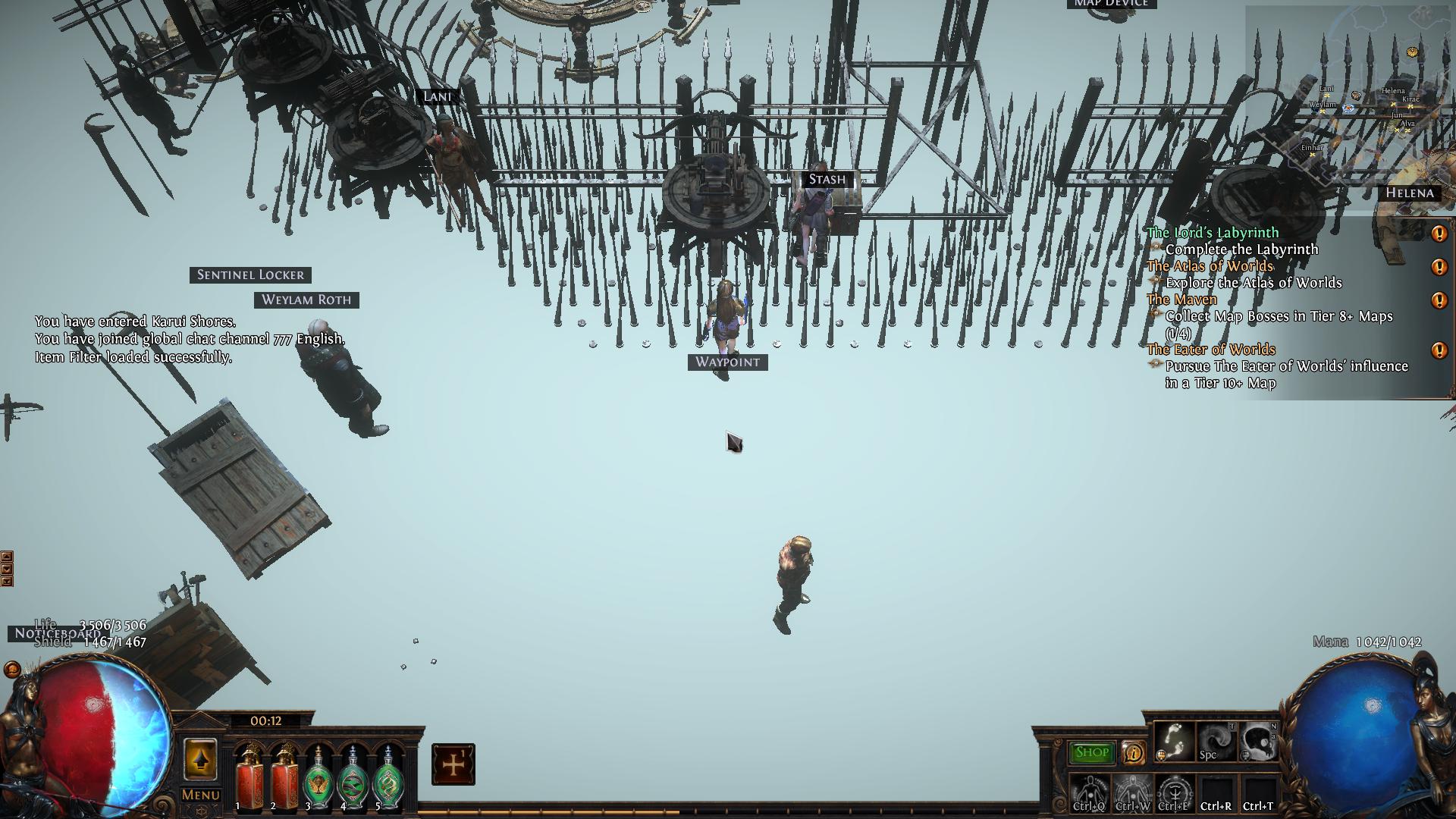 vestal pier
huh. well, it does happen every single time. right when i hit "log in" or when i start a new map or go to my hideout, it's all white with only a few models (like, myself, some furniture, etc.), then it fills in - in squares.
yea, that's pretty much it
dusky goblet
after changing dx12 to vulkan
vestal pier
i've been using vulkan since i started playing. back then (a few months ago) using dx12 sucked really bad.
dusky goblet
under proton?
vestal pier
i'm running through Steam, yes.
dusky goblet
dx11 / dxvk works bad on linux
vestal pier
but vulkan works soooo good 🙂
dusky goblet
dx12 / vkd3d works fine almost as vulkan but GPU temperature lower compared to vulkan
vestal pier
i'm thinking i might have screwed up the settings, because i tweaked around a lot to get it to work well my old comp (limited frames to 50 fg, 30 bg, stuff like that)
so, originally, i was asking if there was just a way to reset to default. but like i said, i'm rockin it and lovin it now. it's fine.
dusky goblet
GGG's vulkan engine gpu resources heavy compared to dx12 which runs under vkd3d (translates into same vulkan) LOL
vestal pier
lol. that's funny
dusky goblet
they messed up dx12 on league release, it not as good as it was at the end of previous league
are you limiting fps to 61 and using that option in nvidia settings? https://i.imgur.com/WYBE4jL.png

screenshot from google
vestal pier
no, i don't do anything with nvidia-settings
dusky goblet
vsync?
vestal pier
off
vestal pier
uh. haven't noticed any. here's my settings (lemme know if you need to see more)
 dusky goblet
you limiting it to 45 why?
vestal pier
more of a feeling thing than anything else. i try to tweak till it feels good and looks decent. with my old ass card, it's a compromise, you know?
dusky goblet
try 61 and enable that option in nvidia settings (and hit apply)
vestal pier
k. one sec.
vestal pier
(and yes, wayland)
hey, like i said, not going on technical information, just trying to find a compromise between looks and feel.
dusky goblet
also GI can slower textures load on game start
there is no "force composition pipeline" option on nvidia under wayland
wayland limits by itself to monitor refresh rate
that option only for xorg to remove screen tearing
why 45 fps xD try 61 or 60
under Xorg 59 or 60 results in random stutters for me
nvidia 515 driver?
afair wayland with pre-510 nvidia driver doesnt run well
im trying to play poe on my old dirt ass cheap i5 6400 with nvidia gtx950 ♿
i bought it 7years ago just to play dota 2 and poe at max settings it was good back then 😛
why you playng 45 fps
with 61/60 fps cap but dynamic resolution to like 49 fps, imho its the best fps mark for game to lower render on big beyonds/dellirium crap
i just want native linux support and amd fsr support (not that dynamic resolution made by GGG)
also CPU/GPU ms frame time on fps graph shouldnt non-stop spike in empty hideout
vestal pier
nvidia 515, yes. i set it to 61 fps and turned off global illumination. still get those white loads. and it's at 45 because i started at 60 and backed down a bit. just to try it out. i've changed it like 20 times.
it's not a big deal, man, i don't really care enough about it. it's really minor.
dusky goblet
GI and high shadows impacts fps more than any other option
under dx11/dxvk game was freezing on these white loads
on vulkan/dx12 shaders apply ashynchroniosly
vestal pier
what do you think i should set it to around 40?
vestal pier
because at 61 when i drag shit around, the object i'm dragging lags way behind the cursor and at 40 it doesn't do that.
dusky goblet
59/60?
vestal pier
it does look better at 61, i'll give you that, but it's hard to play when the thing under your cursor is still where you left it when you're trying to move something from your stash to your inventory
setting this back to 40 keeps it aligned with the cursor with a very minor, but tolerable lag
this is what i was talking about: i just adjust the settings until it works well and looks decent. i know my junk is old...i'll get a new comp sometime - when i can afford it
vestal pier
probably. it's freakin old.
dusky goblet
im suggesting you Xorg/ + that option in nvidia settings on image above + 61 fps
mild urchin
prior to upgrading id get weird lag and network issues cuz my gpu would be choking on vram
feel like wayland is not the play on an older gpu
dusky goblet
980ti should have enough vram thats not vram
vestal pier
according to the little in-game meters, vram is about half full and holding
mild urchin
980ti is old but its not the worst thing i think
dusky goblet
that wayland im 146% sure
mild urchin
wayland on old nvidia gpu drivers sounds sus to me ye
vestal pier
sure. can i get you any diags to prove it?
dusky goblet
fine under 515 and nvidia-drm.modeset=1 kernel boot option
vestal pier
 vestal pier
yea, it's set. i'm not really an fps chaser. i just want to play comfortably without issue and enjoy the grind 🙂
vestal pier
it does look a tiny bit better at 61 fps, but not going to deal with lagging dragging objects for that small of an improvement.
dusky goblet

Anyone remember Ubuntu Gamer? It was a spin-off blog we launched way before Steam for Linux was a thing. Oops! But hey, here's something related…
cringe
vestal pier
yea, i used ubuntu for a few years but got so sick of troubleshooting the ubuntu crap to get something working that i knew that linux could do
dusky goblet
their default kernel show bad results in cpu tests
vestal pier
but i mean, gaming is not everything and POE and one or two other games per year is all i really play these days, so it's not really a priority, ya know
dusky goblet
Given the recent releases of Ubuntu 22.04 LTS and Fedora 36 among other recent OS updates, it's time for a fresh look at how various Linux distributions are performing.
vestal pier
yea, i tried out Clear a long time ago. it's aight. i work in HPC and have for a 15 years and it was a big deal when it came out cause a lot of science apps love their heavily optimized binaries.
for me, i just want something stable and that can handle a lot the tweaking that i love to do without one of 10,000 layered scripts breaking and causing me to have to go fix some annoying vendor addition.
dusky goblet
manual nvidia drivers installation / update is complicated under clearlinux
vestal pier
that sucks. i'm sure they'll come up with some middleware somewhere. the place i used to work had a complicated set of dkms scripts set up that would check and compile from source (kicked off with a systemd unit!) nvidia.ko and friends.
 blissful vale
does anyone get problems on linux with high temperatures?
i seem to get pretty high temperature but on windows that wasn't the case
like the game runs fine but my computer just get's hotter than it normally should
im running it through proton and am using vulkan for rendering
edgy sierra
There's always going to be some more CPU overhead in Linux due to the overhead of Wine/Proton. What's running hot? Are temps high enough to trigger throttling?
dusky goblet
try directx12, if it crashing on switch then edit production_Config.ini manually
your gpu will get colder
also CPU temperature depends on kernel and on config HZ option that kernel was build with
default in most distribution is 250, its awful, 500 is better, 1000 is overkill
CONFIG_HZ_500=y
CONFIG_HZ=500
edgy sierra
Don't mess with CONFIG_HZ, it has nothing to do with power consumption or temperature, it just effects CPU quantum (the minimum "slice" of CPU time allocated to a process).
dusky goblet
wat
ive played/tested poe via steam/proton on ubuntu 20.04 kubuntu 21.10 and fedora 34/35 im 100% sure they all have 250
performance on stock kernel is awful, doesnt matter what kernel you use 5.10 or 5.15
xanmod (especially on fedora manually build rpm) by far best performance and stable fps, also no cpu frametime spikes in hideout at all
on default fedora 35 kernel it looks like disco 6 ms - 22 ms - 6 ms - 25 ms etc
cannocial and redhat did nothing to improve linux gaming experience
its just valve/google
edgy sierra
They may well be set to 250, all I'm saying is it is not a significant benefit. CONFIG_HZ affects the time segments the CPU scheduler allocates to processes. Increasing it may improve responsiveness in CPU limited situations, but it is not going to bring measurable performance benefits. Servers keep the value at 100 for maximum throughput. Xanmod like Liqourix/Zen is a collection of a lot of tweaks to the kernel, it's not just setting CONFIG_HZ. I'm not sure what you're actually arguing about with canonical and redhat. I said nothing about either.
blissful vale
hmm il maybe have a look at switching to directx12 when im done with work , i tried 11 and it started tanking the fps
also it's my gpu that's getting quite hot
despite being cool for most other games
also the gpu runs at about 70 c which isn't terrible but obviously it would be a bit nicer to cool it down a bit when i know it should be able to
actually i think it's sometimes nearing 90
which is pretty high
edgy sierra
blissful vale
hmm il maybe have a look at switching to directx12 when im done with work , i tr...
Switching to DX12 is just going to add extra overhead converting from DX12 back to vulkan, and if you have an old enough Nvidia card will tank performance (I think it's Pascal series ( 1080 etc and older).
The short version on temps is unless it's causing throttling, it's not a problem. As long as you've got adequate airflow for cooling there is no problems with either the GPU and CPU running at 100%. If you want to limit your FPS using PoE's foreground FPS or enabling Vsync those are options to reduce framerate, both of which will have the desired effect without adding in another translation layer by switching to DX12 (vkd3d-proton).
blissful vale
that might be a good idea, thanks
yeah turned it on for a few minutes to see how it runs with vsync and it seems much much quieter
il see at lunch if it's quieter over a hour id imagine it should be
thanks : D
also all my cpu and gpu are amd
blissful vale
yeah turning on vsync seems to totally fix the problem
stops the gpu processing uneeded frames and seems to just make it work like normal
dusky goblet
edgy sierra
Switching to DX12 is just going to add extra overhead converting from DX12 back ...
no it won't
only on cpu side a bit
poe native vulkan render is worse than dx12 (that translates into vulkan via vkd3d)
someone with good pc setup should make tests: CPU/GPU frame times, usage, temperature
afk in hideout for at least 1 minute, running blood aqueduct with phase run not killing monsters and another one killing monsters
hexed pivot
dusky goblet
no it won't
You can't say that for certain, it's highly dependent on the game, and many will make very different graphics calls for dx11 vs dx12 vs vulkan.
It could result in poor graphics performance if, for example, you have an old card which doesn't natively support dx12, but you're using the dx12->vulkan wrapper to "force" dx12, and so the game adds some shader or pipeline which is well-optimised for dx12 cards, but performs poorly on older cards due to lack of some hardware acceleration
that sort of thing
also, poe is a surprisingly cpu-heavy game and you're not going to do yourself any favours if you're adding dxvk into the mix
dusky goblet
mine card supports dx12 🙂
vkd3d is not dxvk
dxvk is for dx9/10/11 they mostly execute synchronius code
im playing dx12 under linux which translates into vulkan cuz it runs better here
they messed up dx12 render for windows in current patch, was better before
like they did with vulkan render to fix screen tearing for windows

GitHub
Fork of VKD3D. Development branches for Proton's Direct3D 12 implementation. - GitHub - HansKristian-Work/vkd3d-proton: Fork of VKD3D. Development branches for Proton's Direct3D 12 ...
edgy sierra
dusky goblet
someone with good pc setup should make tests: CPU/GPU frame times, usage, temper...
I mean we don't need someone with a good PC to check, surely you can record or at least upload screenshots of the FPS chart in the hideout right? You're the one making the claim here.
Vulkan

Dx12 via vkvd3d

Note the increased memory and VRAM usage, in addition to the lower framerate.
dusky goblet
lower vram usage
edgy sierra
Not according to 3rd party tools. one sec anonymizing the desktop screenshots
hexed pivot
dusky goblet
lower vram usage
ingame vram measure won't account for overhead introduced by vkd3d
edgy sierra
Ignore the "GPU Usage stat" since at least on Polaris cards it's either 100% or 0%, never anything else.


And yeah, what Steve said.
dusky goblet
i just did test on clear linux, vulkan shows indeed better numbers :\
twice less cpu ms and 10-15 more fps
on nvidia poe shows correctly gpu memory
dusky goblet
on clearlinux nvidia drivers are broken every time kernel updates :\
blissful vale
@dusky goblet vulkan runs much much smoother for me and is also a lot cooler than directz12 when i ran it earlier
directx12*


 hollow oar
@dusky goblet BASED jackie chan enjoyer
wet wadi
dusky goblet
fonts glyphs still render wrong more often on linux
That is a not a Linux issue, this has happened to us on W7 multiple times, usually after a large patch when they add new filter words.
There was a simple fix for this, but we've forgotten what it was.
 robust mortar
Weirdly I get that issue on my Windows 10 PC as well, but only when I'm using the controller UI. Never does it when I'm using the KB/M UI
Fonts come out looking exactly like that screenshot
dusky goblet
[krab@fedorapc ~]$ grep -i config_hz /boot/config-5.17.9-300.fc36.x86_64
# CONFIG_HZ_PERIODIC is not set
# CONFIG_HZ_100 is not set
# CONFIG_HZ_250 is not set
# CONFIG_HZ_300 is not set
CONFIG_HZ_1000=y
CONFIG_HZ=1000
its 1000 on fedora! still cpu ms is spiking afk in hideout
it looks like 7-15-6-16 etc non stop
and sound is cracking sometimes ty pipeware!
fedora is the worst gaming experience... afk hideout fps is around 65 and close to 40 in combat, while in clearlinux its 80 in hideout and around 55-60 in combat
flint laurel
Would fedora be a better gaming experience with a different scheduler? What would stop you from transplanting a different one?
 sinful palm
Guys whats the full dir of the lootfilter location?
 shut comet
sinful palm
Guys whats the full dir of the lootfilter location?
shut comet
sinful palm
Guys whats the full dir of the lootfilter location?
steamapps/compatdata/238960/pfx/drive_c/users/steamuser/My Documents/My Games/Path of Exile
sinful palm
shut comet
steamapps/compatdata/238960/pfx/drive_c/users/steamuser/My Documents/My Games/Pa...
Thanks
sinful palm
Is anyone else having problems booting? I was still able to play this morning.
$ lsb_release
No LSB modules are available.
Distributor ID:    Ubuntu
Description:    Ubuntu 22.04 LTS
Release:    22.04
Codename:    jammy

$ uname -a
Linux mitchell-pc 5.15.0-33-generic #34-Ubuntu SMP Wed May 18 13:34:26 UTC 2022 x86_64 x86_64 x86_64 GNU/Linux
Im using proton 7.0-2 with the steam client
Log output of steam before and during the crash
I get a black screen and the correct cursor but after like 5-10 sec it just crashes
edgy sierra
WARNING: lavapipe is not a conformant vulkan implementation, testing use only.
This is a problem. Lavapipe is a CPU vulkan implementation, and under normal cirucmstances won't (and shouldn't) be used. What's your GPU? Did you make any changes to your system (new packages,updates)?
What's the output of ls /usr/share/vulkan/icd.d/?
sinful palm
edgy sierra
```WARNING: lavapipe is not a conformant vulkan implementation, testing use only...
I am using vulkan yes
I fixed some issue with setuptools en pipenv
Nothing else i dont think
$ ls /usr/share/vulkan/icd.d/

total 24
-rw-r--r-- 1 root root 161 apr 14 12:28 intel_icd.i686.json
-rw-r--r-- 1 root root 163 apr 14 12:28 intel_icd.x86_64.json
-rw-r--r-- 1 root root 159 apr 14 12:28 lvp_icd.i686.json
-rw-r--r-- 1 root root 161 apr 14 12:28 lvp_icd.x86_64.json
-rw-r--r-- 1 root root 162 apr 14 12:28 radeon_icd.i686.json
-rw-r--r-- 1 root root 164 apr 14 12:28 radeon_icd.x86_64.json
Oh my gpu is a 3070
edgy sierra
you're missing the nvidia vulkan driver and you have the radeon vulkan driver installed.
sinful palm
Uhhhhhhhhhhh
There are a bunch of nvidia packages in my list
wait leme look them all up
$ apt list --installed | grep "nvidia"

WARNING: apt does not have a stable CLI interface. Use with caution in scripts.

libnvidia-compute-510/jammy-updates,jammy-security,now 510.73.05-0ubuntu0.22.04.1 amd64 [installed,automatic]
linux-modules-nvidia-510-5.15.0-33-generic/jammy-updates,jammy-security,now 5.15.0-33.34 amd64 [installed,automatic]
linux-modules-nvidia-510-generic-hwe-22.04/jammy-updates,jammy-security,now 5.15.0-33.34 amd64 [installed]
linux-objects-nvidia-510-5.15.0-25-generic/jammy,now 5.15.0-25.25 amd64 [installed,automatic]
linux-objects-nvidia-510-5.15.0-33-generic/jammy-updates,jammy-security,now 5.15.0-33.34 amd64 [installed,automatic]
linux-signatures-nvidia-5.15.0-25-generic/jammy,now 5.15.0-25.25 amd64 [installed,automatic]
linux-signatures-nvidia-5.15.0-33-generic/jammy-updates,jammy-security,now 5.15.0-33.34 amd64 [installed,automatic]
nvidia-kernel-common-510/jammy-updates,jammy-security,now 510.73.05-0ubuntu0.22.04.1 amd64 [installed,automatic]
nvidia-prime/jammy,jammy,now 0.8.17.1 all [installed]
$ apt list --installed | grep "radeon"

libdrm-radeon1/jammy,now 2.4.110-1ubuntu1 amd64 [installed,automatic]
libdrm-radeon1/jammy,now 2.4.110-1ubuntu1 i386 [installed,automatic]
xserver-xorg-video-radeon/jammy,now 1:19.1.0-2build3 amd64 [installed,automatic]
Mhh this seems weird tho
I did actually try all the other proton versions, idk if that matters
edgy sierra
you should have a nvidia_icd.json in /usr/share/vulkan/icd.d/ if the nvidia driver is installed,
sinful palm
Is this some kinda of extra wine layer that i have to worry about?
Im not sure why its suddenly not installed even tho i had it running this morning
edgy sierra
No, that's where the files that tell the OS what vulkan driver to use are located.
No wine involved
sinful palm
Do i just reinstall all the nvidia packages?
Wait can i just create that file?
Its just a json file for the other drivers
edgy sierra
No it should be created by the driver package
Make sure you're installing nvidia-driver-510
via apt, rather than say, from the nvidia site
sinful palm
I didnt install any driver myself
I clicked the box that says install proprietary drivers on install
I just switched this machine to ubuntu 22.04
Like 2 days ago
Oh ye the driver isnt installed wtf
edgy sierra
Yeah, I can't claim to know how it was running before, but you are missing the vulkan meat and potatoes. I don't know why it wouldn't install it as part of the proprietary driver install.
sinful palm
The /var/run/reboot-required file doesnt exist
Ima try this real quick if that doesnt work ill reboot
Okay im rebooting
hollow oar
sinful palm
```
$ apt list --installed | grep "radeon"
libdrm-radeon1/jammy,now 2.4.110-1ub...
you are ubuntu nvidia right
sinful palm
Omg it works
Ye
Ye i was just wondering if there were radeon related packages installed
Thanks @edgy sierra
What a weird issue
This also made me realize i was missing ripgrep 🙂
hollow oar
you should be good to go with that stuff
hexed pivot
Weird that kernel modules need a reboot to apply properly though
Maybe it was conflicting with an incorrectly loaded Radeon driver
sinful palm
I kinda want to know why this problem wasnt present earlier as well
edgy sierra
hexed pivot
Weird that kernel modules need a reboot to apply properly though
My impression was that nouveau was still being loaded somehow since the drivers weren't properly installed. Since Nouveau and the official drivers conflict you'd need to unload nouveau at runtime and modprobe the nvidia module, and I think even if it that is possible it would obviously blow up the graphical session, just easier to reboot.
 warped dune
Hi, I'm struggling to get PoE running on Linux.
I'm using native Arch with Steam Play enabled, using Proton Experimental
I'm using a 5600g as both a cpu and gpu (drivers: https://frogg.ie/Fui ) on Xorg with KDE
After installation, steam took a few minutes to configure DirectX. A few minutes later, it stopped loading and silently closed without error.
Now, launching will open a PoE process visible in htop, do seemingly nothing for 3 minutes before closing.
mild urchin
u mean integrated gpu?
u can try changing in config file to vulkan
it should p much work on steam out of the box
in terms of dependencies
maybe diff versions of proton
theres a few other builds out there
edgy sierra
A log file would be the best starting point https://www.protondb.com/help/troubleshooting-faq#how-do-i-create-logs-of-a-game-i-run-with-proton . Since you're running arch, do you have vulkan-radeon and lib32-vulkan-radeon installed?

Game information for Proton, Linux, Steam Deck, and SteamOS
 shadow pawn
warped dune
Hi, I'm struggling to get PoE running on Linux.
I'm using native Arch with Stea...
shadow pawn
warped dune
Hi, I'm struggling to get PoE running on Linux.
I'm using native Arch with Stea...
Try using the latest version of Proton-GE
Proton GE usually works well with Path of Exile
warped dune
edgy sierra
A log file would be the best starting point https://www.protondb.com/help/troubl...
Yes, I do have those packages
warped dune
mild urchin
u can try changing in config file to vulkan
Where is that supposed to be? I googled the name of the config file, I don't have a production_Config anywhere
hollow oar
warped dune
Where is that supposed to be? I googled the name of the config file, I don't hav...
u do in
warped dune
I'm not sure I understand
hollow oar
its in something like