#Restyling v3
1 messages · Page 1 of 1 (latest)
 ebon gulch
Better here than shunting you down to #tech-chat 🙂
Others will probably be interested in following along.
 edgy oak
/*     Sets the size and shape of the nav buttons */
.dnd5e2.sheet.actor.character:not(.minimized) nav.tabs > .item {
    /* Affects the height and width of the button. */
    width: 3.75rem;
    height: 2.75rem;
    /* Affects the position of the icon in the center of the button. */
    padding: 0;
    /* row or column. */
    flex-direction: row;
    /* Affects the position of the icon in the center of the button. */
    justify-content: center;
    /* Doesn't seem to affect anything. */
    align-items: center;
    /* Roundness of outer border corners. */
    border-radius:8px;
}

/*     Additional tweaks to the nav buttons when selected or hovered */
.dnd5e2.sheet.actor.character nav.tabs > .item.active, .dnd5e2.sheet.actor.character nav.tabs > .item:hover{
    /* Dont think I need this. There's no text, removing it didn't seem to affect anything. Leaving for now. */
    text-shadow: none;
    /* Dont think I need this. Think it's for text, removing it didn't seem to affect anything. Leaving for now. */
    margin: 0;
    /* Need to get a list of possible colors. gold/blue/red work... white/silver/purple dont seem to... */
    border-color: var(--dnd5e-color-red);
    /* Adds a drop shadow to the button. */
    box-shadow: 0 4px 4px var(--dnd5e-color-gold);
    /* Set scale to a multiplier to enlarge the button. 1 is no change because well math. */
    transform: scale(1);
}

/* The inner most part of the nav buttons. */
.dnd5e2.sheet.actor.character:not(.minimized) nav.tabs > .item:after {
    border: initial;
    /* Sets the gap between the inner and outer border*/
    inset: .25rem;
    /* Sets the width of the inner border*/
    border: 2px solid var(--dnd5e-color-gold);
    /* Roundness of inner border corners. */
    border-radius: 6px;
}
/* What does this do? Removing it doesnt seem to affect anything. Leaving for now. */
.dnd5e2.sheet.actor.character:not(.minimized) nav.tabs > .item > i{
    display: block;
}

/* Sets the position of the nav button flex row. */
.dnd5e2.sheet.actor.character:not(.minimized) nav.tabs[data-group="primary"] {
    /* # of pixels away from top edge of frame. (+)number is below frame edge (-)number is above. */
    top: 5px;
    /* Sets how far from left edge of frame. */
    left: 7%;
    /* Flex container and settings. Read about these more. */
    display: flex;
    flex-direction: row;
    /* Gap betwen buttons. */
    gap: 1.75rem;
    /* Set to a (+)number to make sure nav button stay on top of sheet. */
    z-index: 1;
}

/* This section affects the SR/LR/SpecTraits buttons. */
.dnd5e2.sheet.actor.character .sheet-header > .right > div:last-child .sheet-header-buttons {
    display: flex;
    align-items: center;
    gap: .5rem;
    position: absolute;
    top: 2rem;
    left: 0px;
}
also, can someone help me change all of the section banners in each page of the sheet to match the header color i modified?
 ebon gulch
Restyling v3
 analog tinsel
So I dont like the new Pause icon relating to DND beyond, I need help changing that with either a module or something else
 indigo hawk
Updated my CSS for the navtab buttons (also resized the short rest/longrest/special traits buttons to match);
    width:2.5rem;
    height:2.5rem;
    padding:0;
    flex-direction: row;
    justify-content: center;
    align-items: center;
    border-radius:8px;
}
.dnd5e2.sheet.actor.character nav.tabs > .item.active, .dnd5e2.sheet.actor.character nav.tabs > .item:hover{
    text-shadow: none;
    margin: 0;
    border-color: var(--dnd5e-color-gold);
    box-shadow: 0 0 6px var(--dnd5e-color-gold);
    transform: scale(1.25);
}
.dnd5e2.sheet.actor.character nav.tabs{
    --tab-full-width:initial;
    --tab-inactive-width: initial;
}
.dnd5e2.sheet.actor.character:not(.minimized) nav.tabs > .item:after {
    border:initial;
    inset:0.25rem;
    border: 1px solid var(--dnd5e-color-gold);
border-radius: 4px;
}
.dnd5e2.sheet.actor.character:not(.minimized) nav.tabs > .item > i{
display:block;
}
.dnd5e2.sheet.actor.character:not(.minimized) nav.tabs[data-group="primary"] {
    top:10px;
    left:25%;
    display: flex;
    flex-direction: row;
    gap: 2rem;
    z-index:10;
}
.dnd5e2.sheet.actor.character .sheet-header > .right > div:last-child .sheet-header-buttons {
    display: flex;
    align-items: center;
    gap: 0.5rem;
    position: absolute;
    top: 1.5625rem;
    left: -45px;
}
.dnd5e2.sheet.actor.character .sheet-header > .right > div:last-child .sheet-header-buttons button{
    width:2.5rem;
    height:2.5rem;
}
.dnd5e2.sheet.actor.character .sheet-header > .right > div:last-child .sheet-header-buttons button:hover{
    transform: scale(1.25);
}
.dnd5e2.create-document.dialog{
    border-radius:8px;
    border: 1px solid var(--dnd5e-color-gold);
    width: auto !important;
    height: auto !important;
}
.dnd5e2.create-document.dialog .window-header{
    background: #000;
    border-radius: 8px 8px 0 0;
}
.dnd5e2.create-document.dialog .dialog-button{
    padding:0.25rem 0.5rem;
}```Oh also has the styling for the dialog sheets (e.g. when you edit something like senses or resistances).
 wicked spear
analog tinsel
So I dont like the new Pause icon relating to DND beyond, I need help changing t...
wicked spear
analog tinsel
So I dont like the new Pause icon relating to DND beyond, I need help changing t...
Both Alternative Pause Icon and Pause Customizer are modules that do that.
edgy oak
analog tinsel
So I dont like the new Pause icon relating to DND beyond, I need help changing t...
I think this question would have been better asked in the main channel, not this thread, but no worries. You want Alternative Pause Icon mod, but i am not actually sure it is working. If you're running a local install or on a server where you have access to core data, you could also locate the file image in the core data and change it (keeping the same name) to be the image you want.
Sorry Freeze, didnt see you had already answered.
edgy oak
indigo hawk
Oh also has the styling for the dialog sheets (e.g. when you edit something like...
Thanks! I'll play around with this too 🙂
@indigo hawk This is awesome, thanks. The flex row buttons are behaving exactly the way i want. Just gonna tweak some things to my taste. Thanks again!!
would you have any idea on updating the color of these things, on each page of the character sheet?
 indigo hawk
edgy oak
would you have any idea on updating the color of these things, on each page of t...
indigo hawk
edgy oak
would you have any idea on updating the color of these things, on each page of t...
Use .dnd5e2 .card .header { background: linear-gradient(to right, var(--dnd5e-color-hd-1), var(--dnd5e-color-hd-2)); color: white; border-radius: 3px 3px 0 0; border-bottom: 1px solid var(--dnd5e-color-gold); } to target those headers.
edgy oak
ty. I was actually just looking at that stuff in the styles section of elements in the console. Like in another 3-5 days i may have figured that out. Thanks for the push!! 🙂
and I assume i can replace those var values with any of these in the root?
 indigo hawk
Yep - or replace with your own colors
edgy oak
thanks, really. this is really cool and fun.
/*     Custom CSS */
#ActorSheet5eCharacter2-Actor-ZTXz996qm5J1KwWv.dnd5e2.sheet.actor.character .sheet-header {
    filter: hue-rotate(240deg);
}

#ActorSheet5eCharacter2-Actor-ZTXz996qm5J1KwWv.dnd5e2 .card .header {
    background: linear-gradient(to right, var(--dnd5e-color-card), var(--dnd5e-color-blue));
    color: black;
    border-radius: 3px 3px 0 0;
    border-bottom: 1px solid var(--dnd5e-color-gold);
}
 indigo hawk
Wow you're really getting specific targeting a specific actor sheet!
edgy oak
my players have favorite colors.
indigo hawk
I'd probably aim for a more global styling by leaving it at the .dnd5e2.sheet level
Ah okay
edgy oak
but i'll probably have them paste the more generic code in the User Styles section of Custom CSS, so it affects all their sheets globally, but only for them.
The targeting for me is really about learning syntax and capability
indigo hawk
Well welcome to the wonderful wacky world of cascading stylesheets!
edgy oak
i should run away now while i can
indigo hawk
 edgy oak
too late, im hooked.
indigo hawk
It can be a lot of fun (and a lot of frustration). But seeing things change to the way you want them to look is an amazing feeling 😃
edgy oak
true dat!
indigo hawk
Oh weird - if using PopOut module, the SVG icons for Death Saves (skull) and Inventory (backpack) buttons appear to lose track of their size and appear fairly huge in the sheet.
ebon gulch
Known issue (with the module)
 somber horizon
Hooks.on("renderActorSheet5eCharacter2", function(sheet, [html]) {
  if (sheet._mode !== sheet.constructor.MODES.PLAY) return;
  const div = document.createElement("DIV");
  const abi = sheet._hiddenAbility ??= "tool";
  div.innerHTML = `<a class="swap hide-${abi}"><i class="fa-solid fa-right-left"></i></a>`;
  div.firstElementChild.addEventListener("click", swapAbilityBox.bind(sheet));
  html.querySelector(".dnd5e2.sheet.actor.character .sheet-body .tab-body .col-2 > .left").prepend(div.firstElementChild);
});

function swapAbilityBox(event) {
  const target = event.currentTarget;
  this._hiddenAbility = this._hiddenAbility === "skill" ? "tool" : "skill";
  target.classList.toggle("hide-skill", this._hiddenAbility === "skill");
  target.classList.toggle("hide-tool", this._hiddenAbility !== "skill");
}
.dnd5e2.sheet.actor.character .sheet-body .tab-body .col-2 > .left {
  position: relative;
}
.dnd5e2.sheet.actor.character .sheet-body .tab-body .col-2 > .left:has(.hide-skill) .skills,
.dnd5e2.sheet.actor.character .sheet-body .tab-body .col-2 > .left:has(.hide-tool) .tools {
  display: none;
}
.dnd5e2.sheet.actor.character .sheet-body .tab-body .col-2 .swap {
  position: absolute;
  top: 10px;
  right: 20px;
  z-index: 1;
}
Result:
 minor yoke
Was asked to put this here. I permenantly changed the banners for my players sheets. I used the Custom Css module. Just put
#ActorSheet5eCharacter2-Actor-"actor-ID".dnd5e2.sheet.actor.character .sheet-header {
    background: transparent url("Location of the image") no-repeat center / cover;
}
into the global styles window.
Remember to remove the " ".
somber horizon
```css
. . .
```
🙂
ebon gulch
(Backticks)
minor yoke
ok yeah used the wrong symbol
ebon gulch
minor yoke
Was asked to put this here. I permenantly changed the banners for my players she...
ebon gulch
somber horizon
```js
Hooks.on("renderActorSheet5eCharacter2", function(sheet, [html]) {
if (s...

 stoic kelp
Hooks.on("renderChatMessage", (chatMessage, html, data) => {
    const ulElements = html.find('ul.card-footer.pills');

    ulElements.each(function () {
        const liElements = $(this).find('li.pill.pill-sm');

        liElements.each(function () {
            const span = $(this).find('span.label');
            if (span.length > 0) {
                switch (span.text().trim()) {
                    case "Equipped":
                        $(this).addClass('green');
                        break;
                    case "Unequipped":
                        $(this).addClass('maroon');
                        break;
                    case "Proficient":
                        $(this).addClass('green');
                        break;
                    case "Not Proficient":
                        $(this).addClass('maroon');
                        break;
                    // Add more cases as needed
                }
            }
        });
    });
});
I'm using custom css to override the css.
.card-footer.pills .pill.green {
    background-color: var(--dnd5e-color-green);
}

.card-footer.pills .pill.maroon {
    background-color: var(--dnd5e-color-maroon);
}

.card-footer.pills .pill.green, .card-footer.pills .pill.maroon {
    color: var(--color-text-light-0);
}

 azure mica
Hooks.on("renderActorSheet5eCharacter2", function(app, [html]) {
  const prep = app.document.items.reduce((acc, i) => {
    if (i.type === 'spell' && i.system.preparation.mode === "prepared" && i.system.preparation.prepared && i.system.level !== 0) {
      acc.push(i.name);
    }
    return acc;
  }, []).length;
  const headers = html.querySelectorAll('div[data-type="spell"]');
  for (const header of headers) {
    const type = header.querySelector('h3[class="item-name spell-header"]').textContent;
    if (app._mode === 1 && !type.includes('Innate') && !type.includes('At-Will') && !type.includes('Cantrip') && !type.includes('Pact')) {
      const controls = header.querySelector('div[class="item-header item-controls"]');
      controls.textContent = `${prep}`;
      controls.setAttribute("data-tooltip", "Total Prepared Spells");
      controls.setAttribute("style", "color: white;");
    };
  };
});```
```css
.dnd5e2 .items-section .items-header .item-controls {
  display: flex;
  align-items: center;
  justify-content: center;
  text-align: center;
}
}```
shows a prepared spells tally on the top of every spell row (that can have prepared spells in it) (edited so it no longer says "Spellsy" 🤣)
 paper shore
edgy oak
and I assume i can replace those var values with any of these in the root?
paper shore
edgy oak
and I assume i can replace those var values with any of these in the root?
so do you or anyone know which color here to change to get rid of the awful red on the top of the charachter sheet? turn them blue perhaps?
edgy oak
In the CSS I am using to make the header blue, it is using the .hue-rotate method. Hue rotate is based on a color wheel with 360 degrees. Blue is 240. You can google to find and example of the color wheel.
paper shore
Hiya can someone tell me what I missed here? just trying to make the header and topic headers blue
.dnd5e .card .header {
    filter: hue-rotate(240deg);
}

.dnd5e .actor-sheet .card .header {
    background: linear-gradient(to right, var(--dnd5e-color-card), var(--dnd5e-color-blue));
    color: black;
    border-radius: 3px 3px 0 0;
border-bottom: 1px solid var(--dnd5e-color-gold);```for one thing your selectors are wrong
you want css .dnd5e2.sheet.actor.character .sheet-header {} .dnd5e2 .card .header {}
in my example, the top one is the banner, the bottom one are the feature headers
so it looks like you have those backwards as well, given corrections to the selectors
paper shore
thanks, Im not a css guy Im afraid, trying to figure it out and appreceate teh help
azure mica
you can find it for yourself by hitting ctrl+shift+c and clicking the element you want to change, it will open the console to your styles
you might have to move up or down the nodes in Elements to get the right one, but it will highlight
somber horizon
The top comment line you have will cause an issue, needs to be /*, not starting with just /.
paper shore
so this should be better?
.dnd5e2.sheet.actor.character .sheet-header {
    filter: hue-rotate(240deg);
}

.dnd5e2 .card .header {
    background: linear-gradient(to right, var(--dnd5e-color-card), var(--dnd5e-color-blue));
    color: black;
    border-radius: 3px 3px 0 0;
border-bottom: 1px solid var(--dnd5e-color-gold);```if that first CSS is really there in your code that will break it too
otherwise it looks alright to me but im passing out, goodnight/goodluck
paper shore
Thank you!
paper shore
has anyone figured out how to shrink the header? lots of dead space
/*CSS for D&D 5E character sheets */
.dnd5e2.sheet.actor.character .sheet-header {
    filter: hue-rotate(240deg);
}

.dnd5e2 .card .header {
    background: #00008B;
    color: white;
    border-radius: 3px 3px 0 0;
    border-bottom: 1px solid var(--dnd5e-color-silver);
{ ```works well if you just want a blue sheet for everyone
I was today years old when I wrote my first effective css 😛
 harsh magnet
is there any way to add tooltip to custom skill? i'm using culture and engineering from A5E and i wonder if this is possible to add nice tooltip like vanilla skills
 somber horizon
add a journal page's uuid in the skill's object in CONFIG.DND5E.skills
eg CONFIG.DND5E.skills.acr.reference = "long-ass uuid"
harsh magnet
ok, thanks i will try this 🙏
harsh magnet
i think i'm missing something, bc there already is "reference" but is think i put there wrong syntax
i will try with your method then

yup, that what i thought, i'm too stupid to do this correctly 🥲
 somber horizon
Just put that long-ass uuid you got there where you currently have reference
Compendium.homebrew is not a uuid
actually neither is that second thing with @UUID, that's a content link. You want that internal bit
This is a uuid: JournalEntry.<...>.JournalEntryPage.<...>
harsh magnet
like this?
 somber horizon
no, still too much
harsh magnet
ok, so what i should delete from this: @UUID[JournalEntry.oPsZP8J7rRWm22DQ.JournalEntryPage.eREFnOv71MQEmnWw]{Culture}
somber horizon
somber horizon
This is a uuid: `JournalEntry.<...>.JournalEntryPage.<...>`
^ 🙂
edgy oak
stoic kelp
```js
Hooks.on("renderChatMessage", (chatMessage, html, data) => {
const ulE...
I seem to be having issues with this. its my first world script attempt, but I think I have everything setup right. Chat cards arents shwoing the grren/maroon pills. Any direction?

console log is clean, but I am not seeing anything that definitively indicates my script is loading
disregard please. figured it out. I'm an idiot.
edgy oak
loving the ability to tweak the character sheet banners with custom images.
 paper shore
anyone figure out how to reduce the verticle width of the header?
 topaz pumice
edgy oak
loving the ability to tweak the character sheet banners with custom images.
topaz pumice
edgy oak
loving the ability to tweak the character sheet banners with custom images.
not gonna lie, my internet-poisoned mind thought that you'd made that sheet header:
 azure mica
:root {
  /*...*/
  --dnd5e-color-success: #1849a3;
  --dnd5e-color-success-background: #c0c2d0;
  --dnd5e-color-success-critical: #1755c9;
}
:is(.chat-popout, #chat-log) .message .dnd5e2.evaluation .target.hit .ac {
  color: #00318d;
}
.dnd5e2.sheet.actor.character .sheet-body .sidebar .card .meter.hit-points .progress::before {
  background: linear-gradient(to right, #1b2c4b 0%, #3b60a5 100%);
  border-right: var(--border-width) solid #27516d;
}```
not a very technical one, but this is just a simple conversion away from green elements to blue for a more rg colorblind friendly theme
 stoic kelp
edgy oak
disregard please. figured it out. I'm an idiot.
stoic kelp
edgy oak
disregard please. figured it out. I'm an idiot.
Nice! It was a small tweak but made a big differenc efor me.
stoic kelp
.dnd5e2 .window-header a:not(.close) {
    visibility:hidden;
}

.dnd5e2 .window-header:hover {
    visibility:visible;
}
Hides the top menu buttons on the main sheet unless you hover over it.
You can add more to the not() if you wish certain thing to show.
 paper shore
hey all is there a way to change the actual background behind the boxes?
somber horizon
Which boxes?
paper shore
the actual background behind the stat boxes, that looks like parchment sorry let me get a pic
 azure mica
.dnd5e2.sheet.actor.character .sheet-body {
  background: unset;
}```thank you!
/*CSS for D&D 5E character sheets background changes */
.dnd5e2.sheet.actor.character .sheet-body {
  background: hue-rotate(240deg);
}```is that correct?
Im getting
 somber horizon
filter: hue-rotate
azure mica
the background which is unset in my example is a webp with transparency that provides the parchment look, not the actual color fill
paper shore
I wanted to get the syntax correct and play witl a filter or a new parchent webp I have
if thats possible
.dnd5e2.sheet.actor.character .sheet-body ```keeps coming up red though
azure mica
the color and the background image are two different things. if you want to change the image youll have to play around with the selectors in my first example, the default is css url("ui/texture1.webp") no-repeat top center / auto 770px, url("ui/texture2.webp") no-repeat bottom center / auto 704px
so you will want similarly sized textures.
the color is just css :root { --dnd5e-color-parchment: #f1ebe8;} i think
but there is something funky about it because for instance, it changes the background but not the background of the ability scores, so 🤷
paper shore
--dnd5e-color-parchment: #c9c2bf;```is the color on the background I jsut tested that in styles
I did find this as well
--dnd5e-sheet-background: url(ui/parchment.jpg) repeat;```
 edgy oak
slick
minor yoke
    background: transparent url(location of picture)
}
#ActorSheet5eCharacter2-Actor-"Actor-ID".dnd5e2.sheet.actor.character .sheet-body  {
    background: none;
} ```choose at least 1500px on x so it doesnt repeat if you enlarge the sheet
paper shore
nice
 urban dirge
any known way of changing the colours of the buttons in the chat box posted?
mine looks kind of stupid with my custom UI
 minor yoke
.dnd5e2 .midi-buttons button {
    background:;
}
changes both of them to the same color tho. Cannot find a way to use 2 different ones
minor yoke
urban dirge
any known way of changing the colours of the buttons in the chat box posted?
@urban dirge
urban dirge
minor yoke
```
.dnd5e2 .midi-buttons button {
background:;
}
```
changes both of them t...
that's alright to be fair. Any way to change the background for the item text itself? and the text colour too?
minor yoke
.dnd5e2.chat-card .description {
    color:"text color";
    background:"background color";

}
"color:" chnages the text color
urban dirge
thanks!
minor yoke
np ^^
urban dirge
just to make sure I'm doign this right- how does one apply these CSS changes to foundry?
is it like a world script or am Ithinking wayyy on the wrong lines?
ebon gulch
Easiest: Grab the Custom CSS module
Can just drop styles into it and it'll apply them either globally or per user.
(or yes you can link a stylesheet inside your world.json)
urban dirge
and the hit/miss button that pops up- how would one customise that one's colour?
ebon gulch
Open up your dev console, hit this arrow button, click on the element you want to adjust, check its specifiers
 urban dirge
ebon gulch
Open up your dev console, hit this arrow button, click on the element you want t...
urban dirge
ebon gulch
Open up your dev console, hit this arrow button, click on the element you want t...
could I just get a quick explanation how how to find the specifiers? got the console open now and trying to find it but not really knowing what I'm looking for
ebon gulch
Sure, in the bottom right portion of the dev panel (usually) is a list of Styles that are being applied to the element you selected. It'll be something like
.dnd5e2 button {
  stuff here
}```To override that thing, you'll take that whole block, remove all the stuff here parts you don't want to affect, and leave the line or two you do want to affect, with your changes.
urban dirge
gotcha- that seems to be on the right track, but now how does one determine what to put in button? I am putting in the thing I want to change, but it doesnt seem to work as I'm likely missing something
ebon gulch
You'll need to drop in specific text you're using at this point; we're beyond being able to generalize 🙂
urban dirge
cool! one sec
trying to change these sections here-
here's the code I'm working with- my main issue is likely just not typing in the right stuff to the bit you mentioned above as the 'button'
color: #00008B;
}``` ebon gulch
I don't have a Foundry client handy right now, so someone else will probably need to jump in with more details, but it's probable that the element you've selected is containing the actual text elements inside, and those elements themselves have a color property that is overriding yours because it's more specific. At a guess, anyway.
 slim jackal
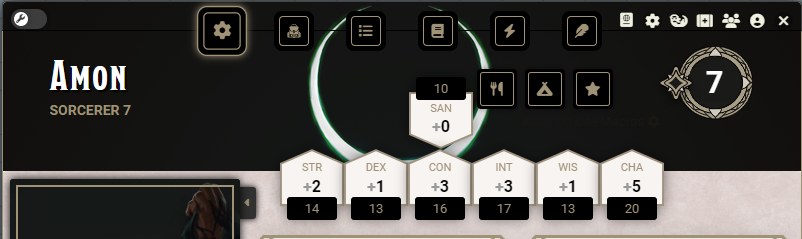
Could I get help trying to move where a specific stat is displayed? My 5e game uses the dmg sanity stat, but the new block just kinda slaps it onto a flipped banner icon even though there's definitely room in the intial 6-grid to squeeze it in unflipped.
 slim jackal
Could I get help trying to move where a specific stat is displayed? My 5e game u...
slim jackal
slim jackal
Could I get help trying to move where a specific stat is displayed? My 5e game u...
Which it apparently natively does when the picture is hidden.
 minor yoke
urban dirge
trying to change these sections here-
here's the code I'm working with- my mai...
minor yoke
urban dirge
trying to change these sections here-
here's the code I'm working with- my mai...
actually needed to change those too. Since they weren't readable on the new background anymore
    background: white;
    padding: 5px;
    border: 2px;
    border-style: solid;
    border-radius: 5px;
    border-color: #9f9c6e;
}

https://www.w3schools.com/css/ This is a great resource to look up stuff for CSS you don't know

W3Schools offers free online tutorials, references and exercises in all the major languages of the web. Covering popular subjects like HTML, CSS, JavaScript, Python, SQL, Java, and many, many more.
You can also do actor specific modifications by putting #ActorSheet5eCharacter2-Actor-"Actor-ID" in front of .dnd5e2
minor yoke
slim jackal
Which it apparently natively does when the picture is hidden.
could also work by making the sheet bigger I think
slim jackal
minor yoke
could also work by making the sheet bigger I think
Yeah I just want to try squeeze them all in with the sheet on minimum width. It doesn't have to be sexy just functional.
minor yoke
You could try reducing the margin of the element
    display: flex;
    gap: 1.375rem;
}
that is the one.
just change the gap value
slim jackal
minor yoke
```.dnd5e2.sheet.actor.character .ability-scores .rows > div {
display: flex...
even at 0rem it doesnt move the 7th ability down.Until it gets to this width, vs the smallest.https://i.imgur.com/6yGhHms.png

 minor yoke
easiest would be to change the class in html from ability-score flipped to ability score

 wintry wharf
Dumb question here. How do I actually do this? I see two different sets of code for each feature.
minor yoke
look in the systems folder in foundry for 5e. There should be a html document somewhere. Open it with vscode or something similar and edit. You would most likely have to redo it everytime you update the system though
azure mica
i wouldnt really recommend making aesthetic changes by modifying the system's files unless you are forking the system well and truly and know what you are getting into
you can edit the classes of elements with js with a world script or module, for instance for this case on the render sheet 2 hook you could do js html.querySelector('div[data-ability="san"]').classList.remove('flipped');
however, its not going to have the effect you wish it just flips it over
 somber horizon
May be best to actually physically move the element using JS
minor yoke
azure mica
you can edit the classes of elements with js with a world script or module, for ...
nice, then you can just use this ```.dnd5e2.sheet.actor.character .ability-scores .rows > div {
display: flex;
gap: 0.2rem;
}
.dnd5e2.sheet.actor.character .ability-scores .rows .top {
margin-left: 0.2rem;
}
.dnd5e2.sheet.actor.character .ability-scores .rows {
margin-right: auto;
padding: 8.75rem 0 4.75rem 1.5rem;
}
.dnd5e2.sheet.actor.character .ability-scores .top {
order: 2;
}
to make this
 azure mica
i may have misunderstood the intent here
minor yoke
Yeah, I got the score there without much of a problem but didn't get to flip it with css so that why I recommended modifying the class
 lavish lodge
Hi! Hey! Hello!
I'm struggling with borders for skills and saving throws in character sheet. I was looking for any border in css to find out about filigree box... does someone know is theres an easy way to disable it an use my own border instead? I've used border-image-source but it seems that filigree whatever it is is rendered above.
This blew my mind
 indigo hawk
It's using shadow DOM (meaning it's being generated somewhere else and injected in) and it's using SVG images for those borders. As best as I can figure out, you're going to have to use javascript to go in after it's rendered and remove those SVGs to get rid of them or create your own character sheet template to use in place of the default sheet. Maybe a dev for the game system can pipe up on the best way to handle this.
azure mica
i get to link my favorite mdn article: https://developer.mozilla.org/en-US/docs/Web/API/Web_components/Using_shadow_DOM
 lavish lodge
well then... seems like a work for next few days since my knowledge of css and js is from college over 10 years ago haha
somber horizon
azure mica
i get to link my favorite mdn article: <https://developer.mozilla.org/en-US/docs...
Your filigree is banished to the Shadow DOM, my dear Yugi-boy!
lavish lodge
which element in css is responsible for highlight color?
 somber horizon
Probably :hover
lavish lodge
That pointed me towards #context-menu.dnd5e2 .context-item:hover, thanks!
lavish lodge
is there a way to change hit dice bar to counting resource?

I'm using module to swap spell slots to spell points (mana) and it would be nice to move it there instead of...
...here D:
 somber horizon
(1) Yes
(2) How's your JS?
lavish lodge
<sweating intensively>
I know some coding...
But you can call it not-proficient 😄
however I'll do what I can, for the glory of my players
ebon gulch
(none of this falls within the realm of #1205721176358395967, which is about CSS/cosmetic changes)
lavish lodge
oh right, sorry... where should I go with it?
ebon gulch
#macro-polo, as you're in world script territory
edgy oak
If anyone is interested, I just released my first module on my first public repository that incorporates quite a few of the CSS changes listed in this thread. I will work to get credits to those that have helped so much in coming future releases.
repo
https://github.com/Carpathias/tgce-mod
manifest
https://github.com/Carpathias/tgce-mod/releases/download/v1.0.1/module.json


working on v1.0.2 to include a settings option to pick from a limited variety of header colors
 edgy oak
lol. Yeah, felt like that.
urban dirge
how would one change the golden trims colours? also the white background to all the main tab's white parts
indigo hawk
The gold trim colors are SVG and they are in a shadow DOM - they are rendered elsewhere (and injected into the sheet later) and aren't reachable via the standard CSS ways. See #1205721176358395967 message
For further info on shadow DOM see :https://developer.mozilla.org/en-US/docs/Web/API/Web_components/Using_shadow_DOM
 remote shale
I've been playing with custom CSS for my journals... and i've almost got it all how I want it. However I cannot figure out how to change the look of the inline links (playlists, tokens, scenes etc) They stay the standard foundry colours which end up looking really strange with my new layout. Can anyone point me in the right direction to learn how to customise these. Nothing drastic, really just some colour changes.
 chrome pasture
does any one know if it's possible to programmatically set the parchment background of chatMessages to something else? Like the "../ui/parchment"
indigo hawk
remote shale
I've been playing with custom CSS for my journals... and i've almost got it all ...
Target your CSS to this: :is(.chat-popout, #chat-log) .message { ... background: var(--dnd5e-color-parchment); }
(remove the ... - that just represents the other things being styled for the chat message)
indigo hawk
chrome pasture
does any one know if it's possible to programmatically set the parchment backgro...
See my response about styling the chat card - change the background to point to whatever image inside Foundry you want.
chrome pasture
alright thanks, where would this be placed tho? like if i have renderData, a renderTemplate(), chatData and then chatMessage.create()?
indigo hawk
It's in the core DnD5e game system's CSS so whenever that gets fired off (I didn't check on that).
chrome pasture
indigo hawk
It's in the core DnD5e game system's CSS so whenever that gets fired off (I didn...
alright, 👍
edgy oak
stoic kelp
```js
Hooks.on("renderChatMessage", (chatMessage, html, data) => {
const ulE...
Just FYI, "Unequipped" needs to be set to "Not Equipped"
 stoic kelp
I fixed that but forgot to update the shared code
edgy oak
coming along
 ebon gulch
edgy oak
coming along
ebon gulch
edgy oak
coming along
Bonus points if you can figure out how to make the header color setting a color input as well and then just map it to the correct rotation behind the scenes. 🙂
edgy oak
You must have a crystal ball. I’ve already been toying with that because hue rotate is limited in what colors you can get out of it because it’s an overlay. Like if you choose 30 for yellow, it looks more like olive drab. In working with the css I have learned that I can actually manipulate the loaded dnd5e.css stylesheet directly. At least I could do it at the console prompt.
I’m going after header image replacement too.
edgy oak
ebon gulch
Bonus points if you can figure out how to make the header color setting a color ...
figured out how to strip the background (and optionally replace) and set a color for the header and character name text.

 indigo hawk
Nice work!
edgy oak
tyty. its a lot of fun.
The background images I am using are sized specifically to the expected height/width format. Going to have to see how it handles it if i say pump in a square image
decided i'm going to have both a background color selector and a hue-rotate option. the hue-rotate is still viable if you have a custom image and want to tweak it, like so. first is base image rotate 0deg (no change) and the second is rotated 180.


just have to make sure i have the logic set to force the hue rotate to 0deg when there is no image so like if someone picks a purple header it doesnt show up green or something.
edgy oak
i'm already thinking V2 will have selectable class and race presets, like themes. not to get ahead of myself lol
 umbral marlin
edgy oak
```css
/* Custom CSS */
#ActorSheet5eCharacter2-Actor-ZTXz996qm5J1KwWv.dnd5e...
umbral marlin
edgy oak
```css
/* Custom CSS */
#ActorSheet5eCharacter2-Actor-ZTXz996qm5J1KwWv.dnd5e...
When I'm using the same code in custom css, it doesn't targe the titles lines, only the header, would you know why's that happening ? Thank you in advance !
edgy oak
Much of the functionality of the Restyler mod is based on this conversation thread, but the code in my mod goes beyond it.
you will have to add your own CSS rules to target other things in the sheet.
beyond what is in the examples in this thread.
i hope to have an update out to address the ability to have different character sheet configs by end of March. Shooting for sooner, but you know, real life.
umbral marlin
I had not doubt it goes beyond it, I just thought that this snippet of code could target this (see image below) as well as the header image

so I was wondering if you, or anyone, knew how to target those line so I could change those colors
edgy oak
one sec
.dnd5e2 .card .header {
    background: linear-gradient(to right, #000000 , #000000));
    color:  #ffffff;
    border-radius: 3px 3px 0 0;
    border-bottom: 1px solid var(--dnd5e-color-gold);
}
That will make a black bar with white text. You can change the 2 hex values on "background" for the bar, and "color" for the text.
you can also use "var(--var-name)" in place of the hex, and you can look at all the loaded variables if you hit F12 in your browser/client and click on styles.

 umbral marlin
'cause with that
edgy oak
one sec
umbral marlin
background-image: url(https://media.discordapp.net/attachments/1211468918229831700/1211922542181359626/Fiche_BG_2.png?ex=65eff5d2&is=65dd80d2&hm=37c05c52a26b9c0d9c9b8a112dcf4a2d35d17652ebe7447854f01392f67f5440&=&format=webp&quality=lossless);
}

I have that no problem
but for the headers/lines I'm really not sure
edgy oak
take that whole thing out, or update the hex value for your actual actor sheet
 umbral marlin
but that's my sheet id
umbral marlin

 edgy oak
or use some of the var options from my screenshot or whatever you want from F12 > Elements > Styles
umbral marlin
#ActorSheet5eCharacter2-Actor-ZTXz996qm5J1KwWv.dnd5e2.sheet.actor.character .sheet-header {
    filter: hue-rotate(240deg);
}

#ActorSheet5eCharacter2-Actor-ZTXz996qm5J1KwWv.dnd5e2 .card .header {
    background: linear-gradient(to right, var(--dnd5e-color-card), var(--dnd5e-color-blue));
    color: black;
    border-radius: 3px 3px 0 0;
    border-bottom: 1px solid var(--dnd5e-color-gold);
}```even just copying that (your code) and changing the actor ID
edgy oak
shouldnt need the quotes i dont think. In looking at examples above.
umbral marlin
it still doesn't change so I'm at a lost
edgy oak
does the console log show anything?
umbral marlin
it might sound stupid, I'm decent at understanding a code but cannot code myself for the life of me
how do I access that ?
edgy oak
i'll disable my mod and throw what i pasted into custom CSS. one sec.
umbral marlin
thank you
edgy oak
This is working for me. Not sure why it isnt taking the hex on the background property.
.dnd5e2 .card .header {
    background: linear-gradient(to right, var(--dnd5e-color-gold), var(--dnd5e-color-gold));
    color:  #000000;
    border-radius: 3px 3px 0 0;
    border-bottom: 1px solid var(--dnd5e-color-gold);
};
play around with using the variables you can see in F12 > Elements > Styles, like in the screenshot above. If I have a chance I may look at it later tonight when I have my big monitor and I can actually see what I am doing.
The above makes a gold bar with black text
you can also pull what you want from my stylesheet on the github
umbral marlin
OH it worked now
thank you !
(it stops working if I'm trying to target a specific character sheet tho)
edgy oak
Are you running both my module and custom CSS?
Are you trying to set these up for users? If so, each user can add to CSS themselves in their own module settings and they don’t have to target a specific sheet.
In the Custom CSS mod GM view has a global styles which affects everybody all logged in users, including the GM, and then the user style section which would be GM only. If a user were to look at the custom CSS module settings, they would only see the user file settings which would affect only them.
In my module, all of the settings are client side meaning that each user can set up their own sheets. It would affect every single one of their sheets, but the settings are unique to them.
This is all voice to text so if I have any typos or things seem a little weird read with a grain of salt
 mild trench
Hello, sorry if this has been asked a hundred times but i saw some folk were able to customise the charactersheet banner and was wondering how you do it because ive been looking for awhile and cant seem to find what im looking for
edgy oak
i just released a mod for it
mild trench
i saw that but it isnt being recognised when i try to install it lol
edgy oak
mild trench
i shall try again, thanks
edgy oak
whwre did you get the manifest from? if this thread, that was a dev beta
mild trench
yeh must have been
edgy oak
it is in the foundry modules list now, you can install from the setup UI
mild trench
appreciate your work, thanks!
edgy oak
no problem, let me know if you have any problems (via the github issues 🙂 )
or tag me in module-troubleshooting
mild trench
will do thanks my guy!
mild trench
edgy oak
no problem, let me know if you have any problems (via the github issues 🙂 )
installed correctly, but i do have 2 questions if that's okay - 1. can my players customize their sheets themselves? 2. Is there an option to return the tab buttons to the side?
edgy oak
for 1. Yes, each player can open the settings and configure their own sheets. It will affect all of the character sheets the same. I am working on making it actor specific, so each actor will have its own config, in a future release.
for 2. not yet, but I am working on that as priority one in the roadmap.
mild trench
edgy oak
for 1. Yes, each player can open the settings and configure their own sheets. It...
sick, thanks my guy I will follow your mod closely, I love custom sheets xD
edgy oak
Yeah, I can’t wait till the new npc sheets come around so I can start toying with those
 acoustic canyon
Hello friends, soo cool to see some people trying to customize our beloved Dnd5 sheets.
I understand this need to put some Css code through the module "Custom Css"
I tried a couple of codes to change the main banner but nothing happens. :p
Ok seems it needs an other module, will dig more
edgy oak
You can use my new module just released today
acoustic canyon
yes installing it right now 😄
Looks great ! Thanks @edgy oak, giving it a try immediately :p
edgy oak
Sweet would appreciate any feedback good and bad especially the bad.
acoustic canyon
will do !
umbral marlin
edgy oak
Are you running both my module and custom CSS?
I wasn't running for your module while doing the test, but thanks again for you help !
acoustic canyon
@edgy oak Is it possible to have the main button back into "right pannel mode" ? I'm affraid is hiding the art a bit too much and some modules options gets behind them.
mild trench
acoustic canyon
<@456226577798135808> Is it possible to have the main button back into "right pa...
i asked this earlier, its on the roadmap but not available at this time
acoustic canyon
oki doki ! thanks @mild trench !
edgy oak
as soon as I get the nav button relocation as a toggle on/off option, I am going to push out a 1.0.1 revision. Hopefully by the end of this weekend, if not sooner.
acoustic canyon
This is awesome, thanks a lot @edgy oak Been playing with it for a while now and I have a better looking character sheet.
A few suggestions and questions :
- Having the nav reloctaion as an option / But you know that already :p
- Being able to change the background of items etc ? The look of the old scroll is nice, but would love to be able to change that.
- Using animated background (Gif) for example ? Would that be even possible ?
- A translation of your module in French would be nice; if I knew the process, I could help out / French foundry community has their own discord and translation channel. Let me know.
Cheers !
edgy oak
acoustic canyon
This is awesome, thanks a lot <@456226577798135808> Been playing with it for a w...
tyvm for the feedback.
-
Having the nav reloctaion as an option / But you know that already :p
Yep! -
Being able to change the background of items etc background ? The look of the old scroll is nice, but would love to be able to change that.
On the roadmap. But I have to be careful about how much i enable for being changed, because the settings UI is going to get to end up nuts. There are literally dozens, if not scores, if not hundreds of CSS targets on the character sheet. -
Using animated background (Gif) for example ? Would that be even possible ?
hmm. intriguing.. i will think about this. -
A translation of your module in French would be nice; if I knew the process, I could help out / French foundry community has their own discord and translation channel. Let me know.
*localization is something I am going to be working on as well. though i heard someone say, browsers are getting better at doing the translating themselves, 'reading' and translating the text after the html elements are rendered. But this is on my mind. *
acoustic canyon
Cheers to that ! Thanks for taking the time to answer back :p
Just in case, this is the channel for Translations on the official french Foundry server : https://discord.com/channels/715943353409339425/932409859054403634
And yeah animated banner would be nuts, imagine a Druid character sheet with this kind of background :

haha :p
indigo hawk
I would avoid GIF just like Foundry core in general avoids GIFs - instead perhaps allow webm format which is a more modern and performant animated image format.
ebon gulch
For what it’s worth, gifs would actually work just fine in the character sheet (though webp would be better).
edgy oak
yeah, definitely .webm, but I like the thought of doing it (at some point)
acoustic canyon
I think it would be awesome, I know a lot of players, myself included who really take the overall visual look of a game is important.
I remember playing Adnd when I started and the art of the books were extremely important to me and played a major role on my passion Rpgs 😄
But yeah .webp would be great as well.
azure mica
that one hundred dollar (for all the art collectively) ad&d 1e art 🤣
edgy oak
@acoustic canyon @mild trench **Restyler for DnD5e 3.0 **update will be coming before the weekend. I still have a little to polish.
edgy oak
thanks for the support. Update v1.1.0 is released.
next update... per actor/sheet config. I plan to add an additional nav tab in the sheet (only in edit mode) that will open a settings pane directly from the character sheet, and store the settings as flags on the actor. Probably within a week.
mild trench
edgy oak
<@207313547041046529> <@294810859673354241> **Restyler for DnD5e 3.0 **update wi...
youre the GOAT
edgy oak
mild trench
youre the GOAT
if you had any issue updating there was a typo in the manifest. Is fixed now.
acoustic canyon
fantastic update, I'll give it a shot right now @edgy oak !
edgy oak
tyvm. looking forward to feedback.
acoustic canyon
So it works fine, I have now my buttons on the right side. But the Relocate nav button doesnt seem to work on my side.
Buttons stays on the right instead of switching like in your video

(I clicked on the wrong button at first but then the Relocate one)
edgy oak
what is that button you have there above the Nav settings?
acoustic canyon
its the module Crash's Tracking & Training / https://foundryvtt.com/packages/5e-training
They actually just did the update and made it compatible with the new sheet. Could be a conflict ? Testing out without it
Crash's Tracking & Training (5e), an Add-on Module for Foundry Virtual Tabletop
Nope having the same issue without it
edgy oak
try a CTRL-F5 to flush your browser cache
acoustic canyon
yup
nope not working, tried on Edge brower and same issue with an additonal one, so recap :
**Chrome : **
- Relocate nav button not working
**Edge : **
- Image link for banner not recognized
- Relocate nav button not working
edgy oak
are you seeing anything in the F12 logs?
acoustic canyon
This (if that helps, Im bad with reading console errors) :p
Uncaught DOMException: Failed to read the 'cssRules' property from 'CSSStyleSheet': Cannot access rules at HTMLAnchorElement.<anonymous> (https://assets.forge-vtt.com/bazaar/modules/tgce-restyler-5e3/1.1.0/scripts/tgce-restyler-5e3.js:293:67) 2tgce-restyler-5e3.js:293 Uncaught DOMException: Failed to read the 'cssRules' property from 'CSSStyleSheet': Cannot access rules at HTMLAnchorElement.<anonymous> (https://assets.forge-vtt.com/bazaar/modules/tgce-restyler-5e3/1.1.0/scripts/tgce-restyler-5e3.js:293:67)
edgy oak
ok, so you're on the Forge?
acoustic canyon
ah yes
acoustic canyon
no problem brother ! Appreciate the effort !
edgy oak
i'm seeing it too. its hard to troubleshoot in the forge because i cant make edits on the fly. let me see what i can figure out.
even with all settings disabled/default, its erroring on the initial sheet render.
if you dont mind, woiuld you log an issue on the github. once i know something, I'll ping you from https://discord.com/channels/170995199584108546/722566083499786352 where this conversation now belongs.
acoustic canyon
Done :p
somber horizon
edgy oak
even with all settings disabled/default, its erroring on the initial sheet rende...
Trying to inject new style sheets?
edgy oak
somber horizon
Trying to inject new style sheets?
Not exactly. My stylesheet is loaded by my module JSON. I dynamically add/remove rules specific to the character.
somber horizon
mmm, yeah Forge won't like that.
edgy oak
i was able to get it to work my manually installing my mod from manifest, not through the bazaar.
somber horizon
Yeah exactly. When doing it like that, the files are in the natural location, as per how you put them yourself. But when installing through Forge's bazaar, they move stuff around.
Basically, you can't make any assumptions about where your own files are when Forge is involved.
edgy oak
tgce-restyler-5e3/1.1.0/scripts - yeah, they added that 1.1.0 folder in the path.
i'm going to have to figure out a different way to do it.
somber horizon
If you want, you can look at my module Visual Active Effects, I inject some styles depending on user settings.
I ran into this same issue a good while back.
edgy oak
i will do that, tyvm
i actualy have that mod installed in my dev instance i thnk. Its quite nice.
edgy oak
SO i think for now I am going to remove the Nav Tab relocation aspect of the module completely. It is only that aspect, and i think moreso in how I am doing it, that seems to be throwing off the forge. All of the other CSS restyling aspects (color changes and image replacement) seem to function just fine. Will look to get v1.2.0 pushed out this weekend with that functional down scaling, which should up scale the overall reliability of the module, and hopefully do so across all foundry platforms and providers.
From there, I am already working on v2.0.0 which will be a complete module restructure based on an example of @somber horizon 's awesome work. Thanks for pointing me to look at VAE. The simplicity of it's intracity is inspiring.
i am also now well more aware i will need to perform more extensive regression testing of my module(s) against the forge.
well, they do things different over there.
and im a forge user, so if i want my stuff to work for me.....
ebon gulch
Was typing: For what it’s worth, you don’t need to accommodate Forge’s weirdnesses at all — but yeah if it’s your own game ugh. 🙂
edgy oak
i may reconsider being a forge user lol
somber horizon
We love all our hosting providers equally, and I am sure none are better than the other.
If you are looking for a hosting provider that does not restructure the data of installed modules, I will recommend Molten. 🙂
edgy oak
I've seen them, and will look at it again. I used to host my own cloud instance on Vultr with a debian server build. I thought moving to a provider would increase performance, and eliminate the need to do the backend upkeep. Its definitely helped in the upkeep dept, but performance is no better and I've since learned that really all the performance requirement is on the client side.
stoic kelp
 edgy oak
nice, i was thinking of adding some additional pill coloring as well. That's a good one.
love the icons too on the VSM
i wish i could quit my job and just code foundry mods all day
ebon gulch
time to get that patreon cheddar flowin in
edgy oak
lol
i need to get better at coding my mod, and make a better version of my mod, before i would consider asking people to give me money
carts and horses.....
ebon gulch
The VTTA patreon was pulling in like $15K a month for at least a year after their DDB import module was abandoned. Think big! 😄
edgy oak
stoic kelp
i think that pill would be better suited as yellow with black text. Red/Green (imo) is for Yes/No, like equipped/not equipped. That concentration pill should scream dont forget about me!! Just some thoughts.
somber horizon
This might be of interest in this thread:
https://github.com/foundryvtt/dnd5e/pull/3164

GitHub
This adds the overall infrastructure for including dark mode styles and having them work depending on whether dark mode is applied via OS styles, via system override, or via individual sheet theme ...
edgy oak
holy crap! I am such an idiot.
stylesheets have a disabled property
so now i just have my manifest JSON loading two css sheets. one for all the pretty stuff, and one for moving the buttons. If you dont want buttons moved, uncheck the setting and it disables the sheet. That setting alone requires a reload, but I can live with that. And thanks to @somber horizon 's script as an example, all of the pretty updates to the character sheet now apply without having to open and close the sheet. @mild trench I think this is going to work well in forge, I will get an updated package out tomorrow afternoon. I have to call it for the night.
edgy oak
v1.2.0 has been released and all seems to be working fine on the Forge. I had to stop all my servers for the update to get picked up by the Bazaar, but I think that is a Forge thing (which has been acting very 'buggy' imo lately).
https://github.com/Carpathias/tgce-restyler-5e3/blob/main/CHANGELOG.md#resolved-issue4
Resolved Issue#4
- Relocate Navigation Tabs
- The additional nav tab has been removed in favor of just a single Boolean setting to enable/disable.
- This setting does require a reload.
- Other Changes
- Character sheet no longer needs opened and closed to refresh style settings.
- Settings will apply as soon as Settings UI is saved and closed.
- Added additional chat pill highlighting for Concentration tag.
- Added the ability to scale the entire sheet down to .8 (80%) of default.
next up is 1.3 for the per sheet settings capability. That is going to push my coding skills a bit, so might take a couple weeks. I have to dig into generating applicationForm objects.
acoustic canyon
Seems to be working all fine for me (Forge user) ! Will test the other options as option as well. Great work @edgy oak
edgy oak
Nice, ty for confirming
azure mica
after all this i wonder if mine works at all on forge...im definitely not fixing it if it doesn't 🫡
edgy oak
lol. If I ever move off forge myself my development considerations are coming with me
edgy oak
Honestly, I think any module developed with “good practice“ methodology is going to be fine on the Forge. I think that was the problem with my previous version, that I had some bad practice.
edgy oak
stoic kelp
would you mind sharing the js behind those Verbal and Somantic pills?
acoustic canyon
edgy oak
Honestly, I think any module developed with “good practice“ methodology is going...
And would be sad to ditch Forge users, we are plenty :p
edgy oak
I know of 5 people at least who have installed it on Forge, so there's atleast 5000 of us lol.
 edgy oak
getting somewhere on the per actor config. Got the formApplication to render, and started building it. It has led me to the conclusion I am not fond of HTML and CSS. Have been fighting with those three buttons on the bottom.

and i dont know why the first color picker is a little wonky.
that whole row is a bit off really.
but, good progress none the less.
azure mica
for the buttons, i think you could put them in a group with display: flex and flex-direction: row, then you could give each of the buttons width: 33.3333%, or something like that. not sure if this is a 'good' solution but its worked alright for me on a similar color picker formapplication

not sure what is going on with that top row
edgy oak
thanks! I'll give that a try... tomorrow. my brain is mush.
I may also break off and figure out how to manipulate the data to/from the form and to/from the actor flags.
Then work on putting it all together.
i'm pretty sure my html is very cobbled together. I'll probably need to redo the whole thing for the final, but have learned a lot today.
mild trench
edgy oak
I know of 5 people at least who have installed it on Forge, so there's atleast 5...
im one of that percentage xD installing the latest version now!
stoic kelp
edgy oak
would you mind sharing the js behind those Verbal and Somantic pills?
Still working on the code. But will share soon.
Here is some updates im working on

This is actually midi though
edgy oak
Nice stuff
chrome pasture
Does anyone know what this thin black border is around the image? Its an application with popout set to false.

nevermind was the <img> that added a border
mild trench
The navigation tab toggle doesnt change anything for me currently. I have it unchecked and the tabs are still at the top, when i check it they remain there.
edgy oak
you installed 1.2.0?
feel free to message me direct. I am working on carving out a space in my discord server for troubleshooting my mod. for now, DM will have to do, cuz it doesnt belong here.
ebon gulch
edgy oak
feel free to message me direct. I am working on carving out a space in my discor...
#modules is, of course, also appropriate 🙂
 hazy wharf
Found a way to edit the background color for chat cards. Is there any way to make this change permanant so it doesn't revert every time the game is launched?

 wind rover
hazy wharf
Found a way to edit the background color for chat cards. Is there any way to mak...
wind rover
hazy wharf
Found a way to edit the background color for chat cards. Is there any way to mak...
Create a CSS file for yourself or use the custom CSS module.
mild trench
edgy oak
feel free to message me direct. I am working on carving out a space in my discor...
sorry i didnt realise this wasnt the place for it i will shoot you a dm
hazy wharf
wind rover
Create a CSS file for yourself or use the custom CSS module.
Cool. Awesome. How does one do that? I don't have any coding knowledge
edgy oak
hazy wharf
Cool. Awesome. How does one do that? I don't have any coding knowledge
get the module Custom CSS. After enabling, go into settings for the mod and click the button to open the panel where you enter the CSS. Then you paste what you have in your screenshot above into either the global section, which will affect all logged in users, or the User section, which will affect only you. This is assuming you're GM. If a user opens the Custom CSS pane, they would only see the User section, where they could also enter the CSS you have in the screenshot above. In this manner, some of your users could have the updated chat cards, and some could not. But I would just stuff it in the global section and let everyone have the same.
edgy oak
HI @mild trench, havent seen anything abnout your issue. You can @ tag me in #modules or DM me. Let me know if you need help.
edgy oak
well, it took me forever to get the .hbs and .css files to work together symbiotically to produce the new 'per-actor" sheet styling config, but I've landed on this for version 1.3. Now to get the JS backend to do its thing......
 acoustic canyon
Hello friends, this thread is only about restyling the Dnd sheet right , I was wondering How I could use custom Css to change the style of this module : https://wiki.theripper93.com/premium/epic-rolls-5e
Precisely the banner when the roll starts.
Thanks a lot
wintry wharf
acoustic canyon
Hello friends, this thread is only about restyling the Dnd sheet right , I was w...
Try asking in TheRipper93's discord server
acoustic canyon
allready did, but I think he's maybe not aware of Custom Css. Hence was wondering if that was possible or just impossible.
wind rover
Hi, there,
I'm looking to tweak some JS code to change the default size of class sheet item...
I don't think it's possible with just CSS, but with JS, would it be possible?
This sheet :

I can't change just .dnd5e.sheet.item because that would change all the windows. 😬
azure mica
what are you trying to do exactly? change the size of the sheet itself, and if so to what end? taller? wider? smaller?
wind rover
azure mica
what are you trying to do exactly? change the size of the sheet itself, and if s...
I'm trying to widen this sheet, specifically. Once it's open, it defaults to a larger size.
By default the sheet has a width: 600px , I would like to increase it to 700 or more.
I can use CSS, but I can't specifically target the "class" sheet, logically. As a result, all the other forms will be enlarged if I do that, which is not desirable.
azure mica
i did something similar in 2.3 to the actor sheet, but unfortunately im not immediately able to find an instance of that code
somber horizon
A minimum width of 700px instead of 600px?
wind rover
Yes, for example, I don't have a precise figure in mind, I need to do some tests. 🙃
somber horizon
.app.sheet.actor.character.dnd5e2 {
  min-width: 700px;
}
i think the problem is this sheet doesnt have a unique selector for when it is a class item, it just has class="app window-app dnd5e sheet item"
somber horizon
Oh, not the character sheet? oopsie
wind rover
Ah, that's for the character sheet, I'm looking to target the class type sheet, the screen a bit more hait.
wind rover
azure mica
i think the problem is this sheet doesnt have a unique selector for when it is a...
Yes, that's right, which is why I thought I'd ask whether or not it was possible with JS. :)
somber horizon
It doesn't have a unique selector, but it does have class-specific inputs
.sheet.item:has(input[name="system.hitDiceUsed"]) {
  min-width: 700px;
}
It ... works. My goodness, I had no idea you could do something like that.
Thanks Zhell, and alakshana too. :)
azure mica
i did sort of find an example of what i was doing back in 2.3, it was this #module-development message , which you could sort of do on ItemSheet5e hook and filter out items you dont want, but...its way worse than doing it with css
i didnt know about has back then
somber horizon
:has wasn't standard until this December
wind rover
Ah well, I just learn :has right now.


 viscid mountain
Any CSS lying around to stop the flashing of the paused icon?
azure mica
it respects windows accessibility settings if you are on windows (so i have heard), it must be true since i have never seen it flash
not really an answer to your question, and im sorry to say i dont know what setting it is
viscid mountain
Huh. Well that's neat™️.
azure mica
what part of it flashes?
somber horizon
The faint white pulse?
viscid mountain
somber horizon
The faint white pulse?
Yes. It's pretty terrible with tidbits (a ripper module you've never heard of).
somber horizon
.dnd5e2#pause#pause {
  animation: none;
}


 fast knot
I had to figure out how to make it spin again as I was using a spinning spiral prior to 3.0. 😄
  background: none;
  animation: fa-spin 2s linear infinite;
}
#pause img {
  content: url("worlds/wbtw/assets/whirl.svg");
  opacity: 0.75;
    top: -14px;
}
#pause img path {
  fill: #d5006d;
}```Obviously the above is very specific to my world, but the gist is there.
IIRC I had to put that top in there to fix it spinning off-centre.
edgy oak
version 1.3 of Restyler is coming along really well, but I need another week I think. I really want it to be polished.
Sheet edits are now per actor. Edits are real time. The smaller sheet is scaled to 80%, the one behind it is default size.
 azure mica
out of curiosity, does your sheet scaling solution allow the sheet to fully expand to the height of the display, or does it have a max height that is smaller than the display?
somber horizon
(That is a bug when using the scale property in either css or overriding defaultOptions.)
azure mica
somber horizon
(That is a bug when using the `scale` property in either css or overriding `defa...
curses
 open moon
Does anyone know the size that these banners should be?
I'm tinkering with a few options now, but it'd make it a lot easier if I had the top banner size measurements in advance lol
sorry if that's already been answered
somber horizon
open moon
Does anyone know the size that these banners should be?
The regular banner should be 800x170.
The darkmode sheet's banners (coming in 3.1) should be 1391x510.
ebon gulch
somber horizon
The regular banner should be 800x170.
The darkmode sheet's banners (coming in 3....
wat
somber horizon
Hm?
ebon gulch
Why on earth would they be different sizes
somber horizon
They look different
ebon gulch
…
somber horizon
 ebon gulch
Good grief
somber horizon
Well, the banner is in a ::before element
it isn't bigger, it just has more of the background
functionally, that is
ebon gulch
Like, okay, cool, maybe it's just me but to me "dark mode" means "this, but dark" — not "an entirely different layout that is also dark"
 azure mica
i panicked but now i see its alright...at least as alright as it was before
edgy oak
azure mica
out of curiosity, does your sheet scaling solution allow the sheet to fully expa...
it uses...
.dnd5e2.sheet.actor.character {
    transform: scale(x);
}
I have it set to be adjustable from .8 to 1.1 (80% to 110%). anything below 80% was too small.
 stray ridge
Hi all. Hoping to get some help with an issue I'm having with a custom stylesheet that worked fine in v2.4.1, but not in v3.0.0.
Here is the selectors and declaration in the CSS file:
h4.h4-header-hppcc, p.h4-header-hppcc { font-family: "Montserrat-SemiBold"; color: var(--color-very-dark-hppcc); font-size: var(--heading-alt1-font-size-hppcc); line-height: 1; margin: 28px 0 10px 0; font-variant: small-caps; orphans: 1; border-bottom: 0px none; }
Here is how I'm calling the class in HTML:
<h4 class="hpp-cc h4-header-hppcc">A</h4>
hpp-cc is where the color and size variables live.
The result like the attacked screengrab from the journal
When I open up the dev-tools in Chrome to see why the CSS is being ignored, I see that the font-family and font-size declarations are crossed out as shown in the other grab. Usually, that means there is a lower level CSS that is overriding the declarations, but I don't have anything lower than the class in the custom CSS other than the adjacent p selector.
In fact, all of my H selectors have a corresponding P selector. None of those are working except for the P selectors.
When I switch the selector to p, it works fine. Note: I bind classes to specific selectors in the module's CSS to make sure I'm not accidently colliding with the core CSS or any other modules.
Any thoughts as to how I can get the H selectors in to work in v3? I've spent a couple of hours debugging and looking through the Discord server and can seem to find the right solution. No luck so far.

 somber horizon
Your second screenshot is showing that there is a more specific css selector applying a style that takes priority.
stray ridge
somber horizon
Your second screenshot is showing that there is a more specific css selector app...
Thanks for the lead. I found what was happing.
paper shore
@edgy oak is there an option to put an image in for the main sheet background? or just the header?
edgy oak
The new version I’m working on has an option to change the color of the overall background. It wouldn’t be much to replace that parchment I don’t think, I can look at that.
edgy oak
Well, there's not going to be a new version of my mod for quite a while. two things have happened.
- I have figured out a way with my current version development, through a particular pattern of settings and order of operations in applying them that I did not capture or record in any way, to completely hose up the CSS of the entire tabletop. It hasnt been easy to yet undo without completely disabling the mod. I'm glad i caught it, because i would hate to have to field those github issues and complaints.
- Dark mode is pretty friggin sweet, and also introduces a whole new layer of considerations and complexity I would need to address and accomodate. While I feel my JS/CSS/HTML capabilities have grown by leaps and bounds over the past few weeks, this new update has pushed the bar beyond me for now.
edgy oak
i gotta not be such a whiny baby. Still a lot to smooth out, but i overcame some hurdles.

going after something that will allow this type of color configuration. Probably going to have a single color selector affect multiple elements.

and I'm probably going to leave those Nav tabs alone for a while. That's where I ended up hosing up the CSS on a grand scale, trying to move those things around to the header on a per actor basis. Had it working, but if you close the sheet before the Restyler app, no bueno.
edgy oak
I know I've been saying this for a while now, but I need another week or two... but v2 of the Restyler is really coming along.
 azure mica
then youll have to do it all again for npc sheets 
edgy oak
yep, but ive (re)designed the framework of the mod with that in mind.
This is the same sheet switched to light mode. Gotta little work to do in the css targeting between the two modes, but I've got most of it.

 eager prism
using CSS (3.1 doesn't seem to work with this module) how do I change the color of these banners?


and this BG image? :000
indigo hawk
Use the web developer tools in your browser to identify the classes you need to style. If you scroll back up to the top of this thread and start reading through you should get some ideas on what needs to be styled and how to do that. Or you can use https://foundryvtt.com/packages/tgce-restyler-5e3 module which adds a nice UI around it and can do that for you.
Restyler for DnD5e 3.0, an Add-on Module for Foundry Virtual Tabletop
azure mica
.dnd5e-theme-dark .dnd5e2.sheet .card .header {
  background: linear-gradient(to right, #000000, #000000);
}``` for dark mode,
```css
.dnd5e2 .card .header {
  background: linear-gradient(to right, #000000, #000000);
}```
for light i believeyes, those are correct for the Inventory/Spell banners.
eager prism
indigo hawk
Use the web developer tools in your browser to identify the classes you need to ...
Only works on 3.0 uu
 sharp osprey
@edgy oak have you had the time to look at the github issue I posted about the console error?
edgy oak
what only works on 3.2?
eager prism
indigo hawk
Use the web developer tools in your browser to identify the classes you need to ...
;3; I tried to do that and I couldn't find the CSS to replace the banner
edgy oak
sharp osprey
<@456226577798135808> have you had the time to look at the github issue I posted...
I will look at that now. Thanks for bringing to my attention.
eager prism
edgy oak
what only works on 3.2?
the module doesn't seem to be working in 3.1 ;3;
edgy oak
light mode or dark mode banner?
eager prism
edgy oak
light mode or dark mode banner?
the one at the very top, the BG image
edgy oak
well, the banner is different in dark mode, which was introduced in 3.1
azure mica
heres some examples of the banner being changed
.dnd5e2.sheet.actor.character .sheet-header {
  background: transparent url(/modules/arcadia/assets/ui/banner-character-pink.webp) no-repeat center / cover;
}

.dnd5e-theme-dark .dnd5e2.sheet.actor.character .window-content::before {
  background: url(/modules/arcadia/assets/ui/headermosaic.webp) no-repeat top center / cover;
}
top is light mode, bottom is dark
sharp osprey
edgy oak
I will look at that now. Thanks for bringing to my attention.
Thanks for the great module. Happy to discuss / troubleshoot it here if more convenient
eager prism
oooh
edgy oak
for dark mode, target
.dnd5e-theme-dark .dnd5e2.sheet.actor.character .window-content::before
okie!
edgy oak
v2 of the mod is coming soon. Has much better handling and UI for sheet style edits.
@sharp osprey , will get back to you asap on the github issue.
sharp osprey
edgy oak
<@211046771407716354> , will get back to you asap on the github issue.
Fantastic
edgy oak
@sharp osprey I think that error is caused by a stylesheet with a null HREF value. See this thread. #1218233119308644513
sharp osprey
I'll have a look after I finish my prep, thanks
edgy oak
There is a lookup that fails if a stylesheet has a null HREF value, beacuse I forgot to put a '?' in that lookup telling the code to essentially ignore null results. It is handled properly in the new version.
Is it failing on the Nav Relocate option?
sharp osprey
I haven't seen any specific bug tbh
I stumbled upon this while debugging another module
edgy oak
Im glad it not impactful to you. Thanks' again for bringing it to my attentions.
If you follow that thread, put any data you get from looking up the stylesheets into the git issue. thanks!
sharp osprey
Will do
eager prism
what would be the value for this beige tone in the dark sheet? '3'
 edgy oak
The level and inspiration badges on the far right are images. You cant adjust the colors of those, but Restyler v2 will let you replace/resize them. The only way to change their color in V1 is to use the hue-rotate option in the mod, which affects ALL header elements.
so there are multiple css targets for all of those items.
eager prism
ohh
edgy oak
This is for the character name, in light and dark mode.
.dnd5e2.sheet.actor.character .sheet-header .document-name
for class/lvl
.dnd5e2.sheet.actor.character .sheet-header > .left .class
for xp label (use color property, same for above)
.dnd5e2.sheet.actor.character .sheet-header > .right > div:last-child .xp-label {color: #000000;}
for xp bar (user border property)
.dnd5e2.sheet.actor.character .sheet-header > .right > div:last-child .xp-bar {border: 2px solid #000000;}
how do I add that property?
sorri, code-illiterate
background, trying to find the background color string too
edgy oak
edited above
i gotta jet, family stuff to do, but hopefully before next weekend I'll be releasing V2 of Restyler and you'll just be able to restyle your whole sheet from my GUI interface.
eager prism
thankiu!
azure mica
@wraith sail
.dnd5e2 .items-section .item.prepared span.title {
  color: #00000
}
and
.dnd5e2 .items-section .item.always span.title {
  color: #00000
}
adding a color of your choice with these selectors is the simplest way
 wraith sail
azure mica
<@302041756965535745>
```css
.dnd5e2 .items-section .item.prepared span.title {...
wraith sail
azure mica
<@302041756965535745>
```css
.dnd5e2 .items-section .item.prepared span.title {...
Where do i put that in ? 😅
Is restyling v3 a mod i don't have ?
azure mica
restyling v3 is just a thread about restyling v3. this is just css, you can follow the guide to make a world script in #dnd5e pins (should be in the first pin), but just make a .css file and a "styles": line instead of a .js file and an "esmodules": line. i know a lot of people also use the 'Custom CSS' module
someone (not me) should modify the world scripts guide to explicitly include css 😅
wraith sail
Ok will try that out 🤔
azure mica
feel free to ask here or in the main channel if you get stuck, people are willing to walk you through whatever parts of the guide dont make sense, its just a good place to start

 edgy oak
and seems to be having issues on Forge. Atleast on my forge it is.
edgy oak
Restyler 2.0.02 is released. Fixed the Forge issue.
The Forge Bazaar is still showing the 2.0.01 version. Here is the updated manifest URL for 2.0.02 if anyone wants it.
https://github.com/Carpathias/tgce-restyler-5e3/releases/download/2.0.02/module.json
Forge is now showing the updated package
paper shore
edgy oak
Forge is now showing the updated package
where do i go to get the config above? I have the manifest installed that you linked for restyler

I dont see the configuration you have there I just see
 edgy oak
Read the first setting hint. It’s a button on the character sheet header that looks like a paintbrush.
paper shore
ahh got it thanks
edgy oak
Edits are now per sheet. (Edit one at a time plz). If you want to copy the config of one sheet to another, I have a macro I can give you.
paper shore
would love that yes please
edgy oak
I can post it here in a few hours, gotta do the morning routine with kids to school and get work going. It is also in the macros folder on my GitHub.
Will be a core feature in a future release of the mod
edgy oak
@paper shore Macro is here. Can't post the JS, its a bit too long and I dont have Nitro.
https://github.com/Carpathias/tgce-restyler-5e3/blob/main/macros/Restyler.Macro.CopyConfigToActor.js
paper shore
Thanks Man!
edgy oak
#1218233119308644513 thread in #modules for any issues, and please use the github issues as well for anything major.
 quiet rover
somber horizon
```js
Hooks.on("renderActorSheet5eCharacter2", function(sheet, [html]) {
if (s...
quiet rover
somber horizon
```js
Hooks.on("renderActorSheet5eCharacter2", function(sheet, [html]) {
if (s...
I'm a dumb, how does one use this?
Oh god its a module, okay I'm a real dumb
somber horizon
no it's a world script, but you can put it in a module, sure
edgy oak
@quiet rover I've included Zhell's awesome skill/tool toggle as a feature in my Restyler module, but if all you were wanting to do was enable that functionality you could do it like Zhell said with a world script for the JS portion and Custom CSS mod to inject the CSS. There are other ways to load the CSS portion but I think Custom CSS is the easiest and most straightforward.
On another note, per a feature/enhancement request from a user, the ability to replace the header and body image with one contiguous image is coming in the next release. probably 1-2 weeks.
 somber horizon
edgy oak
On another note, per a feature/enhancement request from a user, the ability to r...
somber horizon
edgy oak
On another note, per a feature/enhancement request from a user, the ability to r...

I dare you


 somber horizon
😬
edgy oak
won't package that in the mod or use it in the readme, you know copyright stuffs, but my 26yr old DnD player is going to geek out over it.
azure mica
is that number supposed to indicate youth or advanced age 🤔
edgy oak
depends i guess. From my perspective, 26 yrs old is young.
but she's my oldest, at 26, with her sisters being 11 and 16.
azure mica
kids these days dont know about hello kitty? what is the world coming to
edgy oak
oh no, my younger kids are into Sanrio too, they just dont play DnD to care about a character sheet background.
they don't play DnD.... yet.
the 11 year old is into Cinnamon Roll, the middle child is into Kuromi, and I forget what the oldest is into. Has changed quite a few times i think.
no wait, the 11 year old is into Pom Pom Purrin. The oldest is Cinnamon Roll. I think
I know way too much about this stuff... /sigh\
 small thicket
Hello, Im having a issue with setting my header. It continues to cut half the header banner off and leave the default
 somber horizon
It's in a different location when using the darkmode sheet.
small thicket
Do you think you could point out where it is?
edgy oak
you'll find the info in this thread back here #1205721176358395967 message
 twilit moss
I made a few edits using Custom CSS to the chat cards and to the pause button (restyled using Pause Customizer). The edits below hide the apply dropdown, change the background color of the chat cards, return the spin to the pause image, and restore the original Game Paused font.
edit: after seeing the wall of censor that added, i'm going to upload it as a css file...
twilit moss
twilit moss
I made a few edits using Custom CSS to the chat cards and to the pause button (r...
the css file mentioned above
note: to fully restore the spin, you'll need to edit the files used in Pause Customizer to add the class "fa-spin" to the pause image.
twilit moss
twilit moss
I made a few edits using Custom CSS to the chat cards and to the pause button (r...
css file corrected to not require adding a class to the image (because I was wrong and it's not possible without editing the base system, i believe)
 chilly turtle
Is there a way to make the Tools reappear under the skills?
 storm socket
New to this channel, WTF did I just stumble upon?!?! This is all so COOL!