#MidiQOL
1 messages · Page 46 of 1
 violet meadow
 clear kernel
I tried both methods
the item method didn't give an error message but didn't remove the effect
violet meadow
Ok try this. Lose the [] and after the comma keep only the first one with the args
Try within midi use
violet meadow
It's called Grappled, no?
clear kernel
terribly sorry, had a thing come up
it'd look like this in that case? game.cub.removeCondition("Grappled",[args0, token]);
violet meadow
game.cub.removeCondition("Grappled",args[0].hitTargets[0])

 vast bane
is macro.js core file?
 scarlet gale
If this being run from the item?
vast bane
show us the bottom of the item details

 vast bane
ItemMacro if you put it int he item macro
clear kernel
oh right
vast bane
hol up
what is that execute as GM shennanigans?
you have advanced macros on
I guess technically the GM box doesn't matter cause only you will have the frog
but the chances of that box mattering for any of your solutions is slim to none ever
clear kernel
I tried that one both ways, yeah. Is advanced macros causing a conflict?
vast bane
never check it unless someone explicitly tells you to
clear kernel
gotcha
vast bane
So ItemMacro at bottom of item details, make sure the macro is in Item Macro at the top bar and then run it
if nobody told you to turn off character sheet hooks thats likely going to be the next error we see
honestly would say at this point if it doesn't work, uninstall or disable cub unless you need its other features...and then install dfreds CE and watch as its 10x easier to accomplish everything here lol
clear kernel
yeah at this point I don't want to take any more of all you guys' time trying to troubleshoot CUB, you've already been incredibly helpful
vast bane
clear kernel
yeah at this point I don't want to take any more of all you guys' time trying to...
I'm here for another hour regardless waiting for the kids to go to sleep watchin christmas stuff
clear kernel
actually not seeing Item Macro as an option at the bottom of the details page
vast bane
the name of the macro it calls should be "ItemMacro" instead of yada yada grapple yada
clear kernel
oh gotcha
vast bane
clear kernel
oh gotcha
did it work?

 vast bane
new error?
vast bane
no target?
clear kernel
nope, target was set, it's applying the retrained/blinded properly
vast bane
time to toss cub
vast bane
watch how quick its gonna be to set you up with swallow with dfreds 😉
clear kernel
haha
I'll get dfred's installed later on today, husband's just woken up for christmas
thank you again!
 covert mason
Is there functionality to grant a target creature disadvantage on attacks to everyone else but the caster? iE: Unwavering Mark?
If so, are there any example macros that display such functionality?
 sudden crane
covert mason
Is there functionality to grant a target creature disadvantage on attacks to eve...
sudden crane
covert mason
Is there functionality to grant a target creature disadvantage on attacks to eve...
You could need to create an effect that sets this flag on the target: flags.midi-qol.grants.disadvantage.attack.all, and the value would need to be something similar to :
'@targetUuid' !== '<uuid of caster>'
covert mason
i'lll have to figure out how to grab the UUID
on another note, I'm trying to properly scale the damage of Flame Blade
At Higher Levels. When you cast this spell using a spell slot of 4th level or higher, the damage increases by 1d6 for every two slot levels above 2nd.
let i=0
while (!token.actor.items.getName("Summoned Flame Blade") && i < 3000) {
console.log("Waiting for Summoned Flame Blade item to be created, if needed!")
await warpgate.wait(250)
i += 250
}
const item = token.actor.items.getName("Summoned Flame Blade")
const {castLevel} = effect.flags["midi-qol"].castData;
if (castLevel > 4) {
let newItem = duplicate(item.system)
newItem.damage.parts[0][0] = `${Math.floor (2 + castLevel / 2)}d6`
await item.update({'system.damage.parts': newItem.damage.parts})
}```
What would be the formula for that? molten solar
You already have it
Just need to add Math.floor instead of floor. The latter is used in rolls, but you've wrapped it in a string literal, so you need to use the native JavaScript class, Math.
covert mason
molten solar
You already have it
Like that?
molten solar
Try it 🙂
 weary rune
I get that too, I had to replace it on all my monsters.
 fierce basalt

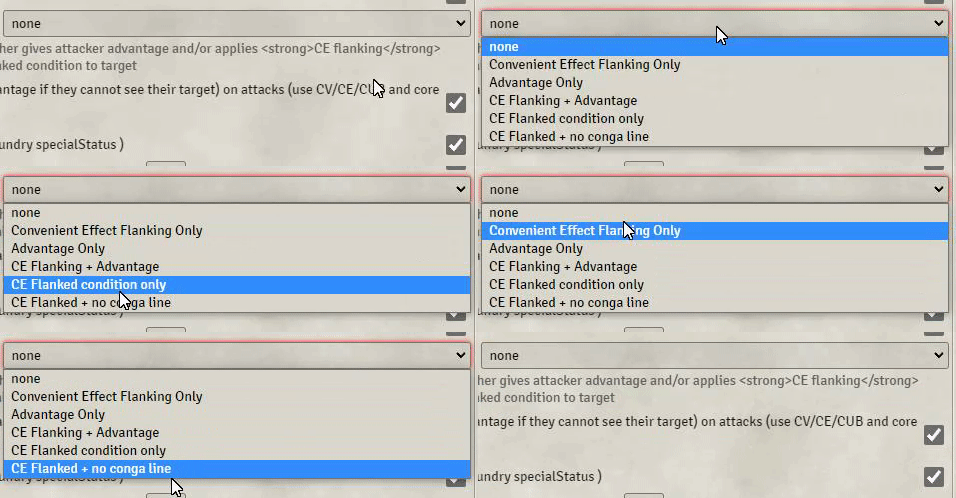
What does this mean in Midi QOL?
What does Convenient Effect Flanking /Condition do??
fierce basalt
scarlet gale
Advantage on the attack
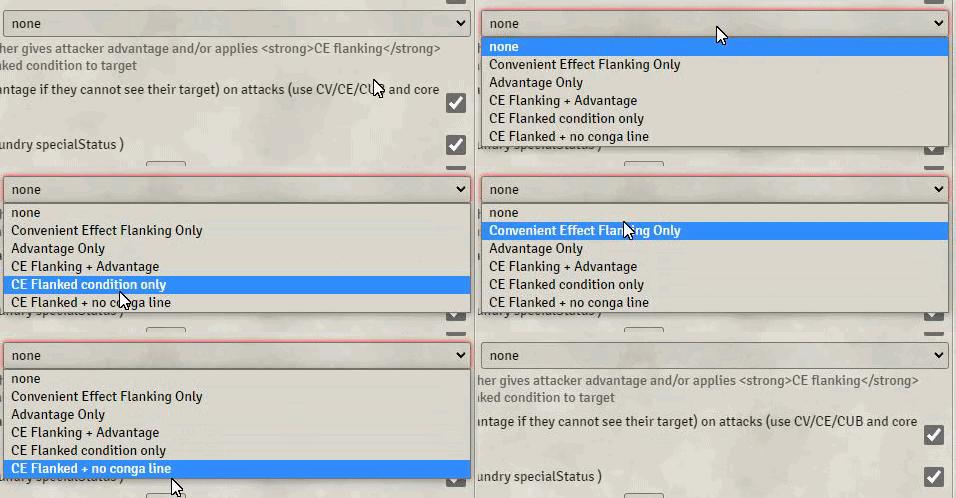
There is advantage of course
But there are other options to which I am confused?
couldn't find it on dfred
scarlet gale
No conga line is a "homebrew" fix to not apply flanking if the flanker is also flanked
violet meadow
fierce basalt
couldn't find it on dfred
There should be Flanking and Flanked premade effects in DFreds
fierce basalt
violet meadow
There should be Flanking and Flanked premade effects in DFreds
Woould it be advantage?
I'm personally looking for a +prof instead
violet meadow
fierce basalt
I'm personally looking for a +prof instead
Right click the condition you want, duplicate as custom
On the custom one change the keys to give a +2 to attacks and not advantage
Either grants something for the Flanked, or normal attack bonus for the Flanking.
You can use +@prof
covert mason
I've been trying to get this spell to work by applying an effect to a template and an OverTime effect. However, I cannot seem to get the fast-forward damage from MidiQoL to work at the start of an affected creature's turn. The effect always churns out (unidentified) instead of the spell level. I've tried @spellLevel and @spell.level, but neither works.


 kind cape
Have you tried [[@spellLevel]]?
Actually that probably won't work either in this case, cause the effect is created by the aura 🤔
violet meadow
covert mason
I've been trying to get this spell to work by applying an effect to a template a...
@spellLevel or @item.level but that should be directly on a DAE, not to be applied via a DFreds CE
covert mason
violet meadow
`@spellLevel` or `@item.level` but that should be directly on a DAE, not to be a...
@item.level seemed to work!
 limber pond
Running a DnD game for the first time on V10 and of course a bunch of modules are broken. Right now trying to work through an issue with MIDI. The Apply active effects button in chat cards doesn't work. As far as I can tell it should be setup correctly. Are there any known issues I should know about?
 coarse mesa
limber pond
Running a DnD game for the first time on V10 and of course a bunch of modules ar...
coarse mesa
limber pond
Running a DnD game for the first time on V10 and of course a bunch of modules ar...
I’ve never actually heard of anyone using that button with midi. Part of the reason for going up the midi route is having effects applied automatically. Is that something you’d prefer?
limber pond
Yeah, I typically prefer to apply the effects manually
coarse mesa
Ah fair, it could be a bug that’s gone unnoticed. I’m not too familiar with that kind of setup, but just making sure you have creatures targeted (not selected)? Did it used to work in v9 for you? And are you seeing any red errors in console?
limber pond
coarse mesa
Ah fair, it could be a bug that’s gone unnoticed. I’m not too familiar with that...
It worked fine in V9, I've tried with both things elected and targeted. I also don't see an error log being generated
covert mason
This should be identifying the level. I'm not sure what I'm doing wrong.
 molten solar
covert mason
This *should* be identifying the level. I'm not sure what I'm doing wrong.
molten solar
covert mason
This *should* be identifying the level. I'm not sure what I'm doing wrong.
actor.system.details.level
covert mason
 Oh, right. The
 system, too.
covert mason
const mod = actor.system.abilities.wis.mod;```
How would I acquire the spellcasting modifier number instead of a specific ability modifier's number? valid thistle
Im having some issues with the Challenge mode armor class house rule.
The target has 10 EC and 10 AR, but if im reading the documentation right this right it should still deal 60% damage instead of the 10 damage reduction from the AR.
Anyone have any ideas for a solution?
im on v10.290 with midi version 10.0.23
 coarse mesa
limber pond
It worked fine in V9, I've tried with both things elected and targeted. I also d...
coarse mesa
limber pond
It worked fine in V9, I've tried with both things elected and targeted. I also d...
Yeah sorry I really haven’t tried the non-automated route with midi. If I get a moment a bit later I could try and reproduce your issue
 halcyon umbra
I need some help, how can I make it so that the midi-qol damage buttons appear for a roll?
await new Roll(`${number}d6[fire]`).toMessage({
  speaker: ChatMessage.getSpeaker(),
  flavor: `Thermal Manipulation (Fire attack) - Damage roll.<br>`});
this is in an item macro
halcyon umbra
I've even tried editing the item's damage with this:
let item = actorData.items.find(i => i.name === "Thermal Manipulation (Fire attack)");
item.system.damage.parts[0][0] = `${number}d6`;
since I call dnd5e.documents.macro.rollItem("Thermal Manipulation (Fire attack)"); anyways
but the item's damage refuses to change. I tried this code as a regular macro and it worked fine, but as an item macro it just does nothing.
scarlet gale
Any reason you're doing it as a macro instead of a feature or something?
halcyon umbra
It's because every time it's used, the player decides how many points to spend on the feature, and if they spend more points than they have, they take damage
I can send the whole macro
scarlet gale
You should probably just edit the workflow during postdamage roll.
Are you on v9?
halcyon umbra
I'm on V10 of FoundryVTT
scarlet gale
You should change any references from data.data to system.
But if this is a feature that's being used
Editing the damage via the workflow will likely get you want you want
halcyon umbra
oh right thanks, I've been doing that for my other macros but this one was kinda old so I forgot
scarlet gale
Although the first line makes me think you're just doing a macro you're running from the hotbar?
halcyon umbra
this is an item macro
scarlet gale
You can get the actor from just doing this.actor
halcyon umbra
oh, huh I didn't know that
thanks!
I am quite new to macros, I just have experience with Javascript
so I'm mainly taking bits and pieces from other's stuff
scarlet gale
For midi item macros this is always just the workflow
And anything that's changed is done live
So you can await a dialog then have the result change the damage roll at this.damageRoll
(with this.setDamageRoll(roll))
You will however want to change the item macro to run during postDamageRoll
halcyon umbra
how do I do that?
I've never done anything with the workflow before so sorry if I'm really clueless
scarlet gale
halcyon umbra
also I don't really want to do any auto applying damage or anything like that, the way my group plays is quite manual with some QOL automation here and there
scarlet gale
It shouldn't auto apply if that's not what your midi is set to
 scarlet gale
Sounds like you're not running it from the feature?
Or maybe your item macros module is setup wrong.
halcyon umbra
ok I think I'm gonna give up on trying to do in that way, and instead, is there a way to roll dice and have the damage buttons appear for a hotbar macro?
(also just in case, these are the damage buttons I'm talking about)

and if there isn't... oh well, I'll just distribute damage manually
scarlet gale
I'm not sure what mix of modules you have that results in that.
halcyon umbra
oh I thought this was a midi-qol thing
it is a midi-qol thing

so in that case, how do I flag a roll as a damage roll?
scarlet gale
Is this something that's for a feature of a player or npc?

This is how a dagger with an item macro would be setup
halcyon umbra
ooooh
scarlet gale
Then whatever is in the item macro on the top gets executed
halcyon umbra
I was using this
 scarlet gale
yea
well that's right
you put the macro in there, but you still need to have midi use it
By having ItemMacro in the on use macros section.
halcyon umbra
I don't see the thing
 scarlet gale
Could you screenshot the full item?
halcyon umbra
 scarlet gale
Could you screenshot your item macros settings?
as in the item macros module settings
halcyon umbra
 scarlet gale
uncheck character sheet hook
halcyon umbra
ok
scarlet gale
actually it might be both
let me double check
yea, uncheck everything there
and see if it shows up after that
 scarlet gale
restart / refresh foundry?
scarlet gale
I'm not sure then
halcyon umbra
is there a way to flag a roll as a damage roll in a hotbar macro?
scarlet gale
You can do some midi functions that can likely get what you want
but you really should have your setup working right first
halcyon umbra
I'll just try and figure it out on my own, thanks for the help though
scarlet gale
Maybe there is a setting you need to find in midi, I'm sure someone more familiar with the obscure settings will be around can help you figure it out.
coarse mesa
@violet meadow when you get a mo, I see some Divine Fury floating about in here thanks to yourself and Moto, just wondering what the best to use is... and is it an actor onUse?
violet meadow
coarse mesa
<@547736620649021450> when you get a mo, I see some Divine Fury floating about i...
Link me? I don't remember which in rn
violet meadow
covert mason
```js
const mod = actor.system.abilities.wis.mod;```
How would I acquire the sp...
const key = actor.system.spellcasting
const mod = actor.system.abilities[key].mod
``` 🤔That should be a damageBonusMacro
coarse mesa
so, on every weapon?
violet meadow
I am on the move rn. Feature with a damageBonusMacro DAE flag, transfer to actor on item equip
coarse mesa
thankies
violet meadow
flags.dnd5e.DamageBonusMacro
coarse mesa
sorry just trying to get my head around this, don't think I've used that key before... is this a passive that you have on all the time, or is it activated by rage somehow?
oh maybe I'm booting Divine Fury from the character sheet and adding it to Rage
violet meadow
Ah yes you can do that. I cannot check it easily rn.
Just apply it on the actor when the effect is applied too
 near hare
I hope this is the correct thread. I want to implement the Goblin Shaman reaction redirect attack as an automated function or at least a feat (since the feature it's not in any installed compendium from start). Anyone that has done this before or knows how to set it up, since the attack grants when it's a hit to swap place with another creature.
violet meadow
near hare
I hope this is the correct thread. I want to implement the Goblin Shaman reactio...
There isn't a straightforward solution.
What's the exact description of the feature?
near hare
violet meadow
There isn't a straightforward solution.
What's the exact description of the feat...
When a creature the goblin can see targets it with an attack, the goblin chooses another goblin within 5 feet of it. The two goblins swap places, and the chosen goblin becomes the target instead.
violet meadow
near hare
When a creature the goblin can see targets it with an attack, the goblin chooses...
It will need some world scripts which will be doing the heavy lifting of cancelling the initial attack, switching targets places and then creating a new attack against the new target.
The most difficult part is that the initial attack will be created on a different client than then one that will be deciding to change targets
So you will need something which will have access to all clients and here comes the world script part
near hare
violet meadow
It will need some world scripts which will be doing the heavy lifting of cancell...
Sounds like I have to manually move the targets
violet meadow
All can come automatically but it needs quite a bit of setup
At least on first glance.
I can't deal with that rn as I am out and about
near hare
I have a session soon but this was just a curious idea if it worked. Maybe in the future. In the meantime, I just physically negate the damage and swaps targets
violet meadow
near hare
I have a session soon but this was just a curious idea if it worked. Maybe in th...
This sounds a ... sound solution 😁
clear kernel
vast bane
watch how quick its gonna be to set you up with swallow with dfreds 😉
ok so it took me a little longer than I thought due to a three day long christmas food coma
but I got dfred's installed and I have to admit it's pretty nifty
vast bane
Midi automates it, the trick though when first setting up dreds is to get it setup to replace status markers then you can create whatever ones you want and right click them in his menu to set as new status markers. But also somany things that the guys here do revolve around having mid+dfreds
clear kernel
ugh yeah it took me like 20 minutes to find that button in the settings
and another 20 to realise that monk's little details was adding more effects
but I think I've finally got it sorted! I can add effects just fine
I'm looking at the script that Chris wrote up above:
game.dfreds.effectInterface.removeEffect( { 'effectName': 'CE name', 'uuid': targetActor.uuid } );
trying to figure what bits to modify to make it remove the grappled
vast bane
my brain is a lil foggy
pretty sure you need effect macro for this
install the module effect macro
replace ce name with the name Grappled make sure you wrap it right with the unique characters
single or double quotes I believe
oh wait I think he did that implying you had item macro
targetActor sounds very item macroey
clear kernel
ah, yeah I do have item macro installed
is effect macro better?
I'm not using item macro for anything else atm so it wouldn't be a pain to switch
vast bane
both will get the job done I think he even revised a later version with effect macro
effect macro stuff will probably have things like this in it
paste that macro into item macro, and then on the item itself set an on use macro for ItemMacro
after active effects is probably fine
make sure your cub has enhanced conditions off or is uninstalled
clear kernel
I've got it uninstalled atm
vast bane
Item macro and effect macro are pretty much core meta modules for midi in v10 so don't remove either modules
make sure your item macro module is set to not use character sheet hooks, midi only uses it as a storage device, its main features conflict with midi usually
clear kernel
it's ok to have both installed?
vast bane
I have cub and dfreds, but you have to have enhanced conditions disabled in cub if dfreds exists
clear kernel
er, both item and effect macro I mean?
vast bane
yeah they both have great uses
clear kernel
gotcha
looks like I've got character sheet hooks off for item macro so that's set up ok
vast bane
Effect macro most of the time is what we'll use when ae's are involved, cause Zhell set it up with a whole bunch of great hooks
k let us know if you get any issues, it should work though
clear kernel
ok! setting up the macro now
let's see if my liberal arts brain can parse all that haha
nope I'm dumb

 vast bane
go to the post you got tha macro from
4-6 posts later he put "let tokenActor or whatever in
but he never edited the original
vast bane
put it in effect macro, clear out the item macro entry
probably on effect creation
to add an effect macro, edit the effect onthe item, and choose when you want the macro by clicking his button at botmmm righ
probably best to choose on effect creation as your trigger point
clear kernel
ok, so erase all the item macro stuff, then i'm making a new effect? and linking the effect macro to the new effect?
vast bane
technically just need to clear the entry at the bottom of the details of the item, you can cut and paste the item macro stuff into effect macro
clear kernel
ah ok
vast bane
 clear kernel
ok, I got rid of the item macro in details, set up the new effect

the new line goes at the top like this?
let targetActor = this.targets.first().actor game.dfreds.effectInterface.removeEffect( { 'effectName': 'Grappled', 'uuid': targetActor.uuid } );
ok! here we go!
hmm,

should it be on effect creation?
I'm doing something wrong then, no luck

 vast bane
did you have a target?
look for a bugbear post in that conversation that changed first target to an args entry
clear kernel
yup, it's applying the effects properly so the targeting part sis fine
wasn't that args one for when bugbear thought it was a CUB macro?
I'll put it in to see!
vast bane
args is how midi finds targets/rolldata
clear kernel
game.cub.removeCondition("Grappled",args[0].hitTargets[0])
so I'd keep the "Grappled",args[0].hitTargets[0] part
and replace grappled with it?
clear kernel
ok no worries, I'll fiddle around with it a bit more to make sure it wasn't user error
vast bane
we need the first lines definition for targetActor to be midi's args entry, just gotta wait for one of the gurus to wake up and see us
clear kernel
alright! Just about bedtime for me so I'll check back when I wake up
thank you for the help once again! I can definitely tell that dfred's is going to be fun to use
 dark canopy
there is an example right above: https://github.com/chrisk123999/foundry-macros/blob/b6c91e4b8b99bb0c277d45170143ef2e003b299d/Spells/Hex/Chris-HexAttack.js
vast bane
yeah they had that, not sure what could be wrong
maybe it was always intended to be an item macro?
dark canopy
"EM.executeScripts"
this is running through effect macro
not midi
which explains why no midi symbols work 😅
vast bane
@clear kernel can you share the macro with us again?
clear kernel
sure
vast bane
I don't think she had any midi stuff in it
clear kernel
let targetActor = this.targets.first().actor game.dfreds.effectInterface.removeEffect( { 'effectName': 'Grappled', 'uuid': targetActor.uuid } );
dark canopy
does it work standalone, replacing this.targets with game.user.targets?
clear kernel
hmm I'll check!
vast bane
is the problem the actor on the end of line 1?
vast bane
ok now the question is what broke to get that working lol?
clear kernel
at least it works standalone, lemme check via the item
dark canopy
vast bane
ok now the question is what broke to get that working lol?
nothing broke, it was never going to work
it was using, what appears to be midi syntax
in a non-midi macro
so...no workie
clear kernel
YOP
vast bane
ok so then the issue was I told them to switch to effect macro when it was never intended to be one?
clear kernel
it took the grappled off and added restrained and blinded as intended!
it worked via effect macro just now
vast bane
I assumed the this thing was a effect macro thing
dark canopy
vast bane
ok so then the issue was I told them to switch to effect macro when it was never...
the issue is you were using midi syntax in a non-midi macro
clear kernel
I'm thrilled, thank you so much for the help! 🙂
what would I change to have it remove the effect from the source token instead of the target?
vast bane
just got my wires crossed, too much christmas fuzz in my brain
clear kernel
I'm STILL in a coma from mashed potatoes
clear kernel
clear kernel
what would I change to have it remove the effect from the source token instead o...
or, in addition to
clear kernel
I added a new condition called Grappling to the frog instead of grappled
vast bane
pretty sure somewhere in that old conversation Chris had written a 1 liner to remove the grappled from the origin actor too
clear kernel
but that should be removed as well, yeah
clear kernel
oh that looks perfect
 vast bane
you get those in the dfreds macro compendium
covert mason
The MidiQoL spiritual weapon sample item gives my cleric player a NaN attack bonus on its spiritual weapon attack.
My cleric player has a few spell attack bonuses from magic items which seems to be causing the issue. Is there a way to modify the macro to include any spell attack bonuses?
 covert mason
That seems to calculate the damage fine
vast bane
Yeah janner something in that line is really fubared, thers also only one `
 scenic scroll
hello, could i apply an status effect with the flags.midi-qol.OverTime ?
Save each round -> fail = stun for 1 round
clear kernel
ok! It's 100% working! Thank you so much again, Janky and honeybadger
last time I'll bug anyone for at least a week
vast bane
scenic scroll
hello, could i apply an status effect with the flags.midi-qol.OverTime ?
Save ea...
If they save stunned is removed?
scenic scroll
if they fail, stun is on
vast bane
just clone hold person, but replace with the right save and status condition
dark canopy
clear kernel
last time I'll bug anyone for at least a week
we'll see you back tomorrow 😉 hehe
vast bane
scenic scroll
if they fail, stun is on
that sounds more like a simple stunning strike attack and not an overtime effect?
scenic scroll
vast bane
just clone hold person, but replace with the right save and status condition
no, each round, if he fail the save, he is stun for 1 round
vast bane
I'll be tapping out on this one, thats probably macro territory
scenic scroll
vast bane
I'll be tapping out on this one, thats probably macro territory
ok thanks anyway
vast bane
vaguely remember a potion of poison macro setup by chris that I think induced saves on a turn by turn basis
covert mason
vast bane
`system.damage.parts` line
Yeah, getting rid of those causes this error.
 vast bane
covert mason
Yeah, getting rid of those causes this error.
vast bane
covert mason
Yeah, getting rid of those causes this error.
forget what I said, does the origin actor not have a spellcasting ability?
covert mason
vast bane
forget what I said, does the origin actor not have a spellcasting ability?
Yup. Wisdom
vast bane
is there something more to the macro than what you showed? Could args[0] not be the source actor?
covert mason
Nope, that's 'bout it. It's the standard spiritual weapon item that comes with MidiQoL
dark canopy
vast bane
`system.damage.parts` line
no, that's correct -- damage parts is a 2D array
covert mason
It just either doesn't take into account the cleric's spell attack bonuses, or seems to be misreading it in some way.
I'm not quite sure
Maybe it's because they from from dynamic effects from magic items?
vast bane
console.log of args 0 but I forget the syntax
Magic Items Module????
If the item is from Magic Items Module, that is very very likely your problem
Use Items with Spells module
covert mason

 vast bane
covert mason
vast bane
covert mason
ok well those mods should be +X not X
covert mason
vast bane
ok well those mods should be +X not X
Yup. Still showing up as NaN
 vast bane
log args[0]
scarlet gale
Nan means it's getting something that results in not a number
covert mason
Just select the actor and put that in the console?
vast bane
no you have to put it in the macro but I don't know the syntax
covert mason
Oh. Neither do I 😅
vast bane
my guess is you are launching the spell abnormally and args[0] is not the caster
console.log(args[0])?
or just do args
scarlet gale
vast bane
`system.damage.parts` line
Damage parts are in a doubled up array fyi
vast bane
I hadn't realized that my window was narrow and I didn't see the end of the line so I saw just 1 set of brackets
scarlet gale
Could you post your full macro?
vast bane
That looks like a carbon copy of midi sample item
covert mason
scarlet gale
Could you post your full macro?
console.log(args[0])
const version = "10.0.13";
try {
  const origin = args[0].itemUuid;
  if (origin) {
      const removeList = actor.effects.filter(ae => ae.origin === origin && getProperty(ae, "flags.dae.transfer") !== 3).map(ae=>ae.id);
      await actor.deleteEmbeddedDocuments("ActiveEffect", removeList)
  }
  const updates = {
      Item: {
      "Spiritual Weapon Attack": {
        "type": "weapon",
        "img": args[0].itemData.img,
        "system.actionType" : "msak",
        "system.properties.mgc": true,
        "system.attackBonus": `${Number(args[0].actor.system.abilities[args[0].actor.system.attributes.spellcasting]?.mod) + Number(args[0].actor.system.attributes.prof) + Number(args[0].actor.system.bonuses.msak.attack)}`,
        "system.proficient": false,
        "system.damage.parts":[[`${1 + Math.floor((args[0].spellLevel-2)/2)}d8 + ${args[0].actor.system.abilities[args[0].actor.system.attributes.spellcasting]?.mod || ""}`,"force"]]
      }
    }
  }
  const result = await warpgate.spawn("Spiritual Weapon",  {embedded: updates}, {}, {});
  if (result.length !== 1) return;
  const createdToken = game.canvas.tokens.get(result[0]);
  await createdToken.actor.items.getName("Spiritual Weapon Attack").update({"data.proficient": false});
  const targetUuid = createdToken.document.uuid;

  await actor.createEmbeddedDocuments("ActiveEffect", [{
      label: "Summon",
      icon: args[0].item.img,
      origin,
      duration: {seconds: 60, rounds:10},
      "flags.dae.stackable": false,
      changes: [{key: "flags.dae.deleteUuid", mode: CONST.ACTIVE_EFFECT_MODES.ADD, value: [targetUuid]}]
  }]);
} catch (err) {
    console.error(`${args[0].itemData.name} - Spiritual Weapon ${version}`, err);
}```That's 'cause it is. It's the macro for the Midi sample item for Spiritual Weapon.
I just imported it from the compendium and realized something was iffy with the spell attack bonuses.
I didn't make this.
vast bane
did you fix all the other bonuses to spell attack on that actor?
where 1 missing + is, theres usually more
covert mason
vast bane
where 1 missing `+` is, theres usually more
Yup.
 molten solar
scarlet gale
In effect macros actor is already defined for you
molten solar
scarlet gale
In effect macros actor is already defined for you
Is this an EM?
scarlet gale
They were trying to use midi functions in an effect macro or something
molten solar
lol
scarlet gale
@covert mason So the issue is that it's not getting your bonus to attacks?
covert mason
scarlet gale
<@151011383092183041> So the issue is that it's not getting your bonus to attack...
Aye, pretty much
scarlet gale
Could you slap a js console.log(Number(args[0].actor.system.bonuses.msak.attack))
At the top and see what it outputs?
molten solar
 covert mason
 molten solar
 covert mason
scarlet gale
Could you slap a ```js
console.log(Number(args[0].actor.system.bonuses.msak.atta...
covert mason
scarlet gale
Could you slap a ```js
console.log(Number(args[0].actor.system.bonuses.msak.atta...
Yup, plops out a NaN
molten solar
Use this
Roll.safeEval(actor.system.bonuses.msak.attack || 0)
(an empty string will error)
covert mason
"system.attackBonus": `${Number(args[0].actor.system.abilities[args[0].actor.system.attributes.spellcasting]?.mod) + Number(args[0].actor.system.attributes.prof) + Number(args[0].actor.system.bonuses.msak.attack)}`,```
to
```js
"system.attackBonus": `${Number(args[0].actor.system.abilities[args[0].actor.system.attributes.spellcasting]?.mod) + Number(args[0].actor.system.attributes.prof)` + `${Roll.safeEval(actor.system.bonuses.msak.attack || 0)}`,```
?Keep the ${} and the args[0] probably
molten solar
Well now that you mention it, these are all numbers
covert mason
I would assume that Tposney coded this. 😅
molten solar
Technically you should replace roll data in the msak.attack before evaluating it
const mod = args[0].actor.system.abilities[args[0].actor.system.attributes.spellcasting].mod;
const prof = args[0].actor.system.attributes.prof;
const bonus = Roll.safeEval(Roll.replaceFormulaData(args[0].actor.system.bonuses.msak.attack || "0"));
and then later:
"system.attackBonus": mod + prof + bonus
Okay, that definitely worked 😅
covert mason
molten solar
```js
const mod = args[0].actor.system.abilities[args[0].actor.system.attributes...
Perfect, thank you!
scarlet gale
Long story short, it was trying to add a number and a string that couldn't be converted to a number
resulting in Not a Number
covert mason
Makes sense
 earnest owl
A newbie trying to use Item Macro
Hi guys, hope you are all doing fine!
I've been trying to get the hang of using Macros on Foundry, I want to create a Great Weapon Figthting macro for an Maul with the Item Macro Module. Ive watched a video about Foundry API but it seems like a lot have changed, and i'm not being able to grasp Foundry API's organization for calls. Can anyone help me with a simple questions:
What would be the best way to test if a damage die is lower then 3 and make a re-roll?
dark canopy
try to keep questions in one channel at a time ❤️
(context: being handled in #macro-polo )
vast bane
great weapon fighting isn't even macro territory. Its just optional roller stuff.
 spice kraken
Yeah, Zhell answered it in #macro-polo
violet meadow
dark canopy
im not sure what `this.targets` is
For anyone who's interested.
this returns the Midi workflow.
this.targets is the MidiQOL workflow targets.
The same with ```js
const workflow = MidiQOL.Workflow.getWorkflow(args[0].uuid)
workflow.targets...
`args[0].uuid` in this case is the rolled `item.uuid` torpid kestrel
5e V10 all modules up to date. Anyone know the fix for Spirit Guardians applying the template to all the targets ?
 spice kraken
Check your AA settings. It looks like it's applying the animation to all with the AE, not necessarily extending the template for each target
torpid kestrel
I can find the quick ref where it discusses "ignore targets" which looks to be what I want, but I don't see how to enable the option.
 torpid kestrel
I'm sorry, is this what you're referencing ?

Or this from the header of the spell
 vast bane
that spirit guardians bug looks very much like you aren't using midi sample items SG
it very specifically has killAnim in it for this bug
either that or its the old v9 npc using SG bug
torpid kestrel
pulled it from the midi comp Spirit Guardian 10.0.10 If that is not the most up to date, how do I get a newer version ?
BTW I appreciate the responses, not trying to sound defensive.
torpid kestrel
Good enough - I'll just leave it alone and wait patiently 😀
vast bane
you can turn off the global recog for it for now
 empty agate
I have a question not for Bugbear but about Bugbears - the race they released in DND 5e has a feature that extends their melee reach by 5 feet. Is there an existing attribute on the character that can be used to let the range check on the melee attacks to work properly?
vast bane
it only extends it during their turn
empty agate
Meaning that you have to enter into combat and then that setting should take effect?
vast bane
empty agate
Meaning that you have to enter into combat and then that setting should take eff...
meaning it only happens on their turn, so yeah for combat but specifically only their turn
I don't think you can automate it and I personally turn off ranges for melee weapons cause the players know their ranges anyway and op attacks are annoying to manage with range set to 5ft
empty agate
" I personally turn off ranges for melee weapons cause the players know their ranges anyway and op attacks are annoying to manage with range set to 5ft" - That would fix the issue certainly. We'll likely go that path. I tried putting the characters into combat and getting to the bugbear's turn but had the same result. Given everything that MidiQOL does - this is certainly an edge case
scarlet gale
I would just set their equipment to have the extra range. It won't really change anything for op attacks since those are manually checked anyways
covert mason
I seem to be getting a warpgate error, and I'm not quite sure where that missing data type is leading to. The link doesn't provide many clues
 vast bane
mismatch between an updates details and the actual item on the actor
show us the actor and the macro
 vast bane
I usually get these with the renaming of the multiattack
 rancid tide
How do I create an item using MidiQOL.socket().executeAsGM ?
I know that for effects it's MidiQOL.socket().executeAsGM("createEffects", { actorUuid: uuid, effects: [effectData] }); but idk about items
And if there isn't a way then how do I create a item inside another actor via macro (need to work as a player)?
vast bane
macro.createitem lets you replicate an existing item not sure if thats what you are looking for, its a dae key
rancid tide
Not quite sadly
I need to create an item (which I make inside the macro) and "give it" to an actor which isn't my own
Problem is that if you're a player you can't do that
scarlet gale
rancid tide
I need to create an item (which I make inside the macro) and "give it" to an act...
You can warpgate mutate the item onto them.
rancid tide
There isn't a way using executeAsGM then
scarlet gale
If you want an example

GitHub
Contribute to chrisk123999/foundry-macros development by creating an account on GitHub.
Warpgate by default will prompt the target actor if you don't have permission
But you can have it auto accept
In the warpgate settings
covert mason
Those looking for a Summon Beast macro via search, here ya' go. You may need to change some files, but it works! Executed via OnUse ItemMacro.
Inspired by some examples found on the warpgate page, and with plenty of help from many of the code wizards here!
rancid tide
scarlet gale
https://github.com/chrisk123999/foundry-macros/blob/main/Spells/Dragon's%20Breat...
Sorry I'm having a difficult time understanding how to use it, for example I have the item I want to spawn on the actor (itemSave) and the actorUuid (targetUuid) with this data, how exactly I use warpgate to do what I want?
scarlet gale
If you have the item embedded in the macro, use the warpgate mutate function to apply it to the target
In my macro I'm getting the item data out of a compendium, but that's easy to change
https://github.com/trioderegion/warpgate
Here's the documentation

GitHub
Contribute to trioderegion/warpgate development by creating an account on GitHub.
Look specifically for the mutate function
rancid tide
Thank you
scarlet gale
You can also use a DAE macro.createItem if it's something you don't need to worry about calculating DCs or spell scaling
covert mason
Also, automated Eldritch Cannon!
This also requires some image configuration, and the feature requires scaling from your Artillarist subclass.
 rancid tide
scarlet gale
If you have the item embedded in the macro, use the warpgate mutate function to ...
rancid tide
scarlet gale
If you have the item embedded in the macro, use the warpgate mutate function to ...
I get this

        name: "Alchemist's Fire [ActiveEffect]",
        flags: {
            itemacro: {
                "macro": {
                    "name": "Alchemist's Fire [Active Effect]",
                    "type": "script",
                    "scope": "global",
                    "command": "X",
                    "author": actor.id,
                    "img": "icons/svg/dice-target.svg"
                }
            },
            "midi-qol": {
                "onUseMacroName": "[postActiveEffects]ItemMacro",
                "onUseMacroParts": {
                    "items": [
                        {
                            "macroName": "ItemMacro",
                            "option": "postActiveEffects"
                        }
                    ]
                }
            }
        },
        img: "icons/magic/fire/flame-burning-yellow-orange.webp",
        system: {
            "source": lastArg.actorUuid,
            "target": {
                "type": "self"
            },
            "actionType": "save",
            "save": {
                "ability": "dex",
                "dc": (actor.flags.dae?.alchemyDC > itemDC ? actor.flags.dae.alchemyDC : itemDC),
                "scaling": "flat"
            }
        },
        type: "feat"
    };
    setProperty(itemSave, "flags.dae.effectId", targetUuid);
    let itemObject = itemSave;
    let updates = {
        'embedded': {
            'Item': {
                [itemObject.name]: itemObject
            }
        }
    };
    let options = {
        'permanent': false,
        'name': itemObject.name,
        'description': itemObject.name
    };
    await warpgate.mutate(target.document, updates, {}, options);
}```This is the macro I use
vast bane
scarlet gale
You can also use a DAE `macro.createItem` if it's something you don't need to wo...
I am able to caulcate that stuff with createitem.
I mutate the item in an effect macro as it lands on the actor
covert mason
Do you still have this Blink macro? 😄
scarlet gale
covert mason
Do you still have this Blink macro? 😄
Oh my GitHub
Let me find it
Oh not there
Oops
I can get you if when I'm back home
dark canopy
covert mason
I seem to be getting a warpgate error, and I'm not quite sure where that missing...
for future reference -- this is saying
Item Add warpgate is interpreting some shorthand to be an 'add' operation data missing '<name>' field. To create an item, one of the required pieces of data is "<name>", in this case 'type'. Was this supposed to be an update instead? Commonly, item update operations do not include changing the type. Double check if your item mutations are intended to be an 'add' or 'update' operation.
covert mason
Yeah, I was about to say xD
scarlet gale
covert mason
Yeah, I was about to say xD
It'll be an hour or so fyi
covert mason
dark canopy
for future reference -- this is saying
`Item Add` warpgate is interpreting some ...
I think I understand
dark canopy
rancid tide
I get this
the error is saying "You gave me some sort of document, but it doesnt look like its a Token or Actor" -- namely this line: await warpgate.mutate(target.document, updates, {}, options); what is target? and where is it defined
scarlet gale
vast bane
I am able to caulcate that stuff with createitem.
I know it's possible, was just saying in general
rancid tide
dark canopy
the error is saying "You gave me some sort of document, but it doesnt look like ...
target is let tokenOrActor = await fromUuid(targetUuid); let target = tokenOrActor.actor ? tokenOrActor._actor : tokenOrActor; where targetUuid comes from a forEach of args[0].hitTargetUuids
dark canopy
log out the target and see what it actually is
whatever it is, i can't figure it out 😅
( "I" = "warpgate" )
rancid tide
Sorry I don't understand the request
scarlet gale
You can just do this.targets.first().document
Assuming this is run from midi
dark canopy
(just go with Chris', it sounds cleaner)
scarlet gale
I'm guessing target is undefined
rancid tide
Let's see
rancid tide
scarlet gale
I'm guessing `target` is undefined
It doesn't seem to be undefinded

But it doesn't appear to have a .document field
Even executing it from console it says it is undefined
scarlet gale
You don't want the actor
rancid tide
idk if document is genereted by something
scarlet gale
Warpgate needs the token document
scarlet gale
scarlet gale
You can just do `this.targets.first().document`
Assuming this is run from midi
Try this
rancid tide
I tried but it throws an error still
scarlet gale
Are you running this from the hotbar or an item macro?
rancid tide
item macro
coarse mesa
How would you guys tackle Psychic Whispers? Ideally an empty AE that can be applied to @prof number of creatures and it lasts for a scale value dice number of hours, which we’d like to see the roll for 😅
rancid tide
scarlet gale
Likely a different error
 scarlet gale
Do you have a target selected?
rancid tide
Yes
To give a better insight this is the whole macro, it's executed from a OnUse ItemMacro
scarlet gale
On mobile, can you put it in a code block?
rancid tide
I fear that it's too long for that
rancid tide
rancid tide
``` let itemSave = {
name: "Alchemist's Fire [ActiveEffect]",
...
The shortened version is the one I linked here
scarlet gale
Upload as a .js file
rancid tide
Yes sorry I've remove it to test things with it it says that .first() isn't defined
first() isn't needed there since target there isn't an array
scarlet gale
Can you do a console.log(this.targets)
rancid tide
yes of course just a sec
scarlet gale
Can you screenshot your item and how you're running the item macro?
rancid tide
With an OnUse
scarlet gale
Does a console log of this have anything?
rancid tide
 rancid tide
scarlet gale
Does a console log of `this` have anything?
rancid tide
scarlet gale
Does a console log of `this` have anything?
Let me check
scarlet gale
Also heads up you misspelled length near the top
rancid tide
Yes there is this
rancid tide
scarlet gale
Also heads up you misspelled length near the top
thanks I always get that wrong xD
scarlet gale
Could you expand it and screenshot it?
rancid tide
 scarlet gale
Do args[0].workflow.targets.first().document
scarlet gale
I didn't realize you were working inside another function
rancid tide
not to worry I didn't say it either
scarlet gale
covert mason
Do you still have this Blink macro? 😄
You'll need to update the macro.createItem reference. The blink landing feature uses automated animations teleport preset to handle where to land when they blink back.

You'll also need effect macros if you don't already have it.
covert mason
scarlet gale
You'll need to update the `macro.createItem` reference. The blink landing featu...
Is the Blink Away buff supposed to immediately fade away after it's applied?
scarlet gale
It should go away upon coming back to their turn
covert mason
Oh
scarlet gale
add another target
to combat
You can always edit the effect macro to not have it auto use the feature if you don't like it working like that
 worthy raft
hello automation friends!
covert mason
scarlet gale
add another target
Noice, it works! Only question is how would I activate the effect if the Blink - Landing was an atwill spell?
And also, do the teleportation at the end of the turn, instead of the start of the next turn?
scarlet gale
I have it setup as a feature
But you should just be able to replace the item with a spell if you really want
Spell says you select where you land at the start of your turn
covert mason
Ah
scarlet gale
As long as the name of the item doesn't get changed, it won't matter whether it's a feature, spell, or item.
covert mason
I did some A-A auto-recognition stuff, and utilized my invisibility macro/Active Effect setup to achieve some degree of invisibility with the blink effect. 😄
 scarlet gale
Either way gets the job done
covert mason
Aye
This is the Token Fade macro I use.
if (args[0] === "on") {
 let data = args[1];
  new Sequence()
   .animation()
    .on(data.sourceToken)
    .fadeOut(500)
   .play()
}

if (args[0] === "off") {
 let data = args[1];
  new Sequence()
   .animation()
    .on(data.sourceToken)
    .fadeIn(500)
   .play()
}
console.log(args)```Though for NPCs, it'd be nice to toggle the token invisibility instead of its opacity.
scarlet gale
Neat
covert mason
covert mason
Though for NPCs, it'd be nice to toggle the token invisibility instead of its op...
So players don't subconsciously metagame the location the NPC's 'gunna pop up 😂
scarlet gale
I haven't had any npcs with this spell yet
Plus the NPC can pick the landing spot to an extent, so the players can only do so much
covert mason
I've got a few spellcasting bad guys in my campaign.
One of which has used this spell before
Oh wait, old on. I think I found something.
if (args[0] === "on") {
    await target.document.update({ "hidden": true });
}
if (args[0] === "off") {
await target.document.update({ "hidden": false });```That might not work so well for players
Depending if you have modules that allow players to see their own hidden tokens
covert mason
Oh, I'm not thinking for players. NPCs
Thoughh a module where players can see their own hidden tokens would be useful
covert mason
covert mason
Oh wait, old on. I think I found something.
```js
if (args[0] === "on") {
aw...
How do I define the target as the entity upon which this effect is placed?
if (args[0] === "on") {
    await target.document.update({ "hidden": true });
}
if (args[0] === "off") {
    await target.document.update({ "hidden": false });
}```
 abstract raptor
Looking for a tiny bit of help. I've got an item which adds +1 ki (primary resource for this monk) - it works, no problem. HOWEVER, the Feature/Ability to actually USE Ki Ki Points is created / hard coded on this character import with 6 uses per short rest. So even though I +1 the primary resource, this Ki spender doesn't go from 6 -> 7, it stays at 6. I feel like I need to reach into this Ability and change it. Any tips?

I tried macro-ing it, but I can't seem to find the "Ki Points" Feature on this actor. Not sure why . . .
molten solar
Look in the class item.
Oh nvm, you imported it? All bets are off then. Make a scale value in the Monk class item.
abstract raptor
yeah using dndbeyond importer.
molten solar
A monk just has ki points equal to their level, right? Normally.
molten solar
Cool, replace the '6' in the max uses with @details.level + 1
(none of this is related to Midi btw)
scarlet gale
covert mason
How do I define the target as the entity upon which this effect is placed?
```js...
Effect macro on creation and on deletion
actor.update
Throw out the args on and off part
Might be token.update depending on what you're doing
covert mason
scarlet gale
Might be token.update depending on what you're doing
Basically this.
 molten solar
w... why are you making a custom effect for Invisibility
covert mason
Aye
molten solar
If you use the regular Invisible condition, not only will the tokens be hidden, any token with See Invisibility will be able to see them.
The 'hidden' property is something else entirely.
scarlet gale
If this is tied to blink I don't they want that
molten solar
(and also, good lord, what is that abuse happening to the EM interface?)
scarlet gale
Advanced macros module
molten solar
Well those gotta go.
scarlet gale
I can't imagine any of those check boxes would actually do anything
molten solar
They disturb me. That's enough.
 scarlet gale
@molten solar Effect macros DND hooks aren't the preroll hooks right?
Or whatever they're called
molten solar
Correct. Post.
scarlet gale
Have you ever considered having a checkbox or some to have it be pre so the roll could be messed with?
I know I can just do it myself with a world script and some filtering.
molten solar
Use case?
scarlet gale
Personally, to replace midi optional bonus dialogs with my own.
molten solar
With a crowbar
scarlet gale
Oh well
molten solar
(read: by replacing the entire thing with its own)
molten solar
There's always babonus.
scarlet gale
True
I need to use that more
But I always just wind up going the macro route with complicated features
covert mason
Perhaps I'll just manually hide NPCs when they turn invisible 😅
molten solar
covert mason
Perhaps I'll just manually hide NPCs when they turn invisible 😅
But why not use the Invisible condition?
covert mason
molten solar
But why not use the Invisible condition?
Aye, that's what I'm thinking. Use that, and hide the 0 opacity token.
molten solar
You don't need to hide it
scarlet gale
Is this still for the blink spell?
molten solar
If they have the Invisible condition, and if token vision is enabled on the scene (and the player tokens), then they cannot see the invisible tokens.
rancid tide
How to you usually save the item you need for macro.createItem? What I mean is that I usually "get" the items that createItem create from game.items, the problem is that game.items don't have a uuid, (I tried with their id but it says that it couldn't find the item) so I usually create the item on my actor temporarily to get a uuid and then delete it once I used createItem, is there a more practical way?
molten solar
All items have a uuid.
covert mason
Wait, so v10 automatically recognizes if the token has a condition called 'invisible' on them? I use Dfreds Conditions, and that has an invisibility condition that turns tokens' opacity to 0.
rancid tide
molten solar
All items have a uuid.
Yes sorry, it throws an error when doing so
scarlet gale
Drag the item onto the value field
molten solar
covert mason
Wait, so v10 automatically recognizes if the token has a condition called 'invis...
It's core, yeah. 🤷
I don't know what DFCE does.
scarlet gale
covert mason
Wait, so v10 automatically recognizes if the token has a condition called 'invis...
CE uses the core way
molten solar
An old effect or outdated version of the module perhaps?
scarlet gale
It remaps it, but it should just work out of the box
molten solar
Doesn't sound like it needs to turn the opacity down anymore.
rancid tide
scarlet gale
Drag the item onto the value field
it says that createActorItem could not find item
If it from game.items
scarlet gale
Could you screenshot what you're doing?
rancid tide
I can link you the macro, if you want?
scarlet gale
scarlet gale
You'll need to update the `macro.createItem` reference. The blink landing featu...
It should look like this screenshot
rancid tide
scarlet gale
It should look like this screenshot
Give me a sec
molten solar
An item in-world has a uuid of the form Item.fdshif789fs
scarlet gale
If you're doing it in a macro, I don't think that's the intended way
rancid tide
rancid tide
scarlet gale
If you're doing it in a macro, I don't think that's the intended way
Yeah I am doing it inside a macro
I'm creating an effect from a macro
covert mason
This is what Dfreds gives me for Invisibility.


I can still see the token when viewing it as a different player.
molten solar
rancid tide
I'm creating an effect from a macro
You turned it into an object (duplicate)
An object is not an item
That is why it does not have a uuid.
rancid tide
Okay in this case what do I do?
molten solar
The idea here is you want to use an item as a base, make modifications to it, and then create it?
rancid tide
Yes
molten solar
covert mason
I can still see the token when viewing it as a different player.
Turn token vision on
molten solar
rancid tide
Yes
Then just use actor.createEmbeddedDocuments("Item", [effectItem])
rancid tide
Problem for that is that the item needs to be created on another actor
scarlet gale
It's on a unowned target actor
molten solar
Then warpgate it in
rancid tide
I tried it's a mess (I don't know how to use warpgate) createItem was easier to understand
molten solar
const updates = {embedded: {Item: {[effectItem.name]: effectItem}}};
await warpgate.mutate(target.document, updates);
There.
rancid tide
I did that and got a lot of errors, maybe I missed something I'll try again
molten solar
(where target.document is the document of a targeted token placeable)
rancid tide
Thank you
scarlet gale
I'm not sure why you don't just have the DAE effect do the createItem thing
molten solar
Due to wanting to make changes to the item, I presume. Or can it do that?
scarlet gale
Not easily
molten solar
This way's pretty easy tho
rancid tide
scarlet gale
I'm not sure why you don't just have the DAE effect do the createItem thing
What do you mean?
scarlet gale
So your item applies an effect to the failed saves right?
rancid tide
Ah yes, that's because since this needs to be a module I can't for every people that downloads it say "Yeah copy that uuid and do this to make it work"
rancid tide
Looking into it
scarlet gale
Although having the effect created in the macro is an interesting way to work around that
Find the item by name a grab the uuid
covert mason
molten solar
Turn token vision on
Welp
Looks like I've been trying to do something pointless when the functionality is already built in. 
scarlet gale
I feel like your macro greatly over complicates that
rancid tide
rancid tide
And it does work
Problem is that I have to create a duplicate of the item into the actor and then delete after all it's done
rancid tide
scarlet gale
I feel like your macro greatly over complicates that
Like?
molten solar
covert mason
*Welp*
Looks like I've been trying to do something pointless when the functional...
Welcome to v10. 🙂
covert mason
molten solar
Welcome to v10. 🙂
I'm continuously impressed by it.
scarlet gale
Shouldn't it literally just be like game.items.getName("Name").uuid
Then throw that into an effect created in the macro
rancid tide
Yeah but you have to factor in a lot of things that the macro doesn't show
Like passives that change the item in some way or another
That's why I need to modify the item
scarlet gale
Then warpgate the way
rancid tide
I would really like to do game.items.getName("Name").uuid and create the item but I need to modify it
covert mason
@scarlet gale I suppose that brings me on to my next issue.
Knowing that Invisibility hides the token from all views, I'd like to try and stick invisibility on your blink macro when it jumps. Is this how I'd format it the 'End Turn' Effect?
rancid tide
scarlet gale
Then warpgate the way
I'm using functions and it doesn't pass the token.document for some reason so it's undefined
Because I'm getting the targets from getUuid() so idk if that doesn't pass document
rancid tide
okay but then how to I know it's the target I am in? Since I'm using a forEach of failedSaveUuids
scarlet gale
covert mason
<@70671672507629568> I suppose that brings me on to my next issue.
Knowing tha...
Not quite
value should be 'Invisible'
mode should be whatever the number for custom is
I don't remember of the top of my head
covert mason
Perhaps it's 1?
scarlet gale
rancid tide
okay but then how to I know it's the target I am in? Since I'm using a forEach o...
What's the context of what you're trying to do?
scarlet gale
covert mason
Perhaps it's 1?
You can check by making an effect on something with mode custom and checking the effect data in console
Or exporting the json I guess
scarlet gale
rancid tide
okay but then how to I know it's the target I am in? Since I'm using a forEach o...
this.failedSaves is a set of all failed save tokens IIRC
let me double check
args[0].workflow.failedSaves would have the same data
molten solar
covert mason
<@70671672507629568> I suppose that brings me on to my next issue.
Knowing tha...
mode: CONST.ACTIVE_EFFECT_MODES.CUSTOM
No need to remember random numbers.
rancid tide
scarlet gale
What's the context of what you're trying to do?
I'm creating Alchemist's Fire, and there's a feature that makes it have a radius effect, so for each target that have failed I want the effect to take place, also since Alchemist's Fire for it to stop doing damage it needs the creature to use its action to stop it, I've make it so that the effect creates an usable item for the creature to try and save against it using an action
rancid tide
scarlet gale
`args[0].workflow.failedSaves` would have the same data
Using this with warpgate create the item on each of the targets?
Or do I have to use a forEach for it?
scarlet gale
failedSaves is the token objects of all the failed saves, you could just loop over it and do a warpgate mutation on each one
Or you can slap a actionSave=true in the overtime effect
and not bother with any of this
rancid tide
Ehheh funny you say this, but that would mean that the creature always uses its action to try and stop the effect, what if it doesn't?
scarlet gale
actionSave just makes it not do anything unless you roll the specific save / skill check you want manually
Technically I guess there's a rare chance you could wind up doing a manual roll for something unrelated
rancid tide
I feel pretty dumb right now, don't mind me, I'll just go to cry in this corner for a bit
scarlet gale
For what it's worth, I don't like using action saves
And I would also just warpgate a feature onto the target
that just lets you click it and if they succeed do a effect.delete()
rancid tide
You think I should keep trying to do it like this?
scarlet gale
Let me look up that item quick
scarlet gale
molten solar
```js
mode: CONST.ACTIVE_EFFECT_MODES.CUSTOM
```
No need to remember random numb...
I'll never be able to remember that string to be fair
rancid tide
scarlet gale
Let me look up that item quick
You want me to export the item?
rancid tide
Okay so I don't need to pass you anything?
scarlet gale
nah
covert mason
Oh, a little something that's been bugging me and I've been trying to get right these last couple of days. I'm trying to have this Primordial Eruption item trigger and this Primordial Rage warpgate mutation to happen at the same time with an On Effect Creation macro. Am I missing something here?
rancid tide
Okay it works now only problem is there a command to reverse the warpgate mutate?
molten solar
Other than the ui.notification never being reached (because you return) as well as some pre-v10 data paths (token.img is token.texture.src), it looks good to me
molten solar
rancid tide
Okay it works now only problem is there a command to reverse the warpgate mutate...
warpgate.revert
If you gave it a name, you can use that to revert the specific mutation.
scarlet gale
rancid tide
Okay it works now only problem is there a command to reverse the warpgate mutate...
rancid tide
Where do I put the name?
scarlet gale
During the mutation you can set a name for the mutation
rancid tide
Okay I'll look up the api
Thank you all so much
I can't find where to put the name inside warpgate.mutate()
scarlet gale
Part of the options iirc
rancid tide
Ah yes sorry I didn't see, it's pretty late here I guess I'm tired
covert mason
molten solar
Other than the ui.notification never being reached (because you `return`) as wel...
await warpgate.mutate(token.document, {token: {height: 1, width: 1, scale: 1.3, texture.src: '/Player_Tokens/Grunka/Grunka_Topdown_Large.webp', light: {color: "#ff9c33", dim: 30, bright: 15, alpha: 0.5, animation: {type: "torch", speed: 3, intensity: 1}}}},{},{name:"Primordial Rage"});
ui.notifications.info("Fiery Fists added to your inventory");
const item = game.items.getName("Primordial Eruption");
const data = game.items.fromCompendium(item);
const fake = new Item.implementation(data, {parent: actor});
return fake.use({}, {"flags.dnd5e.itemData": data});```
This doesn't seem to pull off the mutation at allAhh
scarlet gale
if (this.hitTargets.size != 1) return;
let item = game.items.getName('Alchemist\'s Fire - Extinguish Flames');
if (!item) return;
let effectData = {
    'label': 'Alchemist\'s Fire',
    'icon': item.img,
    'duration': {
        'seconds': 86400
    },
    'origin': this.item.uuid,
    'changes': [
        {
            'key': 'macro.createItem',
            'mode': 0,
            'priority': 20,
            'value': item.uuid
        },
        {
            'key': 'flags.midi-qol.OverTime',
            'mode': 0,
            'priority': 20,
            'value': 'label=Alchemist\'s Fire (End of Turn),turn=end,damageRoll=1d4[fire]'
        }
    ]
};
await MidiQOL.socket().executeAsGM('createEffects', {'actorUuid': this.hitTargets.first().actor.uuid, 'effects': [effectData]});```let roll = await actor.rollAbilityTest('dex');
if (roll.total < 10) return;
let effect = actor.effects.find(eff => eff.label === "Alchemist's Fire");
if (!effect) return;
await effect.delete();
First one is the item macro on the Alchemist's Fire flask.
2nd one is the item macro on a feature called Alchemist's Fire - Extinguish Flames
rancid tide
scarlet gale
During the mutation you can set a name for the mutation
It doesn't revert with a name idk what I'm doing wrong
mutationName = `${randomID(5)}`;
const updates = {embedded: {Item: {[itemEffect.name]: itemEffect}}};
await warpgate.mutate(target.document, updates, mutationName);
warpgate.revert(lastArg.workflow.actor.document, mutationName);
This is what I basically do, idk why it doesn't revert
scarlet gale
You're doing a revert on an actor
It needs a token document
also, you're reverting right after doing a mutation?
rancid tide
No I just simplify it to give an example
rancid tide
Okay thank you
scarlet gale
For what it's worth, my code from above that message more or less does the same thing
except with macro.createItem
embedded the overtime effect onto it as well
rancid tide
glad it was easy for one of us ahah
scarlet gale
I've been recently doing a bunch of things like this. I just finished setting up a bunch of potions for my own game
And a lot of them needed warpgate stuff or macro.createItem
rancid tide
Yeah doing a lot of that too, doing a homebrew alchemist class
scarlet gale
Does it change how many targets can be hit?
Because my example one from above would only work on a single target
Since I'm doing this.targets.first()
rancid tide
Yes there are items that make the item be multi target
scarlet gale
Then you'd want to make a for loop for the size of the set
scarlet gale
You're using the mutate function slightly wrong
The last part needs to be an object
let options = {
    'permanent': false,
    'name': itemObject.name,
    'description': itemObject.name
};
await warpgate.mutate(targetToken.document, updates, {}, options);```It's likely your mutation isn't actually getting a name
You can tell by holding down shift and clicking on the revert button on the actor
I'll show a list of mutations to revert by name
rancid tide
Okay, when I try to put {} in mutate it throws an error saying that it's not an object
scarlet gale
Post the relevant part of your macro
scarlet gale
Same thing
Your last part isn't setup right
effectInfo.mutationName isn't what you want in the original mutation
scarlet gale
{
    'permanent': false,
    'name': 'Mutation Name',
    'description': 'Mutation Description'
}```Okay thank you so much
omg it works, oh gosh my eyes hurt
Thank you for your patience
clear kernel
is there a way to set A-A to play an animation on that token's turn end so long as the effect is active?
via crazy macro voodoo
I guess I'd just need the syntax to trigger the animation then link it to "combat turn ending" with effect macro
scarlet gale
Most AA things can be set to loop
You may want to ask in #513918036919713802 or #dnd5e
clear kernel
ok, gotcha. thought it might be midi related. Appreciate it 🙂
clear kernel
dark canopy
we'll see you back tomorrow 😉 hehe
ok you're not wrong!
let targetActor = game.user.targets.first().actor game.dfreds.effectInterface.addEffect( { 'effectName': 'Grappled', 'uuid': targetActor.uuid } );
How would I go about having this apply to every target of the actor?
scarlet gale
You would need to iterate over the set
clear kernel
ah, that sounds less convenient
hmm I guess my main confusion is, using CE I can add a new DAE effect from CE so long as it's listed as a token status effect, but I'm not sure how to apply an effect like bless, or any sort of spell that gives non-token status effects to multiple targets at once
clear kernel
well, before I had spells, etc set up via CUB, so I'm trying to recreate that with CE
but I'm missing something fundamental, I'm not sure how to go about applying non token status effects
scarlet gale
Depending on your settings midi will use the CE that's already created
if the name matches
clear kernel
ah, so if I wanted to create a new spell I'd have to create a new match with midi?
clear kernel
ah I think that's my confusion though, I don't see for example, "Bless" on the DAE page
scarlet gale
On a spell press the DAE button and configure the flags there how you would want
clear kernel
the same way I see Dead, Unconscious, etc
spice kraken
I'm assuming bless is coming from CE here
scarlet gale
midi won't apply a DAE on something that passes a save
spice kraken
So if you create a new spell called Steve that give advantage to all melee weapon attacks, you create a new CE named Steve with that flag. That way you don't have to edit every instance of the spell Steve and midi will take care of the rest
clear kernel
then I'd do macro.ce, find steve on the dropdown, and apply that?
scarlet gale
You would just set it up on the spell
spice kraken
But if the spell gives the exact same bonus as bless, then just macro.CE | custom | bless is enough
spice kraken
Just to wrap it up. If you have a spell named Steve, just make a CE and let midi auto-apply it
scarlet gale
Here's an example of how a lot of stuff could be automated
 spice kraken
Great example, ty
scarlet gale
This uses macro.CE to apply a condition, while also using a midi flag for the overtime
clear kernel
scarlet gale
Here's an example of how a lot of stuff could be automated
oh that's infinitely helpful
 clear kernel
appreciate it! I feel like I'm bugging people but you've all been amazingly helpful
clear kernel
spice kraken
But if the spell gives the exact same bonus as bless, then just `macro.CE | cust...
so if I do things this way, by having an ability trigger the CE via macro.ce, the "Disease (Sewer Rot)" is applied correctly, but it's linked to the Diseased Bite passive effect, and two effects show up in the target's effect screen, like so:


is that normal?
I can circumvent it by not entering anything in effects and just making the item name "Diseased (Sewer Rat)", in which case the item applies its effects normally, like your bless example
but then the attack name is Diseased (Sewer Rat) instead of Diseased Bite, which is what I want players to actually see
spice kraken
Give it a duration (on the item, not the ce). It still shows both icons but when diseased bite is removed, so will the sewer rat
Assuming you have the module Times Up to expire based on durations
coarse mesa
This Guidance isn't working with Thieves' Tools dex checks... any idea on how to get it working?

 spice kraken
What other options do you get before the skill.all
clear kernel
gotcha, I'll give that a shot. Thanks 🙂
coarse mesa
spice kraken
What other options do you get before the skill.all
In DAE? There are a bunch but can't see anything tool related 🤔
 spice kraken
Can you show below skills? I'm in bed so can't check myself

 spice kraken
Oh, well... idk, haha. Let me see if I see anything in the readme
coarse mesa
thanks – maybe it's just not come up before, this is the first time we've had a Guidance set up this way (DDB import). It's cool for other skill/ability checks tho
spice kraken
It's a long shot but try the damage util one?
coarse mesa
spice kraken
It's a long shot but try the damage util one?
Thanks I'll have to experiment in the morning now... bedtime for me too
coarse mesa
@gilded yacht should there be an optional flag for tool checks or is there an inherent limitation in dnd5E?
molten solar
coarse mesa
<@378398557050503168> should there be an optional flag for tool checks or is the...
It's 100% possible to add a bonus onto a tool check.
covert mason
I'm trying to automate Sleet Storm's two saving throw effects. The con save else lose concentration, and the dex save else fall prone.
How would I achieve that using OverTime effects?

The ground in the area is covered with slick ice, making it difficult terrain. When a creature enters the spell's area for the first time on a turn or starts its turn there, it must make a Dexterity saving throw. On a failed save, it falls prone.

If a creature starts its turn in the spell's area and is concentrating on a spell, the creature must make a successful Constitution saving throw against your spell save DC or lose concentration.```I don't think adding a condition upon failure is possible with an overtime.
But this would be pretty simple with an effect macro.
Honestly, this is a really good example of where having parity between effect macros and template macros for events would be nice.
molten solar
Explain
scarlet gale
On turn start trigger for a token in the template for example
avoid even having an effect
In this case, I would set a flag on entering the template for what turn the token entered it. (To avoid doubling up on the check if they leave the template then come back into it)
Then ideally have a starting turn in template check
Right now I'd have to slap an effect on tokens entering and deal with having an effect macro embedded in the template macro.
Also having a macro that could be saved on the template that is manually triggered, similar to the "Never Automatically" option from effect macros would be useful for avoiding repeated code.
molten solar
Well I'm not against it. Do you wanna make a PR?
scarlet gale
I'm not that good enough at javascript to even know where to start with that.
molten solar
steal from EM lol
scarlet gale
Somewhat related, you may want to give template macros the same treatment you just did to effect macros for the code box.
Since advanced macros is trying to add it's own buttons there too.
(I think?)
 molten solar
Yeah that's AM alright
 last mural
Hey there! I'm trying to build a feature and could need some help with the process.
The feature is a bit similar to lay on hands :
Choose a number from your resource pool. Then make an melee spell attack. on a hit, it deals #pointsUsed necrotic damage [or heals undead]. This damage can crit. On a miss, no resources are consumed. ```

My idea was to use the midi example lay on hands as a baseline and steal the resource and dialog parts. But I'm not sure how to proceed from there, especially the part where missing doesnt consume resources has me wonderingPostDamageRoll macro. Have a dialog pop up if the attack was a hit. Then do an item.update depending on what options were selected.
You can edit the workflow to set how much damage was done.
last mural
Ah yeah, so the dialog only really plays once something is hit. This should work! Thanks
scarlet gale
workflow.setDamageRoll(roll)
 graceful geyser
What mechanism should I use to remove targets from a "live" workflow? I have an OnUse macro but no matter when I set it to run modifying workflow.targets doesn't seem to actually stop the workflow from running on those targets.
Trying to stop Abi-Dalzim's Horrid Wilting from running against undead and construct targets.
 rigid jackal
Hello, I've been trying to make this feature work using the Overtime flag however it has not work one bit, and I'm frankly lost on the reason, what's wrong here.
 scarlet gale
Maybe from the dash in the class name?
coarse mesa
@rigid jackal there’s a v10 version of midi SRD you can install from here https://raw.githubusercontent.com/thatlonelybugbear/midi-srd/master/module.json
covert mason
I'm attempting to apply conditions using overtime effects too. How did you manage this?
spice kraken
Don't use apply conditions. Just macro.CE or StatusEffect and pick the one you want
covert mason
spice kraken
Don't use apply conditions. Just macro.CE or StatusEffect and pick the one you w...
But if I were to add an overtime and a macro.ce in the same effect, wouldn't the condition and the overtime effect just be applied automatically when entering the template?
Without having to roll to save first before applying the condition on a fail?
spice kraken
Prolly, idk. Haven't had to mess with this in a minute and I'm at work
coarse mesa
I think this is what was happening to us last night. If we cast a spell in combat it didn’t expire properly once regular time resumed. If cast out of combat it seemed fine (I think). Sound about the same as what you noticed? Also, VAE was being a bit weird, the panel pulsing/refreshing every second out of combat, gonna investigate that some more (maybe a module conflict)
scarlet gale
Effect macro on creation and on turn start. Roll a save and use the CE API to add the condition if they fail.
molten solar
coarse mesa
I think this is what was happening to us last night. If we cast a spell in comba...
It refreshes when game time is updated.
I am betting you have a module updating game time every second.
coarse mesa
I’m using SmallTime and Simple Calendar…
covert mason
scarlet gale
Effect macro on creation and on turn start. Roll a save and use the CE API to a...
I'm a little confused. Would you happen to have a visual example of this?
scarlet gale
let save = await token.actor.rollAbilitySave('con');
if (save.total >= 13) return;
//apply condition here
That’s good, to see the time counting down… but it re-does the hover anim each time too… wonder if it’s some wonky CSS on my end 👀
molten solar
That'd be the application being re-rendered every second for you, yeah.
covert mason
scarlet gale
```js
let save = await token.actor.rollAbilitySave('con');
if (save.total >= 13)...
So the only trouble then would be grabbing the caster's spell save to use in place of that 13, and finding out how CE applies its conditions.
molten solar
And to be honest, that sounds insane and like one of those edge cases where I'm just gonna say, "Make a PR" lol
scarlet gale
await game.dfreds.effectInterface.addEffect(
            {
                'effectName': 'condition name',
                'uuid': actor.uuid,
                'origin': origin,
                'overlay': false
            }
);```Me? Even Atro uses SmallTime… it’s pretty ubiquitous
molten solar
I refuse to believe he has it update every second.
scarlet gale
You could get the spell level / dc or whatever by having the effect have a flag
coarse mesa
That’s what it does 🤷♂️ It’s a game clock after all
scarlet gale
I like to just make a key in the effect flags.world.spell.castLevel | overwrite | something
molten solar
Nothing on SmallTime's page says it does anything of the sort.
scarlet gale
Simple calendar will sync the time like every 30 seconds or something
Not sure if that's related
molten solar
Yeah that sounds more likely. And it probably has a setting to do it every 1 second instead?
coarse mesa
I’m sure someone would have mentioned it before, might just be me
The time divider flashes every second when time is running… I’ll have a fiddle around
I wonder if it’s About Time or Times Up maybe… something to do with effects expiring in real-time
But then I’m sure Moto or Bugbear would have noticed it too 🤔
molten solar
How many time management modules can one New Zealander need.
coarse mesa
Those are both midi dependencies… are you seeing the same thing @scarlet gale ?
scarlet gale
I don't use VAE
coarse mesa
Ah
spice kraken
Eh, if you have simple calendar you don't need about time
covert mason
scarlet gale
```js
await game.dfreds.effectInterface.addEffect(
{
...
So here's what I have for on-effect-creation.

Oop-
Forgot the condition name
scarlet gale
You can probably remove the token part since effect macros defines that for you
covert mason
covert mason
Forgot the condition name
let save = await actor.rollAbilitySave('dex');
if (save.total >= ProneFlag) return;
await game.dfreds.effectInterface.addEffect(
            {
                'effectName': 'Prone',
                'uuid': actor.uuid,
                'origin': origin,
                'overlay': false
            }
);```You still need to get the prone flag
And the tabbing is bad from my bad copy and paste
molten solar
Now that's a nice clean Effect Macro editor. 
last mural
scarlet gale
`workflow.setDamageRoll(roll)`
mhhm i think i dont really understand how the setDamageRoll() works. right now i am able to update the item to do the damage-value as I set it. however, the damage gets rolled before I update the item and not after
covert mason
scarlet gale
You still need to get the prone flag
How would I do that?
scarlet gale
last mural
mhhm i think i dont really understand how the `setDamageRoll()` works. right now...
That function replaces whatever was originally rolled. You want to make sure it's being run on postDamageRoll.
last mural
if (args[0].hitTargets.length < 1) return;

let consumeTarget = args[0].itemData.system.consume.target;
if (!consumeTarget || consumeTarget === "") consumeTarget = 'resources.primary.value';
const available = getProperty(actor.system, consumeTarget);


//new Dialog : How much used?
if (available <= 0) return false;


await new Dialog({
    title: "Charnel Touch",
    content: `How many points to use? ${available} available<input id="charnelpoints" type="number" min="0" step="1.0" max="${available}"></input>`,
    buttons: {
      attack: {
        label: "Attack",
        callback: async (html) => {
            const damagevalue = html[0].querySelector("#charnelpoints").value;
            //await ChatMessage.create({content : roll._total})
            await item.update({'system.damage.parts': [[`${damagevalue}`,"necrotic"]]});
            let damageRoll = await new Roll(damagevalue).evaluate();
            await args[0].workflow.setDamageRoll(damageRoll)

        }
      },
      abort: {
        icon: '<i class="fas fa-cross"></i>',
        label: "Quit",
        callback: () => {return}
      },
    },
    default: "abort",
}).render(true);```is it a problem that the damage application is automated via midi?
scarlet gale
covert mason
How would I do that?
let spellDC = actor.flags.world?.spellName?.dc
if (!spellDC) spellDC = 10```something like that
violet meadow
coarse mesa
But then I’m sure Moto or Bugbear would have noticed it too 🤔
What's that?
scarlet gale
last mural
is it a problem that the damage application is automated via midi?
You shouldn't need to change the item damage parts. Just overwrite the already rolled damage.
violet meadow
molten solar
Now that's a nice clean Effect Macro editor. <a:pepeclap:474469257501999104>
Exponentially harder to use EM after the change 😁
scarlet gale
Also you want to make sure the hitTargets size isn't 0 either.
To account for not having a target selected
molten solar
violet meadow
Exponentially harder to use EM after the change 😁
Sucks to suck. Don't use outdated modules.
covert mason
So it should then be-
let spellDC = actor.flags.world?.spellName?.dc
if (!spellDC) spellDC = 10
let save = await actor.rollAbilitySave('dex');
if (save.total >= spellDC) return;
await game.dfreds.effectInterface.addEffect(
            {
                'effectName': 'Prone',
                'uuid': actor.uuid,
                'origin': origin,
                'overlay': false
            }
);```Pretty much, but you'll need to change your key in the effect too
covert mason
 scarlet gale
Keep in mind that the effect is making a flag, so you'll want to actually use the spell name
and not just spellName
covert mason
OH
last mural
scarlet gale
You shouldn't need to change the item damage parts. Just overwrite the already ...
await args[0].workflow.setDamageRoll(damageRoll)```
is this the overwrite for the rolled damage? how would I then apply that damage to hitTargets?It should just do it
Assuming you made sure anything that's run async is being properly awaited
 uncut rampart
How do I make a macro look for the frightened condition on an actor?
(Trying to make aura of conquest)
covert mason
-and flags.world.SleetStorm.castLevel in the effect attribute?
scarlet gale
well
.dc too
(you're also missing a ;)
Actually, now that I'm thinking about it
you could get the DC from the origin
covert mason

 last mural
scarlet gale
It should just do it
last mural
scarlet gale
It should just do it
somewhere is a hiccup ....
I set the item damage to 0 [necrotic] so it rolls the damage and the ItemMacro can start PostDamageRoll, but it then only applies 0 damage to the target, and not the update
 scarlet gale
covert mason
scarlet gale
covert mason
Your swapping stuff around weirdly
I personally use flags.world.spellName.dc
But all that matters is that you get it the same
coarse mesa
violet meadow
What's that?
If you’re out of combat and the clock is running, does your VAE panel pulse/refresh every second when you’re hovering?
covert mason
scarlet gale
Your swapping stuff around weirdly
... I'll be honest. I have very little clue what I'm doing here. 
scarlet gale
Let me get you something easier to work with
violet meadow
coarse mesa
If you’re out of combat and the clock is running, does your VAE panel pulse/refr...
Hmm I cannot test it now, I am out.
Might iirc.
scarlet gale
the effect has the origin, so we can just get the DC that way instead
violet meadow
It counts seconds down though. That much I do remember
coarse mesa
violet meadow
Hmm I cannot test it now, I am out.
Might iirc.
I’m hoping it’s just something weird at my end. Would hate for the module that shows you remaining AE duration and the module that expires at said duration to be incompatible 😔
scarlet gale
covert mason
... I'll be honest. I have very little clue what I'm doing here. <:sad_cat:87345...
let spellDC;
let scaling = origin.system.save.scaling;
if (scaling === 'spell') {
    spellDC = origin.parent.system.attributes.spelldc;
} else {
    spellDC = origin.parent.system.abilities[scaling].dc;
}