#peer-help
1 messages · Page 17 of 1
 sturdy kestrel
 hard orbit
I don't speak French but is this a error in the language?
sturdy kestrel
hard orbit
I don't speak French but is this a error in the language?
In fact, in French it is marked that one can try to join the trust and security team
hard orbit
If so; you can report that here: https://support.discord.com/hc/en-us/requests/new?ticket_form_id=360004944073
 ebon ivy
Thats… not how it works. Right now there isn’t a way to join at all. But don’t worry, we’re working on it ^^
sturdy kestrel
ebon ivy
Thats… not how it works. Right now there isn’t a way to join at all. But don’t w...
Your banner btw 🤣
 arctic apex
its not expensive
hard orbit
Only 9,99
arctic apex
hard orbit
Only 9,99
yeah
cant wait to get more badges
and my current ones upgraded
i wish we could buy everything
hard orbit
You'll not be able to get all badges.
arctic apex
hard orbit
You'll not be able to get _all_ badges.
yeah i know
but i can get 2 more
and more in hypesquad events
in future
hard orbit
Not sure if  will open again in the future.
sturdy kestrel
hard orbit
Not sure if <:hypesquad_events:585765895939424258> will open again in the future...
Probably not
 atomic belfry
this is the only badges u can get
** ,
, ,
,

 ,
, ,
, ,
, **
**
@arctic apex (Most of them are hard)
last one
 arctic apex
atomic belfry
**this is the only badges u can get**
**<:PartneredServerOwner:92426634081300076...
arctic apex
atomic belfry
**this is the only badges u can get**
**<:PartneredServerOwner:92426634081300076...
I will get the first one by December
Then the active developer soon
I’m okay with that I think
atomic belfry
arctic apex
I’m okay with that I think
that one?
arctic apex
My discord boost should be upgrading itself
arctic apex
atomic belfry
<:Staff:958062701345640478> that one?
This is hard
 wary flicker
No crap, you need to work at Discord
atomic belfry
 atomic belfry
arctic apex
My discord boost should be upgrading itself
atomic belfry
arctic apex
My discord boost should be upgrading itself
yup
wary flicker
You would also need to comply with all of their requirements and actually offer them something
atomic belfry
Good luck
arctic apex
atomic belfry
Mine is 6 months


 empty junco
Umm I don’t think you can 🤔
hard orbit
Settings > Text & Images

 crimson pasture
yeah u can
empty junco
Yeah never mind you can lol
crimson pasture
yeah ^
atomic belfry
hard orbit
Settings > Text & Images
sooo...
 atomic belfry
hard orbit
Settings > Text & Images
atomic belfry
hard orbit
Settings > Text & Images
thank youuuuuu
hard orbit
Your welcome!
 cosmic viper

 violet thistle
arctic apex
Next year when I’m 19
violet thistle
arctic apex
Next year when I’m 19
What phenguini said. This is damn near impossible
arctic apex
violet thistle
What phenguini said. This is damn near impossible
hmm lets see with money everything is possible
crimson pasture
😂
violet thistle
My point is you're unlikely to get hired. You need several years of experience which you're very unlikely to have at that age
arctic apex
violet thistle
Whats that got to do with anything
😂
wary flicker
Not gonna work lmao
crimson pasture
"When you you hire me, The $1M check will be sent 😉😉😉"
 burnt wolf
how do i get the link of someones discord pfp
 gritty summit
atomic belfry
**this is the only badges u can get**
**<:PartneredServerOwner:92426634081300076...
gritty summit
atomic belfry
**this is the only badges u can get**
**<:PartneredServerOwner:92426634081300076...

Sometimes it just breaks Discord's UI 😂 But yes, this person has all of them except the  badge
badge
atomic belfry
gritty summit

 hoary basin
Half are unobtainable rn oop
 outer flax
gah damn
arctic apex
gritty summit
Give me everything and I will give you all my money 😭
gritty summit
It’s not my account in the screenshot, plus buying/selling accounts is a violation of tos
outer flax
gritty summit
whose profile is that? 😨
arctic apex
gritty summit
It’s not my account in the screenshot, plus buying/selling accounts is a violati...
Lol I was joking don’t take it serious
gritty summit
outer flax
whose profile is that? 😨
Idk if they’d be happy if I shared that info, but they are in this server
crimson pasture
😵💫
arctic apex
gritty summit
Idk if they’d be happy if I shared that info, but they are in this server
Lol
outer flax
gritty summit
Idk if they’d be happy if I shared that info, but they are in this server
slide me the id. i won't tell 🤫
gritty summit
I’ll do one better: 
crimson pasture
bruh
gritty summit
It wasn’t quikblend tho lol
crimson pasture
also its not possible to have green and gold bug hunter unless someone set it that way
(discord staff)
gritty summit
crimson pasture
also its not possible to have green and gold bug hunter unless someone set it th...
This person does
arctic apex
gritty summit
This person does
Who
arctic apex
crimson pasture
why did you bring it up if you arent gonna say who it is
😂😂😂😂😂
gritty summit
gritty summit
I’ll do one better: <:zira:758184566887677972>
If you click the emoji, you’ll see who it is 
crimson pasture
lol ok
arctic apex
gritty summit
If you click the emoji, you’ll see who it is <:ghoullurk:494376777687236608>
Another server
gritty summit
Yea, they own that server
arctic apex
gritty summit
Yea, they own that server
I saw
That’s crazy I love it
What is the server all about
crimson pasture
😵💫
gritty summit
It’s a support server for the bots he made
arctic apex
gritty summit
It’s a support server for the bots he made
Okay I see you’re a mod there ❤️
gritty summit
Ye, that’s how I know the guy with all the badges 😅
 potent flame
is the gift inventory like, trustworthy cuz i have a free xbox thingy but i have no idea where i got it from
 frigid shale
 crimson pasture
no
 radiant owl
Does anyone have some useful tips or recommendation's for buying new monitors? I'm currently looking at buying 2 new monitors for my home studio/gaming setup but I'm not sure if I should go with a 1080p, 1440p, or a 4k monitor. I know I should be looking for something with a high refresh rate but that's about it.
ebon ivy
High refresh doesn’t really matter if your computer can’t handle it
4k is nice and all, but it’s not absolutely necessary. I’m honestly fine with 1440p, personally
 harsh zinc
I use the LG UltraGear. They are not expensive, but they are really good imo. 1440p, 165Hz.
 white cypress
radiant owl
Does anyone have some useful tips or recommendation's for buying new monitors? I...
white cypress
radiant owl
Does anyone have some useful tips or recommendation's for buying new monitors? I...
I don't think monitor is really necessary, I play valorant without a Monitor and still better than all average valorant players.
radiant owl
ebon ivy
High refresh doesn’t really matter if your computer can’t handle it
I'm currently running a MSI 2080 RTX 8gb with 32gb of ram, and a couple things I can't remember maybe a i7 or i6 intel CPU but I do have liquid cooling. The rest i have no idea its been like 3+ years since I checked. I plan on upgrading to a 3090 TI soon as well as a new motherboard. and i9 processor
radiant owl
harsh zinc
I use the LG UltraGear. They are not expensive, but they are really good imo. 14...
how big is the monitor?
harsh zinc
32"
white cypress
radiant owl
how big is the monitor?
but seriously LG monitors have good quality in general
by experience
radiant owl
white cypress
but seriously LG monitors have good quality in general
curved I'm guessing or? I was thinking of doing like a horizontal and vertical monitor type thing but honestly have zero idea, nothing really set in motion yet.
my desk is 72 inches and 23 inches deep
harsh zinc
Mine are not curved
white cypress
radiant owl
curved I'm guessing or? I was thinking of doing like a horizontal and vertical m...
it depends, Im not really big fan of curved monitors
radiant owl
ok cool, so they have both standard and curved.
ill check out the LG monitors, I'm also having performance issues with my PC and I'm not sure which part is causing the issue. I was thinking its my Graphics card since its only a 2080RTX 8gb but still learning about everything lol
harsh zinc
rtx 2080 is a pretty good card
radiant owl
do you think it might be one of my other components?
harsh zinc
It's hard to tell. There are so many variables to consider. Issue, app where it occurs, settings of the app, etc.
white cypress
radiant owl
do you think it might be one of my other components?
You have to make sure the issue is not from Softwares
it could be hardware issue or Software issue
radiant owl
Took it in recently (2 weeks ago) to get cleaned, updated, etc.
had Geek Squad do it
my current specs are
Intel(R) Core(TM) i7-9700K CPU @ 3.60GHz 3.60 GHz
32gb Ram
MPG Z390 GAMING PLUS (MS-7B51)
I make sure to have everything closed when running games
white cypress
your spec is not that bad
radiant owl
plus checking task manager
that's good, I get mid spec settings on most games but am looking to get higher end specs
ebon ivy
I was gonna say. Check your task manager and see what’s topping out. That can influence what you should upgrade next
radiant owl
saying memory is 28% from running discord, Spotify and task manager
ebon ivy
What about cpu/gpu?
radiant owl
7-8% CPU and 1% GPU
white cypress
radiant owl
7-8% CPU and 1% GPU
How much SSD storage do you have ? and percentage of volume occupied ?
radiant owl
930GB of SSD storage and like 99% used
white cypress
I guess you need more SSD space then
radiant owl
i do have HHD space as well 1.81TB and 1.05TB used
I have a cooler master case tower
white cypress
Free some SSD space + Maybe you need to adjust virtual memory settings, check it on YouTube to learn how to do it correctly,
make sure your graphic card driver is updated to the latest version
Check what ? dude ask google and youtube
radiant owl
ok thank you
radiant owl
only moving steam games atm
white cypress
no
I don't think that a good idea
why the hell you keep 700+ gb of steam games
Just delete the games you already finished and are not used lately
potent flame
is the gift inventory like, trustworthy cuz i have a free xbox thingy but i have no idea where i got it from
radiant owl
171GB free now on the SSD
 last verge
If you transfer your games from SSD to HDD they will load quite a bit slower I believe
white cypress
radiant owl
171GB free now on the SSD
I think that's enough
radiant owl
i uninstalled a few more i don't play so now at 209GB free
does SSD space effect performance?
white cypress
radiant owl
does SSD space effect performance?
The more data on the drive, the more time it takes the SSD to find the right spot to move that data, regardless of whether you're writing brand new data or just changing a file that already exists. To put it as simply as possible: The more an SSD fills up, the more it slows down
radiant owl
makes sense, thank you again for the help
cosmic viper
The best they could do? Scammers getting lazy I see

 tender pebble
this might sound like alot but here it is i need a new computer and college funds and i have a gofundme page
ebon ivy
While that is unfortunate, there are rules against self advertisements :(
 upbeat dew
sorry I thought you meant a different type of help ^
tender pebble
ok thx beathan
ebon ivy
Sorry :(
I hope things go better! 
 heavy pagoda
hey guys
i connected spotify to my account
but its not showing up as my status
ive turned on connections and everything
crimson pasture
heavy pagoda
but its not showing up as my status
are you invisible
heavy pagoda
crimson pasture
are you invisible
no im very visible
crimson pasture
shows invisible lol
 eternal ravine
white cypress
The more data on the drive, the more time it takes the SSD to find the right spo...
eternal ravine
white cypress
The more data on the drive, the more time it takes the SSD to find the right spo...
That's not true though - the physical writes happen through the wear leveler. It never seq scans the drive like that for writes.
Beyond that, at a logical block level, the partition table already knows which sectors are free or not, it doesn't have to search around for them or anything.
white cypress
eternal ravine
That's not true though - the physical writes happen through the wear leveler. It...
Maybe but at the end the less drive got capacity the better it perform, thats why it is always recommend to keep 30% of the drive free for best performance
eternal ravine
Depends on the drive, but 30% seems to be massively over recommendation. Keeping it 99% full is bad for a lot of reasons, but some drives actually have extra space as a buffer to prevent these issues. If you're 15% empty on anything over 512gb, you're fine. As for keeping it full, I'd be more worried about wear than performance. Wear leveler can't level if it's all full, lol.
 stiff tiger
Need help. im in a large server and i made a suggestion to ad a forums channel, the owner said they didnt have that. i told them to check and yes, they have no forums channel option. How is it not rolled out yet with how long its been out
upbeat dew
Still 5% of servers without it apparently, it WILL come eventually to everyone
stiff tiger
well apparently this server goes last for all updates, we barely just got voice chat, chats
cosmic viper
Got a question here, why does Discord say that my os is Windows 10 but I am running Windows 11?
ebon ivy
That's been a bug ever since Win11 was in beta
 native flicker
Im likely not upgrading to Win11 until 2024 
 tiny hull
stiff tiger
well apparently this server goes last for all updates, we barely just got voice ...
tiny hull
stiff tiger
well apparently this server goes last for all updates, we barely just got voice ...
This server is quite official. So it usually has features pretty early
after that comes Partnered and verified servers, then other communities
also, a note: The server should be community enabled. Forum channels are only availalble in Communities
ebon ivy
That's not how it works 
 vapid spruce
oh hello people of earth
ebon ivy
This server only just started getting new features, and it doesn't always roll out to partnered/verified servers first. The only reason it does sometimes is because Discord wants a large test group, which they can reliably get in some partnered servers to see how a feature will work in a large scale environment. Most often for most features, they'll roll it out to a random set of servers, partnered or not
tiny hull
regardless, however large the server is, forums being Communities only feature wouldn't be available if the server isn't community enabled
so that's there
ebon ivy
Well if forums aren't available for your server, then it's most likely because you're part of the 10% control group that still doesn't have them 
tiny hull
I mean before even going about control groups, one should make sure it's first of all community enabled right?
ebon ivy
Well yes
 clever pilot
Hi, i have a small problem with a role setup hiding a channel. Can i get help here our do you know where i can ask?
(I know this is not a support server) (btw)
tiny hull
gotta elaborate, you are trying to setup a channel invisible to particular role(s)?
 noble pelican
tiny hull
This server is quite *official*. So it usually has features pretty early
noble pelican
tiny hull
This server is quite *official*. So it usually has features pretty early
they meant the server they're in, not this one
clever pilot
tiny hull
gotta elaborate, you are trying to setup a channel invisible to particular role(...
i have a channel that is only visible to a particular role (1). But should be hidden if you get an other role(2). role 2 is above role 1 but the channel is still visible 🤷♂️
tiny hull
noble pelican
they meant the server they're in, not this one
ah I re-read. My bad
tiny hull
clever pilot
i have a channel that is only visible to a particular role (1). But should be hi...
permissions work in a cumulative way. If one of your roles have access to that channel, having a role higher inorder without the access would change nothing until you have the role(1)
clever pilot
but if i decline the permission in the channel settings for that role it should be revoked again or not?
tiny hull
https://support.discord.com/hc/en-us/articles/206141927
https://support.discord.com/hc/en-us/articles/206029707-Setting-Up-Permissions-FAQ
Discord
This helpdesk article details the Discord permission hierarchy.
For a general overview of the permission system and instructions on where to access these settings click here.
You can also check out...
Discord
One of the great things about creating communities on Discord is our permission system! In this Help Center article, you'll learn more about permissions, how to create and customize permissions bas...
read this article carefully
tiny hull
clever pilot
but if i decline the permission in the channel settings for that role it should ...
yes, channel specific permissions override server wide role permissions
clever pilot
thought i read that a higher role always override a lower one within the same context... So its only possible to remove role 1 instead of adding role 2 to hide it?
tiny hull
yeah, that will be it
clever pilot
hmm... okay, thanks
cosmic viper
So I'm not sure why this has happened, I've been mysteriously kicked out of a discord call overnight with both people in call, and it seems to kick me out without Clyde saying it's for bandwidth or anything, and it's bugging me a lot
It happened but then stopped and now it did it again, unsure as to why
hi i have a problem with servers.The pproblem is that im in 97 servers and i cant join other servers but the limit is 100 can someone help me
hard orbit
Do you get an error on the invite if you try to join the server?
cosmic viper
yes
hard orbit
What does it say?
hard orbit
Well, if it's saying that you aren't in 97 but 100.
hard orbit
So does Discord, I don't think this is a bug but just you who's counting incorrect.
cosmic viper
i will count again
hard orbit
Getting Nitro would work too for sure.
cosmic viper
hard orbit
Getting Nitro would work too for sure.
i had nitro and i joined more than 100 servers
but i left some servers and im in 97 server now
and still cant join any server
hard orbit
Hmm, @ebon ivy is this possible a bug?
 wild obsidian
cosmic viper
i counted them again
wild obsidian
cosmic viper
i counted them again
try using a website such as https://discordlookup.com/guildlist to make sure you counted right ;)

DiscordLookup.com
Show all the guilds you are on, with counters, permissions, features, experiments and more information about the guilds.
cosmic viper
wild obsidian
try using a website such as https://discordlookup.com/guildlist to make sure you...
ok
it say im in 96 servers
 wild obsidian
and what happens when you try to join another server?
like what's the error (screenshot)
hard orbit
Might want to blur out the invite, as it can be seen as advertising now.
cosmic viper
today
wild obsidian
hm
cosmic viper
hard orbit
Might want to blur out the invite, as it can be seen as advertising now.
ohh sorry
wild obsidian
np
ebon ivy
When in doubt, reload the app
 pallid scaffold
Lol cache
 oblique scroll
Hello folks, we have failed miserably and deleted our announcements channel with more than 300 servers following and basically deleting years of our efforts and game history written on Discord. Is there any way to restore it, or at last to get those servers following back other than building it up for next years?
empty junco
oblique scroll
Hello folks, we have failed miserably and deleted our announcements channel with...
Unfortunately once something is deleted on discord it’s deleted so yes you will have to rebuild it
oblique scroll
damn, that's really a bad day, thanks
 glacial nymph
aw, sorry for you guys ☹️
we've had the same happen to a different channel once, really unfortunate
 abstract sand
Hey hey hey i know that a maximum of 99 members can join a voice channel. If i want to share my screen how much of them can watch it at the same time?
Would appreciate already if you just tell me what maximum you had 
hard orbit
There isn't a maximum of people who can join a VC if you don't set one and is a stage channel not better?
abstract sand
Yeah maybe you are right still i saw somewhere that there is a maximum like 50 or something that can watch at the same time. The rest can be still in vc but cant watch the stream (maybe also an old info)
hard orbit
Not sure, but I believe in a stage channel everyone can watch a stream.
noble pelican
abstract sand
Yeah maybe you are right still i saw somewhere that there is a maximum like 50 o...
yea iirc they increased it to 50 during covid, and i haven't heard about them touching the limit since so it's probably still 50
the support article still mentions it as 50
 abstract sand
Yeah that's also what i found thanks a lot you 2 
 cloud grove
is it possible to gift small nitros? o,o
hard orbit
Basic you mean? Not on the moment.
hard orbit
In the future, I think it will.
hard orbit
Hey @thick lake! You'll need the Member role which you can get in id:customize.
It's the Meet others and make friends one, if you give that to yourself you can attach files in here.
 thick lake
hard orbit
It's the _Meet others and make friends_ one, if you give that to yourself you ca...
thick lake
hard orbit
It's the _Meet others and make friends_ one, if you give that to yourself you ca...
thank you
hard orbit
No worries, did you have any other issues I can assist you with?
thick lake
hard orbit
No worries, did you have any other issues I can assist you with?
I wanted to ask if this is real

or its a phising gift
it looks very convincing to me
hard orbit
It's a scam, click the Report spam button and ignore it. 👍
I would also inform the moderators in the mutual server so they can kick the bot.
thick lake
ok thank you
they really are evolving in their phising scams huh
years before it was far far more obvious
hard orbit
Sadly yes.
thick lake
I also wanted to ask, did the server owner of that discord do that on purpose with the bot or it happened without it having anything to do with the Owner or staff in the discord?
hard orbit
Not sure, some people who get a verified bot change the code to do this, some might somehow get hacked.
At least it's important to hit the Report spam so you'll inform T&S and they can take action if needed.
thick lake
Ok
 shrewd moth
Heyo guys! How can I enable Forums in my community server?
empty junco
shrewd moth
Heyo guys! How can I enable Forums in my community server?
Sounds like your in the control group unfortunately
shrewd moth
empty junco
Sounds like your in the control group unfortunately
What does it mean?
empty junco
There’s a group that doesn’t have access to it still
noble pelican
shrewd moth
What does it mean?
10% of servers still don't have forums, yours is likely in the 10%
shrewd moth
noble pelican
10% of servers still don't have forums, yours is likely in the 10%
Can we get that feature somehow? It is something we really need as we are a learners community
noble pelican
sadly you will have to wait until discord fully releases it
shrewd moth
noble pelican
sadly you will have to wait until discord fully releases it
Any timeline that we can expect the feature to release?
noble pelican
no idea
shrewd moth
noble pelican
no idea
Who can I reach out for the same?
noble pelican
wdym?
empty junco
shrewd moth
Who can I reach out for the same?
Theres unfortunately isn’t anyone to reach out to for it
 proud iris
Is it also possible to invite thse two bots to my server??
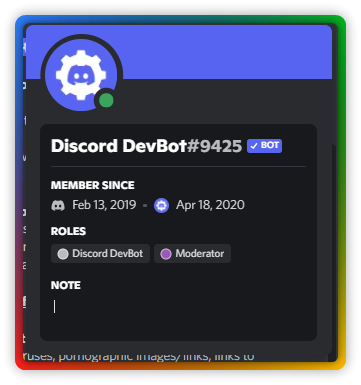
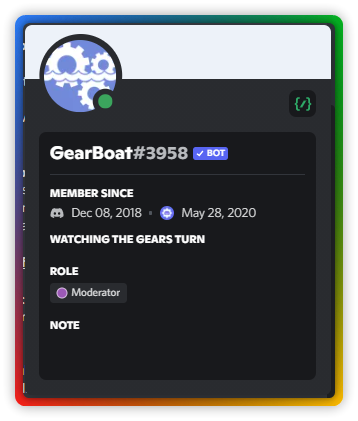 wary flicker
proud iris
Is it also possible to invite thse two bots to my server??
https://i.imgur.com/...
wary flicker
proud iris
Is it also possible to invite thse two bots to my server??
https://i.imgur.com/...
Not without a link
empty junco
proud iris
Is it also possible to invite thse two bots to my server??
https://i.imgur.com/...
Yes to gearbot
proud iris
wary flicker
Not without a link
Oh
proud iris
empty junco
Yes to gearbot
What is the invite link??
empty junco
You would have to google that
proud iris
couldnt find it cuz it says GearBot instead of GearBoat
hard orbit
GearBoat is a custom made bot of GearBot for official servers.
hard orbit
I think it's a refference to rowboat.
empty junco
Yeah that and discord needed a way to differentiate the name from the actual gearbot
proud iris
So they kinda copied the original bot??
empty junco
Well yes but copied with permission
cosmic viper
Hey do you know if the discord bug hunter badge is still available please?
hard orbit
On the moment not iirc, but you can still report bugs.
cosmic viper
Ok thank you and I have to go or as soon as I find bugs!
 zealous nimbus
discord is not respoding on my wifi but other app working
hard orbit
Where does it get stuck?
hard orbit
Alrigt, I assume you're using Windows?
zealous nimbus
- in web it says took long to respond
zealous nimbus
hard orbit
Alrigt, I assume you're using Windows?
i tried in all platfrom i useing
phone web pc
not working in any
hard orbit
Your computer is a Windows device?
zealous nimbus
yes
hard orbit
Could you open a commandprompt and type the following: ping discord.com.
zealous nimbus
hard orbit
Could you open a commandprompt and type the following: `ping discord.com`.
ok
let me do
hard orbit
cosmic viper
Ok thank you and I have to go or as soon as I find bugs!
Missed this one! D-testers is closed and invite only, report bugs via https://dis.gd/bugreport
zealous nimbus
Pinging discord.com [218.248.112.60] with 32 bytes of data:
Request timed out.
Request timed out.
Request timed out.
Request timed out.
Ping statistics for 218.248.112.60:
Packets: Sent = 4, Received = 0, Lost = 4 (100% loss),
C:\Users\TOSHIBA>
hard orbit
Hmm, something is blocking it. Did it work before?
hard orbit
Writing down some steps for you.
zealous nimbus
This site can’t be reachedThe webpage at https://discord.com/ might be temporarily down or it may have moved permanently to a new web address.
this eroer on web
zealous nimbus
hard orbit
Writing down some steps for you.
ok
hard orbit
Okay, lets try the following. Please read everything carefully.
Step 1: Open a commandprompt as administrator.
Step 2: Enter the following commands, with an enter between each.
ipconfig /flushdns > enter
netsh winsock reset > enter
netsh int ip reset > enter
netsh int ipv6 reset > enter
netsh int ipv4 reset > enter
Step 3: Reboot your device.
Step 4: Try to open https://discord.com.
 fossil oak
zealous nimbus
This site can’t be reachedThe webpage at https://discord.com/ might be temporari...
fossil oak
zealous nimbus
This site can’t be reachedThe webpage at https://discord.com/ might be temporari...
Did you recently (between now and the last time you tried visiting the website) download something or get keylogged or anything?
hard orbit
@fossil oak a keylogger should still allow you to get access to the website, it only sends what you enter to hackers.
fossil oak
hard orbit
<@111540837770375168> a keylogger should still allow you to get access to the we...
Correct, but a keylogger usually doesnt come alone/without a virus.
Yesterday I had someone with the same problem.
If you go to Local Disk (C:) > Windows > System32 > etc there should be a file named hosts without an extension.
If you open that with notepad, big chance there is a line 0.0.0.0 discord.com
That means the website is being redirected to the IP 0.0.0.0
And then you get no response
If that's the case, remove the line 0.0.0.0 discord.com from the file, save it to your desktop, remove the .txt and drag it back into the original folder.
*you cant save it into the folder cuz of permissilns, hence why the redirect to desktop
hard orbit
True; but mostly a winsock reset will fix it.
fossil oak
hard orbit
True; but mostly a winsock reset will fix it.
Winsock doesnt reset the hosts file, but it does fix a lot if problems, correct.
But if it were to be the issue I mentioned above, nothing will fix it besides the manual deletion of the line
hard orbit
Okay, could you check your hosts file and see if there is something going with discord.com in there?
zealous nimbus
how?
fossil oak
fossil oak
Correct, but a keylogger usually doesnt come alone/without a virus.
Yesterday I...
 @zealous nimbus
zealous nimbus
let me check
zealous nimbus
fossil oak
<:This:725514097772200007> <@822815981469958184>
sir but not only windows or web. discrod isnt working even in my phone
it stuck on connecting
fossil oak
It's not even working on your phone? 
Have you tried restarting your modem/router yet?
hard orbit
Is it blocked in the router/modem?
zealous nimbus
fossil oak
It's not even working on your phone? <:PikaThink:719253960719859752>
Have you t...
already did
discord breakuped with my wifi 😭
hard orbit
Did you check the router/modem itself to see if it's not blocked on there?
zealous nimbus
hard orbit
Did you check the router/modem itself to see if it's not blocked on there?
it is blocked by it maybe
cause when i connect by othernetwork in phone pc web it start working
fossil oak
Do you know how to get into the settings in your modem?
zealous nimbus
fossil oak
Do you know how to get into the settings in your modem?
nope
zealous nimbus
fossil oak
Do you know how to get into the settings in your modem?
but why it block only discord other app are working fine
fossil oak
It MIGHT be an infection from a virus
Or someone who has access to your modem/router blocked it, maybe a friend or family who you live with or something, i dont know
zealous nimbus
fossil oak
It MIGHT be an infection from a virus
Or someone who has access to your modem/ro...
my wifi?
fossil oak
Possibly
zealous nimbus
how
hard orbit
Malware. You can run a virus scan and see if it finds something.
hard orbit
Right click > open with > notepad
zealous nimbus
which one
fossil oak
The hosts
zealous nimbus
there is 2 file
hard orbit
But since it also doesn't work on your mobile device, I don't think the issue is there.
fossil oak
zealous nimbus
there is 2 file
Screenshot please?
*get a member role in id:customize
zealous nimbus
 hard orbit
It's the first one, could you rename the second one to hosts_1?
zealous nimbus
done
fossil oak
You can ignore the calendar file
Open the white one
zealous nimbus
 hard orbit
Looks fine, @zealous nimbus can you do a virusscan?
zealous nimbus
in comandpromt?
fossil oak
zealous nimbus
Alright that one is fine, Gem can help you further 

zealous nimbus
hard orbit
No, are you using Defender?
i have 4 gb ram and dual core so i dont have any anti virus installed
white cypress
@zealous nimbus can you open discord in a browser ?
zealous nimbus
white cypress
<@822815981469958184> can you open discord in a browser ?
nope
white cypress
zealous nimbus
nope
What does it says ?
hard orbit
zealous nimbus
i have 4 gb ram and dual core so i dont have any anti virus installed
- Defender is built in in Windows.
- You know that not using an AV is dumb?
zealous nimbus
hard orbit
1) Defender is built in in Windows.
2) You know that not using an AV is dumb?
ok
zealous nimbus
white cypress
What does it says ?
took too long to respond
hard orbit
Try to open Defender and do a scan with it, want to see if there is no malware on your system.
white cypress
zealous nimbus
took too long to respond
I think discord is blocked in your router, since you could not access with phone too
zealous nimbus
hard orbit
Try to open Defender and do a scan with it, want to see if there is no malware o...
ok
fossil oak
hard orbit
1) Defender is built in in Windows.
2) You know that not using an AV is dumb?
No need to call people dumb 
I dont use an AV either but I know what I visit and/or download
zealous nimbus
scaning
hard orbit
fossil oak
No need to call people dumb <:KEKW:974232870111559690>
I dont use an AV either ...
Most people don't.
@zealous nimbus let me know if it finds anything. 👍
zealous nimbus
white cypress
I think discord is blocked in your router, since you could not access with phon...
any soluion for this?
how to check this
white cypress
@zealous nimbus I think you need to unblock it from you router, every router have a different admin page, just search it on youtube
fossil oak
You'll have to get into your router
But that's different for every router, and there are thiusands of routers
zealous nimbus
i use lan cable for internet
hard orbit
Doing an ipconfig would show the IP to the router.
white cypress
zealous nimbus
any soluion for this?
type in youtube : "How to unblock/block websites from [INSERT ROUTER BRAND HERE]"
fossil oak
Nice
zealous nimbus
i will talk you after it done
white cypress
Does discord TOS allow the use of VPNs ?
hard orbit
Yes; but not to avoid bans.
fossil oak
white cypress
Does discord TOS allow the use of VPNs ?
As long as you dont use it to ban evade, technically yes
zealous nimbus
white cypress
Does discord TOS allow the use of VPNs ?
shoud i try by vpn once?
white cypress
fossil oak
As long as you dont use it to ban evade, technically yes
is possible this guy got IP BAN ?
fossil oak
white cypress
is possible this guy got IP BAN ?
You dont get IP banned from the entire website, only from the client
white cypress
zealous nimbus
shoud i try by vpn once?
You have 2 options : 1) Unblock Discord from the router 2) use a VPN
white cypress
btw Could be your ISP blocking Discord
fossil oak
It worked before so doubt the ISP would block it randomly
zealous nimbus
white cypress
type in youtube : "How to unblock/block websites from [INSERT ROUTER BRAND HERE]...
let me try this frist
zealous nimbus
hard orbit
Doing an `ipconfig` would show the IP to the router.
which one?
there is 3 ip
oh i froget to disconect from other network
i need connect to wffi for wiffi ip right?
so if i connect to wiffi my discord will auto off
hard orbit
Mostly it's 192.168.1.1 or 192.168.1.256
zealous nimbus
i wont uble to send msg
hard orbit
Works on LAN too.
fossil oak
@zealous nimbus other websites and stuff do work no problem?
zealous nimbus
fossil oak
<@822815981469958184> other websites and stuff do work no problem?
yes
fossil oak
Okay
zealous nimbus
hard orbit
Mostly it's `192.168.1.1` or `192.168.1.256`
gateway or ip4v?
fossil oak
Gateway
zealous nimbus
ok
fossil oak
Ipv4 is the one from ur pc
zealous nimbus
let me see on yt
fossil oak
If you type the ip from the gateway into your webbrowser, you should be welcomed with a login screen
Then you need to know the login details of the router
white cypress
zealous nimbus
let me see on yt
Do you have physical access to your router ?
fossil oak
They already restarted it
white cypress
Not restart but reinstallation
fossil oak
💀😅 fair enough
white cypress
Do you mean restart by turn it on / turn it off ?
fossil oak
As long as he doesnt live with his parents and fucks up the entire network xD
fossil oak
white cypress
Do you mean restart by turn it on / turn it off ?
Yeah probably
hard orbit
Lets wait for the virusscan first, cause if there is malware that can spread over the network.
white cypress
fossil oak
As long as he doesnt live with his parents and fucks up the entire network xD
Maybe just reinstall and call his ISP if it didnt work xD
fossil oak
hard orbit
Lets wait for the virusscan first, cause if there is malware that can spread ove...
It had 0 results
fossil oak
zealous nimbus
0 threats found
hard orbit
Hmm, might contact support over at https://dis.gd/support in this case
white cypress
hard orbit
Lets wait for the virusscan first, cause if there is malware that can spread ove...
Most of Malwares are undetectable once system is affected
fossil oak
Time to dissappear again for a little while cuz work 
white cypress
fossil oak
Time to dissappear again for a little while cuz work <a:CB_hide_homer:6518911626...
see ya soon, hope you finish your work xD
fossil oak
white cypress
see ya soon, hope you finish your work xD
Almost 8pm
Started 6am 
hard orbit
white cypress
Most of Malwares are undetectable once system is affected
Untrue.
white cypress
hard orbit
Untrue.
How untrue
hard orbit
There are tools, but they are more advanced.
fossil oak
K byeeee, goodluck
zealous nimbus
white cypress
Maybe just reinstall and call his ISP if it didnt work xD

i dont know password
white cypress
zealous nimbus
i dont know password
Thats bad
white cypress
zealous nimbus
my father know
Ask your father then he may know how to unblock it
 light lodge
how has the discord development team not rolled out forum channels to the last 10% of community discords in 2 months after release
"If your communities are a part of the holdout group, we understand the frustration this may cause and appreciate your patience as we continue to increase availability over time." - a very nice way of saying "we don't really care how slow it is"
cosmic viper
light lodge
how has the discord development team not rolled out forum channels to the last 1...
idk but i have not gotten forum channels yet and everyone on my server is asking for them and i always have to send a screenshot of me not having the option
still really stupid move on discord's part
fossil oak
light lodge
how has the discord development team not rolled out forum channels to the last 1...
Rolling out a feature like that is not just a matter of flipping a switch.
They have come across some issues which they prefer to solve first before the complete roll out.
light lodge
fossil oak
Rolling out a feature like that is not just a matter of flipping a switch.
They ...
But like... I'm pretty sure everyone would be fine if it was clunky rather than having no access at all.
fossil oak
light lodge
But like... I'm pretty sure everyone would be fine if it was clunky rather than ...
Discord thinks differently 
Most companies rather roll something out which is complete and works than something that is bugged because people will always complain when stuff doesnt work the way it's supposed to work.
I understand the frustration but it will come 
They just have to put the dots on the i's and fix the last issues and bugs out
light lodge
Don't really understand the logic when it's been rolled out to 90% of the population.
90% are interacting with these supposed "deal-breaking bugs"
If it was rolled out to 20%, more understandable
violet thistle
I do agree it's a bit weird they'd hold back on the last 10% when it's such a big issue
surely they'd roll it back
fossil oak
I do too tbh, but it is the way it is 😅
fossil oak
Tried ctrl + r yet?
 rain goblet
yes
fossil oak
Tried restarting your network? Cuz this seems like a network related issue to me due to stuff not loading
cosmic viper
hello
rain goblet
how do i restart my network, u mean router and stuff?
 fiery inlet
rain goblet
anyone got a clue why my discord is like this
fiery inlet
rain goblet
anyone got a clue why my discord is like this
Try to look at your network connection (do a speed test / restart router ) And check if your rooter is blocking protocols that discord uses.
rain goblet
how do i check that
fiery inlet
You mean protocols?
rain goblet
yes
 simple root
Hello, there is some sort of server that has like “rust games” or whatever in it and I leave it, then every day it automatically makes me join with no message to my DM’s or anything like if they auto add people with no message.
And it’s getting annoying cause I leave it everyday and it comes back.
simple root
Thanks! I deleted everyone that has “join servers for you” hopefully it works. ❤️
noble pelican
fossil oak
Discord thinks differently <:vvShrug:580599773413769228>
Most companies rather ...
forums are complete
the 10% is for analytics and other data
eternal ravine
fiery inlet
Try to look at your network connection (do a speed test / restart router ) And c...
Discord's only network-level protocol outside of voice/video is TCP. If you're blocking that, you're blocking almost everything, including the ability for Discord to start in the first place, lol
(UDP is used for voice data, of course)
 rough mountain
Hello, I don't know if this channel does the fake account stuff but I might have found a bot
hard orbit
A user who's acting as a bot? @rough mountain
rough mountain
The user of araskulk#3301. They are not in any mutual server or have any mutual friends and they have a random link on they're account of an event on discord. I'm just being careful
hard orbit
If you don't trust it, don't click it.
You can always block them and eventually report them toT&S: https://dis.gd/report
rough mountain
Alright. Thank you
 eternal silo
Are we allowed to share private discord dms/group chats (provided that we redact sensitive information such as irl names, addresses, phone numbers, etc etc). We do this so we can provide evidence of someone breaking our Discord Server's rules. regulations, and policies and show proper documentation of why we took action the way we did? Someone said to me that we cant do this because it would violate Discord TOS. When looking at Discord's TOS it specifically states that any content when posted through discord become freeuse. Nor is it considering bullying because its actions backed with evidence (same way a job would file an HR Warning, write-up, or termination paperwork).
empty junco
To be quite honest that should be fine but you don’t really have to prove why someone broke your server’s rules
white cypress
eternal silo
Are we allowed to share private discord dms/group chats (provided that we redact...
Are you trying to know if that person could be suspended by Discord ? if so, probably you can't, but is up to you to ban them from your server
white cypress
eternal silo
Are we allowed to share private discord dms/group chats (provided that we redact...
You probably need to ask a Discord Staff, they may see your message here
eternal silo
white cypress
Are you trying to know if that person could be suspended by Discord ? if so, pro...
Have you heard of TruckersMP? Its a group of collective gaming groups that run in a business-like structure. Owners of those gaming groups within that community have a spot to share files regarding issue drivers/staff members and provide evidence of when someone breaks TMP rules and.or their own rules and why you shouldnt hire them.
hard orbit
eternal silo
Are we allowed to share private discord dms/group chats (provided that we redact...
You can always open a ticket with your question, https://dis.gd/support
@Gh.Yotta#7956 this isn't a official support server, asking Discord Staff here isn't going to work. A ticket is the best way.
empty junco
@white cypress ^
white cypress
ok
eternal silo
hard orbit
You can always open a ticket with your question, https://dis.gd/support
@Gh.Yo...
thank you
hard orbit
empty junco
<@757724471476879391> ^
~~Is that a bug? When you reply ping that you fail to ping someone else?
@fossil oak I need a test subject.~~
Seems like a me issue.
empty junco
Umm I honestly think they just weren’t cached for you
fossil oak
hard orbit
~~Is that a bug? When you reply ping that you fail to ping someone else?
<@1115...

white cypress
I told them that because I have seen a discord staff replying here before
hard orbit
eternal silo
thank you
No worries!
hard orbit
white cypress
I told them that because I have seen a discord staff replying here before
True, but in #📖-rules you can see that this is not a support server.
white cypress
hard orbit
True, but in <#727975970296037457> you can see that this is not a support server...
Not sure if he were looking for a support or an advice
hard orbit
In both cases, a ticket would provide the best answer.
white cypress
ok
eternal silo
Also was curious if anyone knew the exact color for HypeSquad Events Badge New 2022 Burple Update and if they have an updated icon too?
you know how the discord staff and discord partner badges on discord got updated to match the new colors?
is there one for HypeSquad Events?
 spare palm
eternal silo
is there one for HypeSquad Events?
spare palm
eternal silo
is there one for HypeSquad Events?


Although, I don't really remember if this was updated in the rebrand or prior to it
also why 2022 update
eternal silo
spare palm
also why 2022 update
oh just to match the regular burple wasnt sure when the burple update was
 lapis jackal
Can you get idle by watching youtube videos? I have read that u get idle if you don't open discord, but im not sure about this, for example, i might be researching for a project or something and dunno watching cat videos, but just bcs i dont open discord will i get idle even if im using my pc (but not discord, app open)?
upbeat dew
You're trying to stay in online mode?
Edit: I don't have the answer sorry, I was just curious what your intent was. Someone will provide you with an answer I'm sure
hard orbit
No.
lapis jackal
"Idle signifies that the user is “AFK” (or Away From Keyboard). This means that the user has the Discord app open on their computer, and is logged in, but hasn’t opened the app for a few minutes. In some cases, the user may not be near their device, and in others, they might have the Discord app open in the background while working on something else." so this is false?
false/outdated?
spare palm
lapis jackal
false/outdated?
No, that's correct.
If you have Discord on the background and not using it, it'll go on Idle.
lapis jackal
lapis jackal
do i get idle even when using my pc
then this is right?
spare palm
Yes
lapis jackal
spare palm
Yes
ok thx
hard orbit
spare palm
If you have Discord on the background and not using it, it'll go on Idle.
Never had that happening here.
lapis jackal
hard orbit
No.
and no worries for the wrong answer, ty for trying to help, it's the intention that counts
hard orbit
It never happened to me, so in my case it's a correct answer.
lapis jackal
hard orbit
It never happened to me, so in my case it's a correct answer.
maybe u just didn't notice ur status changing idk
i noticed, that's why i asked
fair point
eternal ravine
I mean, I'm not sure how you could notice yourself idle, since having the app in FG makes you not idle
lapis jackal
eternal ravine
I mean, I'm not sure how you could notice yourself idle, since having the app in...
fg?
upbeat dew
Just to make it more confusing for everyone. I have it on my PC by itself as the foreground app all the time and I'm idle after [×] time unless I chat or interact with it
eternal ravine
If the app is in the foreground, it will make you not idle, which is also how you would be able to see the app in the first place
lapis jackal
app in foreground? i never heard that, my bad for my ignorance, do u mind explaining?
i got different answers, im confused now
eternal ravine
Foreground means not the background, in front
lapis jackal
well i thought background were the apps that were opened but not in the screen, (they show up in the taskbar but not in the screen)
upbeat dew
I'm thinking you might wanna take the enquiry to Discord since we all have conflicting experiences and get the answer directly from them
lapis jackal
foreground is when the open app is on the screen?
eternal ravine
Yea
lapis jackal
upbeat dew
I'm thinking you might wanna take the enquiry to Discord since we all have confl...
and how do i do that?
lapis jackal
eternal ravine
Yea
so for example, rn i have the discord app completely taking my screen and opera opened, discord is foreground and opera is background?
upbeat dew
I dunno honestly, it's not a problem per se
lapis jackal
upbeat dew
Just to make it more confusing for everyone. I have it on my PC by itself as the...
if that's the case, then this is right, bcs most of the times i go idle if i dont move my mouse even if the app is in the foreground, but now im asking for background, does it get idle anyway?
even if i move the mouse on the foreground app (not discord)
upbeat dew
If it's in the background logic dictates you will go idle. But I dunno If the software follows logic
eternal ravine
To be fair, Windows is also real weird about reporting that status to programs sometimes
So the behavior may be a bit inconsistent in general
upbeat dew
We would all have different setups that might be why for sure
eternal ravine
You DM it, but that's not for questions like this.
upbeat dew
It's for server issues not software enquiries
lapis jackal
ah ok
eternal ravine
That bot is for reporting issues in the server (e.g. rulebreaking)
lapis jackal
well, where do i make questions like this then lmao, i would like to know a concrete answer
white cypress
lapis jackal
if that's the case, then this is right, bcs most of the times i go idle if i don...
Change your status to invisible and you will not need to deal with that
lapis jackal
white cypress
Change your status to invisible and you will not need to deal with that
people will think im offline tho, but im not offline nor afk
white cypress
lapis jackal
people will think im offline tho, but im not offline nor afk
So you dont like to appear nor afk nor invisible ?
lapis jackal
white cypress
So you dont like to appear nor afk nor invisible ?
yeah
white cypress
lapis jackal
yeah
Why
eternal ravine
Does it matter why?
white cypress
eternal ravine
Does it matter why?
I have a feeling this potato is trolling
Also we could find a solution out of the box
eternal ravine
I don't think so, and I don't see why you would. It's not an unreasonable request to understand, tbh.
lapis jackal
i honestly thought my friends were always afk when idle, now im just confused if they just have the discord app in the background but using the foreground, i never bothered to even tag them unless they are online
lapis jackal
white cypress
I have a feeling this potato is trolling
this potato is not trolling, im just confused about the idle status, + i dont want to be idle since im not afk and using foreground apps but have discord as background
eternal ravine
In general, I would say not to trust that status as a source of reliable truth. They could be sitting by their computer, watching tv on another screen, and idle because they haven't interacted with their mouse in a while, but are still watching messages
white cypress
Also you can change status manually
eternal ravine
Sure, but that's still a workaround, not an answer
lapis jackal
eternal ravine
Sure, but that's still a workaround, not an answer
facts
well, i already contacted support, im just going to wait for an answer, ty for trying to help tho
white cypress
lapis jackal
this potato is not trolling, im just confused about the idle status, + i dont wa...
Does it necessary to keep discord in Background ?
lapis jackal
white cypress
Does it necessary to keep discord in Background ?
well, if im just watching a video on youtube, yeah
white cypress
You can minimize the window without sending it to background
lapis jackal
isn't minimizing sending it to the background tho...
lapis jackal
lapis jackal
so for example, rn i have the discord app completely taking my screen and opera ...
i asked this already here
white cypress
Im confused now xD i
lapis jackal
white cypress
Im confused now xD i
i might be wrong, but i thought minimizing an app/closing meant putting it in the background
white cypress
lapis jackal
i might be wrong, but i thought minimizing an app/closing meant putting it in th...
Or just dont minimize it, let the discord window open while browser window on top of it
native flicker
It automatically goes to Idle after you haven't interacted with the app for (i believe) 15 min
lapis jackal
white cypress
Or just dont minimize it, let the discord window open while browser window on to...
that's still background no?
eternal ravine
background is underneath other apps, minimized is minimized, either to the tray or the taskbar. I don't know which Discord uses for idle status checking for sure
lapis jackal
native flicker
It automatically goes to Idle after you haven't interacted with the app for (i b...
but if i interact with another app (not discord for 15m), will it still go idle?
eternal ravine
It also might literally be that you have to interact with it in some way (bringing to the foreground would do that)
I'm not sure, tbh
white cypress
lapis jackal
that's still background no?
I thought background is when you send it to thre tray
eternal ravine
the area by the clock
lapis jackal
the hidden icons?
white cypress
And you just can type your own custom status telling that you are always available or smth
eternal ravine
potentially hidden, but often yes
lapis jackal
eternal ravine
It also might literally be that you have to interact with it in some way (bringi...
i think that's it
eternal ravine
Taskbar is where you see "#peer-help". Tray is where you see the small Discord icon with the red dot.
 native flicker
lapis jackal
but if i interact with another app (not discord for 15m), will it still go idle?
native flicker
lapis jackal
but if i interact with another app (not discord for 15m), will it still go idle?
I don't believe so, as long there is some activity on your pc
lapis jackal
eternal ravine
Taskbar is where you see "<#889950993352110160>". Tray is where you see the smal...
ohh okok
eternal ravine
native flicker
I don't believe so, as long there is some activity on your pc
That's what we're all not totally sure about
native flicker
I'll test it and share the results later
lapis jackal
native flicker
I don't believe so, as long there is some activity on your pc
from the articles i saw, they said that the person can be using other apps, but hasn't touched discord for 15min
lapis jackal
native flicker
I'll test it and share the results later
i contacted support anyway, but sure, u can try
lapis jackal
"Thanks for reaching out.
If you are active on your computer, your idle status will change to online. This is the case regardless of whether or not you are actively using your Discord account.
If you have any other questions or concerns, feel free to message me again. I will be glad to help!"
ig we don't go idle
 tight mural
I need help with a server I've been maintaining.
tight mural
tight mural
I need help with a server I've been maintaining.
Recently, Discord disabled my account for something I didn't do and I'm trying to transfer ownership or enable my main account again so that my server can have an owner again. I need help to see how I can get ownership back.
tight mural
tight mural
Recently, Discord disabled my account for something I didn't do and I'm trying t...
I'm still pissed Discord won't enable my main account again after sending them 3 request emails that I didn't do anything wrong.
native flicker
tight mural
Recently, Discord disabled my account for something I didn't do and I'm trying t...
You can appeal your ban, or wait until the disabled account has been inactive for 30 days and request a ownership transfer
empty junco
tight mural
I'm still pissed Discord won't enable my main account again after sending them 3...
Umm your never supposed to send more then one per issue
That’s a violation of the community guidelines
per the guidelines https://discord.com/guidelines
Do not mislead Discord’s support teams. Do not make false or malicious reports to Trust & Safety or Customer Support; send multiple reports about the same issue; or ask a group of users to report the same content or issue. These behaviors may result in action being taken on your account.

These community guidelines are developed to make sure everyone on Discord has a good time making great memories.
tight mural
native flicker
You can appeal your ban, or wait until the disabled account has been inactive fo...
Then wth is my server is supposed to do in the meantime? It's not right to leave a large public server in a state like this.
 dense axle
hey im not exactly sure where im supposed to ask help for this but i want a way to have a bot/webhook post a message whenever a specific person in my server sends something
how would i go about doing that?
tight mural
Discord's request system is absolute bs. I didn't do anything wrong and yet they decided to put a ban hammer over my main account. I had close friends and they didn't even consider allowing a person to assist me but instead a bot that keeps spewing on the same bs message over and over again.
empty junco
tight mural
Discord's request system is absolute bs. I didn't do anything wrong and yet they...
Just have to wait it out
tight mural
empty junco
Just have to wait it out
Wait it out huh? I've waited almost 2 weeks and my main account's about to be deleted and you want me to "wait it out".
empty junco
Yep because that’s all you can do it’s unfortunate but there’s no way to speed the process up
tight mural
empty junco
Yep because that’s all you can do it’s unfortunate but there’s no way to speed t...
You're either joking with me, and it's not funny, or you're feeding me nonsense.
What do you want my public server to do in the meantime then?
dense axle
tight mural
What do you want my public server to do in the meantime then?
what do you want him to do lol?
empty junco
tight mural
You're either joking with me, and it's not funny, or you're feeding me nonsense.
I’m not joking or feeding you nonsense that’s just how it is
dense axle
he cant really help you he is just telling you how it is
empty junco
Hopefully there’s someone in that server like a mod that can run things until you can get ownership back
 ornate arch
Are there any bots that remind people to do /bump with disboard?
 slow mountain
I need help with my Discord server
I have a Discord server that has community enabled, but the server doesnt send messages when someone joins
But when I give a new person a role THEN it sends a welcome message
spare palm
slow mountain
But when I give a new person a role THEN it sends a welcome message
If you have Rules Screening, users need to finish and agree to it first before the server actually recognizes that they've joined the server.
This one:
 slow mountain
should it work again if i remove that?
spare palm
If you disable it, all the users that haven't done it will bypass the need to agree to that and be "welcomed".
slow mountain
thank you, I thought it was just all broken for some reason
 acoustic basin
How can I make a channel that people with no role and people with the moderator role on my server can view and send message. But people with a role cannot see?
I want to make a channel where my moderators can talk to newcomers if they have questions
spare palm
acoustic basin
How can I make a channel that people with no role and people with the moderator ...
Keep View Messages on Neutral, put View Messages on Deny  on the role they get after verification.
outer flax
ornate arch
Are there any bots that remind people to do /bump with disboard?
you can just set a recurring reminder with any bot like carl
 brisk spruce
 fast jetty
discord is scamming me
fast jetty
discord is scamming me
You should put in a support ticket then.
 brisk spruce
fast jetty
but it says i need nitro
brisk spruce
fast jetty
but it says i need nitro
It is red.
fast jetty
not for me its pink?
brisk spruce
 fast jetty
how do i take screen shot again
brisk spruce
PrtScrn
 craggy thunder
My Active Developer badge isn't showing on my Mobile device but it is in my PC?
brisk spruce
craggy thunder
My Active Developer badge isn't showing on my Mobile device but it is in my PC?
It might still be having issues for mobile devices.
fast jetty
@brisk spruce check dm
brisk spruce
fast jetty
it wont let me upload photos
Get the Townhall Member role in id:customize.
craggy thunder
brisk spruce
It might still be having issues for mobile devices.
Maybe
 brisk spruce
?? Shows it customized right there.
fast jetty
no the bottom is the preview
brisk spruce
Yes but it also is the one that applies.
So basically a preview without having to back out and go to your own profile to check.
fast jetty
than why is it not
brisk spruce
brisk spruce
Like I said, it is showing.
fast jetty
but the pic i sent is what it should look like
brisk spruce
You might need to restart Discord to see if that helps.
brisk spruce
Mobile is usually more buggy and it's showing
fast jetty
and there support team sucks
brisk spruce
This isn't a bug.
fast jetty
they just keep telling me to refund with apple
brisk spruce
It's just not showing client side cause you need to update or restart.
fast jetty
still is not showing
discord is scamming me
i have been robbed
AND THEY WONT HELP
brisk spruce
fast jetty
discord is scamming me
Then send in a bug report ticket.
They should answer within 24h.
brisk spruce
Can you show a screenshot of the full details you put in since they haven't answered?
fast jetty
how
brisk spruce
Hold on one moment
craggy thunder
It shows up for me
 craggy thunder
Did you save it?
 ornate shuttle
I think it might be a glitch
craggy thunder
If you change your profile it shows 'Save Changes' and 'Reset'
tiny hull
craggy thunder
My Active Developer badge isn't showing on my Mobile device but it is in my PC?
the feature is not yet released for mobile clients, They had provided timeline as december
craggy thunder
Maybe log out and in and then check it
fast jetty
i did i even reinstalled discord
tiny hull

 brisk spruce
tiny hull
the feature is not yet released for mobile clients, They had provided timeline a...
brisk spruce
tiny hull
the feature is not yet released for mobile clients, They had provided timeline a...
It only shows on unstable builds currently.
ornate shuttle
Ya I'm not sure, nitro worked for me awhile back. Not really sure what's causing it tho, maybe try signing in on a pc.
 brisk spruce
You have regular nitro right?
fast jetty
yes the $10 one
brisk spruce
Cause it does show so it's something client side.
fast jetty
ik and there support team is bull crap and says to refund
is there someone i can talk to in a call
ornate shuttle
Oh, I'm not sure what's causing it then. Might be to do with the account in general. Still I don't really have any ideas,
fast jetty
i need this fixed
brisk spruce
Wait, you sent them a bug report correct? And not just a support ticket?
ornate shuttle
A bug report might work
fast jetty
a support ticket
 ornate shuttle
I usually contact the support team for technical difficulties, or other issues. I don't think they can upfront fix glitches, so a report hopefully can get that fixed
brisk spruce
No, their bug report team will try to help you fix it.
craggy thunder
Do you still get the Discord Mod badge if you go into the DMA as a Junior Mod (I don't know what the under 18 one is cuz' I'm asking for a friend)
brisk spruce
craggy thunder
Do you still get the Discord Mod badge if you go into the DMA as a Junior Mod (I...
It depends on certain things, but one is you have to be active in it.
ornate shuttle
brisk spruce
No, their bug report team will try to help you fix it.
Yes, I haven't really used bug report before. Just usually contact them if there is problems that isn't to do with glitches, usually they are able to help. So hopefully that'll help buffalo
craggy thunder
I have no access to my account email and I can't change my email address, what should I do?
ornate shuttle
craggy thunder
I have no access to my account email and I can't change my email address, what s...
Creating a new account might help. But that would require another email.
craggy thunder
ornate shuttle
Creating a new account might help. But that would require another email.
Yeah, but I really want to keep this one
ornate shuttle
craggy thunder
Yeah, but I really want to keep this one
Maybe try creating another email & swapping them in account settings. Hopefully that works. What's caused the access problem?
 gaunt tide
Hello i registered an account but as soon as i registered my acc got disabled
i have opened a support ticket but it is seriously slow no answer for 18 hours
hard orbit
Hi, did you receive an email about it being disabled?
gaunt tide
Yes
hard orbit
gaunt tide
i have opened a support ticket but it is seriously slow no answer for 18 hours
It can take up to 24 hours at minimum. What did the email say?
Was it being disabled by Trust and Safety for a violation of the ToS?
gaunt tide
umm im sending it in the media
oh i cant
Discord is focused on maintaining a safe and secure environment for our community. We've found your account to be in violation of our Terms of Service or Community Guidelines. As a result, we've disabled your account for the following reason:
Discord has disabled your account for spam and/or platform abuse. Our anti-abuse measures may have flagged your account for any of the following behaviors:
hard orbit
If you give you yourself the member role (make friends and meet people) you can attach files here.
Did you create the new account on a VPN?
gaunt tide
No
Here s the mail

My password is complicated for humans and my nickname is h14turkiye does that cause any problems?
hard orbit
No. Did you do anything like mentioned above?
gaunt tide
No i didn't
hard orbit
Trust and Safety doesn't take this action without a good reason.
gaunt tide
Well i just registered...
hard orbit
While you was on the account, what did you do with it?
gaunt tide
I was not in the account
gritty summit
I once made an account, didn’t even get as far as adding a friend or joining a server, and I was hit with suspicious activity warning 🤷♂️ sometimes discord’s automated system can flag a false positive
hard orbit
gritty summit
I once made an account, didn’t even get as far as adding a friend or joining a s...
But normally you need to add a phone number first in that case?
gritty summit
This was years ago before that was enforced
hard orbit
Ah, cause I believe that's the case now.
gaunt tide
In https://discord.com/guidelines but discord supports multiple accounts as they allow us to switch our accs as a feature.
I also verified via phone

These community guidelines are developed to make sure everyone on Discord has a good time making great memories.
gritty summit
That tos says not to cause spam by making multiple accounts, not that making multiple accounts isn’t allowed
For example if I made an alt to spam friend requests to someone who blocked my other account, then that would be in violation of tos and I could be banned
gaunt tide
Well i was not even in my account. Even for a second
hard orbit
I think it's the best to be patient and wait for support to answer you.
If they say that you aren't getting the account back, there's nothing more we or you can do. On the moment you only option is to wait.
gritty summit
It’s a brand new account though, it’s not like you lost anything other than a handle (which’ll free up after 30 days)
gaunt tide
Oh thanks, i hope i can help the community so nothing like this happen again.
gaunt tide
gritty summit
It’s a brand new account though, it’s not like you lost anything other than a ha...
Well email is important
gritty summit
That will also unlink when the account becomes a Deleted User
gaunt tide
Oh didnt know that thanks.
gritty summit
The only thing that stays is the phone number ig
hard orbit
gritty summit
The only thing that stays is the phone number ig
That will also be removed after a period of time.
gritty summit
Nope
To this day the phone number I originally added to my first account that is now deleted, still cannot be used to bind an account today
hard orbit
Weird, I was able to
wild obsidian
gritty summit
To this day the phone number I originally added to my first account that is now ...
have you contacted support about that at least?
gritty summit
I don't need to. It's been many years, I have a new number lol
simple root
Followed #981539980813955102 Deleted every one that says, “Join Servers for you” and Everyone one that is a fake authorization app. The “Skyfall” Server keeps coming back into my server list, but it’s a different server logo since, the last server they had was shutdown by Discord Officials, and I got a warning for “Participating” in “CyberCrime” that they had going on, but I was just getting added over and over, and they said, “If you are in participation in a server with breaking Discord TOS we will take action of your account.”

I emailed them and they said they logged my account for “Account Strike 1: Participation of CyberCrime”
And if I keep getting those discord strikes for me getting auto added to servers that have CyberCrime related stuff, I’m gonna get pretty mad. Because, discord should strike people who had participation not people who were just added.
 hasty skiff
You have authorized a bot to auto add you into servers
Go to Authorized Apps and delete it
Read the permissions of each one and remove the one that, probably, says "automatically add you into servers" or something like that
simple root
hasty skiff
Read the permissions of each one and remove the one that, probably, says "autom...
Already did that.
simple root
simple root
Followed <#981539980813955102> Deleted every one that says, “Join Servers for yo...
^
noble pelican
are you 100% sure it still added you to servers after you deauthorized the apps?
simple root
Yes.

Left it, and it added me back.
And I checked every app and I deleted them all.
noble pelican
check if you see any unrecognized device in settings -> devices
if possible, change your password just in case
it will log you out of all other devices
simple root
All of them were accessed by me. Because, I have 2FA enabled.

 unreal leaf
Why did i lose my active dev badge?
noble pelican
the only two ways of getting added into servers against your will is either a malicious authorized app or someone having access to your account
if it keeps occurring and you're sure it's neither of those two options, you should contact support
 noble pelican
it's only on beta/alpha on phone so far
simple root
 noble pelican
you will see it on stable in early december
unreal leaf
K
simple root
I can only view hidden badges on Ptb Discord. The version that only discord staff have. And moderators.
 simple root
You can’t get it randomly.
 violet thistle
simple root
You can’t get it randomly.
violet thistle
simple root
You can’t get it randomly.
You very much can lol. By the way, moderators don't use a different discord than regular users do.
violet thistle
simple root
I can only view hidden badges on Ptb Discord. The version that only discord staf...
And there is no such thing as 'hidden badges'
There are user flags, but they're not meant as badges are they
wild obsidian
the only badges that are hidden are just not implemented yet
hard orbit
There are no hidden badges.
@cosmic viper Discord doesn't. It means that the emoji is having a white background.
Can you send a screenshot of what you exactly mean?
hang on.
Could you try to add this as emoji and see the result?

I removed the background (mostly) and saves it as .png.
pallid scaffold
This has a background on my device, guess the transparency was applied locally
 hard orbit
Because in your case, there was a background on the image (the white part).
I did it by hand using GIMP.
I assume you are on Windows? Have a look at Paint.net, with the Magicwand you can easily remove the background. Don't forget to save it as .png after.
Unsure if you can get GIMP on it.
No I don't.
cosmic viper
Hello, I was wondering if they are still giving the certified moderator badge
cosmic viper
Alright, thank you! Do you know when they're gonna start giving it again?
 stone idol
Hi. Is it fair to download ptb discord version right?
hard orbit
It is, but it can contain bugs as it's a Public Test Build. @stone idol
@cosmic viper no and Discord does not give ETAs.
stone idol
hard orbit
It is, but it can contain bugs as it's a Public Test Build. <@736866280791081000...
So if I download that discord won't do anything right
I mean it won't take any kind of action right
hard orbit
No? Why would it?
PTB and Canary are test builds. So you should expect more bugs on it.
 crystal beacon
Hey, does anyone know if I can do something like this with Discord? You search in a specific channel with in:#channel. Is there a way I can just type in: when I've selected that channel to the left already, so I don't have to type the channel name every time? I.e., I'd go to the search bar, type in:, and then whatever query
 elfin kayak


 fast jetty
??
 barren pewter
fast jetty
??
barren pewter
fast jetty
??
Your profile is black + red
fast jetty
Not for me
barren pewter
Not pink
fast jetty
For me it’s pink and it says I don’t have nitro
barren pewter
Click on the "profile color" option and "accent color" option
And choose your preferred color
fast jetty
And there support team won’t help me
That’s not what I needed help with
I payed for discord nitro but it says I don’t have it
They scammed me
barren pewter
fast jetty
I payed for discord nitro but it says I don’t have it
Send the exact screenshot
wary flicker
You did pay for the full nitro, correct? Not basic
fast jetty
Yes the $10
wary flicker
fast jetty
Yes the $10
You should have it in the profiles tab then
fast jetty

 barren pewter
Its not nitro basic
 wary flicker
I think there may be a bug, because I see it as pink
 fast jetty
Yes see
empty junco
So do I ^
fast jetty
Ya idk and there support team just ignored me and said to refund it
But I should get what I payed for
empty junco
Well yeah unless they can’t do anything and so they want you to request a refund and then rebuy on desktop
Mobile is kinda a last resort for buying nitro
fast jetty
You can’t buy on pc
empty junco
What?
fast jetty
Once you set up on apple doesn’t let you
barren pewter
Bro it's pink because the one who is viewing it is using light mode
empty junco
fast jetty
Once you set up on apple doesn’t let you
Umm don’t think so… you sure your not getting manage subscription confused with something else?
empty junco
barren pewter
Bro it's pink because the one who is viewing it is using light mode
Nope
barren pewter
Enable sync profile themes under accessibility settings
barren pewter
empty junco
Nope
Yes, try it
empty junco
We already disapproved that
empty junco
wary flicker
I think there may be a bug, because I see it as pink
So this is light mode?
wary flicker
Listen, I know I have high brightness, but its not that bright
barren pewter
@empty junco

 wary flicker
barren pewter
<@169962780391112704>
wary flicker
barren pewter
<@169962780391112704>
Probably because mobile
barren pewter
empty junco
Well again per https://discord.com/channels/169256939211980800/88995099335211016...
Yes because the sync profile themes option is disabled here
@wary flicker turn on the sync profile themes option and check that user's profile
I bet it would be black + red
wary flicker
Yeah, no the same
empty junco
That actually did work for me
barren pewter
It should work for everyone, phenguini has caught bug
fast jetty
So any ideas how to get a hold of someone who can help me
empty junco
fast jetty
So any ideas how to get a hold of someone who can help me
Unfortunately support is they only way… I really would just get a refund and then rebuy on desktop where it should work
fast jetty
I CANT BUY ON DESKTOP
barren pewter
Pls send a screenshot 😭🙏
empty junco
fast jetty
I CANT BUY ON DESKTOP
Well yeah currently you can’t
You should be able to after that refund though
Since Apple wouldn’t be in charge of your subscription
hard orbit
Isn't a ticket directly to the billing team not better if they want a refund?
hard orbit
Oh, didn't know that.
barren pewter
He got nitro in Aug last year, how would he get a refund
empty junco
Who knows
empty junco
hard orbit
Oh, didn't know that.
Actually seems it’s just iOS
https://support.discord.com/hc/en-us/articles/360012668071-Refund-Policy
If you purchased Discord Nitro on your iOS device, such as an iPhone, iPad, or iPod touch, you will need to request a refund for Nitro subscriptions purchased on iOS via the App Store.```
Discord
We understand that you may not <3 <3 <3 everything that you purchase. That's why we're keeping our refund policy simple and straightforward.
Nitro and Server Boost Refund Policy
Gift Ref...
barren pewter
Wait. Since when nitro became purchasable on iPhones
I mean on the mobile app in iOS
empty junco
Years ago 🤔
barren pewter
Was it for android then?
empty junco
Android was a little more recent but still years ago
barren pewter
Oh ok
 chrome estuary
bro, i can't for the life of me use slash commands
like they just dont show up when i use '/'
all i get are the default discord slash commands like shrug, and tableflip
empty junco
Do you have the legacy chat input on?
empty junco
All good
chrome estuary
thank you a ton chief
tight mural
Alright, if an account got disabled but they owned a public server with thousands of members and they want to get it back or transfer ownership to someone else, what can they do?
Because I'm skeptical about sending them an email.
If they deny it once it's denied for good, since their request service is so damn bad.
hard orbit
iirc they don't transfer ownership for disabled accounts.
tight mural
hard orbit
iirc they don't transfer ownership for disabled accounts.
Then what can they do for public community servers that hosts at least thousands of members.
empty junco
I thought we had a conversation about this yesterday 🤔
tight mural
Let them die or something?
cosmic viper
Hello, how do I make my discord bot let join servers for you?
hard orbit
Dont get banned.
tight mural
hard orbit
Dont get banned.
What the hell does that mean?
Discord wrongfully disabled my account and the server I own has to experience the burden of it. Even if I did something wrong, that server shouldn't pay for it.
hard orbit
Why did your account get disabled?
tight mural
hard orbit
Why did your account get disabled?
Discord thinks I'm raiding other servers.
I didn't do ANY of that at all.
hard orbit
Was you involved in servers that did raid?
Did you try to get in discussion over the ban?
tight mural
hard orbit
Did you try to get in discussion over the ban?
"get in discussion"
A literal bot gave me the same BS email like they give to everyone that they won't reiterate my account.
tight mural
hard orbit
Was you involved in servers that did raid?
I'm not sure, the closest thing I've done is when I just joined a server the staff asked me to spy on in case they raid our server.
tight mural
empty junco
I thought we had a conversation about this yesterday 🤔
Only to receive useless responses like yours. No HELP at all was given to me yesterday and I'm trying today.
I thought this server, especially this channel, was meant to help peers and communities. Not the other way around.
hard orbit
You should reply to that email and you get a response from a human.
tight mural
hard orbit
You should reply to that email and you get a response from a human.
I've done that and they haven't replied back from the past 2 weeks.
hard orbit
https://dis.gd/mytickets - Is the ticket still open?
crystal beacon
Iirc it's at least 30 days
hard orbit
tight mural
Only to receive useless responses like yours. No HELP at all was given to me yes...
Also if you're going to act like this, I'm not going to assist you.
hard orbit
crystal beacon
Iirc it's at least 30 days
Accounts get deleted after 30 days.
empty junco
tight mural
Only to receive useless responses like yours. No HELP at all was given to me yes...
NegusNuckerNugget none of the responses you got where useless yesterday in my opinion, while this channel is a place you can get discord help, there are limits especially when it comes to things that only support can help you with
tight mural
hard orbit
Also if you're going to act like this, I'm not going to assist you.
Alright, I understand.
crystal beacon
hard orbit
Accounts get deleted after 30 days.
Ah, okay. Ty
tight mural
You are trying to help me today and I haven't seen this go far in comparison to yesterday's. I'll respect that decision.
empty junco
Also as I mentioned yesterday if you really did send multiple tickets for the same issue (regardless if you knew you couldn’t do that or not) that’s also probably why your getting the same response since that’s a community guidelines violation
hard orbit
You just don't have a lot of options.
Wait for a reply from a Trust and Safety member. See what they say, if they say your account doesn't get unbanned it doesn't. Make a new account and follow ToS.
spare palm
hard orbit
iirc they don't transfer ownership for disabled accounts.
They do, they just have a disclaimer saying there's a chance they may not do it for users that were disabled for a ToS violation.
A chance not to =/= does not.
In many cases, they will still transfer it after 30 days
tight mural
Ok, a chance is better than nothing at all.
hard orbit
Isn't at least moderator permission required then?
tight mural
hard orbit
https://dis.gd/mytickets - Is the ticket still open?
Was that for me to log in?
hard orbit
Yes; see if your ticket is open.
eternal ravine
cosmic viper
Hello, how do I make my discord bot let join servers for you?
The bot itself wouldn't, technically, as that's an oauth2 user scope. You'd need to configure your application to request the guilds.join scope when users authorize your application from their account, then use the access token you get from the oauth2 flow for that user to use that api endpoint to join them to a guild.
tight mural
It asks me to login. I used the same email and pass. for my account and it didn't work.
empty junco
It’s not the same as what you use for discord
hard orbit
You need to reset your password; it's a different password you use there.
cosmic viper
eternal ravine
The bot itself wouldn't, technically, as that's an oauth2 user scope. You'd need...
Hm I figured myself but how to I make it not have a redirect link, because it's forcing me to
eternal ravine
You should look up how oauth2 works - that redirect is how you get the initial code back to exchange for an access token.
Implicit grant flow doesn't work for guilds.join I don't believe.
cosmic viper
Alright, thank you. btw i like the game in your about me
eternal ravine
Thanks!
tight mural
hard orbit
You need to reset your password; it's a different password you use there.
Alright.
eternal ravine
And yeah, implicit grant actually requires redirect anyway, so that wouldn't even help now that I think about it.
cosmic viper
so its just not possible
hard orbit
Like Nick said, you did open multiple which is against ToS so I can understand that. I assume your account is gone.
cosmic viper
ill make the redirect link discord.com i guess
eternal ravine
That won't work
 modern relic
tight mural
Even unanswered emails were considered "solved".
modern relic
tight mural
Even unanswered emails were considered "solved".
Don't talk about Twitter support
eternal ravine
You need to redirect to a domain you control so that you can receive the code. That redirect is how the code gets to you. Otherwise you'll never be able to get the token you need to authenticate the api request to join a user to a guild
tight mural
hard orbit
Like Nick said, you did open multiple which is against ToS so I can understand t...
Ok, that I understand but the problem I have currently is about transferring ownership. I accepted the fact that my account's gone a long time ago.