


1 messages · Page 1 of 1 (latest)
 crisp nest
hello!
i have a new Qidi Q2 printer, and with PETG i seem to have issues with some overhangs. doing the time-honored tradition of using a fidget toy to test a new printer, i started printing this. most of the parts printed fine, but Gear_fidget_top.stl and Gear_fidget_Bottom.stl are giving me some issues (see the attached pics - this is from my latest print of only the _top.stl model). i'm using the stock Qidi Q2 PETG profile in OrcaSlicer, only profile change is forcing brims off. any ideas what can cause this? i've made sure the filament is dry already as well, and this last test print I did with the top glass of the printer completely off, not just slid open like you can do without fully removing it.
since the orientation confused a bunch of people yesterday when i was asking about this in #help-quick-questions - the part is upside down in the photos vs how i printed it, so the top in the pictures was on the build plate, to make the issue more visible in the pictures.
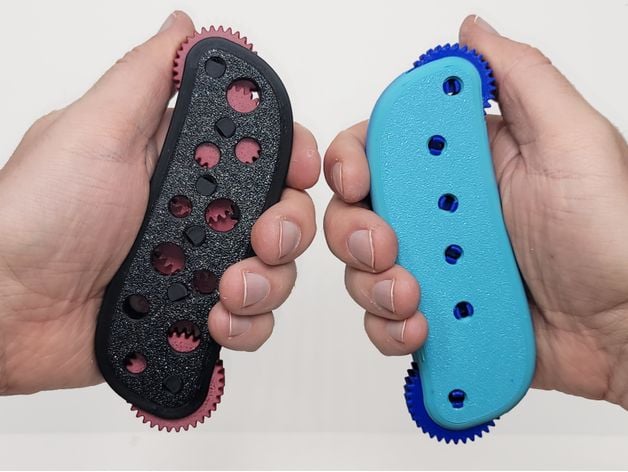
When I was making the gear chain for my excavator, I found it very fun to play with. I decided to make a fidget version of a gear chain. When you spin the small gear on the top once, the gear on the opposite end will spin 28 times. It's a very satisfying feeling!I highly recommend using 120-grit sandpaper to smooth off the textured side of the g...
 eternal spoke
The diagonal lines are typically under extrusion..but can be deceptive in that it can be from cooling when it shows up only on overhangs.
For under extrusion, try:
For cooling, try:
 midnight mangoBOT
This post has been inactive for over 1 hour and so has been closed. To reopen this post simply send another message.
crisp nest
eternal spoke
The diagonal lines are typically under extrusion..but can be deceptive in that i...
I'm thinking it was cooling, but not 100% sure
since i saw your reply i tried lowering the temp target for the PETG from 240 first layer/250 other layers to 230 first layer/240 other layers. i also adjusted the fan speeds to pretty much always be between 80 and 100%, without much difference.


the lid to my printer was fully open, with the chamber temp target at 0c the whole time (ie. no chamber heat at all)
eternal spoke
Thats good start...
Lets just try something ridiclous and set max layer time to 60 seconds and if theres still no change there. It's something else.
It's probably not, but take the time to check the spool and path from the extruder to the hotend too, just so it's not getting caught on stuff.
crisp nest
eternal spoke
Thats good start...
Lets just try something ridiclous and set max layer time to ...
got it, let me try that. should i also try doing just the part of the model that's having issues, or should i keep doing the whole part just to avoid changing too much at once lol
(also, can you ping me when you reply please? 😅)
i'm assuming you meant min layer time, not max layer time?
oh wait - i see what you meant, got it
increase the layer time on the max fan speed threshold
eternal spoke
crisp nest
got it, let me try that. should i also try doing just the part of the model that...
we just need the overhnag to test so feel free to cut up the part so we are only printing with that overhang. no reason to waste more material than needed 
crisp nest
eternal spoke
we just need the overhnag to test so feel free to cut up the part so we are only...
should i do that fdm torture test model that orca has built-in?
eternal spoke
crisp nest
should i do that fdm torture test model that orca has built-in?
we just need something with the same overhang angle and approx long distance. so i'd just chop that edge up on the fidget thingy + print ins ame orientation.
crisp nest
👍
crisp nest
eternal spoke
we just need something with the same overhang angle and approx long distance. so...
okay, printed the part without changes since i already started it before you replied, but i stopped it early at least lmao
came out... better, but not the best still - some spots i can still see through the print


 eternal spoke
crisp nest
okay, printed the part without changes since i already started it before you rep...
eternal spoke
crisp nest
okay, printed the part without changes since i already started it before you rep...
ok, last few i'd do:
 ) the issue should also be showing up in stuff like the infill though if this is the case.
crisp nest
eternal spoke
ok, last few i'd do:
- lower outerwall speed. (although max layer time *should* ...
) the issue should also be showing up in stuff like the infill though if this is the case.
crisp nest
eternal spoke
ok, last few i'd do:
- lower outerwall speed. (although max layer time *should* ...
so - default pressure advance on this printer is
pressure_advance: 0.032
pressure_advance_smooth_time: 0.03
do those seem like sane values?
beyond that i'm about to print again, just did the cold pull and lowered outer wall speed
eternal spoke
Looking at them, yeah they are reasonable.
If you notice a big gap at the seams, i'd still run a pressure advance test, either line or pattern. Take like 10mins tops on a slow machine.
crisp nest
got it
never really tuned PA before so not sure what to do for that 😅 but yeah i can look at it if i still have issues
eternal spoke
Fair enough.
The tldr version is it's flow control for corners and seams.
crisp nest
forgot to leave the door open on that test - chamber got up to ~36.5c, had the same thing on the final result, nearly identical to the last print
i think the issue is just cooling tbh?
just not sure how to improve it further
@eternal spoke ^ forgot to ping, but going to sleep in a few, it's ~3:45am now 😅
hmm - it does have an auxiliary cooling fan. let me modify the gcode macro that controls the main cooling fan to just set both to the same speed lol
they set M106 to this:
[gcode_macro M106]
gcode:
    {% set p = params.P|default(0)|int %}

    {% if p == 2 %}
    {% if params.S is defined %}
        SET_FAN_SPEED FAN=auxiliary_cooling_fan SPEED={(params.S|float / 255.0)}
    {% else %}
        SET_FAN_SPEED FAN=auxiliary_cooling_fan SPEED=1
    {% endif %}
    {% endif %}

    {% if p == 0 %}
    {% if params.S is defined %}
        SET_FAN_SPEED FAN=cooling_fan SPEED={(params.S|float / 255.0)}

    {% else %}
        SET_FAN_SPEED FAN=cooling_fan SPEED=1
    {% endif %}
    {% endif %}

    {% if p == 3 %}
    {% if params.S is defined %}
        SET_FAN_SPEED FAN=chamber_circulation_fan SPEED={(params.S|float / 255.0)}
    {% else %}
        SET_FAN_SPEED FAN=chamber_circulation_fan SPEED=1
    {% endif %}
    {% endif %}

    {% if p == 4 %}
        {% if params.S is defined %}
            SET_PIN PIN=Polar_cooler VALUE={(params.S|int / 255)}
        {% else %}
            SET_PIN PIN=Polar_cooler VALUE=1
        {% endif %}
    {% endif %}
so i'm gonna just make the if p==0 block set both
print started, with that i'm gonna lay down lmao, what's the worst that'll happen
midnight mangoBOT
This post has been inactive for over 1 hour and so has been closed. To reopen this post simply send another message.
crisp nest
okay, that didn't make much of a difference
no big gaps, just ripples on the first few layers of that overhang still...
did the print with the door open and those cooling changes, so i think at this point i ruled out that it's cooling related?
ping @eternal spoke since you were helping before
midnight mangoBOT
This post has been inactive for over 1 hour and so has been closed. To reopen this post simply send another message.
crisp nest
(thread was auto-closed, but still no luck...)
midnight mangoBOT
This post has been inactive for over 1 hour and so has been closed. To reopen this post simply send another message.
eternal spoke
Out of ideas 😕