#Need help in call setting up a1 bambu lab
1 messages · Page 1 of 1 (latest)
 late pasture
 tall marshBOT
late pasture
Just got a printer from an old friend and I cant figure out why nothing is stick...
tall marshBOT
late pasture
Just got a printer from an old friend and I cant figure out why nothing is stick...
Tips for better first layer success
The first layer is quite literally the foundation of a successful print. These are some of the things to keep in mind:
- Wash your print surface with dish soap and water, refer to
?bedcleaning. - Ensure your printing temperatures are appropriate. For PLA, the ideal bed temperature is 55°C-60°C. If the lines appear to come out "gummy" and forms clumps, raising the nozzle temperature may help. Calibrate your nozzle temperature by printing a temperature tower. Refer also to
?platemps. - Relevel your bed and ensure your nozzle distance is equally spaced at each corner, refer to
?paperlevel. If your printer is equipped with a bed meshing probe such as a BLTouch or CRTouch, make sure your Z-offset positions the nozzle close enough to the bed, refer to?z-offsetfor additional information. If your printer has automatic Z-offset calibration, make sure the nozzle is clean while the calibration runs. - You can confirm that your leveling and Z-offset is correct by observing your first layer extrusion by printing a full layer test: Printables, Thingiverse Refer to
?levelingfor help with the interpretation of the results. - Ensure the nozzle is not colliding with the print. This usually presents itself as loud noises and layer shifting. Some causes may include overextrusion, insufficient cooling, mechanical Z axis issues, or insufficient Z hop
- For warp-prone materials such as ABS, Nylon, Polypropylene and others an enclosure is recommended, ensure ambient temperatures are high enough (40°C+) and stable. Consider using a specialized bed adhesive.
?firstlayer requested by: m.von.d
 lunar talon
Clean the bed, probably
late pasture
I've done most of what that says due to it being all over Google
What's happening is when it transfers to a diffrent part of the print it messes up it does fine when I set it on few loops once it goes it goes then jumps to the print it messes up again
 cold blaze
Have you tried adhesion glue?
late pasture
I have not
I was gona give that a try this week when I get paid but wanted to see if i can figure this out cuz I printed a little tiny boat once already and that came out perfectly tried printing something else and bam it's gone
cold blaze
I'm not sure too much about the A1 but try glue.
Make sure to clean it with isopropyl alcohol every few prints if you are gonna use adhesives
tall marshBOT
Cleaning Your 3D Printer Bed
While IPA (Isopropyl Alcohol) may dissolve the oily compounds built up on your bed, it mostly just spreads those oils around. For a more permanent solution use a degreasing agent such as dish soap and water (unscented, as those sometimes have chemicals that make the bed adhesion worse) under warm water, scrub the entire plate taking care to push the soap into all the cracks (if your bed is textured). Dry with a lint free cloth or leave to air dry. You can then put the build surface back on to your printer. If you like you can use the isopropyl alcohol to clean the bed intermittently between prints, but please note it still wont remove any of the oily compounds.
If you are still experiencing adhesion issues it may be z offset, speeds or temperatures. You may also find more success in using adhesion boosters such as hairspray, glue-stick, or specially formulated adhesives for 3d printing. Happy printing!
?bedcleaning requested by: m.von.d
late pasture
What kinda glue would I use like a standard kids glue stick lol or what
lunar talon
late pasture
I was gona give that a try this week when I get paid but wanted to see if i can ...
What are your settings? Could also have been a badly oriented part 🤷
late pasture
Where would I check that
lunar talon
late pasture
What kinda glue would I use like a standard kids glue stick lol or what
Yeah gluestick works, just needs a very thin layer
lunar talon
late pasture
Where would I check that
In the slicer
cold blaze
lunar talon
Yeah gluestick works, just needs a very thin layer
i personally use a stick designed for 3d prints, but im guessing kids glue would be similar right?
late pasture
It's a basic flat print
lunar talon
cold blaze
i personally use a stick designed for 3d prints, but im guessing kids glue would...
Its likely just rebranded
 lunar talon
Mh big flat print, sharp corners. Very prone to warping
late pasture
Well i havent made it that far yet cant even get 2 s3conds into the print
lunar talon
Check the color scheme to line type in the info box
 lunar talon
Yes, so you can check what is what and check for potential problems better (weird overhangs, bridges etc)
For example
cold blaze
lunar talon
Yes, so you can check what is what and check for potential problems better (weir...
could his z offset be off, if hes having problems with getting any filament down?
lunar talon
auto z on the A1
cold blaze
ah mb
late pasture
Could it be the filament ?
lunar talon
Would need to to start gcode shenanigans to lower it iirc
cold blaze
late pasture
Could it be the filament ?
have you dried it?
late pasture
I dried it in this dryer thing for like 3 hours
lunar talon
Again, what settings? Material, hotend temp, bed temp?
late pasture
Petg hf 230 nozzle 75 bed
cold blaze
ah its petg
lunar talon
80ºC bed for petg for me🤷
cold blaze
i print petg hotter than that too, like...250
late pasture
Ah ok I did that and it was stiff to get off thr bed but it still messed up
Should I print it hotter?
lunar talon
late pasture
Ah ok I did that and it was stiff to get off thr bed but it still messed up
Got a picture?
late pasture
I dont but I can have it start again and give a video
cold blaze
late pasture
Ah ok I did that and it was stiff to get off thr bed but it still messed up
petg oft has OVER adhesion from my experience, so i use glue so i dont tear a chunk from my build plate, but yeah a picture/video would help us
late pasture
Gimme a second ill get a video
Let it get threw auto bed leveling and stuff
Should I change the heat setting or leave where I had it?
cold blaze
you can change them if you want
raise the temps by like 10 c if you do, at least thats my reccomendation
except for bed...id raise that by 5
late pasture
Ok
I just washed the bed like 4 tries ago but I wiped it with alcohol
So its clean
cold blaze
Petg can be temperamental, surprised you didn't start with pla
 amber burrow
Errr might depend on what printer you have.
The main diff i had with petg vs pla is temp, keeping it dry and first layer speed, but i don't want add suggestions here yet. 
Too much info = confusion 👌
cold blaze
amber burrow
Errr might depend on what printer you have.
The main diff i had with petg vs pla...
It's an a1
late pasture
The video i made is to big I dont have nitro
But for thebgist
Gist
This happened and now nothing is sticking
I switched back to printing boat
amber burrow
Is that black silicon rubber sock on all the way?
(It looks like z offset, but lets get other opinions)
late pasture
Yes it's on all the way i even took it off earlier to see cuz I dont think it does anything lol
amber burrow
late pasture
Yes it's on all the way i even took it off earlier to see cuz I dont think it do...
😅 it's helpful to keep the nozzle temp stable and help prevent less frequent clogs 👌
But occasionally if it gets loose, drags on the print.
late pasture
Yea i only took it off to see if it was clogging it on its way out
I ordered 4 nozzles and new sock that will get here tomorrow

Rip boat
cold blaze
Could be z offset..but it's an a1 Bambu has auto z
I'm really thinking it could be you need glue
cold blaze
lunar talon
Got a picture?
MVD, what you think?
amber burrow
Dont let me get too confusing but what i'd want to do is:
- dry it a little longer (maybe 2 - 3 more hours)
- i've usaully found glue for removing the print. But it's a controversial topic, and it can sometimes help. It's the gluestick kind you'd usually use for sticking bits of paper together (e.g. elmers purple stick glue)
- try a slower first layer at 20 - 30mm\s. This is in speed settings in bambu slicer.
- if you're up for it, try messing with z offset. You can try by cleaning the nozzle first (if you have like brass \ gold coloured brush, heat it up and give it a wipe) and then re-run auto levelling... If not, we might want someone to go through it with you. It's a little daunting
cold blaze
amber burrow
Dont let me get too confusing but what i'd want to do is:
- dry it a little long...
Yeah, drying for a few more hours could work.
.3 hours isn't long and we don't know how old the petg is
amber burrow
(also some dryer don't hold the temp advertised 😅)
Dont forget to take your breaks, and good work so far 🙂
late pasture
Yea so how long do you think just dryer it over night
I have some test pla I can try to tinker with tonight
cold blaze
Yeah try that
amber burrow
I typically do 6, but my dryer holds at 50 ish, and i live in about 60% humidity. (Petg)
late pasture
Gotcha let me grab it and put it on a spare reel
Also have tpu but idk if that's good or not
I have a creality 1 spool dryer
amber burrow
late pasture
Also have tpu but idk if that's good or not
Lets uh, leave that for later.
Tpu is fun, but a humidity spounge. Definitely try after you get the hang of printing.
cold blaze
Tpu is more advanced
amber burrow
Yep! That'll do for just testing it
late pasture
@amber burrow is there a certain tempature for bed and nozzle like on petg
amber burrow
late pasture
<@449142875494678528> is there a certain tempature for bed and nozzle like on pe...
Yeah, lower typically.
Bambu defaults to 55 for the bed, which can work, but i usually use 60 on my sv06.
Nozzle is anywhere from 190 - 240.
A lower temp can affect how fast you can print without it looking holey \ underextrusion.
A higher temp can make it curl upwards on thin and pointy areas (cooling issues)
Tldr: 60 bed, approx 215 nozzle.
late pasture
Gotcha
It did something just ripped up on first layer
Seemed to fix it's self it's printing
cold blaze
Hm
amber burrow
Z offset is across all filaments.
So you can either:
- fiddle with the start gcode, under machine settings in the slicer.
Or - adjust first layer thickness (i think it's under quality in the slicer?) to compensate for the gap between the nozzle and bed being a little too large.
I'm not sure if it also needs to be printed slower, because more filament will cool slower.
i might have the setting names a little wrong
lunar talon
late pasture
Wash that plate, tighten the heater screws behind the nozzle
Redo auto z offset, see if it is closer to the bed
tall marshBOT

?zoffset2 requested by: m.von.d
amber burrow
Again.. the bottom says "z offset fine" 🤔
But ripping is not normal behaviour...so lets try these:
- Mvd said to check your screws. This does require a little bit of disassembly, but there is a decent guide from bambu on how to do that. (I'll find the link and edit the message)
- There are 7 screws that can loosen overtime. This can affect how auto z behaves. Z offset is usually the first check to fix whenever stuff goes wrong.
Screws:
https://forum.bambulab.com/t/a1-mini-a1-users-solved-screw-fell-out-of-toolhead/97626
Disassembly:
-
https://wiki.bambulab.com/en/a1-mini/maintenance/hotend-heating-assembly-replacement
Ofc let it cool first -
Z offset would have changed when you moved the printer, but i'm also wondering if maybe the side to side bar (x axis gantry) is wonky....? (Thats shouldnt affect such a small print though.
We can check by printing one of these.
https://www.thingiverse.com/thing:2187071
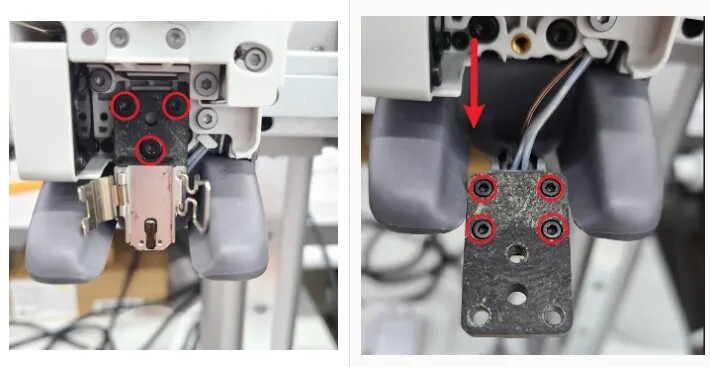
Bambu Lab Community Forum
I’ve seen a few posts here & doing a Google search over the weekend after it happened to me. I noticed my first layer was bad, tramming the bed didn’t fix it. I changed the Z-Offset in Bambu Studio, it worked for a few prints. The Z -Offset would change during the print. The last print I started having extrusion issues. During a calibrati...
Bambu Lab Wiki
This guide shows how to replace the Hotend Heating Assembly on the A1 series printers.
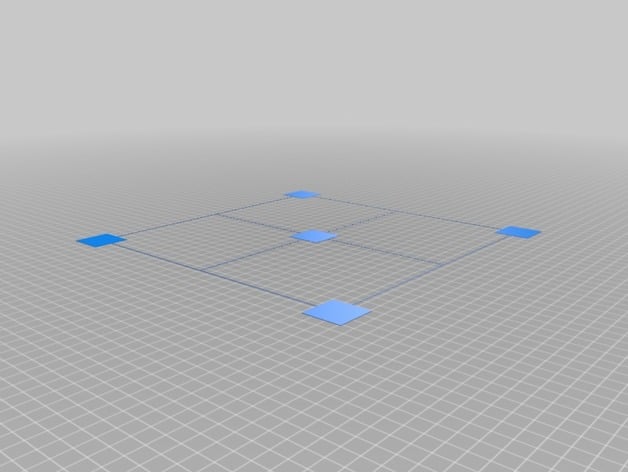
Thingiverse - Digital Designs for Physical Objects
Updated test print for bed leveling or bed warping. Default size is for the CR 10 or the CR 10s. To use, simply print and check that all four corners and middle square stick to the bed and all look similar to each other. The lines may or may not print for you depending on your slicer and settings but this is perfectly fine.
(benchy looks pretty clean, with some very tiny stuff we can maybe fix later if needed)
cold blaze
amber burrow
(benchy looks pretty clean, with some very tiny stuff we can maybe fix later if ...
One or 2 issues with adhesion I see, but that can be tweaked
amber burrow
cold blaze
One or 2 issues with adhesion I see, but that can be tweaked
Ah i'm seeing some very very minor stuff for like cooling in the overhangs. 😅
Not something to worry about atm.
Note: if needed, you can bookmark the post with a bookmark emoji to reference later, they close temporarily after an hour. send a message to reopen later when you need it. 👌
late pasture
gotcha checking screws now
late pasture
amber burrow
Ah i'm seeing some very very minor stuff for like cooling in the overhangs. <:bu...
the screws WERE LOOSEE
tiny bit but they were
amber burrow
Yay we got em!
Thanks mvd for bringing it up!
Now we can try the auto z offset again 🤞
late pasture
just di that and it still messed up
i tried doing a little print like the excavator and everytime it moved to a diffrent pieace it would mess it upl;
@amber burrow
amber burrow
late pasture
i tried doing a little print like the excavator and everytime it moved to a diff...
Hmm ok,
What temps, layer speed...?
Moves around connected to the nozzle? Is it curling upwards on the egdes?
Any photo of it in the slicer?
late pasture
 late pasture
amber burrow
Hmm ok,
What temps, layer speed...?
Moves around connected to the nozzle? Is it...
late pasture
amber burrow
Hmm ok,
What temps, layer speed...?
Moves around connected to the nozzle? Is it...
heat was at 215 bed 60 na dbasically when it switched from outter layer it would grab it and take it with it
if you know what i mean everytime it switched it would take that pieace witrh it lifting it then cuasing a chain reaction to other pieaces
amber burrow
late pasture
Oo thats a small print, so very little surface area to stick to.
I think i know what you mean..but sometimes it can be caused by a few different things.
late pasture
im printing small things due to lack of filament
cold blaze
amber burrow
Oo thats a small print, __so very little surface area to stick to.__
I think i ...
brim
amber burrow
There don't seem to be too many overhangs, but printing in thin air can occasionally be problematic
Generally overhangs up to 70 degrees are ok on modern printers without supports. (This will already have a default on your printer)
You can slice as much as you like before pressing print.
For this print i would look into:
- adding a brim (in the slicer) due to it's small size. (Check in the others tab). Clearance \ gap at 0.
- maybe adding auto supports, if after it sticks it fails to do the bucket top wells
- check first layer speed in the speed tab.
cold blaze
amber burrow
There don't seem to be too many overhangs, but printing in thin air can occasion...
when using supports make sure to tick, on bed only
amber burrow
would say supports are optional, unless u notice issues.
cold blaze
amber burrow
would say supports are optional, unless u notice issues.
i think that cab would need supports
late pasture
amber burrow
There don't seem to be too many overhangs, but printing in thin air can occasion...
gotcha i did the speed thing idk what brim is ill check it out
late pasture
late pasture
gotcha i did the speed thing idk what brim is ill check it out
what kinda brim ? there is like 10
amber burrow
late pasture
what kinda brim ? there is like 10
Oh yeah just auto or outer if auto doesn't do anything.
Also use this for any large square prints to help with "warping" where stuff bends up from the buildplate \ bed.
I forgot they have that now.
late pasture
gotcha
tall marshBOT
This post has been closed due to inactivity.
This post has been inactive for over 1 hour and so has been closed. To reopen this post simply send another message.
late pasture
@amber burrow so I tried glue stick and i tried messing with heat setting i got a roll of basic pla and it's still doing the same thing
amber burrow
What numbers are you using for first layer speed, nozzle and bed temp etc. ?
What does the print look like in the slicer?
late pasture
amber burrow
What numbers are you using for first layer speed, nozzle and bed temp etc. ?
Wha...
215 for nozzle 65 for bed and 20mm/s edge and inner 80mms
and its the standard benchyy with 2 outter rings
i got it to print good if i moved the print to the corners of bed sheet i might need a new bed sheet
amber burrow
late pasture
i got it to print good if i moved the print to the corners of bed sheet i might ...
Yeah thats what i was going to suggest. 😅
Espiecally if it's was well loved and well used.
Probably stick to just 60 for the bed for pla unless the room is particularly cold (e.g. 10 degrees)
Try a biqu cryogrip glacier (blue) for the a1 or a pei plate.
I think the bed is 245mm?
late pasture
my bottom layer on flat prints seems to be tearing here and tehre
256
@amber burrow
This is the problem im running into now
cold blaze
late pasture
Yeah might need a new sheet
tall marshBOT
This post has been closed due to inactivity.
This post has been inactive for over 1 hour and so has been closed. To reopen this post simply send another message.