
#Glizzy got an other industrial printer
1 messages · Page 1 of 1 (latest)
 flint sphinx
 novel crag
take more pics of the motion system 👀
flint sphinx
 covert crescent
ooh that's idex right?
covert crescent
ooh that's idex right?
Yeah, gets to 100C chamber and 200C bed
flint sphinx
novel crag
take more pics of the motion system 👀
I'll try to take some when I get home in like 2h
flint sphinx
Just got home exactly 2h later
flint sphinx
novel crag
take more pics of the motion system 👀


 novel crag
flint sphinx
novel crag
flint sphinx
mmm ok
and this shit gets them 100c huh
interesting choice with the bltouch
and that wiring
also, is that reverse bowden capricorn?
thanks btw
flint sphinx
novel crag
also, is that reverse bowden capricorn?
Yes
flint sphinx
novel crag
and this shit gets them 100c huh
Yeah I am not sure if everything is original on there
Might have to reverse engineer things to put them back on metal parts
Also emailed them because there are free parts I can get apparently, hope they will give them to me even if I am not the first owner
Hmmmmmmmmmm

Yep yep yep yep yep
That would indeed be the issue right there
@crimson sluice @strange rose lmao wtf is happening there 
I mean my finger clearly closes the contact but wow didn't think it would be enough to turn that lil light on
 little harness
I feel more adequate with the DupliHeater now🙏
flint sphinx
Oh it's the 5V converter that is shot
And 12V too I guess
Aight so full electronics bay rework it is then
And then I hope nothing else pops up in the process
Oh I have a 24V meanwell
Amazing, didn't think I did
 strange rose
novel crag
interesting choice with the bltouch
strange rose
novel crag
interesting choice with the bltouch
that doesn't look original
flint sphinx
strange rose
that doesn't look original
It was a bltouch originally
novel crag
strange rose
that doesn't look original
i know for a fact older version 22idex use bltouch
flint sphinx
120V plug fits perfectly
 novel crag
surprising amount of printed shit on that printer
flint sphinx
Yeah I am not sure if everything is original
novel crag
although i guess it makes sense for such low volumes
novel crag
flint sphinx
Yeah I am not sure if everything is original
that ebox definately didnt arrive like that
flint sphinx
There have been at least 3 batches of the v2
flint sphinx
novel crag
that ebox definately didnt arrive like that
Most of it did
novel crag
flint sphinx
Most of it did
damn. and it costs 15k? 😭
my stock ender 3 was better cable managed
strange rose
flint sphinx
It was a bltouch originally
huh
flint sphinx
novel crag
my stock ender 3 was better cable managed
Oh idk about cable management
Mod #1: replacing some phillips with hex, this probably will give an 80% better print quality already

The bed is only 500W at 240V...
Wtf
And the chamber heater only 150w?
Huh?
flint sphinx
Well ima need a new heater that's for sure
Probably a new bed entirely
Hmmmm
Wonder if it is not a v1
Adding it all up it doesn't make 2200W
Doesn't really matter, anyways, should head to bed
novel crag
flint sphinx
The bed is only 500W at 240V...
that's the same w/m^2 as an ender 3 lmao
 stone vault
flint sphinx
I mean my finger clearly closes the contact but wow didn't think it would be eno...
stone vault
flint sphinx
I mean my finger clearly closes the contact but wow didn't think it would be eno...
Well, it's MOSFETs, there's no current requirement other than forced by the gate charge / discharge resistors
flint sphinx
stone vault
Well, it's MOSFETs, there's no current requirement other than forced by the gate...
@median idol I think you will also enjoy this
 median idol
Yeah I saw it, custom made?
I'm a fan of low power stuff, I am curious to see the heating times. Is it working?
flint sphinx
median idol
Yeah I saw it, custom made?
Nope, 22idex
But I was told it is a v2 but it actually is a V1
Vision miner emailed me back, hopefully they will send me free stuff to upgrade things
median idol
Mmm
I can only ask how much was it?
Im not a 22idex fan, quite the opposite but I am happy for you if you got it for a good price
flint sphinx
median idol
I can only ask how much was it?
1340$ CAD
flint sphinx
median idol
Im not a 22idex fan, quite the opposite<:monkakarp:596704350919852042> but I am ...
Do I think it is the best printer ever? No, I am not delusional, but I do like markforged kinematic and i think it has good potential for upgrade
flint sphinx
median idol
Im not a 22idex fan, quite the opposite<:monkakarp:596704350919852042> but I am ...
What exactly is it you do not like about it?
median idol
flint sphinx
1340$ CAD
At that price I like it very much
median idol
flint sphinx
What exactly is it you do not like about it?
It's not that I don't like it as a machine on its own, but I really dislike as a machine sold at the price they put
flint sphinx
ah ok yeah
median idol
Does it make sense? I feel like I did not explain myself the best
flint sphinx
you just think it is massively overpriced basically
median idol
Yeah
To say the least
Because when I put it next to a real industrial machine its embarassing
At the same price
How much is it retail, 12k?
Lol 15k
They need to cut the price 4-5 times lower as far as im concerned
Idk what your version is different in, if it has the same specs but just older/slower then you got a super deal, I would have bought it too in an istant
flint sphinx
median idol
Idk what your version is different in, if it has the same specs but just older/s...
it is on BMG and mosquito instead of LGX and copperhead, printed motion parts instead of the metal ones in the newer versions and duet 2 instead of duet 3 and maybe custom boards for the V4, it also has a bltouch instead of the klicky style on the new ones
strange rose
the bmg and mosq sounds like an upgrade
printed parts you can redo anyway and the duet 2 is still alright
sounds like a good deal
median idol
flint sphinx
it is on BMG and mosquito instead of LGX and copperhead, printed motion parts in...
I'm curious to know if there is any particular things in that ht bed compared to a regular one?
And how is the chamber heater?
flint sphinx
strange rose
the bmg and mosq sounds like an upgrade
I prefer LGX personally tbh
mosq is an upgrade tho
flint sphinx
median idol
I'm curious to know if there is any particular things in that ht bed compared to...
not really no, but the bed connects directly to the kinematic balls instead of having a frame for it
and the chamber heater is just a PTC
I am going to need to get a new one because this one will be too weak, maybe I will get 2
median idol
flint sphinx
not really no, but the bed connects directly to the kinematic balls instead of h...
I think I understood but im not certain 😂
median idol
And a alu plate?
flint sphinx
or Z stages
flint sphinx
median idol
And a alu plate?
yeah
it is a bit thin, probably will get a new one at some point
median idol
Damn 200° and a thin alu bed doesnt sound very good
Im not sure about the various alloys but I feel 200° is too much
Creep territory right
stone vault
flint sphinx
not really no, but the bed connects directly to the kinematic balls instead of h...
That's my preferred arrangement
flint sphinx
well yeah it is the better one
median idol
I want to see how long it takes to reach the max
I think @stone vault the other day was saying something about the difference from heating to 100 or 200 is not much or something like that.. I can't recall exactly
Like I am probably overthinking it but does that mean I can heat any bed to 200 as I can heat it to 100 with the same configuration? Ignoring the mechanical build
Tldr: what the fuck is the difference between your 200 bed and a "standard" 100 bed
little harness
Probs not much, considering a normal alu heatblock is good for 300ºC (that doesn't need stiffness, granted)
flint sphinx
median idol
Tldr: what the fuck is the difference between your 200 bed and a "standard" 100 ...
adhesive
median idol
flint sphinx
adhesive

flint sphinx
also thermal fuse
median idol
So in printers they limit the bed temp to what the pieces its made with can withstand basically
Or well, they should..
little harness
As one does, weakest link etc
median idol
little harness
Probs not much, considering a normal alu heatblock is good for 300ºC (that doesn...
Yeah but im not sure a bed plate, especially without a frame, at 200° won't creep
300mm also
Anyway thank you all the info will come in handy for my builds 🙏
median idol
flint sphinx
also thermal fuse
Are you gonna test for creep or you gonna rebuild anyway?
little harness
vision miner says to heatsoak for at least 60 mins at temp
flint sphinx
median idol
Are you gonna test for creep or you gonna rebuild anyway?
creep of what?
little harness
Bed at max temp
median idol
flint sphinx
creep of what?
The alu bed
novel crag
flint sphinx
it is only 160W on 120V
I dont think youll be able to break 100c with that
flint sphinx
with a heated up chamber I might be able to
I want to get a convection oven heater I think
but monies
they are expensive af
I have an air fryer heater and fan maybe I will try that
 median idol
novel crag
I dont think youll be able to break 100c with that
median idol
novel crag
I dont think youll be able to break 100c with that
What am I missing here
novel crag
median idol
What am I missing here
not enough watts/m^2
median idol
How is it sold as 200°
novel crag
median idol
How is it sold as 200°
maybe it's meant to run on 220v
flint sphinx
yeah it is
median idol
But from what we said before... it doesnt matter?  if it can reach 100..
Assuming you can contain the heat inside
novel crag
median idol
But from what we said before... it doesnt matter? <:monkaHmm:819882964081967134>...
160w is .13w/cm^2. it's gonna radiate the heat away faster than it can heat up
flint sphinx
median idol
But from what we said before... it doesnt matter? <:monkaHmm:819882964081967134>...
tbf as long as I have a chamber heater that allows the chamber to get to like 90C I don't really even need a bed heater
 median idol
I'll watch closely 😄
strange rose
median idol
Yeah but im not sure a bed plate, especially without a frame, at 200° won't cree...
usually adhesives for the magsheet and heating mat are lower temp
so ideally you sandwich the heater between the alu bed and a steel backer plate and use embedded smco magnets to hold the printing plate
or maybe get an e3d ht bed from somewhere
flint sphinx
@stone vault would you put more trust in a genuine fotek 100A or a genuine crydom 50A?
stone vault
flint sphinx
<@374587076718624768> would you put more trust in a genuine fotek 100A or a genu...
How much load? Send datasheets of both
flint sphinx
stone vault
How much load? Send datasheets of both
Oh well I guess it is not genuine, can't find it directly on fotek's website, or maybe it is an old one and they don't have it anymore
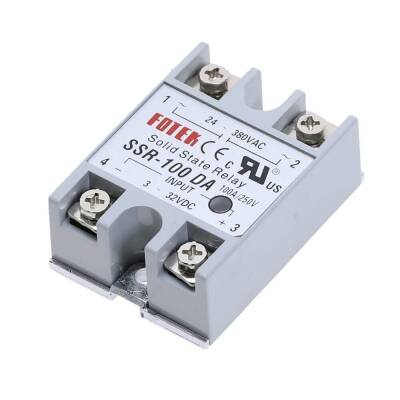
www.motorobit.com
I guess it would be this for the fotek
And the crydom is D2450-10
novel crag
flint sphinx
<@374587076718624768> would you put more trust in a genuine fotek 100A or a genu...
does it even matter
flint sphinx
novel crag
does it even matter
Well I just want to put what is best on it
And I am rewiring it all rn so might as well do that rn
flint sphinx
It's really weird, all the fans and it seems also the hotend heaters are wired for 24V but both PSU's were 12V
stone vault
flint sphinx
https://www.motorobit.com/ssr-100da-solid-state-relay-100a?srsltid=AfmBOopXnMEci...
It's obviously a clone
flint sphinx
We're swapping out SSR's then I guess
flint sphinx
almost fully rewired it up, just a couple more things to do, I might be able to have it at least homing tomorrow
printing covers for the SSR's rn and I might see if I have some microswitches to add filament sensors
flint sphinx
@strange rose do you know if any filament sensors that are better than others?
like I am looking at the duet one and that seems pretty damn expensive
but like just a microswitch with a ball bearing sounds fine idk if there are any other sensors that would be enough of an improvement to spend money on them
strange rose
flint sphinx
<@278236711753089025> do you know if any filament sensors that are better than o...
I don't use any
I'd rather just look at the filament left than gamble on having false positives
 rancid cargo
wtf
flint sphinx
rancid cargo
wtf
I'm playing pokemon with industrial printers
flint sphinx
@strange rose do you know if there is something that might be modifying the path of the homing file?
I keep getting this error when I try homing

and it slams the 2nd toolhead on the 1st one for like no reason
flint sphinx
strange rose
homeall is in sys
yeah that's what I don't get, it keeps trying to read it from there
strange rose
not sure why
flint sphinx
@tacit vine I also have a project thread here for the 22idex
 tacit vine
Alright.
flint sphinx
it be printing


making a purge bucket for it now

need to make tolerances a bit tighter
strange rose
flint sphinx
I love this
flint sphinx
I am going to portugal for a week but once I get back I think I will start making macros for it, probably also going to try to do filament management
flint sphinx
Yes
tacit vine
What was it in the end, I missed that update.
flint sphinx
tacit vine
What was it in the end, I missed that update.
I had to redo the kinematic, it was done as if it was cartesian and it was wrong, the current config for the v2 is also cartesian but I wasn't able to get it to work properly
tacit vine
the legacy v2 thing you shared with me was incomplete for dual markforged. No idea what they are smoking at AddWise
flint sphinx
tacit vine
the legacy v2 thing you shared with me was incomplete for dual markforged. No id...
the current v2 config is also using a cartesian like that, I don't get why
tacit vine
I mean, if you do cartesian, and then define the X,U,Y,Z axes completely, that will override it
flint sphinx
Yeah I did override all the axes
strange rose
flint sphinx
could you share this?
flint sphinx
strange rose
could you share this?
It is not finished yet but I can send it in a couple hours when I get to the next airport
strange rose
where you flyin?
flint sphinx
To Philadelphia for a layover and then Portugal
strange rose
oo nice
flint sphinx
You don't have solidworks or inventor right?
strange rose
nope
flint sphinx
Aight, I'll try to remake it in fusion for you so you can modify it for your printer then
It also has a space for a silicone brush at the top
strange rose
step would be perfectly fine
strange rose
flint sphinx
It also has a space for a silicone brush at the top
that's perfect
flint sphinx
strange rose
step would be perfectly fine
Would be a pain, I'll just remake for you and add parametric things so you can adjust preload
I have sketch and modeling tree already won't take too long
flint sphinx
Alright, I am back in Canada so should make some progress soon™ I was just told by the rep at visionminer that the mosquitoes are indeed not stock so they don't have a duct for it so I am going to have to make my own
strange rose
interesting
what will you do to line up the nozzles?
the copperheads can be adjusted but mosq cannot
flint sphinx
strange rose
the copperheads can be adjusted but mosq cannot
probably just pray it is not too bad for duplication and mirroring and for idex prints I'll calibrate it
btw how should I be setting things up for IS on RRF? I forgot how to do it
or I might not even have done it properly last time
strange rose
same as klipper, mzv but make it so it covers both x and y
flint sphinx
yeah but like I have to do the motion analysis
idk how I should set that up
should I be doing small or big moves?
strange rose
oh, I just do very high accel, very high jerk, pretty high speed and do like a 10 mm move
flint sphinx
ah ok
strange rose
seems like the most readable output
flint sphinx
why MZV over the other ones?

 flint sphinx
ah ok
strange rose
as you see at 59 hz it covers both axes
tacit vine
flint sphinx
Alright, I am back in Canada so should make some progress soon™ I was just told ...
Aren't they copperheads?
flint sphinx
no
the guy apparently put some mosquitoes on it after buying it
thought it was standard but the addwise 22idex actually came with some e3d volcanoes
strange rose
flint sphinx
ah ok
it's only an issue if you want to go "fast"
zvd starts rounding corners way before mzv
you can also do custom shaper
but mzv periods line up perfectly for me
flint sphinx
I do 6k accel 180mm/s outer walls, top and bottom solid, 10k 300mm/s almost everything else
strange rose
10k with zvd was awful for me
flint sphinx
not super mega fast
strange rose
ei is best like max 3k accel
zvd like 5-6k
but maybe your setups different, so worth a few tries
flint sphinx
ah fuck does it home before doing the motion?
the adxl is pointed towards the bed and it would hit if it does home Z
flint sphinx
yeah but it doesn't auto home then
flint sphinx
yeah I set the Z axis height by hand and it is far from the bed
strange rose
so just do like G92 Z100
flint sphinx
but if it auto homes it will try to home into the adxl
flint sphinx
ok I have no clue what I am looking at and what it should look like
strange rose
like regular klipper shaper
disable the capture whole thing and enable wide band
then it should look readable
 flint sphinx
jerk of 900, accel of 25k

 flint sphinx
this is with no shaping enabled
strange rose
yeah that's the one you should do
M566 X6000 Y6000
M203 X60000 Y60000
and accels at 30k for me
 crimson sluice
the initial spike is probably from the stepper starting to move, the docs mention something about ignoring the first 15hz or so


 strange rose
looks acceptable, the very low freq peaks just ruin it
flint sphinx
yeah but if it is just stepper then it doesn't matter
strange rose
not sure why yours look that high
but yeah give this a test
need to sit down again sometime and fix my X

 strange rose
first looks better
flint sphinx
40 looks a bit better I think


 flint sphinx
strange rose
but yeah give this a test
flint sphinx
strange rose
but yeah give this a test
any suggestions of what to print to test it out?
flint sphinx
strange rose
ringing tower I guess
which one?
strange rose
any
flint sphinx
@strange rose is there not MPC now in RRF?
flint sphinx
ah okay
tacit vine
flint sphinx
<@278236711753089025> is there not MPC now in RRF?
dc42 told me their control algorithm is more like MPC than like trad PID
flint sphinx
strange rose
but yeah extra heater control is heatforward
Are you using it?
strange rose
yep
stone vault
tacit vine
dc42 told me their control algorithm is more like MPC than like trad PID
That's because MPC for hotend is so rudimentary, you take into account:
Constant heat loss (P term of PID)
Thermal inertia (I term of PID)
Heat loss due to parts fan (fan feed forward like in RRF)
Heat loss due to filament flow (RRF doesn't take this one into account)
The main thing that full MPC does better is lower settling time as thermal inertia is a bit more rudimentary than modelling thermal capacity
strange rose
stone vault
That's because MPC for hotend is so rudimentary, you take into account:
Constant...
heatforward for flow I think
fan is different
it can be used for fan but mainly makes the hotend hotter when it's extruding more
M307 K is the fan parameter and calibrated during heater tool tuning
M309 S is the power scaling with extrusion rate
or feedforward
I forgot the names but it does scale based on flow
stone vault
strange rose
I forgot the names but it does scale based on flow
Well, both are feedforward in controls
strange rose
yeah you're right
so many stuff to adjust
thankfully the fan and pid is handled very well by the autotune
the flow coefficient is a bit harder to do
stone vault
The upside of MPC is that these values get physical sense like "average specific heat of filament"
strange rose
bet it wouldn't be too hard to transform that into a config parameter
tacit vine
I wouldnt be surprised if there was a constant in the RRF source code that amounts to specific heat that could be pulled out ... nice starter project to acquaint yourself with the build environment and so on
flint sphinx
Well I printed 2 parts in aero ASA so far, they look pretty good (especially given it is aero ASA) and I got the chamber to around 50C with the bed heater and the chamber heater, pretty impressive given that the chamber heater is only running at 188W
tacit vine
how'd you deal with the heating delay on the chamber?
flint sphinx
tacit vine
how'd you deal with the heating delay on the chamber?
I didn't really, I just kept resetting it until I got it to an "ok" temp and then left it at that, was able to stabilize just fine
flint sphinx
the preview of the bed is flipped on the X axis I have no idea what is happening

the firmware on this printer is truely fucked
crimson sluice
did it probed it in the correct direction?
crimson sluice
ive discovered a bug with the bed mesh being weird last year or two years ago
what firmware version are you on? it should be fixed in 3.5.6 i think
flint sphinx
3.6.2 rc-1
crimson sluice
yea that one should be fixed there
if i remember correctly ive had that issue once too.
cant remember what i did to fix that
i think coordinates where swapped or smth
flint sphinx
bed is fucked on there but when I try do check manually it is off by like 0.04-0.08mm maybe? so like it is good
I might have to just redo the whole config at this point idk
flint sphinx
now it keeps going to tool 3 and there is nothing anywhere that mentions tool 3 in any macros that it could be running
crimson sluice
usually a sign to just backup the configs and start over
flint sphinx
yeah it is what I am going to do I think but like I really need to print some parts rn for a club
flint sphinx
yeah their configuration for anything other than using 1 toolhead is god aweful. I am going to need to redo it all
well the club will just have to wait longer
flint sphinx
@tacit vine do you have any macros for idex printers? I managed to find your cr-cast configuration but it doesn't have any macros
tacit vine
What kind of macros? It has everything it needs for mirror and copy mode.
flint sphinx
tacit vine
What kind of macros? It has everything it needs for mirror and copy mode.
Just general other macros like QOL stuff maybe
tacit vine
No, that machine was YOLO'd and manually tuned and bed plated shimmed
Also ran copperhead hotends so Z calibration was a breeze
stone vault
tacit vine
Also ran copperhead hotends so Z calibration was a breeze
I can confirm
crimson sluice
flint sphinx
Just general other macros like QOL stuff maybe
only QOL macro i have is for centering toolheads on the bed for offset calibration
tacit vine
@crimson sluice that sounds interesting. Please share.
flint sphinx
Well I guess I'll have to go mad and make a bunch myself
flint sphinx
strange rose
what do you have in mind?
Probably not a whole bunch, most likely purge, wipe, custom pause that account for the fact there are 2 toolheads and can be using something that is not just t0, which it doesn't really do rn, also I need to modify things so when I home when I am using a tool it doesn't fuck up, rn it does for some reason
I also need to make macros for chamber filters, leds, add materials and such
strange rose
you could use a lot of non-idex macros then
flint sphinx
strange rose
you could use a lot of non-idex macros then
Yeah, I'll probably base the config off of the troodon 2 from teamgloomy like I have done for my other printers
flint sphinx
@tacit vine do you think I should make the coordinates based off the corner of the bed or should I leave them as is with the origin at the center of the bed?
not sure if there is that much of a benefit to having them on the center
also not sure if having centralized variables that get called is better or if putting variables in the different macros and files is better
tacit vine
I did move from center zero to normal bed corner because everything else broke my brain. It should not make a difference function wise unless you have prints you want to print both on a delta and this machine without realizing the file. Probably not likely.
flint sphinx
funny macro to purge things has been made, now going to be doing the wiping macro
claude is pretty handy to comment it all
crimson sluice
tacit vine
<@247359861929672714> that sounds interesting. Please share.
not sure if its worth sharing, its just a file that checks if the printer is homed and then moves the active toolhead to the center
got another one that does the same but for the ABL probe
flint sphinx
and now the wipe is done too, hopefully those will work well and I won't get issues, but with my luck I'll have a lot of troubleshooting ahead
flint sphinx
I think I got a little carried away with getting help from claude AI, my print start macro is now 280 lines long
I have material checks, temp checks, sets up idle and regular temp
tacit vine
flint sphinx
I have material checks, temp checks, sets up idle and regular temp
Do share
flint sphinx
tacit vine
Do share
it is not fully finished I think, still need to review it and confirm it works just like all the other things but I think it will work great when it does, I do think I'll be changing the globals to variables tho since that does not make sense with what I saw in the RRF server
strange rose
flint sphinx
well I was able to get it to about 65C in about 1.5h
pretty slow, what kinda heater?
strange rose
oh, yeah that sounds a bit weak
flint sphinx
yeah it is
this machine was on 240V
just don't have the money to get new heaters for it rn
also a 750W heater in the same size and in 120V is really hard to find
well maybe not really hard but hard
strange rose
can't you use 240v?
flint sphinx
my dad said no to me running some 240V to my bedroom
flint sphinx
we aren't going to be able to get it to our house, too far from the industrial area
it is about like 1.5-2km away
stone vault
flint sphinx
it is about like 1.5-2km away
Run fiber instead of copper, lower losses
flint sphinx
I don't think the power company would appreciate
and my mom works for them so she might get in extra trouble for it
flint sphinx
flint sphinx
it is not fully finished I think, still need to review it and confirm it works j...
ah fuck I just realized that there can't be filament assignment to the mirror and duplication mode tools
I was making them on a break at school so now I need to modify them I guess
flint sphinx
@strange rose do you know if there is something that is being called when a stepper gets enabled? I would want to have the electronics fan kick on whenever that happens but not sure if there is any command that gets executed I could add that to
flint sphinx
hmmm adding it to daemon.g is probably not a good idea right?
strange rose
not sure how you'd do stepper energized -> fan on
tacit vine
You can probably look at object model
stone vault
I love object model and abusing the plethora of options
crimson sluice
yea i use something similar to turn on the chamberheater fans on my k3
flint sphinx
yeah not really finding anything about steppers being enabled, I just set it so if an axis is homed it will be kicking on the fans
just used the things in jay's config and put it in daemon,g
if move.axes[0].homed || move.axes[1].homed || move.axes[2].homed           ; check whether X, Y or Z drivers are active
    M106 P5 S1                                                              ; if they are, turn on the electronics bay fan
else
M106 P5 S0 ; if not, turn off the electronics bay fan```I think that object model lets you check pin state
crimson sluice
move.axes[0].machinePosition might work
its 0 when its not set or unknown
flint sphinx
crimson sluice
move.axes[0].machinePosition might work
its 0 when its not set or unknown
issue is that after a print is done it will not get reset so it will keep the electronics fan enabled forever
crimson sluice
then i would just add a global variable and set it in the homing macro and unset it in the print end macro
flint sphinx
well then if I am just doing things on the printer it won't activate, I think jay's solution was good with the daemon.g
flint sphinx
alright, remade the config.g, just need to finish the cancel.g, and the pause.g I think
tacit vine
flint sphinx
issue is that after a print is done it will not get reset so it will keep the el...
You can just look at printing state
In v3.7 you can do OM based triggers which should reduce daemon.g abuse
flint sphinx
the printer is on a duet 2 so I can't go to 3.7
tacit vine
bummer.
flint sphinx
alright got the whole config loaded up
flint sphinx
I don't get it, I have been fighting with that thing forever, never had to do anything like that with any other printers, the Y axis just refuses to home properly and goes in the wrong direction
and it only goes in the wrong direction when homing not when moving normally
I just ran it line by line and now it works? what the fuck
tacit vine
Put M400 between the lines in homey.g to see if it works.
Also, try swapping X and Y steppers to see if that stays with Y or moves to X. The. You may want to inspect the Y driver, depending on outcome.
flint sphinx
tacit vine
Also, try swapping X and Y steppers to see if that stays with Y or moves to X. T...
it ended up working after I simply ran it once manually and now it is working every time, I am really lost on why it didn't work
flint sphinx
okay so I am not sure how that can happen but when I do my pause.g I have a line that is putting the toolheads in their parked positions, which is G1 H2 X{move.axes[0].max - 2} U{move.axes[2].min + 2} F3000 ; park X at max - 2mm and U at min + 2mm simultaneously
for some reason the U axis is going to U-145 when it is not supposed to be going there since the minimum for the U axis is -25mm from the config.g```M208 X0:370.4 Y-6:362 U-25:350 Z0:450
so now I am really confused as to wtf it is trying to doI am just slightly loosing my mind I think
stone vault
flint sphinx
okay so I am not sure how that can happen but when I do my pause.g I have a line...
What do you get when you echo move.axes[2].min?
flint sphinx
0.0 for some reason
flint sphinx
stone vault
What do you get when you echo ``move.axes[2].min``?
even right after setting them up it is not giving me the right value

the Y axis gives me -6 like it should tho
tacit vine
move.axes[2].min is Z
try move.axes[3].min
It'd XYZUVAB .... and I don't remember beyond that.
And the position it shows may be for tool 1, so you'd have to apply tool offsets for it to make sense. Possibly. I don't remember.
flint sphinx
tacit vine
try move.axes[3].min
Well I am an idiot, that would explains it, had it defined as X,Y,U,Z,E so thought it was setting the axes in that order
tacit vine
Ah yeah, that would cause some confusion if you're not aware that the output of the OM doesn't care about the order of configuration of axes.
crimson sluice
pretty sure you can lookup the definition in the machine model
flint sphinx
just sent a 13h (I think) print to it, one plate for all the tradrack parts out of PET-CF and the accent color will be purple ASA-CF
also need to do filamentalist
tacit vine
Time estimation is based on current speed and filament used. Time will go down towards the end a bit.
flint sphinx
Well it is telling me 20 minutes now so it wasn't the best slicer estimate but the printer estimate was decent I guess
The entire plate is looking good
flint sphinx
Came out perfect


 flint sphinx
I shall take some when I get back home
flint sphinx
@strange rose you got any ideas of what to do for cooling fans on the 22idex?
Kind of seems to have to be mounted to the extruder
flint sphinx
Thought about it but the fan would either need to be at the top of the chamber or I would need more holes in the back coming from the electronics bay
The gantry doesn't have any space at the back for a tube to pass
strange rose
hmm, then keep the stock config and add sheet cooling
flint sphinx
Oh yeah that could do
strange rose
I think the 12032 can't do high temps though so you need something else
flint sphinx
Just need to make new ducts because originally it was for copperhead or for v6 not mosquito
flint sphinx
strange rose
I think the 12032 can't do high temps though so you need something else
Yeah I can probably find something, I should have a couple people I can ask
little harness
berdair
flint sphinx
Last time I tried it I was melting the parts more and not cooling them
flint sphinx
6mm should be enough breathing room for a 2510 right?
 flint sphinx
aight that should work
 flint sphinx
It just releases so perfectly
flint sphinx
@strange rose here you go
getting to 40mm^3/s on infill, 2k accel printing and 4k on travel
crimson sluice
flint sphinx
It just releases so perfectly
thats why i like my real CF buildplates
just the right amount of adhesion for PETG and PCTG
also PET from how it looks
crimson sluice
might grab a thicker one for my k3, but idk if i want to go with binderclips
could go with another custom made 0.2mm sheet but idk if the transfer tape survives the bed temps
flint sphinx
yeah that's a bit annoying
I'll probably be putting holes with thumbscrews on it
but I can't find my taps
crimson sluice
time to Hightemp silicone a sheet to some blank springsteel
flint sphinx
I am really annoyed because they are really nice taps
strange rose
flint sphinx
<@278236711753089025> here you go
👀
flint sphinx
It looks so good

 flint sphinx
some purple ASA-CF, it is my new favorite filament

 strange rose
clean
flint sphinx
And all of that is with no part cooling fan
 worldly bane
flint sphinx
It looks so good
worldly bane
flint sphinx
It looks so good
damn didnt even know u got an idex22 thats clean, hows its vfa profile? wondering because it seems to use the same movement mechanics as the q1/p1s etc
flint sphinx
The calibration for toolheads is taking a lot longer than expected
The positions I had were way out of whack
stone vault
flint sphinx
The positions I had were way out of whack
Initial offsets I just eyeballed using a piece of paper with a dot on it
flint sphinx
Yeah I did the same but I think I went in the wrong direction at one point and made it worse and then fixed it ish
flint sphinx
XY is done but Z needs a bit of calibration, going to use a bit of percussive maintenance to do it lol
flint sphinx
I percussive maintenanced too hard and now the left tool is a bit lower than the right one
flint sphinx
I fixed the tool issue but I have an issue while changing tools where it doesn't wait for M116 to heat the selected tool up it just goes back to the resume position and then heats up, I posted on the discord and forums so I'll see if we are able to find the issue
Also posted the config to a github page https://github.com/Toaster0042/22idex_config
GitHub
RRF config for my 22idex V0. Contribute to Toaster0042/22idex_config development by creating an account on GitHub.
Tool changes are also really long rn because tools need to heat up in the tool change, I'll dig around to see if there is a way to do pre heating
crimson sluice
Orca has a preheat feature but it used to be broken and used a deprecated command for that
tacit vine
@flint sphinx you could probably try the second gcode stream to interleave the pre-heating. But that would probably require a post processor
flint sphinx
tacit vine
<@282176192252215299> you could probably try the second gcode stream to interlea...
Is that 3.7+ only or is that already in 3.6.2?
tacit vine
that's already in 3.6
Duet3D Documentation
This page documents the support for multiple motion systems provided in RepRapFirmware 3.5 on Duet 3 boards.
oh
you have Duet2 boards. So no can do
crimson sluice
hmm might try that out on my idex
not sure if it will work well as its on a mini5+
flint sphinx
Pain
I can't afford to put some duet 3's on all machines lol
And mellow boards are not allowed in my house
I need to learn to make pcb's
Could MPU's work with RRF?
Could have some really good controllers if we can use MPU's I think
tacit vine
What do you mean with MPU?