


1 messages · Page 1 of 1 (latest)
 brisk olive
Hello I have been having frequent problems with my printer I have attached images below of the examples I have done many things such as cleaning the bed and editing z offset and still no luck even doing Manuel bed levelling again and my bed mesh even says a variance of 0.1900 which bed levelling can’t be the problem I just don’t know what’s up 🙏
 orchid stratusBOT
brisk olive
Hello I have been having frequent problems with my printer I have attached imag...
orchid stratusBOT
brisk olive
Hello I have been having frequent problems with my printer I have attached imag...
It sounds like you've already tried a variety of troubleshooting steps. Since you've mentioned that the bed leveling seems fine according to the mesh, it might be worth checking the nozzle for any clogs or issues. It's also possible that the filament might be causing issues, so you could try a different type or brand of filament. If the problem persists, it might be beneficial to reach out to the manufacturer for further assistance.
 raven plaza
temperature? material? chamber temp?
brisk olive
Bed temp is 60
Extruder is 210
Material is PLA
brisk olive
raven plaza
temperature? material? chamber temp?
Tbh I’m just stuck on what to do
I have tried most things
I guess I can try wash it again
raven plaza
no need
brisk olive
What do u think is wrong would u say
raven plaza
from the pictures with the square, the Z offset is too far
we know this because we can see the space between the lines
brisk olive
Yeah I know but right now my z offset it in the -2.50
raven plaza
you can adjust it as its printing
slow down the speed at the start
so you have time to adjust it on the fly
brisk olive
So ur tip is start a print and adjust it as it goes
raven plaza
when its high we see spaces between lines
brisk olive
And see what number is best
brisk olive
So that means I have to adjust it everytime ?
raven plaza
the number changes because it depends on temperature
higher temperature bed moves upward
so you see, it has to be adjusted often, eittther manually or semi-automatically
brisk olive
I did the z offset and probe test when my bed was hot
raven plaza
even when the bed is hot, the printer keeps expanding
lets say you bring your bed to a certain temp like 60c, and then you measure Z
brisk olive
Damm never knew that what would I do about that then surely the resolvent is just re doing it every time
brisk olive
Or will auto levelling take care of the rest
raven plaza
auto levelling only levels the current bed
but if it expands, the levellign will be off
the solution is to 'heat soak'
there are automatic ways to heat soak
brisk olive
Remind me what that is
raven plaza
heat soak lets the bed sit so that the heat in it can evently distribute and allow it to expand to a certain size where it no longer expands at
klipper?
brisk olive
Yes elegoo Neptune 4 it’s a second hand one
raven plaza
does it have a scanning probe like eddy?
brisk olive
It has probing yes
raven plaza
what kind
brisk olive
Lemme check
raven plaza
with software we can manage heat soaking ... fortunately people before us have done all the hard work and made macros which you can use to manage your heat soaking
you can install Demon Klipper macros
in demon macros, it heat soaks for a bit, then check Z, then heat soaks some more, checks again , etc
it does that until it has determined the height no longer changes and is safe to print
brisk olive
and how long dose it take
raven plaza
somtimes it can take 20-30 minutes but depends on printer
if my printer is cold it will take longer
thats the beauty of demon macros,, it calculates how much time instead of guessing
brisk olive
and its not a onetime thing u have to do it everytime u wanna print ?
raven plaza
exactly
but it checks constantly so that it doesnt waste time heating if its already heat soaked
brisk olive
ok how do i install them
raven plaza
have to follow the demon guide
it has a lot of macros not just heat soaking
Devilishly Good Klipper Macros! Contribute to 3DPrintDemon/Demon_Klipper_Essentials_Unified development by creating an account on GitHub.
brisk olive
aight lemme see if this works so this will basicly adjust my z offset for me
raven plaza
basicall you have to add some Gcode lines to the slicer, but follow the guide its a bit more than that
no it doesnt set your z offset, but it will make it so you only have to set it once
so your -2.5 or whatever will be the same each time
brisk olive
oh thats sick ty
raven plaza
and not only once because you can set it based on filament type
for pla, for petg, abs, etc will be slightly different
some plastics like more squish
brisk olive
lemme give it a try rq and i will get back to u
raven plaza
its a long read
but its longer to guess z-offset and throw prints away
they have discord and youtube videos too
brisk olive
wait can i do this on ultimaker cura
brisk olive
i can edit my cfg
raven plaza
in the slicer it asks you to add a start g-code and and end gcode
and in printer.cfg you include the demon config
Devilishly Good Klipper Macros! Contribute to 3DPrintDemon/Demon_Klipper_Essentials_Unified development by creating an account on GitHub.
here is what the slicer setup is like
even if your slicer isnt mentoined there its the same
i use qidi , superslicer, and prusa are not mentioned there but its the same thing
brisk olive
ooh these are confusing lol is there a yt video on it or smthin
raven plaza
ys
its faster to read
if you skip sections you can mess things up
Devilishly Good Klipper Macros! Contribute to 3DPrintDemon/Demon_Klipper_Essentials_Unified development by creating an account on GitHub.

https://github.com/3DPrintDemon/Demon_Klipper_Essentials_Unified
Install Demon Klipper Essentials Unified in 15 minutes or less!
Further full setup is still required!
Join the community on the Demon Discord!
https://discord.gg/KEbxw22AD4
Here's quick run-through of the general install process. This is NOT meant to replace the written instructions below, it's meant purely as a visual guide that will help you get the macros up & running on your system. By the time you're done you should be confident & comfortable working with the files on your printer to continue with setting up the macros further.
...You got this!
raven plaza
you need ssh to clone the git repo on your printer
brisk olive
ohh i need to ssh into my printer ?
raven plaza
ye
just like your printer has printer.cfg, it needs the demon macros right next to it
since printer.cfg calls the demon macros
brisk olive
elegoo neptune 4
raven plaza
username: mks
password: makerbase
change the password to 'mkfs' ,,, easier to type and if you forget you will be able to guess it easily
mks*
i ssh all the time in my machine to make changes to printer.cfg or demon configs
brisk olive
 raven plaza
you can through mainsail too
brisk olive
i dont mind if u have my ip lol
raven plaza
thats not ur ip
thats the local ip on the local network
i have the same ip as you
brisk olive
 raven plaza
there u go
sudo -i
apt update
apt upgrade
passwd mks
set your password to mks you're gonna be doing a lot of ssh
brisk olive
raven plaza
hold on wait
update your system first
sudo -i #to log as root user
apt update
apt upgrade
brisk olive
raven plaza
apt update before apt upgrade
brisk olive
root@mkspi:~# apt update
Ign:1 http://security.debian.org buster/updates InRelease
Ign:2 http://deb.debian.org/debian buster InRelease
Err:3 http://security.debian.org buster/updates Release
404 Not Found [IP: 151.101.194.132 80]
Ign:4 http://deb.debian.org/debian buster-updates InRelease
Ign:5 http://deb.debian.org/debian buster-backports InRelease
Err:6 http://deb.debian.org/debian buster Release
404 Not Found [IP: 151.101.2.132 80]
Err:7 http://deb.debian.org/debian buster-updates Release
404 Not Found [IP: 151.101.2.132 80]
Err:8 http://deb.debian.org/debian buster-backports Release
404 Not Found [IP: 151.101.2.132 80]
Hit:9 http://mirror.vinehost.net/armbian/apt buster InRelease
Reading package lists... Done
E: The repository 'http://security.debian.org buster/updates Release' no longer has a Release file.
N: Updating from such a repository can't be done securely, and is therefore disabled by default.
N: See apt-secure(8) manpage for repository creation and user configuration details.
E: The repository 'http://deb.debian.org/debian buster Release' no longer has a Release file.
N: Updating from such a repository can't be done securely, and is therefore disabled by default.
N: See apt-secure(8) manpage for repository creation and user configuration details.
E: The repository 'http://deb.debian.org/debian buster-updates Release' no longer has a Release file.
N: Updating from such a repository can't be done securely, and is therefore disabled by default.
N: See apt-secure(8) manpage for repository creation and user configuration details.
E: The repository 'http://deb.debian.org/debian buster-backports Release' no longer has a Release file.
N: Updating from such a repository can't be done securely, and is therefore disabled by default.
N: See apt-secure(8) manpage for repository creation and user configuration details.
root@mkspi:~#
brisk olive
Linux mkspi 5.16.20-rockchip64 #trunk SMP PREEMPT Mon Jul 25 01:58:45 UTC 2022 aarch64 GNU/Linux
raven plaza
sh ~/printer_data/config/Demon_Klipper_Essentials_Unified/Other_Files/Demon_Diagnostics/Demon_Diagnostics.sh
this is all from the demon guide
is demon installed?
brisk olive
root@mkspi:~# sh ~/printer_data/config/Demon_Klipper_Essentials_Unified/Other_Files/Demon_Diagnostics/Demon_Diagnostics.sh
sh: 0: Can't open /root/printer_data/config/Demon_Klipper_Essentials_Unified/Other_Files/Demon_Diagnostics/Demon_Diagnostics.sh
root@mkspi:~#
raven plaza
ok its not installed
follow the guide, if you go down theres a section Preparing Your Current System
install Kiauh, its a simple program that manages updates
its optional but recommended
type 'exit' to exit back to the mks user
you are root now.. exit to go back to mks
let me know where you are, im going to guide you through this
brisk olive
ok i did exit
brisk olive
yes done that
brisk olive
s
cache_cleaned Documents gpio66_value klipper_logs Music sled2.sh
clear_plr.sh Downloads gpio79_value klippy-env Pictures Templates
Demon_Klipper_Essentials_Unified fix_ready kiauh mjpg-streamer plr.sh update_moonraker.sh
demon_vars.cfg fluidd klipper moonraker Public update.sh
Desktop gcode_files klipper_config moonraker-env sled1.sh Videos
mks@mkspi:~$ clear
brisk olive
mks@mkspi:~$ du -sh
806M .
mks@mkspi:~$ df -h
Filesystem Size Used Avail Use% Mounted on
udev 417M 0 417M 0% /dev
tmpfs 98M 7.8M 90M 8% /run
/dev/mmcblk1p2 6.6G 5.1G 1.5G 78% /
tmpfs 489M 0 489M 0% /dev/shm
tmpfs 5.0M 4.0K 5.0M 1% /run/lock
tmpfs 489M 0 489M 0% /sys/fs/cgroup
tmpfs 489M 0 489M 0% /tmp
/dev/mmcblk1p1 256M 107M 150M 42% /boot
/dev/zram1 49M 8.9M 37M 20% /var/log
tmpfs 98M 0 98M 0% /run/user/1000
mks@mkspi:~$
raven plaza
lets make a backup of the home folder
brisk olive
ok
brisk olive
done
raven plaza
cp $HOME ./home_backup
brisk olive
mks@mkspi:/home$ cp $HOME ./home_backup
cp: -r not specified; omitting directory '/home/mks'
mks@mkspi:/home$
brisk olive
it might want sudo
raven plaza
-r is for 'recursive' it means go down in each dur
brisk olive
as its denied
raven plaza
sure
sudo it
you dont really need backup of all those files but for simplicity we're copying it all right now
brisk olive
ok done no errors
brisk olive
raven plaza
sh ~/printer_data/config/Demon_Klipper_Essentials_Unified/Other_Files/Demon_Install_Script/Demon_Prerequisites_Installer.sh
brisk olive
mks@mkspi:~$ sh ~/printer_data/config/Demon_Klipper_Essentials_Unified/Other_Files/Demon_Install_Script/Demon_Prerequisites_Installer.sh
sh: 0: Can't open /home/mks/printer_data/config/Demon_Klipper_Essentials_Unified/Other_Files/Demon_Install_Script/Demon_Prerequisites_Installer.sh
mks@mkspi:~$
raven plaza
sudo it
brisk olive
mks@mkspi:~$ sudo sh ~/printer_data/config/Demon_Klipper_Essentials_Unified/Other_Files/Demon_Install_Script/Demon_Prere
quisites_Installer.sh
sh: 0: Can't open /home/mks/printer_data/config/Demon_Klipper_Essentials_Unified/Other_Files/Demon_Install_Script/Demon_Prerequisites_Installer.sh
mks@mkspi:~$
or the other command ?
brisk olive
mks@mkspi:~$ sudo cd $HOME && wget -O - https://raw.githubusercontent.com/3DPrintDemon/Demon_Klipper_Essentials_Unified/refs/heads/main/Other_Files/Demon_Install_Script/Demon_Klipper_Essentials_Installer.sh | bash
sudo: cd: command not found
mks@mkspi:~$ sudo sh ~/printer_data/config/Demon_Klipper_Essentials_Unified/Other_Files/Demon_Install_Script/Demon_Prerequisites_Installer.sh
sh: 0: Can't open /home/mks/printer_data/config/Demon_Klipper_Essentials_Unified/Other_Files/Demon_Install_Script/Demon_Prerequisites_Installer.sh
mks@mkspi:~$
raven plaza
sudo the wget
you're already in $HOME
type 'pwd'
'pwd' to see where we are
pwd means present working directory
brisk olive
raven plaza
Repo /home/mks/printer_data/config/Demon_Klipper_Essentials_Unified does not exist.
does that dir exist ?
i thought i saw it before ..
since you're in /home/mks you can type 'ls' to see if its there
brisk olive
mks@mkspi:~$ ls
cache_cleaned Documents gpio66_value klipper_logs Music sled2.sh
clear_plr.sh Downloads gpio79_value klippy-env Pictures Templates
Demon_Klipper_Essentials_Unified fix_ready kiauh mjpg-streamer plr.sh update_moonraker.sh
demon_vars.cfg fluidd klipper moonraker Public update.sh
Desktop
raven plaza
cd /home/mks/printer_data/config/
brisk olive
-bash: cd: /home/mks/printer_data/config/: No such file or directory
mks@mkspi:~$
raven plaza
cd $HOME/printer_data
brisk olive
-bash: cd: /home/mks/printer_data: No such file or directory
mks@mkspi:~$
raven plaza
is your printer running klipper?
brisk olive
yes
brisk olive
root@mkspi:/# find . -name printer_data
find: ‘./proc/14422’: No such file or directory
root@mkspi:/#
brisk olive
22:21:41
$ M115
22:21:41
// FIRMWARE_VERSION:v0.10.0-530-g3387a9c2-dirty FIRMWARE_NAME:Klipper
i am running klipper
raven plaza
run that latest find command
brisk olive
root@mkspi:/# find . -name printer.cfg
find: ‘./proc/14541’: No such file or directory
./home/mks/klipper_config/printer.cfg
./home/mks/kiauh/resources/printer.cfg
./home/..../klipper_config/printer.cfg
./home/..../kiauh/resources/printer.cfg
root@mkspi:/#
brisk olive
raven plaza
we can reinstall klipper
brisk olive
if that helps sure
raven plaza
the demon script wants it printer_data/config
we can make a link or we can reinstall it
brisk olive
well why not cant hurt doing a reinstall
raven plaza
lets use kiauh
brisk olive
aight
raven plaza
sec while i google
brisk olive
all good
brisk olive
worked
raven plaza
sh ./kiauh.sh
brisk olive
./kiauh.sh: 16: ./kiauh.sh: Bad substitution
./kiauh.sh: 14: ./scripts/backup.sh: Syntax error: "(" unexpected
mks@mkspi:~/kiauh$
brisk olive
/=======================================================\
| New KIAUH update available! |
|---|
| View Changelog: https://git.io/JnmlX |
| It is recommended to keep KIAUH up to date. Updates |
| usually contain bugfixes, important changes or new |
| features. Please consider updating! |
| =======================================================/ |
Klipper Installation And Update Helper. Contribute to dw-0/kiauh development by creating an account on GitHub.
i got rid of sh
brisk olive
now it wants me to restart kiuha
brisk olive
wdym ?
raven plaza
how much time can you stay
brisk olive
as long as needed
raven plaza
if you have time i would set this up the correct way
brisk olive
i have time
raven plaza
that way when you need support, all the paths are the common locations
brisk olive
sure we will do it the proper way
raven plaza
we backed up /home/mks we are in agreement yes?
raven plaza
since kiauh is interactive it might be hard for me to tell you what to press so you will look yourself
i have my kiauh open as well
press '2' to update'
brisk olive
i already did the update
raven plaza
which programs are installed
brisk olive
sorry i dont know what u mean lol
brisk olive
mks@mkspi:~/kiauh$ ./kiauh.sh
Python 3.8 or higher is not installed!
Please install Python 3.8 or higher and try again.
mks@mkspi:~/kiauh$
it dose want me to do this
raven plaza
moonraker installed 1
i think python is installed
sudo ./kiauh.sh
we are only working in kiauh for now
brisk olive
mks@mkspi:~/kiauh$ sudo ./kiauh.sh
/-------------------------------------------------------
| !!! THIS SCRIPT MUST NOT RUN AS ROOT !!! |
| |
| It will ask for credentials as needed. |
-------------------------------------------------------/
mks@mkspi:~/kiauh$
brisk olive
how
/-------------------------------------------------------
| !!! THIS SCRIPT MUST NOT RUN AS ROOT !!! |
| |
| It will ask for credentials as needed. |
-------------------------------------------------------/
mks@mkspi:~/kiauh$
raven plaza
looks like kiauh doesnt want sudo
brisk olive
thats all i get
raven plaza
sh ./kiauh.sh
brisk olive
./kiauh.sh: 22: ./kiauh.sh: Syntax error: "(" unexpected
mks@mkspi:~/kiauh$
raven plaza
bash ./kiauh.sh
brisk olive
mks@mkspi:~/kiauh$ bash ./kiauh.sh
Python 3.8 or higher is not installed!
Please install Python 3.8 or higher and try again.
mks@mkspi:~/kiauh$
raven plaza
sudo -i
brisk olive
yep
brisk olive
its ok lol
raven plaza
python3
brisk olive
root@mkspi:~# python3
Python 3.7.3 (default, Jan 22 2021, 20:04:44)
[GCC 8.3.0] on linux
Type "help", "copyright", "credits" or "license" for more information.
brisk olive
root@mkspi:~# apt upgrade
Reading package lists... Done
Building dependency tree
Reading state information... Done
Calculating upgrade... Done
The following package was automatically installed and is no longer required:
armbian-bsp-cli-mkspi
Use 'apt autoremove' to remove it.
The following packages have been kept back:
armbian-bsp-cli-mkspi linux-dtb-edge-rockchip64 linux-image-edge-rockchip64 linux-u-boot-mkspi-edge
The following packages will be upgraded:
wireguard-tools
1 upgraded, 0 newly installed, 0 to remove and 4 not upgraded.
Need to get 91.1 kB of archives.
After this operation, 0 B of additional disk space will be used.
Do you want to continue? [Y/n] y
Err:1 http://deb.debian.org/debian buster-backports/main arm64 wireguard-tools arm64 1.0.20210223-1~bpo10+1
404 Not Found [IP: 151.101.194.132 80]
E: Failed to fetch http://deb.debian.org/debian/pool/main/w/wireguard/wireguard-tools_1.0.20210223-1~bpo10+1_arm64.deb 404 Not Found [IP: 151.101.194.132 80]
E: Unable to fetch some archives, maybe run apt-get update or try with --fix-missing?
root@mkspi:~#
raven plaza
this piece of shit system has an old ass python
brisk olive
brisk olive
ik i used to use debian and arch
raven plaza
its kinda ridiculous too they need a newer python
brisk olive
and i used to use gentoo
brisk olive
dammm rip ur cpu
raven plaza
do you need the stm32
link
or whatever
or can you just flash it to a microsd and boot that?
brisk olive
explain that in stupid terms for me 😭
raven plaza
these printer mcu's require flashing
but
sometimes they can boot a microsd
so this linux that we're in right now, is that on a microsd?
brisk olive
no i thats flashed
raven plaza
on my sv08 printer i didnt have the link to flash it so i just booted on microsd
brisk olive
 brisk olive
root@mkspi:~# df -h
Filesystem Size Used Avail Use% Mounted on
udev 417M 0 417M 0% /dev
tmpfs 98M 9.0M 89M 10% /run
/dev/mmcblk1p2 6.6G 5.9G 683M 90% /
tmpfs 489M 0 489M 0% /dev/shm
tmpfs 5.0M 4.0K 5.0M 1% /run/lock
tmpfs 489M 0 489M 0% /sys/fs/cgroup
tmpfs 489M 4.0K 489M 1% /tmp
/dev/mmcblk1p1 256M 107M 150M 42% /boot
/dev/zram1 49M 9.1M 36M 21% /var/log
tmpfs 98M 0 98M 0% /run/user/1000
root@mkspi:~#
raven plaza
mmcblk1 thats your root microsd
brisk olive
huh i dont have any sd in
raven plaza
hmm
brisk olive
lemme check
raven plaza
try a quick google
it might be on the inside
my printer has its microsd slot on the mcu inside the printer (no access from outside)
even if it doesnt have microsd slot maybe we can just boot it off a usb
i have run gentoo for years on a usb
brisk olive
Yes, the Linux operating system (running Klipper/Fluidd) on the Elegoo Neptune 4 series is stored on an internal storage module, which is sometimes a microSD card, but more commonly an eMMC module (embedded MultiMediaCard) on newer units.
brisk olive
yes and a usb
raven plaza
nothing crazy big
how big microsd
these shitty printers wont support 512microsd if you have that
brisk olive
i have one thats 32 gb and one thats 512Mb
raven plaza
can we use the 32gb?
brisk olive
yeah sure
raven plaza
can you install and boot armbian on the microsd?
armbian wants you to configure wifi details on one of their configs after flashing the microsd , so that your printer can connect to wifi so you can ssh once it boots
brisk olive
what exactly are u asking me to do lol
raven plaza
install armbian to microsd and boot that
brisk olive
boot it off the printer ?
raven plaza
install armbian to a new microsd CARD and then insert that in the printer and then boot that
give me the printer name again
im sure theres a guide for it
brisk olive
Elegoo neptune 4
raven plaza

Transform your Neptune 4 3D printer with OpenNept4une, a collection of scripts designed to replace the manufacturer's software, reverting to the original open-source projects for enhanced p...
this is going to put your neptune on steroids
raven plaza
youll have the latest klipper, latest python, latest demon marcos
and that will make upgrading later easier, like if you wanna put an eddy probe on it
eddy can is 8$ i imagine youll want to
this old ass linux doesnt eve have python3.8
its like your printer has shakles around its feet
ball and chain
brisk olive
so what do i do now lol
raven plaza
follow the open nept4une guide
to get a modern armbian on your neptune
ask questions here if stuck
Acquire an eMMC to USB Adapter: MKS USB3 Adapter - AliExpress or Adapter with spare eMMC - AliExpress / 32GB version (without adapter).
Back up your printer.cfg to a file off your printer.
Power off the printer and access the Mainboard by removing all silver screws securing the underside access panel.
Remove the two screws securing the eMMC module and safely lift it free.
For N4 or N4Pro users ONLY, determine your Stepper & PCB Version.
If your printer lacks an externally accessible microSD slot (located on the front I/O to the left of the USB-C port)
follow these instructions: Hidden microSD Access. The microSD is needed for updating the Klipper MCU firmware.
do you have an emmc to usb?
or does it have a microsd port
brisk olive
i have a micro sd to usb
brisk olive
The Elegoo Neptune 4 and 4 Pro feature a micro-SD card slot on the front base panel, although it can be difficult to access due to its placement under the Y-axis belt tensioner. This slot is primarily intended for firmware updates, and users often report needing tweezers to remove the card due to its nearly flush fit.
Slot Type: Micro-SD (not standard SD).
raven plaza
If your printer lacks an externally accessible microSD slot (located on the front I/O to the left of the USB-C port)
follow these instructions: Hidden microSD Access. The microSD is needed for updating the Klipper MCU firmware.
brisk olive
let me get acsess to the port gimme a sec
raven plaza
try to boot armbian off the microsd
if that doesnt work we'll have to flash emmc, or try updating the old linux somehow
brisk olive
eh aslong as it works
raven plaza
check my photo
they cannot guarantee or helpp
plus the community is small people are rarely on
if you have nothing to lose, try that armbian-config thing they recommend, and in the same time place an order for the 1$ adapter to flash mmc
brisk olive
like i said my printer has a external sd slot
i dont have to use the internal one i dont think
raven plaza
you dont have to use internal
try the external
we will link the klipper on the microsd to the klipper on the mmc
try to get a bootable armbian on the microsd and ssh into it, and if that doesnt work, we'll try armbian-config to update the userspace
and if that doesnt work we'll flash the emmc but you need the adapter
brisk olive
Expose the SD card slot, remove the front plate
Next step is we have to expose the motherboards micro SD slot on the front of the printer. Elegoo in their wisdom decided to hide the card slot, thanks. We have to expose the SD card slot so we can flash new firmware to the MCU of the printer. On the N4M there are four screws on the front of the printer. Remove all four, then underneath/behind the plate there are a series of small screws attached to the front face plate. Remove those too.
[https://github.com/OpenNeptune3D/OpenNept4une/wiki/Hidden-microSD-Slot-Access#neptune-4-max]
Print a new front panel before you start the whole process.
[https://www.thingiverse.com/thing:6485924]
Remove the eMMC module
Now we have to remove the eMMC itself. You will need a small phillips screwdriver to remove the two tiny screws. One the screws are removed gently wiggle it back and forth while pulling straight up and it should just pop off.
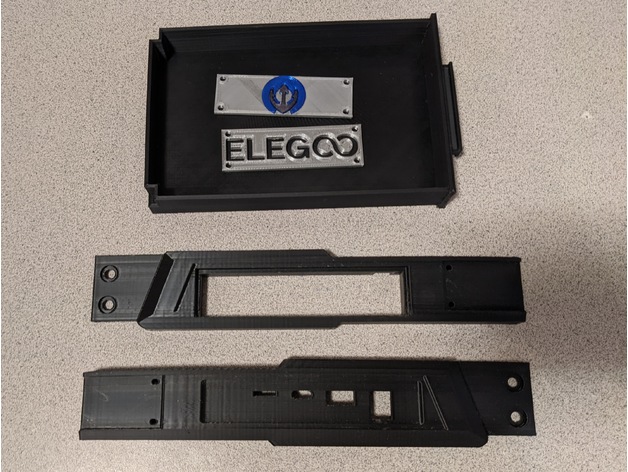
After moving over to OpenNept4une on my Neptune 4 Max, I decided I wanted to have easier access to the micro-SD slot on the front of my mainboard, but also didn't want to have to cut into or damage the original front panel just in case I ever decide to sell it or revert it back to stock. So... I modeled and designed a printable front panel for i...
Transform your Neptune 4 3D printer with OpenNept4une, a collection of scripts designed to replace the manufacturer's software, reverting to the original open-source projects for enhanced p...
thats what i got to do
To flash new firmware on the Elegoo Neptune 4, you must update both the motherboard and the touchscreen using a USB drive and a micro SD card. Download the latest files from the Elegoo website, copy the "ELEGOO_UPDATE_DIR" folder to a formatted USB drive for the board, and use a separate micro SD card for the screen update.
Step 1: Motherboard Firmware Update
Download & Extract: Download the latest firmware for your specific printer model (Neptune 4, 4 Pro, 4 Plus, or 4 Max) from the Elegoo support website.
Prepare USB Drive: Format a USB drive (FAT32/4096 bytes recommended).
Copy Files: Copy the folder named ELEGOO_UPDATE_DIR directly to the root directory of the USB drive.
Install: Turn off the printer. Insert the USB drive. Turn on the printer.
Confirm Update: Navigate to Settings > About on the touch screen, click the "Update" icon (often a blue button), and confirm.
Reboot: The printer will install the firmware and restart.
Step 2: Touchscreen Firmware Update
Prepare SD Card: Locate the "screen firmware" folder in the download.
Copy Files: Copy the firmware files (typically .tft files) to the root directory of a Micro SD (TF) card.
Install: Turn off the printer. Remove the screws on the back of the touchscreen to access the micro SD slot.
Flash Screen: Insert the micro SD card into the screen, power on the printer, and wait for the update to complete (indicated by a progress bar or screen message).
This video demonstrates how to update the touchscreen firmware:
or that
@raven plaza
raven plaza
the main thing is ssh access
brisk olive
nvm thats the one
brisk olive
no its not
Technically, no—you can use the OpenNept4une script-based "de-Elegoo" method via SSH. However, it is strongly recommended for several critical reasons:
Why an eMMC Adapter is Recommended
Benefit Script Method (No Adapter) eMMC Flashing (With Adapter)
OS Support Keeps Elegoo's old, out-of-support Debian Buster. Installs a fresh, modern Debian Bullseye OS.
Reliability High chance of "soft-bricking" if the script fails or apt packages error out. Highly reliable; uses standard image burning tools like BalenaEtcher.
Recovery Impossible to fix without an adapter if the system becomes unbootable. Easy to re-flash or revert to stock Elegoo firmware at any time.
Storage Limited to the stock 8GB eMMC capacity. Allows upgrading to a larger 32GB eMMC module for more g-code and timelapse storage.
Summary
The Script Method: Is a "workaround" that strips Elegoo's software but leaves the underlying outdated operating system. If it fails, you must buy an eMMC USB Reader anyway to recover the printer.
The eMMC Method: Is the official, tested path for OpenNept4une. It ensures all Klipper features and future updates work correctly by providing a clean OS environment.
raven plaza
we dont need to run the linux on the emmc because we run it on microsd
emmc can keep its outdated shit
brisk olive
so what do i do do i start unscrewing my printer
raven plaza
i would install armbian on a microsd and try to boot that
or any linux that can connect itself to wifi
then we ssh into that, install all our kiauh klipper shit
brisk olive
No, you cannot simply boot Armbian from an external SD card or USB drive on a Neptune 4. The printer's hardware is hardcoded to prioritize the eMMC module as the primary boot device.
brisk olive
 raven plaza

MCU and host are different, you see?
so mcu can keep its emmc shit and we install new armbian to host
brisk olive
we can try
raven plaza
ignore mcu ebb thats just my toolhead
brisk olive
how would i go about it
raven plaza
so its not perfect but i avoided buying the adapter ... mcu keeps its old shit and host runs my mainline klipper
its not perfect because the version mismatch is theoretically said to cause some problems
brisk olive
oh well i have nothing to lose lets do itt
i want a printer that acc prints good lol
You cannot "just boot" Armbian from an external drive because the Rockchip processor on the Neptune 4 is hardcoded to prioritize the internal eMMC module. Since there is no BIOS or physical switch to change this, the only way to boot a new OS without an adapter is to modify the boot instructions already on the eMMC via SSH.
How to "Boot" Armbian (The Script Method)
This method technically keeps the old Elegoo OS but swaps out the Klipper stack for a clean community version. It is the only way to avoid the eMMC "shit" without an adapter.
Gain SSH Access:
Host: Use the printer's IP address.
Login: User mks, Password makerbase.
Run the OpenNept4une Script:
This script automates the process of "de-Elegooing" the system. Run:
bash
git clone https://github.com
cd OpenNept4une
./install.sh
Use code with caution.
Flash the MCU (Essential):
After the script finishes, it will generate a .bin file. You must put this on a microSD card and insert it into the slot on the front of the printer to update the motor controller.

Join the world's most widely adopted, AI-powered developer platform where millions of developers, businesses, and the largest open source community build software that advances humanity.
raven plaza
can that printer run on microsd card without emmc?
maybe emmc is removable and so it doesnt matter priority
brisk olive
Yes, the eMMC module is removable from the Elegoo Neptune 4 series printers. It is not soldered directly to the motherboard, but rather connects via a socket.
raven plaza
the isntructions you posted above look promising
brisk olive
we could try it but if it fails i risk softbricking it lol
i dont mind taking the risk
raven plaza
either we trust the script or try to wing it updating old debian
a new mcu board like btt pico is cheap
brisk olive
Option 1: Trust the OpenNept4une Script (Recommended)
brisk olive
ok so even gemini says the script is even less risky than focring updates
brisk olive
what do u think we should do ?
brisk olive
aight lets do it
raven plaza
that way if it doesnt work we cant blame ourselves
we did the best we could with what we had
brisk olive
exactly if it dont i will just buy upgrades and make it better later on anyway
raven plaza
mcus are super cheap
brisk olive
yeah im gonna do the script just for now lol
raven plaza
you get more sensor ports, a lot of extra features
make sure to follow exactly as they say
brisk olive
i will wish me luck lol
raven plaza
also write down on a piece of paper
put checkmarks for each step
because when you debug it if it doesnt work, you might get confused about what was done or not done, like if you start to doubt youtself thinking you might have skipped a step by accdient
yolo
it will probably work
if it was so risky the author would not have put the script public
i dont get how these piece of shit linuxes are un-updatable
i've never had problems updating gentoo
or slackware before that or linux from scratch from before that
brisk olive
 brisk olive
no
the flash didnt work
just put the printer back together
theres one last thing i can do
brisk olive
@raven plaza
 raven plaza
looks like your flashing
brisk olive
oops i bricked it lol @raven plaza
dont boot no more
welp guess whos buying a EMC adapter
ME
raven plaza
power off and leave unplugged 60 seconds
brisk olive
and there is no green flashing light
raven plaza
can you ssh?
brisk olive
nope
brisk olive
 brisk olive
wdym
raven plaza
nmap 192.168.1.0/24 -sn from your other linux machine
maybe it booted but its having a hard time connecting for some reason
if its booted but not on the network maybe you can conn a usb keyboard to it
maybe it wants you to 'press enter to continue' or something
maybe it booted and its on the network but ssh config got reinitialized
also why is it you pinged 124 but the response came from 181
does it have an ethernet port?
hook it up directly through ethernet
orchid stratusBOT
This post has been inactive for over 1 hour and so has been closed. To reopen this post simply send another message.


