
#Newbie trying to lengthen someone else's model.
1 messages · Page 1 of 1 (latest)
 safe meteor
 violet ravineBOT
safe meteor
Hello,
I'm completely new to 3d printing and modelling, but trying to learn. My...
violet ravineBOT
safe meteor
Hello,
I'm completely new to 3d printing and modelling, but trying to learn. My...
AI Help
Hello,
It's great that you're diving into 3D printing and modeling! One way you could achieve the elongation of the soap dish in Fusion 360 is by using the "Modify" menu and selecting the "Move" or "Scale" tool. This can help you adjust the size of the entire object without skewing the pattern. Additionally, you might also consider using the "Pattern" tool to replicate and extend certain features of the design.
Feel free to explore these options and let me know if you encounter any specific roadblocks along the way. Good luck with your project! If you need further assistance or have more questions, don't hesitate to ask.
WARNING: This response is AI generated and may contain errors.
 jade delta
safe meteor
Hello,
I'm completely new to 3d printing and modelling, but trying to learn. My...
jade delta
safe meteor
Hello,
I'm completely new to 3d printing and modelling, but trying to learn. My...
is it a STL or STEP? either way you can scale in slicer easiest
STLs suck to edit, and fusion is not the program for it in the first place if STL
and id hope you would split them if your gonna use 2 materials, dont print it like that
safe meteor
My wife found it on Bambu's app. I believe I could only export it as STL or 3mf
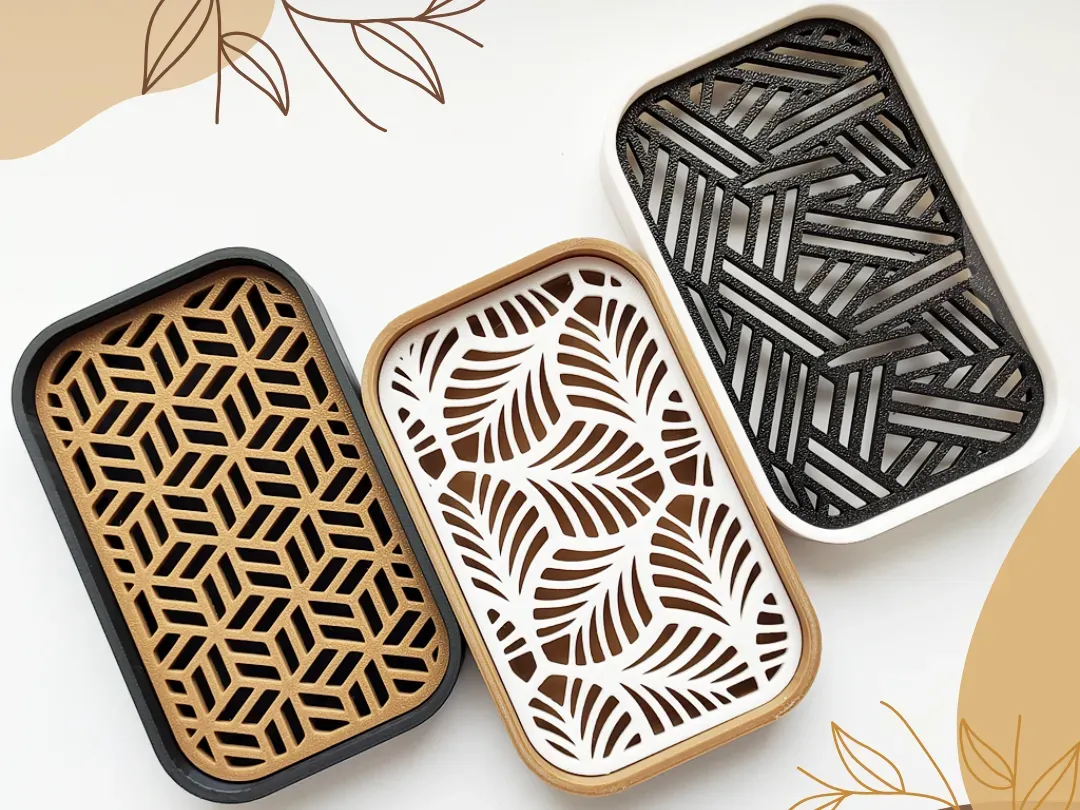
Download this free 3D print file designed by M1chal. Boost MeIf you like my work and want to support me, a Boost is greatly appreciated!Oval Soap Dish with Removable Inserts - Perfect for Bar Soap Lovers! Enhance your bathroom with this must-have soap dish if you prefer bar soap.This freestanding soap dish comes with a practical drainer that ...
jade delta
STLs are reduced into a bunch of triangles, called a mesh, blender is better or mesh editing, slicer scaling seems the way though
safe meteor
Sorry for my newbness, everything is... A lot. Oh okay, and slicer scaling won't stretch the pattern?
jade delta
it would stretch, but its much easier than learning blender to continue the pattern, or could expand in both x and y
safe meteor
Hmm, okay I'll fiddle around with that then. Thank you very much for your guidance