#3d modeling for 3d printing help
1 messages · Page 1 of 1 (latest)
 eager frigate
 umbral abyssBOT
eager frigate
Unsure of how or where to start
umbral abyssBOT
eager frigate
Unsure of how or where to start
AI Help
For beginners, I recommend starting by researching different types of 3D printers and deciding which one best fits your needs and budget. You can also look for online tutorials and communities to help you get started with 3D printing. Additionally, many libraries and maker spaces offer workshops and classes on 3D printing that can help you get started.
WARNING: This response is AI generated and may contain errors.
eager frigate
If you dont have a printer, generally y9u can just model your things to the exact size (and ask whoever is printing it to properly tune thier printer
- You can download a orcaslicer for free off the github to test your design will with a standard setup (pick a common printer) you don't actually need the printer to do this.
- for blender, get the addon "3d print toolbox"
- you can use a ruler, but a caliper makes it much easier to do.
- i'd start by 3d scanning the controller to get the dimensions (if you can't get a reference model) + use it for reference int the 3d program
- for design, look at how existing design work + maybe adjust the angles to fit your specific controller.
- design tips.
Blender has a function that allow you to map planes to a curved surface through a modifier.
(Skinning? Sorry can never remember the name of it!!)
It's going to be tricky enough of a design, so i'd stick to what you know.
Pick a simpler project (eg storage box) to learn new software.
Every new project you'll find some new functions in the program you already know 😉
 lofty oar
The covers are the same idea as what you're doing....just a little fancier + maybe easier.
Cos then it's a slide on\off mechanism, rather than fiddling with click on\off + maybe fall off during use etc.
eager frigate
eager frigate
Also about this, aren't 3d prints pretty light?
eager frigate
lofty oar
The covers are the same idea as what you're doing....just a little fancier + may...
Honestly if I had easy access to a 3d printer I'd def do it this way, but it sadly isn't too viable of an option right now D:
lofty oar
eager frigate
Also about this, aren't 3d prints pretty light?
Depends on your settings.
It's less about the weight and more about the length of it, that could become heavy as a "lever effect" if your sitting on the couch and it's not flat on at table or something like that.
Maybe not an issue if you're holding it though!! 
eager frigate
The idea is for it to be to me left stationary
Acting like an Airbus joystick of sorts

:D
Atp I wonder if you're actually typing or if you fell asleep on the keyboard lmao
lofty oar
eager frigate
Honestly if I had easy access to a 3d printer I'd def do it this way, but it sad...
Ok, but you're designing it atm.
Heres some stuff about 3d printing that might help more too:
- supports are messy \ rounded parts
Suggested fix (for this stick) -> split in half vertically when done modelling + add square nut and bolt holes (or heatset inserts, but thats extra) - since you dont have a printer, you aren't bound by as many constraints. You can use ANY material or process including resin. This gives you a lot of freedom. More than those with a printer.
- deaign it first, get help assesing for issues.
I repair controllers a lot + design + print my own stuff. If you can spend a little bit on that screw driver, and resin print a joystick cap with a cross shape, it's going work really really well compared to just clipping it on over a rubber stick. 😅
You can fdm or filament pront the stick in petg or abs via the print service.
Reducing overhnags \ stuff flonting in the air will make it cheaper and nicer end stick \o/
(Sun is still up here, but i do try and take my time to think things through) Thankyou for being patient. Planes are cool.
lofty oar
Also 🔖
Use that emoji on the post to keep a link for later. Benchy bot should dm you.
lofty oar
(sorry react) 😅
 lofty oar
eager frigate
So if I make a model would you be able to test/critique it?
lofty oar
eager frigate
So if I make a model would you be able to test/critique it?
Yeah sure 👌
It's small enough i don't mind.
eager frigate
Btw this is the type of clamp I wanted to go for
lofty oar
It kight work.
I just wonder that when you got to "PULL UP, PULL UP!!" It might flip off. But i guess we can test that.
I got xbox, ps4 + nintendo controllers to test with so hopefully your cap is the same size. 😅
eager frigate
lofty oar
It kight work.
I just wonder that when you got to "PULL UP, PULL UP!!" It might ...
For now we can just use Xbox measurements to come up with a design, then fit it to mine?
lofty oar
On the print service side, usually a profession print service charges:
- one time setup fee (e.g. $20aud)
- type of material cost + amount + time.
- postage.
(Fdm)
I got a small 3d printer duct out of polycarbonate for a total of $60 aud. (Pc is special though)
eager frigate
Oh heres the design I wanted to retro fit my controller, if it ends up being a better idea I'd rather do this one
Ah crap I didn't copy it
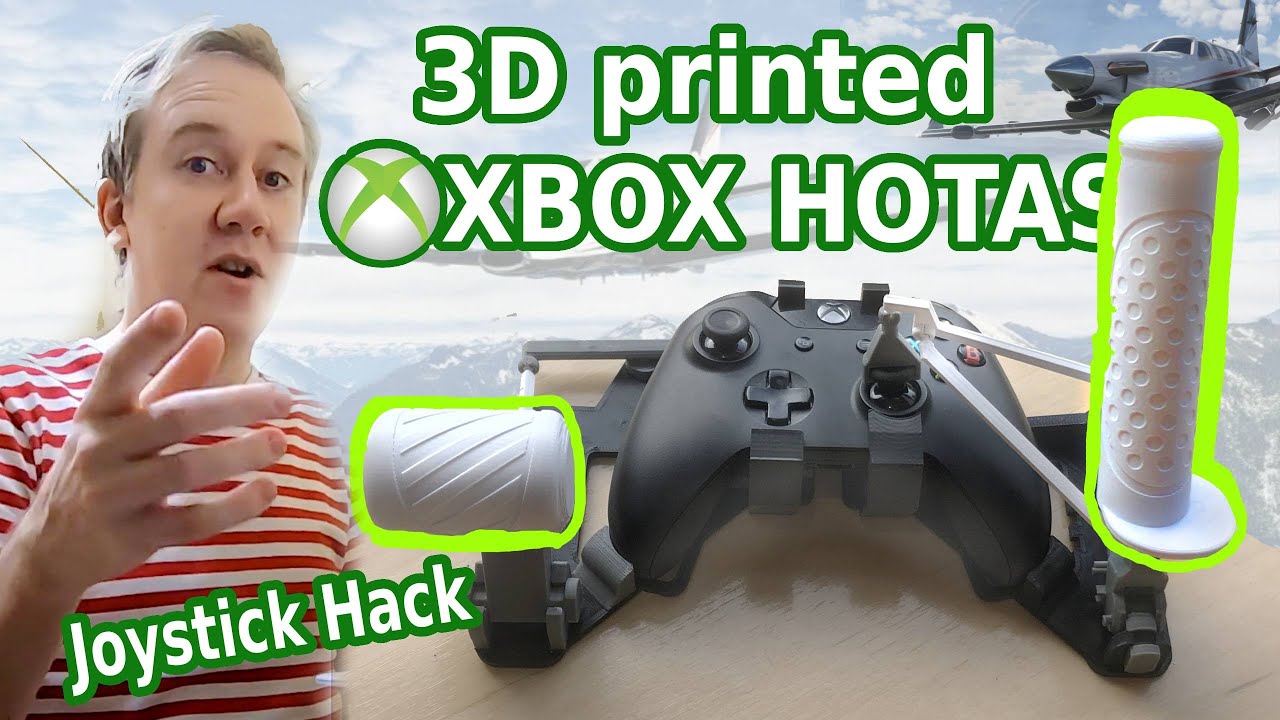
Let me show you how to 3D print this easy snap-together extension for your Xbox One controller and turn it into a precise HOTAS flight controller.
Find the files here: https://www.thingiverse.com/thing:4605273 or here https://www.myminifactory.com/object/3d-print-snap-on-xbox-flight-simulator-hotas-joystick-135272
Other controllers:
PS4: http...
This one might be the most cost effective since it seems to be pretty good and is a 1 print thing, so I won't have to pay for multiple prints, even tho I dont have. A clue how 3d prints are charged for lol
lofty oar
eager frigate
This one might be the most cost effective since it seems to be pretty good and i...
You can get a quote first + it wont cost you anything...
eager frigate
🤷♀️
Idk, since I don't live in the us I don't have access to stuff like pcbway etc
So I'm probably limited to basic filiments
eager frigate
eager frigate
https://youtu.be/4G6hYgOzZvI?si=gifFOYOoU4W1jQ9A
What do you think of this, btw
Anyway I'm gonna head to bed. It's 4:31 and I gotta sleep, tha ks for the help! I'll make sure to update you towmorrow, I may be able to 3d scan my controller tho after doing some. Research
lofty oar
this might be expensive...
when i slice it, it costs me 3 cents.
when i get a print farm to slice the same piece, it's $10
when i slice all the parts, it's $7.30 AUD.
the ball joints should be done at a higher resolution than everything else, so those parts may cost a little more.
Would not be surprised if this will cost half the price of a 3d printer...
__but it's super cool and you should still try it. __
you can test these out yourself too WITHOUT a printer.
just install orca or cura slicer. tomorrow go sleep.....
 eager frigate
Lemme do some math
lofty oar
https://solidium3d.com.au/product/custom-3d-print-quote/
this possibly au only, but i was using this. there should be a USA one somewhere too.
eager frigate
lofty oar
this might be expensive...
when i slice it, it costs me 3 cents.
when i get a *...
Tbh, the raw numbers without taking to account what the person may add to profit themselves doesn't seem too bad all things considered
I do plan on printing theese once I (hopefully) get my job soon
So 8-9k in my currency won't be too bad
eager frigate
lofty oar
<https://solidium3d.com.au/product/custom-3d-print-quote/>
this possibly au only...
What's this :o?
lofty oar
 eager frigate
20 bucks just for a ball joint..?
lofty oar
eager frigate
20 bucks just for a ball joint..?
no $30 AUD. 😅
but the $20 is the startup cost / one time cost.
i dont endorse this website or business i just used them once and they have quoting
so it will be
- $20 startup / one time (for the whole project)
- part prices (varying on the parts) In this case, just the ball joint ($10)
- postage ($20)
so $50..
if i add the other parts one by one.(which is going to take a while)
only the part price will go up.
eager frigate
I'll try asking some places I know for some quotes to see what's up
Anyways I'ma go to sleep, ngl I feel like this idea of mine isn't gonna be very possible
lofty oar
for this project though dimensional accuracy is VERY important. so keep that in mind when finding someone.
eager frigate
lofty oar
for this project though dimensional accuracy is VERY important. so keep that in ...
Wdym by that, like would I have to send them specific settings or smth?
lofty oar
there also #make-a-request
but note above
lofty oar
eager frigate
Wdym by that, like would I have to send them specific settings or smth?
no more like "do i trust them to have fully tuned their printer properly." 😅
eager frigate
Oh
We'll figure that out when the time comes
I guess for now I'd rather focus on creating a more cost effective version of the print I sent
Cause it's probs gonna be super expensive lol
If my idea is still possible I'd like for it to be print in place
Found theese pics on the Instagram of one of the people I'm considering


Be warned the images are stretched, used discord edit image feature thing and it fucked up the images or smth
lofty oar
wow those are some older printers. (still fine, but older) 😅
eager frigate
lol
Gonna hope they're still in business cause I was checking and they last posed in 2022... 😬
If not I'll have to look for places near the city center
umbral abyssBOT
This post has been closed due to inactivity.
This post has been inactive for over 1 hour and so has been closed. To reopen this post simply send another message.
eager frigate
Derp
umbral abyssBOT
This post has been closed due to inactivity.
This post has been inactive for over 1 hour and so has been closed. To reopen this post simply send another message.
eager frigate
@lofty oar lol this 3d scanner app botched it so hard lmao

 umbral abyssBOT
This post has been closed due to inactivity.
This post has been inactive for over 1 hour and so has been closed. To reopen this post simply send another message.
lofty oar
eager frigate
<@449142875494678528> lol this 3d scanner app botched it so hard lmao
Oof. 😅
If you're just attaching it to the joystick, you may only need like: diameter + thickness
eager frigate
lofty oar
Oof. 😅
If you're just attaching it to the joystick, you may only need like: dia...
Gonna have to look up how to calcuate diameters then
math class has not helped me in that regard 
lofty oar
eager frigate
Gonna have to look up how to calcuate diameters then
It's really really easy. 😅
- Take a ruler or caliper
- Measure across the middle of the joystick cap where you'd put your thumb usually.
- thats your diameter.
eager frigate
@lofty oar green line or red line? Sorry for ping

Like from the middle of it or the whole thing
If it's like the green line, pretty sure its1 cm and 6 mm
And from what I saw in videos I have to divide that by 2 to get the diameter which would be 0.8 cm..?
lofty oar
eager frigate
<@449142875494678528> green line or red line? Sorry for ping
Green.
Side to side.
Red would be the radius (or half of the diameter)
No maths after that.
The diameter is that number.
eager frigate
ohh
soo
now what :D
do I measure the thiccness now?
pretty sure its 0.2 cm
I downloade free cad btw :D
lofty oar
eager frigate
pretty sure its 0.2 cm
Ok, yep that sounds right.
When you get into freecad or blender, make a cylinder that size. (Diameter (x + y) 0.2mm z
Thats your reference.
Then pull in the piece (stl) from the thingyverse model that would hold the joystick, and see if it fits.
eager frigate
alr ill try my best :D
I cant figure out which is the file
lol
oaky I think I foudn the file
but I cant figure out how to orbit around the model

okay I figured itout
gonna have to figure out how to make a cylinder tho
okay nvm I can change the navigation mode wtf

 eager frigate
Im honestly stumped @lofty oar Please help D: I cant get the cylinder to go under the slot
even tho from what I see, even tho for some reason it only a ppears at a certain angle it appears to be too big (the socket)

 lofty oar
eager frigate
Im honestly stumped <@449142875494678528> Please help D: I cant get the cylinde...
lofty oar
eager frigate
Im honestly stumped <@449142875494678528> Please help D: I cant get the cylinde...
I dont know freecad,
But you can use blender with xray mode and snaps.
- Xray mode = alt + z
- Snaps = shift + tab. Change the mode to vertex up the top.
- use 1, 3 and 7 om the numberpad to get top, side and front veiws.
- g -> x to move only on x axis.
 eager frigate
I guess I can try with blender
ive just heard it isnt good for 3d printing cause of all the retopo you'd have to do and mesh modeling not being good for 3d printing
🤷♀️
ermm how do I change this to mm xd
 lofty oar
...it's really down to how you prepare the model. If you mostly edit stl's it's great.
If you do a lot of testing and iteration then fusion \ parametric is better for rapid small changes.....
But you can set up a similar work flow in blender with modifier and booleans.
CAD is a mindset of being non-destructive to the meshes.
(I've done like 3 years of blender and printing, no major issues yet)
Under scene options.
Blender has a search bar i think too.
lofty oar
Should still have all the functions i mentioned.
eager frigate
uhhh okay with blender idk how to do it
Im used to blender but not for this
D:

im sorry if im being a bit dense
im just so confused rn
lofty oar
use these:
- X-ray mode = alt + z,
- Snaps = shift + tab. Change the mode to vertex up the top. (you can toggle these.)
- use 1, 3 and 7 on the numberpad to get top, side and front views to help you line the two object up.
- g -> x to move only on x axis.
. on the number pad (when an object is selected) to focus on it and orbit.
 umbral abyssBOT
This post has been closed due to inactivity.
This post has been inactive for over 1 hour and so has been closed. To reopen this post simply send another message.
eager frigate
lofty oar
use these:
- X-ray mode = alt + z,
- Snaps = shift + tab. Change the mode to ver...
Hi sorry, I was abit passed out
eager frigate
lofty oar
use these:
- X-ray mode = alt + z,
- Snaps = shift + tab. Change the mode to ver...
I know how to navigate blender, I just dont know how to properly scale things in blender..
are you able to help me resize the knuckle and other parts yourself?
cause this is a bit too complex for me 😢
lofty oar
S-> scale then press shift z and will scale on x+y and not z.
(Same for any other axis)
Using top view and xray, you can see how close you are to the edge (and zoom in.)
It's a good skill to learn
umbral abyssBOT
This post has been closed due to inactivity.
This post has been inactive for over 1 hour and so has been closed. To reopen this post simply send another message.
eager frigate
lofty oar
S-> scale then press shift z and will scale on x+y and not z.
(Same for any othe...
But don't I have to size it accurately to the dimensions of the thumbstick?
They don't look correct when I do it in blender
lofty oar
eager frigate
But don't I have to size it accurately to the dimensions of the thumbstick?
The inside of the holder needs to be about the right size to fit over your disk \ replica thumbstick.
And then if the holder has a hole or ball joint, you'll need to re-add that at the original size.
umbral abyssBOT
This post has been closed due to inactivity.
This post has been inactive for over 1 hour and so has been closed. To reopen this post simply send another message.
eager frigate
lofty oar
The inside of the holder needs to be about the right size to fit over your disk ...
oh I see
I guess ill try again, but idk I dont see myself using blender for 3d printing 😅
I mainly use it for animation and modeling stuff for animation
lofty oar
Oh cool!!
For printing, it's basically the same thing, you just gotta work out how to use the dimensions.
I might have ahh blender animation question for you one day.
I'm stuck at learning the rigging part 😅
Wait unless you mean 2d?
eager frigate
lofty oar
Oh cool!!
For printing, it's basically the same thing, you just gotta work out h...
ah.
Just use maya.
😭 😭
I never was able to make a proper rig in maya
I mean blender
always fucks up in the parenting phase..
eager frigate
lofty oar
Oh cool!!
For printing, it's basically the same thing, you just gotta work out h...
And thats the issue, since blender isnt made for 3d pritning its weird
the same dimentions I put into freecad, dont produce the same shape when I put it in blender
and id rather.. not.. struggle that much
lofty oar
eager frigate
the same dimentions I put into freecad, dont produce the same shape when I put i...
What do you mean?
lofty oar
eager frigate
Just use maya.
I would if i had the money + it ran on linux 😅
I just gotta sit down long enough to get a handle on it. Gotta keep trying. 👌
Working with blender is more like working with after effects, where you have make all the effects from scratch. 😅
umbral abyssBOT
This post has been closed due to inactivity.
This post has been inactive for over 1 hour and so has been closed. To reopen this post simply send another message.
eager frigate
lofty oar
What do you mean?
I input the values I measured for the top of the thumbstick and got two different shapes
eager frigate
eager frigate
Free cad
umbral abyssBOT
This post has been closed due to inactivity.
This post has been inactive for over 1 hour and so has been closed. To reopen this post simply send another message.
lofty oar
eager frigate
8mm in x
And 8mm in y
Almost there
lofty oar
eager frigate
Freecad you'd need to put 4mm in cos it's asking for a radius (half of diameter)
So radius + radius = diameter
umbral abyssBOT
This post has been closed due to inactivity.
This post has been inactive for over 1 hour and so has been closed. To reopen this post simply send another message.
eager frigate
@lofty oar Im gonna keep trying in blender, should I make the geo go to the center?

aka with origin to geo > geo to cursor
lofty oar
eager frigate
<@449142875494678528> Im gonna keep trying in blender, should I make the geo go...
Yeah i usually use "origin to geometry" then put 0 in the xyz coordinates.
It doesn't matter much when you press export with 3dprinttoolbox add on. It just helps you with the modelling side of stuff.
eager frigate
lofty oar
Yeah i usually use "origin to geometry" then put 0 in the xyz coordinates.
It do...
alr, ill make sure to do it towmorrow... im getting sleepy and im not feeling it rn lol
lofty oar
Good work, btw. These programs can be thoroughly overwhelming some days
eager frigate
It's not that it's overwhelming
I just don't understand how tf you use this for 3d printing 
It's like saying you use a hammer for screwing a screw
lofty oar
Ok let me break it down a little.
- Model your model in blender like you normally would. Export it.
N\A - model in \ bake normal maps and bump maps to mesh.
- it's really just hard surface modelling (think character props and furniture)
- export
- Download a slicer (ultimaker cura) (seperate program)
- i can help you set this up
- you don't need a printer to use this.
- it is free
- i think it may help, because then you can quickly see how it might be printed + remove some of the worry.
3d printing something like woodworking or sewing from a pattern. (Or working off a 2d character design to model)
Kinda like:
- You are modelling the pattern atm. \o/
- Then the slicer makes it instructions for the printer. (GO HERE AND SQUIRT PLASTIC PLS).
- then we press print...and the printer squirts plastic usually in the shape we want.
Does that help?