
#First time PETG print failed. Please help
1 messages · Page 1 of 1 (latest)
 lunar wigeon
 silver echoBOT
lunar wigeon
Hello! So I'm trying PETG for the first time and decided a good test would be an...
silver echoBOT
lunar wigeon
Hello! So I'm trying PETG for the first time and decided a good test would be an...
AI Help
It sounds like you may be experiencing issues with temperature settings. PETG typically prints well at a nozzle temperature of around 240-250°C and a bed temperature of 70-80°C, so your temperatures seem appropriate.
The problem could be related to cooling or support settings. PETG doesn't handle overhangs and supports as well as some other materials, so you may need to adjust your support settings or consider using a cooling fan to improve the print quality.
Additionally, make sure your printer settings, such as printing speed and layer height, are optimized for PETG. It also helps to ensure your nozzle is clean and free from any clogs that may affect the extrusion.
If you continue to have issues, feel free to provide more details or reach out to the manufacturer of your printer for further assistance.
WARNING: This response is AI generated and may contain errors.
lunar wigeon
Also as a note I'm printing at 80% speed here
lunar wigeon
Update: tried lowering the temp to 230 and lowered the speed to 75% and it still failed
And the layers on the support structure fell apart when I tried to remove it which leads me to believe it's a moisture issue maybe
Any assistance would be helpful
 solar vale
To try:
- dry the filament
- bed temp at 80 for pei
- check minimum and maximum layer time are high enough. (In filament settings)
- check volmetric flow rate under filament settings is correct for your machine.
lunar wigeon
I've already tried to bed dry the filament but I don't think it worked. I'ma invest in a dryer eventually so I'll try again then.
I'll also try the other stuff after this.
Thank you for the info!
lunar wigeon
@solar vale
Quick random question. How do I know if the min and mad layer times are right? Is it different per printer? And if so how do I find out the right values?
solar vale
lunar wigeon
<@449142875494678528>
Quick random question. How do I know if the min and mad l...
Yes different per printer, but if it's to low, the filament will appear melty, tree supports can bend up from the plate + fail.
This is what you can do if you're cooling is already at 100% speed.
Print a small thing ( like only benchies chimneys) and adjust up in 5 secs til you get something not melty 👌
lunar wigeon
solar vale
Yes different per printer, but if it's to low, the filament will appear melty, t...
By cooling do you mean the fan? Cause on my printer I have the ability to turn on an auxiliary fan or something and I turned it to 50% but there was no change
lunar wigeon
solar vale
Print a small thing ( like only benchies chimneys) and adjust up in 5 secs til y...
I'm not entirely sure what you mean by this. Adjust what? And wdym in 5 secs?
Sorry I'm new to this
solar vale
lunar wigeon
By cooling do you mean the fan? Cause on my printer I have the ability to turn o...
Yes, part cooling fan. Auxiliary fan is for venting enclosed printers, like a qidi q1 pro.
Printing has evolved so fast, dw.
solar vale
lunar wigeon
I'm not entirely sure what you mean by this. Adjust what? And wdym in 5 secs?
So...
https://www.thingiverse.com/thing:909901
Print this, but not for retraction.
Adjust the minimum part cooling and layer speed til you get it clean like the picture in 5 second intervals.
These are slicer settings that in orca you can find under the filament settings cooling tab. 
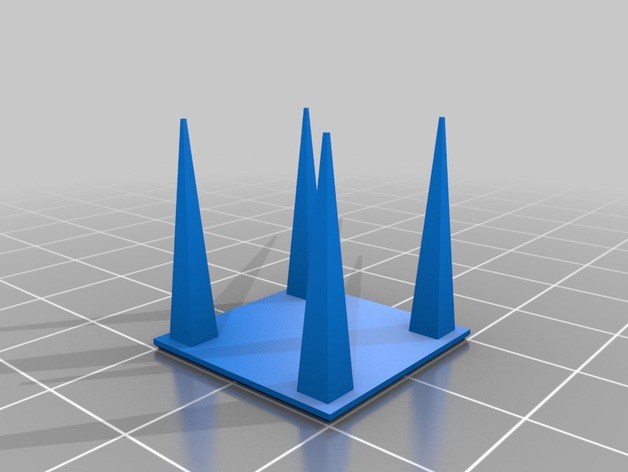
Thingiverse
(10/19/2016)I did retraction calibration for B'struder.Extruder drive: B’struderKysan Nema 17 5.18:1 geared stepper motor, 2.4 V, 1.0 Aconfig.g of RepRapFirmware-dc42 1.12aM92 411.230M201 X4000 Y4000 Z4000 E3000 ; Accelerations (mm/s^2)M203 X15000 Y15000 Z15000 E15000 ; Maximum speeds (mm/min)M906 X800 Y800 Z800 E800 ; Set motor currents (mA)M...
lunar wigeon
I don't understand how I change the settings mid print
I'm very confused I'm sorry
Part cooling part I understand
By layer speed do you just mean the general print speed?
solar vale
lunar wigeon
I don't understand how I change the settings mid print
Oh ok, my bad, new print with new settings each time
lunar wigeon
I see
So start print, wait 5 seconds, adjust, repeat?
Or do I print the whole thing and adjust after?
solar vale
Here maybe this might help a bit 😅
 lunar wigeon
Okay and do I increment up or down? And what settings exactly
Sorry for all the questions I just have no idea what I'm doing
solar vale
Generally up for layer time.
You can mouse over for tooltips.
- The min layer time is "time below this number without max fan"
- The max layer time is "time below this number with max fan, before slowing the print"
It gets really technical sometimes and there can be a fair bit to learn. By asking, your helping direct my attention so i can help you better.
Feel free to ask anything easy or not, and i'll try my best to answer.
lunar wigeon
Okay and you said to increment by 5 each time? And this is both of them together right?
solar vale
It's kinda a guess 😔
I dont yhink i'm doing the best job of explaining it.... 😅
Try here:
https://ellis3dp.com/Print-Tuning-Guide/articles/cooling_and_layer_times.html
lunar wigeon
solar vale
It's kinda a guess 😔
I dont yhink i'm doing the best job of explaining it.... ...
No you're fine I definitely have a better idea of what to do than I did before
I'll do my research
Thank you!
I may ping you if I need more help if you don't mind me doing so
solar vale
Absoultwly! But sometimes i may take a while to respond 👌
(note: only for continuing chats usaully though)
silver echoBOT
This post has been closed due to inactivity.
This post has been inactive for over 1 hour and so has been closed. To reopen this post simply send another message.
 silver echoBOT
This post has been closed due to inactivity.
This post has been inactive for over 1 hour and so has been closed. To reopen this post simply send another message.