#Adhesion problems
1 messages · Page 1 of 1 (latest)
 humble kindle
 blissful orchidBOT
humble kindle
Hi, I'm having problems with adhesion with my 3d printer. After printing a few l...
blissful orchidBOT
humble kindle
Hi, I'm having problems with adhesion with my 3d printer. After printing a few l...
AI Help
It sounds like you are experiencing adhesion issues with your 3D printer. Here are a few troubleshooting tips:
- Ensure that your print bed is leveled properly. Use a piece of paper to check the distance between the nozzle and the bed at different points and adjust as needed.
- Clean the print bed with isopropyl alcohol to remove any grease or particles that may be affecting adhesion.
- Try using a different bed adhesion method, such as using a brim or a raft, or applying a thin layer of glue stick or a specialized bed adhesion solution.
- Make sure the first layer of your print is properly squished onto the bed. Adjust the print bed height or the first layer's printing speed and temperature accordingly.
If you have further questions or continue to experience issues, please feel free to ask for more specific help.
WARNING: This response is AI generated and may contain errors.
humble kindle
I've already tried adding more adhesive but that didn't work also I tried heating the baseboard up
thanks
 limber moth
humble kindle
Hi, I'm having problems with adhesion with my 3d printer. After printing a few l...
limber moth
humble kindle
Hi, I'm having problems with adhesion with my 3d printer. After printing a few l...
you messed with zoffset as well?
blissful orchidBOT

?zoffset2 requested by: jack3939#0
humble kindle
whats z offset
limber moth
distance from probe activation to where the nozzle is
or in easier terms, how close the nozzle is to the bed
humble kindle
oh
blissful orchidBOT
Leveling Your Printer
Here is a handy infographic that will help with levelling your printer.
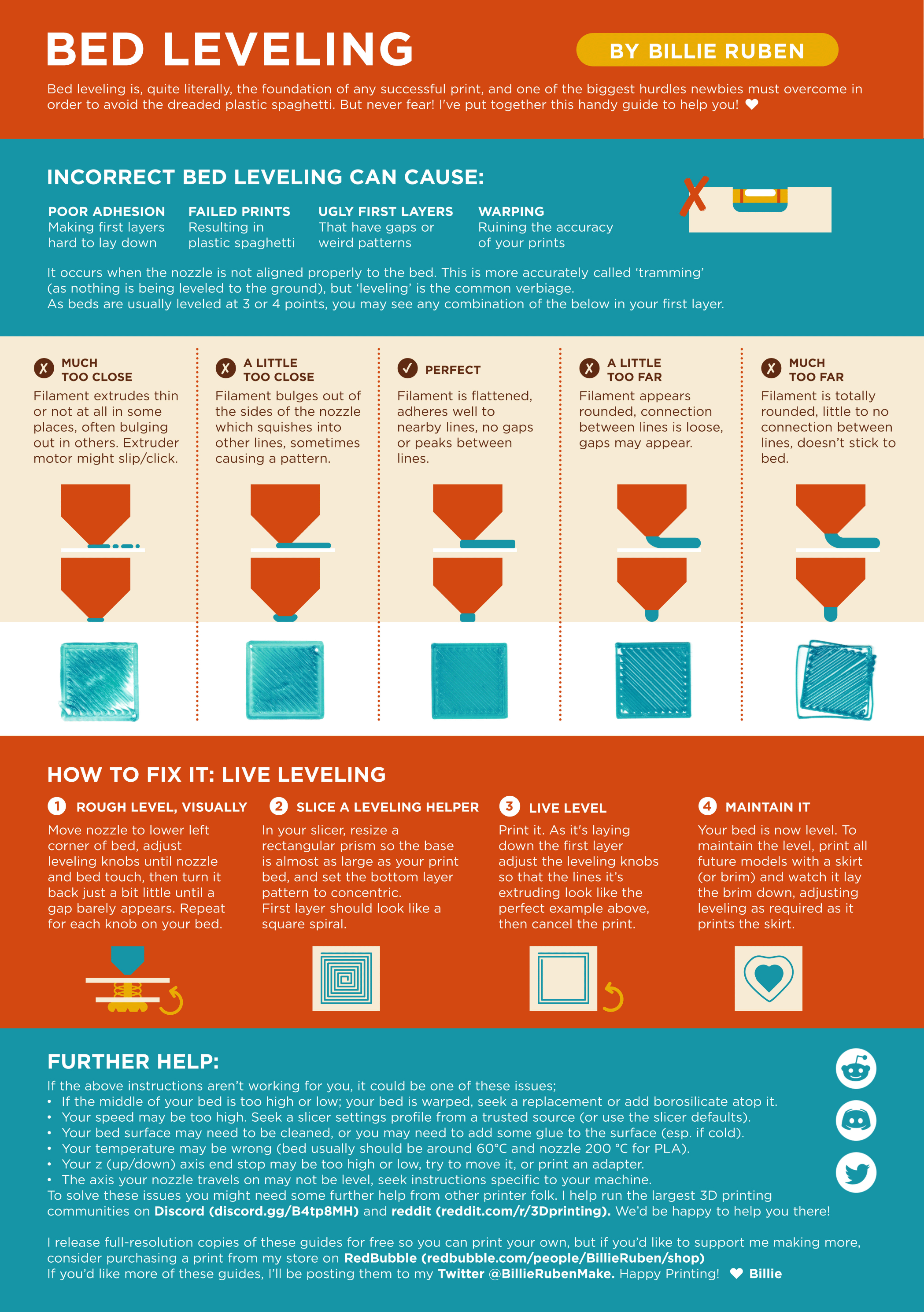
?leveling requested by: jack3939#0
limber moth
see the nozzle tip positions
humble kindle
thanks
blissful orchidBOT
This post has been closed due to inactivity.
This post has been inactive for over 1 hour and so has been closed. To reopen this post simply send another message.
humble kindle
?solved