1 messages · Page 1 of 1 (latest)
 nova ridge
In the first picture you see how it needed to be and in the second one is how it turned out.
 south lightBOT
nova ridge
In the first picture you see how it needed to be and in the second one is how it...
south lightBOT
nova ridge
In the first picture you see how it needed to be and in the second one is how it...
I'm happy to help with any questions or troubleshooting related to 3D printing. Could you provide more details about the issue you are experiencing with your 3D print?
nova ridge
I used some clue (prit) so my prints won’t come of the bed and i noticed that my print bed lowers tho the upper right and is higher in the down left
 formal yacht
what nozzle size are you using?
south lightBOT
This post has been inactive for over 1 hour and so has been closed. To reopen this post simply send another message.
nova ridge
Can somebody help me?
 tender sedge
nova ridge
In the first picture you see how it needed to be and in the second one is how it...
tender sedge
nova ridge
In the first picture you see how it needed to be and in the second one is how it...
looks like you had a layer shift. What printer?
nova ridge
Ender 3 V3 SE
tender sedge
nova ridge
Ender 3 V3 SE
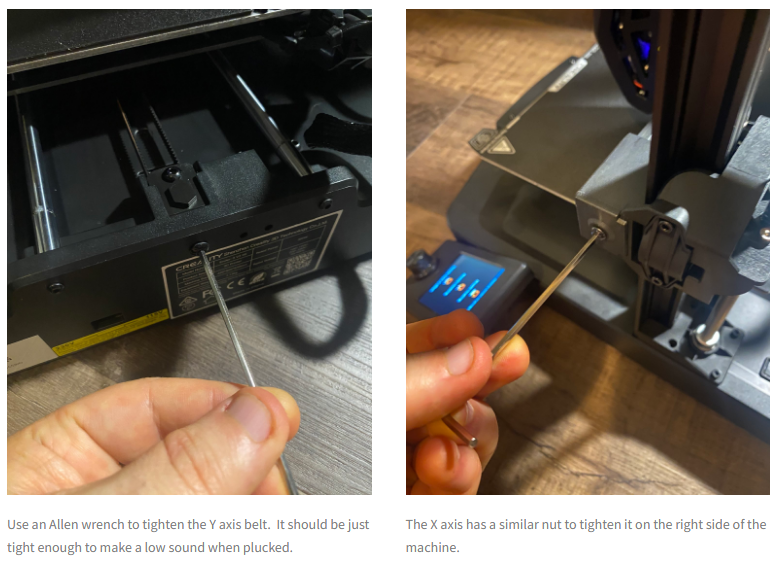
check that your belts are not too tight and not too loose. They should not be "wobbly" and not to "stiff"
?belttension
south lightBOT
There is very little good information on what correct belt tension is, and virtually nothing on empirically setting belt tension. Gates, t...
south lightBOT
Belt tensioning
To have proper belt operation it needs to be operating under tension according to specification.
Most printers use GT2 belts and this'll be reference point here. For Gates GT2 6mm wide the operating tension is 30±5N.
To achieve that, we use tensioners to pull the belt tight.
To measure belt tension we can use a phone with Spectroid app or other audio spectral analyzer. Then proceed with hte following steps:
To calculate required frequency use
?belt_freq [belt span in m] [belt width in mm if you're using different than 6mm].
This will show the range of frequencies that you should be in.
To check tension based on frequency, use
?belt_tension [frequency in Hz] [belt span in m] [width in mm if other than 6mm]
WARNING: Not all printers are meant to handle the tension like this and due to this belt tension can cause parts to bend or stepper shafts to break. Proceed with caution.
 tender sedge
huh good to know that we have two of those
nova ridge
Is this good
tender sedge
I would make it a tiny bit tighter but should in theroy not slip
nova ridge
But do you think this really makes a difference?
I can tighten it with this screw right?
 tender sedge
No thats the "shaft" the idler sits on
nova ridge
Oh
tender sedge
south lightBOT
Calibration
Calibration and tuning can help with all aspects of print quality.
Extruder calibration should be done only once, and then again if you change any hardware on your extruder setup (new tube, gear drive, different motor, etc).
Flow calculation should be done for every filament, even different colours from the same brand.
A number of calibration and tuning guides exist online:
tender sedge
Why not kill two birds with one stone and do some profile tuning?
tender sedge
but its only in the Y direction, isn't it? Bed Movement?
nova ridge
So what should i do
Bc it only on a certain level
It was the same with the other print
I think it’s software
I have a Sonic pad btw
Maybe it’s bc of that
south lightBOT
This post has been inactive for over 1 hour and so has been closed. To reopen this post simply send another message.
nova ridge
.
south lightBOT
This post has been inactive for over 1 hour and so has been closed. To reopen this post simply send another message.
south lightBOT
No command called "for" found.
nova ridge
?help for help what should I do
south lightBOT
No command called "for" found.
nova ridge
?help what should i do help
south lightBOT
No command called "what" found.
nova ridge
?help
south lightBOT
BenchyBot
BetaCommands:
add_printer Adds a printer to your name.
belt_freq Calculates target belt frequency (Hz) for correct tension base...
belt_tension Calculates the tension (N) in a GT belt based on the measured...
pi
random_thing Find a random thing from thingiverse.
time Used to get the current time in a timezone.
topic
GCode:
mg Used to search Marlin Gcode Commands.
HelpForum:
solved
No Category:
help Shows this message
Type ?help command for more info on a command.
You can also type ?help category for more info on a category.
@nova ridge your name has been changed successfully.
nova ridge
?belt_tension