#Clueless about a print im trying to print

1 messages · Page 1 of 1 (latest)

brazen dagger
#

I will start with this: Iam very new to the printing world and have absolute no experiance at all.

So ive got a Creality CR 20 PRO with a swiss extruder mod. I use the Slicer UltiMaker Cura 5.10.0, And PLA+ filament from Esun.

Here is the problem: When the printer is done with the raft it go's to the actual print but after the brittle thingy's (look picture) it just stop pushing out filament. The print im printing is small part of a body to become an action figure. the 3 prints you see in the picture is a foot and a (supossed to be) hand.

The maker of the model said i needed these setting:

Nozzle diameter: 0.2mm
Extrusion Multiplier: 0.90
Extrusion Width: Auto
Retraction Distance: 4.00mm
Retraction Speed: 1800mm/min
Coast at End: ON
Coasting Distance: 0.2mm

Primary Layer Height: 0.1mm
Top Solid Layers: 4
Bottom Solid Layers: 4
Outline/Perimeter Shells: 8

Use Raft: ON
Raft Top Layers: 3
Raft Bottom Layers: 3
Raft Top Infil: 30%

Infil: 100%

Generate Support Material: ON
Support Infil Percentage: 30%

Primary Extruder: 200‹
Heated Bed: 70‹

Cooling Fan Layer 1: 0
Cooling Fan Layer 2: 100

Default Print Speed: 3600mm/min

I think i used these setting in my slicer but im not sure if i did miss anything or not (i followed step by step the steps that was made with Chat-GPT because some things couldn't be found).

The things i did so far to try n fix it is read some guide's but i didn't understand any of it cuz its to complicated for me.

Could someone help me with this ?

mild prairieBOT
#
AI Help

It sounds like your printer is experiencing extrusion issues after the raft layer. Here are a few troubleshooting steps you can try:

  1. Check the filament: Make sure the filament is loaded correctly and is not tangled or stuck. Also, ensure that the filament can move freely through the extruder.

  2. Unclog the nozzle: If the extruder is not pushing out filament, the nozzle might be clogged. Heat up the nozzle to the printing temperature and manually push filament through to clear any blockages.

  3. Adjust the extrusion multiplier: Try increasing the extrusion multiplier slightly to ensure that enough filament is being extruded during the print.

  4. Check the extruder gear tension: Make sure that the extruder gear is gripping the filament properly and that there is enough tension to push it through consistently.

  5. Monitor the first few layers: Watch the first few layers of the actual print to see if the filament is extruding correctly. If not, there may be a leveling issue or the ...

rare walrus
mild prairieBOT
#
rare walrus
#

Isn't the microswiss extruder a direct drive? If so your retraction should be 1 mm max

brazen dagger
rare walrus
#

Its the pulling back of the filament after printing a line to stop the backpressure in the nozzle to ooze material

brazen dagger
#

Oh also the brittle things you can see in the picture are not burned but i would rather say slighty overheat like marshmellow roasted on a fire with a gold crust if you know what i mean. Even tho i had set it on 200- 210 and 220 degrees it kept the same color.

rare walrus
#

If you pull the molten material up too far you get the same effect as heatcreep

brazen dagger
#

So i should tighten it more ?

rare walrus
#

You should tune it. Not sure what you want to tighten

brazen dagger
#

Also someone said i had to lower the ^printing speed, is that neccesary ?

rare walrus
#

60 mm/s is slow enough

#

Or 3600 mm/min as you have stated it

brazen dagger
#

Could the problem also be the 2mm nozzle itself ? becaus with a 4mm nozzle i could print the foot perfectly.

rare walrus
#

yeah 0.2 clogs easier

#

As in the material flow is lower with 0.2 mm so it heatcreeps more

#

I feel you need some general info about how the stuff works, is that right?

brazen dagger
#

Yeah defenitly.

#

The slicer itself is a maze on its own for me

#

what is the diffrence between Retraction Speed and Default Print Speed ?

rare walrus
#

One is the speed of the pullback (>the retraction) and the other is your speed limit for printing

#

?beginner

mild prairieBOT
rare walrus
#

?anatomy

mild prairieBOT
rare walrus
#

?onestopshop

brazen dagger
#

Another question

#

when i was printing a small ankle joint for the action figure which was very small. I did it with a 4mm nozzle but each time it came lose of the bed even tho i sprayed the 3d spray thing.

rare walrus
#

You need to get the nozzle distance right

brazen dagger
#

Z axis ?

mild prairieBOT
#

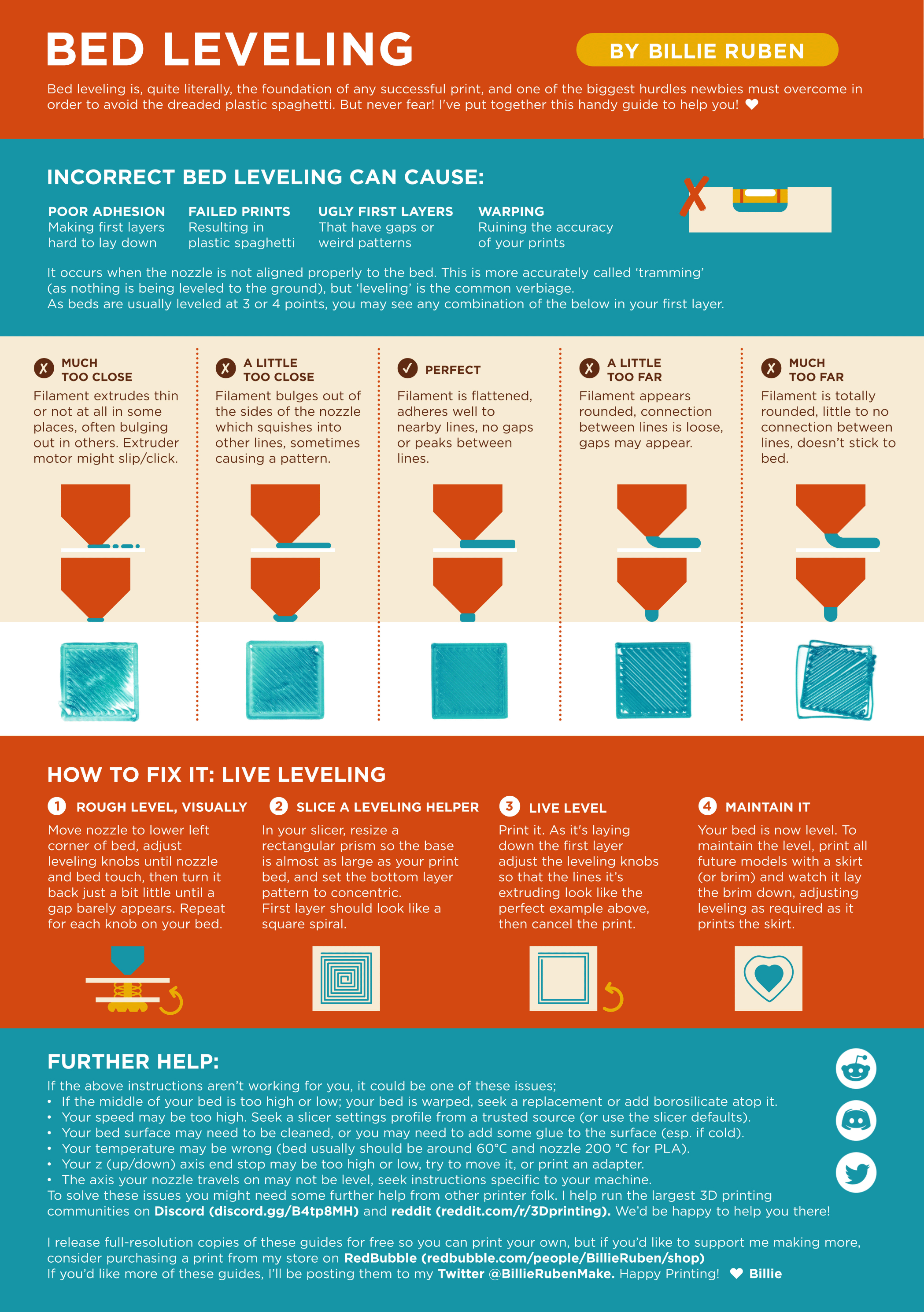
Leveling Your Printer
Here is a handy infographic that will help with levelling your printer.

#
brazen dagger
#

Ok i've got an update. I just printed that small ankle ball. The print came midway and then randomly stopped spitting out infill.

#

I pushed the infill myself trough the extruder n nozzle and by surprise it was not clogged

#

I think the toothwheels just stopped working ?