#Brand new Bambu Labs X1C just arrived. Absolutely no filament is extruding at all???

1 messages · Page 1 of 1 (latest)

urban magnet
#

Brand new X1C arrived, followed all the manual instructions, did the first time calibration.. Trying to load external filament and follow the on screen instructions but absolutely no filament comes out of the nozzle AT ALL. I've pushed the filament in as far as humanly possible but nothing.

All I hear is the extruder clicking when trying to extrude filament. It's almost like I have a complete clog but I don't know how that would be possible from the factory??

hollow vineBOT
#
AI Help

It sounds like your extruder may indeed be clogged. One common issue is that there may be a small piece of debris or an obstruction in the hotend preventing the filament from flowing through. Try a cold pull (also known as atomic pull) to clear any obstructions.

To do a cold pull:

  1. Heat your hotend to the normal printing temperature for the filament you are using.
  2. Once at the proper temperature, push a small piece of filament into the extruder manually until you feel resistance.
  3. Let the filament cool down to about 90-100°C.
  4. Slowly retract the filament. It should come out with any debris or clogs attached to it.

If the cold pull doesn't work, you may need to disassemble the hotend for a more thorough cleaning. Please consult your printer's manual or seek advice from the manufacturer for specific instructions on disassembly.

Remember to always be cautious when working with hot components and make sure the hotend has cooled down completely before attempting any maintenance.

urban magnet
#

It's a completely stock X1C, I already tried clearing the nozzle with the nozzle clearing tool but still no filament to be seen on the tip of the needle and still nothing extrudes.

sage swift
# urban magnet It's a completely stock X1C, I already tried clearing the nozzle with the nozzle...

If you put a torch down under the nozzle and shine it through, can you see light?

Also try wiggling the fialment and twisting it so the bend goes the opposite way.
if it has a filament tensioner on the head, pull it to the side put of the way and try again.
If it has a bowden tube, try remove the bowden tube, put the filament in and put the bowden tube all the way back. Push it in as far as it goes. (Per instruction manaul)

urban magnet
#

There was no clogs or anything in extruder (as you'd expect for a factory new printer) so idk wtf was causing so many issues

sage swift
hollow vineBOT
#

Is your problem solved? / No longer need this channel?
You can close a help channel with ?solved when it is no longer needed.

hollow vineBOT
#
This post has been closed due to inactivity.

This post has been inactive for over 1 hour and so has been closed. To reopen this post simply send another message.

urban magnet
#

I noticed when I took apart the extruder that pushing a bit of filament through the holes and actually having them line up was pretty difficult and I had to bend the filament to straight it out a bit etc

#

I wonder if the filament was just getting caught and not feeding all the way through

hollow vineBOT
#
This post has been closed due to inactivity.

This post has been inactive for over 1 hour and so has been closed. To reopen this post simply send another message.

urban magnet
#

Im still having the same issue 😦 I've managed to do a few prints now but whenever the filament changes either manually or via the AMS I always get an error on the printer "The AMS filament may be broken in the tool head"

hollow vineBOT
#
This post has been closed due to inactivity.

This post has been inactive for over 1 hour and so has been closed. To reopen this post simply send another message.

sage swift
#

Just common to printers in general 😅

#

Loosen the bit in the blue a bit

fresh quail
# sage swift

do you think having too much tension could be a reason that other filaments work but tpu isn't extruding on my p1s?

hollow vineBOT
#
sage swift
#

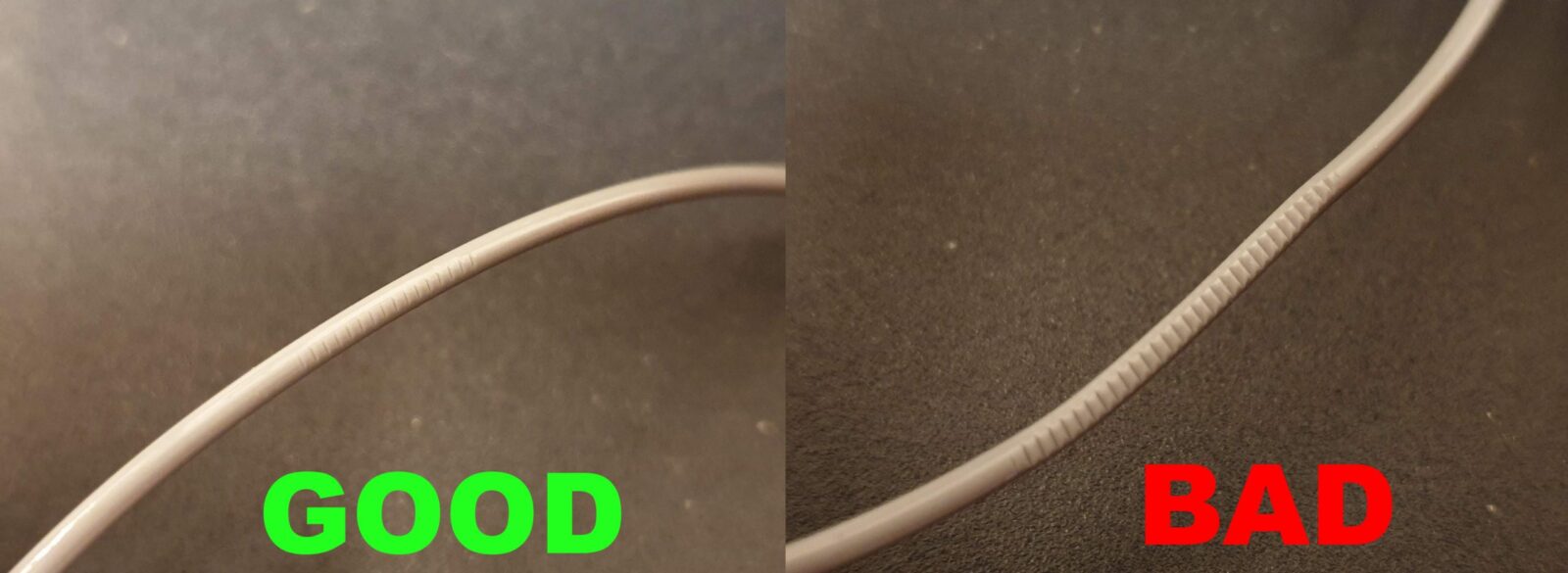
Recommend to compare filament to the photo.
If no teeth, too loose.
If lots of teeth and or dust like bad photo...then too tight.
Takes some practice.

hollow vineBOT
#
This post has been closed due to inactivity.

This post has been inactive for over 1 hour and so has been closed. To reopen this post simply send another message.

urban magnet
# sage swift

Is this not supposed to be tightened all the way? Mine currently is. I'm doing another print now and have managed to get the AMS to actually change filaments to do a multicolor print without the extruder getting blocked!

hollow vineBOT
#
This post has been closed due to inactivity.

This post has been inactive for over 1 hour and so has been closed. To reopen this post simply send another message.

sage swift
hollow vineBOT
#
This post has been closed due to inactivity.

This post has been inactive for over 1 hour and so has been closed. To reopen this post simply send another message.

urban magnet
#

The screw sticks out too much for it to go back into the housing

#

On the X1C wiki page theirs seems to be fully screwed in all the way

sage swift
urban magnet
#

It's the extruder filament tension

#

It literally can only be fully screwed in to fit into the print end housing so they must have taken that into account I guess

sage swift
#

Up to you.
Of your printer is already extruding now, dont change anyhtjing els...