#bunch of questions

1 messages · Page 1 of 1 (latest)

gilded raptor
#

hey all, got a couple of questions/troubleshooting/is-this-normals that i'd appreciate some help with

anycubic mega x
PLA filament

  1. filament comes out before printing actually starts,

  2. and/or, instead of going straight down, it "blobs up" at the nozzle for a sec before sticking to the print bed. then it starts to stick but the extra filament that didn't stick at first is there as well. this is at the very beginning so it's on the "border" it makes around the actual print.

  3. the printer changes the temp by itself. test #3 (right) started off at 210c and 65c and then i noticed somewhere in the second layer that it had switched to 200c. why does it do this, is it normal, if no is it fixable etc

  4. considering the prev point + images attached, is it possible that some of these issues are caused by the hotend/bed not being hot enough at the start of a print even tho the set temp is good? basically, say i want temp 205. am i supposed to set the temp to eg. 225, wait for it to get that hot, and then lower it back to 205?

  5. when stopping a print mid-print, the nozzle stays exactly where it was when i stop the print, causing a blob. can you make it move away by itself instead??

abt the images, the parts on the prints that are faulty, just ask me what happened if its helpful for being able to help n hopefully i'll remember what it was but i cant be bothered to write it all down rn

covert vesselBOT
#
AI Help
  1. Filament oozing before printing can occur due to various reasons such as incorrect nozzle distance from the bed, over-extrusion settings, or a partial clog in the hotend. Make sure your printer is properly calibrated and clean to avoid such issues.

  2. The issue of filament blobbing up at the nozzle before sticking to the bed could be due to incorrect initial layer calibration or bed leveling. Adjusting the nozzle height or re-leveling the print bed might resolve this issue.

  3. Automatic temperature changes during printing could be due to slicer settings, firmware glitches, or thermal inconsistencies. Check your slicer settings for temperature changes and ensure your firmware is up to date. If the issue persists, you may need to troubleshoot further or seek assistance.

  4. It's not advisable to set the temperature significantly higher than required and then reduce it once the printer reaches that temperature. This can lead to other issues like overheating or thermal runaway. Ens...

silk shuttle
# gilded raptor hey all, got a couple of questions/troubleshooting/is-this-normals that i'd appr...
  1. Its called oozing, hot molten filament following gravitys/backpressures call
  2. Your nozzle is probably a bit gar off the bed
  3. Check your slicer/filament profile, its probably set up for different temps for first and following layers.
  4. You need to tune your slicer profile for the machine/filament you are using
  5. Yes, you need to configure what it does during a pause (I would need to look up how exactly too though)
covert vesselBOT
#

Calibration
Calibration and tuning can help with all aspects of print quality.
Extruder calibration should be done only once, and then again if you change any hardware on your extruder setup (new tube, gear drive, different motor, etc).
Flow calculation should be done for every filament, even different colours from the same brand.

A number of calibration and tuning guides exist online:

silk shuttle
#

For nr 4👆

silk shuttle
#

Also to 2. : Thats what the purgeline is for

gilded raptor
silk shuttle
#

To 1: You can edit your slicer start gcode to put the heating of the nozzle at the very end of the pre-print sequence

gilded raptor
silk shuttle
#

Yeah sounds like nozzle distance

gilded raptor
silk shuttle
#

Yeah you can swap those commands around

gilded raptor
# silk shuttle Yeah sounds like nozzle distance

i trust you i just can't understand how it can be nozzle distance since it (at least sometimes like in the last test to the right) works just fine after actually getting stuck on the print bed

#

like wouldn't it keep not-sticking or unstick again or stuff if it was too far from the bed?

silk shuttle
#

once it "falls down" it can adhere to the bed. Can you show the underside of the print?

gilded raptor
#

the slight dot pattern is because the print bed has a mesh like that

#

and yea it's just bent because i took it off the plate before it had cooled down

silk shuttle
#

Could be a tiny bit closer I guess.

gilded raptor
#

😅

#

i'll adjust it🙂‍↕️

covert vesselBOT
#
This post has been closed due to inactivity.

This post has been inactive for over 1 hour and so has been closed. To reopen this post simply send another message.

gilded raptor
#

maybe i just need to clean it

silk shuttle
#

Well you look at it🤷

covert vesselBOT
#

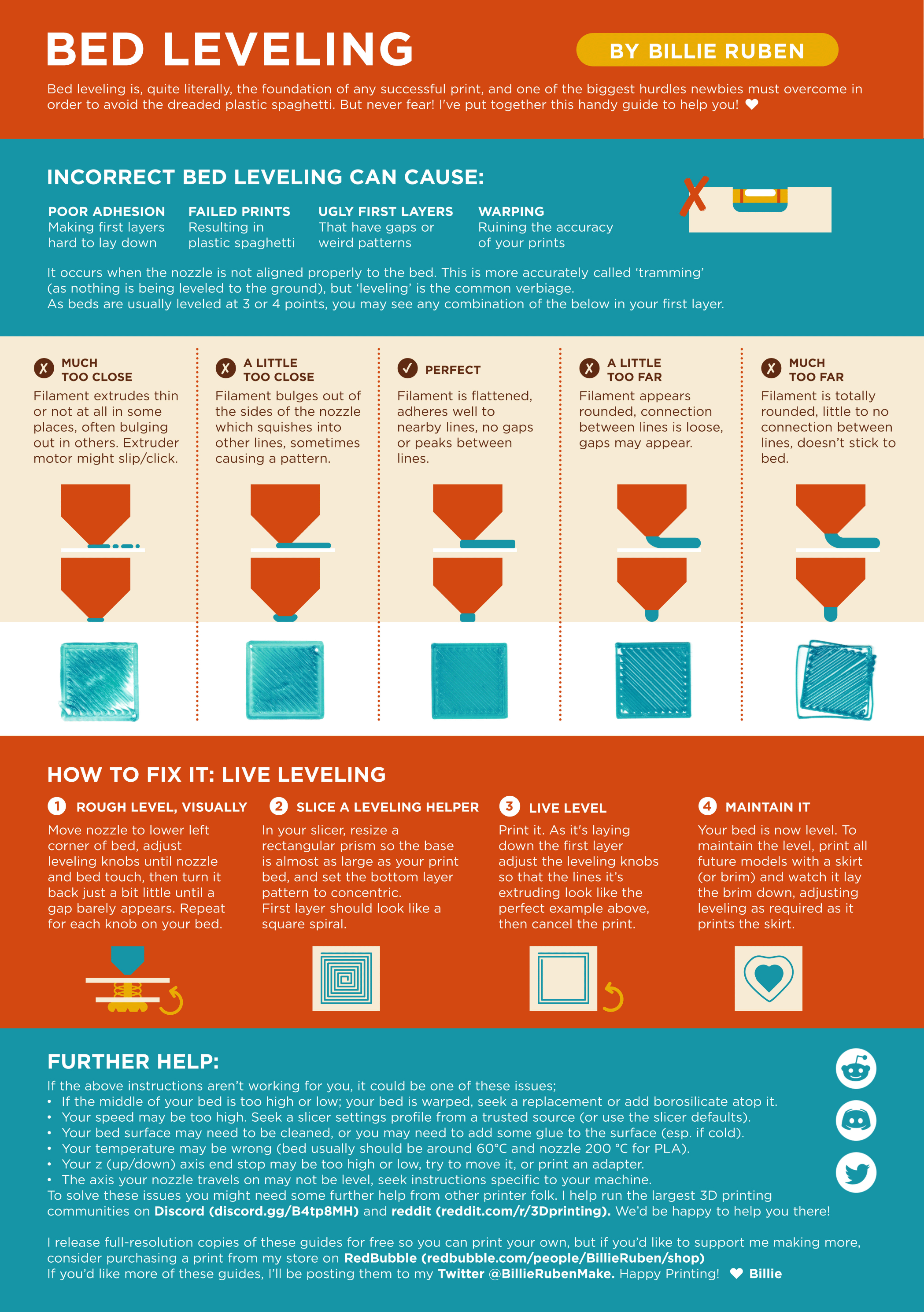
Leveling Your Printer
Here is a handy infographic that will help with levelling your printer.

#