#First layer issues
1 messages · Page 1 of 1 (latest)
 earnest flameBOT
AI Help
It sounds like you have done a lot of troubleshooting already. One additional thing you could try is checking the tension of the filament on the spool, ensuring it is not tangled or caught on anything. You could also try adjusting the temperature settings for the filament you are using. If the issue persists, it may be helpful to consult with the manufacturer or a professional technician for further assistance.
WARNING: This response is AI generated and may contain errors.
 vast junco
 signal copper
Raise it
Do you have any videos that explains z offsetting? I have heard the term but thats it
signal copper
vast junco
Do you have any videos that explains z offsetting? I have heard the term but tha...
THep rinter has auto bed levelling, right?
vast junco
Yeah
signal copper
If so there should be a setting somewhere in the menu called z offset
It's like, the abl thinks theres .3mm, but the z offset can either add or subtract a certain amount
vast junco
Ill check it out thank you
vast junco
I played around with it and wasnt able to find a setting to change the z offset
signal copper
Yea, play around with it (increase it) until you get a good first layer
Should be a way to save it
if not, just set it manually every time you turn on the printer
 hollow ingot
It is an Bambulab? If yes, according to The Internet Bambu Studio doesn't have z-offset setting, you have to change it in Machine Start G-Code
https://tickets.th3dstudio.com/products/article/changing-your-bambu-printers-z-offset
https://forum.bambulab.com/t/how-to-do-multi-z-offset-settings-for-filaments-bed-plates/50794

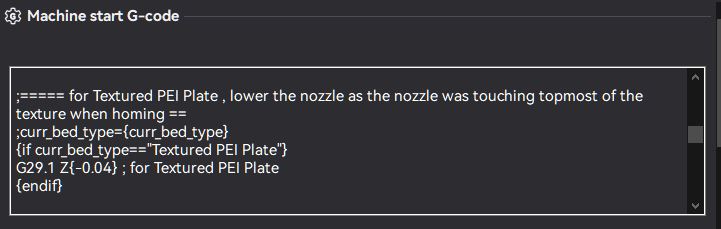
Bambu Lab Community Forum
Click the edit preset for the printer Click the Machine G-code tab Now scroll down and look for this G-code and replace it with the new Multi Z Offset Settings G-code Updated V2 1/26/2024 . ;==== Multi Z offset settings 3DTech V2 ======== {if (filament_type[initial_no_support_extruder]=="PETG-CF" && (curr_bed_type=="High Temp Plat...
vast junco
I changed it but it's gcode but i am still having this issue, the hotend keeps clicking from not staying seated, I tried a print and held it with my thumb and when hotend stays firmly in place it places the layers down like normal
earnest flameBOT
This post has been closed due to inactivity.
This post has been inactive for over 1 hour and so has been closed. To reopen this post simply send another message.