
#Hotbed temperature graph is a rollercoaster
1 messages · Page 1 of 1 (latest)
 twin arch
 fossil lanceBOT
twin arch
Randomly started happening today, no idea how to fix it, the printer is a Neptun...
AI Help
It would be helpful if you could provide more details about the issue you're experiencing with your Neptune 4 Plus 3D printer. Without specific information, it's challenging to provide targeted troubleshooting steps. However, you can try the following general troubleshooting tips:
- Check the filament: Ensure that the filament is loaded correctly and isn't tangled or stuck.
- Clean the nozzle: If you're experiencing print quality issues, it might be due to a clogged or dirty nozzle. Clean it using a nozzle cleaning tool.
- Check the bed leveling: Make sure your print bed is properly leveled to ensure adhesion.
- Update firmware: Check if there are any firmware updates available for your printer and install them if needed.
- Inspect the extruder: Check if the extruder assembly is functioning correctly and nothing is obstructing the filament path.
If the problem persists, consider reaching out to the manufacturer or an experienced technician for further assistance.
WARNING: This response is AI generated and may contain errors.
twin arch
Neptune 4 Plus
no mods
klipper
last print was elegoo pla at 200c and 60c hotbed 5 hours ago but i didn't check the graphs then
i haven't tried anything so far because i don't know what i could do
fossil lanceBOT
This post has been closed due to inactivity.
This post has been inactive for over 1 hour and so has been closed. To reopen this post simply send another message.

 oblique ruin
twin arch
Randomly started happening today, no idea how to fix it, the printer is a Neptun...
Is there any other devices plugged in in the same room that might cycle on during that time...?
(Aka is the graph exactly repeatable each time)
Visually inspect what you can of the Thermistor and heating coil area for anything that looks off.
twin arch
i don't know what i would look for, it looks fine otherwise
nothing else is turned on, but it's worked fine for a couple months so i don't know why it would now
oblique ruin
twin arch
i don't know what i would look for, it looks fine otherwise
I misread that as nozzle! 
Ok your heatbed..
Check the cables to heatbed...and all the connections.
If it's loose, get it fixed asap.
twin arch
i checked and none seem like they're loose
the other half of the cables are going under the foam which is glued
oblique ruin
twin arch
the other half of the cables are going under the foam which is glued
This is the connection directly to the bed..?
How hot does the bed usually get?
Can i get a photo of that connection to the bed plate please?
twin arch
the bed's maximum temp is 100 but the hottest ive had it be was 80, and usually 60
 oblique ruin
twin arch
the bed's maximum temp is 100 but the hottest ive had it be was 80, and usually ...
Yeah good 
The connector looks fine.....
But surely thats not the final connection that heats the bed...
Let me just research your printer a bit
Brb
It only fluctuates on heat up?
twin arch
i think, i haven't tried leaving it on because i got too worried
when heating up and very slightly when cooling down
oblique ruin
Thats fair....
If you do it while you are sitting there you can at least turn it off if you smell or hear weirdness.
Don't leave it unspuervised if u are testing it.
Do u put the foam on the bed?
Is there more wire under that foam...? What the insulation on them look like?
twin arch
the foam insulation thing was there from factory, it's around a centimetres thick and glued to the bed, the thin wires go under it, and they look similar to the ones i posted but they're colourful
just tested while supervising, didn't smell hear or see anything odd, and it still fluctuates while hot

the temperature i felt with my hand was roughly the same as normal, but idk why it's so inaccurate randomly
 oblique ruin
twin arch
the foam insulation thing was there from factory, it's around a centimetres thic...
Can you inspect the colourful ones ? (Later when it's fully unplugged from power and cooled down)
Take a few photos while you are there...
I'm mainly getting you do this cos i'm pretty sure thats commonly the unsafe part if it breaks.
oblique ruin
🤔 yeah dont do that yet then...
twin arch
it doesn't seem to be under warranty so ill have to fix it myself too
when it's under around 40c or 35c it seems to be normal
oblique ruin
It just happens as the amp draw increases.
(Higher temp = more power usage)
oblique ruin
Idk if it's normal for that to happen btw.
I was looking through this to get a better look at the bed...
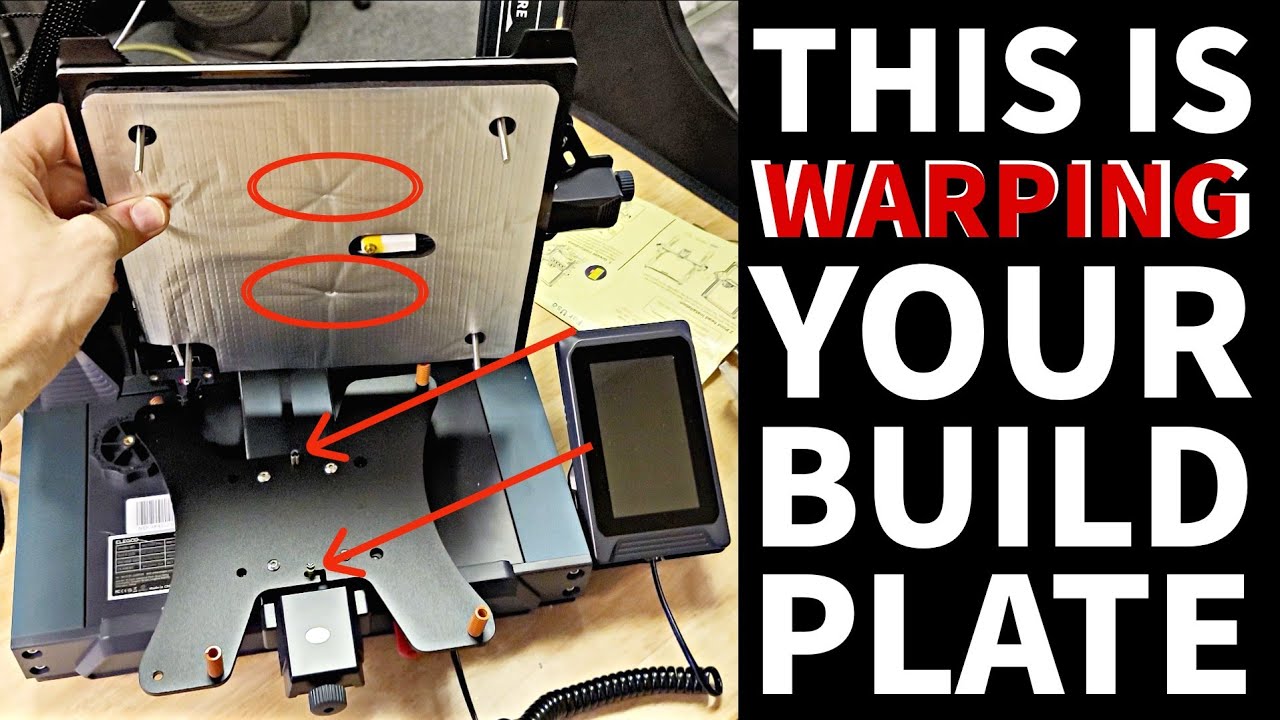
There's a design flaw hidden under the ELEGOO NEPTUNE 4 PRO build plate. The Y-axis belt ends stick up into the foam insulation and heater under the bed. This constant pressure can cause the bed to warp. Overtightening [accidentally] the bed using the bed leveling screws will apply more pressure and definitely cause the bed to warp. This video s...
 lavish hornet
Fluctuation could also be caused by PID tuning not being done for the specific use case
Such as tuning it with fans off
Then heating with fans on
Though that fluctuation does seem rather extremes
fossil lanceBOT
This post has been closed due to inactivity.
This post has been inactive for over 1 hour and so has been closed. To reopen this post simply send another message.
 open folio
could be the temp sensor loosing physical contact to the bed, the spikes ramping down slower than up which would make sense to me in that case. also for longer tests, which are dangerous (good call on approaching it with caution), you could put some wet tissue on the bed and abort when you sense boiling/steam
fossil lanceBOT
This post has been closed due to inactivity.
This post has been inactive for over 1 hour and so has been closed. To reopen this post simply send another message.
oblique ruin
@twin arch there has been some other great suggestions (see above)
oblique ruin
twin arch
so what should i do?
@open folio @lavish hornet do u guys want to run them through how to do pid tuning for bed and check the thermistor is loose?
(Note: pls remember to ping)
twin arch
oblique ruin
<@355439900134342677> <@258038088406794240> do u guys want to run them through h...
do i need to check if the thermistor is loose or can i try to do the pid tune right now?
i looked online how to do it and it's simple enough for me to understand, but i don't know if it's a hardware or a software issue
oblique ruin
twin arch
i looked online how to do it and it's simple enough for me to understand, but i ...
Start with checking the hardware.
Then tune the software imo...
Cos if you pid tune (software) now and the sensor hardware is loose...you could still get false readings in future as the bed moves.
twin arch
searching online for it is a bit of a pain because everything that shows up is about the hot end instead of the bed
oblique ruin
twin arch
searching online for it is a bit of a pain because everything that shows up is a...
Thats fair...
I had the same issue looking for your stuff earlier...
I wonder if there's a teardown vid anywhere...
I can't imagine the sensor being very big...and idk if it'd be embedded in the steel plate .. 🤔
fossil lanceBOT
This post has been closed due to inactivity.
This post has been inactive for over 1 hour and so has been closed. To reopen this post simply send another message.
twin arch
i did a pid tune and then a test print and it seems like it's mostly fine?

compared to the hot end
 oblique ruin
Nice!!
That looks tons better!
I wonder why it changed originally so suddenly? 🤔
twin arch
it still has these stutters while heating up and cooling down but they're not as severe anymore, and it can keep the same temperature consistently
might need a tech priest
oblique ruin
twin arch
it still has these stutters while heating up and cooling down but they're not as...
Small stutter are possibly fine...
Just keep an eye on it..
If you can check the physical thermisitor for the bed...
twin arch
i did a really stupid test to try and see where it is by shining my insanely high powered flashlight on the bed and i found that the temperature rises the fastest while i'm shining it in the exact middle of the bed, so it's probably there
i'll take the bed off when i'm motivated enough and see if i can find anything
oblique ruin
Stupid? No bro that high level clever!!
Great idea!!
It also shows thermistor still works.. 🙂
fossil lanceBOT
This post has been closed due to inactivity.
This post has been inactive for over 1 hour and so has been closed. To reopen this post simply send another message.
twin arch
i don't know what's wrong with it anymore

while heating up it still has the jitters but once it gets to 60c, it's +- 0.2 degrees
 next lake
twin arch
i don't know what's wrong with it anymore
Check connections. The fans may be vibrating a loose connection for the heating elements.
fossil lanceBOT
This post has been closed due to inactivity.
This post has been inactive for over 1 hour and so has been closed. To reopen this post simply send another message.
twin arch
?solved