1 messages · Page 1 of 1 (latest)
 tight coral
whenever I try to print small things like this, there is always these “micro-mess-ups” like shown in the picture. What could be causing this and how do I fix it? I’m printing the first layer with no cooling, 10 mm/s, and with a glued print bed
 lusty knollBOT
tight coral
whenever I try to print small things like this, there is always these “micro-mes...
The issue you're experiencing with small "micro-mess-ups" can be caused by various factors, including uneven bed leveling, improper nozzle height, inconsistent filament flow, or nozzle clogs. Here are some steps to help you troubleshoot and fix the issue:
Ensure your bed is leveled properly. Adjust the bed leveling screws to make sure the distance between the nozzle and bed is consistent across the entire build plate.
Check the nozzle height. Make sure the nozzle is at the correct distance from the bed. Adjust the Z-offset if needed.
Verify that the filament diameter is consistent and that it is feeding smoothly without any obstructions.
Clean the nozzle to remove any potential clogs or debris that may be affecting the extrusion.
Make sure your filament is of good quality and stored properly to avoid moisture absorption.
Consider increasing the first layer printing temperature slightly to improve adhesion.
By following these steps, you should be able to trou...
tight coral
Sidewinder X3 Pro
PETG at 60°C bed temp and 210°C nozzle temp
 lyric sky
PETG at 210 ?
im sure you should run it around 230-250
iirc bed temp is around 70-80
theres more issues than where your arrow is pointing the whole print is a flop
the starting circle looks like its sat on the board and not stuck to it ?
tight coral
lyric sky
PETG at 210 ?
any temp above 210 causes my nozzle to just extrude the filament when it’s not supposed to be
lyric sky
well does it not do a wipe?
tight coral
lyric sky
the starting circle looks like its sat on the board and not stuck to it ?
this is a visual illusion, it’s actually very stuck to the bed because I wanted to improve adhesion (Z offset is lower than usual)
lyric sky
maybe you should print a retraction tower if it is that bad and fix your retraction rate?
tight coral
lyric sky
well does it not do a wipe?
it does but doesn’t work very well, usually keeps filament on the nozzle if there’s alot it extruded
lyric sky
because petg wont work at 210 buddy iv ran it in pla settings before if it dosnt clog the end print will look bubbly
instead of the circle try make it use the wipe line at the start
tight coral
this is a successful print I had using the petg at 210
 lyric sky
ya got lucky its just small
i dont print anything that smal
small*
fix your extrusion issue and run it at 230-250 higher bed temp too
what slicer do you use?
lyric sky
does it have calabration > retraction ?
tight coral
 lyric sky
have you tried anti ooze?
tight coral
nope
lyric sky
if you build a retraction tower it will tell you what to set the retraction distance too on the result you want
usually in the top tool bar on the slicer it has "calibration"
cura is one i have never used tho
tight coral
lyric sky
if you build a retraction tower it will tell you what to set the retraction dist...
uhhh
 lyric sky
1 & 2 is the only one not really leaving any extrusion
Which one looks the better one to you? And switch your retraction rate to that. You did run the petg at 230-250 in the test?
lyric sky
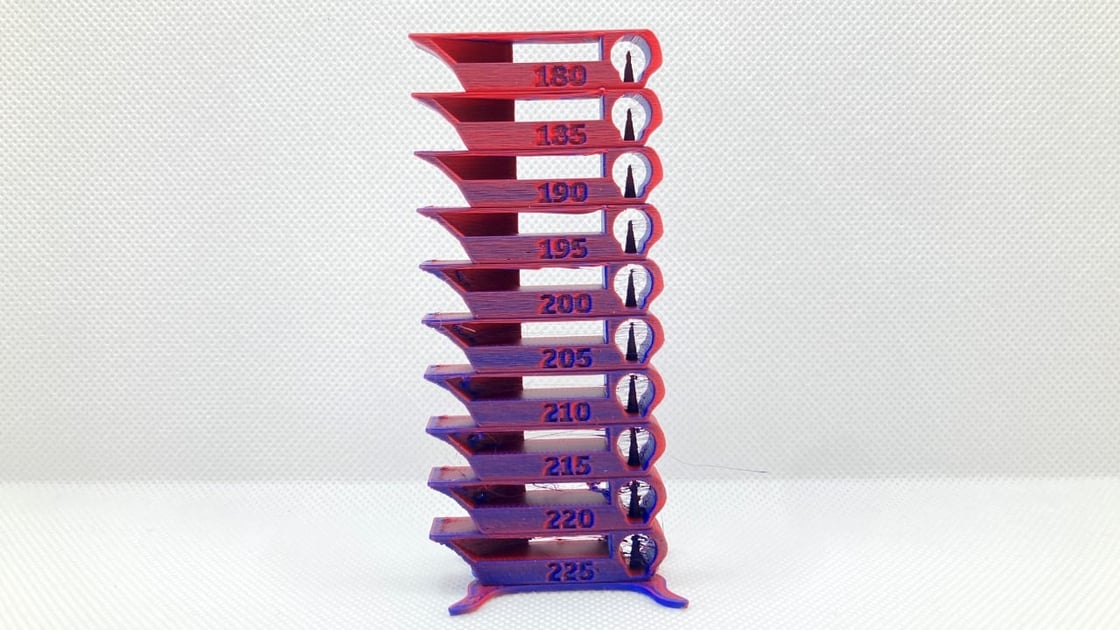
Yeah do the temp tower have you told your slicer your using petg?
Idk a slicer that would set temps to 210 for petg
The petg temp tower wud go like 220-260 i think
tight coral
my temp tower wasn’t actually changing the temps, but I printed a part at 245 temp and 2 retraction and I think it mostly fixed my issue
it felt stiffer than the same part I printed at 210