 somber pivot
got my bambu lab p1s, printed a benchy and it was great, printed a borderlands psycho mask (https://www.thingiverse.com/thing:3873963/files) and it's great apart from supported surfaces looking stringy and scuffed and where it transitions from a vertical surface to a horizontal surface the layer lines become more pronounced. I'm using all the default bambu lab profiles for the p1s and bambu labs pla. Some of the supports were easy to remove and some of the supports required pliers, it looked equally as stringy and scuffed beneath both supports.
to fix the support issue I'm
-printing at a cooler temp (preset is 190-240) at exactly 210
-increasing auxiliary fan from 80% to 90%
-and decreasing layer height from .2 to .16/using adaptive layer height
Other than that idk what could be causing this, speed, under/over extrusion, support gap/density? idk
To fix the vertical to horizontal transition I'm clueless idk what this is or is causing it, over extrusion? temps? Will decreasing the layer height help?
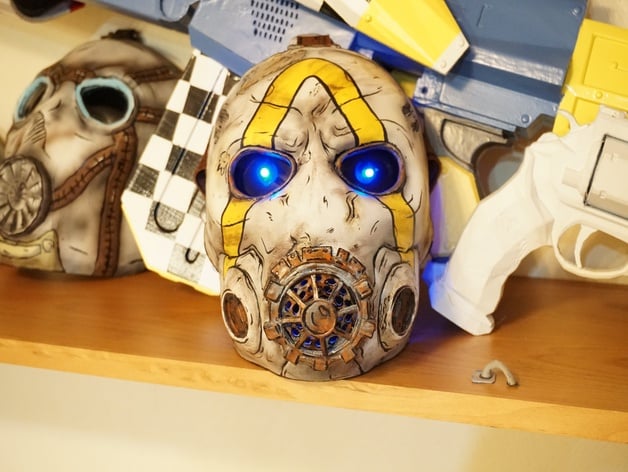
Visit my YouTube channel for details for step by step instructions on creating this mask.https://www.youtube.com/channel/UCcJPk9Skg5S7EB8s3h2tingSee the time lapse for the 3D modeling process of this mask.https://www.youtube.com/watch?v=69gFPBrrf8I&tSee the time lapse for the 3D printing mask.https://www.youtube.com/watch?v=ZUyglcILWCkSee Tutori...
 tall rivet


