
#Bed adhesion
1 messages · Page 1 of 1 (latest)
 solemn mesa
 celest lanternBOT
solemn mesa
Anycubic kobra 2 neo print just falls off the bed on the first print is it my z ...
AI Help
It's possible that your Z offset might need adjustment. Make sure your bed is properly leveled and ensure that the first layer is adhering well to the build plate. You may need to increase the adhesion or adjust the Z offset to ensure better adhesion.
WARNING: This response is AI generated and may contain errors.
solemn mesa
Printer is Anycubic kobra 2 neo slicer is Cura I’ve tried using glue sticks
How do I know what to put it as
 weary jetty
your nozzle is probably too high from the bed, slice up a cube make it 0.2mm thick (1 layer) print that while its printing adjust the z offset, its in a menu somewhere, lower it till the lines start to touch
celest lanternBOT
Leveling Your Printer
Here is a handy infographic that will help with levelling your printer.
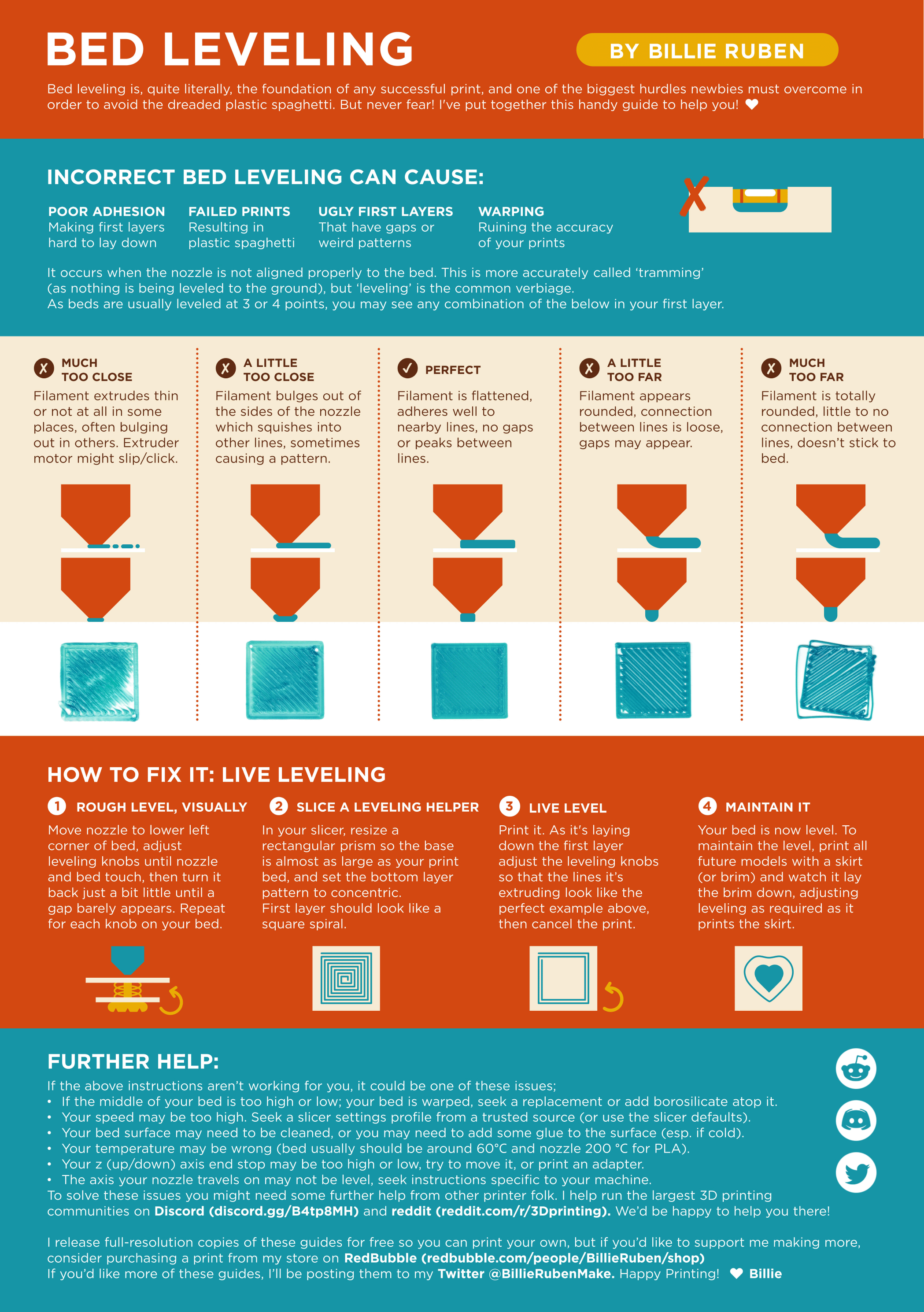
?leveling requested by: poiuytrewq4645#0
solemn mesa
weary jetty
your nozzle is probably too high from the bed, slice up a cube make it 0.2mm thi...
I’m sorry but this is my first printer can you explain what to do
weary jetty
ah
solemn mesa
All I know is download the file print the file
weary jetty
slice and print this, when its printing in the menu on your printer find z offset, might be under tune or adjust might be called babystep z
adjust that value down until the lines start to look like in the middle

once you do that and get the number you set go to cura do this and your prints should start to... print
 solemn mesa
It’s good but it’s starting to peel off the plate
weary jetty
keep going down?
solemn mesa
Ok
solemn mesa
 solemn mesa
I’ll try another
weary jetty
was that corner at the start or end of print?
solemn mesa
Start
solemn mesa
New got it on Christmas
weary jetty
fresh in bag?
weary jetty
ok....
where it started looking bad was that after adjusting offset or it just happened?
solemn mesa
Adjusting offset
weary jetty
which way
weary jetty
down made it worse?

 weary jetty
solemn mesa
I’m trying something now on -2.36 and it’s decent
nice
weary jetty
weary jetty
once you do that and get the number you set go to cura do this and your prints s...
oh set the offset in the slicer
so you dont have to do it every print
 rich musk
weary jetty
ok....
filament can absorb water while in the bag unfortunately
weary jetty
yea true but turns out z was set up not down
weary jetty
solemn mesa
Thanks for the help
feel free to ping me if you have any issues
solemn mesa
👍